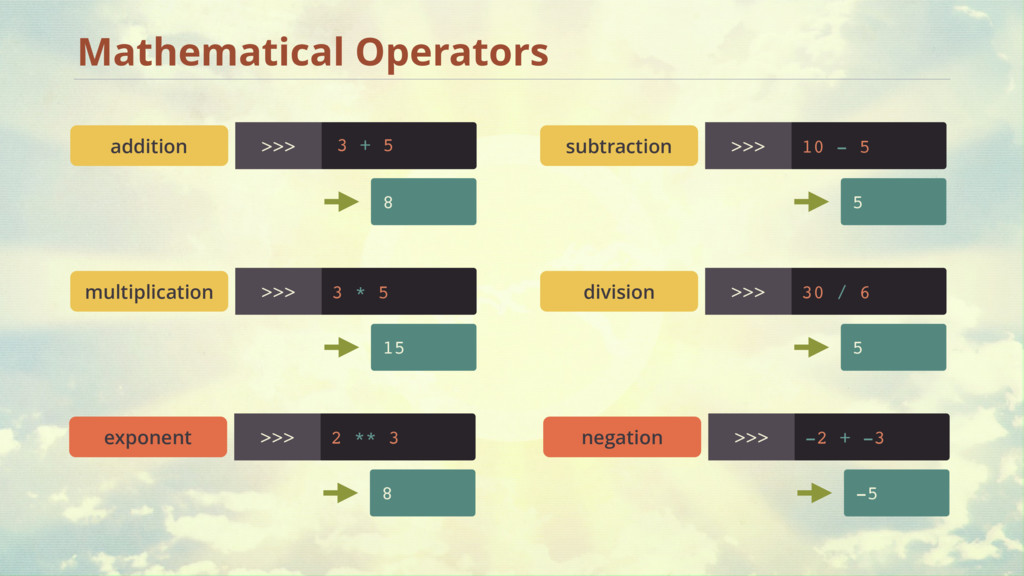
swallow can carry this coconut! Can a Swallow Carry a Coconut? So, 1 swallow can carry 20 grams What we know: A swallow weighs 60g and can carry 1/3 of its weight. …but a coconut weighs 1450 grams 20 Swallow’s weight in grams Divide by 3 60 / 3
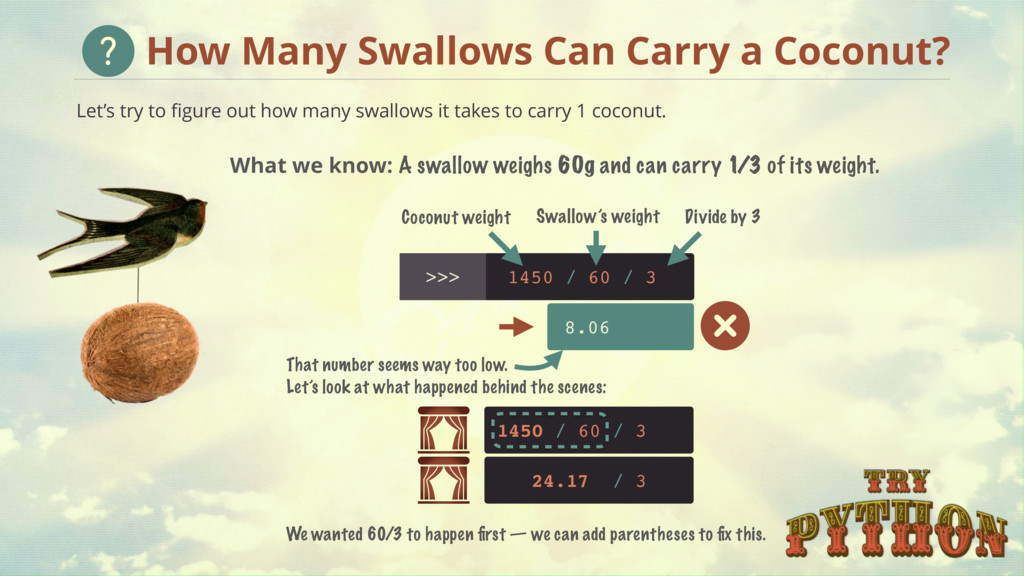
takes to carry 1 coconut. 1450 / Coconut weight Divide by 3 Swallow’s weight 24.17 / 3 That number seems way too low. Let’s look at what happened behind the scenes: 8.06 1450 / 60 / 3 We wanted 60/3 to happen first — we can add parentheses to fix this. How Many Swallows Can Carry a Coconut? 60 / 3 What we know: A swallow weighs 60g and can carry 1/3 of its weight.
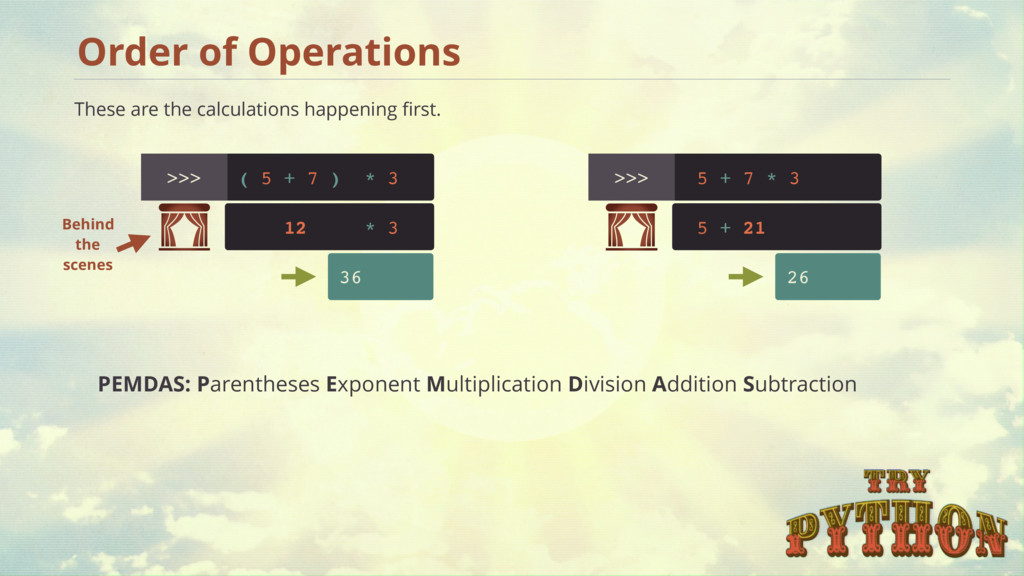
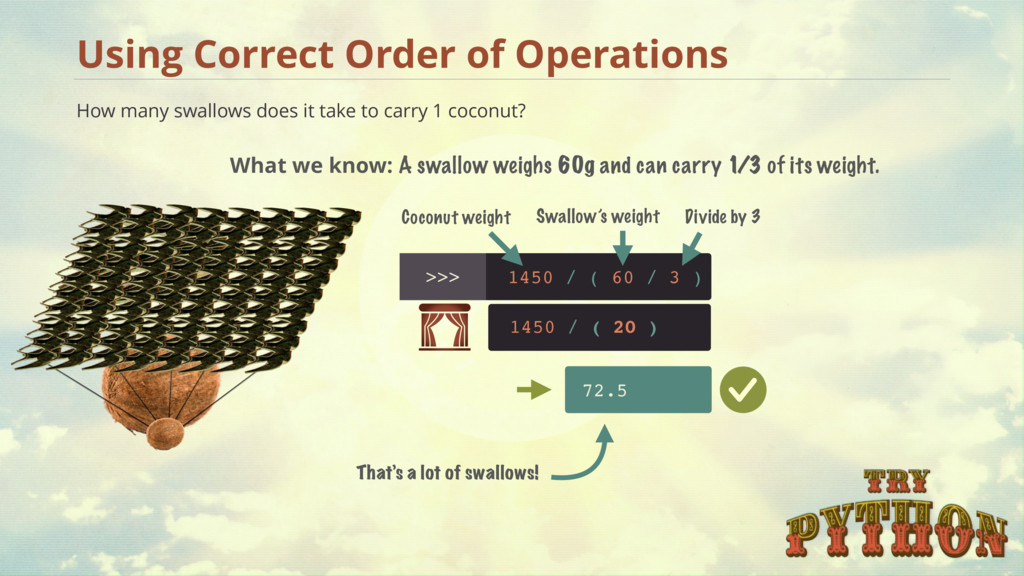
coconut? Using Correct Order of Operations 1450 / Coconut weight Divide by 3 Swallow’s weight That’s a lot of swallows! 72.5 1450 / ( 20 ) 60 / 3 ) ( What we know: A swallow weighs 60g and can carry 1/3 of its weight.
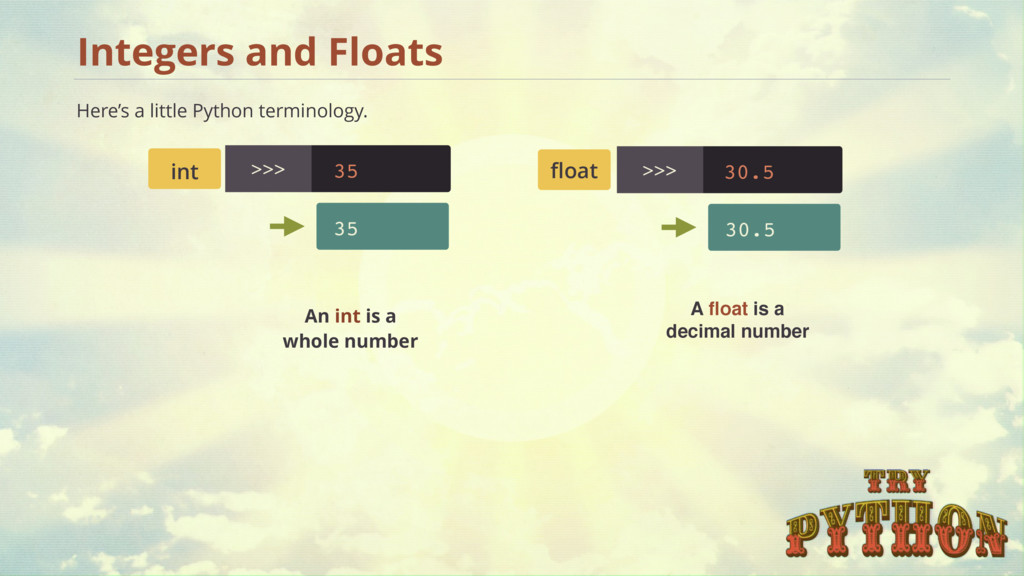
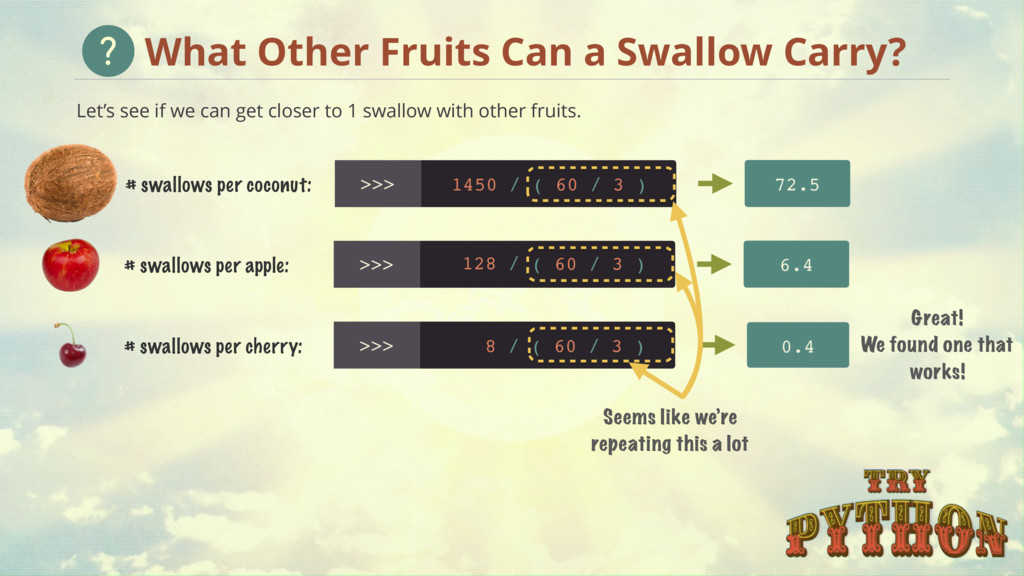
to 1 swallow with other fruits. What Other Fruits Can a Swallow Carry? Great! We found one that works! 6.4 # swallows per apple: 128 / 0.4 # swallows per cherry: 8 / # swallows per coconut: 1450 / 72.5 Seems like we’re repeating this a lot ( 60 / 3 ) ( 60 / 3 ) ( 60 / 3 )
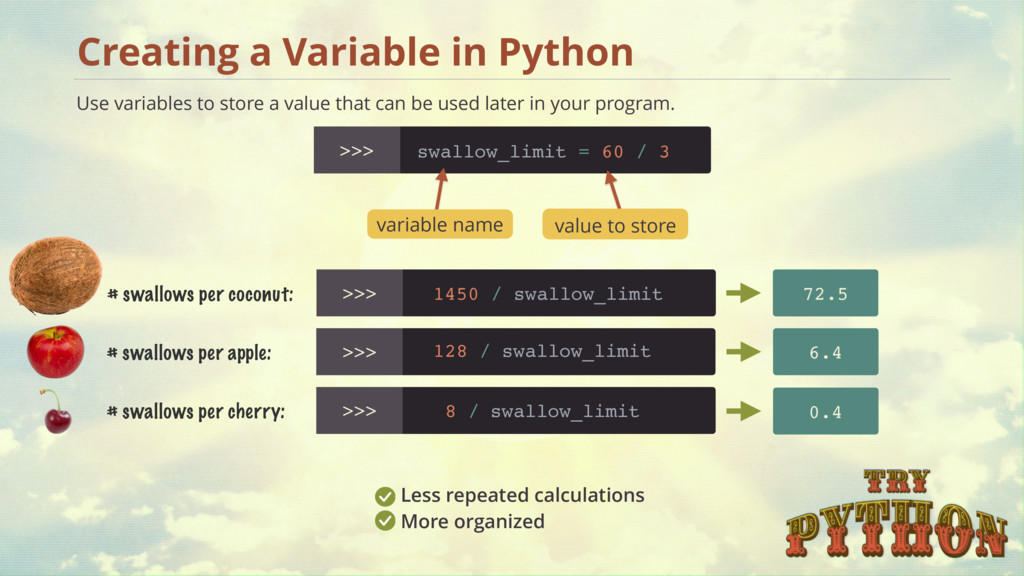
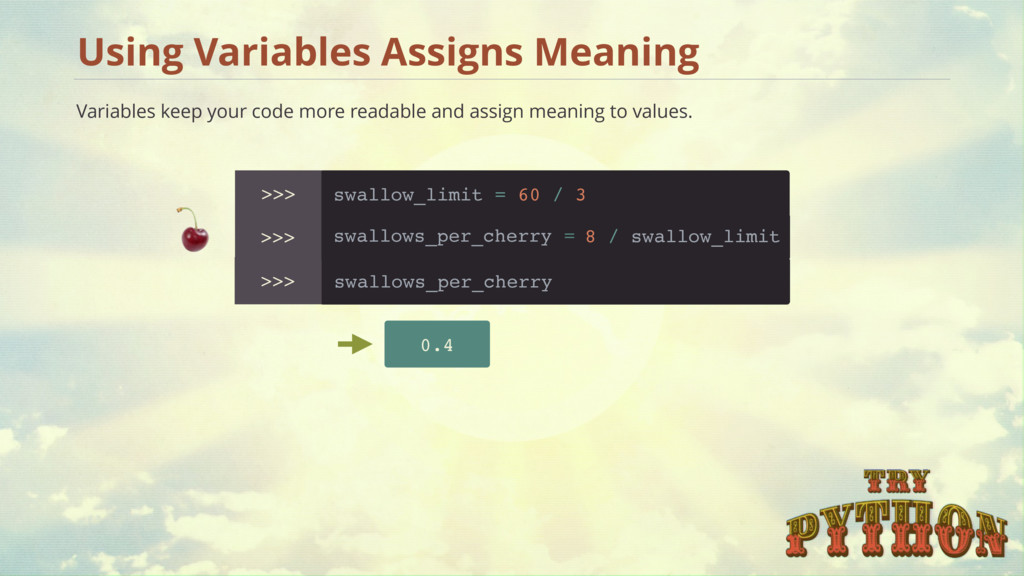
repeated calculations More organized swallow_limit = 60 / 3 # swallows per apple: 6.4 # swallows per cherry: 0.4 # swallows per coconut: 1450 / 72.5 variable name value to store Use variables to store a value that can be used later in your program. swallow_limit swallow_limit swallow_limit 128 / 8 /
name variables anything you want! What Should I Name My Variables? swallowLimit camel case, later words are capitalized Pep 8 Style Guide does NOT recommend: no spaces = 0 no spaces in the name 3mice, $mice no digits or special characters in front swallow_limit lowercase, use underscores for spaces Pep 8 Style Guide recommends: Check Pep 8 style guide here - http://go.codeschool.com/pep8-styleguide
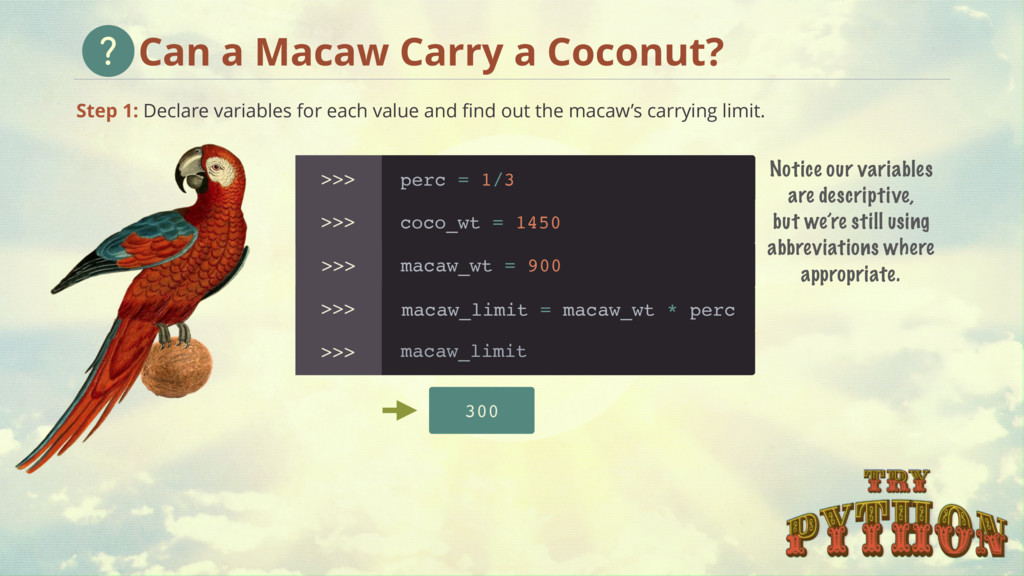
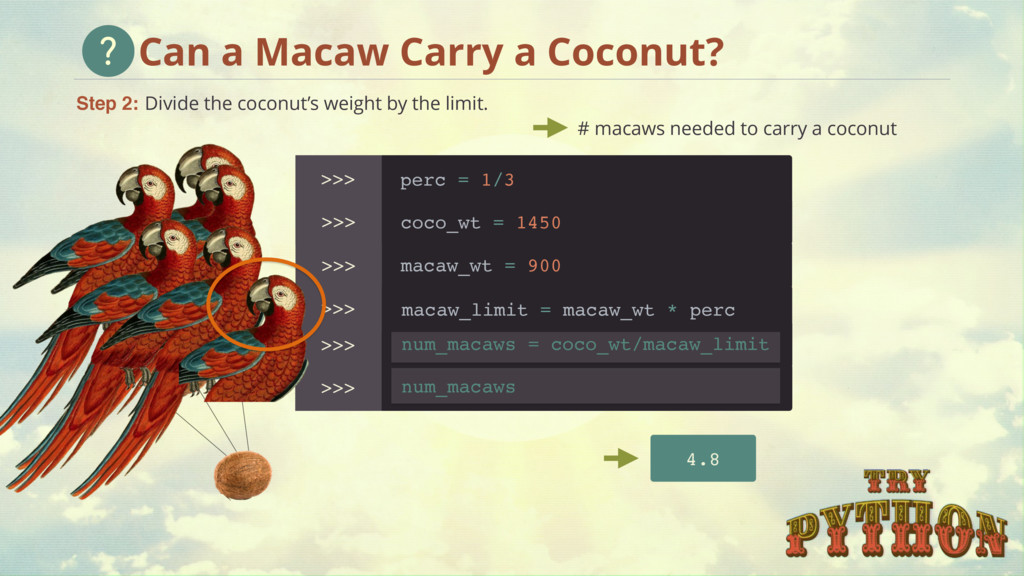
the macaw’s carrying limit. Can a Macaw Carry a Coconut? >>> >>> >>> >>> >>> 300 Notice our variables are descriptive, but we’re still using abbreviations where appropriate. coco_wt = 1450 macaw_wt = 900 perc = 1/3 macaw_limit = macaw_wt * perc macaw_limit
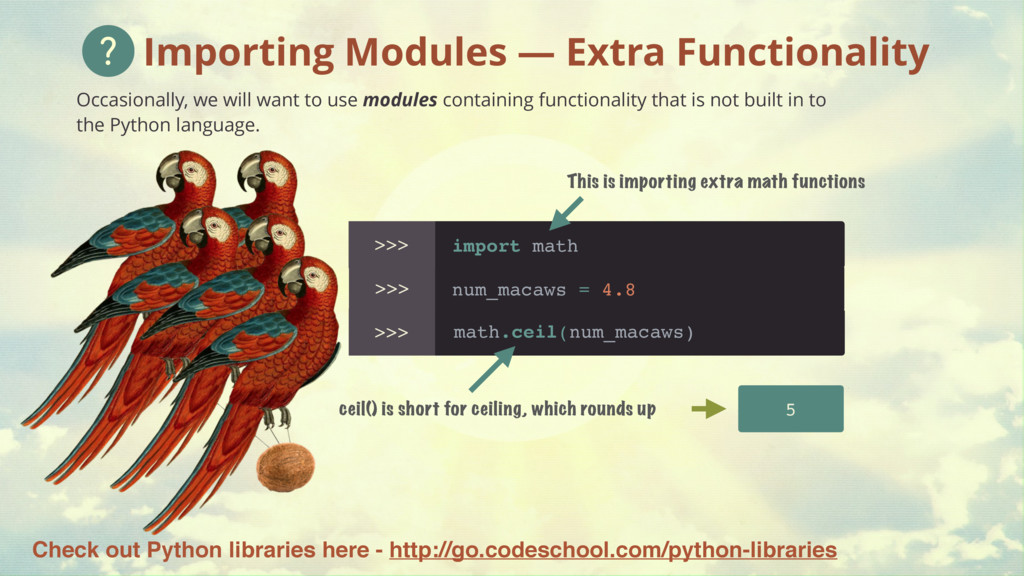
containing functionality that is not built in to the Python language. Importing Modules — Extra Functionality 5 import math This is importing extra math functions math.ceil(num_macaws) num_macaws = 4.8 ceil() is short for ceiling, which rounds up Check out Python libraries here - http://go.codeschool.com/python-libraries
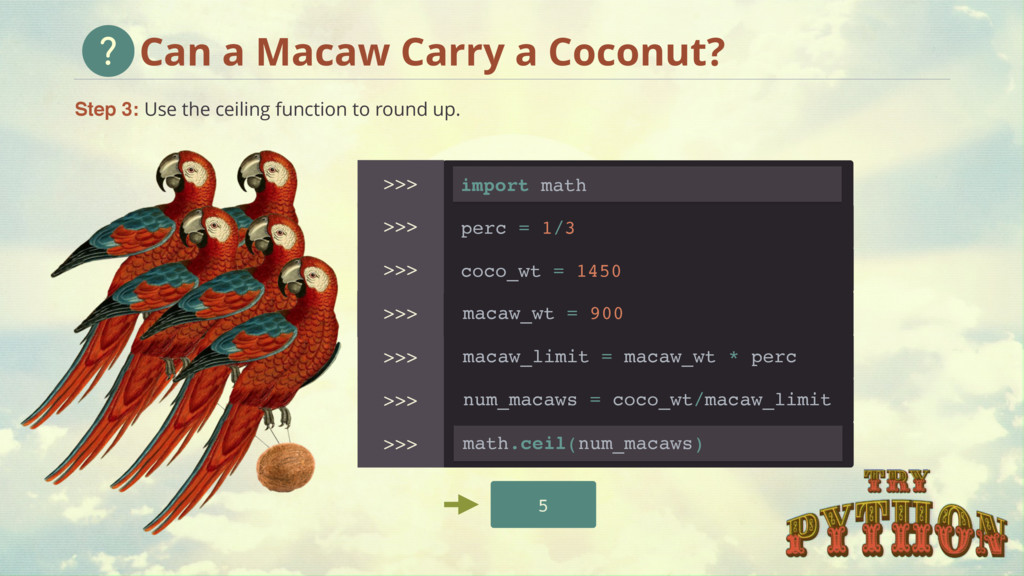
macaw_wt = 900 perc = 1/3 macaw_limit = macaw_wt * perc num_macaws = coco_wt/macaw_limit >>> math.ceil(num_macaws) import math Step 3: Use the ceiling function to round up. Can a Macaw Carry a Coconut?
of characters that can store letters, numbers, or a combination — anything! Create a string with quotes >>> "SPAM83" 'SPAM83' Single or double quotes work — just be consistent string 'Hello World'
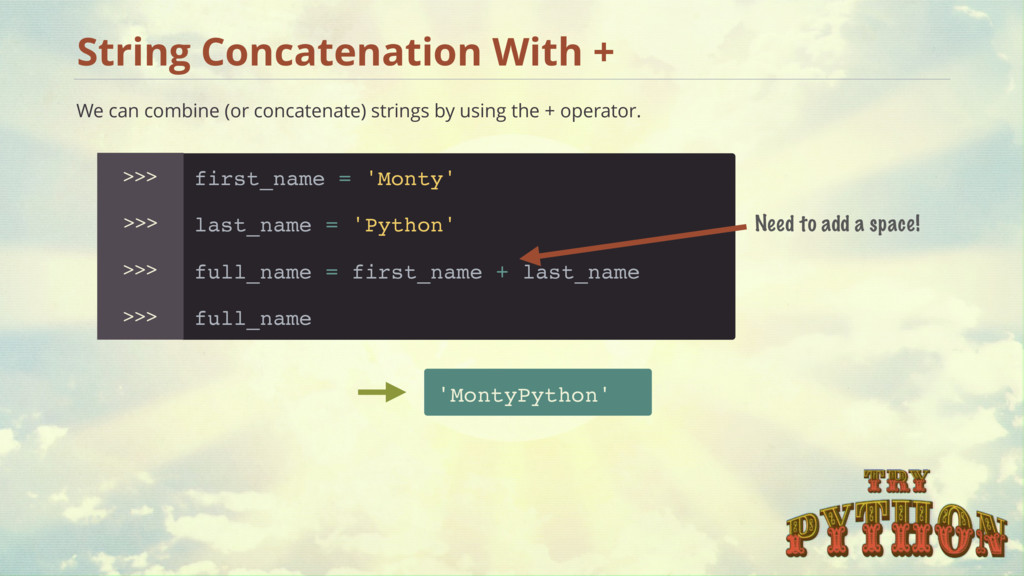
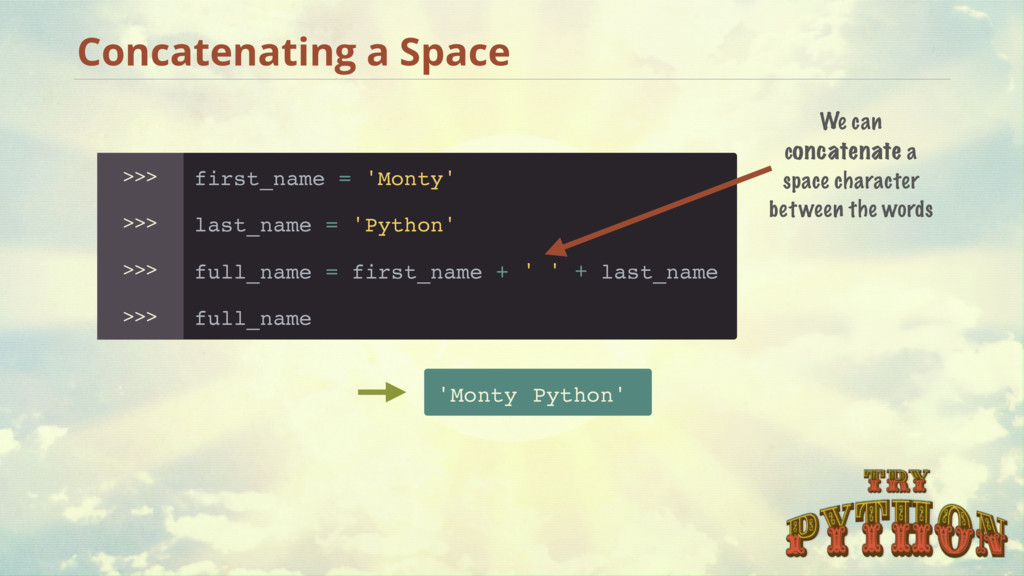
by using the + operator. last_name = 'Python' >>> 'MontyPython' first_name = 'Monty' >>> full_name = first_name + >>> full_name >>> Need to add a space! last_name
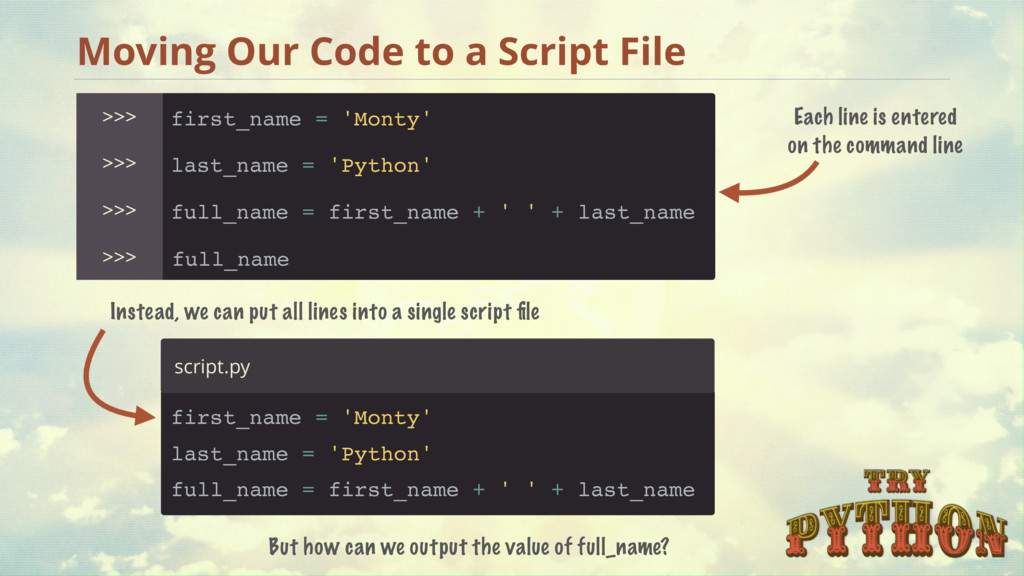
first_name = 'Monty' full_name = first_name + full_name Each line is entered on the command line last_name = 'Python' first_name = 'Monty' full_name = first_name + ' ' + last_name Instead, we can put all lines into a single script file script.py But how can we output the value of full_name? >>> >>> >>> >>> last_name ' ' +
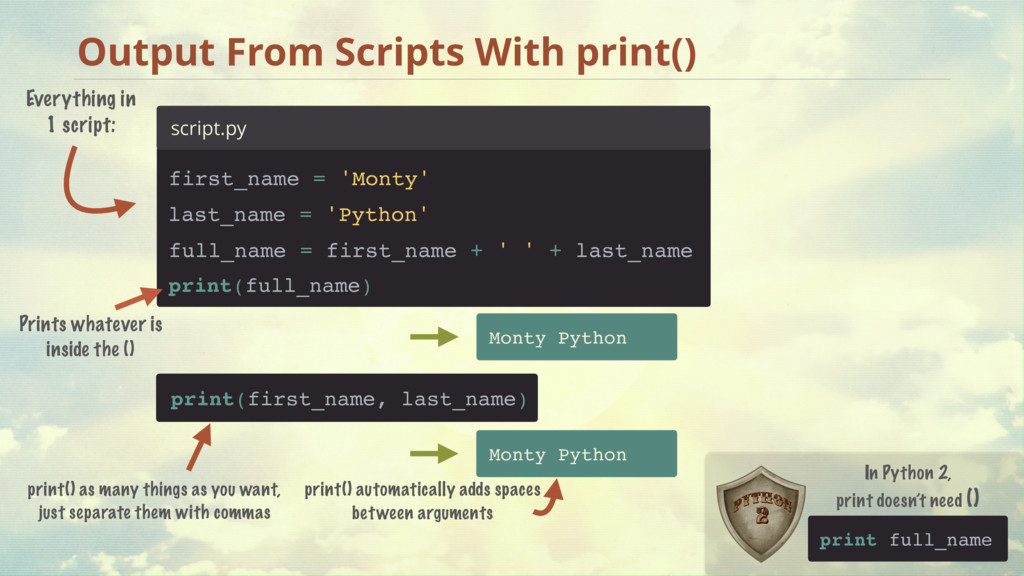
in 1 script: script.py print(full_name) Prints whatever is inside the () print(first_name, last_name) print() as many things as you want, just separate them with commas Monty Python last_name = 'Python' first_name = 'Monty' full_name = first_name + ' ' + last_name print() automatically adds spaces between arguments In Python 2, print doesn’t need ()
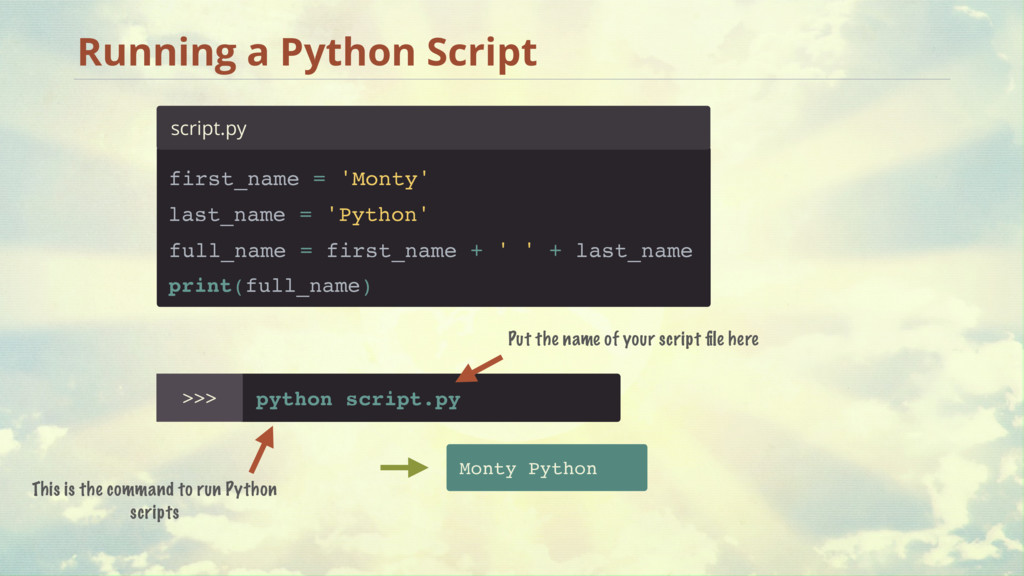
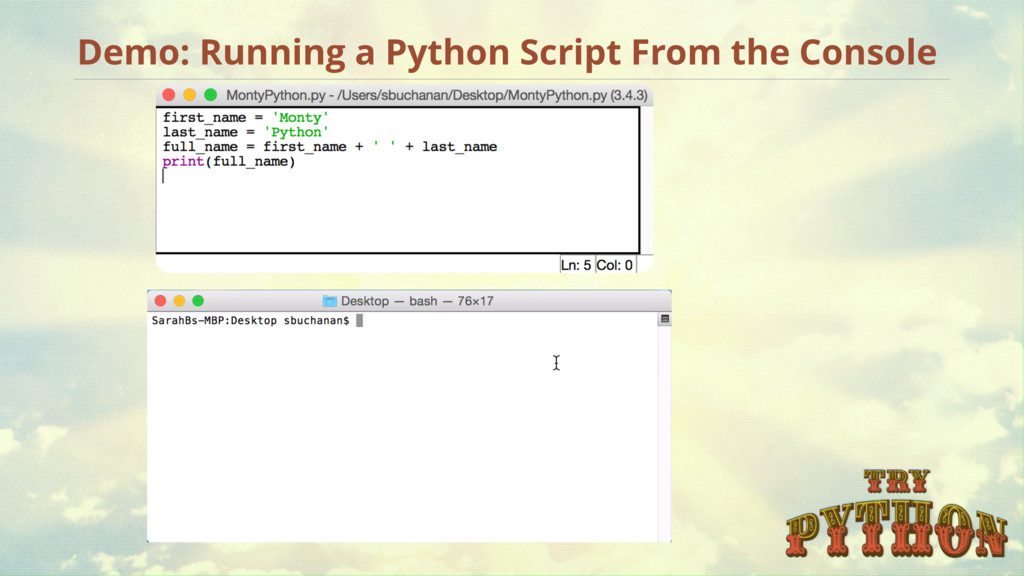
command to run Python scripts Monty Python Put the name of your script file here script.py print(full_name) last_name = 'Python' first_name = 'Monty' full_name = first_name + ' ' + last_name
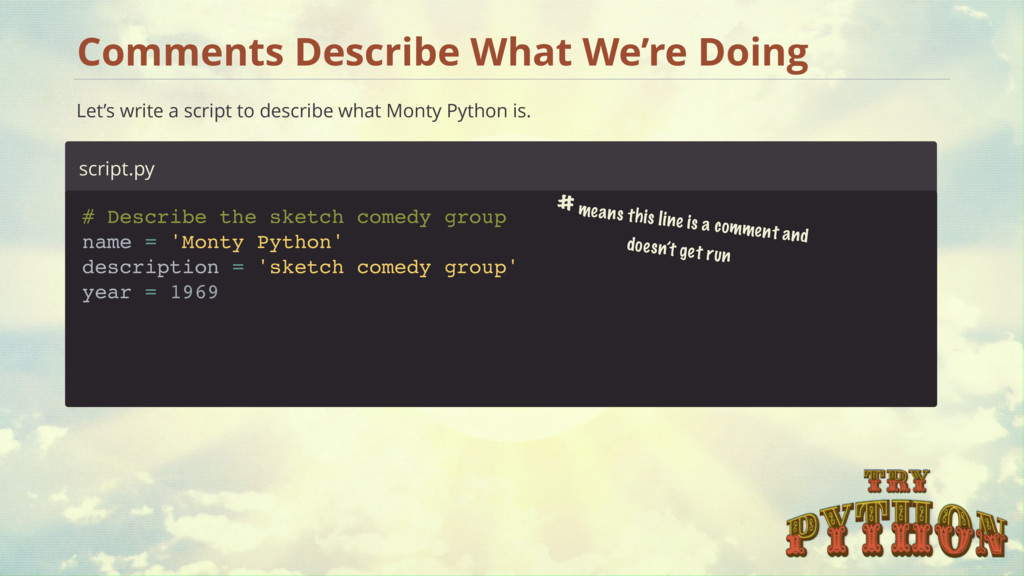
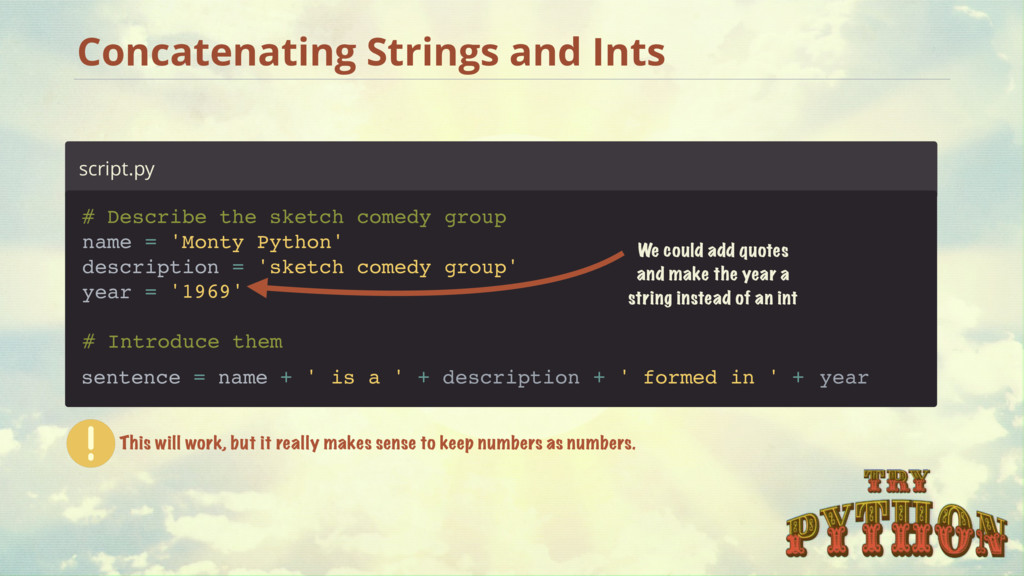
to describe what Monty Python is. # means this line is a comment and doesn’t get run 1969 name = 'Monty Python' description = 'sketch comedy group' # Describe the sketch comedy group year =
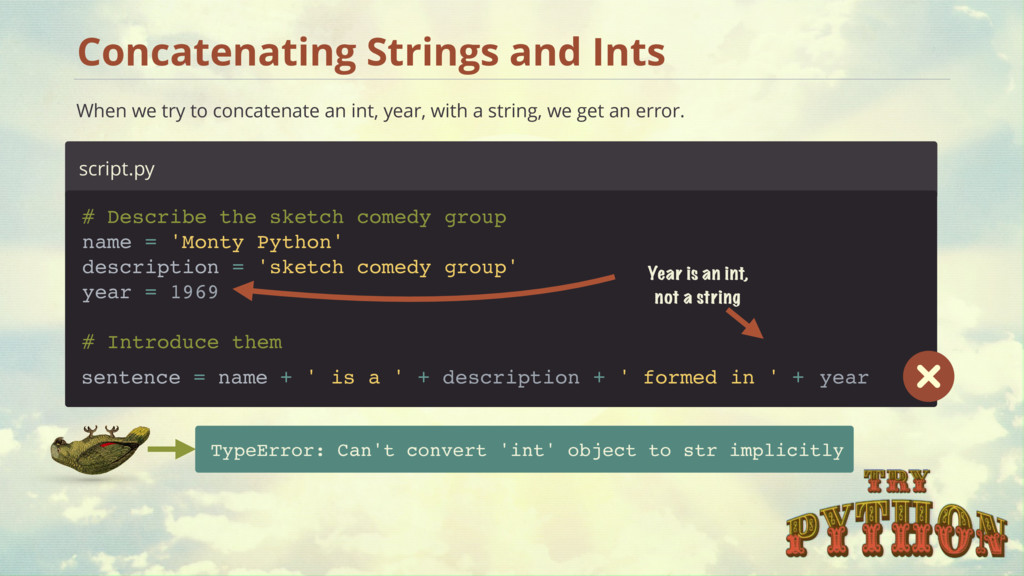
int, year, with a string, we get an error. script.py TypeError: Can't convert 'int' object to str implicitly Year is an int, not a string # Introduce them 1969 name = 'Monty Python' description = 'sketch comedy group' year = # Describe the sketch comedy group is a ' description formed in year sentence = name + ' + ' + + '
make the year a string instead of an int This will work, but it really makes sense to keep numbers as numbers. '1969' # Introduce them name = 'Monty Python' description = 'sketch comedy group' year = # Describe the sketch comedy group is a ' description formed in year sentence = name + ' + ' + + '
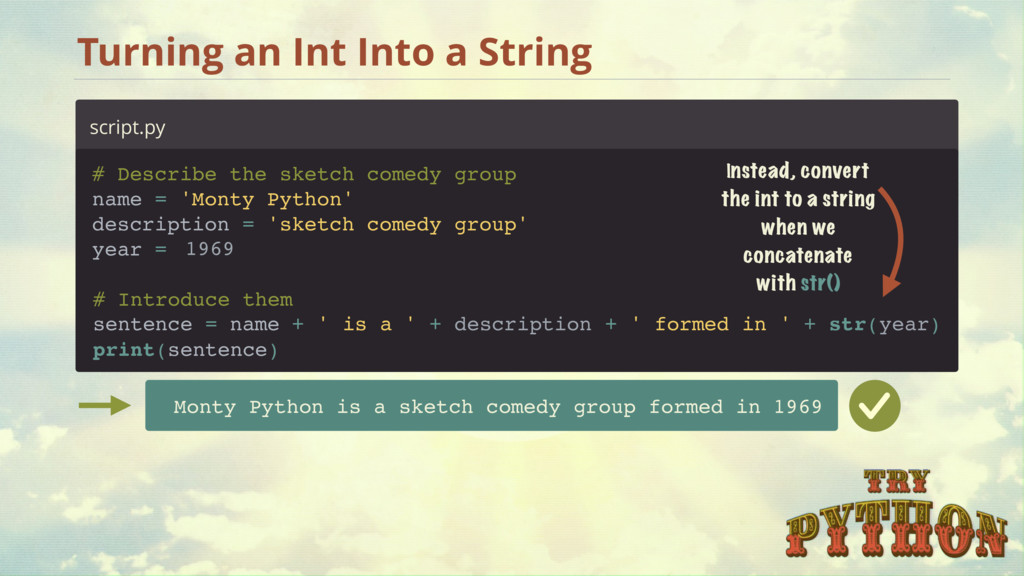
a sketch comedy group formed in 1969 Instead, convert the int to a string when we concatenate with str() print(sentence) is a # Introduce them ' description formed in year str( ) sentence = name + ' + ' + + ' name = 'Monty Python' description = 'sketch comedy group' year = # Describe the sketch comedy group 1969
for us Monty Python is a sketch comedy group formed in 1969 1969 # Introduce them print( , , , , ) is a description formed in year ' name ' ' ' name = 'Monty Python' description = 'sketch comedy group' year = # Describe the sketch comedy group 1969
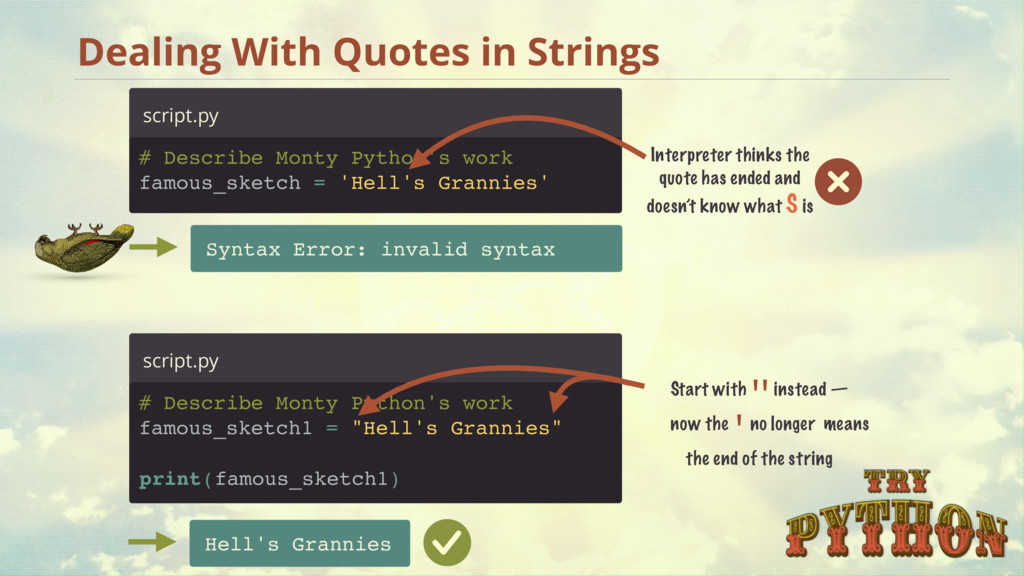
famous_sketch = 'Hell's Grannies' script.py Syntax Error: invalid syntax Interpreter thinks the quote has ended and doesn’t know what S is # Describe Monty Python's work famous_sketch1 = "Hell's Grannies" script.py Hell's Grannies Start with '' instead — now the ' no longer means the end of the string '' ' ) print(famous_sketch1
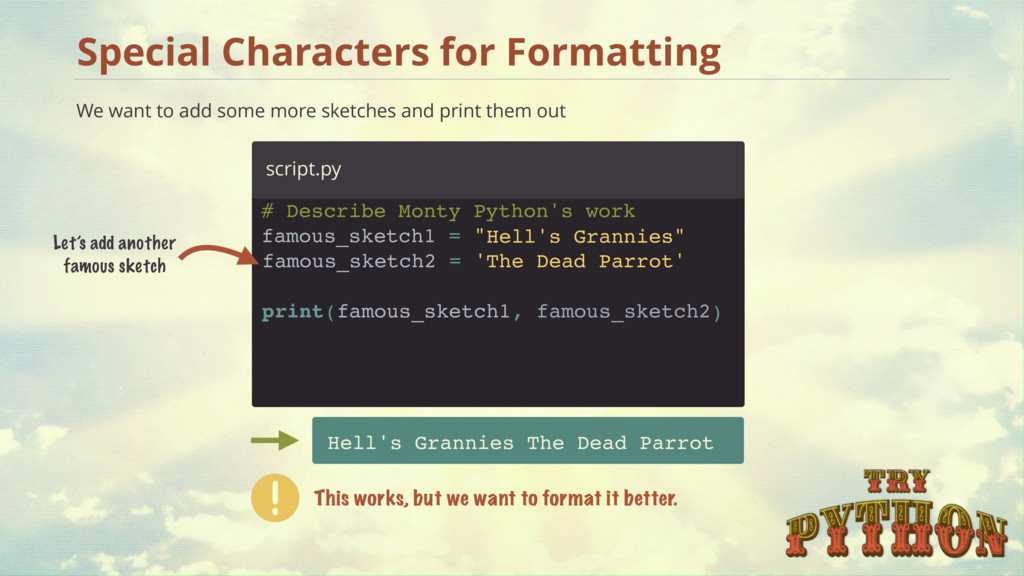
The Dead Parrot script.py Special Characters for Formatting We want to add some more sketches and print them out This works, but we want to format it better. Let’s add another famous sketch ) famous_sketch2 = ' print( , famous_sketch2 Hell's Grannies" The Dead Parrot' famous_sketch1
Characters — Newline Add a newline to make this look better \n is a special character that means new line. This works, but we want to indent the titles. Famous Work: Hell's Grannies The Dead Parrot \n \nThe Dead Parrot' Hell's Grannies" famous_sketch2 = ' print('Famous Work:', famous_sketch1, famous_sketch2)
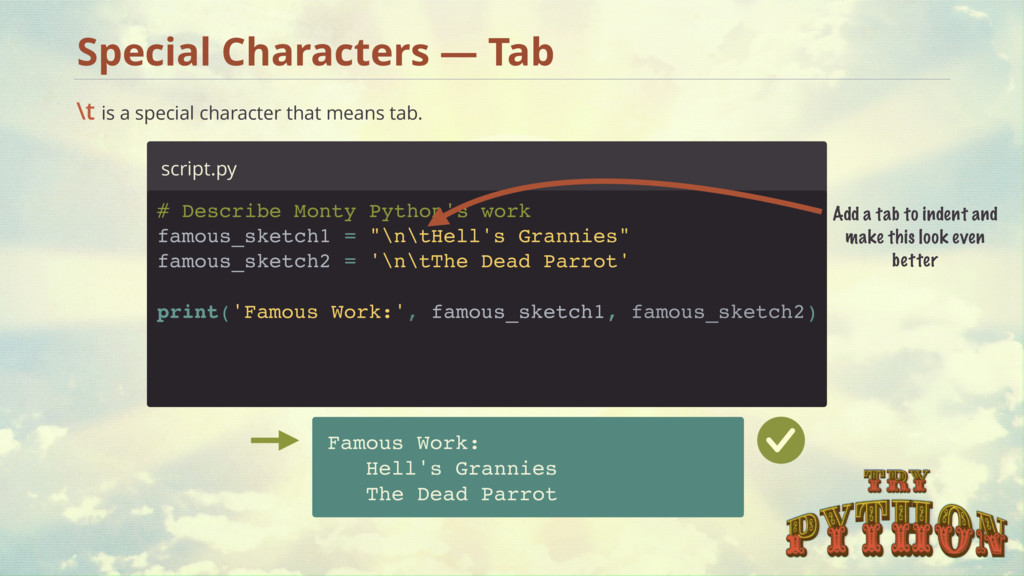
Tab # Describe Monty Python's work famous_sketch1 = " script.py Add a tab to indent and make this look even better \t is a special character that means tab. \n \n The Dead Parrot' Hell's Grannies" famous_sketch2 = ' print('Famous Work:', famous_sketch1, famous_sketch2) \t \t
Characters greeting = >>> greeting[0] 'H' greeting[11] '!' A string is a list of characters, and each character in this list has a position or an index. We can get each character by calling its index with [] greeting[12] IndexError: string index out of range Starts at 0 [0] [1] [2] [3] [4] [5] [6] [7] [8] [9] [10][11] 'H E L L O W O R L D !'
!' There are a few built-in string functions — like len(), which returns the length of a string and is very useful. # print the length of greeting greeting = 'HELLO WORLD!' print( len(greeting) ) script.py 12 [0] [1] [2] [3] [4] [5] [6] [7] [8] [9] [10] [11] 12 String Built-in Function — len()
The last half of the word: characters at positions [2] and [3] 'G o o d' [0] [1] [2] [3] 'E v e n i n g' [0] [1] [2] [3] [4] [5] [6] Good Evening od od ning The Man Who Only Says Ends of Words
[1] [2] [3] [4] [5] word[2:5] tho Boundary starts before index 2 Boundary ends before index 5 Start boundary End boundary Using Slices to Access Parts of a String
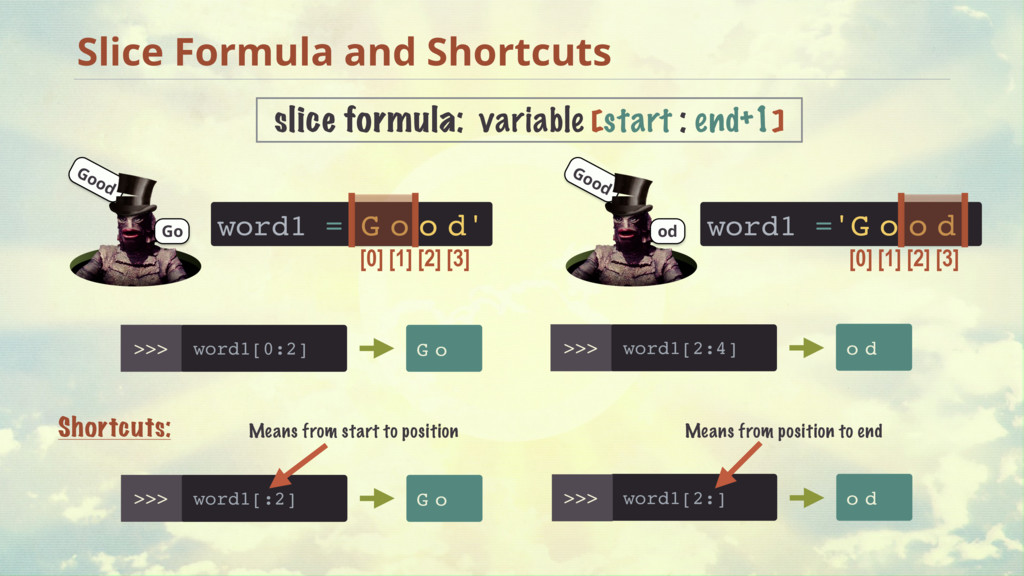
word1 ='G o o d' [0] [1] [2] [3] word1[0:2] G o slice formula: variable [start : end+1] word1[2:4] G o o d Shortcuts: word1[:2] G o Means from start to position [0] [1] [2] [3] word1 ='G o o d' word1[2:] Means from position to end Good Go Good od
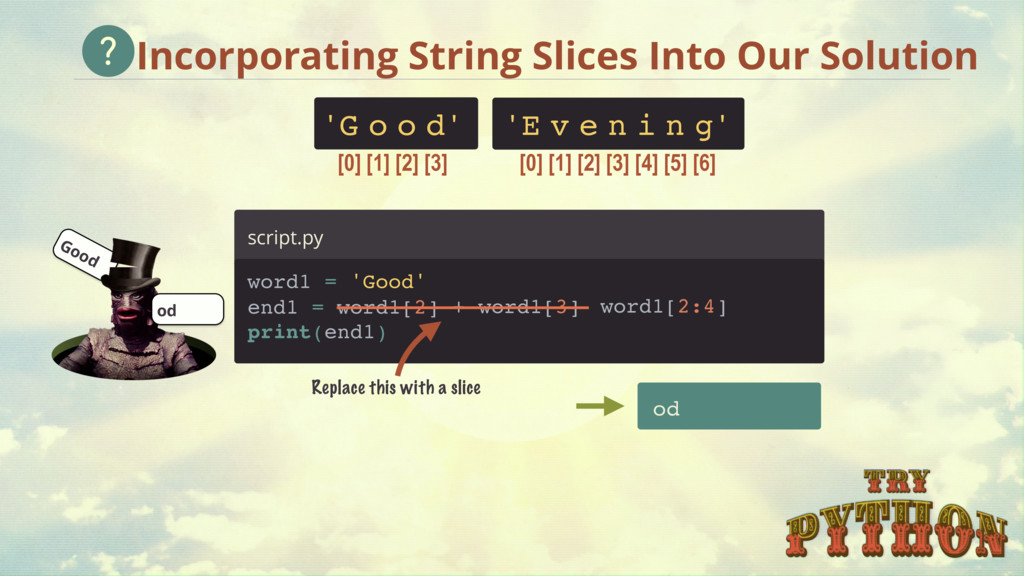
[0] [1] [2] [3] 'E v e n i n g' [0] [1] [2] [3] [4] [5] [6] Replace this with a slice word1[2:4] od Good od Incorporating String Slices Into Our Solution print(end1) word1[3] + word1[2]
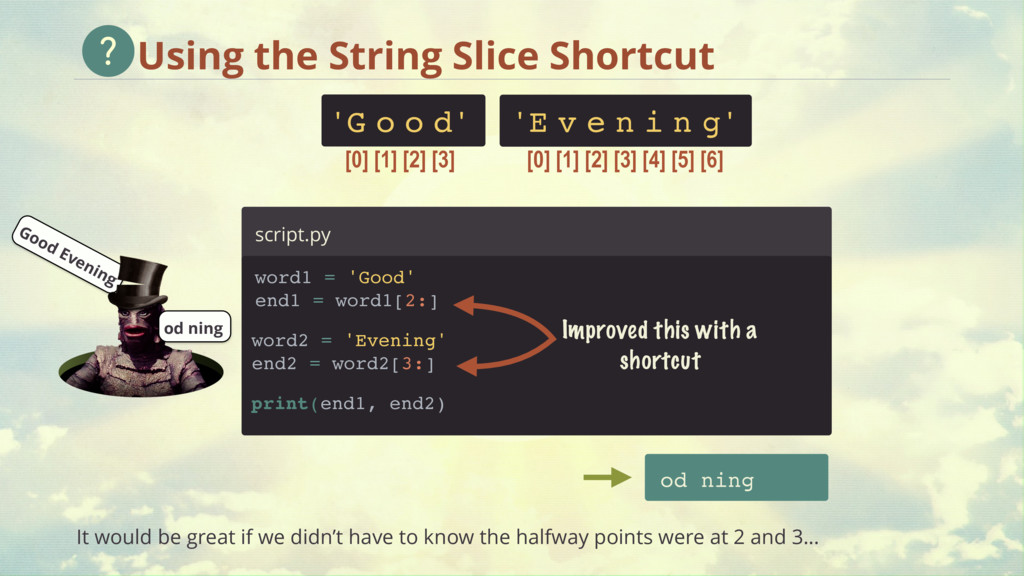
= 'Good' end1 = word1[2:] script.py [0] [1] [2] [3] 'E v e n i n g' [0] [1] [2] [3] [4] [5] [6] print(end1, end2) word2 = 'Evening' end2 = word2[3:] Improved this with a shortcut od ning It would be great if we didn’t have to know the halfway points were at 2 and 3… Good Evening od ning
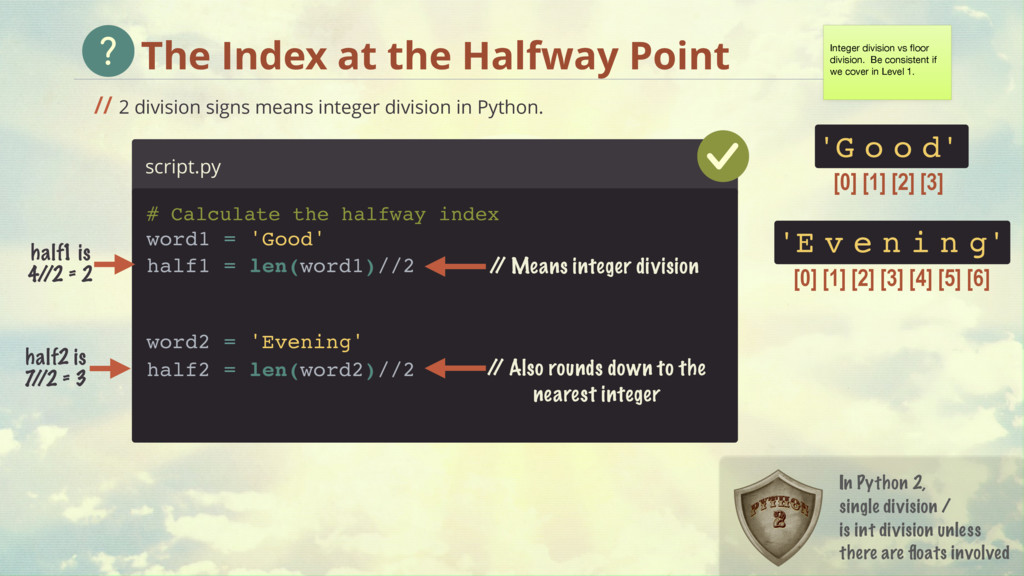
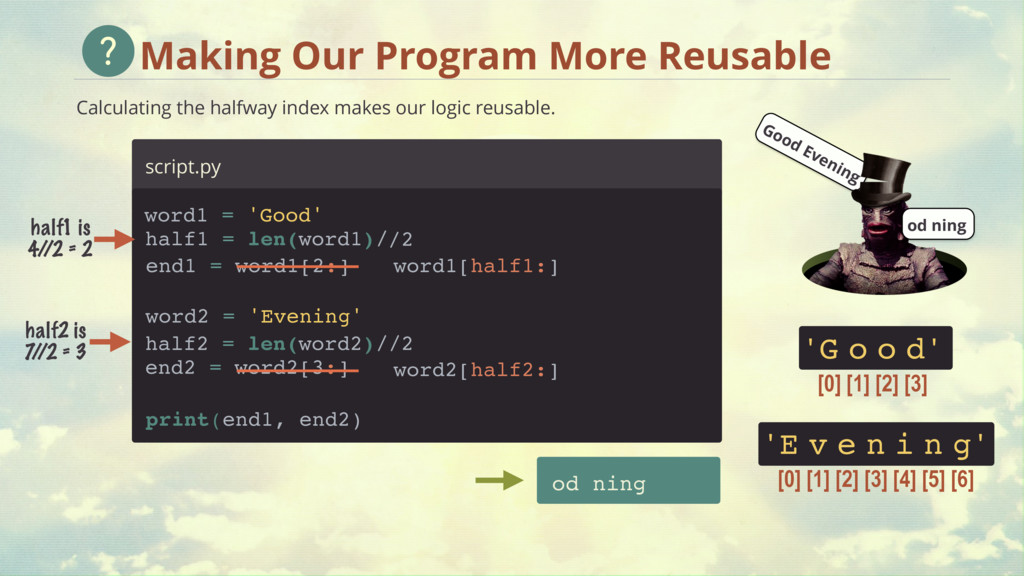
let us calculate the halfway index of our word. 'G o o d' [0] [1] [2] [3] 'E v e n i n g' [0] [1] [2] [3] [4] [5] [6] script.py # Calculate the halfway index half1 = len(word1)/ half2 = len(word2)/ PROBLEM: indexes have to be integers — floats won’t work! half1 is 2.0 half2 is 3.5 Good Evening od ning word2 = 'Evening' 2 2 word1 = 'Good'
means integer division in Python. 'G o o d' [0] [1] [2] [3] 'E v e n i n g' [0] [1] [2] [3] [4] [5] [6] script.py / / Also rounds down to the nearest integer half1 is 4/ /2 = 2 half2 is 7 / /2 = 3 / / Means integer division Integer division vs floor division. Be consistent if we cover in Level 1. In Python 2, single division / is int division unless there are floats involved # Calculate the halfway index half1 = len(word1)/ half2 = len(word2)/ word2 = 'Evening' 2 2 / / word1 = 'Good'
our logic reusable. od ning word2[half2:] script.py word1[half1:] 'G o o d' [0] [1] [2] [3] 'E v e n i n g' [0] [1] [2] [3] [4] [5] [6] half1 is 4/ /2 = 2 half2 is 7 / /2 = 3 Good Evening od ning half1 = len(word1)/ 2 / word1 = 'Good' end1 = word1[2:] half2 = len(word2)/ word2 = 'Evening' 2 / end2 = word2[3:] print(end1, end2)
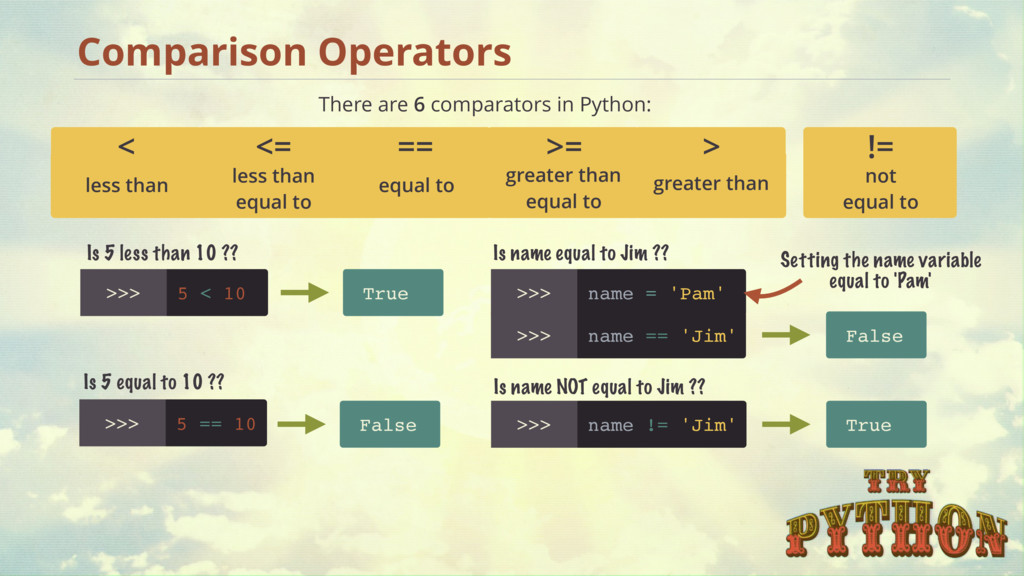
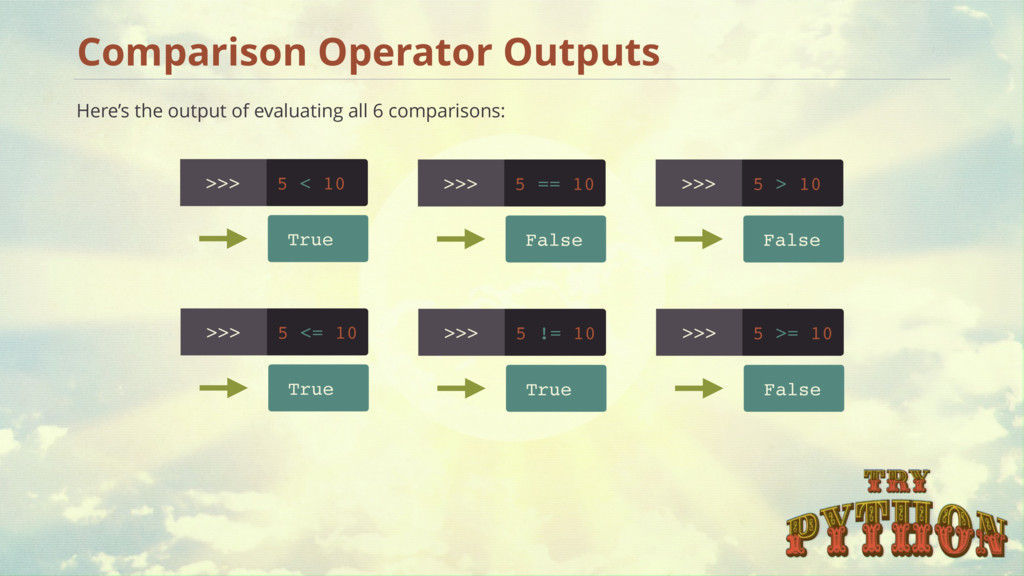
Python: Comparison Operators < less than <= less than equal to == equal to != not equal to >= greater than equal to > greater than True 5 < 10 Is 5 less than 10 ?? 5 == 10 Is 5 equal to 10 ?? False name = 'Pam' Is name equal to Jim ?? name == 'Jim' name != 'Jim' Is name NOT equal to Jim ?? True False Setting the name variable equal to 'Pam'
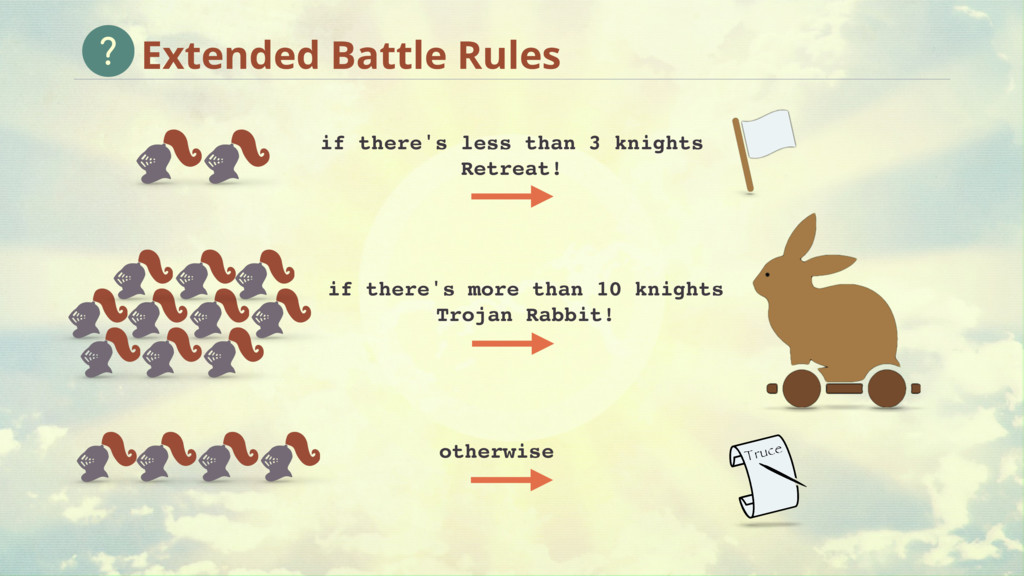
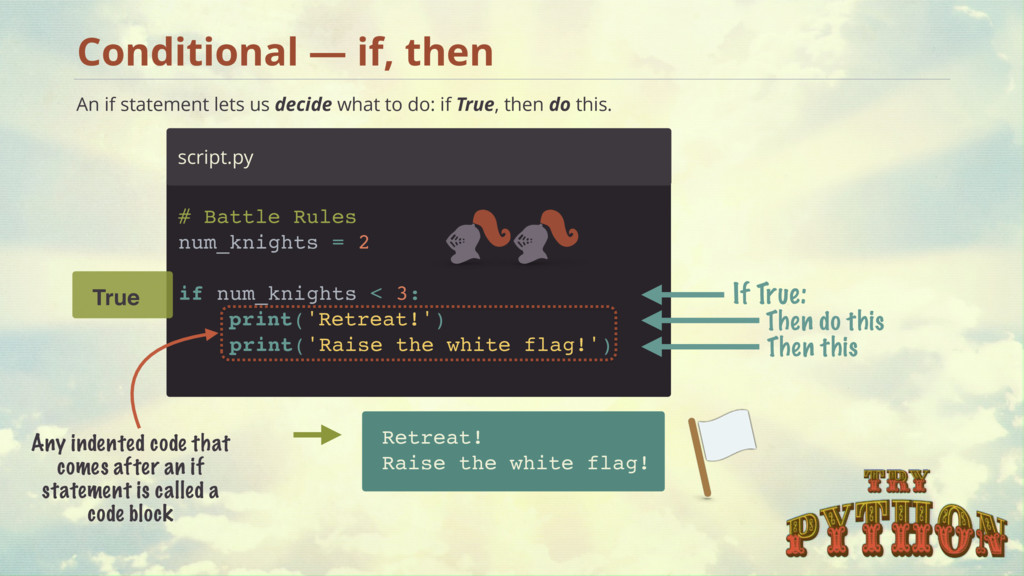
Then do this Then this Retreat! Raise the white flag! An if statement lets us decide what to do: if True, then do this. If True: True Any indented code that comes after an if statement is called a code block 2 print('Retreat!') print('Raise the white flag!') if num_knights < 3:
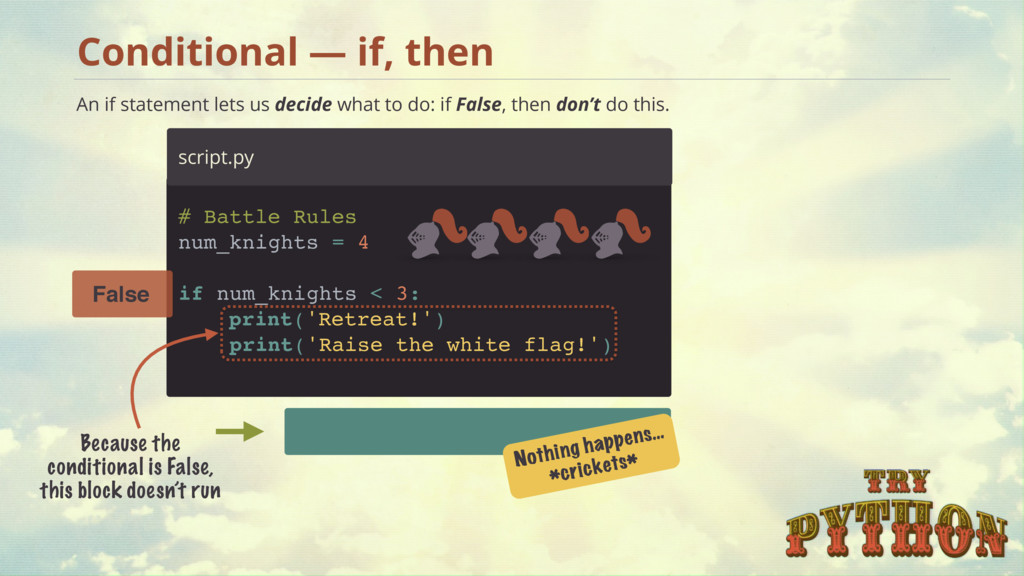
False Because the conditional is False, this block doesn’t run Nothing happens… *crickets* An if statement lets us decide what to do: if False, then don’t do this. 4 print('Retreat!') print('Raise the white flag!') if num_knights < 3:
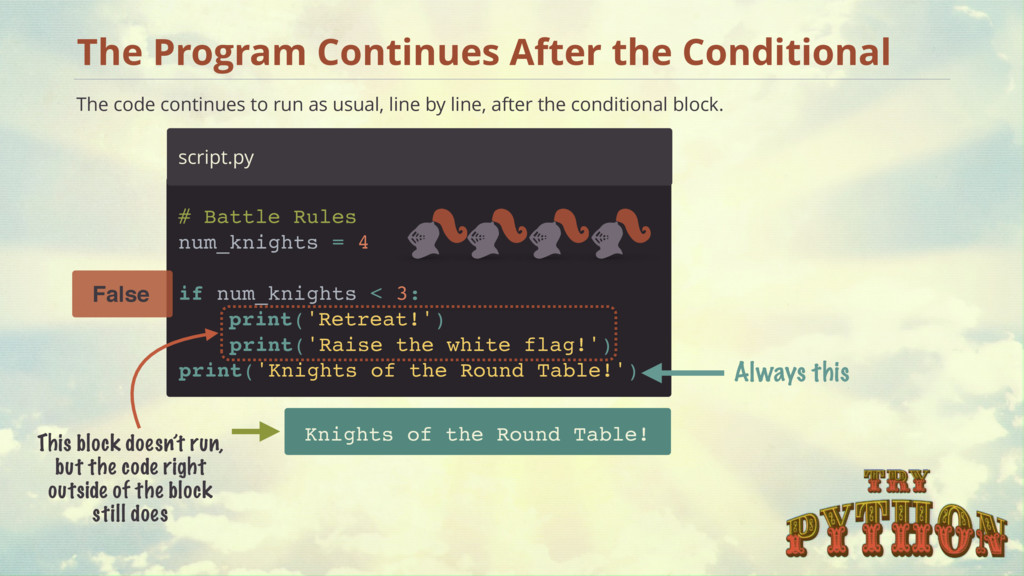
line, after the conditional block. The Program Continues After the Conditional Knights of the Round Table! # Battle Rules num_knights = Always this This block doesn’t run, but the code right outside of the block still does False 4 print('Knights of the Round Table!') print('Retreat!') print('Raise the white flag!') if num_knights < 3:
as long as you’re consistent. Rules for Whitespace in Python if num_knights == 1: # Block start print('Do this') print('And this') print('Always this') IndentationError: unexpected indent 2 spaces 4 spaces Irregular spacing is a no-no! The PEP 8 style guide recommends 4 spaces - http://go.codeschool.com/pep8-styleguide
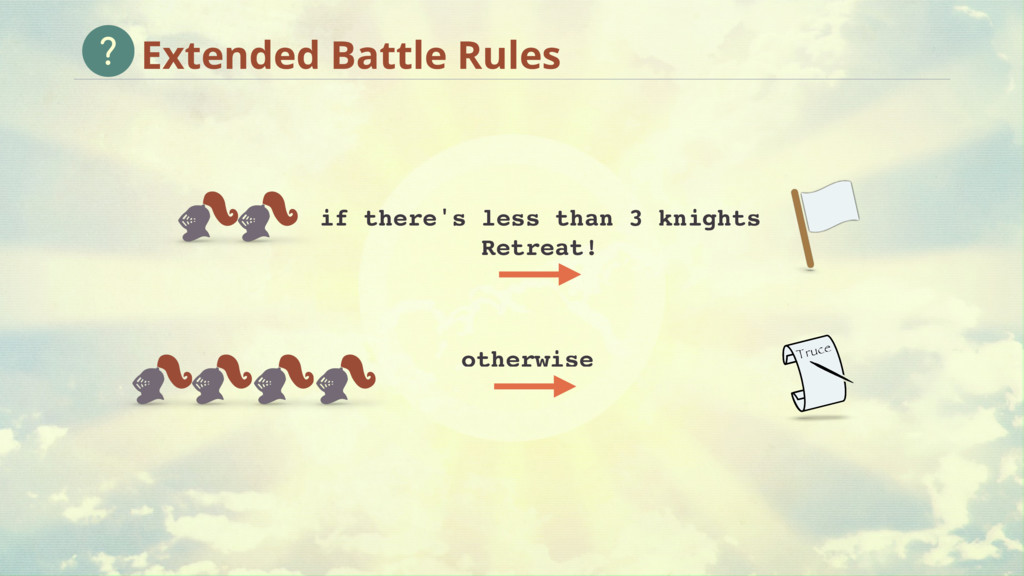
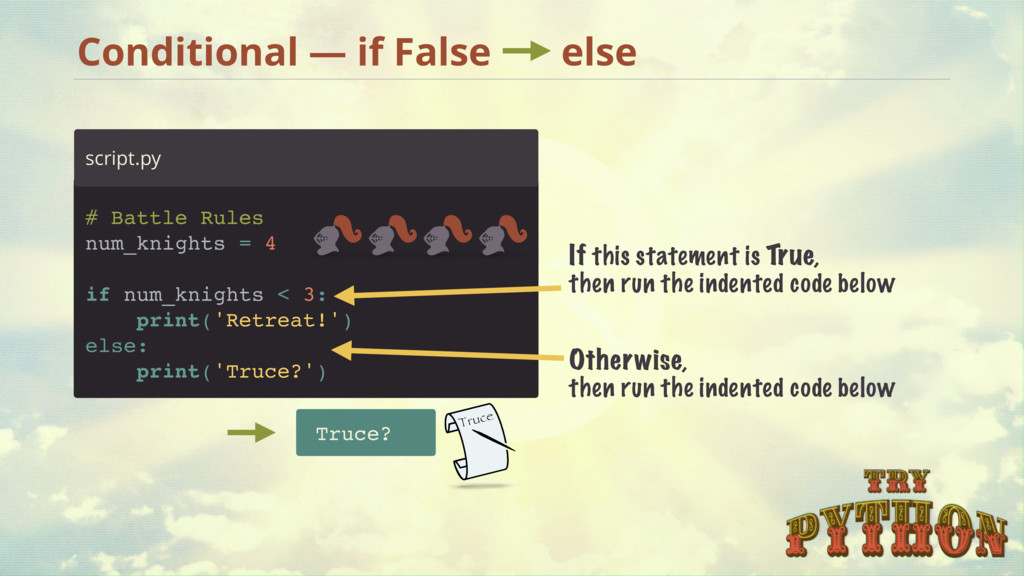
= 4 if num_knights < 3: print('Retreat!') else: print('Truce?') Truce? If this statement is True, then run the indented code below Otherwise, then run the indented code below
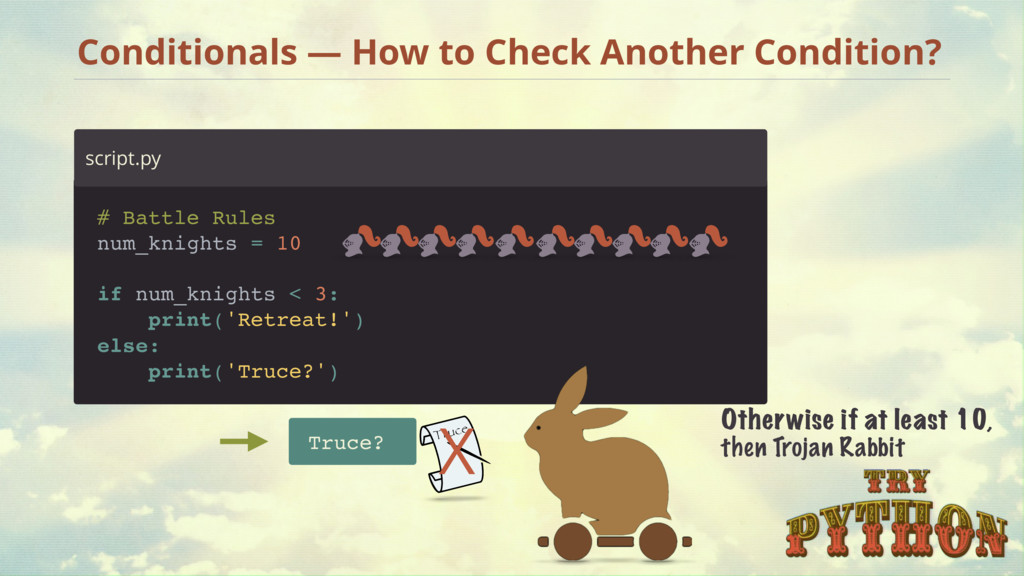
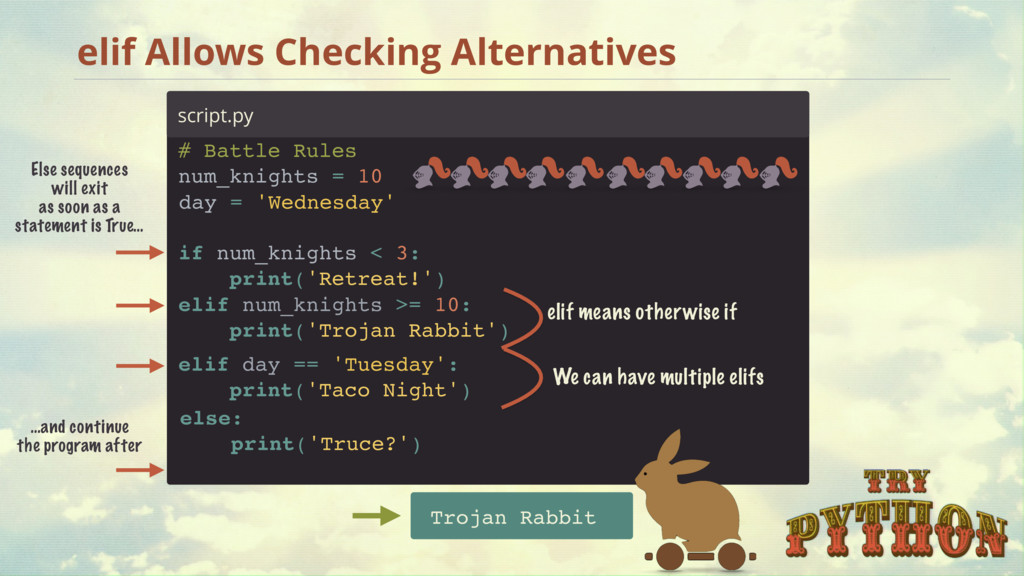
as a statement is True… …and continue the program after script.py # Battle Rules num_knights = 10 Trojan Rabbit else: print('Truce?') elif num_knights >= 10: print('Trojan Rabbit') elif means otherwise if elif day == 'Tuesday': print('Taco Night') We can have multiple elifs if num_knights < 3: print('Retreat!') day = 'Wednesday'
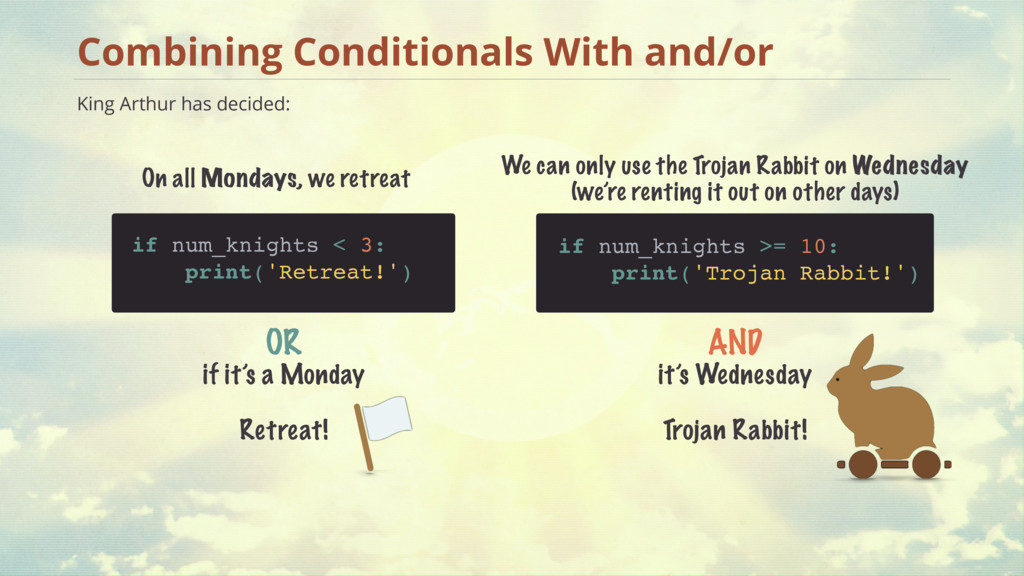
< 3: print('Retreat!') if num_knights >= 10: print('Trojan Rabbit!') On all Mondays, we retreat We can only use the Trojan Rabbit on Wednesday (we’re renting it out on other days) OR if it’s a Monday Retreat! AND it’s Wednesday Trojan Rabbit!
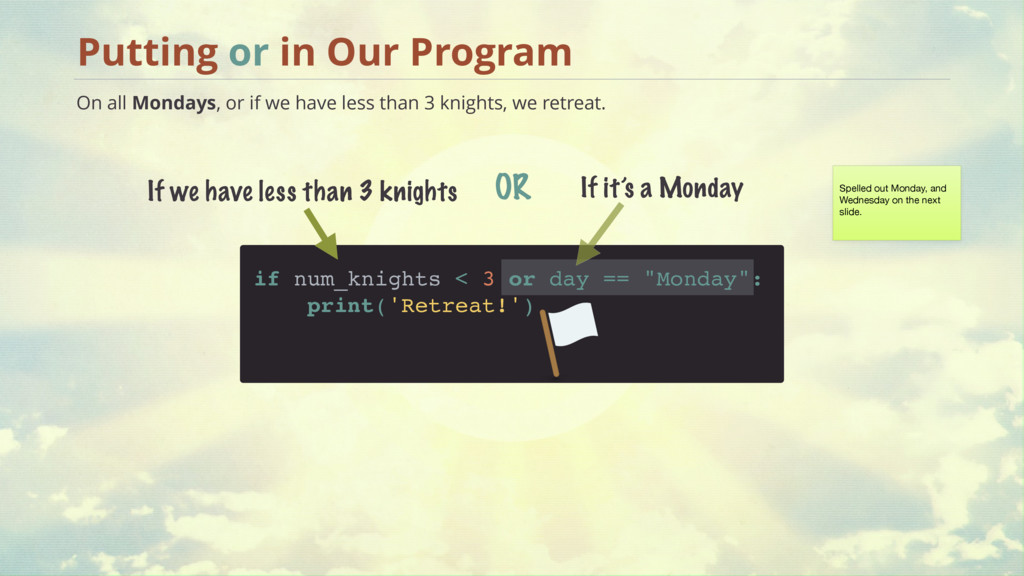
all Mondays, or if we have less than 3 knights, we retreat. Putting or in Our Program If we have less than 3 knights OR If it’s a Monday Spelled out Monday, and Wednesday on the next slide.
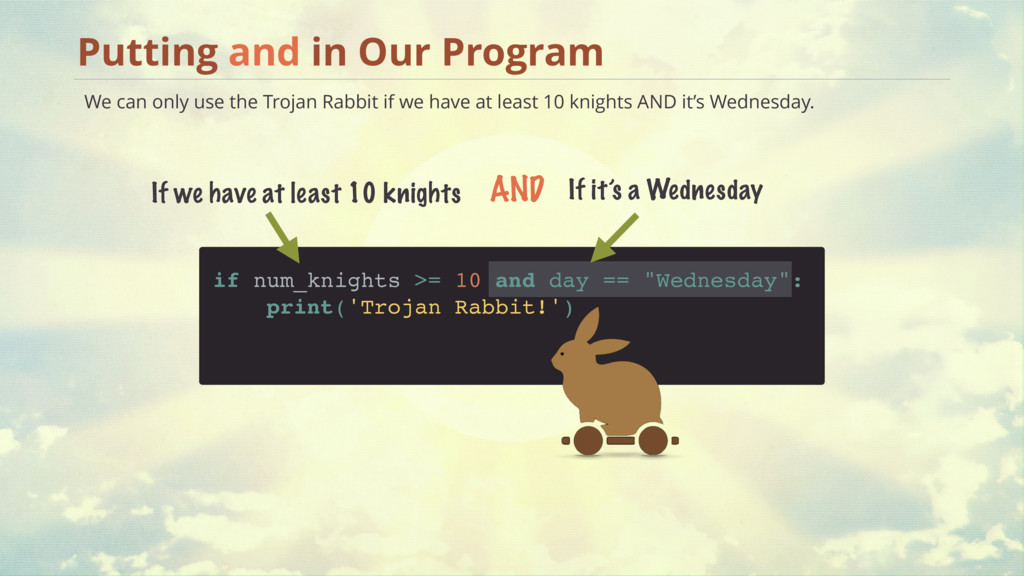
We can only use the Trojan Rabbit if we have at least 10 knights AND it’s Wednesday. Putting and in Our Program If we have at least 10 knights AND If it’s a Wednesday
— and / or True False True False True False True True False If 1 is True or result will be True True False True False True False True False False If 1 is False and result will be False and and and or or or
the week # Battle Rules num_knights = 10 day = 'Wednesday' if num_knights < 3 or day == 'Monday': print('Retreat!') elif num_knights >= 10 and day == 'Wednesday': print('Trojan Rabbit!') else: print('Truce?')
the user to input the day of the week day = input('Enter the day of the week') print('You entered:', day) prints out this statement and waits for user input day saves the user's input In Python 2, raw_input() is used instead of input()
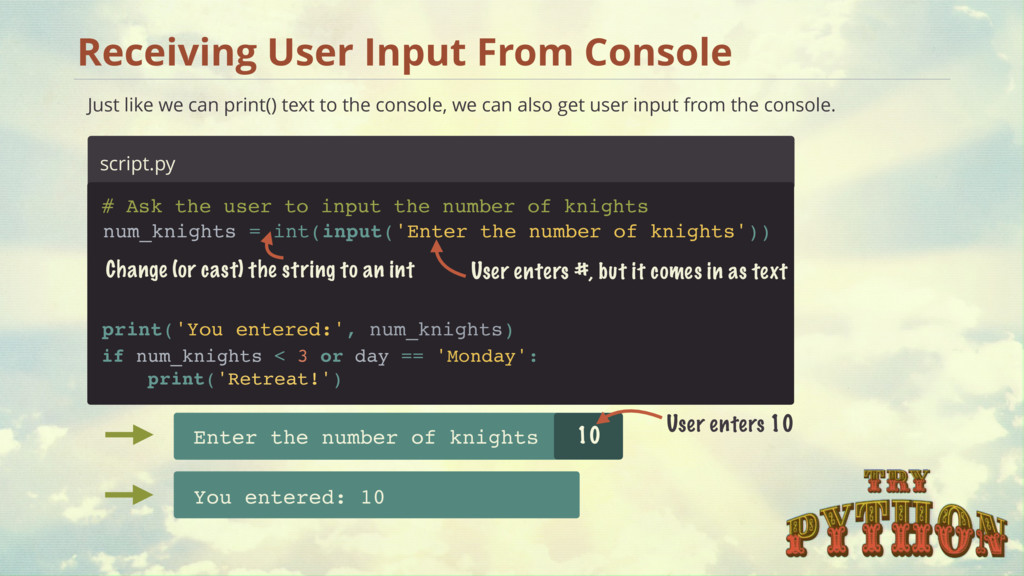
text to the console, we can also get user input from the console. script.py User enters #, but it comes in as text Change (or cast) the string to an int Enter the number of knights You entered: 10 10 User enters 10 if num_knights < 3 or day == 'Monday': print('Retreat!') num_knights = int(input('Enter the number of knights')) print('You entered:', num_knights) # Ask the user to input the number of knights
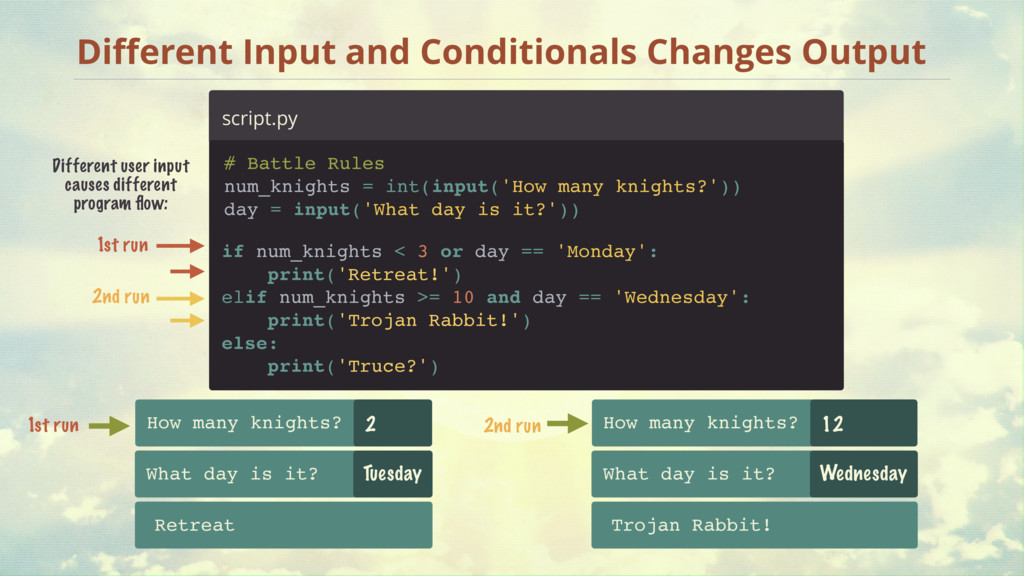
num_knights = int(input('How many knights?')) day = input('What day is it?')) if num_knights < 3 or day == 'Monday': print('Retreat!') elif num_knights >= 10 and day == 'Wednesday': print('Trojan Rabbit!') else: print('Truce?') How many knights? Retreat 2 What day is it? Tuesday 2 How many knights? Trojan Rabbit! 12 What day is it? Wednesday Different user input causes different program flow: 1st run 2nd run 1st run 2nd run
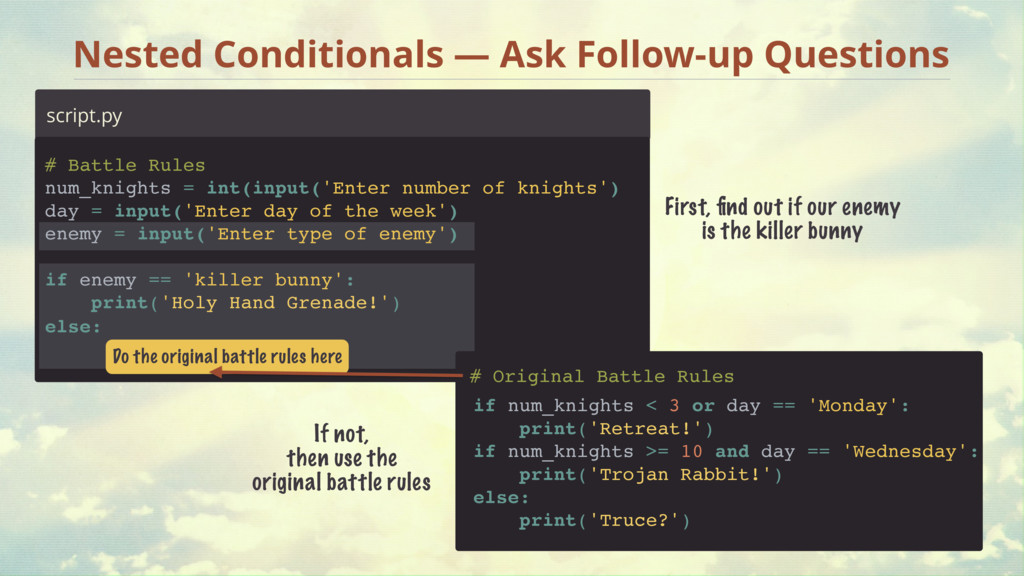
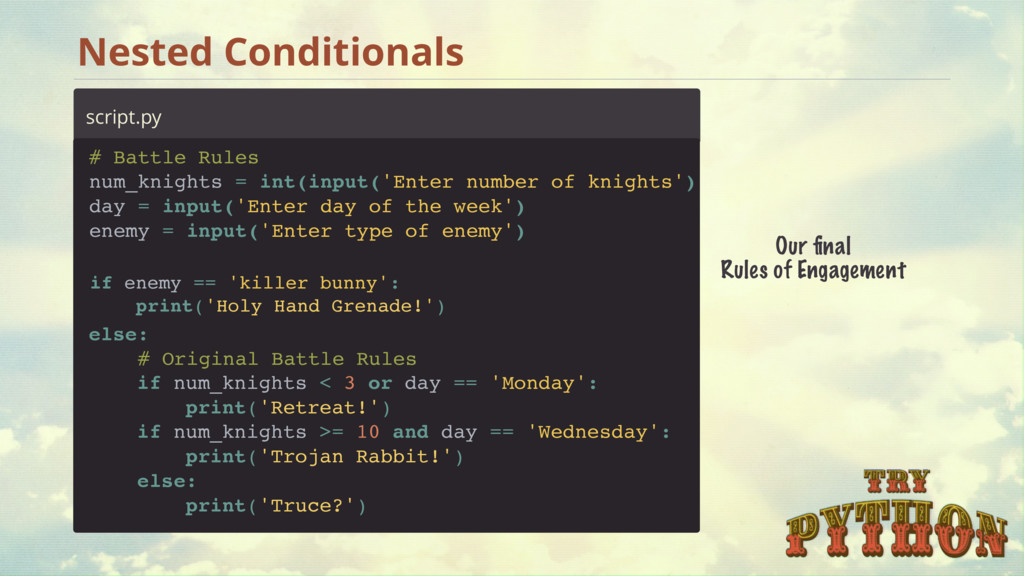
3 or day == 'Monday': print('Retreat!') if num_knights >= 10 and day == 'Wednesday': print('Trojan Rabbit!') else: print('Truce?') # Original Battle Rules First, find out if our enemy is the killer bunny If not, then use the original battle rules Do the original battle rules here # Battle Rules num_knights = int(input('Enter number of knights') day = input('Enter day of the week') enemy = input('Enter type of enemy') else: if enemy == 'killer bunny': print('Holy Hand Grenade!')
Rules num_knights = int(input('Enter number of knights') day = input('Enter day of the week') enemy = input('Enter type of enemy') else: if num_knights < 3 or day == 'Monday': print('Retreat!') if num_knights >= 10 and day == 'Wednesday': print('Trojan Rabbit!') else: print('Truce?') # Original Battle Rules if enemy == 'killer bunny': print('Holy Hand Grenade!')


 xgqfrms
 lx_t
lx_t
 headius
 riku_sakamoto
.jpeg) kaseken
kaseken
 yukiny
 uyuki234
 steliosf
 drumath2237
 yuukiw00w
 yosuke_furukawa
 teyamagu
 reimaru
 tammyeverts
 bkeepers
 notwaldorf
 lara
lara
 sarafernandez
 davidcarrasco
 codingconduct
 lauravandoore
 leimatthew05
 addyosmani
 inesmontani
 tmiket












![word1 = 'Good' end1 = word1[2] + word1[3] print(end1) script.py](https://files.speakerdeck.com/presentations/9206a2abad8f4d559fb69ac9868768d5/slide_40.jpg)
![>>> word = "P y t h o n" [0]](https://files.speakerdeck.com/presentations/9206a2abad8f4d559fb69ac9868768d5/slide_41.jpg)