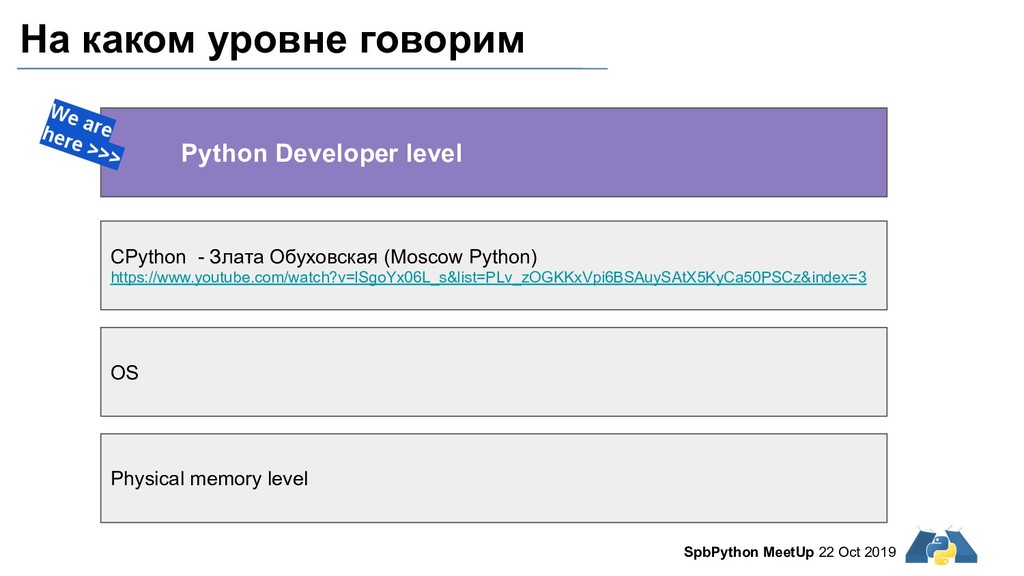
memory level CPython - Злата Обуховская (Moscow Python) https://www.youtube.com/watch?v=lSgoYx06L_s&list=PLv_zOGKKxVpi6BSAuySAtX5KyCa50PSCz&index=3 Python Developer level We are here >>> OS
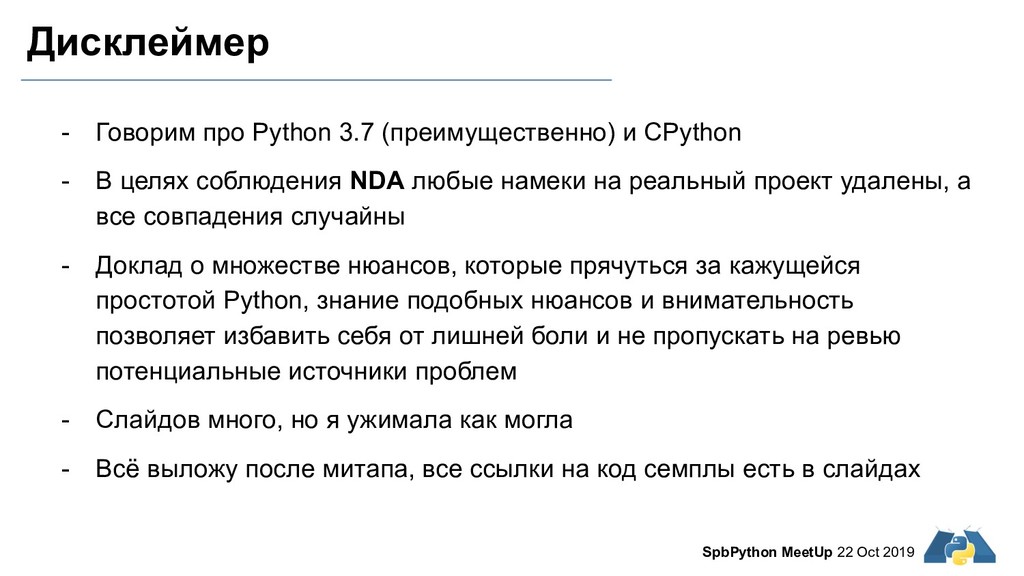
В целях соблюдения NDA любые намеки на реальный проект удалены, а все совпадения случайны - Доклад о множестве нюансов, которые прячуться за кажущейся простотой Python, знание подобных нюансов и внимательность позволяет избавить себя от лишней боли и не пропускать на ревью потенциальные источники проблем - Слайдов много, но я ужимала как могла - Всё выложу после митапа, все ссылки на код семплы есть в слайдах SpbPython MeetUp 22 Oct 2019
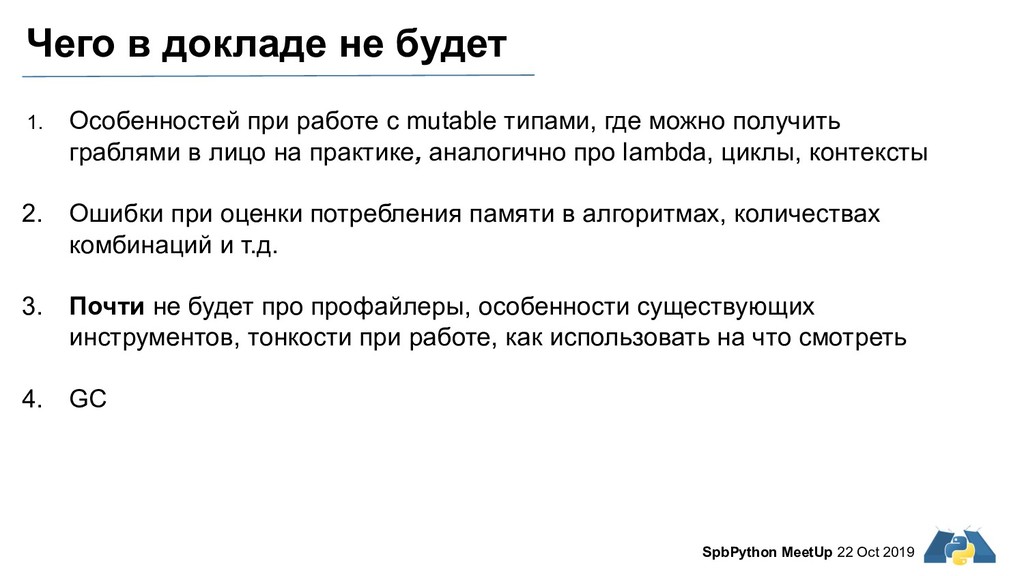
1. Особенностей при работе с mutable типами, где можно получить граблями в лицо на практике, аналогично про lambda, циклы, контексты 2. Ошибки при оценки потребления памяти в алгоритмах, количествах комбинаций и т.д. 3. Почти не будет про профайлеры, особенности существующих инструментов, тонкости при работе, как использовать на что смотреть 4. GC
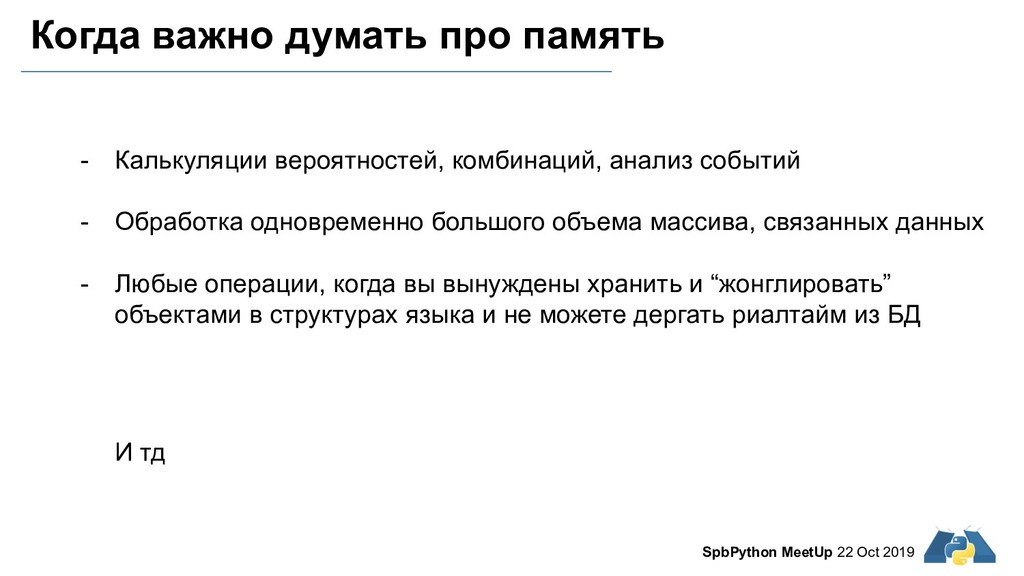
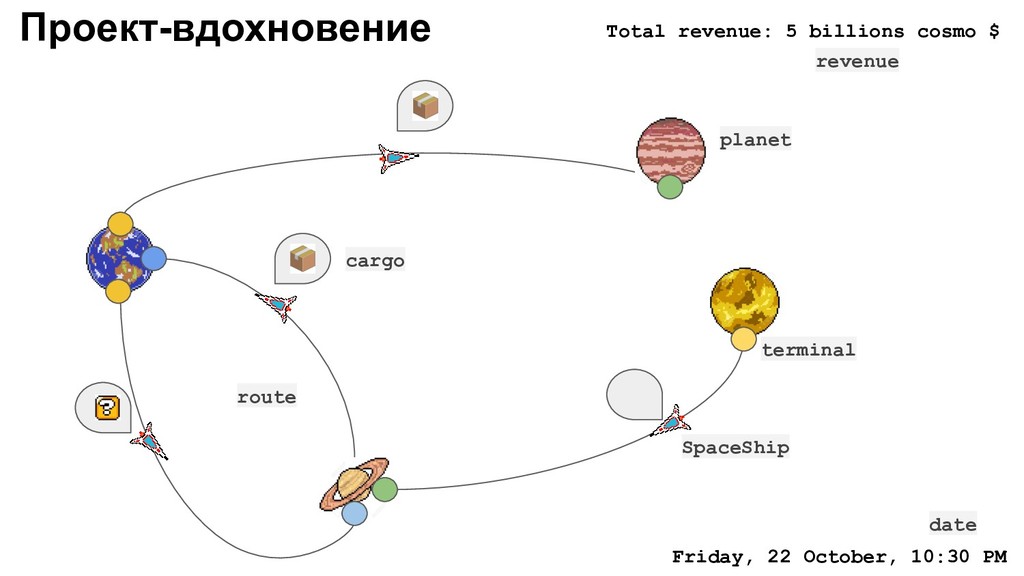
событий - Обработка одновременно большого объема массива, связанных данных - Любые операции, когда вы вынуждены хранить и “жонглировать” объектами в структурах языка и не можете дергать риалтайм из БД И тд SpbPython MeetUp 22 Oct 2019
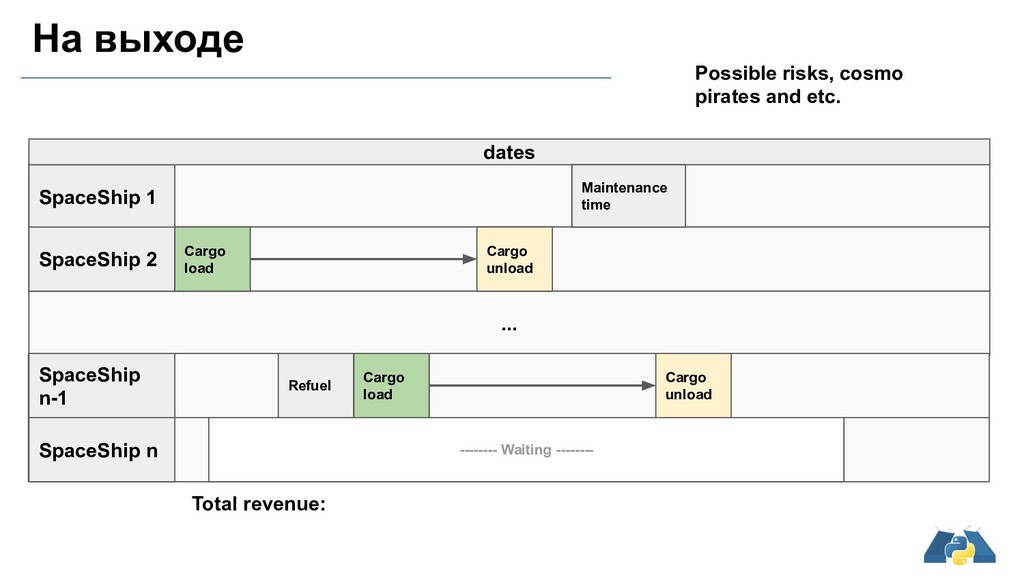
SpaceShip n Cargo load Cargo unload Maintenance time Refuel Cargo load Cargo unload Total revenue: Possible risks, cosmo pirates and etc. -------- Waiting --------
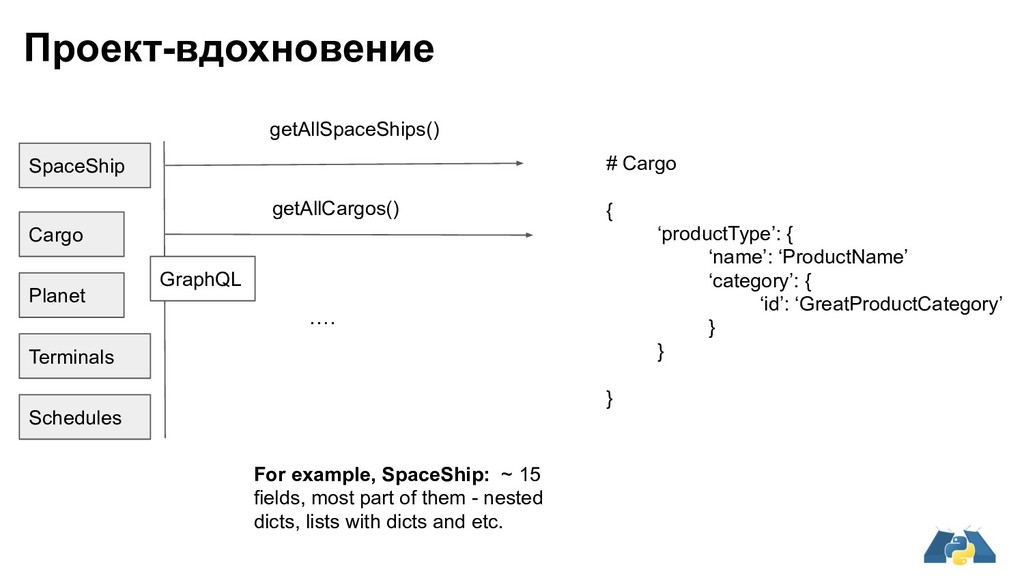
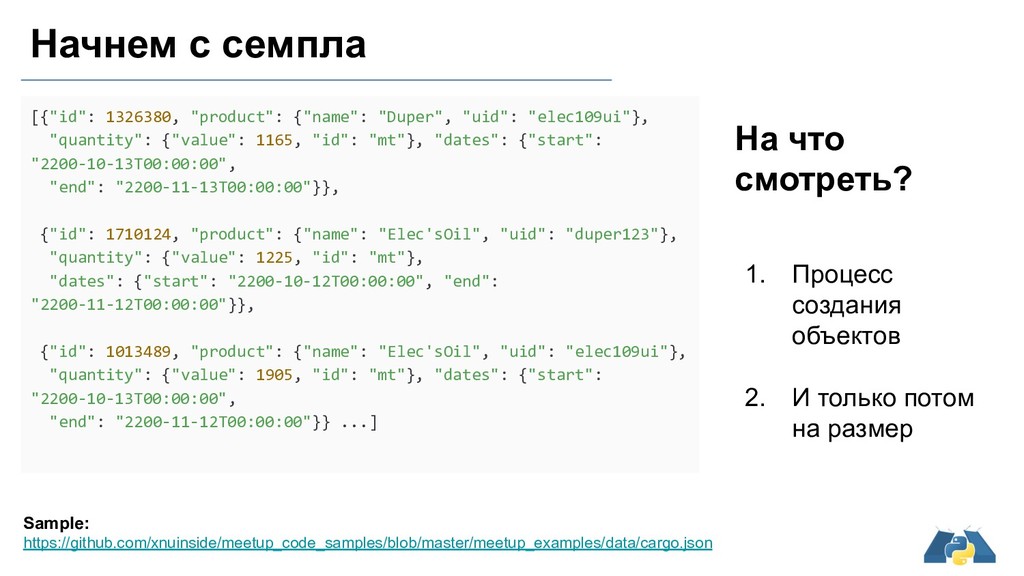
# Cargo { ‘productType’: { ‘name’: ‘ProductName’ ‘category’: { ‘id’: ‘GreatProductCategory’ } } } For example, SpaceShip: ~ 15 fields, most part of them - nested dicts, lists with dicts and etc.
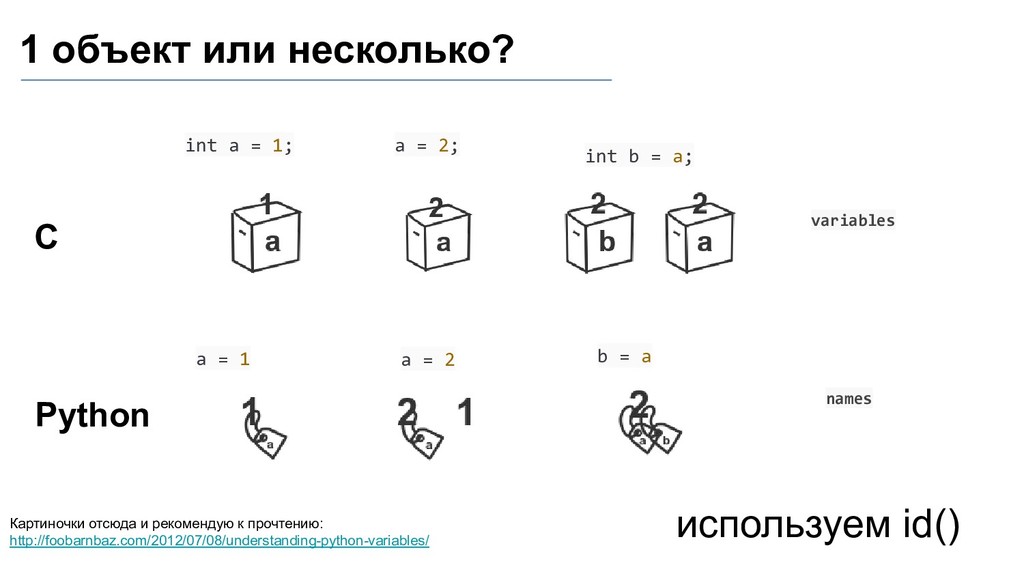
http://foobarnbaz.com/2012/07/08/understanding-python-variables/ int a = 1; С Python variables names используем id() a = 1 a = 2; int b = a; b = a a = 2
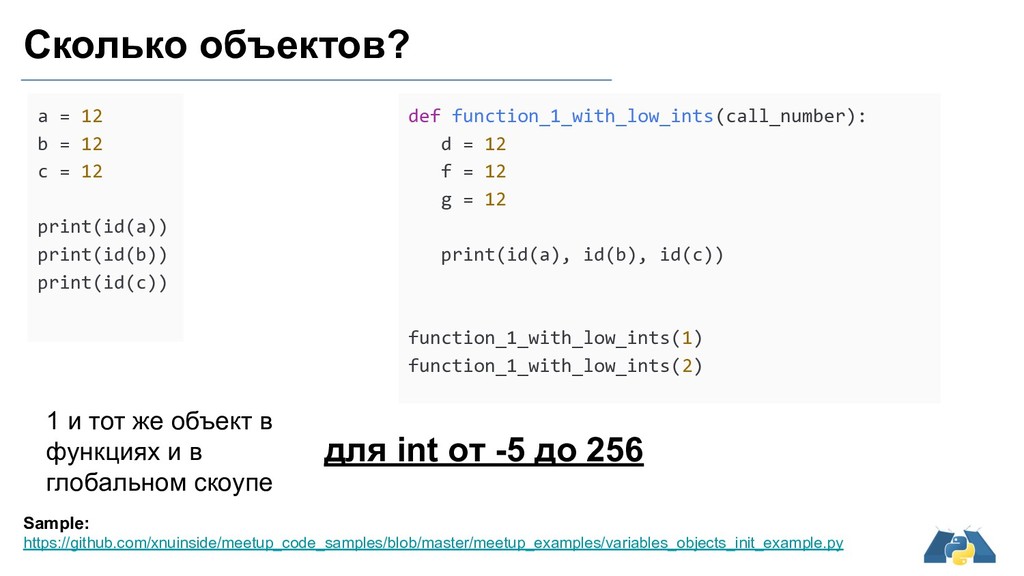
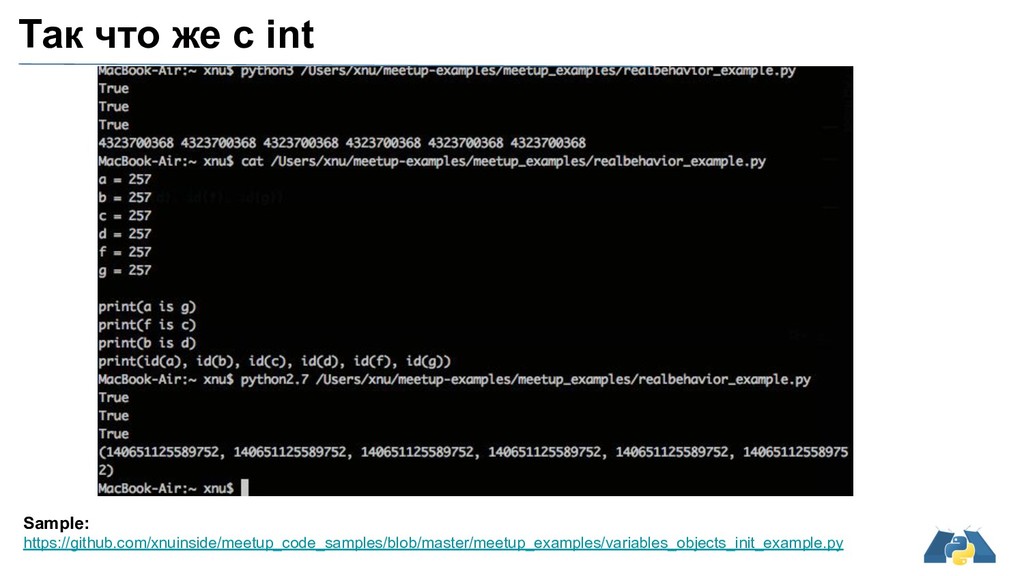
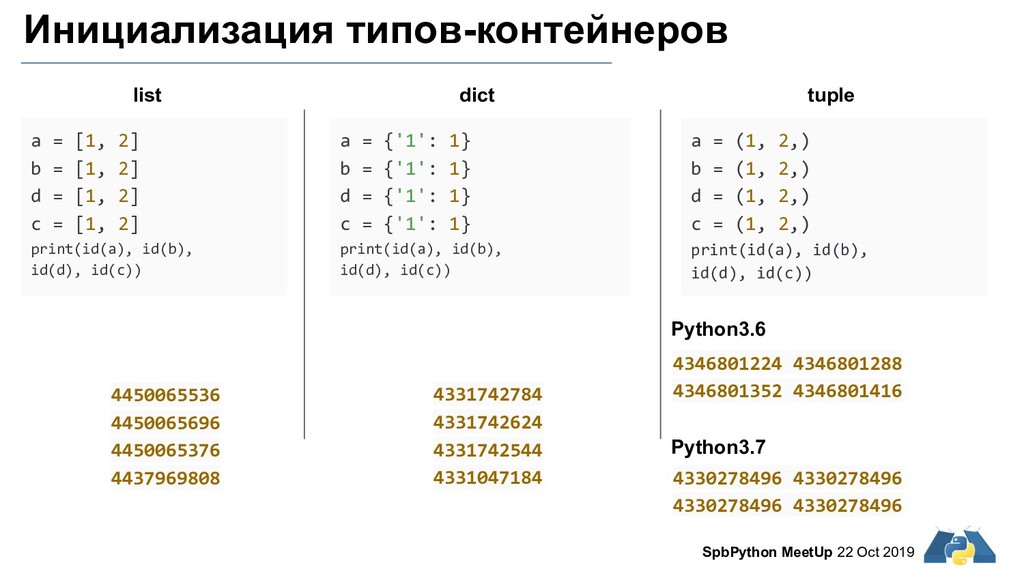
12 print(id(a)) print(id(b)) print(id(c)) 1 и тот же объект в функциях и в глобальном скоупе для int от -5 до 256 Sample: https://github.com/xnuinside/meetup_code_samples/blob/master/meetup_examples/variables_objects_init_example.py def function_1_with_low_ints(call_number): d = 12 f = 12 g = 12 print(id(a), id(b), id(c)) function_1_with_low_ints(1) function_1_with_low_ints(2)
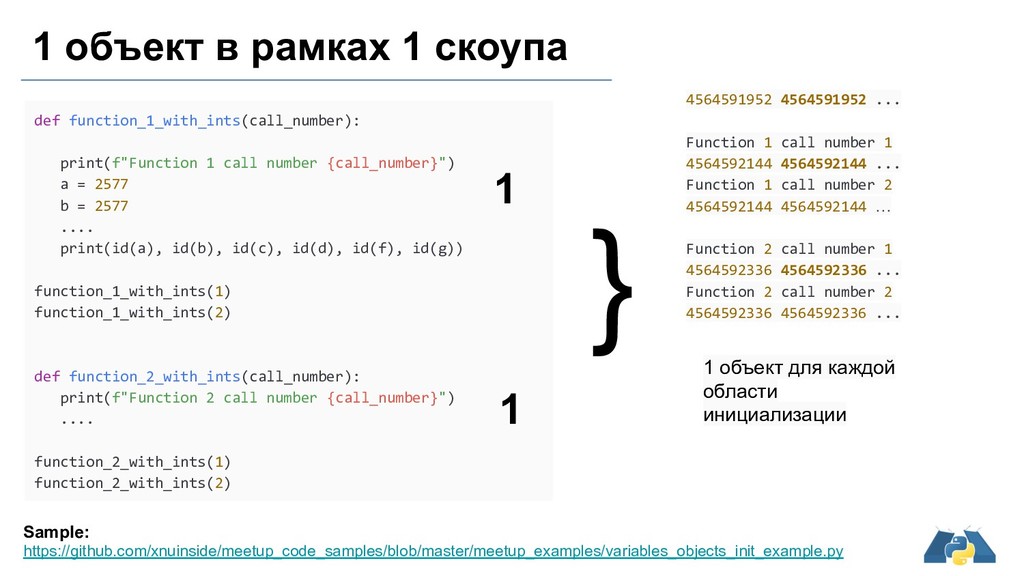
... Function 1 call number 2 4564592144 4564592144 … Function 2 call number 1 4564592336 4564592336 ... Function 2 call number 2 4564592336 4564592336 ... def function_1_with_ints(call_number): print(f"Function 1 call number {call_number}") a = 2577 b = 2577 .... print(id(a), id(b), id(c), id(d), id(f), id(g)) function_1_with_ints(1) function_1_with_ints(2) def function_2_with_ints(call_number): print(f"Function 2 call number {call_number}") .... function_2_with_ints(1) function_2_with_ints(2) Sample: https://github.com/xnuinside/meetup_code_samples/blob/master/meetup_examples/variables_objects_init_example.py 1 объект в рамках 1 скоупа 1 1 } 1 объект для каждой области инициализации
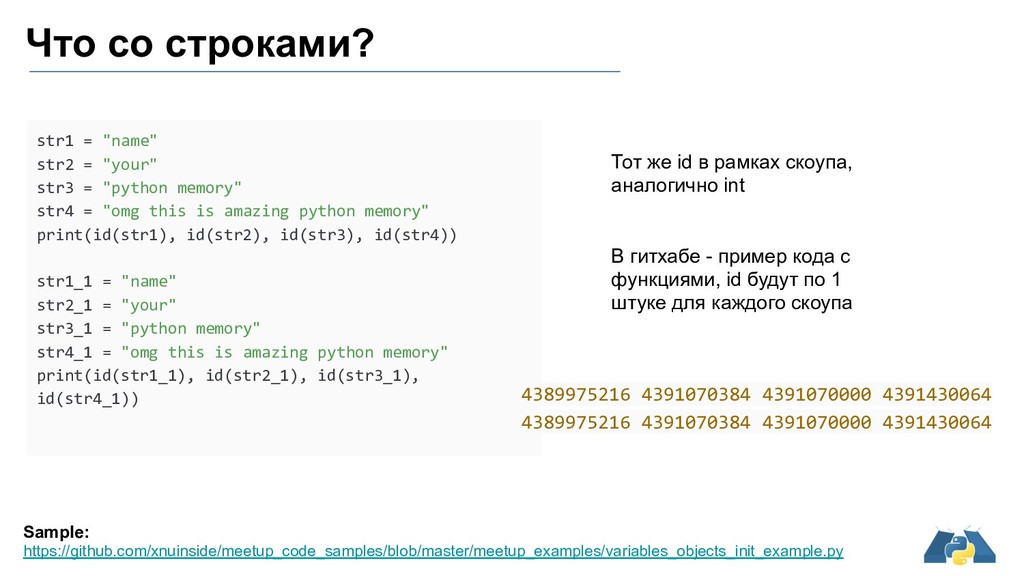
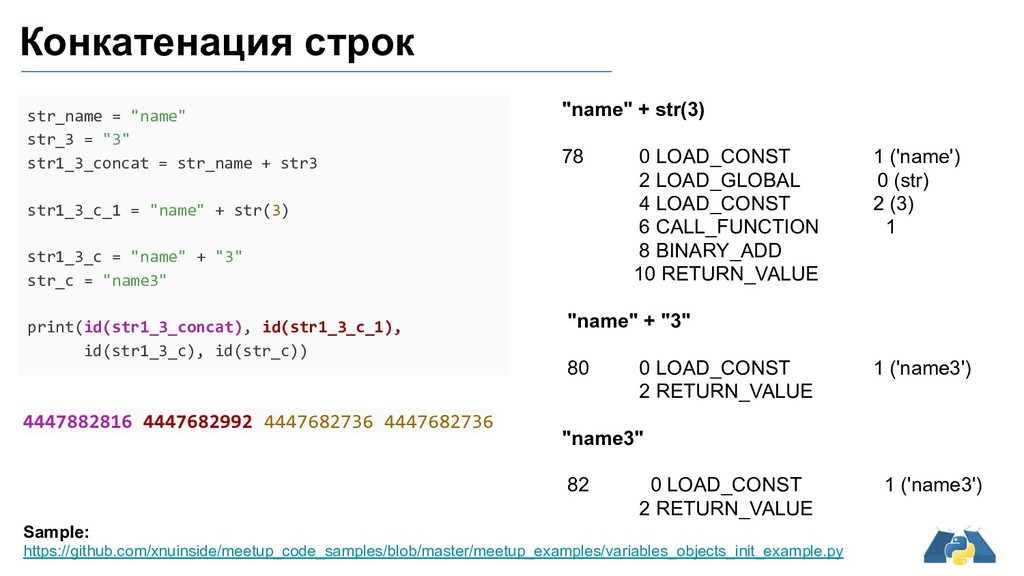
"python memory" str4 = "omg this is amazing python memory" print(id(str1), id(str2), id(str3), id(str4)) str1_1 = "name" str2_1 = "your" str3_1 = "python memory" str4_1 = "omg this is amazing python memory" print(id(str1_1), id(str2_1), id(str3_1), id(str4_1)) Что со строками? 4389975216 4391070384 4391070000 4391430064 4389975216 4391070384 4391070000 4391430064 Тот же id в рамках скоупа, аналогично int В гитхабе - пример кода с функциями, id будут по 1 штуке для каждого скоупа
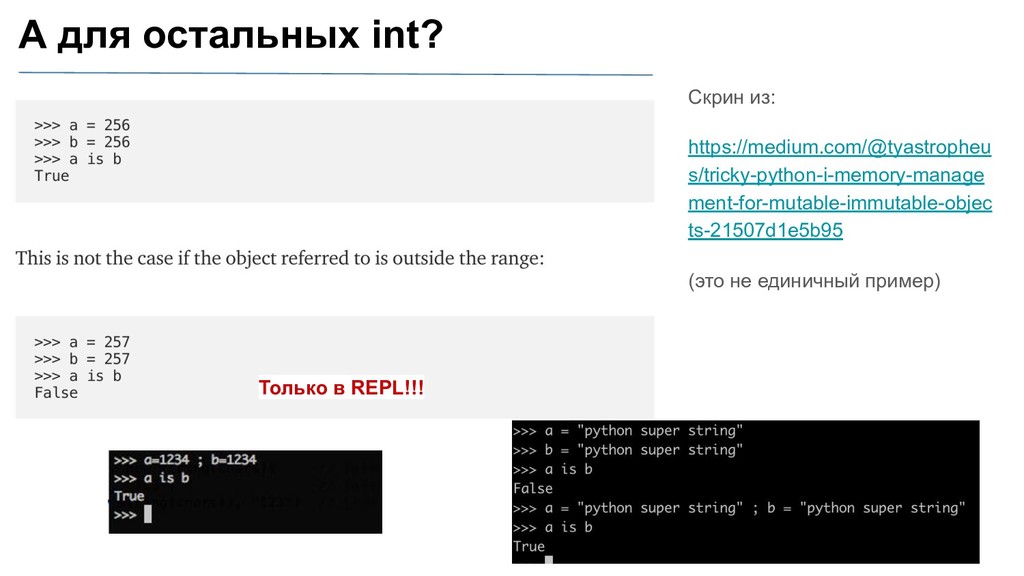
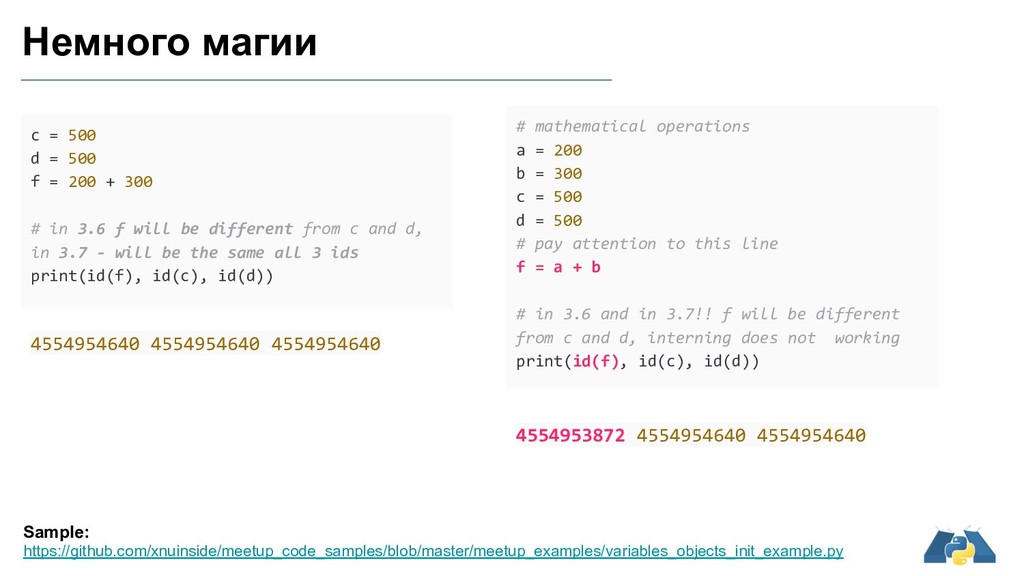
200 + 300 # in 3.6 f will be different from c and d, in 3.7 - will be the same all 3 ids print(id(f), id(c), id(d)) # mathematical operations a = 200 b = 300 c = 500 d = 500 # pay attention to this line f = a + b # in 3.6 and in 3.7!! f will be different from c and d, interning does not working print(id(f), id(c), id(d)) 4554954640 4554954640 4554954640 4554953872 4554954640 4554954640 Sample: https://github.com/xnuinside/meetup_code_samples/blob/master/meetup_examples/variables_objects_init_example.py
'key4': 'very long and strange string', 'key1_1': 1, 'key2_2': 135673, 'key3_3': 'python', 'key4_4': 'very long and strange string'} test_list = ['python', 1, 135673, 1, ['very long and strange string'], 135673, 'very long and strange string', 'very long and strange string', 'python'] 1 4504432400 4504432400 135673 4507093328 4507093328 very long and strange string 4507121184 4507121184 very long and strange string inside nested list 4507121184 python 4507705904 4507705904 very long and strange string 4507121184 4507121184 python 4507705904 4507705904 135673 4507093328 4507093328
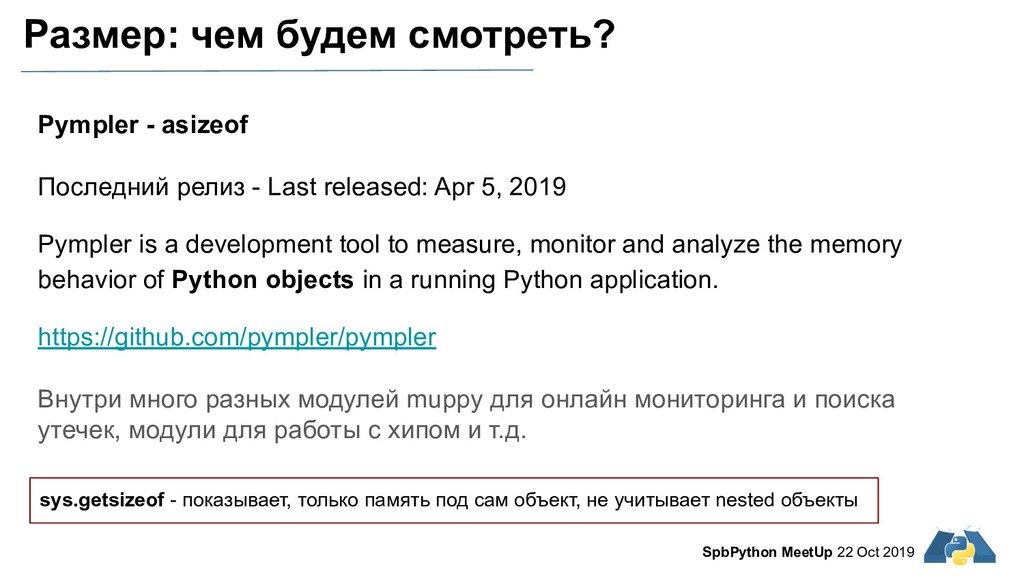
- asizeof Последний релиз - Last released: Apr 5, 2019 Pympler is a development tool to measure, monitor and analyze the memory behavior of Python objects in a running Python application. https://github.com/pympler/pympler Внутри много разных модулей muppy для онлайн мониторинга и поиска утечек, модули для работы с хипом и т.д. sys.getsizeof - показывает, только память под сам объект, не учитывает nested объекты
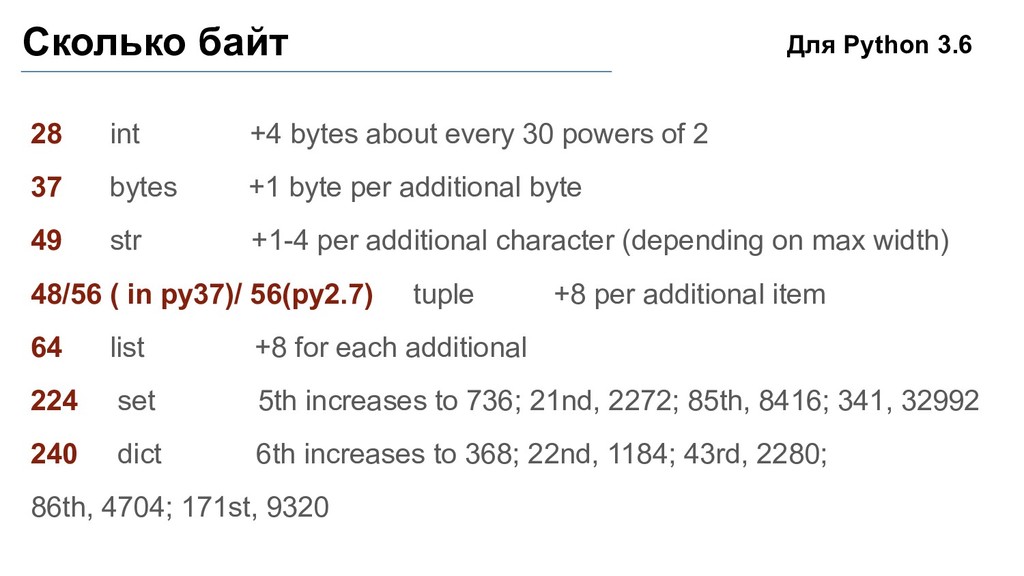
of 2 37 bytes +1 byte per additional byte 49 str +1-4 per additional character (depending on max width) 48/56 ( in py37)/ 56(py2.7) tuple +8 per additional item 64 list +8 for each additional 224 set 5th increases to 736; 21nd, 2272; 85th, 8416; 341, 32992 240 dict 6th increases to 368; 22nd, 1184; 43rd, 2280; 86th, 4704; 171st, 9320 Для Python 3.6
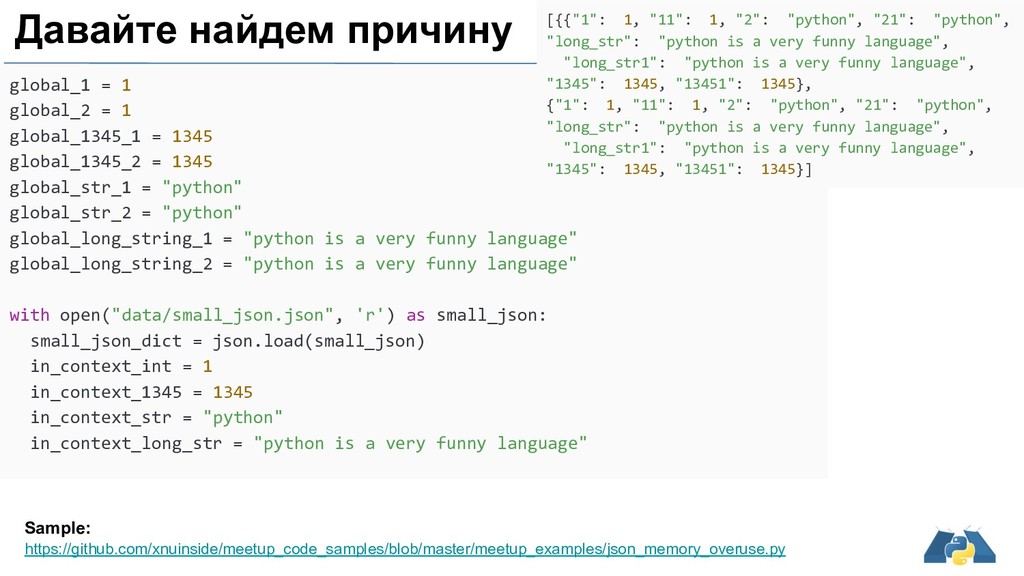
= 1345 global_str_1 = "python" global_str_2 = "python" global_long_string_1 = "python is a very funny language" global_long_string_2 = "python is a very funny language" with open("data/small_json.json", 'r') as small_json: small_json_dict = json.load(small_json) in_context_int = 1 in_context_1345 = 1345 in_context_str = "python" in_context_long_str = "python is a very funny language" Sample: https://github.com/xnuinside/meetup_code_samples/blob/master/meetup_examples/json_memory_overuse.py [{{"1": 1, "11": 1, "2": "python", "21": "python", "long_str": "python is a very funny language", "long_str1": "python is a very funny language", "1345": 1345, "13451": 1345}, {"1": 1, "11": 1, "2": "python", "21": "python", "long_str": "python is a very funny language", "long_str1": "python is a very funny language", "1345": 1345, "13451": 1345}] Давайте найдем причину
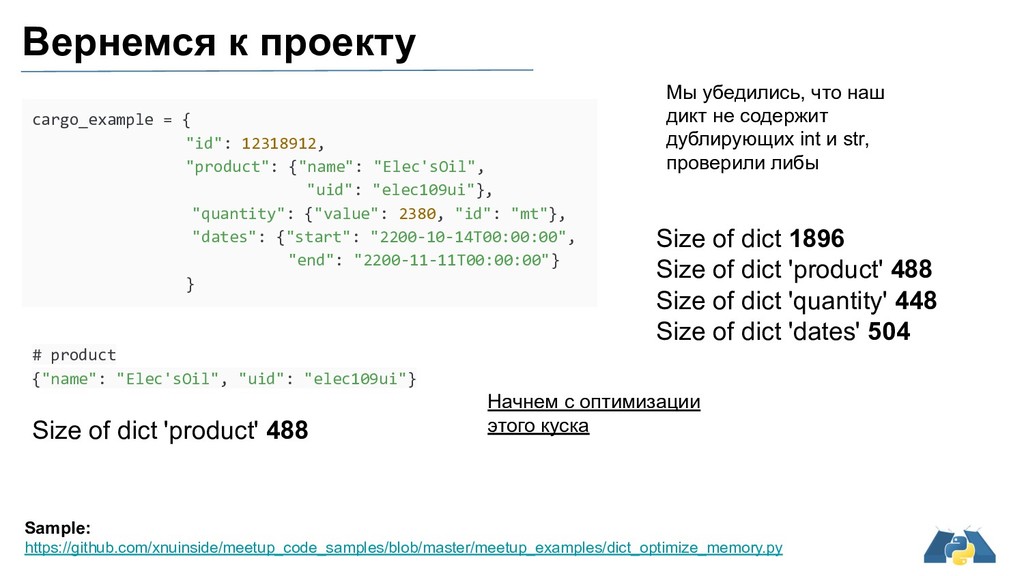
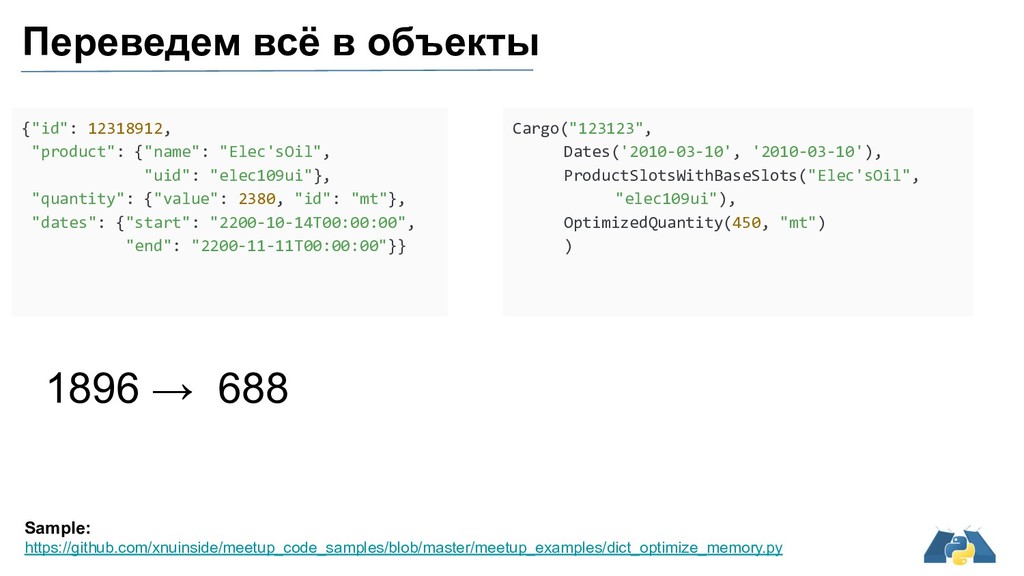
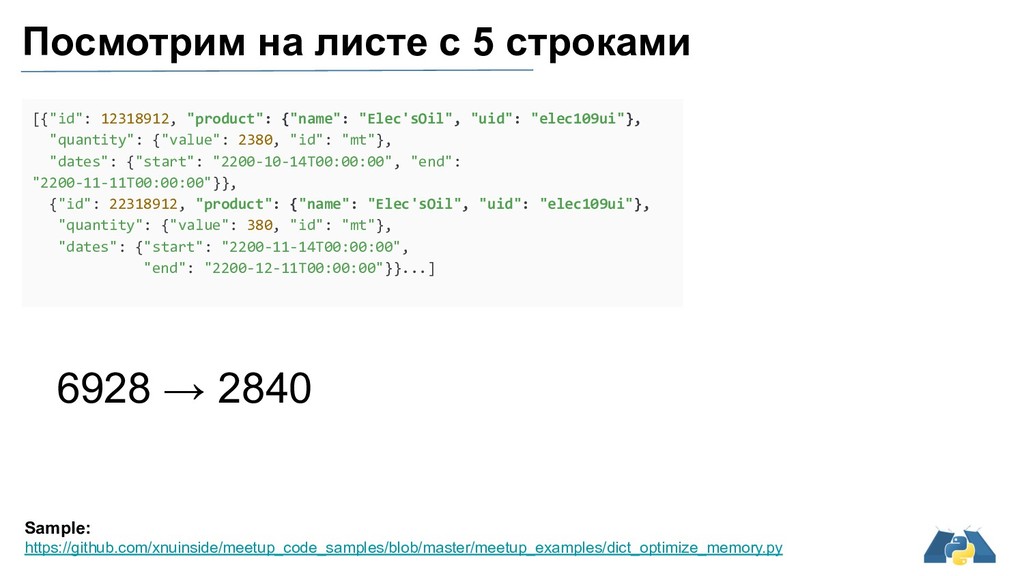
"product": {"name": "Elec'sOil", "uid": "elec109ui"}, "quantity": {"value": 2380, "id": "mt"}, "dates": {"start": "2200-10-14T00:00:00", "end": "2200-11-11T00:00:00"} } Size of dict 1896 Size of dict 'product' 488 Size of dict 'quantity' 448 Size of dict 'dates' 504 # product {"name": "Elec'sOil", "uid": "elec109ui"} Size of dict 'product' 488 Начнем с оптимизации этого куска Мы убедились, что наш дикт не содержит дублирующих int и str, проверили либы
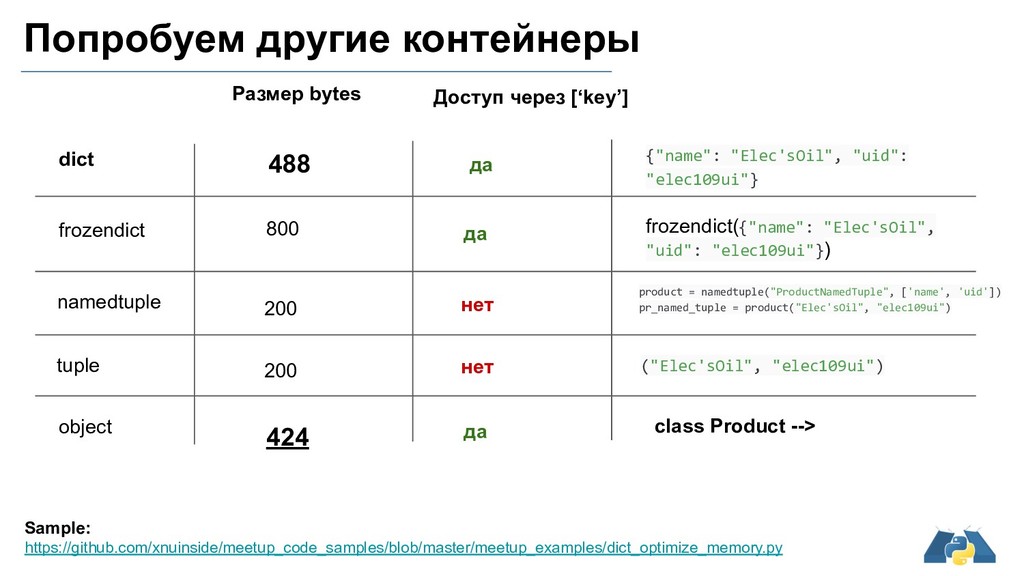
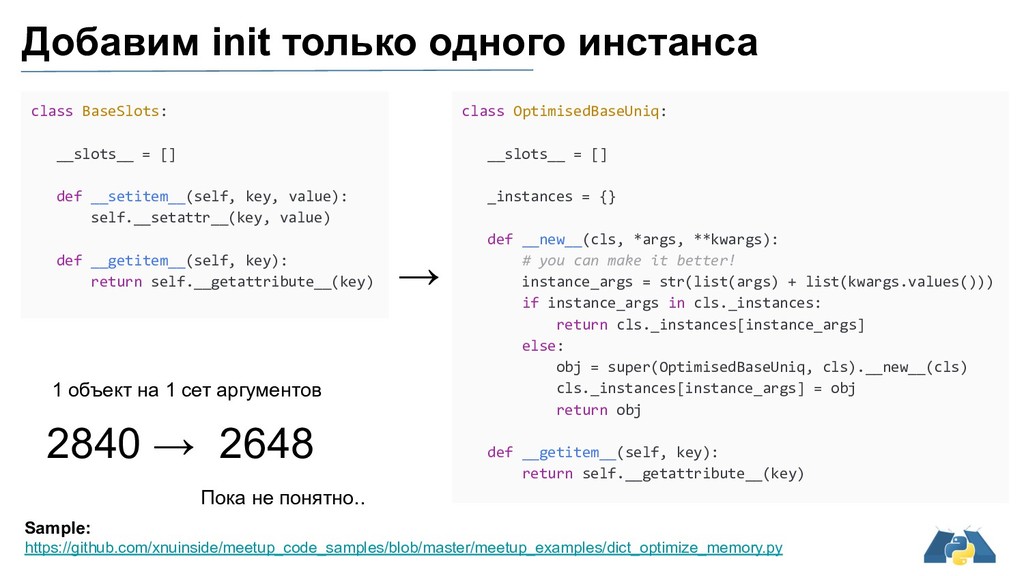
frozendict namedtuple tuple object Размер bytes Доступ через [‘key’] frozendict({"name": "Elec'sOil", "uid": "elec109ui"}) ("Elec'sOil", "elec109ui") да да нет нет 800 да 488 200 200 424 product = namedtuple("ProductNamedTuple", ['name', 'uid']) pr_named_tuple = product("Elec'sOil", "elec109ui") class Product -->
dates def find_product_with_name_dict(): for i in multi_cargo_example: if i['product']['name'] == "Elec'sOil": return i def while_products_all_dates_in_multi_cargo_example(): while cargo_copy_dict: i = cargo_copy_dict.pop() if i['product']['name'] == "Elec'sOil": return i def get_id_in_multi_cargo_example(): for i in multi_cargo_example: return i['id'] Sample: https://github.com/xnuinside/meetup_code_samples/blob/master/meetup_examples/perfomance_test.py Так, стоп, а что с perfomance Find all dates and return list Dict 0.3583587479999999 Object 1.4361160179999999 Find first product with name with for Dict 0.0028282829999999315 Objects by keys 0.011392252999999908 Search first elem with product name == Elec’sOil with while and pop Dict 0.0033425770000001798 Objects by keys 0.004955137000000054 Return id of first element Dict 0.001728861000000137 Objects by keys 0.004175465999999961 10000 runs
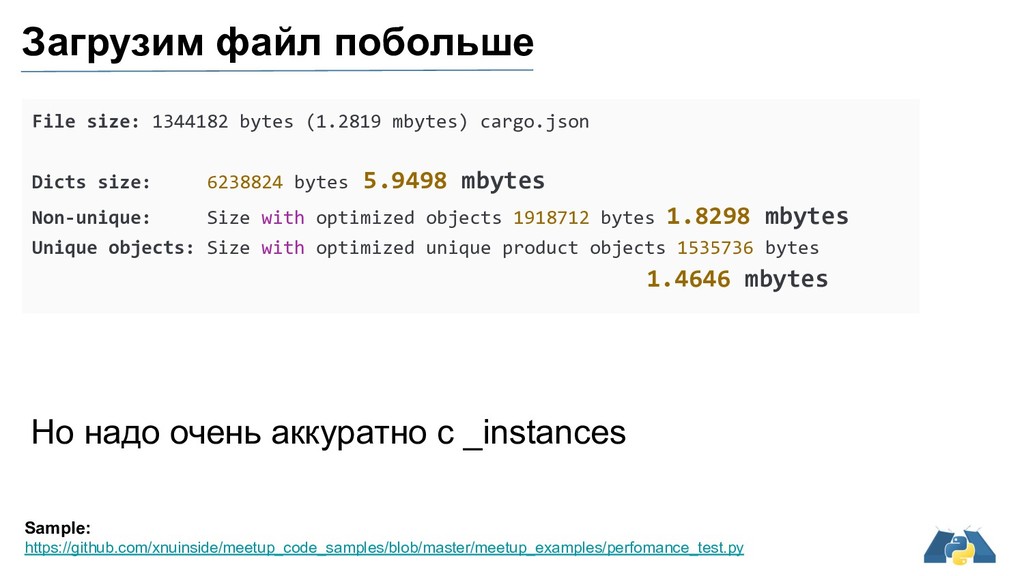
dates def find_first_product_byid_in_optimized(): for i in optimized_multi_cargo_unique_product: if i.product.name == "Elec'sOil": return i def while_all_dates_in_optimized_with_arg(): while cargo_copy_optimized: i = cargo_copy_optimized.pop() if i.product.name == "Elec'sOil": return i def get_id_by_arg_optimized(): for i in optimized_multi_cargo_unique_product: return i.id Sample: https://github.com/xnuinside/meetup_code_samples/blob/master/meetup_examples/perfomance_test.py A если атрибуты Find all dates and return list Dict 0.3583587479999999 Objects by id 0.2514159760000001 Find first product with name with for Dict 0.0028282829999999315 Objects by id 0.0030798729999998997 Search first elem with product name == Elec’sOil with while and pop Dict 0.0033425770000001798 Objects by id 0.0011348099999999306 Return id of first element Dict 0.001728861000000137 Objects by id 0.0015311040000001164 10000 runs
== "Elec'sOil"] def find_first_product_byid_in_optimized_list(): return [i for i in optimized_multi_cargo_unique_product if i.product.name == "Elec'sOil"] Sample: https://github.com/xnuinside/meetup_code_samples/blob/master/meetup_examples/perfomance_test.py А давайте последний тест Find all elems with product == name with for and return list Dict 6.373839168999999 Objects by dict keys 4.485599703 10000 runs
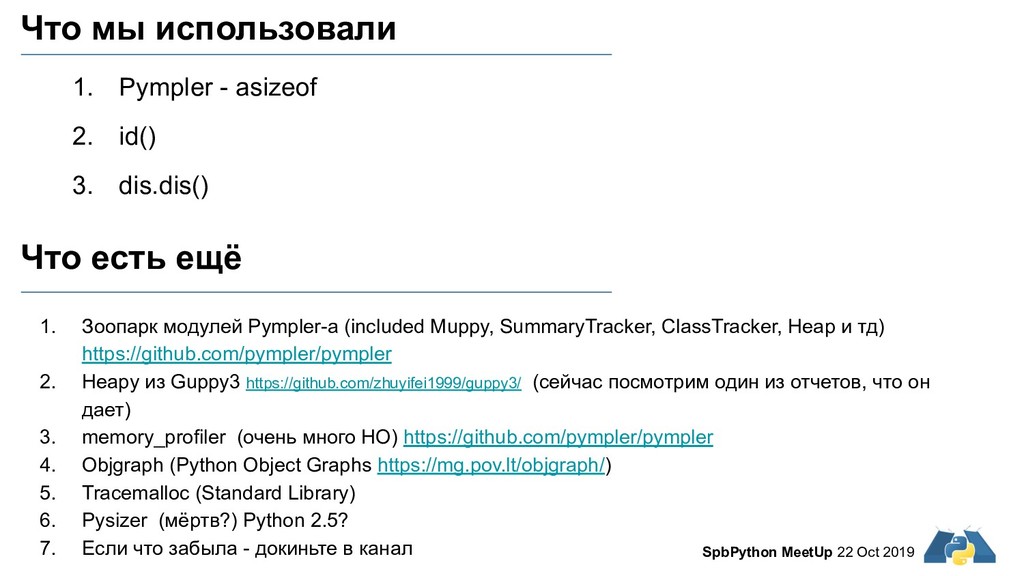
- asizeof 2. id() 3. dis.dis() Что есть ещё 1. Зоопарк модулей Pympler-а (included Muppy, SummaryTracker, ClassTracker, Heap и тд) https://github.com/pympler/pympler 2. Heapy из Guppy3 https://github.com/zhuyifei1999/guppy3/ (сейчас посмотрим один из отчетов, что он дает) 3. memory_profiler (очень много НО) https://github.com/pympler/pympler 4. Objgraph (Python Object Graphs https://mg.pov.lt/objgraph/) 5. Tracemalloc (Standard Library) 6. Pysizer (мёртв?) Python 2.5? 7. Если что забыла - докиньте в канал
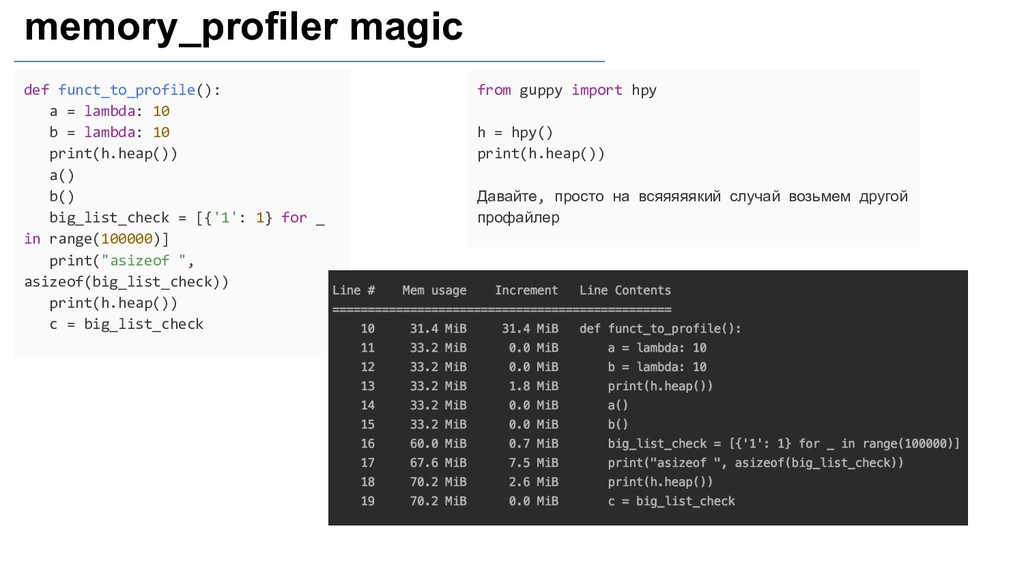
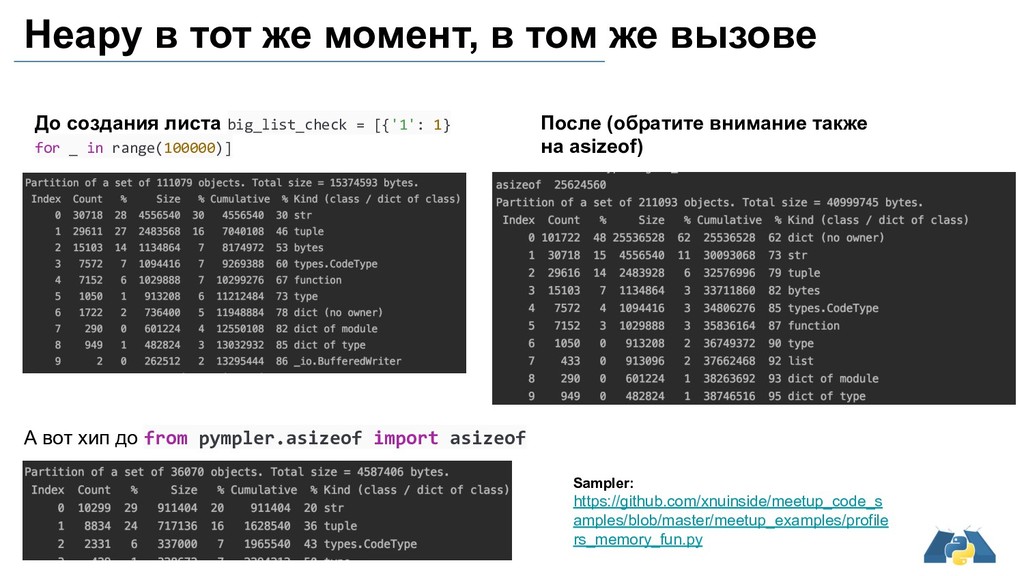
lambda: 10 print(h.heap()) a() b() big_list_check = [{'1': 1} for _ in range(100000)] print("asizeof ", asizeof(big_list_check)) print(h.heap()) c = big_list_check from guppy import hpy h = hpy() print(h.heap()) Давайте, просто на всяяяяякий случай возьмем другой профайлер
создания листа big_list_check = [{'1': 1} for _ in range(100000)] После (обратите внимание также на asizeof) А вот хип до from pympler.asizeof import asizeof Sampler: https://github.com/xnuinside/meetup_code_s amples/blob/master/meetup_examples/profile rs_memory_fun.py
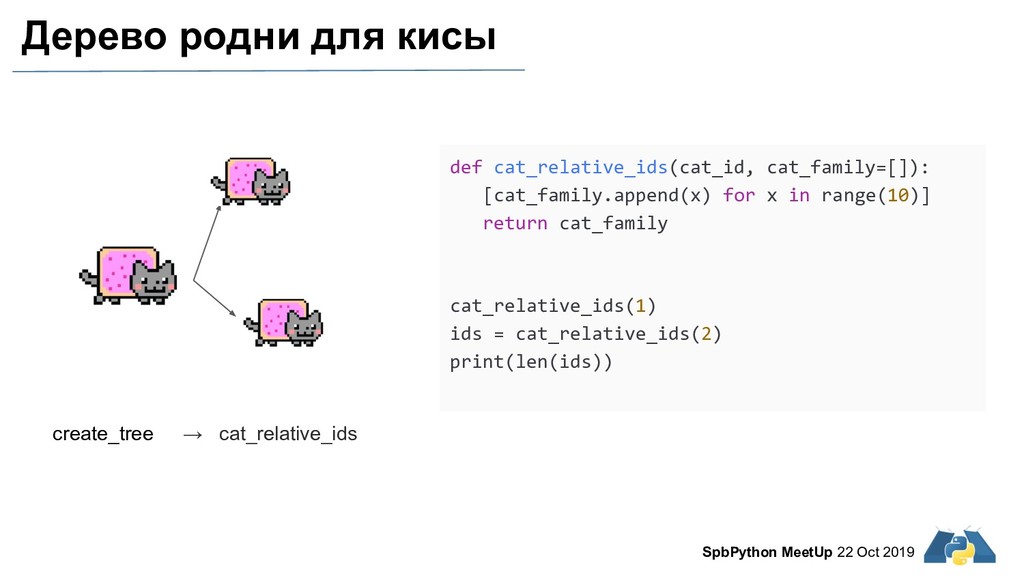
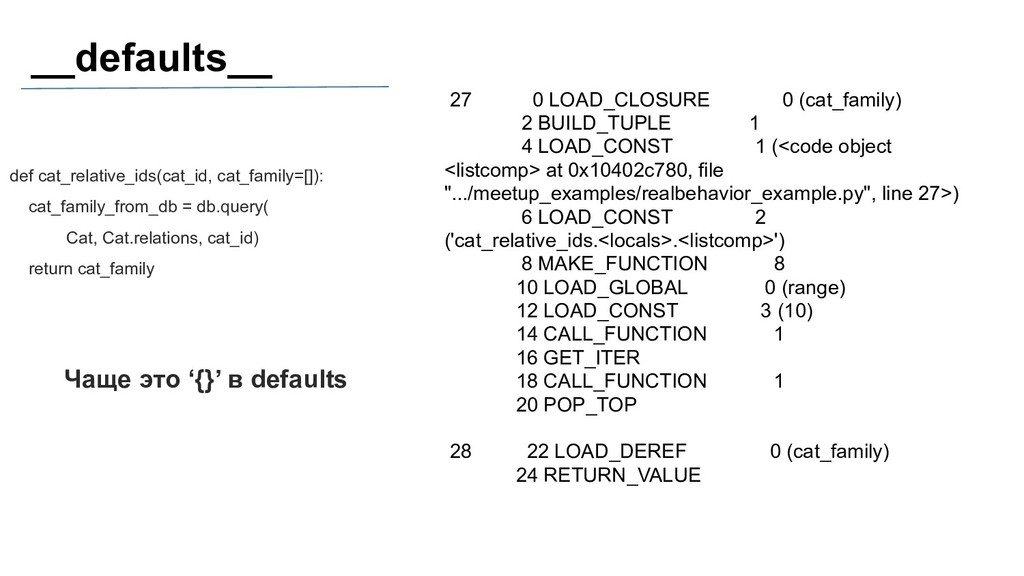
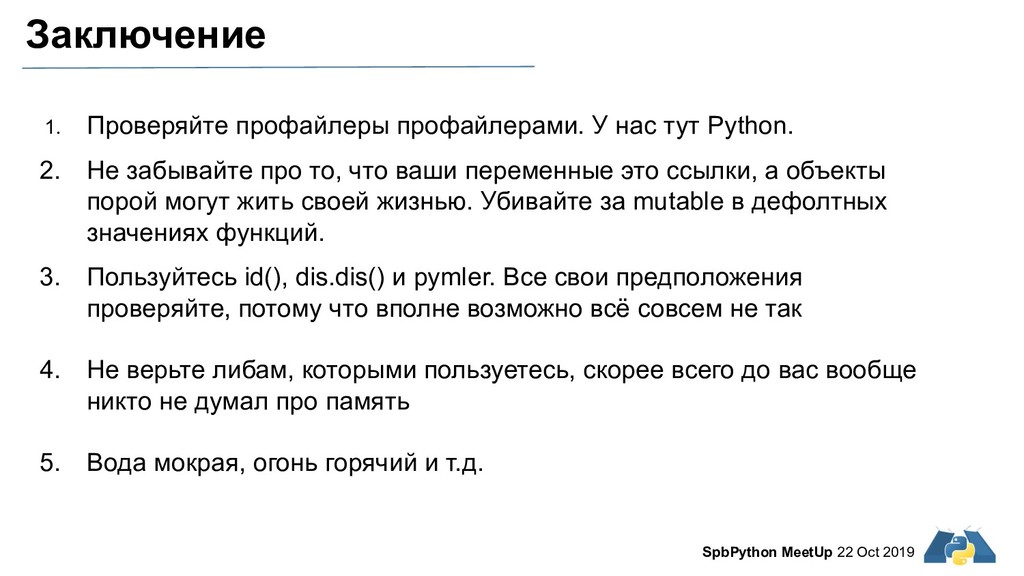
У нас тут Python. 2. Не забывайте про то, что ваши переменные это ссылки, а объекты порой могут жить своей жизнью. Убивайте за mutable в дефолтных значениях функций. 3. Пользуйтесь id(), dis.dis() и pymler. Все свои предположения проверяйте, потому что вполне возможно всё совсем не так 4. Не верьте либам, которыми пользуетесь, скорее всего до вас вообще никто не думал про память 5. Вода мокрая, огонь горячий и т.д.


 xnuinside
 findyinc
 rshindo
 y0hgi
y0hgi
 minodriven
 nao_randd
 suneo3476
 morizo_1984
 yuta_onishi_97
 htkym
htkym
 lef237
 gam0022
 kasacchiful
 holman
 nwiizo
 rakko
rakko
 garrettdimon
 ks91
ks91
 greggifford
 mza
mza
 coloredviolet
 livdayseo
 akashhashmi
 lara
lara
 tammielis

![def find_all_dates_in_multi_cargo_example(): dates = [event['dates'] for event in multi_cargo_example] return](https://files.speakerdeck.com/presentations/c55ece936e8445b88849564397569b81/slide_35.jpg)
![def find_all_dates_in_optimized_access_by_arg(): dates = [event.dates for event in optimized_multi_cargo_unique_product] return](https://files.speakerdeck.com/presentations/c55ece936e8445b88849564397569b81/slide_36.jpg)
![def find_product_with_name_dict_list(): return [i for i in optimized_multi_cargo_unique_product if i['product']['name']](https://files.speakerdeck.com/presentations/c55ece936e8445b88849564397569b81/slide_37.jpg)