Share
Embed
Building A Hosting Platform With Python
A talk I gave at EuroPython 2011
Andrew Godwin
July 20, 2011
Transcript
53 slides
-
Why am I here? Architecture Overview What we use, and
how What did we learn? -
Hardware Real colo'd machines Linode EC2 (pretty unreliable) (pretty reliable)
(pretty reliable) IPv6 (as much as we can) -
Network Internal networks are easy Cross-Atlantic latency is less fun
Variety of different restrictions -
Daemons by the Dozen We have lots of small components
17, as of June 2011 They all need to communicate -
Redundancy, Redundancy, ... It's very important that no site dies.
Everything can be run as a pair HA and backups both needed Cannot rely on a centralised state -
Security User data is paramount Quite a bit of our
code runs as root Permissions, chroot, other isolation VM per site is too much overhead -
Variety Python sites are pretty varied We need other languages
to work too Some things (PostgreSQL vs MySQL) we have to be less flexible on -
Storage We're testing btrfs and GlusterFS One type needed for
app disk images One type needed for app data store (mounted on every app instance) -
What is eventlet? Greenlet-based async/"threading" Multiple hubs (including libevent) Threads
yield cooperatively on any async operations -
Brief Example from eventlet.green import urllib results = {} def
fetch(key, url): # The urlopen call will cooperatively yield results[key] = urllib.urlopen(url).read() for i in range(10): eventlet.spawn(fetch, i, "http://ep.io/%s" % i) # There's also a waitall() method on GreenPools while len(results) < 10: eventlet.sleep(1) -
Standard Classes Eventlet-based daemons Multiple main loops, terminates if any
die Catches any exceptions Logs to stderr and remote syslog -
Daemon Example from ... import BaseDaemon, resilient_loop class Locker(BaseDaemon): main_loops
= ["heartbeat_loop", "lock_loop"] def pre_run(self): # Initialise a dictionary of known locks. self.locks = {} @resilient_loop(1) def heartbeat_loop(self): self.send_heartbeat( self.lock_port, "locker-lock", ) -
Greening The World You must use greenlet-friendly libraries Others will
work, but just block Eventlet supports most of stdlib Can monkeypatch to support other modules -
We're Not In Kansas Anymore You can still have race
conditions Ungreened modules block everything Some combiantions have odd bugs (unpatched Django & psycopg2) -
Still, it's really useful We've had upwards of 10,000 threads
multiprocessing falls over at that level eventlet is easier to use than threading (much less chance of race conditions) -
The Beginning Everything in Redis No, really - app disk
images too Disk images quickly moved to, uh, disk -
February - March Doing lots of filtering "queries" Moved user
info, permissions to Postgres App info, messaging still there -
Recently App info moved to Postgres Messaging moved to ZeroMQ
Not used by backend any more -
Why? It's a great database/store, but not for us We
may revisit once we get PGSQL issues Looking forward to Redis Cluster -
What is ZeroMQ? It's NOT a message queue Basically high-level
sockets Comes in many delicious flavours: PUB/SUB REQ/REP PUSH/PULL XREQ/XREP PAIR -
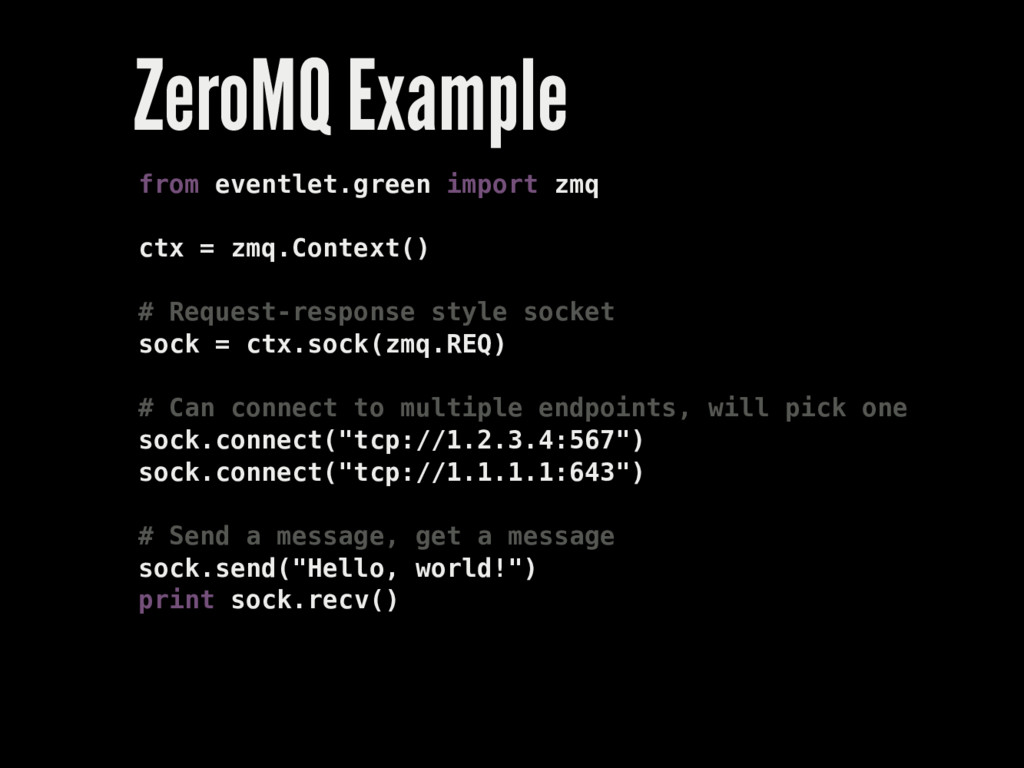
ZeroMQ Example from eventlet.green import zmq ctx = zmq.Context() #
Request-response style socket sock = ctx.sock(zmq.REQ) # Can connect to multiple endpoints, will pick one sock.connect("tcp://1.2.3.4:567") sock.connect("tcp://1.1.1.1:643") # Send a message, get a message sock.send("Hello, world!") print sock.recv() -
How do we use it? Mostly REQ/XREP Custom @zmq_loop decorator
JSON + security measures -
zmq_loop example from ... import BaseDaemon, zmq_loop class SomeDaemon(BaseDaemon): main_loops
= ["query_loop", "stats_loop"] port = 1234 @zmq_loop(zmq.XREP, "port") def query_loop(data): return {"error": "Only a slide demo!"} @zmq_loop(zmq.PULL, "stats_port") def stats_loop(data): # PULL is one-way, so no return data print data -
Other Nice ZeroMQ things Eventlet supports it, quite well Can
use TCP, PGM, or in-process comms Can be faster than raw messages on TCP Doesn't care if your network isn't up yet -
What is a PTY? It's a process-controllable terminal Used for
SSH, etc. We needed them for interactivity -
Attempt One Just run processes in subprocess Great, until you
want to be interactive Some programs insist on a terminal -
Attempt Two Python has a pty module! Take the raw
OS filehandles Try to make it greenlet-compatible Works! Most of the time... -
Greened pty example def run(self): # First, fork to a
new PTY. gc.disable() try: pid, fd = pty.fork() except: gc.enable() raise # If we're the child, run our program. if pid == 0: self.run_child() # Otherwise, do parent stuff else: gc.enable() ... -
Greened pty example fcntl.fcntl(self.fd, fcntl.F_SETFL, os.O_NONBLOCK) # Call IO greenthreads
in_thread = eventlet.spawn(self.in_thread) out_thread = eventlet.spawn(self.out_thread) out_thread.wait() out_thread.kill() # Wait for process to terminate rpid = 0 while rpid == 0: rpid, status = os.waitpid(self.pid, 0) eventlet.sleep(0.01) in_thread.wait() in_thread.kill() os.close(self.fd) -
Attempt Three Use subprocess, but with a wrapper Wrapper exposes
pty over stdin/stdout Significantly more reliable -
The resource module Lets you set file handle, nproc, etc.
limits Lets you discover limits, too -
The signal module Want to catch Ctrl-C in a sane
way? We use it to quit cleanly on SIGTERM Can set handlers for most signals -
The atexit module Not terribly useful most of the time
Used in our command-line admin client -
The shlex module Implements a shell-like lexer shlex.split("command string") gives
you arguments for os.exec -
The fcntl module The portal to a dark world of
Unix We use it for fiddling blocking modes Also contains leases, signals, dnotify, creation flags, and pipe fiddling -
Adopting fresh technologies can be a pain. Eventlet, ZeroMQ, new
Redis are all young OS packaging and bugs not always fully worked out. -
Don't reinvent the wheel, or optimize prematurely. Old advice, but
still good. You really don't want to solve things the kernel solves already. -
Reinvent the wheel, occasionally Don't necessarily use it Helps you
to understand the problem Sometimes it's better (e.g. our balancer) -
Python is really very capable It's easy to develop and
maintain It's not too slow for most jobs There's always PyPy...