Upgrade to Pro — share decks privately, control downloads, hide ads and more …

Constraint Layout - Designing better UI

Sponsored · Ship Features Fearlessly Turn features on and off without deploys. Used by thousands of Ruby developers.

Constraint Layout - Designing better UI

Implementing the best user experience should be one of the main concerns for an android developer. The user interface represents the first interaction a user has with the app and even though it must look nice, it should also have the best performance.
In this talk you will learn:
– the basic concepts about Constraint Layout
– how to convert challenging layouts into simpler ones using Constraint Layout and analyzing their performance
– animating views inside Constraint Layout
By the end of the talk, I hope, you will be more confident to write layouts using constraints or converting your current ones (where it makes sense).

Avatar for Andrei Bacalu

Andrei Bacalu

September 20, 2018
Tweet

More Decks by Andrei Bacalu

Other Decks in Programming

Transcript

  1. Why? Flexible Flat hierarchy Unbundled (com.android.support.constraint:constraint-layout:2.0.0-alpha2) Visual editor Performance Flexible

    Flat hierarchy Unbundled (com.android.support.constraint:constraint-layout:2.0.0-alpha2) Visual editor Performance depends
  2. Relative positioning Centering positioning Circular positioning Bias Dimension constraints Chains

    Virtual helpers Animations Features (+constraint-layout:2.0.0-alpha2)
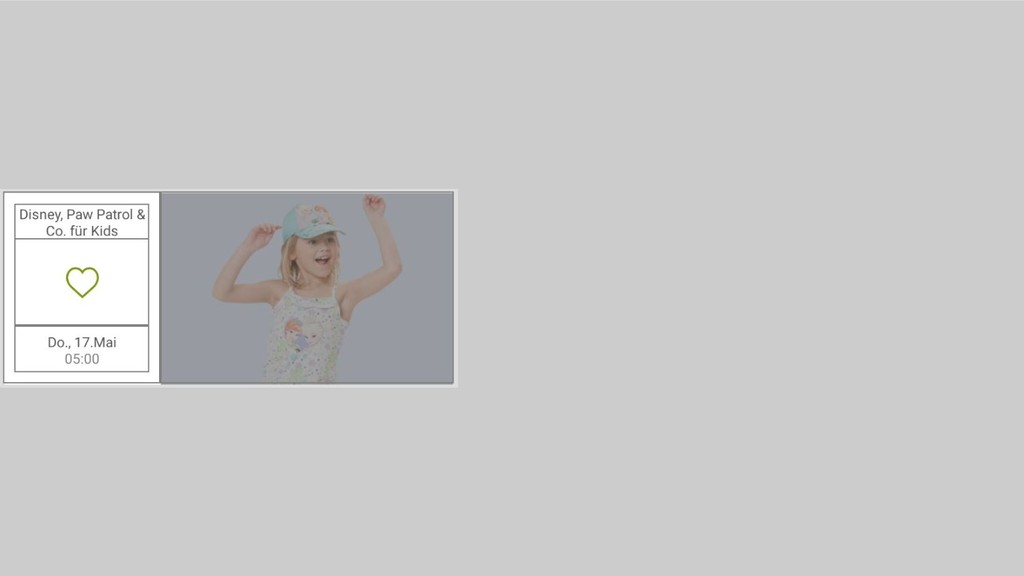
  3. <android.support.v7.widget.CardView> <FrameLayout> <LinearLayout android:orientation="horizontal"> <LinearLayout android:orientation="vertical" android:layout_weight="0.35"> <TextView/> <ImageView/> <TextView/>

    </LinearLayout> <RelativeLayout android:layout_weight="0.65"> </RelativeLayout> <LinearLayout> </FrameLayout> </android.support.v7.widget.CardView>
  4. <android.support.v7.widget.CardView> <FrameLayout> <LinearLayout android:orientation="horizontal"> <LinearLayout android:orientation="vertical" android:layout_weight="0.35"> <TextView/> <ImageView/> <TextView/>

    </LinearLayout> <RelativeLayout android:layout_weight="0.65"> <RelativeLayout> <FrameLayout> <ImageView/> </FrameLayout> <ImageView android:visibility="gone"/> </RelativeLayout> </RelativeLayout> <LinearLayout> </FrameLayout> </android.support.v7.widget.CardView>
  5. <android.support.v7.widget.CardView> <FrameLayout> <LinearLayout android:orientation="horizontal"> <LinearLayout android:orientation="vertical" android:layout_weight="0.35"> <TextView/> <ImageView/> <TextView/>

    </LinearLayout> <RelativeLayout android:layout_weight="0.65"> <RelativeLayout> <FrameLayout> <ImageView/> </FrameLayout> <ImageView android:visibility="gone"/> </RelativeLayout> <RelativeLayout> <ImageView android:background="@drawable/ic_close"/> <TextView android:id="@+id/brands_description"/> <TextView android:id="@+id/first_brand"/> <RelativeLayout android:id="@+id/second_brand_layout"> <View android:id="@+id/first_brand_divider"/> <TextView android:id="@+id/second_brand"/> </RelativeLayout> <RelativeLayout android:id="@+id/third_brand_layout"> <View android:id="@+id/second_brand_divider"/> <TextView android:id="@+id/third_brand"/> </RelativeLayout> </RelativeLayout> </RelativeLayout> <LinearLayout> </FrameLayout> </android.support.v7.widget.CardView>
  6. <android.support.constraint.ConstraintLayout> <LinearLayout android:orientation="vertical" android:layout_weight="0.35"> <TextView/> <ImageView/> <TextView/> </LinearLayout> <RelativeLayout android:layout_weight="0.65">

    <RelativeLayout> <FrameLayout> <ImageView/> </FrameLayout> <ImageView android:visibility="gone"/> </RelativeLayout> <RelativeLayout> <ImageView android:background="@drawable/ic_close"/> <TextView android:id="@+id/brands_description"/> <TextView android:id="@+id/first_brand"/> <RelativeLayout android:id="@+id/second_brand_layout"> <View android:id="@+id/first_brand_divider"/> <TextView android:id="@+id/second_brand"/> </RelativeLayout> <RelativeLayout android:id="@+id/third_brand_layout"> <View android:id="@+id/second_brand_divider"/> <TextView android:id="@+id/third_brand"/> </RelativeLayout> </RelativeLayout> </RelativeLayout> </android.support.constraint.ConstraintLayout> <android.support.v7.widget.CardView> <FrameLayout> <LinearLayout android:orientation="horizontal"> <LinearLayout android:orientation="vertical" android:layout_weight="0.35"> <TextView/> <ImageView/> <TextView/> </LinearLayout> <RelativeLayout android:layout_weight="0.65"> <RelativeLayout> <FrameLayout> <ImageView/> </FrameLayout> <ImageView android:visibility="gone"/> </RelativeLayout> <RelativeLayout> <ImageView android:background="@drawable/ic_close"/> <TextView android:id="@+id/brands_description"/> <TextView android:id="@+id/first_brand"/> <RelativeLayout android:id="@+id/second_brand_layout"> <View android:id="@+id/first_brand_divider"/> <TextView android:id="@+id/second_brand"/> </RelativeLayout> <RelativeLayout android:id="@+id/third_brand_layout"> <View android:id="@+id/second_brand_divider"/> <TextView android:id="@+id/third_brand"/> </RelativeLayout> </RelativeLayout> </RelativeLayout> <LinearLayout> </FrameLayout> </android.support.v7.widget.CardView> <android.support.v7.widget.CardView> <FrameLayout> <LinearLayout android:orientation="horizontal"> <LinearLayout android:orientation="vertical" android:layout_weight="0.35"> <TextView/> <ImageView/> <TextView/> </LinearLayout> <RelativeLayout android:layout_weight="0.65"> <RelativeLayout> <FrameLayout> <ImageView/> </FrameLayout> <ImageView android:visibility="gone"/> </RelativeLayout> <RelativeLayout> <ImageView android:background="@drawable/ic_close"/> <TextView android:id="@+id/brands_description"/> <TextView android:id="@+id/first_brand"/> <RelativeLayout android:id="@+id/second_brand_layout"> <View android:id="@+id/first_brand_divider"/> <TextView android:id="@+id/second_brand"/> </RelativeLayout> <RelativeLayout android:id="@+id/third_brand_layout"> <View android:id="@+id/second_brand_divider"/> <TextView android:id="@+id/third_brand"/> </RelativeLayout> </RelativeLayout> </RelativeLayout> <LinearLayout> </FrameLayout> </android.support.v7.widget.CardView>
  7. Guideline • layout_constraintGuide_begin • layout_constraintGuide_end • layout_constraintGuide_percent <android.support.constraint.ConstraintLayout> <LinearLayout android:orientation="vertical"

    android:layout_weight="0.35"> <TextView/> <ImageView/> <TextView/> </LinearLayout> <RelativeLayout android:layout_weight="0.65"> <RelativeLayout> <FrameLayout> <ImageView/> </FrameLayout> <ImageView android:visibility="gone"/> </RelativeLayout> <RelativeLayout> <ImageView android:background="@drawable/ic_close"/> <TextView android:id="@+id/brands_description"/> <TextView android:id="@+id/first_brand"/> <RelativeLayout android:id="@+id/second_brand_layout"> <View android:id="@+id/first_brand_divider"/> <TextView android:id="@+id/second_brand"/> </RelativeLayout> <RelativeLayout android:id="@+id/third_brand_layout"> <View android:id="@+id/second_brand_divider"/> <TextView android:id="@+id/third_brand"/> </RelativeLayout> </RelativeLayout> </RelativeLayout> </android.support.constraint.ConstraintLayout> <android.support.constraint.ConstraintLayout> <LinearLayout android:orientation="vertical" android:layout_weight="0.35"> <TextView/> <ImageView/> <TextView/> </LinearLayout> <RelativeLayout android:layout_weight="0.65"> <RelativeLayout> <FrameLayout> <ImageView/> </FrameLayout> <ImageView android:visibility="gone"/> </RelativeLayout> <RelativeLayout> <ImageView android:background="@drawable/ic_close"/> <TextView android:id="@+id/brands_description"/> <TextView android:id="@+id/first_brand"/> <RelativeLayout android:id="@+id/second_brand_layout"> <View android:id="@+id/first_brand_divider"/> <TextView android:id="@+id/second_brand"/> </RelativeLayout> <RelativeLayout android:id="@+id/third_brand_layout"> <View android:id="@+id/second_brand_divider"/> <TextView android:id="@+id/third_brand"/> </RelativeLayout> </RelativeLayout> </RelativeLayout> </android.support.constraint.ConstraintLayout>
  8. <android.support.constraint.ConstraintLayout> <android.support.constraint.Guideline android:orientation="vertical" app:layout_constraintGuide_percent="0.35"/> <TextView android:id="@+id/textView1"/> <ImageView android:id="@id/imageView"/> <TextView android:id="@id/textView2"/>

    <RelativeLayout> <FrameLayout> <ImageView/> </FrameLayout> <ImageView android:visibility="gone"/> </RelativeLayout> <RelativeLayout> <ImageView android:background="@drawable/ic_close"/> <TextView android:id="@+id/brands_description"/> <TextView android:id="@+id/first_brand"/> <RelativeLayout android:id="@+id/second_brand_layout"> <View android:id="@+id/first_brand_divider"/> <TextView android:id="@+id/second_brand"/> </RelativeLayout> <RelativeLayout android:id="@+id/third_brand_layout"> <View android:id="@+id/second_brand_divider"/> <TextView android:id="@+id/third_brand"/> </RelativeLayout> </RelativeLayout> </android.support.constraint.ConstraintLayout> Constraints • layout_constraintTop_toTopOf • layout_constraintTop_toBottomOf • • layout_constraintBottom_toBottomOf • layout_constraintBottom_toTopOf • • layout_constraintStart_toStartOf • layout_constraintStart_toEndOf • • layout_constraintEnd_toEndOf • layout_constraintEnd_toStartOf • • layout_constraintBaseline_toBaselineOf
  9. <android.support.constraint.ConstraintLayout> <android.support.constraint.Guideline android:orientation="vertical" app:layout_constraintGuide_percent="0.35"/> <TextView android:id="@+id/textView1" app:layout_constraintEnd_toStartOf="@id/guideline" app:layout_constraintStart_toStartOf="parent" app:layout_constraintTop_toTopOf="parent"/> <ImageView

    android:id="@id/imageView” app:layout_constraintEnd_toEndOf="@id/guideline" app:layout_constraintBottom_toTopOf="@+id/textView2" app:layout_constraintTop_toBottomOf="@id/textView1" app:layout_constraintStart_toStartOf="parent"/> <TextView android:id="@id/textView2" app:layout_constraintEnd_toEndOf="@id/guideline" app:layout_constraintBottom_toBottomOf="parent" app:layout_constraintStart_toStartOf="parent"/> </android.support.constraint.ConstraintLayout>
  10. Animations layout_1.xml layout_2.xml val constraintSet1 = ConstraintSet() val constraintSet2 =

    ConstraintSet() constraintSet1.clone(this, R.layout.layout_1) constraintSet2.clone(this, R.layout.layout_2) val transition = Slide(Gravity.START) TransitionManager.beginDelayedTransition(layoutParent, transition) constraintSet2.applyTo(constraintLayout)
  11. Animations - MotionLayout <android.support.constraint.motion.MotionLayout <!--optional--> app:showPaths="true" app:layoutDescription="@xml/scene"> <View android:id="@+id/view"/> </android.support.constraint.motion.MotionLayout>

    <MotionScene> <Transition motion:constraintSetEnd="@+id/end" motion:constraintSetStart="@+id/start" motion:duration="1000" motion:interpolator="linear"> </Transition> </MotionScene> <MotionScene> <Transition motion:constraintSetEnd="@+id/end" motion:constraintSetStart="@+id/start" motion:duration="1000" motion:interpolator="linear"> </Transition> <ConstraintSet android:id="@+id/start"> </ConstraintSet> <ConstraintSet android:id="@+id/end"> </ConstraintSet> </MotionScene> <MotionScene> <Transition motion:constraintSetEnd="@+id/end" motion:constraintSetStart="@+id/start" motion:duration="1000" motion:interpolator="linear"> </Transition> <ConstraintSet android:id="@+id/start"> <Constraint android:id="@id/view" motion:layout_constraintBottom_toBottomOf="parent"...> </Constraint> </ConstraintSet> <ConstraintSet android:id="@+id/end"> <Constraint android:id="@id/view" motion:layout_constraintBottom_toBottomOf="parent" ... motion:layout_constraintVertical_bias="0.2"> </Constraint> </ConstraintSet> </MotionScene>
  12. Layout manipulation: • Linear • Flow • * Others: horizontal

    layout, table layout Post-layout manipulation: • Layer (android.support.constraint.helper) • Circular reveal Rendering or decorating Helpers 2.0
  13. Cons? Editor: • difficult to reference ids for virtual helpers

    Designer: • generates not needed code • some rendering problems - id related Features: • 2.0 is not yet completed