Upgrade to Pro — share decks privately, control downloads, hide ads and more …

Introduction to Video Tech

Introduction to Video Tech

https://www.meetup.com/BOS-Video-Technology/events/268544810/

Boston Video Tech Meetup - February 27, 2020

A few introductory talks will be given on HLS, CMAF(and a bit of DASH) and WebRTC.

Thiago Teixeira (Brightcove) - Intro to Video Streaming with CMAF
Alex Barstow (Brightcove) - Intro to Apple's HTTP Live Streaming (HLS): The De Facto Standard for Video Streaming
Chris Allen (Red5 Pro) - Intro to WebRTC

Avatar for Boston VidTech Meetup

Boston VidTech Meetup

February 27, 2020

Other Decks in Programming

Transcript

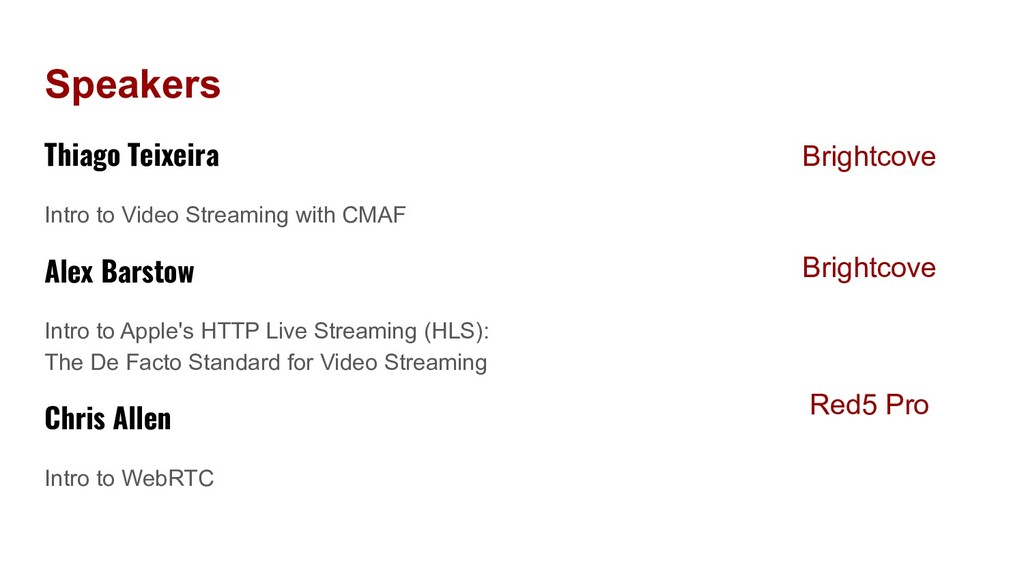
  1. Speakers Thiago Teixeira Intro to Video Streaming with CMAF Alex

    Barstow Intro to Apple's HTTP Live Streaming (HLS): The De Facto Standard for Video Streaming Chris Allen Intro to WebRTC Brightcove Red5 Pro Brightcove
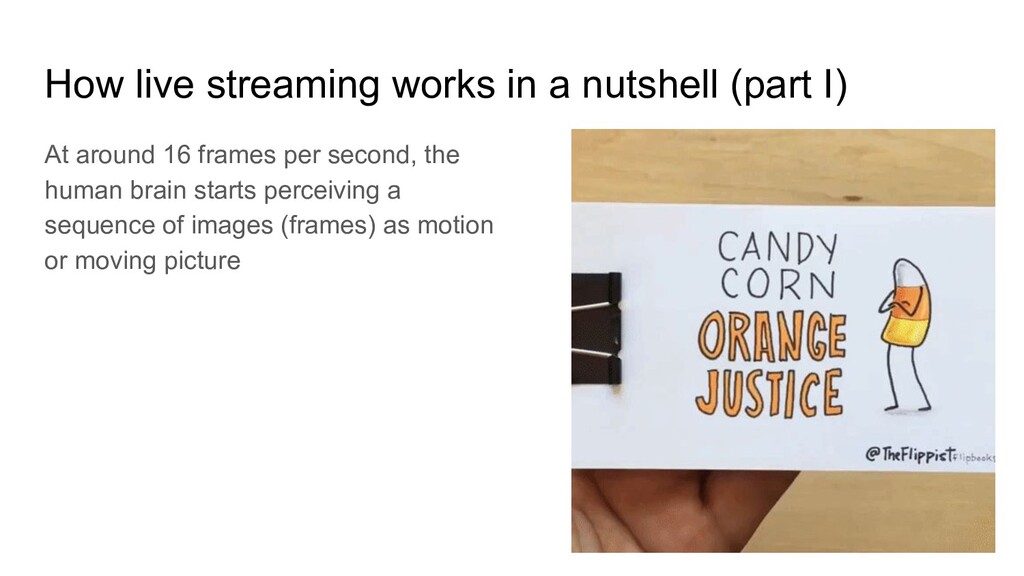
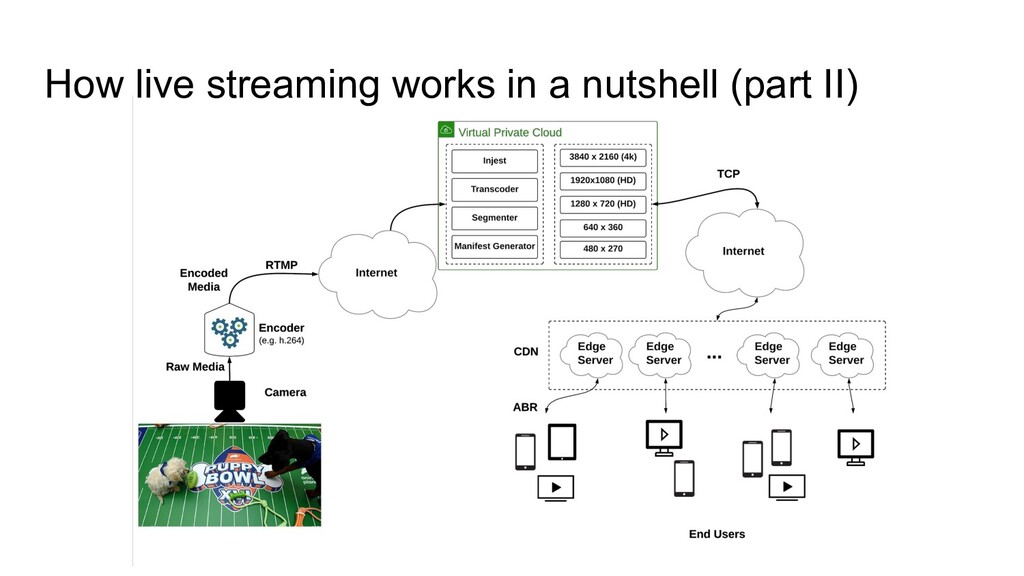
  2. How live streaming works in a nutshell (part I) At

    around 16 frames per second, the human brain starts perceiving a sequence of images (frames) as motion or moving picture
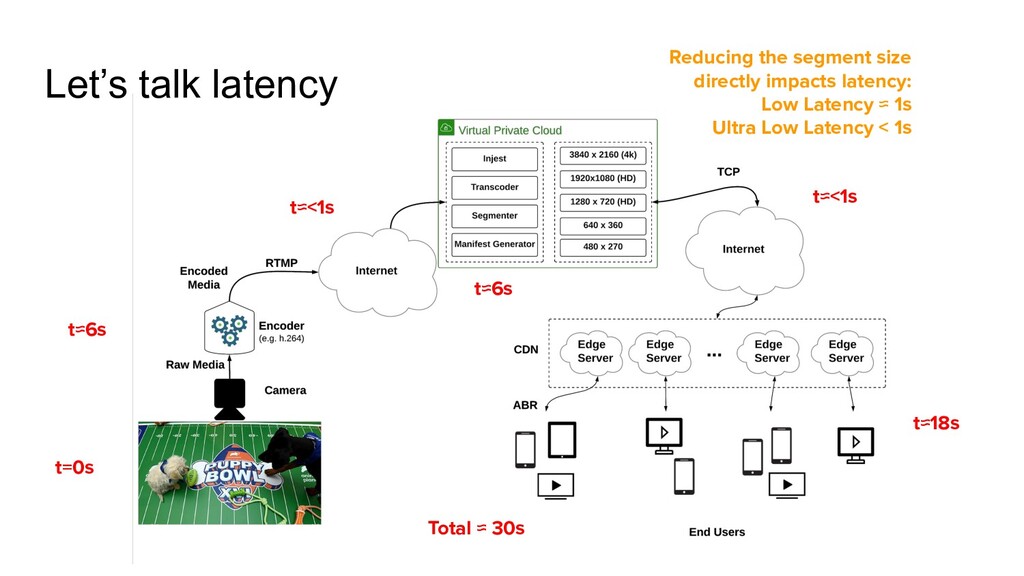
  3. Let’s talk latency t=0s t≈6s t≈6s t≈<1s t≈<1s t≈18s Total

    ≈ 30s Reducing the segment size directly impacts latency: Low Latency ≈ 1s Ultra Low Latency < 1s
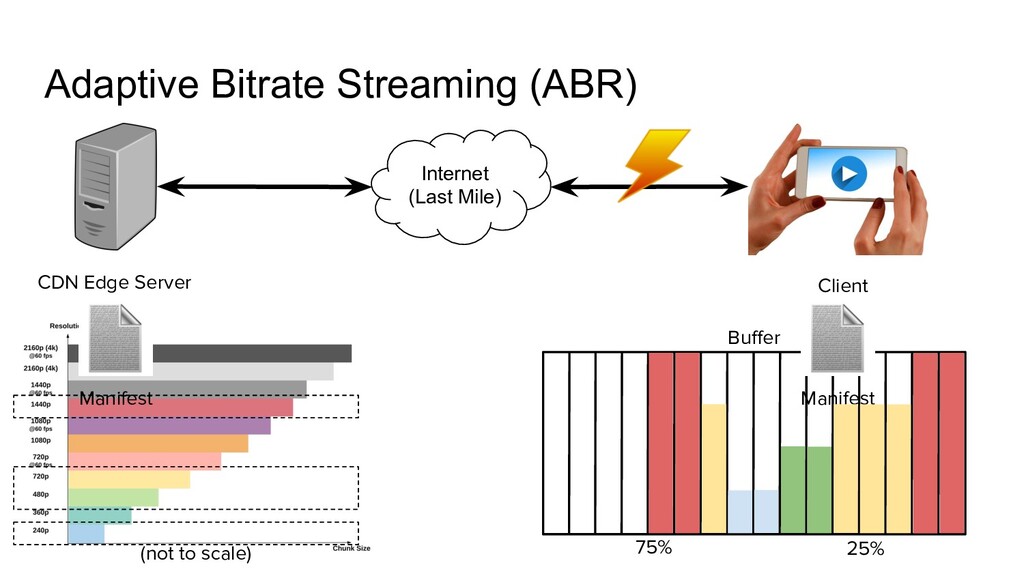
  4. Buffer 25% 75% Adaptive Bitrate Streaming (ABR) CDN Edge Server

    Internet (Last Mile) Client (not to scale) Manifest Manifest
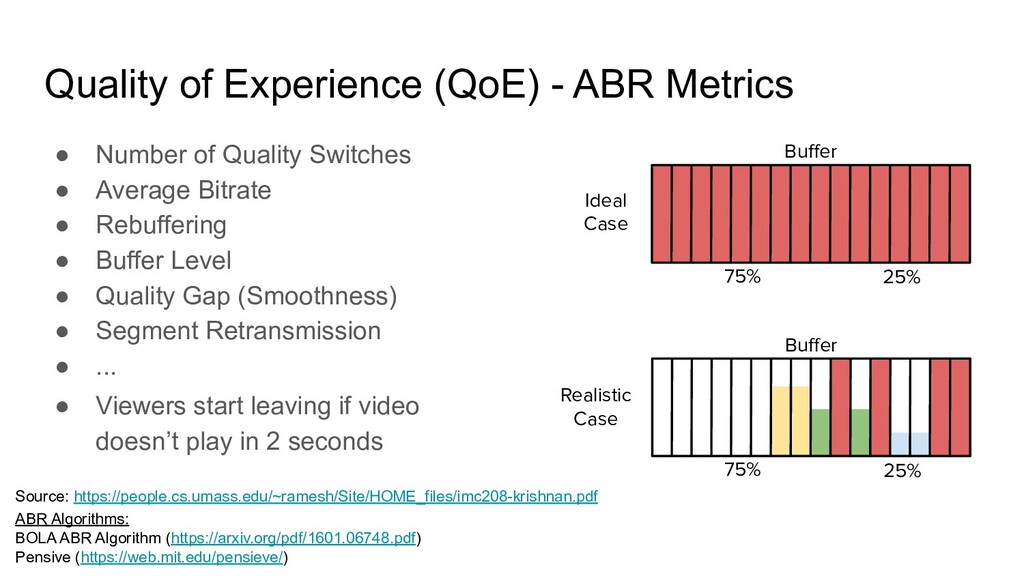
  5. Quality of Experience (QoE) - ABR Metrics • Number of

    Quality Switches • Average Bitrate • Rebuffering • Buffer Level • Quality Gap (Smoothness) • Segment Retransmission • ... Buffer 25% 75% Buffer 25% 75% Ideal Case Realistic Case ABR Algorithms: BOLA ABR Algorithm (https://arxiv.org/pdf/1601.06748.pdf) Pensive (https://web.mit.edu/pensieve/) Source: https://people.cs.umass.edu/~ramesh/Site/HOME_files/imc208-krishnan.pdf • Viewers start leaving if video doesn’t play in 2 seconds
  6. Intro to Apple’s HTTP Live Streaming (HLS): The De Facto

    Standard for Video Streaming Alex Barstow Software Engineer, Brightcove
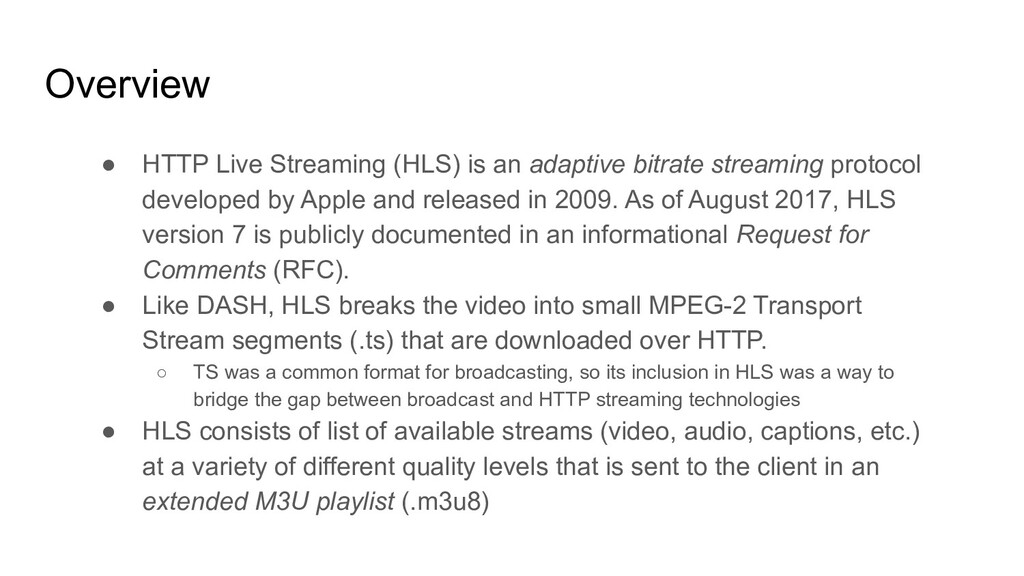
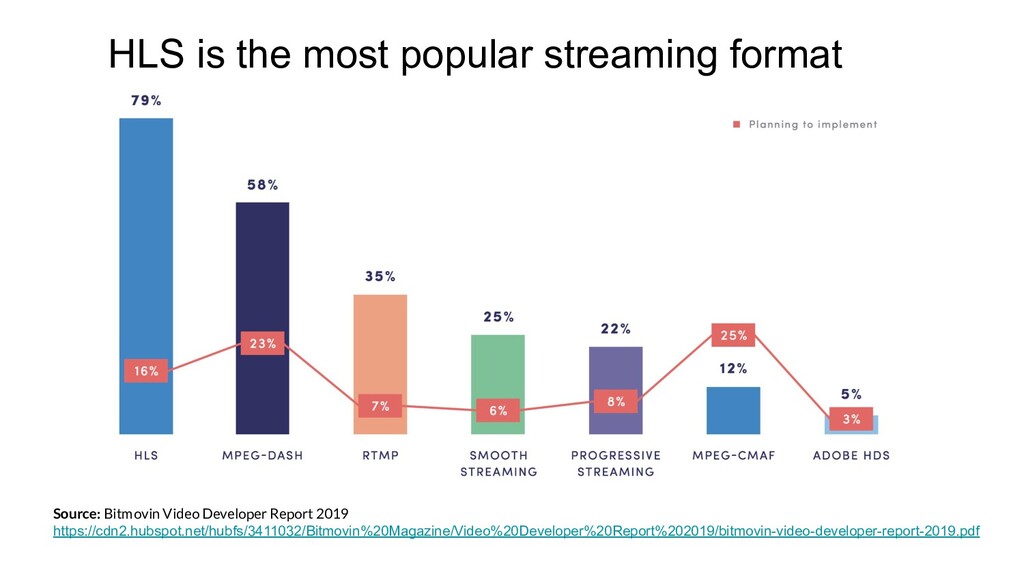
  7. Overview • HTTP Live Streaming (HLS) is an adaptive bitrate

    streaming protocol developed by Apple and released in 2009. As of August 2017, HLS version 7 is publicly documented in an informational Request for Comments (RFC). • Like DASH, HLS breaks the video into small MPEG-2 Transport Stream segments (.ts) that are downloaded over HTTP. ◦ TS was a common format for broadcasting, so its inclusion in HLS was a way to bridge the gap between broadcast and HTTP streaming technologies • HLS consists of list of available streams (video, audio, captions, etc.) at a variety of different quality levels that is sent to the client in an extended M3U playlist (.m3u8)
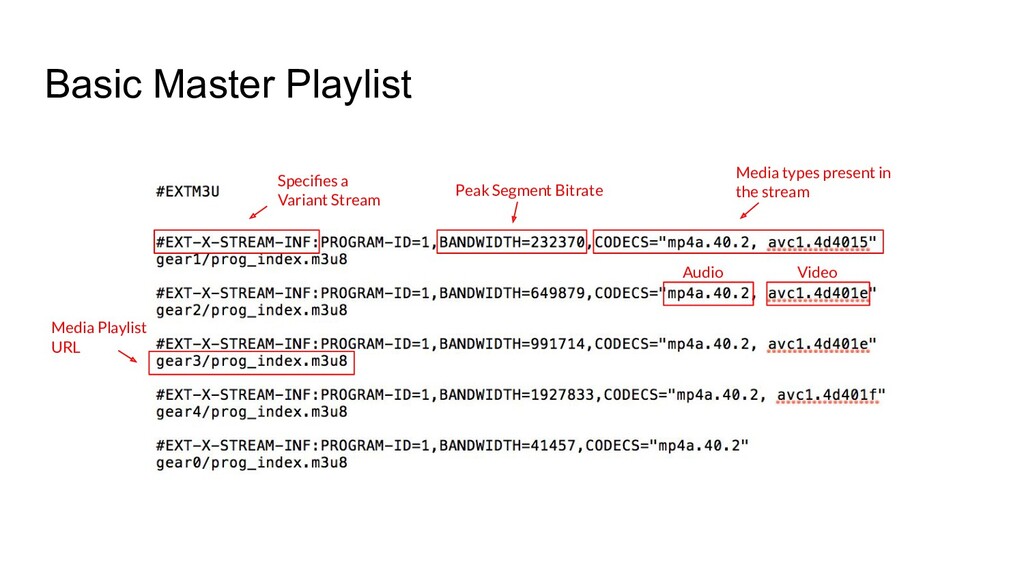
  8. Basic Master Playlist Peak Segment Bitrate Specifies a Variant Stream

    Media types present in the stream Audio Video Media Playlist URL
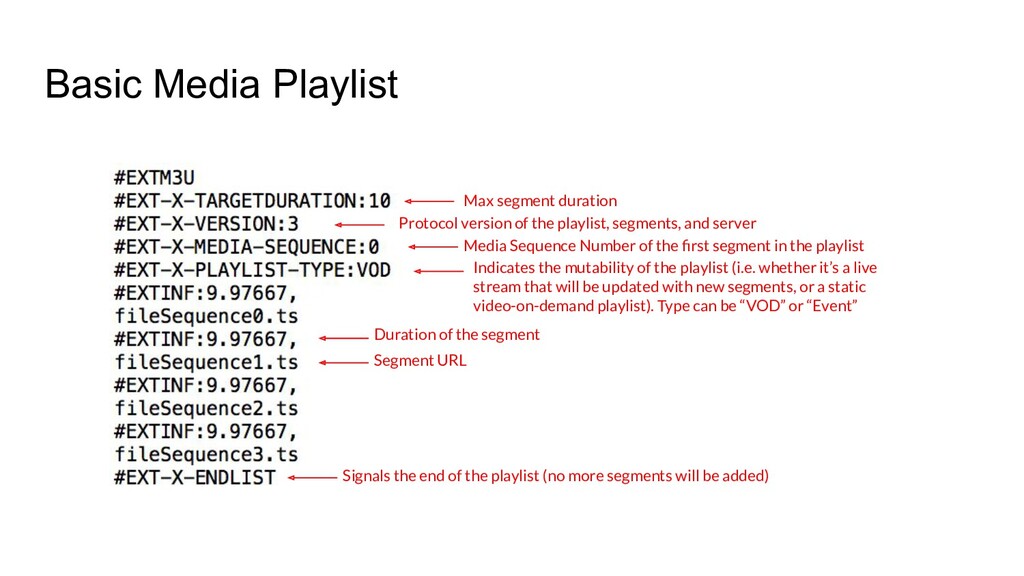
  9. Basic Media Playlist Max segment duration Protocol version of the

    playlist, segments, and server Media Sequence Number of the first segment in the playlist Indicates the mutability of the playlist (i.e. whether it’s a live stream that will be updated with new segments, or a static video-on-demand playlist). Type can be “VOD” or “Event” Duration of the segment Segment URL Signals the end of the playlist (no more segments will be added)
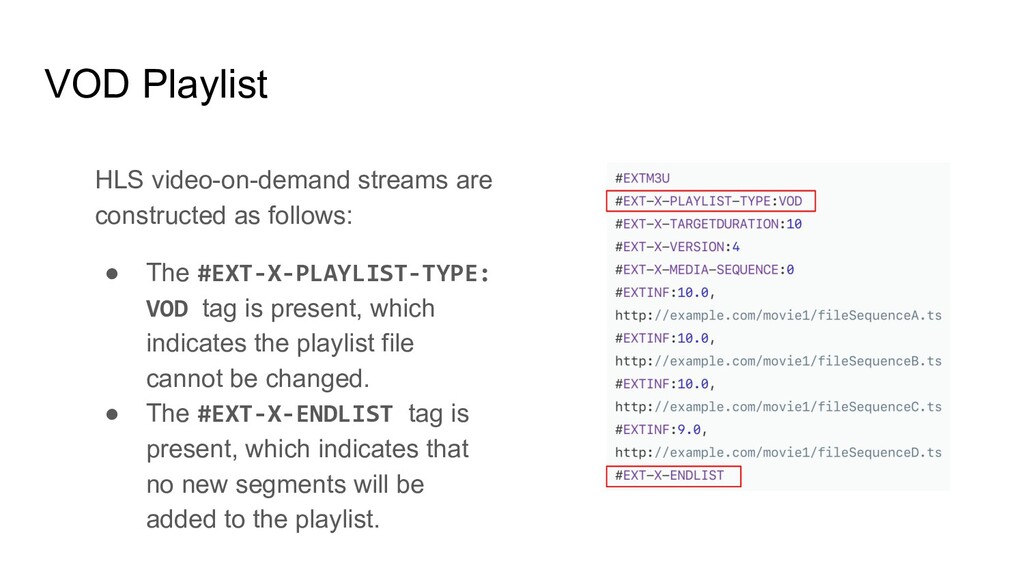
  10. VOD Playlist HLS video-on-demand streams are constructed as follows: •

    The #EXT-X-PLAYLIST-TYPE: VOD tag is present, which indicates the playlist file cannot be changed. • The #EXT-X-ENDLIST tag is present, which indicates that no new segments will be added to the playlist.
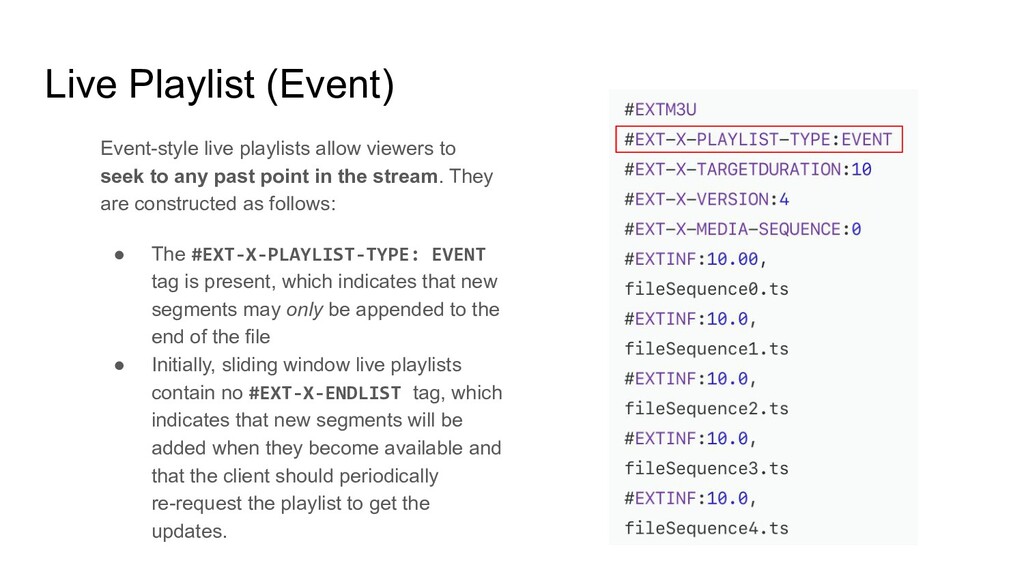
  11. Live Playlist (Event) Event-style live playlists allow viewers to seek

    to any past point in the stream. They are constructed as follows: • The #EXT-X-PLAYLIST-TYPE: EVENT tag is present, which indicates that new segments may only be appended to the end of the file • Initially, sliding window live playlists contain no #EXT-X-ENDLIST tag, which indicates that new segments will be added when they become available and that the client should periodically re-request the playlist to get the updates.
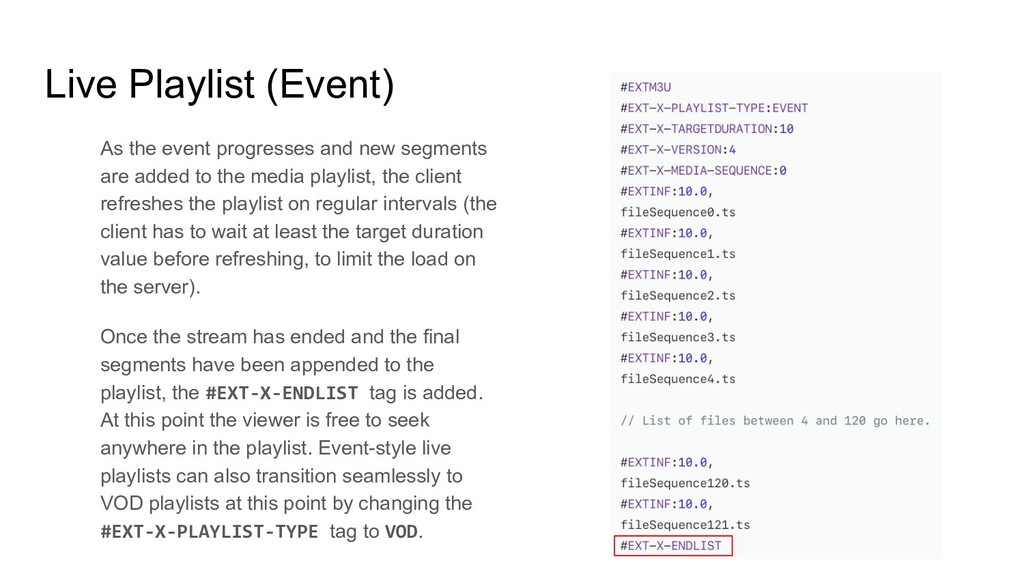
  12. Live Playlist (Event) As the event progresses and new segments

    are added to the media playlist, the client refreshes the playlist on regular intervals (the client has to wait at least the target duration value before refreshing, to limit the load on the server). Once the stream has ended and the final segments have been appended to the playlist, the #EXT-X-ENDLIST tag is added. At this point the viewer is free to seek anywhere in the playlist. Event-style live playlists can also transition seamlessly to VOD playlists at this point by changing the #EXT-X-PLAYLIST-TYPE tag to VOD.
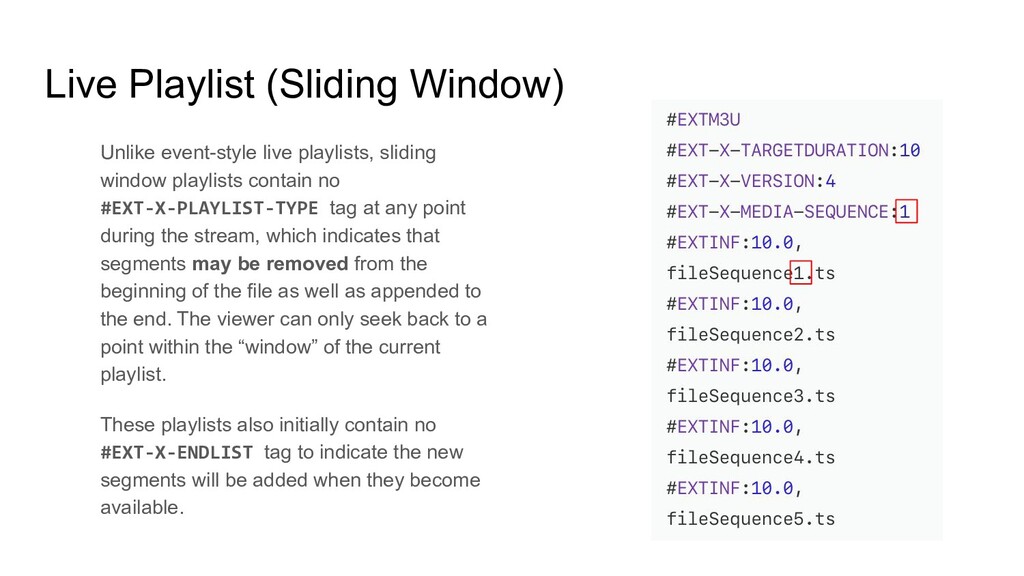
  13. Live Playlist (Sliding Window) Unlike event-style live playlists, sliding window

    playlists contain no #EXT-X-PLAYLIST-TYPE tag at any point during the stream, which indicates that segments may be removed from the beginning of the file as well as appended to the end. The viewer can only seek back to a point within the “window” of the current playlist. These playlists also initially contain no #EXT-X-ENDLIST tag to indicate the new segments will be added when they become available.
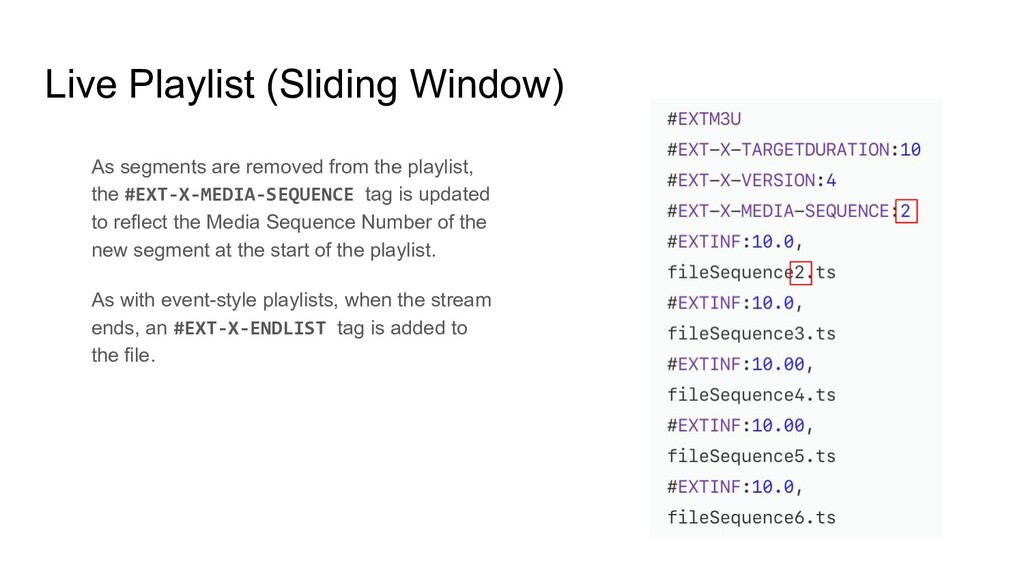
  14. Live Playlist (Sliding Window) As segments are removed from the

    playlist, the #EXT-X-MEDIA-SEQUENCE tag is updated to reflect the Media Sequence Number of the new segment at the start of the playlist. As with event-style playlists, when the stream ends, an #EXT-X-ENDLIST tag is added to the file.
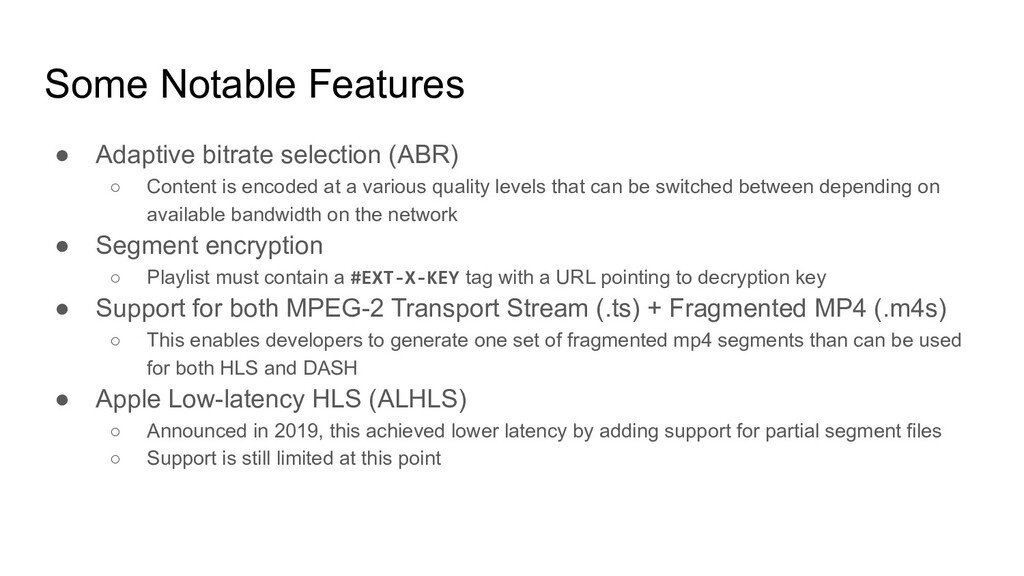
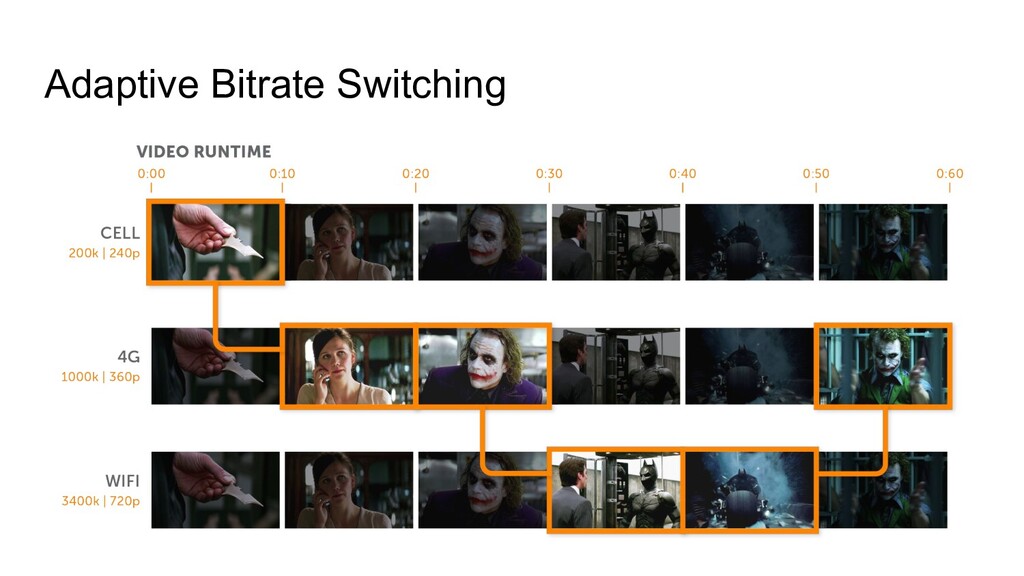
  15. Some Notable Features • Adaptive bitrate selection (ABR) ◦ Content

    is encoded at a various quality levels that can be switched between depending on available bandwidth on the network • Segment encryption ◦ Playlist must contain a #EXT-X-KEY tag with a URL pointing to decryption key • Support for both MPEG-2 Transport Stream (.ts) + Fragmented MP4 (.m4s) ◦ This enables developers to generate one set of fragmented mp4 segments than can be used for both HLS and DASH • Apple Low-latency HLS (ALHLS) ◦ Announced in 2019, this achieved lower latency by adding support for partial segment files ◦ Support is still limited at this point
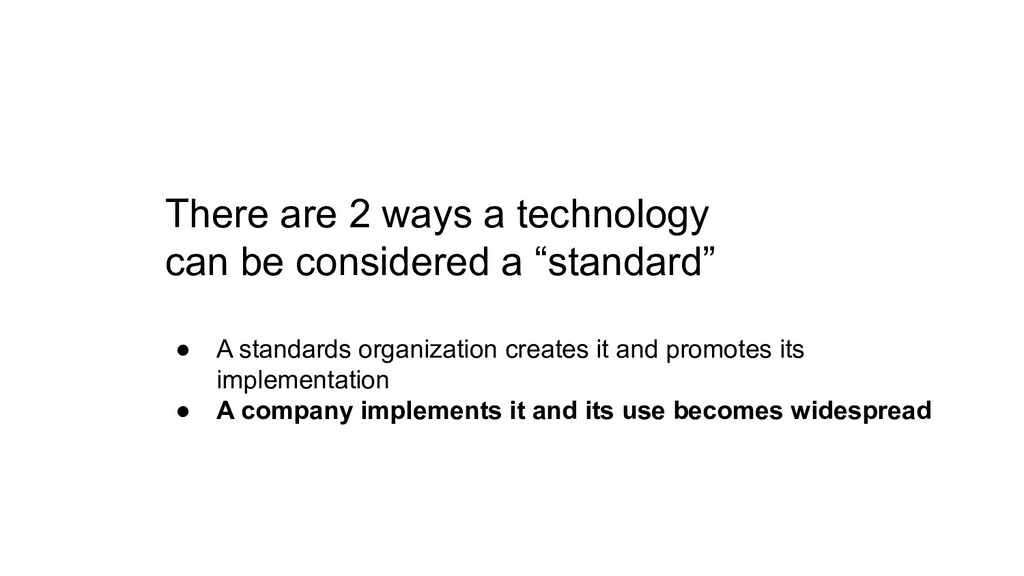
  16. There are 2 ways a technology can be considered a

    “standard” • A standards organization creates it and promotes its implementation • A company implements it and its use becomes widespread
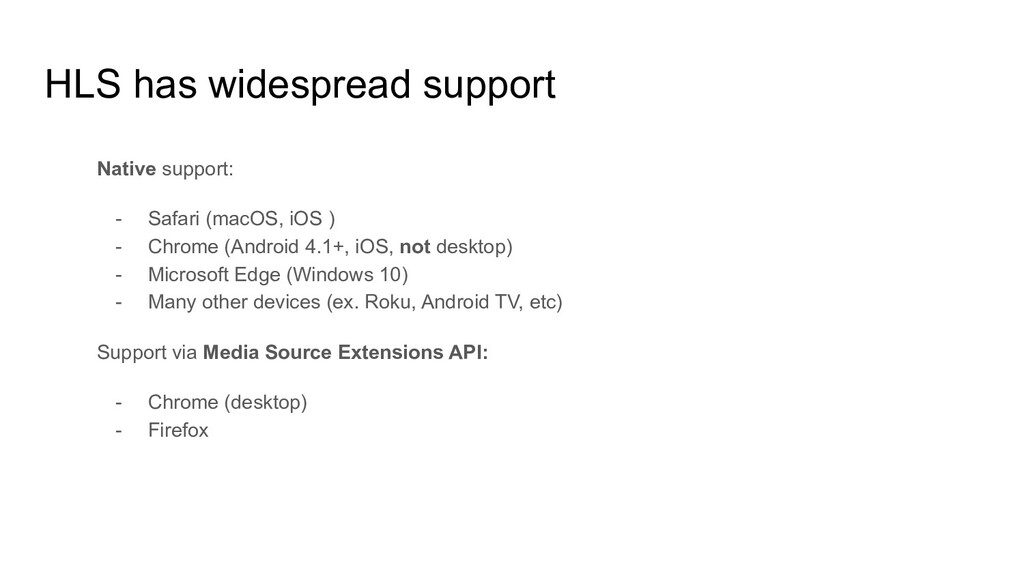
  17. HLS has widespread support Native support: - Safari (macOS, iOS

    ) - Chrome (Android 4.1+, iOS, not desktop) - Microsoft Edge (Windows 10) - Many other devices (ex. Roku, Android TV, etc) Support via Media Source Extensions API: - Chrome (desktop) - Firefox
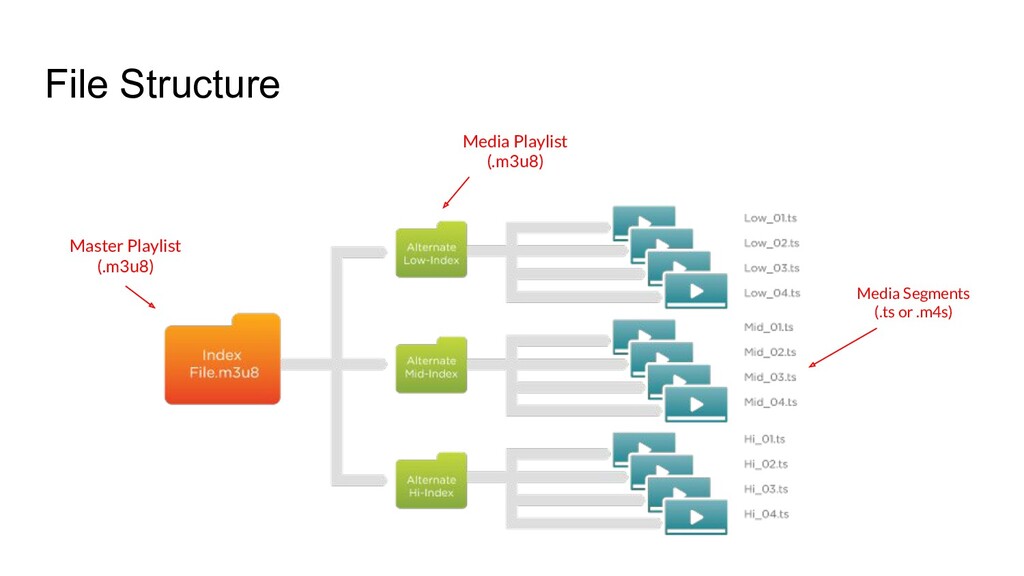
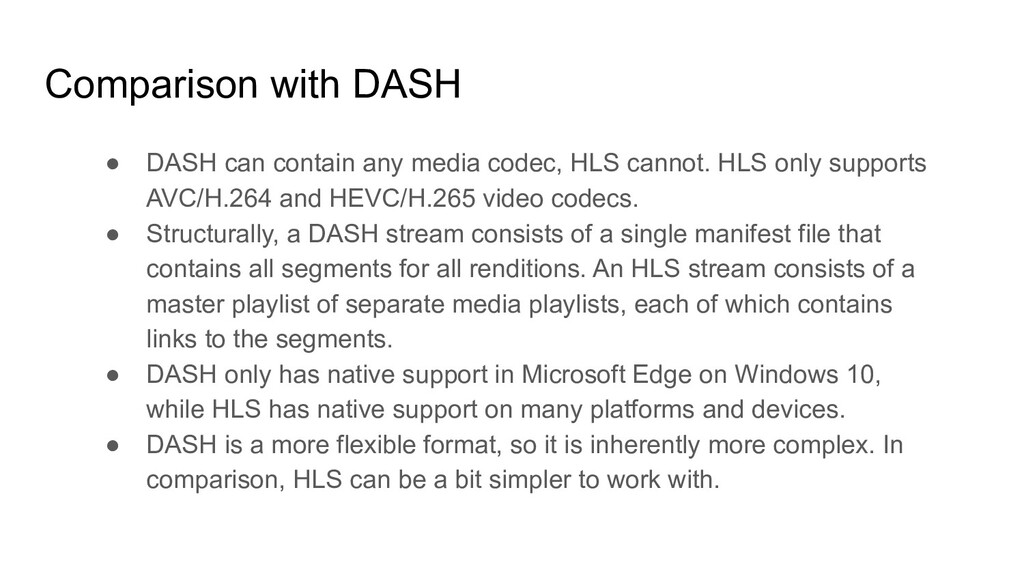
  18. Comparison with DASH • DASH can contain any media codec,

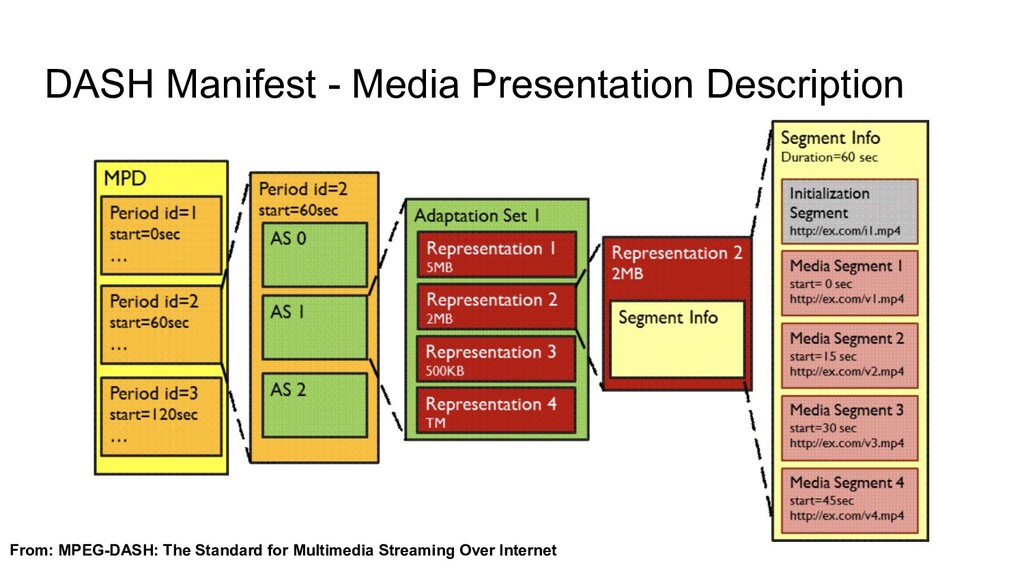
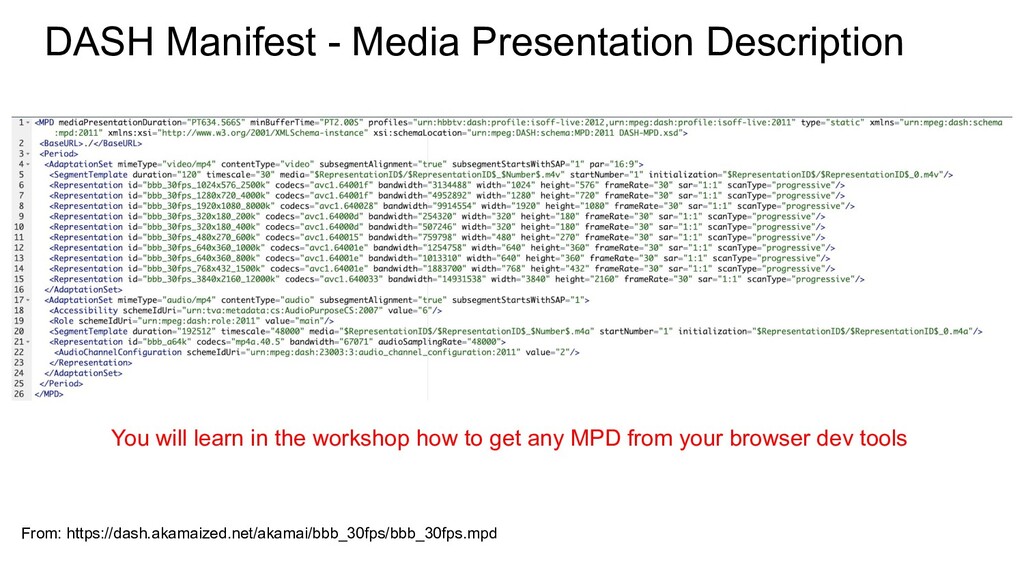
    HLS cannot. HLS only supports AVC/H.264 and HEVC/H.265 video codecs. • Structurally, a DASH stream consists of a single manifest file that contains all segments for all renditions. An HLS stream consists of a master playlist of separate media playlists, each of which contains links to the segments. • DASH only has native support in Microsoft Edge on Windows 10, while HLS has native support on many platforms and devices. • DASH is a more flexible format, so it is inherently more complex. In comparison, HLS can be a bit simpler to work with.
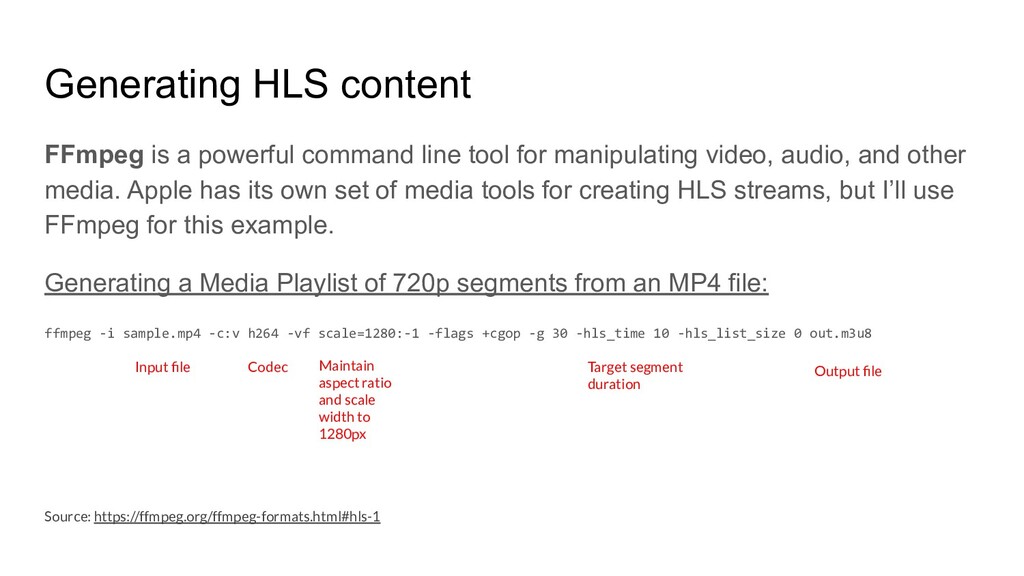
  19. Generating HLS content FFmpeg is a powerful command line tool

    for manipulating video, audio, and other media. Apple has its own set of media tools for creating HLS streams, but I’ll use FFmpeg for this example. Generating a Media Playlist of 720p segments from an MP4 file: ffmpeg -i sample.mp4 -c:v h264 -vf scale=1280:-1 -flags +cgop -g 30 -hls_time 10 -hls_list_size 0 out.m3u8 Input file Codec Maintain aspect ratio and scale width to 1280px Target segment duration Output file Source: https://ffmpeg.org/ffmpeg-formats.html#hls-1
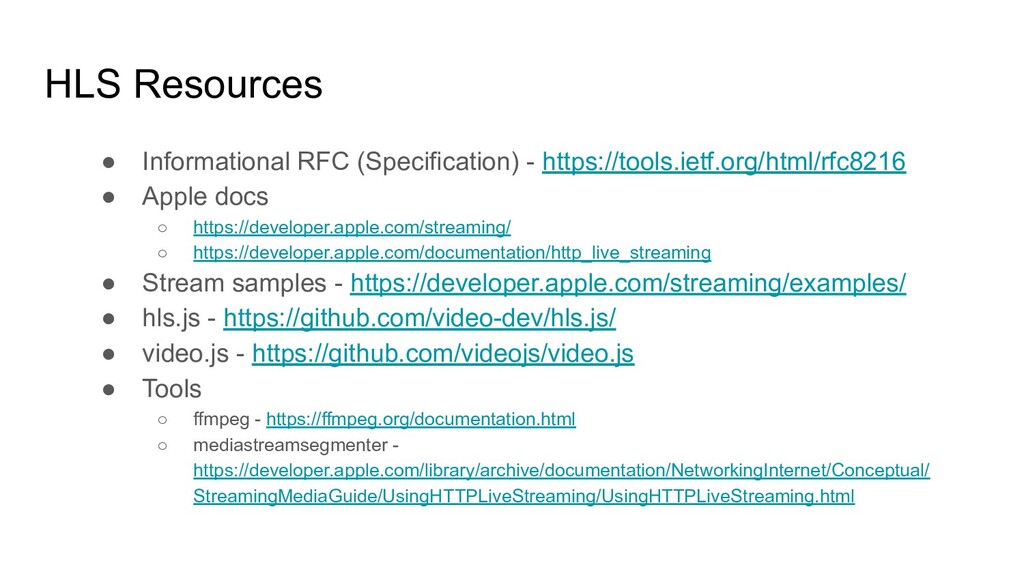
  20. HLS Resources • Informational RFC (Specification) - https://tools.ietf.org/html/rfc8216 • Apple

    docs ◦ https://developer.apple.com/streaming/ ◦ https://developer.apple.com/documentation/http_live_streaming • Stream samples - https://developer.apple.com/streaming/examples/ • hls.js - https://github.com/video-dev/hls.js/ • video.js - https://github.com/videojs/video.js • Tools ◦ ffmpeg - https://ffmpeg.org/documentation.html ◦ mediastreamsegmenter - https://developer.apple.com/library/archive/documentation/NetworkingInternet/Conceptual/ StreamingMediaGuide/UsingHTTPLiveStreaming/UsingHTTPLiveStreaming.html
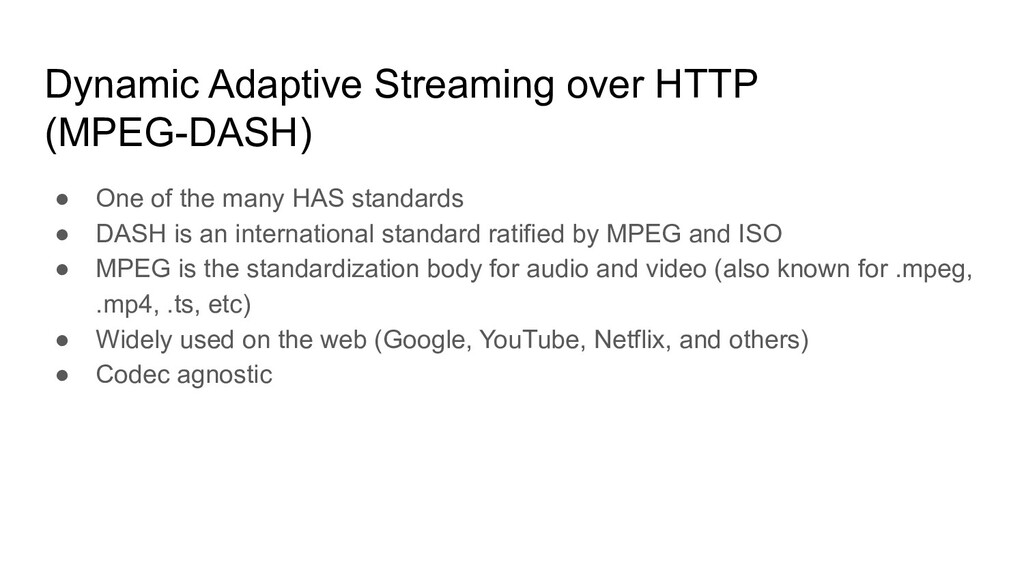
  21. Dynamic Adaptive Streaming over HTTP (MPEG-DASH) • One of the

    many HAS standards • DASH is an international standard ratified by MPEG and ISO • MPEG is the standardization body for audio and video (also known for .mpeg, .mp4, .ts, etc) • Widely used on the web (Google, YouTube, Netflix, and others) • Codec agnostic
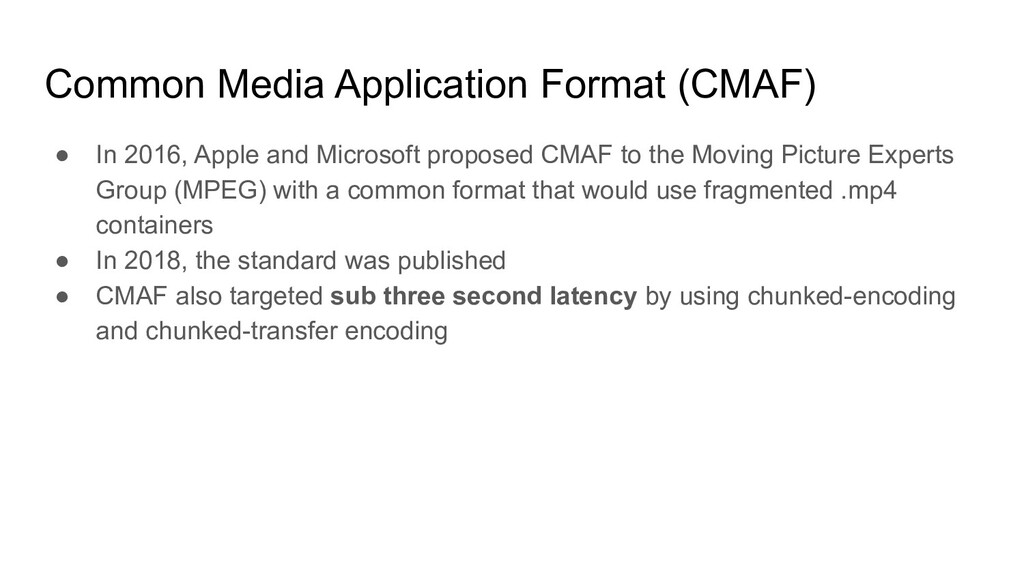
  22. Common Media Application Format (CMAF) • In 2016, Apple and

    Microsoft proposed CMAF to the Moving Picture Experts Group (MPEG) with a common format that would use fragmented .mp4 containers • In 2018, the standard was published • CMAF also targeted sub three second latency by using chunked-encoding and chunked-transfer encoding
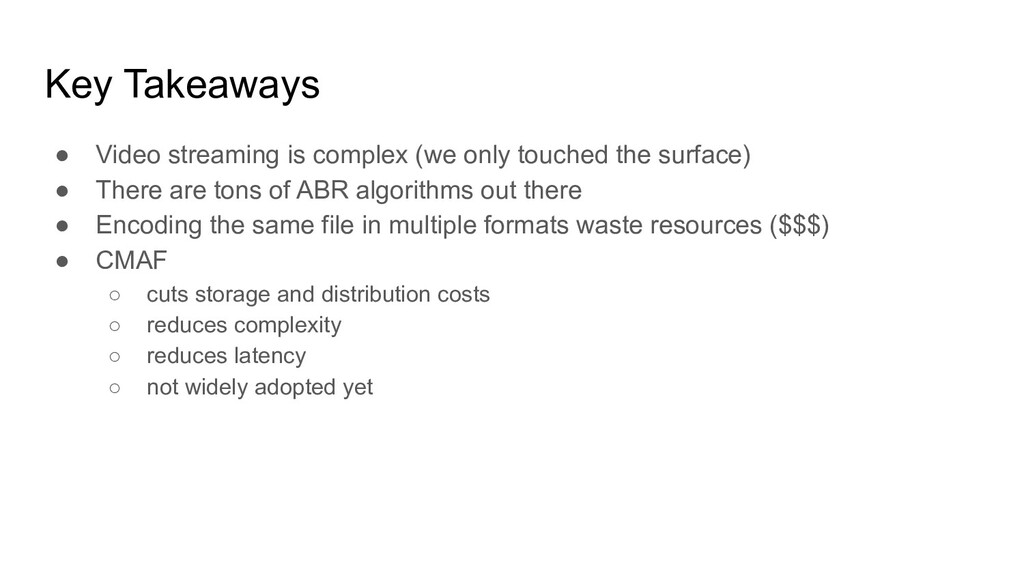
  23. Key Takeaways • Video streaming is complex (we only touched

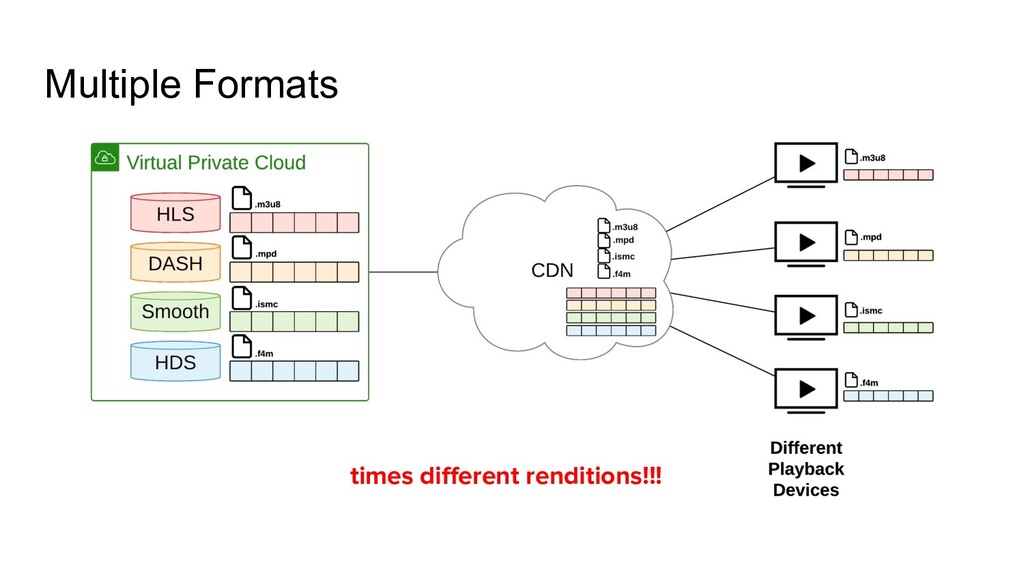
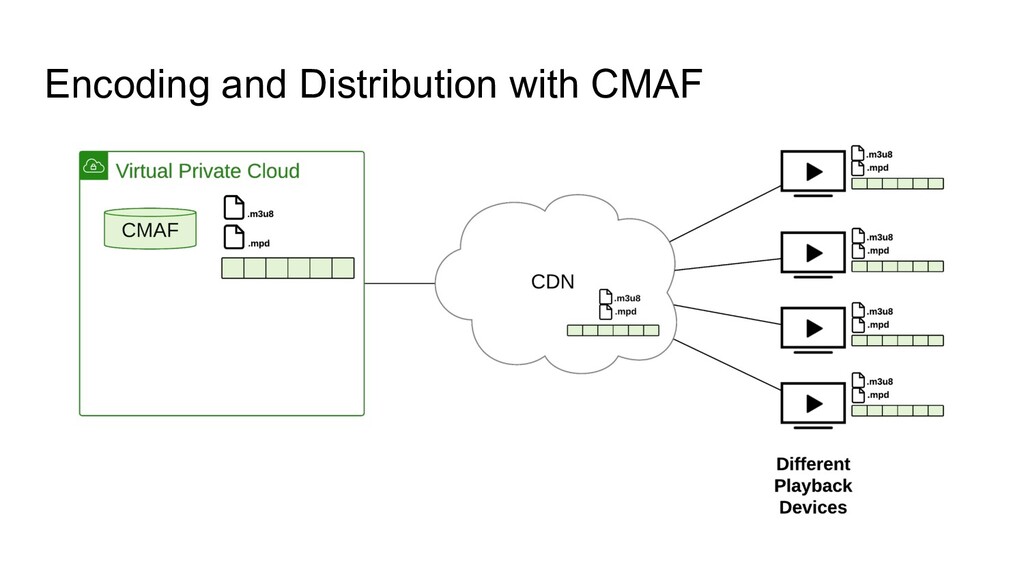
    the surface) • There are tons of ABR algorithms out there • Encoding the same file in multiple formats waste resources ($$$) • CMAF ◦ cuts storage and distribution costs ◦ reduces complexity ◦ reduces latency ◦ not widely adopted yet
  24. THE PROBLEM Latency is a real issue for interactivity in

    live video. Today’s technology introduces 10-45 seconds of latency from when the video is shot to when someone sees it on their screen. Current realtime low latency solutions don’t scale. Infrared5 Confidential Information subject to Non-Disclosure Agreement by and between Infrared5 and Recipient MOST ADVANCED ENGINEERING FOR LIVE STREAMING RED5PRO.COM
  25. SOLUTION • Red5 Pro achieves realtime latency of under 500

    milliseconds. • Red5 Pro scales on cloud platforms and in private data centers to millions of concurrent viewers. Infrared5 Confidential Information subject to Non-Disclosure Agreement by and between Infrared5 and Recipient MOST ADVANCED ENGINEERING FOR LIVE STREAMING RED5PRO.COM
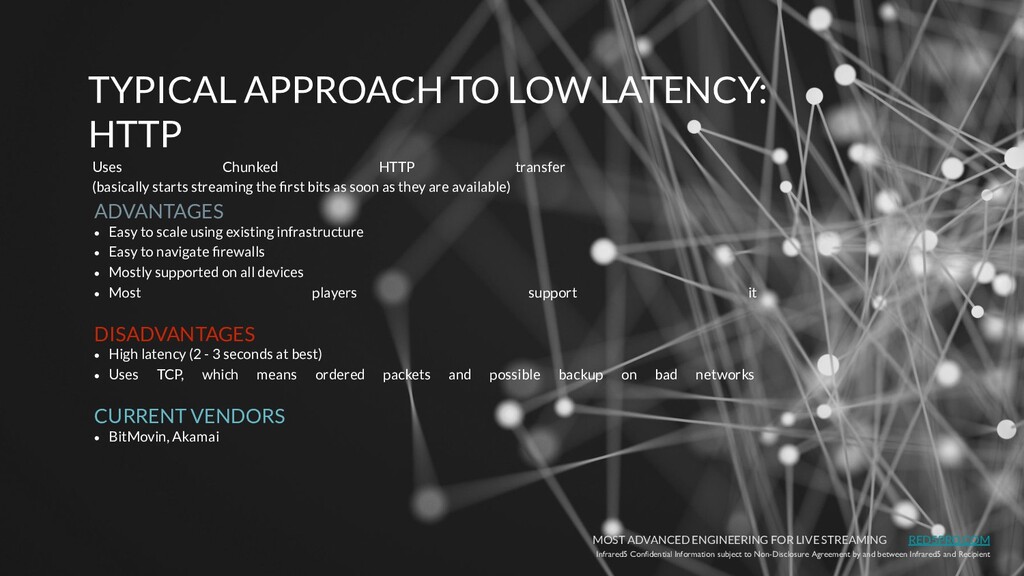
  26. ADVANTAGES • Easy to scale using existing infrastructure • Easy

    to navigate firewalls • Mostly supported on all devices • Most players support it DISADVANTAGES • High latency (2 - 3 seconds at best) • Uses TCP, which means ordered packets and possible backup on bad networks CURRENT VENDORS • BitMovin, Akamai Infrared5 Confidential Information subject to Non-Disclosure Agreement by and between Infrared5 and Recipient MOST ADVANCED ENGINEERING FOR LIVE STREAMING RED5PRO.COM TYPICAL APPROACH TO LOW LATENCY: HTTP Uses Chunked HTTP transfer (basically starts streaming the first bits as soon as they are available)
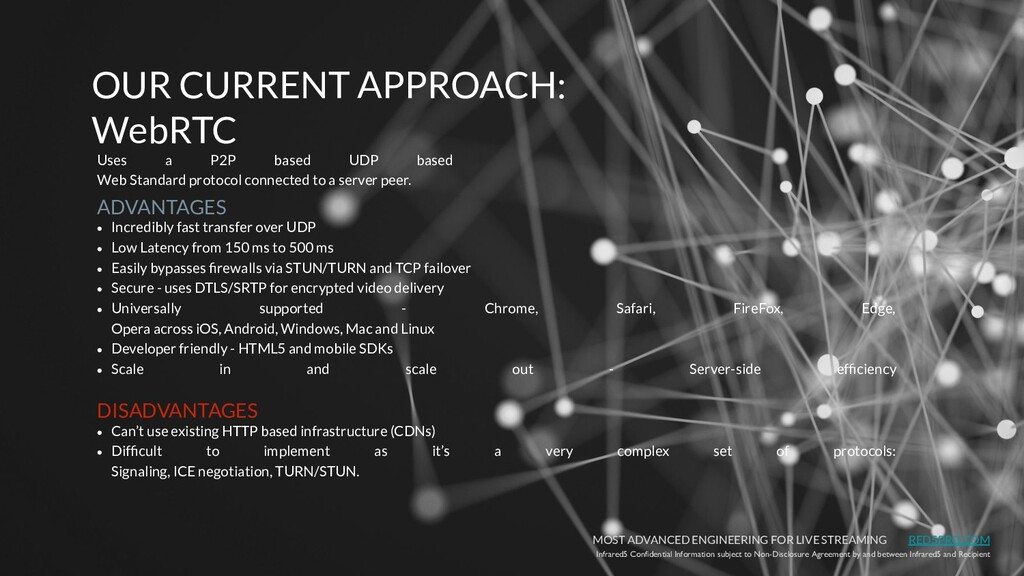
  27. ADVANTAGES • Incredibly fast transfer over UDP • Low Latency

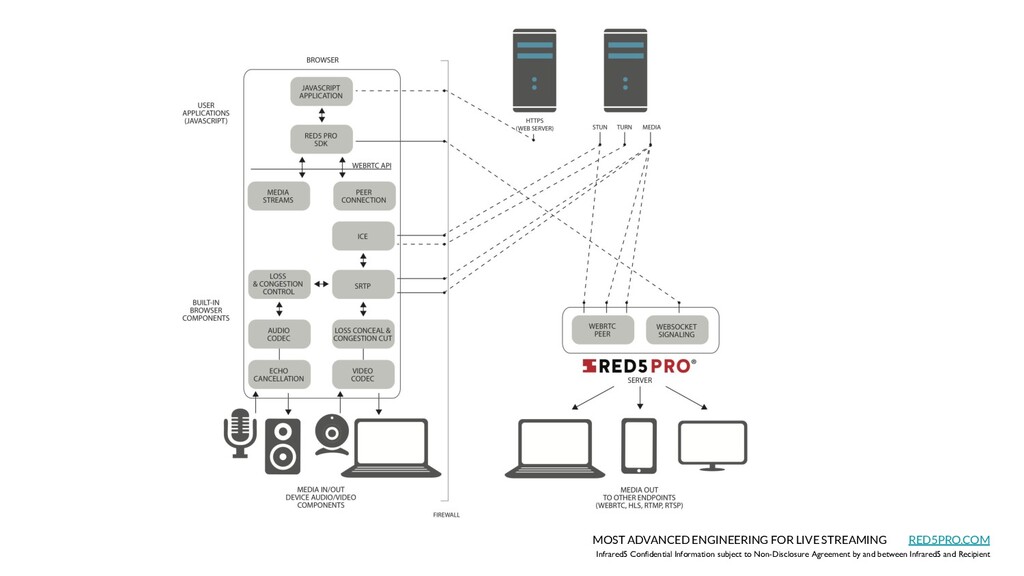
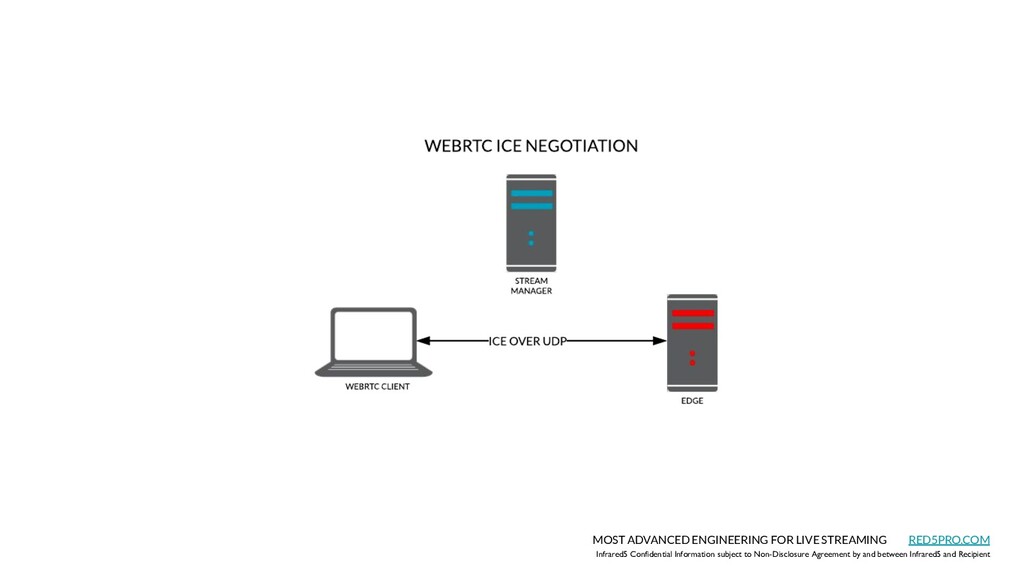
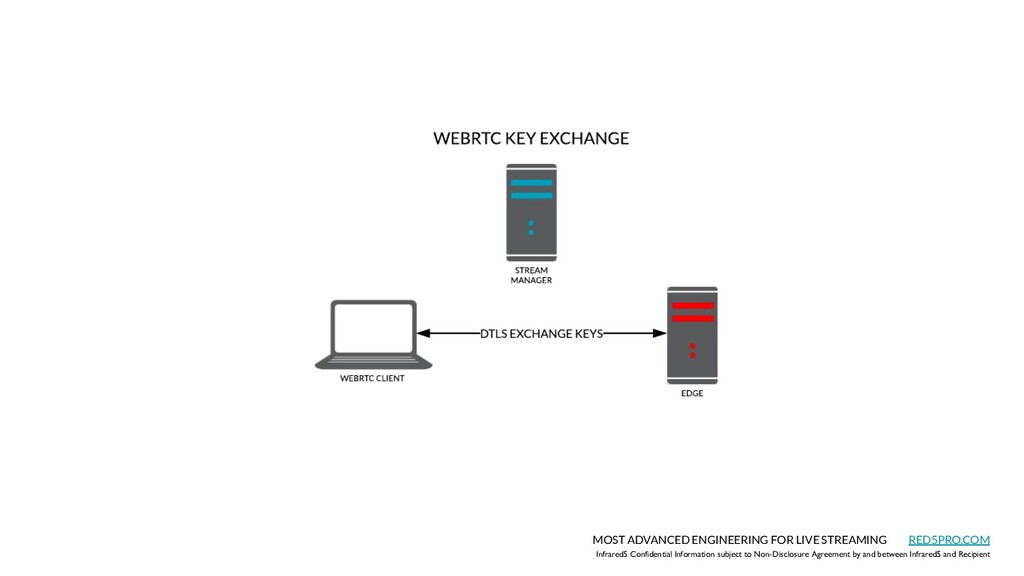
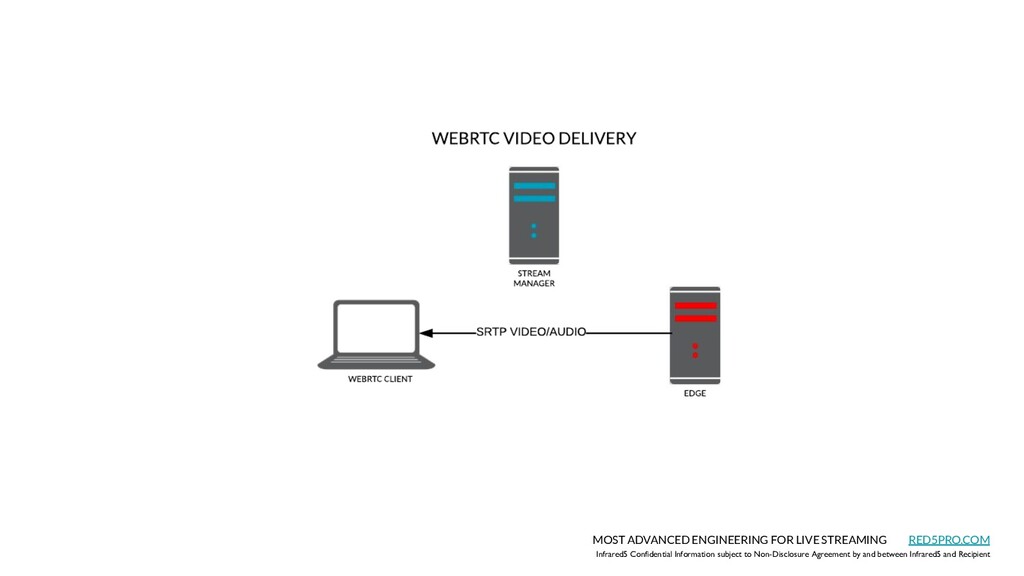
    from 150 ms to 500 ms • Easily bypasses firewalls via STUN/TURN and TCP failover • Secure - uses DTLS/SRTP for encrypted video delivery • Universally supported - Chrome, Safari, FireFox, Edge, Opera across iOS, Android, Windows, Mac and Linux • Developer friendly - HTML5 and mobile SDKs • Scale in and scale out - Server-side efficiency DISADVANTAGES • Can’t use existing HTTP based infrastructure (CDNs) • Difficult to implement as it’s a very complex set of protocols: Signaling, ICE negotiation, TURN/STUN. Infrared5 Confidential Information subject to Non-Disclosure Agreement by and between Infrared5 and Recipient MOST ADVANCED ENGINEERING FOR LIVE STREAMING RED5PRO.COM OUR CURRENT APPROACH: WebRTC Uses a P2P based UDP based Web Standard protocol connected to a server peer.
  28. Infrared5 Confidential Information subject to Non-Disclosure Agreement by and between

    Infrared5 and Recipient MOST ADVANCED ENGINEERING FOR LIVE STREAMING RED5PRO.COM New York to Paris and Back in 180 ms!
  29. Infrared5 Confidential Information subject to Non-Disclosure Agreement by and between

    Infrared5 and Recipient MOST ADVANCED ENGINEERING FOR LIVE STREAMING RED5PRO.COM WEBRTC
  30. Infrared5 Confidential Information subject to Non-Disclosure Agreement by and between

    Infrared5 and Recipient MOST ADVANCED ENGINEERING FOR LIVE STREAMING RED5PRO.COM
  31. Infrared5 Confidential Information subject to Non-Disclosure Agreement by and between

    Infrared5 and Recipient MOST ADVANCED ENGINEERING FOR LIVE STREAMING RED5PRO.COM mediaDevices.getUserMedia(constraints);
  32. Infrared5 Confidential Information subject to Non-Disclosure Agreement by and between

    Infrared5 and Recipient MOST ADVANCED ENGINEERING FOR LIVE STREAMING RED5PRO.COM
  33. Infrared5 Confidential Information subject to Non-Disclosure Agreement by and between

    Infrared5 and Recipient MOST ADVANCED ENGINEERING FOR LIVE STREAMING RED5PRO.COM
  34. Infrared5 Confidential Information subject to Non-Disclosure Agreement by and between

    Infrared5 and Recipient MOST ADVANCED ENGINEERING FOR LIVE STREAMING RED5PRO.COM
  35. Infrared5 Confidential Information subject to Non-Disclosure Agreement by and between

    Infrared5 and Recipient MOST ADVANCED ENGINEERING FOR LIVE STREAMING RED5PRO.COM
  36. Infrared5 Confidential Information subject to Non-Disclosure Agreement by and between

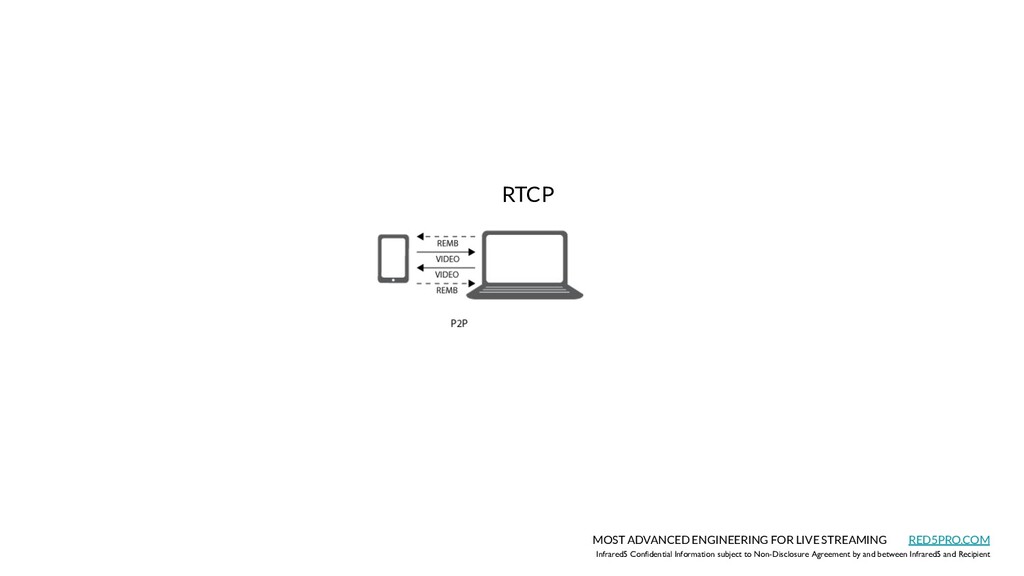
    Infrared5 and Recipient MOST ADVANCED ENGINEERING FOR LIVE STREAMING RED5PRO.COM RTCP
  37. Infrared5 Confidential Information subject to Non-Disclosure Agreement by and between

    Infrared5 and Recipient MOST ADVANCED ENGINEERING FOR LIVE STREAMING RED5PRO.COM THE MYTH: WebRTC Doesn’t Scale
  38. Infrared5 Confidential Information subject to Non-Disclosure Agreement by and between

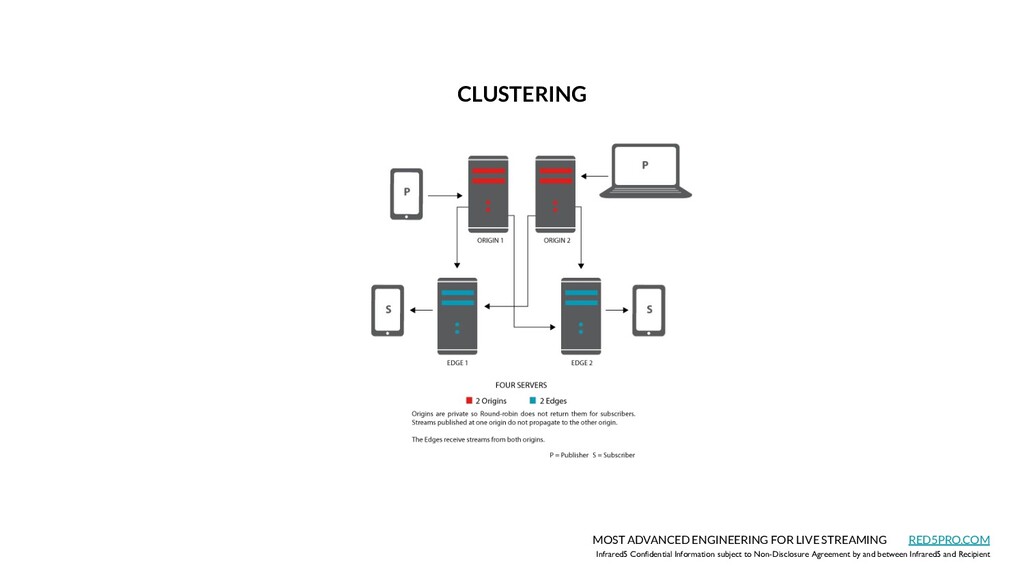
    Infrared5 and Recipient MOST ADVANCED ENGINEERING FOR LIVE STREAMING RED5PRO.COM CLUSTERING
  39. Infrared5 Confidential Information subject to Non-Disclosure Agreement by and between

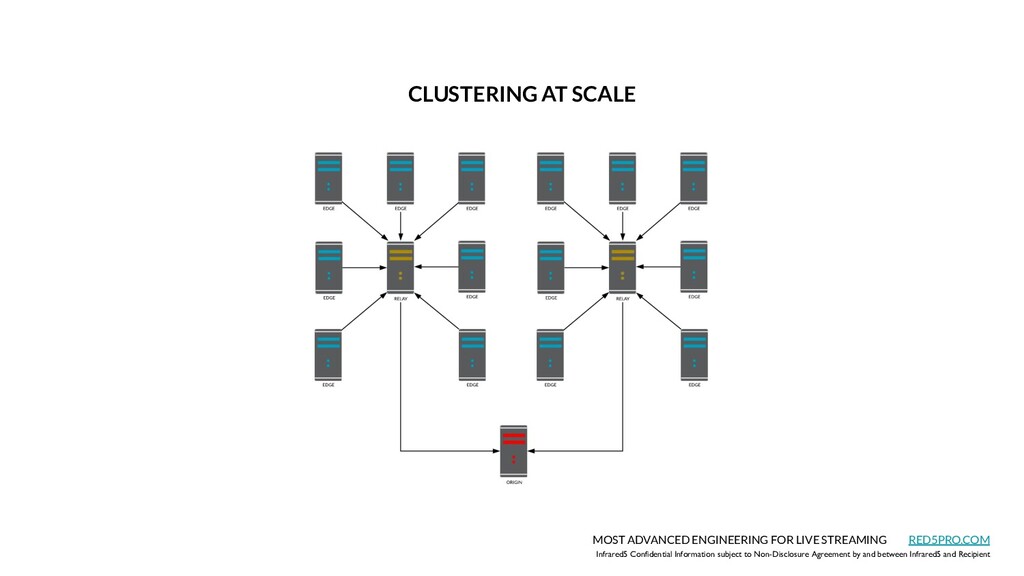
    Infrared5 and Recipient MOST ADVANCED ENGINEERING FOR LIVE STREAMING RED5PRO.COM CLUSTERING AT SCALE
  40. Infrared5 Confidential Information subject to Non-Disclosure Agreement by and between

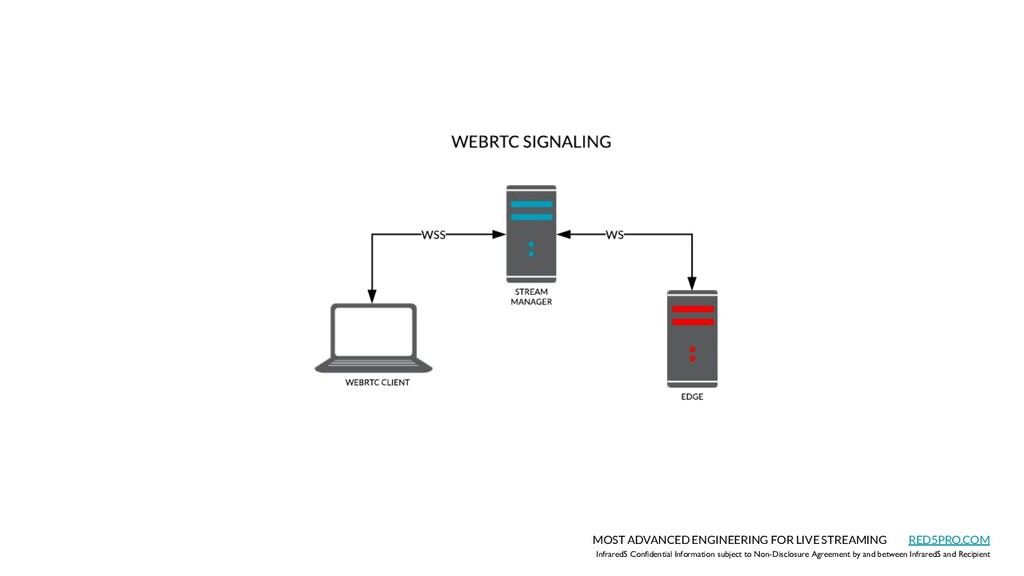
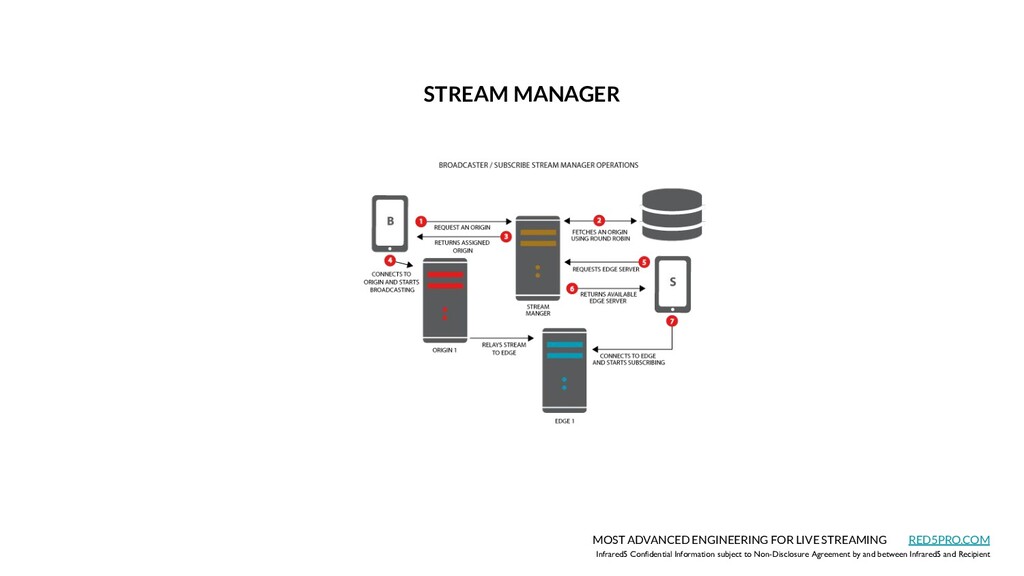
    Infrared5 and Recipient MOST ADVANCED ENGINEERING FOR LIVE STREAMING RED5PRO.COM STREAM MANAGER
  41. Infrared5 Confidential Information subject to Non-Disclosure Agreement by and between

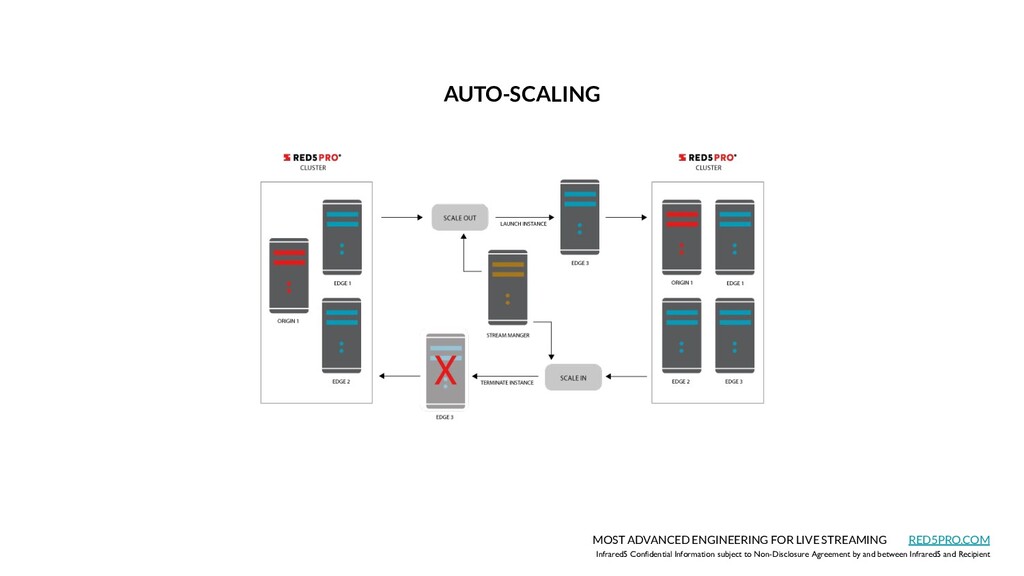
    Infrared5 and Recipient MOST ADVANCED ENGINEERING FOR LIVE STREAMING RED5PRO.COM AUTO-SCALING
  42. Infrared5 Confidential Information subject to Non-Disclosure Agreement by and between

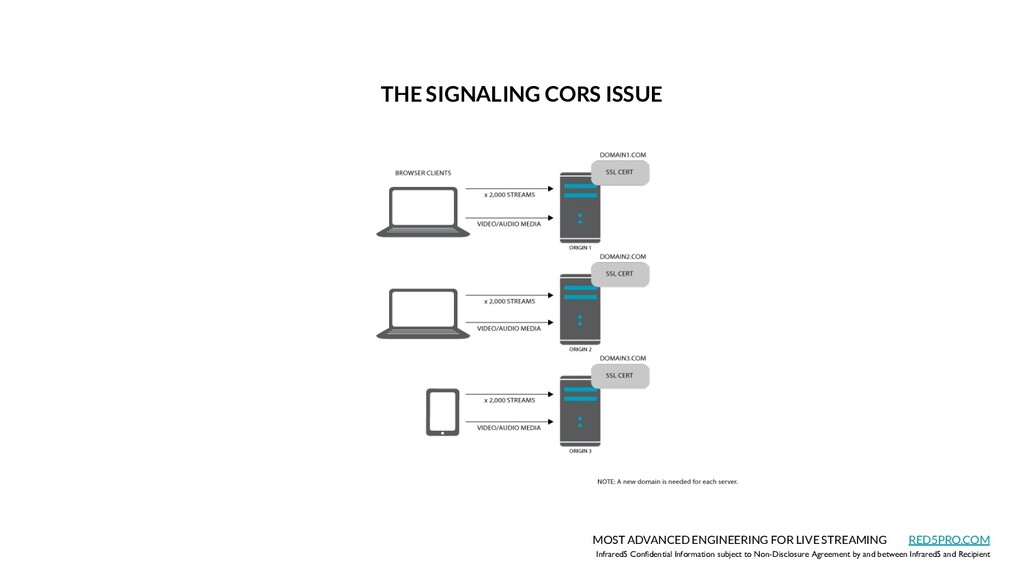
    Infrared5 and Recipient MOST ADVANCED ENGINEERING FOR LIVE STREAMING RED5PRO.COM THE SIGNALING CORS ISSUE
  43. Infrared5 Confidential Information subject to Non-Disclosure Agreement by and between

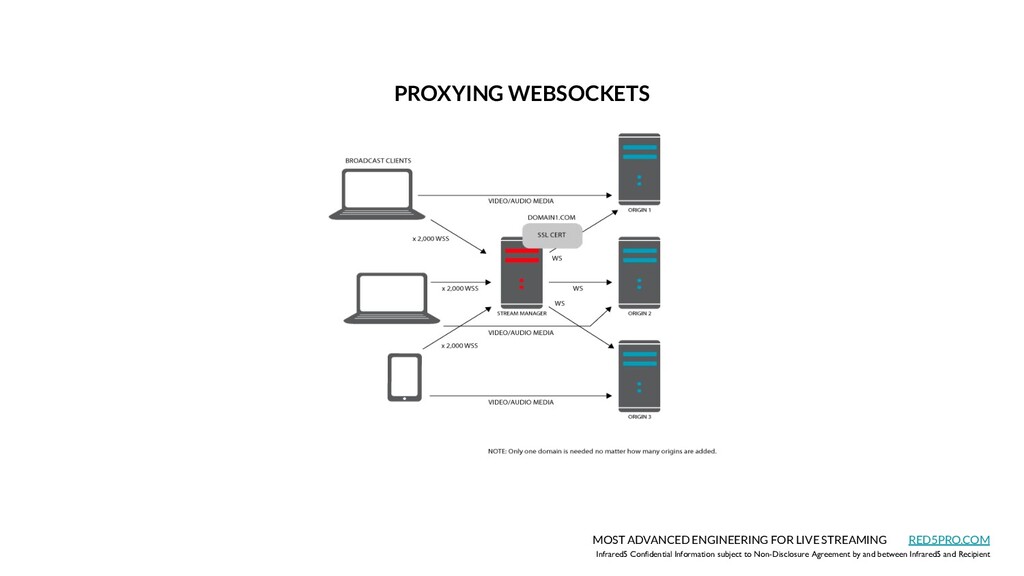
    Infrared5 and Recipient MOST ADVANCED ENGINEERING FOR LIVE STREAMING RED5PRO.COM PROXYING WEBSOCKETS
  44. Infrared5 Confidential Information subject to Non-Disclosure Agreement by and between

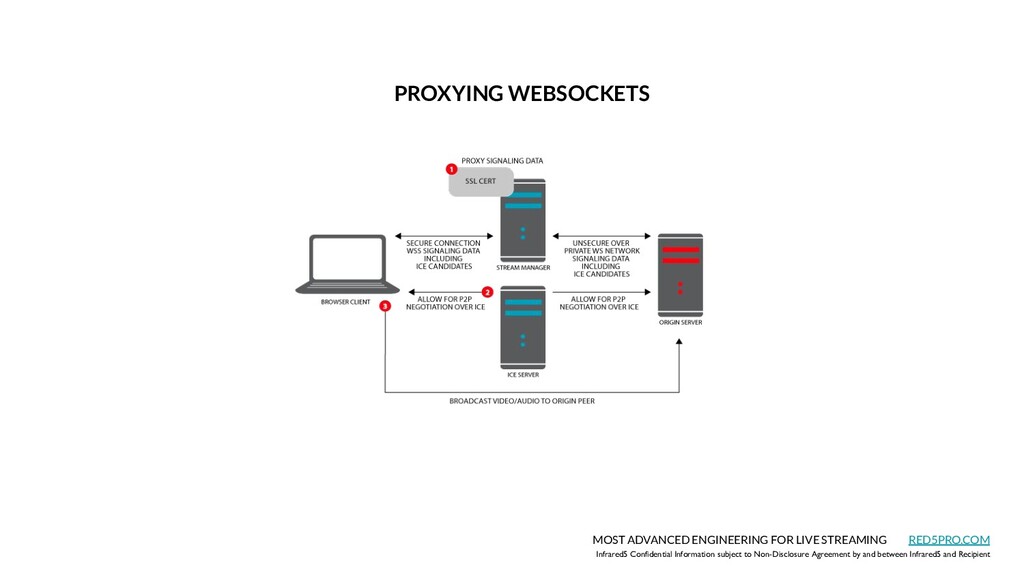
    Infrared5 and Recipient MOST ADVANCED ENGINEERING FOR LIVE STREAMING RED5PRO.COM PROXYING WEBSOCKETS
  45. Infrared5 Confidential Information subject to Non-Disclosure Agreement by and between

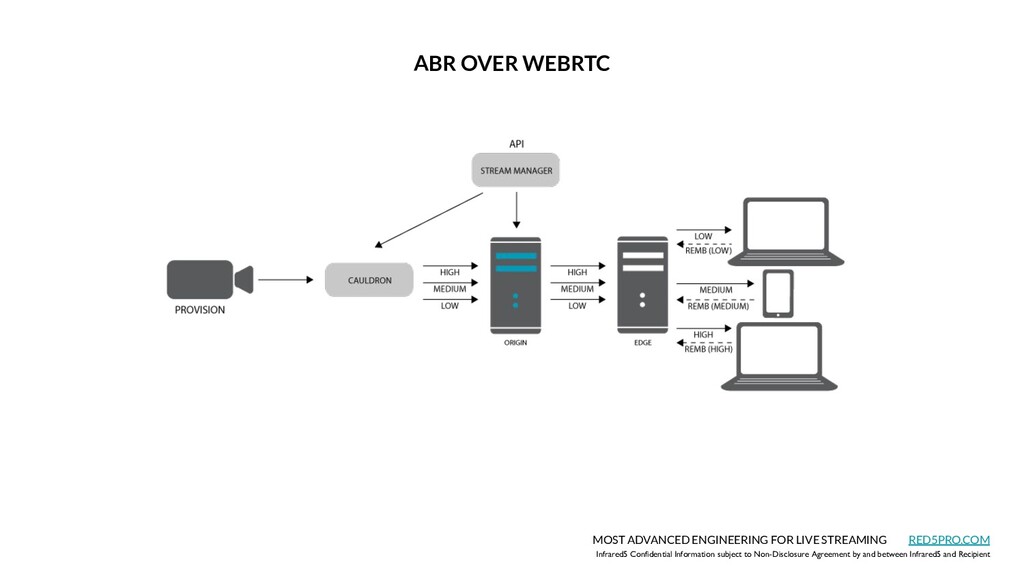
    Infrared5 and Recipient MOST ADVANCED ENGINEERING FOR LIVE STREAMING RED5PRO.COM ABR OVER WEBRTC
  46. Infrared5 Confidential Information subject to Non-Disclosure Agreement by and between

    Infrared5 and Recipient MOST ADVANCED ENGINEERING FOR LIVE STREAMING RED5PRO.COM Cross Cloud Delivery System
  47. Infrared5 Confidential Information subject to Non-Disclosure Agreement by and between

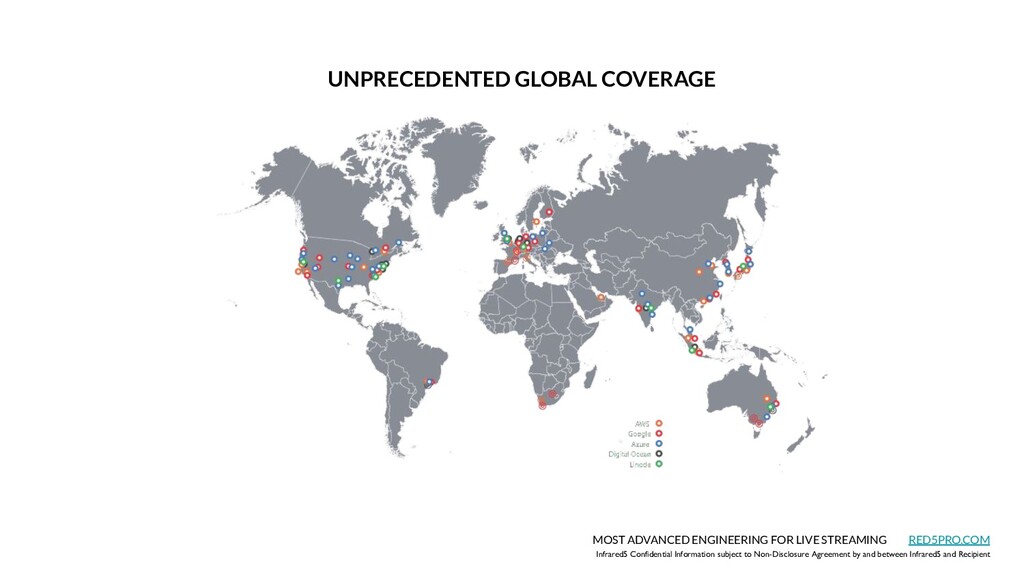
    Infrared5 and Recipient MOST ADVANCED ENGINEERING FOR LIVE STREAMING RED5PRO.COM UNPRECEDENTED GLOBAL COVERAGE
  48. Infrared5 Confidential Information subject to Non-Disclosure Agreement by and between

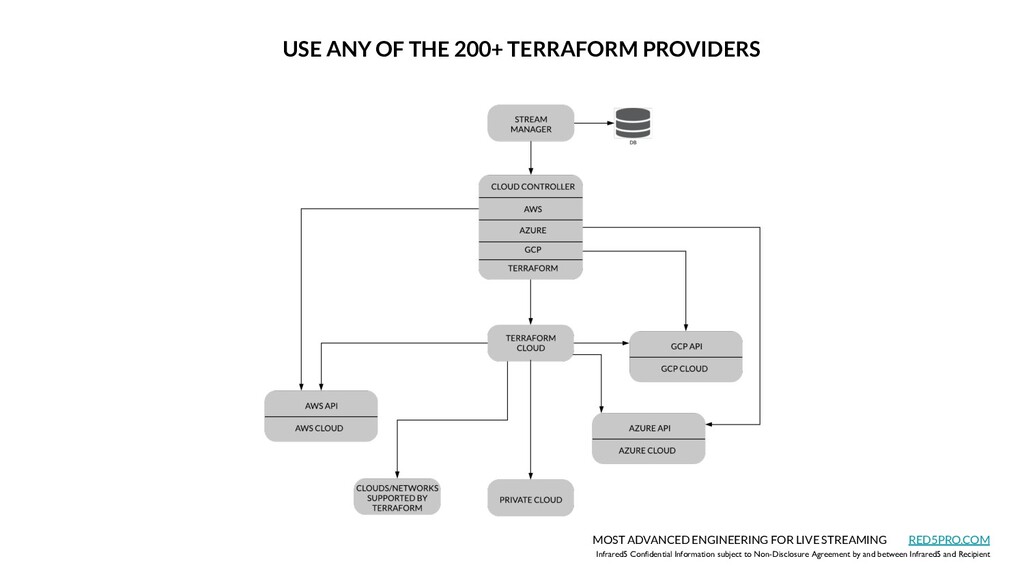
    Infrared5 and Recipient MOST ADVANCED ENGINEERING FOR LIVE STREAMING RED5PRO.COM USE ANY OF THE 200+ TERRAFORM PROVIDERS
  49. Chris Allen CEO [email protected] Infrared5 Confidential Information subject to Non-Disclosure

    Agreement by and between Infrared5 and Recipient MOST ADVANCED ENGINEERING FOR LIVE STREAMING RED5PRO.COM MILLISECONDS TO MILLIONS
  50. Ideas • Plug a few of the resources on the

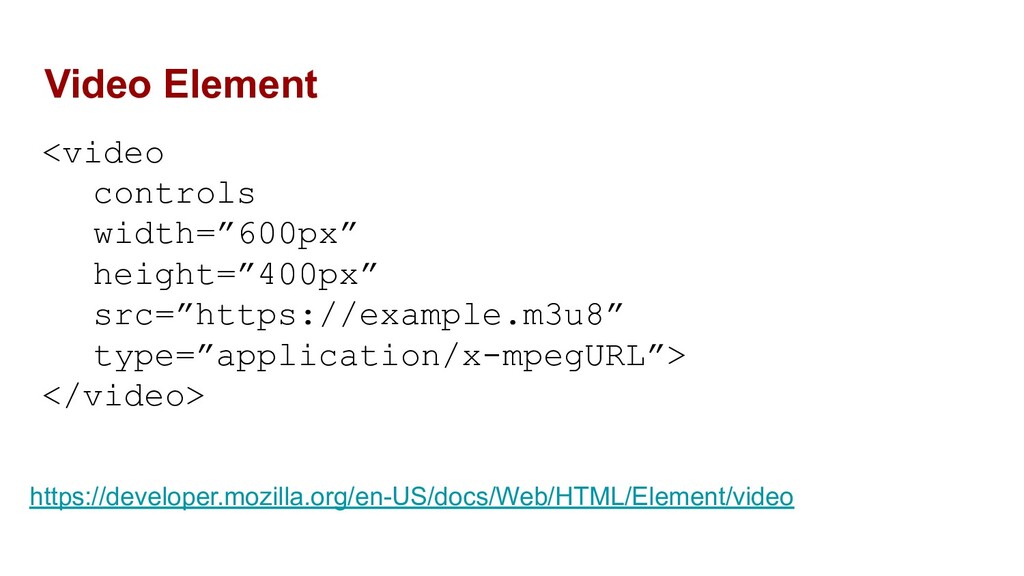
    next slide into https://videojs.github.io/http-streaming/ and take a look at the network tab of the console • Try playing an HLS stream directly in Safari • Try throttling the network while playing a video https://developers.google.com/web/tools/chrome-devtools/network#throttle • Find a website with video on it and take a look at the network tab. Can you tell what format is being used? • Try writing a small webpage with a video player from the next page on it and play one of the test streams • Build the WebRTC example app with Red5 Pro SDK
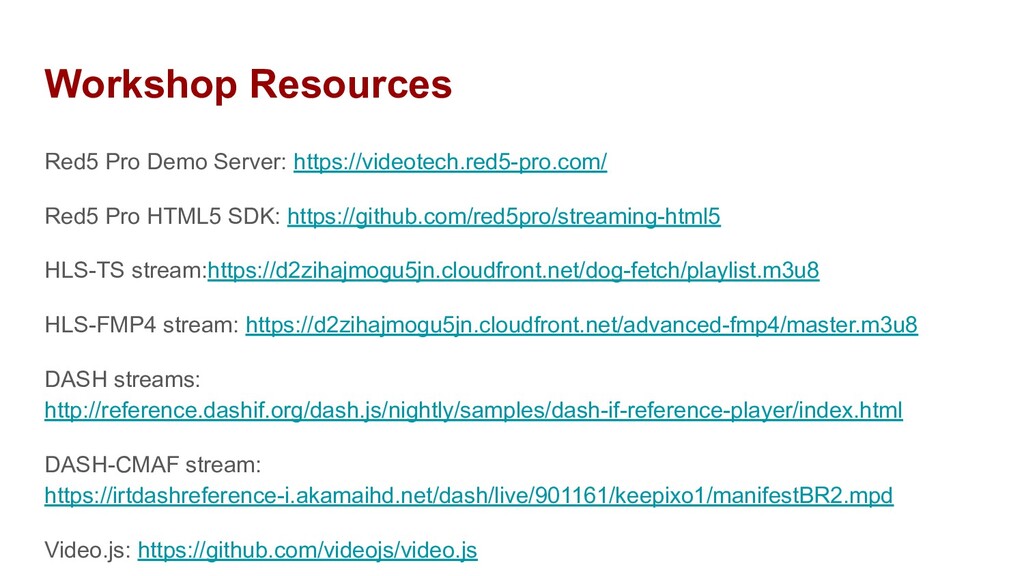
  51. Workshop Resources Red5 Pro Demo Server: https://videotech.red5-pro.com/ Red5 Pro HTML5

    SDK: https://github.com/red5pro/streaming-html5 HLS-TS stream:https://d2zihajmogu5jn.cloudfront.net/dog-fetch/playlist.m3u8 HLS-FMP4 stream: https://d2zihajmogu5jn.cloudfront.net/advanced-fmp4/master.m3u8 DASH streams: http://reference.dashif.org/dash.js/nightly/samples/dash-if-reference-player/index.html DASH-CMAF stream: https://irtdashreference-i.akamaihd.net/dash/live/901161/keepixo1/manifestBR2.mpd Video.js: https://github.com/videojs/video.js