Upgrade to Pro
— share decks privately, control downloads, hide ads and more …
Speaker Deck
Sign up for free
Menu
Search
Features
All features
Private URLs
Password Protection
Custom URLS
Scheduled publishing
Remove Branding
Restrict embedding
Deck Collections
Notes
Features
All features
Private URLs
Password Protection
Custom URLS
Scheduled publishing
Remove Branding
Restrict embedding
Deck Collections
Notes
Explore
Featured decks
Featured speakers
Programming
Technology
Storyboards
Explore
Featured decks
Featured speakers
Programming
Technology
Storyboards
Pricing
Search
Sign in
Sign up for free
前端框架开发培训
Search
cssrain
September 02, 2014
Technology
150
0
Share
Embed
Copy iframe code
Copy JS code
Copy link
Start on current slide
前端框架开发培训
前端框架开发培训
cssrain
September 02, 2014
More Decks by cssrain
See All by cssrain
UED工作流程分享和交流
cssrain
1
540
解读HTML
cssrain
0
210
解读HTML5
cssrain
2
230
基础CSS(1)
cssrain
0
220
基础CSS(2)
cssrain
0
160
高效的CSS
cssrain
0
210
高级CSS—继承
cssrain
0
190
PhoneGap分享和交流
cssrain
0
160
PhoneGap实践
cssrain
0
110
Other Decks in Technology
See All in Technology
ソフトウェア ファクトリー - 再現性のあるソフトウェアの工場づくり / Software factory
iktakahiro
4
1.3k
NDIでApple Vision Proにリアルタイム映像送信
jyouryuusui
0
110
AI時代のAPI開発を加速する品質ガードレール / API Quality Guardrails in the AI Era
yokawasa
0
190
触りたくないデータに、どう触るか AI時代のRBACアクセスガバナンス
ivry_presentationmaterials
0
140
遠藤な_めぐろLT #38 「社内のAI活用推進」@麻布台_20261009
endonanana
0
120
TinyGoでオブザーバビリティ?OpenTelemetryはTinyGoで使えるのか / Is OpenTelemetry available in TinyGo environment?
ymotongpoo
2
140
Loop Engineering, beyond prompt, context, and harness engineering
glaforge
0
100
[AWS 秋のクラウドオペレーション祭り 2026]AWS DevOps Agentで変わる リリースと運用対応 ~リリース管理機能と Directed actions のご紹介~
furuton
4
1.2k
Persisting Massive Data with Rails ~Designing for 60 billion rows, and fighting the bottlenecks~ Railsで挑む大量データ永続化 〜600億件を永続化するための設計とボトルネックとの戦い〜
occhi
0
490
アウトプット初心者、半年間のふりかえり
4o1sobblue
0
200
子育てエンジニアの可処分時間が減っても成長を諦めない戦い方
sudoakiy
6
4.5k
DevelopersIO 2026 知識の地図を描く ─ オントロジーとは何か?
ishikawa_satoru
1
1.5k
Featured
See All Featured
Measuring & Analyzing Core Web Vitals
bluesmoon
9
1k
BBQ
matthewcrist
90
10k
Speed Design
sergeychernyshev
33
2.2k
State of Search Keynote: SEO is Dead Long Live SEO
ryanjones
0
320
実際に使うSQLの書き方 徹底解説 / pgcon21j-tutorial
soudai
PRO
203
77k
How People are Using Generative and Agentic AI to Supercharge Their Products, Projects, Services and Value Streams Today
helenjbeal
2
360
How to Create Impact in a Changing Tech Landscape [PerfNow 2023]
tammyeverts
56
3.5k
職位にかかわらず全員がリーダーシップを発揮するチーム作り / Building a team where everyone can demonstrate leadership regardless of position
madoxten
69
67k
How to Talk to Developers About Accessibility
jct
2
570
Redefining SEO in the New Era of Traffic Generation
szymonslowik
1
470
Claude Code のすすめ
schroneko
67
230k
The B2B funnel & how to create a winning content strategy
katarinadahlin
PRO
1
560
Transcript
单东林 2013年04月 前端框架开发培训 UED分享 · 交流 http://cssrain.github.io
1,开发模式 2,数据整合 3,开发规范 浏览器兼容性管理 文件目录管理 Lib源管理 内容:
1,开发模式
Ajax开发模式 所有页面的数据都是从前台发送ajax请求,后台返回的形式。所有操作都 是异步模式。
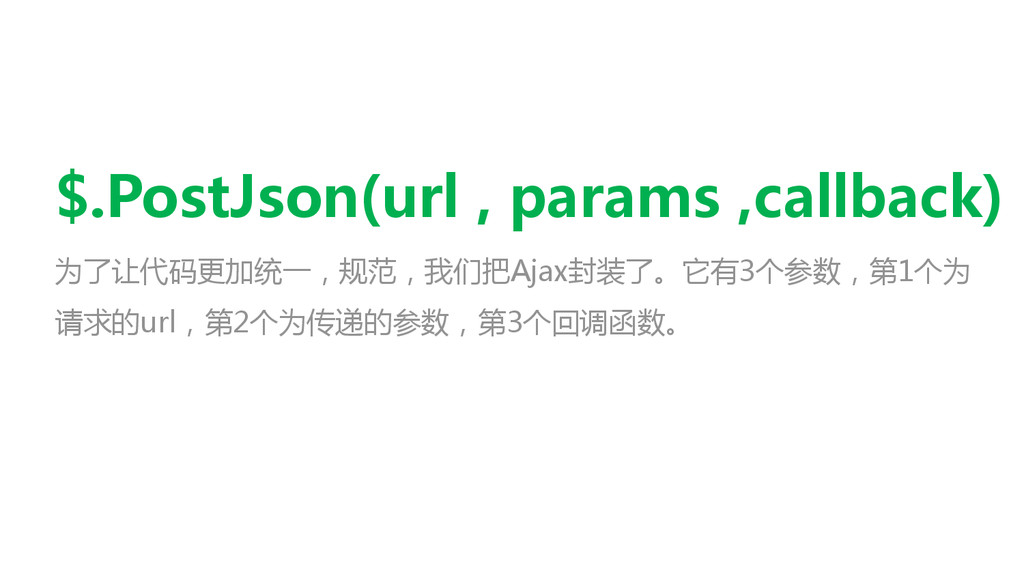
$.PostJson(url , params ,callback) 为了让代码更加统一,规范,我们把Ajax封装了。它有3个参数,第1个为 请求的url,第2个为传递的参数,第3个回调函数。
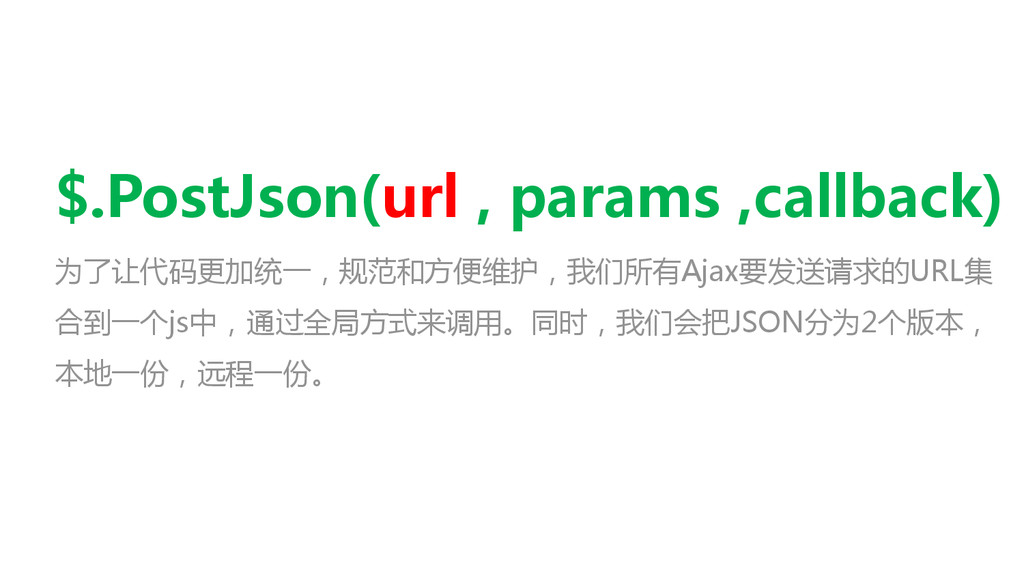
$.PostJson(url , params ,callback) 为了让代码更加统一,规范和方便维护,我们所有Ajax要发送请求的URL集 合到一个js中,通过全局方式来调用。同时,我们会把JSON分为2个版本, 本地一份,远程一份。
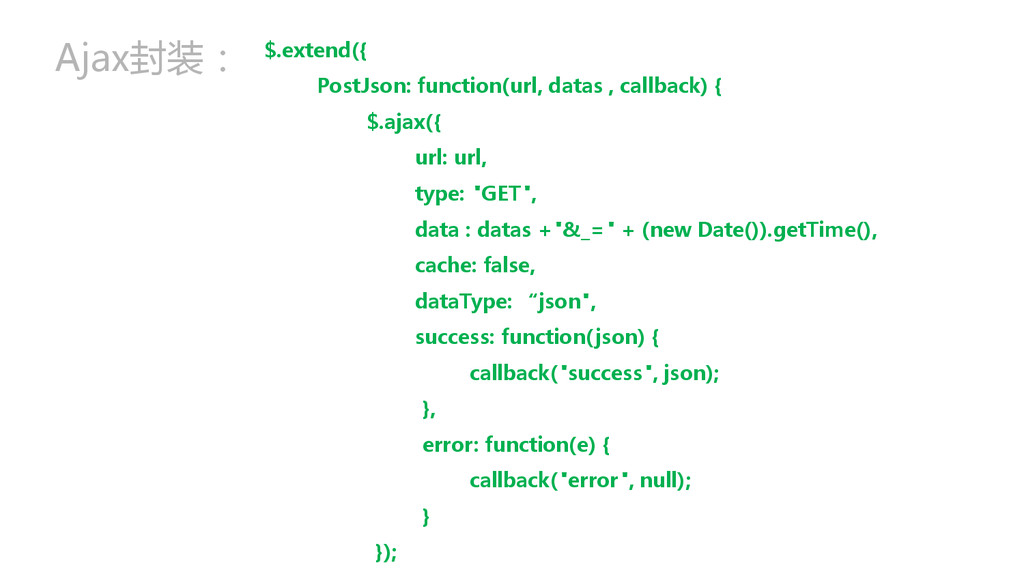
Ajax封装: $.extend({ PostJson: function(url, datas , callback) { $.ajax({ url:
url, type: "GET", data : datas +"&_=" + (new Date()).getTime(), cache: false, dataType: “json", success: function(json) { callback("success", json); }, error: function(e) { callback("error", null); } });
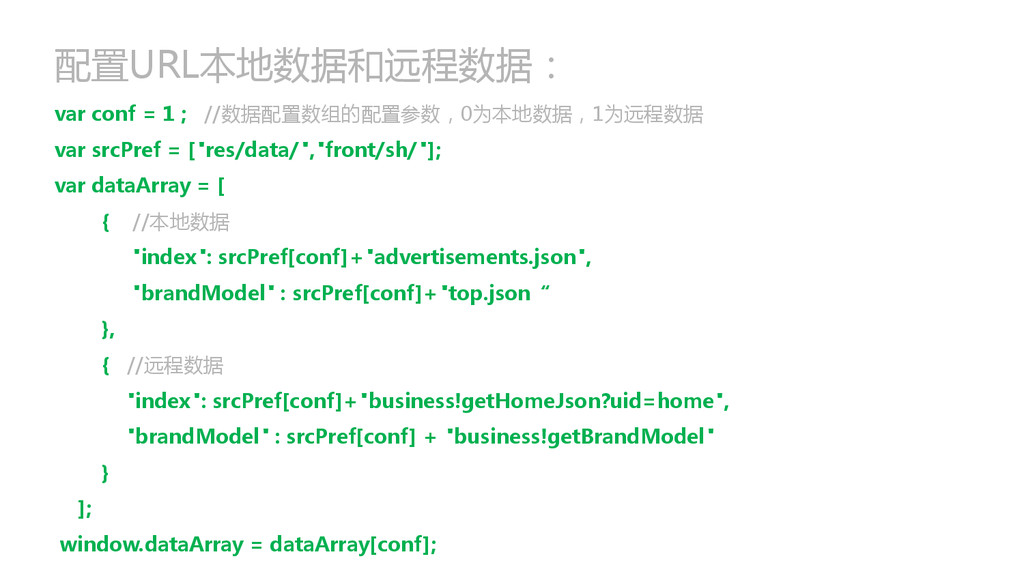
配置URL本地数据和远程数据: var conf = 1 ; //数据配置数组的配置参数,0为本地数据,1为远程数据 var srcPref =
["res/data/","front/sh/"]; var dataArray = [ { //本地数据 "index": srcPref[conf]+"advertisements.json", "brandModel" : srcPref[conf]+"top.json“ }, { //远程数据 "index": srcPref[conf]+"business!getHomeJson?uid=home", "brandModel" : srcPref[conf] + "business!getBrandModel" } ]; window.dataArray = dataArray[conf];
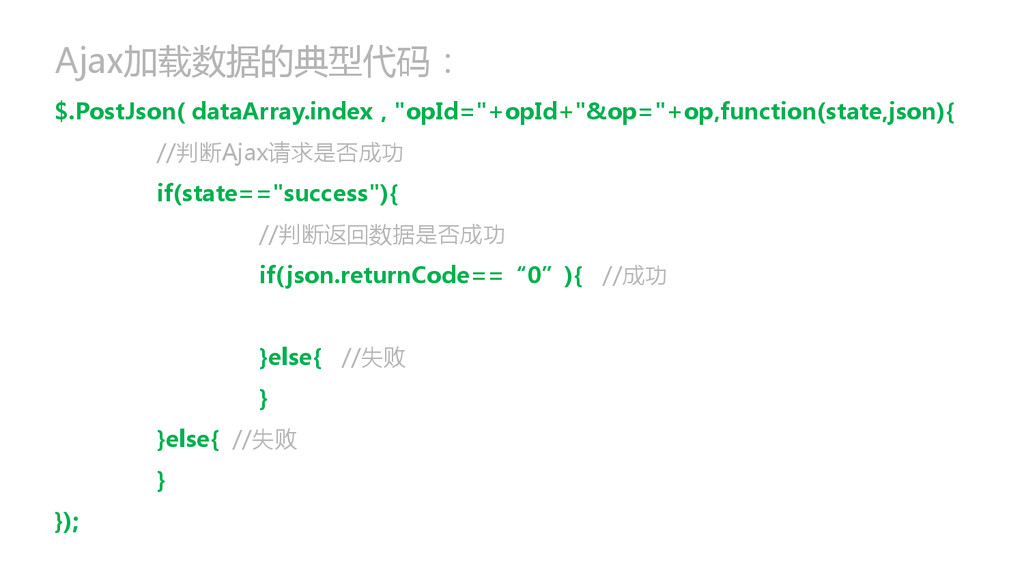
Ajax加载数据的典型代码: $.PostJson( dataArray.index , "opId="+opId+"&op="+op,function(state,json){ //判断Ajax请求是否成功 if(state=="success"){ //判断返回数据是否成功 if(json.returnCode==“0”){ //成功
}else{ //失败 } }else{ //失败 } });
2,数据整合
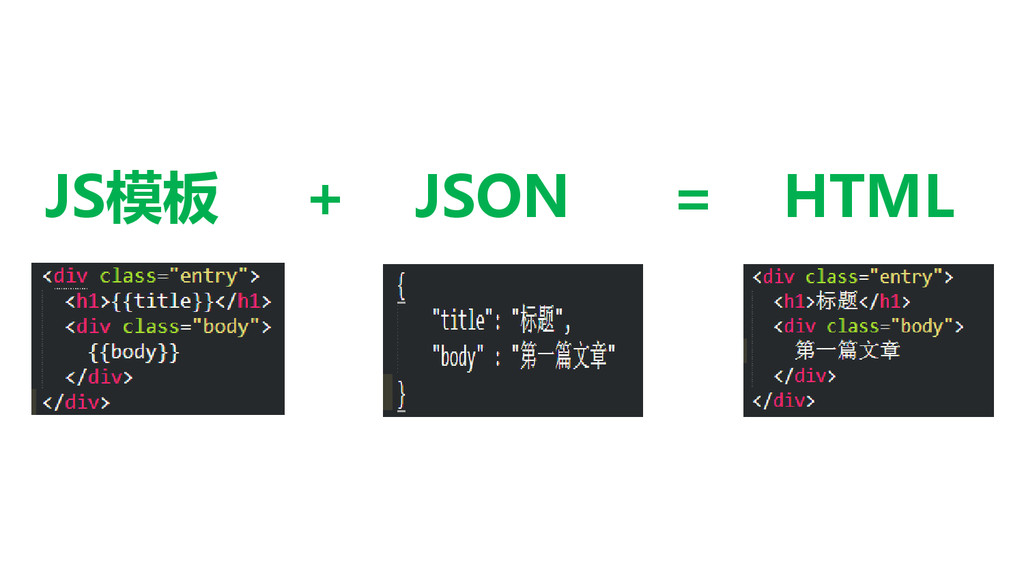
JS模板 + JSON = HTML 传统模式:后台输出json,前台把json解析,拼接成HTML插入到页面中
Handlebars.js 它是JavaScript一个语义模板库,通过对view和data的分离来快速构建 Web模板。它采用“Logic-less template”(无逻辑模版)的思路。
JS模板 + JSON = HTML
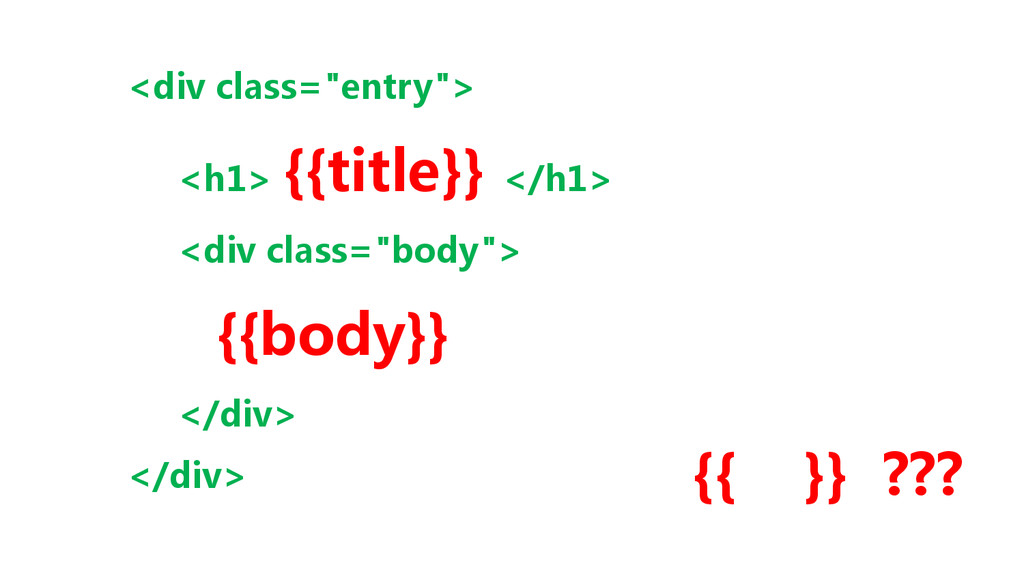
<div class="entry"> <h1> {{title}} </h1> <div class="body"> {{body}} </div> </div>
{{ }} ???
如何使用它? 官方网站:http://handlebarsjs.com/ 教程: http://software.intel.com/zh-cn/articles/html5handlebars
3,开发规范
浏览器兼容性管理 保证代码样式,脚本在规定的浏览器下正常运行。
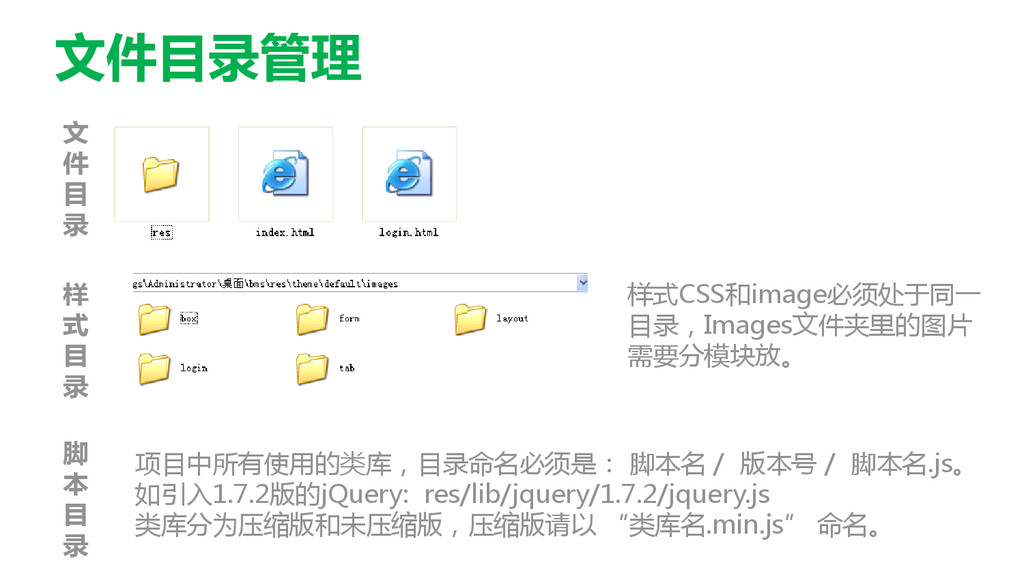
文件目录管理 文 件 目 录 样 式 目 录 样式CSS和image必须处于同一
目录,Images文件夹里的图片 需要分模块放。 脚 本 目 录 项目中所有使用的类库,目录命名必须是: 脚本名 / 版本号 / 脚本名.js。 如引入1.7.2版的jQuery: res/lib/jquery/1.7.2/jquery.js 类库分为压缩版和未压缩版,压缩版请以 “类库名.min.js” 命名。
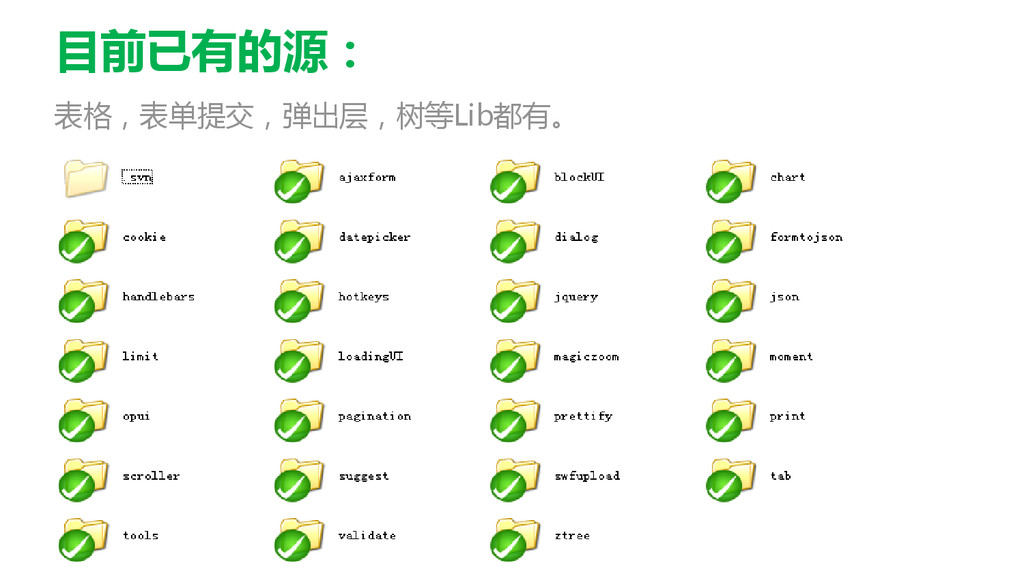
Lib源地址 所有的脚本库都需要从Lib源中获取,Lib源已放置在项目中。如果没有相 关的lib,可讨论后再添加Lib源。切勿随意添加lib,随意引入其他脚本效 果!
目前已有的源: 表格,表单提交,弹出层,树等Lib都有。
Q&A
感 谢 聆 听


 cssrain
 iktakahiro
 jyouryuusui
 yokawasa
 ivry_presentationmaterials
 endonanana
 ymotongpoo
 glaforge
 furuton
 occhi
occhi
 4o1sobblue
 sudoakiy
 ishikawa_satoru
 bluesmoon
 matthewcrist
 sergeychernyshev
 ryanjones
 soudai
.png) helenjbeal
helenjbeal
 tammyeverts
 madoxten
 jct
jct
 szymonslowik
 schroneko
 katarinadahlin