Upgrade to Pro
— share decks privately, control downloads, hide ads and more …
Speaker Deck
Sign up for free
Menu
Search
Features
All features
Private URLs
Password Protection
Custom URLS
Scheduled publishing
Remove Branding
Restrict embedding
Deck Collections
Notes
Features
All features
Private URLs
Password Protection
Custom URLS
Scheduled publishing
Remove Branding
Restrict embedding
Deck Collections
Notes
Explore
Featured decks
Featured speakers
Programming
Technology
Storyboards
Explore
Featured decks
Featured speakers
Programming
Technology
Storyboards
Pricing
Search
Sign in
Sign up for free
シーンファイルの気持ちを理解する
Search
Daisuke Nakayama
September 05, 2018
Programming
15
0
Share
Embed
Copy iframe code
Copy JS code
Copy link
Start on current slide
シーンファイルの気持ちを理解する
Unityのシーンとかプレハブを読めるようになった時に作った資料
Daisuke Nakayama
September 05, 2018
Other Decks in Programming
See All in Programming
3回つくってわかった、 定期実行ジョブ基盤の本質情報
takai
0
520
コードで差別化できない時代の ソフトウェアエンジニアリング / Software Engineering in an Era Where Code Doesn’t Differentiate
kishida
2
180
Compiling a real-world CLI tool to native with Static Hermes
tmikov2023
0
120
Web Framework Benchmark Battle 2026, Any%
a_matsuda
2
2.5k
AWS CDKのカスタムリソースでContinuum(旧Security Agent)を実装した話 | Implementing Continuum (formerly Security Agent) via AWS CDK Custom Resource
akihisaikeda
2
150
AWSに止められる覚悟してますか?
morizo_1984
2
540
[2026-10-09]一枚の布で作らなくてもいい。 信頼性は「パッチワーク」で紡がれる~既存の運用と新しい可能性をつなぎ合わせてきたCREの話~
tosite
0
100
R8 の設定見直しでアプリサイズ削減
andpad
0
220
Herb in Rails 8.2: Your ERB views, now HTML-aware @ Kaigi on Rails 2026, Tokyo, Japan
marcoroth
2
290
設計次第でAIコードの読む量は減らせる / designing-for-code-reading
minodriven
35
17k
Next.js: The final boss of Web Performance
guaca
0
280
自サークルのIdPからログアウトできるようになるまで
taiseiue
1
140
Featured
See All Featured
BBQ
matthewcrist
90
10k
GraphQLの誤解/rethinking-graphql
sonatard
75
12k
No one is an island. Learnings from fostering a developers community.
thoeni
21
3.9k
Designing for Timeless Needs
cassininazir
1
530
HU Berlin: Industrial-Strength Natural Language Processing with spaCy and Prodigy
inesmontani
PRO
0
760
New Earth Scene 8
popppiees
4
2.7k
The Pragmatic Product Professional
lauravandoore
37
7.5k
How to train your dragon (web standard)
notwaldorf
96
6.9k
Designing for humans not robots
tammielis
254
26k
The Mindset for Success: Future Career Progression
greggifford
PRO
0
540
Intergalactic Javascript Robots from Outer Space
tanoku
273
28k
How GitHub (no longer) Works
holman
316
150k
Transcript
シーンファイルの気持ちを理解する 1 / 27
はじめに 2 / 27
「シーンファイルの気持ちを理解する」とは シーンファイルの構造を知るという意味 3 / 27
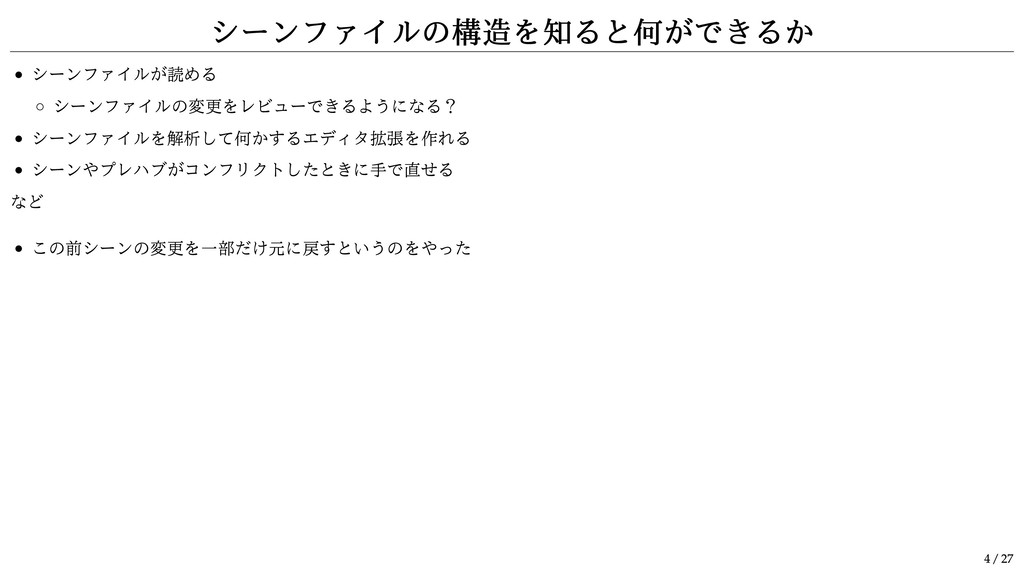
シーンファイルの構造を知ると何ができるか シーンファイルが読める シーンファイルの変更をレビューできるようになる? シーンファイルを解析して何かするエディタ拡張を作れる シーンやプレハブがコンフリクトしたときに手で直せる など この前シーンの変更を一部だけ元に戻すというのをやった 4 / 27
まずは YAML について 5 / 27
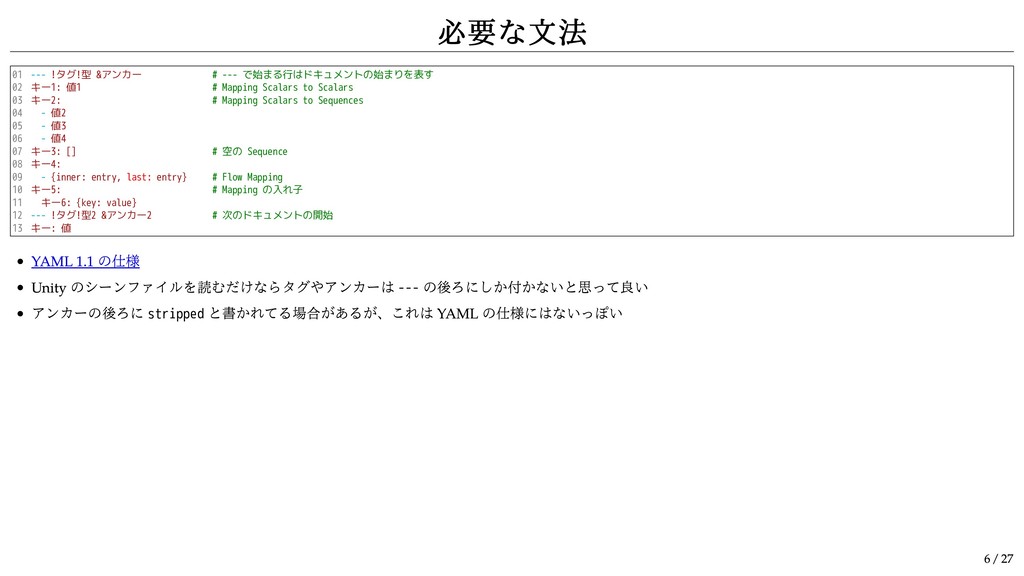
必要な文法 01 02 03 04 05 06 07 08 09
10 11 12 13 --- !タグ!型 &アンカー # --- で始まる行はドキュメントの始まりを表す キー1: 値1 # Mapping Scalars to Scalars キー2: # Mapping Scalars to Sequences - 値2 - 値3 - 値4 キー3: [] # 空の Sequence キー4: - {inner: entry, last: entry} # Flow Mapping キー5: # Mapping の入れ子 キー6: {key: value} --- !タグ!型2 &アンカー2 # 次のドキュメントの開始 キー: 値 YAML 1.1 の仕様 Unity のシーンファイルを読むだけならタグやアンカーは --- の後ろにしか付かないと思って良い アンカーの後ろに stripped と書かれてる場合があるが、これは YAML の仕様にはないっぽい 6 / 27
適当なシーンファイルの最初を抜き出したもの 01 02 03 04 05 06 07 08 09
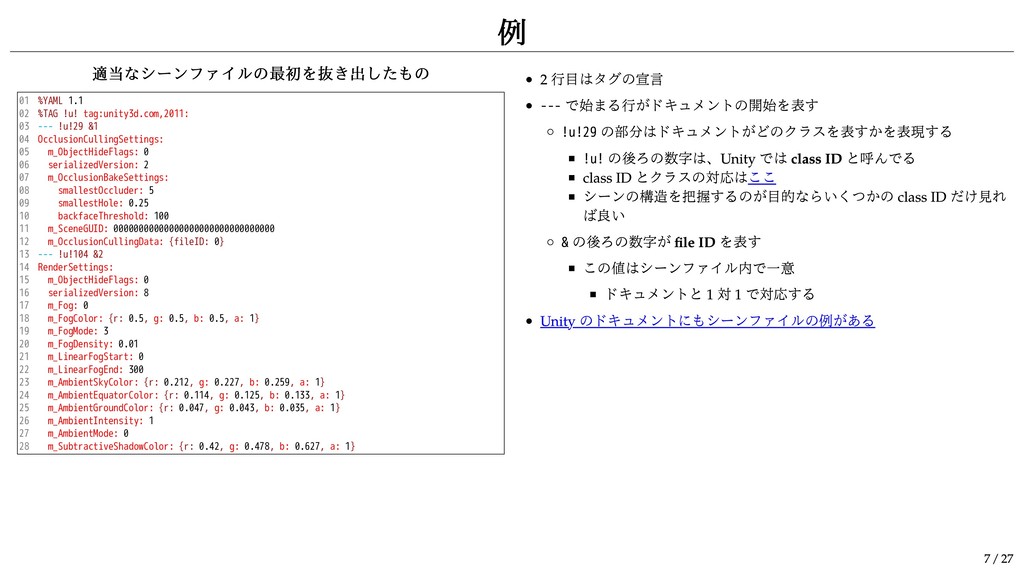
10 11 12 13 14 15 16 17 18 19 20 21 22 23 24 25 26 27 28 %YAML 1.1 %TAG !u! tag:unity3d.com,2011: --- !u!29 &1 OcclusionCullingSettings: m_ObjectHideFlags: 0 serializedVersion: 2 m_OcclusionBakeSettings: smallestOccluder: 5 smallestHole: 0.25 backfaceThreshold: 100 m_SceneGUID: 00000000000000000000000000000000 m_OcclusionCullingData: {fileID: 0} --- !u!104 &2 RenderSettings: m_ObjectHideFlags: 0 serializedVersion: 8 m_Fog: 0 m_FogColor: {r: 0.5, g: 0.5, b: 0.5, a: 1} m_FogMode: 3 m_FogDensity: 0.01 m_LinearFogStart: 0 m_LinearFogEnd: 300 m_AmbientSkyColor: {r: 0.212, g: 0.227, b: 0.259, a: 1} m_AmbientEquatorColor: {r: 0.114, g: 0.125, b: 0.133, a: 1} m_AmbientGroundColor: {r: 0.047, g: 0.043, b: 0.035, a: 1} m_AmbientIntensity: 1 m_AmbientMode: 0 m_SubtractiveShadowColor: {r: 0.42, g: 0.478, b: 0.627, a: 1} 2 行目はタグの宣言 --- で始まる行がドキュメントの開始を表す !u!29 の部分はドキュメントがどのクラスを表すかを表現する !u! の後ろの数字は、Unity では class ID と呼んでる class ID とクラスの対応はここ シーンの構造を把握するのが目的ならいくつかの class ID だけ見れ ば良い & の後ろの数字が file ID を表す この値はシーンファイル内で一意 ドキュメントと 1 対 1 で対応する Unity のドキュメントにもシーンファイルの例がある 例 7 / 27
GameObject について 8 / 27
01 02 03 04 05 06 07 08 09 10
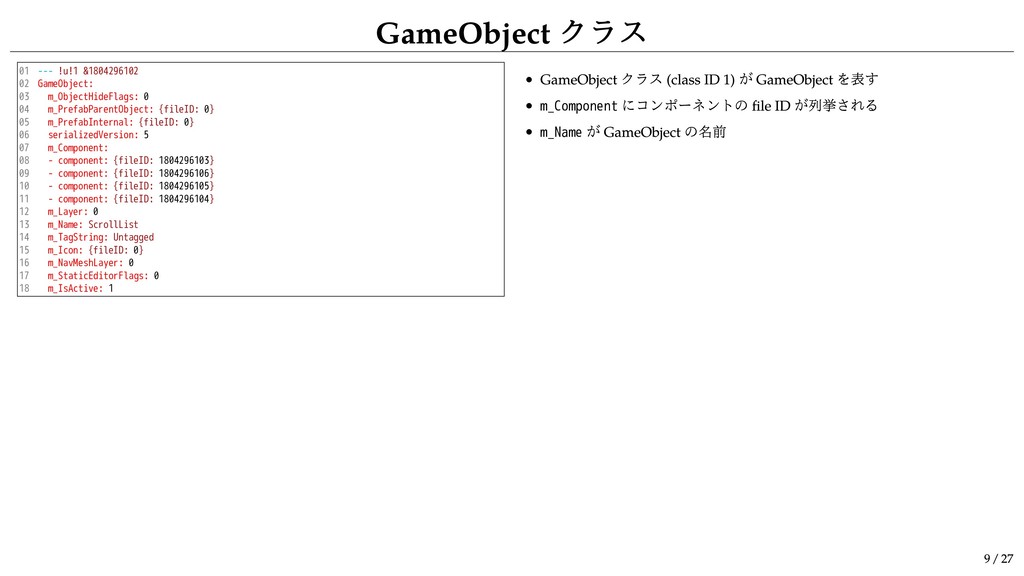
11 12 13 14 15 16 17 18 --- !u!1 &1804296102 GameObject: m_ObjectHideFlags: 0 m_PrefabParentObject: {fileID: 0} m_PrefabInternal: {fileID: 0} serializedVersion: 5 m_Component: - component: {fileID: 1804296103} - component: {fileID: 1804296106} - component: {fileID: 1804296105} - component: {fileID: 1804296104} m_Layer: 0 m_Name: ScrollList m_TagString: Untagged m_Icon: {fileID: 0} m_NavMeshLayer: 0 m_StaticEditorFlags: 0 m_IsActive: 1 GameObject クラス (class ID 1) が GameObject を表す m_Component にコンポーネントの file ID が列挙される m_Name が GameObject の名前 GameObject クラス 9 / 27
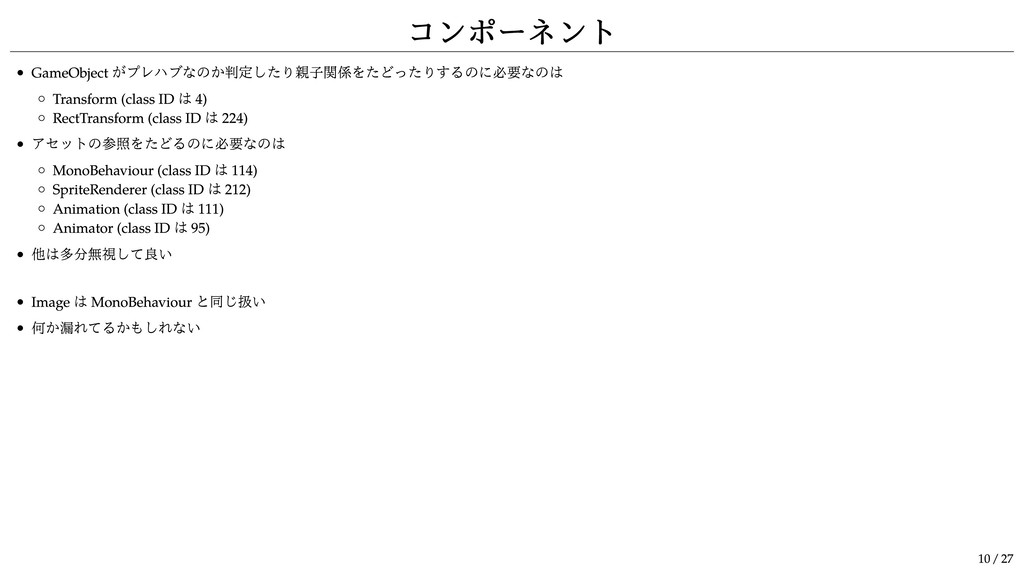
コンポーネント GameObject がプレハブなのか判定したり親子関係をたどったりするのに必要なのは Transform (class ID は 4) RectTransform (class
ID は 224) アセットの参照をたどるのに必要なのは MonoBehaviour (class ID は 114) SpriteRenderer (class ID は 212) Animation (class ID は 111) Animator (class ID は 95) 他は多分無視して良い Image は MonoBehaviour と同じ扱い 何か漏れてるかもしれない 10 / 27
Transform を見るとできること 11 / 27
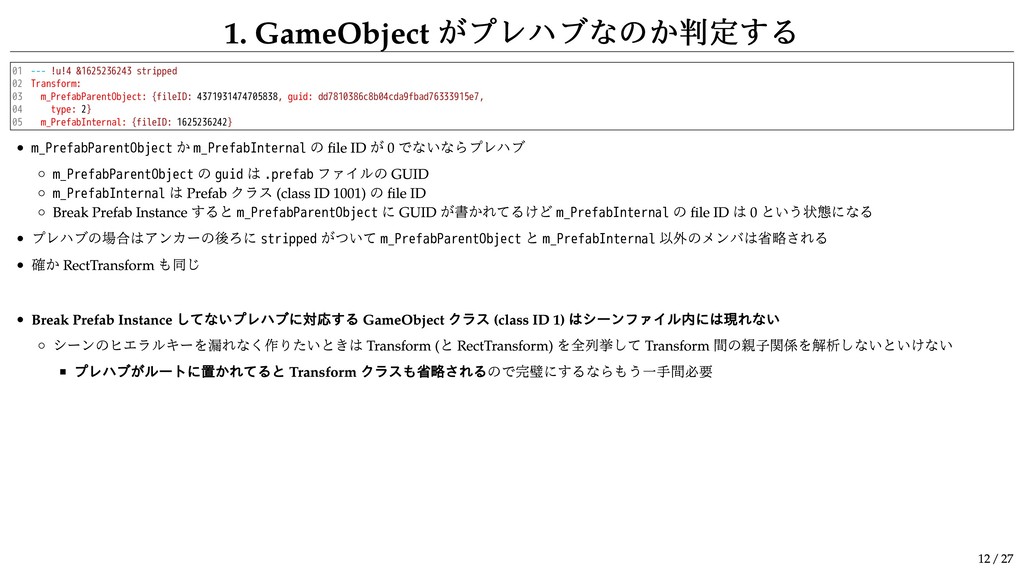
1. GameObject がプレハブなのか判定する 01 02 03 04 05 --- !u!4
&1625236243 stripped Transform: m_PrefabParentObject: {fileID: 4371931474705838, guid: dd7810386c8b04cda9fbad76333915e7, type: 2} m_PrefabInternal: {fileID: 1625236242} m_PrefabParentObject か m_PrefabInternal の file ID が 0 でないならプレハブ m_PrefabParentObject の guid は .prefab ファイルの GUID m_PrefabInternal は Prefab クラス (class ID 1001) の file ID Break Prefab Instance すると m_PrefabParentObject に GUID が書かれてるけど m_PrefabInternal の file ID は 0 という状態になる プレハブの場合はアンカーの後ろに stripped がついて m_PrefabParentObject と m_PrefabInternal 以外のメンバは省略される 確か RectTransform も同じ Break Prefab Instance してないプレハブに対応する GameObject クラス (class ID 1) はシーンファイル内には現れない シーンのヒエラルキーを漏れなく作りたいときは Transform ( と RectTransform) を全列挙して Transform 間の親子関係を解析しないといけない プレハブがルートに置かれてると Transform クラスも省略されるので完璧にするならもう一手間必要 12 / 27
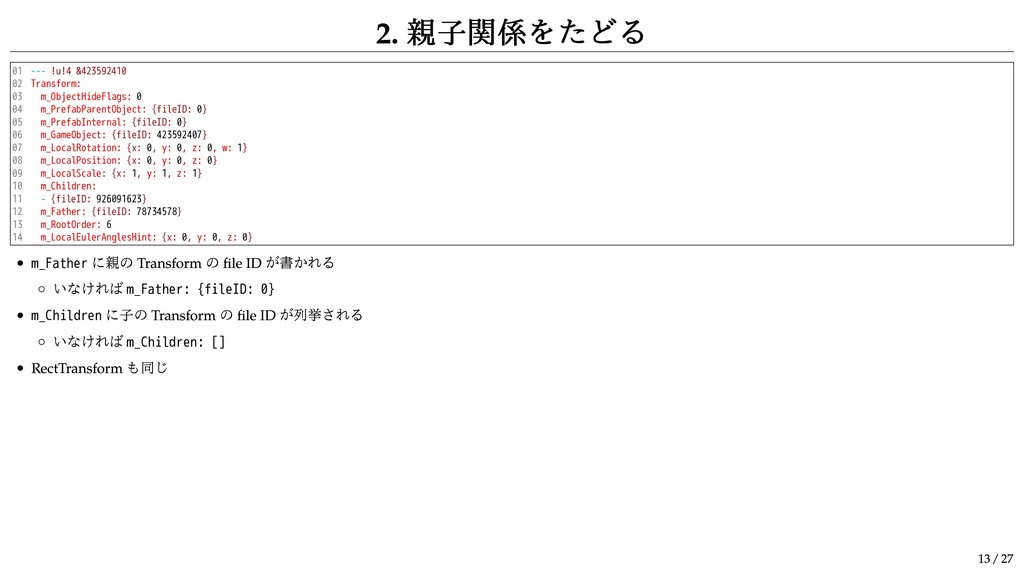
2. 親子関係をたどる 01 02 03 04 05 06 07 08
09 10 11 12 13 14 --- !u!4 &423592410 Transform: m_ObjectHideFlags: 0 m_PrefabParentObject: {fileID: 0} m_PrefabInternal: {fileID: 0} m_GameObject: {fileID: 423592407} m_LocalRotation: {x: 0, y: 0, z: 0, w: 1} m_LocalPosition: {x: 0, y: 0, z: 0} m_LocalScale: {x: 1, y: 1, z: 1} m_Children: - {fileID: 926091623} m_Father: {fileID: 78734578} m_RootOrder: 6 m_LocalEulerAnglesHint: {x: 0, y: 0, z: 0} m_Father に親の Transform の file ID が書かれる いなければ m_Father: {fileID: 0} m_Children に子の Transform の file ID が列挙される いなければ m_Children: [] RectTransform も同じ 13 / 27
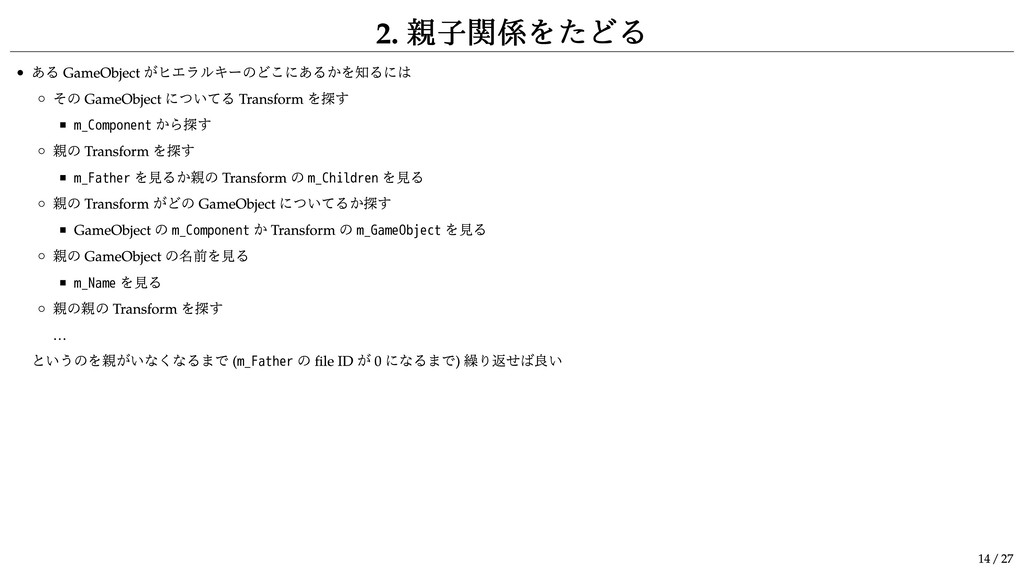
2. 親子関係をたどる ある GameObject がヒエラルキーのどこにあるかを知るには その GameObject についてる Transform を探す
m_Component から探す 親の Transform を探す m_Father を見るか親の Transform の m_Children を見る 親の Transform がどの GameObject についてるか探す GameObject の m_Component か Transform の m_GameObject を見る 親の GameObject の名前を見る m_Name を見る 親の親の Transform を探す … というのを親がいなくなるまで ( m_Father の file ID が 0 になるまで) 繰り返せば良い 14 / 27
プレハブについて!!!! 15 / 27
1. シーンに置かれてるプレハブ 01 02 03 04 05 06 07 08
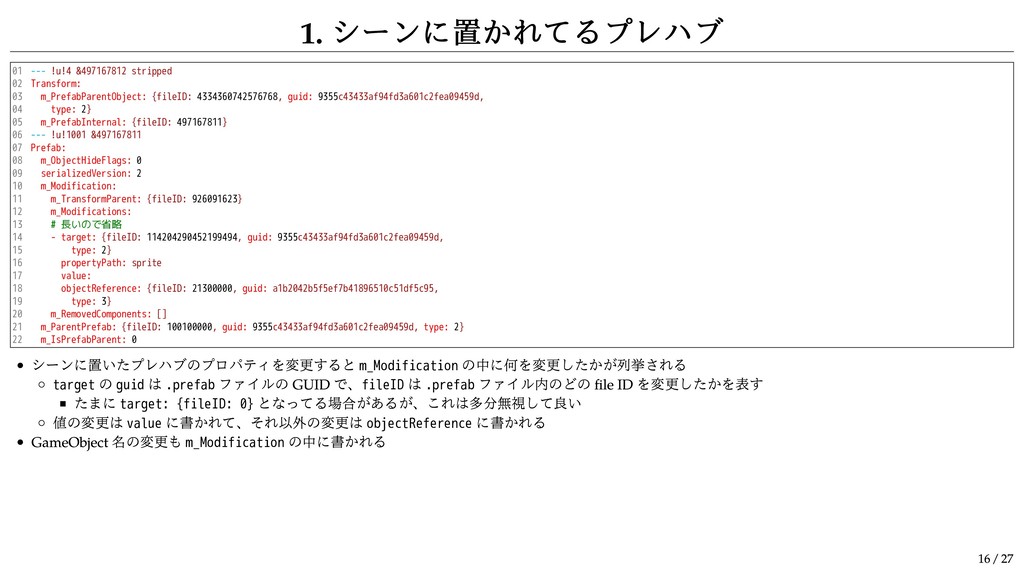
09 10 11 12 13 14 15 16 17 18 19 20 21 22 --- !u!4 &497167812 stripped Transform: m_PrefabParentObject: {fileID: 4334360742576768, guid: 9355c43433af94fd3a601c2fea09459d, type: 2} m_PrefabInternal: {fileID: 497167811} --- !u!1001 &497167811 Prefab: m_ObjectHideFlags: 0 serializedVersion: 2 m_Modification: m_TransformParent: {fileID: 926091623} m_Modifications: # 長いので省略 - target: {fileID: 114204290452199494, guid: 9355c43433af94fd3a601c2fea09459d, type: 2} propertyPath: sprite value: objectReference: {fileID: 21300000, guid: a1b2042b5f5ef7b41896510c51df5c95, type: 3} m_RemovedComponents: [] m_ParentPrefab: {fileID: 100100000, guid: 9355c43433af94fd3a601c2fea09459d, type: 2} m_IsPrefabParent: 0 シーンに置いたプレハブのプロパティを変更すると m_Modification の中に何を変更したかが列挙される target の guid は .prefab ファイルの GUID で、fileID は .prefab ファイル内のどの file ID を変更したかを表す たまに target: {fileID: 0} となってる場合があるが、これは多分無視して良い 値の変更は value に書かれて、それ以外の変更は objectReference に書かれる GameObject 名の変更も m_Modification の中に書かれる 16 / 27
1. シーンに置かれてるプレハブ 01 02 03 04 05 06 07 08
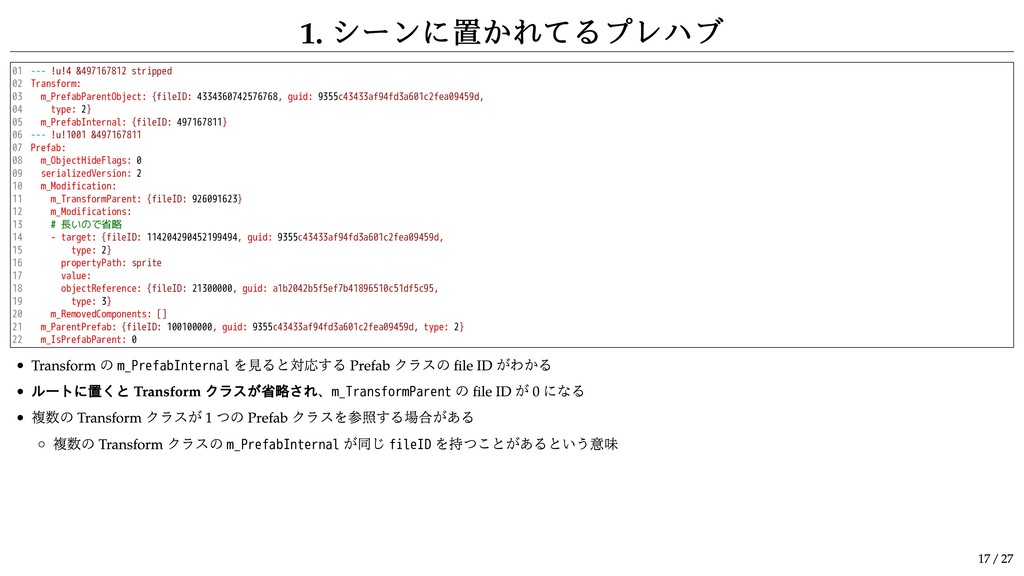
09 10 11 12 13 14 15 16 17 18 19 20 21 22 --- !u!4 &497167812 stripped Transform: m_PrefabParentObject: {fileID: 4334360742576768, guid: 9355c43433af94fd3a601c2fea09459d, type: 2} m_PrefabInternal: {fileID: 497167811} --- !u!1001 &497167811 Prefab: m_ObjectHideFlags: 0 serializedVersion: 2 m_Modification: m_TransformParent: {fileID: 926091623} m_Modifications: # 長いので省略 - target: {fileID: 114204290452199494, guid: 9355c43433af94fd3a601c2fea09459d, type: 2} propertyPath: sprite value: objectReference: {fileID: 21300000, guid: a1b2042b5f5ef7b41896510c51df5c95, type: 3} m_RemovedComponents: [] m_ParentPrefab: {fileID: 100100000, guid: 9355c43433af94fd3a601c2fea09459d, type: 2} m_IsPrefabParent: 0 Transform の m_PrefabInternal を見ると対応する Prefab クラスの file ID がわかる ルートに置くと Transform クラスが省略され、m_TransformParent の file ID が 0 になる 複数の Transform クラスが 1 つの Prefab クラスを参照する場合がある 複数の Transform クラスの m_PrefabInternal が同じ fileID を持つことがあるという意味 17 / 27
1. シーンに置かれてるプレハブ Transform クラスと Prefab クラスの関係は 1 対 1 ではなく多対
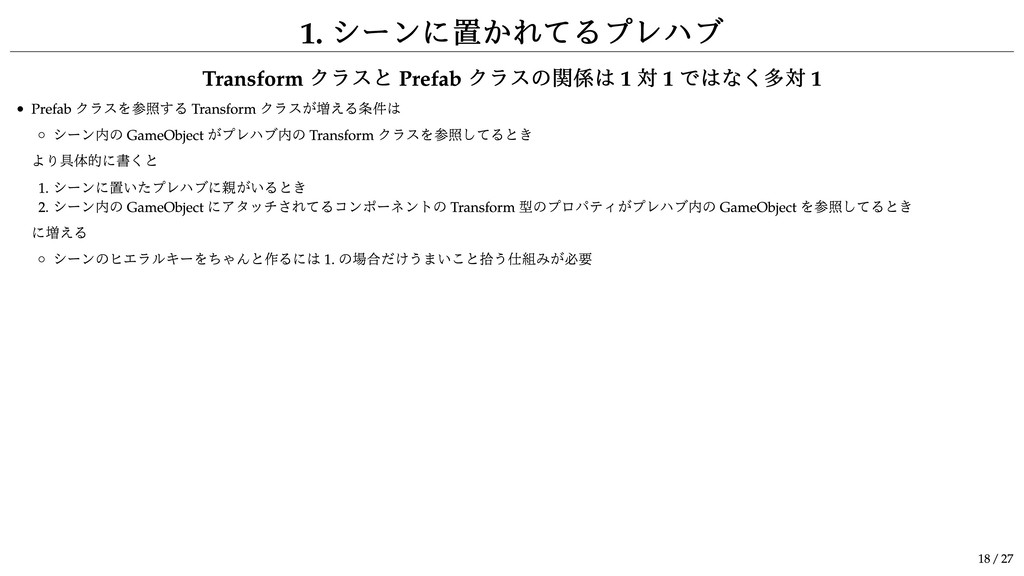
1 Prefab クラスを参照する Transform クラスが増える条件は シーン内の GameObject がプレハブ内の Transform クラスを参照してるとき より具体的に書くと 1. シーンに置いたプレハブに親がいるとき 2. シーン内の GameObject にアタッチされてるコンポーネントの Transform 型のプロパティがプレハブ内の GameObject を参照してるとき に増える シーンのヒエラルキーをちゃんと作るには 1. の場合だけうまいこと拾う仕組みが必要 18 / 27
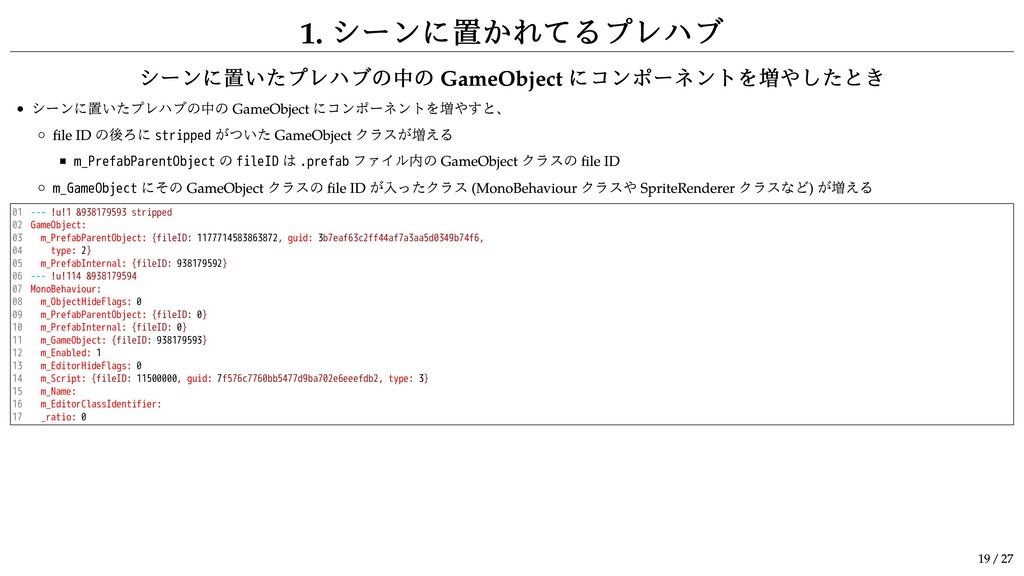
1. シーンに置かれてるプレハブ シーンに置いたプレハブの中の GameObject にコンポーネントを増やしたとき シーンに置いたプレハブの中の GameObject にコンポーネントを増やすと、 file ID
の後ろに stripped がついた GameObject クラスが増える m_PrefabParentObject の fileID は .prefab ファイル内の GameObject クラスの file ID m_GameObject にその GameObject クラスの file ID が入ったクラス (MonoBehaviour クラスや SpriteRenderer クラスなど) が増える 01 02 03 04 05 06 07 08 09 10 11 12 13 14 15 16 17 --- !u!1 &938179593 stripped GameObject: m_PrefabParentObject: {fileID: 1177714583863872, guid: 3b7eaf63c2ff44af7a3aa5d0349b74f6, type: 2} m_PrefabInternal: {fileID: 938179592} --- !u!114 &938179594 MonoBehaviour: m_ObjectHideFlags: 0 m_PrefabParentObject: {fileID: 0} m_PrefabInternal: {fileID: 0} m_GameObject: {fileID: 938179593} m_Enabled: 1 m_EditorHideFlags: 0 m_Script: {fileID: 11500000, guid: 7f576c7760bb5477d9ba702e6eeefdb2, type: 3} m_Name: m_EditorClassIdentifier: _ratio: 0 19 / 27
2. .prefab ファイル 最初に file ID が 100100000 な Prefab
クラスがあるという点は注意が必要 他はシーンファイルとほぼ同じなので省略 20 / 27
コンポーネント 21 / 27
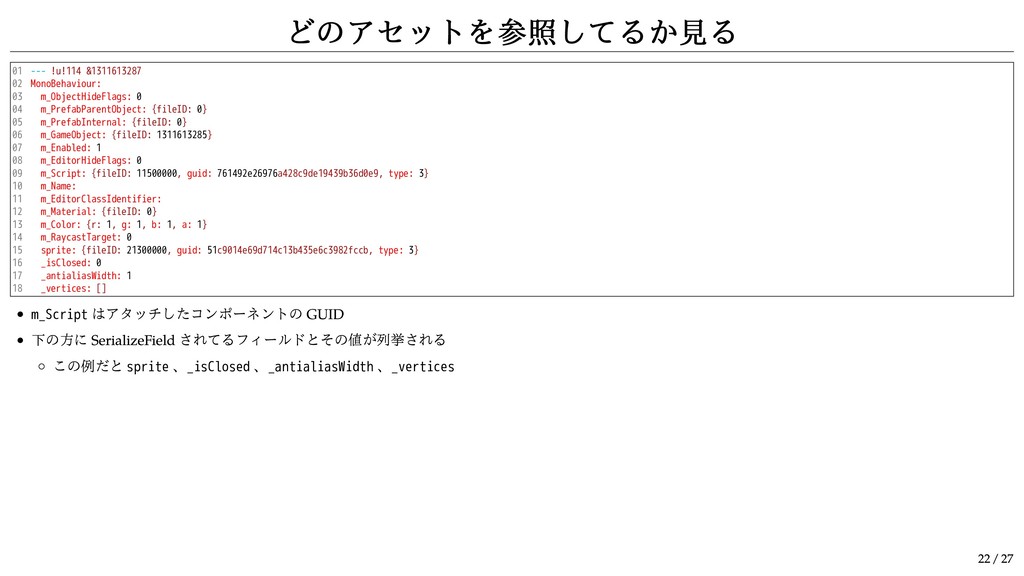
どのアセットを参照してるか見る 01 02 03 04 05 06 07 08 09
10 11 12 13 14 15 16 17 18 --- !u!114 &1311613287 MonoBehaviour: m_ObjectHideFlags: 0 m_PrefabParentObject: {fileID: 0} m_PrefabInternal: {fileID: 0} m_GameObject: {fileID: 1311613285} m_Enabled: 1 m_EditorHideFlags: 0 m_Script: {fileID: 11500000, guid: 761492e26976a428c9de19439b36d0e9, type: 3} m_Name: m_EditorClassIdentifier: m_Material: {fileID: 0} m_Color: {r: 1, g: 1, b: 1, a: 1} m_RaycastTarget: 0 sprite: {fileID: 21300000, guid: 51c9014e69d714c13b435e6c3982fccb, type: 3} _isClosed: 0 _antialiasWidth: 1 _vertices: [] m_Script はアタッチしたコンポーネントの GUID 下の方に SerializeField されてるフィールドとその値が列挙される この例だと sprite 、_isClosed 、_antialiasWidth 、_vertices 22 / 27
Animation と Animator 23 / 27
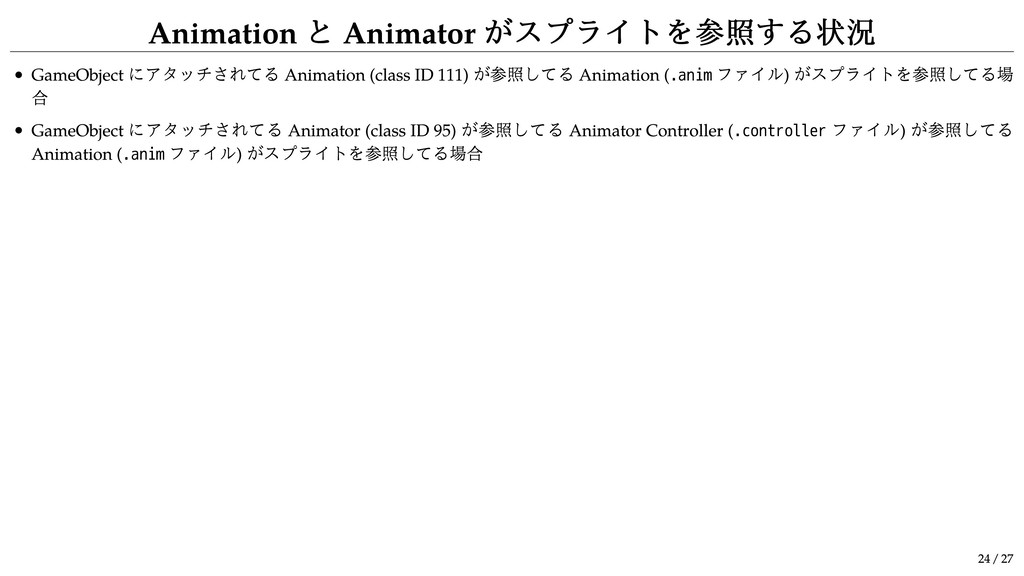
Animation と Animator がスプライトを参照する状況 GameObject にアタッチされてる Animation (class ID 111)
が参照してる Animation ( .anim ファイル) がスプライトを参照してる場 合 GameObject にアタッチされてる Animator (class ID 95) が参照してる Animator Controller ( .controller ファイル) が参照してる Animation ( .anim ファイル) がスプライトを参照してる場合 24 / 27
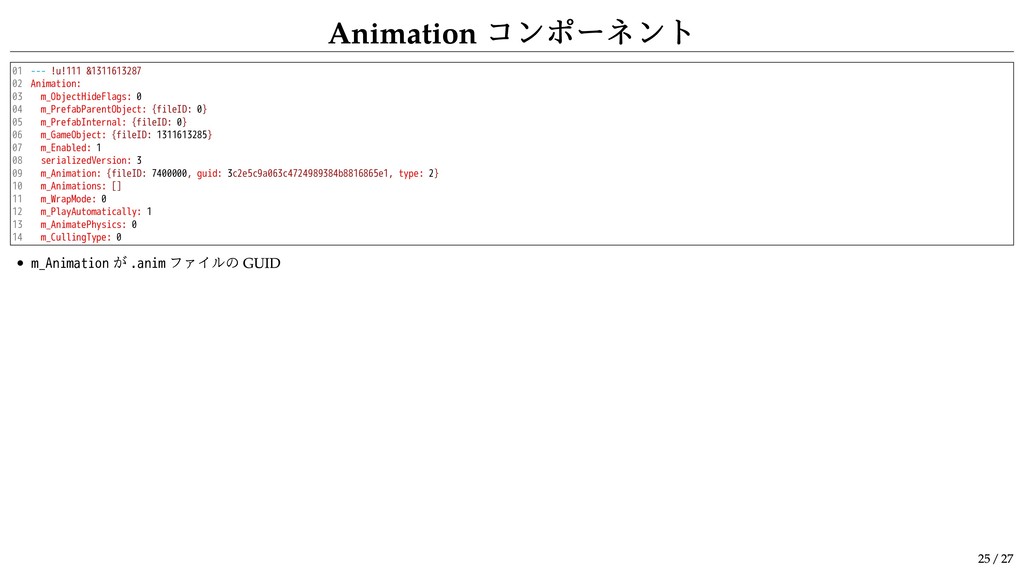
Animation コンポーネント 01 02 03 04 05 06 07 08
09 10 11 12 13 14 --- !u!111 &1311613287 Animation: m_ObjectHideFlags: 0 m_PrefabParentObject: {fileID: 0} m_PrefabInternal: {fileID: 0} m_GameObject: {fileID: 1311613285} m_Enabled: 1 serializedVersion: 3 m_Animation: {fileID: 7400000, guid: 3c2e5c9a063c4724989384b8816865e1, type: 2} m_Animations: [] m_WrapMode: 0 m_PlayAutomatically: 1 m_AnimatePhysics: 0 m_CullingType: 0 m_Animation が .anim ファイルの GUID 25 / 27
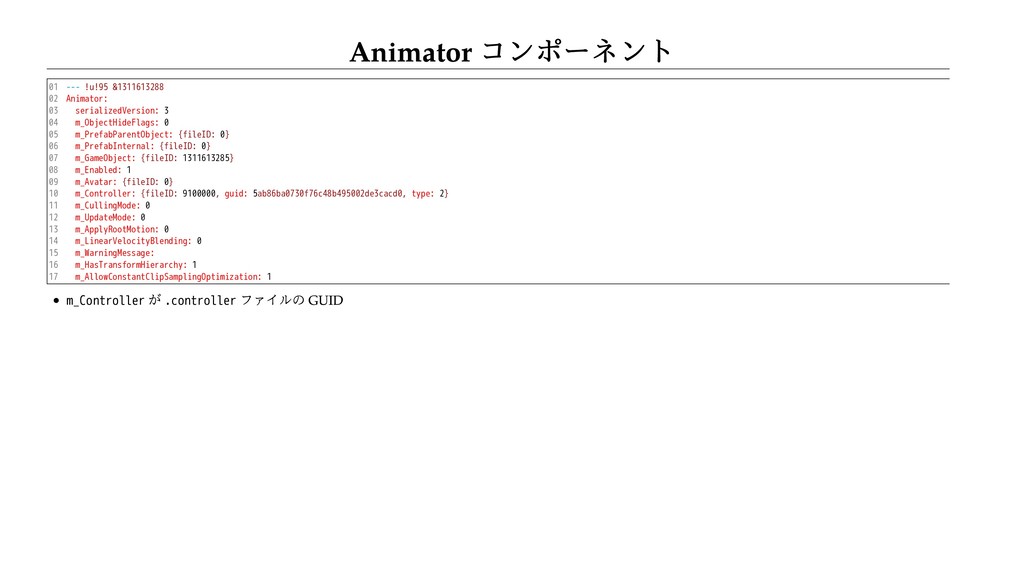
Animator コンポーネント 01 02 03 04 05 06 07 08
09 10 11 12 13 14 15 16 17 --- !u!95 &1311613288 Animator: serializedVersion: 3 m_ObjectHideFlags: 0 m_PrefabParentObject: {fileID: 0} m_PrefabInternal: {fileID: 0} m_GameObject: {fileID: 1311613285} m_Enabled: 1 m_Avatar: {fileID: 0} m_Controller: {fileID: 9100000, guid: 5ab86ba0730f76c48b495002de3cacd0, type: 2} m_CullingMode: 0 m_UpdateMode: 0 m_ApplyRootMotion: 0 m_LinearVelocityBlending: 0 m_WarningMessage: m_HasTransformHierarchy: 1 m_AllowConstantClipSamplingOptimization: 1 m_Controller が .controller ファイルの GUID
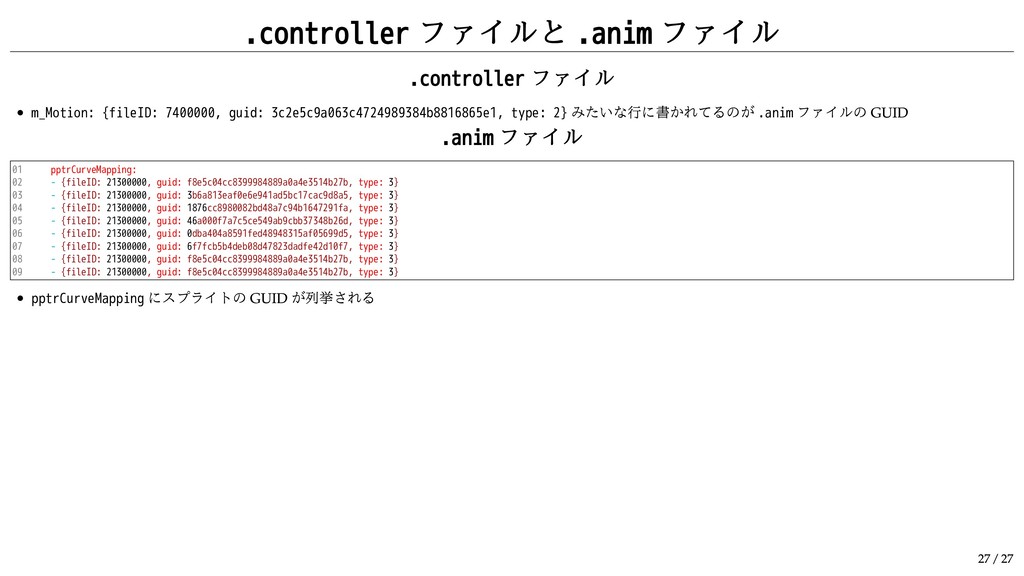
.controller ファイルと .anim ファイル .controller ファイル m_Motion: {fileID: 7400000, guid:
3c2e5c9a063c4724989384b8816865e1, type: 2} みたいな行に書かれてるのが .anim ファイルの GUID .anim ファイル 01 02 03 04 05 06 07 08 09 pptrCurveMapping: - {fileID: 21300000, guid: f8e5c04cc8399984889a0a4e3514b27b, type: 3} - {fileID: 21300000, guid: 3b6a813eaf0e6e941ad5bc17cac9d8a5, type: 3} - {fileID: 21300000, guid: 1876cc8980082bd48a7c94b1647291fa, type: 3} - {fileID: 21300000, guid: 46a000f7a7c5ce549ab9cbb37348b26d, type: 3} - {fileID: 21300000, guid: 0dba404a8591fed48948315af05699d5, type: 3} - {fileID: 21300000, guid: 6f7fcb5b4deb08d47823dadfe42d10f7, type: 3} - {fileID: 21300000, guid: f8e5c04cc8399984889a0a4e3514b27b, type: 3} - {fileID: 21300000, guid: f8e5c04cc8399984889a0a4e3514b27b, type: 3} pptrCurveMapping にスプライトの GUID が列挙される 27 / 27


 takai
takai
 kishida
 tmikov2023
 a_matsuda
 akihisaikeda
 morizo_1984
 tosite
 andpad
 marcoroth
 minodriven
 guaca
guaca
 taiseiue
 matthewcrist
 sonatard
 thoeni
 cassininazir
 inesmontani
 popppiees
 lauravandoore
 notwaldorf
 tammielis
 greggifford
 tanoku
 holman