Share
Embed
Android functional testing made easy with Kotlin by Marc-Antoine Sauvé
Android functional testing made easy with Kotlin
Level: Intermediate
by Marc-Antoine Sauvé, Hopper
This talk will walk you through how Hopper leveraged Kotlin to build clean DSL based functional testing that separates the “what” from the “how”.
https://gdgmontreal.com/2019/07/26/kotlin-everywhere/
GDG Montreal
August 28, 2019
Transcript
49 slides
-
Hello to GDG Sofia! Special thanks to Boris Strandjev, organiser
at GDG Sofia, for the help with this talk -
#1 Mobile Travel App in North America Downloads to date
30M+ Trips planned in our app 60M+ Sold from 126 countries $900M -
Functional testing according to Wikipedia Functional testing is [...] a
type of black-box testing that bases its test cases on the specifications of the software component under test. Functional testing is conducted to evaluate the compliance of a system or component with specified functional requirements. Functional testing usually describes what the system does. -
Why UI testing? Test their functionalities according to the specs
of the different features Test main funnels We were not setup to test the business logic in isolation Not “testing ready” UI testing is not implementation dependant Legacy code -
Goals Separate the what and the how Clean tests We
want to improve our detection of regressions in our most used funnels Test features Generate clear reports to help identify the failures easily Clear failures -
Concepts They know how do to the stuff, where the
tests using them know what to do Robot pattern Its presence in a screen signify that the screen is ready to be used Proof object Allow simple logging to help understand where a test failed and allow to define optional steps in a funnel Steps -
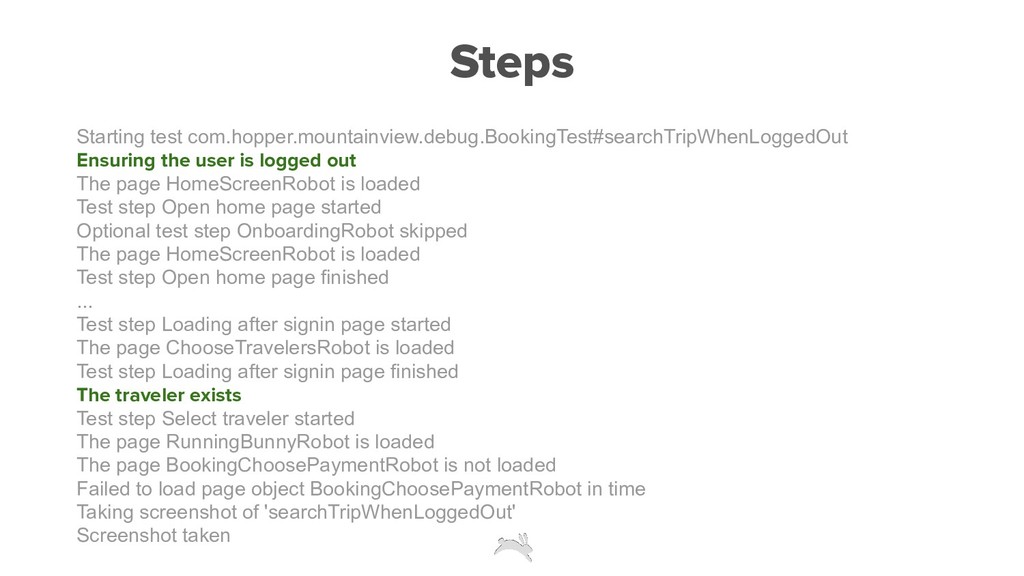
Steps Starting test com.hopper.mountainview.debug.BookingTest#searchTripWhenLoggedOut Ensuring the user is logged out
The page HomeScreenRobot is loaded Test step Open home page started Optional test step OnboardingRobot skipped The page HomeScreenRobot is loaded Test step Open home page finished ... Test step Loading after signin page started The page ChooseTravelersRobot is loaded Test step Loading after signin page finished The traveler exists Test step Select traveler started The page RunningBunnyRobot is loaded The page BookingChoosePaymentRobot is not loaded Failed to load page object BookingChoosePaymentRobot in time Taking screenshot of 'searchTripWhenLoggedOut' Screenshot taken -
The Robot pattern ▪ Each screens have a Robot class
▪ Defines the elements on the screen you can interact with ▪ Defines the actions you can take on those elements ▪ Test data should be provided, not hardcoded -
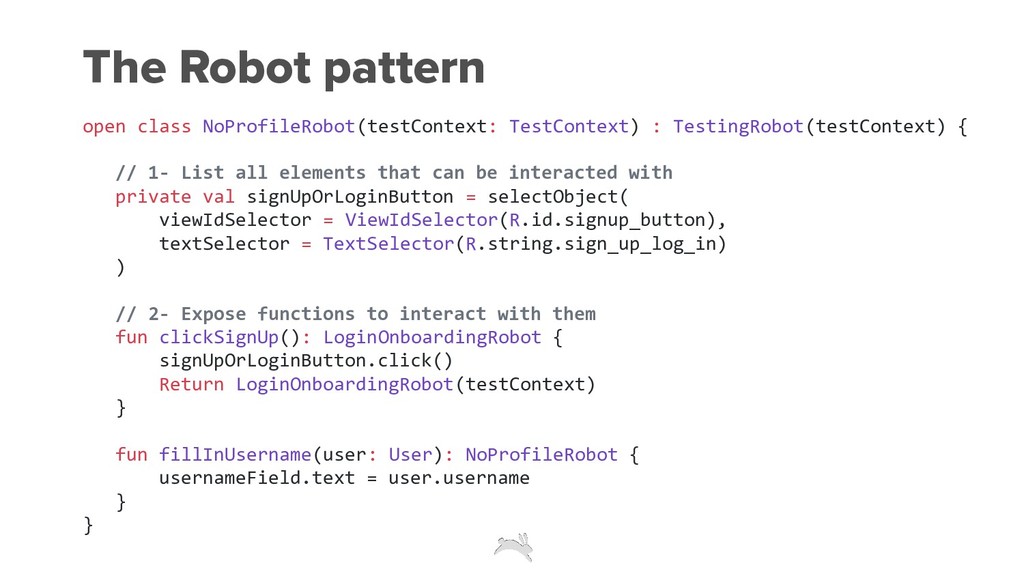
The Robot pattern open class NoProfileRobot(testContext: TestContext) : TestingRobot(testContext) {
// 1- List all elements that can be interacted with private val signUpOrLoginButton = selectObject( viewIdSelector = ViewIdSelector(R.id.signup_button), textSelector = TextSelector(R.string.sign_up_log_in) ) // 2- Expose functions to interact with them fun clickSignUp(): LoginOnboardingRobot { signUpOrLoginButton.click() Return LoginOnboardingRobot(testContext) } fun fillInUsername(user: User): NoProfileRobot { usernameField.text = user.username } } -
The Robot pattern @Test fun signIn() { HomeScreenRobot(testContext) .openTrips() val
loginOnboardingRobot = NoProfileRobot(testContext) .clickSignUp() val signInRobot = loginOnboardingRobot .swipeThroughAllTabs() .goToSignin() signInRobot .enterPhoneNumber(DEFAULT_TEST_USER.userData) assertPageLoaded(TripsRobot(testContext)) } -
The Robot pattern @Test fun signIn() { HomeScreenRobot(testContext) .openTrips() NoProfileRobot(testContext)
.clickSignUp() .swipeThroughAllTabs() .goToSignin() .enterPhoneNumber(DEFAULT_TEST_USER.userData) assertPageLoaded(TripsRobot(testContext)) } -
The Robot pattern fun noProfileRobot(testContext: TestContext, func: NoProfileRobot.() -> Unit
= {}) = NoProfileRobot(testContext).apply(func) open class NoProfileRobot(testContext: TestContext) : TestingRobot(testContext) { [...] } -
The Robot pattern @Test fun signIn() { // 1- Create
the HomeScreenRobot homeScreenRobot(testContext) { // this: HomeScreenRobot // 2- Actions to do on the robot openTrips() } // 3- The robots can be chained noProfileRobot(testContext) .clickSignUp { // this: LoginOnboardingRobot swipeThroughAllTabs() }.goToSignin { // this: SignInRobot enterPhoneNumber(DEFAULT_TEST_USER.userData) sendVerificationText() } tripsRobot(testContext) } -
The Robot pattern fun noProfileRobot(testContext: TestContext, func: NoProfileRobot.() -> Unit
= {}) = NoProfileRobot(testContext).apply(func) open class NoProfileRobot(testContext: TestContext) : TestingRobot(testContext) { [...] } -
The Robot pattern fun noProfileRobot(testContext: TestContext, func: NoProfileRobot.() -> Unit
= {}) = NoProfileRobot(testContext).apply(func) open class NoProfileRobot(testContext: TestContext) : TestingRobot(testContext) { [...] } -
The Robot pattern fun noProfileRobot(testContext: TestContext, func: NoProfileRobot.() -> Unit
= {}) = NoProfileRobot(testContext).apply(func) open class NoProfileRobot(testContext: TestContext) : TestingRobot(testContext) { [...] } -
The Robot pattern fun noProfileRobot(testContext: TestContext, func: NoProfileRobot.() -> Unit
= {}) = NoProfileRobot(testContext).apply(func) open class NoProfileRobot(testContext: TestContext) : TestingRobot(testContext) { [...] } public inline fun <T> T.apply(block: T.() -> Unit): T { block() return this } -
The Robot pattern @Test fun signIn() { homeScreenRobot(testContext) { //
this: HomeScreenRobot openTrips() } [...] } -
The Robot pattern @Test fun signIn() { homeScreenRobot(testContext) { //
this: HomeScreenRobot this.openTrips() } [...] } -
The Robot pattern open class NoProfileRobot(testContext: TestContext) : TestingRobot(testContext) {
[...] fun clickSignUp(func: LoginOnboardingRobot.() -> Unit = {}): LoginOnboardingRobot { signUpOrLoginButton.click() return loginOnboardingRobot(testContext, func) } } -
The Robot pattern open class NoProfileRobot(testContext: TestContext) : TestingRobot(testContext) {
[...] fun clickSignUp(func: LoginOnboardingRobot.() -> Unit = {}): LoginOnboardingRobot { signUpOrLoginButton.click() return loginOnboardingRobot(testContext, func) } } -
The Robot pattern open class NoProfileRobot(testContext: TestContext) : TestingRobot(testContext) {
[...] fun clickSignUp(func: LoginOnboardingRobot.() -> Unit = {}): LoginOnboardingRobot { signUpOrLoginButton.click() return loginOnboardingRobot(testContext, func) } } -
The Robot pattern open class NoProfileRobot(testContext: TestContext) : TestingRobot(testContext) {
[...] fun clickSignUp(func: LoginOnboardingRobot.() -> Unit = {}): LoginOnboardingRobot { signUpOrLoginButton.click() return loginOnboardingRobot(testContext, func) } } -
The Robot pattern @Test fun signIn() { homeScreenRobot(testContext) { //
this: HomeScreenRobot openTrips() } noProfileRobot(testContext) .clickSignUp { // this: LoginOnboardingRobot swipeThroughAllTabs() }.goToSignin { // this: SignInRobot enterPhoneNumber(DEFAULT_TEST_USER.userData) sendVerificationText() } tripsRobot(testContext) } -
The Proof object ▪ uiObjects are not immediately resolved, only
when interacted with ▪ we defined annotation @ProofObject ▪ we defined the method TestingRobot.waitForPageToLoad(testContext) ▪ The work of fetching and validating the ProofObject is done by TestContext This allows us to ensure that the screens are loaded appropriately -
The Proof object open class NoProfileRobot(testContext: TestContext) : TestingRobot(testContext) {
@ProofObject private val signUpOrLoginButton = selectObject( viewIdSelector = ViewIdSelector(R.id.signup_button), textSelector = TextSelector(R.string.sign_up_log_in) ) fun clickSignUp(func: LoginOnboardingRobot.() -> Unit = {}): LoginOnboardingRobot { signUpOrLoginButton.click() return loginOnboardingRobot(testContext, func).waitForPageToLoad() } } -
The TestContext ▪ Knows how to get the ProofObject for
a screen ▪ Knows how to validate that the screen is loaded ▪ Knows if there is optional screens that can be skipped ▪ Each Robots have a TestContext that is shared for a given test ▪ The TestContext will timeout if the screen does not appear within reasonable time ▪ Holds the Android context ▪ Holds the Test logger ▪ Ui automator device ▪ Other things (e.g. whether ANR was encountered) -
Optional screens ▪ define their own proof objects ▪ also
define skip steps ▪ each Robot can define optional before and optional after screens ▪ our framework automatically skips these screens Sometimes a test can not determine if a page will be shown or not -
Optional screens class OnboardingRobot(testContext: TestContext) : OptionalPage(testContext) { @ProofObject private
val continueButton = selectObject([...]) private val letsGetStartedButton = selectObject([...]) override fun executeSkipSteps() { continueButton.click() letsGetStartedButton.click() loadThroughLoadingScreen(testContext, ::NavigationBarRobot) { openWatch() } } } -
Test steps Steps logs whenever they start and finish, with
their name and relevant information Better logs An optional test will not fail the test if it is there or not Optional steps Allows to add optional steps before or after a given step Hooks -
Test step withTestStep(testContext, TestStep.OPEN_SETTINGS) { homeScreenRobot(testContext) { openTrips() } tripsRobot(testContext)
{ openSettings() } } A test is composed of multiple test steps -
Test step // Extension function on any Robot or Test
fun <T : TestContextHolder, U> T.withTestStep( testContext: TestContext, testStep: TestStep, stepBody: T.() -> U ): U { // Log & execute steps before (hooks) // Some more logs val returnValue = stepBody() // Some more logs & ANR check // Log & execute steps after (hooks) return returnValue } -
Test step fun signIn() { withTestStep(TestStep.OPEN_HOME) { homeScreenRobot(testContext) }.withTestStep(TestStep.OPEN_TRIPS) {
// this: HomeScreenRobot openTrips() } withTestStep(TestStep.CLICK_LOGIN) { noProfileRobot(testContext) .clickSignUp() }.withTestStep(TestStep.SCROLL_SIGNIN_INTRO) { // this: LoginOnboardingRobot swipeThroughAllTabs() goToSignin() } [...] } -
Prerequisites @UserLoggedOut @Test fun searchTripWhenLoggedOut() { Other examples of prerequisites:
@CreditCardPresent(UserDataSample.NO_MATTER, CardDataSamples.MASTERCARD1) @CreditCardNotPresent(UserDataSample.NO_MATTER, CardDataSamples.MASTERCARD1) @UserLoggedIn(UserDataSample.NO_MATTER) These are things you expect to hold true before you run the test -
Test against ANRs ▪ At one moment of time we
had plenty ▪ We decided to use ANRWatchdog in our debug builds ▪ We also altered the tests to report failure on ANR -
We’re on the Lookout for Talented People Check out current
openings at hopper.com/jobs.