Upgrade to Pro — share decks privately, control downloads, hide ads and more …

EKS AnywhereとIAM Anywhereを組み合わせてみた

geibee
August 09, 2022

EKS AnywhereとIAM Anywhereを組み合わせてみた

geibee

August 09, 2022

Transcript

11 slides
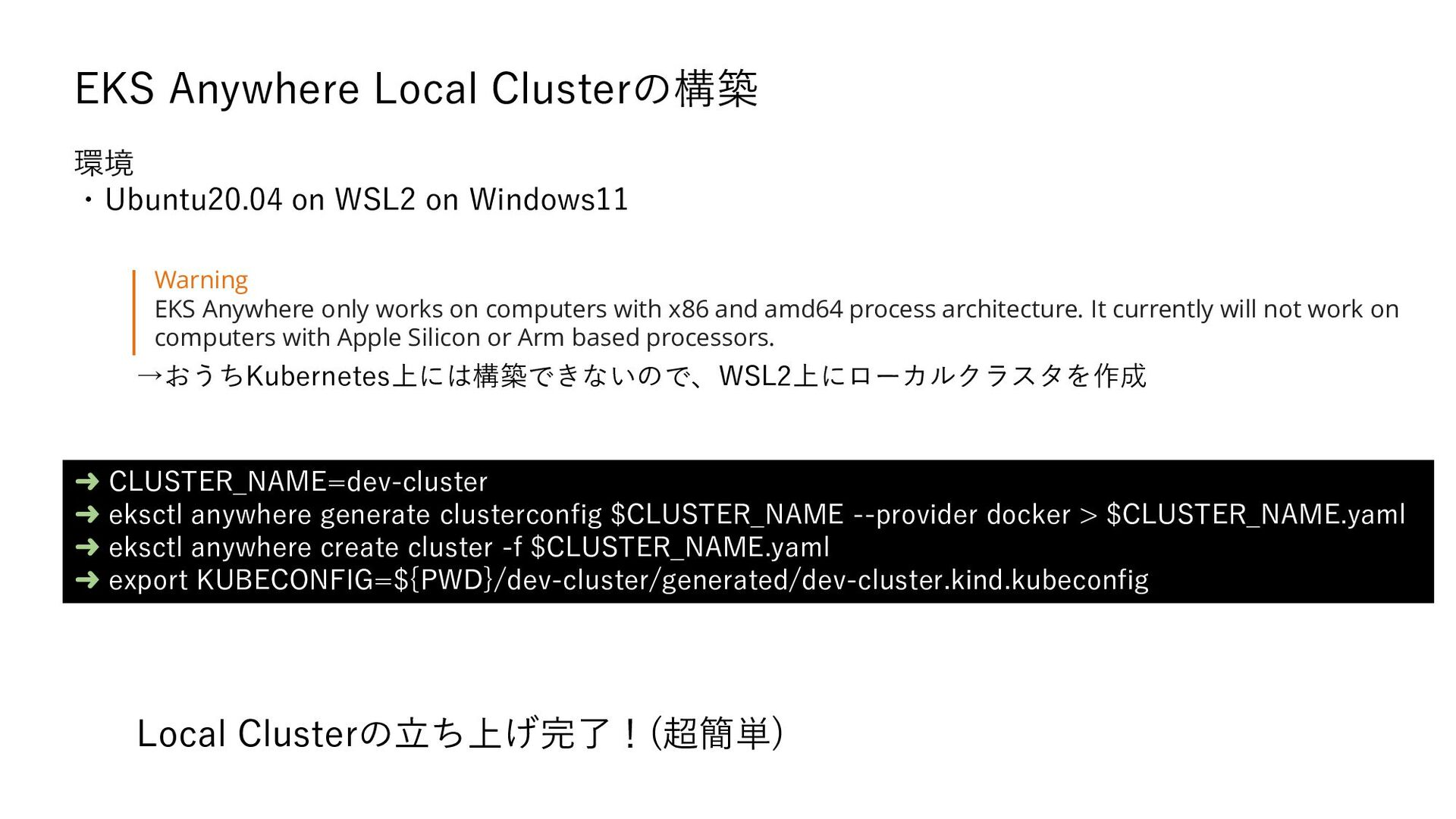
  1. EKS Anywhere Local Clusterの構築 ➜ CLUSTER_NAME=dev-cluster ➜ eksctl anywhere generate

    clusterconfig $CLUSTER_NAME --provider docker > $CLUSTER_NAME.yaml ➜ eksctl anywhere create cluster -f $CLUSTER_NAME.yaml ➜ export KUBECONFIG=${PWD}/dev-cluster/generated/dev-cluster.kind.kubeconfig Warning EKS Anywhere only works on computers with x86 and amd64 process architecture. It currently will not work on computers with Apple Silicon or Arm based processors. →おうちKubernetes上には構築できないので、WSL2上にローカルクラスタを作成 環境 ・Ubuntu20.04 on WSL2 on Windows11 Local Clusterの立ち上げ完了!(超簡単)
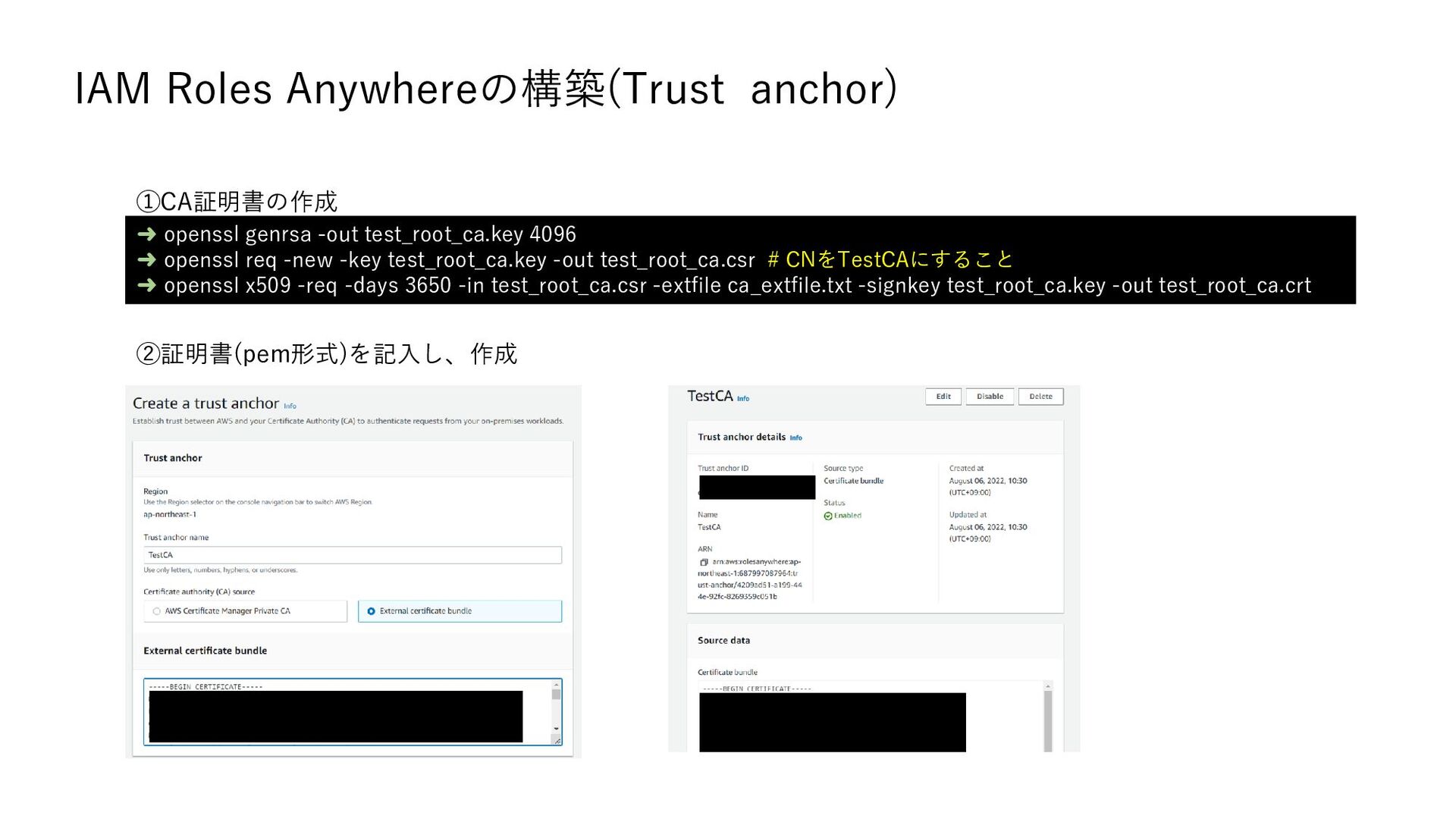
  2. IAM Roles Anywhereの構築(Trust anchor) ➜ openssl genrsa -out test_root_ca.key 4096

    ➜ openssl req -new -key test_root_ca.key -out test_root_ca.csr # CNをTestCAにすること ➜ openssl x509 -req -days 3650 -in test_root_ca.csr -extfile ca_extfile.txt -signkey test_root_ca.key -out test_root_ca.crt ①CA証明書の作成 ②証明書(pem形式)を記入し、作成
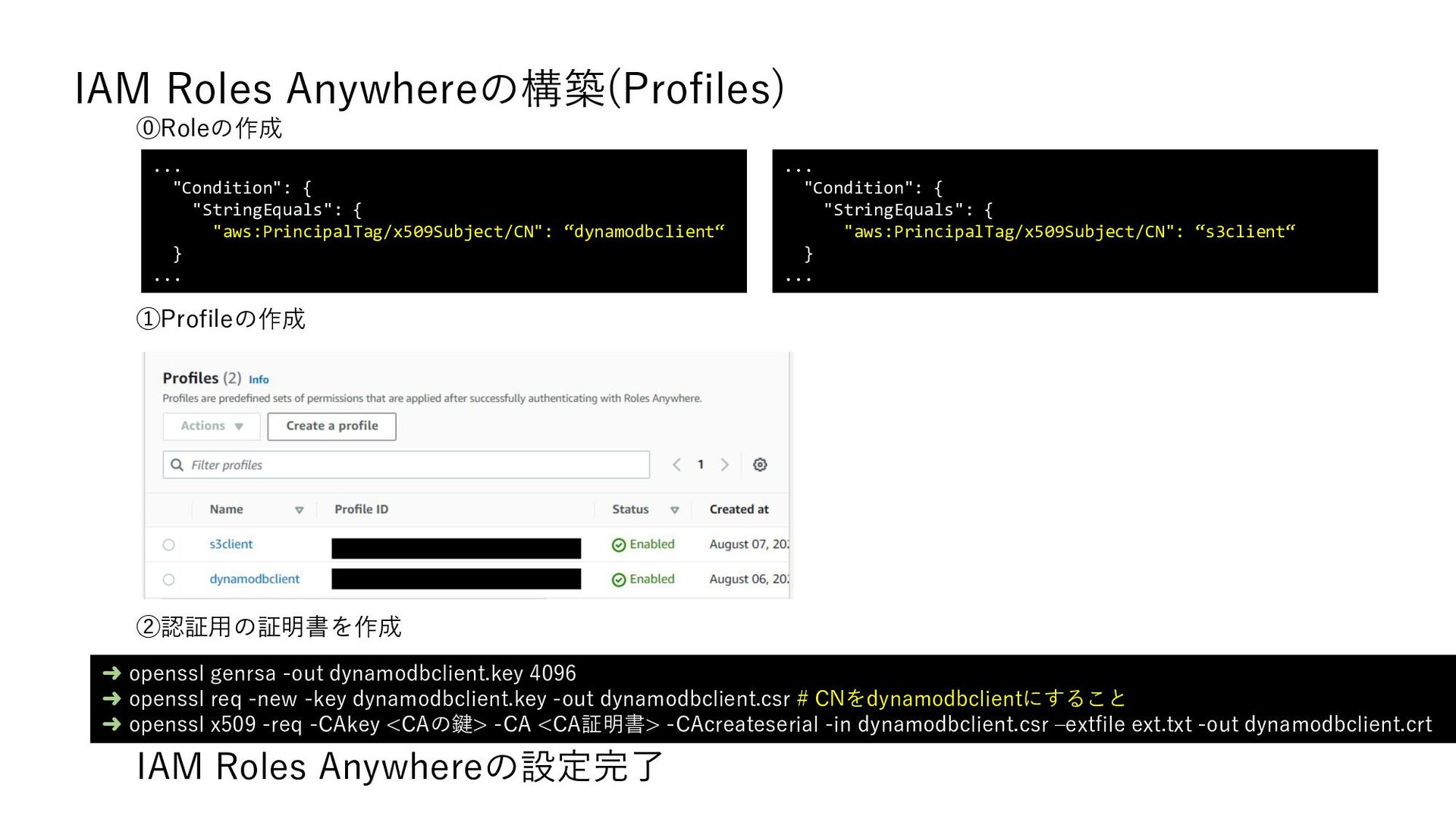
  3. IAM Roles Anywhereの構築(Profiles) ⓪Roleの作成 ... "Condition": { "StringEquals": { "aws:PrincipalTag/x509Subject/CN":

    “dynamodbclient“ } ... ... "Condition": { "StringEquals": { "aws:PrincipalTag/x509Subject/CN": “s3client“ } ... ①Profileの作成 IAM Roles Anywhereの設定完了 ➜ openssl genrsa -out dynamodbclient.key 4096 ➜ openssl req -new -key dynamodbclient.key -out dynamodbclient.csr # CNをdynamodbclientにすること ➜ openssl x509 -req -CAkey <CAの鍵> -CA <CA証明書> -CAcreateserial -in dynamodbclient.csr –extfile ext.txt -out dynamodbclient.crt ②認証用の証明書を作成
  4. アプリケーションの設定 aws_singing_helperで認証情報を取得 ➜ cat ~/.aws/config [profile dynamodbclient] credential_process = aws_signing_helper

    credential-process --certificate /secret-volume/tls.crt --private-key /secret-volume/tls.key --trust-anchor-arn $TRUST_ANCHOR_ARN --profile-arn $PROFILE_ARN --role-arn $ROLE_ARN …(省略) func main() { sess := session.Must(session.NewSessionWithOptions( session.Options{Profile: "dynamodbclient“}, )) client := dynamodb.New(sess) …(省略) } アプリケーション側でprofileを指定 FROM ubuntu:20.04 RUN apt update COPY ./config ./ COPY ./dynamodbclient ./ # ビルド済みのGo言語のバイナリを配置 COPY ./aws_signing_helper /bin/ # aws_signing_helperのバイナリを配置 COPY ./dynamodbclient.key ./secret-volume/ COPY ./dynamodbclient.crt ./secret-volume/ ENV AWS_SDK_LOAD_CONFIG=1 ENV AWS_CONFIG_FILE=/config Dockerfile
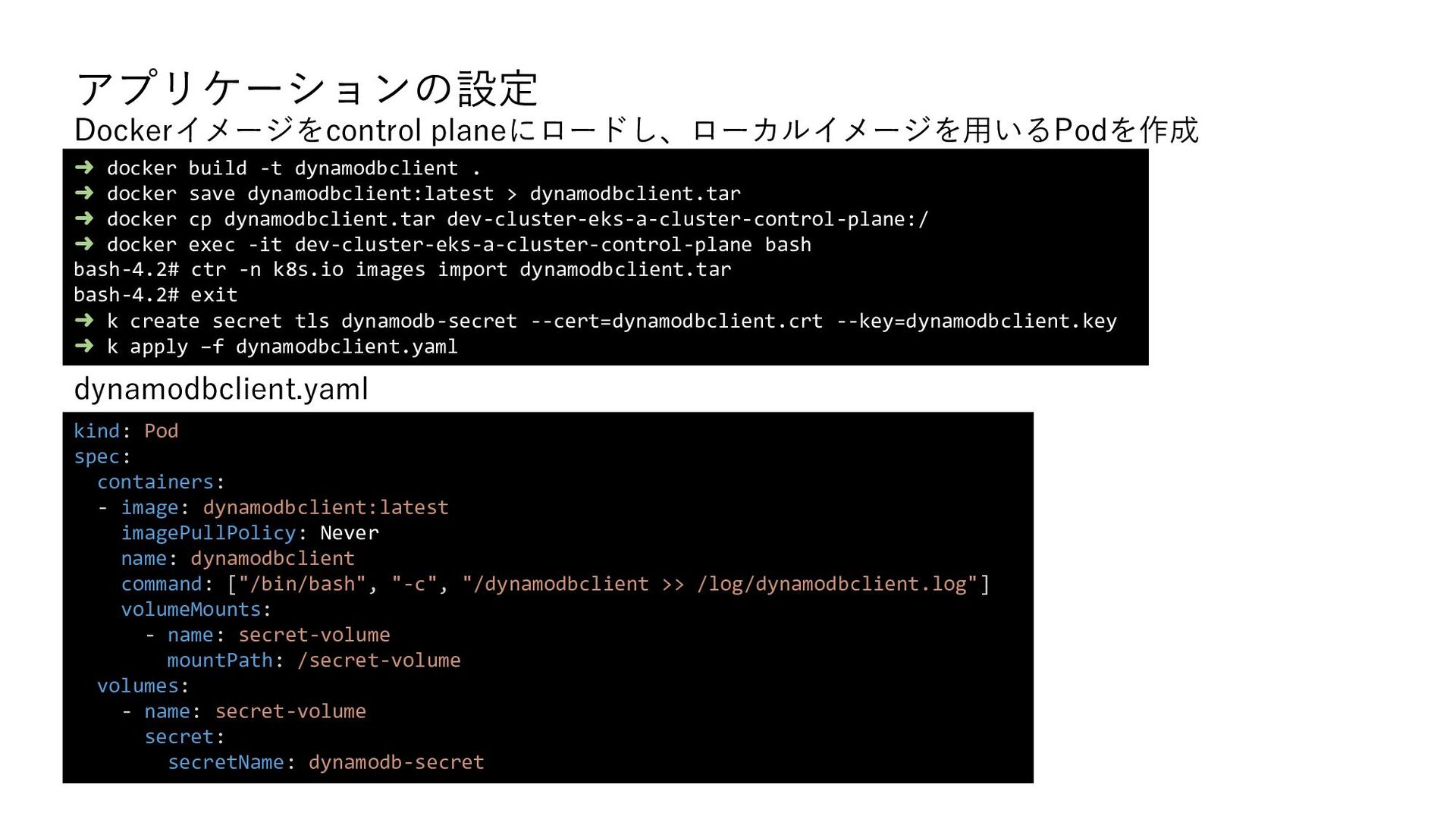
  5. アプリケーションの設定 dynamodbclient.yaml ➜ docker build -t dynamodbclient . ➜ docker

    save dynamodbclient:latest > dynamodbclient.tar ➜ docker cp dynamodbclient.tar dev-cluster-eks-a-cluster-control-plane:/ ➜ docker exec -it dev-cluster-eks-a-cluster-control-plane bash bash-4.2# ctr -n k8s.io images import dynamodbclient.tar bash-4.2# exit ➜ k create secret tls dynamodb-secret --cert=dynamodbclient.crt --key=dynamodbclient.key ➜ k apply –f dynamodbclient.yaml kind: Pod spec: containers: - image: dynamodbclient:latest imagePullPolicy: Never name: dynamodbclient command: ["/bin/bash", "-c", "/dynamodbclient >> /log/dynamodbclient.log"] volumeMounts: - name: secret-volume mountPath: /secret-volume volumes: - name: secret-volume secret: secretName: dynamodb-secret Dockerイメージをcontrol planeにロードし、ローカルイメージを用いるPodを作成
  6. アプリケーションの設定 ➜ docker exec -it dev-cluster-eks-a-cluster-control-plane bash bash-4.2# cat /var/log/dynamodbclient.log

    current value is as follows { Item: { ID: { N: "1" }, TIME: { S: "2022-08-08 00:54:20.269041775 +0000 UTC m=+0.003399239" } } } hostPathにログを出力するように設定したため、control planeからログを確認
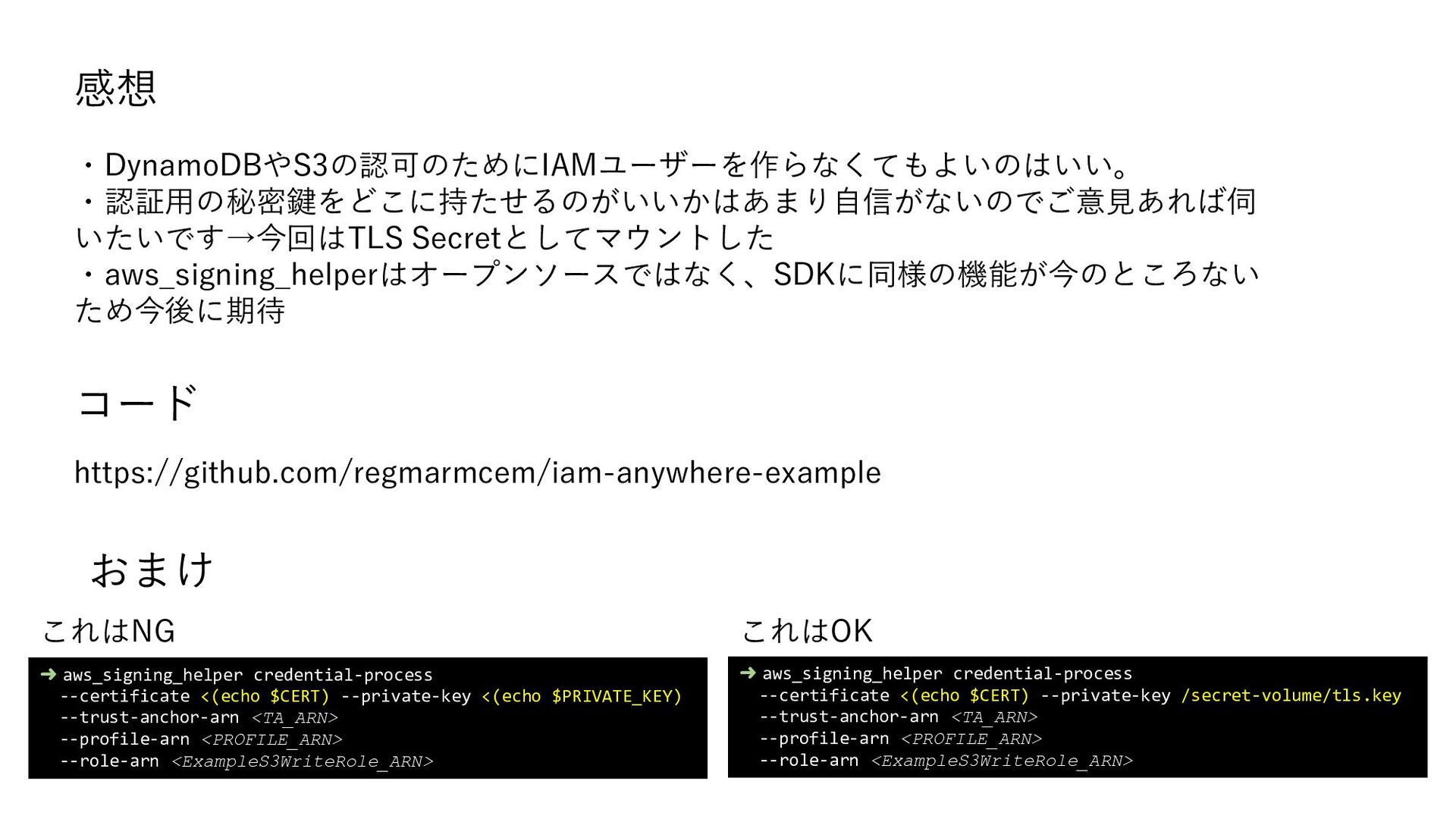
  7. 感想 ➜ aws_signing_helper credential-process --certificate <(echo $CERT) --private-key <(echo $PRIVATE_KEY)

    --trust-anchor-arn <TA_ARN> --profile-arn <PROFILE_ARN> --role-arn <ExampleS3WriteRole_ARN> ➜ aws_signing_helper credential-process --certificate <(echo $CERT) --private-key /secret-volume/tls.key --trust-anchor-arn <TA_ARN> --profile-arn <PROFILE_ARN> --role-arn <ExampleS3WriteRole_ARN> これはNG これはOK ・DynamoDBやS3の認可のためにIAMユーザーを作らなくてもよいのはいい。 ・認証用の秘密鍵をどこに持たせるのがいいかはあまり自信がないのでご意見あれば伺いた いです→今回はTLS Secretとしてマウントした ・aws_signing_helperはオープンソースではなく、SDKに同様の機能が今のところないため今 後に期待 おまけ https://github.com/geibee/iam-anywhere-example コード

More Decks by geibee

Other Decks in Technology