Upgrade to Pro — share decks privately, control downloads, hide ads and more …

Spatial Computing, Written in Vue: Front-end De...

Sponsored · SiteGround - Reliable hosting with speed, security, and support you can count on. →

Spatial Computing, Written in Vue: Front-end Development for XR Devices with TresJS and WebXR

Slides from my talk at Vue Fes Japan 2026 (October 24, 2026).

If you can write Vue, you can build apps for XR glasses. This talk walks Vue developers who have never touched 3D or XR through building a mixed reality experience on the web: no app store, no native SDK, just a web page.

Topics:
- Why build XR on the web
- 3D basics: coordinates, meshes, lights, cameras and the rendering pipeline
- Writing Three.js as Vue components with TresJS
- Blending with reality on Meta Quest 3 with WebXR: passthrough, plane detection, and grabbing objects with your gaze and hands

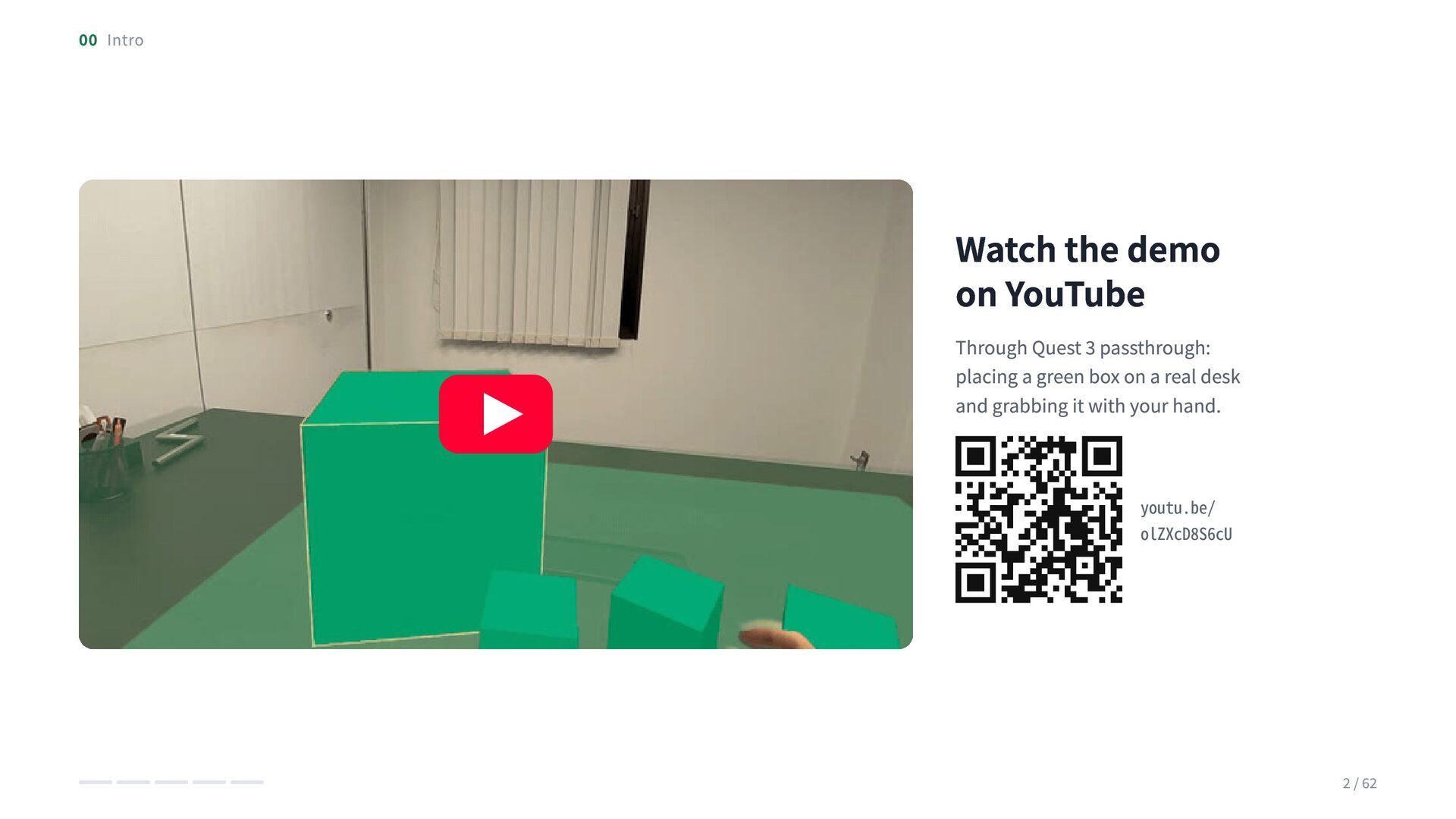
Demo video: https://youtu.be/olZXcD8S6cU
Starter kit: https://github.com/XRaft-labs/vue-webxr-starter
Japanese version of the slides: https://speakerdeck.com/hiranuma/vue-de-kaku-kuukan-tresjs-to-webxr-o-tsukata-xr-debaisu-no-furonto-endo-kaihatsu

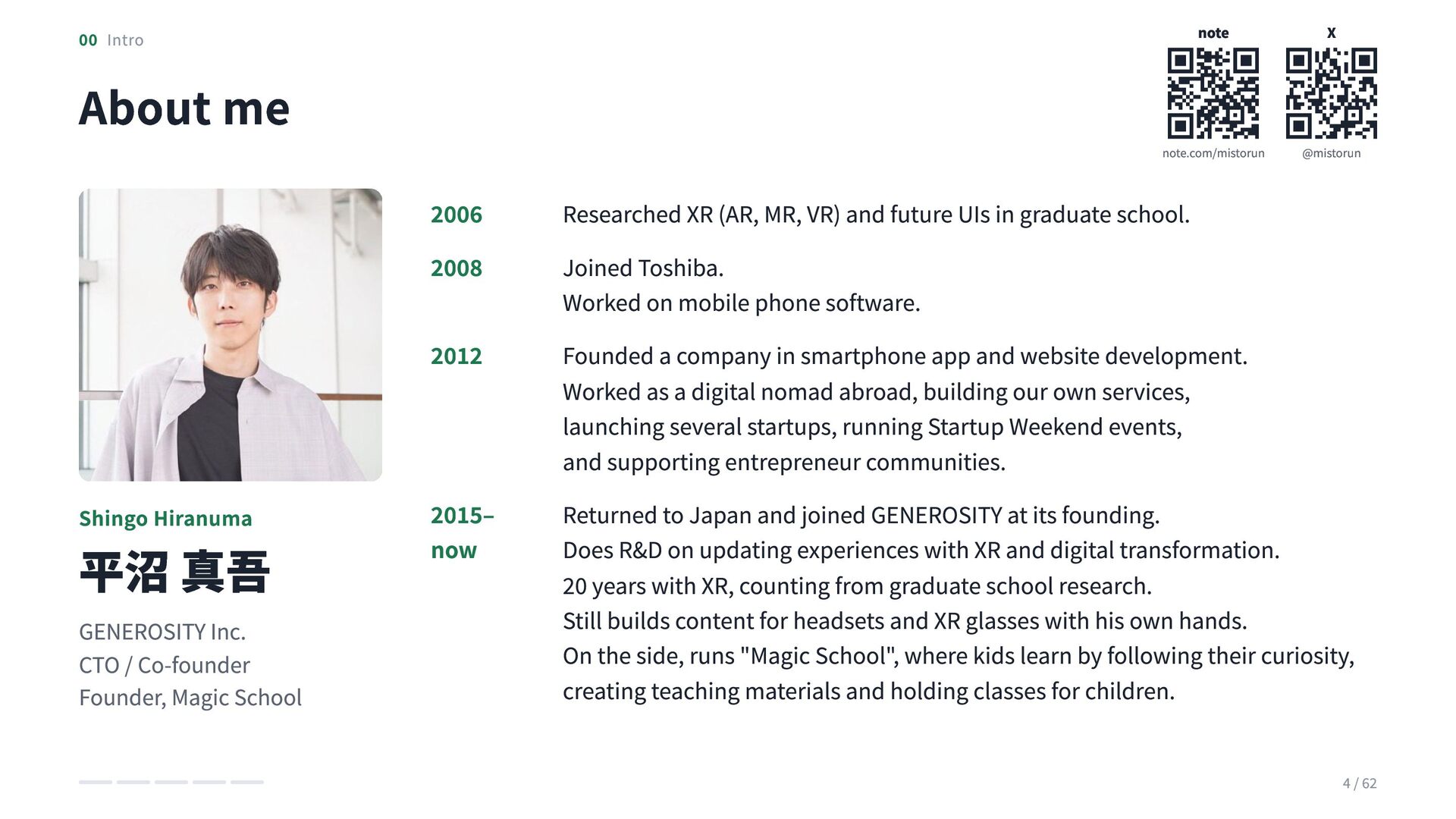
Speaker: Shingo Hiranuma (CTO, GENEROSITY Inc.)
note: https://note.com/mistorun
X: https://x.com/mistorun
GENEROSITY is hiring: https://recruit.generosity.co.jp/

Avatar for Shingo Hiranuma

Shingo Hiranuma

October 27, 2026

More Decks by Shingo Hiranuma

Other Decks in Technology

Transcript

  1. Spatial computing, written in Vue Front-end development for XR devices

    with TresJS and WebXR Vue Fes Japan 2026・2026.10.24 Shingo Hiranuma・GENEROSITY
  2. 00 Intro Watch the demo on YouTube Through Quest 3

    passthrough: placing a green box on a real desk and grabbing it with your hand. youtu.be/ olZXcD8S6cU 2 / 62
  3. 00 Intro About me 2006 2008 2012 Shingo Hiranuma 平沼

    真吾 GENEROSITY Inc. CTO / Co-founder Founder, Magic School 2015– now note X note.com/mistorun @mistorun Researched XR (AR, MR, VR) and future UIs in graduate school. Joined Toshiba. Worked on mobile phone software. Founded a company in smartphone app and website development. Worked as a digital nomad abroad, building our own services, launching several startups, running Startup Weekend events, and supporting entrepreneur communities. Returned to Japan and joined GENEROSITY at its founding. Does R&D on updating experiences with XR and digital transformation. 20 years with XR, counting from graduate school research. Still builds content for headsets and XR glasses with his own hands. On the side, runs "Magic School", where kids learn by following their curiosity, creating teaching materials and holding classes for children. 4 / 62
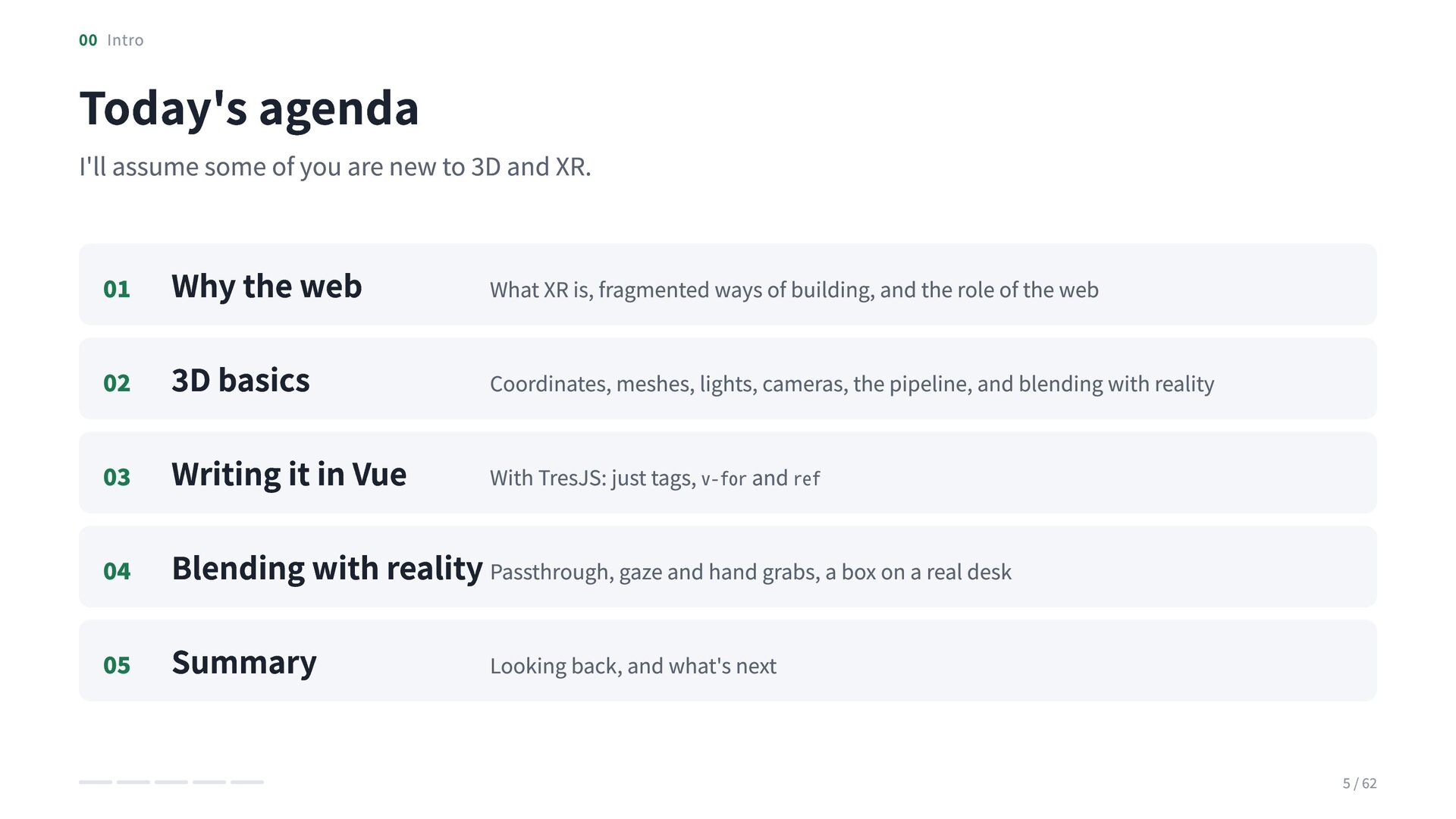
  4. 00 Intro Today's agenda I'll assume some of you are

    new to 3D and XR. 01 Why the web What XR is, fragmented ways of building, and the role of the web 02 3D basics Coordinates, meshes, lights, cameras, the pipeline, and blending with reality 03 Writing it in Vue With TresJS: just tags, v-for and ref 04 Blending with reality Passthrough, gaze and hand grabs, a box on a real desk 05 Summary Looking back, and what's next 5 / 62
  5. CHAPTER 01 Why build on the web A different toolchain

    for every device, and the role of the web 6 / 62
  6. 01 Why build on the web・Terminology XR is an umbrella

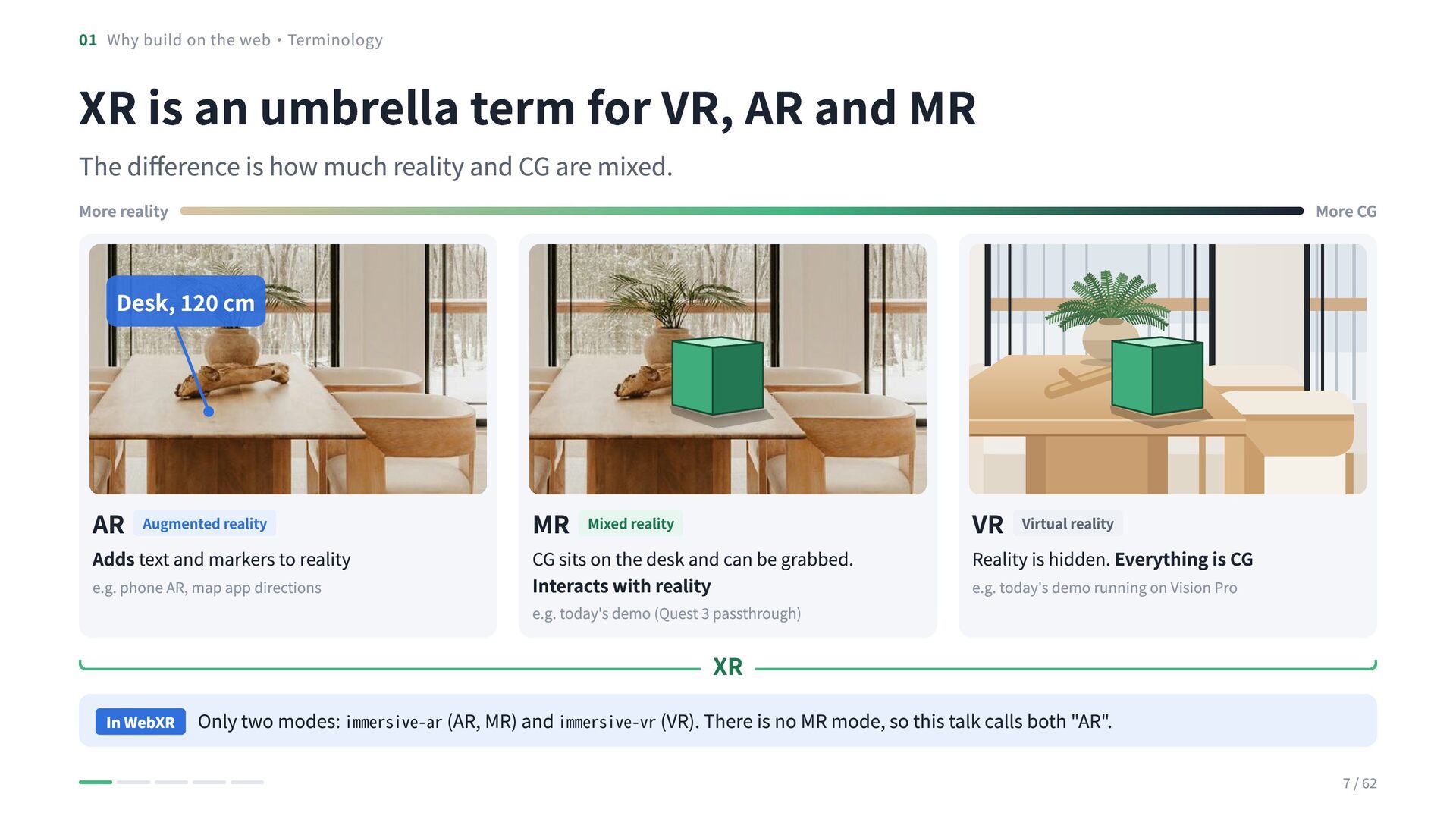
    term for VR, AR and MR The difference is how much reality and CG are mixed. More reality More CG Desk, 120 cm AR Augmented reality Adds text and markers to reality e.g. phone AR, map app directions MR Mixed reality CG sits on the desk and can be grabbed. Interacts with reality e.g. today's demo (Quest 3 passthrough) VR Virtual reality Reality is hidden. Everything is CG e.g. today's demo running on Vision Pro XR In WebXR Only two modes: immersive-ar (AR, MR) and immersive-vr (VR). There is no MR mode, so this talk calls both "AR". 7 / 62
  7. 01 Why build on the web Over 100 smart glasses

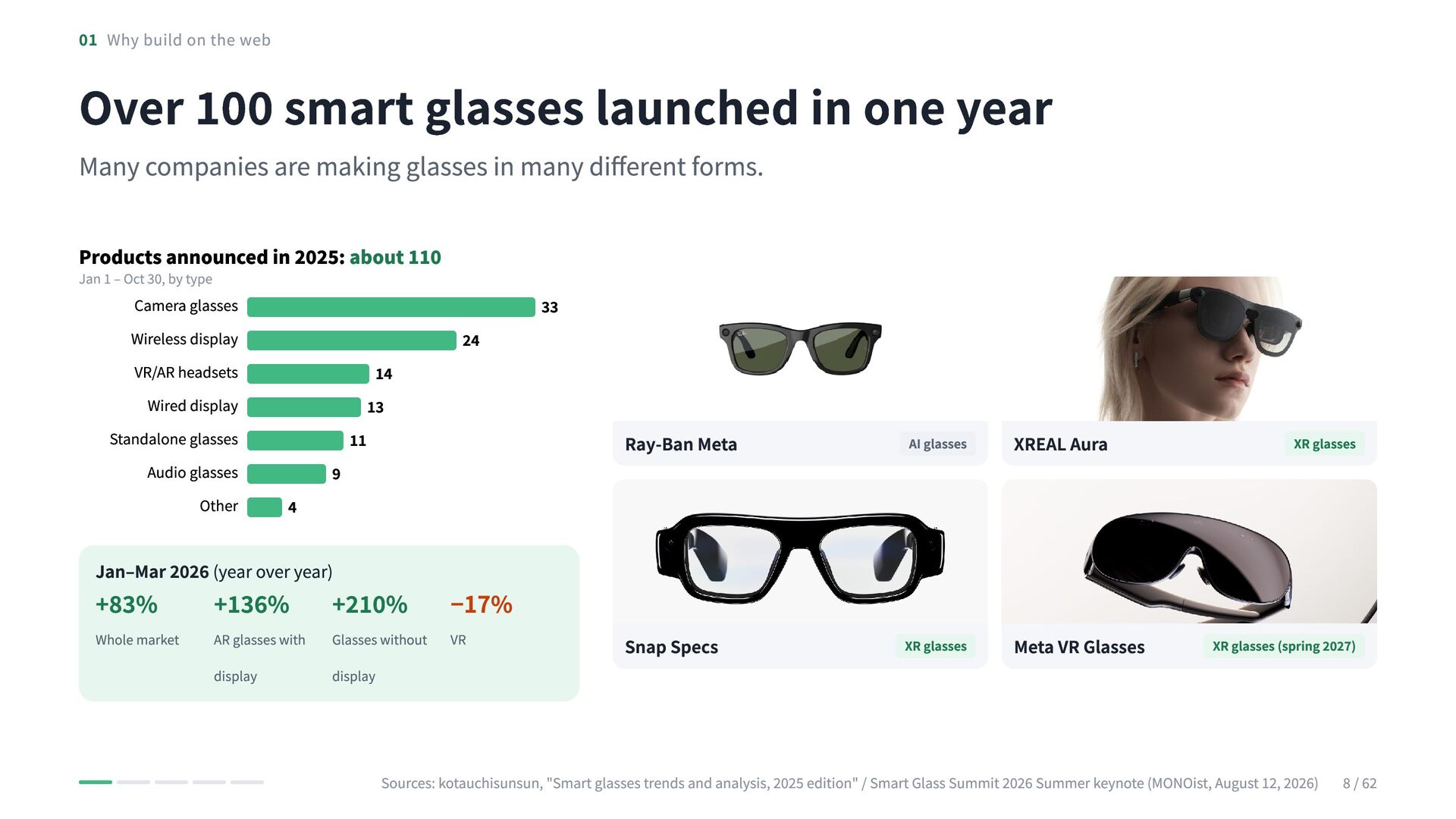
    launched in one year Many companies are making glasses in many different forms. Products announced in 2025: about 110 Jan 1 – Oct 30, by type Camera glasses Wireless display VR/AR headsets Wired display Standalone glasses Audio glasses Other 4 9 11 14 13 24 33 Ray-Ban Meta AI glasses XREAL Aura Snap Specs XR glasses Meta VR Glasses XR glasses Jan–Mar 2026 (year over year) +83% Whole market +136% +210% −17% AR glasses with display Glasses without VR display XR glasses (spring 2027) Sources: kotauchisunsun, "Smart glasses trends and analysis, 2025 edition" / Smart Glass Summit 2026 Summer keynote (MONOist, August 12, 2026) 8 / 62
  8. 01 Why build on the web AI glasses and XR

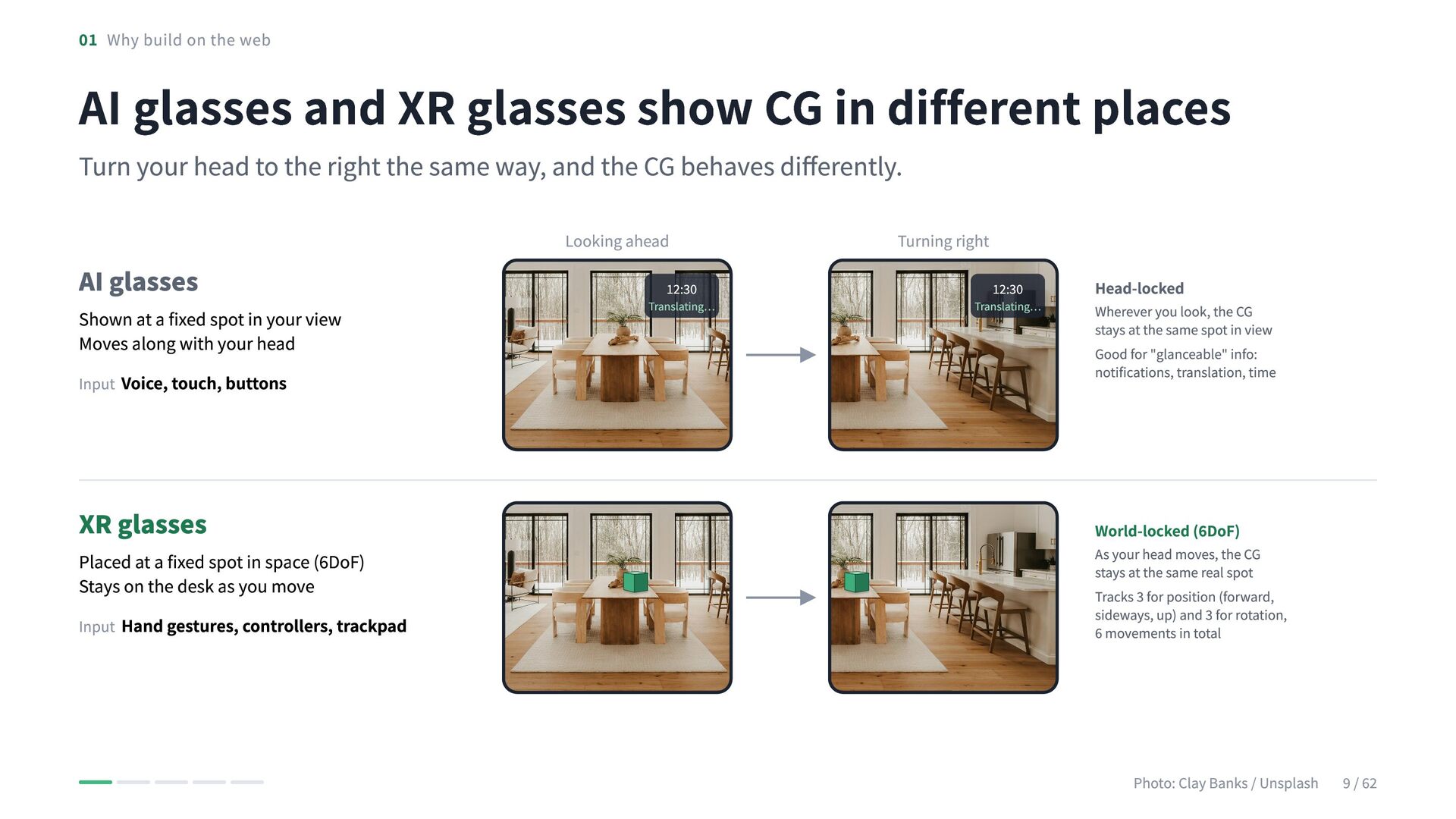
    glasses show CG in different places Turn your head to the right the same way, and the CG behaves differently. AI glasses Shown at a fixed spot in your view Moves along with your head Input Voice, touch, buttons XR glasses Placed at a fixed spot in space (6DoF) Stays on the desk as you move Input Hand gestures, controllers, trackpad Looking ahead 12:30 Translating… Turning right 12:30 Translating… Head-locked Wherever you look, the CG stays at the same spot in view Good for "glanceable" info: notifications, translation, time World-locked (6DoF) As your head moves, the CG stays at the same real spot Tracks 3 for position (forward, sideways, up) and 3 for rotation, 6 movements in total Photo: Clay Banks / Unsplash 9 / 62
  9. 01 Why build on the web XR devices are diverse,

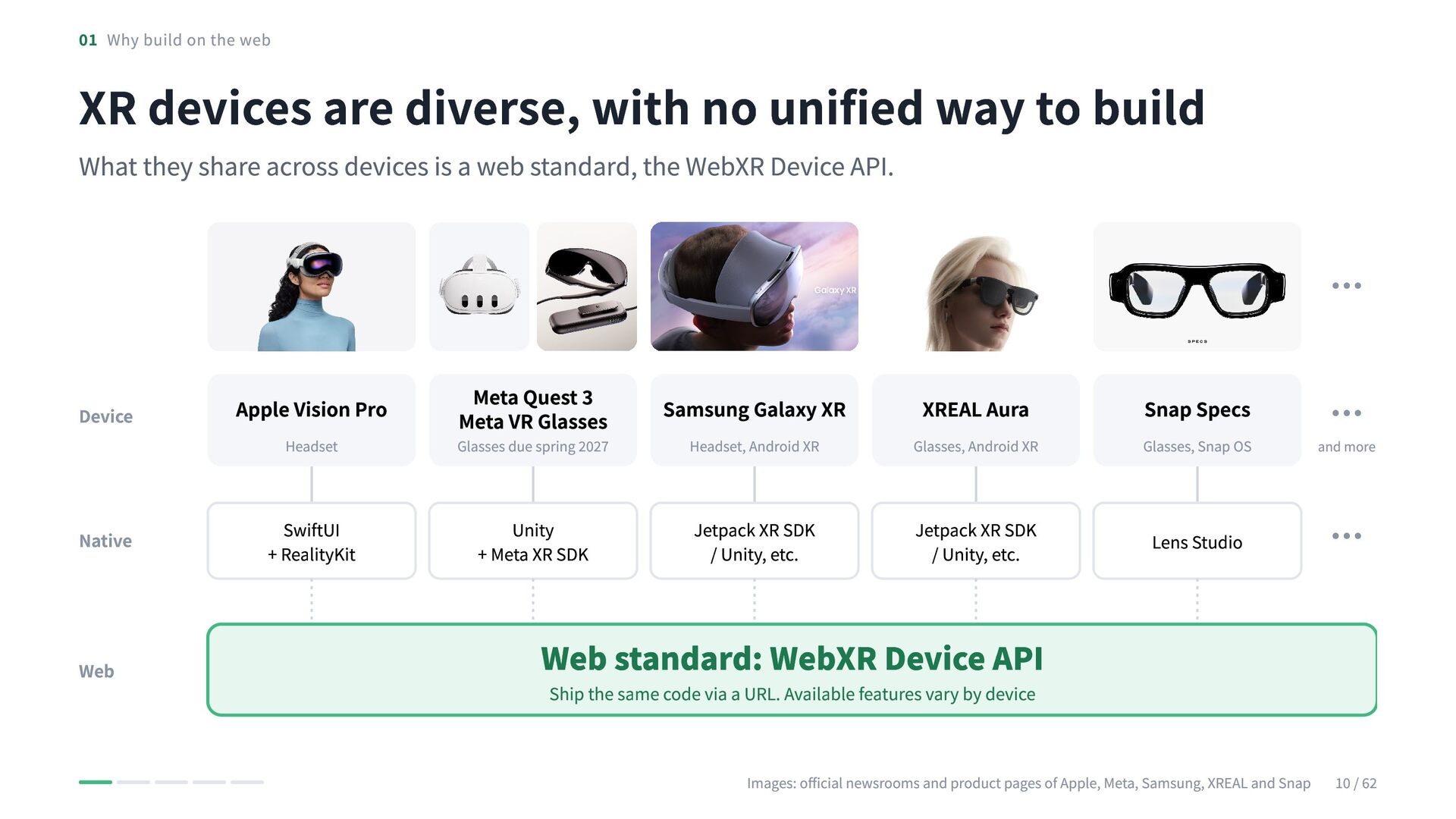
    with no unified way to build What they share across devices is a web standard, the WebXR Device API. … Samsung Galaxy XR Headset, Android XR Glasses, Android XR Glasses, Snap OS and more Jetpack XR SDK / Unity, etc. Jetpack XR SDK / Unity, etc. Lens Studio … Device Headset Glasses due spring 2027 Native SwiftUI + RealityKit Unity + Meta XR SDK Web … Meta Quest 3 Meta VR Glasses Apple Vision Pro XREAL Aura Snap Specs Web standard: WebXR Device API Ship the same code via a URL. Available features vary by device Images: official newsrooms and product pages of Apple, Meta, Samsung, XREAL and Snap 10 / 62
  10. 01 Why build on the web Phones were just as

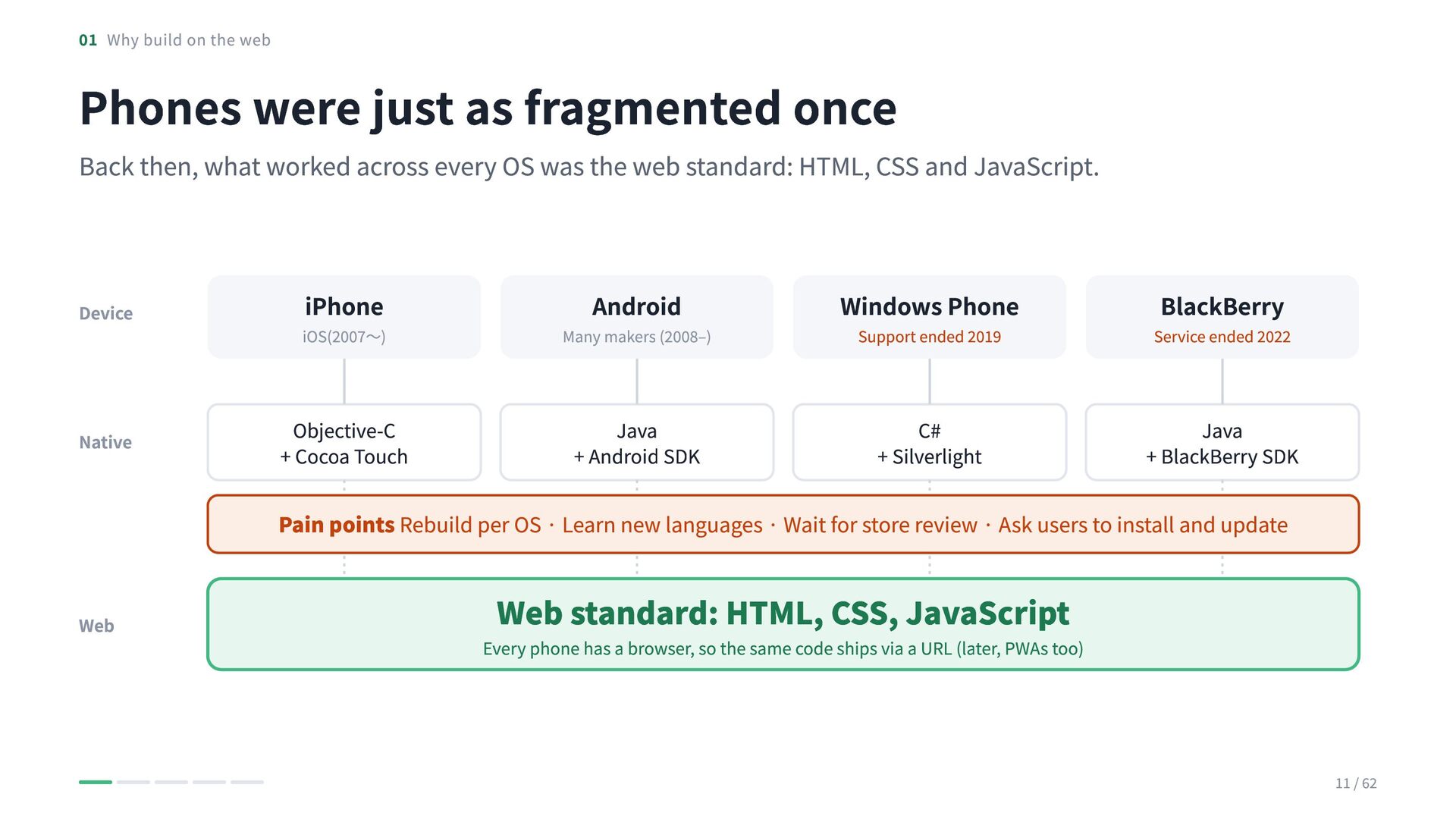
    fragmented once Back then, what worked across every OS was the web standard: HTML, CSS and JavaScript. Device Native iPhone iOS(2007〜) Android Many makers (2008–) Windows Phone BlackBerry Support ended 2019 Service ended 2022 Objective-C + Cocoa Touch Java + Android SDK C# + Silverlight Java + BlackBerry SDK Pain points Rebuild per OS · Learn new languages · Wait for store review · Ask users to install and update Web Web standard: HTML, CSS, JavaScript Every phone has a browser, so the same code ships via a URL (later, PWAs too) 11 / 62
  11. 01 Why build on the web Even today, phone AR

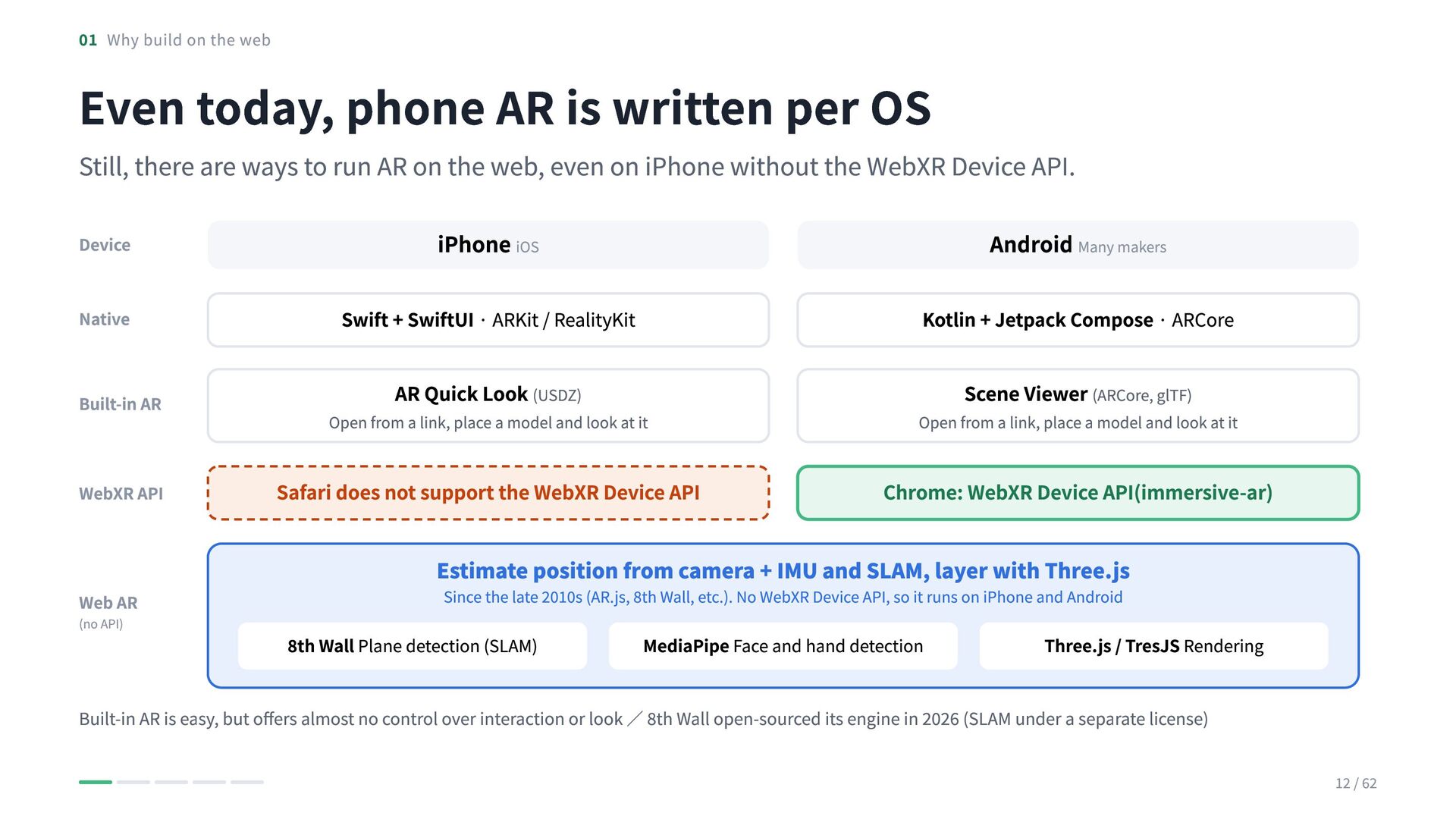
    is written per OS Still, there are ways to run AR on the web, even on iPhone without the WebXR Device API. Device iPhone iOS Android Many makers Native Swift + SwiftUI · ARKit / RealityKit Kotlin + Jetpack Compose · ARCore Built-in AR AR Quick Look (USDZ) Scene Viewer (ARCore, glTF) WebXR API Web AR (no API) Open from a link, place a model and look at it Open from a link, place a model and look at it Safari does not support the WebXR Device API Chrome: WebXR Device API(immersive-ar) Estimate position from camera + IMU and SLAM, layer with Three.js Since the late 2010s (AR.js, 8th Wall, etc.). No WebXR Device API, so it runs on iPhone and Android 8th Wall Plane detection (SLAM) MediaPipe Face and hand detection Three.js / TresJS Rendering Built-in AR is easy, but offers almost no control over interaction or look / 8th Wall open-sourced its engine in 2026 (SLAM under a separate license) 12 / 62
  12. 01 Why build on the web What you gain by

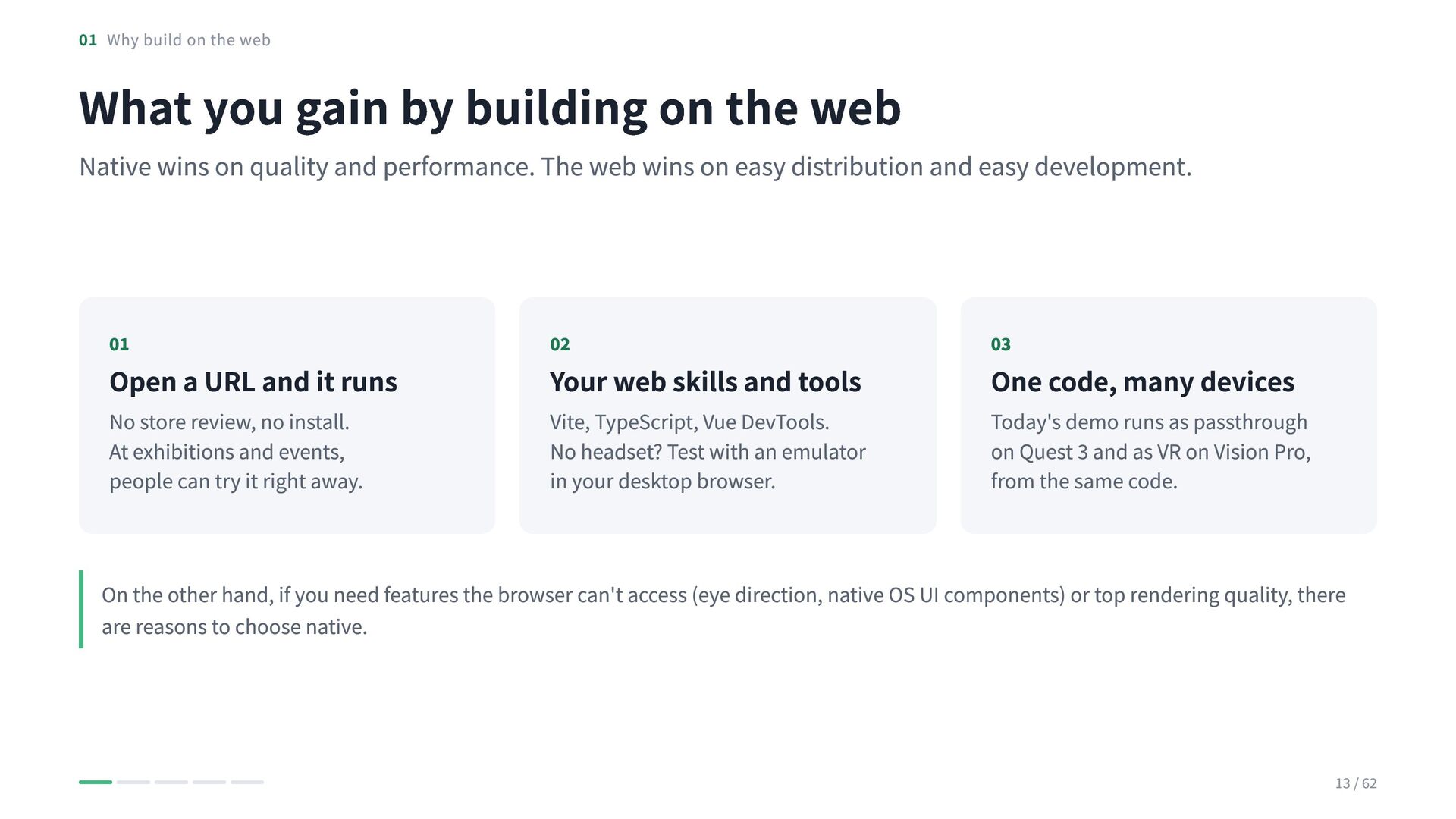
    building on the web Native wins on quality and performance. The web wins on easy distribution and easy development. 01 02 03 No store review, no install. At exhibitions and events, people can try it right away. Vite, TypeScript, Vue DevTools. No headset? Test with an emulator in your desktop browser. Today's demo runs as passthrough on Quest 3 and as VR on Vision Pro, from the same code. Open a URL and it runs Your web skills and tools One code, many devices On the other hand, if you need features the browser can't access (eye direction, native OS UI components) or top rendering quality, there are reasons to choose native. 13 / 62
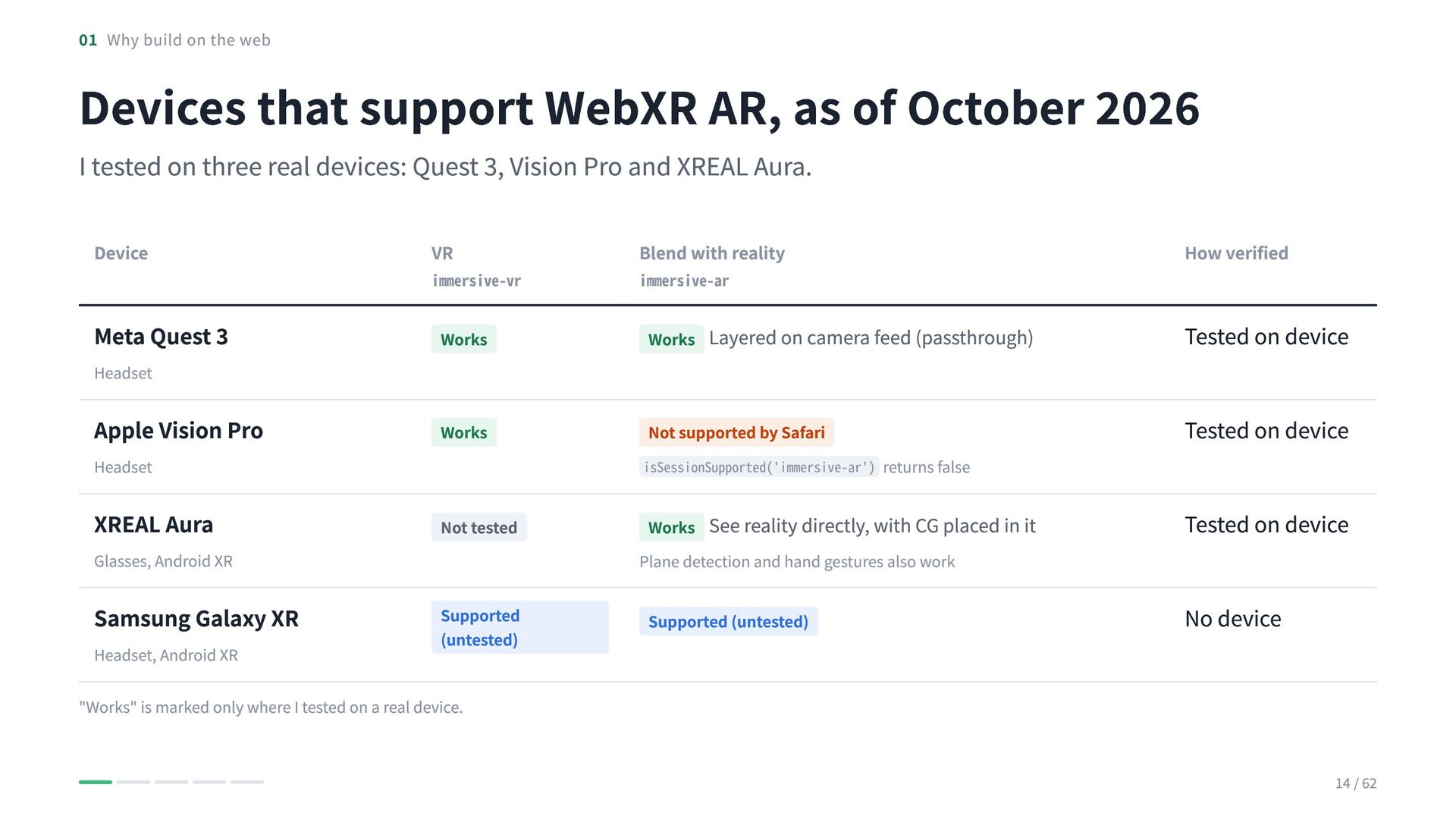
  13. 01 Why build on the web Devices that support WebXR

    AR, as of October 2026 I tested on three real devices: Quest 3, Vision Pro and XREAL Aura. Device VR Blend with reality How verified Meta Quest 3 Works Works Layered on camera feed (passthrough) Tested on device Apple Vision Pro Works Not supported by Safari Tested on device XREAL Aura Not tested Works See reality directly, with CG placed in it Plane detection and hand gestures also work Tested on device Samsung Galaxy XR Supported (untested) Supported (untested) No device Headset Headset Glasses, Android XR Headset, Android XR immersive-vr immersive-ar isSessionSupported('immersive-ar') returns false "Works" is marked only where I tested on a real device. 14 / 62
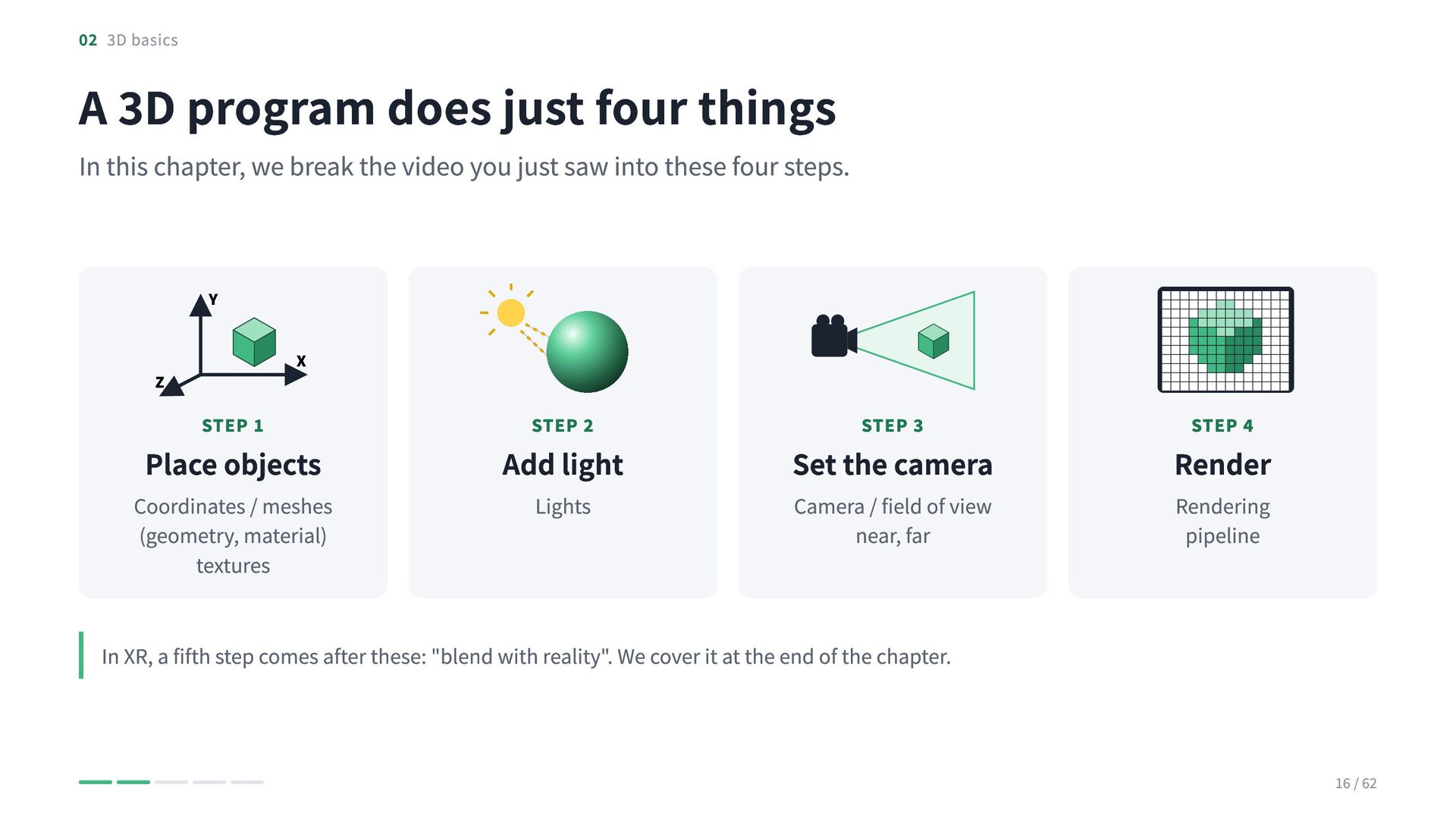
  14. 02 3D basics A 3D program does just four things

    In this chapter, we break the video you just saw into these four steps. Y X Z STEP 1 Place objects Coordinates / meshes (geometry, material) textures STEP 2 Add light Lights STEP 3 Set the camera Camera / field of view near, far STEP 4 Render Rendering pipeline In XR, a fifth step comes after these: "blend with reality". We cover it at the end of the chapter. 16 / 62
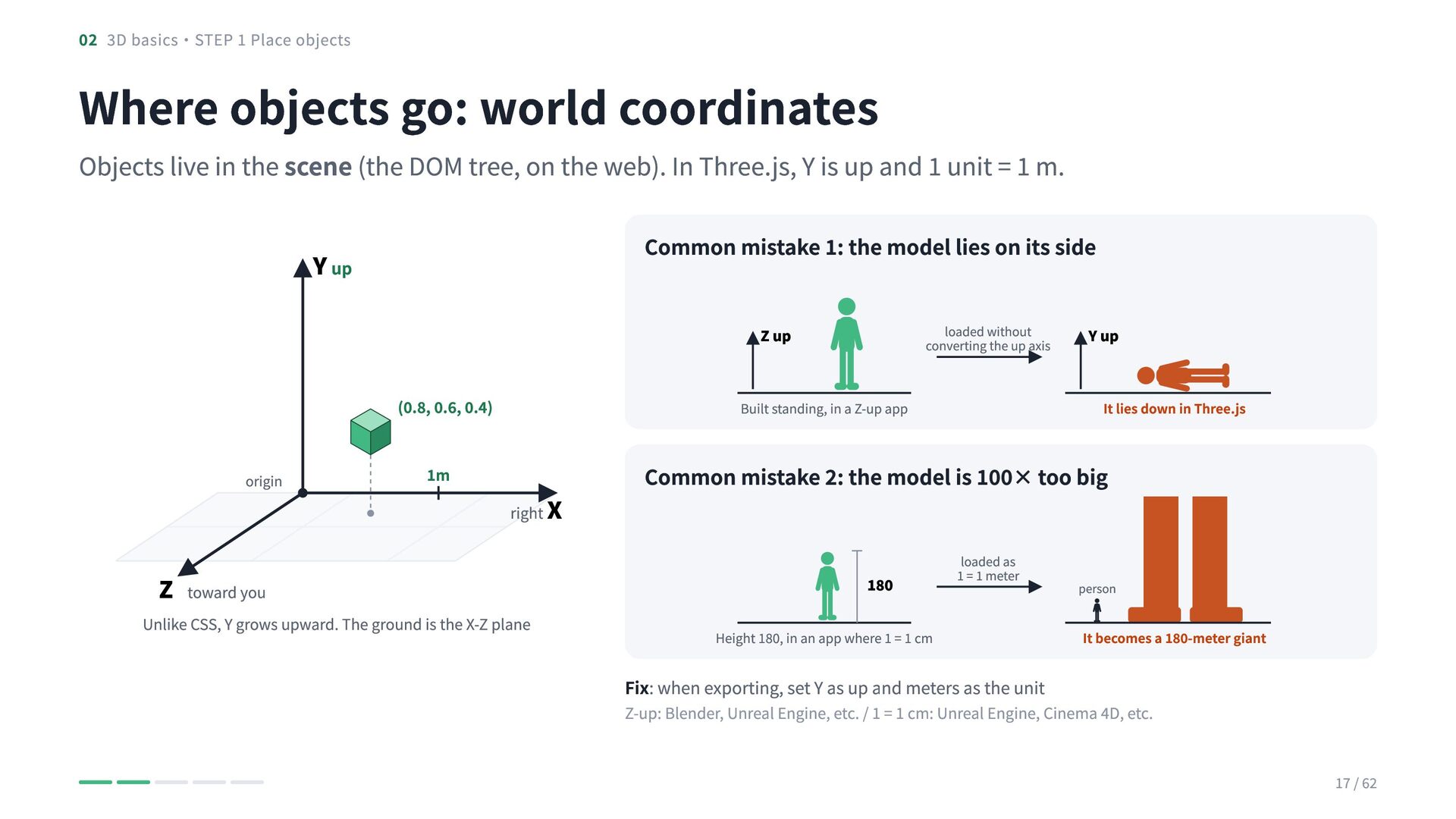
  15. 02 3D basics・STEP 1 Place objects Where objects go: world

    coordinates Objects live in the scene (the DOM tree, on the web). In Three.js, Y is up and 1 unit = 1 m. Common mistake 1: the model lies on its side Y up loaded without converting the up axis Z up (0.8, 0.6, 0.4) origin Z toward you 1m Built standing, in a Z-up app right X Unlike CSS, Y grows upward. The ground is the X-Z plane Y up It lies down in Three.js Common mistake 2: the model is 100× too big 180 loaded as 1 = 1 meter Height 180, in an app where 1 = 1 cm person It becomes a 180-meter giant Fix: when exporting, set Y as up and meters as the unit Z-up: Blender, Unreal Engine, etc. / 1 = 1 cm: Unreal Engine, Cinema 4D, etc. 17 / 62
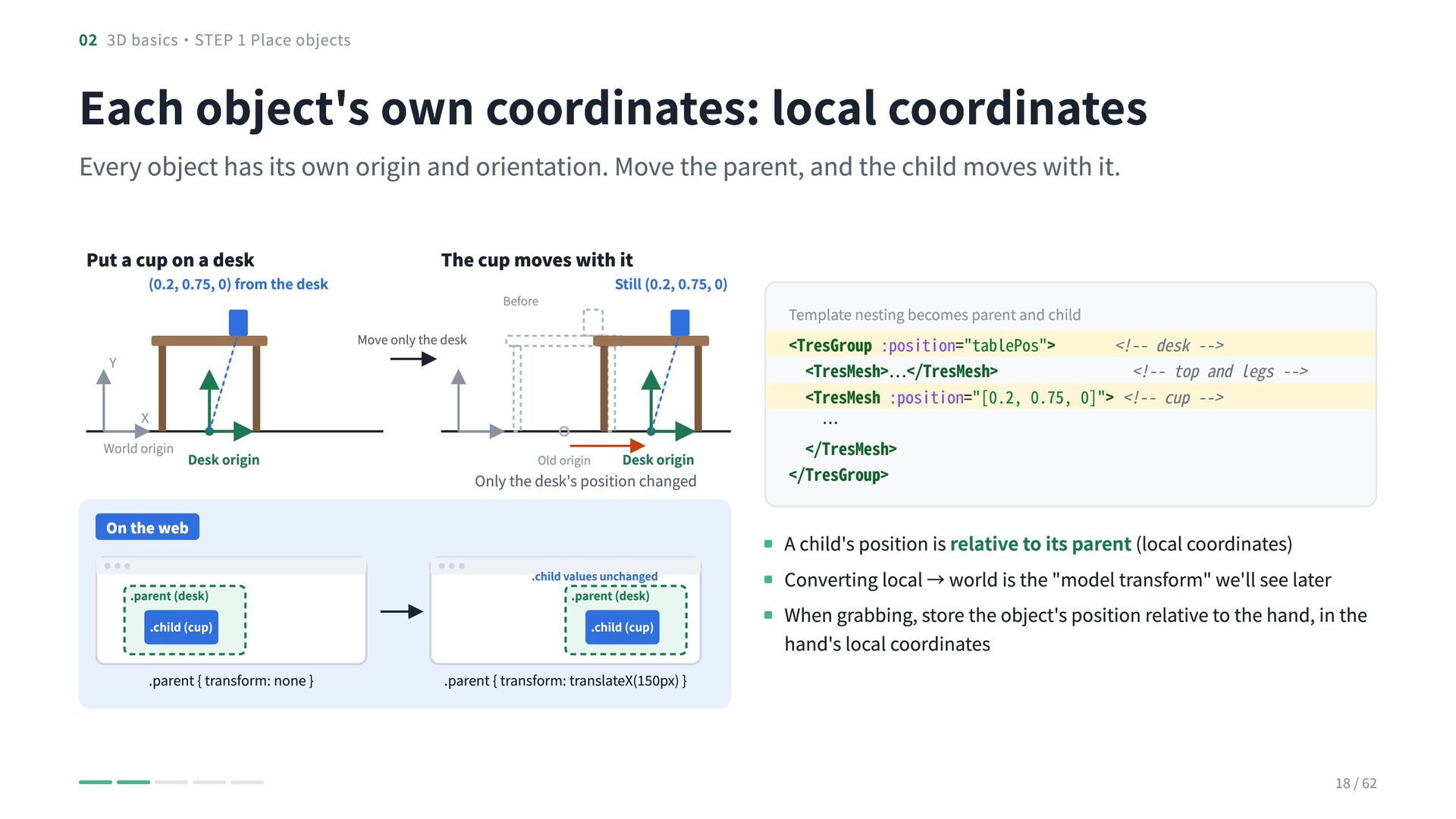
  16. 02 3D basics・STEP 1 Place objects Each object's own coordinates:

    local coordinates Every object has its own origin and orientation. Move the parent, and the child moves with it. Put a cup on a desk (0.2, 0.75, 0) from the desk The cup moves with it Still (0.2, 0.75, 0) Before Move only the desk Y X World origin Desk origin Old origin Desk origin Only the desk's position changed On the web .parent (desk) .child (cup) .parent { transform: none } .child values unchanged .parent (desk) .child (cup) .parent { transform: translateX(150px) } Template nesting becomes parent and child <TresGroup :position="tablePos"> <!-- desk --> <TresMesh>…</TresMesh> <!-- top and legs --> <TresMesh :position="[0.2, 0.75, 0]"> <!-- cup --> … </TresMesh> </TresGroup> A child's position is relative to its parent (local coordinates) Converting local → world is the "model transform" we'll see later When grabbing, store the object's position relative to the hand, in the hand's local coordinates 18 / 62
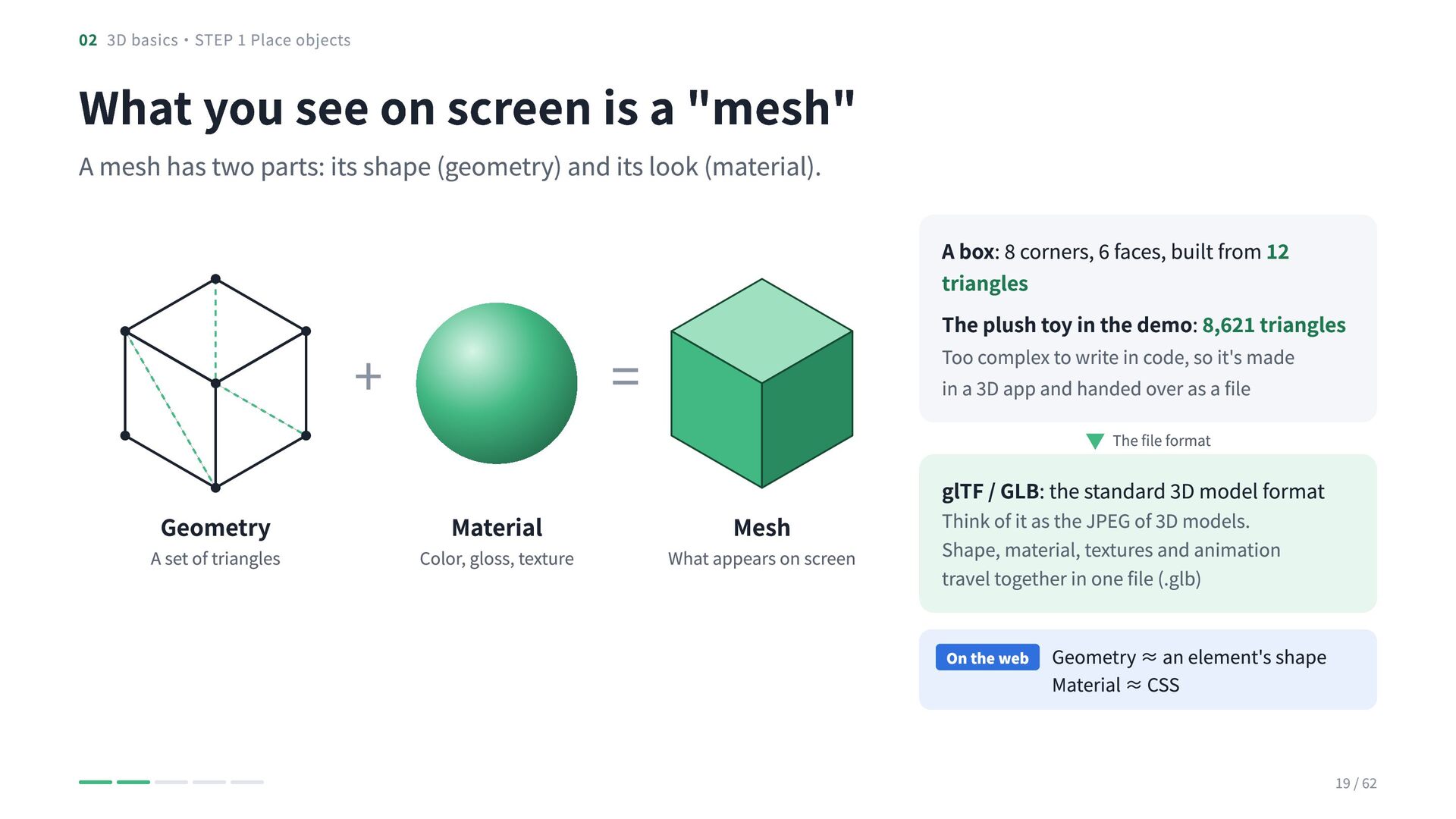
  17. 02 3D basics・STEP 1 Place objects What you see on

    screen is a "mesh" A mesh has two parts: its shape (geometry) and its look (material). + Geometry A set of triangles A box: 8 corners, 6 faces, built from 12 triangles The plush toy in the demo: 8,621 triangles = Material Color, gloss, texture Too complex to write in code, so it's made in a 3D app and handed over as a file Mesh What appears on screen ▼ The file format glTF / GLB: the standard 3D model format Think of it as the JPEG of 3D models. Shape, material, textures and animation travel together in one file (.glb) On the web Geometry ≈ an element's shape Material ≈ CSS 19 / 62
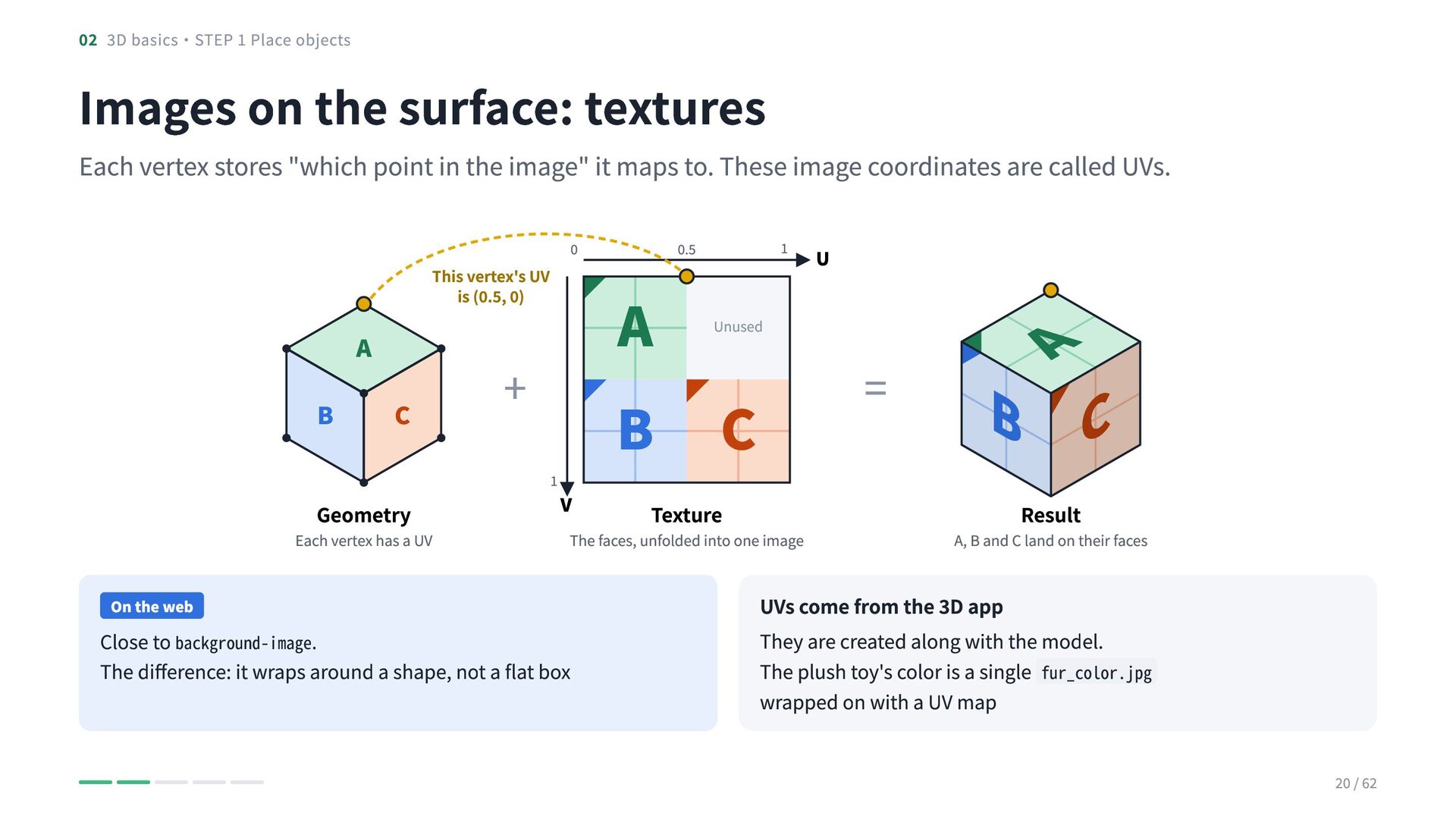
  18. 02 3D basics・STEP 1 Place objects Images on the surface:

    textures Each vertex stores "which point in the image" it maps to. These image coordinates are called UVs. This vertex's UV is (0.5, 0) C Geometry Each vertex has a UV On the web 1 0.5 A B C Unused + 1 V Texture The faces, unfolded into one image Close to background-image. The difference: it wraps around a shape, not a flat box U = B C A A B 0 Result A, B and C land on their faces UVs come from the 3D app They are created along with the model. The plush toy's color is a single fur_color.jpg wrapped on with a UV map 20 / 62
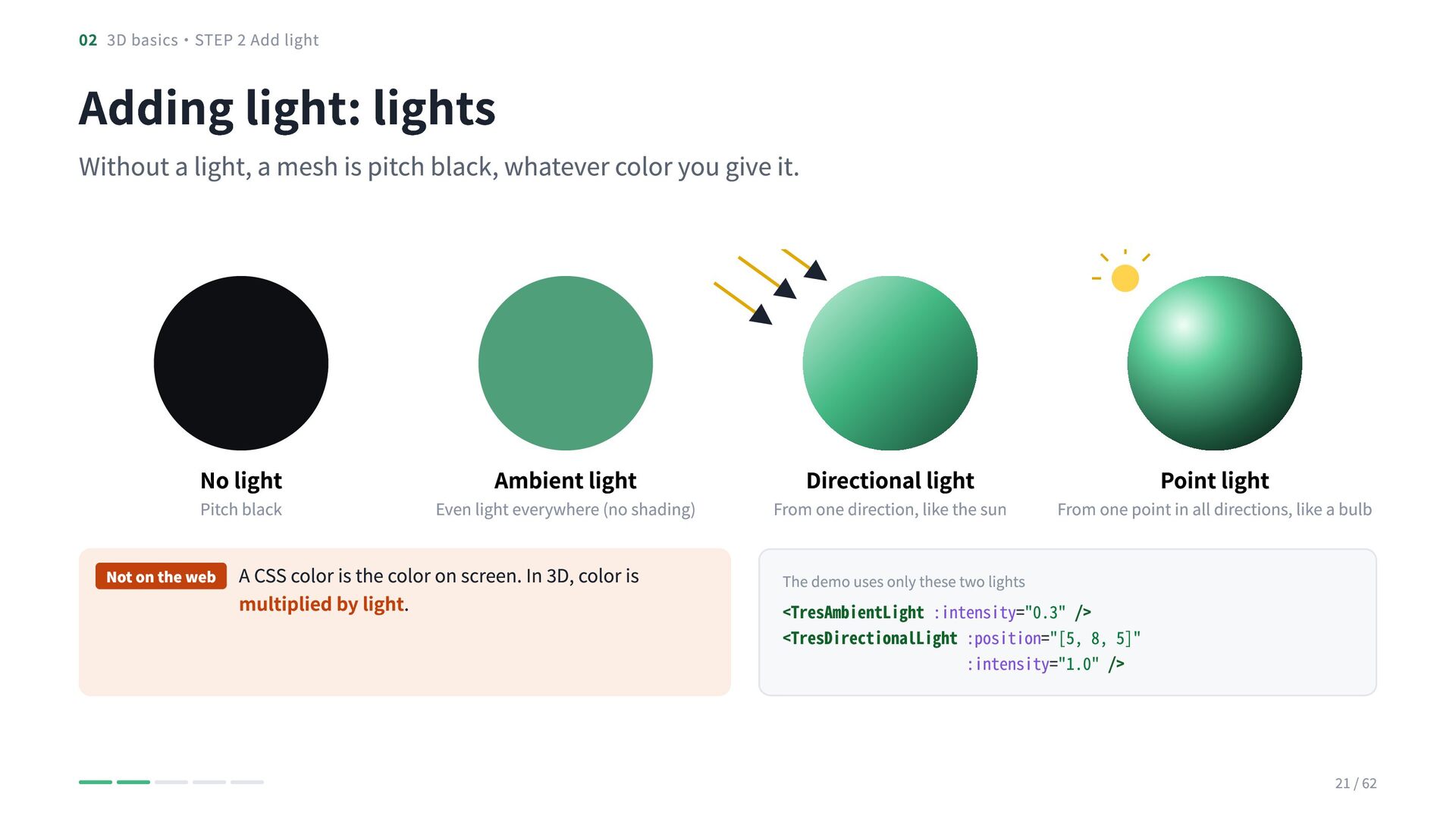
  19. 02 3D basics・STEP 2 Add light Adding light: lights Without

    a light, a mesh is pitch black, whatever color you give it. No light Pitch black Not on the web Ambient light Even light everywhere (no shading) A CSS color is the color on screen. In 3D, color is multiplied by light. Directional light From one direction, like the sun Point light From one point in all directions, like a bulb The demo uses only these two lights <TresAmbientLight :intensity="0.3" /> <TresDirectionalLight :position="[5, 8, 5]" :intensity="1.0" /> 21 / 62
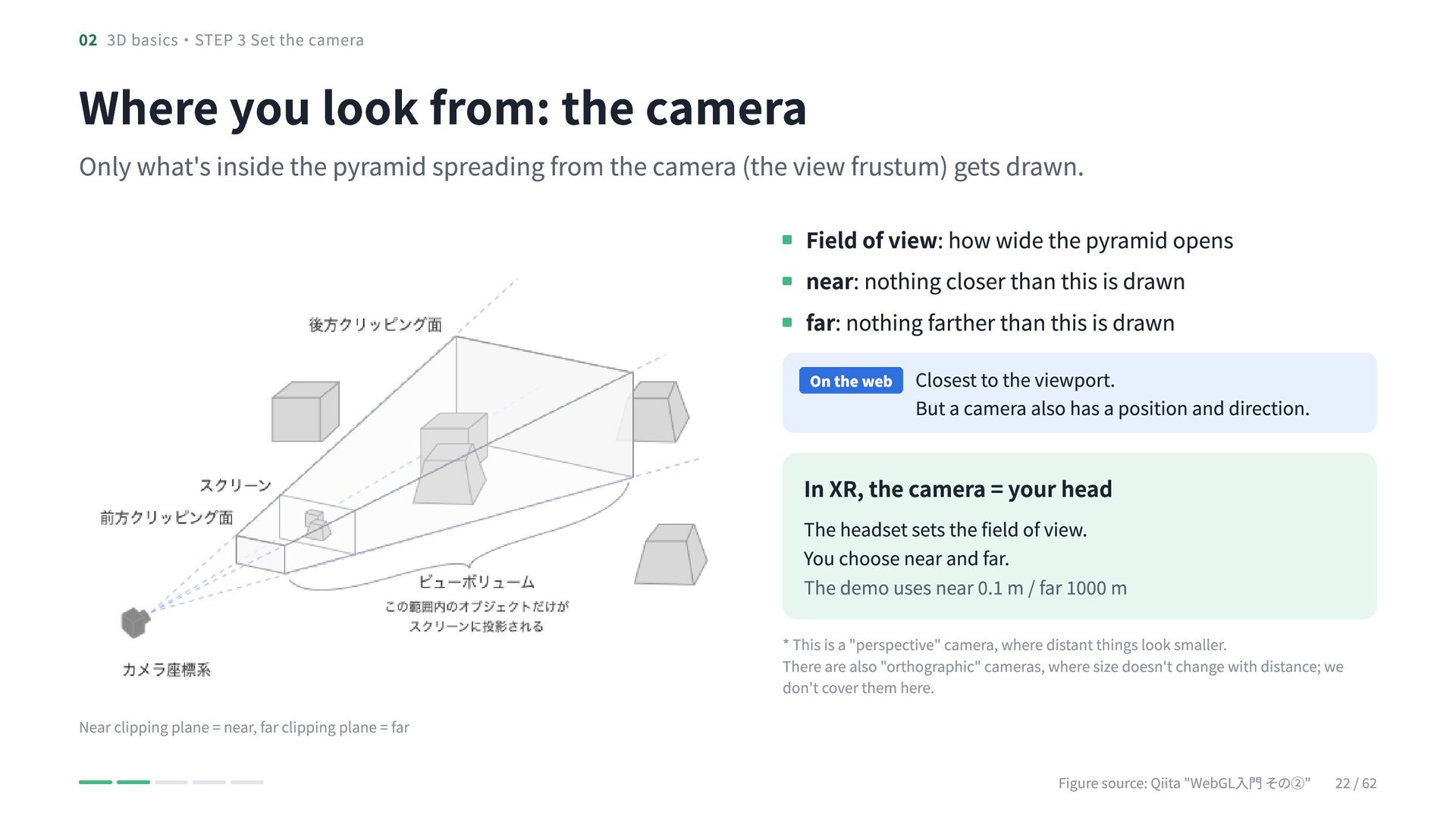
  20. 02 3D basics・STEP 3 Set the camera Where you look

    from: the camera Only what's inside the pyramid spreading from the camera (the view frustum) gets drawn. Field of view: how wide the pyramid opens near: nothing closer than this is drawn far: nothing farther than this is drawn On the web Closest to the viewport. But a camera also has a position and direction. In XR, the camera = your head The headset sets the field of view. You choose near and far. The demo uses near 0.1 m / far 1000 m * This is a "perspective" camera, where distant things look smaller. There are also "orthographic" cameras, where size doesn't change with distance; we don't cover them here. Near clipping plane = near, far clipping plane = far Figure source: Qiita "WebGL入門 その②" 22 / 62
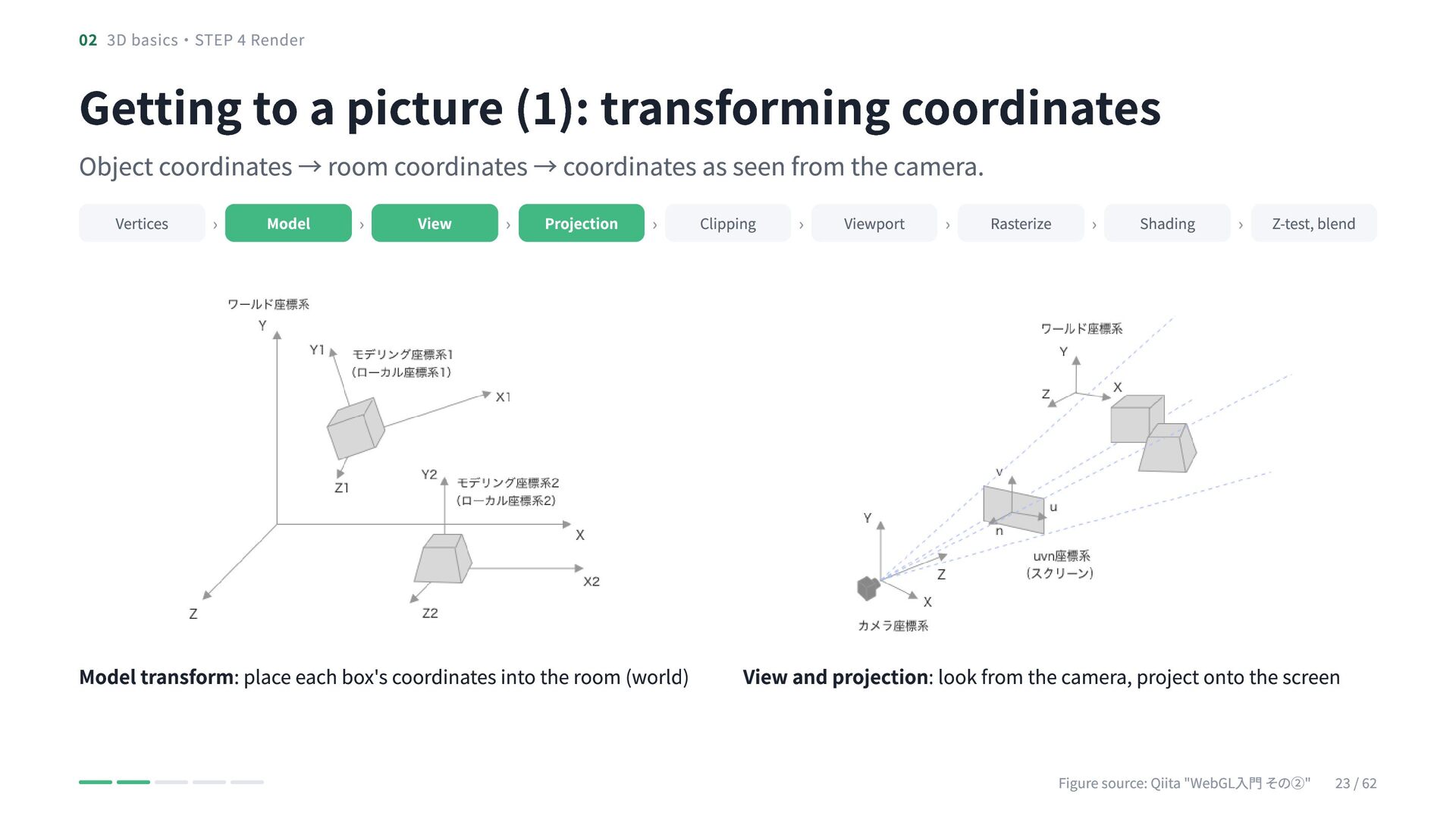
  21. 02 3D basics・STEP 4 Render Getting to a picture (1):

    transforming coordinates Object coordinates → room coordinates → coordinates as seen from the camera. Vertices › Model › View › Projection › Model transform: place each box's coordinates into the room (world) Clipping › Viewport › Rasterize › Shading › Z-test, blend View and projection: look from the camera, project onto the screen Figure source: Qiita "WebGL入門 その②" 23 / 62
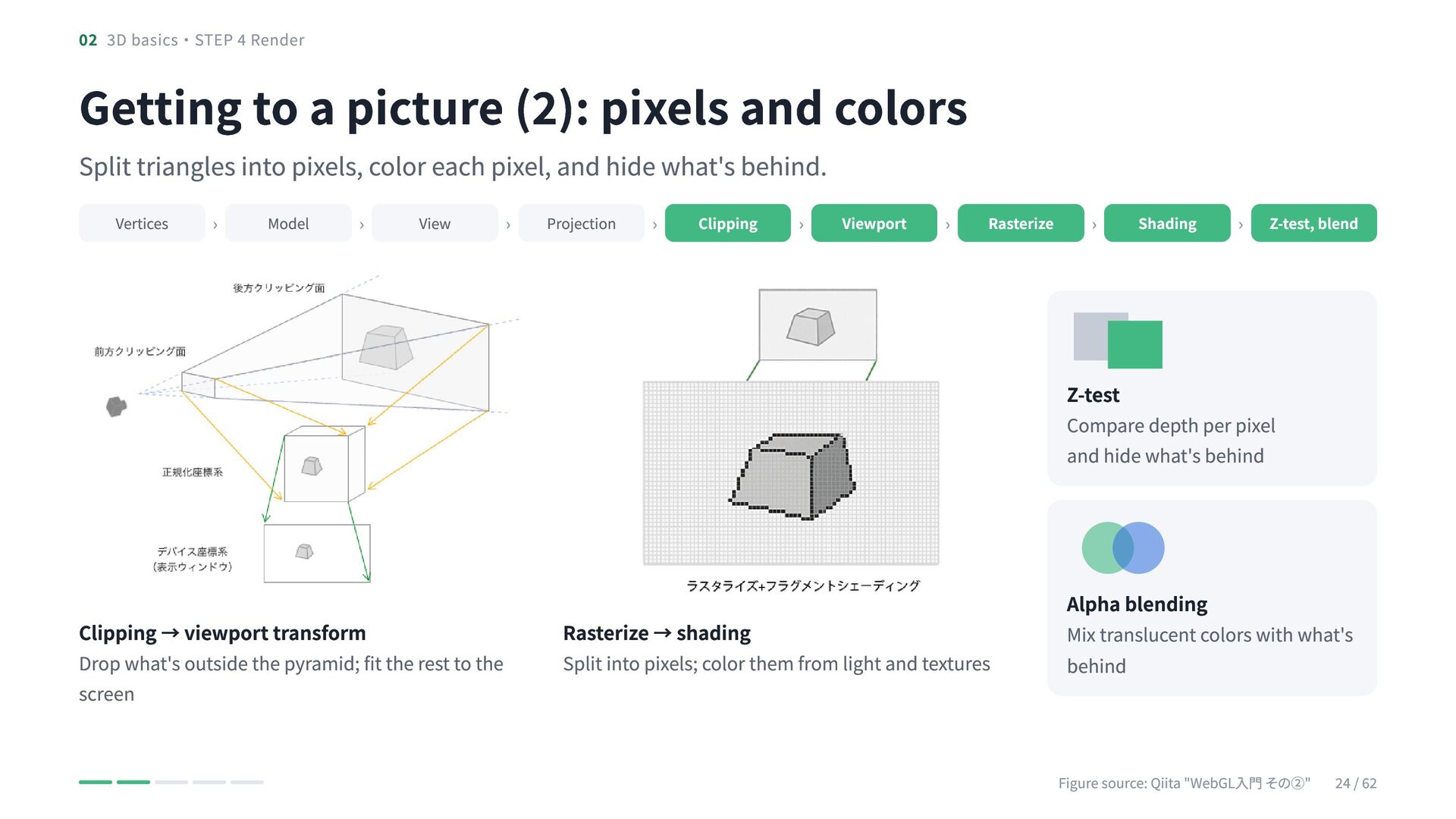
  22. 02 3D basics・STEP 4 Render Getting to a picture (2):

    pixels and colors Split triangles into pixels, color each pixel, and hide what's behind. Vertices › Model › View › Projection › Clipping › Viewport › Rasterize › Shading › Z-test, blend Z-test Compare depth per pixel and hide what's behind Clipping → viewport transform Drop what's outside the pyramid; fit the rest to the screen Rasterize → shading Split into pixels; color them from light and textures Alpha blending Mix translucent colors with what's behind Figure source: Qiita "WebGL入門 その②" 24 / 62
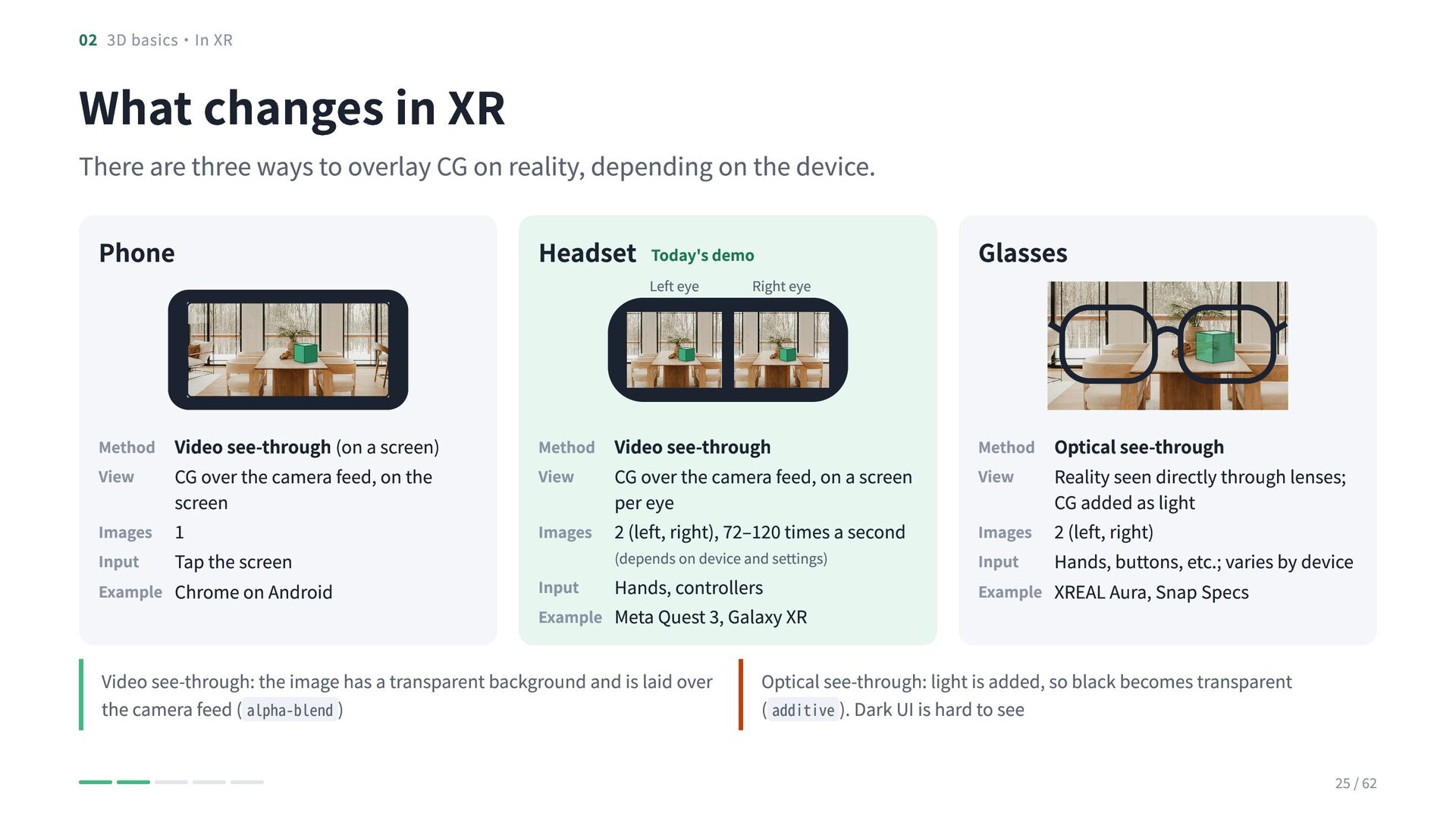
  23. 02 3D basics・In XR What changes in XR There are

    three ways to overlay CG on reality, depending on the device. Phone Headset Today's demo Glasses Method Video see-through (on a screen) View CG over the camera feed, on the Method Video see-through View CG over the camera feed, on a screen Method Optical see-through View Reality seen directly through lenses; screen Images 1 Input Tap the screen Example Chrome on Android Left eye Right eye per eye Images 2 (left, right), 72–120 times a second (depends on device and settings) Input Hands, controllers Example Meta Quest 3, Galaxy XR Video see-through: the image has a transparent background and is laid over the camera feed ( alpha-blend ) CG added as light Images 2 (left, right) Input Hands, buttons, etc.; varies by device Example XREAL Aura, Snap Specs Optical see-through: light is added, so black becomes transparent ( additive ). Dark UI is hard to see 25 / 62
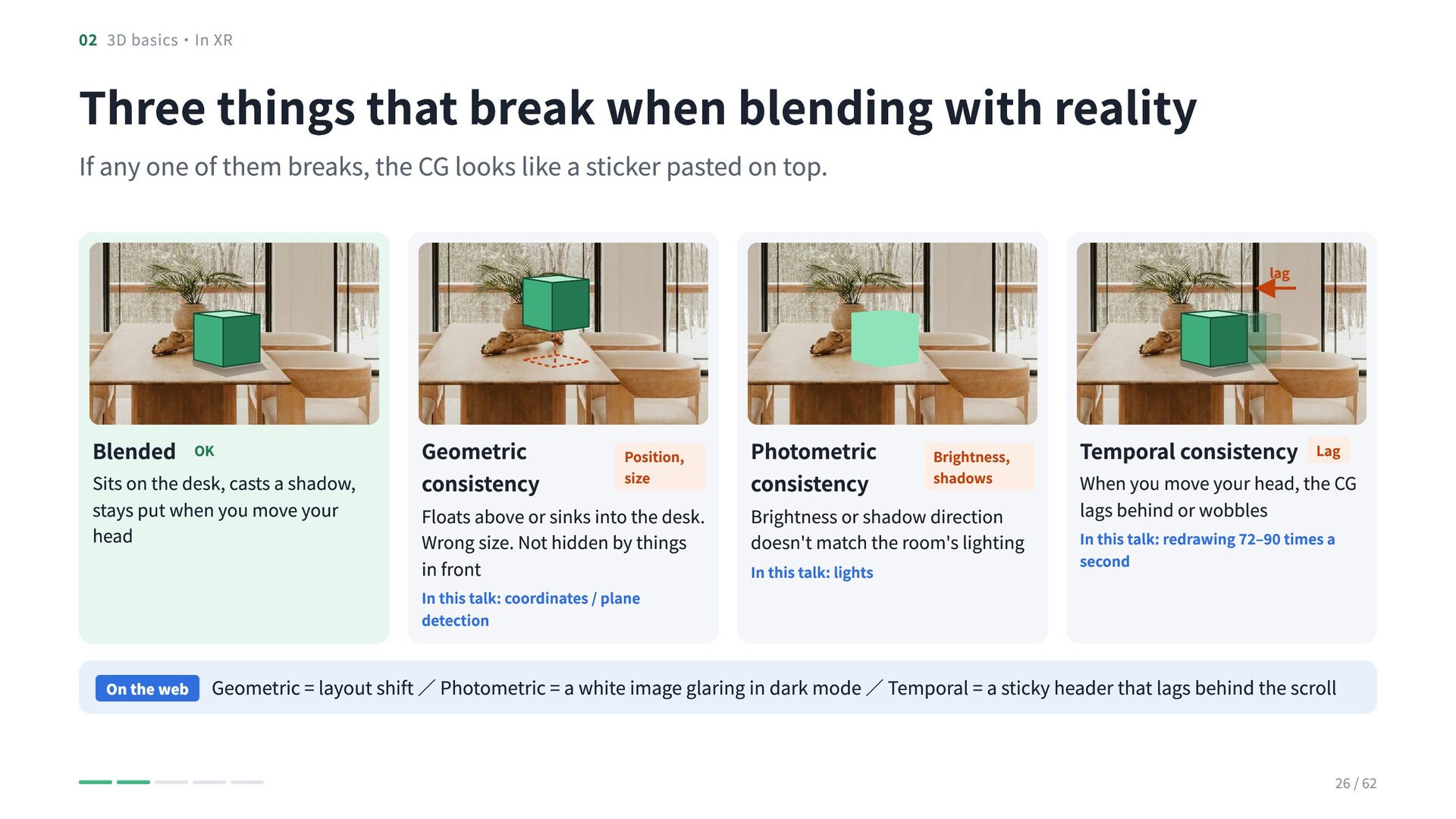
  24. 02 3D basics・In XR Three things that break when blending

    with reality If any one of them breaks, the CG looks like a sticker pasted on top. lag Blended OK Sits on the desk, casts a shadow, stays put when you move your head Geometric consistency Position, size Floats above or sinks into the desk. Wrong size. Not hidden by things in front In this talk: coordinates / plane detection On the web Photometric consistency Brightness, shadows Brightness or shadow direction doesn't match the room's lighting In this talk: lights Temporal consistency Lag When you move your head, the CG lags behind or wobbles In this talk: redrawing 72–90 times a second Geometric = layout shift / Photometric = a white image glaring in dark mode / Temporal = a sticky header that lags behind the scroll 26 / 62
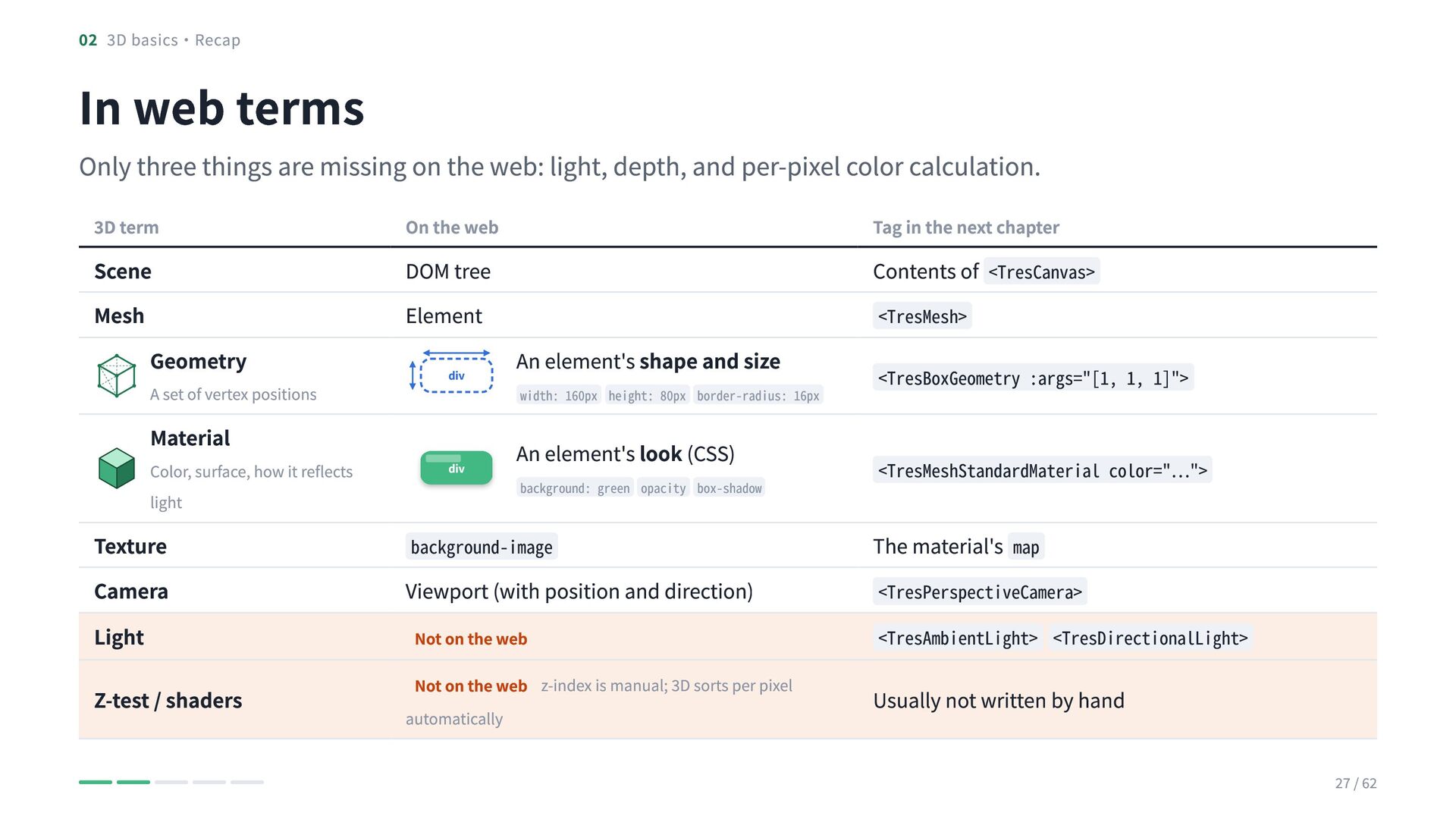
  25. 02 3D basics・Recap In web terms Only three things are

    missing on the web: light, depth, and per-pixel color calculation. 3D term Scene Mesh Geometry A set of vertex positions Material Color, surface, how it reflects light On the web DOM tree Element Tag in the next chapter Contents of <TresCanvas> div An element's shape and size div An element's look (CSS) width: 160px height: 80px border-radius: 16px background: green opacity box-shadow <TresMesh> <TresBoxGeometry :args="[1, 1, 1]"> <TresMeshStandardMaterial color="…"> Texture Camera Light Viewport (with position and direction) Not on the web <TresPerspectiveCamera> <TresAmbientLight> <TresDirectionalLight> Z-test / shaders Not on the web z-index is manual; 3D sorts per pixel automatically Usually not written by hand background-image The material's map 27 / 62
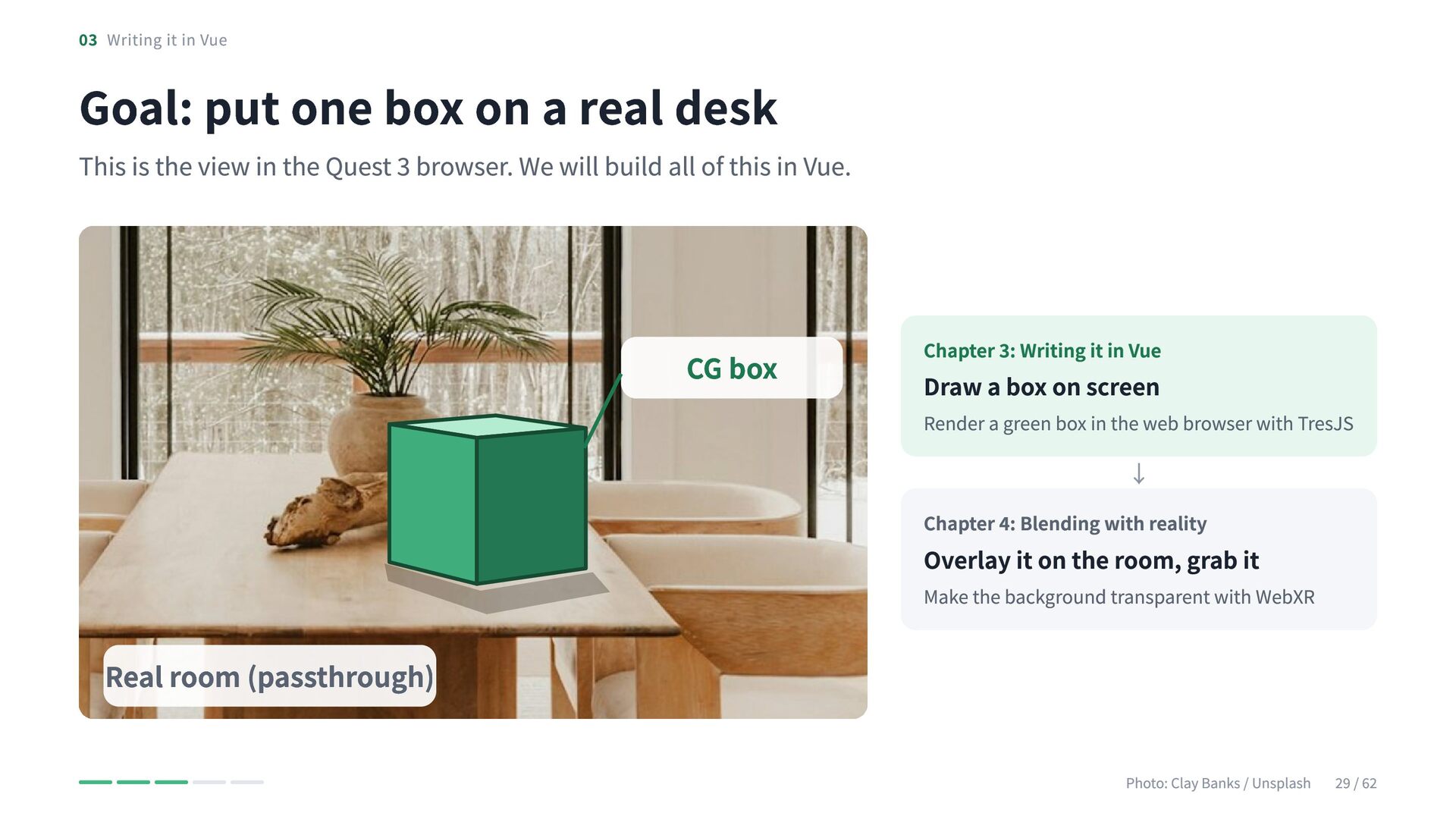
  26. 03 Writing it in Vue Goal: put one box on

    a real desk This is the view in the Quest 3 browser. We will build all of this in Vue. CG box Chapter 3: Writing it in Vue Draw a box on screen Render a green box in the web browser with TresJS ↓ Chapter 4: Blending with reality Overlay it on the room, grab it Make the background transparent with WebXR Real room (passthrough) Photo: Clay Banks / Unsplash 29 / 62
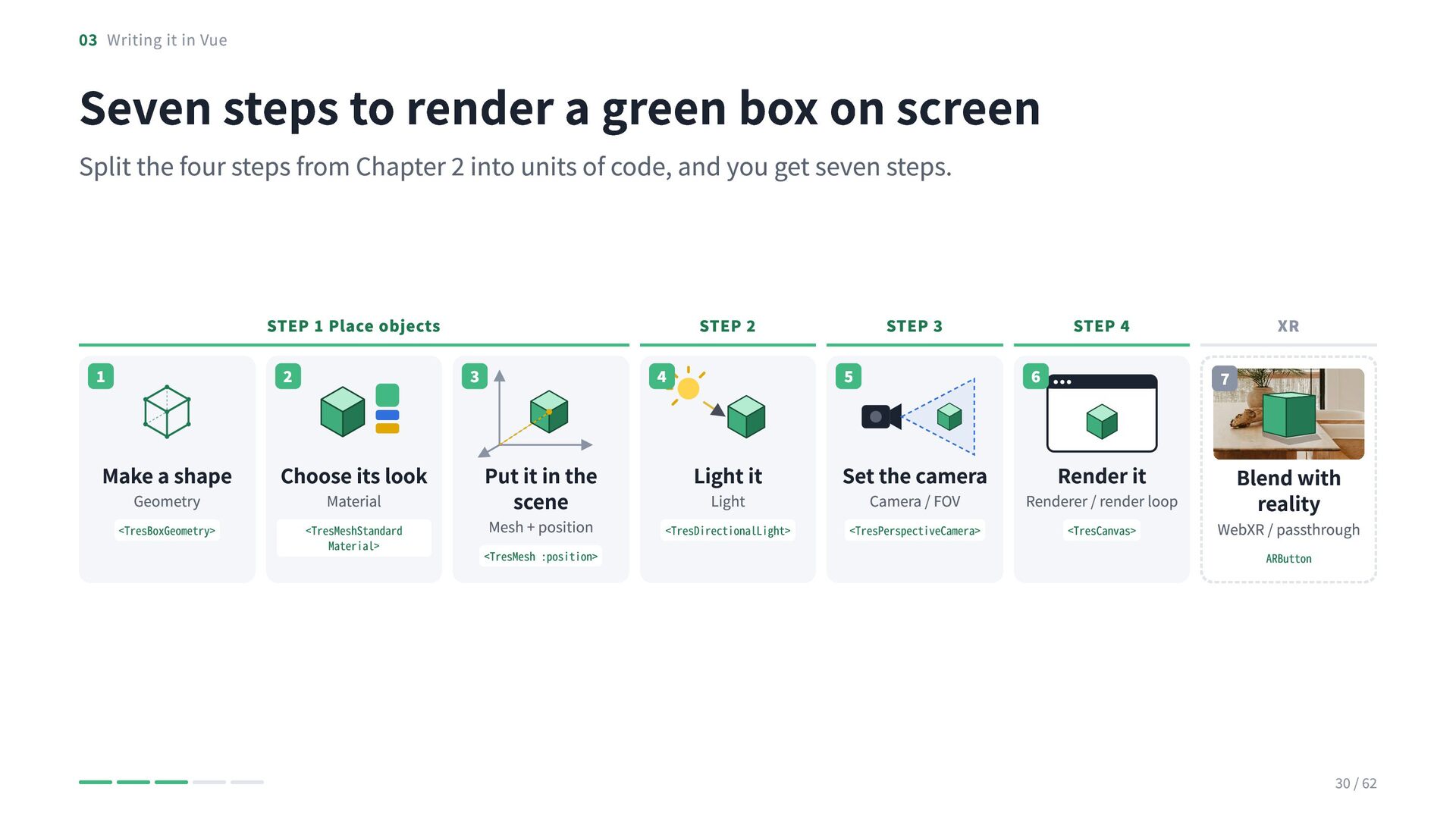
  27. 03 Writing it in Vue Seven steps to render a

    green box on screen Split the four steps from Chapter 2 into units of code, and you get seven steps. STEP 1 Place objects 1 2 Make a shape Choose its look <TresBoxGeometry> <TresMeshStandard​ Material> Geometry STEP 2 3 Material 4 Put it in the scene Mesh + position <TresMesh :position> STEP 3 5 6 Light it Set the camera <TresDirectional​Light> <TresPerspective​Camera> Light STEP 4 Camera / FOV XR 7 Render it Renderer / render loop <TresCanvas> Blend with reality WebXR / passthrough ARButton 30 / 62
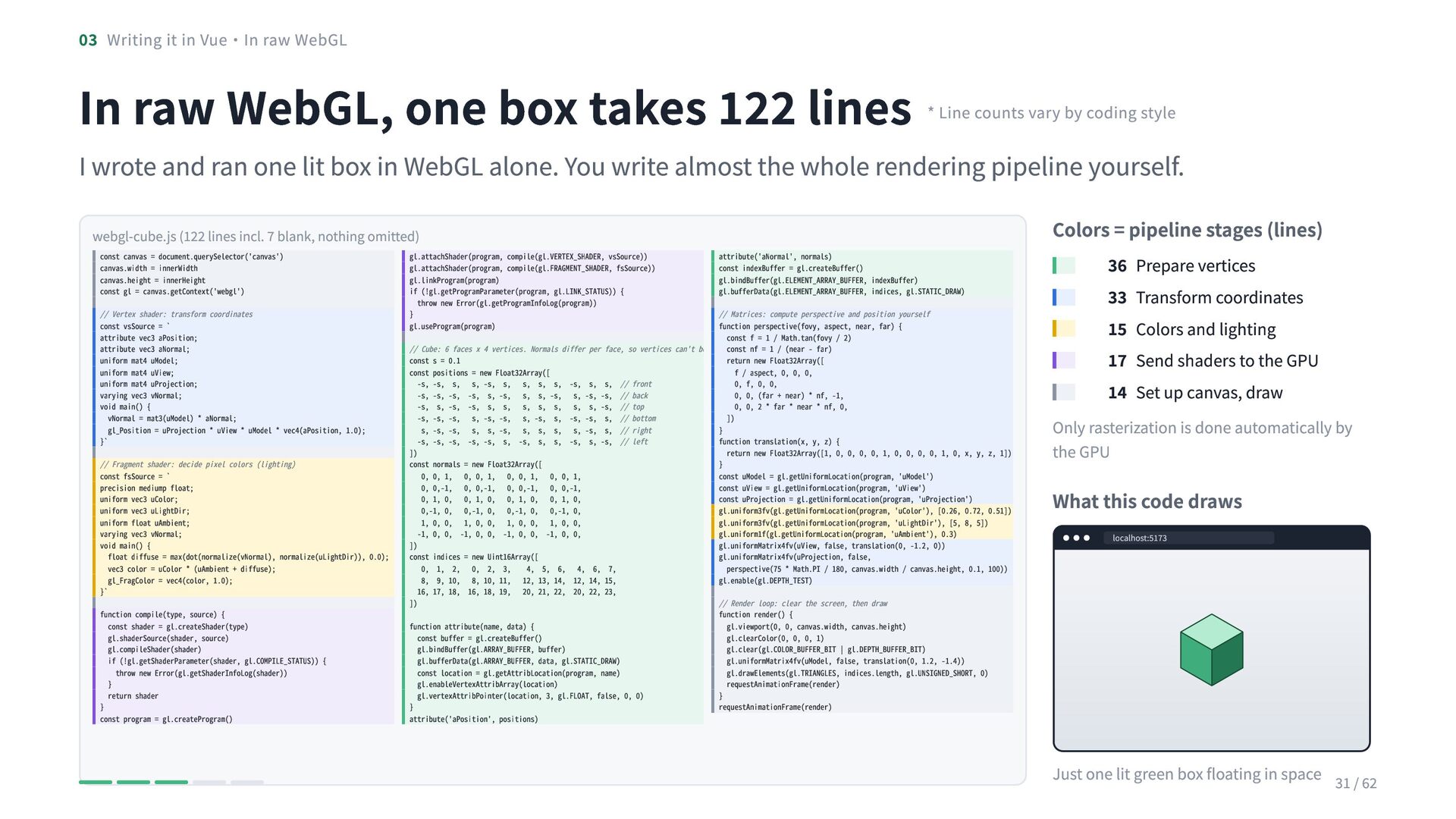
  28. 03 Writing it in Vue・In raw WebGL In raw WebGL,

    one box takes 122 lines * Line counts vary by coding style I wrote and ran one lit box in WebGL alone. You write almost the whole rendering pipeline yourself. webgl-cube.js (122 lines incl. 7 blank, nothing omitted) const canvas = document.querySelector('canvas') canvas.width = innerWidth canvas.height = innerHeight const gl = canvas.getContext('webgl') // Vertex shader: transform coordinates const vsSource = ` attribute vec3 aPosition; attribute vec3 aNormal; uniform mat4 uModel; uniform mat4 uView; uniform mat4 uProjection; varying vec3 vNormal; void main() { vNormal = mat3(uModel) * aNormal; gl_Position = uProjection * uView * uModel * vec4(aPosition, 1.0); }` // Fragment shader: decide pixel colors (lighting) const fsSource = ` precision mediump float; uniform vec3 uColor; uniform vec3 uLightDir; uniform float uAmbient; varying vec3 vNormal; void main() { float diffuse = max(dot(normalize(vNormal), normalize(uLightDir)), 0.0); vec3 color = uColor * (uAmbient + diffuse); gl_FragColor = vec4(color, 1.0); }` function compile(type, source) { const shader = gl.createShader(type) gl.shaderSource(shader, source) gl.compileShader(shader) if (!gl.getShaderParameter(shader, gl.COMPILE_STATUS)) { throw new Error(gl.getShaderInfoLog(shader)) } return shader } const program = gl.createProgram() gl.attachShader(program, compile(gl.VERTEX_SHADER, vsSource)) gl.attachShader(program, compile(gl.FRAGMENT_SHADER, fsSource)) gl.linkProgram(program) if (!gl.getProgramParameter(program, gl.LINK_STATUS)) { throw new Error(gl.getProgramInfoLog(program)) } gl.useProgram(program) // Cube: 6 faces x 4 vertices. Normals differ per face, so vertices can't be const s = 0.1 const positions = new Float32Array([ -s, -s, s, s, -s, s, s, s, s, -s, s, s, // front -s, -s, -s, -s, s, -s, s, s, -s, s, -s, -s, // back -s, s, -s, -s, s, s, s, s, s, s, s, -s, // top -s, -s, -s, s, -s, -s, s, -s, s, -s, -s, s, // bottom s, -s, -s, s, s, -s, s, s, s, s, -s, s, // right -s, -s, -s, -s, -s, s, -s, s, s, -s, s, -s, // left ]) const normals = new Float32Array([ 0, 0, 1, 0, 0, 1, 0, 0, 1, 0, 0, 1, 0, 0,-1, 0, 0,-1, 0, 0,-1, 0, 0,-1, 0, 1, 0, 0, 1, 0, 0, 1, 0, 0, 1, 0, 0,-1, 0, 0,-1, 0, 0,-1, 0, 0,-1, 0, 1, 0, 0, 1, 0, 0, 1, 0, 0, 1, 0, 0, -1, 0, 0, -1, 0, 0, -1, 0, 0, -1, 0, 0, ]) const indices = new Uint16Array([ 0, 1, 2, 0, 2, 3, 4, 5, 6, 4, 6, 7, 8, 9, 10, 8, 10, 11, 12, 13, 14, 12, 14, 15, 16, 17, 18, 16, 18, 19, 20, 21, 22, 20, 22, 23, ]) function attribute(name, data) { const buffer = gl.createBuffer() gl.bindBuffer(gl.ARRAY_BUFFER, buffer) gl.bufferData(gl.ARRAY_BUFFER, data, gl.STATIC_DRAW) const location = gl.getAttribLocation(program, name) gl.enableVertexAttribArray(location) gl.vertexAttribPointer(location, 3, gl.FLOAT, false, 0, 0) } attribute('aPosition', positions) attribute('aNormal', normals) const indexBuffer = gl.createBuffer() gl.bindBuffer(gl.ELEMENT_ARRAY_BUFFER, indexBuffer) gl.bufferData(gl.ELEMENT_ARRAY_BUFFER, indices, gl.STATIC_DRAW) // Matrices: compute perspective and position yourself function perspective(fovy, aspect, near, far) { const f = 1 / Math.tan(fovy / 2) const nf = 1 / (near - far) return new Float32Array([ f / aspect, 0, 0, 0, 0, f, 0, 0, 0, 0, (far + near) * nf, -1, 0, 0, 2 * far * near * nf, 0, ]) } function translation(x, y, z) { return new Float32Array([1, 0, 0, 0, 0, 1, 0, 0, 0, 0, 1, 0, x, y, z, 1]) } const uModel = gl.getUniformLocation(program, 'uModel') const uView = gl.getUniformLocation(program, 'uView') const uProjection = gl.getUniformLocation(program, 'uProjection') gl.uniform3fv(gl.getUniformLocation(program, 'uColor'), [0.26, 0.72, 0.51]) gl.uniform3fv(gl.getUniformLocation(program, 'uLightDir'), [5, 8, 5]) gl.uniform1f(gl.getUniformLocation(program, 'uAmbient'), 0.3) gl.uniformMatrix4fv(uView, false, translation(0, -1.2, 0)) gl.uniformMatrix4fv(uProjection, false, perspective(75 * Math.PI / 180, canvas.width / canvas.height, 0.1, 100)) gl.enable(gl.DEPTH_TEST) // Render loop: clear the screen, then draw function render() { gl.viewport(0, 0, canvas.width, canvas.height) gl.clearColor(0, 0, 0, 1) gl.clear(gl.COLOR_BUFFER_BIT | gl.DEPTH_BUFFER_BIT) gl.uniformMatrix4fv(uModel, false, translation(0, 1.2, -1.4)) gl.drawElements(gl.TRIANGLES, indices.length, gl.UNSIGNED_SHORT, 0) requestAnimationFrame(render) } requestAnimationFrame(render) Colors = pipeline stages (lines) 36 Prepare vertices 33 Transform coordinates 15 Colors and lighting 17 Send shaders to the GPU 14 Set up canvas, draw Only rasterization is done automatically by the GPU What this code draws localhost:5173 Just one lit green box floating in space 31 / 62
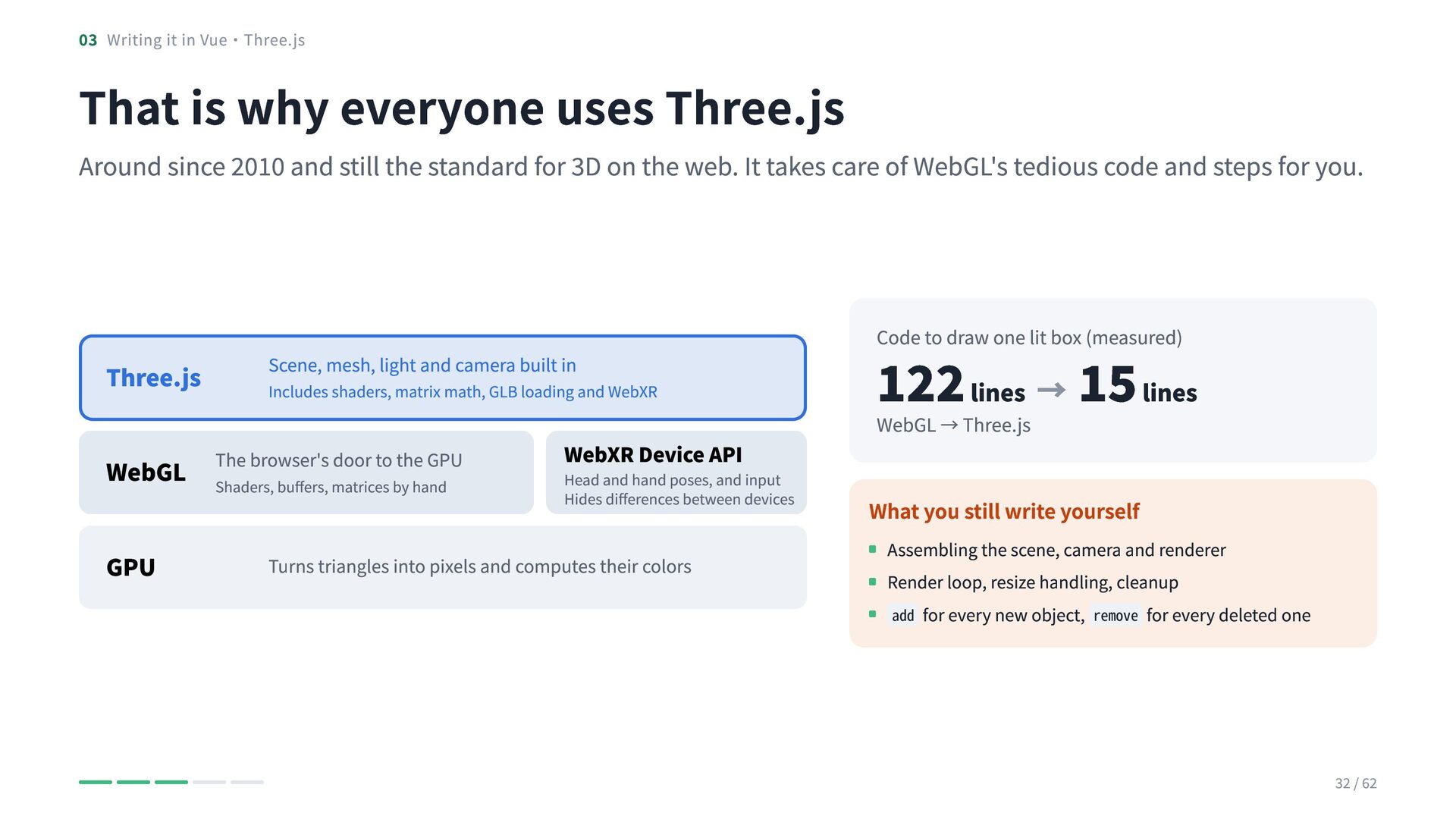
  29. 03 Writing it in Vue・Three.js That is why everyone uses

    Three.js Around since 2010 and still the standard for 3D on the web. It takes care of WebGL's tedious code and steps for you. Three.js Scene, mesh, light and camera built in Includes shaders, matrix math, GLB loading and WebXR The browser's door to the GPU WebGL Shaders, buffers, matrices by hand GPU WebXR Device API Head and hand poses, and input Hides differences between devices Turns triangles into pixels and computes their colors 122 lines → 15 lines Code to draw one lit box (measured) WebGL → Three.js What you still write yourself Assembling the scene, camera and renderer Render loop, resize handling, cleanup add for every new object, remove for every deleted one 32 / 62
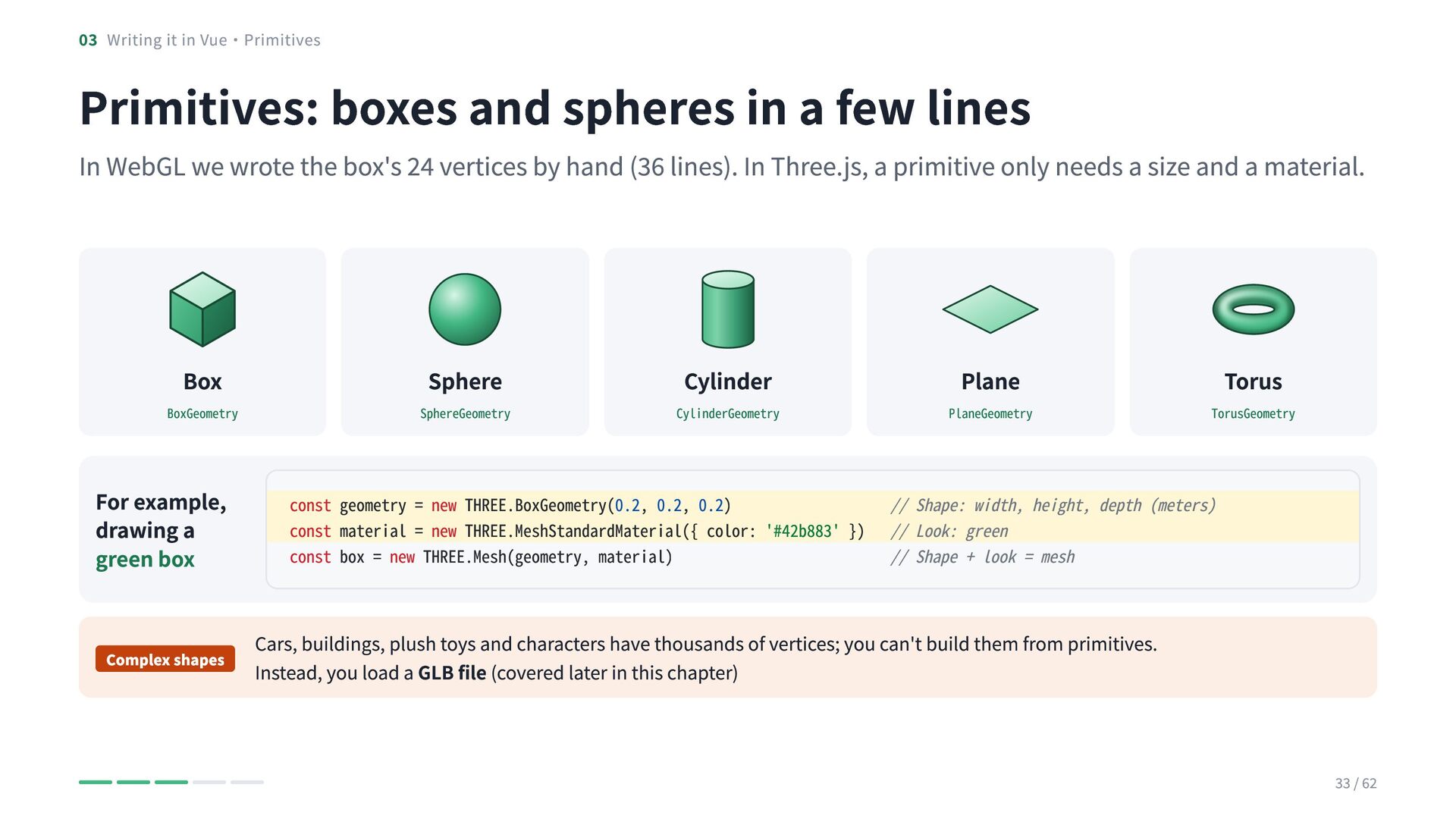
  30. 03 Writing it in Vue・Primitives Primitives: boxes and spheres in

    a few lines In WebGL we wrote the box's 24 vertices by hand (36 lines). In Three.js, a primitive only needs a size and a material. Box BoxGeometry For example, drawing a green box Complex shapes Sphere SphereGeometry Cylinder CylinderGeometry Plane PlaneGeometry Torus TorusGeometry const geometry = new THREE.BoxGeometry(0.2, 0.2, 0.2) // Shape: width, height, depth (meters) const material = new THREE.MeshStandardMaterial({ color: '#42b883' }) // Look: green const box = new THREE.Mesh(geometry, material) // Shape + look = mesh Cars, buildings, plush toys and characters have thousands of vertices; you can't build them from primitives. Instead, you load a GLB file (covered later in this chapter) 33 / 62
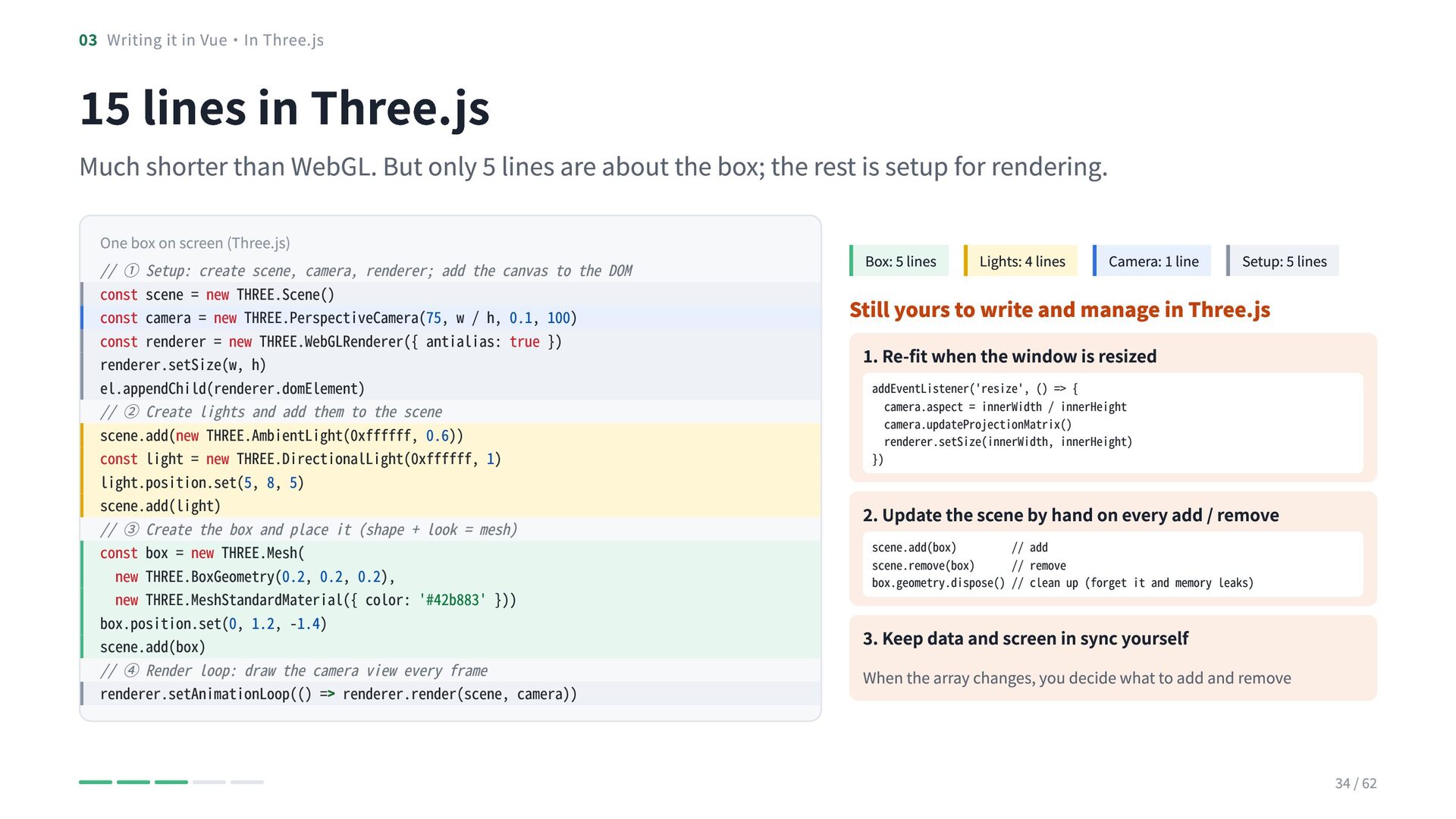
  31. 03 Writing it in Vue・In Three.js 15 lines in Three.js

    Much shorter than WebGL. But only 5 lines are about the box; the rest is setup for rendering. One box on screen (Three.js) // ① Setup: create scene, camera, renderer; add the canvas to the DOM const scene = new THREE.Scene() const camera = new THREE.PerspectiveCamera(75, w / h, 0.1, 100) const renderer = new THREE.WebGLRenderer({ antialias: true }) renderer.setSize(w, h) el.appendChild(renderer.domElement) // ② Create lights and add them to the scene scene.add(new THREE.AmbientLight(0xffffff, 0.6)) const light = new THREE.DirectionalLight(0xffffff, 1) light.position.set(5, 8, 5) scene.add(light) // ③ Create the box and place it (shape + look = mesh) const box = new THREE.Mesh( new THREE.BoxGeometry(0.2, 0.2, 0.2), new THREE.MeshStandardMaterial({ color: '#42b883' })) box.position.set(0, 1.2, -1.4) scene.add(box) // ④ Render loop: draw the camera view every frame renderer.setAnimationLoop(() => renderer.render(scene, camera)) Box: 5 lines Lights: 4 lines Camera: 1 line Setup: 5 lines Still yours to write and manage in Three.js 1. Re-fit when the window is resized addEventListener('resize', () => { camera.aspect = innerWidth / innerHeight camera.updateProjectionMatrix() renderer.setSize(innerWidth, innerHeight) }) 2. Update the scene by hand on every add / remove scene.add(box) // add scene.remove(box) // remove box.geometry.dispose() // clean up (forget it and memory leaks) 3. Keep data and screen in sync yourself When the array changes, you decide what to add and remove 34 / 62
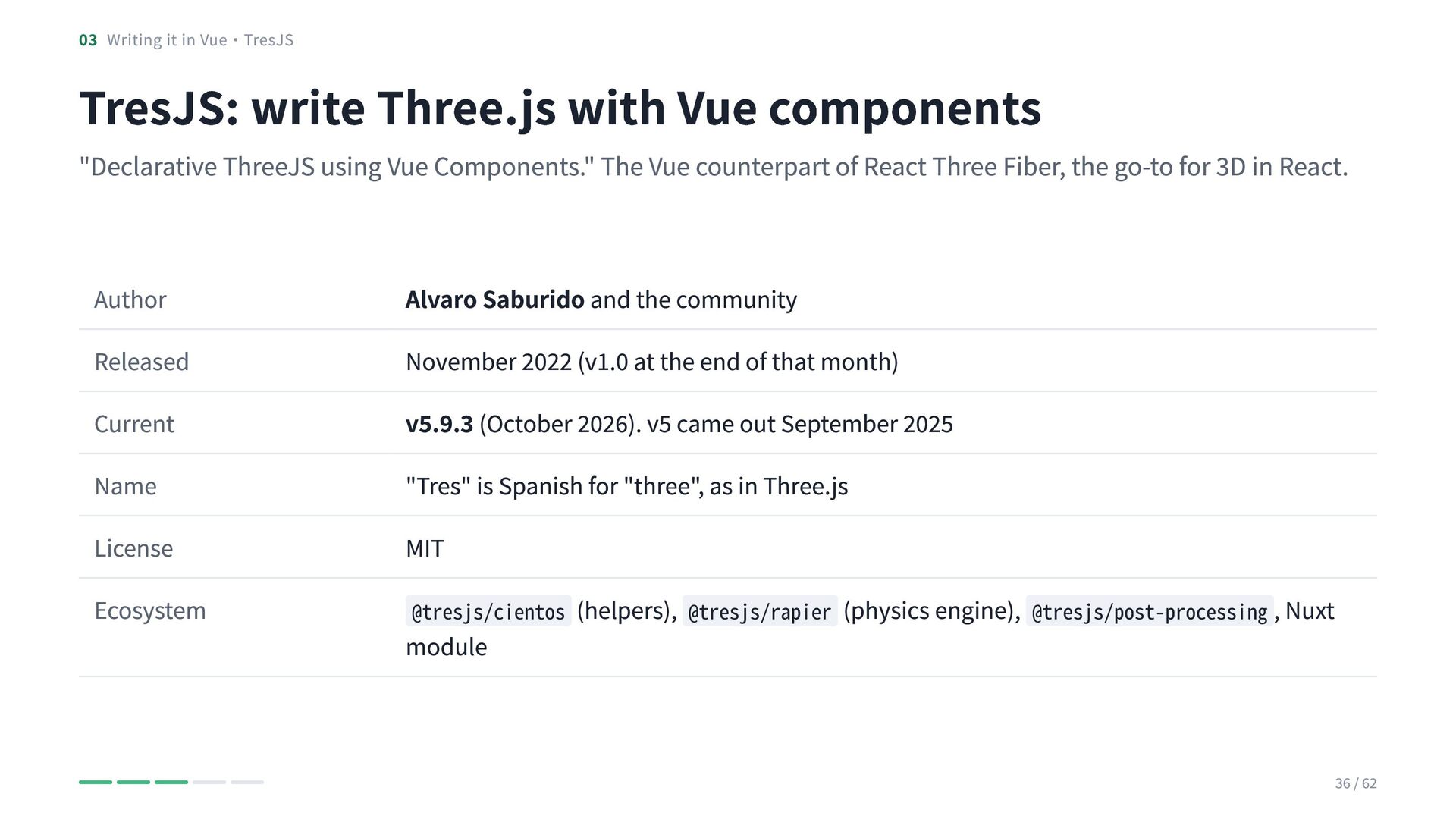
  32. 03 Writing it in Vue・TresJS TresJS: write Three.js with Vue

    components "Declarative ThreeJS using Vue Components." The Vue counterpart of React Three Fiber, the go-to for 3D in React. Author Released Current Name License Ecosystem Alvaro Saburido and the community November 2022 (v1.0 at the end of that month) v5.9.3 (October 2026). v5 came out September 2025 "Tres" is Spanish for "three", as in Three.js MIT @tresjs/cientos (helpers), @tresjs/rapier (physics engine), @tresjs/post-processing , Nuxt module 36 / 62
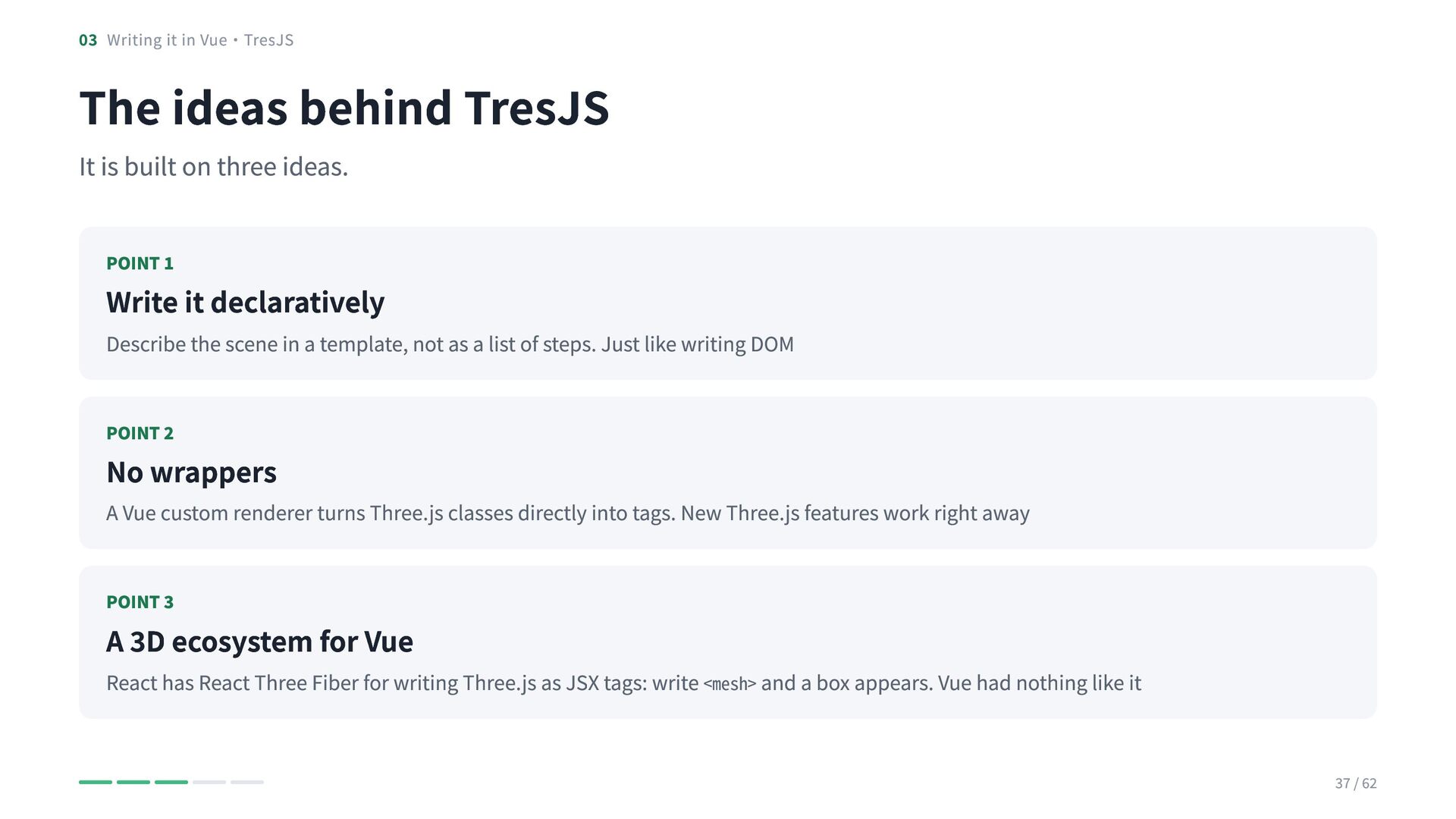
  33. 03 Writing it in Vue・TresJS The ideas behind TresJS It

    is built on three ideas. POINT 1 Write it declaratively Describe the scene in a template, not as a list of steps. Just like writing DOM POINT 2 No wrappers A Vue custom renderer turns Three.js classes directly into tags. New Three.js features work right away POINT 3 A 3D ecosystem for Vue React has React Three Fiber for writing Three.js as JSX tags: write <mesh> and a box appears. Vue had nothing like it 37 / 62
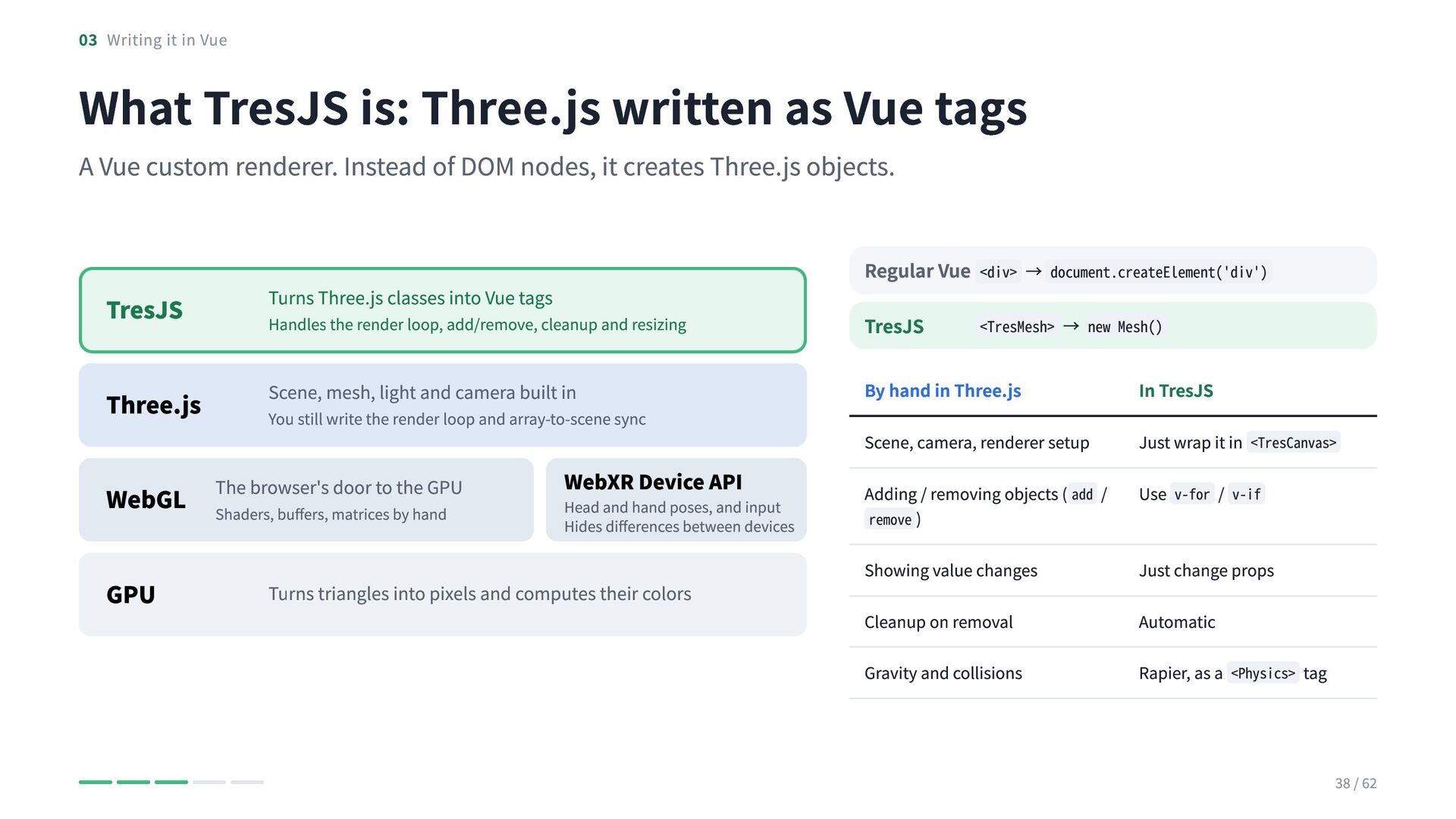
  34. 03 Writing it in Vue What TresJS is: Three.js written

    as Vue tags A Vue custom renderer. Instead of DOM nodes, it creates Three.js objects. Regular Vue <div> → document.createElement('div') TresJS Turns Three.js classes into Vue tags Handles the render loop, add/remove, cleanup and resizing TresJS Three.js Scene, mesh, light and camera built in By hand in Three.js In TresJS Scene, camera, renderer setup Just wrap it in <TresCanvas> You still write the render loop and array-to-scene sync The browser's door to the GPU WebGL Shaders, buffers, matrices by hand GPU WebXR Device API Head and hand poses, and input Hides differences between devices Turns triangles into pixels and computes their colors <TresMesh> → new Mesh() Adding / removing objects ( add / Use v-for / v-if remove ) Showing value changes Just change props Cleanup on removal Automatic Gravity and collisions Rapier, as a <Physics> tag 38 / 62
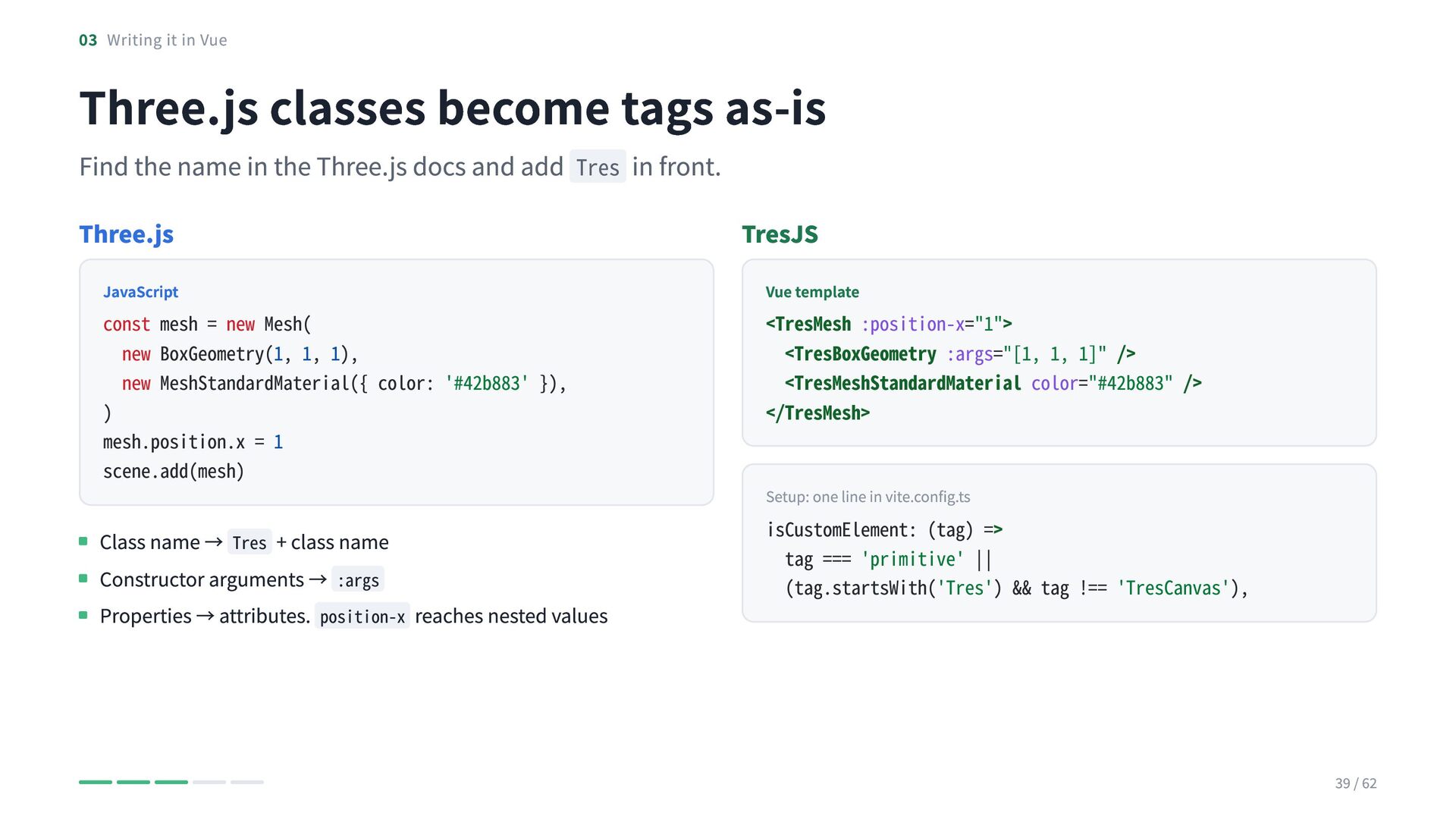
  35. 03 Writing it in Vue Three.js classes become tags as-is

    Find the name in the Three.js docs and add Tres in front. Three.js JavaScript const mesh = new Mesh( new BoxGeometry(1, 1, 1), new MeshStandardMaterial({ color: '#42b883' }), ) mesh.position.x = 1 scene.add(mesh) Class name → Tres + class name Constructor arguments → :args Properties → attributes. position-x reaches nested values TresJS Vue template <TresMesh :position-x="1"> <TresBoxGeometry :args="[1, 1, 1]" /> <TresMeshStandardMaterial color="#42b883" /> </TresMesh> Setup: one line in vite.config.ts isCustomElement: (tag) => tag === 'primitive' || (tag.startsWith('Tres') && tag !== 'TresCanvas'), 39 / 62
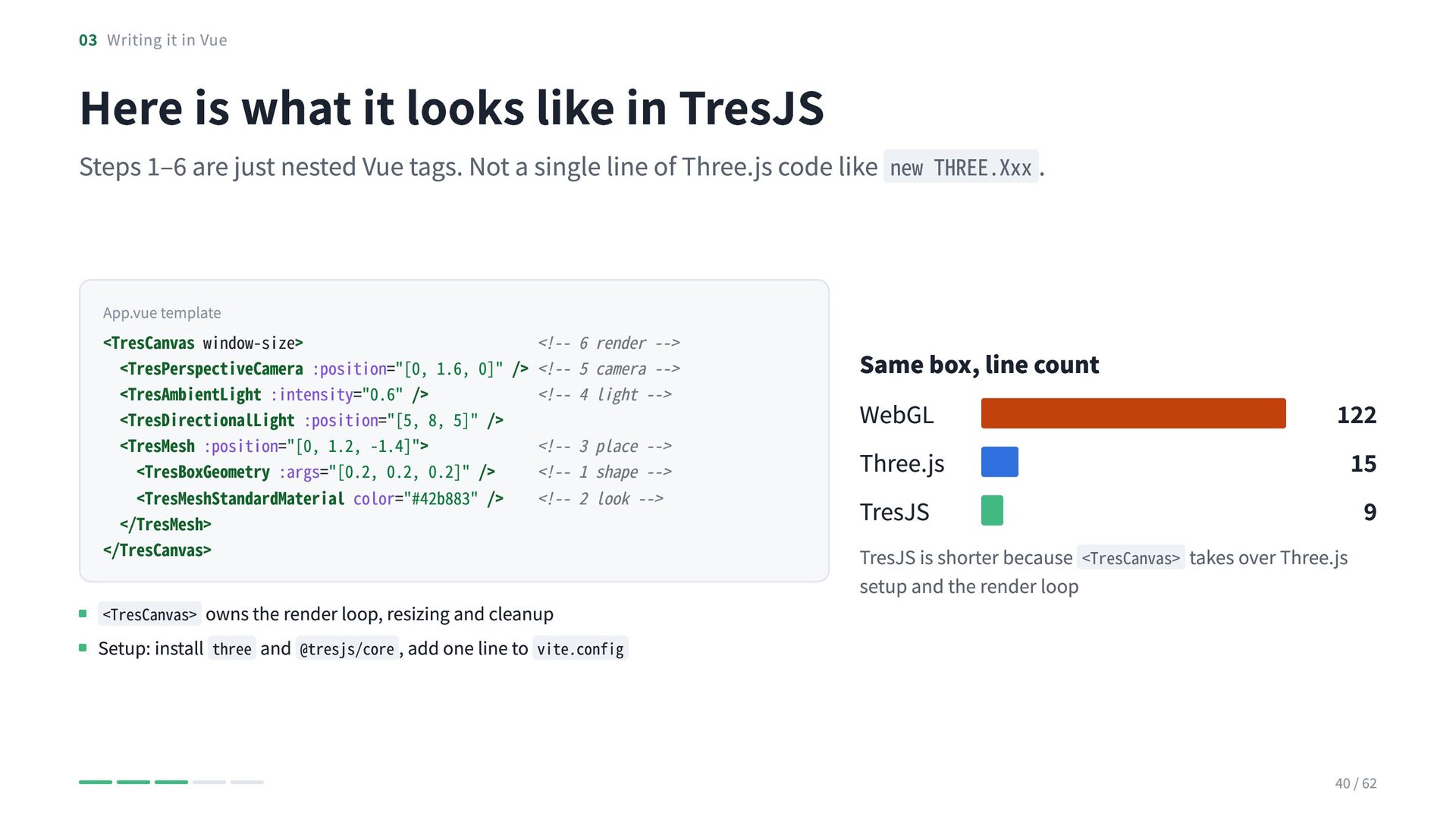
  36. 03 Writing it in Vue Here is what it looks

    like in TresJS Steps 1–6 are just nested Vue tags. Not a single line of Three.js code like new THREE.Xxx . App.vue template <TresCanvas window-size> <!-- 6 render --> <TresPerspectiveCamera :position="[0, 1.6, 0]" /> <!-- 5 camera --> <TresAmbientLight :intensity="0.6" /> <!-- 4 light --> <TresDirectionalLight :position="[5, 8, 5]" /> <TresMesh :position="[0, 1.2, -1.4]"> <!-- 3 place --> <TresBoxGeometry :args="[0.2, 0.2, 0.2]" /> <!-- 1 shape --> <TresMeshStandardMaterial color="#42b883" /> <!-- 2 look --> </TresMesh> </TresCanvas> <TresCanvas> owns the render loop, resizing and cleanup Setup: install three and @tresjs/core , add one line to vite.config Same box, line count WebGL Three.js TresJS 122 15 9 TresJS is shorter because <TresCanvas> takes over Three.js setup and the render loop 40 / 62
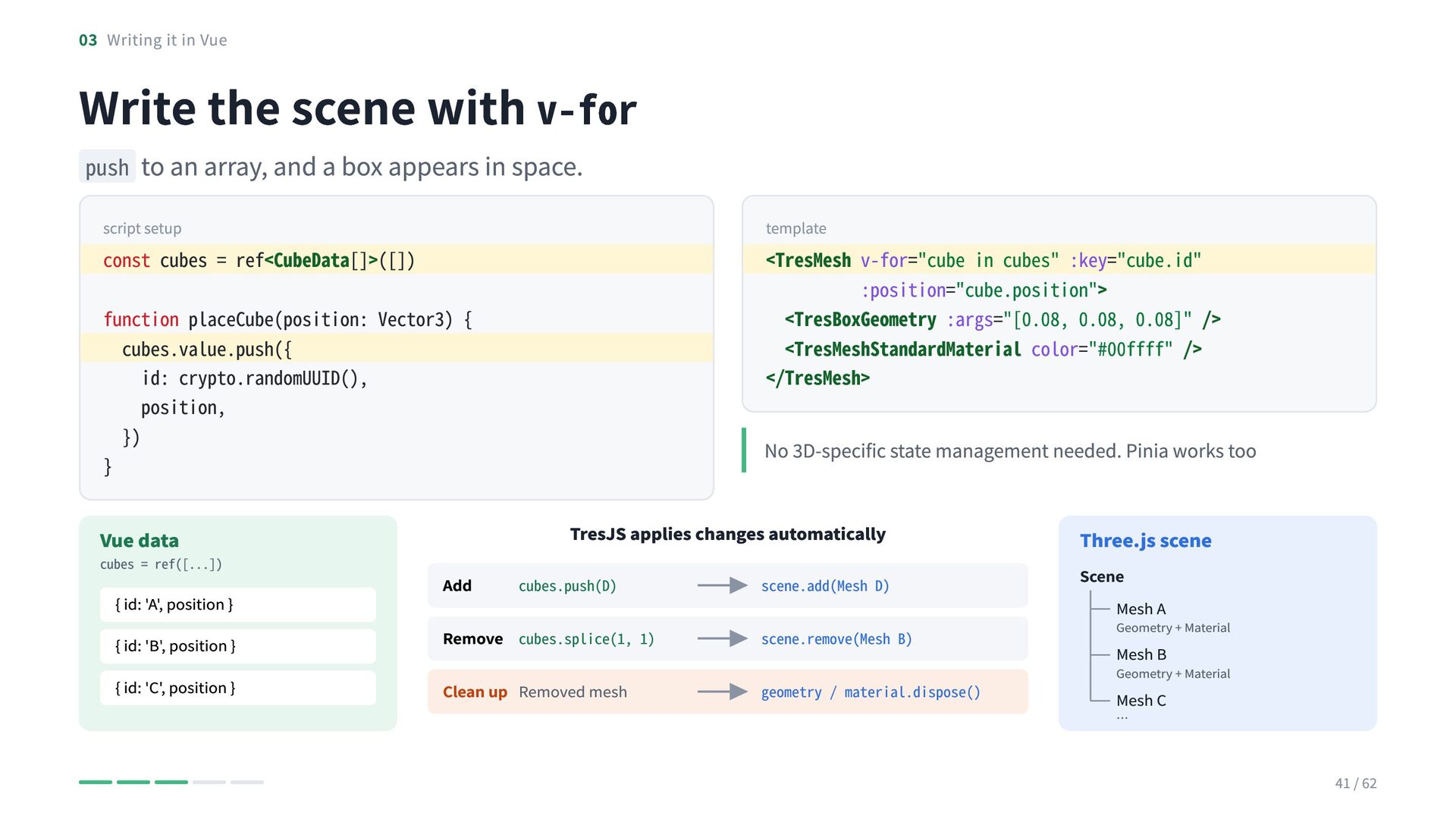
  37. 03 Writing it in Vue Write the scene with v-for

    push to an array, and a box appears in space. script setup template const cubes = ref<CubeData[]>([]) <TresMesh v-for="cube in cubes" :key="cube.id" :position="cube.position"> <TresBoxGeometry :args="[0.08, 0.08, 0.08]" /> <TresMeshStandardMaterial color="#00ffff" /> </TresMesh> function placeCube(position: Vector3) { cubes.value.push({ id: crypto.randomUUID(), position, }) } TresJS applies changes automatically Vue data cubes = ref([...]) { id: 'A', position } { id: 'B', position } { id: 'C', position } No 3D-specific state management needed. Pinia works too Add cubes.push(D) scene.add(Mesh D) Remove cubes.splice(1, 1) scene.remove(Mesh B) Clean up Removed mesh geometry / material.dispose() Three.js scene Scene Mesh A Geometry + Material Mesh B Geometry + Material Mesh C … 41 / 62
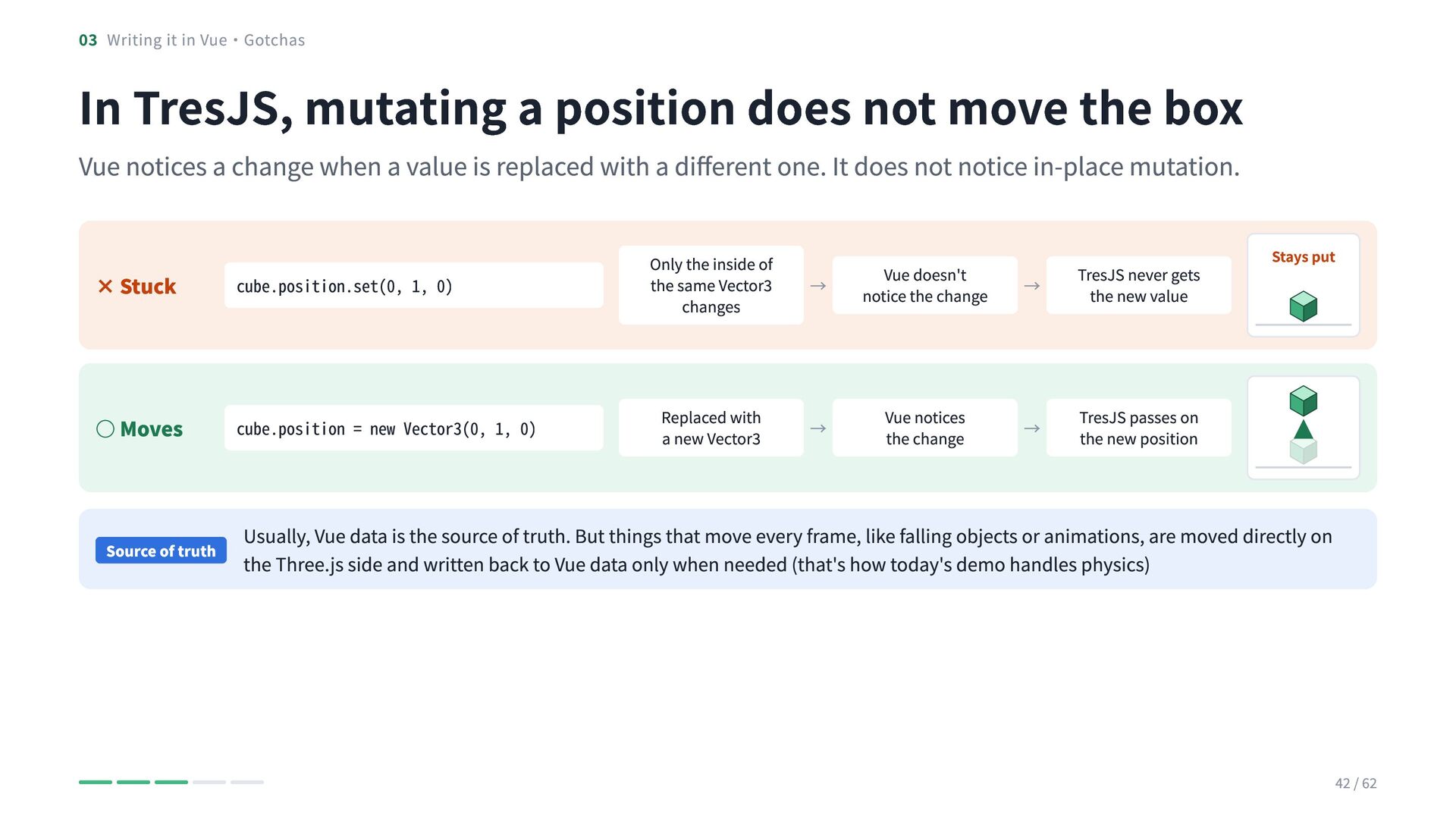
  38. 03 Writing it in Vue・Gotchas In TresJS, mutating a position

    does not move the box Vue notices a change when a value is replaced with a different one. It does not notice in-place mutation. Stays put × Stuck cube.position.set(0, 1, 0) Only the inside of the same Vector3 changes ◦ Moves cube.position = new Vector3(0, 1, 0) Replaced with a new Vector3 Source of truth Usually, Vue data is the source of truth. But things that move every frame, like falling objects or animations, are moved directly on the Three.js side and written back to Vue data only when needed (that's how today's demo handles physics) → Vue doesn't notice the change → TresJS never gets the new value → Vue notices the change → TresJS passes on the new position 42 / 62
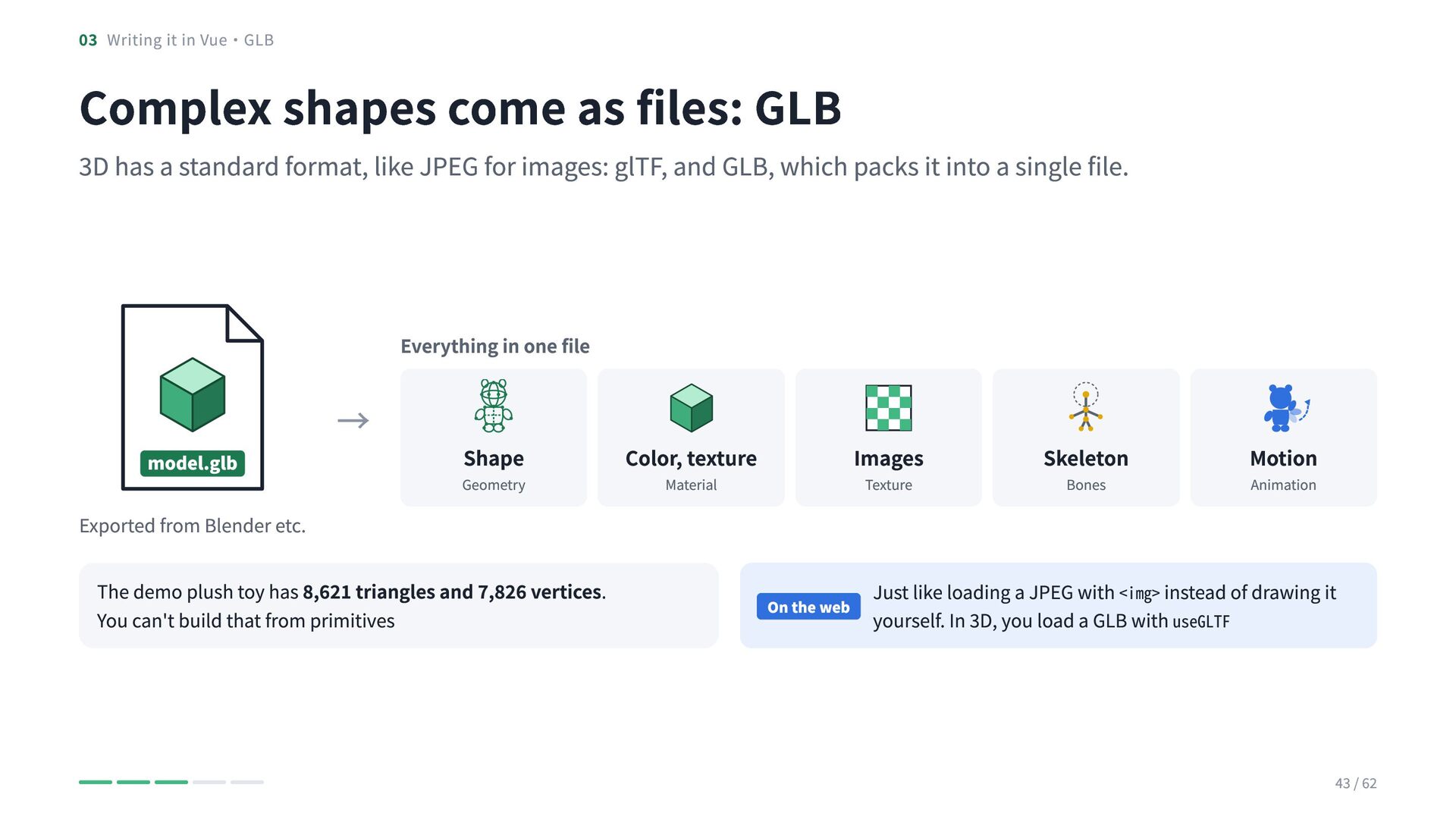
  39. 03 Writing it in Vue・GLB Complex shapes come as files:

    GLB 3D has a standard format, like JPEG for images: glTF, and GLB, which packs it into a single file. Everything in one file model.glb Exported from Blender etc. → Shape Geometry The demo plush toy has 8,621 triangles and 7,826 vertices. You can't build that from primitives Color, texture Images Material Texture On the web Skeleton Bones Motion Animation Just like loading a JPEG with <img> instead of drawing it yourself. In 3D, you load a GLB with useGLTF 43 / 62
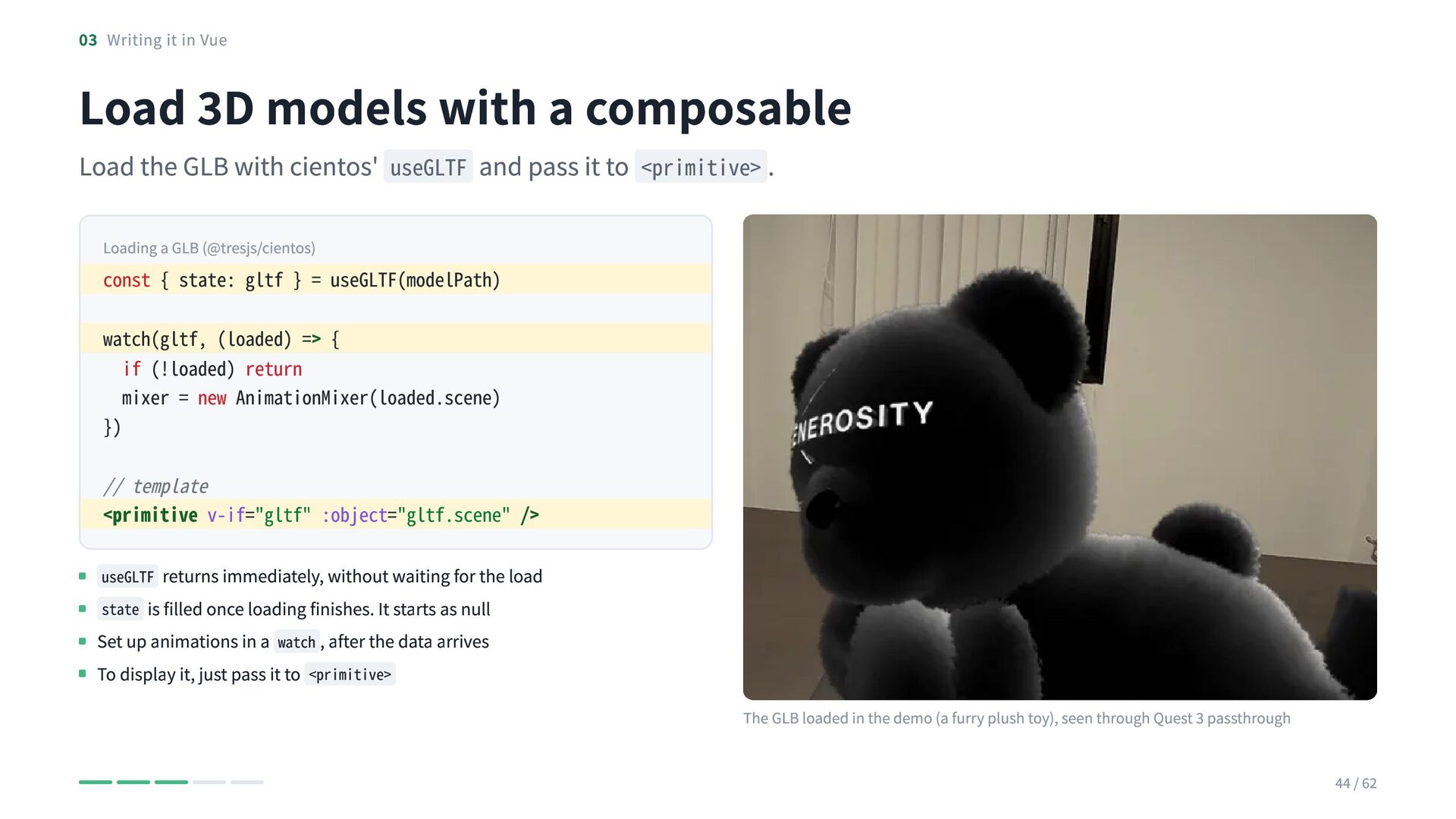
  40. 03 Writing it in Vue Load 3D models with a

    composable Load the GLB with cientos' useGLTF and pass it to <primitive> . Loading a GLB (@tresjs/cientos) const { state: gltf } = useGLTF(modelPath) watch(gltf, (loaded) => { if (!loaded) return mixer = new AnimationMixer(loaded.scene) }) // template <primitive v-if="gltf" :object="gltf.scene" /> useGLTF returns immediately, without waiting for the load state is filled once loading finishes. It starts as null Set up animations in a watch , after the data arrives To display it, just pass it to <primitive> The GLB loaded in the demo (a furry plush toy), seen through Quest 3 passthrough 44 / 62
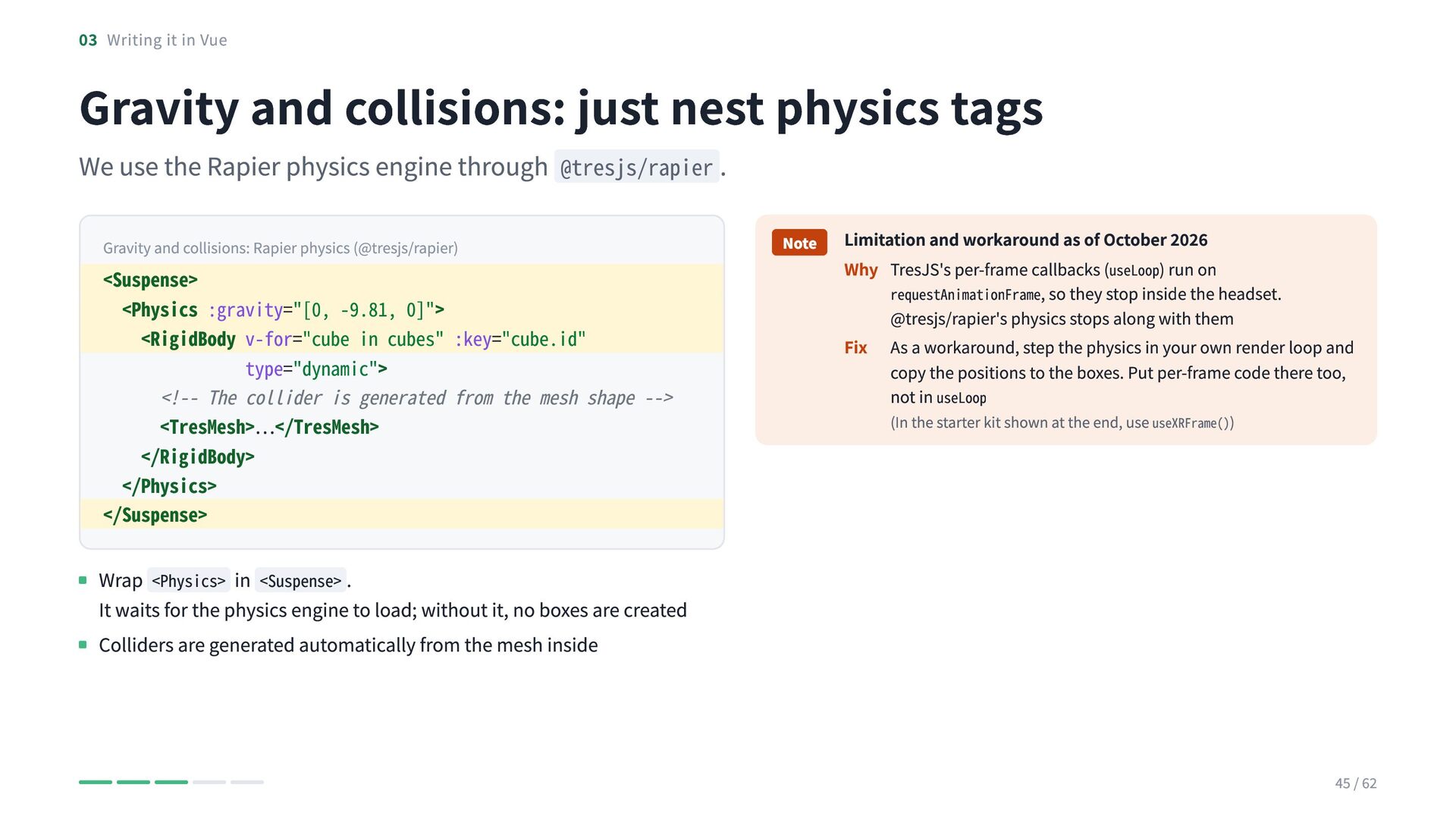
  41. 03 Writing it in Vue Gravity and collisions: just nest

    physics tags We use the Rapier physics engine through @tresjs/rapier . Gravity and collisions: Rapier physics (@tresjs/rapier) <Suspense> <Physics :gravity="[0, -9.81, 0]"> <RigidBody v-for="cube in cubes" :key="cube.id" type="dynamic"> <!-- The collider is generated from the mesh shape --> <TresMesh>…</TresMesh> </RigidBody> </Physics> </Suspense> Note Limitation and workaround as of October 2026 Why TresJS's per-frame callbacks (useLoop) run on requestAnimationFrame, so they stop inside the headset. @tresjs/rapier's physics stops along with them Fix As a workaround, step the physics in your own render loop and copy the positions to the boxes. Put per-frame code there too, not in useLoop (In the starter kit shown at the end, use useXRFrame()) Wrap <Physics> in <Suspense> . It waits for the physics engine to load; without it, no boxes are created Colliders are generated automatically from the mesh inside 45 / 62
  42. CHAPTER 04 Blending with reality Overlay a box on the

    passthrough view, grab it with gaze and hands, and place it on a real desk 46 / 62
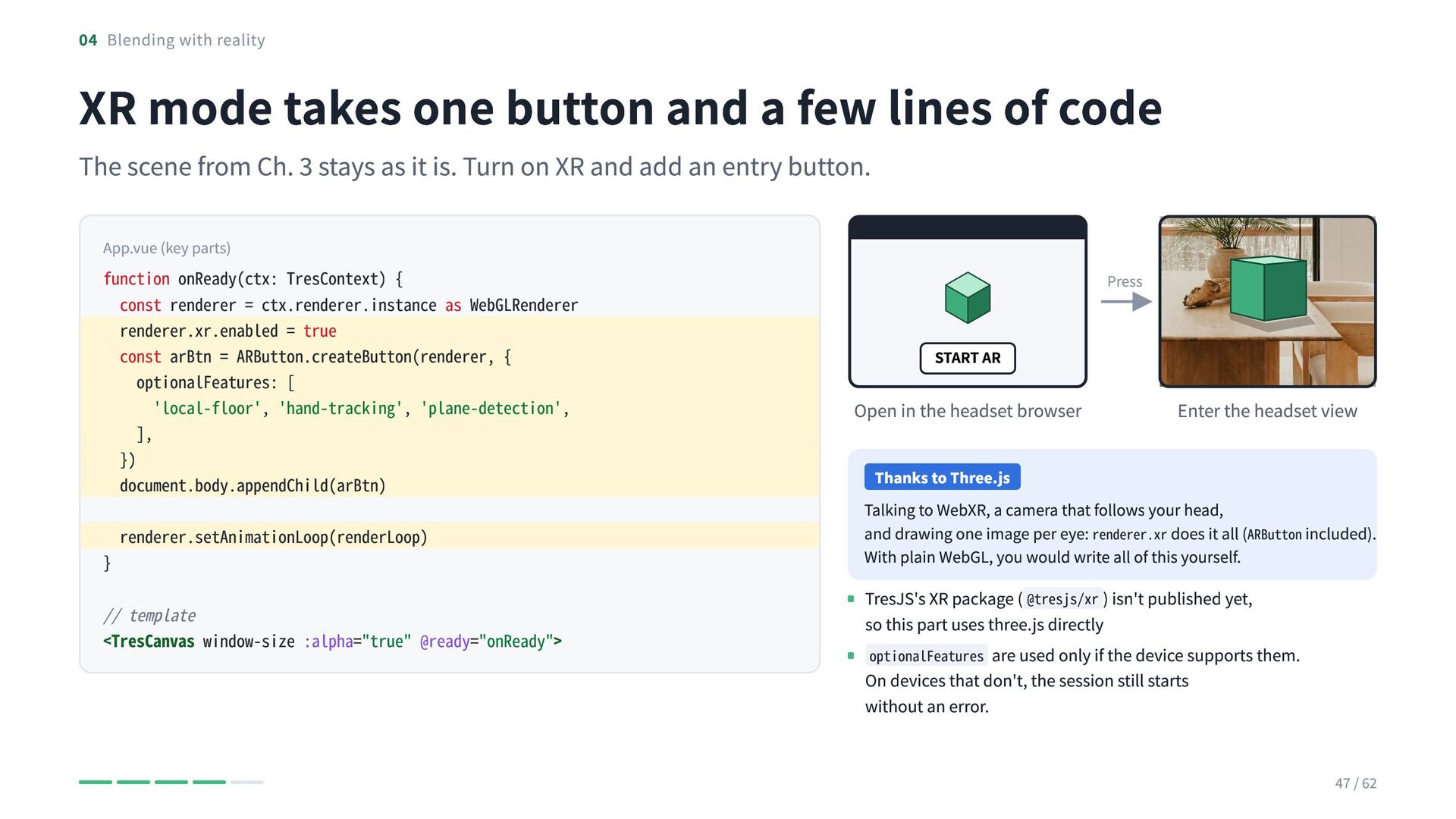
  43. 04 Blending with reality XR mode takes one button and

    a few lines of code The scene from Ch. 3 stays as it is. Turn on XR and add an entry button. App.vue (key parts) function onReady(ctx: TresContext) { const renderer = ctx.renderer.instance as WebGLRenderer renderer.xr.enabled = true const arBtn = ARButton.createButton(renderer, { optionalFeatures: [ 'local-floor', 'hand-tracking', 'plane-detection', ], }) document.body.appendChild(arBtn) } renderer.setAnimationLoop(renderLoop) // template <TresCanvas window-size :alpha="true" @ready="onReady"> Press START AR Open in the headset browser Enter the headset view Thanks to Three.js Talking to WebXR, a camera that follows your head, and drawing one image per eye: renderer.xr does it all (ARButton included). With plain WebGL, you would write all of this yourself. TresJS's XR package ( @tresjs/xr ) isn't published yet, so this part uses three.js directly optionalFeatures are used only if the device supports them. On devices that don't, the session still starts without an error. 47 / 62
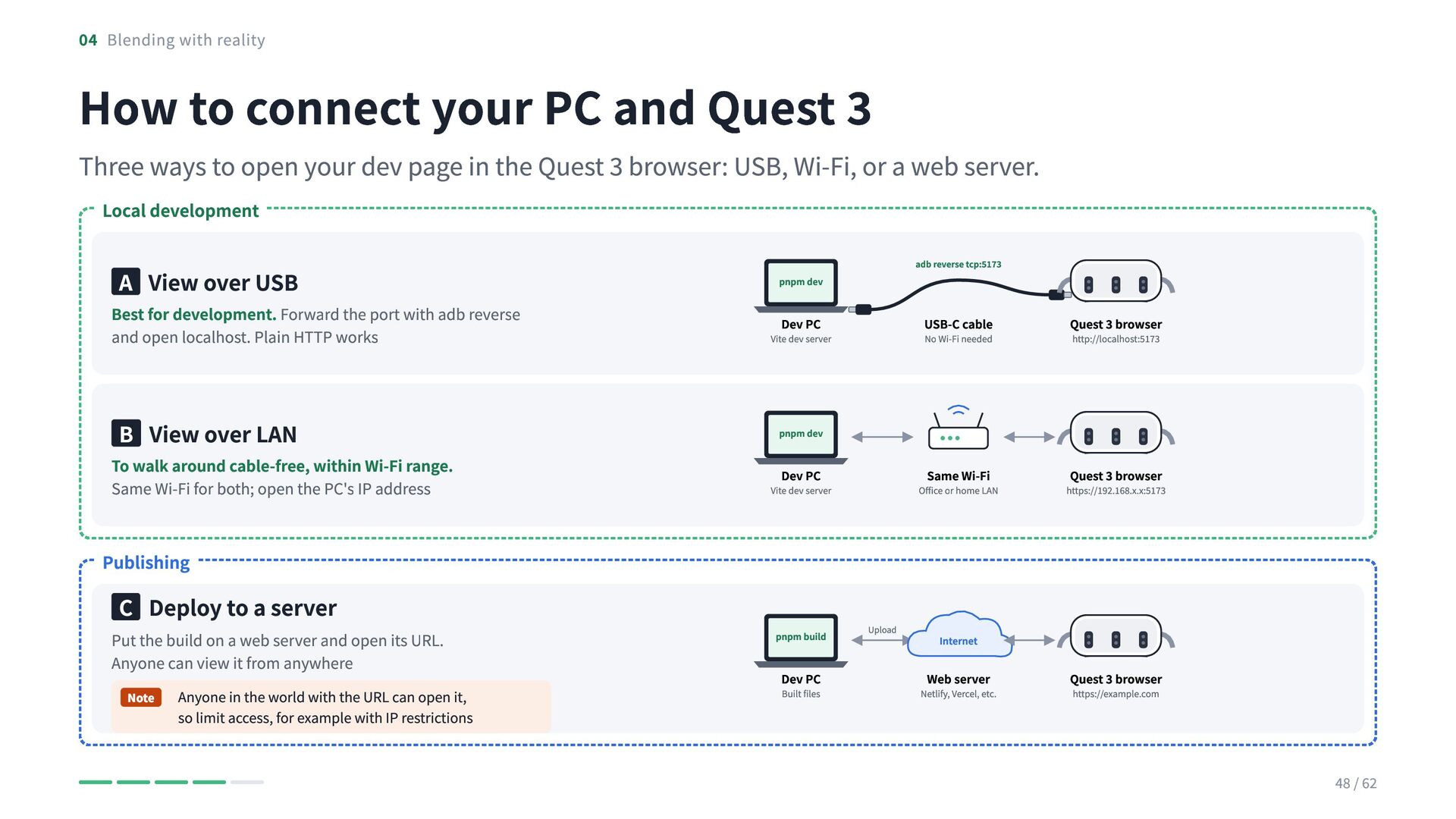
  44. 04 Blending with reality How to connect your PC and

    Quest 3 Three ways to open your dev page in the Quest 3 browser: USB, Wi-Fi, or a web server. Local development A View over USB Best for development. Forward the port with adb reverse and open localhost. Plain HTTP works B View over LAN To walk around cable-free, within Wi-Fi range. Same Wi-Fi for both; open the PC's IP address adb reverse tcp:5173 pnpm dev Dev PC Vite dev server USB-C cable Quest 3 browser Same Wi-Fi Quest 3 browser No Wi-Fi needed http://localhost:5173 pnpm dev Dev PC Vite dev server Office or home LAN https://192.168.x.x:5173 Publishing C Deploy to a server Put the build on a web server and open its URL. Anyone can view it from anywhere Note Anyone in the world with the URL can open it, so limit access, for example with IP restrictions pnpm build Dev PC Built files Upload Internet Web server Netlify, Vercel, etc. Quest 3 browser https://example.com 48 / 62
  45. 04 Blending with reality WebXR only works over HTTPS WebXR

    needs a secure connection (HTTPS or localhost ). On http://192.168.x.x the AR button is disabled. Over USB, opening localhost works with plain HTTP. A Over USB: reverse-forward the port B Over LAN: switch to HTTPS B Over LAN: switch to HTTPS Forward localhost over USB Free Cloudflare Tunnel Free, no sign-up ngrok Free plan adb reverse tcp:5173 tcp:5173 → http://localhost:5173 cloudflared tunnel --url http://localhost:5173 → https://xxxx.trycloudflare.com ngrok http 5173 → https://xxxx.ngrok-free.app Quest 3 sees it as localhost, so even passthrough works over HTTP. No certificate or Wi-Fi needed (used for the demo) Send the URL to Quest 3 (ADB) Gives your PC's dev server a temporary HTTPS URL. Quest 3 can open it even on another Wi-Fi Same idea. The free plan needs an account and shows a warning page first adb shell am start -a android.intent.action.VIEW -d "http://localhost:5173" com.oculus.browser Open it in the headset browser from the PC, no typing in VR a tunnel URL, add '.trycloudflare.com' or similar to Vite's server.allowedHosts. A self-signed mkcert certificate on the LAN also works, but Quest 3 shows a Note With warning 49 / 62
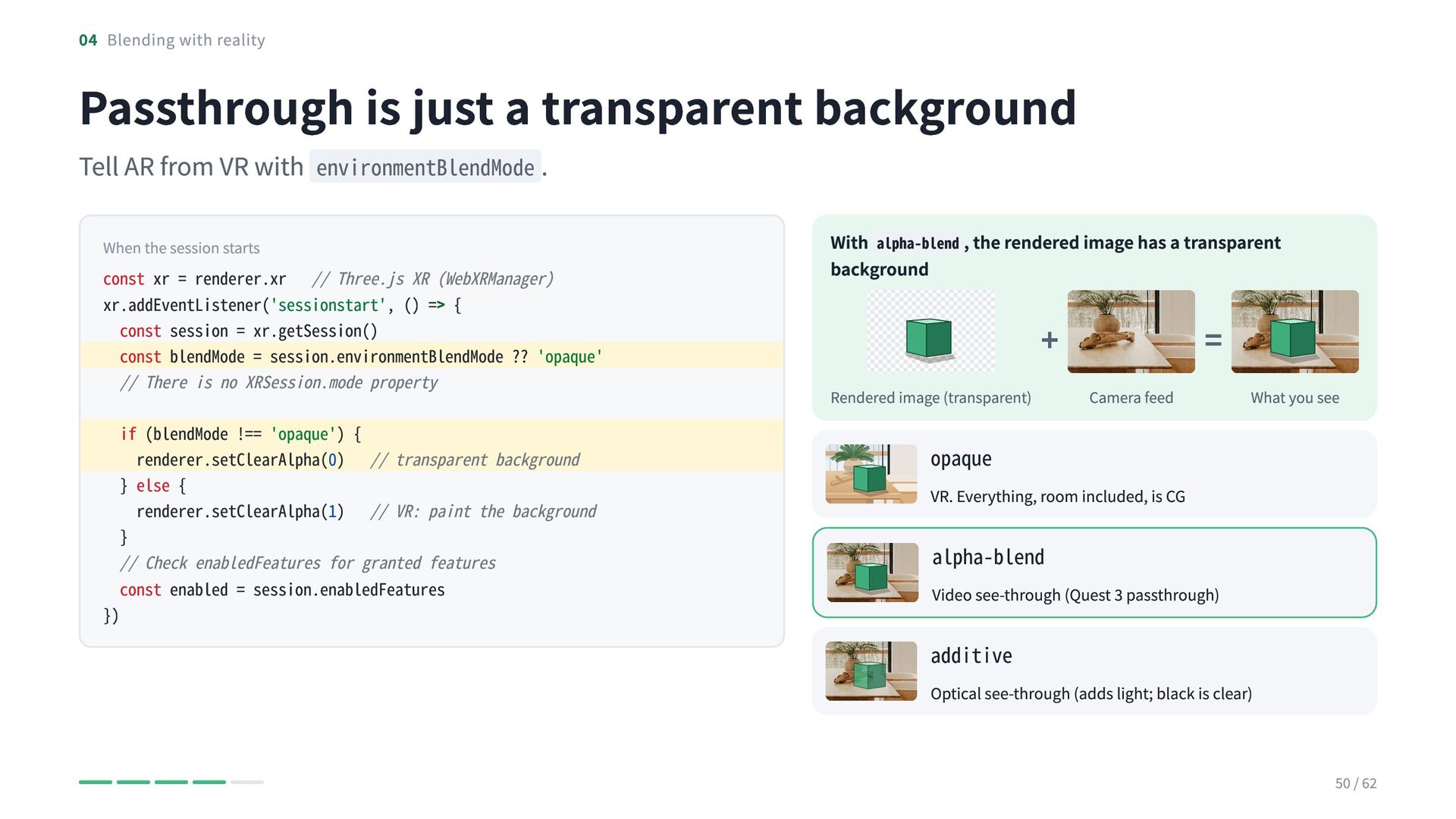
  46. 04 Blending with reality Passthrough is just a transparent background

    Tell AR from VR with environmentBlendMode . When the session starts const xr = renderer.xr // Three.js XR (WebXRManager) xr.addEventListener('sessionstart', () => { const session = xr.getSession() const blendMode = session.environmentBlendMode ?? 'opaque' // There is no XRSession.mode property }) if (blendMode !== 'opaque') { renderer.setClearAlpha(0) // transparent background } else { renderer.setClearAlpha(1) // VR: paint the background } // Check enabledFeatures for granted features const enabled = session.enabledFeatures With alpha-blend , the rendered image has a transparent background + Rendered image (transparent) = Camera feed What you see opaque VR. Everything, room included, is CG alpha-blend Video see-through (Quest 3 passthrough) additive Optical see-through (adds light; black is clear) 50 / 62
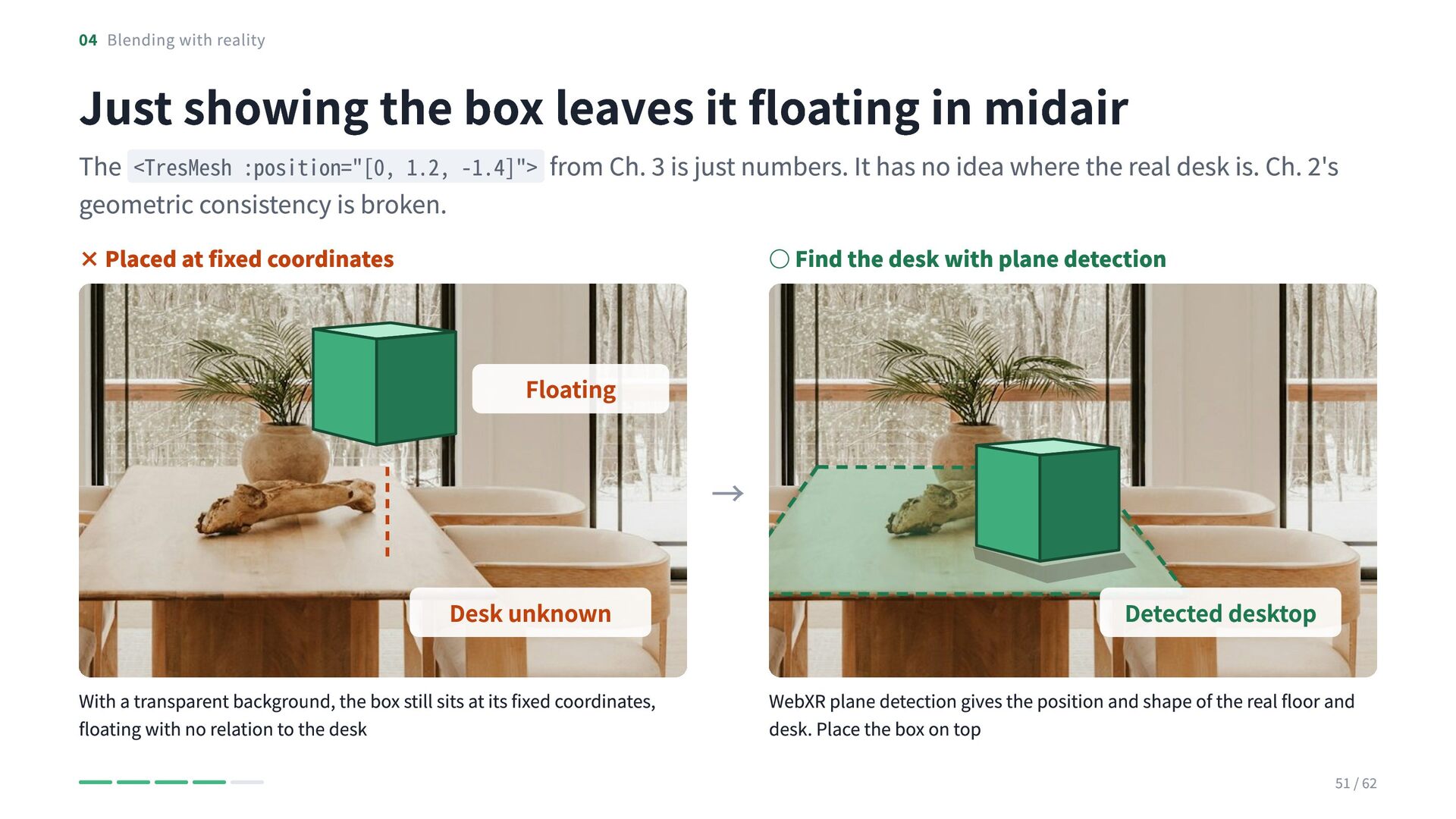
  47. 04 Blending with reality Just showing the box leaves it

    floating in midair The <TresMesh :position="[0, 1.2, -1.4]"> from Ch. 3 is just numbers. It has no idea where the real desk is. Ch. 2's geometric consistency is broken. × Placed at fixed coordinates ◦ Find the desk with plane detection Floating → Desk unknown With a transparent background, the box still sits at its fixed coordinates, floating with no relation to the desk Detected desktop WebXR plane detection gives the position and shape of the real floor and desk. Place the box on top 51 / 62
  48. 04 Blending with reality Place it on the real desk

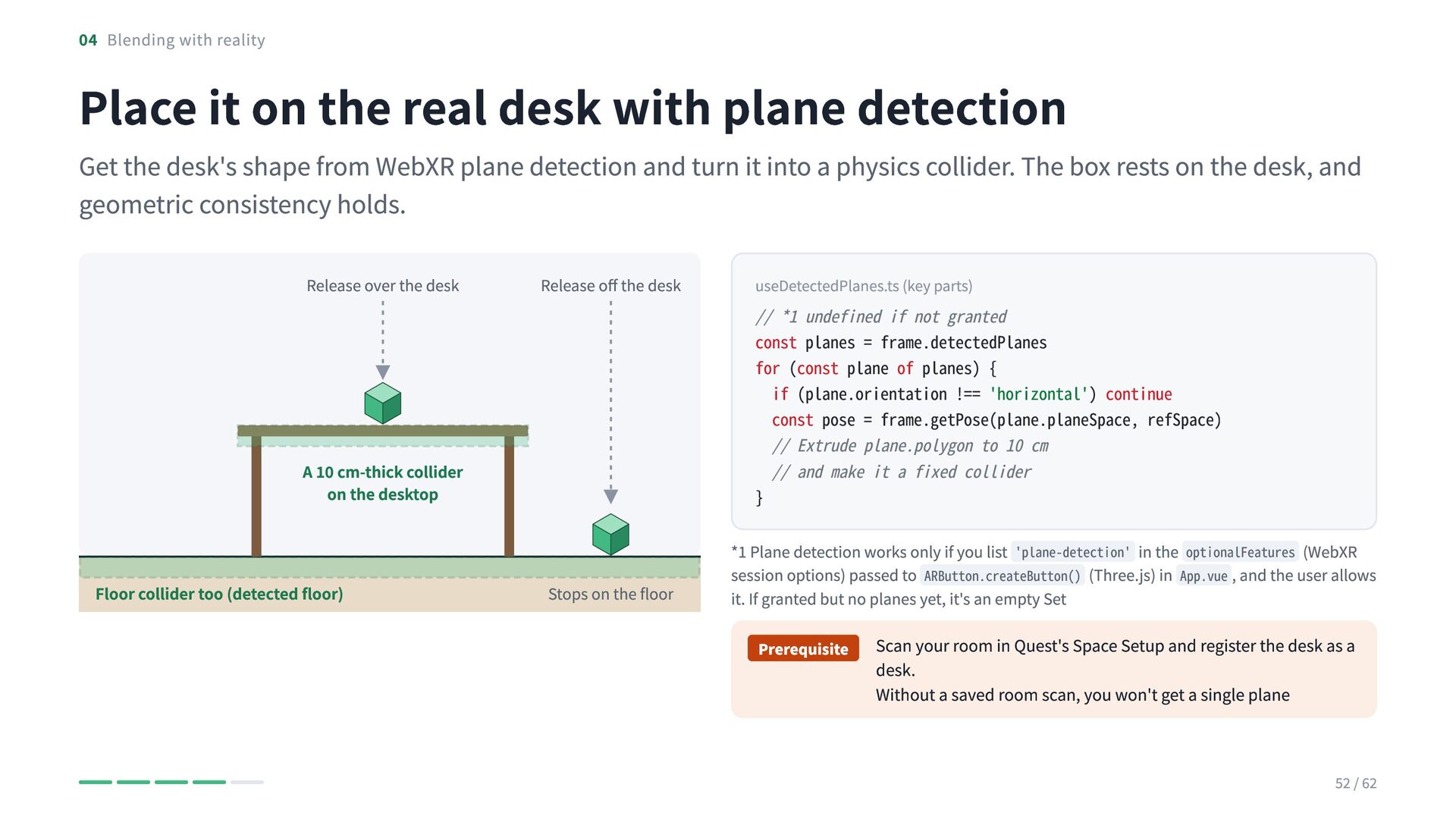
    with plane detection Get the desk's shape from WebXR plane detection and turn it into a physics collider. The box rests on the desk, and geometric consistency holds. Release over the desk Release off the desk A 10 cm-thick collider on the desktop Floor collider too (detected floor) Stops on the floor useDetectedPlanes.ts (key parts) // *1 undefined if not granted const planes = frame.detectedPlanes for (const plane of planes) { if (plane.orientation !== 'horizontal') continue const pose = frame.getPose(plane.planeSpace, refSpace) // Extrude plane.polygon to 10 cm // and make it a fixed collider } *1 Plane detection works only if you list 'plane-detection' in the optionalFeatures (WebXR session options) passed to ARButton.createButton() (Three.js) in App.vue , and the user allows it. If granted but no planes yet, it's an empty Set Prerequisite Scan your room in Quest's Space Setup and register the desk as a desk. Without a saved room scan, you won't get a single plane 52 / 62
  49. 04 Blending with reality Aim with your gaze, grab with

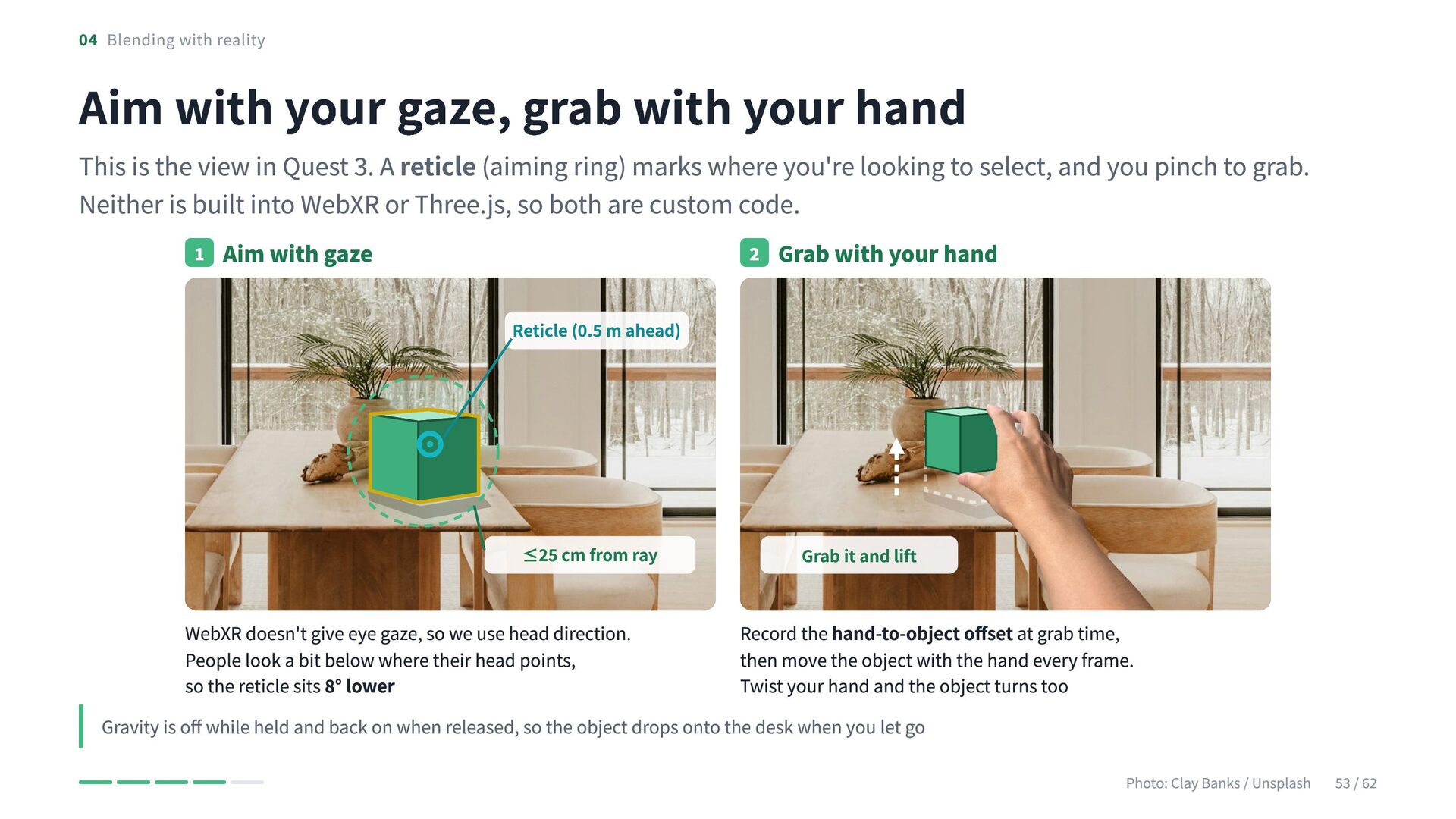
    your hand This is the view in Quest 3. A reticle (aiming ring) marks where you're looking to select, and you pinch to grab. Neither is built into WebXR or Three.js, so both are custom code. 1 Aim with gaze 2 Grab with your hand Reticle (0.5 m ahead) ≤25 cm from ray Grab it and lift WebXR doesn't give eye gaze, so we use head direction. Record the hand-to-object offset at grab time, People look a bit below where their head points, then move the object with the hand every frame. so the reticle sits 8° lower Twist your hand and the object turns too Gravity is off while held and back on when released, so the object drops onto the desk when you let go Photo: Clay Banks / Unsplash 53 / 62
  50. 04 Blending with reality Controllers and bare hands share the

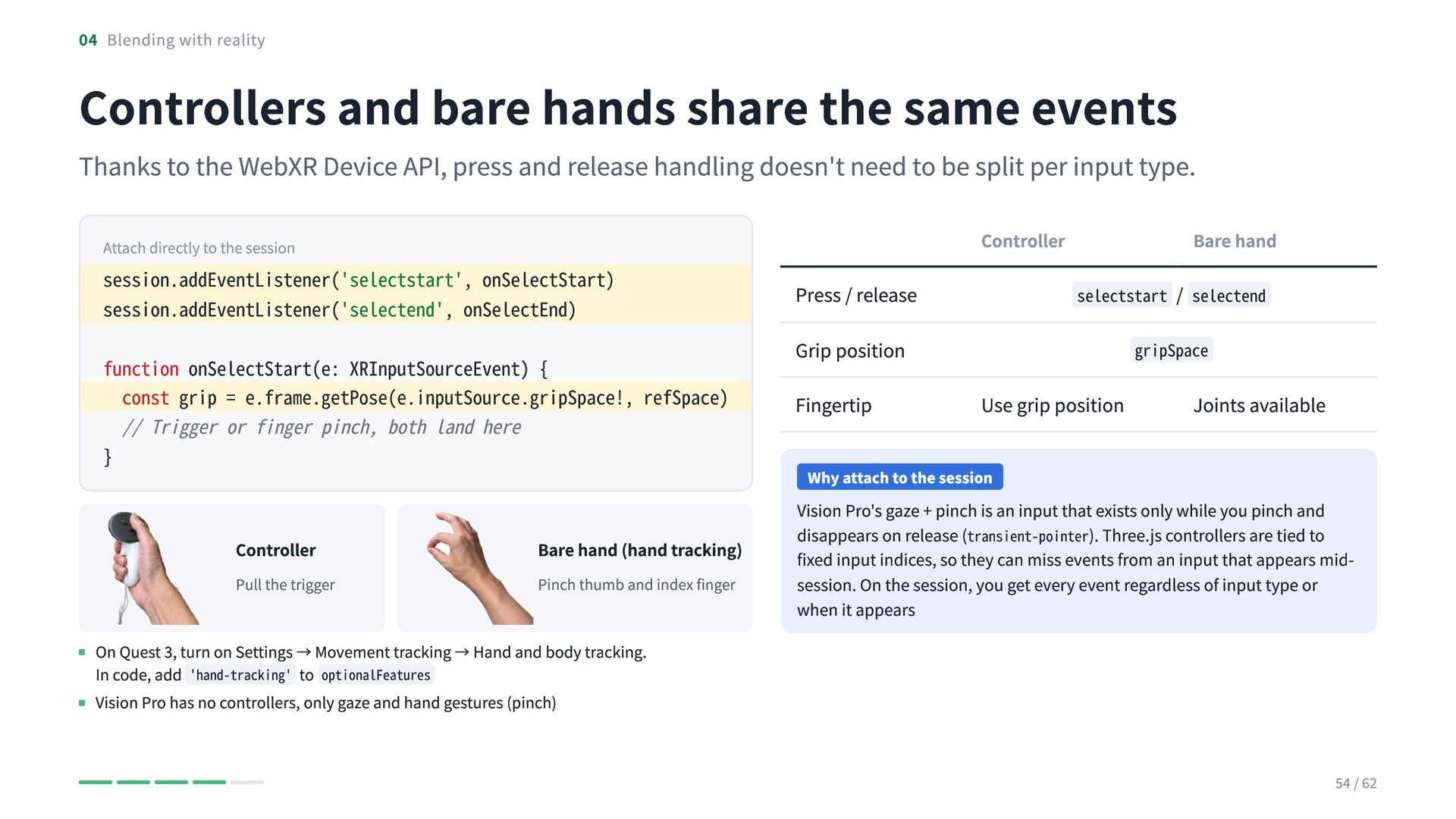
    same events Thanks to the WebXR Device API, press and release handling doesn't need to be split per input type. Controller Attach directly to the session session.addEventListener('selectstart', onSelectStart) session.addEventListener('selectend', onSelectEnd) function onSelectStart(e: XRInputSourceEvent) { const grip = e.frame.getPose(e.inputSource.gripSpace!, refSpace) // Trigger or finger pinch, both land here } Controller Pull the trigger Bare hand (hand tracking) Pinch thumb and index finger Bare hand Press / release selectstart / selectend Grip position Fingertip gripSpace Use grip position Joints available Why attach to the session Vision Pro's gaze + pinch is an input that exists only while you pinch and disappears on release (transient-pointer). Three.js controllers are tied to fixed input indices, so they can miss events from an input that appears midsession. On the session, you get every event regardless of input type or when it appears On Quest 3, turn on Settings → Movement tracking → Hand and body tracking. In code, add 'hand-tracking' to optionalFeatures Vision Pro has no controllers, only gaze and hand gestures (pinch) 54 / 62
  51. 04 Blending with reality From code to the green box

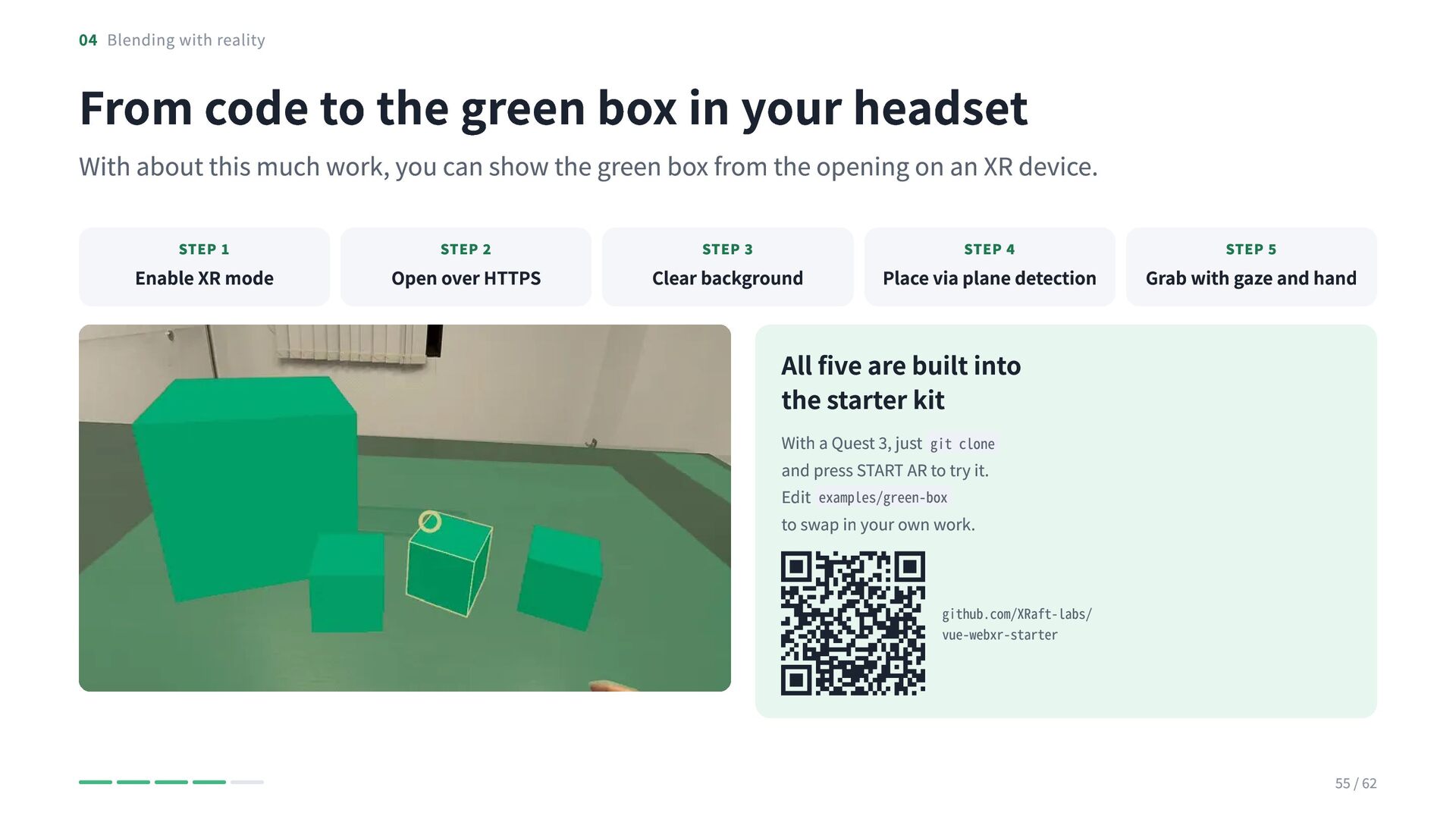
    in your headset With about this much work, you can show the green box from the opening on an XR device. STEP 1 Enable XR mode STEP 2 Open over HTTPS STEP 3 Clear background STEP 4 Place via plane detection STEP 5 Grab with gaze and hand All five are built into the starter kit With a Quest 3, just git clone and press START AR to try it. Edit examples/green-box to swap in your own work. github.com/XRaft-labs/ vue-webxr-starter 55 / 62
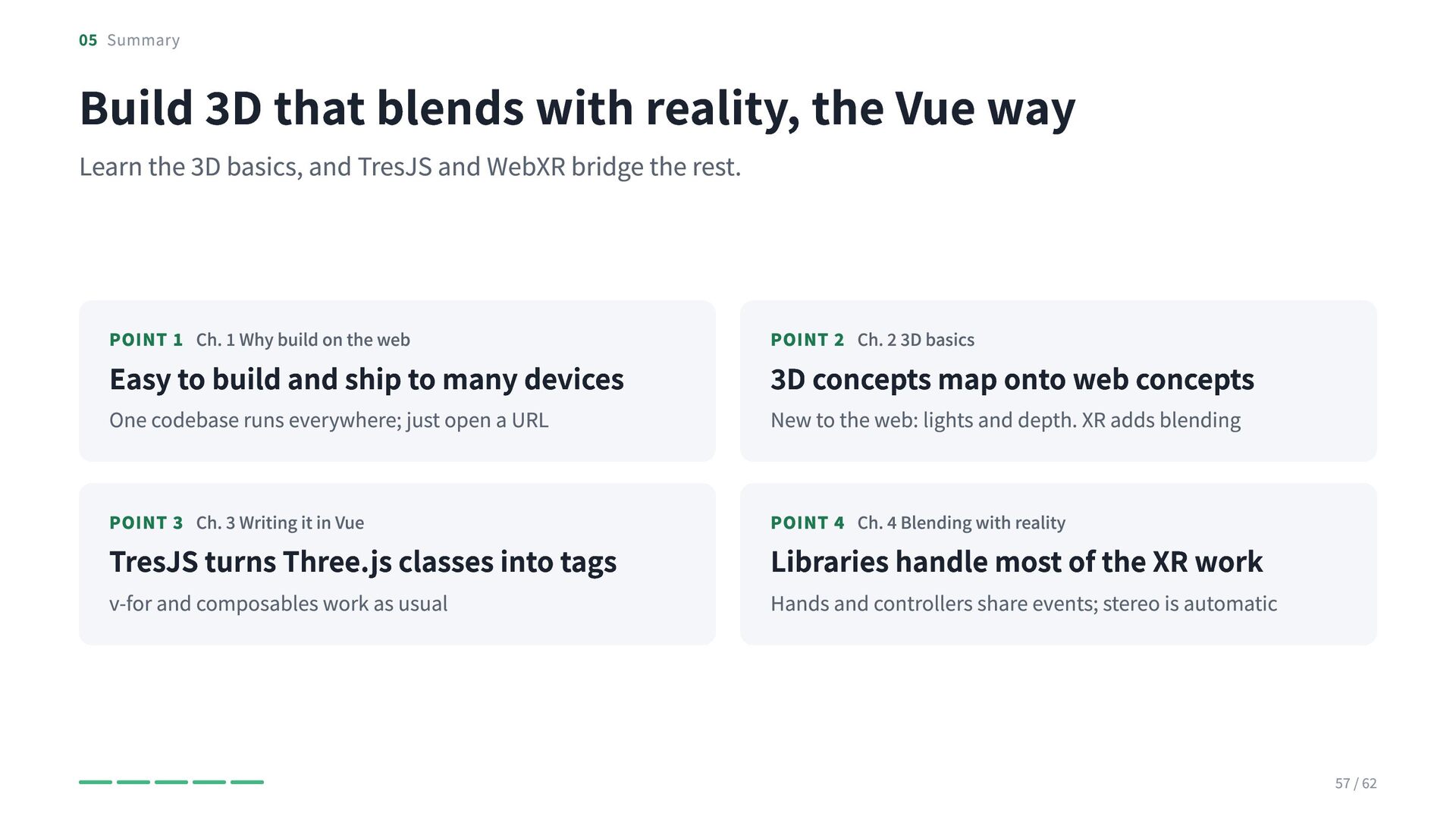
  52. 05 Summary Build 3D that blends with reality, the Vue

    way Learn the 3D basics, and TresJS and WebXR bridge the rest. POINT 1 Ch. 1 Why build on the web POINT 2 Ch. 2 3D basics One codebase runs everywhere; just open a URL New to the web: lights and depth. XR adds blending Easy to build and ship to many devices 3D concepts map onto web concepts POINT 3 Ch. 3 Writing it in Vue POINT 4 Ch. 4 Blending with reality v-for and composables work as usual Hands and controllers share events; stereo is automatic TresJS turns Three.js classes into tags Libraries handle most of the XR work 57 / 62
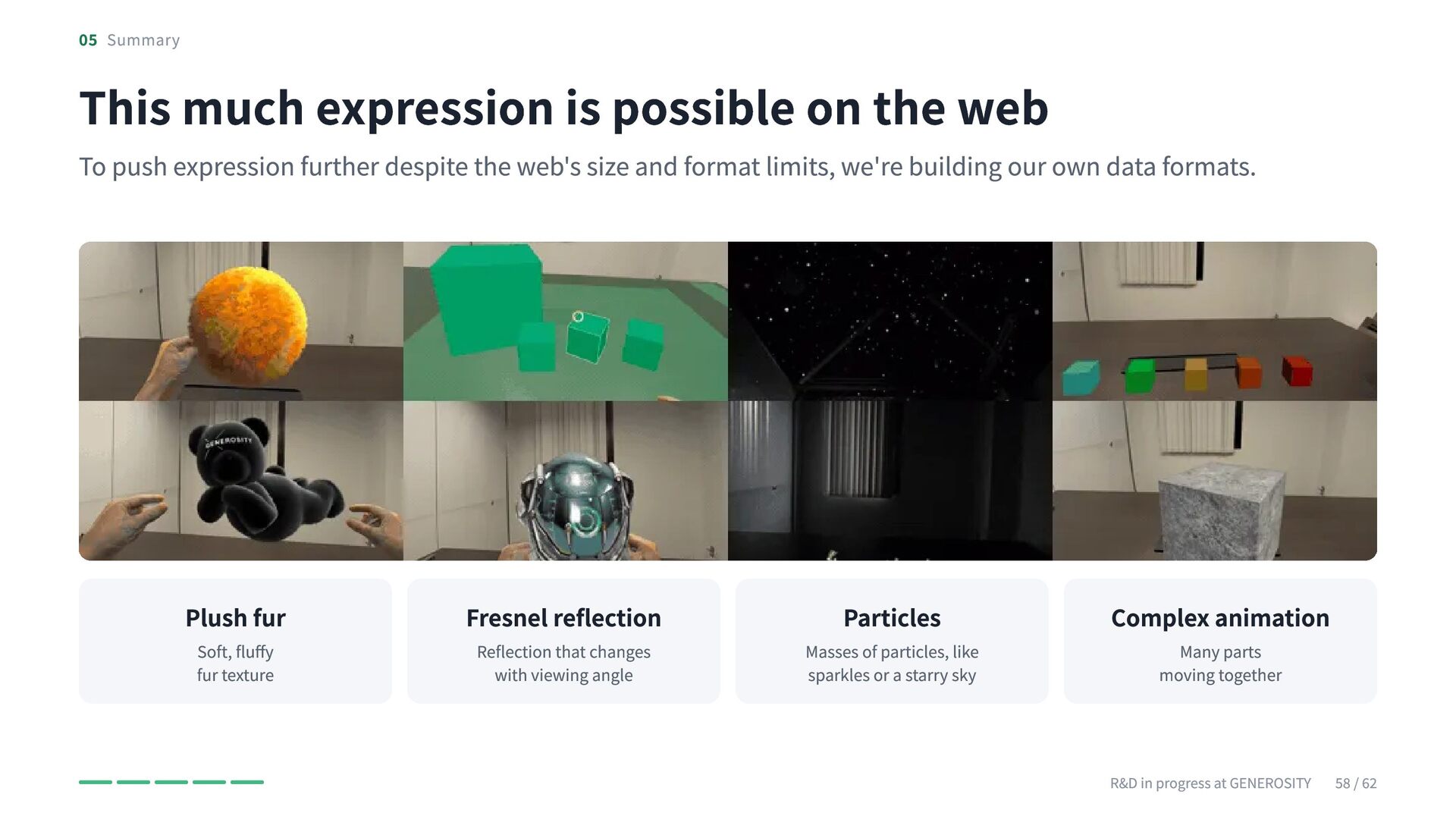
  53. 05 Summary This much expression is possible on the web

    To push expression further despite the web's size and format limits, we're building our own data formats. Plush fur Soft, fluffy fur texture Fresnel reflection Reflection that changes with viewing angle Particles Masses of particles, like sparkles or a starry sky Complex animation Many parts moving together R&D in progress at GENEROSITY 58 / 62
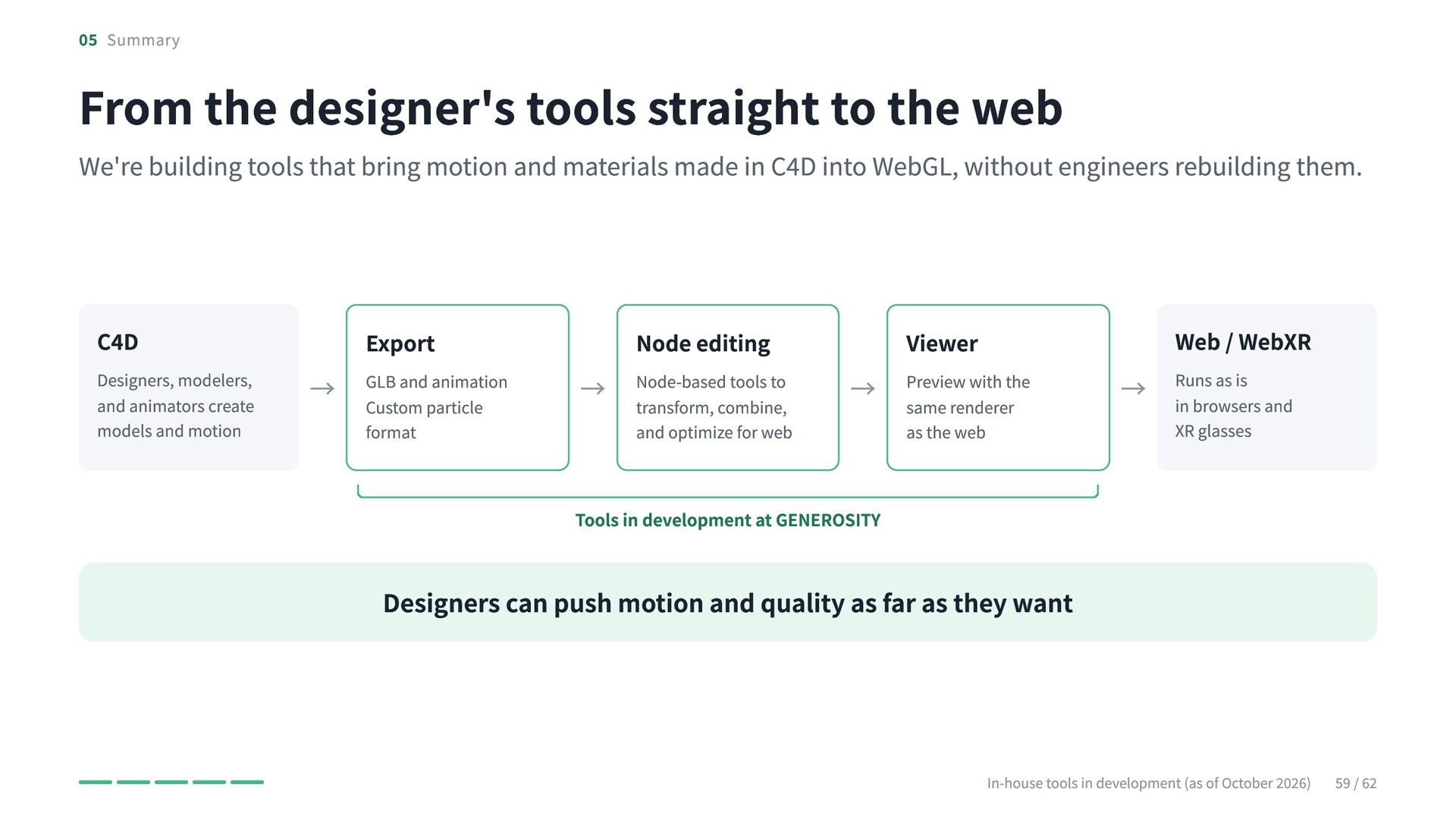
  54. 05 Summary From the designer's tools straight to the web

    We're building tools that bring motion and materials made in C4D into WebGL, without engineers rebuilding them. C4D Designers, modelers, and animators create models and motion Export and animation → GLB Custom particle format Node editing tools to → Node-based transform, combine, and optimize for web Viewer with the → Preview same renderer as the web Web / WebXR as is → Runs in browsers and XR glasses Tools in development at GENEROSITY Designers can push motion and quality as far as they want In-house tools in development (as of October 2026) 59 / 62
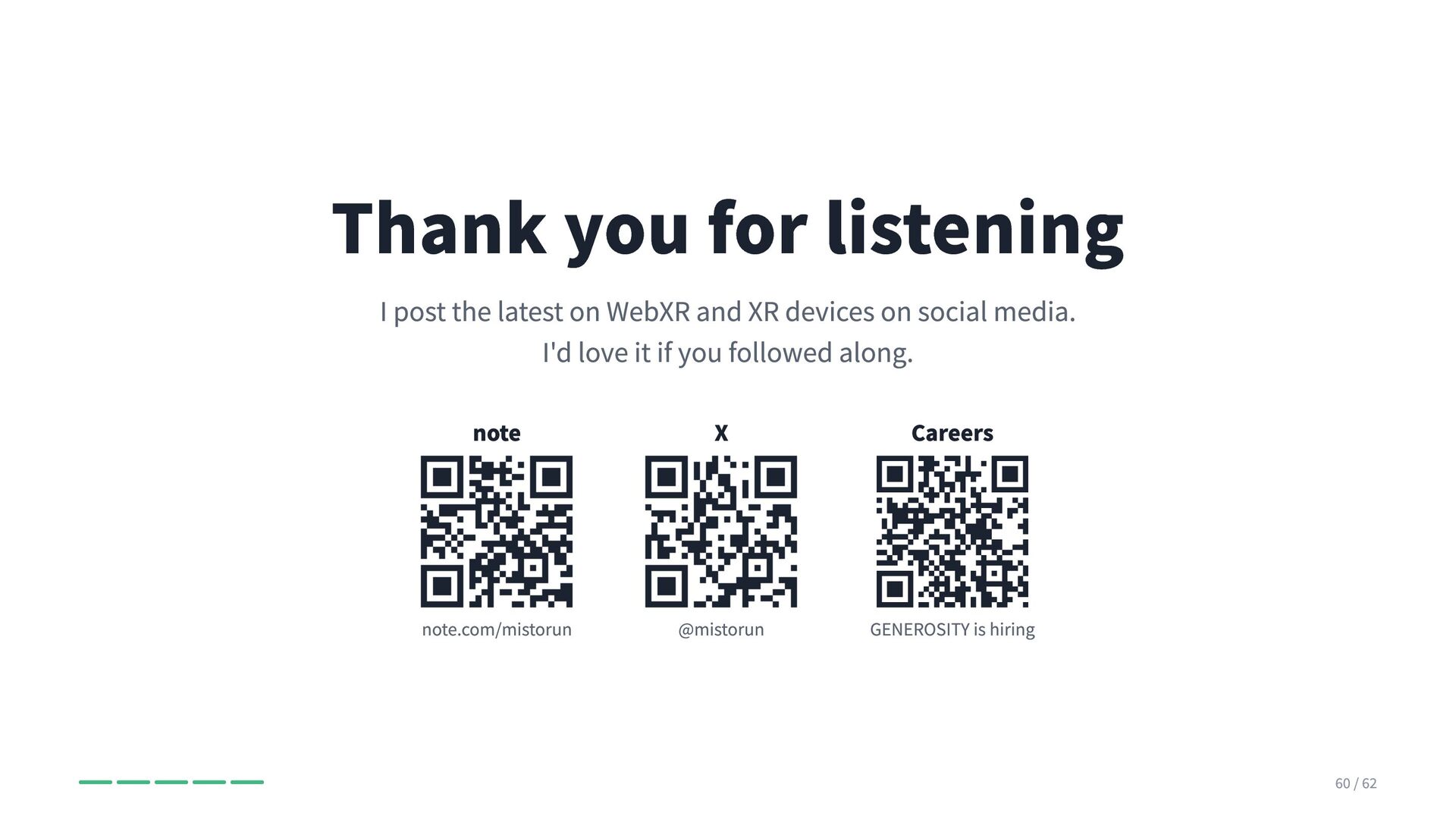
  55. Thank you for listening I post the latest on WebXR

    and XR devices on social media. I'd love it if you followed along. note X Careers note.com/mistorun @mistorun GENEROSITY is hiring 60 / 62
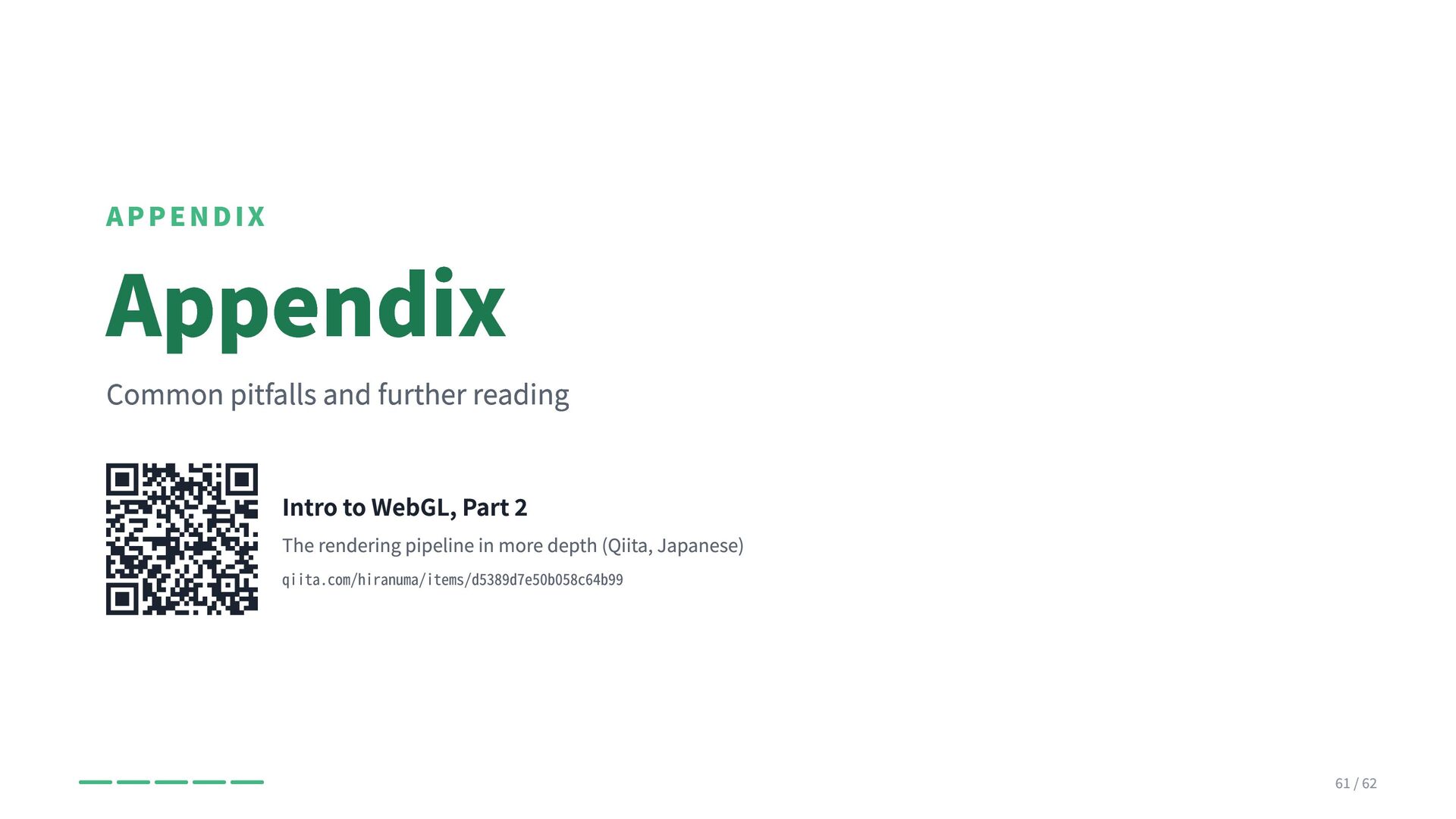
  56. APPENDIX Appendix Common pitfalls and further reading Intro to WebGL,

    Part 2 The rendering pipeline in more depth (Qiita, Japanese) qiita.com/hiranuma/items/d5389d7e50b058c64b99 61 / 62
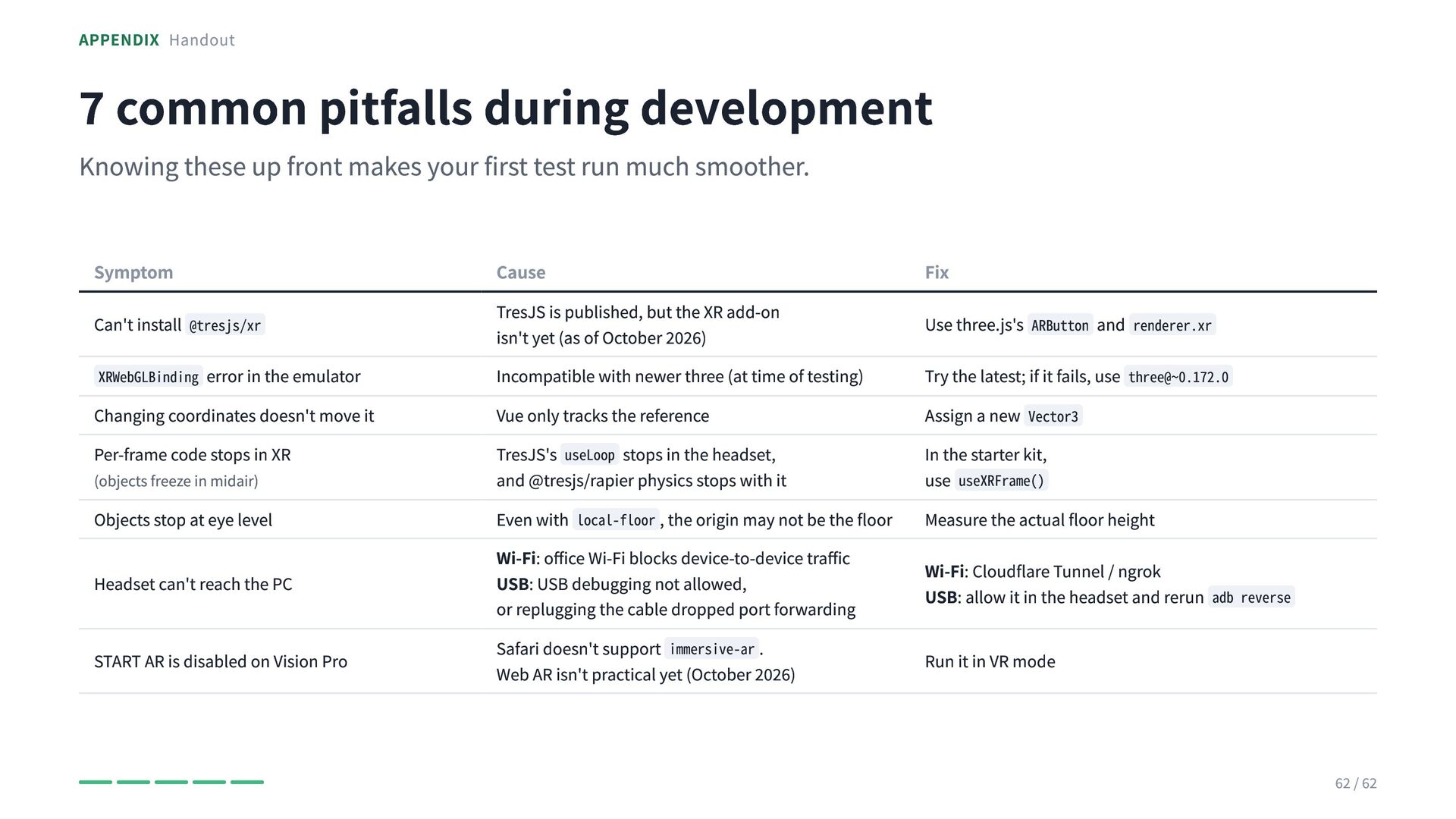
  57. APPENDIX Handout 7 common pitfalls during development Knowing these up

    front makes your first test run much smoother. Symptom Can't install @tresjs/xr XRWebGLBinding error in the emulator Changing coordinates doesn't move it Per-frame code stops in XR (objects freeze in midair) Objects stop at eye level Headset can't reach the PC START AR is disabled on Vision Pro Cause TresJS is published, but the XR add-on isn't yet (as of October 2026) Incompatible with newer three (at time of testing) Vue only tracks the reference TresJS's useLoop stops in the headset, and @tresjs/rapier physics stops with it Even with local-floor , the origin may not be the floor Wi-Fi: office Wi-Fi blocks device-to-device traffic USB: USB debugging not allowed, or replugging the cable dropped port forwarding Safari doesn't support immersive-ar . Web AR isn't practical yet (October 2026) Fix Use three.js's ARButton and renderer.xr Try the latest; if it fails, use three@~0.172.0 Assign a new Vector3 In the starter kit, use useXRFrame() Measure the actual floor height Wi-Fi: Cloudflare Tunnel / ngrok USB: allow it in the headset and rerun adb reverse Run it in VR mode 62 / 62