Upgrade to Pro — share decks privately, control downloads, hide ads and more …

Migrating from Amazon Q Developer (Where each f...

Migrating from Amazon Q Developer (Where each feature you use lives in Kiro) | Kiro: Zero to Hero 14

Amazon Q Developer IDE plugins and paid subscriptions reach end of support on April 30, 2027. Q Developer in the AWS console and in chat apps is not part of this. This handout shows where each feature you use goes in Kiro, and how to move from VS Code, JetBrains IDEs, Visual Studio and Eclipse, and Q Developer CLI, as well as from Q Developer Pro subscriptions. It also includes a table of CLI setting paths, the steps for admins and for each developer, and a suggested phased plan that starts with one pilot team. Based on the kiro.dev docs and the AWS end-of-support announcement, as of November 2026 (Kiro IDE 1.4, Kiro CLI 3.1). This is deck 14, in the Roll it out part of the Kiro: Zero to Hero series.

Avatar for Riku INADA

Riku INADA PRO

November 08, 2026

More Decks by Riku INADA

Other Decks in Technology

Transcript

  1. Kiro: Zero to Hero Roll it out Migrating from Amazon

    Q Developer Where each feature you use lives in Kiro 14 As of November 2026 (Kiro IDE 1.4, Kiro CLI 3.1) November 2026 Riku Inada Amazon Web Services Japan © 2026, Amazon Web Services, Inc. or its affiliates. All rights reserved. 1
  2. Introduction About me Riku Inada Amazon Web Services Japan G.K.

    Solutions Architect Works mainly with manufacturing customers Recent work Promoting the AI-Driven Development Life Cycle (AI-DLC) Writing and speaking about Kiro and AWS Amplify © 2026, Amazon Web Services, Inc. or its affiliates. All rights reserved. X @inada_riku Speaker Deck speakerdeck.com/inariku Zenn zenn.dev/inariku GitHub github.com/inariku 2
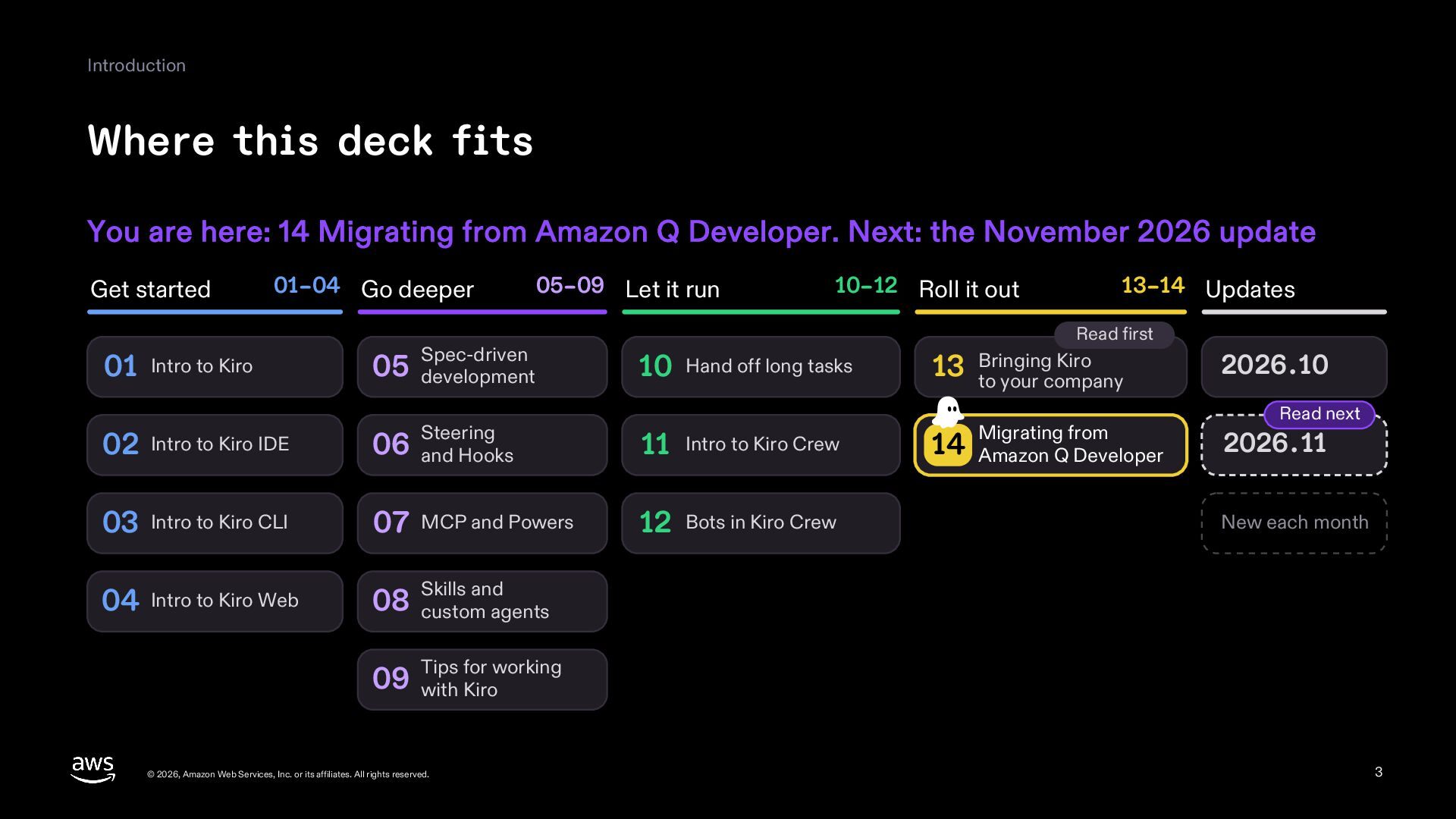
  3. Introduction Where this deck fits You are here: 14 Migrating

    from Amazon Q Developer. Next: the November 2026 update Get started 01–04 Go deeper 01 Intro to Kiro Spec-driven 05 development 05–09 Let it run 10–12 Roll it out 13–14 Updates Read first 10 Hand off long tasks Kiro 13 Bringing to your company 02 Intro to Kiro IDE Steering 06 and Hooks 11 Intro to Kiro Crew Migrating from 14 Amazon Q Developer 03 Intro to Kiro CLI 07 MCP and Powers 12 Bots in Kiro Crew 04 Intro to Kiro Web and 08 Skills custom agents 2026.10 Read next 2026.11 New each month for working 09 Tips with Kiro © 2026, Amazon Web Services, Inc. or its affiliates. All rights reserved. 3
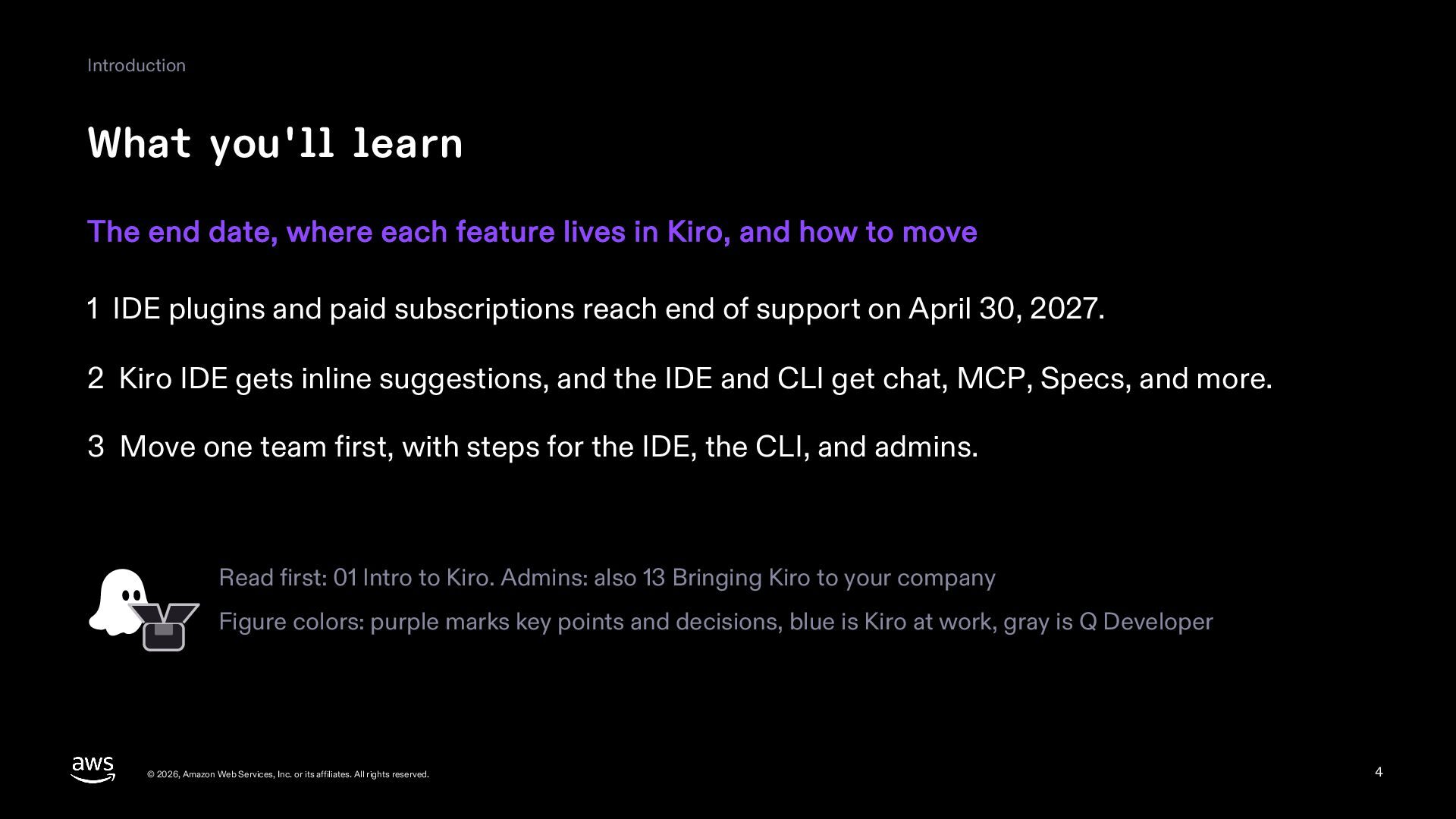
  4. Introduction What you'll learn The end date, where each feature

    lives in Kiro, and how to move 1 IDE plugins and paid subscriptions reach end of support on April 30, 2027. 2 Kiro IDE gets inline suggestions, and the IDE and CLI get chat, MCP, Specs, and more. 3 Move one team first, with steps for the IDE, the CLI, and admins. Read first: 01 Intro to Kiro. Admins: also 13 Bringing Kiro to your company Figure colors: purple marks key points and decisions, blue is Kiro at work, gray is Q Developer © 2026, Amazon Web Services, Inc. or its affiliates. All rights reserved. 4
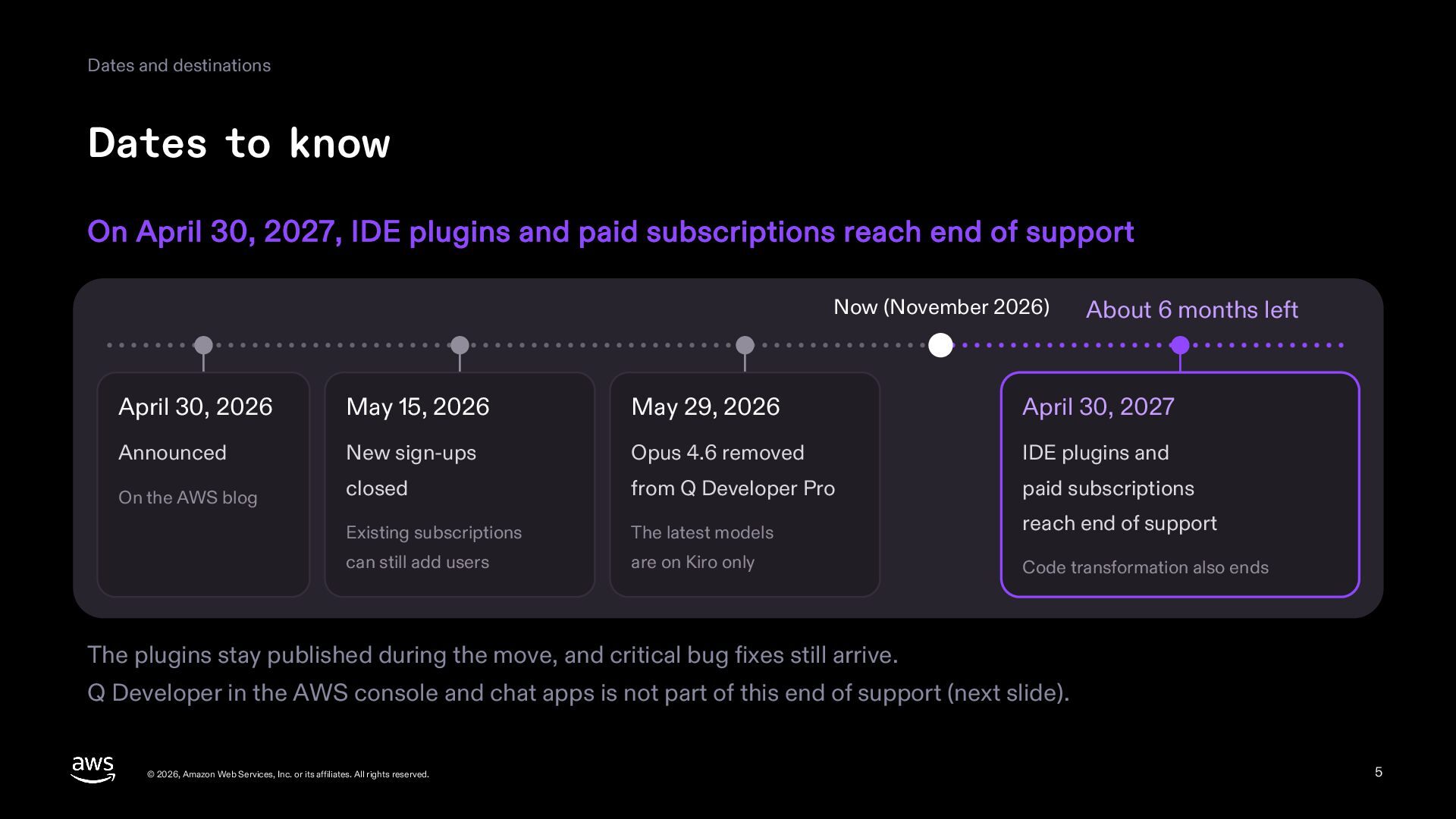
  5. Dates and destinations Dates to know On April 30, 2027,

    IDE plugins and paid subscriptions reach end of support Now (November 2026) About 6 months left April 30, 2026 May 15, 2026 May 29, 2026 April 30, 2027 Announced New sign-ups Opus 4.6 removed IDE plugins and On the AWS blog closed from Q Developer Pro paid subscriptions Existing subscriptions The latest models reach end of support can still add users are on Kiro only Code transformation also ends The plugins stay published during the move, and critical bug fixes still arrive. Q Developer in the AWS console and chat apps is not part of this end of support (next slide). © 2026, Amazon Web Services, Inc. or its affiliates. All rights reserved. 5
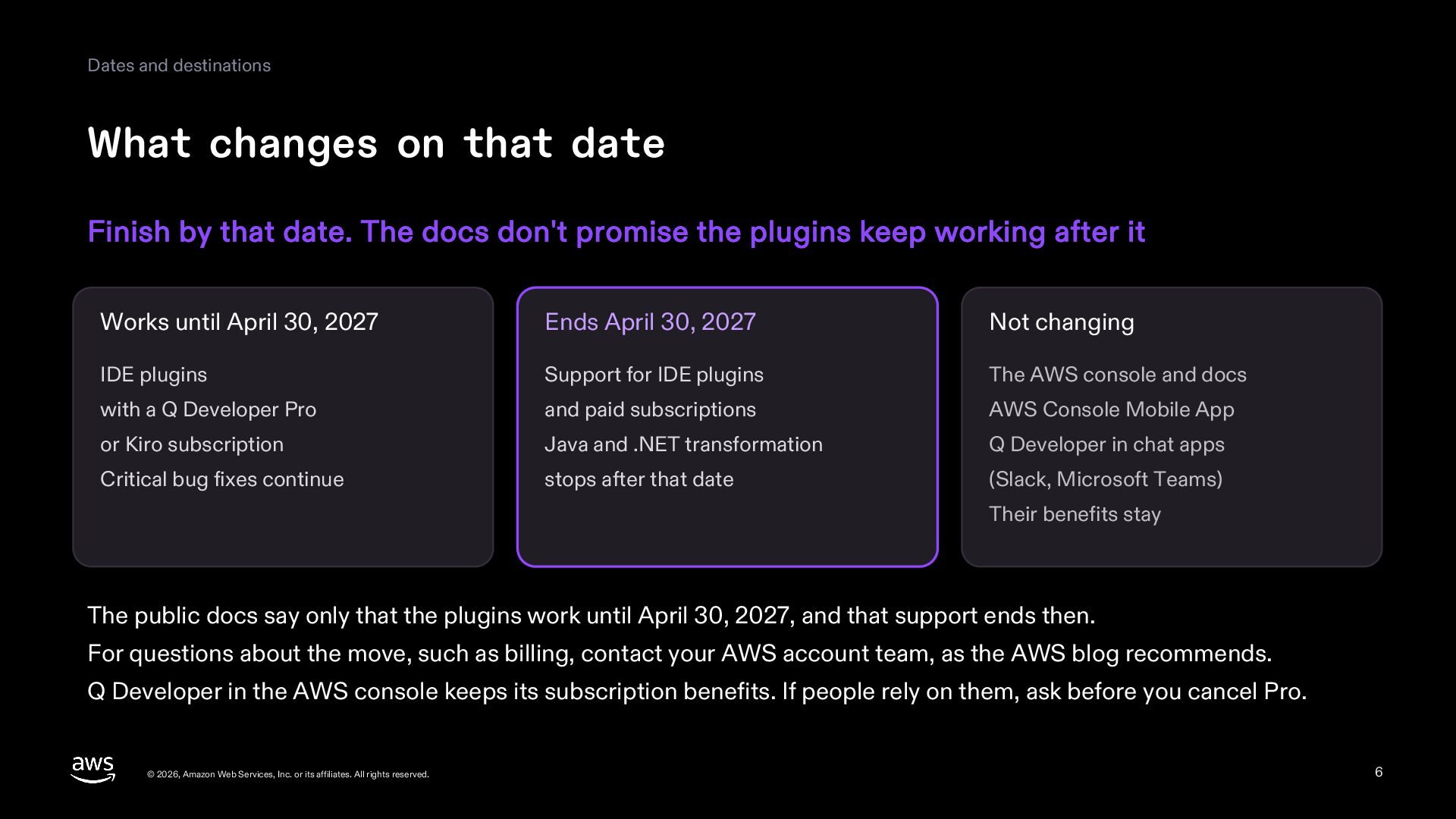
  6. Dates and destinations What changes on that date Finish by

    that date. The docs don't promise the plugins keep working after it Works until April 30, 2027 Ends April 30, 2027 Not changing IDE plugins Support for IDE plugins The AWS console and docs with a Q Developer Pro and paid subscriptions AWS Console Mobile App or Kiro subscription Java and .NET transformation Q Developer in chat apps Critical bug fixes continue stops after that date (Slack, Microsoft Teams) Their benefits stay The public docs say only that the plugins work until April 30, 2027, and that support ends then. For questions about the move, such as billing, contact your AWS account team, as the AWS blog recommends. Q Developer in the AWS console keeps its subscription benefits. If people rely on them, ask before you cancel Pro. © 2026, Amazon Web Services, Inc. or its affiliates. All rights reserved. 6
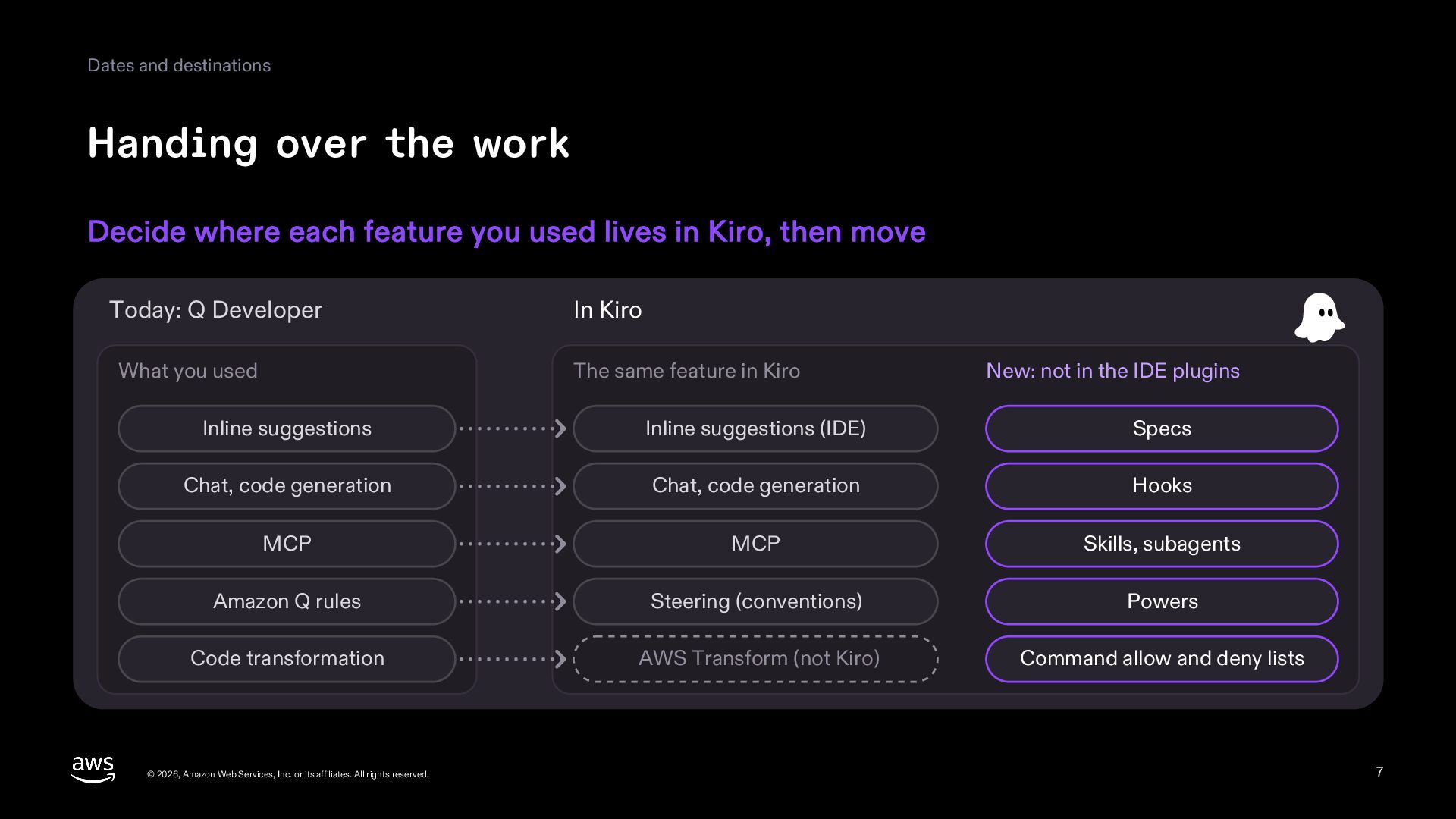
  7. Dates and destinations Handing over the work Decide where each

    feature you used lives in Kiro, then move Today: Q Developer In Kiro What you used The same feature in Kiro New: not in the IDE plugins Inline suggestions Inline suggestions (IDE) Specs Chat, code generation Chat, code generation Hooks MCP MCP Skills, subagents Amazon Q rules Steering (conventions) Powers Code transformation AWS Transform (not Kiro) Command allow and deny lists © 2026, Amazon Web Services, Inc. or its affiliates. All rights reserved. 7
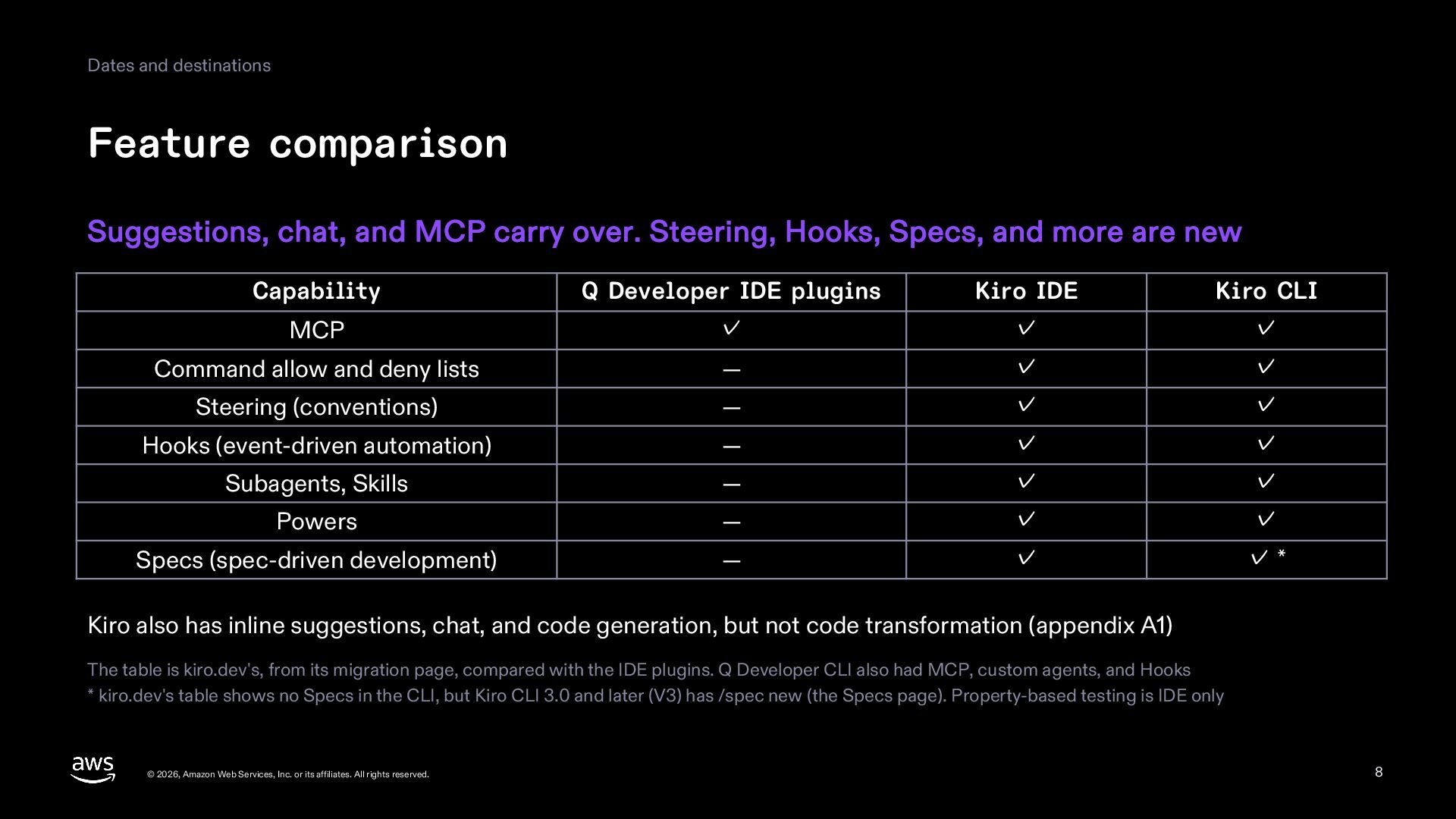
  8. Dates and destinations Feature comparison Suggestions, chat, and MCP carry

    over. Steering, Hooks, Specs, and more are new Capability Q Developer IDE plugins Kiro IDE Kiro CLI MCP ✓ ✓ ✓ Command allow and deny lists — ✓ ✓ Steering (conventions) — ✓ ✓ Hooks (event-driven automation) — ✓ ✓ Subagents, Skills — ✓ ✓ Powers — ✓ ✓ Specs (spec-driven development) — ✓ ✓* Kiro also has inline suggestions, chat, and code generation, but not code transformation (appendix A1) The table is kiro.dev's, from its migration page, compared with the IDE plugins. Q Developer CLI also had MCP, custom agents, and Hooks * kiro.dev's table shows no Specs in the CLI, but Kiro CLI 3.0 and later (V3) has /spec new (the Specs page). Property-based testing is IDE only © 2026, Amazon Web Services, Inc. or its affiliates. All rights reserved. 8
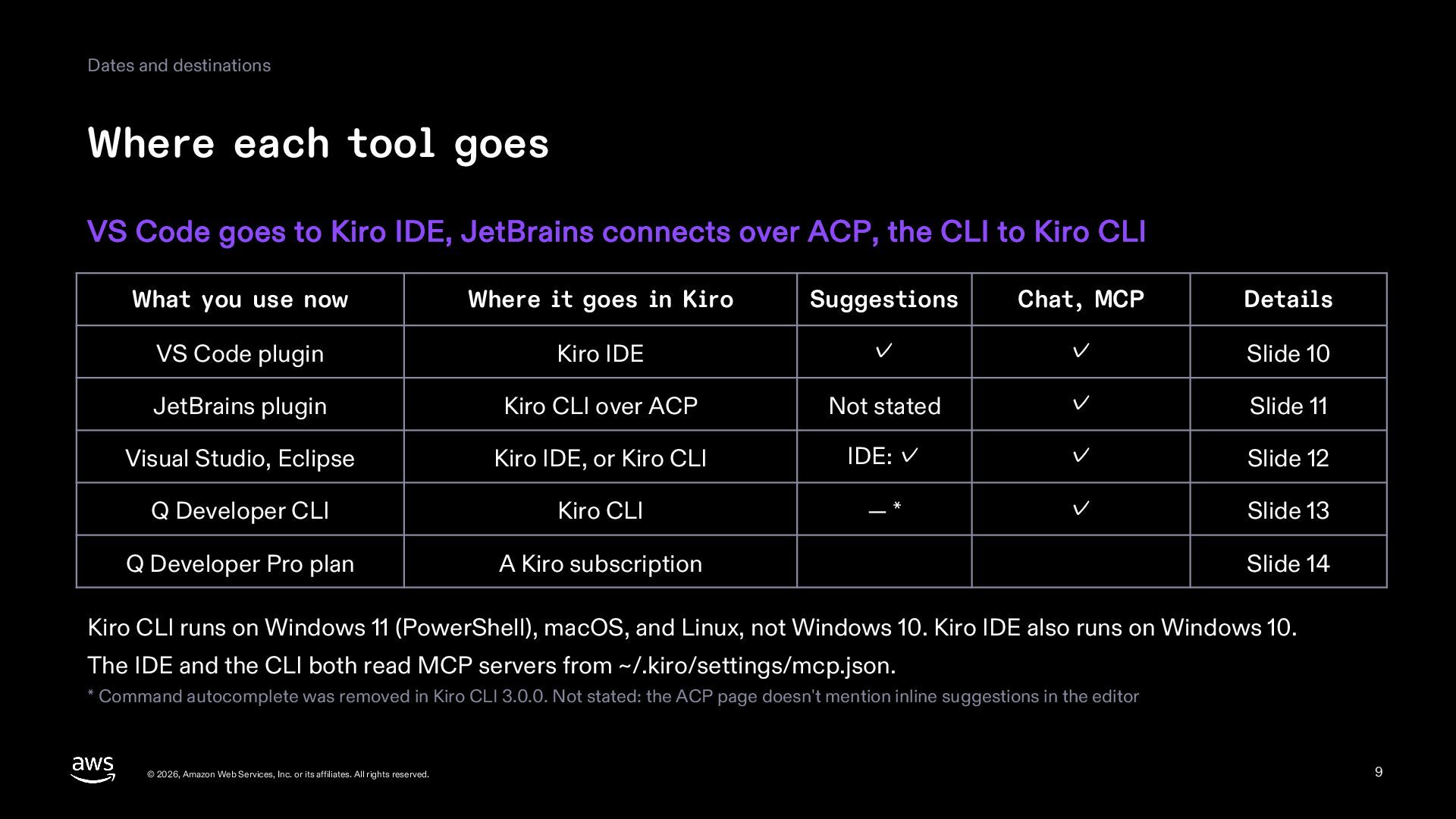
  9. Dates and destinations Where each tool goes VS Code goes

    to Kiro IDE, JetBrains connects over ACP, the CLI to Kiro CLI What you use now Where it goes in Kiro Suggestions Chat, MCP Details VS Code plugin Kiro IDE ✓ ✓ Slide 10 JetBrains plugin Kiro CLI over ACP Not stated ✓ Slide 11 Visual Studio, Eclipse Kiro IDE, or Kiro CLI IDE: ✓ ✓ Slide 12 Q Developer CLI Kiro CLI —* ✓ Slide 13 Q Developer Pro plan A Kiro subscription Slide 14 Kiro CLI runs on Windows 11 (PowerShell), macOS, and Linux, not Windows 10. Kiro IDE also runs on Windows 10. The IDE and the CLI both read MCP servers from ~/.kiro/settings/mcp.json. * Command autocomplete was removed in Kiro CLI 3.0.0. Not stated: the ACP page doesn't mention inline suggestions in the editor © 2026, Amazon Web Services, Inc. or its affiliates. All rights reserved. 9
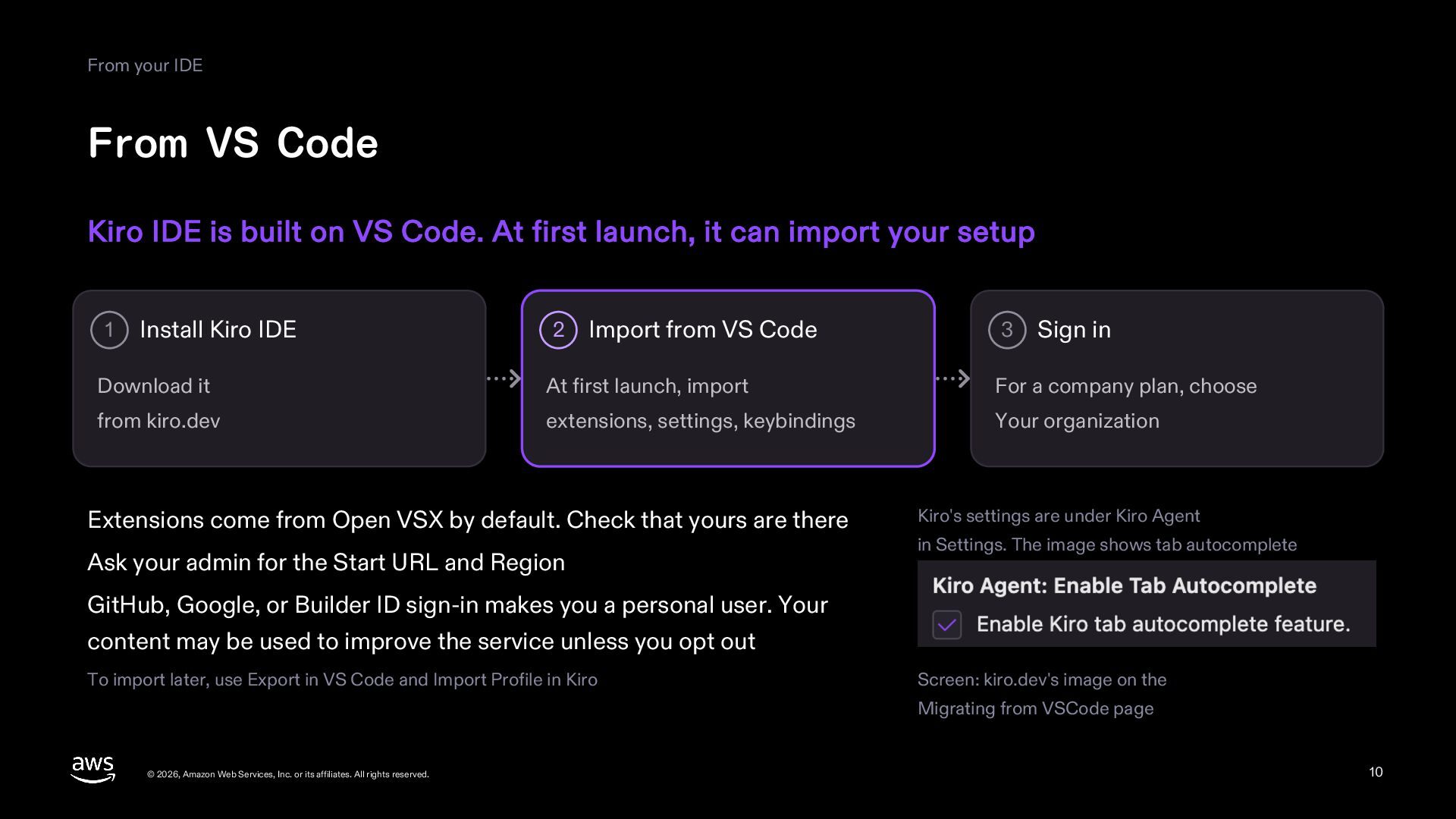
  10. From your IDE From VS Code Kiro IDE is built

    on VS Code. At first launch, it can import your setup 1 Install Kiro IDE 2 Import from VS Code 3 Sign in Download it At first launch, import For a company plan, choose from kiro.dev extensions, settings, keybindings Your organization Extensions come from Open VSX by default. Check that yours are there Ask your admin for the Start URL and Region Kiro's settings are under Kiro Agent in Settings. The image shows tab autocomplete GitHub, Google, or Builder ID sign-in makes you a personal user. Your content may be used to improve the service unless you opt out To import later, use Export in VS Code and Import Profile in Kiro Screen: kiro.dev's image on the Migrating from VSCode page © 2026, Amazon Web Services, Inc. or its affiliates. All rights reserved. 10
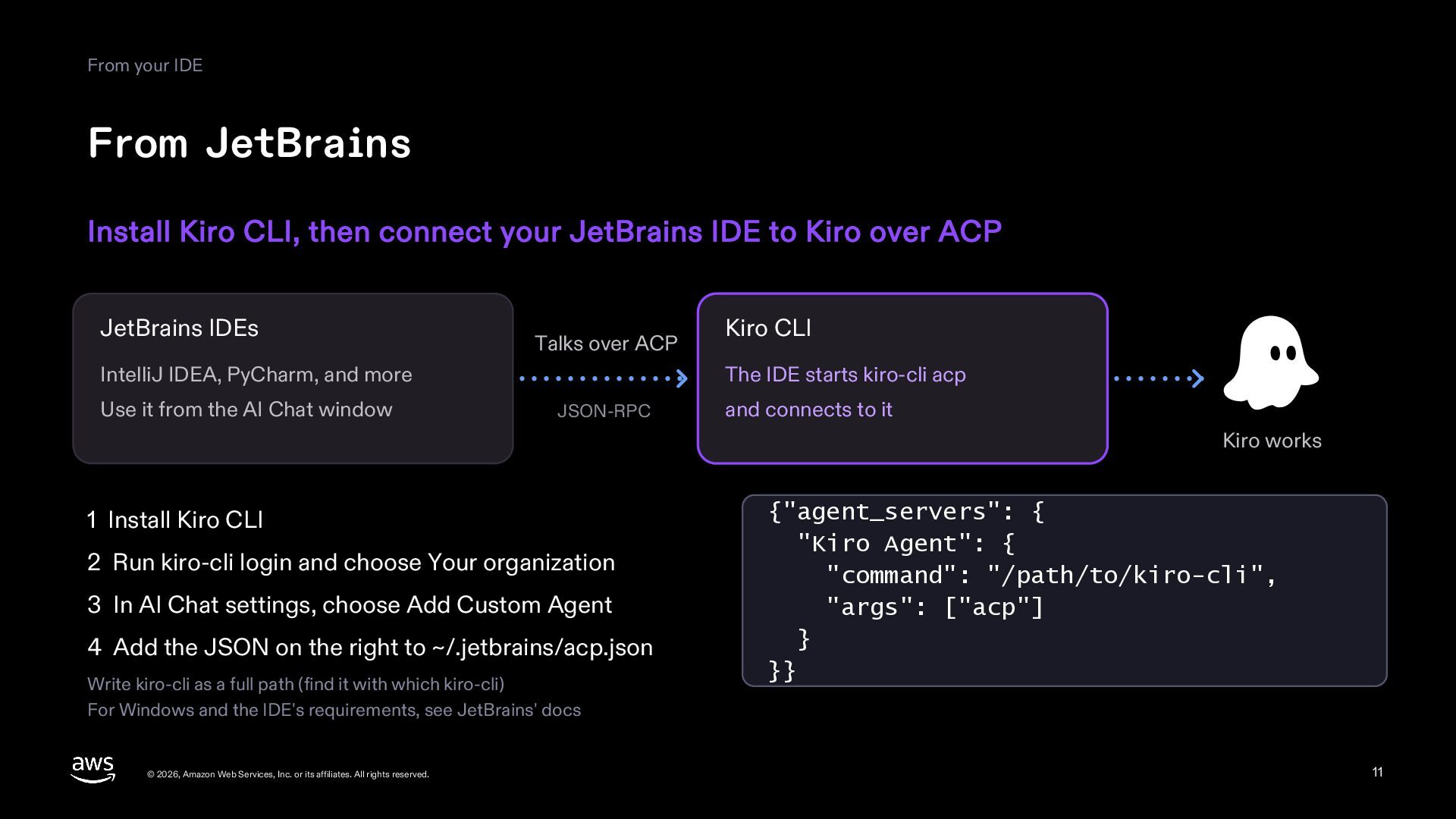
  11. From your IDE From JetBrains Install Kiro CLI, then connect

    your JetBrains IDE to Kiro over ACP JetBrains IDEs Talks over ACP IntelliJ IDEA, PyCharm, and more Use it from the AI Chat window Kiro CLI The IDE starts kiro-cli acp JSON-RPC and connects to it Kiro works 1 Install Kiro CLI 2 Run kiro-cli login and choose Your organization 3 In AI Chat settings, choose Add Custom Agent 4 Add the JSON on the right to ~/.jetbrains/acp.json Write kiro-cli as a full path (find it with which kiro-cli) For Windows and the IDE's requirements, see JetBrains' docs © 2026, Amazon Web Services, Inc. or its affiliates. All rights reserved. {"agent_servers": { "Kiro Agent": { "command": "/path/to/kiro-cli", "args": ["acp"] } }} 11
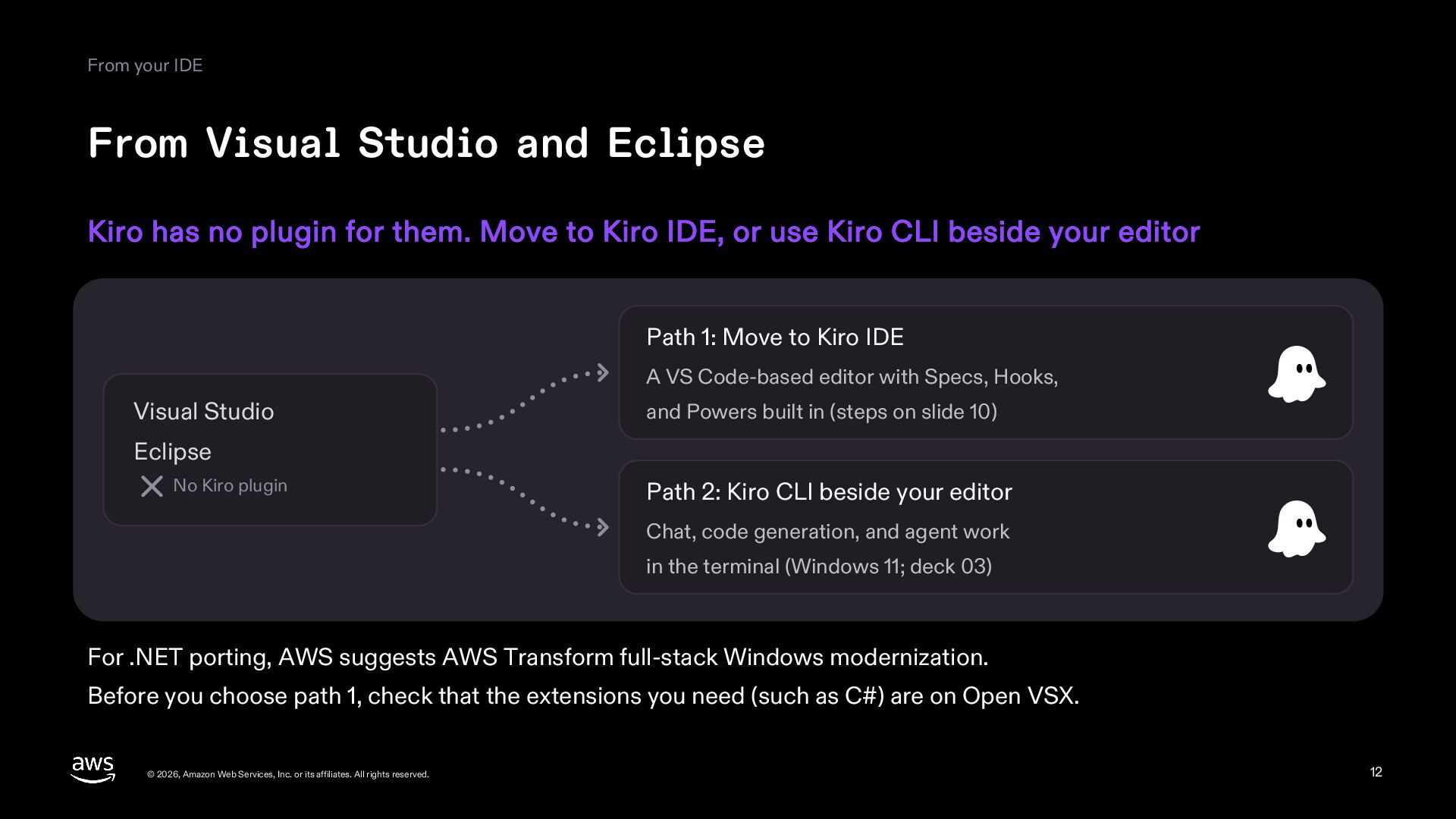
  12. From your IDE From Visual Studio and Eclipse Kiro has

    no plugin for them. Move to Kiro IDE, or use Kiro CLI beside your editor Path 1: Move to Kiro IDE A VS Code-based editor with Specs, Hooks, Visual Studio and Powers built in (steps on slide 10) Eclipse No Kiro plugin Path 2: Kiro CLI beside your editor Chat, code generation, and agent work in the terminal (Windows 11; deck 03) For .NET porting, AWS suggests AWS Transform full-stack Windows modernization. Before you choose path 1, check that the extensions you need (such as C#) are on Open VSX. © 2026, Amazon Web Services, Inc. or its affiliates. All rights reserved. 12
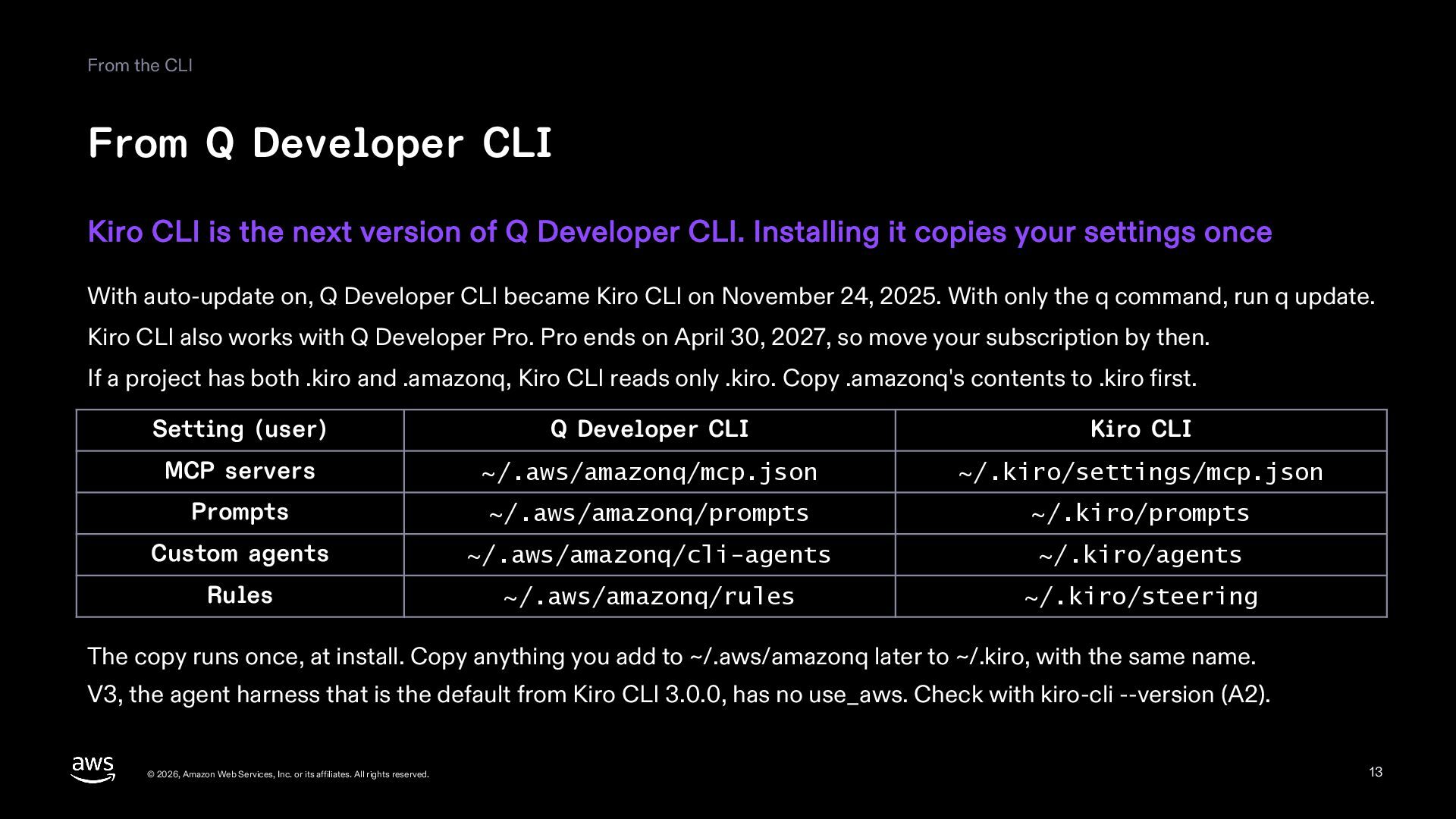
  13. From the CLI From Q Developer CLI Kiro CLI is

    the next version of Q Developer CLI. Installing it copies your settings once With auto-update on, Q Developer CLI became Kiro CLI on November 24, 2025. With only the q command, run q update. Kiro CLI also works with Q Developer Pro. Pro ends on April 30, 2027, so move your subscription by then. If a project has both .kiro and .amazonq, Kiro CLI reads only .kiro. Copy .amazonq's contents to .kiro first. Setting (user) Q Developer CLI Kiro CLI MCP servers ~/.aws/amazonq/mcp.json ~/.kiro/settings/mcp.json Prompts ~/.aws/amazonq/prompts ~/.kiro/prompts Custom agents ~/.aws/amazonq/cli-agents ~/.kiro/agents Rules ~/.aws/amazonq/rules ~/.kiro/steering The copy runs once, at install. Copy anything you add to ~/.aws/amazonq later to ~/.kiro, with the same name. V3, the agent harness that is the default from Kiro CLI 3.0.0, has no use_aws. Check with kiro-cli --version (A2). © 2026, Amazon Web Services, Inc. or its affiliates. All rights reserved. 13
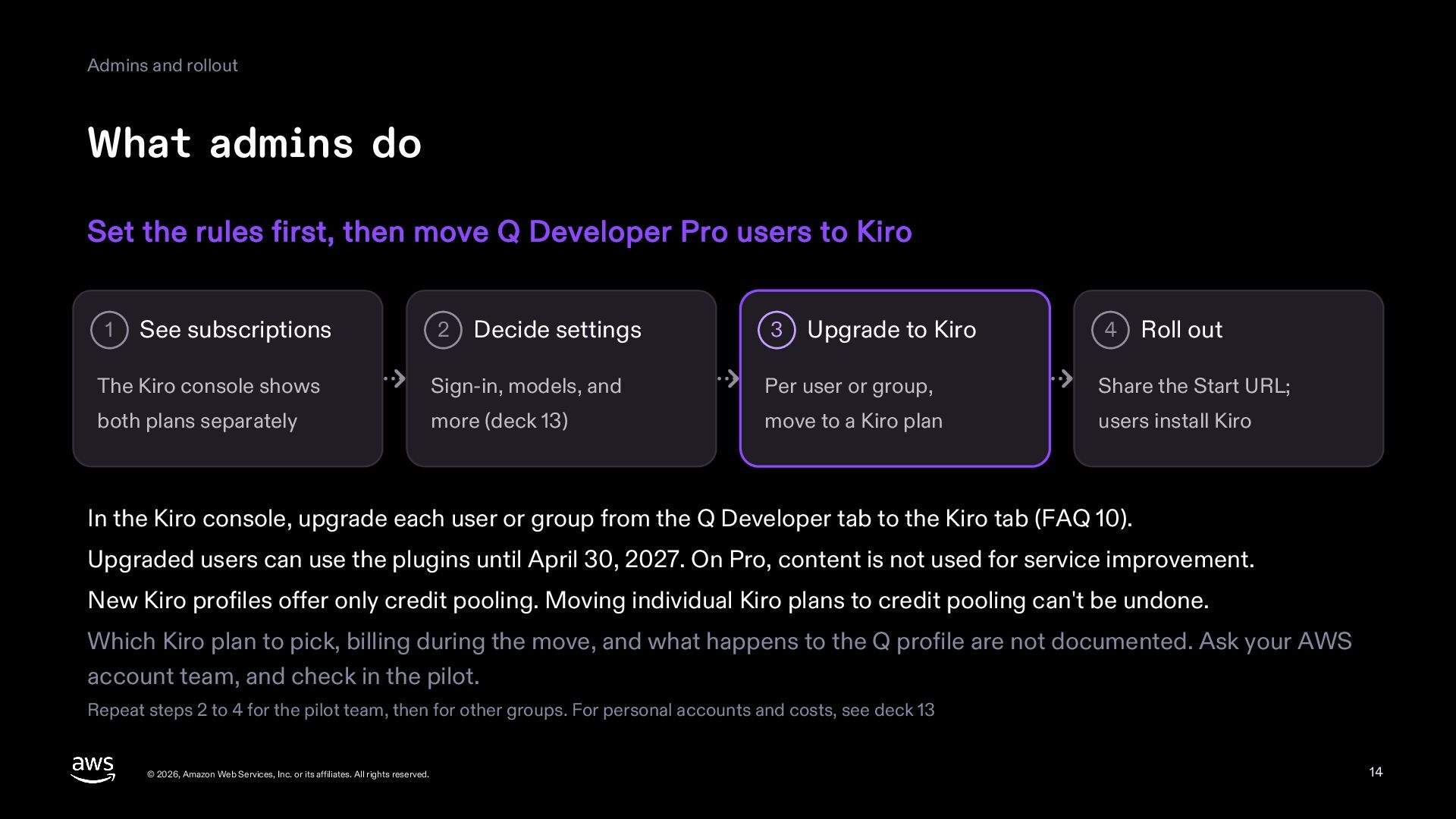
  14. Admins and rollout What admins do Set the rules first,

    then move Q Developer Pro users to Kiro 1 See subscriptions 2 Decide settings 3 Upgrade to Kiro 4 Roll out The Kiro console shows Sign-in, models, and Per user or group, Share the Start URL; both plans separately more (deck 13) move to a Kiro plan users install Kiro In the Kiro console, upgrade each user or group from the Q Developer tab to the Kiro tab (FAQ 10). Upgraded users can use the plugins until April 30, 2027. On Pro, content is not used for service improvement. New Kiro profiles offer only credit pooling. Moving individual Kiro plans to credit pooling can't be undone. Which Kiro plan to pick, billing during the move, and what happens to the Q profile are not documented. Ask your AWS account team, and check in the pilot. Repeat steps 2 to 4 for the pilot team, then for other groups. For personal accounts and costs, see deck 13 © 2026, Amazon Web Services, Inc. or its affiliates. All rights reserved. 14
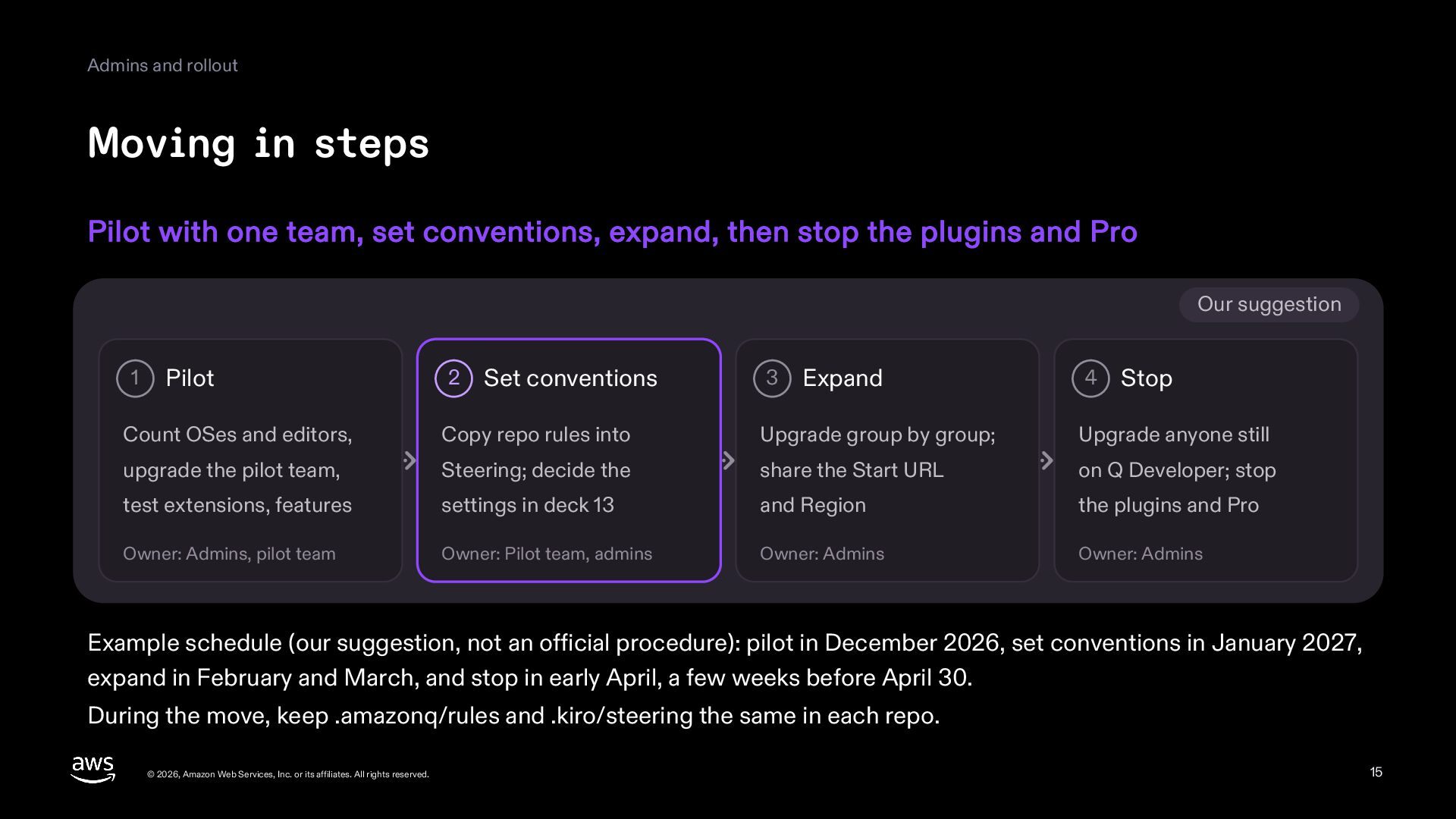
  15. Admins and rollout Moving in steps Pilot with one team,

    set conventions, expand, then stop the plugins and Pro Our suggestion 1 Pilot 2 Set conventions 3 Expand 4 Stop Count OSes and editors, Copy repo rules into Upgrade group by group; Upgrade anyone still upgrade the pilot team, Steering; decide the share the Start URL on Q Developer; stop test extensions, features settings in deck 13 and Region the plugins and Pro Owner: Admins, pilot team Owner: Pilot team, admins Owner: Admins Owner: Admins Example schedule (our suggestion, not an official procedure): pilot in December 2026, set conventions in January 2027, expand in February and March, and stop in early April, a few weeks before April 30. During the move, keep .amazonq/rules and .kiro/steering the same in each repo. © 2026, Amazon Web Services, Inc. or its affiliates. All rights reserved. 15
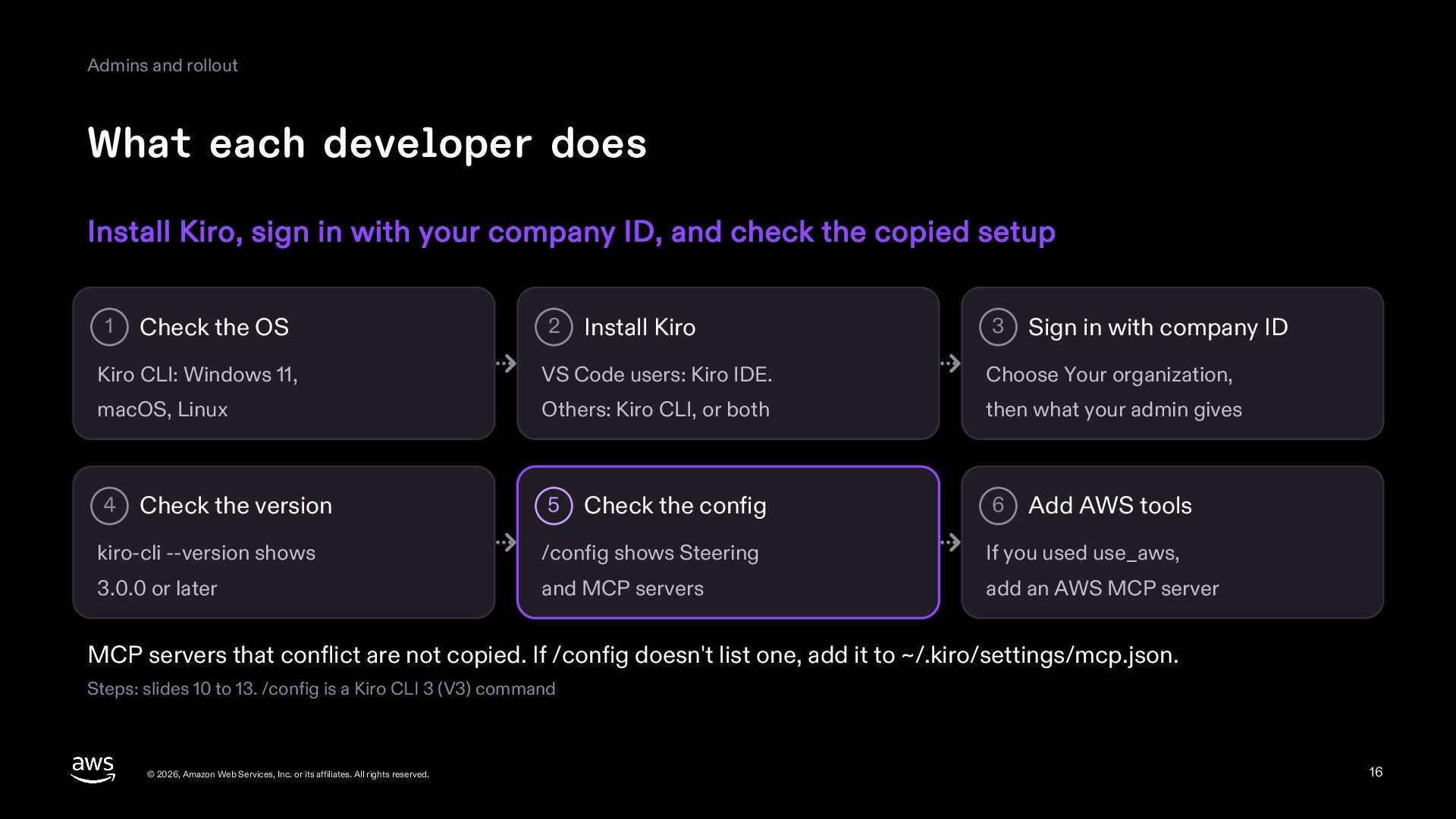
  16. Admins and rollout What each developer does Install Kiro, sign

    in with your company ID, and check the copied setup 1 Check the OS 2 Install Kiro 3 Sign in with company ID Kiro CLI: Windows 11, VS Code users: Kiro IDE. Choose Your organization, macOS, Linux Others: Kiro CLI, or both then what your admin gives 4 Check the version 5 Check the config 6 Add AWS tools kiro-cli --version shows /config shows Steering If you used use_aws, 3.0.0 or later and MCP servers add an AWS MCP server MCP servers that conflict are not copied. If /config doesn't list one, add it to ~/.kiro/settings/mcp.json. Steps: slides 10 to 13. /config is a Kiro CLI 3 (V3) command © 2026, Amazon Web Services, Inc. or its affiliates. All rights reserved. 16
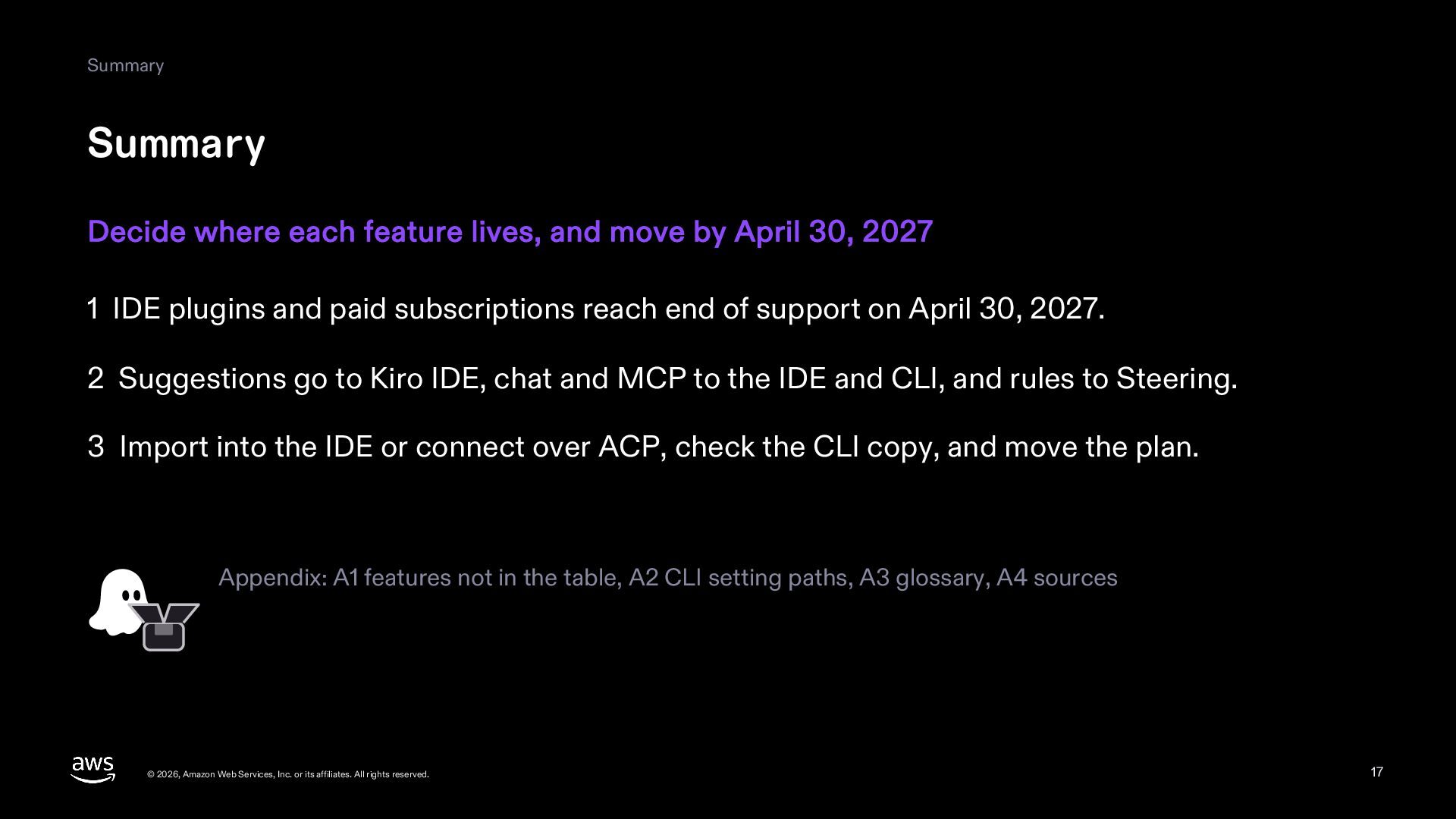
  17. Summary Summary Decide where each feature lives, and move by

    April 30, 2027 1 IDE plugins and paid subscriptions reach end of support on April 30, 2027. 2 Suggestions go to Kiro IDE, chat and MCP to the IDE and CLI, and rules to Steering. 3 Import into the IDE or connect over ACP, check the CLI copy, and move the plan. Appendix: A1 features not in the table, A2 CLI setting paths, A3 glossary, A4 sources © 2026, Amazon Web Services, Inc. or its affiliates. All rights reserved. 17
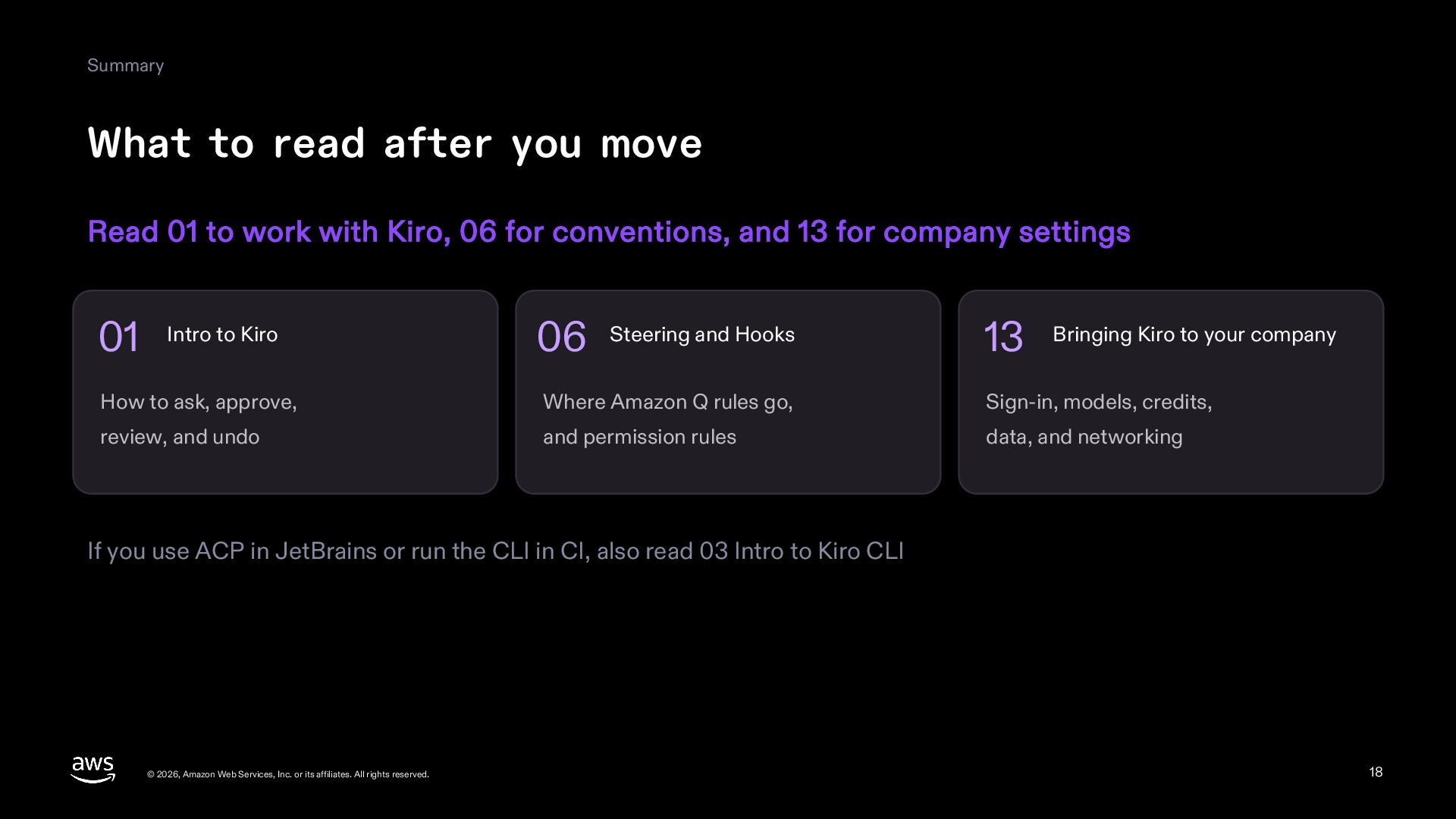
  18. Summary What to read after you move Read 01 to

    work with Kiro, 06 for conventions, and 13 for company settings 01 Intro to Kiro 06 Steering and Hooks 13 Bringing Kiro to your company How to ask, approve, Where Amazon Q rules go, Sign-in, models, credits, review, and undo and permission rules data, and networking If you use ACP in JetBrains or run the CLI in CI, also read 03 Intro to Kiro CLI © 2026, Amazon Web Services, Inc. or its affiliates. All rights reserved. 18
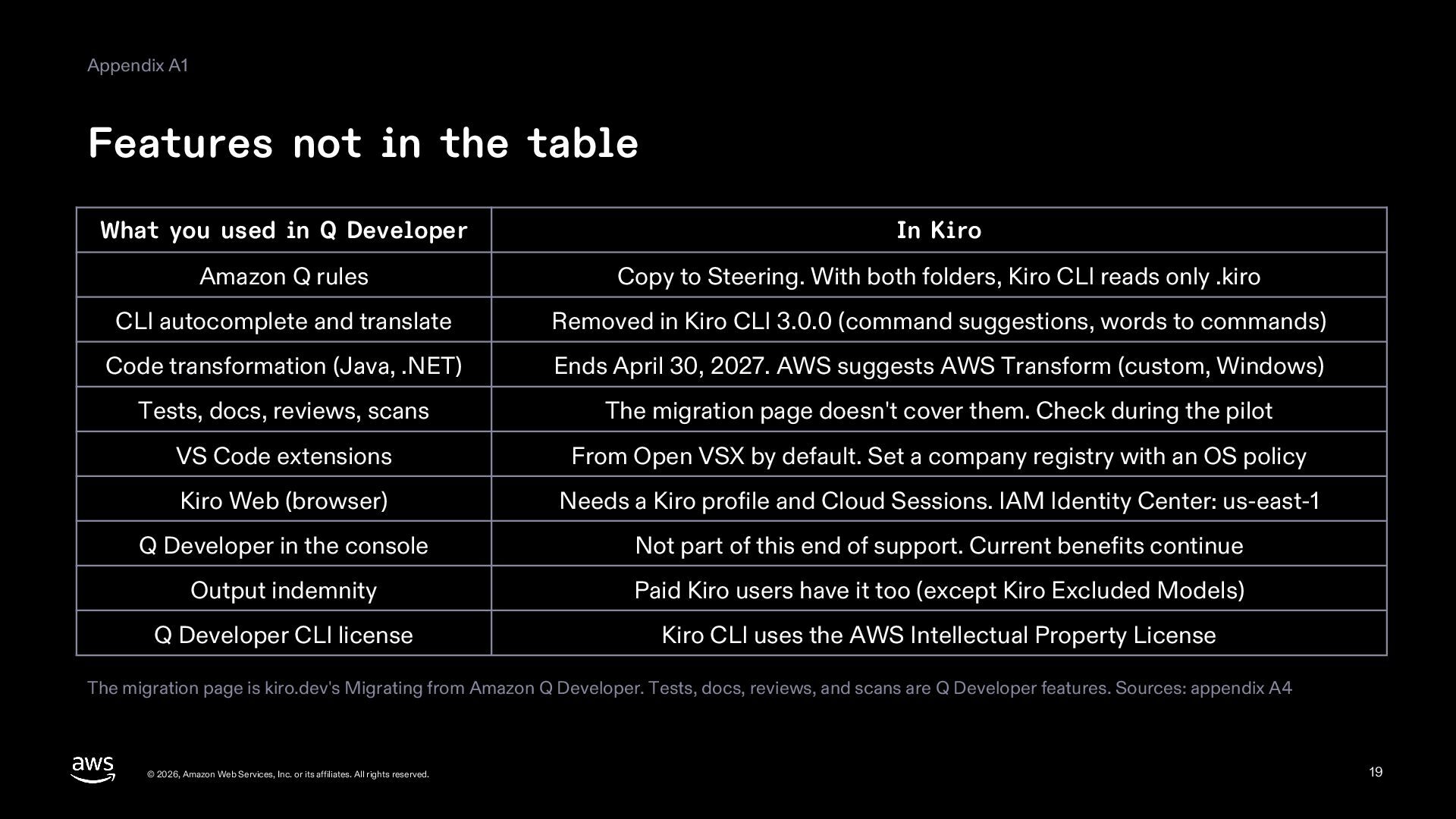
  19. Appendix A1 Features not in the table What you used

    in Q Developer In Kiro Amazon Q rules Copy to Steering. With both folders, Kiro CLI reads only .kiro CLI autocomplete and translate Removed in Kiro CLI 3.0.0 (command suggestions, words to commands) Code transformation (Java, .NET) Ends April 30, 2027. AWS suggests AWS Transform (custom, Windows) Tests, docs, reviews, scans The migration page doesn't cover them. Check during the pilot VS Code extensions From Open VSX by default. Set a company registry with an OS policy Kiro Web (browser) Needs a Kiro profile and Cloud Sessions. IAM Identity Center: us-east-1 Q Developer in the console Not part of this end of support. Current benefits continue Output indemnity Paid Kiro users have it too (except Kiro Excluded Models) Q Developer CLI license Kiro CLI uses the AWS Intellectual Property License The migration page is kiro.dev's Migrating from Amazon Q Developer. Tests, docs, reviews, and scans are Q Developer features. Sources: appendix A4 © 2026, Amazon Web Services, Inc. or its affiliates. All rights reserved. 19
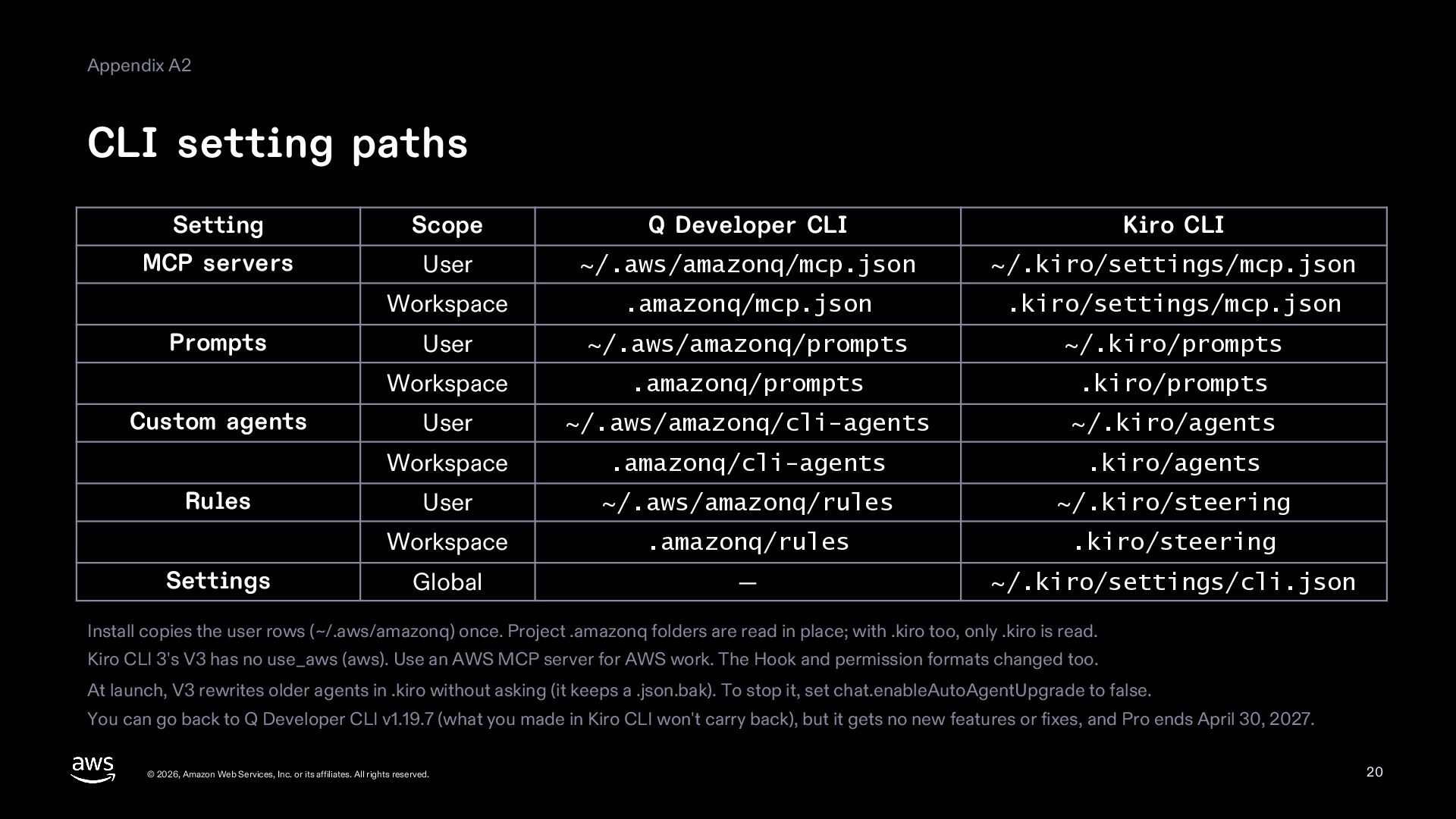
  20. Appendix A2 CLI setting paths Setting Scope Q Developer CLI

    Kiro CLI MCP servers User ~/.aws/amazonq/mcp.json ~/.kiro/settings/mcp.json Workspace .amazonq/mcp.json .kiro/settings/mcp.json User ~/.aws/amazonq/prompts ~/.kiro/prompts Workspace .amazonq/prompts .kiro/prompts User ~/.aws/amazonq/cli-agents ~/.kiro/agents Workspace .amazonq/cli-agents .kiro/agents User ~/.aws/amazonq/rules ~/.kiro/steering Workspace .amazonq/rules .kiro/steering Global — ~/.kiro/settings/cli.json Prompts Custom agents Rules Settings Install copies the user rows (~/.aws/amazonq) once. Project .amazonq folders are read in place; with .kiro too, only .kiro is read. Kiro CLI 3's V3 has no use_aws (aws). Use an AWS MCP server for AWS work. The Hook and permission formats changed too. At launch, V3 rewrites older agents in .kiro without asking (it keeps a .json.bak). To stop it, set chat.enableAutoAgentUpgrade to false. You can go back to Q Developer CLI v1.19.7 (what you made in Kiro CLI won't carry back), but it gets no new features or fixes, and Pro ends April 30, 2027. © 2026, Amazon Web Services, Inc. or its affiliates. All rights reserved. 20
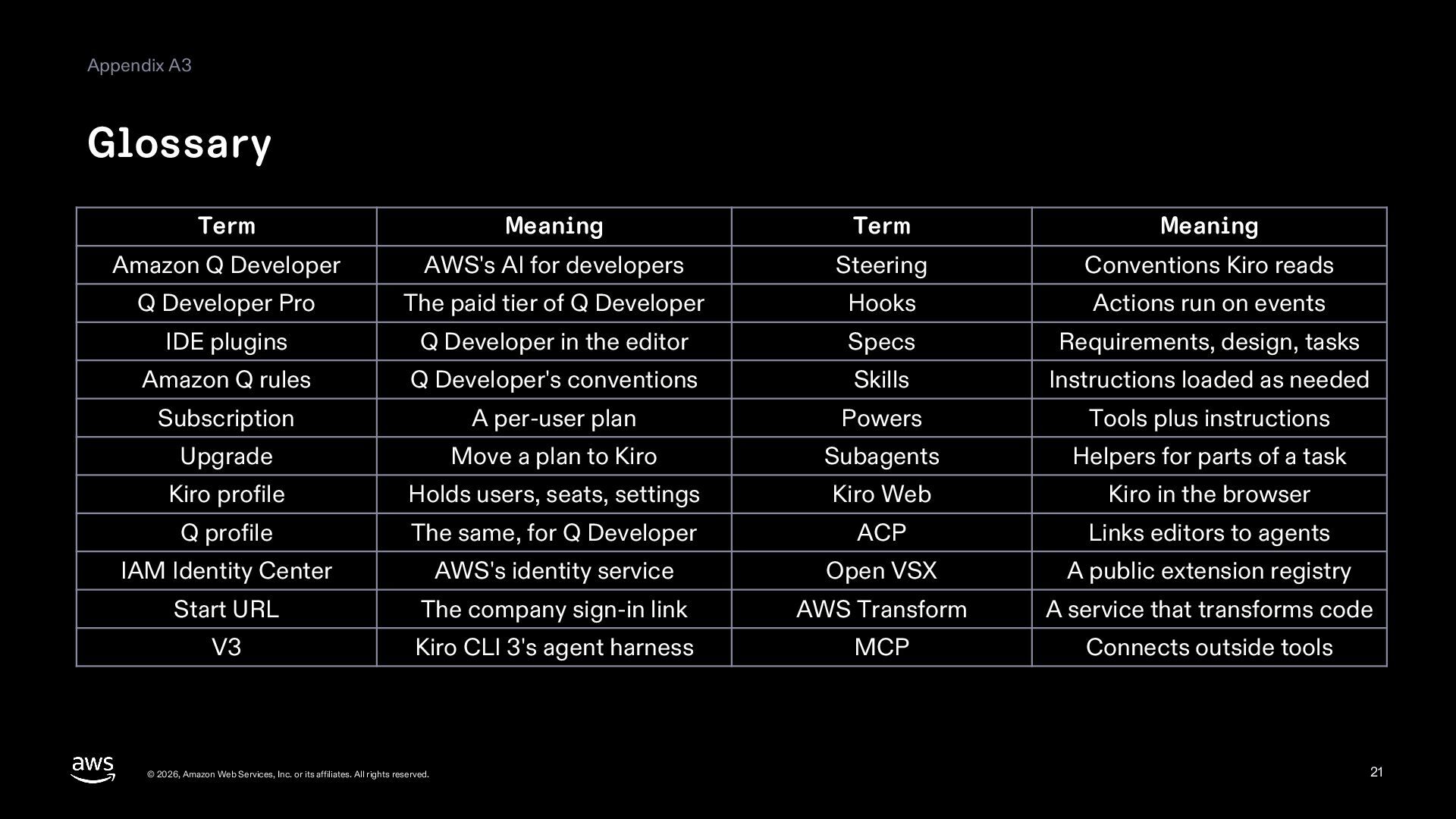
  21. Appendix A3 Glossary Term Meaning Term Meaning Amazon Q Developer

    AWS's AI for developers Steering Conventions Kiro reads Q Developer Pro The paid tier of Q Developer Hooks Actions run on events IDE plugins Q Developer in the editor Specs Requirements, design, tasks Amazon Q rules Q Developer's conventions Skills Instructions loaded as needed Subscription A per-user plan Powers Tools plus instructions Upgrade Move a plan to Kiro Subagents Helpers for parts of a task Kiro profile Holds users, seats, settings Kiro Web Kiro in the browser Q profile The same, for Q Developer ACP Links editors to agents IAM Identity Center AWS's identity service Open VSX A public extension registry Start URL The company sign-in link AWS Transform A service that transforms code V3 Kiro CLI 3's agent harness MCP Connects outside tools © 2026, Amazon Web Services, Inc. or its affiliates. All rights reserved. 21
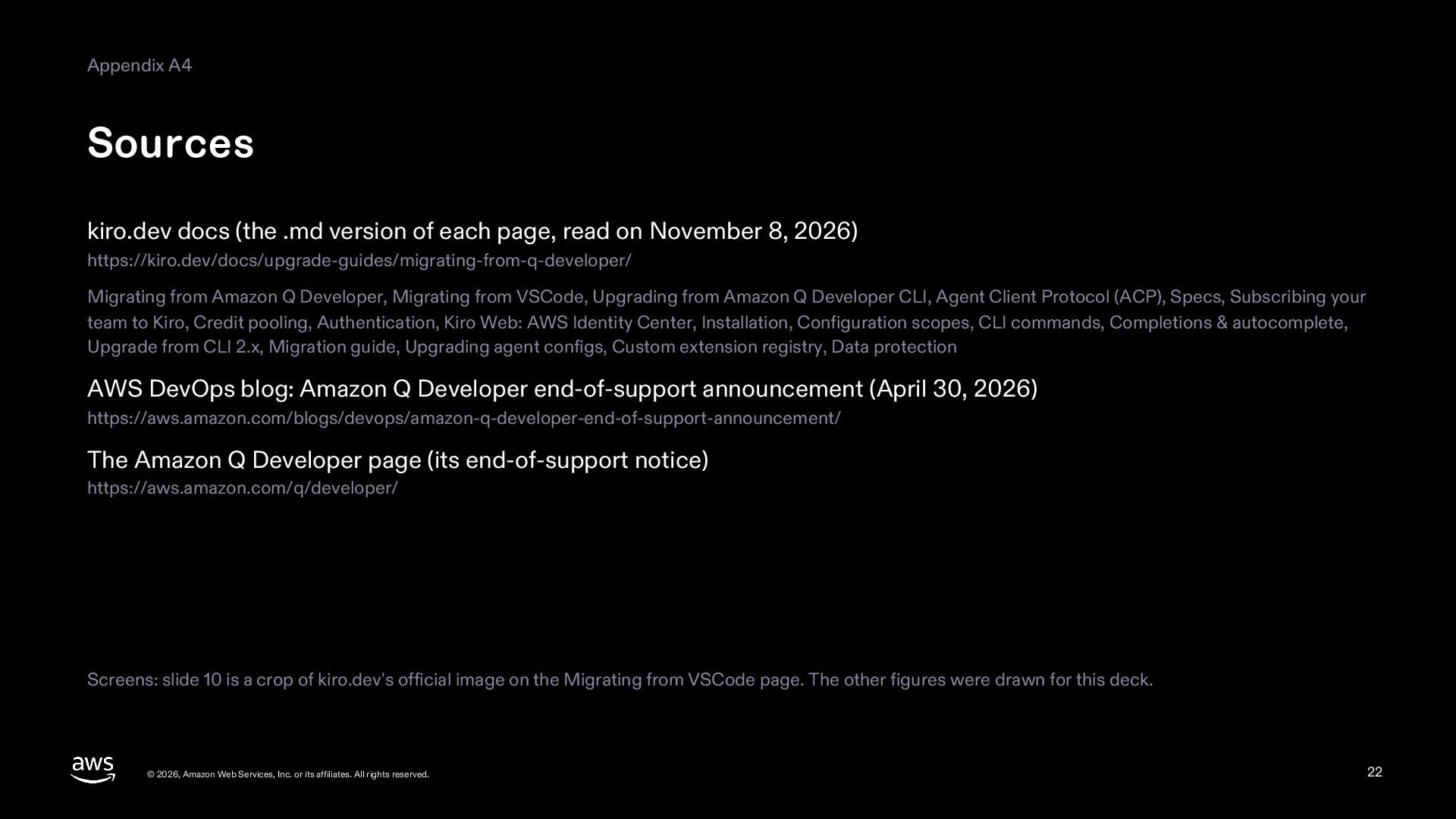
  22. Appendix A4 Sources kiro.dev docs (the .md version of each

    page, read on November 8, 2026) https://kiro.dev/docs/upgrade-guides/migrating-from-q-developer/ Migrating from Amazon Q Developer, Migrating from VSCode, Upgrading from Amazon Q Developer CLI, Agent Client Protocol (ACP), Specs, Subscribing your team to Kiro, Credit pooling, Authentication, Kiro Web: AWS Identity Center, Installation, Configuration scopes, CLI commands, Completions & autocomplete, Upgrade from CLI 2.x, Migration guide, Upgrading agent configs, Custom extension registry, Data protection AWS DevOps blog: Amazon Q Developer end-of-support announcement (April 30, 2026) https://aws.amazon.com/blogs/devops/amazon-q-developer-end-of-support-announcement/ The Amazon Q Developer page (its end-of-support notice) https://aws.amazon.com/q/developer/ Screens: slide 10 is a crop of kiro.dev's official image on the Migrating from VSCode page. The other figures were drawn for this deck. © 2026, Amazon Web Services, Inc. or its affiliates. All rights reserved. 22