Share
From QuickSight to Quick (What happens to your dashboards and users) | AWS Quick: Zero to Hero 15
Level 200. A handout on what the move from Amazon QuickSight to AWS Quick means for your dashboards and users, for admins and analysts at companies that use Amazon QuickSight. It covers what changed (Amazon QuickSight is now AWS Quick Sight, a feature of AWS Quick, and existing content, APIs, SDKs, and integrations keep working; the new tools next to your dashboards); where users go (per-user Readers move up to Essentials at no extra per-user cost, Region by Region; Authors get Enterprise until an end date; BI-only pricing; where costs can change); and making the move (the Tokyo Region as an example, choosing dashboards and datasets as data for chat, what to decide before Readers move up, where to set it, and opening the new tools to one team first). The screenshots show the web app with the English display language. The rollout order is the author's suggestion, not an official AWS procedure. The appendix has roles and plans, a glossary, and sources. Based on public documentation as of November 2026. Deck 15 (Roll it out) of the series AWS Quick: Zero to Hero.
Riku INADA PRO
Annual Pro sale · Save $30
Have presentations of your own?
Share with private links, password protection, and more control over your work.
Transcript
28 slides
-
AWS Quick: Zero to Hero Roll it out From QuickSight
to Quick What happens to your dashboards and users 15 Level 200 / As of November 2026 November 2026 Riku Inada Amazon Web Services Japan © 2026, Amazon Web © 2026, Services, Amazon Inc. or Web its Services, affiliates.Inc. All or rights its affiliates. reserved.All rights reserved. 1 -
Introduction About me Riku Inada Amazon Web Services Japan G.K.
Solutions Architect Works mainly with manufacturing customers Recent work Promoting the AI-Driven Development Life Cycle (AI-DLC) Writing and speaking about Kiro and AWS Amplify © 2026, Amazon Web Services, Inc. or its affiliates. All rights reserved. X @inada_riku Speaker Deck speakerdeck.com/inariku Zenn zenn.dev/inariku GitHub github.com/inariku 2 -
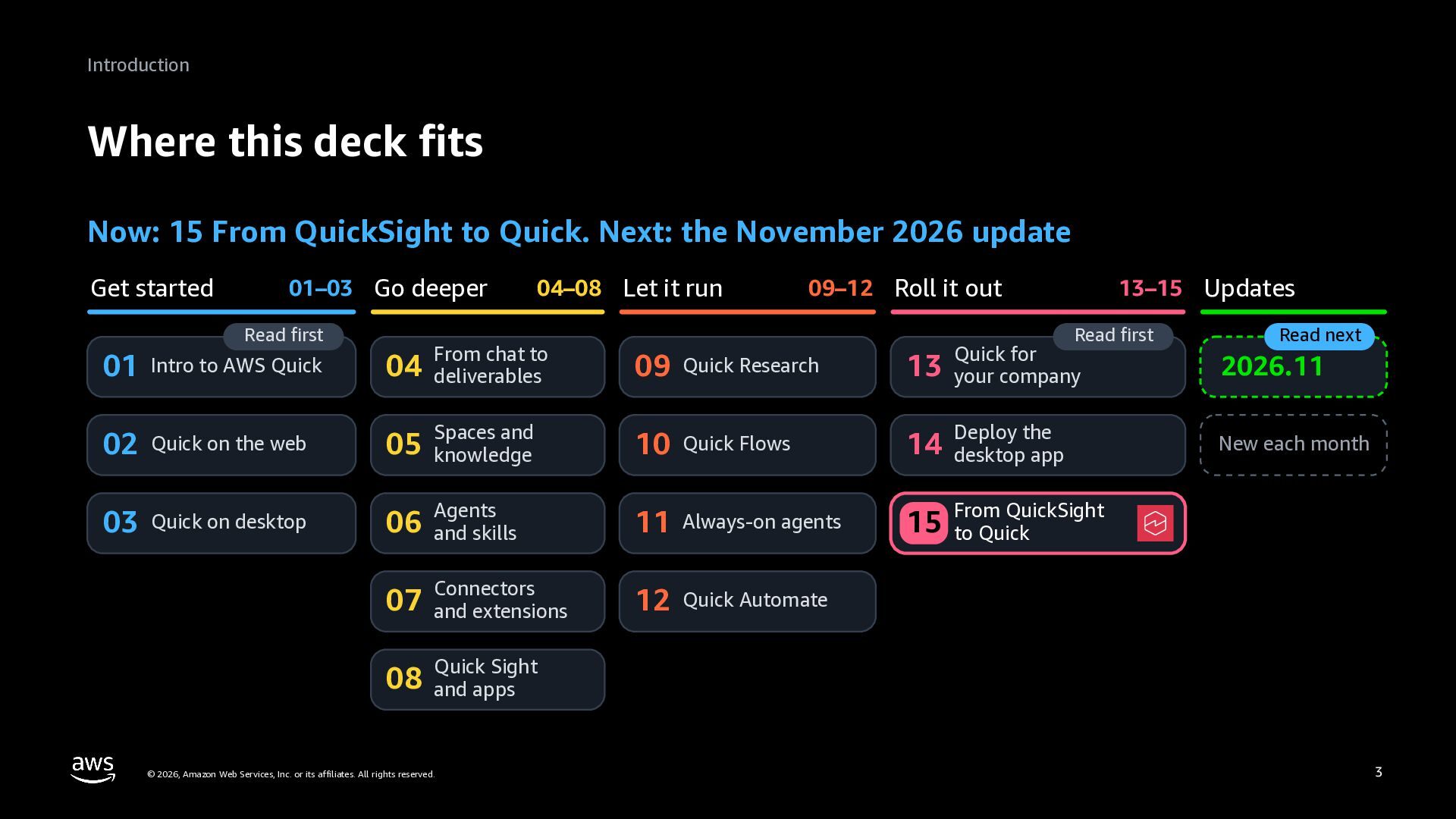
Introduction Where this deck fits Now: 15 From QuickSight to
Quick. Next: the November 2026 update Get started 01–03 Go deeper Read first 04–08 Let it run 01 Intro to AWS Quick From chat to 04 deliverables 02 Quick on the web 03 Quick on desktop 09–12 Roll it out 13–15 Updates Read first 09 Quick Research Quick for 13 your company 05 knowledge 10 Quick Flows 14 desktop app 06 Agents and skills 11 Always-on agents QuickSight 15 From to Quick 07 Connectors and extensions 12 Quick Automate Spaces and Deploy the Read next 2026.11 New each month Sight 08 Quick and apps © 2026, Amazon Web Services, Inc. or its affiliates. All rights reserved. 3 -
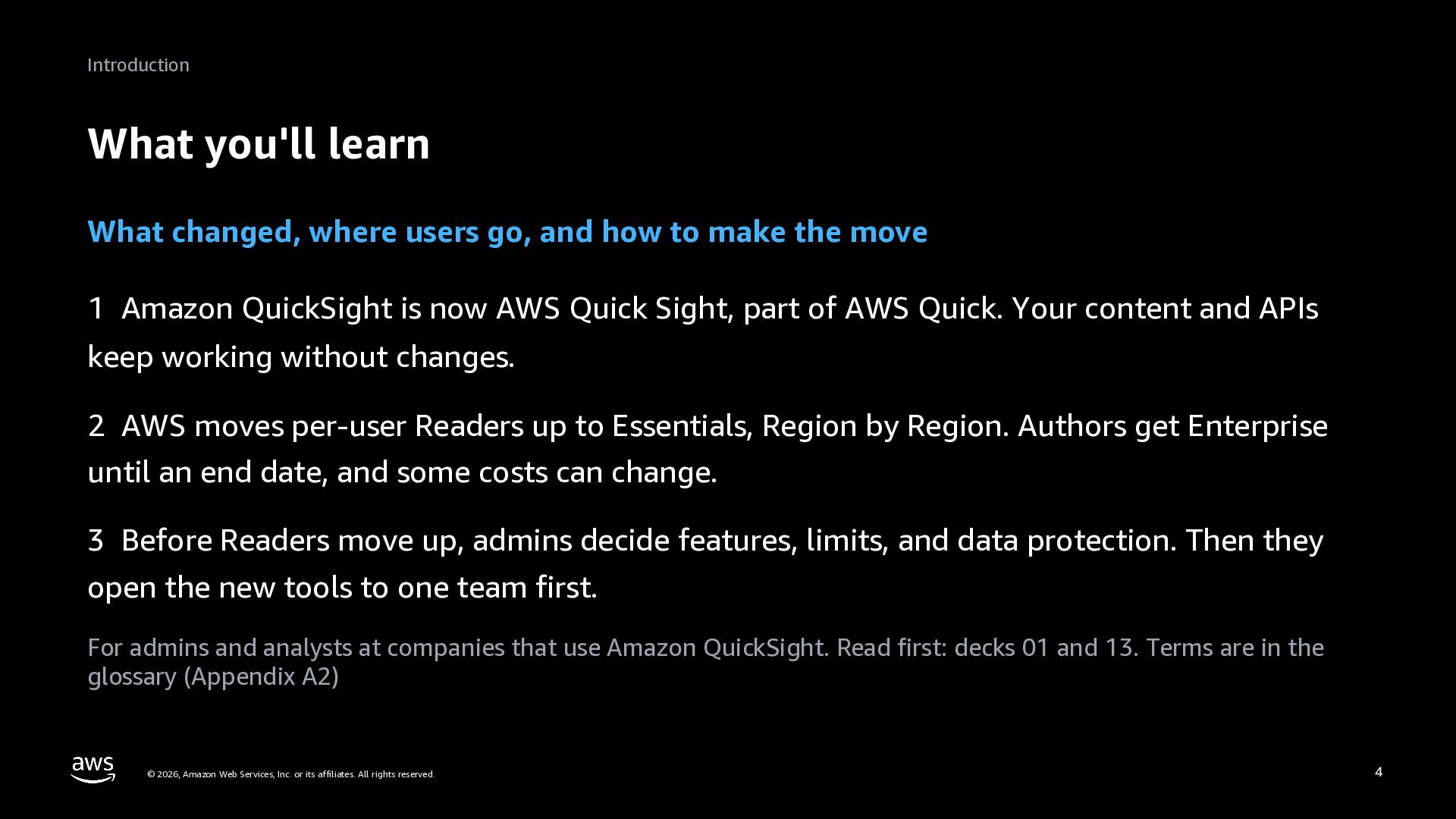
Introduction What you'll learn What changed, where users go, and
how to make the move 1 Amazon QuickSight is now AWS Quick Sight, part of AWS Quick. Your content and APIs keep working without changes. 2 AWS moves per-user Readers up to Essentials, Region by Region. Authors get Enterprise until an end date, and some costs can change. 3 Before Readers move up, admins decide features, limits, and data protection. Then they open the new tools to one team first. For admins and analysts at companies that use Amazon QuickSight. Read first: decks 01 and 13. Terms are in the glossary (Appendix A2) © 2026, Amazon Web Services, Inc. or its affiliates. All rights reserved. 4 -
What changed © 2026, Amazon Web Services, Inc. or its
affiliates. All rights reserved. 5 -
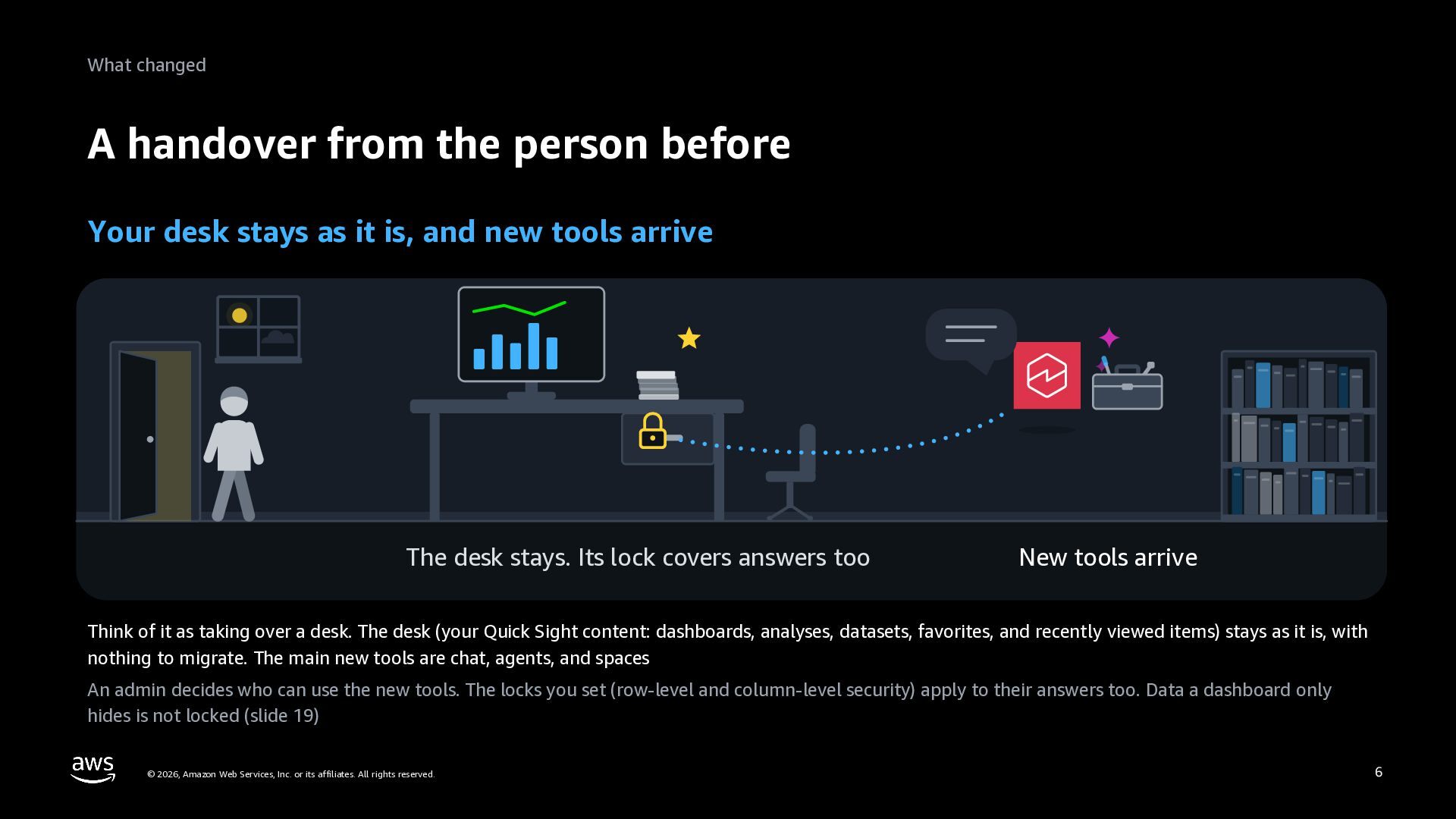
What changed A handover from the person before Your desk
stays as it is, and new tools arrive The desk stays. Its lock covers answers too New tools arrive Think of it as taking over a desk. The desk (your Quick Sight content: dashboards, analyses, datasets, favorites, and recently viewed items) stays as it is, with nothing to migrate. The main new tools are chat, agents, and spaces An admin decides who can use the new tools. The locks you set (row-level and column-level security) apply to their answers too. Data a dashboard only hides is not locked (slide 19) © 2026, Amazon Web Services, Inc. or its affiliates. All rights reserved. 6 -
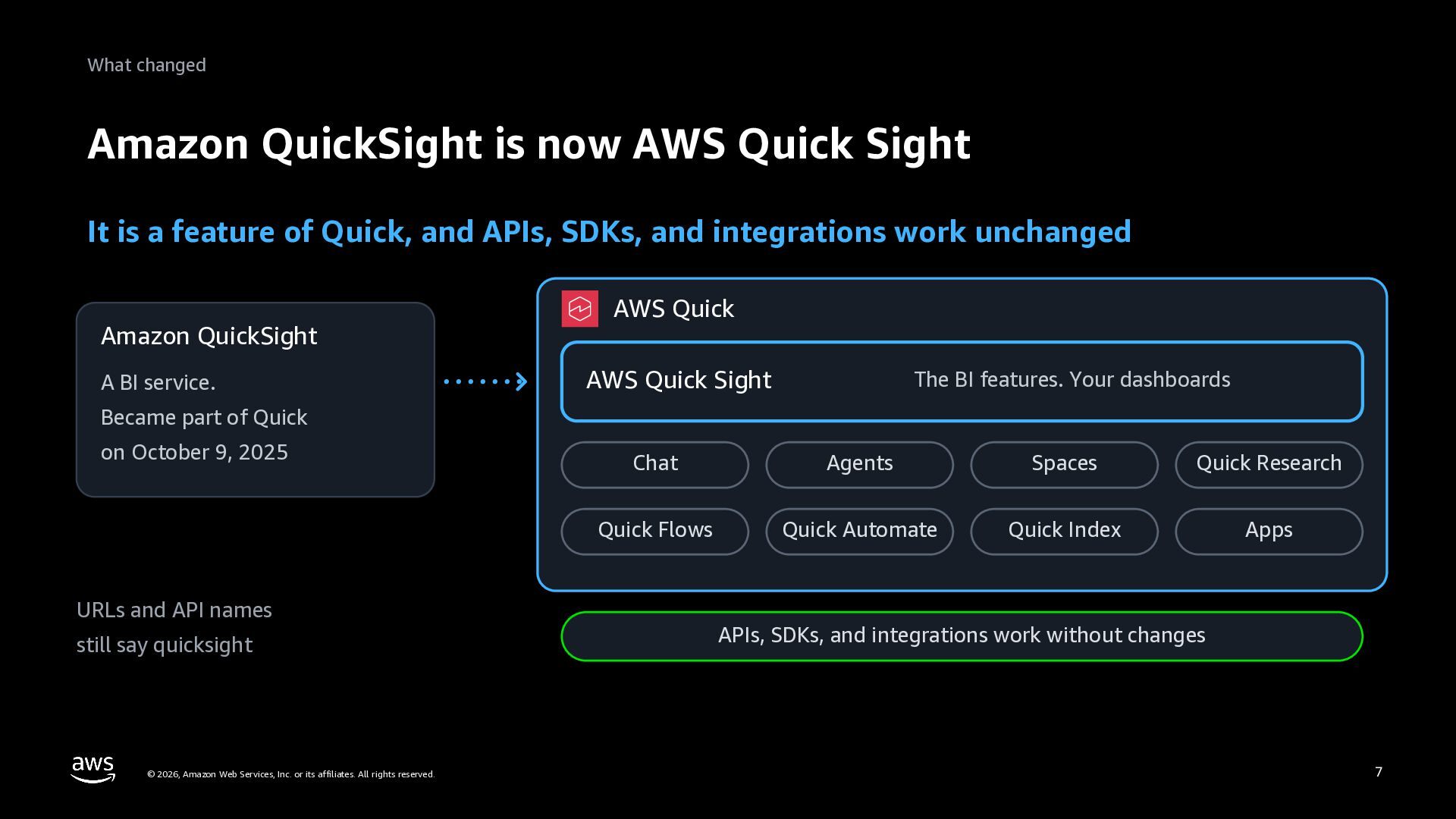
What changed Amazon QuickSight is now AWS Quick Sight It
is a feature of Quick, and APIs, SDKs, and integrations work unchanged Amazon QuickSight A BI service. AWS Quick AWS Quick Sight The BI features. Your dashboards Became part of Quick on October 9, 2025 URLs and API names still say quicksight © 2026, Amazon Web Services, Inc. or its affiliates. All rights reserved. Chat Agents Spaces Quick Research Quick Flows Quick Automate Quick Index Apps APIs, SDKs, and integrations work without changes 7 -
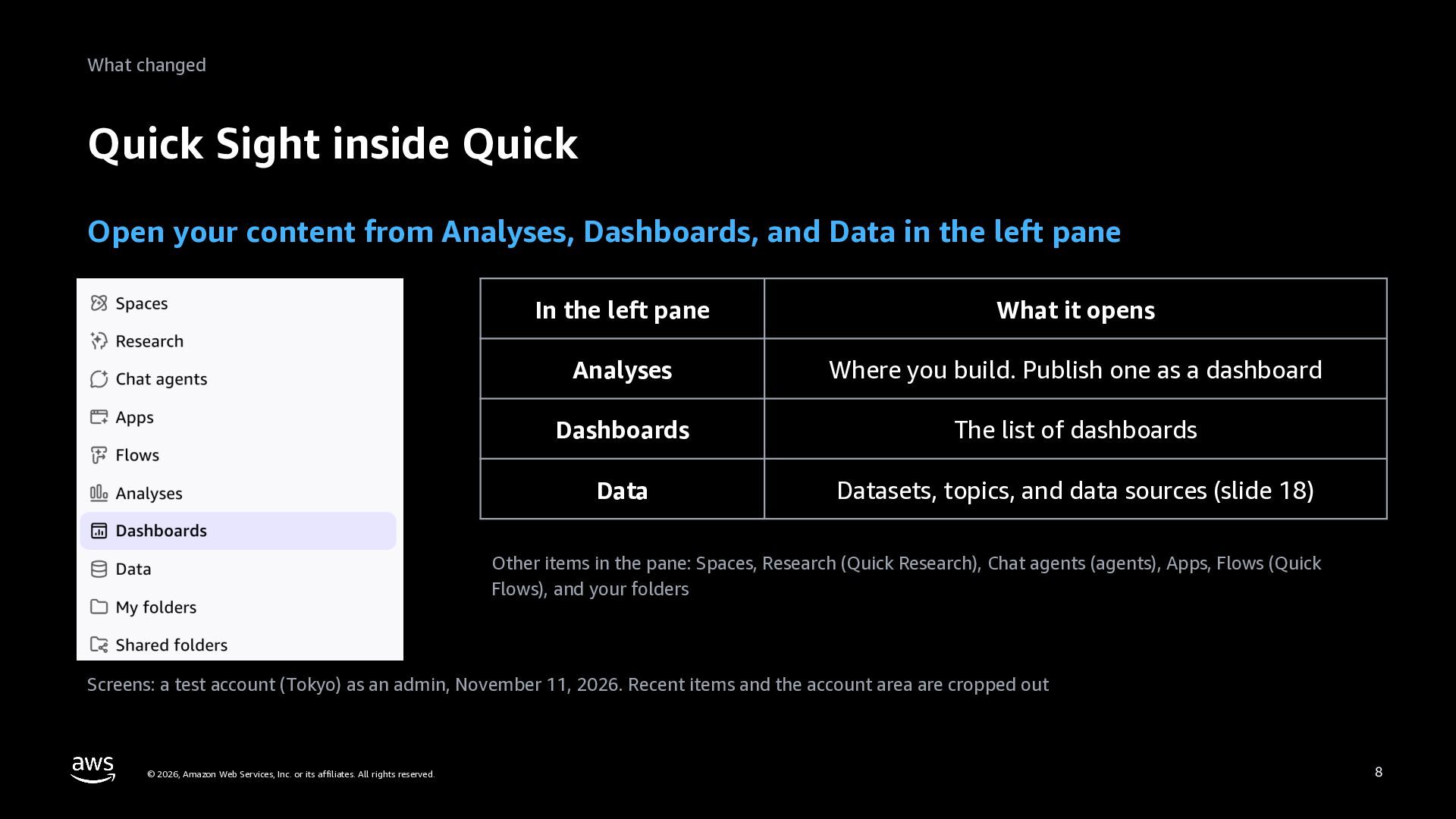
What changed Quick Sight inside Quick Open your content from
Analyses, Dashboards, and Data in the left pane In the left pane What it opens Analyses Where you build. Publish one as a dashboard Dashboards The list of dashboards Data Datasets, topics, and data sources (slide 18) Other items in the pane: Spaces, Research (Quick Research), Chat agents (agents), Apps, Flows (Quick Flows), and your folders Screens: a test account (Tokyo) as an admin, November 11, 2026. Recent items and the account area are cropped out © 2026, Amazon Web Services, Inc. or its affiliates. All rights reserved. 8 -
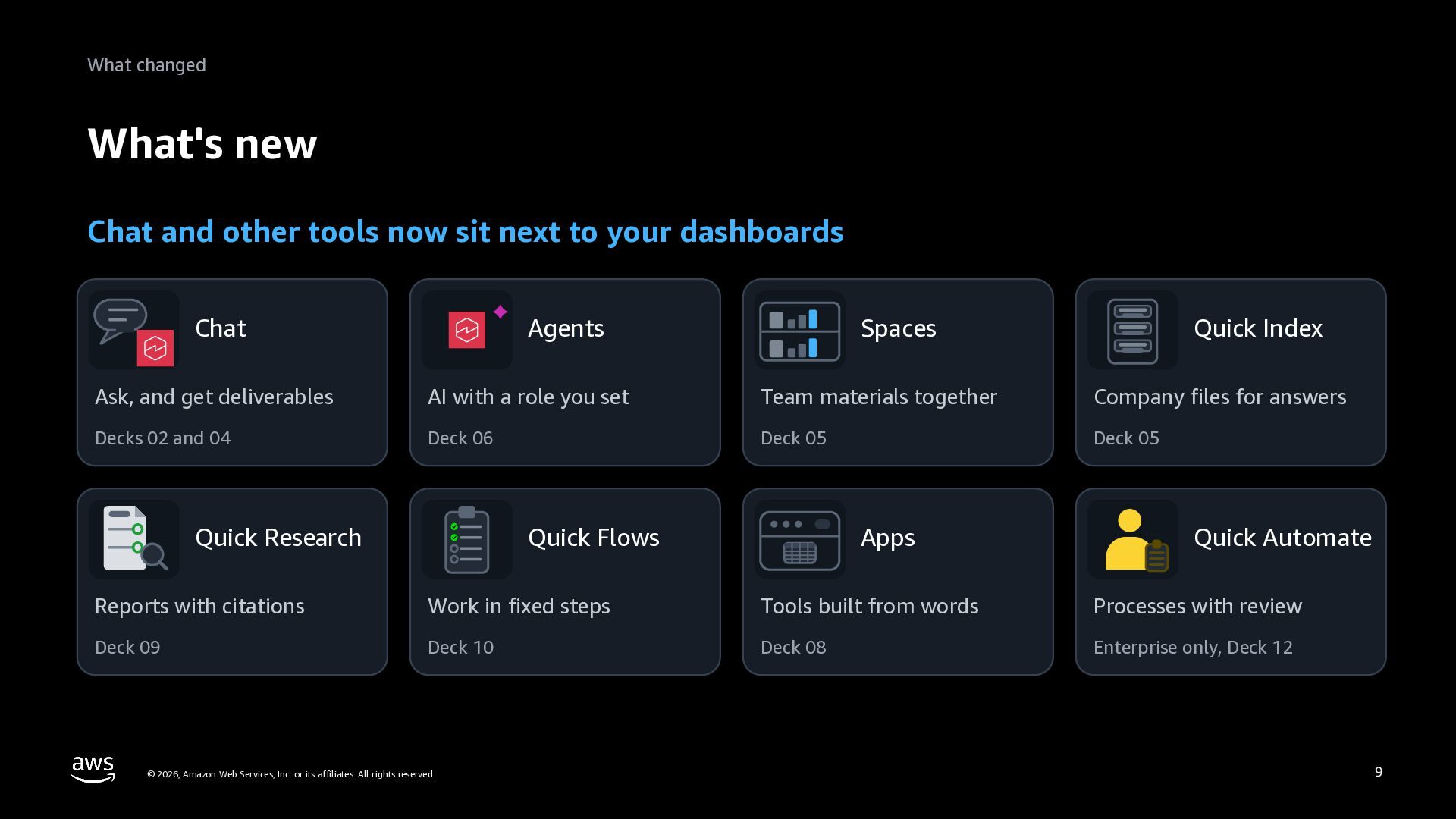
What changed What's new Chat and other tools now sit
next to your dashboards Chat Agents Spaces Quick Index Ask, and get deliverables AI with a role you set Team materials together Company files for answers Decks 02 and 04 Deck 06 Deck 05 Deck 05 Quick Research Quick Flows Apps Quick Automate Reports with citations Work in fixed steps Tools built from words Processes with review Deck 09 Deck 10 Deck 08 Enterprise only, Deck 12 © 2026, Amazon Web Services, Inc. or its affiliates. All rights reserved. 9 -
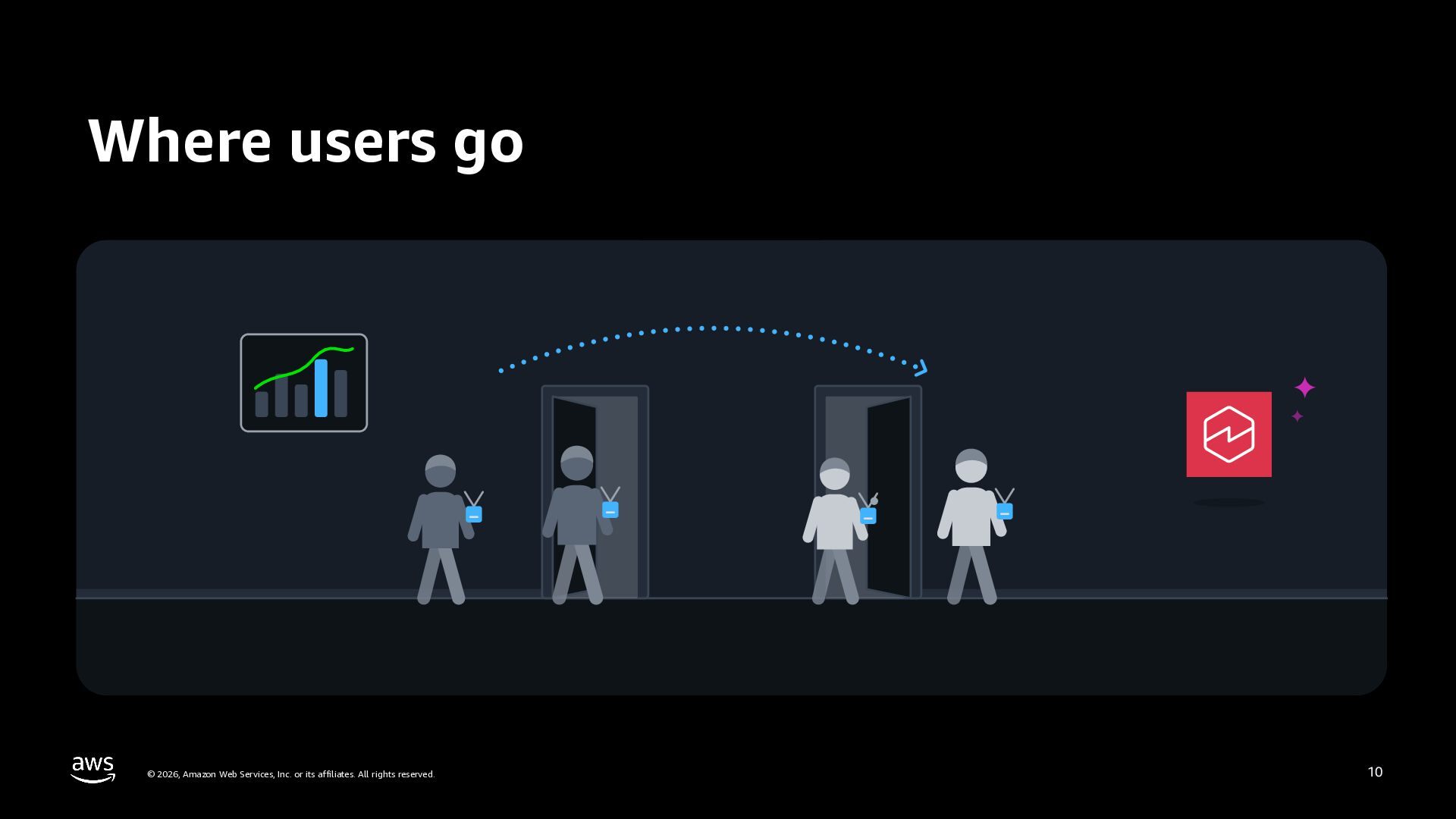
Where users go © 2026, Amazon Web Services, Inc. or
its affiliates. All rights reserved. 10 -
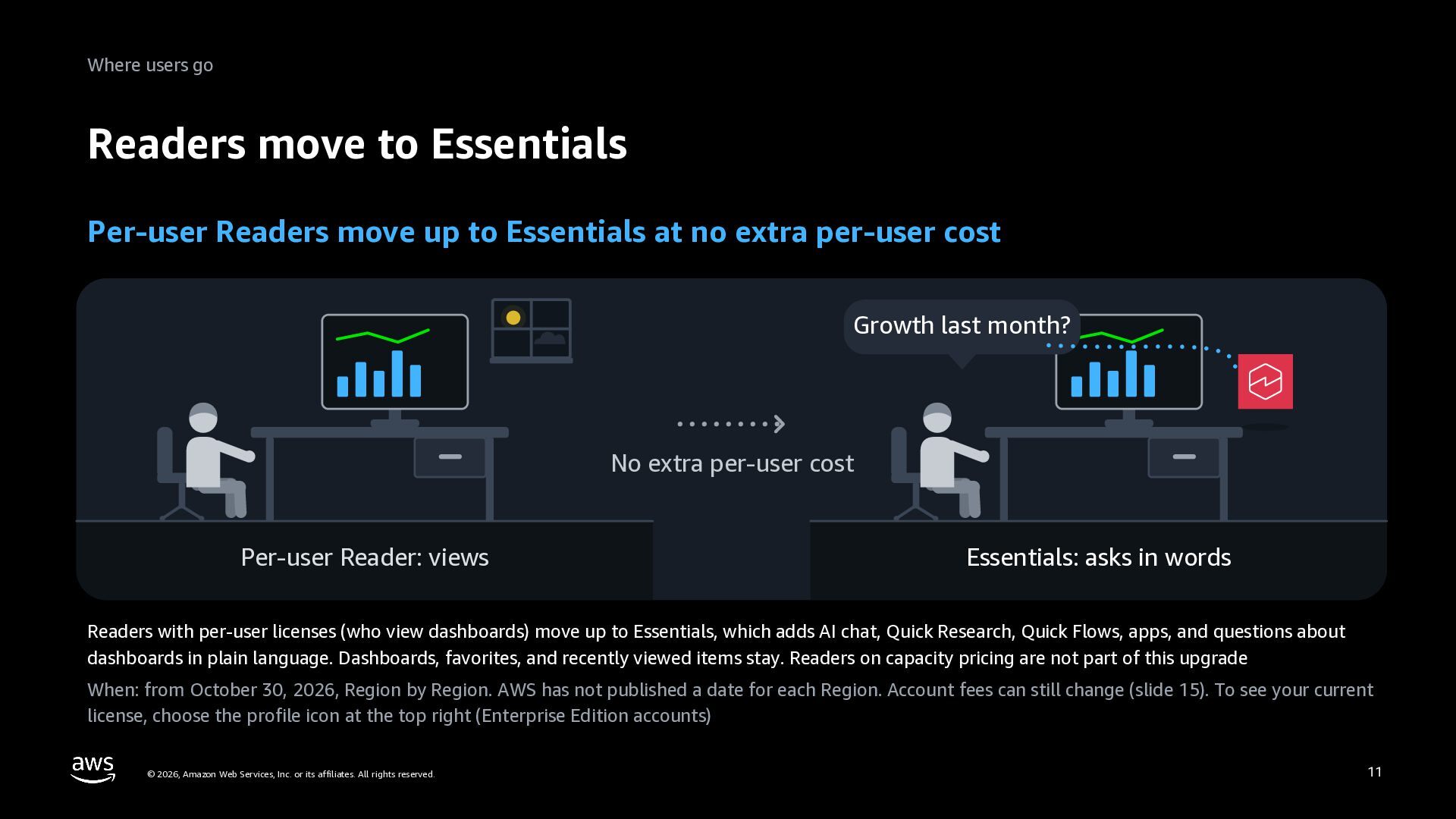
Where users go Readers move to Essentials Per-user Readers move
up to Essentials at no extra per-user cost Growth last month? No extra per-user cost Per-user Reader: views Essentials: asks in words Readers with per-user licenses (who view dashboards) move up to Essentials, which adds AI chat, Quick Research, Quick Flows, apps, and questions about dashboards in plain language. Dashboards, favorites, and recently viewed items stay. Readers on capacity pricing are not part of this upgrade When: from October 30, 2026, Region by Region. AWS has not published a date for each Region. Account fees can still change (slide 15). To see your current license, choose the profile icon at the top right (Enterprise Edition accounts) © 2026, Amazon Web Services, Inc. or its affiliates. All rights reserved. 11 -
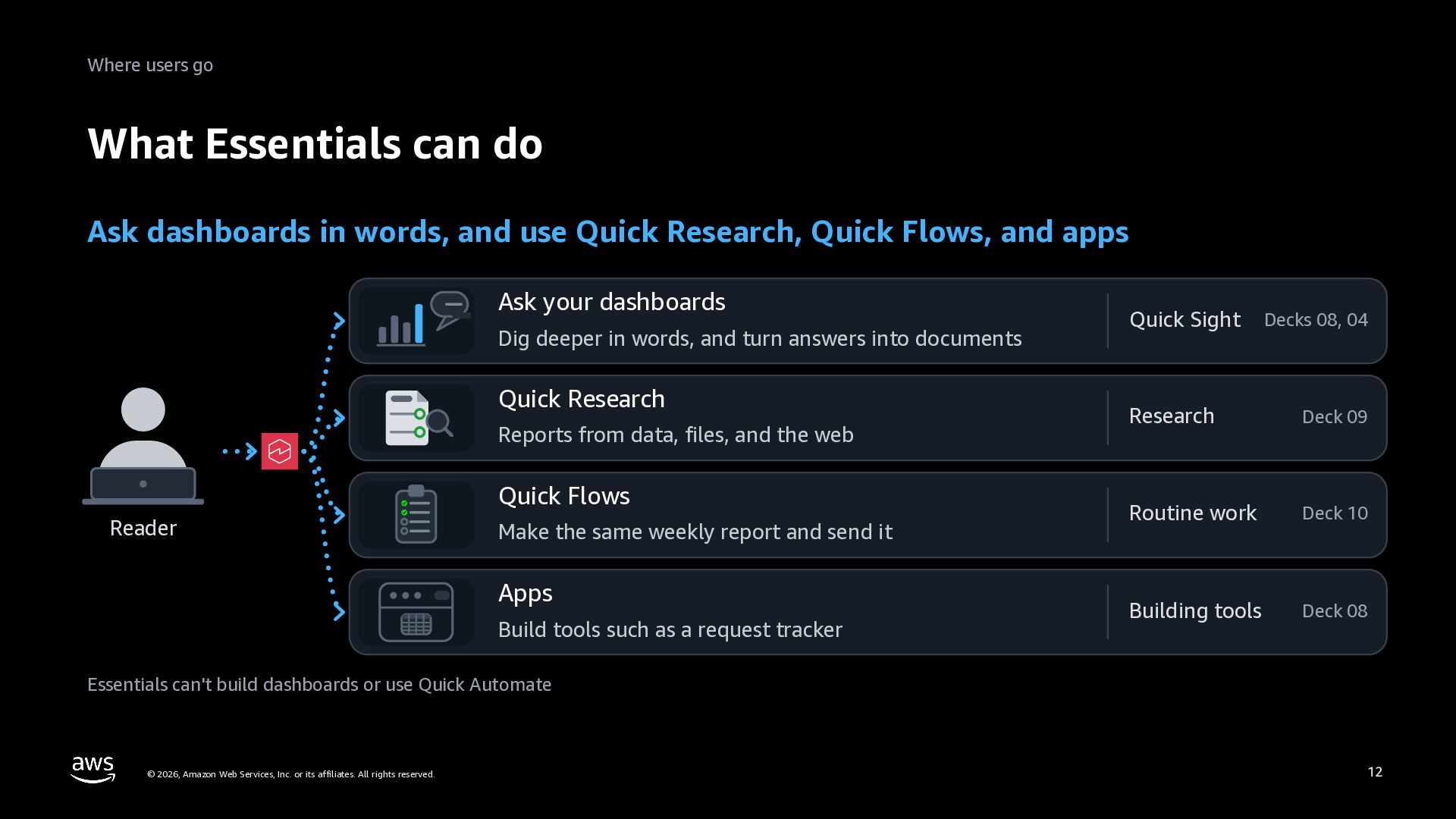
Where users go What Essentials can do Ask dashboards in
words, and use Quick Research, Quick Flows, and apps Ask your dashboards Dig deeper in words, and turn answers into documents Quick Research Reports from data, files, and the web Quick Flows Reader Make the same weekly report and send it Apps Build tools such as a request tracker Quick Sight Decks 08, 04 Research Deck 09 Routine work Deck 10 Building tools Deck 08 Essentials can't build dashboards or use Quick Automate © 2026, Amazon Web Services, Inc. or its affiliates. All rights reserved. 12 -
Where users go Where Authors go Authors move up to
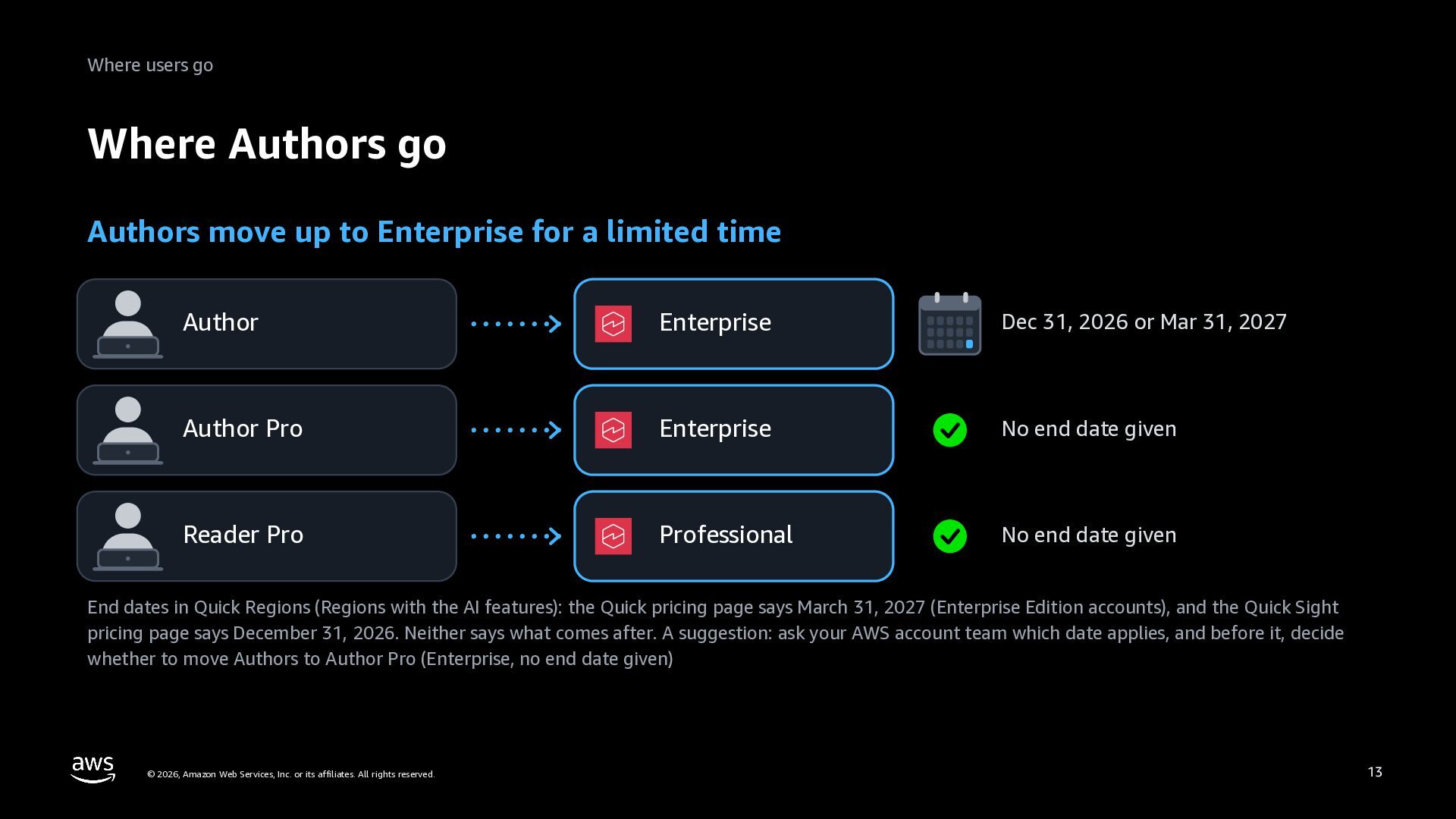
Enterprise for a limited time Author Enterprise Dec 31, 2026 or Mar 31, 2027 Author Pro Enterprise No end date given Reader Pro Professional No end date given End dates in Quick Regions (Regions with the AI features): the Quick pricing page says March 31, 2027 (Enterprise Edition accounts), and the Quick Sight pricing page says December 31, 2026. Neither says what comes after. A suggestion: ask your AWS account team which date applies, and before it, decide whether to move Authors to Author Pro (Enterprise, no end date given) © 2026, Amazon Web Services, Inc. or its affiliates. All rights reserved. 13 -
Where users go Companies that use only BI If you
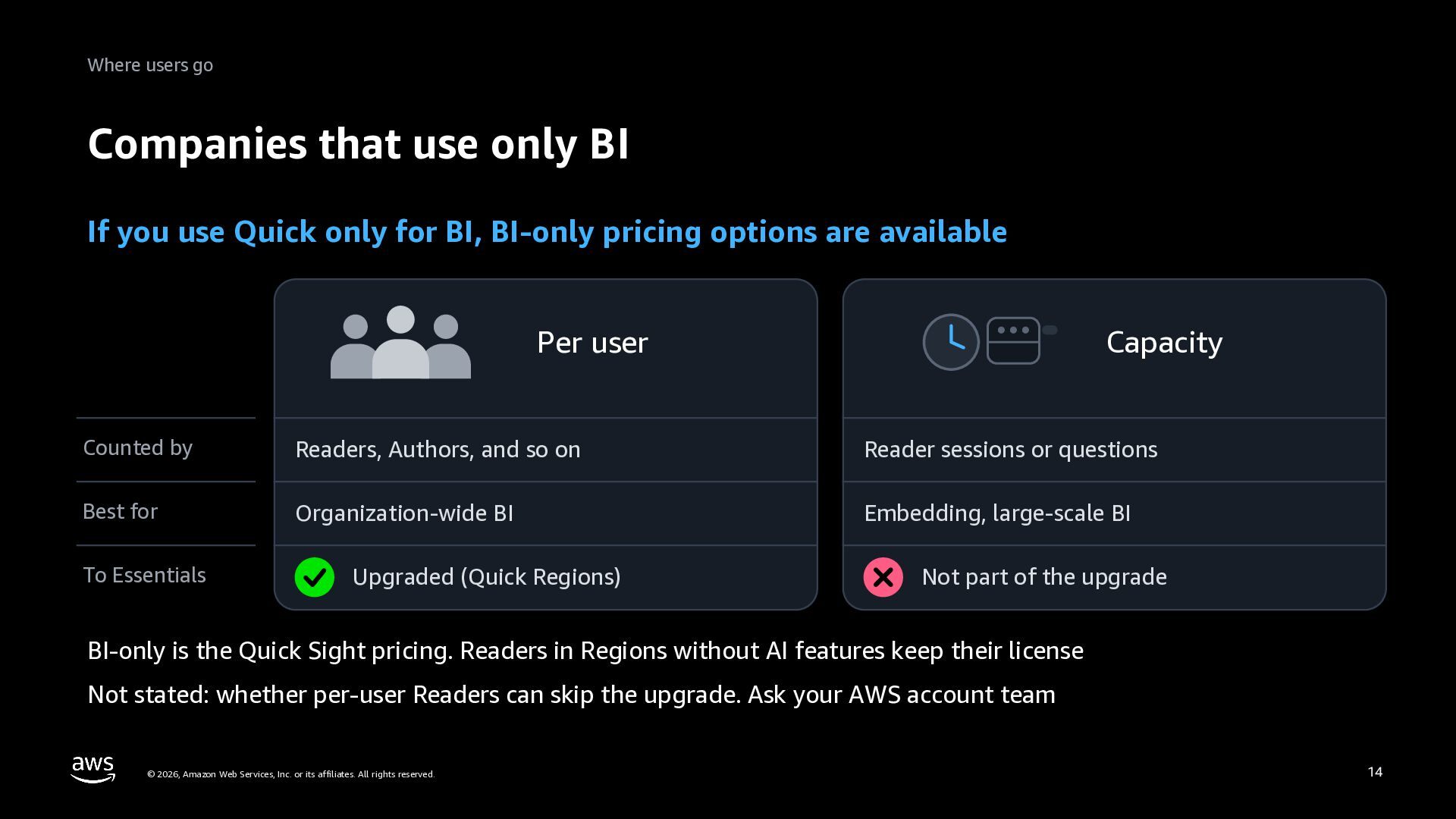
use Quick only for BI, BI-only pricing options are available Per user Capacity Counted by Readers, Authors, and so on Reader sessions or questions Best for Organization-wide BI Embedding, large-scale BI To Essentials Upgraded (Quick Regions) Not part of the upgrade BI-only is the Quick Sight pricing. Readers in Regions without AI features keep their license Not stated: whether per-user Readers can skip the upgrade. Ask your AWS account team © 2026, Amazon Web Services, Inc. or its affiliates. All rights reserved. 14 -
Where users go Where costs change Costs depend on the
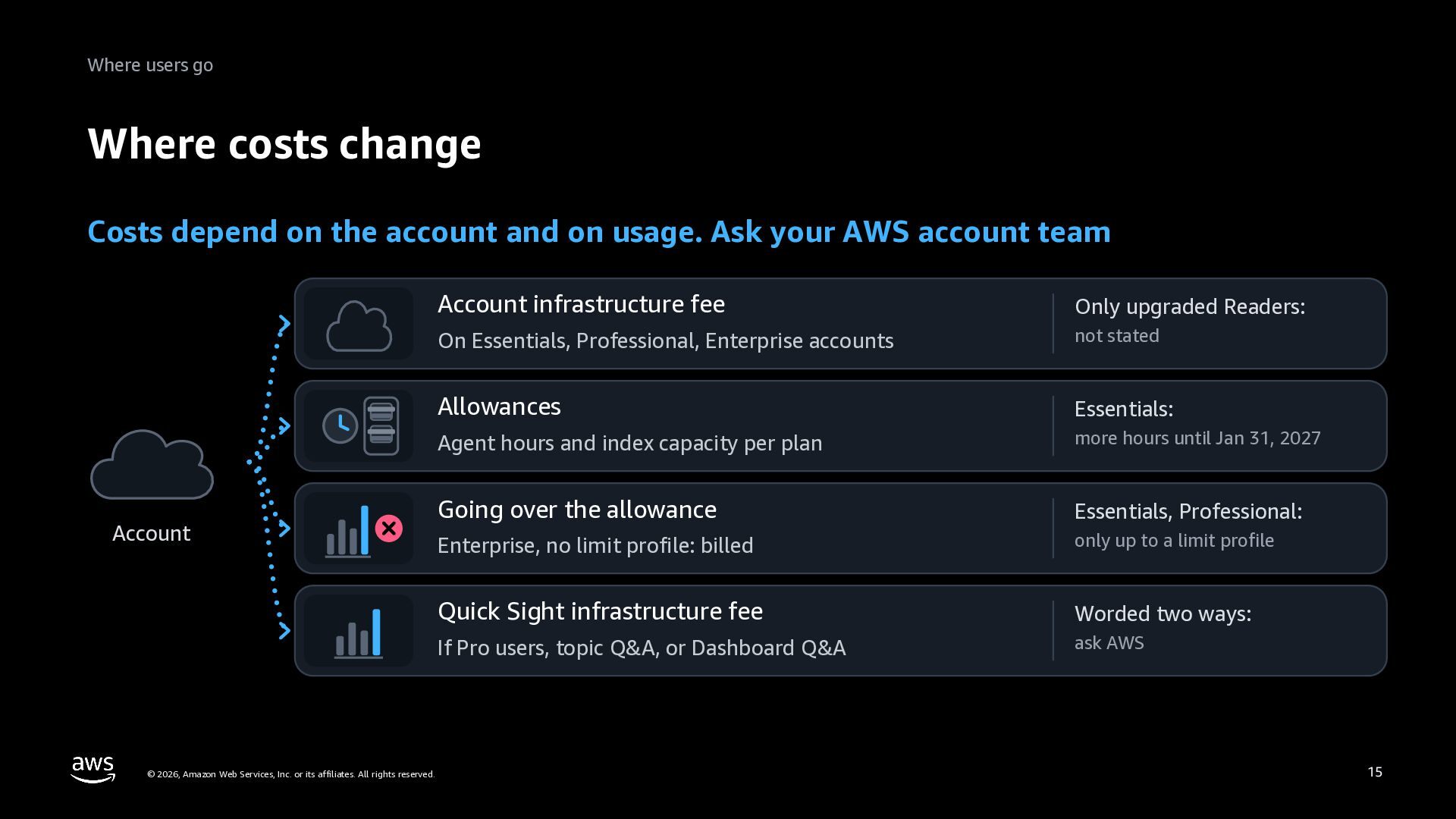
account and on usage. Ask your AWS account team Account © 2026, Amazon Web Services, Inc. or its affiliates. All rights reserved. Account infrastructure fee Only upgraded Readers: On Essentials, Professional, Enterprise accounts not stated Allowances Essentials: Agent hours and index capacity per plan more hours until Jan 31, 2027 Going over the allowance Essentials, Professional: Enterprise, no limit profile: billed only up to a limit profile Quick Sight infrastructure fee Worded two ways: If Pro users, topic Q&A, or Dashboard Q&A ask AWS 15 -
Making the move © 2026, Amazon Web Services, Inc. or
its affiliates. All rights reserved. 16 -
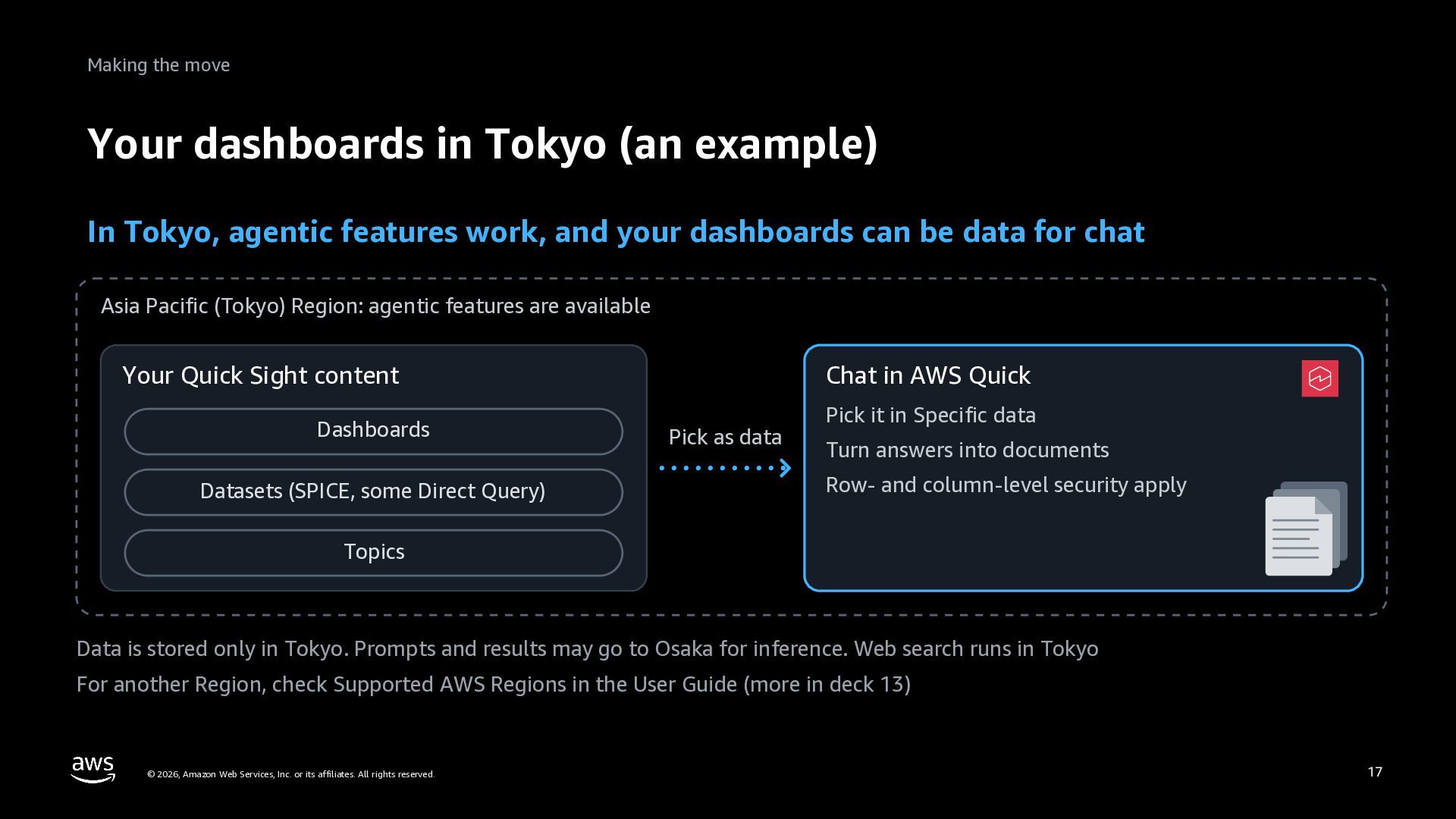
Making the move Your dashboards in Tokyo (an example) In
Tokyo, agentic features work, and your dashboards can be data for chat Asia Pacific (Tokyo) Region: agentic features are available Your Quick Sight content Dashboards Datasets (SPICE, some Direct Query) Chat in AWS Quick Pick as data Pick it in Specific data Turn answers into documents Row- and column-level security apply Topics Data is stored only in Tokyo. Prompts and results may go to Osaka for inference. Web search runs in Tokyo For another Region, check Supported AWS Regions in the User Guide (more in deck 13) © 2026, Amazon Web Services, Inc. or its affiliates. All rights reserved. 17 -
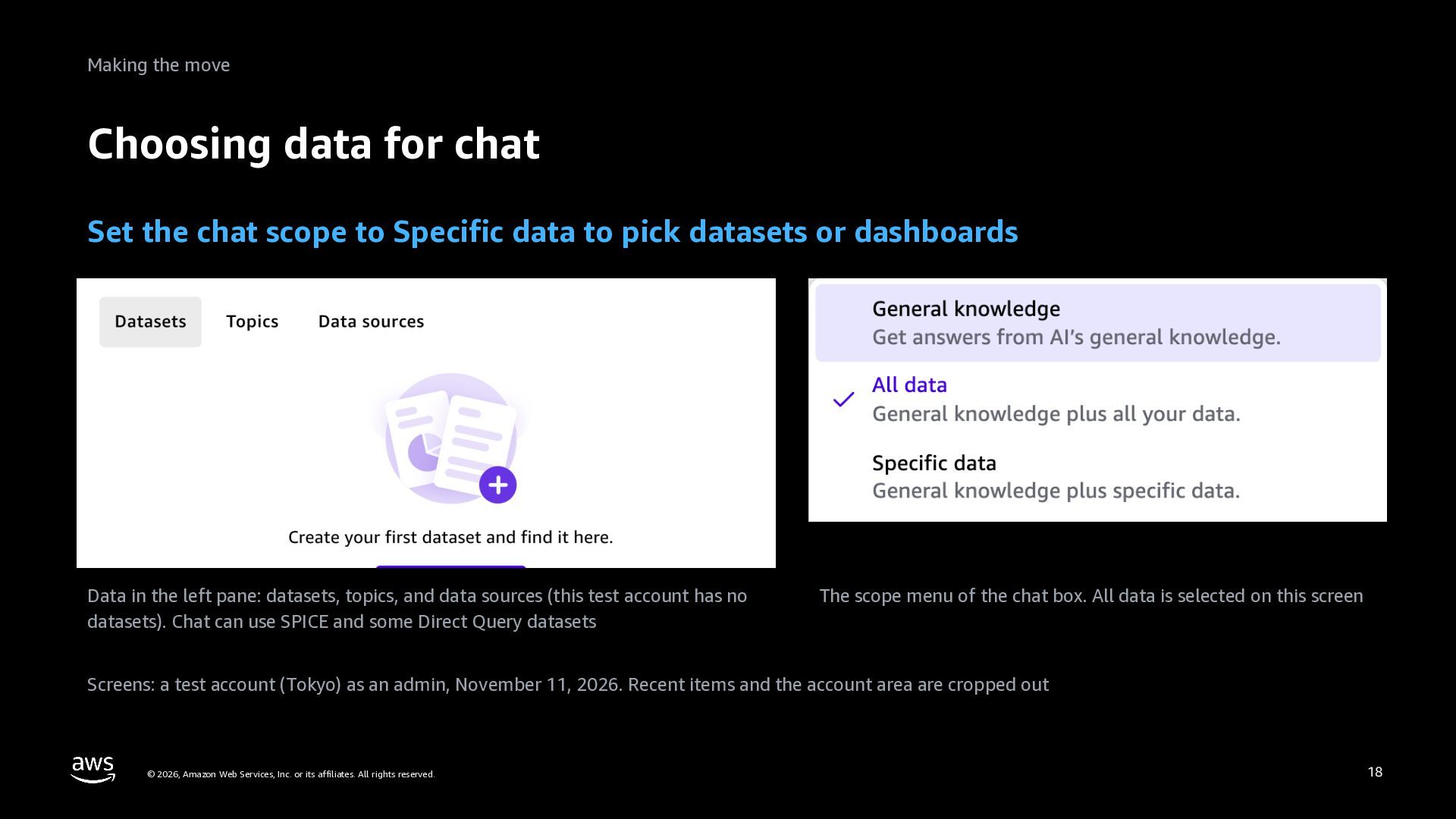
Making the move Choosing data for chat Set the chat
scope to Specific data to pick datasets or dashboards Data in the left pane: datasets, topics, and data sources (this test account has no datasets). Chat can use SPICE and some Direct Query datasets The scope menu of the chat box. All data is selected on this screen Screens: a test account (Tokyo) as an admin, November 11, 2026. Recent items and the account area are cropped out © 2026, Amazon Web Services, Inc. or its affiliates. All rights reserved. 18 -
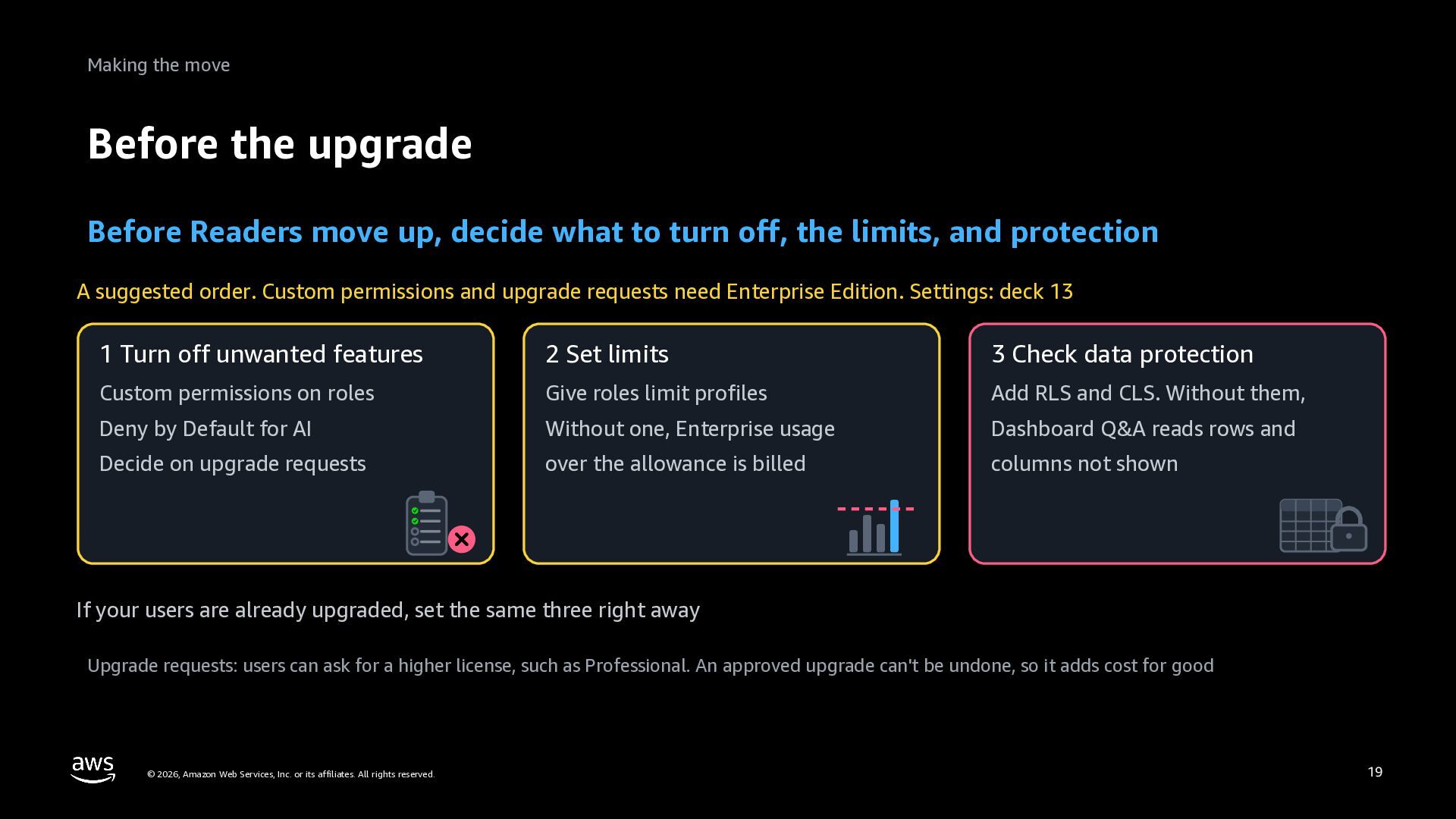
Making the move Before the upgrade Before Readers move up,
decide what to turn off, the limits, and protection A suggested order. Custom permissions and upgrade requests need Enterprise Edition. Settings: deck 13 1 Turn off unwanted features 2 Set limits 3 Check data protection Custom permissions on roles Give roles limit profiles Add RLS and CLS. Without them, Deny by Default for AI Without one, Enterprise usage Dashboard Q&A reads rows and Decide on upgrade requests over the allowance is billed columns not shown If your users are already upgraded, set the same three right away Upgrade requests: users can ask for a higher license, such as Professional. An approved upgrade can't be undone, so it adds cost for good © 2026, Amazon Web Services, Inc. or its affiliates. All rights reserved. 19 -
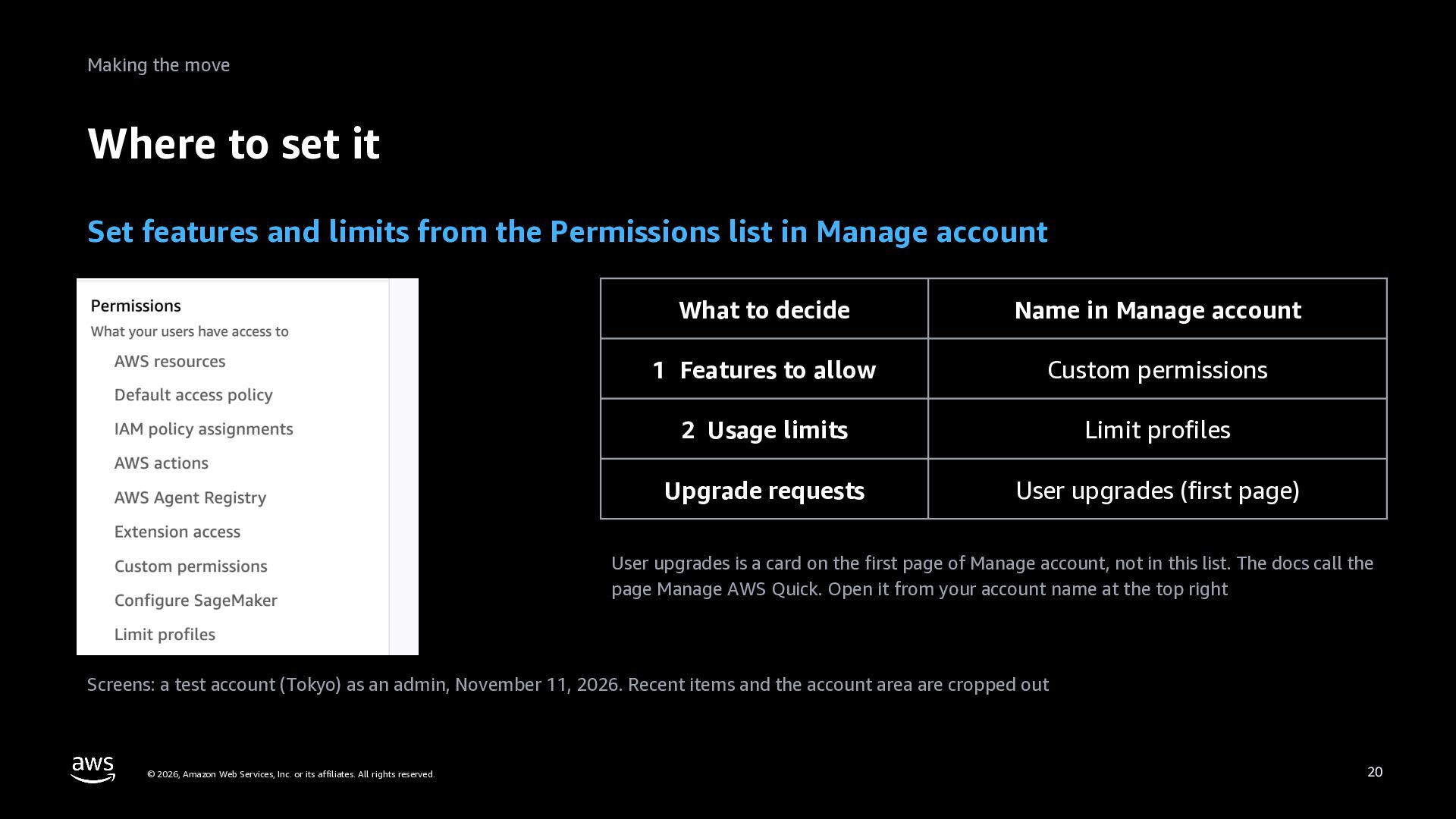
Making the move Where to set it Set features and
limits from the Permissions list in Manage account What to decide Name in Manage account 1 Features to allow Custom permissions 2 Usage limits Limit profiles Upgrade requests User upgrades (first page) User upgrades is a card on the first page of Manage account, not in this list. The docs call the page Manage AWS Quick. Open it from your account name at the top right Screens: a test account (Tokyo) as an admin, November 11, 2026. Recent items and the account area are cropped out © 2026, Amazon Web Services, Inc. or its affiliates. All rights reserved. 20 -
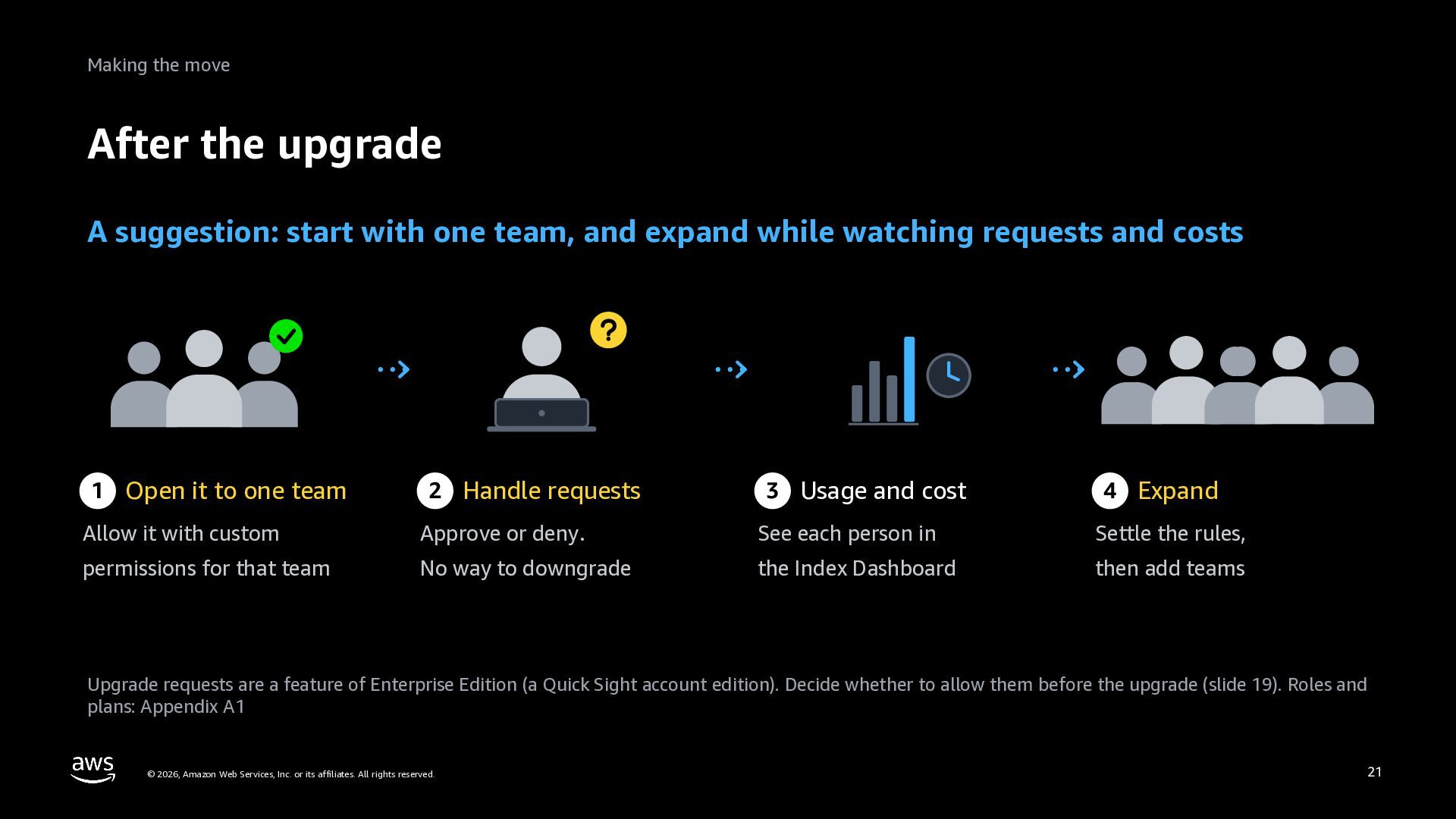
Making the move After the upgrade A suggestion: start with
one team, and expand while watching requests and costs 1 Open it to one team 2 Handle requests 3 Usage and cost 4 Expand Allow it with custom Approve or deny. See each person in Settle the rules, permissions for that team No way to downgrade the Index Dashboard then add teams Upgrade requests are a feature of Enterprise Edition (a Quick Sight account edition). Decide whether to allow them before the upgrade (slide 19). Roles and plans: Appendix A1 © 2026, Amazon Web Services, Inc. or its affiliates. All rights reserved. 21 -
Summary © 2026, Amazon Web Services, Inc. or its affiliates.
All rights reserved. 22 -
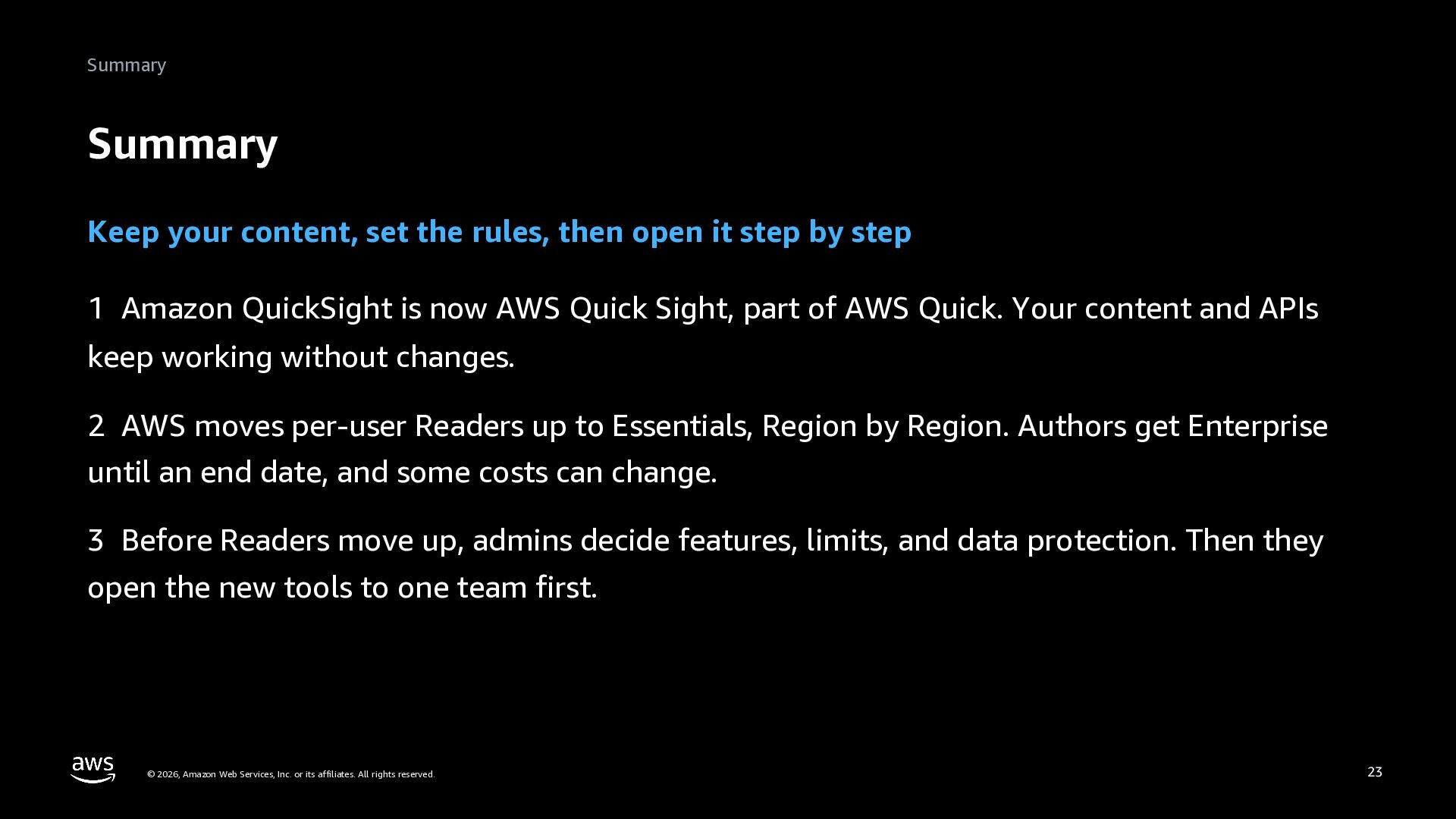
Summary Summary Keep your content, set the rules, then open
it step by step 1 Amazon QuickSight is now AWS Quick Sight, part of AWS Quick. Your content and APIs keep working without changes. 2 AWS moves per-user Readers up to Essentials, Region by Region. Authors get Enterprise until an end date, and some costs can change. 3 Before Readers move up, admins decide features, limits, and data protection. Then they open the new tools to one team first. © 2026, Amazon Web Services, Inc. or its affiliates. All rights reserved. 23 -
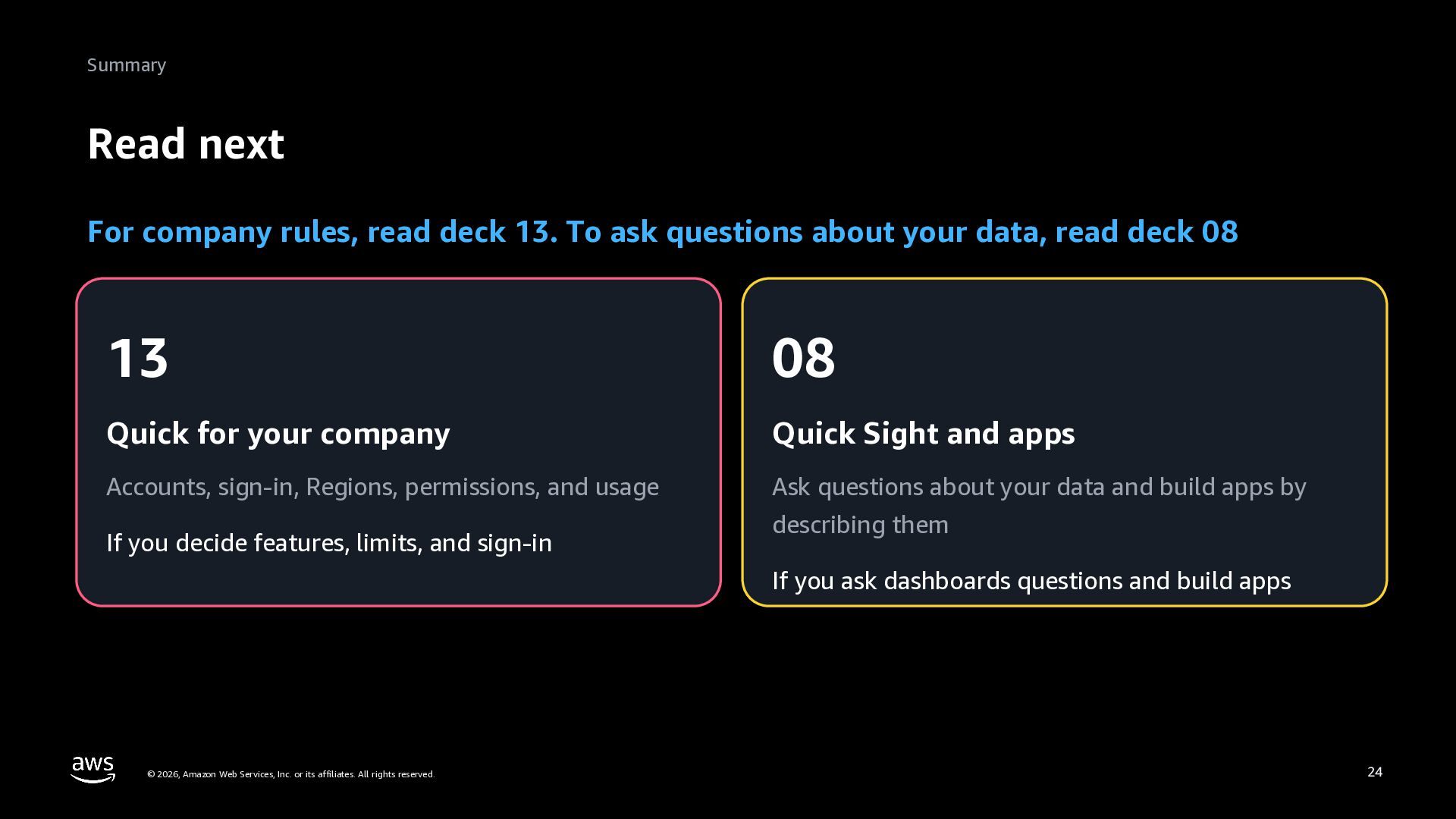
Summary Read next For company rules, read deck 13. To
ask questions about your data, read deck 08 13 08 Quick for your company Quick Sight and apps Accounts, sign-in, Regions, permissions, and usage Ask questions about your data and build apps by If you decide features, limits, and sign-in describing them If you ask dashboards questions and build apps © 2026, Amazon Web Services, Inc. or its affiliates. All rights reserved. 24 -
Appendix © 2026, Amazon Web Services, Inc. or its affiliates.
All rights reserved. 25 -
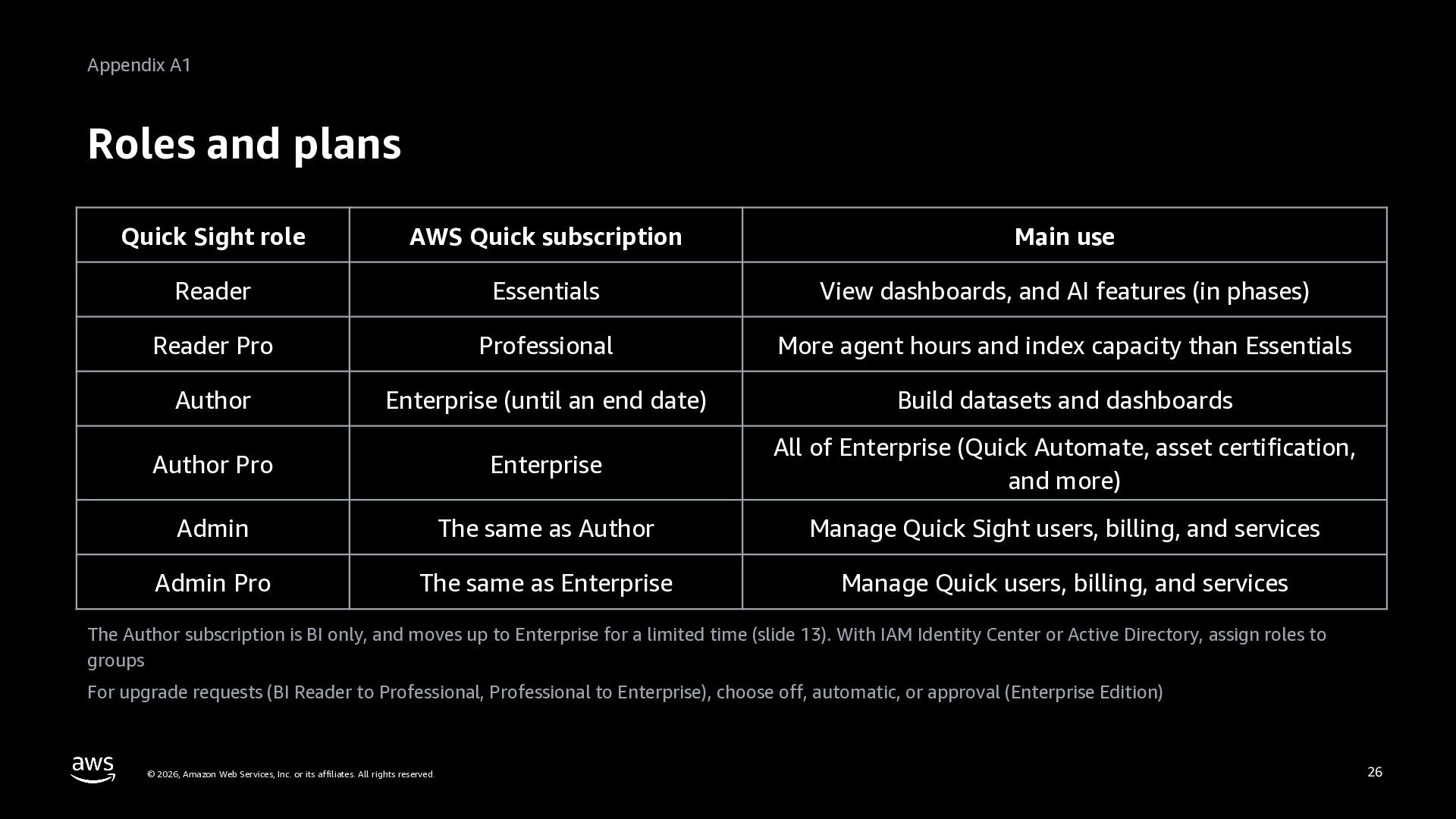
Appendix A1 Roles and plans Quick Sight role AWS Quick
subscription Main use Reader Essentials View dashboards, and AI features (in phases) Reader Pro Professional More agent hours and index capacity than Essentials Author Enterprise (until an end date) Build datasets and dashboards Author Pro Enterprise All of Enterprise (Quick Automate, asset certification, and more) Admin The same as Author Manage Quick Sight users, billing, and services Admin Pro The same as Enterprise Manage Quick users, billing, and services The Author subscription is BI only, and moves up to Enterprise for a limited time (slide 13). With IAM Identity Center or Active Directory, assign roles to groups For upgrade requests (BI Reader to Professional, Professional to Enterprise), choose off, automatic, or approval (Enterprise Edition) © 2026, Amazon Web Services, Inc. or its affiliates. All rights reserved. 26 -
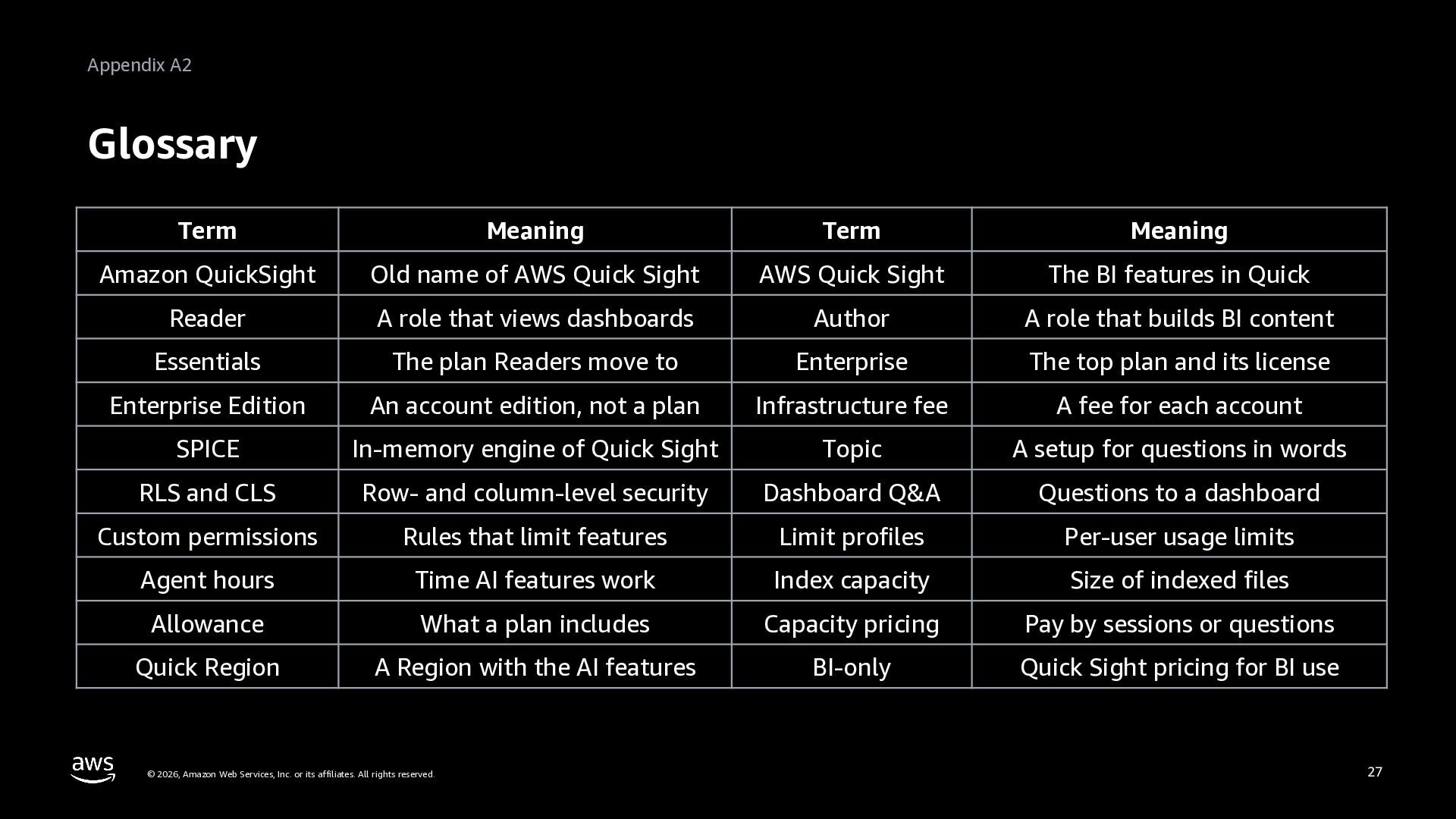
Appendix A2 Glossary Term Meaning Term Meaning Amazon QuickSight Old
name of AWS Quick Sight AWS Quick Sight The BI features in Quick Reader A role that views dashboards Author A role that builds BI content Essentials The plan Readers move to Enterprise The top plan and its license Enterprise Edition An account edition, not a plan Infrastructure fee A fee for each account SPICE In-memory engine of Quick Sight Topic A setup for questions in words RLS and CLS Row- and column-level security Dashboard Q&A Questions to a dashboard Custom permissions Rules that limit features Limit profiles Per-user usage limits Agent hours Time AI features work Index capacity Size of indexed files Allowance What a plan includes Capacity pricing Pay by sessions or questions Quick Region A Region with the AI features BI-only Quick Sight pricing for BI use © 2026, Amazon Web Services, Inc. or its affiliates. All rights reserved. 27 -
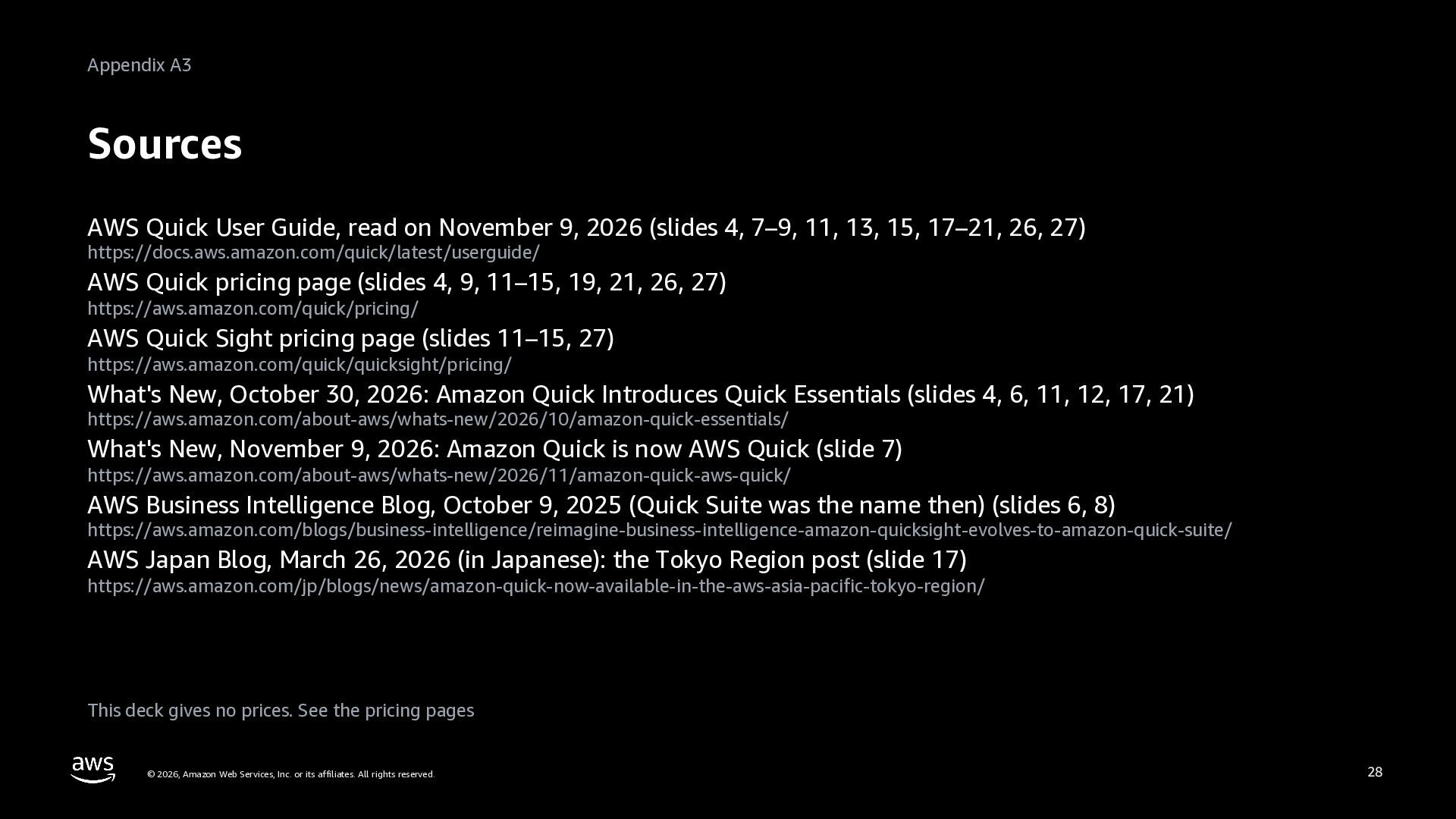
Appendix A3 Sources AWS Quick User Guide, read on November
9, 2026 (slides 4, 7–9, 11, 13, 15, 17–21, 26, 27) https://docs.aws.amazon.com/quick/latest/userguide/ AWS Quick pricing page (slides 4, 9, 11–15, 19, 21, 26, 27) https://aws.amazon.com/quick/pricing/ AWS Quick Sight pricing page (slides 11–15, 27) https://aws.amazon.com/quick/quicksight/pricing/ What's New, October 30, 2026: Amazon Quick Introduces Quick Essentials (slides 4, 6, 11, 12, 17, 21) https://aws.amazon.com/about-aws/whats-new/2026/10/amazon-quick-essentials/ What's New, November 9, 2026: Amazon Quick is now AWS Quick (slide 7) https://aws.amazon.com/about-aws/whats-new/2026/11/amazon-quick-aws-quick/ AWS Business Intelligence Blog, October 9, 2025 (Quick Suite was the name then) (slides 6, 8) https://aws.amazon.com/blogs/business-intelligence/reimagine-business-intelligence-amazon-quicksight-evolves-to-amazon-quick-suite/ AWS Japan Blog, March 26, 2026 (in Japanese): the Tokyo Region post (slide 17) https://aws.amazon.com/jp/blogs/news/amazon-quick-now-available-in-the-aws-asia-pacific-tokyo-region/ This deck gives no prices. See the pricing pages © 2026, Amazon Web Services, Inc. or its affiliates. All rights reserved. 28