Upgrade to Pro — share decks privately, control downloads, hide ads and more …

Multi-agent | Kiro と学ぶ Strands Agents 07

Multi-agent | Kiro と学ぶ Strands Agents 07

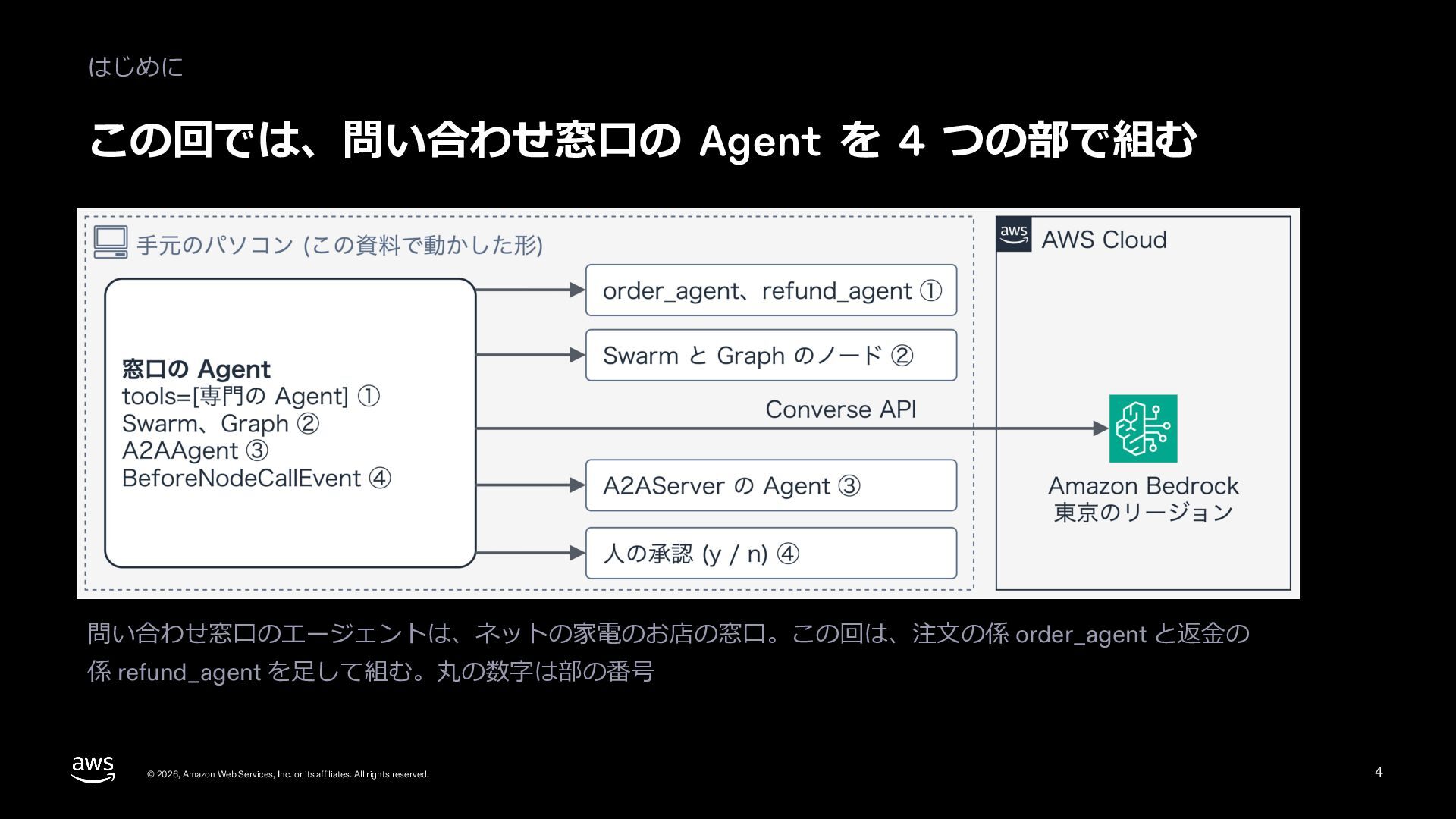
Level 300。Strands Agents (1.64) で複数の Agent を組む 5 つの形を、公式ドキュメントの章立てに沿って、問い合わせ窓口のエージェントのコードと東京の Amazon Bedrock で動かした本物の出力で見せる。Agent を道具として渡す形 (as_tool、delegate)、Swarm と Graph (手渡し、条件付きの辺、OR の既定、ループの上限)、Workflow、A2AAgent と A2AServer、BeforeNodeCallEvent の interrupt による人の承認までを扱う。

Avatar for Riku INADA

Riku INADA PRO

November 11, 2026

More Decks by Riku INADA

Other Decks in Technology

Transcript

  1. Kiro と学ぶ Strands Agents 07 作り込む Multi-agent Agents as tools、Swarm、Graph、A2A

    Level 300 / 2026-11 時点 2026 年 11 ⽉ 稲⽥ ⼤陸 アマゾン ウェブ サービス ジャパン © 2026, Amazon Web Services, Inc. or its affiliates. All rights reserved. 07 Kiro + Strands Agents 1
  2. はじめに ⾃⼰紹介 稲⽥ ⼤陸 いなだ りく (いなりく) アマゾン ウェブ サービス

    ジャパン合同会社 ソリューションアーキテクト 製造業のお客様を中⼼に⽀援 最近の取り組み AI 駆動開発ライフサイクルの推進 Kiro と AWS Amplify の情報発信 © 2026, Amazon Web Services, Inc. or its affiliates. All rights reserved. X @inada_riku Speaker Deck speakerdeck.com/inariku Zenn zenn.dev/inariku GitHub github.com/inariku 2
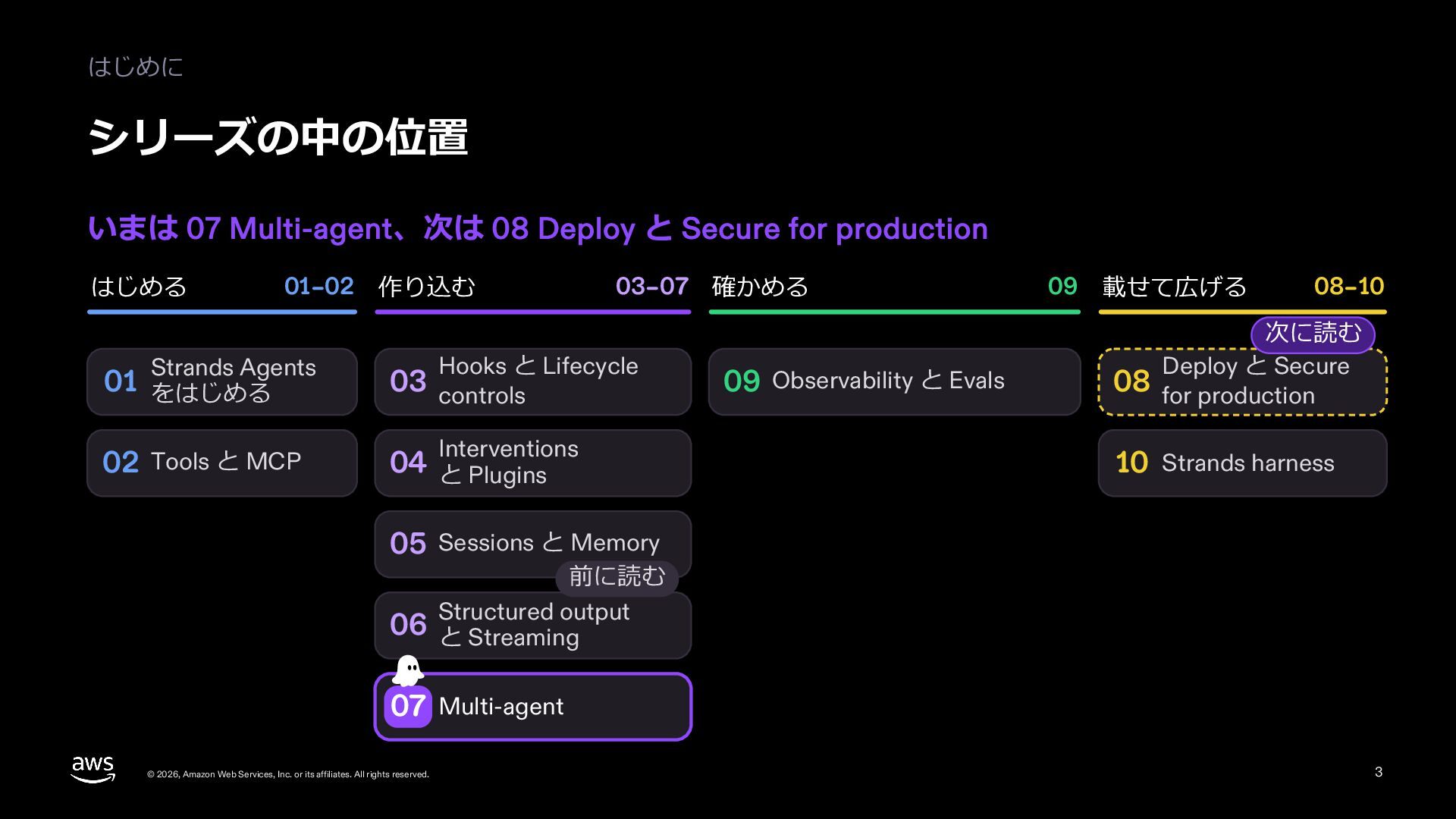
  3. はじめに シリーズの中の位置 いまは 07 Multi-agent、次は 08 Deploy と Secure for

    production はじめる 01–02 作り込む Strands Agents 03–07 確かめる Hooks と Lifecycle 01 をはじめる 03 controls 02 Tools と MCP 04 と Plugins Interventions 09 Observability と Evals 09 載せて広げる 08–10 次に読む Deploy と Secure 08 for production 10 Strands harness 05 Sessions と Memory 前に読む output 06 Structured と Streaming 07 Multi-agent © 2026, Amazon Web Services, Inc. or its affiliates. All rights reserved. 3
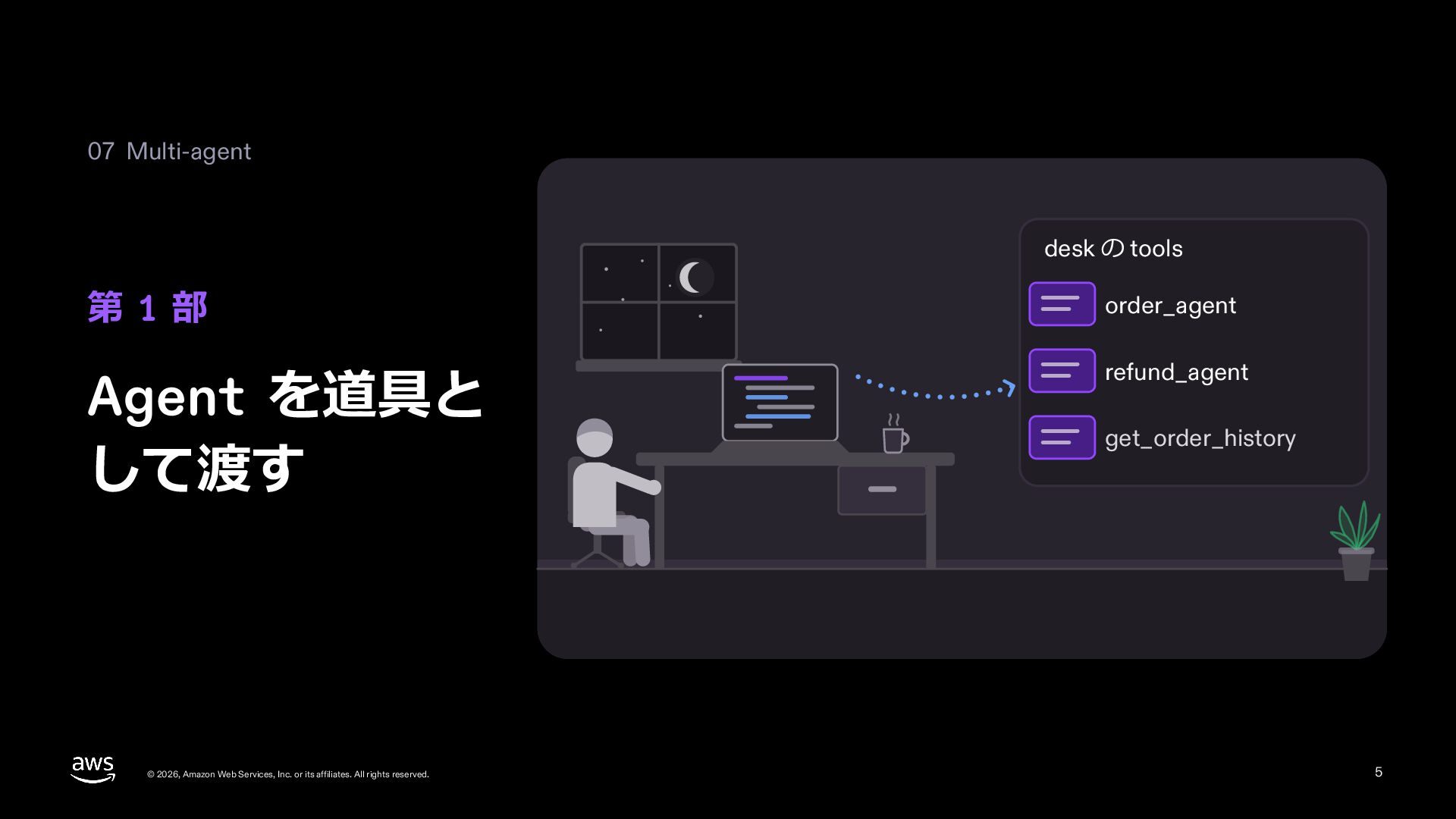
  4. 07 Multi-agent desk の tools 第 1 部 order_agent Agent

    を道具と して渡す refund_agent © 2026, Amazon Web Services, Inc. or its affiliates. All rights reserved. get_order_history 5
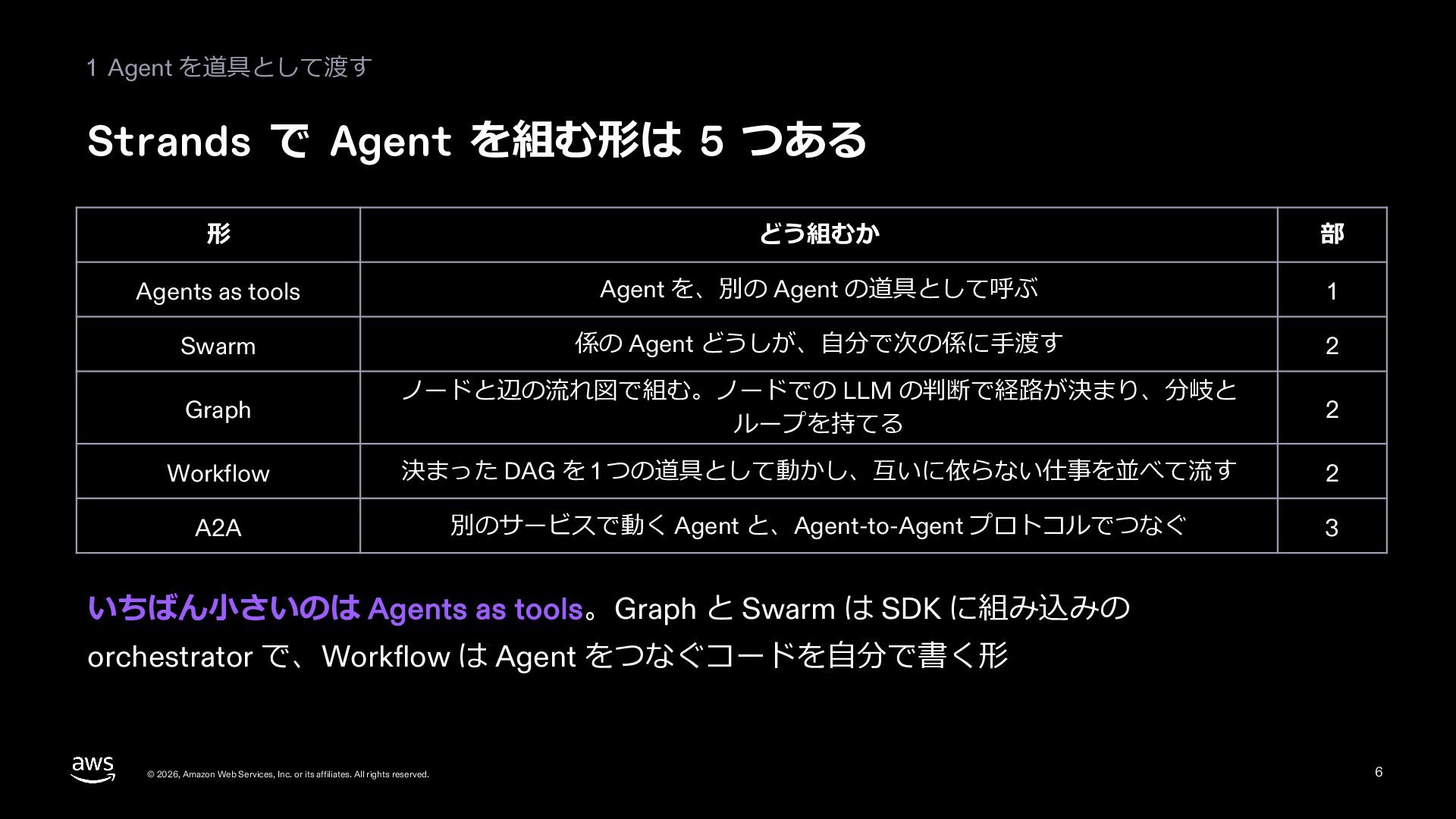
  5. 1 Agent を道具として渡す Strands で Agent を組む形は 5 つある 形

    どう組むか 部 Agents as tools Agent を、別の Agent の道具として呼ぶ 1 Swarm 係の Agent どうしが、⾃分で次の係に⼿渡す 2 Graph ノードと辺の流れ図で組む。ノードでの LLM の判断で経路が決まり、分岐と ループを持てる 2 Workflow 決まった DAG を 1 つの道具として動かし、互いに依らない仕事を並べて流す 2 A2A 別のサービスで動く Agent と、Agent-to-Agent プロトコルでつなぐ 3 いちばん⼩さいのは Agents as tools。Graph と Swarm は SDK に組み込みの orchestrator で、Workflow は Agent をつなぐコードを⾃分で書く形 © 2026, Amazon Web Services, Inc. or its affiliates. All rights reserved. 6
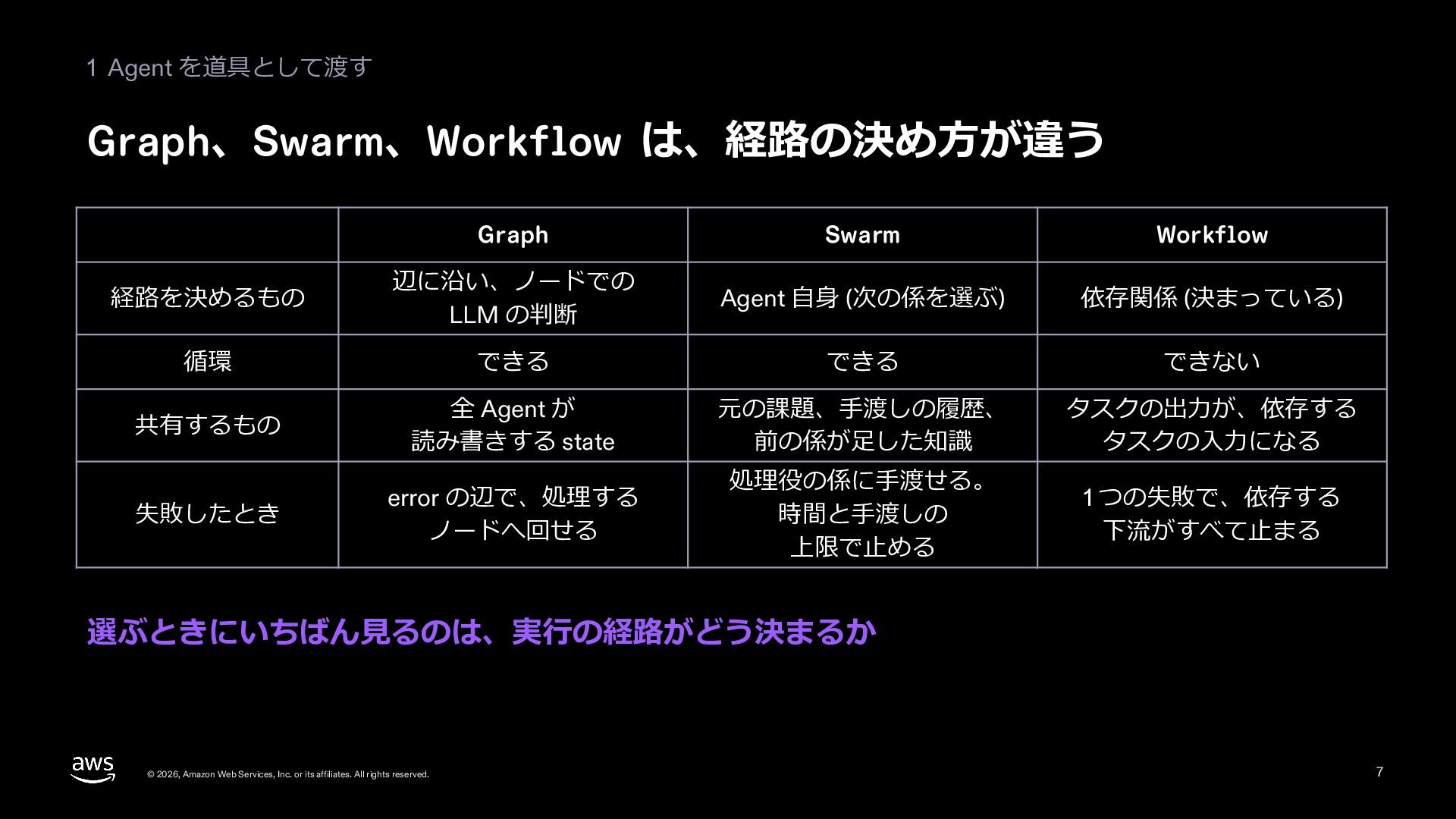
  6. 1 Agent を道具として渡す Graph、Swarm、Workflow は、経路の決め⽅が違う Graph Swarm Workflow 経路を決めるもの 辺に沿い、ノードでの

    LLM の判断 Agent ⾃⾝ (次の係を選ぶ) 依存関係 (決まっている) 循環 できる できる できない 共有するもの 全 Agent が 読み書きする state 元の課題、⼿渡しの履歴、 前の係が⾜した知識 タスクの出⼒が、依存する タスクの⼊⼒になる 失敗したとき error の辺で、処理する ノードへ回せる 処理役の係に⼿渡せる。 時間と⼿渡しの 上限で⽌める 1 つの失敗で、依存する 下流がすべて⽌まる 選ぶときにいちばん⾒るのは、実⾏の経路がどう決まるか © 2026, Amazon Web Services, Inc. or its affiliates. All rights reserved. 7
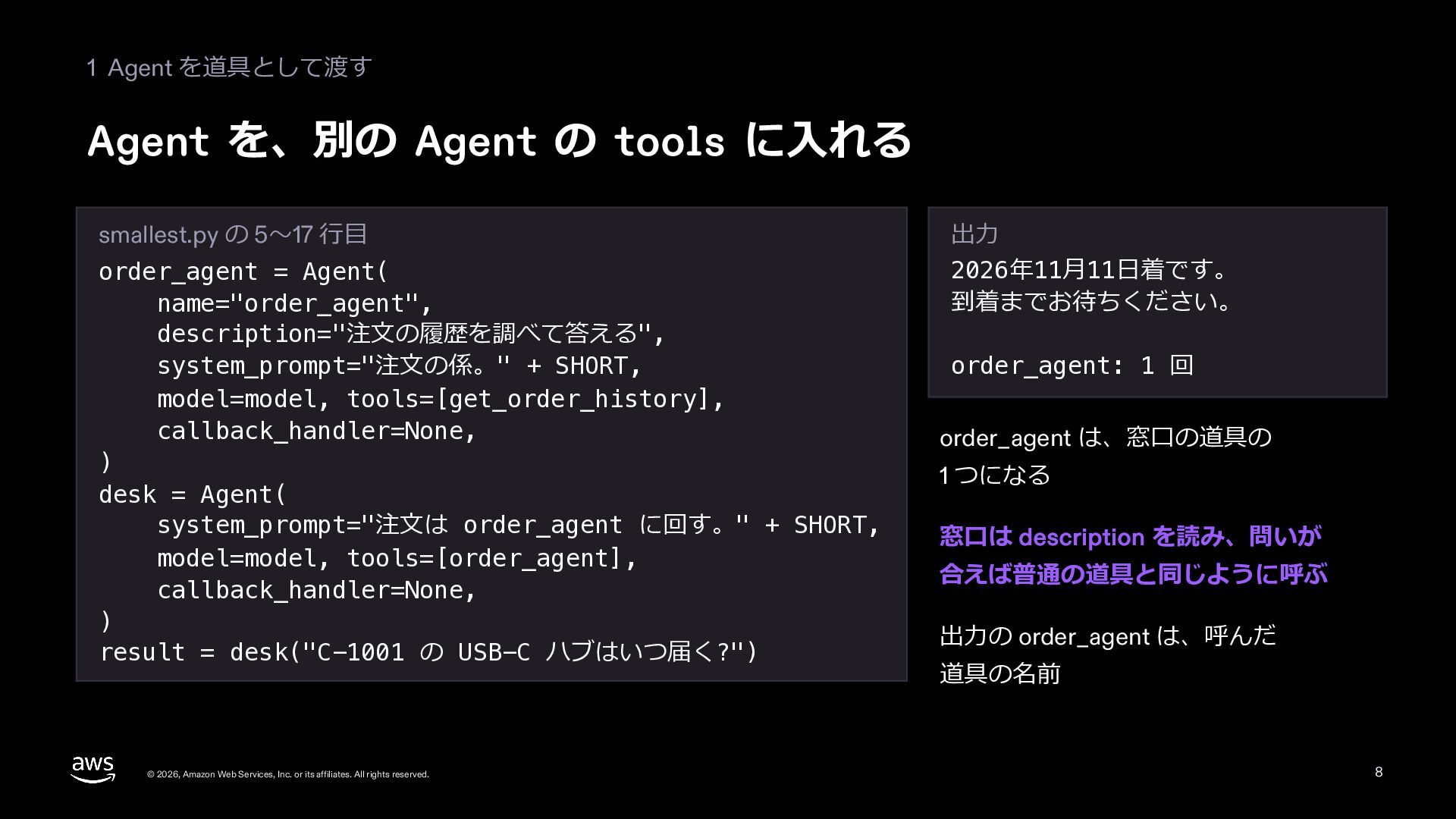
  7. 1 Agent を道具として渡す Agent を、別の Agent の tools に⼊れる smallest.py

    の 5〜17 ⾏⽬ order_agent = Agent( name="order_agent", description="注⽂の履歴を調べて答える", system_prompt="注⽂の係。" + SHORT, model=model, tools=[get_order_history], callback_handler=None, ) desk = Agent( system_prompt="注⽂は order_agent に回す。" + SHORT, model=model, tools=[order_agent], callback_handler=None, ) result = desk("C-1001 の USB-C ハブはいつ届く?") © 2026, Amazon Web Services, Inc. or its affiliates. All rights reserved. 出⼒ 2026年11⽉11⽇着です。 到着までお待ちください。 order_agent: 1 回 order_agent は、窓⼝の道具の 1 つになる 窓⼝は description を読み、問いが 合えば普通の道具と同じように呼ぶ 出⼒の order_agent は、呼んだ 道具の名前 8
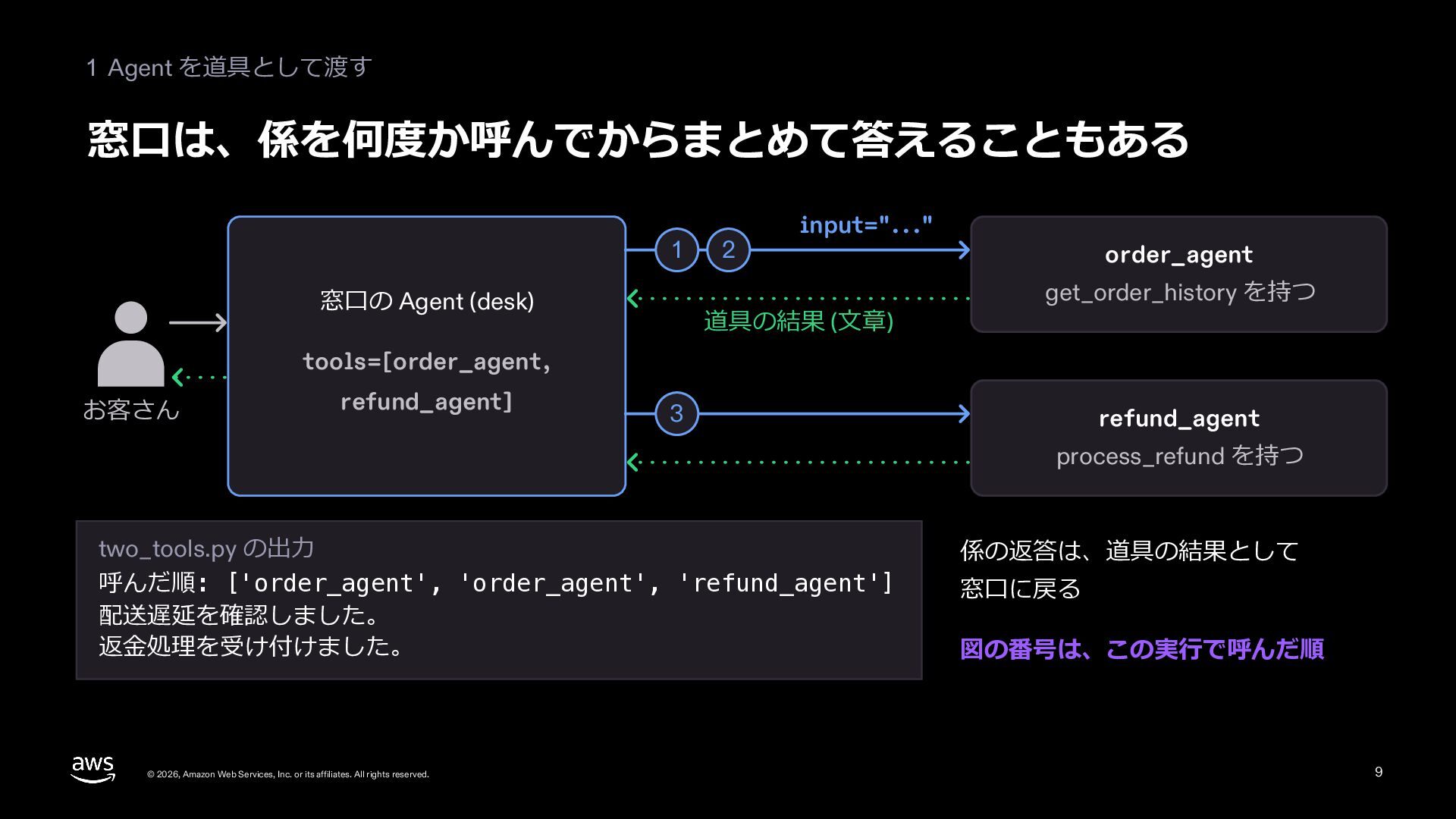
  8. 1 Agent を道具として渡す 窓⼝は、係を何度か呼んでからまとめて答えることもある 1 窓⼝の Agent (desk) 2 input="..."

    道具の結果 (⽂章) order_agent get_order_history を持つ tools=[order_agent, お客さん refund_agent] 3 refund_agent process_refund を持つ two_tools.py の出⼒ 呼んだ順: ['order_agent', 'order_agent', 'refund_agent'] 配送遅延を確認しました。 返⾦処理を受け付けました。 © 2026, Amazon Web Services, Inc. or its affiliates. All rights reserved. 係の返答は、道具の結果として 窓⼝に戻る 図の番号は、この実⾏で呼んだ順 9
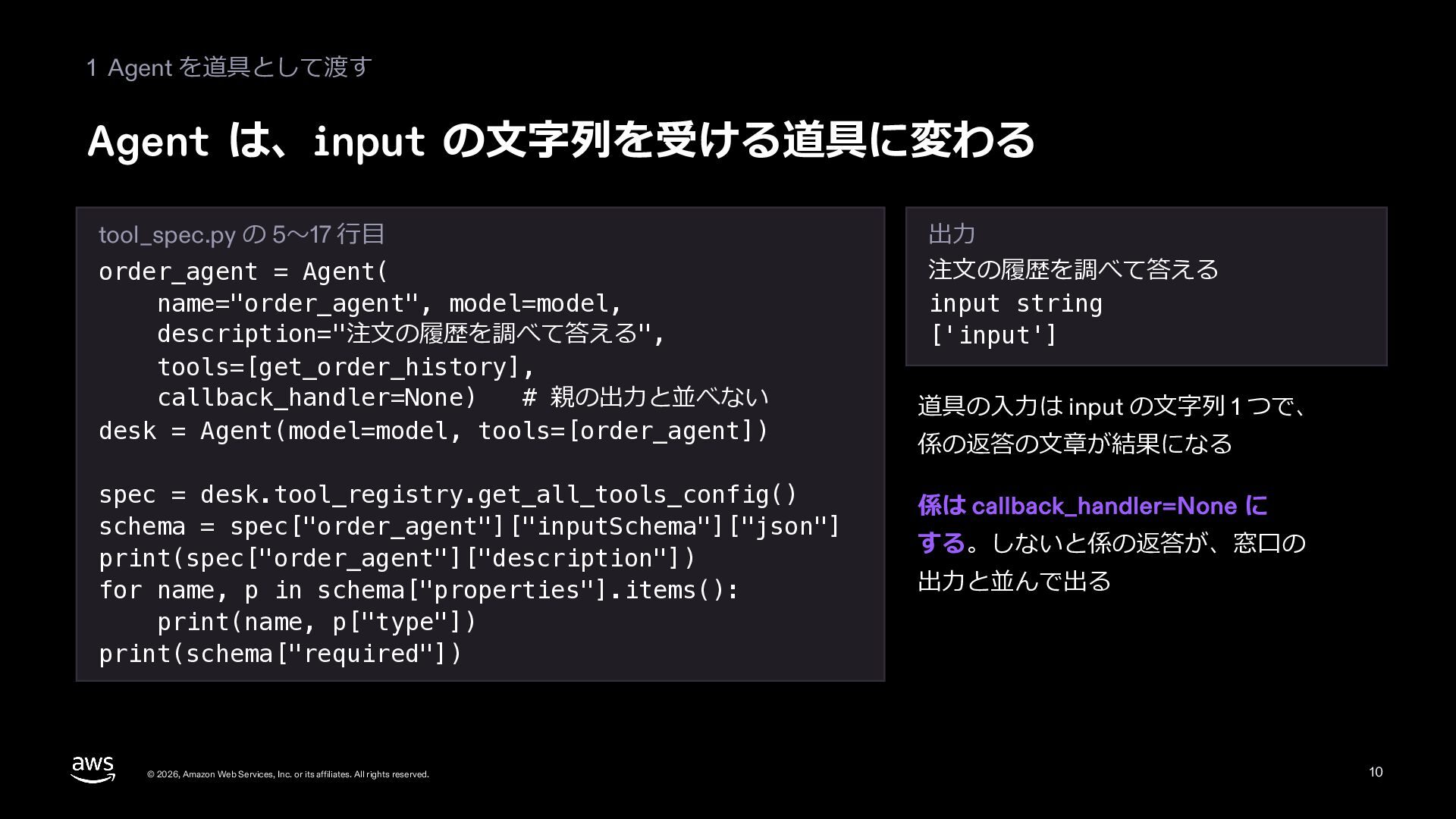
  9. 1 Agent を道具として渡す Agent は、input の⽂字列を受ける道具に変わる tool_spec.py の 5〜17 ⾏⽬

    order_agent = Agent( name="order_agent", model=model, description="注⽂の履歴を調べて答える", tools=[get_order_history], callback_handler=None) # 親の出⼒と並べない desk = Agent(model=model, tools=[order_agent]) spec = desk.tool_registry.get_all_tools_config() schema = spec["order_agent"]["inputSchema"]["json"] print(spec["order_agent"]["description"]) for name, p in schema["properties"].items(): print(name, p["type"]) print(schema["required"]) © 2026, Amazon Web Services, Inc. or its affiliates. All rights reserved. 出⼒ 注⽂の履歴を調べて答える input string ['input'] 道具の⼊⼒は input の⽂字列 1 つで、 係の返答の⽂章が結果になる 係は callback_handler=None に する。しないと係の返答が、窓⼝の 出⼒と並んで出る 10
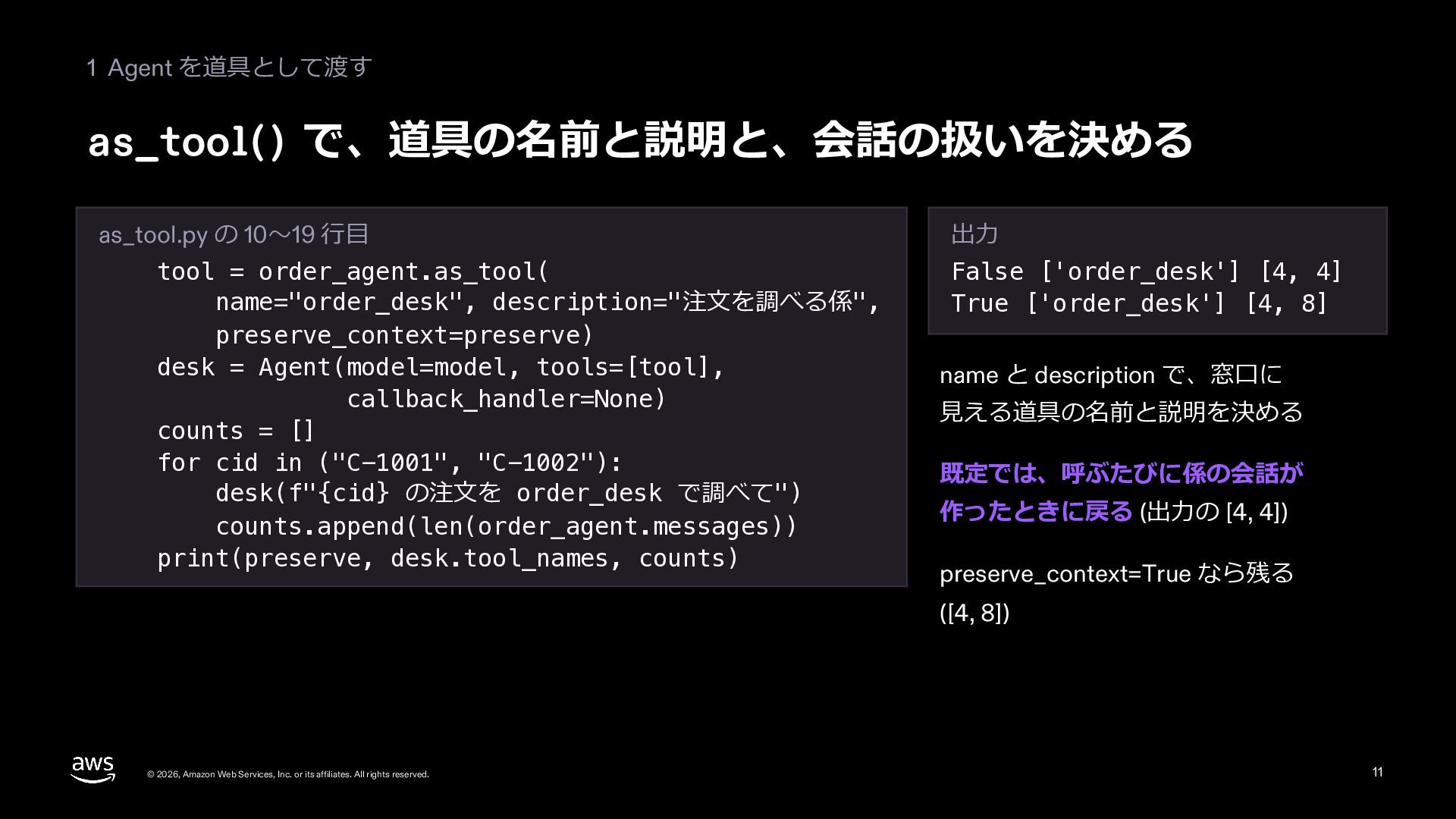
  10. 1 Agent を道具として渡す as_tool() で、道具の名前と説明と、会話の扱いを決める as_tool.py の 10〜19 ⾏⽬ tool

    = order_agent.as_tool( name="order_desk", description="注⽂を調べる係", preserve_context=preserve) desk = Agent(model=model, tools=[tool], callback_handler=None) counts = [] for cid in ("C-1001", "C-1002"): desk(f"{cid} の注⽂を order_desk で調べて") counts.append(len(order_agent.messages)) print(preserve, desk.tool_names, counts) 出⼒ False ['order_desk'] [4, 4] True ['order_desk'] [4, 8] name と description で、窓⼝に ⾒える道具の名前と説明を決める 既定では、呼ぶたびに係の会話が 作ったときに戻る (出⼒の [4, 4]) preserve_context=True なら残る ([4, 8]) © 2026, Amazon Web Services, Inc. or its affiliates. All rights reserved. 11
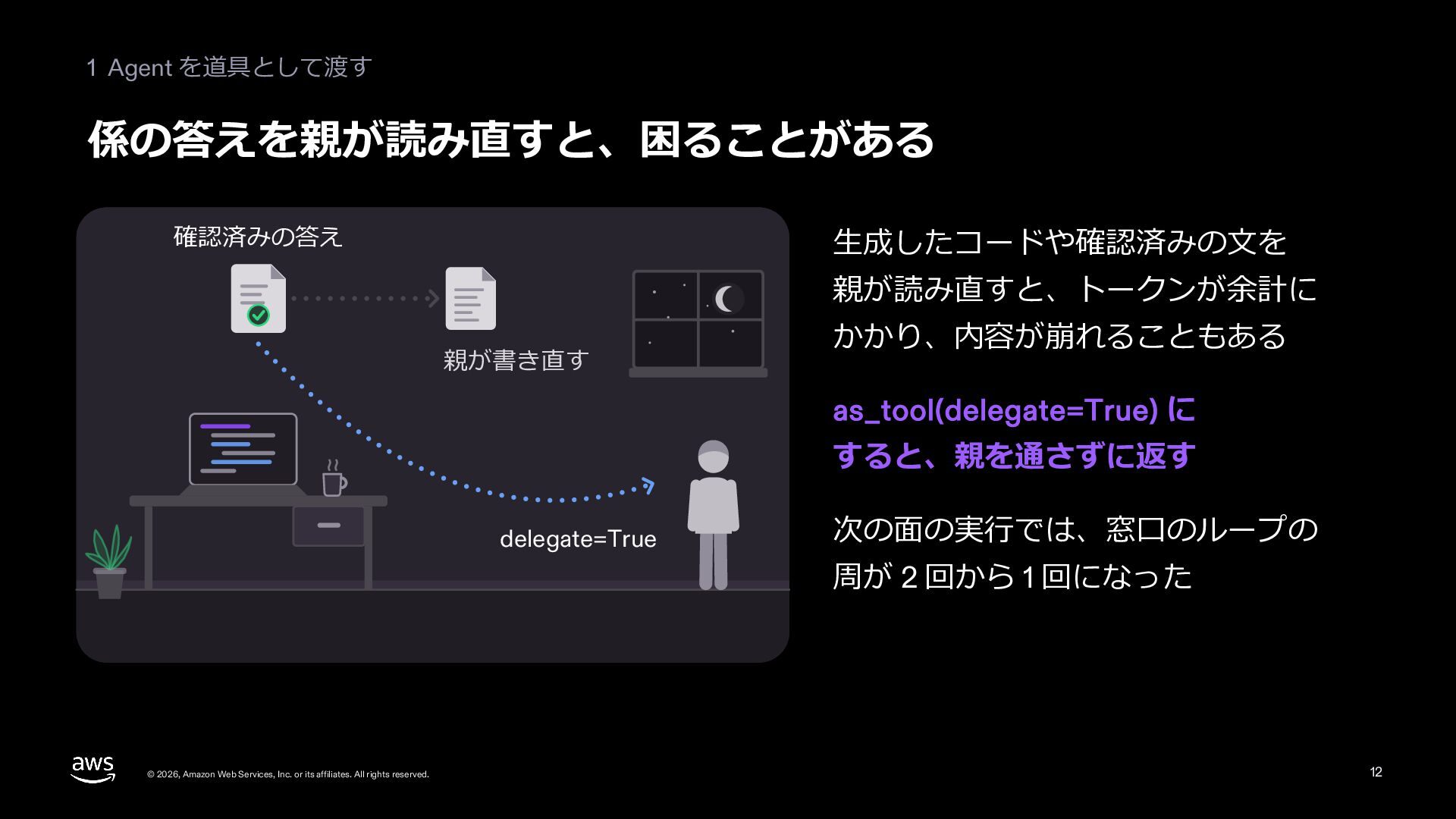
  11. 1 Agent を道具として渡す 係の答えを親が読み直すと、困ることがある 確認済みの答え ⽣成したコードや確認済みの⽂を 親が読み直すと、トークンが余計に 親が書き直す かかり、内容が崩れることもある as_tool(delegate=True)

    に すると、親を通さずに返す delegate=True 次の⾯の実⾏では、窓⼝のループの 周が 2 回から 1 回になった © 2026, Amazon Web Services, Inc. or its affiliates. All rights reserved. 12
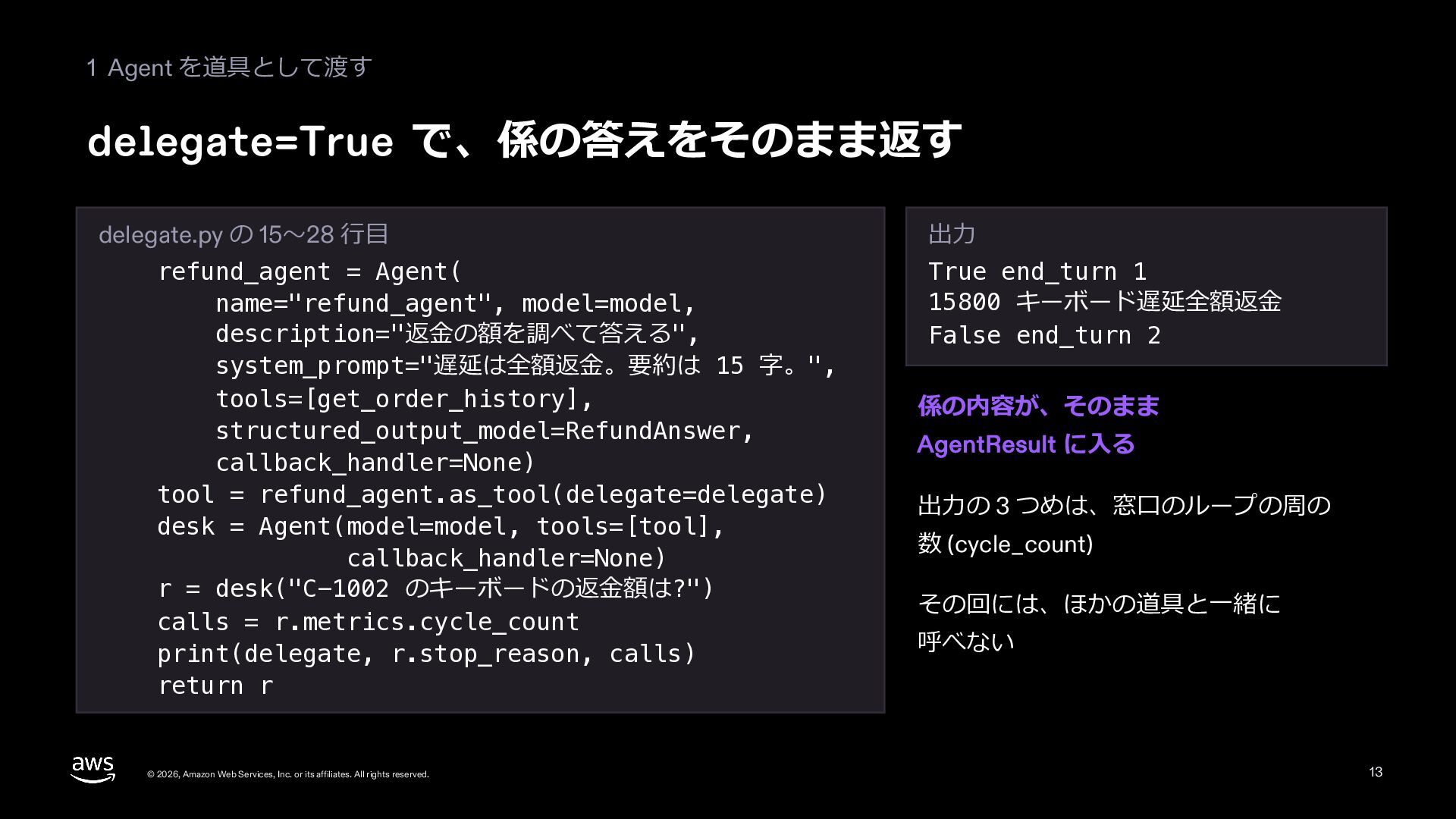
  12. 1 Agent を道具として渡す delegate=True で、係の答えをそのまま返す delegate.py の 15〜28 ⾏⽬ refund_agent

    = Agent( name="refund_agent", model=model, description="返⾦の額を調べて答える", system_prompt="遅延は全額返⾦。要約は 15 字。", tools=[get_order_history], structured_output_model=RefundAnswer, callback_handler=None) tool = refund_agent.as_tool(delegate=delegate) desk = Agent(model=model, tools=[tool], callback_handler=None) r = desk("C-1002 のキーボードの返⾦額は?") calls = r.metrics.cycle_count print(delegate, r.stop_reason, calls) return r © 2026, Amazon Web Services, Inc. or its affiliates. All rights reserved. 出⼒ True end_turn 1 15800 キーボード遅延全額返⾦ False end_turn 2 係の内容が、そのまま AgentResult に⼊る 出⼒の 3 つめは、窓⼝のループの周の 数 (cycle_count) その回には、ほかの道具と⼀緒に 呼べない 13
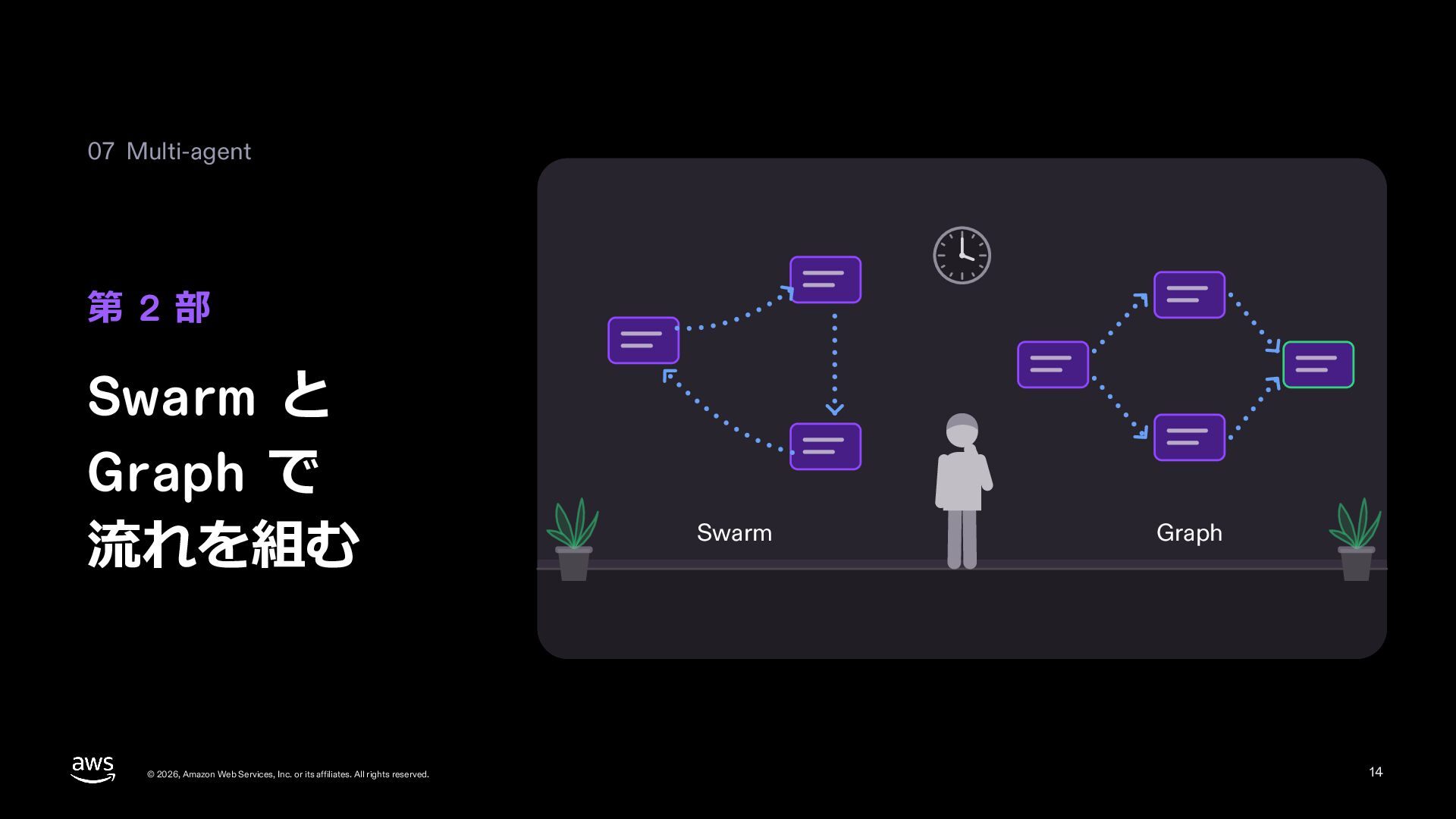
  13. 07 Multi-agent 第 2 部 Swarm と Graph で 流れを組む

    © 2026, Amazon Web Services, Inc. or its affiliates. All rights reserved. Swarm Graph 14
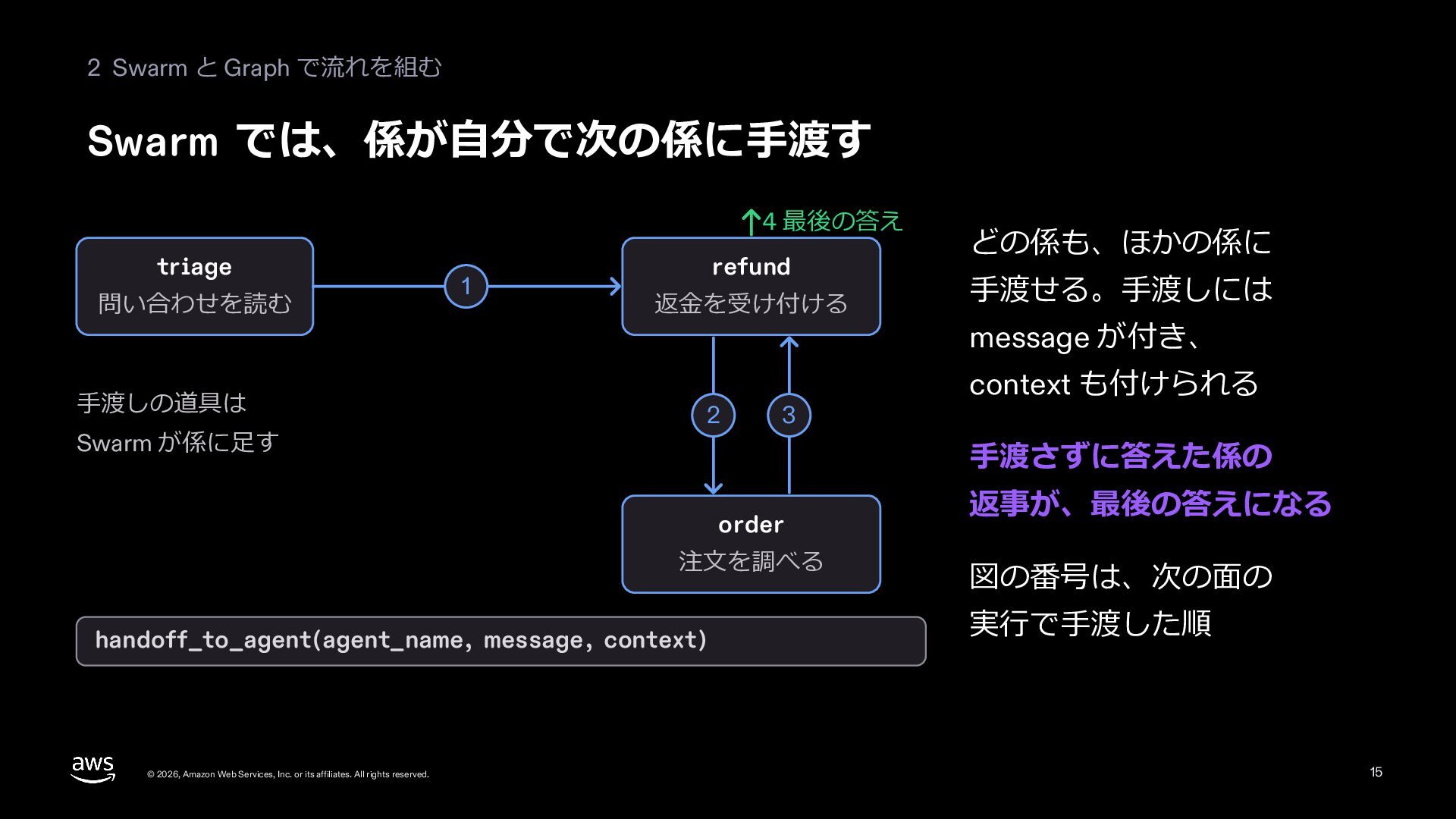
  14. 2 Swarm と Graph で流れを組む Swarm では、係が⾃分で次の係に⼿渡す 4 最後の答え triage

    問い合わせを読む ⼿渡しの道具は Swarm が係に⾜す 1 refund 返⾦を受け付ける 2 3 ⼿渡せる。⼿渡しには message が付き、 context も付けられる ⼿渡さずに答えた係の order 注⽂を調べる handoff_to_agent(agent_name, message, context) © 2026, Amazon Web Services, Inc. or its affiliates. All rights reserved. どの係も、ほかの係に 返事が、最後の答えになる 図の番号は、次の⾯の 実⾏で⼿渡した順 15
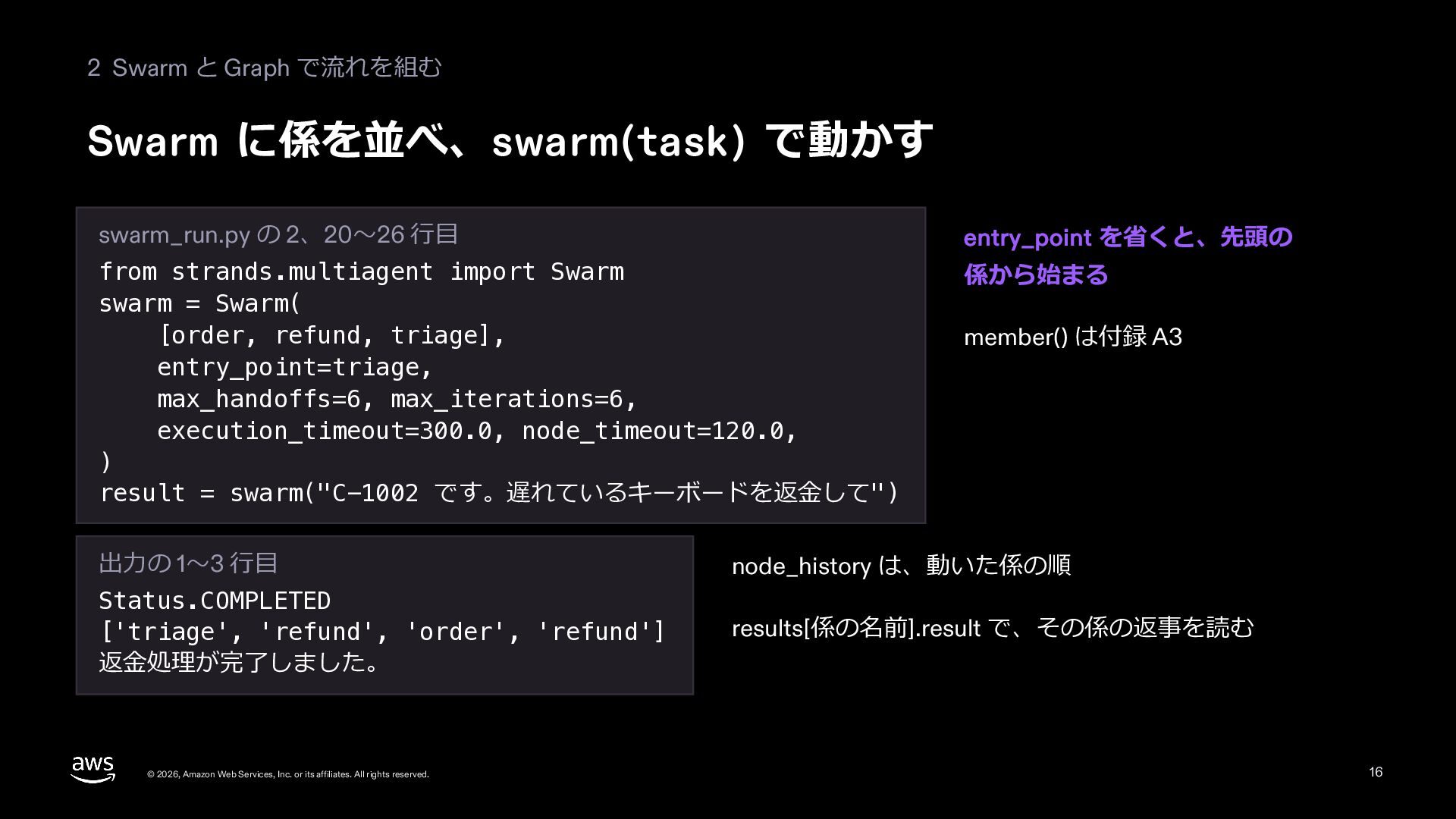
  15. 2 Swarm と Graph で流れを組む Swarm に係を並べ、swarm(task) で動かす swarm_run.py の

    2、20〜26 ⾏⽬ entry_point を省くと、先頭の from strands.multiagent import Swarm swarm = Swarm( [order, refund, triage], entry_point=triage, max_handoffs=6, max_iterations=6, execution_timeout=300.0, node_timeout=120.0, ) result = swarm("C-1002 です。遅れているキーボードを返⾦して") 係から始まる member() は付録 A3 出⼒の 1〜3 ⾏⽬ node_history は、動いた係の順 Status.COMPLETED ['triage', 'refund', 'order', 'refund'] 返⾦処理が完了しました。 results[係の名前].result で、その係の返事を読む © 2026, Amazon Web Services, Inc. or its affiliates. All rights reserved. 16
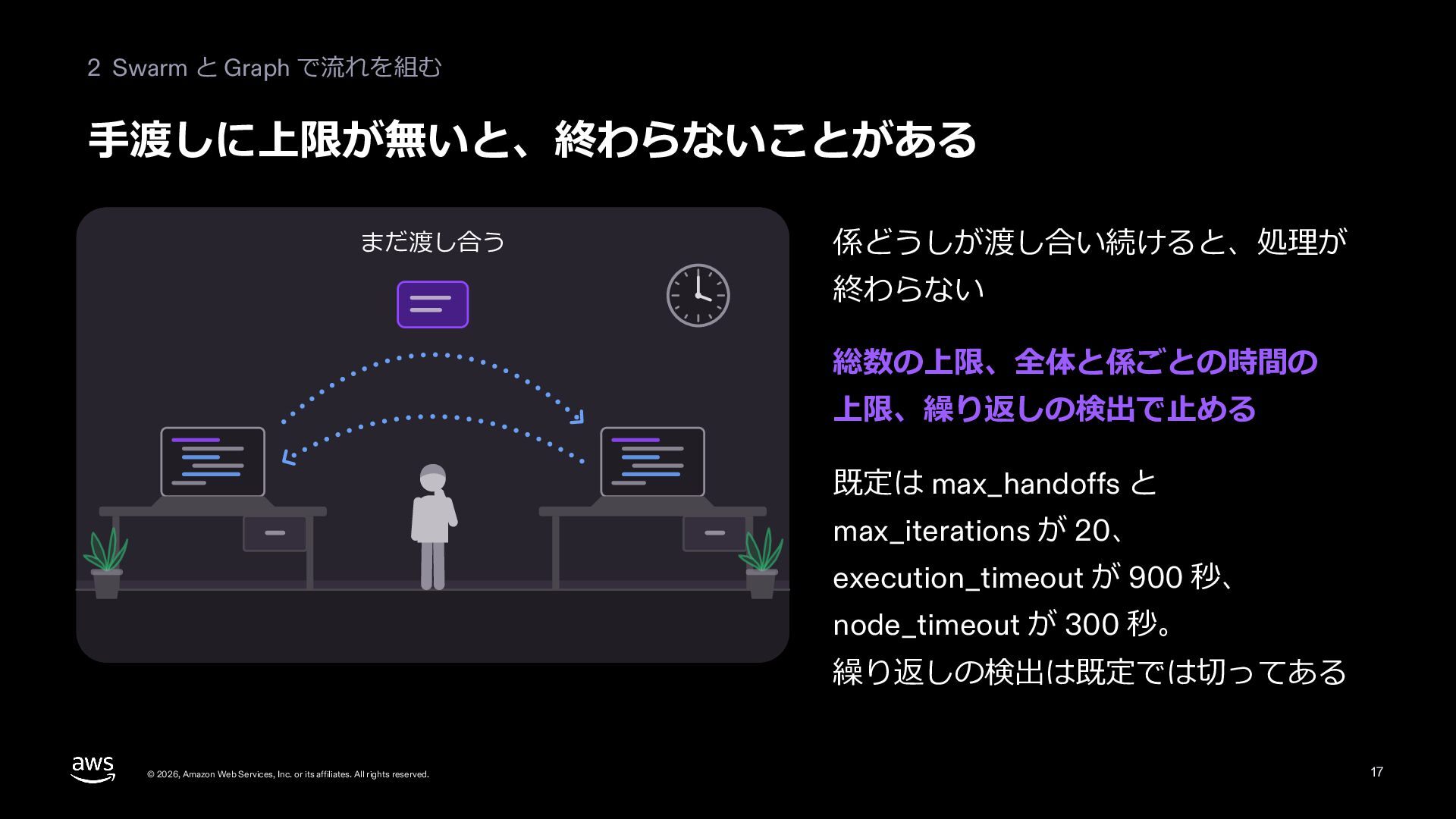
  16. 2 Swarm と Graph で流れを組む ⼿渡しに上限が無いと、終わらないことがある まだ渡し合う 係どうしが渡し合い続けると、処理が 終わらない 総数の上限、全体と係ごとの時間の

    上限、繰り返しの検出で⽌める 既定は max_handoffs と max_iterations が 20、 execution_timeout が 900 秒、 node_timeout が 300 秒。 繰り返しの検出は既定では切ってある © 2026, Amazon Web Services, Inc. or its affiliates. All rights reserved. 17
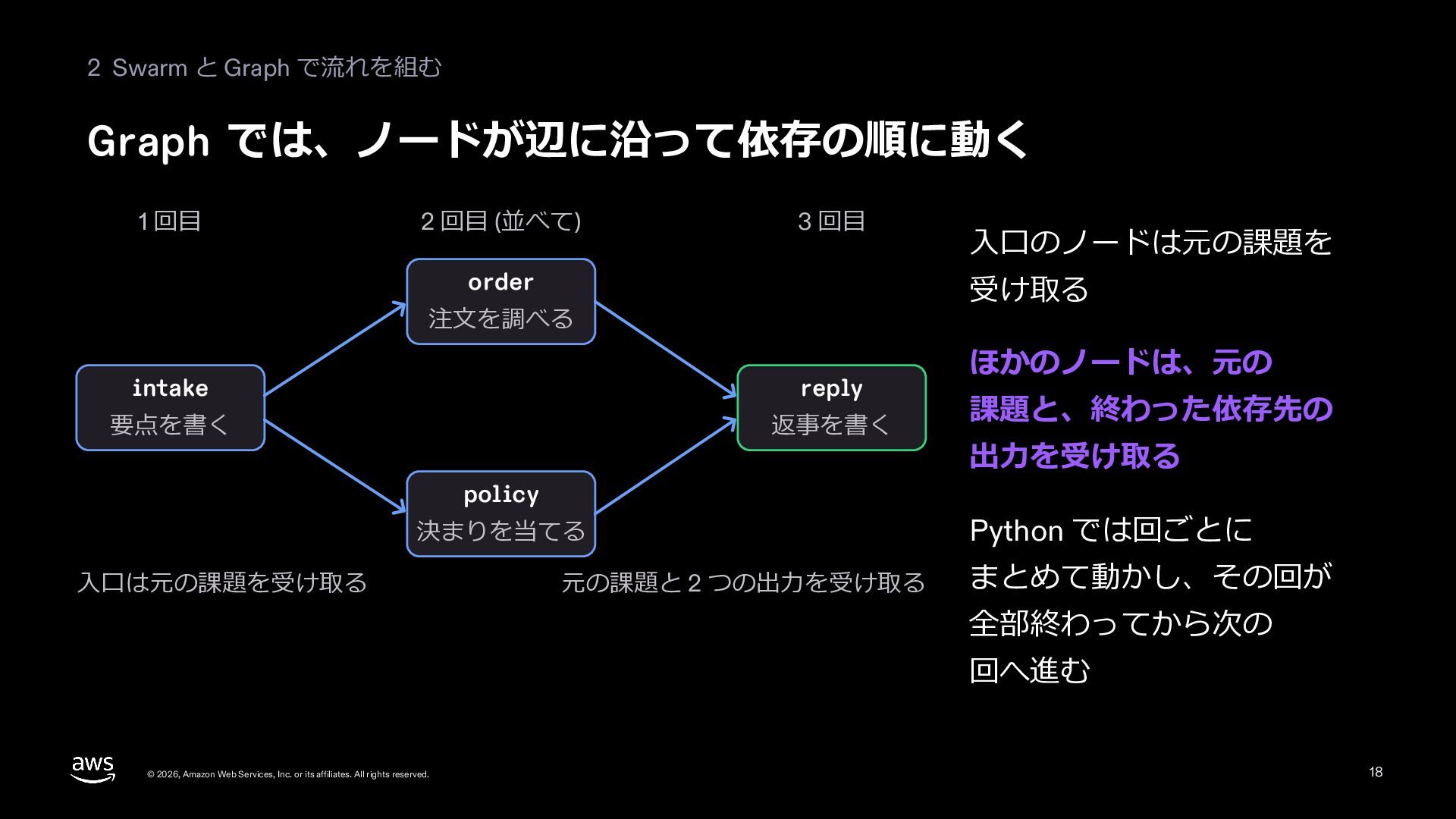
  17. 2 Swarm と Graph で流れを組む Graph では、ノードが辺に沿って依存の順に動く 1 回⽬ 2

    回⽬ (並べて) 3 回⽬ order 受け取る 注⽂を調べる intake reply 要点を書く 返事を書く policy 決まりを当てる ⼊⼝は元の課題を受け取る ⼊⼝のノードは元の課題を 元の課題と 2 つの出⼒を受け取る ほかのノードは、元の 課題と、終わった依存先の 出⼒を受け取る Python では回ごとに まとめて動かし、その回が 全部終わってから次の 回へ進む © 2026, Amazon Web Services, Inc. or its affiliates. All rights reserved. 18
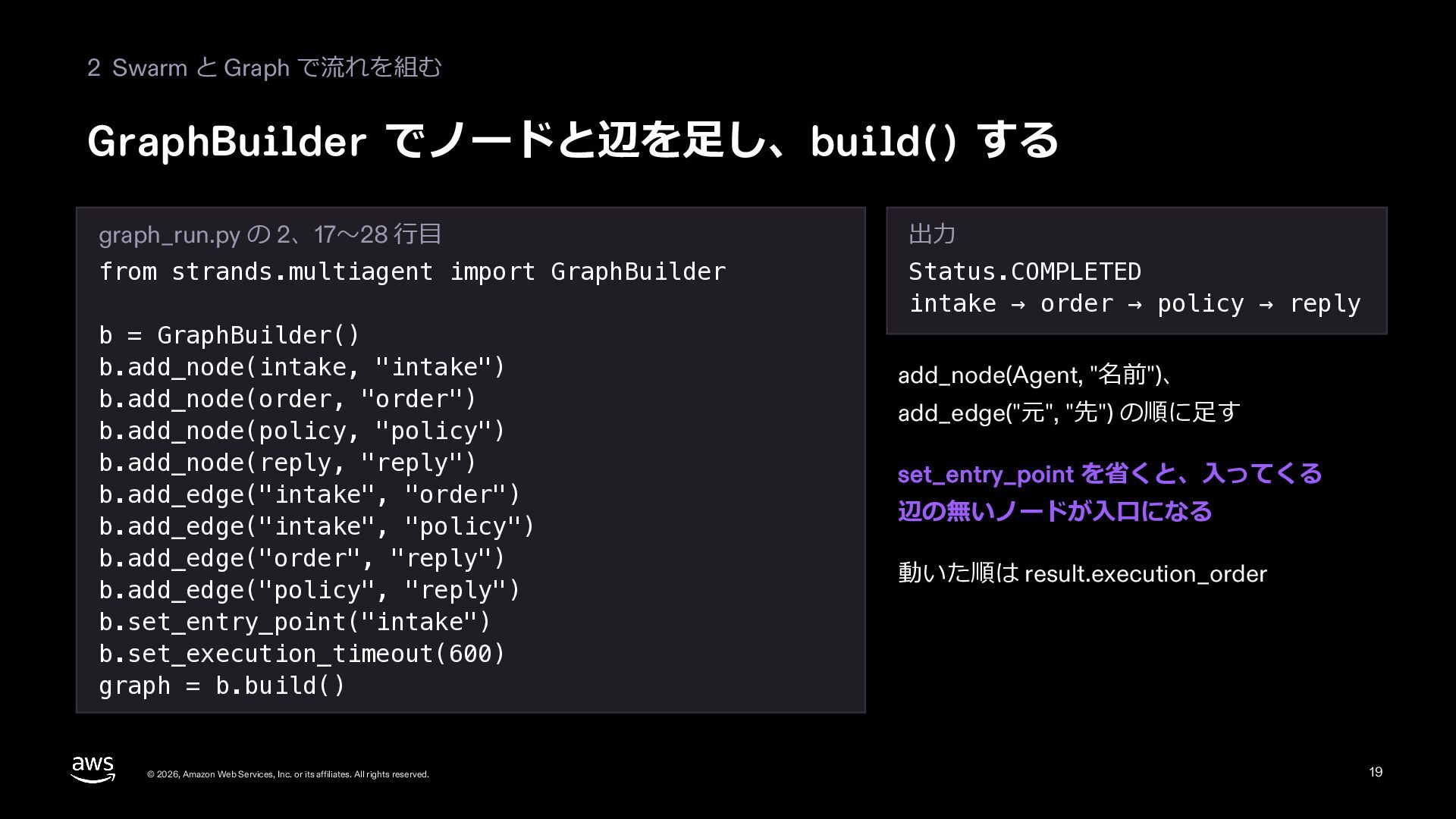
  18. 2 Swarm と Graph で流れを組む GraphBuilder でノードと辺を⾜し、build() する graph_run.py の

    2、17〜28 ⾏⽬ 出⼒ from strands.multiagent import GraphBuilder Status.COMPLETED intake → order → policy → reply b = GraphBuilder() b.add_node(intake, "intake") b.add_node(order, "order") b.add_node(policy, "policy") b.add_node(reply, "reply") b.add_edge("intake", "order") b.add_edge("intake", "policy") b.add_edge("order", "reply") b.add_edge("policy", "reply") b.set_entry_point("intake") b.set_execution_timeout(600) graph = b.build() © 2026, Amazon Web Services, Inc. or its affiliates. All rights reserved. add_node(Agent, "名前")、 add_edge("元", "先") の順に⾜す set_entry_point を省くと、⼊ってくる 辺の無いノードが⼊⼝になる 動いた順は result.execution_order 19
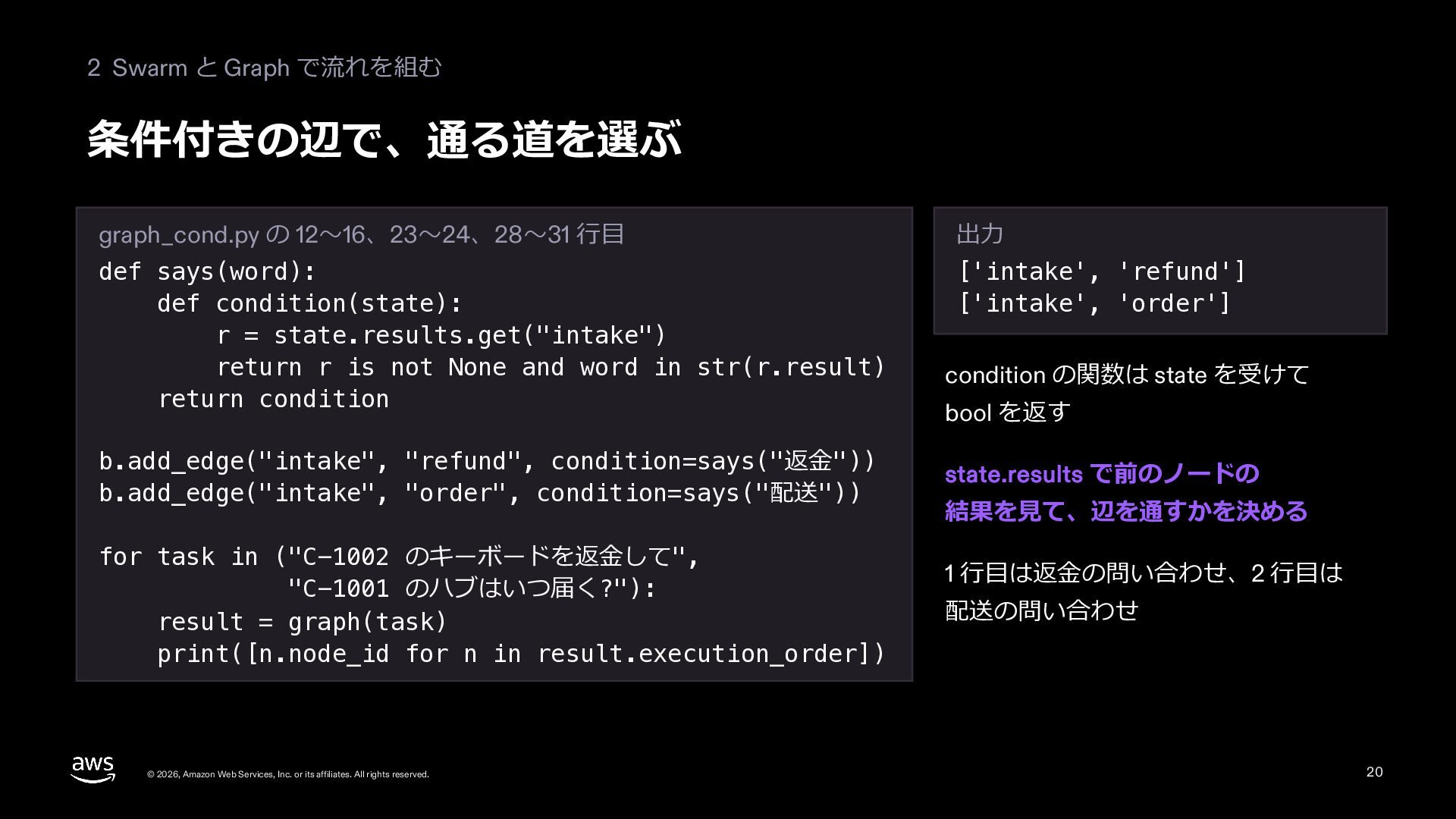
  19. 2 Swarm と Graph で流れを組む 条件付きの辺で、通る道を選ぶ graph_cond.py の 12〜16、23〜24、28〜31 ⾏⽬

    出⼒ def says(word): def condition(state): r = state.results.get("intake") return r is not None and word in str(r.result) return condition ['intake', 'refund'] ['intake', 'order'] b.add_edge("intake", "refund", condition=says("返⾦")) b.add_edge("intake", "order", condition=says("配送")) for task in ("C-1002 のキーボードを返⾦して", "C-1001 のハブはいつ届く?"): result = graph(task) print([n.node_id for n in result.execution_order]) © 2026, Amazon Web Services, Inc. or its affiliates. All rights reserved. condition の関数は state を受けて bool を返す state.results で前のノードの 結果を⾒て、辺を通すかを決める 1 ⾏⽬は返⾦の問い合わせ、2 ⾏⽬は 配送の問い合わせ 20
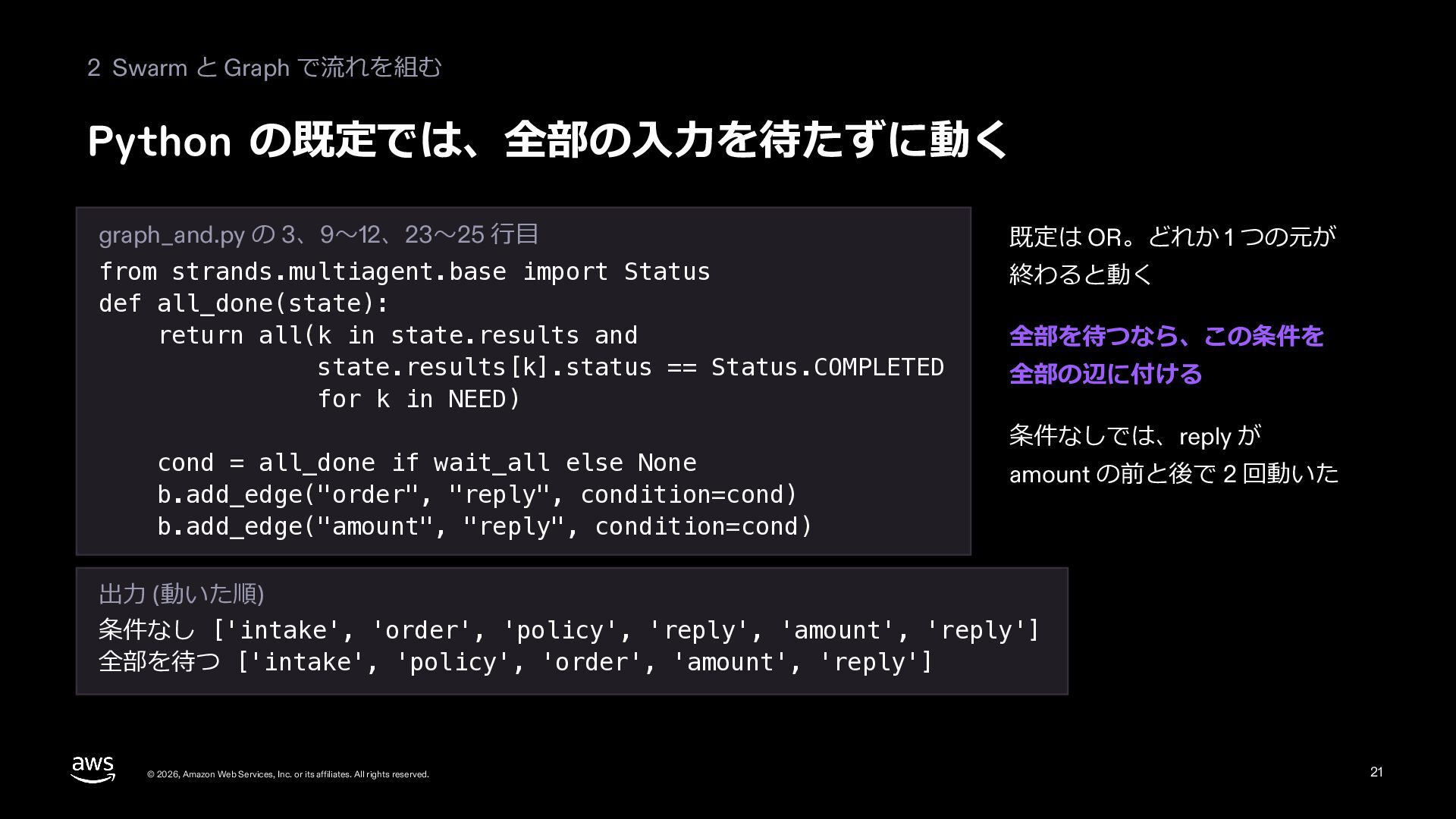
  20. 2 Swarm と Graph で流れを組む Python の既定では、全部の⼊⼒を待たずに動く graph_and.py の 3、9〜12、23〜25

    ⾏⽬ 既定は OR。どれか 1 つの元が from strands.multiagent.base import Status def all_done(state): return all(k in state.results and state.results[k].status == Status.COMPLETED for k in NEED) 終わると動く cond = all_done if wait_all else None b.add_edge("order", "reply", condition=cond) b.add_edge("amount", "reply", condition=cond) 全部を待つなら、この条件を 全部の辺に付ける 条件なしでは、reply が amount の前と後で 2 回動いた 出⼒ (動いた順) 条件なし ['intake', 'order', 'policy', 'reply', 'amount', 'reply'] 全部を待つ ['intake', 'policy', 'order', 'amount', 'reply'] © 2026, Amazon Web Services, Inc. or its affiliates. All rights reserved. 21
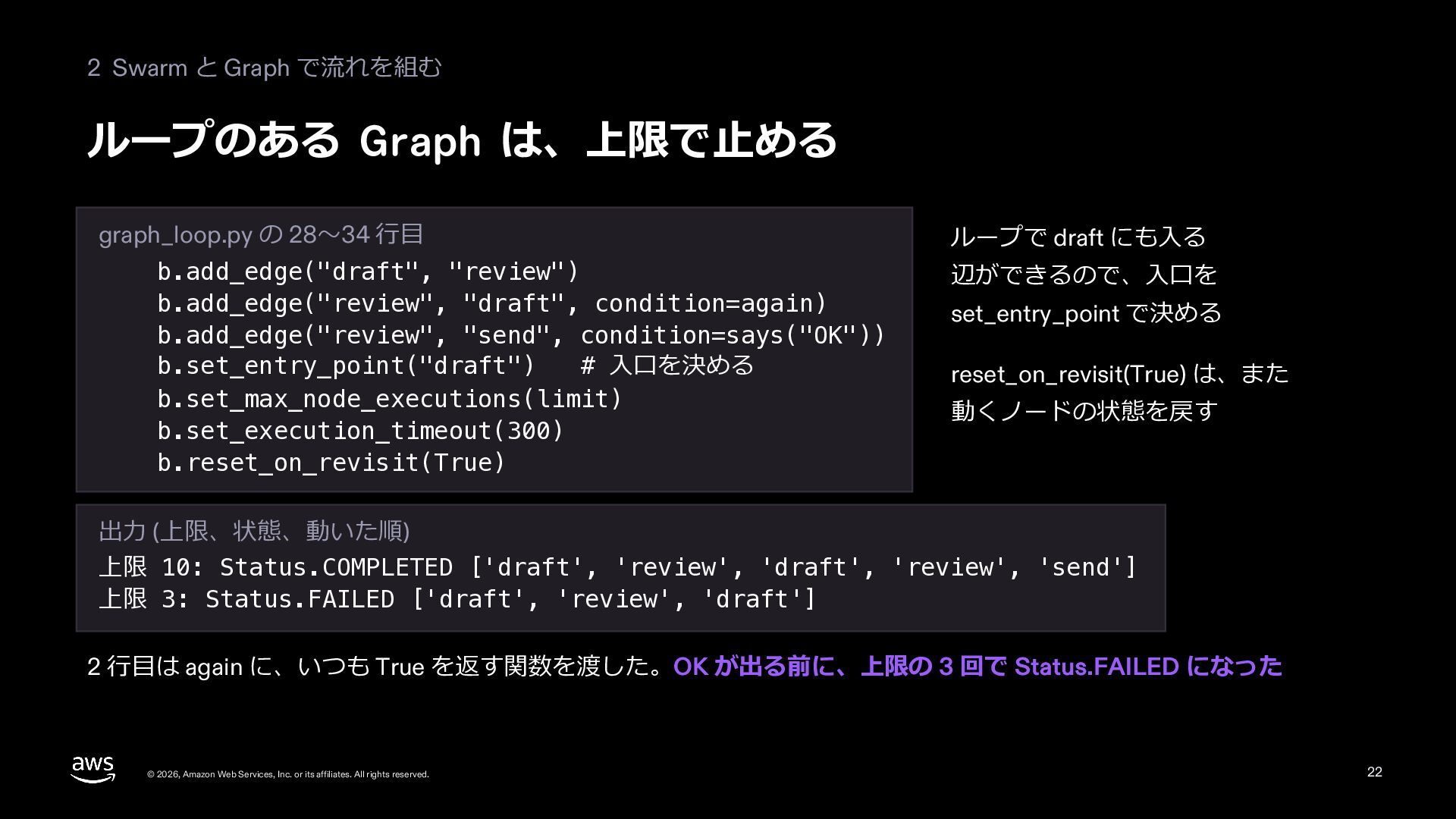
  21. 2 Swarm と Graph で流れを組む ループのある Graph は、上限で⽌める graph_loop.py の

    28〜34 ⾏⽬ b.add_edge("draft", "review") b.add_edge("review", "draft", condition=again) b.add_edge("review", "send", condition=says("OK")) b.set_entry_point("draft") # ⼊⼝を決める b.set_max_node_executions(limit) b.set_execution_timeout(300) b.reset_on_revisit(True) ループで draft にも⼊る 辺ができるので、⼊⼝を set_entry_point で決める reset_on_revisit(True) は、また 動くノードの状態を戻す 出⼒ (上限、状態、動いた順) 上限 10: Status.COMPLETED ['draft', 'review', 'draft', 'review', 'send'] 上限 3: Status.FAILED ['draft', 'review', 'draft'] 2 ⾏⽬は again に、いつも True を返す関数を渡した。OK が出る前に、上限の 3 回で Status.FAILED になった © 2026, Amazon Web Services, Inc. or its affiliates. All rights reserved. 22
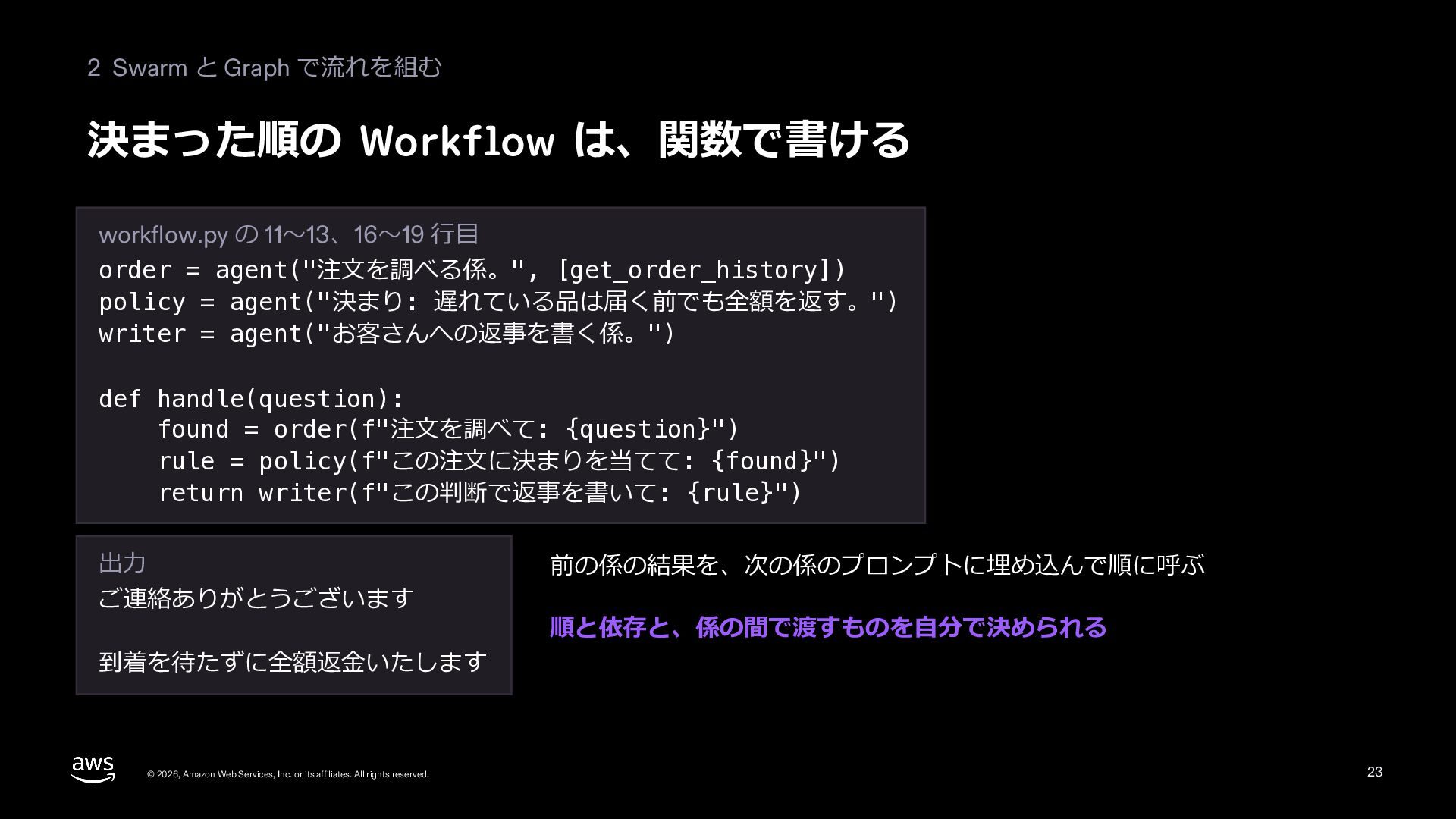
  22. 2 Swarm と Graph で流れを組む 決まった順の Workflow は、関数で書ける workflow.py の

    11〜13、16〜19 ⾏⽬ order = agent("注⽂を調べる係。", [get_order_history]) policy = agent("決まり: 遅れている品は届く前でも全額を返す。") writer = agent("お客さんへの返事を書く係。") def handle(question): found = order(f"注⽂を調べて: {question}") rule = policy(f"この注⽂に決まりを当てて: {found}") return writer(f"この判断で返事を書いて: {rule}") 出⼒ ご連絡ありがとうございます 到着を待たずに全額返⾦いたします © 2026, Amazon Web Services, Inc. or its affiliates. All rights reserved. 前の係の結果を、次の係のプロンプトに埋め込んで順に呼ぶ 順と依存と、係の間で渡すものを⾃分で決められる 23
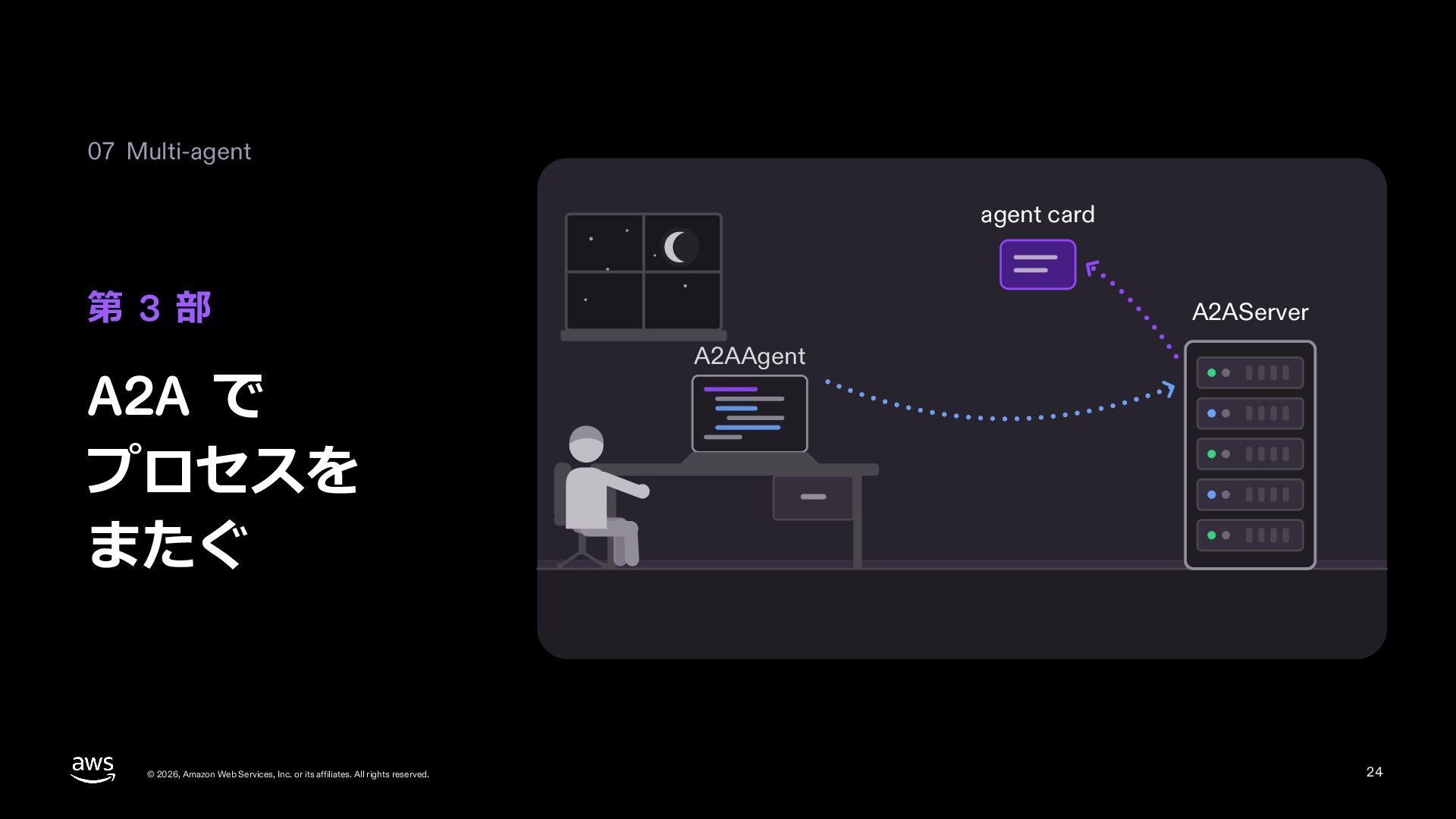
  23. 07 Multi-agent agent card 第 3 部 A2A で プロセスを

    またぐ © 2026, Amazon Web Services, Inc. or its affiliates. All rights reserved. A2AServer A2AAgent 24
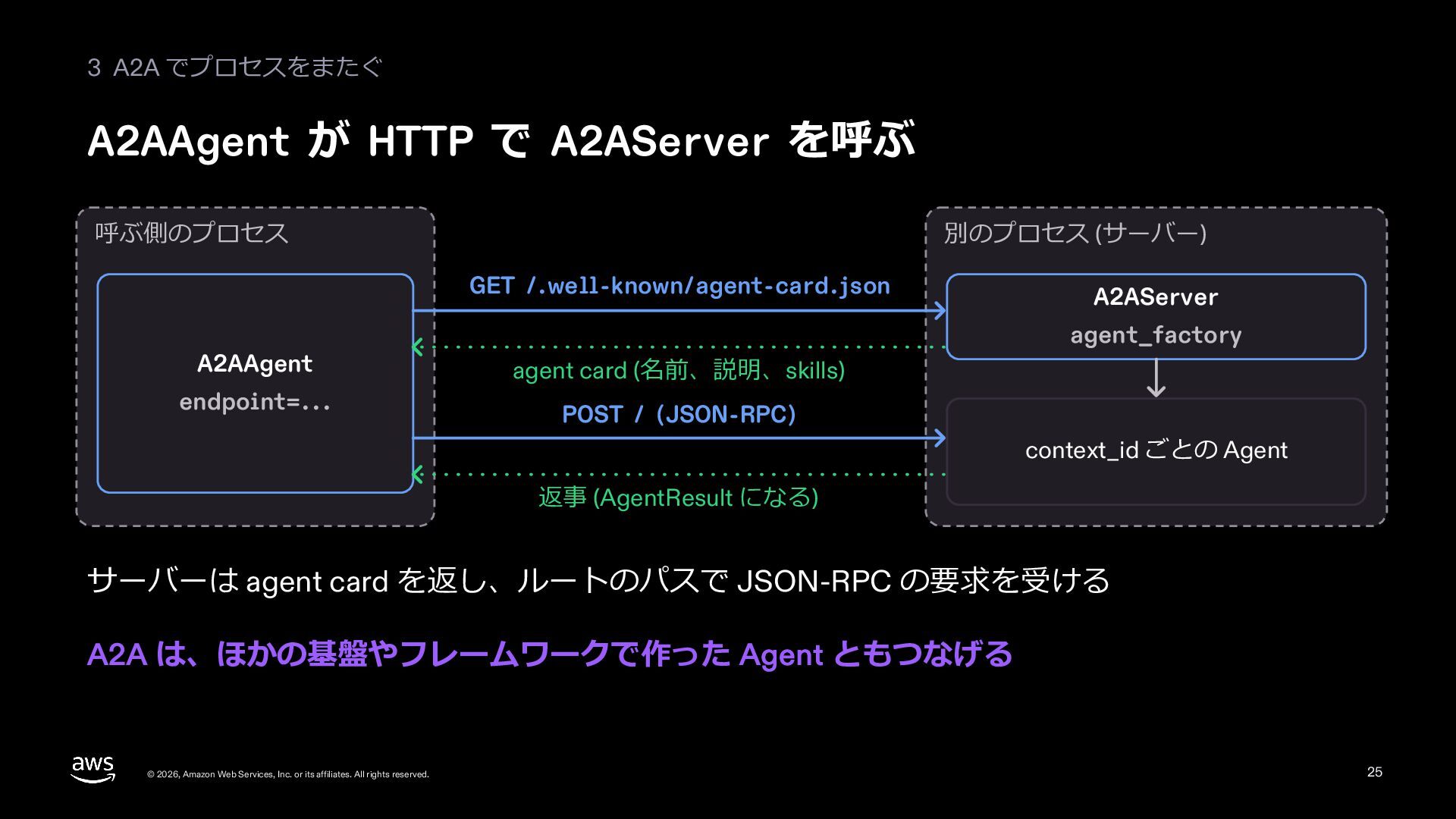
  24. 3 A2A でプロセスをまたぐ A2AAgent が HTTP で A2AServer を呼ぶ 呼ぶ側のプロセス

    別のプロセス (サーバー) GET /.well-known/agent-card.json A2AAgent endpoint=... A2AServer agent_factory agent card (名前、説明、skills) POST / (JSON-RPC) context_id ごとの Agent 返事 (AgentResult になる) サーバーは agent card を返し、ルートのパスで JSON-RPC の要求を受ける A2A は、ほかの基盤やフレームワークで作った Agent ともつなげる © 2026, Amazon Web Services, Inc. or its affiliates. All rights reserved. 25
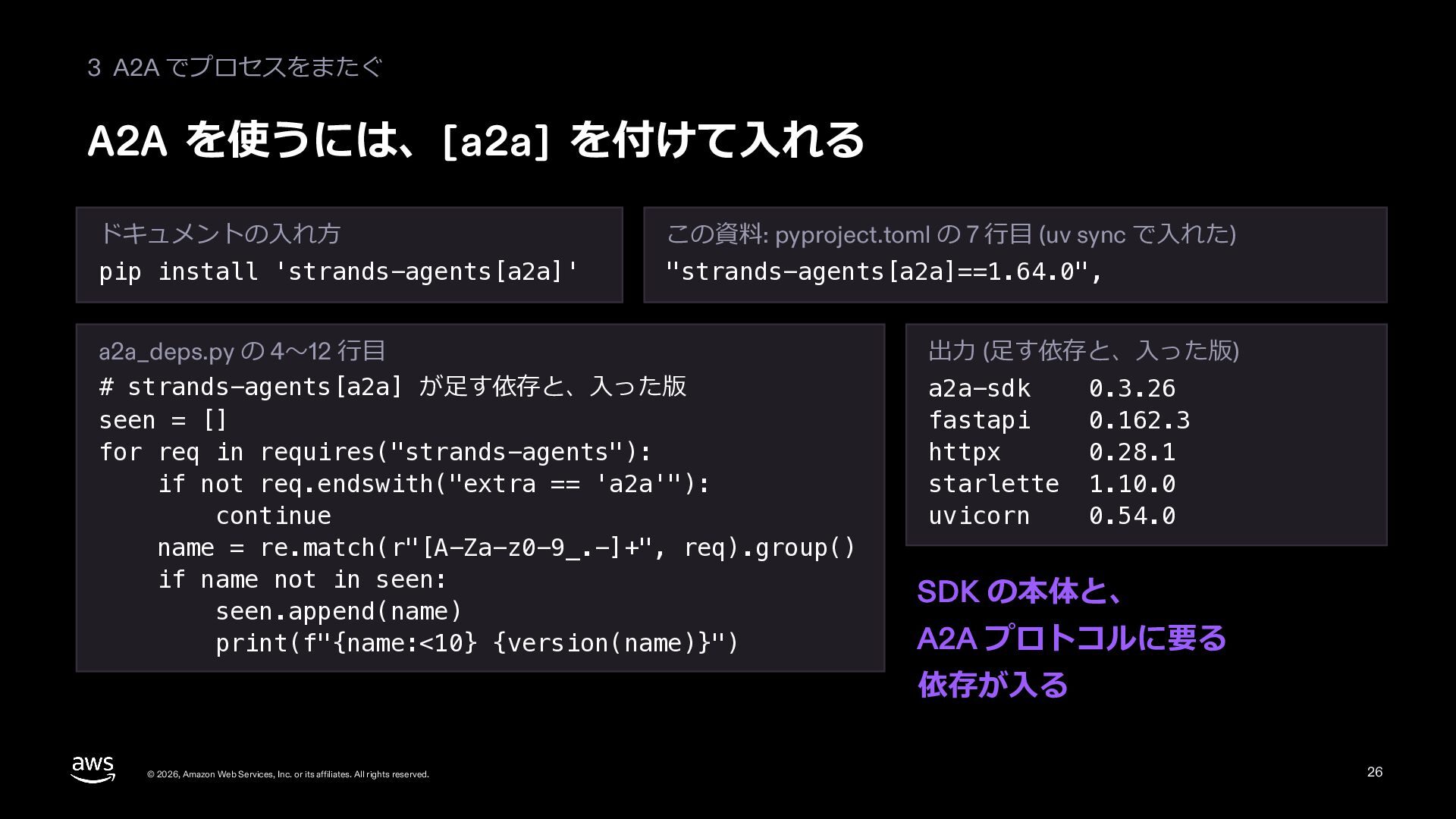
  25. 3 A2A でプロセスをまたぐ A2A を使うには、[a2a] を付けて⼊れる ドキュメントの⼊れ⽅ この資料: pyproject.toml の

    7 ⾏⽬ (uv sync で⼊れた) pip install 'strands-agents[a2a]' "strands-agents[a2a]==1.64.0", a2a_deps.py の 4〜12 ⾏⽬ # strands-agents[a2a] が⾜す依存と、⼊った版 seen = [] for req in requires("strands-agents"): if not req.endswith("extra == 'a2a'"): continue name = re.match(r"[A-Za-z0-9_.-]+", req).group() if name not in seen: seen.append(name) print(f"{name:<10} {version(name)}") 出⼒ (⾜す依存と、⼊った版) a2a-sdk fastapi httpx starlette uvicorn 0.3.26 0.162.3 0.28.1 1.10.0 0.54.0 SDK の本体と、 A2A プロトコルに要る 依存が⼊る © 2026, Amazon Web Services, Inc. or its affiliates. All rights reserved. 26
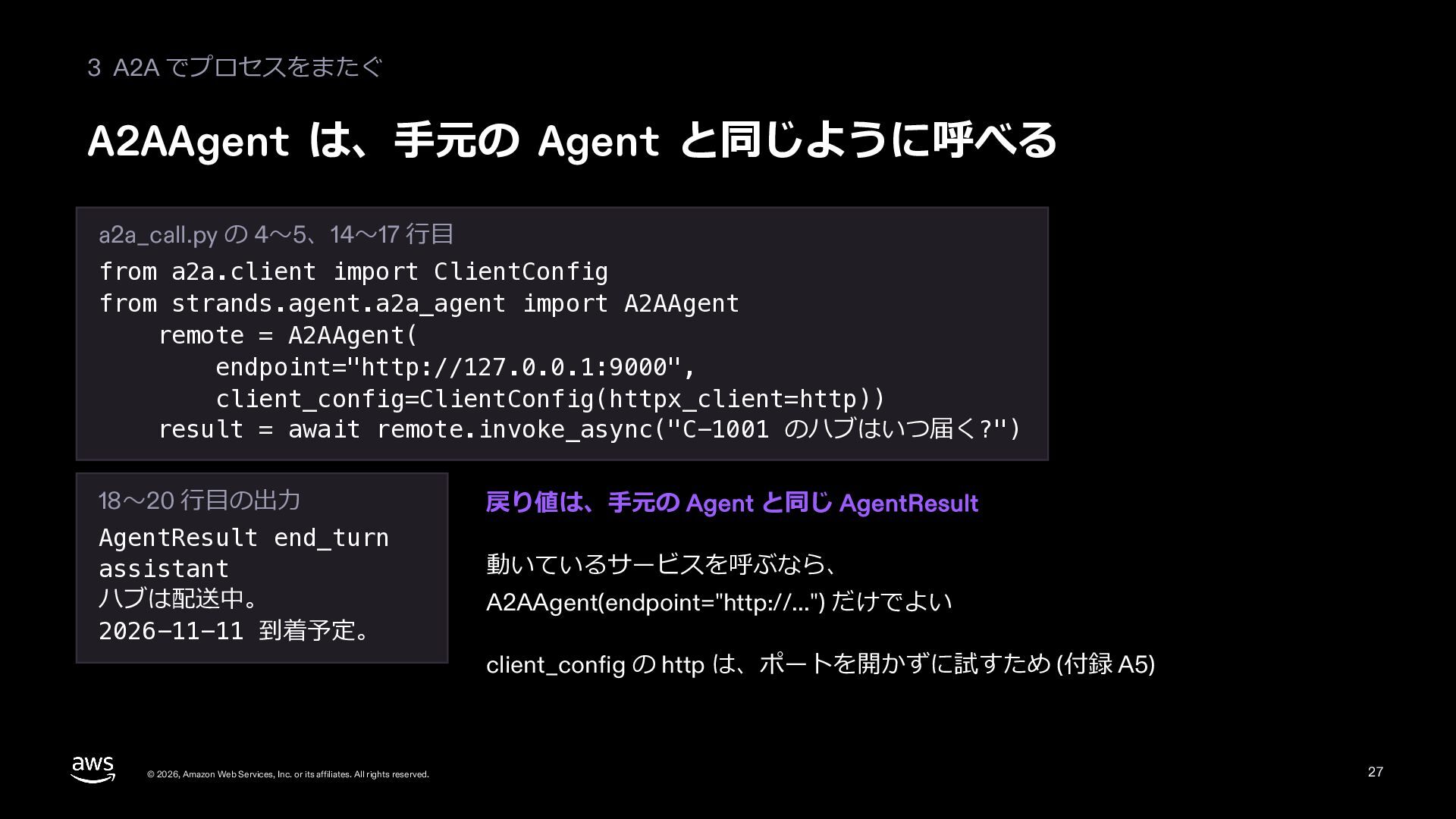
  26. 3 A2A でプロセスをまたぐ A2AAgent は、⼿元の Agent と同じように呼べる a2a_call.py の 4〜5、14〜17

    ⾏⽬ from a2a.client import ClientConfig from strands.agent.a2a_agent import A2AAgent remote = A2AAgent( endpoint="http://127.0.0.1:9000", client_config=ClientConfig(httpx_client=http)) result = await remote.invoke_async("C-1001 のハブはいつ届く?") 18〜20 ⾏⽬の出⼒ AgentResult end_turn assistant ハブは配送中。 2026-11-11 到着予定。 © 2026, Amazon Web Services, Inc. or its affiliates. All rights reserved. 戻り値は、⼿元の Agent と同じ AgentResult 動いているサービスを呼ぶなら、 A2AAgent(endpoint="http://...") だけでよい client_config の http は、ポートを開かずに試すため (付録 A5) 27
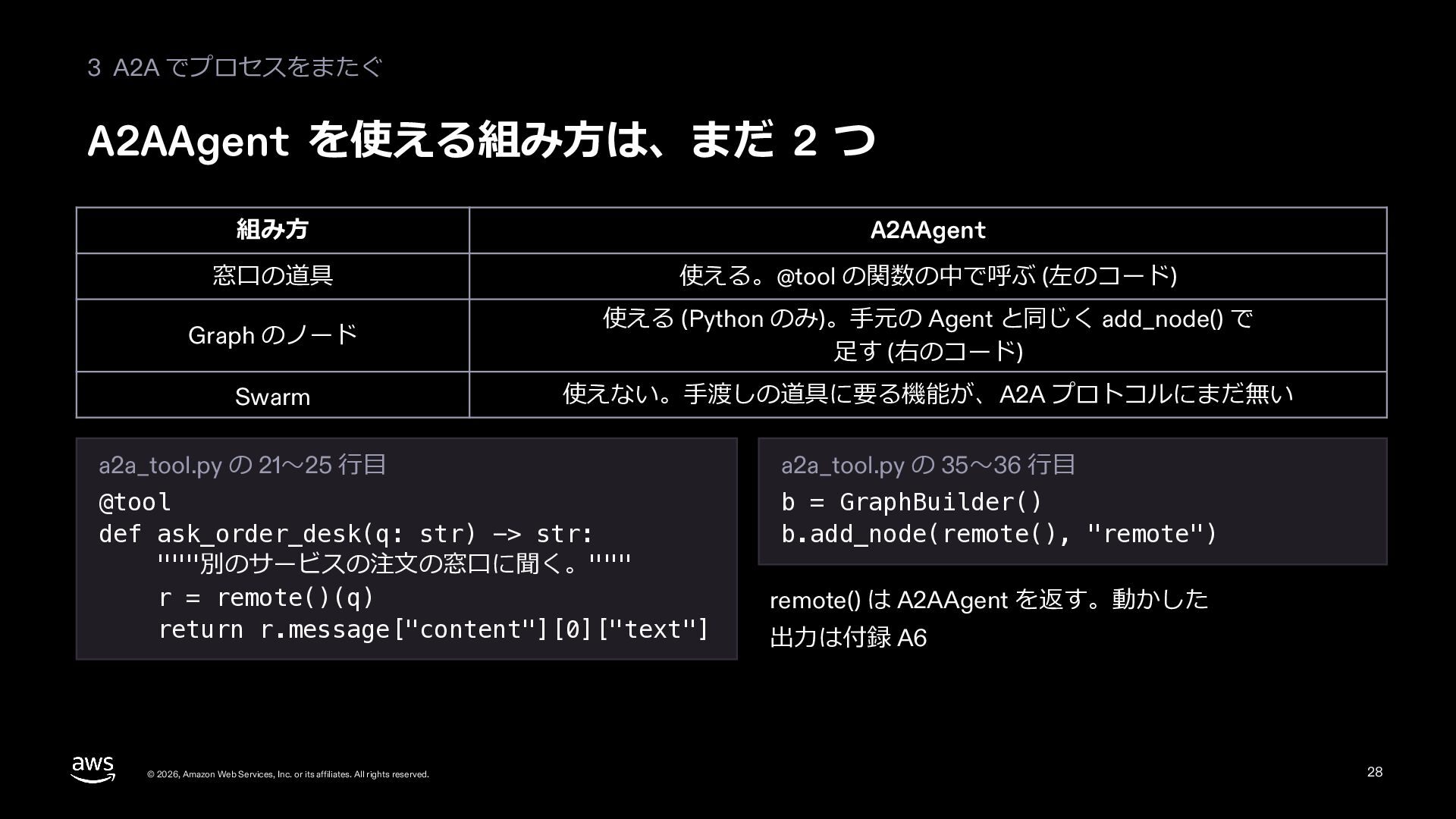
  27. 3 A2A でプロセスをまたぐ A2AAgent を使える組み⽅は、まだ 2 つ 組み⽅ A2AAgent 窓⼝の道具

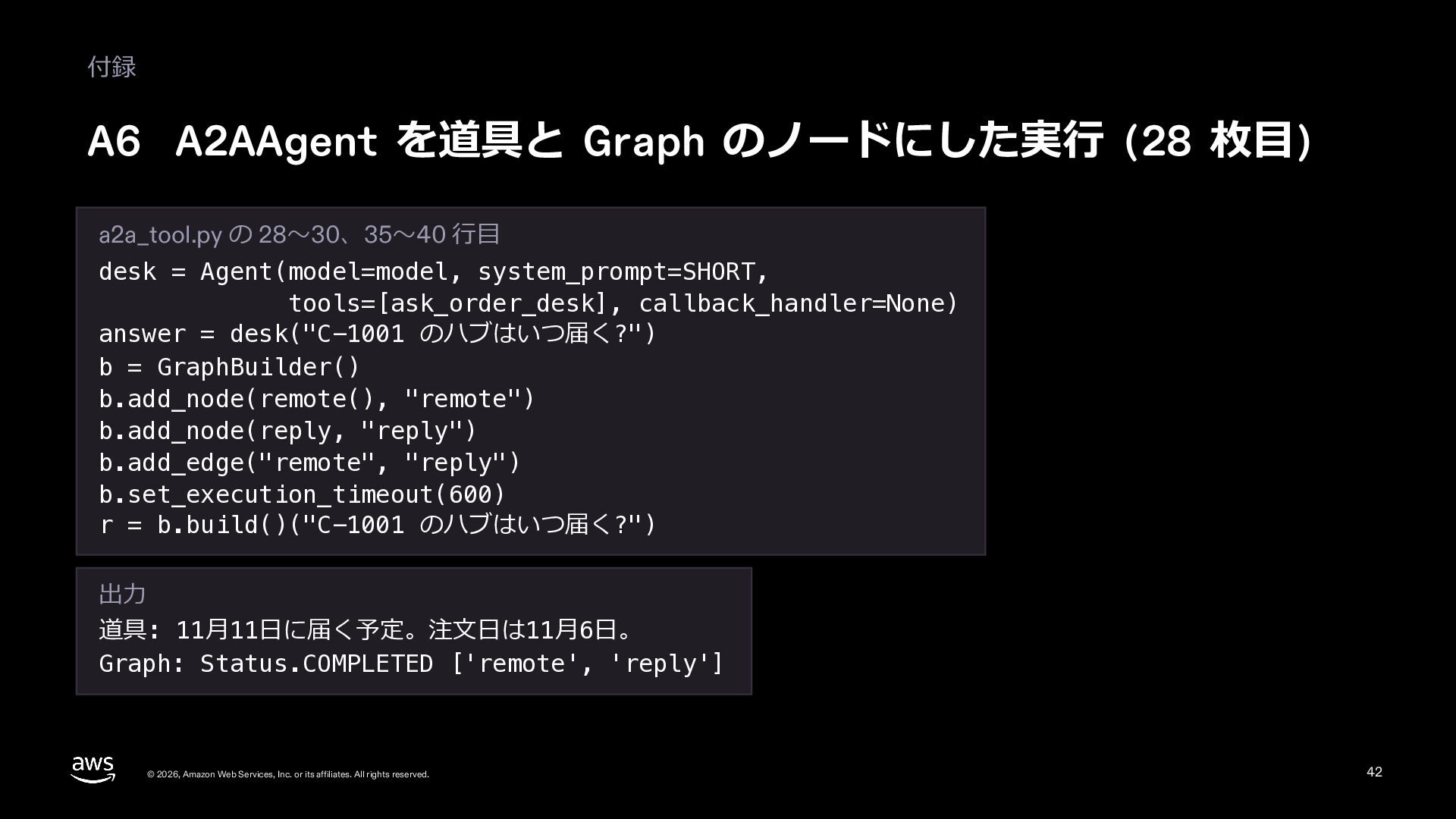
    使える。@tool の関数の中で呼ぶ (左のコード) Graph のノード 使える (Python のみ)。⼿元の Agent と同じく add_node() で ⾜す (右のコード) Swarm 使えない。⼿渡しの道具に要る機能が、A2A プロトコルにまだ無い a2a_tool.py の 21〜25 ⾏⽬ a2a_tool.py の 35〜36 ⾏⽬ @tool def ask_order_desk(q: str) -> str: """別のサービスの注⽂の窓⼝に聞く。""" r = remote()(q) return r.message["content"][0]["text"] b = GraphBuilder() b.add_node(remote(), "remote") © 2026, Amazon Web Services, Inc. or its affiliates. All rights reserved. remote() は A2AAgent を返す。動かした 出⼒は付録 A6 28
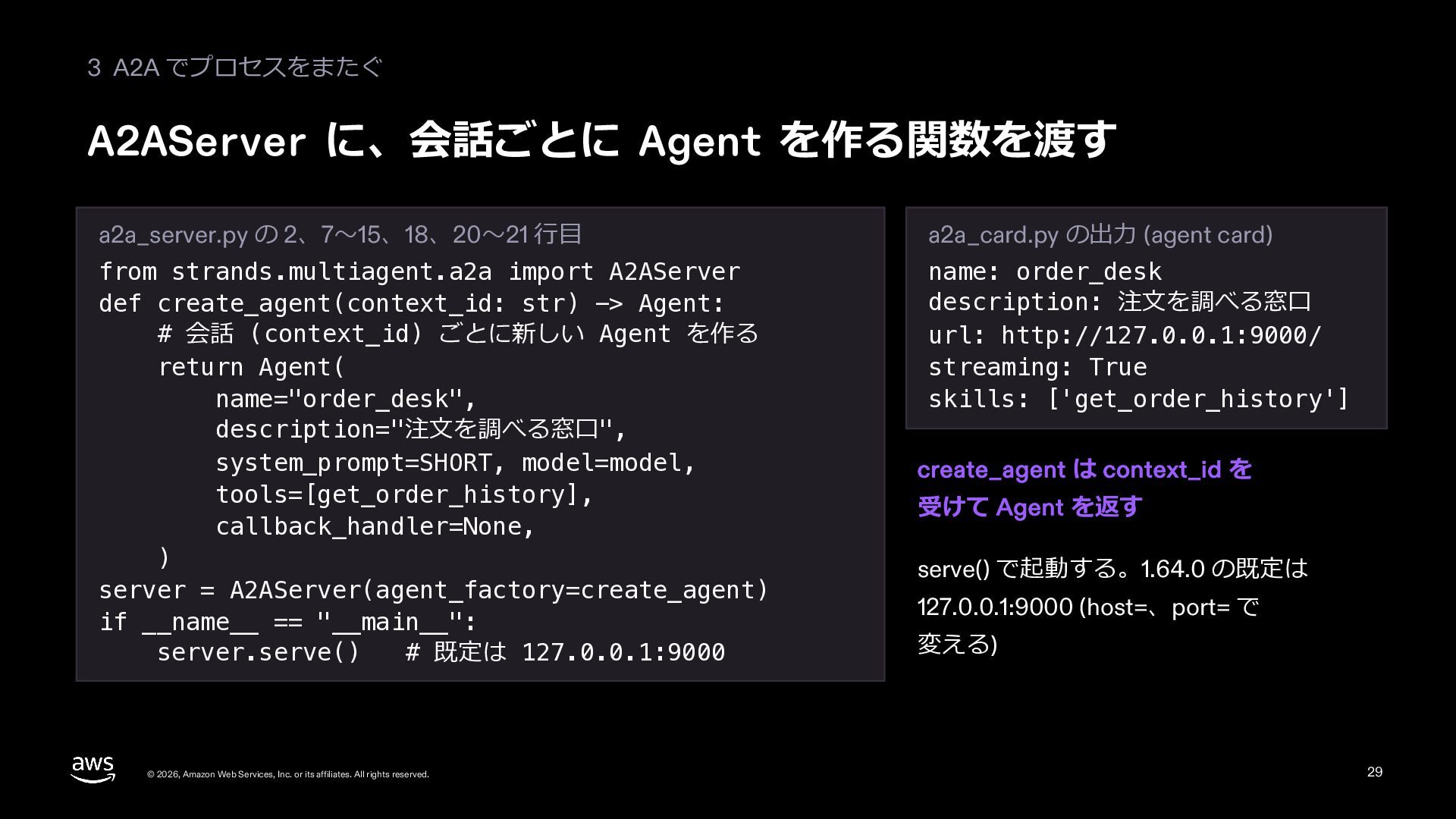
  28. 3 A2A でプロセスをまたぐ A2AServer に、会話ごとに Agent を作る関数を渡す a2a_server.py の 2、7〜15、18、20〜21

    ⾏⽬ a2a_card.py の出⼒ (agent card) from strands.multiagent.a2a import A2AServer def create_agent(context_id: str) -> Agent: # 会話 (context_id) ごとに新しい Agent を作る return Agent( name="order_desk", description="注⽂を調べる窓⼝", system_prompt=SHORT, model=model, tools=[get_order_history], callback_handler=None, ) server = A2AServer(agent_factory=create_agent) if __name__ == "__main__": server.serve() # 既定は 127.0.0.1:9000 name: order_desk description: 注⽂を調べる窓⼝ url: http://127.0.0.1:9000/ streaming: True skills: ['get_order_history'] © 2026, Amazon Web Services, Inc. or its affiliates. All rights reserved. create_agent は context_id を 受けて Agent を返す serve() で起動する。1.64.0 の既定は 127.0.0.1:9000 (host=、port= で 変える) 29
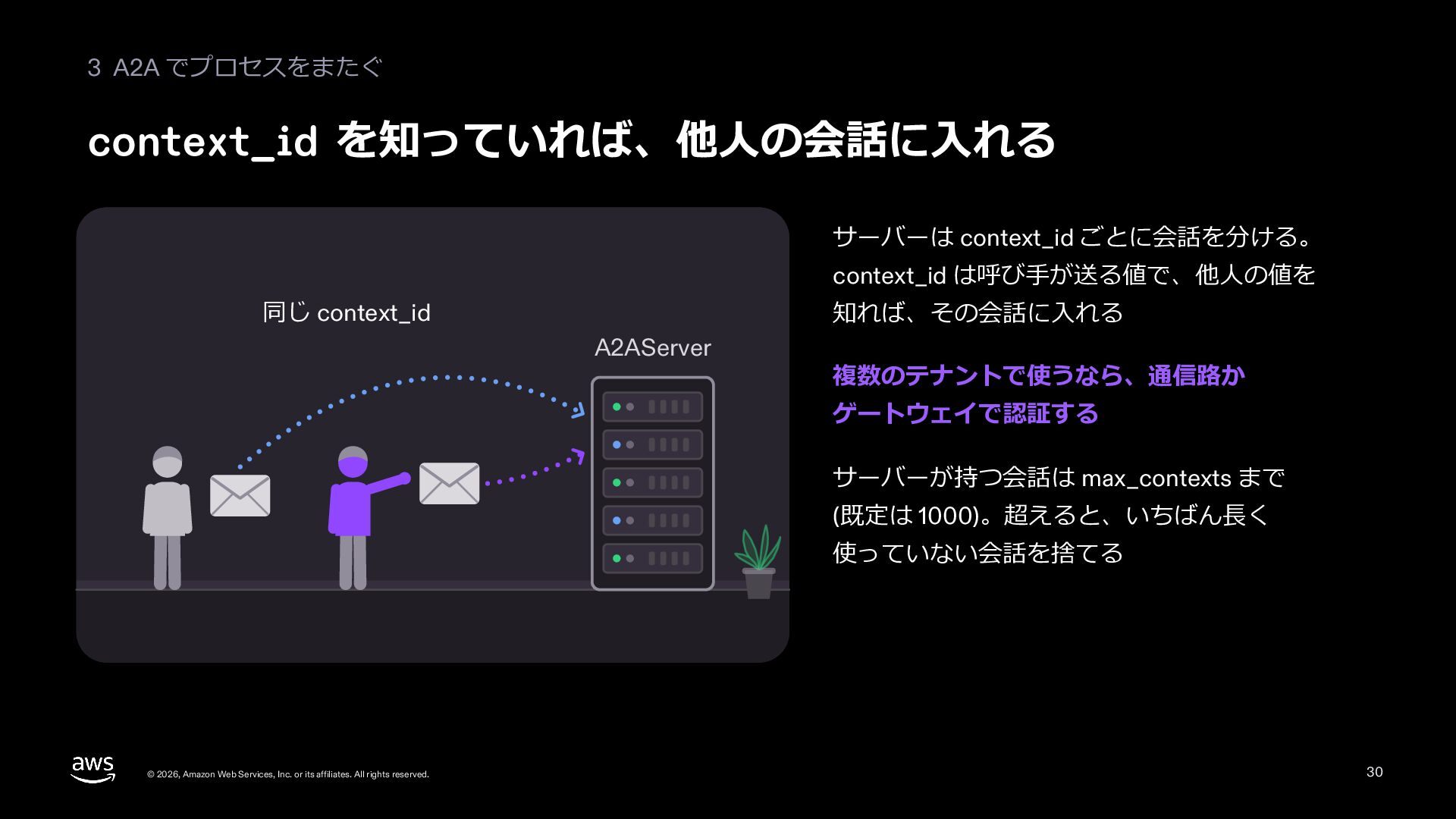
  29. 3 A2A でプロセスをまたぐ context_id を知っていれば、他⼈の会話に⼊れる サーバーは context_id ごとに会話を分ける。 context_id は呼び⼿が送る値で、他⼈の値を

    同じ context_id 知れば、その会話に⼊れる A2AServer 複数のテナントで使うなら、通信路か ゲートウェイで認証する サーバーが持つ会話は max_contexts まで (既定は 1000)。超えると、いちばん⻑く 使っていない会話を捨てる © 2026, Amazon Web Services, Inc. or its affiliates. All rights reserved. 30
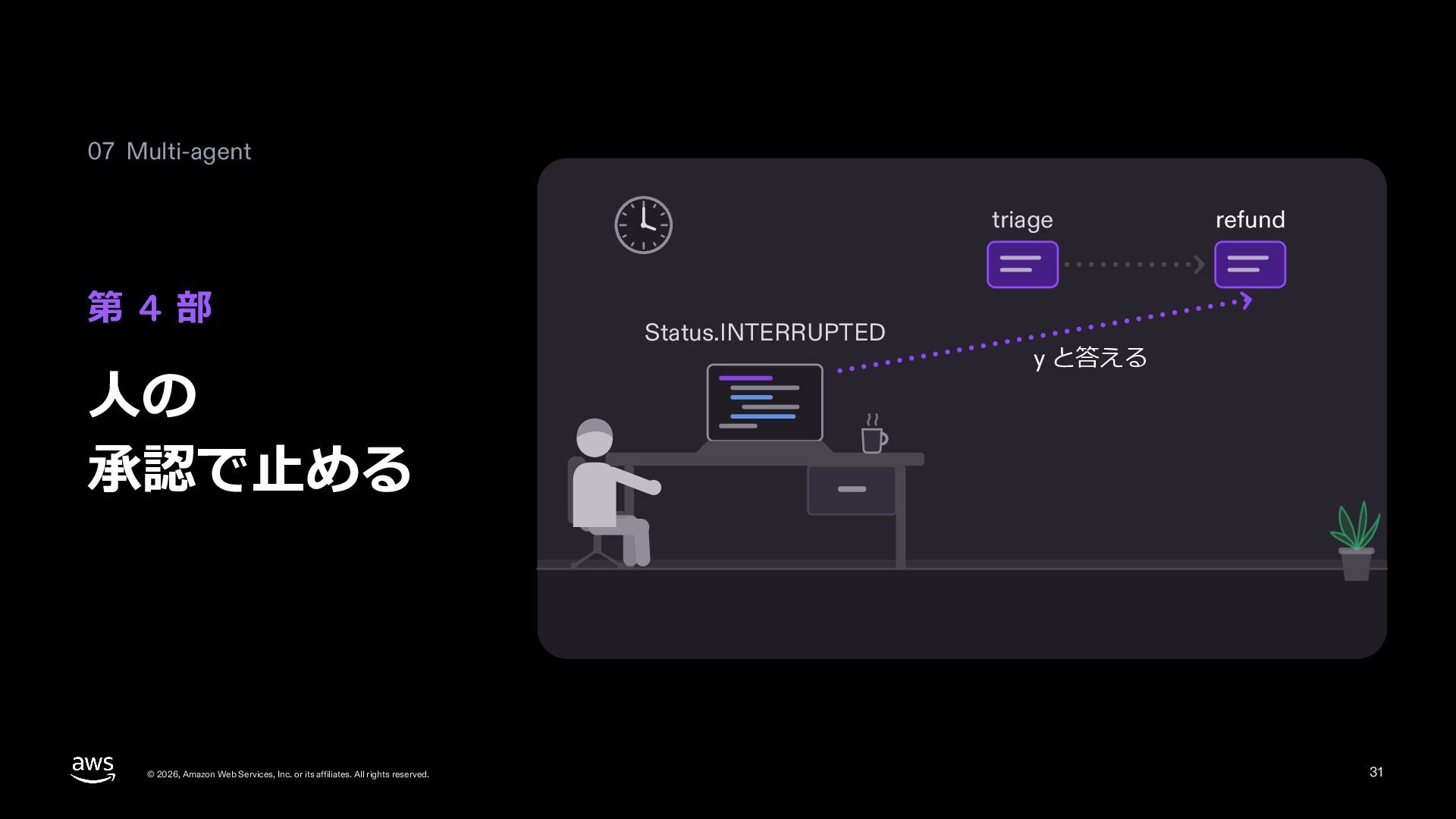
  30. 07 Multi-agent triage 第 4 部 ⼈の 承認で⽌める © 2026,

    Amazon Web Services, Inc. or its affiliates. All rights reserved. Status.INTERRUPTED refund y と答える 31
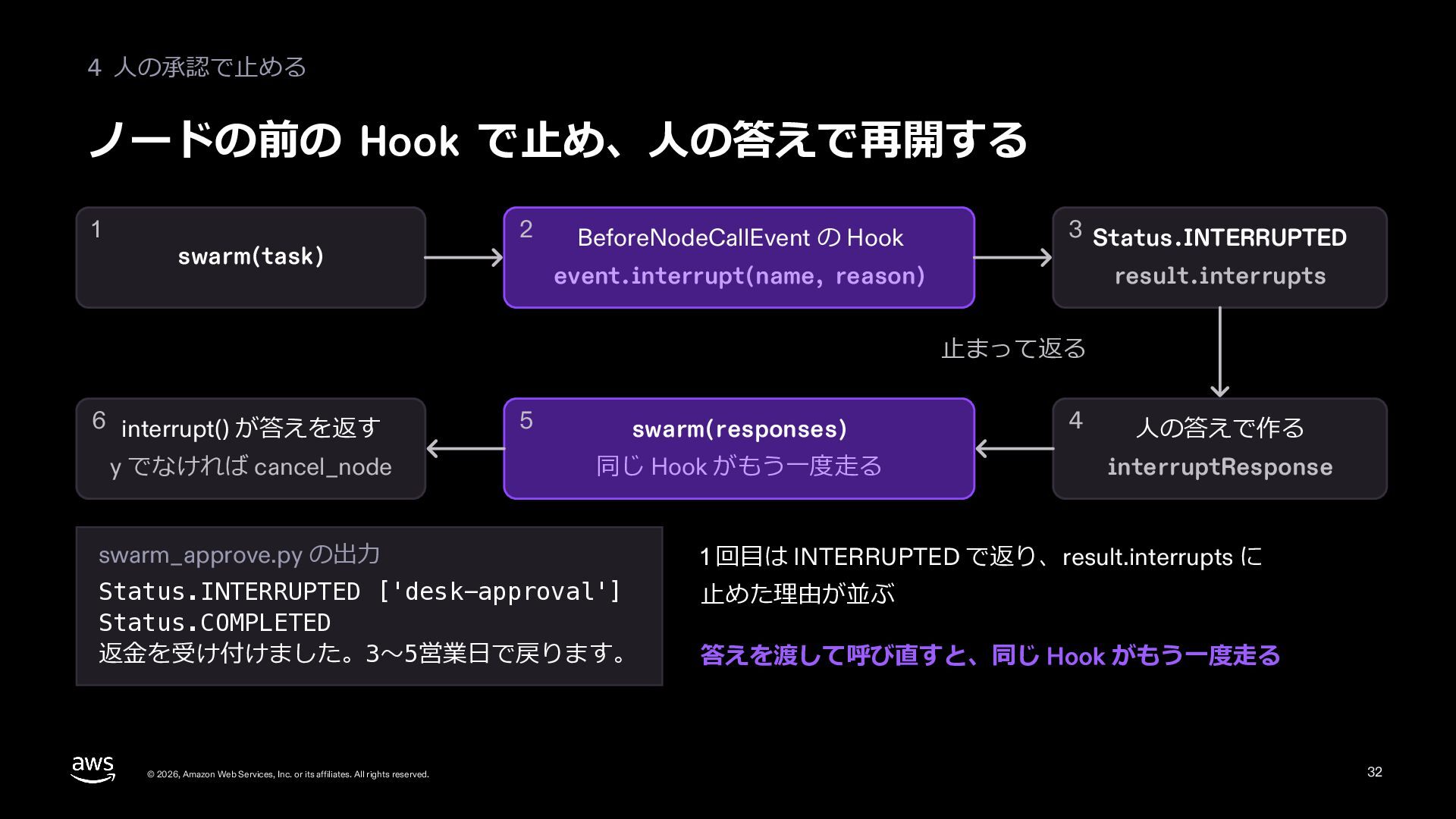
  31. 4 ⼈の承認で⽌める ノードの前の Hook で⽌め、⼈の答えで再開する 1 swarm(task) 2 BeforeNodeCallEvent の

    Hook 3 Status.INTERRUPTED event.interrupt(name, reason) result.interrupts ⽌まって返る 6 interrupt() が答えを返す y でなければ cancel_node 5 swarm(responses) 同じ Hook がもう⼀度⾛る 4 ⼈の答えで作る interruptResponse swarm_approve.py の出⼒ 1 回⽬は INTERRUPTED で返り、result.interrupts に Status.INTERRUPTED ['desk-approval'] Status.COMPLETED 返⾦を受け付けました。3〜5営業⽇で戻ります。 ⽌めた理由が並ぶ © 2026, Amazon Web Services, Inc. or its affiliates. All rights reserved. 答えを渡して呼び直すと、同じ Hook がもう⼀度⾛る 32
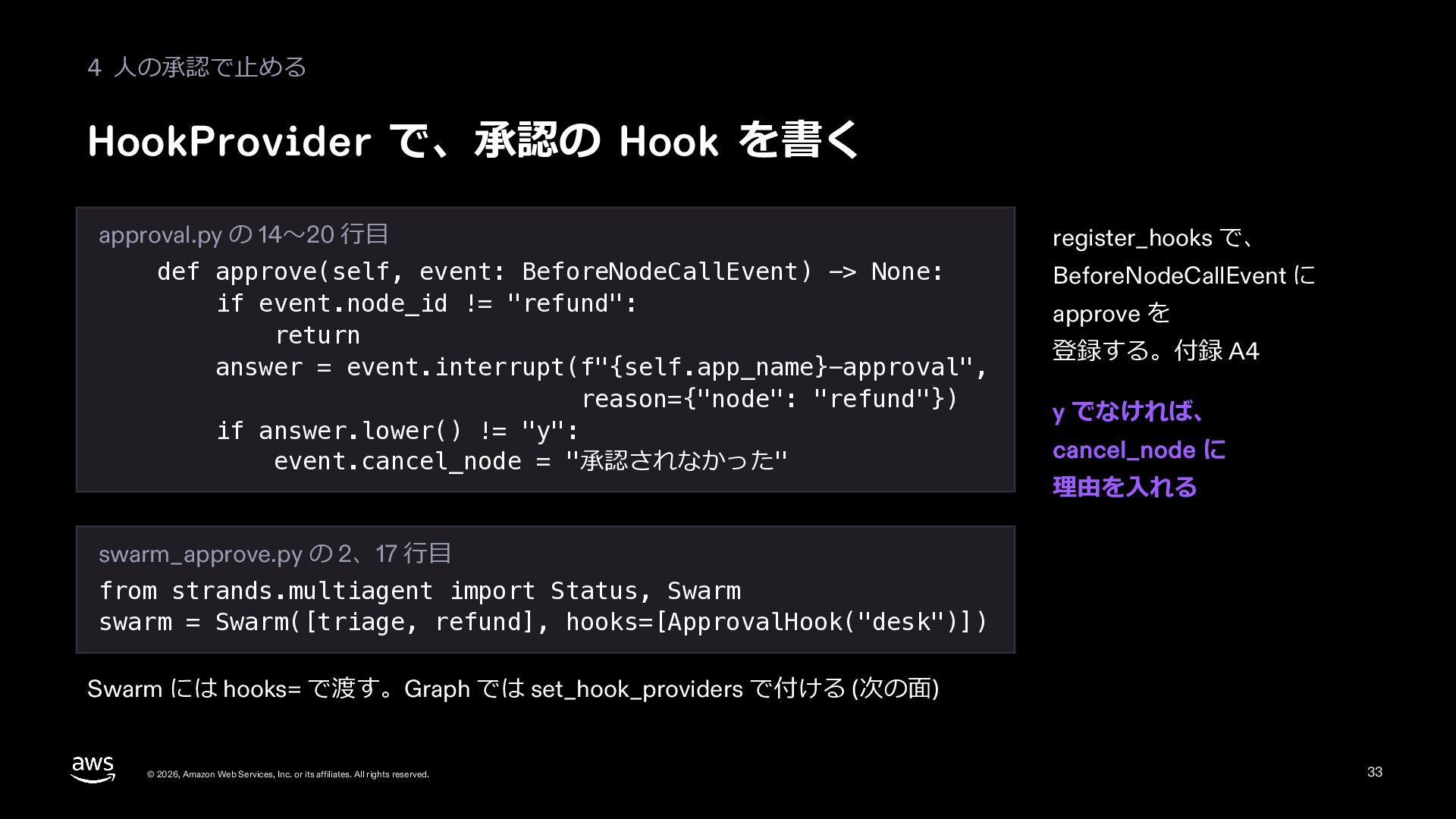
  32. 4 ⼈の承認で⽌める HookProvider で、承認の Hook を書く approval.py の 14〜20 ⾏⽬

    def approve(self, event: BeforeNodeCallEvent) -> None: if event.node_id != "refund": return answer = event.interrupt(f"{self.app_name}-approval", reason={"node": "refund"}) if answer.lower() != "y": event.cancel_node = "承認されなかった" register_hooks で、 BeforeNodeCallEvent に approve を 登録する。付録 A4 y でなければ、 cancel_node に 理由を⼊れる swarm_approve.py の 2、17 ⾏⽬ from strands.multiagent import Status, Swarm swarm = Swarm([triage, refund], hooks=[ApprovalHook("desk")]) Swarm には hooks= で渡す。Graph では set_hook_providers で付ける (次の⾯) © 2026, Amazon Web Services, Inc. or its affiliates. All rights reserved. 33
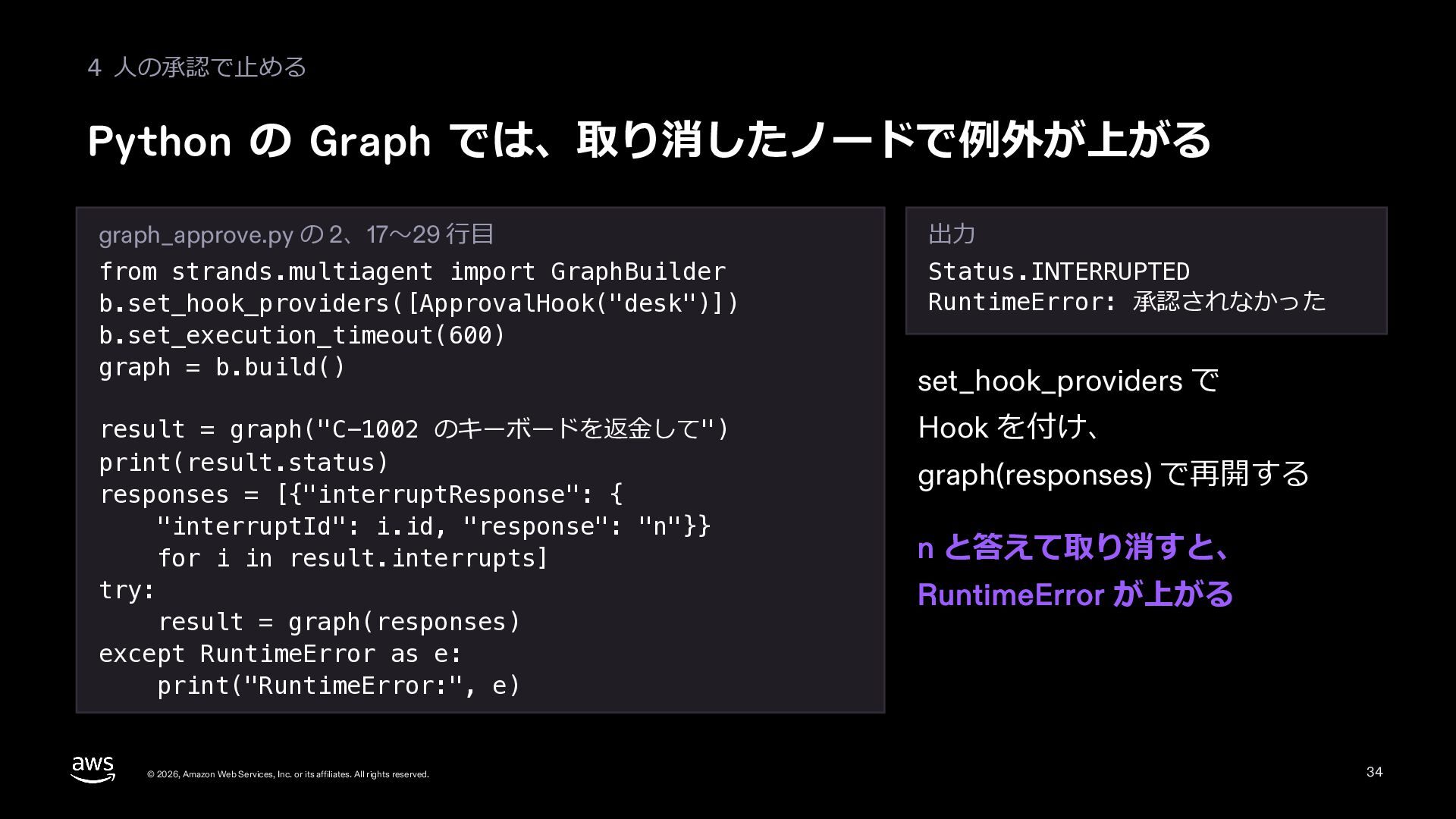
  33. 4 ⼈の承認で⽌める Python の Graph では、取り消したノードで例外が上がる graph_approve.py の 2、17〜29 ⾏⽬

    出⼒ from strands.multiagent import GraphBuilder b.set_hook_providers([ApprovalHook("desk")]) b.set_execution_timeout(600) graph = b.build() Status.INTERRUPTED RuntimeError: 承認されなかった result = graph("C-1002 のキーボードを返⾦して") print(result.status) responses = [{"interruptResponse": { "interruptId": i.id, "response": "n"}} for i in result.interrupts] try: result = graph(responses) except RuntimeError as e: print("RuntimeError:", e) © 2026, Amazon Web Services, Inc. or its affiliates. All rights reserved. set_hook_providers で Hook を付け、 graph(responses) で再開する n と答えて取り消すと、 RuntimeError が上がる 34
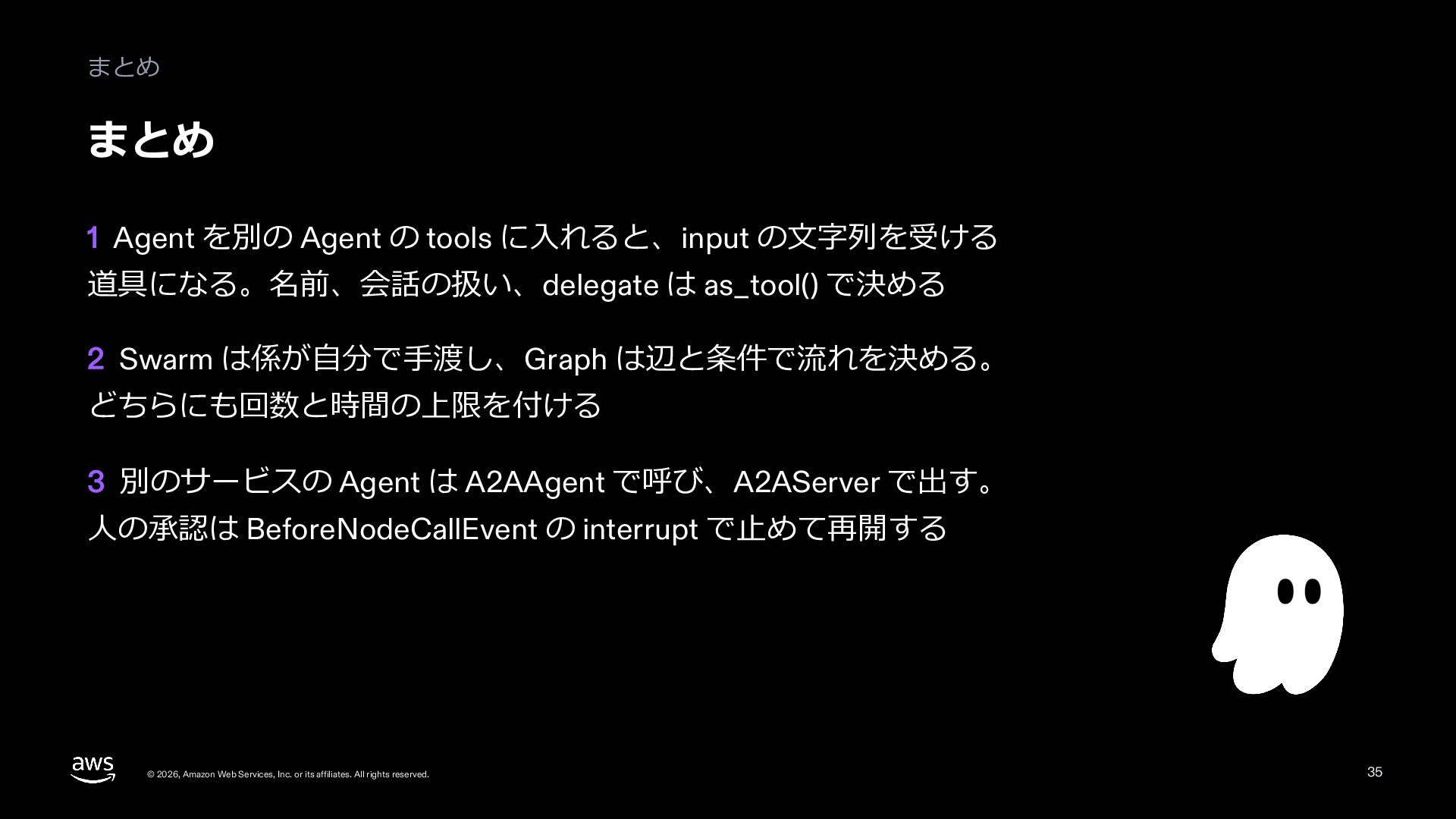
  34. まとめ まとめ 1 Agent を別の Agent の tools に⼊れると、input の⽂字列を受ける

    道具になる。名前、会話の扱い、delegate は as_tool() で決める 2 Swarm は係が⾃分で⼿渡し、Graph は辺と条件で流れを決める。 どちらにも回数と時間の上限を付ける 3 別のサービスの Agent は A2AAgent で呼び、A2AServer で出す。 ⼈の承認は BeforeNodeCallEvent の interrupt で⽌めて再開する © 2026, Amazon Web Services, Inc. or its affiliates. All rights reserved. 35
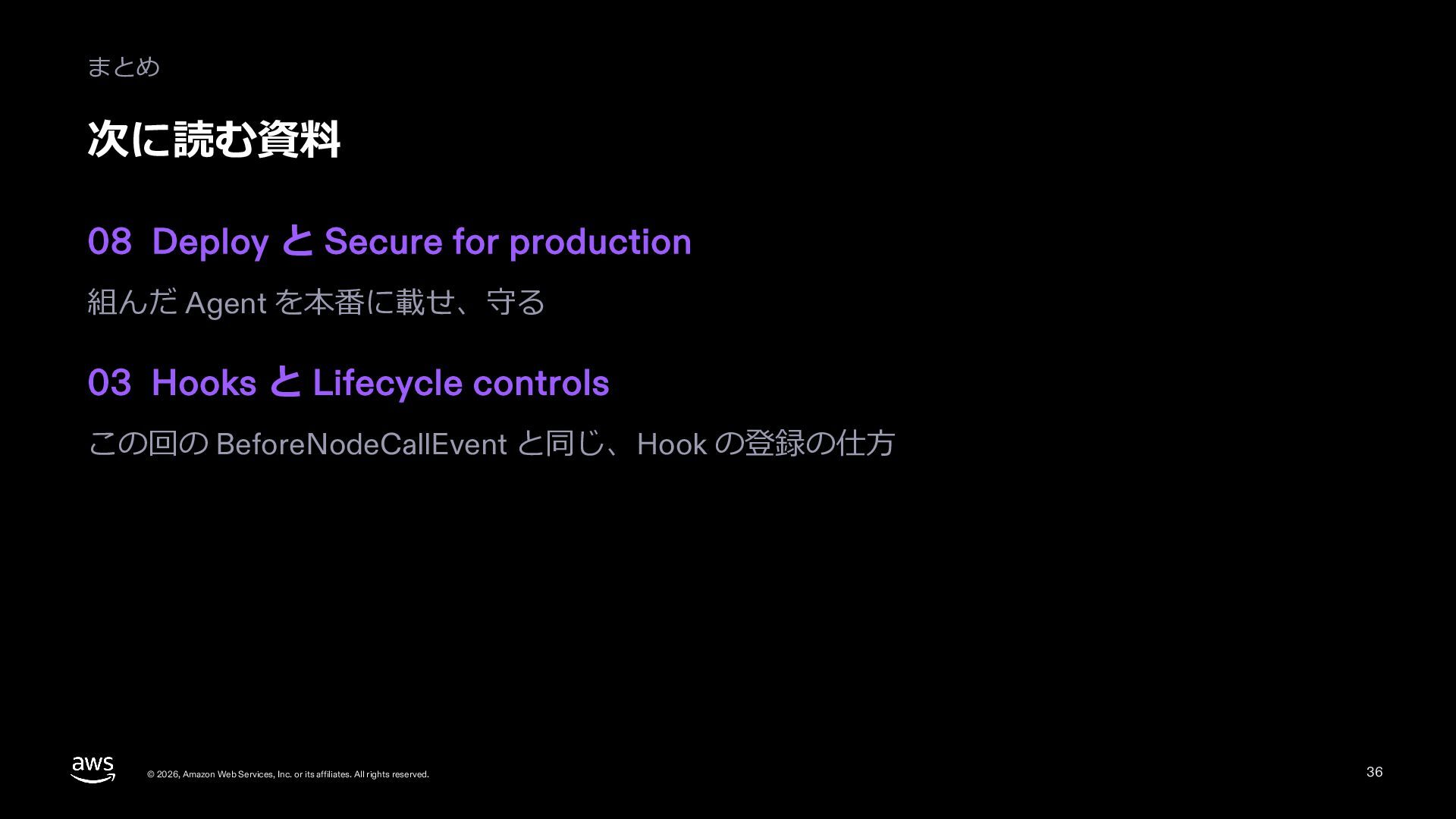
  35. まとめ 次に読む資料 08 Deploy と Secure for production 組んだ Agent

    を本番に載せ、守る 03 Hooks と Lifecycle controls この回の BeforeNodeCallEvent と同じ、Hook の登録の仕⽅ © 2026, Amazon Web Services, Inc. or its affiliates. All rights reserved. 36
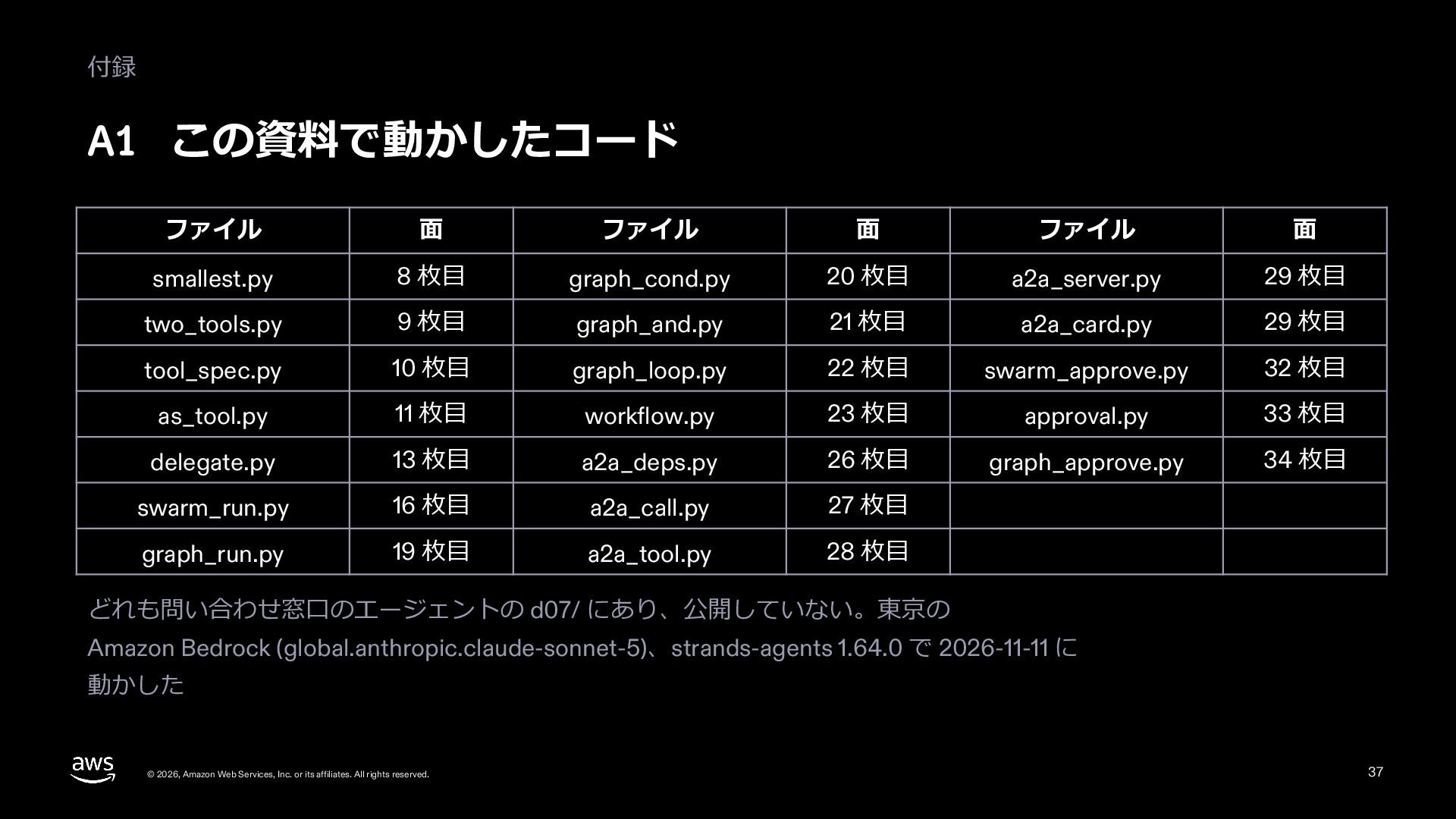
  36. 付録 A1 この資料で動かしたコード ファイル ⾯ ファイル ⾯ ファイル ⾯ smallest.py

    8 枚⽬ graph_cond.py 20 枚⽬ a2a_server.py 29 枚⽬ two_tools.py 9 枚⽬ graph_and.py 21 枚⽬ a2a_card.py 29 枚⽬ tool_spec.py 10 枚⽬ graph_loop.py 22 枚⽬ swarm_approve.py 32 枚⽬ as_tool.py 11 枚⽬ workflow.py 23 枚⽬ approval.py 33 枚⽬ delegate.py 13 枚⽬ a2a_deps.py 26 枚⽬ graph_approve.py 34 枚⽬ swarm_run.py 16 枚⽬ a2a_call.py 27 枚⽬ graph_run.py 19 枚⽬ a2a_tool.py 28 枚⽬ どれも問い合わせ窓⼝のエージェントの d07/ にあり、公開していない。東京の Amazon Bedrock (global.anthropic.claude-sonnet-5)、strands-agents 1.64.0 で 2026-11-11 に 動かした © 2026, Amazon Web Services, Inc. or its affiliates. All rights reserved. 37
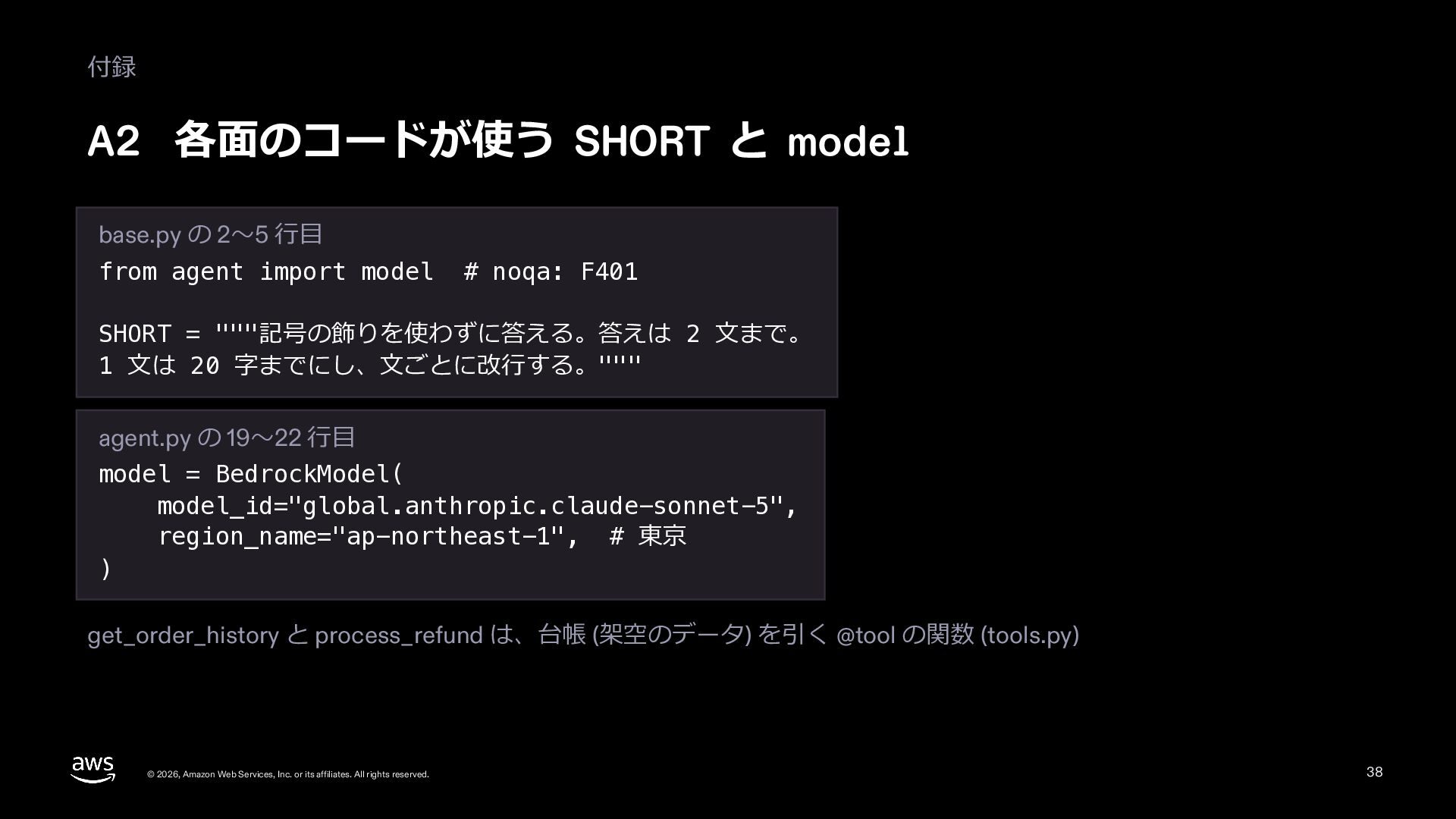
  37. 付録 A2 各⾯のコードが使う SHORT と model base.py の 2〜5 ⾏⽬

    from agent import model # noqa: F401 SHORT = """記号の飾りを使わずに答える。答えは 2 ⽂まで。 1 ⽂は 20 字までにし、⽂ごとに改⾏する。""" agent.py の 19〜22 ⾏⽬ model = BedrockModel( model_id="global.anthropic.claude-sonnet-5", region_name="ap-northeast-1", # 東京 ) get_order_history と process_refund は、台帳 (架空のデータ) を引く @tool の関数 (tools.py) © 2026, Amazon Web Services, Inc. or its affiliates. All rights reserved. 38
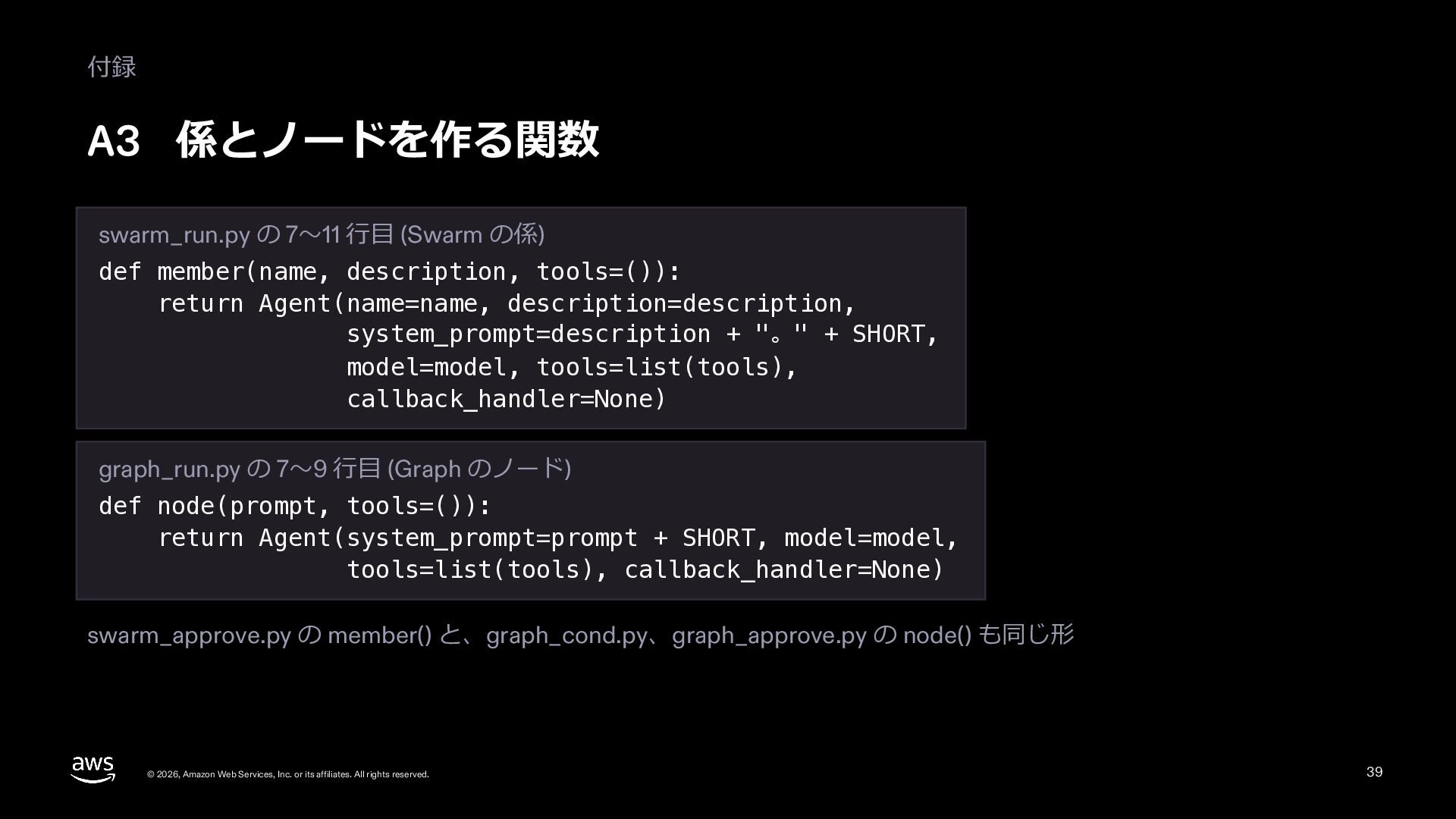
  38. 付録 A3 係とノードを作る関数 swarm_run.py の 7〜11 ⾏⽬ (Swarm の係) def

    member(name, description, tools=()): return Agent(name=name, description=description, system_prompt=description + "。" + SHORT, model=model, tools=list(tools), callback_handler=None) graph_run.py の 7〜9 ⾏⽬ (Graph のノード) def node(prompt, tools=()): return Agent(system_prompt=prompt + SHORT, model=model, tools=list(tools), callback_handler=None) swarm_approve.py の member() と、graph_cond.py、graph_approve.py の node() も同じ形 © 2026, Amazon Web Services, Inc. or its affiliates. All rights reserved. 39
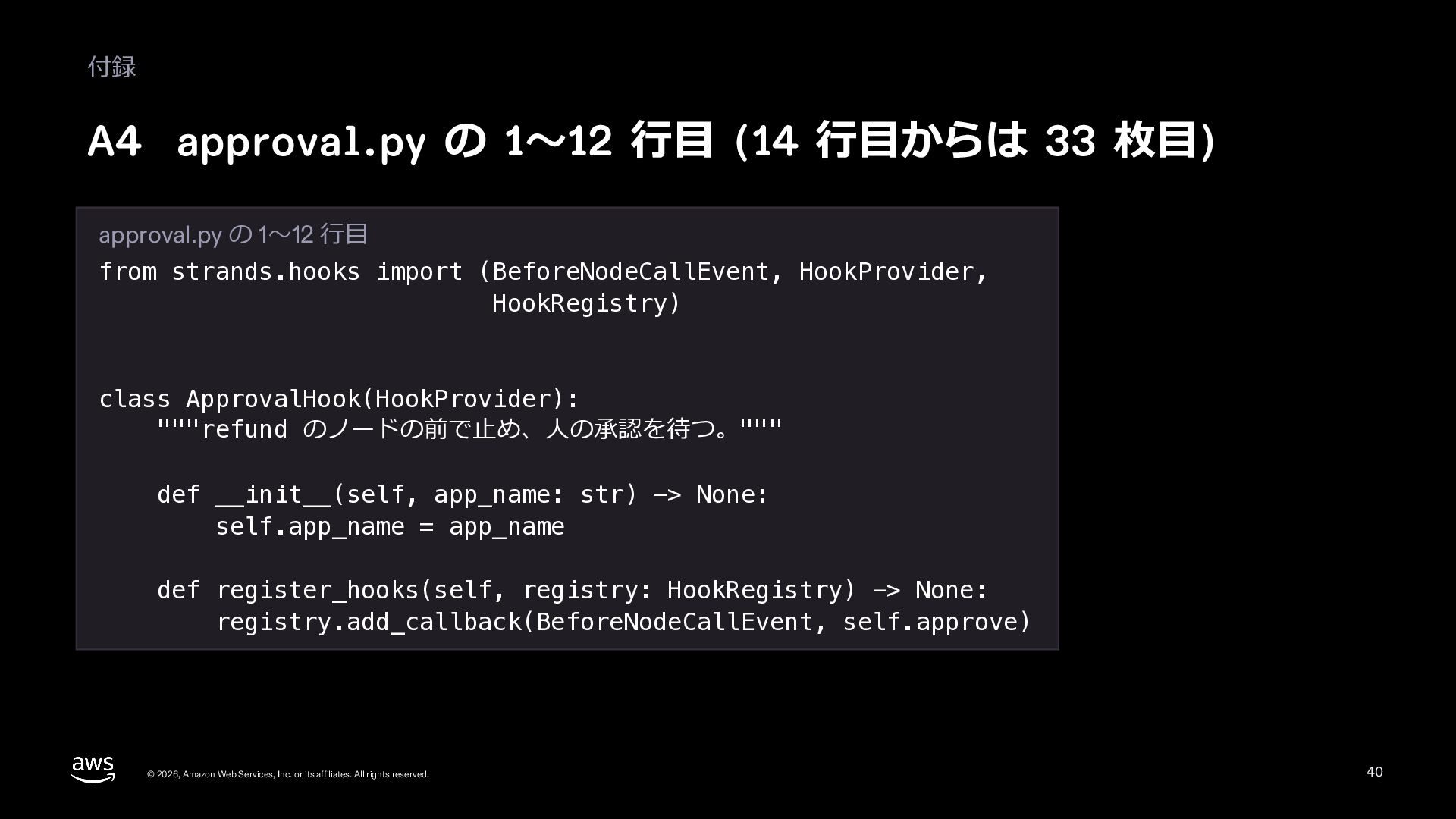
  39. 付録 A4 approval.py の 1〜12 ⾏⽬ (14 ⾏⽬からは 33 枚⽬)

    approval.py の 1〜12 ⾏⽬ from strands.hooks import (BeforeNodeCallEvent, HookProvider, HookRegistry) class ApprovalHook(HookProvider): """refund のノードの前で⽌め、⼈の承認を待つ。""" def __init__(self, app_name: str) -> None: self.app_name = app_name def register_hooks(self, registry: HookRegistry) -> None: registry.add_callback(BeforeNodeCallEvent, self.approve) © 2026, Amazon Web Services, Inc. or its affiliates. All rights reserved. 40
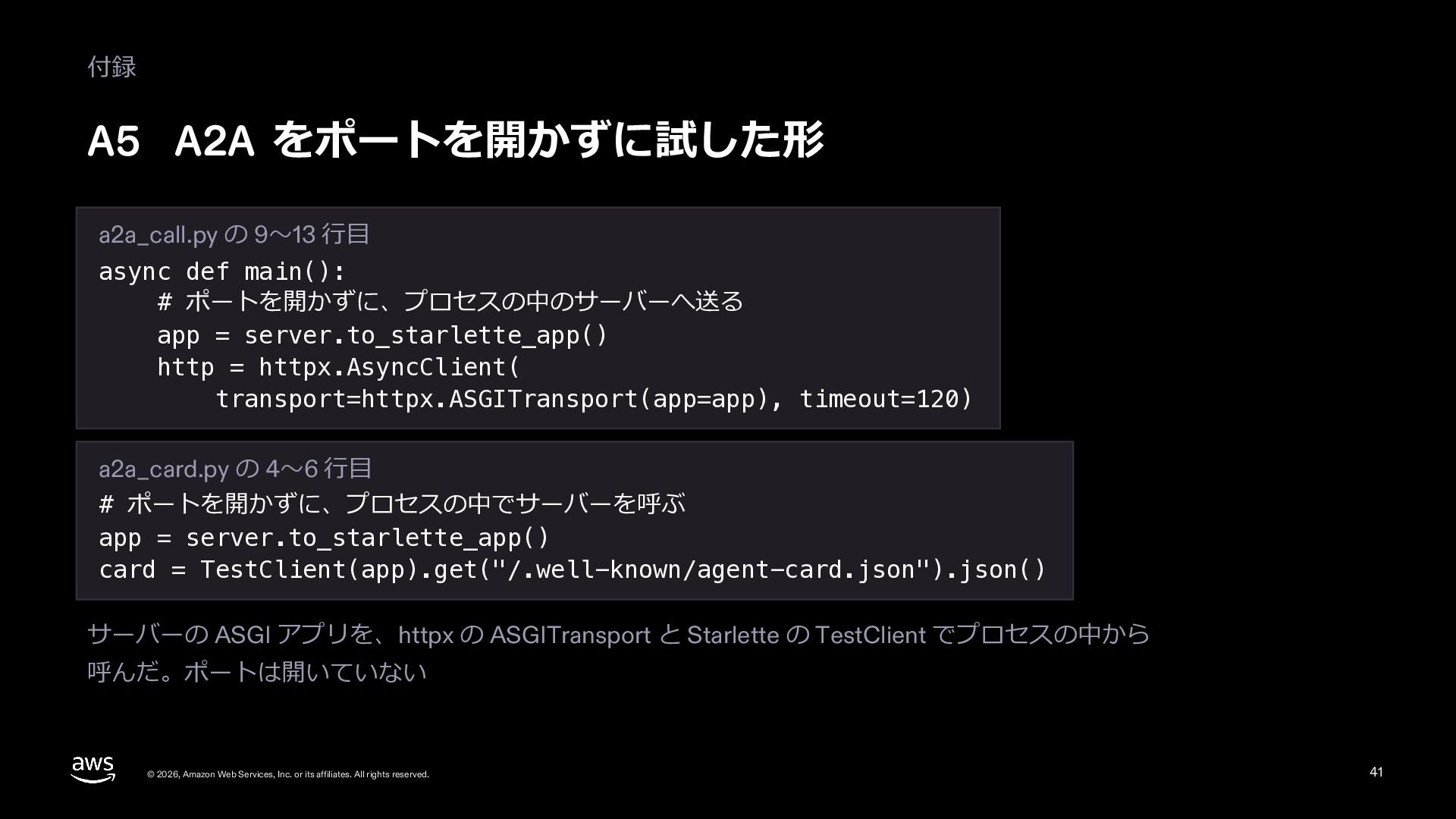
  40. 付録 A5 A2A をポートを開かずに試した形 a2a_call.py の 9〜13 ⾏⽬ async def

    main(): # ポートを開かずに、プロセスの中のサーバーへ送る app = server.to_starlette_app() http = httpx.AsyncClient( transport=httpx.ASGITransport(app=app), timeout=120) a2a_card.py の 4〜6 ⾏⽬ # ポートを開かずに、プロセスの中でサーバーを呼ぶ app = server.to_starlette_app() card = TestClient(app).get("/.well-known/agent-card.json").json() サーバーの ASGI アプリを、httpx の ASGITransport と Starlette の TestClient でプロセスの中から 呼んだ。ポートは開いていない © 2026, Amazon Web Services, Inc. or its affiliates. All rights reserved. 41
  41. 付録 A6 A2AAgent を道具と Graph のノードにした実⾏ (28 枚⽬) a2a_tool.py の

    28〜30、35〜40 ⾏⽬ desk = Agent(model=model, system_prompt=SHORT, tools=[ask_order_desk], callback_handler=None) answer = desk("C-1001 のハブはいつ届く?") b = GraphBuilder() b.add_node(remote(), "remote") b.add_node(reply, "reply") b.add_edge("remote", "reply") b.set_execution_timeout(600) r = b.build()("C-1001 のハブはいつ届く?") 出⼒ 道具: 11⽉11⽇に届く予定。注⽂⽇は11⽉6⽇。 Graph: Status.COMPLETED ['remote', 'reply'] © 2026, Amazon Web Services, Inc. or its affiliates. All rights reserved. 42
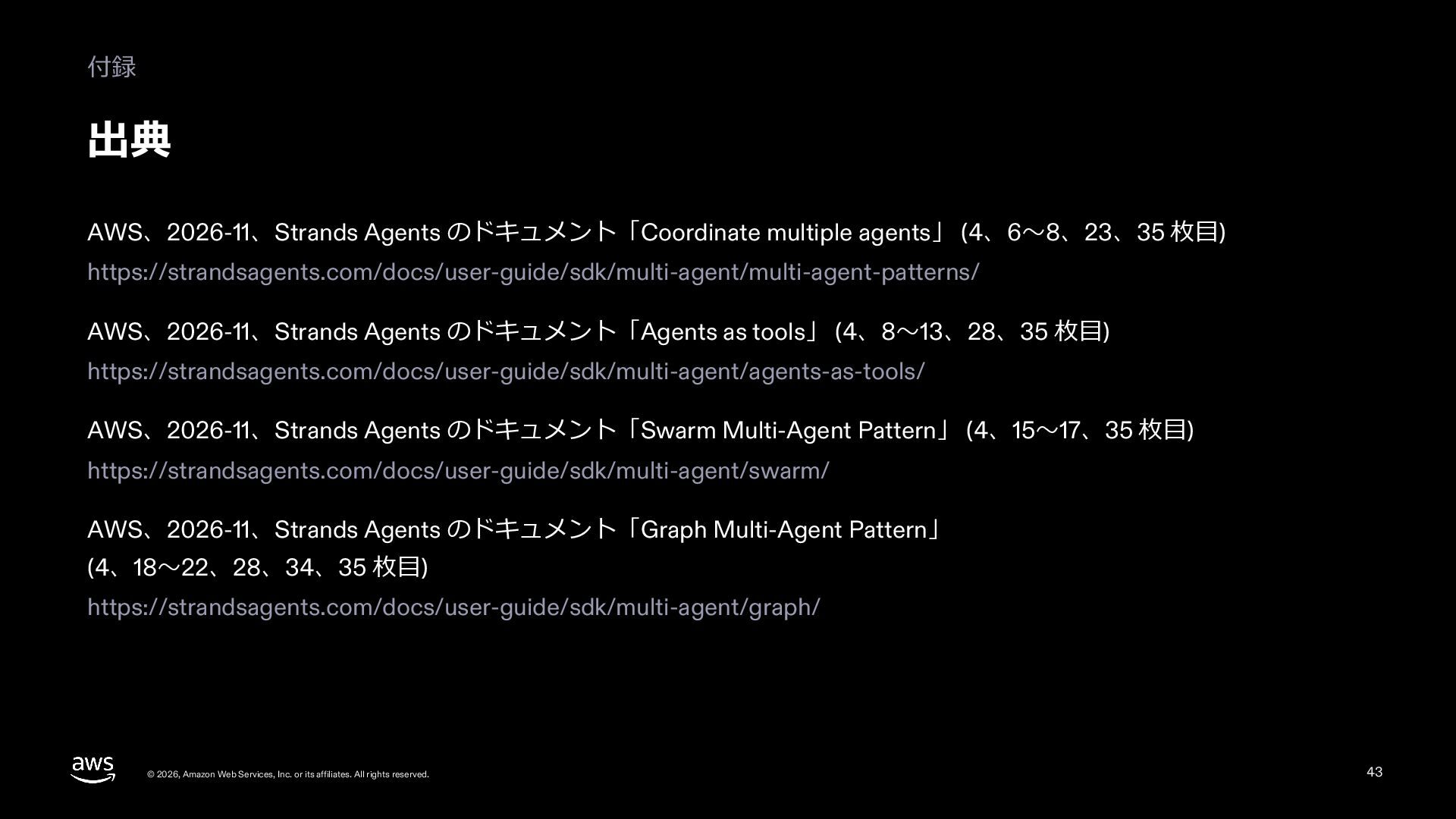
  42. 付録 出典 AWS、2026-11、Strands Agents のドキュメント「Coordinate multiple agents」 (4、6〜8、23、35 枚⽬) https://strandsagents.com/docs/user-guide/sdk/multi-agent/multi-agent-patterns/

    AWS、2026-11、Strands Agents のドキュメント「Agents as tools」 (4、8〜13、28、35 枚⽬) https://strandsagents.com/docs/user-guide/sdk/multi-agent/agents-as-tools/ AWS、2026-11、Strands Agents のドキュメント「Swarm Multi-Agent Pattern」 (4、15〜17、35 枚⽬) https://strandsagents.com/docs/user-guide/sdk/multi-agent/swarm/ AWS、2026-11、Strands Agents のドキュメント「Graph Multi-Agent Pattern」 (4、18〜22、28、34、35 枚⽬) https://strandsagents.com/docs/user-guide/sdk/multi-agent/graph/ © 2026, Amazon Web Services, Inc. or its affiliates. All rights reserved. 43
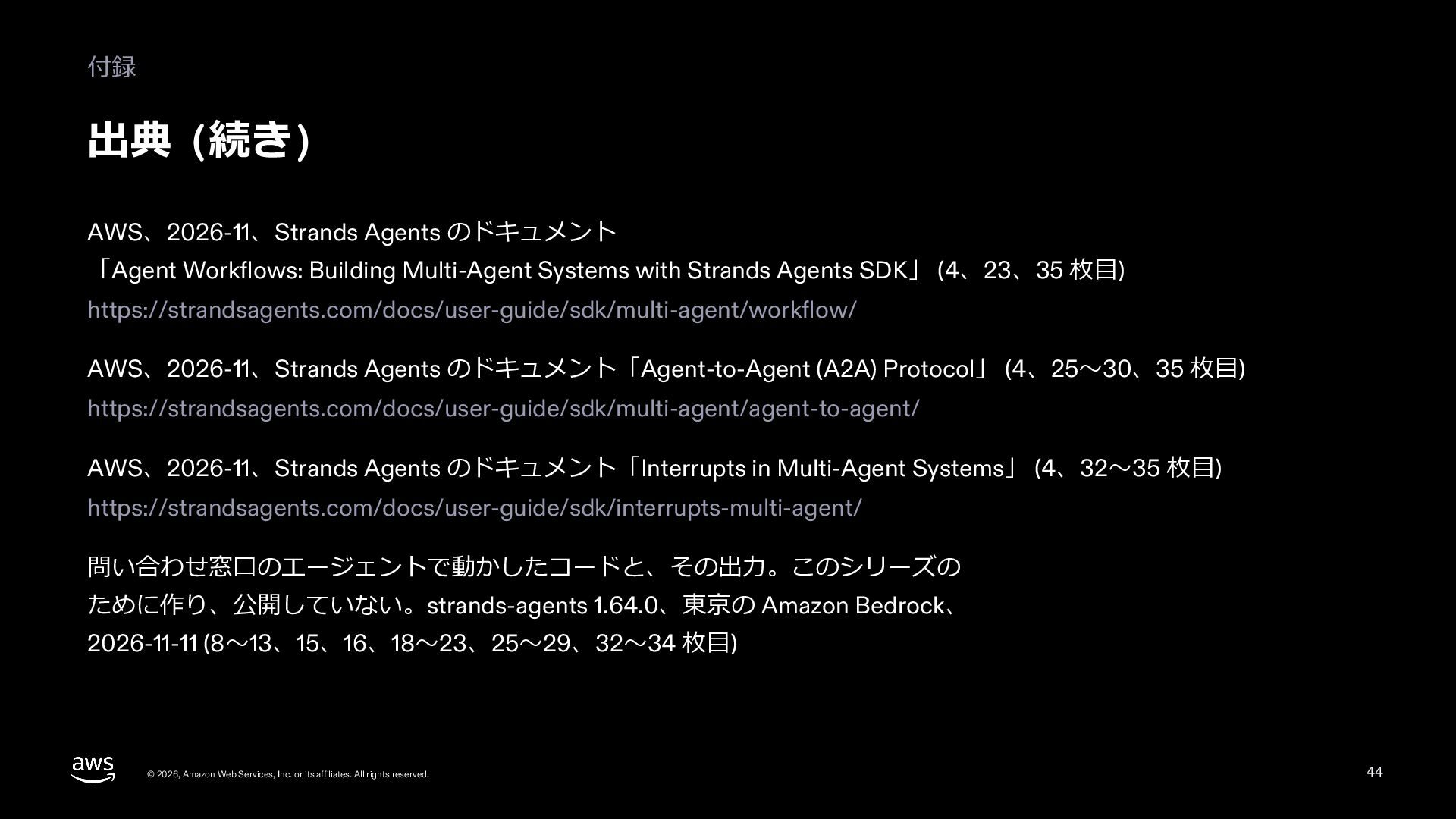
  43. 付録 出典 (続き) AWS、2026-11、Strands Agents のドキュメント 「Agent Workflows: Building Multi-Agent

    Systems with Strands Agents SDK」 (4、23、35 枚⽬) https://strandsagents.com/docs/user-guide/sdk/multi-agent/workflow/ AWS、2026-11、Strands Agents のドキュメント「Agent-to-Agent (A2A) Protocol」 (4、25〜30、35 枚⽬) https://strandsagents.com/docs/user-guide/sdk/multi-agent/agent-to-agent/ AWS、2026-11、Strands Agents のドキュメント「Interrupts in Multi-Agent Systems」 (4、32〜35 枚⽬) https://strandsagents.com/docs/user-guide/sdk/interrupts-multi-agent/ 問い合わせ窓⼝のエージェントで動かしたコードと、その出⼒。このシリーズの ために作り、公開していない。strands-agents 1.64.0、東京の Amazon Bedrock、 2026-11-11 (8〜13、15、16、18〜23、25〜29、32〜34 枚⽬) © 2026, Amazon Web Services, Inc. or its affiliates. All rights reserved. 44