Upgrade to Pro — share decks privately, control downloads, hide ads and more …

Managing Large-scale Networks with Trigger

Managing Large-scale Networks with Trigger

Trigger was designed to increase the speed and efficiency of managing network configuration while reducing human error, and is the bread and butter of how we manage the large-scale network at AOL. In this talk I intend to cover the problems we solved using Python to manage our network infrastructure, especially how each network vendor does things distinctly differently, and about the code and API that makes Trigger tick using detailed examples.

Given at SCaLE 11x, Los Angeles, CA

Avatar for Jathan McCollum

Jathan McCollum

February 22, 2013

More Decks by Jathan McCollum

Other Decks in Programming

Transcript

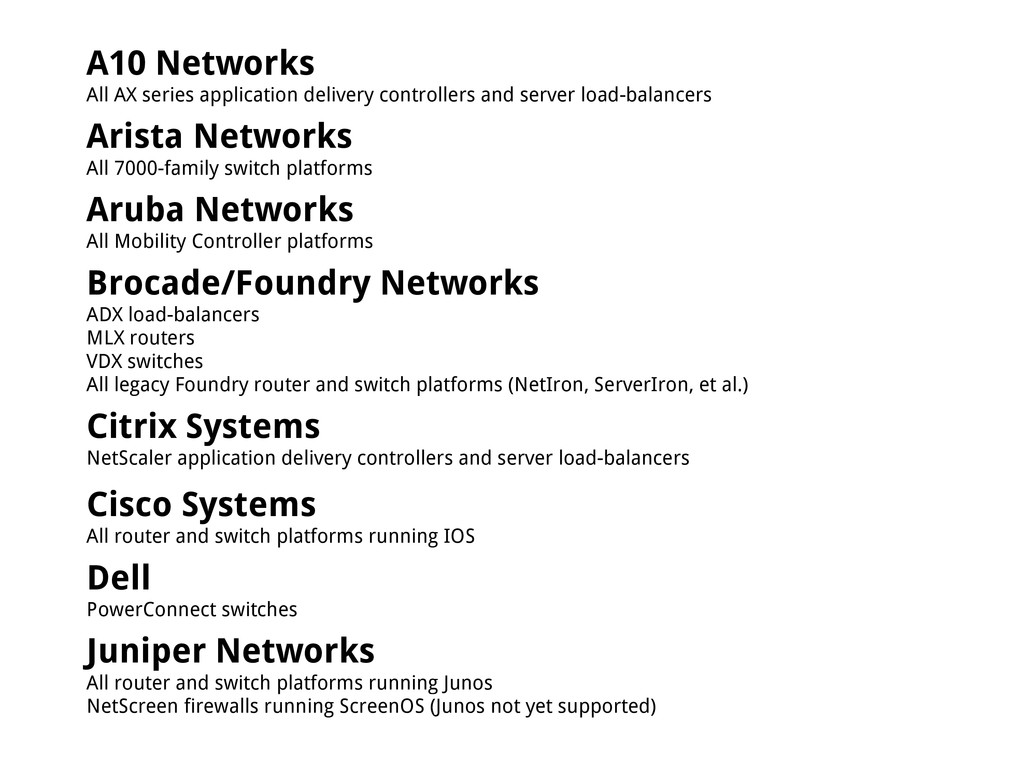
  1. A10 Networks All AX series application delivery controllers and server

    load-balancers Arista Networks All 7000-family switch platforms Aruba Networks All Mobility Controller platforms Brocade/Foundry Networks ADX load-balancers MLX routers VDX switches All legacy Foundry router and switch platforms (NetIron, ServerIron, et al.) Citrix Systems NetScaler application delivery controllers and server load-balancers Cisco Systems All router and switch platforms running IOS Dell PowerConnect switches Juniper Networks All router and switch platforms running Junos NetScreen firewalls running ScreenOS (Junos not yet supported)
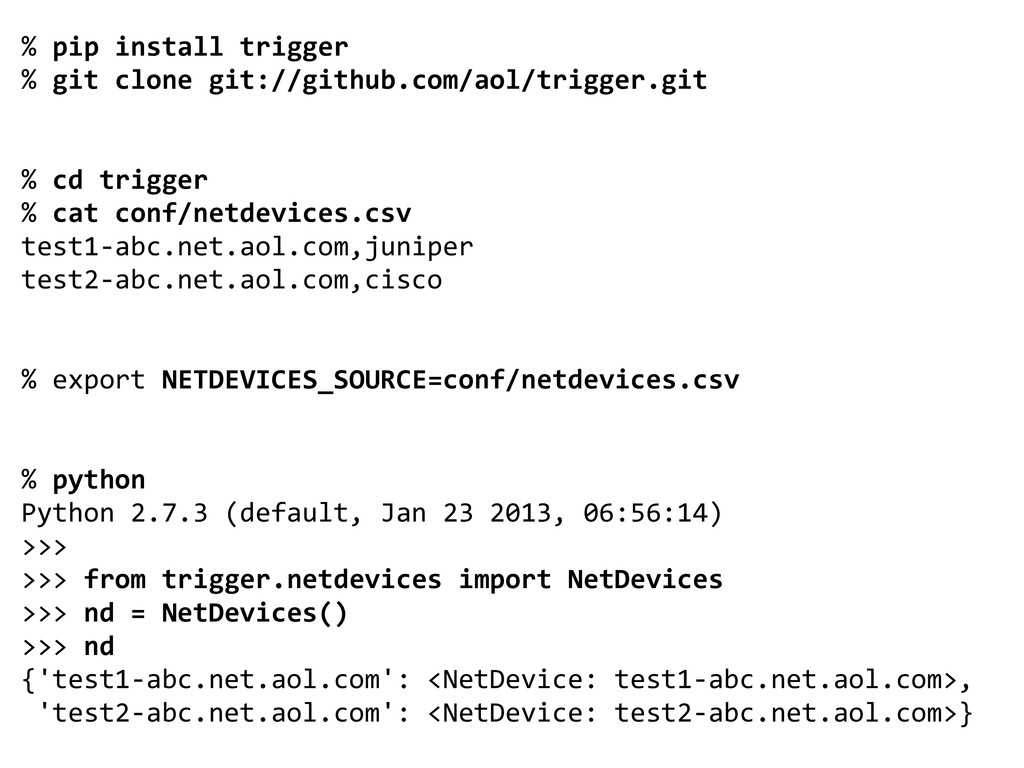
  2. % pip install trigger % git clone git://github.com/aol/trigger.git % cd

    trigger % cat conf/netdevices.csv test1-abc.net.aol.com,juniper test2-abc.net.aol.com,cisco % export NETDEVICES_SOURCE=conf/netdevices.csv % python Python 2.7.3 (default, Jan 23 2013, 06:56:14) >>> >>> from trigger.netdevices import NetDevices >>> nd = NetDevices() >>> nd {'test1-abc.net.aol.com': <NetDevice: test1-abc.net.aol.com>, 'test2-abc.net.aol.com': <NetDevice: test2-abc.net.aol.com>}
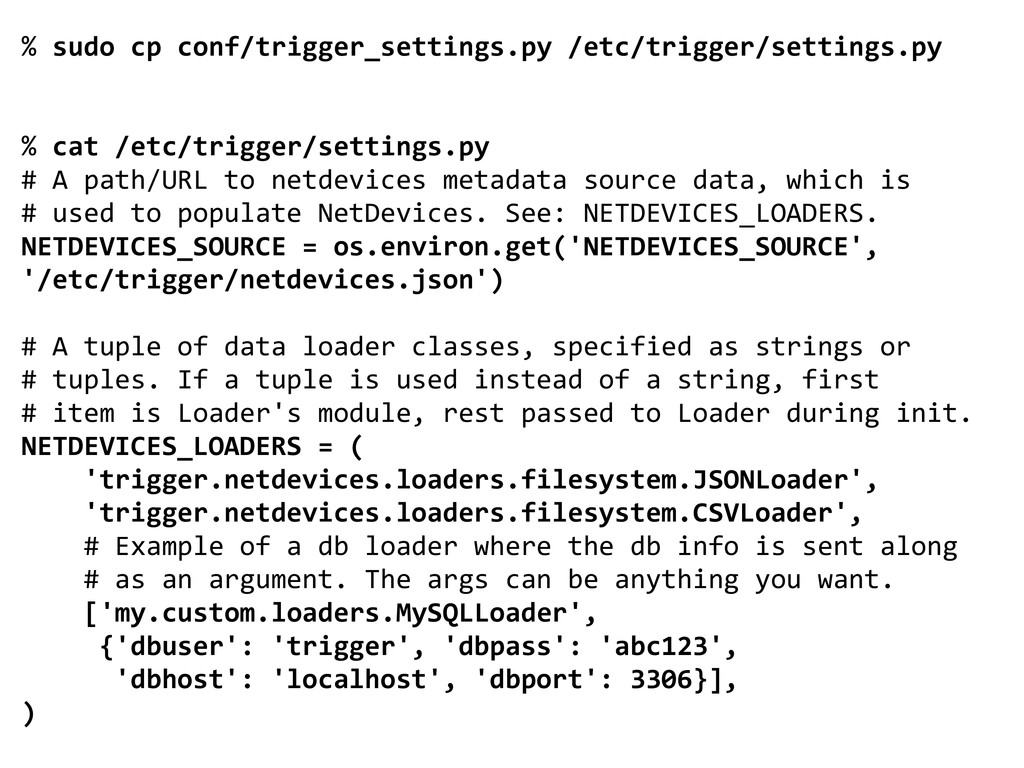
  3. % sudo cp conf/trigger_settings.py /etc/trigger/settings.py % cat /etc/trigger/settings.py # A

    path/URL to netdevices metadata source data, which is # used to populate NetDevices. See: NETDEVICES_LOADERS. NETDEVICES_SOURCE = os.environ.get('NETDEVICES_SOURCE', '/etc/trigger/netdevices.json') # A tuple of data loader classes, specified as strings or # tuples. If a tuple is used instead of a string, first # item is Loader's module, rest passed to Loader during init. NETDEVICES_LOADERS = ( 'trigger.netdevices.loaders.filesystem.JSONLoader', 'trigger.netdevices.loaders.filesystem.CSVLoader', # Example of a db loader where the db info is sent along # as an argument. The args can be anything you want. ['my.custom.loaders.MySQLLoader', {'dbuser': 'trigger', 'dbpass': 'abc123', 'dbhost': 'localhost', 'dbport': 3306}], )
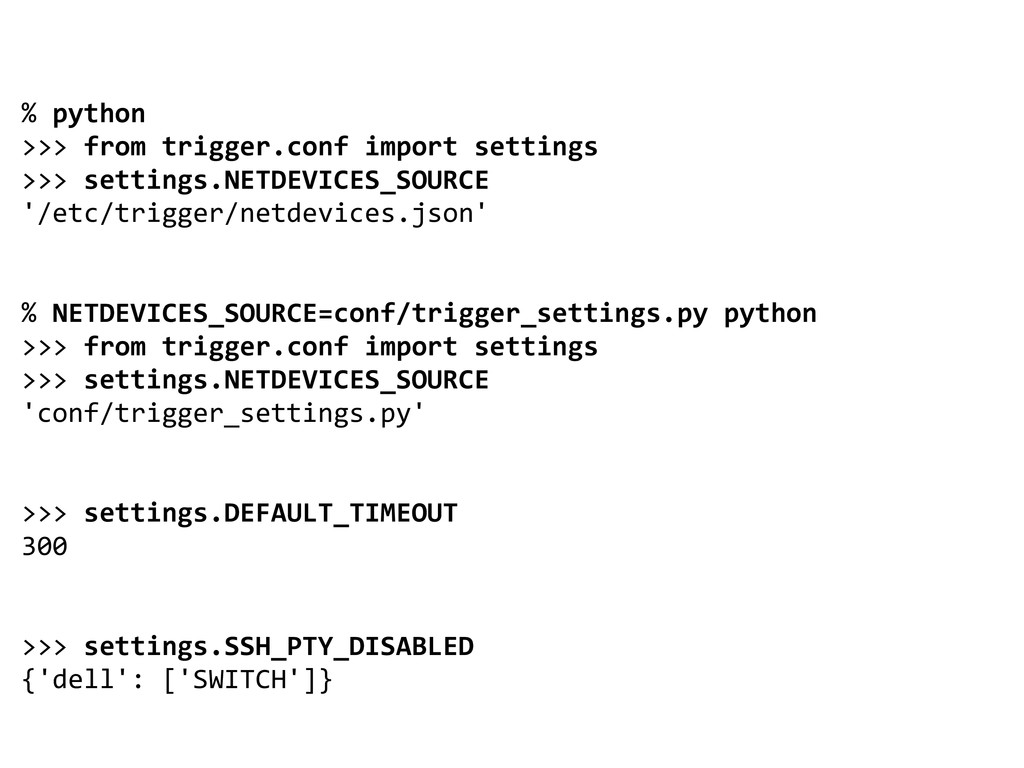
  4. % python >>> from trigger.conf import settings >>> settings.NETDEVICES_SOURCE '/etc/trigger/netdevices.json'

    % NETDEVICES_SOURCE=conf/trigger_settings.py python >>> from trigger.conf import settings >>> settings.NETDEVICES_SOURCE 'conf/trigger_settings.py' >>> settings.DEFAULT_TIMEOUT 300 >>> settings.SSH_PTY_DISABLED {'dell': ['SWITCH']}
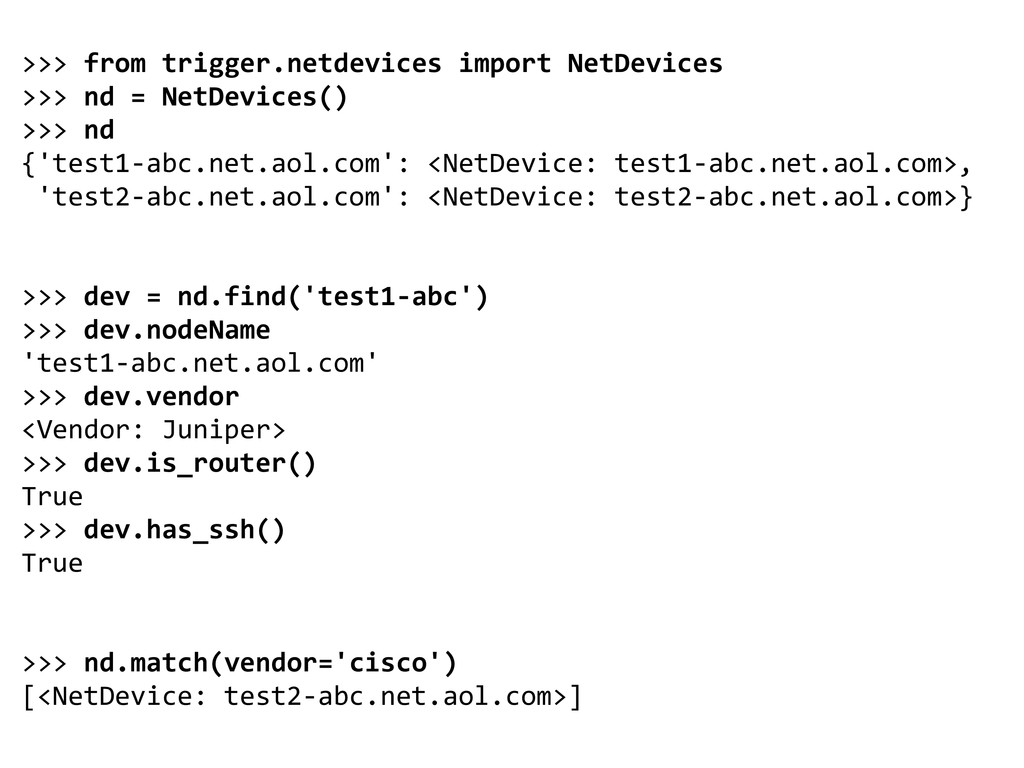
  5. >>> from trigger.netdevices import NetDevices >>> nd = NetDevices() >>>

    nd {'test1-abc.net.aol.com': <NetDevice: test1-abc.net.aol.com>, 'test2-abc.net.aol.com': <NetDevice: test2-abc.net.aol.com>} >>> dev = nd.find('test1-abc') >>> dev.nodeName 'test1-abc.net.aol.com' >>> dev.vendor <Vendor: Juniper> >>> dev.is_router() True >>> dev.has_ssh() True >>> nd.match(vendor='cisco') [<NetDevice: test2-abc.net.aol.com>]
  6. % netdev Usage: netdev [options] Command-line search interface for 'NetDevices'

    metadata. Options: --version show program's version number and exit -h, --help show this help message and exit -a, --acls Search returns acls vs. devices. -l <DEVICE>, --list=<DEVICE> List all information for a DEVICE -s, --search Perform a search based on arguments -L <LOCATION>, --location=<LOCATION> Match on site location. -n <NODENAME>, --nodename=<NODENAME> Match on full or partial nodeName. NO REGEXP. -t <TYPE>, --type=<TYPE> Match on deviceType. Must be FIREWALL, ROUTER, or SWITCH. -o <OWNING TEAM NAME>, --owning-team=<OWNING TEAM NAME> Match on Owning Team (owningTeam).
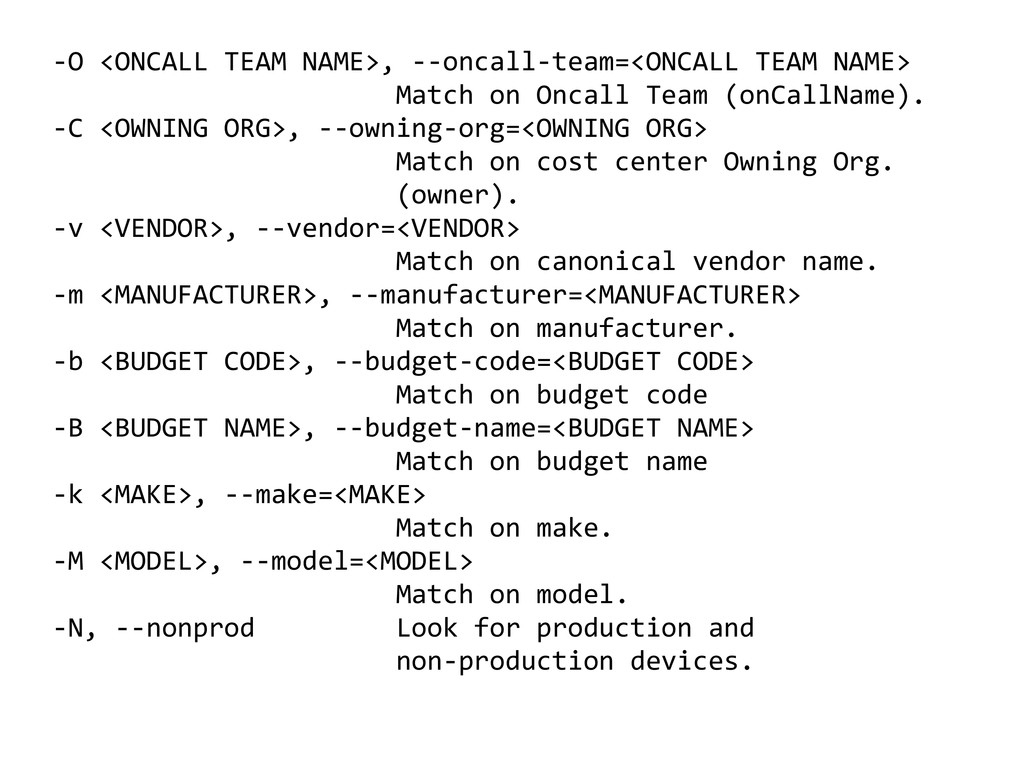
  7. -O <ONCALL TEAM NAME>, --oncall-team=<ONCALL TEAM NAME> Match on Oncall

    Team (onCallName). -C <OWNING ORG>, --owning-org=<OWNING ORG> Match on cost center Owning Org. (owner). -v <VENDOR>, --vendor=<VENDOR> Match on canonical vendor name. -m <MANUFACTURER>, --manufacturer=<MANUFACTURER> Match on manufacturer. -b <BUDGET CODE>, --budget-code=<BUDGET CODE> Match on budget code -B <BUDGET NAME>, --budget-name=<BUDGET NAME> Match on budget name -k <MAKE>, --make=<MAKE> Match on make. -M <MODEL>, --model=<MODEL> Match on model. -N, --nonprod Look for production and non-production devices.
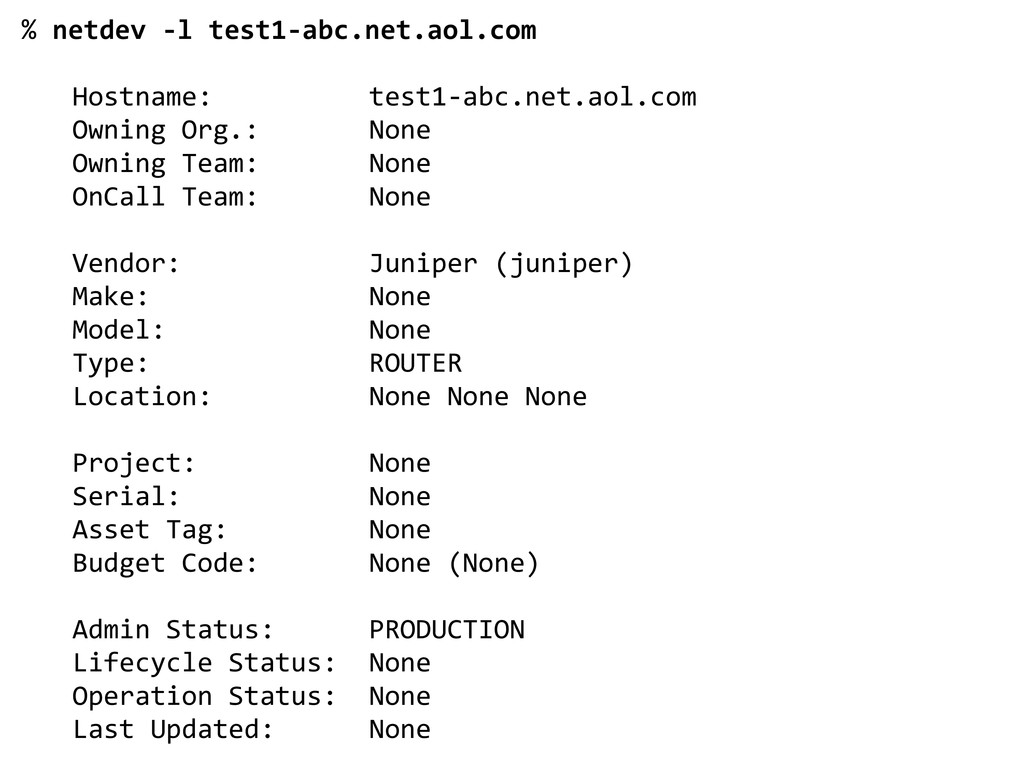
  8. % netdev -l test1-abc.net.aol.com Hostname: test1-abc.net.aol.com Owning Org.: None Owning

    Team: None OnCall Team: None Vendor: Juniper (juniper) Make: None Model: None Type: ROUTER Location: None None None Project: None Serial: None Asset Tag: None Budget Code: None (None) Admin Status: PRODUCTION Lifecycle Status: None Operation Status: None Last Updated: None
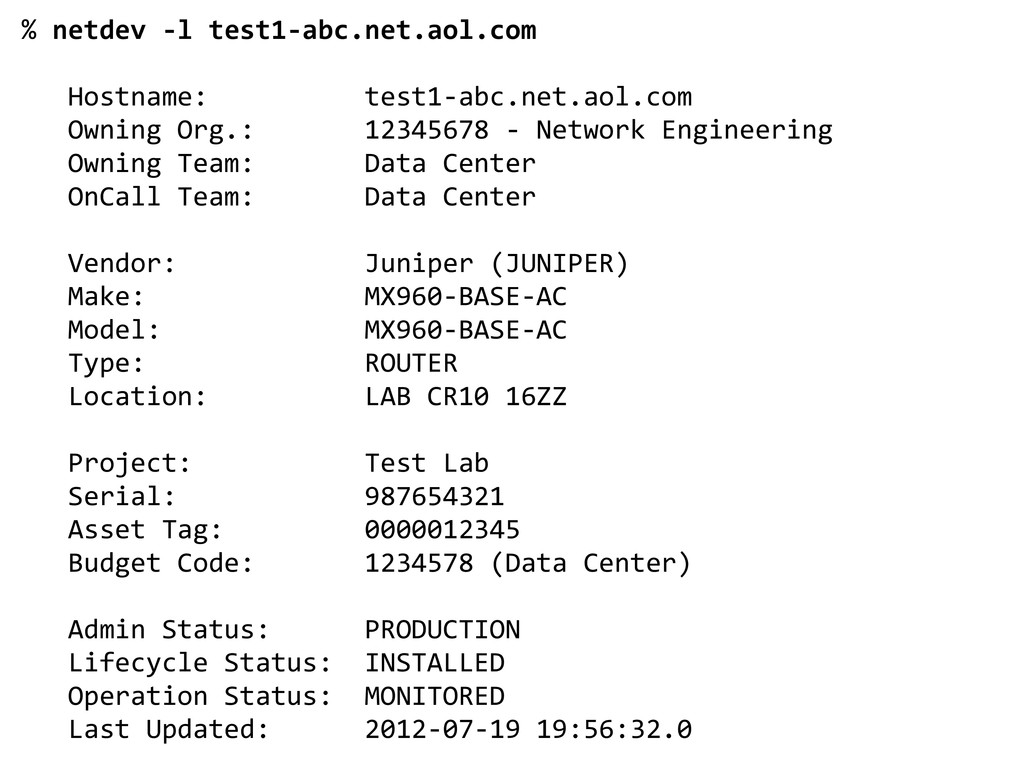
  9. % netdev -l test1-abc.net.aol.com Hostname: test1-abc.net.aol.com Owning Org.: 12345678 -

    Network Engineering Owning Team: Data Center OnCall Team: Data Center Vendor: Juniper (JUNIPER) Make: MX960-BASE-AC Model: MX960-BASE-AC Type: ROUTER Location: LAB CR10 16ZZ Project: Test Lab Serial: 987654321 Asset Tag: 0000012345 Budget Code: 1234578 (Data Center) Admin Status: PRODUCTION Lifecycle Status: INSTALLED Operation Status: MONITORED Last Updated: 2012-07-19 19:56:32.0
  10. 2013-02-20 09:05:22-0800 [TriggerSSHTransport,client] Client connection lost. Reason: Failure instance: Traceback

    (failure with no frames): <class 'twisted.internet.error. TimeoutError'>: User timeout caused connection failure.\n]" 2013-02-12 05:24:35-0800 [-] "PUSH FAILED ON test2-abc.net. aol.com: [Failure instance: Traceback (failure with no frames): <class 'trigger.exceptions.CommandTimeout'>: Timed out while sending commands\n]" 013-02-12 06:15:13-0800 [TriggerSSHTransport,client] Client connection lost. Reason: [Failure instance: Traceback (failure with no frames): <class 'trigger.exceptions.LoginFailure('No more authentication methods available\n')]"
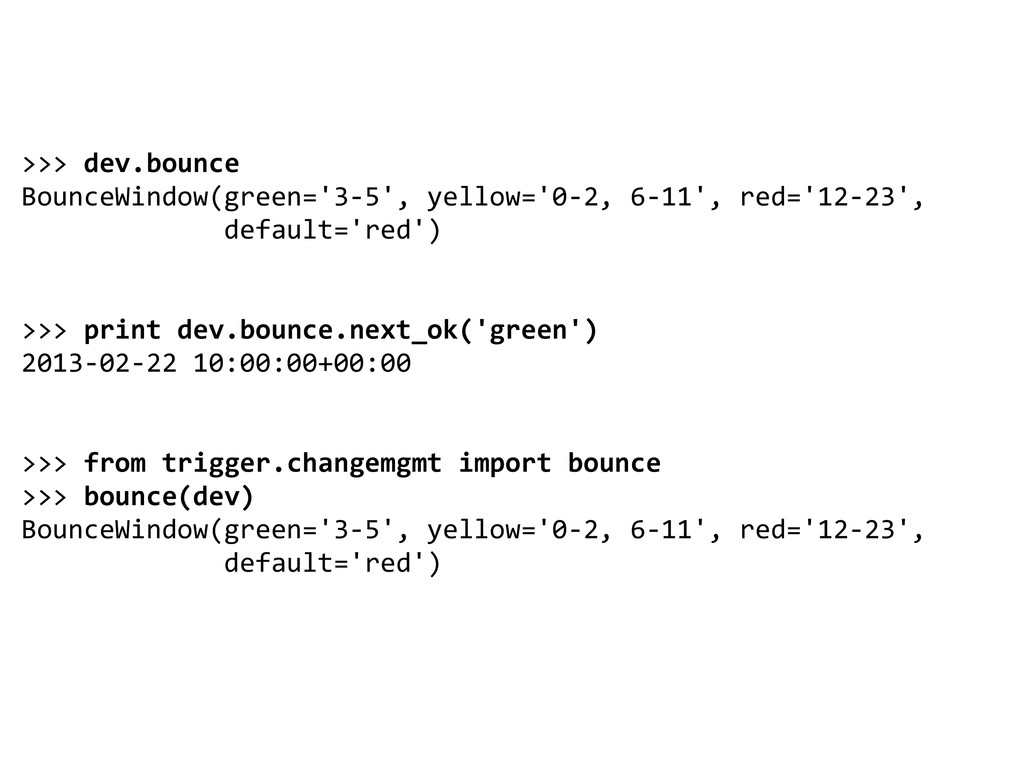
  11. >>> dev.bounce BounceWindow(green='3-5', yellow='0-2, 6-11', red='12-23', default='red') >>> print dev.bounce.next_ok('green')

    2013-02-22 10:00:00+00:00 >>> from trigger.changemgmt import bounce >>> bounce(dev) BounceWindow(green='3-5', yellow='0-2, 6-11', red='12-23', default='red')
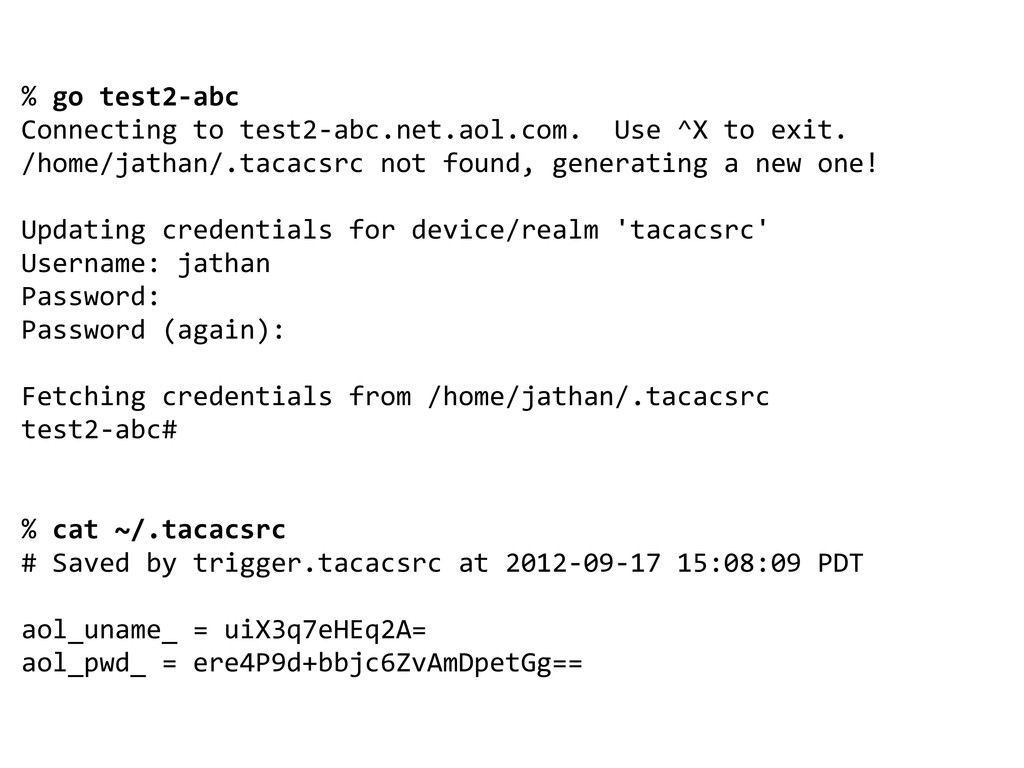
  12. % go test2-abc Connecting to test2-abc.net.aol.com. Use ^X to exit.

    /home/jathan/.tacacsrc not found, generating a new one! Updating credentials for device/realm 'tacacsrc' Username: jathan Password: Password (again): Fetching credentials from /home/jathan/.tacacsrc test2-abc# % cat ~/.tacacsrc # Saved by trigger.tacacsrc at 2012-09-17 15:08:09 PDT aol_uname_ = uiX3q7eHEq2A= aol_pwd_ = ere4P9d+bbjc6ZvAmDpetGg==
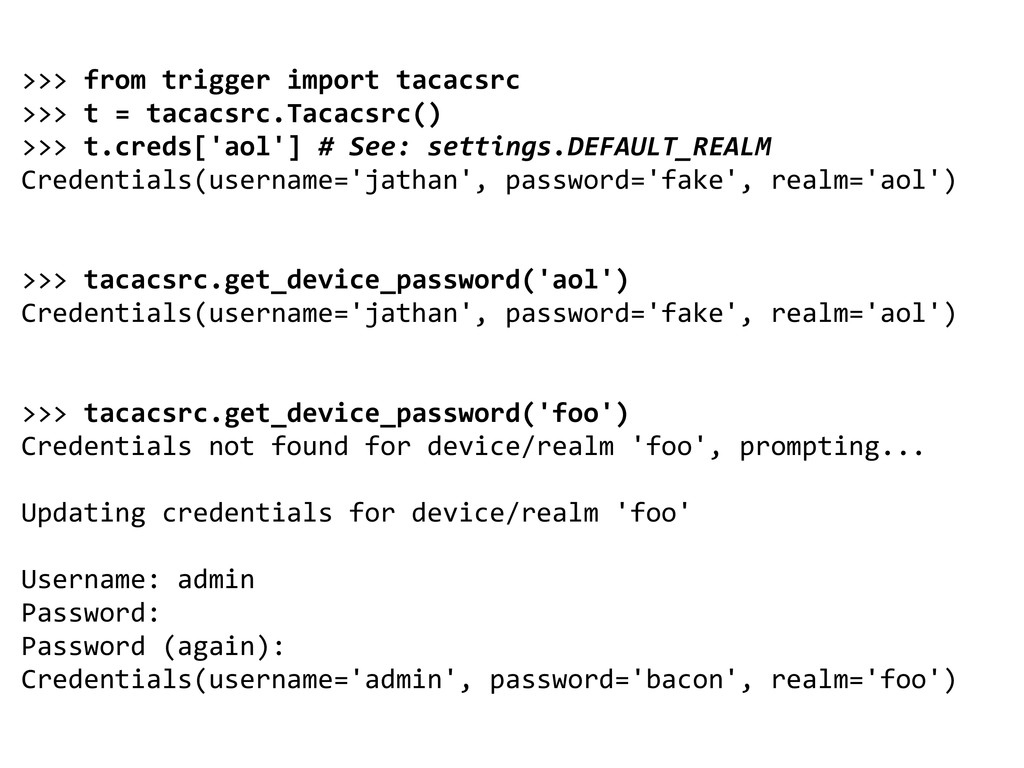
  13. >>> from trigger import tacacsrc >>> t = tacacsrc.Tacacsrc() >>>

    t.creds['aol'] # See: settings.DEFAULT_REALM Credentials(username='jathan', password='fake', realm='aol') >>> tacacsrc.get_device_password('aol') Credentials(username='jathan', password='fake', realm='aol') >>> tacacsrc.get_device_password('foo') Credentials not found for device/realm 'foo', prompting... Updating credentials for device/realm 'foo' Username: admin Password: Password (again): Credentials(username='admin', password='bacon', realm='foo')
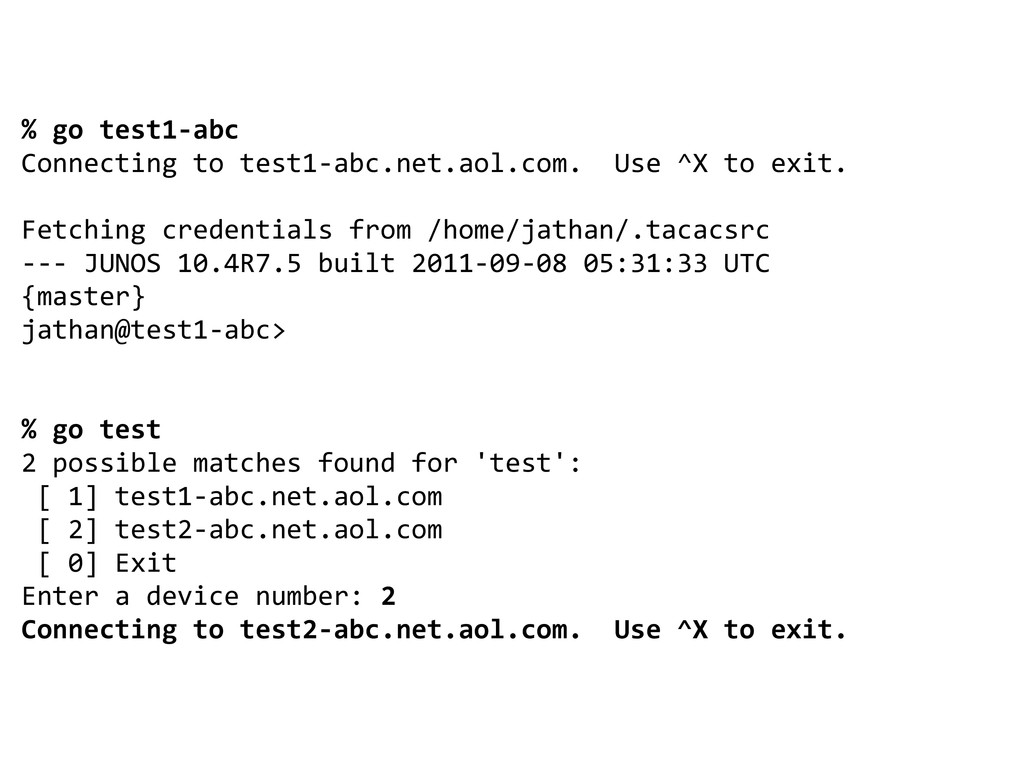
  14. % go test1-abc Connecting to test1-abc.net.aol.com. Use ^X to exit.

    Fetching credentials from /home/jathan/.tacacsrc --- JUNOS 10.4R7.5 built 2011-09-08 05:31:33 UTC {master} jathan@test1-abc> % go test 2 possible matches found for 'test': [ 1] test1-abc.net.aol.com [ 2] test2-abc.net.aol.com [ 0] Exit Enter a device number: 2 Connecting to test2-abc.net.aol.com. Use ^X to exit.
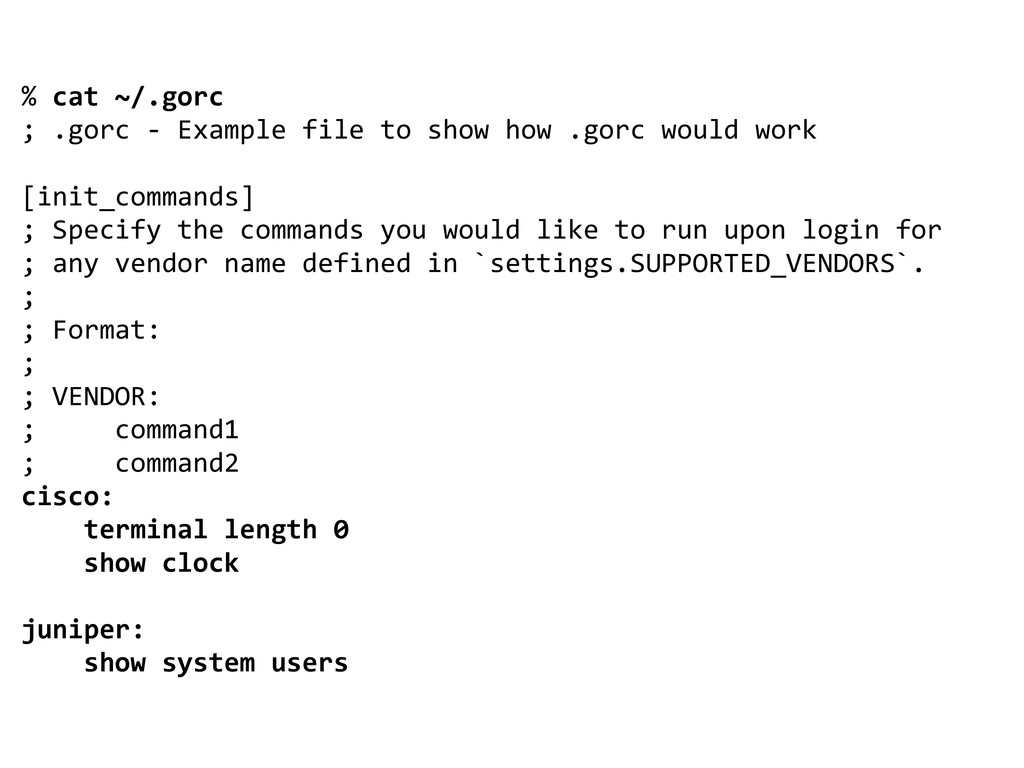
  15. % cat ~/.gorc ; .gorc - Example file to show

    how .gorc would work [init_commands] ; Specify the commands you would like to run upon login for ; any vendor name defined in `settings.SUPPORTED_VENDORS`. ; ; Format: ; ; VENDOR: ; command1 ; command2 cisco: terminal length 0 show clock juniper: show system users
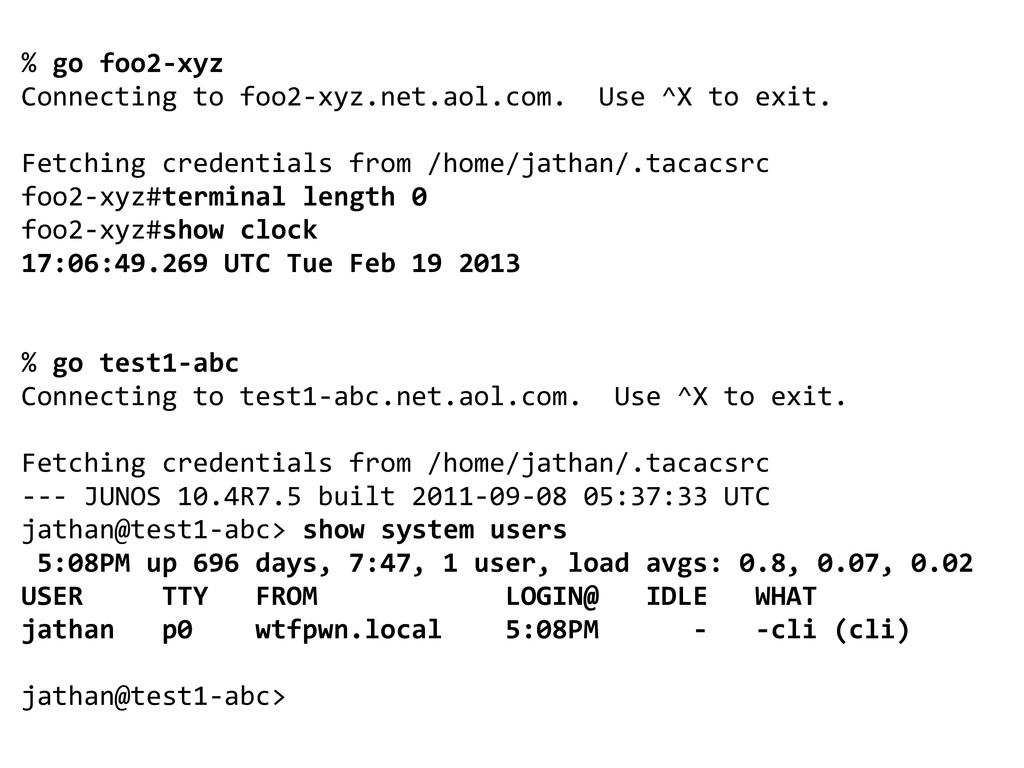
  16. % go foo2-xyz Connecting to foo2-xyz.net.aol.com. Use ^X to exit.

    Fetching credentials from /home/jathan/.tacacsrc foo2-xyz#terminal length 0 foo2-xyz#show clock 17:06:49.269 UTC Tue Feb 19 2013 % go test1-abc Connecting to test1-abc.net.aol.com. Use ^X to exit. Fetching credentials from /home/jathan/.tacacsrc --- JUNOS 10.4R7.5 built 2011-09-08 05:37:33 UTC jathan@test1-abc> show system users 5:08PM up 696 days, 7:47, 1 user, load avgs: 0.8, 0.07, 0.02 USER TTY FROM LOGIN@ IDLE WHAT jathan p0 wtfpwn.local 5:08PM - -cli (cli) jathan@test1-abc>
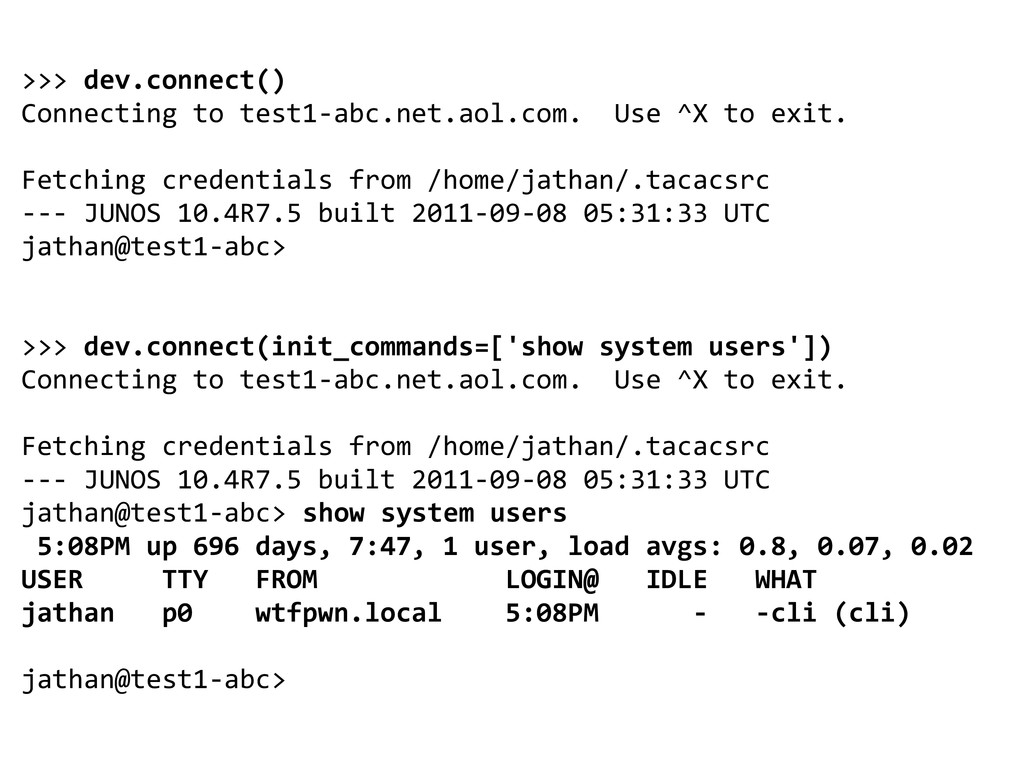
  17. >>> dev.connect() Connecting to test1-abc.net.aol.com. Use ^X to exit. Fetching

    credentials from /home/jathan/.tacacsrc --- JUNOS 10.4R7.5 built 2011-09-08 05:31:33 UTC jathan@test1-abc> >>> dev.connect(init_commands=['show system users']) Connecting to test1-abc.net.aol.com. Use ^X to exit. Fetching credentials from /home/jathan/.tacacsrc --- JUNOS 10.4R7.5 built 2011-09-08 05:31:33 UTC jathan@test1-abc> show system users 5:08PM up 696 days, 7:47, 1 user, load avgs: 0.8, 0.07, 0.02 USER TTY FROM LOGIN@ IDLE WHAT jathan p0 wtfpwn.local 5:08PM - -cli (cli) jathan@test1-abc>
  18. >>> dev.execute(['show clock']) <Deferred at 0x9a84dcc> >>> from trigger.cmds import

    Commando >>> c = Commando(devices=[foo2-xyz.net.aol.com'], commands=['show clock']) >>> c.run() >>> c.results { 'foo2-xyz.net.aol.com': { 'show clock': '22:40:40.895 UTC Mon Sep 17 2012\n' } }
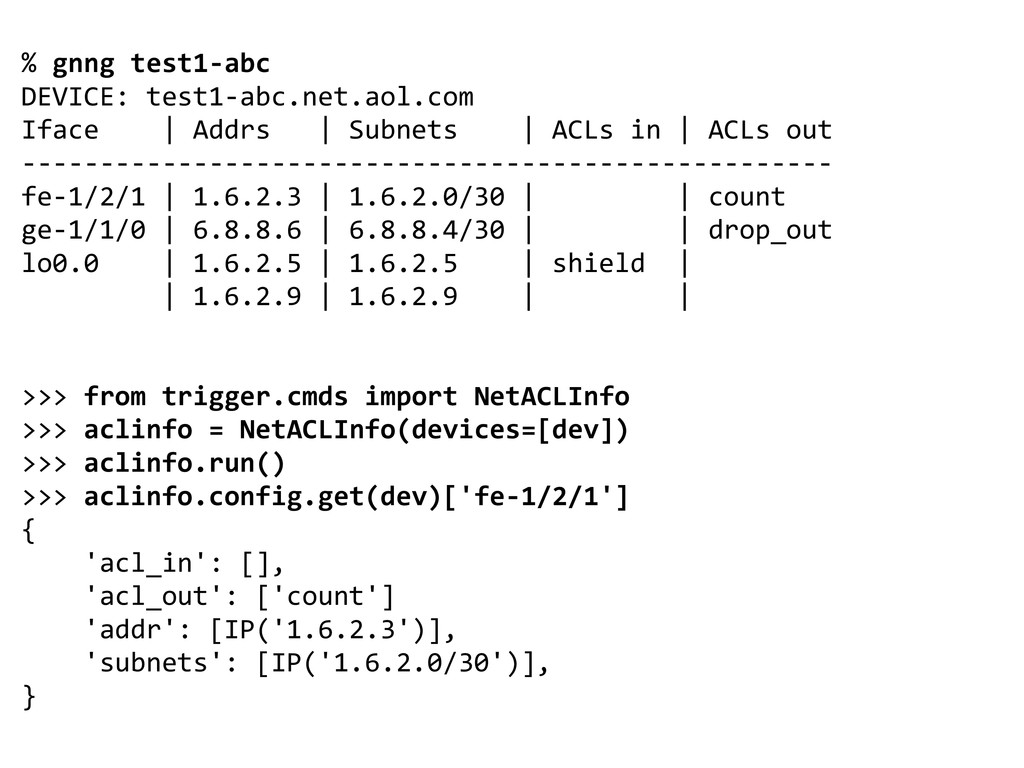
  19. % gnng test1-abc DEVICE: test1-abc.net.aol.com Iface | Addrs | Subnets

    | ACLs in | ACLs out ---------------------------------------------------- fe-1/2/1 | 1.6.2.3 | 1.6.2.0/30 | | count ge-1/1/0 | 6.8.8.6 | 6.8.8.4/30 | | drop_out lo0.0 | 1.6.2.5 | 1.6.2.5 | shield | | 1.6.2.9 | 1.6.2.9 | | >>> from trigger.cmds import NetACLInfo >>> aclinfo = NetACLInfo(devices=[dev]) >>> aclinfo.run() >>> aclinfo.config.get(dev)['fe-1/2/1'] { 'acl_in': [], 'acl_out': ['count'] 'addr': [IP('1.6.2.3')], 'subnets': [IP('1.6.2.0/30')], }
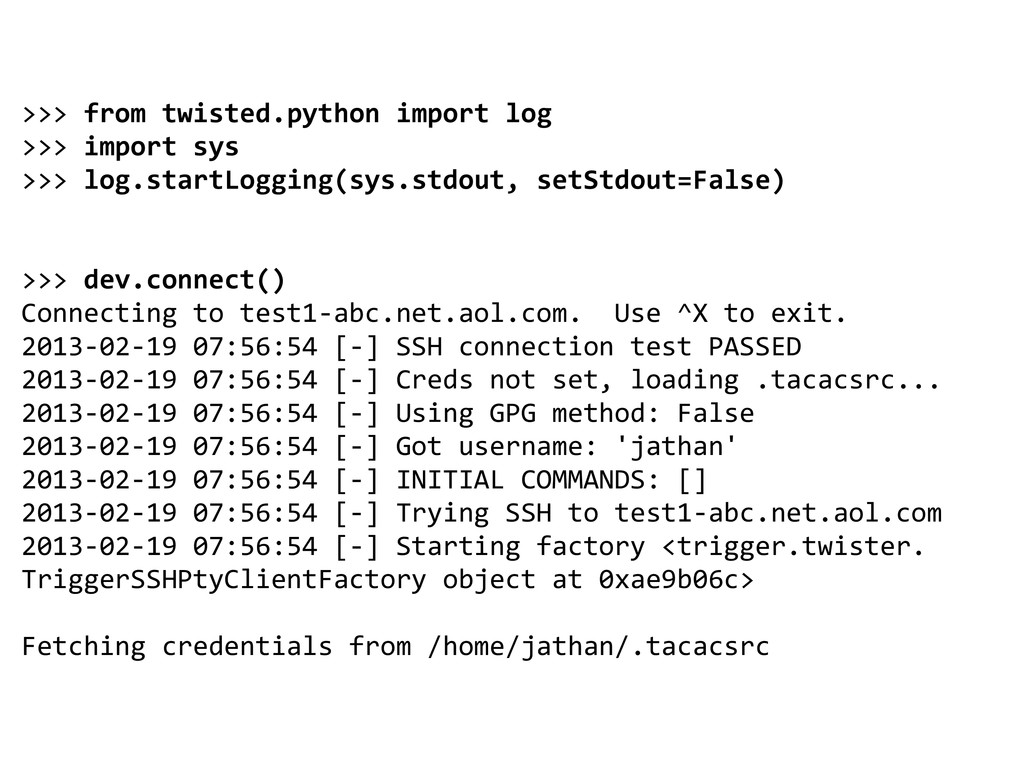
  20. >>> from twisted.python import log >>> import sys >>> log.startLogging(sys.stdout,

    setStdout=False) >>> dev.connect() Connecting to test1-abc.net.aol.com. Use ^X to exit. 2013-02-19 07:56:54 [-] SSH connection test PASSED 2013-02-19 07:56:54 [-] Creds not set, loading .tacacsrc... 2013-02-19 07:56:54 [-] Using GPG method: False 2013-02-19 07:56:54 [-] Got username: 'jathan' 2013-02-19 07:56:54 [-] INITIAL COMMANDS: [] 2013-02-19 07:56:54 [-] Trying SSH to test1-abc.net.aol.com 2013-02-19 07:56:54 [-] Starting factory <trigger.twister. TriggerSSHPtyClientFactory object at 0xae9b06c> Fetching credentials from /home/jathan/.tacacsrc
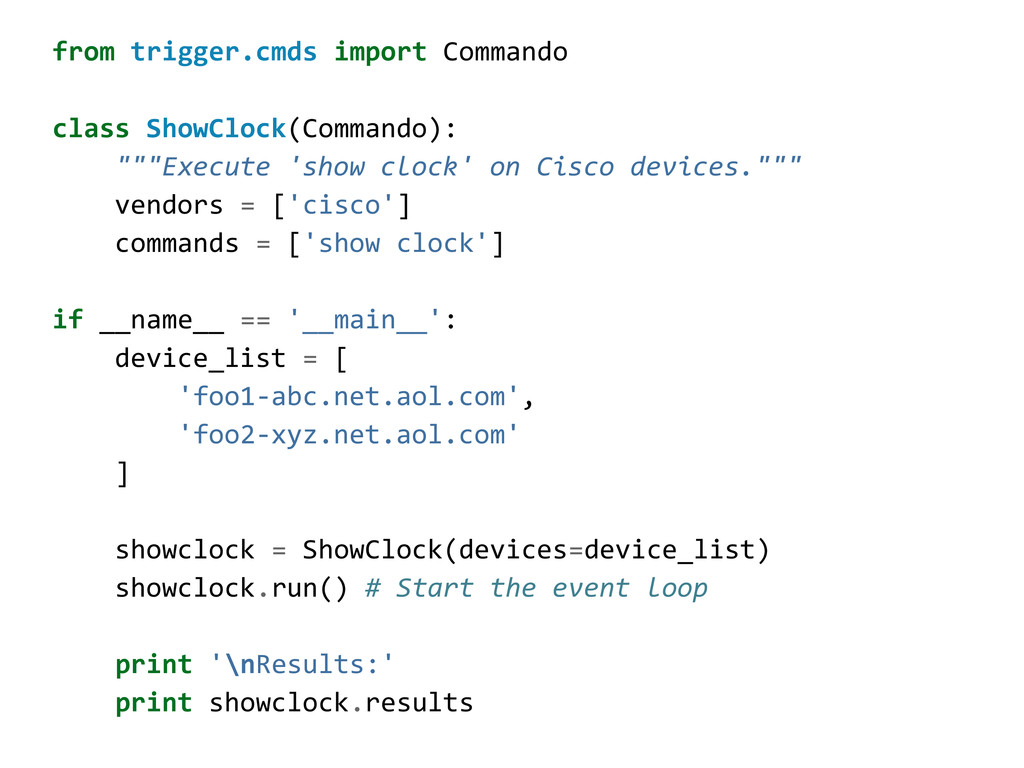
  21. from trigger.cmds import Commando class ShowClock(Commando): """Execute 'show clock' on

    Cisco devices.""" vendors = ['cisco'] commands = ['show clock'] if __name__ == '__main__': device_list = [ 'foo1-abc.net.aol.com', 'foo2-xyz.net.aol.com' ] showclock = ShowClock(devices=device_list) showclock.run() # Start the event loop print '\nResults:' print showclock.results
  22. sending ['show clock'] to foo2-xyz.net.aol.com sending ['show clock'] to foo1-abc.net.aol.com

    received ['22:40:40.895 UTC Mon Sep 17 2012\n'] from foo1-abc.net.aol.com received ['22:40:40.897 UTC Mon Sep 17 2012\n'] from foo2-xyz.net.aol.com Results: { 'foo1-abc.net.aol.com': { 'show clock': '22:40:40.895 UTC Mon Sep 17 2012\n' }, 'foo2-xyz.net.aol.com': { 'show clock': '22:40:40.897 UTC Mon Sep 17 2012\n' } }
  23. class ShowClock(Commando): vendors = ['cisco'] commands = ['show clock'] def

    from_cisco(self, results, device): # => '16:18:21.763 GMT Thu Jun 28 2012\n' fmt = '%H:%M:%S.%f %Z %a %b %d %Y\n' self._store_datetime(results, device, fmt) def _store_datetime(self, results, device, fmt): parsed_dt = self._parse_datetime(results, fmt) self.store_results(device, parsed_dt) def _parse_datetime(self, datestr, fmt): try: return datetime.strptime(datestr, fmt) except ValueError: return datestr
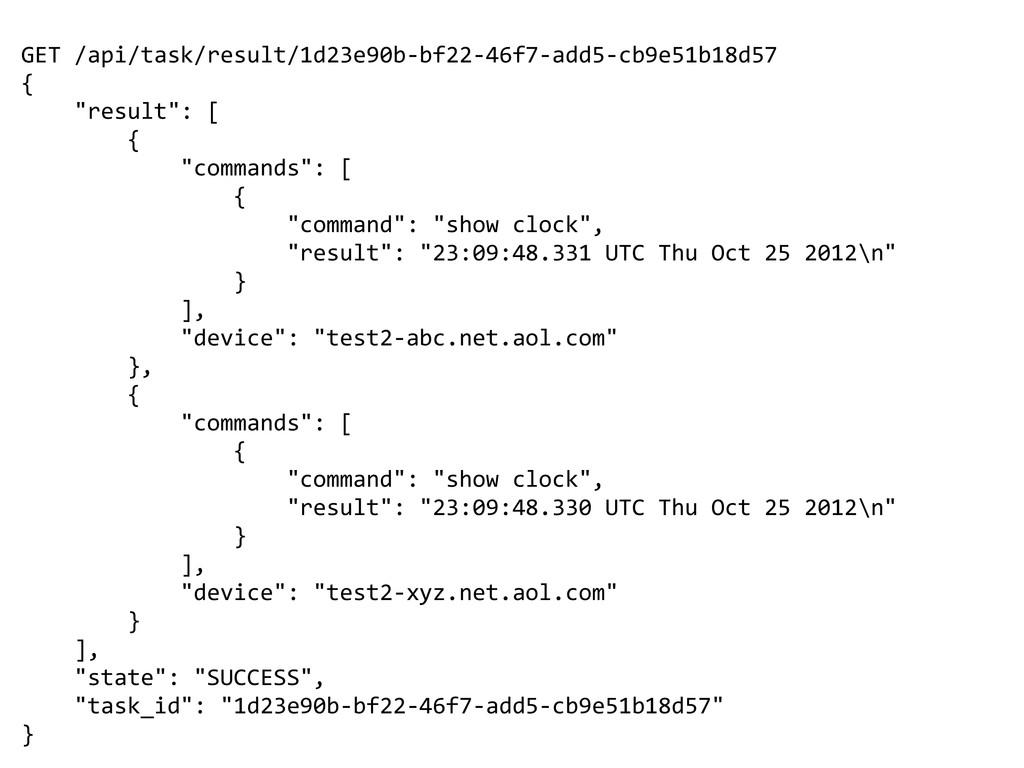
  24. GET /api/task/result/1d23e90b-bf22-46f7-add5-cb9e51b18d57 { "result": [ { "commands": [ { "command":

    "show clock", "result": "23:09:48.331 UTC Thu Oct 25 2012\n" } ], "device": "test2-abc.net.aol.com" }, { "commands": [ { "command": "show clock", "result": "23:09:48.330 UTC Thu Oct 25 2012\n" } ], "device": "test2-xyz.net.aol.com" } ], "state": "SUCCESS", "task_id": "1d23e90b-bf22-46f7-add5-cb9e51b18d57" }
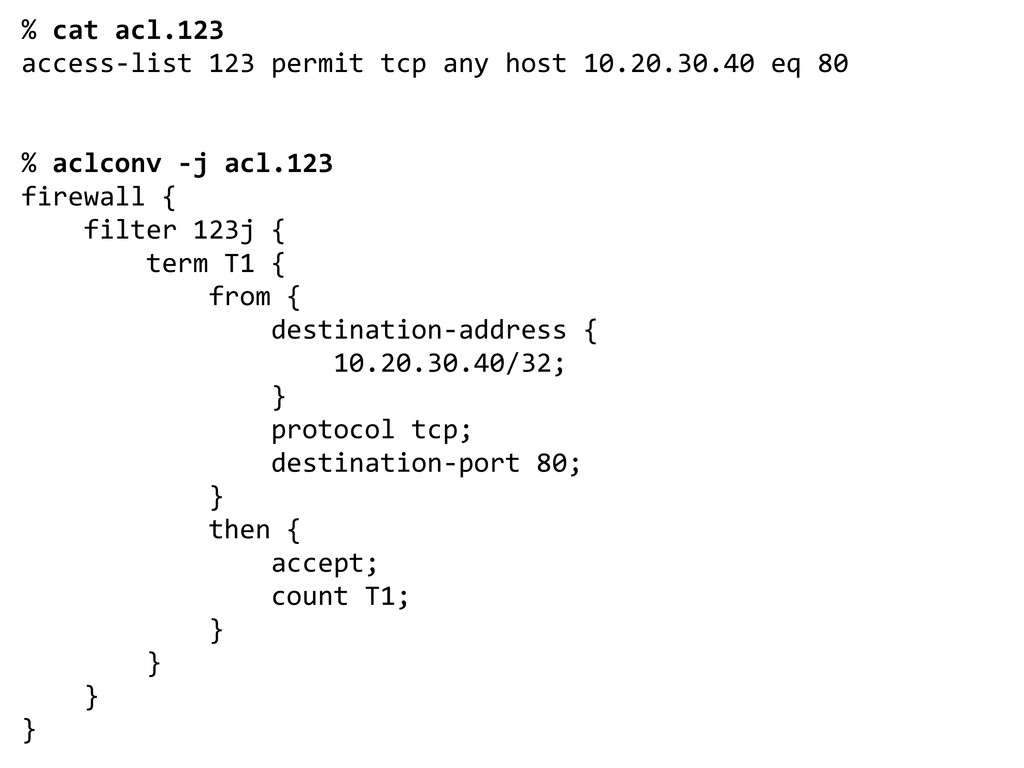
  25. % cat acl.123 access-list 123 permit tcp any host 10.20.30.40

    eq 80 % aclconv -j acl.123 firewall { filter 123j { term T1 { from { destination-address { 10.20.30.40/32; } protocol tcp; destination-port 80; } then { accept; count T1; } } } }
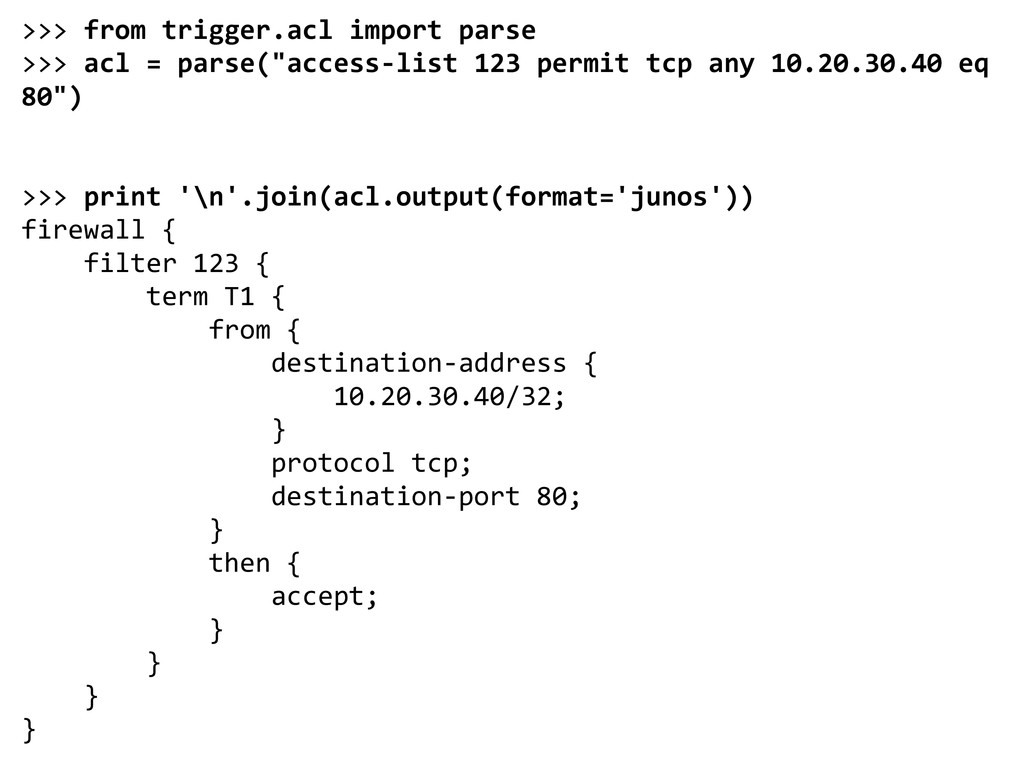
  26. >>> from trigger.acl import parse >>> acl = parse("access-list 123

    permit tcp any 10.20.30.40 eq 80") >>> print '\n'.join(acl.output(format='junos')) firewall { filter 123 { term T1 { from { destination-address { 10.20.30.40/32; } protocol tcp; destination-port 80; } then { accept; } } } }
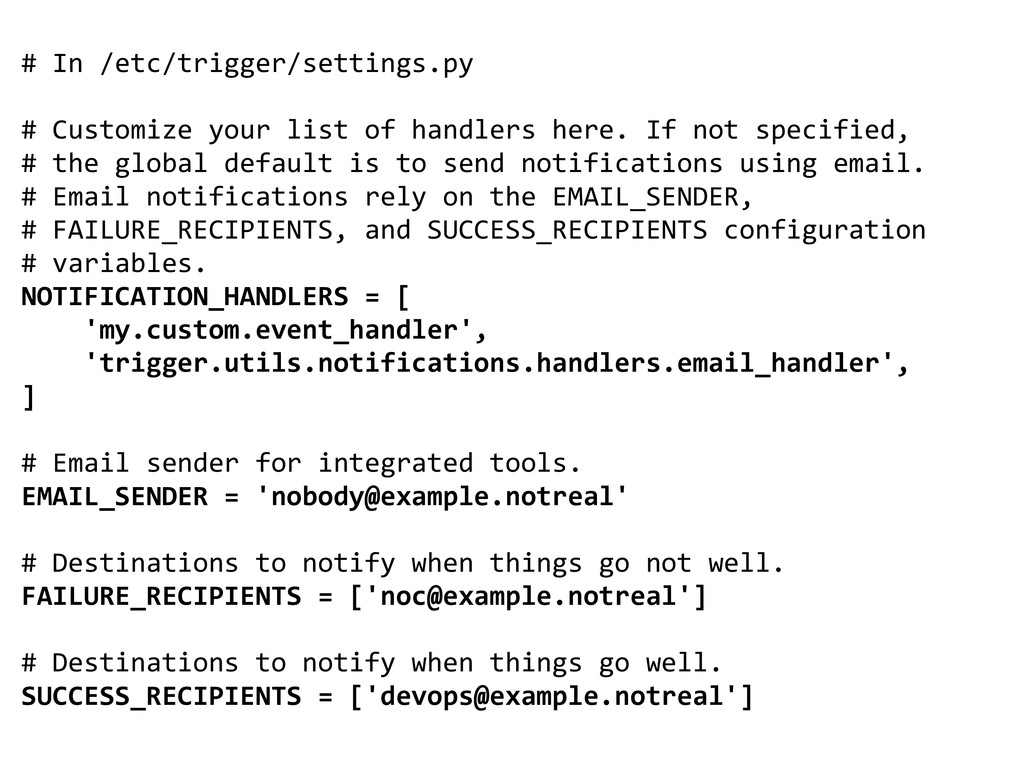
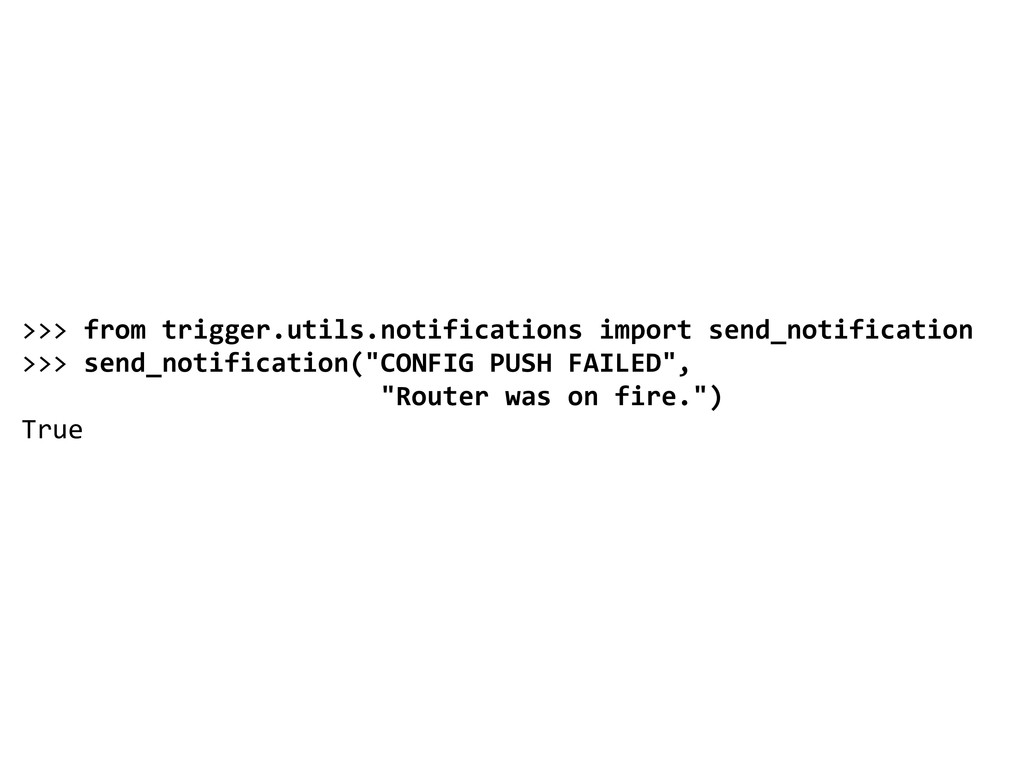
  27. # In /etc/trigger/settings.py # Customize your list of handlers here.

    If not specified, # the global default is to send notifications using email. # Email notifications rely on the EMAIL_SENDER, # FAILURE_RECIPIENTS, and SUCCESS_RECIPIENTS configuration # variables. NOTIFICATION_HANDLERS = [ 'my.custom.event_handler', 'trigger.utils.notifications.handlers.email_handler', ] # Email sender for integrated tools. EMAIL_SENDER = '[email protected]' # Destinations to notify when things go not well. FAILURE_RECIPIENTS = ['[email protected]'] # Destinations to notify when things go well. SUCCESS_RECIPIENTS = ['[email protected]']