Upgrade to Pro
— share decks privately, control downloads, hide ads and more …
Speaker Deck
Sign up for free
Menu
Search
Features
All features
Private URLs
Password Protection
Custom URLS
Scheduled publishing
Remove Branding
Restrict embedding
Deck Collections
Notes
Features
All features
Private URLs
Password Protection
Custom URLS
Scheduled publishing
Remove Branding
Restrict embedding
Deck Collections
Notes
Explore
Featured decks
Featured speakers
Programming
Technology
Storyboards
Explore
Featured decks
Featured speakers
Programming
Technology
Storyboards
Pricing
Search
Sign in
Sign up for free
空間情報システム Tasking Manager Manual
Search
Juria hata
June 15, 2019
72
0
Share
Embed
Copy iframe code
Copy JS code
Copy link
Start on current slide
空間情報システム Tasking Manager Manual
Juria hata
June 15, 2019
More Decks by Juria hata
See All by Juria hata
空間情報システム Tasking Manager Manual
juria
0
40
空間情報システム tasking manager manual
juria
0
45
空間情報システム tasking manager manual
juria
0
27
空間情報システム tasking manager manual
juria
0
26
Featured
See All Featured
The B2B funnel & how to create a winning content strategy
katarinadahlin
PRO
1
570
Designing Powerful Visuals for Engaging Learning
tmiket
1
610
Optimising Largest Contentful Paint
csswizardry
37
4k
sira's awesome portfolio website redesign presentation
elsirapls
0
460
Let's Do A Bunch of Simple Stuff to Make Websites Faster
chriscoyier
508
140k
What's in a price? How to price your products and services
michaelherold
247
13k
A designer walks into a library…
pauljervisheath
211
25k
The Power of CSS Pseudo Elements
geoffreycrofte
82
6.6k
技術選定の審美眼(2025年版) / Understanding the Spiral of Technologies 2025 edition
twada
PRO
120
120k
Collaborative Software Design: How to facilitate domain modelling decisions
baasie
1
340
The untapped power of vector embeddings
frankvandijk
2
1.9k
Paper Plane
katiecoart
PRO
5
54k
Transcript
タンザニア地図作成 #600 タスクの作業⽅法 1A119134 畑 樹莉杏
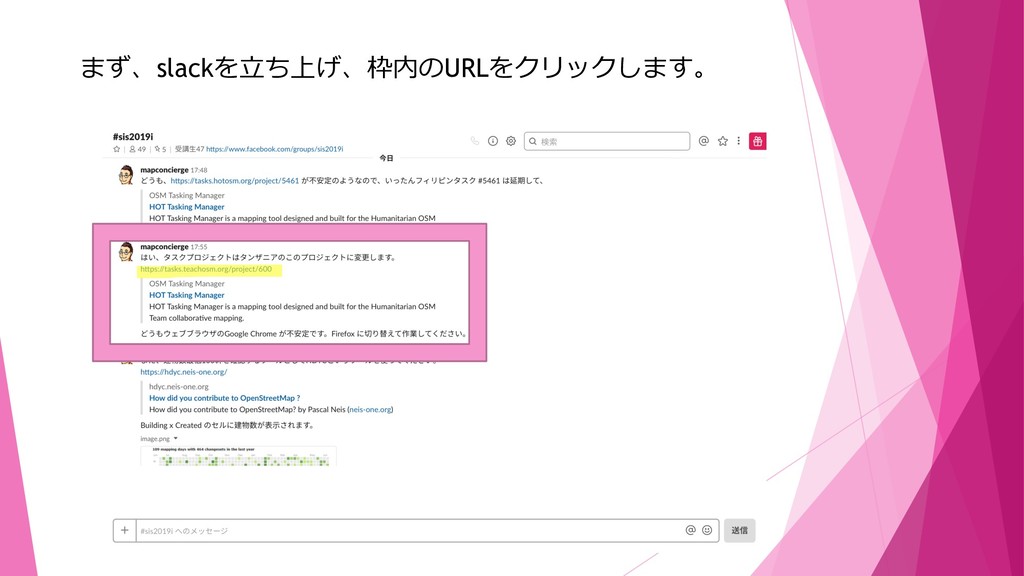
まず、slackを⽴ち上げ、枠内のURLをクリックします。
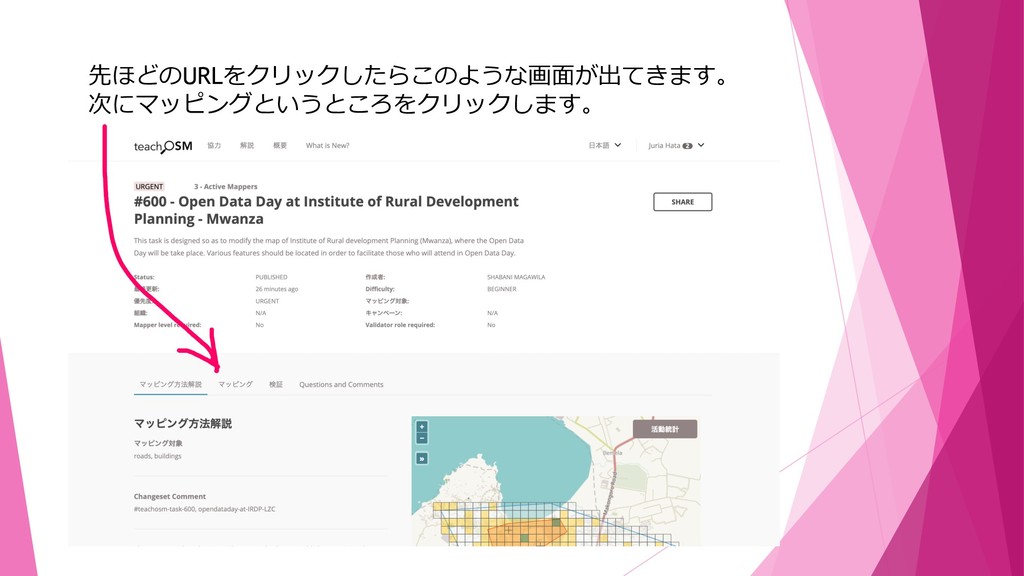
先ほどのURLをクリックしたらこのような画⾯が出てきます。 次にマッピングというところをクリックします。
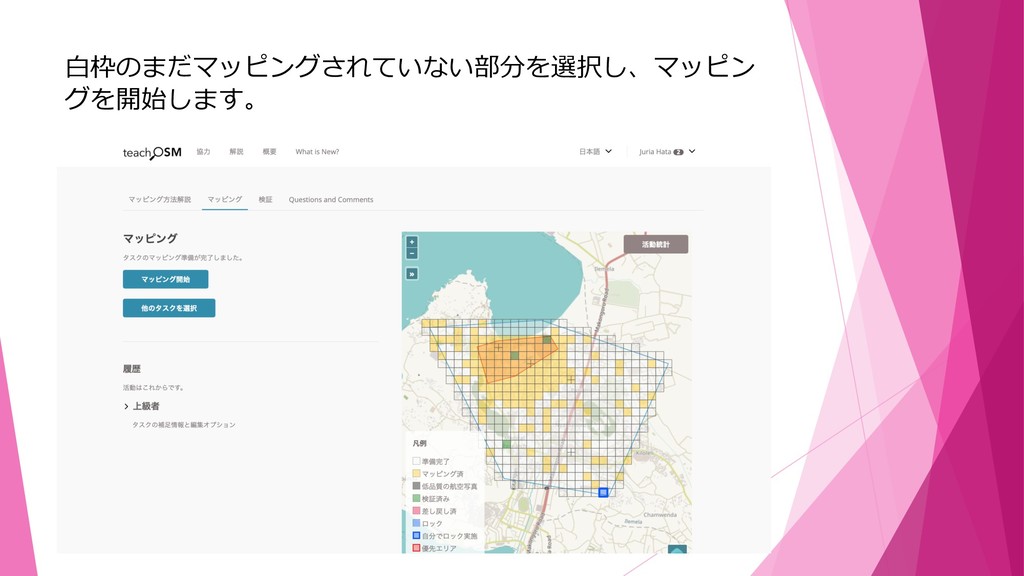
⽩枠のまだマッピングされていない部分を選択し、マッピン グを開始します。
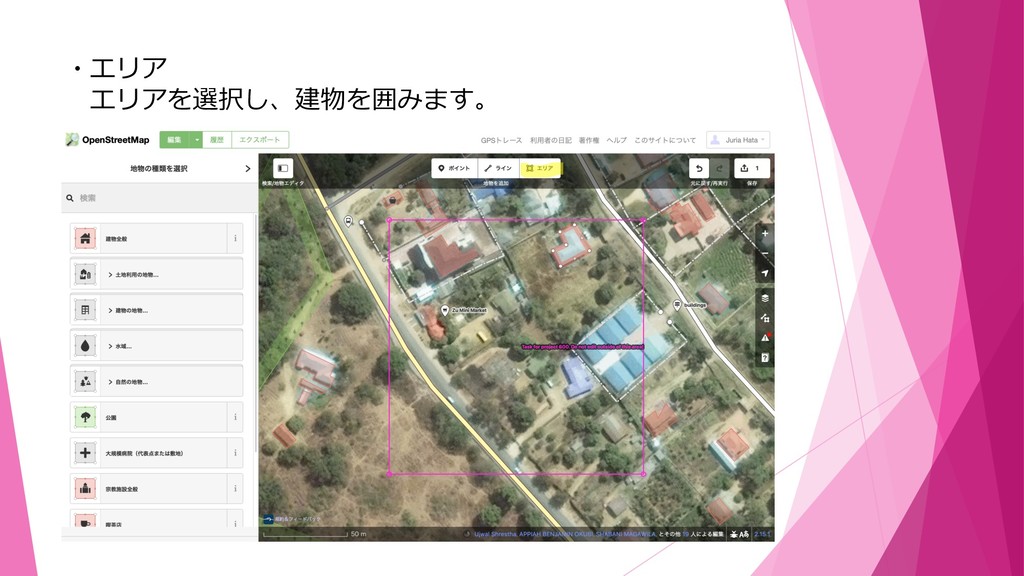
・エリア エリアを選択し、建物を囲みます。
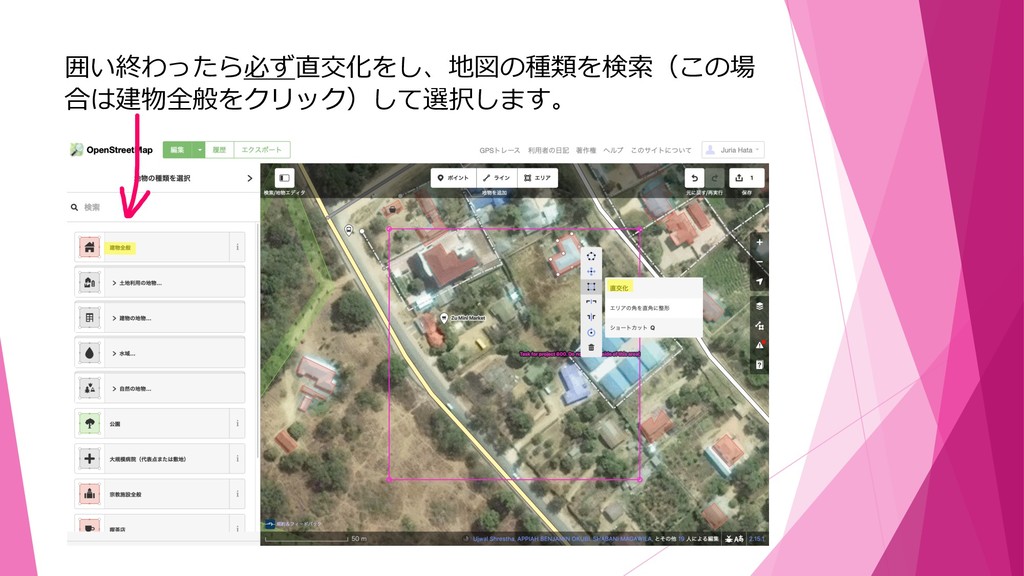
囲い終わったら必ず直交化をし、地図の種類を検索(この場 合は建物全般をクリック)して選択します。
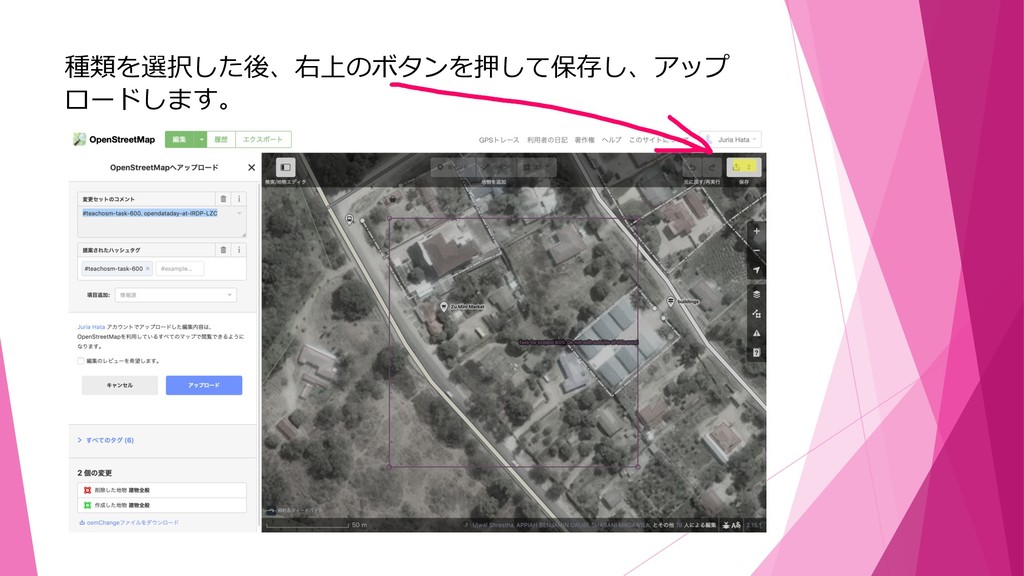
種類を選択した後、右上のボタンを押して保存し、アップ ロードします。
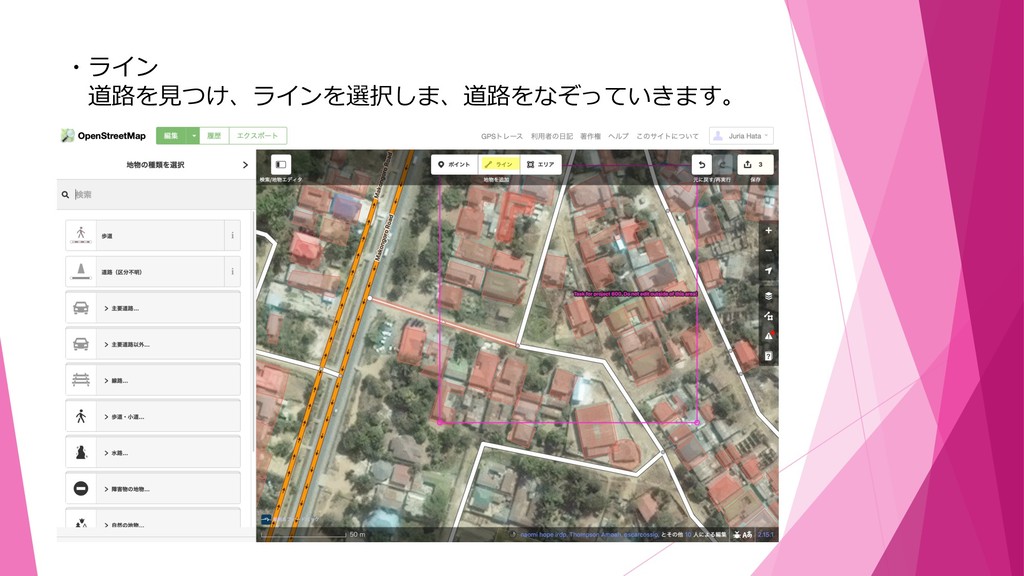
・ライン 道路を⾒つけ、ラインを選択しま、道路をなぞっていきます。
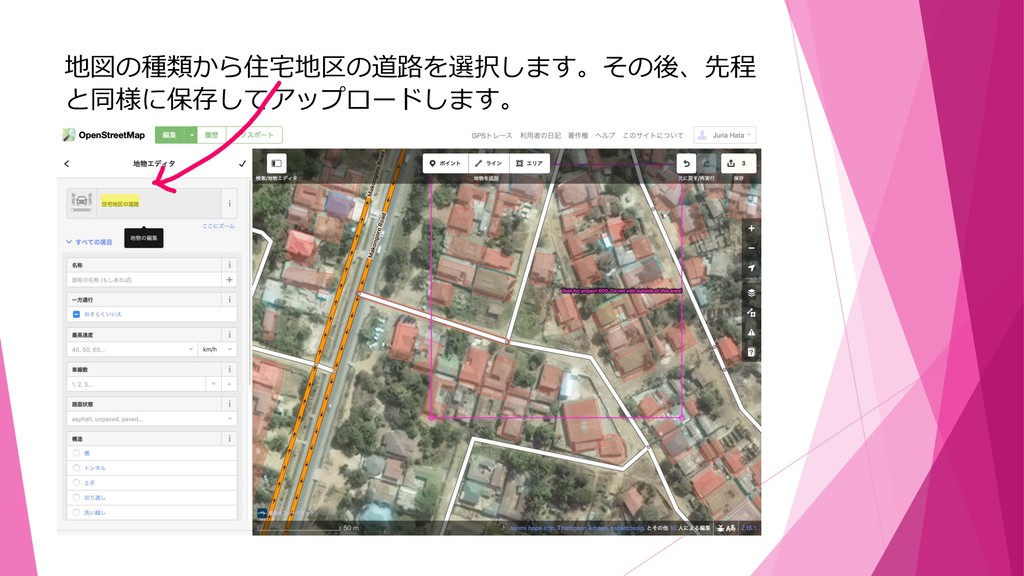
地図の種類から住宅地区の道路を選択します。その後、先程 と同様に保存してアップロードします。
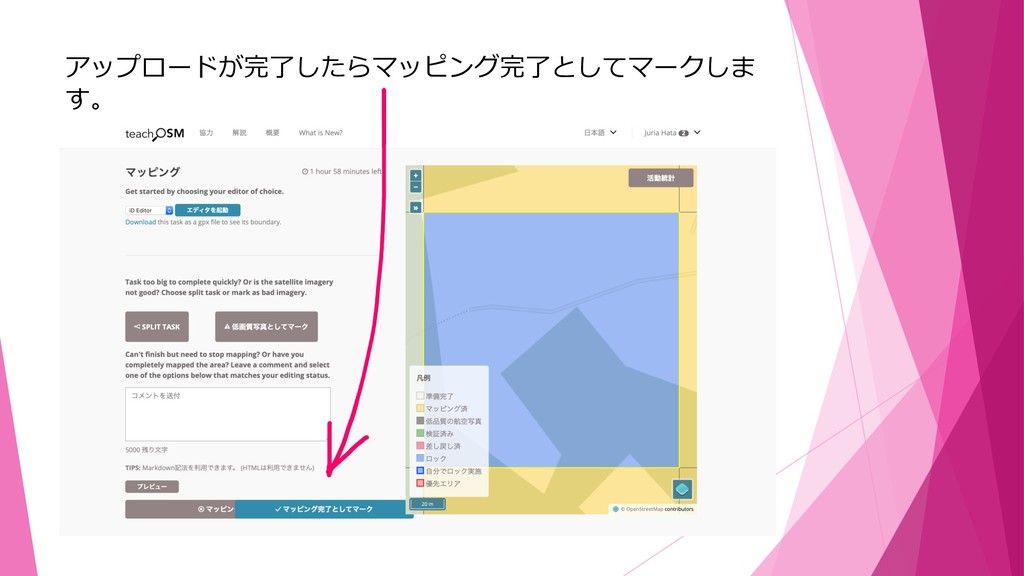
アップロードが完了したらマッピング完了としてマークしま す。
これで作業⼯程は終了です。


 juria
juria
 katarinadahlin
 tmiket
 csswizardry
 elsirapls
 chriscoyier
 michaelherold
 pauljervisheath
 geoffreycrofte
 twada
twada
 baasie
 frankvandijk
 katiecoart