Upgrade to Pro
— share decks privately, control downloads, hide ads and more …
Speaker Deck
Sign up for free
Menu
Search
Features
All features
Private URLs
Password Protection
Custom URLS
Scheduled publishing
Remove Branding
Restrict embedding
Deck Collections
Notes
Features
All features
Private URLs
Password Protection
Custom URLS
Scheduled publishing
Remove Branding
Restrict embedding
Deck Collections
Notes
Explore
Featured decks
Featured speakers
Programming
Technology
Storyboards
Explore
Featured decks
Featured speakers
Programming
Technology
Storyboards
Pricing
Search
Sign in
Sign up for free
空間情報システム Tasking Manager Manual
Search
Sponsored
·
Your Podcast. Everywhere. Effortlessly.
Share. Educate. Inspire. Entertain. You do you. We'll handle the rest.
→
Juria hata
June 15, 2019
40
0
Share
Embed
Copy iframe code
Copy JS code
Copy link
Start on current slide
空間情報システム Tasking Manager Manual
Juria hata
June 15, 2019
More Decks by Juria hata
See All by Juria hata
空間情報システム Tasking Manager Manual
juria
0
72
空間情報システム tasking manager manual
juria
0
45
空間情報システム tasking manager manual
juria
0
27
空間情報システム tasking manager manual
juria
0
26
Featured
See All Featured
The Language of Interfaces
destraynor
162
27k
Mozcon NYC 2025: Stop Losing SEO Traffic
samtorres
1
570
Balancing Empowerment & Direction
lara
6
1.3k
Odyssey Design
rkendrick25
PRO
2
870
世界の人気アプリ100個を分析して見えたペイウォール設計の心得
akihiro_kokubo
PRO
74
43k
How People are Using Generative and Agentic AI to Supercharge Their Products, Projects, Services and Value Streams Today
helenjbeal
2
360
State of Search Keynote: SEO is Dead Long Live SEO
ryanjones
0
320
Optimizing for Happiness
mojombo
378
71k
Statistics for Hackers
jakevdp
799
230k
Dealing with People You Can't Stand - Big Design 2015
cassininazir
367
27k
Become a Pro
speakerdeck
PRO
31
6.3k
DBのスキルで生き残る技術 - AI時代におけるテーブル設計の勘所
soudai
PRO
68
58k
Transcript
タンザニア地図作成 #600 タスクの作業⽅法 1A119134 畑 樹莉杏
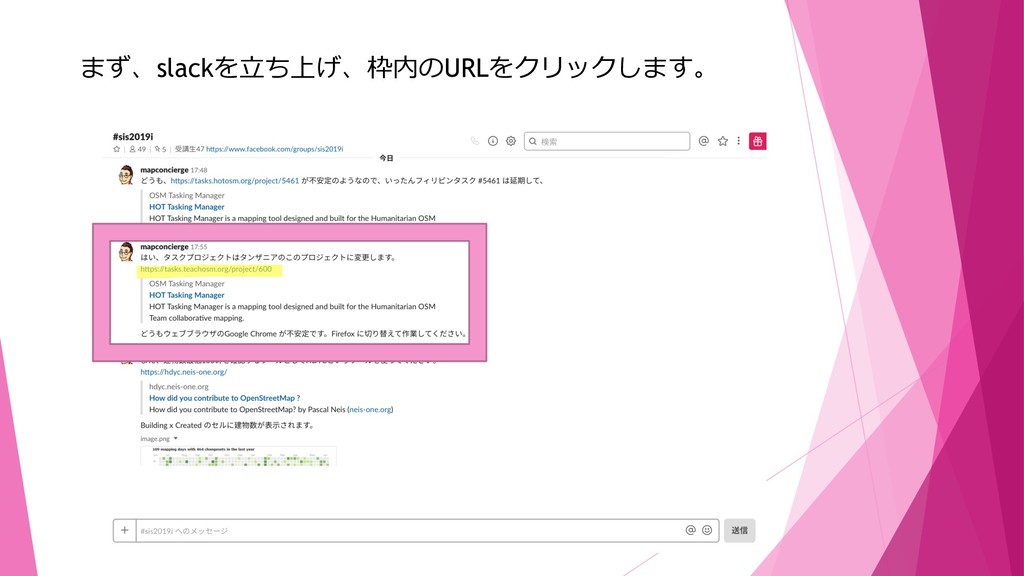
まず、slackを⽴ち上げ、枠内のURLをクリックします。
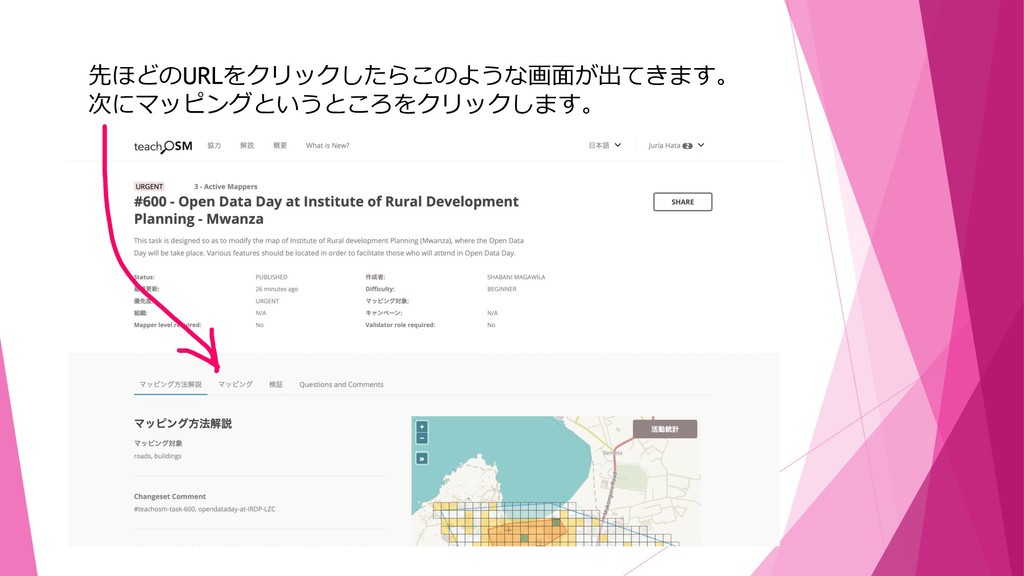
先ほどのURLをクリックしたらこのような画⾯が出てきます。 次にマッピングというところをクリックします。
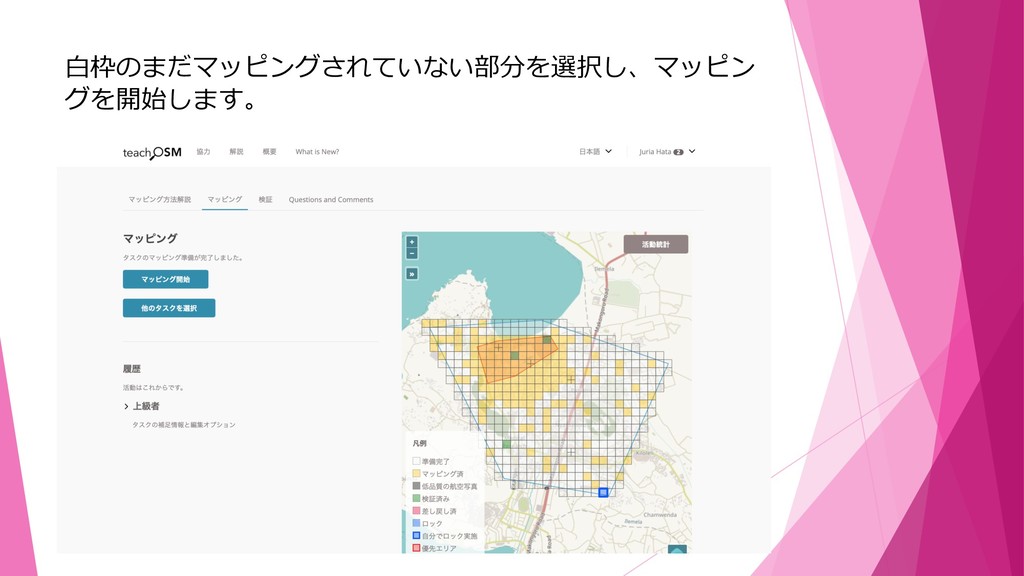
⽩枠のまだマッピングされていない部分を選択し、マッピン グを開始します。
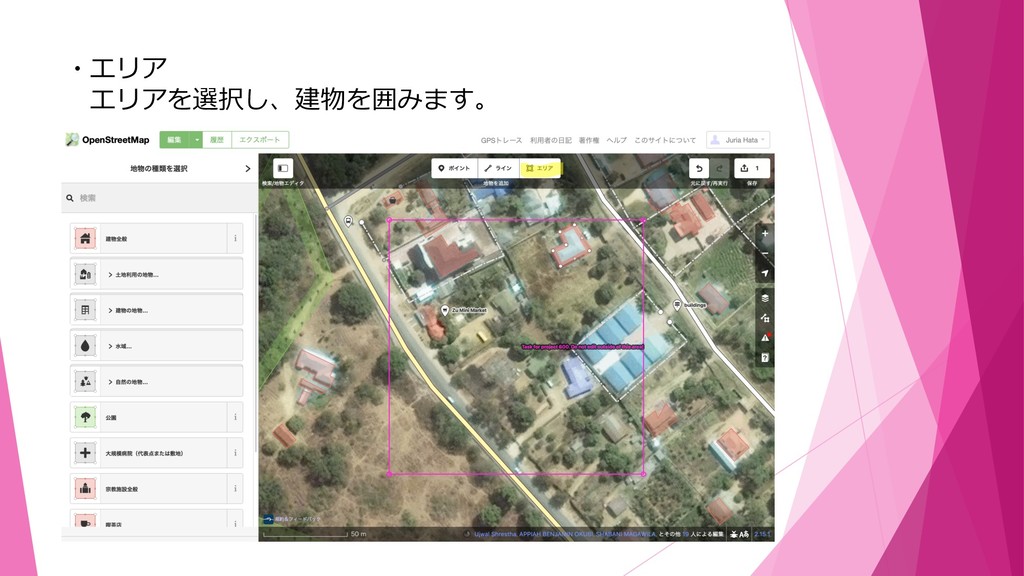
・エリア エリアを選択し、建物を囲みます。
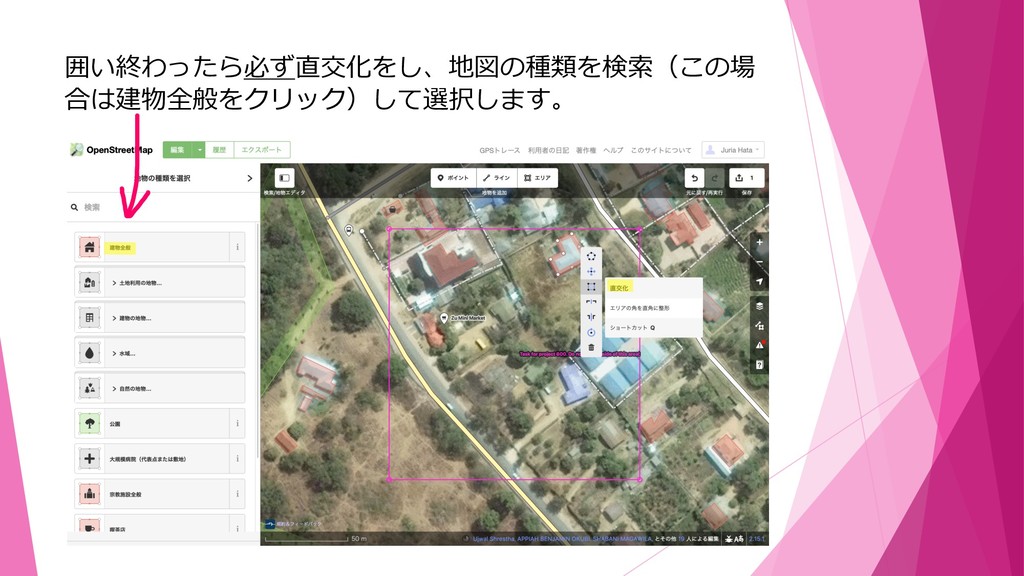
囲い終わったら必ず直交化をし、地図の種類を検索(この場 合は建物全般をクリック)して選択します。
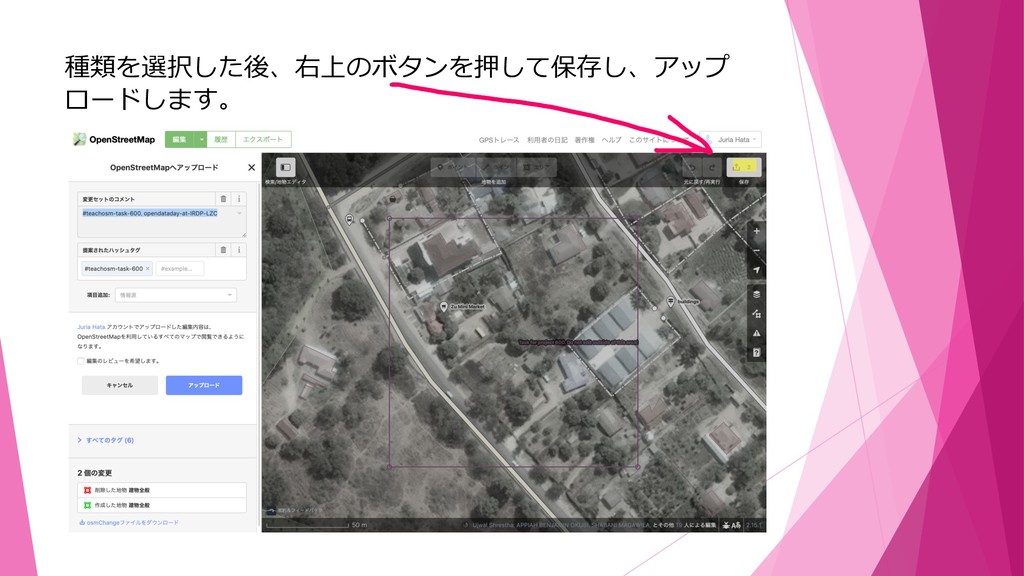
種類を選択した後、右上のボタンを押して保存し、アップ ロードします。
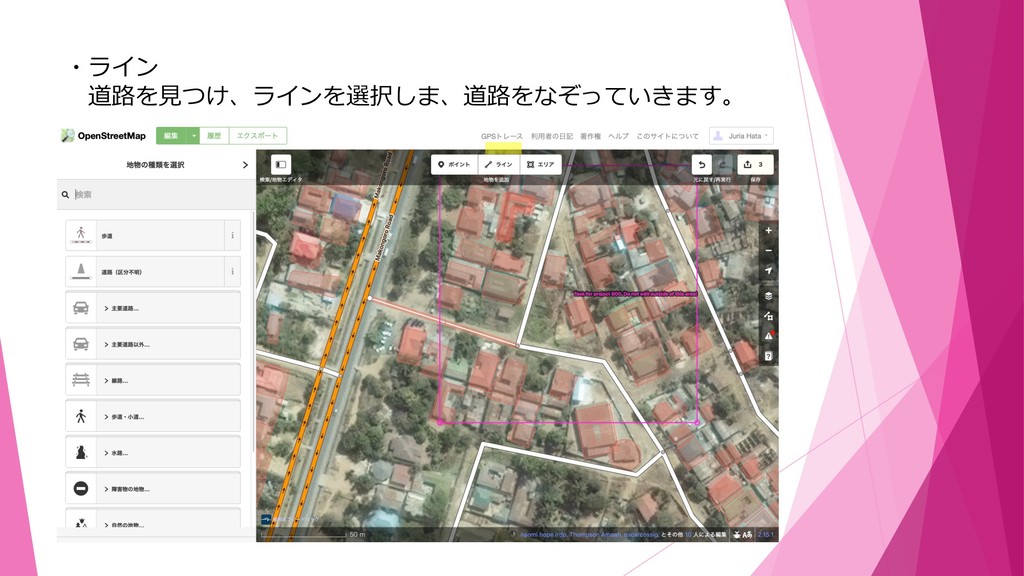
・ライン 道路を⾒つけ、ラインを選択しま、道路をなぞっていきます。
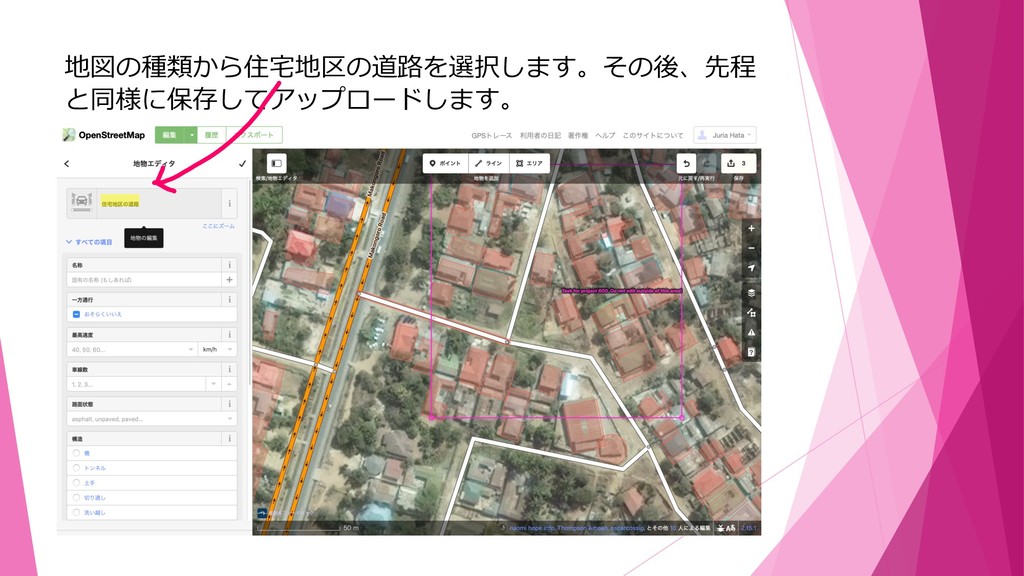
地図の種類から住宅地区の道路を選択します。その後、先程 と同様に保存してアップロードします。
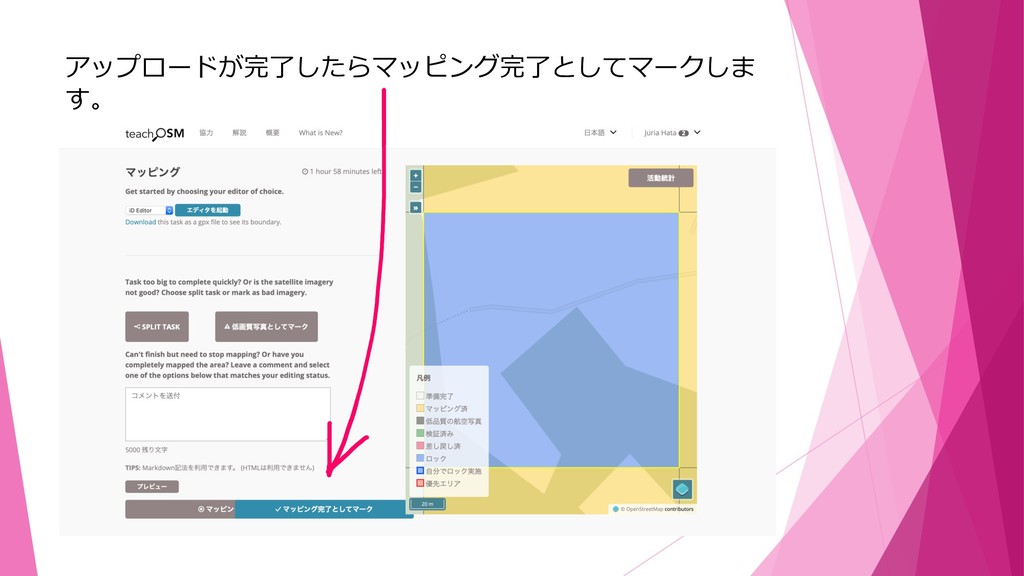
アップロードが完了したらマッピング完了としてマークしま す。
これで作業⼯程は終了です。


 juria
juria
 destraynor
 samtorres
 lara
lara
 rkendrick25
 akihiro_kokubo
.png) helenjbeal
helenjbeal
 ryanjones
 mojombo
 jakevdp
 cassininazir
 speakerdeck
 soudai