Upgrade to Pro
— share decks privately, control downloads, hide ads and more …
Speaker Deck
Sign up for free
Menu
Search
Features
All features
Private URLs
Password Protection
Custom URLS
Scheduled publishing
Remove Branding
Restrict embedding
Deck Collections
Notes
Features
All features
Private URLs
Password Protection
Custom URLS
Scheduled publishing
Remove Branding
Restrict embedding
Deck Collections
Notes
Explore
Featured decks
Featured speakers
Programming
Technology
Storyboards
Explore
Featured decks
Featured speakers
Programming
Technology
Storyboards
Pricing
Search
Sign in
Sign up for free
空間情報システム入門Ⅰ#02 2016/06/16
Search
Kota
June 16, 2016
Programming
55
0
Share
Embed
Copy iframe code
Copy JS code
Copy link
Start on current slide
空間情報システム入門Ⅰ#02 2016/06/16
Kota
June 16, 2016
More Decks by Kota
See All by Kota
空間情報システム入門Ⅰ 2016/7/14
kotafujii
0
39
Other Decks in Programming
See All in Programming
Vue Fes Japan の “作る側”に関わってみて
naokihaba
0
160
現場と育てるRailsモデリング 〜Spreadsheetから始めたモデル設計〜
siroemk
2
590
残高管理から台帳サービスへの進化
artoy
1
200
Simple Storage Service(S3) is not simple
iwatsukayura
0
290
AWSに止められる覚悟してますか?
morizo_1984
2
540
AI主導のプログラミング学習アプリを作ってみた
econanringo
0
180
[2026-09-26]空論ジェネリックプロセス~テスト資産とAIで紡ぐ、再現可能なパフォーマンスチューニングの話~
tosite
0
270
Workers Cache を知る
syumai
0
370
ソニーのクラウド共通基盤の変遷と AI時代の開発スタイルに合わせた進化 / The Journey of Sony’s Common Cloud Platform and Its Evolution for AI-Native Development
kenjiyoneyama
0
270
設計次第でAIコードの読む量は減らせる / designing-for-code-reading
minodriven
35
17k
SalesForceを内製化!? ~ HR事業を支える顧客管理基盤のインフラを大公開 ~
oku053
0
180
contenteditable と日本語入力に向き合う
colorful12
0
200
Featured
See All Featured
Sharpening the Axe: The Primacy of Toolmaking
bcantrill
46
3k
The Cult of Friendly URLs
andyhume
79
7k
Claude Code のすすめ
schroneko
67
230k
No one is an island. Learnings from fostering a developers community.
thoeni
21
3.9k
Neural Spatial Audio Processing for Sound Field Analysis and Control
skoyamalab
0
570
BBQ
matthewcrist
90
10k
Producing Creativity
orderedlist
PRO
348
41k
エンジニアに許された特別な時間の終わり
watany
109
250k
Conquering PDFs: document understanding beyond plain text
inesmontani
PRO
4
3.2k
Primal Persuasion: How to Engage the Brain for Learning That Lasts
tmiket
0
500
New Earth Scene 8
popppiees
4
2.7k
Leveraging LLMs for student feedback in introductory data science courses - posit::conf(2025)
minecr
1
440
Transcript
マッピング作業のマニュアル 1A116193 藤井 孝太
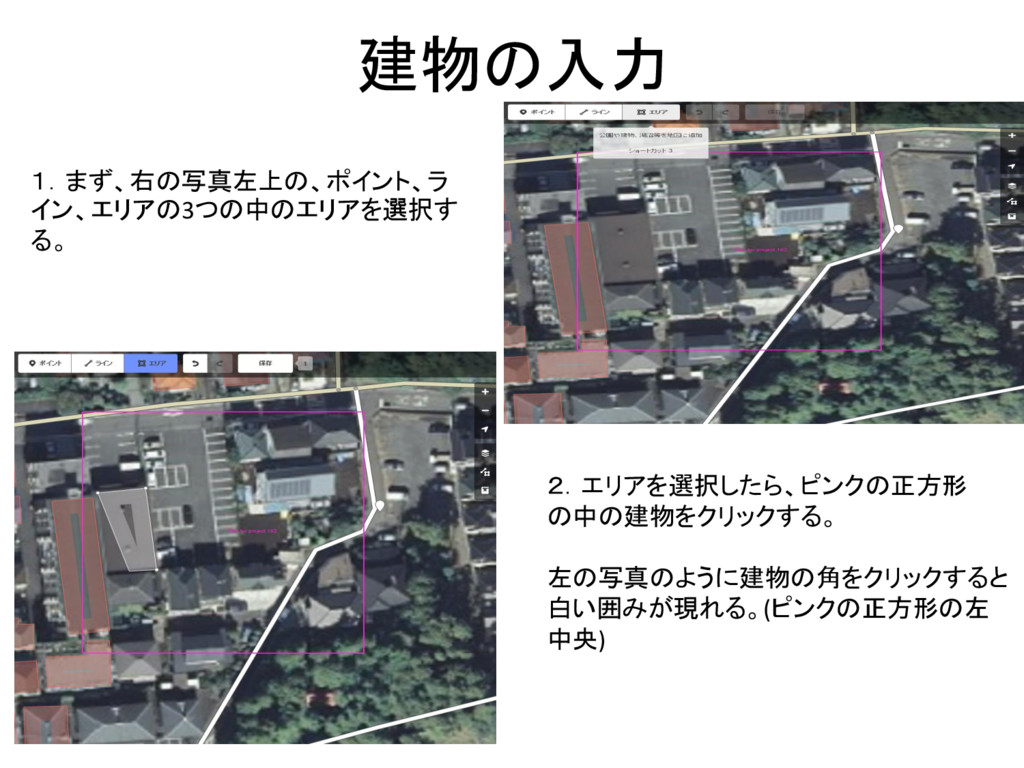
建物の入力 1.まず、右の写真左上の、ポイント、ラ イン、エリアの3つの中のエリアを選択す る。 2.エリアを選択したら、ピンクの正方形 の中の建物をクリックする。 左の写真のように建物の角をクリックすると 白い囲みが現れる。(ピンクの正方形の左 中央)
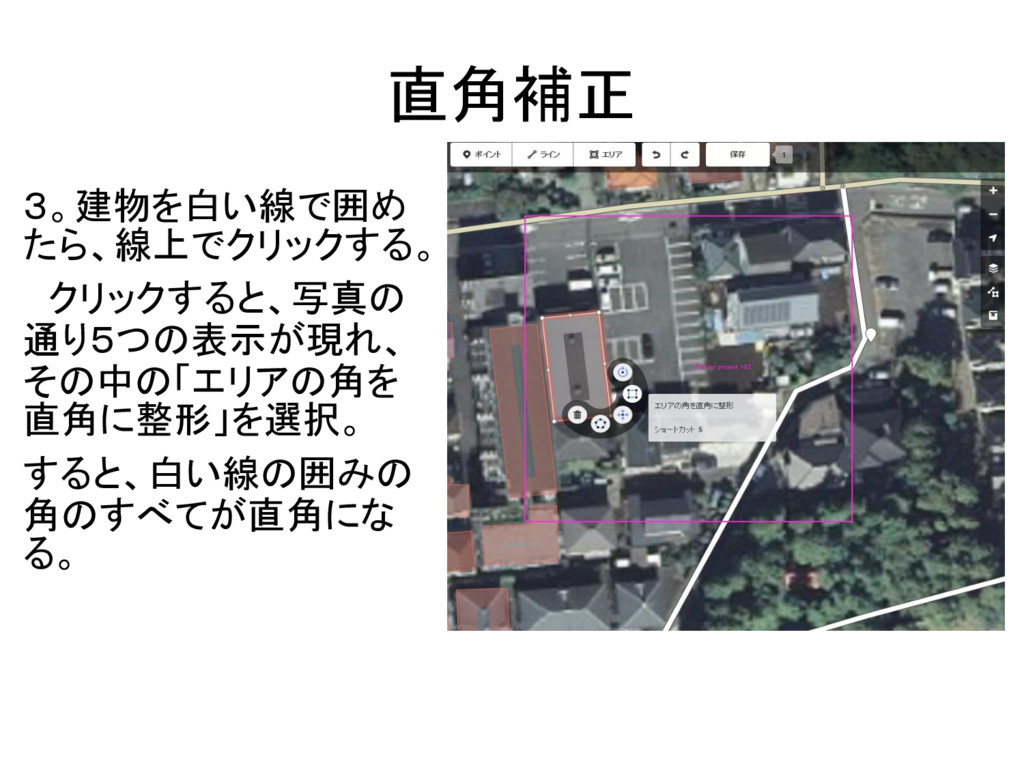
直角補正 3。建物を白い線で囲め たら、線上でクリックする。 クリックすると、写真の 通り5つの表示が現れ、 その中の「エリアの角を 直角に整形」を選択。 すると、白い線の囲みの 角のすべてが直角にな る。
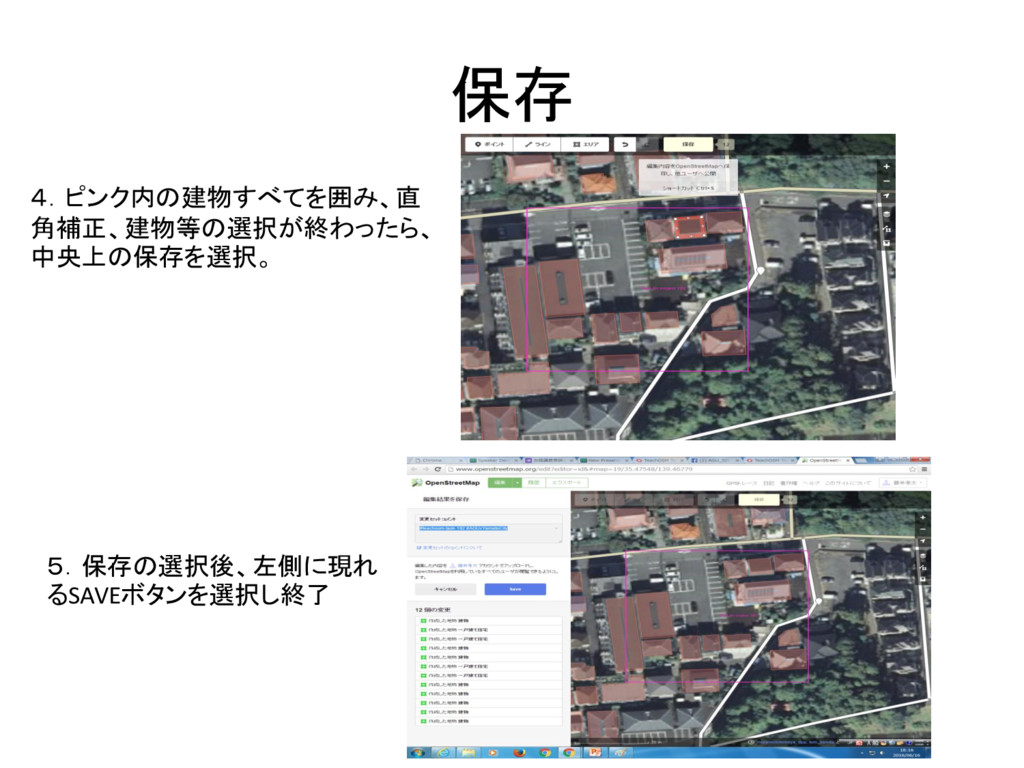
保存 4.ピンク内の建物すべてを囲み、直 角補正、建物等の選択が終わったら、 中央上の保存を選択。 5.保存の選択後、左側に現れ るSAVEボタンを選択し終了
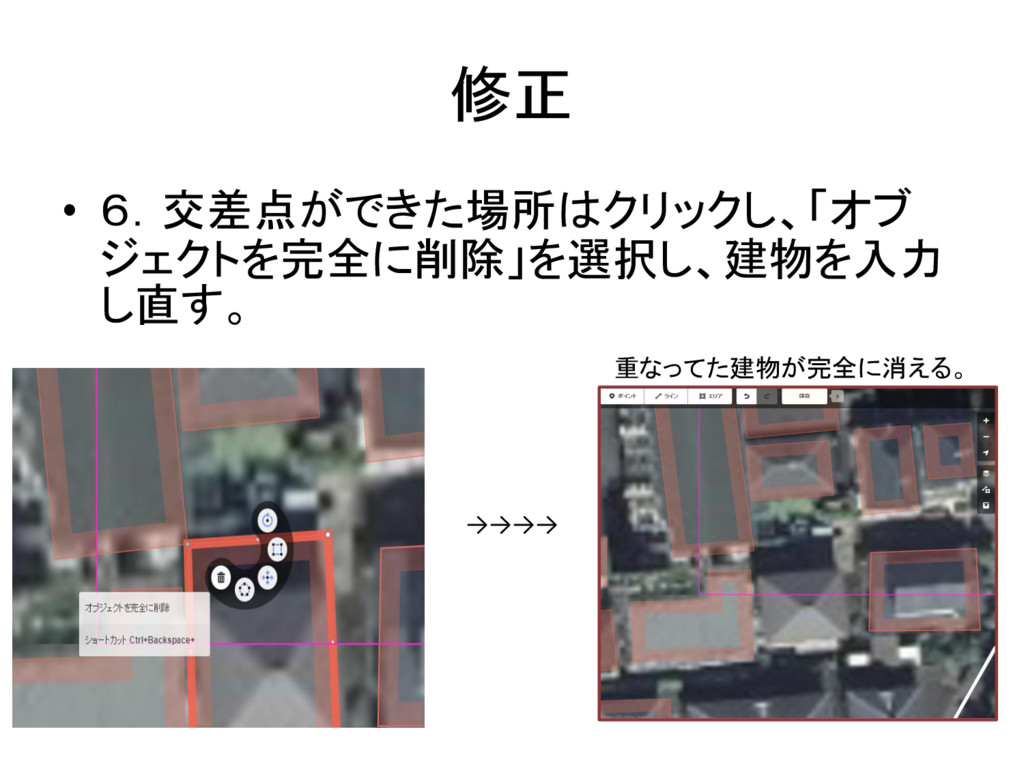
修正 • 6.交差点ができた場所はクリックし、「オブ ジェクトを完全に削除」を選択し、建物を入力 し直す。 重なってた建物が完全に消える。 →→→→
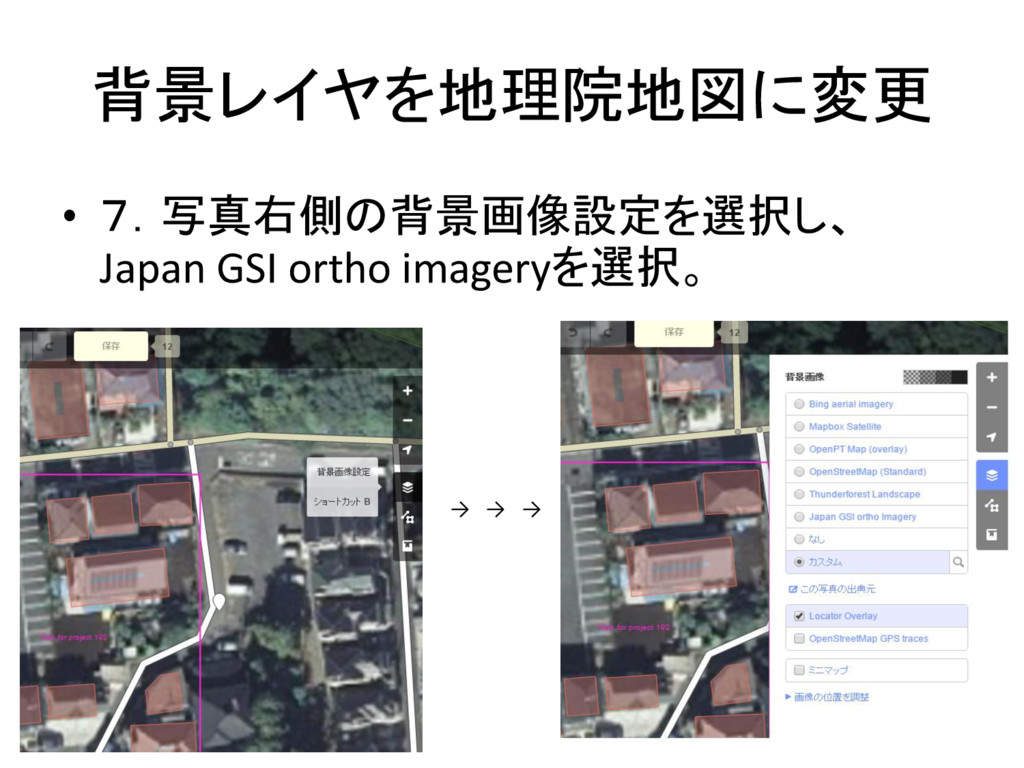
背景レイヤを地理院地図に変更 • 7.写真右側の背景画像設定を選択し、 Japan GSI ortho imageryを選択。 → → →
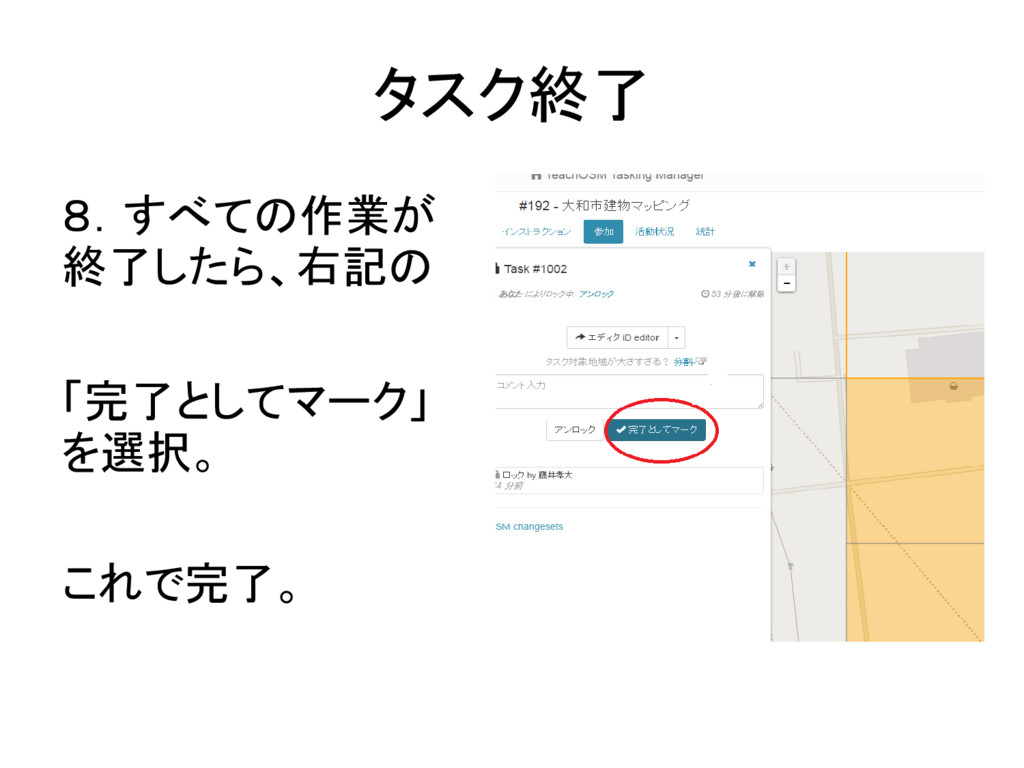
タスク終了 8.すべての作業が 終了したら、右記の 「完了としてマーク」 を選択。 これで完了。
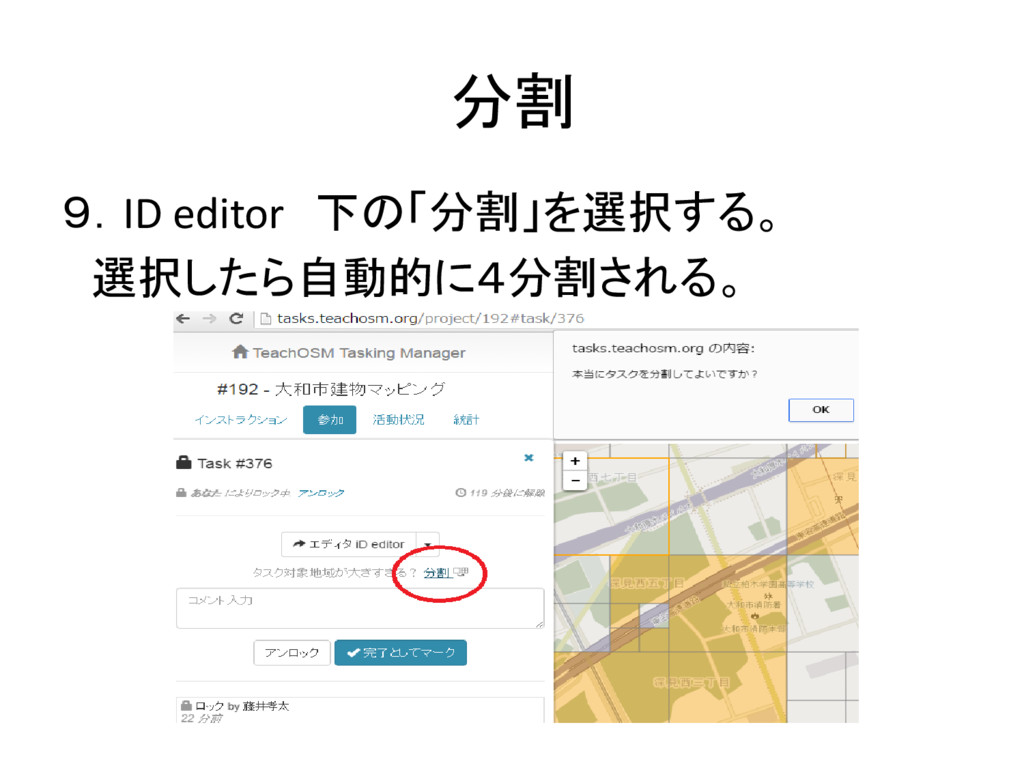
分割 9.ID editor 下の「分割」を選択する。 選択したら自動的に4分割される。
None
None


 kotafujii
 naokihaba
 siroemk
 artoy
artoy
 iwatsukayura
 morizo_1984
 econanringo
 tosite
 syumai
 kenjiyoneyama
 minodriven
 oku053
 colorful12
 bcantrill
 andyhume
 schroneko
 thoeni
 skoyamalab
 matthewcrist
 orderedlist
 watany
 inesmontani
 tmiket
 popppiees
 minecr