Upgrade to Pro — share decks privately, control downloads, hide ads and more …

DB2 10 para Profissionais Oracle

Sponsored · SiteGround - Reliable hosting with speed, security, and support you can count on. →
Avatar for Marcelo Kruger Marcelo Kruger
September 28, 2013

DB2 10 para Profissionais Oracle

Apresentação do Workshop DB2 para profissionais Oracle. Todos os direitos reservados a IBM.

Avatar for Marcelo Kruger

Marcelo Kruger

September 28, 2013

More Decks by Marcelo Kruger

Other Decks in Programming

Transcript

  1. © 2012 IBM Corporation Information Management Technology Ecosystem 2 Agenda

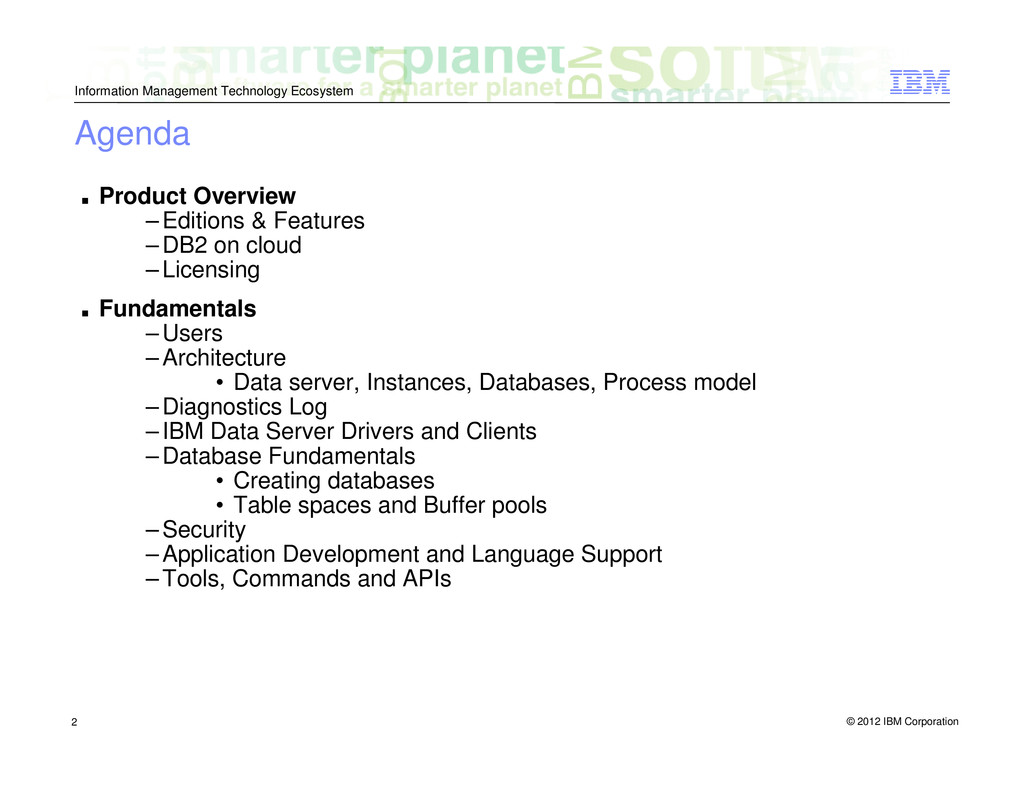
    ▪ Product Overview – Editions & Features – DB2 on cloud – Licensing ▪ Fundamentals – Users – Architecture • Data server, Instances, Databases, Process model – Diagnostics Log – IBM Data Server Drivers and Clients – Database Fundamentals • Creating databases • Table spaces and Buffer pools – Security – Application Development and Language Support – Tools, Commands and APIs
  2. © 2012 IBM Corporation Information Management Technology Ecosystem 3 DB2

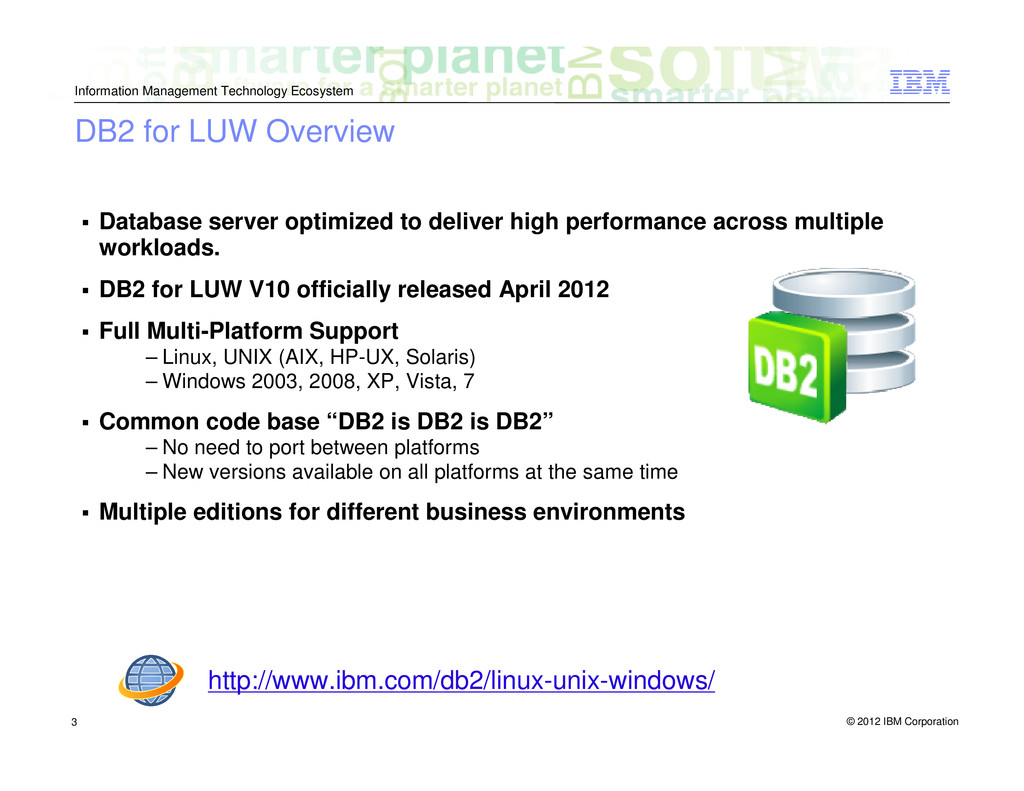
    for LUW Overview Database server optimized to deliver high performance across multiple workloads. DB2 for LUW V10 officially released April 2012 Full Multi-Platform Support – Linux, UNIX (AIX, HP-UX, Solaris) – Windows 2003, 2008, XP, Vista, 7 Common code base “DB2 is DB2 is DB2” – No need to port between platforms – New versions available on all platforms at the same time Multiple editions for different business environments http://www.ibm.com/db2/linux-unix-windows/
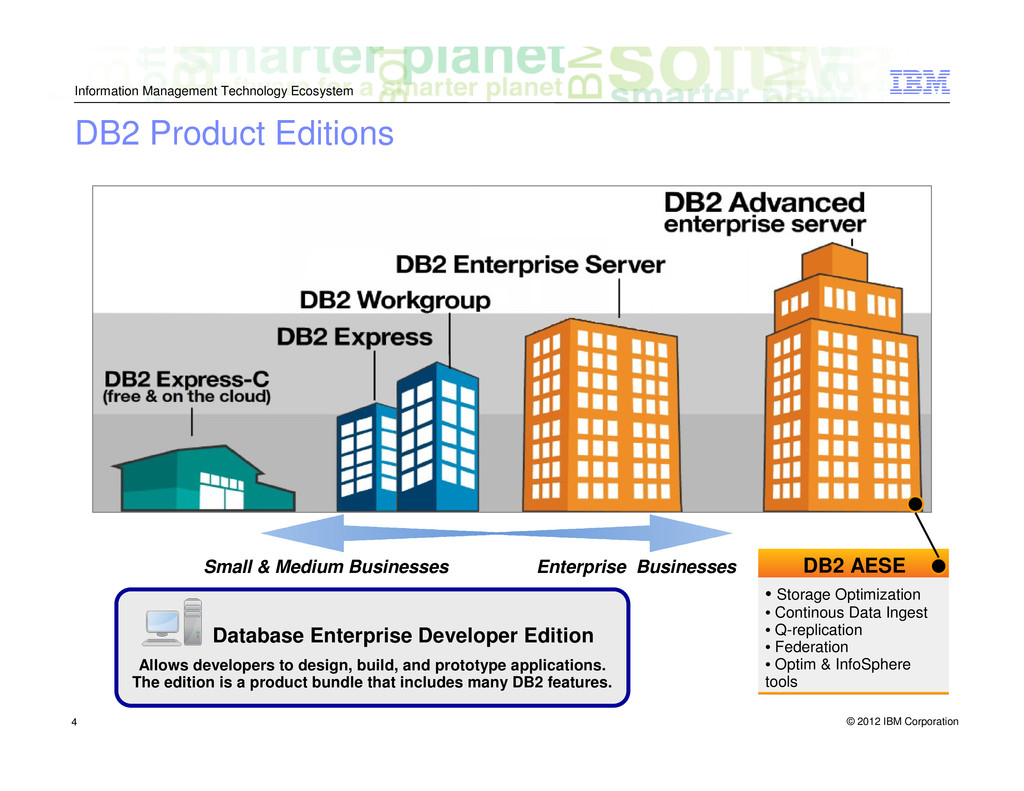
  3. © 2012 IBM Corporation Information Management Technology Ecosystem 4 •

    Storage Optimization • Continous Data Ingest • Q-replication • Federation • Optim & InfoSphere tools DB2 AESE Small & Medium Businesses Enterprise Businesses Database Enterprise Developer Edition Allows developers to design, build, and prototype applications. The edition is a product bundle that includes many DB2 features. DB2 Product Editions
  4. © 2012 IBM Corporation Information Management Technology Ecosystem 5 DB2

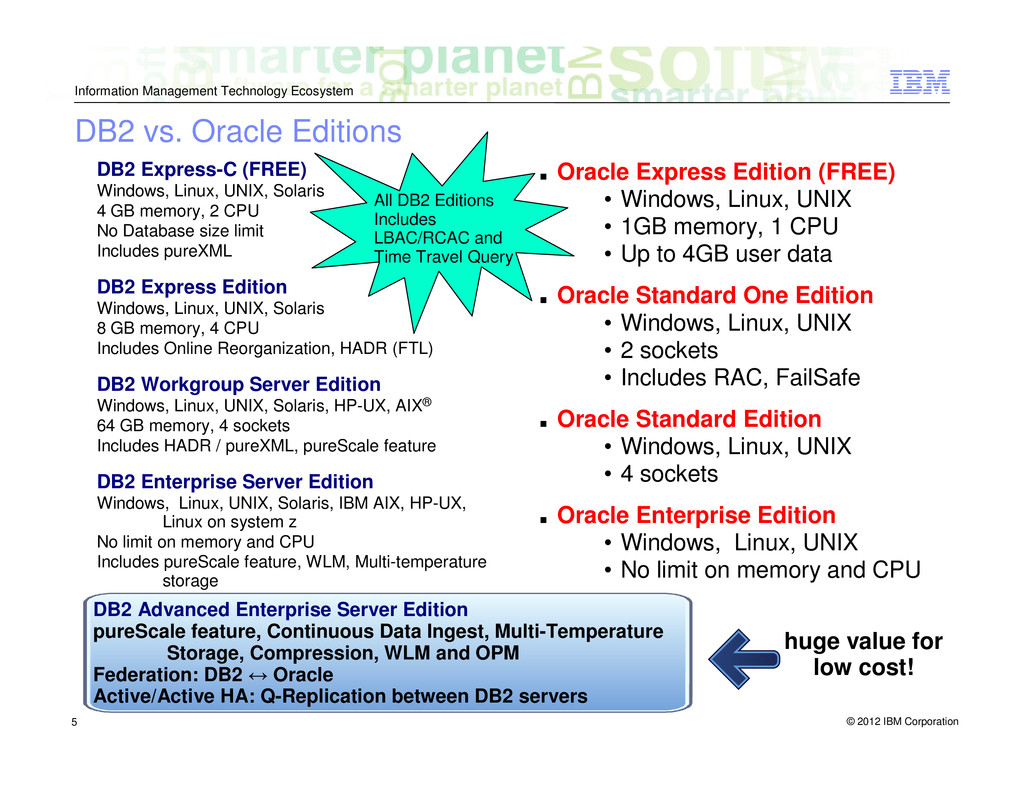
    Express-C (FREE) Windows, Linux, UNIX, Solaris 4 GB memory, 2 CPU No Database size limit Includes pureXML DB2 Express Edition Windows, Linux, UNIX, Solaris 8 GB memory, 4 CPU Includes Online Reorganization, HADR (FTL) DB2 Workgroup Server Edition Windows, Linux, UNIX, Solaris, HP-UX, AIX® 64 GB memory, 4 sockets Includes HADR / pureXML, pureScale feature DB2 Enterprise Server Edition Windows, Linux, UNIX, Solaris, IBM AIX, HP-UX, Linux on system z No limit on memory and CPU Includes pureScale feature, WLM, Multi-temperature storage ▪ Oracle Express Edition (FREE) • Windows, Linux, UNIX • 1GB memory, 1 CPU • Up to 4GB user data ▪ Oracle Standard One Edition • Windows, Linux, UNIX • 2 sockets • Includes RAC, FailSafe ▪ Oracle Standard Edition • Windows, Linux, UNIX • 4 sockets ▪ Oracle Enterprise Edition • Windows, Linux, UNIX • No limit on memory and CPU DB2 Advanced Enterprise Server Edition pureScale feature, Continuous Data Ingest, Multi-Temperature Storage, Compression, WLM and OPM Federation: DB2 ↔ Oracle Active/Active HA: Q-Replication between DB2 servers huge value for low cost! All DB2 Editions Includes LBAC/RCAC and Time Travel Query DB2 vs. Oracle Editions
  5. © 2012 IBM Corporation Information Management Technology Ecosystem 6 Highlights

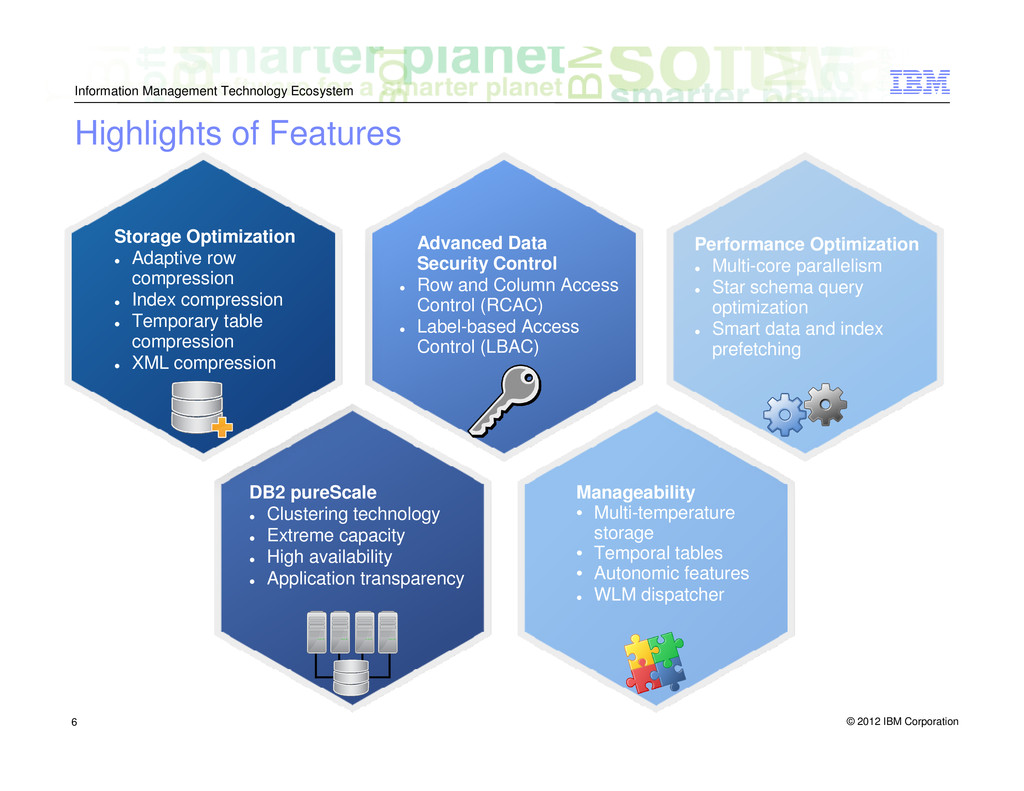
    of Features Storage Optimization Adaptive row compression Index compression Temporary table compression XML compression Advanced Data Security Control Row and Column Access Control (RCAC) Label-based Access Control (LBAC) Performance Optimization Multi-core parallelism Star schema query optimization Smart data and index prefetching DB2 pureScale Clustering technology Extreme capacity High availability Application transparency Manageability • Multi-temperature storage • Temporal tables • Autonomic features WLM dispatcher
  6. © 2012 IBM Corporation Information Management Technology Ecosystem 7 DB2

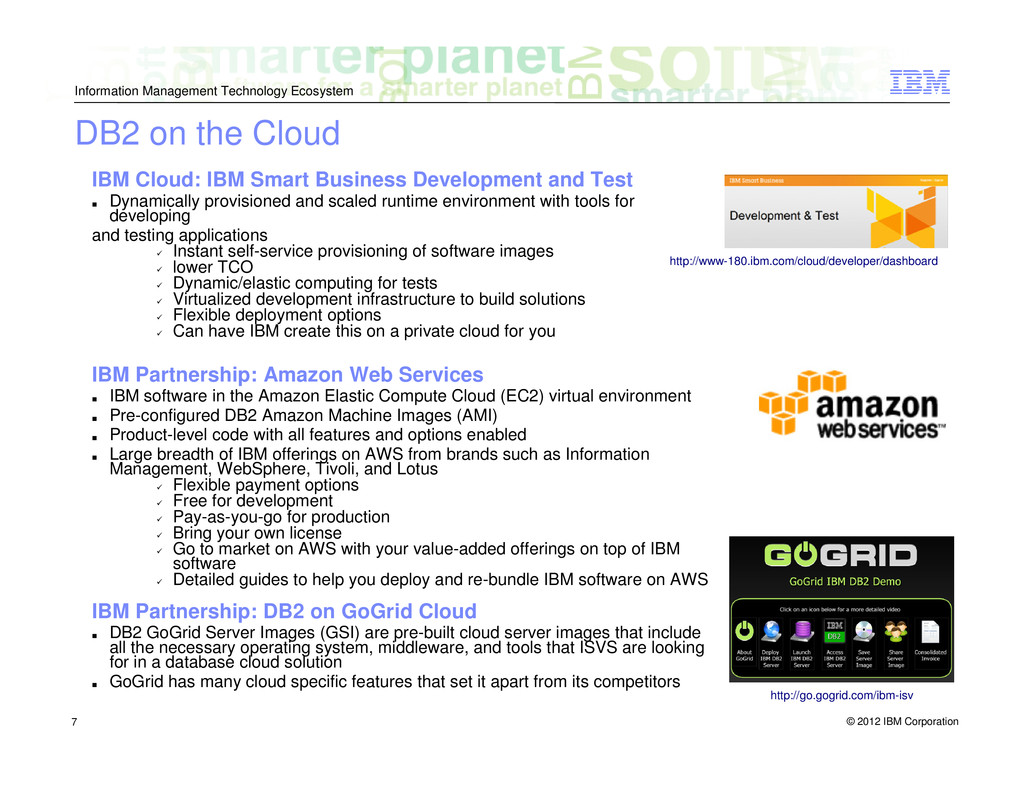
    on the Cloud IBM Cloud: IBM Smart Business Development and Test ▪ Dynamically provisioned and scaled runtime environment with tools for developing and testing applications Instant self-service provisioning of software images lower TCO Dynamic/elastic computing for tests Virtualized development infrastructure to build solutions Flexible deployment options Can have IBM create this on a private cloud for you IBM Partnership: Amazon Web Services ▪ IBM software in the Amazon Elastic Compute Cloud (EC2) virtual environment ▪ Pre-configured DB2 Amazon Machine Images (AMI) ▪ Product-level code with all features and options enabled ▪ Large breadth of IBM offerings on AWS from brands such as Information Management, WebSphere, Tivoli, and Lotus Flexible payment options Free for development Pay-as-you-go for production Bring your own license Go to market on AWS with your value-added offerings on top of IBM software Detailed guides to help you deploy and re-bundle IBM software on AWS IBM Partnership: DB2 on GoGrid Cloud ▪ DB2 GoGrid Server Images (GSI) are pre-built cloud server images that include all the necessary operating system, middleware, and tools that ISVS are looking for in a database cloud solution ▪ GoGrid has many cloud specific features that set it apart from its competitors http://www-180.ibm.com/cloud/developer/dashboard http://go.gogrid.com/ibm-isv
  7. © 2012 IBM Corporation Information Management Technology Ecosystem 8 Yes

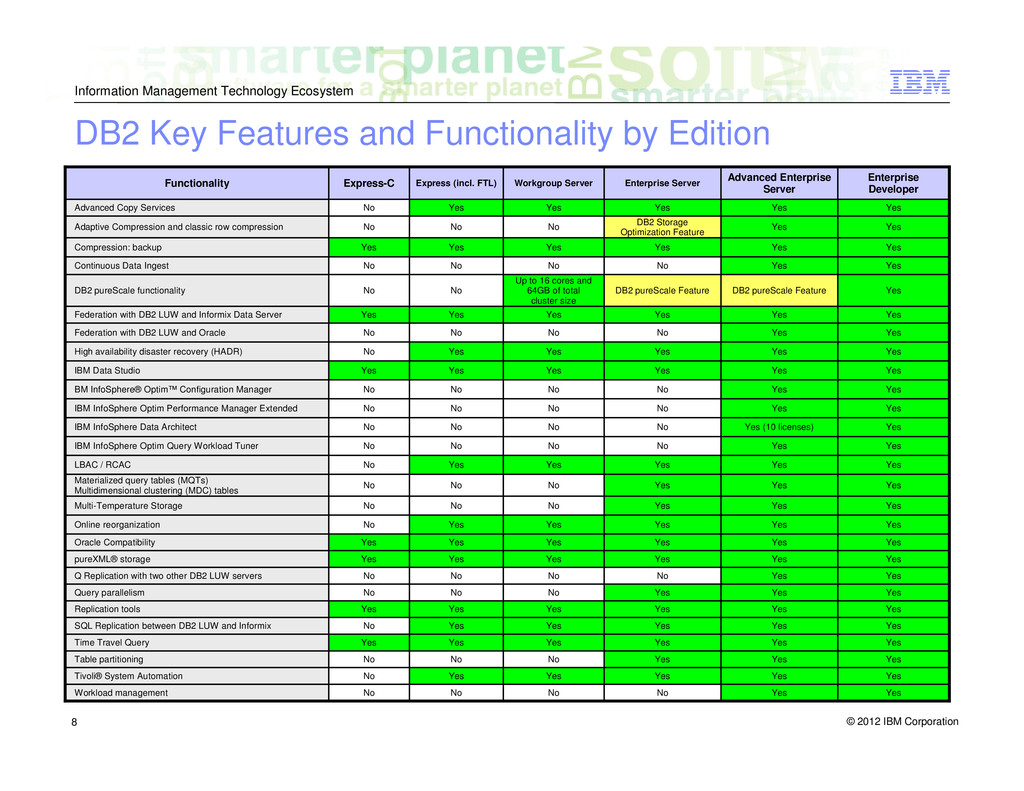
    Yes Yes Yes Yes Yes Time Travel Query Yes Yes No No No No Workload management Yes Yes Yes Yes Yes No Tivoli® System Automation Yes Yes Yes No No No Table partitioning Yes Yes Yes Yes Yes No SQL Replication between DB2 LUW and Informix Yes Yes Yes Yes Yes Yes Replication tools Yes Yes Yes No No No Query parallelism Yes Yes No No No No Q Replication with two other DB2 LUW servers Yes Yes Yes Yes Yes Yes pureXML® storage Yes Yes Yes Yes Yes Yes Oracle Compatibility Yes Yes Yes Yes Yes No Online reorganization Yes Yes Yes No No No Multi-Temperature Storage Yes Yes Yes No No No Materialized query tables (MQTs) Multidimensional clustering (MDC) tables Yes Yes Yes Yes Yes No LBAC / RCAC Yes Yes No No No No IBM InfoSphere Optim Query Workload Tuner Yes Yes (10 licenses) No No No No IBM InfoSphere Data Architect Yes Yes No No No No IBM InfoSphere Optim Performance Manager Extended Yes Yes No No No No BM InfoSphere® Optim™ Configuration Manager Yes Yes Yes Yes Yes Yes IBM Data Studio Yes Yes Yes Yes Yes No High availability disaster recovery (HADR) Yes Yes No No No No Federation with DB2 LUW and Oracle Yes Yes Yes Yes Yes Yes Federation with DB2 LUW and Informix Data Server Yes DB2 pureScale Feature DB2 pureScale Feature Up to 16 cores and 64GB of total cluster size No No DB2 pureScale functionality Yes Yes No No No No Continuous Data Ingest Yes Yes Yes Yes Yes Yes Compression: backup Yes Yes DB2 Storage Optimization Feature No No No Adaptive Compression and classic row compression Yes Yes Yes Yes Yes No Advanced Copy Services Enterprise Developer Advanced Enterprise Server Enterprise Server Workgroup Server Express (incl. FTL) Express-C Functionality DB2 Key Features and Functionality by Edition
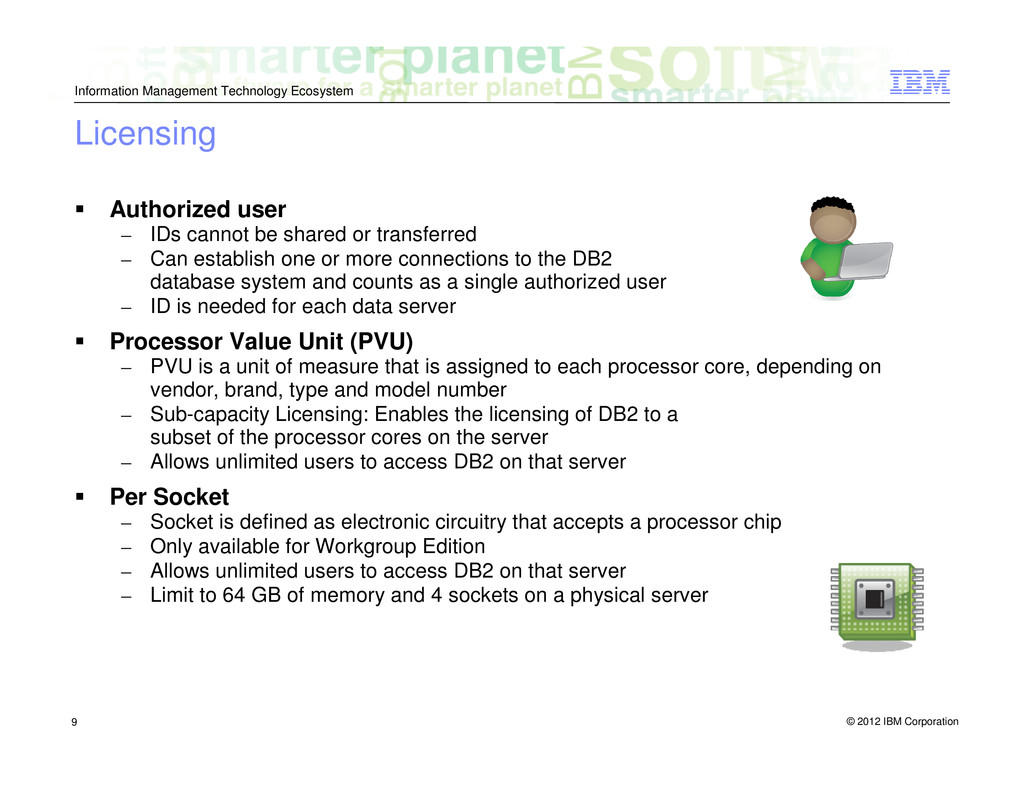
  8. © 2012 IBM Corporation Information Management Technology Ecosystem 9 Authorized

    user – IDs cannot be shared or transferred – Can establish one or more connections to the DB2 database system and counts as a single authorized user – ID is needed for each data server Processor Value Unit (PVU) – PVU is a unit of measure that is assigned to each processor core, depending on vendor, brand, type and model number – Sub-capacity Licensing: Enables the licensing of DB2 to a subset of the processor cores on the server – Allows unlimited users to access DB2 on that server Per Socket – Socket is defined as electronic circuitry that accepts a processor chip – Only available for Workgroup Edition – Allows unlimited users to access DB2 on that server – Limit to 64 GB of memory and 4 sockets on a physical server Licensing
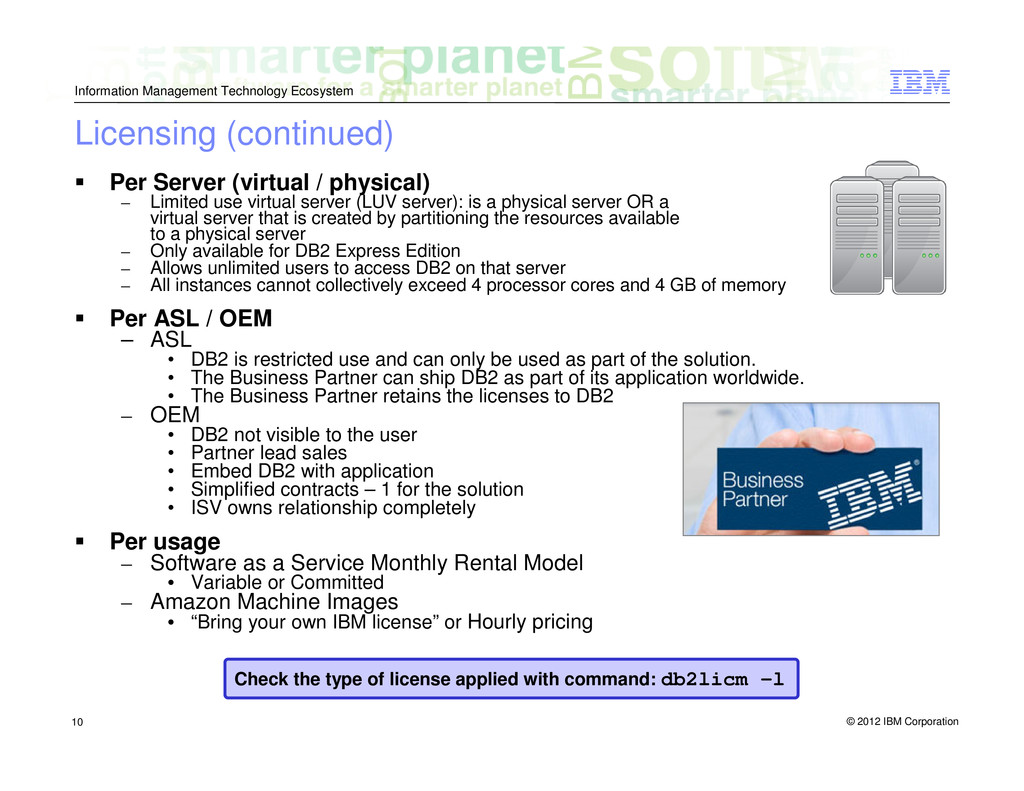
  9. © 2012 IBM Corporation Information Management Technology Ecosystem 10 Per

    Server (virtual / physical) – Limited use virtual server (LUV server): is a physical server OR a virtual server that is created by partitioning the resources available to a physical server – Only available for DB2 Express Edition – Allows unlimited users to access DB2 on that server – All instances cannot collectively exceed 4 processor cores and 4 GB of memory Per ASL / OEM – ASL • DB2 is restricted use and can only be used as part of the solution. • The Business Partner can ship DB2 as part of its application worldwide. • The Business Partner retains the licenses to DB2 – OEM • DB2 not visible to the user • Partner lead sales • Embed DB2 with application • Simplified contracts – 1 for the solution • ISV owns relationship completely Per usage – Software as a Service Monthly Rental Model • Variable or Committed – Amazon Machine Images • “Bring your own IBM license” or Hourly pricing Check the type of license applied with command: db2licm -l Licensing (continued)
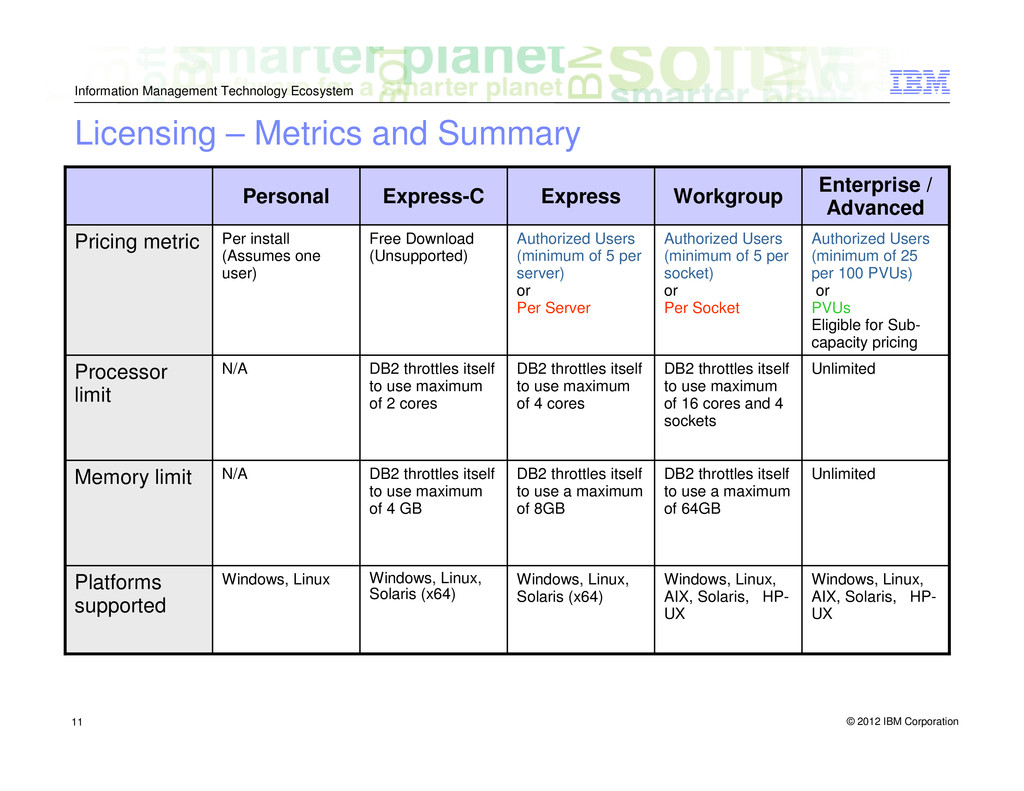
  10. © 2012 IBM Corporation Information Management Technology Ecosystem 11 Windows,

    Linux, AIX, Solaris, HP- UX Windows, Linux, AIX, Solaris, HP- UX Windows, Linux, Solaris (x64) Windows, Linux, Solaris (x64) Windows, Linux Platforms supported Unlimited DB2 throttles itself to use a maximum of 64GB DB2 throttles itself to use a maximum of 8GB DB2 throttles itself to use maximum of 4 GB N/A Memory limit Unlimited DB2 throttles itself to use maximum of 16 cores and 4 sockets DB2 throttles itself to use maximum of 4 cores DB2 throttles itself to use maximum of 2 cores N/A Processor limit Authorized Users (minimum of 25 per 100 PVUs) or PVUs Eligible for Sub- capacity pricing Authorized Users (minimum of 5 per socket) or Per Socket Authorized Users (minimum of 5 per server) or Per Server Free Download (Unsupported) Per install (Assumes one user) Pricing metric Enterprise / Advanced Workgroup Express Express-C Personal Licensing – Metrics and Summary
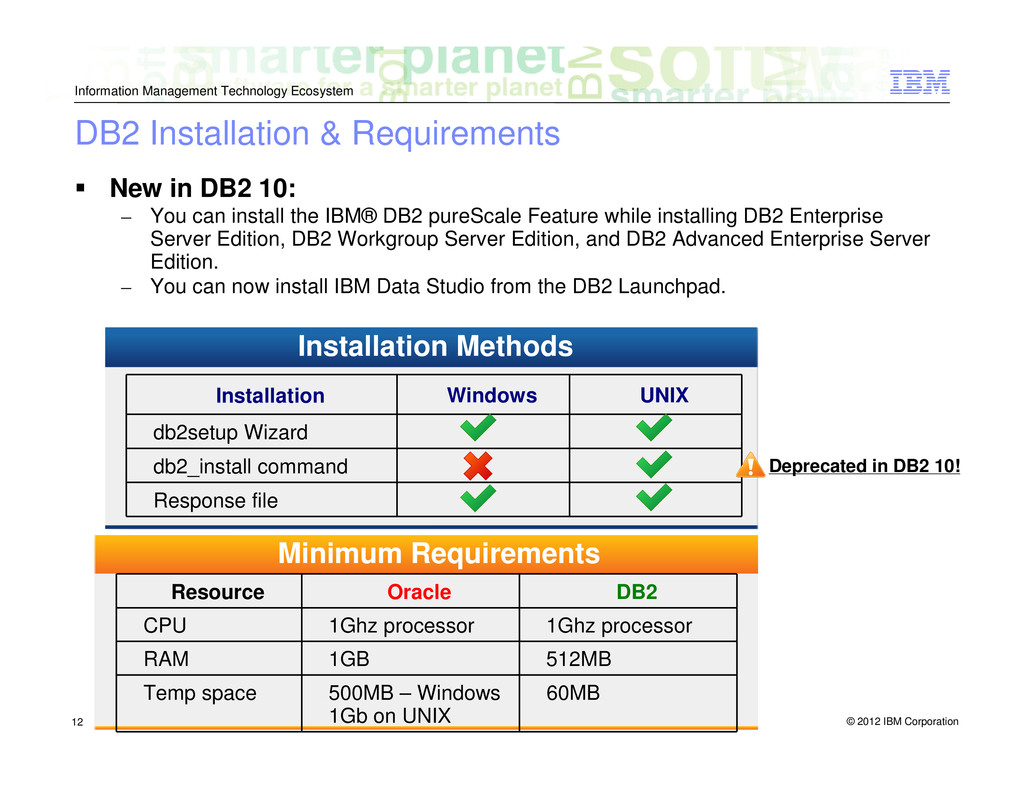
  11. © 2012 IBM Corporation Information Management Technology Ecosystem 12 Installation

    Windows UNIX db2setup Wizard db2_install command Response file Installation Methods Resource Oracle DB2 CPU 1Ghz processor 1Ghz processor RAM 1GB 512MB Temp space 500MB – Windows 1Gb on UNIX 60MB Minimum Requirements New in DB2 10: – You can install the IBM® DB2 pureScale Feature while installing DB2 Enterprise Server Edition, DB2 Workgroup Server Edition, and DB2 Advanced Enterprise Server Edition. – You can now install IBM Data Studio from the DB2 Launchpad. Deprecated in DB2 10! DB2 Installation & Requirements
  12. © 2012 IBM Corporation Information Management Technology Ecosystem 13 On

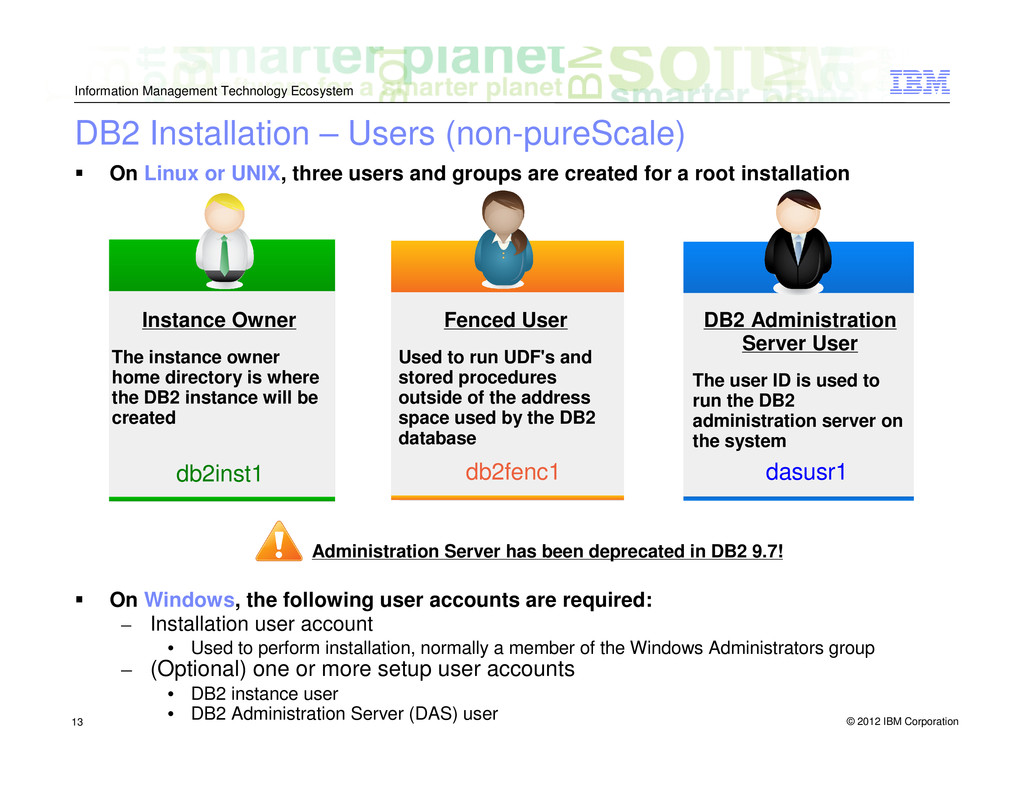
    Linux or UNIX, three users and groups are created for a root installation On Windows, the following user accounts are required: – Installation user account • Used to perform installation, normally a member of the Windows Administrators group – (Optional) one or more setup user accounts • DB2 instance user • DB2 Administration Server (DAS) user Instance Owner The instance owner home directory is where the DB2 instance will be created db2inst1 Fenced User Used to run UDF's and stored procedures outside of the address space used by the DB2 database db2fenc1 DB2 Administration Server User The user ID is used to run the DB2 administration server on the system dasusr1 Administration Server has been deprecated in DB2 9.7! DB2 Installation – Users (non-pureScale)
  13. © 2012 IBM Corporation Information Management Technology Ecosystem 14 listener.ora

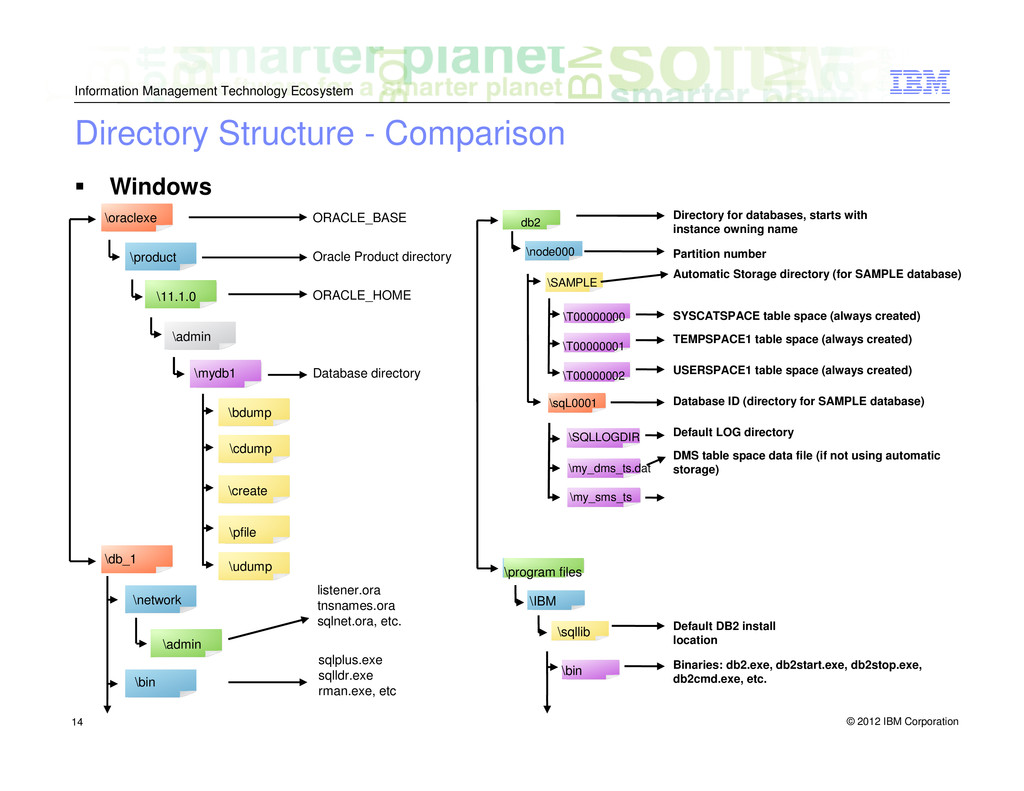
    tnsnames.ora sqlnet.ora, etc. ORACLE_BASE Oracle Product directory ORACLE_HOME Database directory sqlplus.exe sqlldr.exe rman.exe, etc \oraclexe \db_1 \mydb1 \product \11.1.0 \admin \bdump \cdump \create \pfile \udump \network \admin \bin Binaries: db2.exe, db2start.exe, db2stop.exe, db2cmd.exe, etc. Directory for databases, starts with instance owning name Partition number Database ID (directory for SAMPLE database) Default LOG directory Automatic Storage directory (for SAMPLE database) SYSCATSPACE table space (always created) TEMPSPACE1 table space (always created) USERSPACE1 table space (always created) Default DB2 install location DMS table space data file (if not using automatic storage) db2 \program files \node000 \IBM \SAMPLE \T00000000 \T00000001 \T00000002 \sqL0001 \SQLLOGDIR \my_dms_ts.dat \my_sms_ts \bin \sqllib Windows Directory Structure - Comparison
  14. © 2012 IBM Corporation Information Management Technology Ecosystem 15 Linux

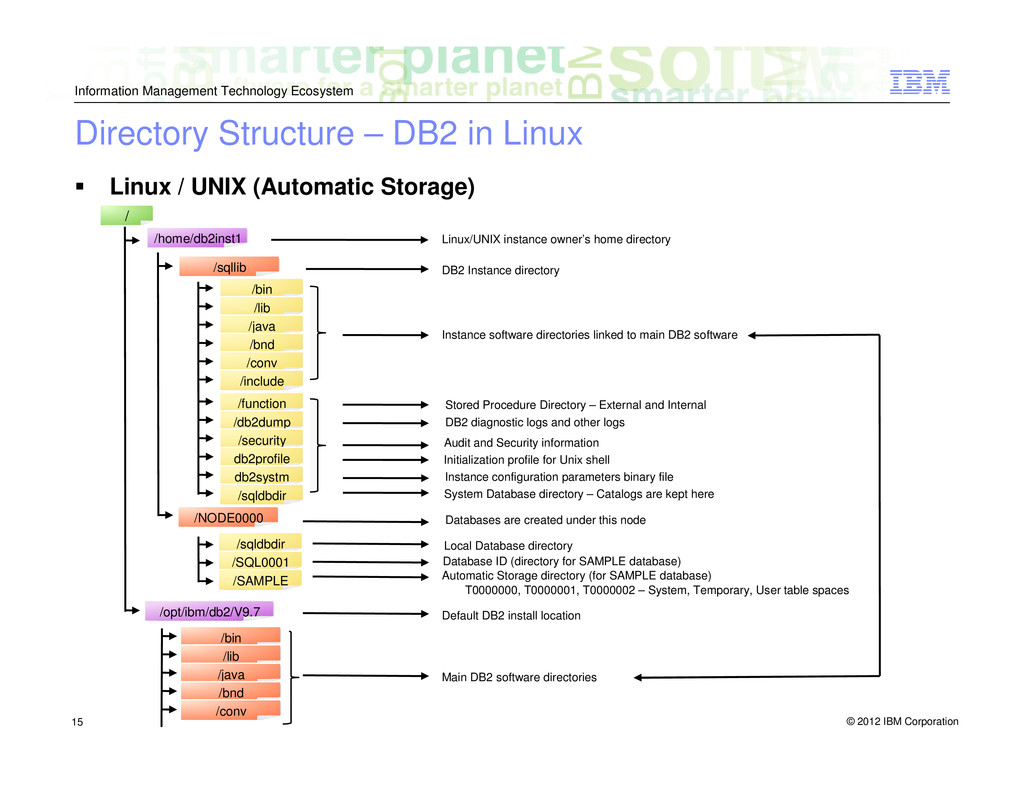
    / UNIX (Automatic Storage) Main DB2 software directories Linux/UNIX instance owner’s home directory DB2 Instance directory Stored Procedure Directory – External and Internal Automatic Storage directory (for SAMPLE database) Default DB2 install location Instance software directories linked to main DB2 software DB2 diagnostic logs and other logs Audit and Security information Initialization profile for Unix shell Instance configuration parameters binary file System Database directory – Catalogs are kept here Local Database directory Databases are created under this node Database ID (directory for SAMPLE database) T0000000, T0000001, T0000002 – System, Temporary, User table spaces / /home/db2inst1 /sqllib /bin /opt/ibm/db2/V9.7 /lib /java /bnd /conv /include /function /db2dump /security db2profile db2systm /sqldbdir /sqldbdir /SQL0001 /SAMPLE /NODE0000 /bin /lib /java /bnd /conv Directory Structure – DB2 in Linux
  15. © 2012 IBM Corporation Information Management Technology Ecosystem 16 DB2

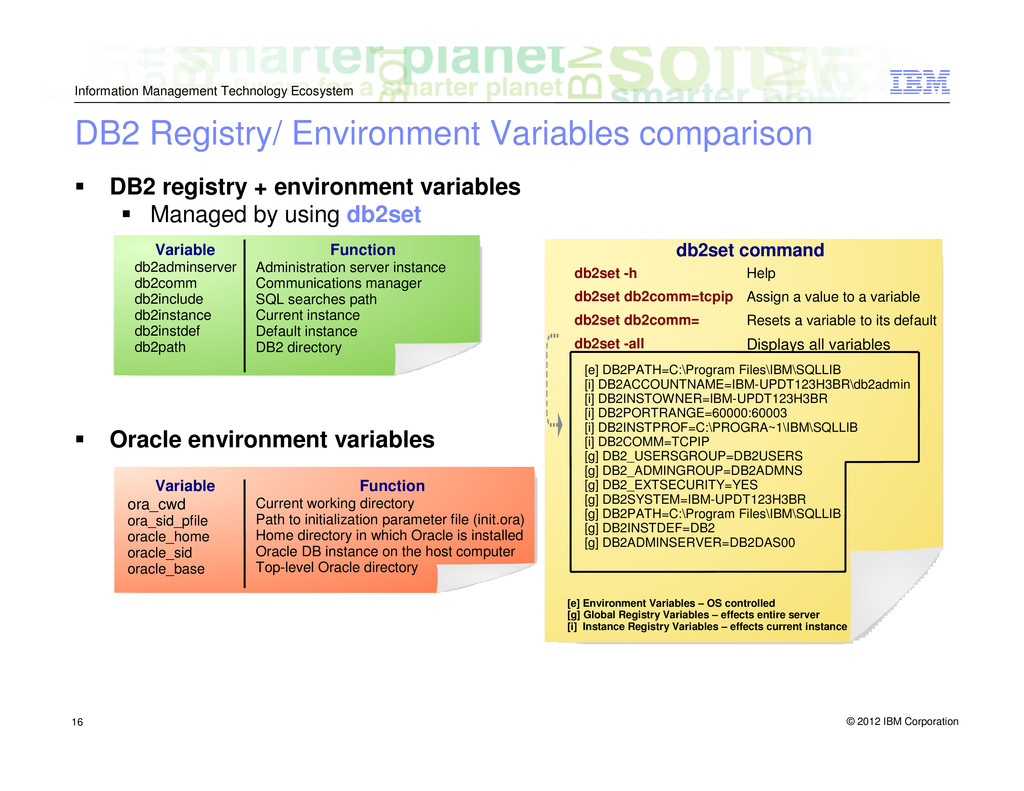
    registry + environment variables Managed by using db2set Oracle environment variables db2adminserver db2comm db2include db2instance db2instdef db2path Administration server instance Communications manager SQL searches path Current instance Default instance DB2 directory Variable Function db2set -h db2set db2comm=tcpip db2set db2comm= db2set -all Help Assign a value to a variable Resets a variable to its default Displays all variables db2set command [e] DB2PATH=C:\Program Files\IBM\SQLLIB [i] DB2ACCOUNTNAME=IBM-UPDT123H3BR\db2admin [i] DB2INSTOWNER=IBM-UPDT123H3BR [i] DB2PORTRANGE=60000:60003 [i] DB2INSTPROF=C:\PROGRA~1\IBM\SQLLIB [i] DB2COMM=TCPIP [g] DB2_USERSGROUP=DB2USERS [g] DB2_ADMINGROUP=DB2ADMNS [g] DB2_EXTSECURITY=YES [g] DB2SYSTEM=IBM-UPDT123H3BR [g] DB2PATH=C:\Program Files\IBM\SQLLIB [g] DB2INSTDEF=DB2 [g] DB2ADMINSERVER=DB2DAS00 [e] Environment Variables – OS controlled [g] Global Registry Variables – effects entire server [i] Instance Registry Variables – effects current instance ora_cwd ora_sid_pfile oracle_home oracle_sid oracle_base Current working directory Path to initialization parameter file (init.ora) Home directory in which Oracle is installed Oracle DB instance on the host computer Top-level Oracle directory Variable Function DB2 Registry/ Environment Variables comparison
  16. © 2012 IBM Corporation Information Management Technology Ecosystem 17 Oracle

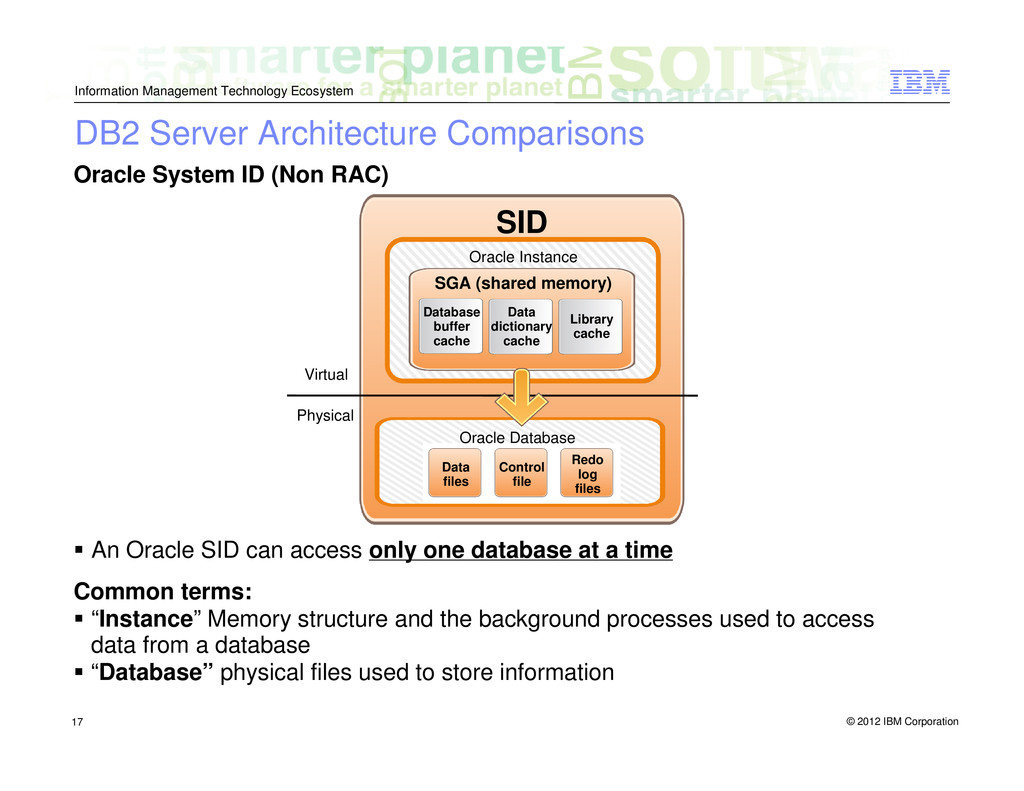
    System ID (Non RAC) An Oracle SID can access only one database at a time Common terms: “Instance” Memory structure and the background processes used to access data from a database “Database” physical files used to store information Control file Data files Redo log files Oracle Database SID Virtual Physical SGA (shared memory) Database buffer cache Oracle Instance Library cache Data dictionary cache DB2 Server Architecture Comparisons
  17. © 2012 IBM Corporation Information Management Technology Ecosystem 18 DB2

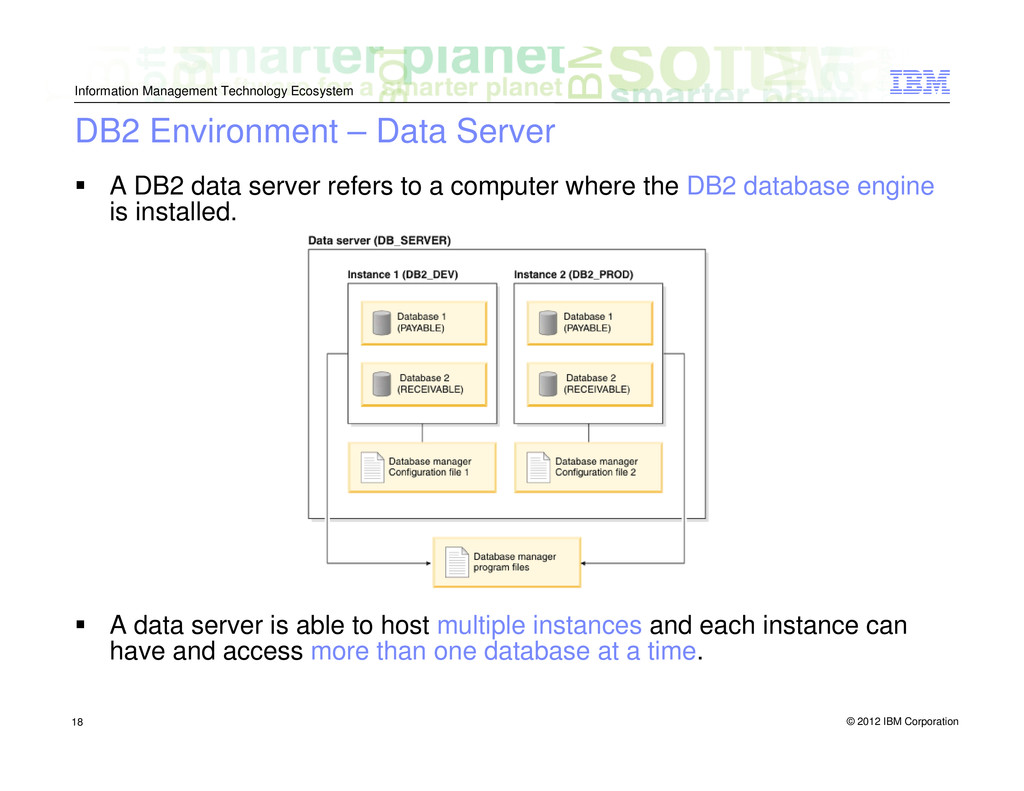
    Environment – Data Server A DB2 data server refers to a computer where the DB2 database engine is installed. A data server is able to host multiple instances and each instance can have and access more than one database at a time.
  18. © 2012 IBM Corporation Information Management Technology Ecosystem 19 DB2

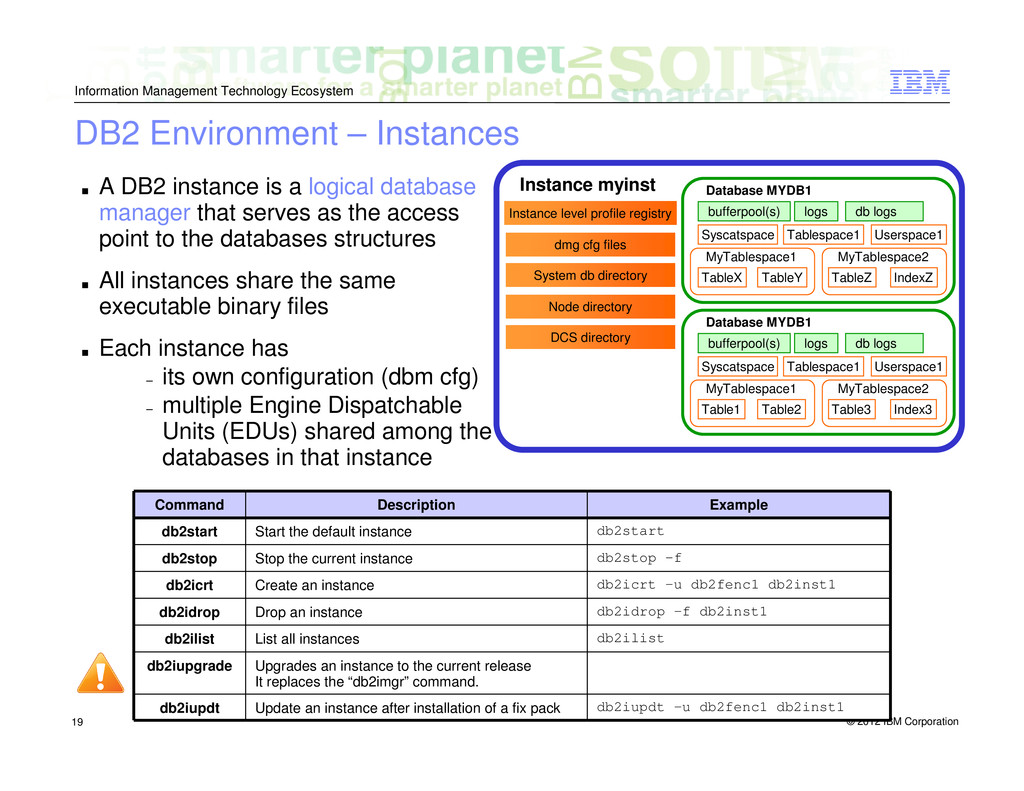
    Environment – Instances ▪ A DB2 instance is a logical database manager that serves as the access point to the databases structures ▪ All instances share the same executable binary files ▪ Each instance has − its own configuration (dbm cfg) − multiple Engine Dispatchable Units (EDUs) shared among the databases in that instance Upgrades an instance to the current release It replaces the “db2imgr” command. db2iupgrade Command Description Example db2start Start the default instance db2start db2stop Stop the current instance db2stop -f db2icrt Create an instance db2icrt –u db2fenc1 db2inst1 db2idrop Drop an instance db2idrop –f db2inst1 db2ilist List all instances db2ilist db2iupdt Update an instance after installation of a fix pack db2iupdt –u db2fenc1 db2inst1 Instance myinst Instance level profile registry dmg cfg files System db directory Node directory DCS directory Database MYDB1 bufferpool(s) logs db logs Syscatspace Tablespace1 Userspace1 MyTablespace1 TableX TableY MyTablespace2 TableZ IndexZ Database MYDB1 bufferpool(s) logs db logs Syscatspace Tablespace1 Userspace1 MyTablespace1 Table1 Table2 MyTablespace2 Table3 Index3
  19. © 2012 IBM Corporation Information Management Technology Ecosystem 20 DB

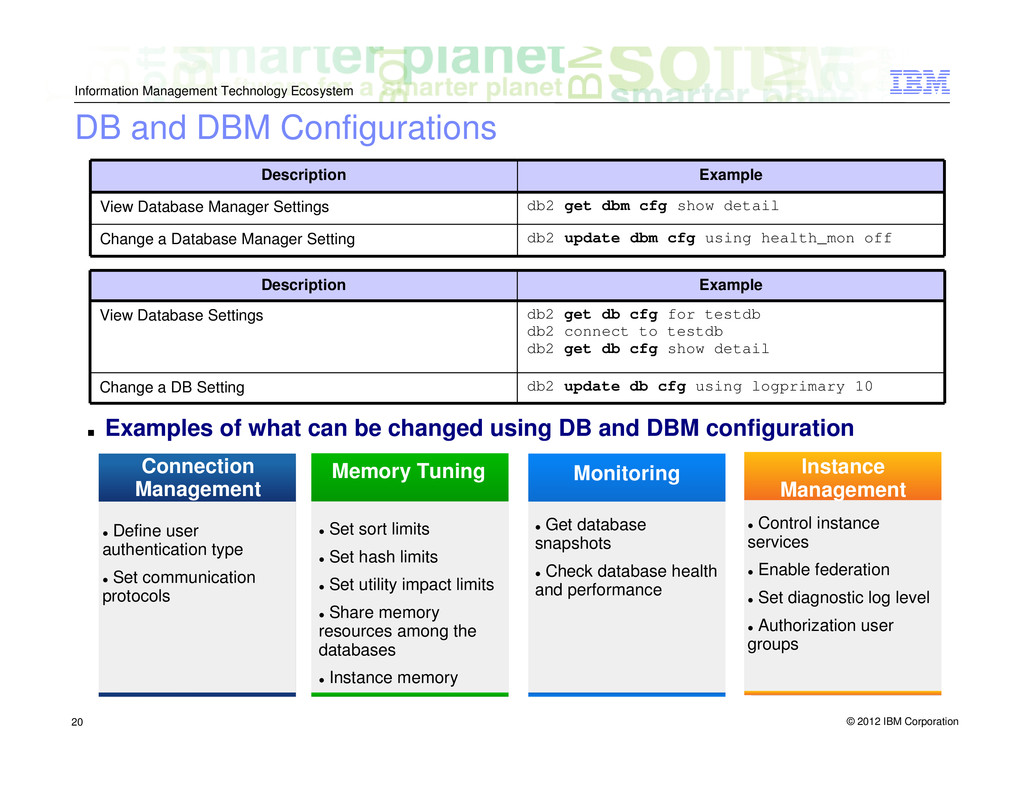
    and DBM Configurations Description Example View Database Manager Settings db2 get dbm cfg show detail Change a Database Manager Setting db2 update dbm cfg using health_mon off Description Example View Database Settings db2 get db cfg for testdb db2 connect to testdb db2 get db cfg show detail Change a DB Setting db2 update db cfg using logprimary 10 Connection Management Memory Tuning Monitoring Define user authentication type Set communication protocols Instance Management Set sort limits Set hash limits Set utility impact limits Share memory resources among the databases Instance memory Get database snapshots Check database health and performance Control instance services Enable federation Set diagnostic log level Authorization user groups ▪ Examples of what can be changed using DB and DBM configuration
  20. © 2012 IBM Corporation Information Management Technology Ecosystem 21 Memory

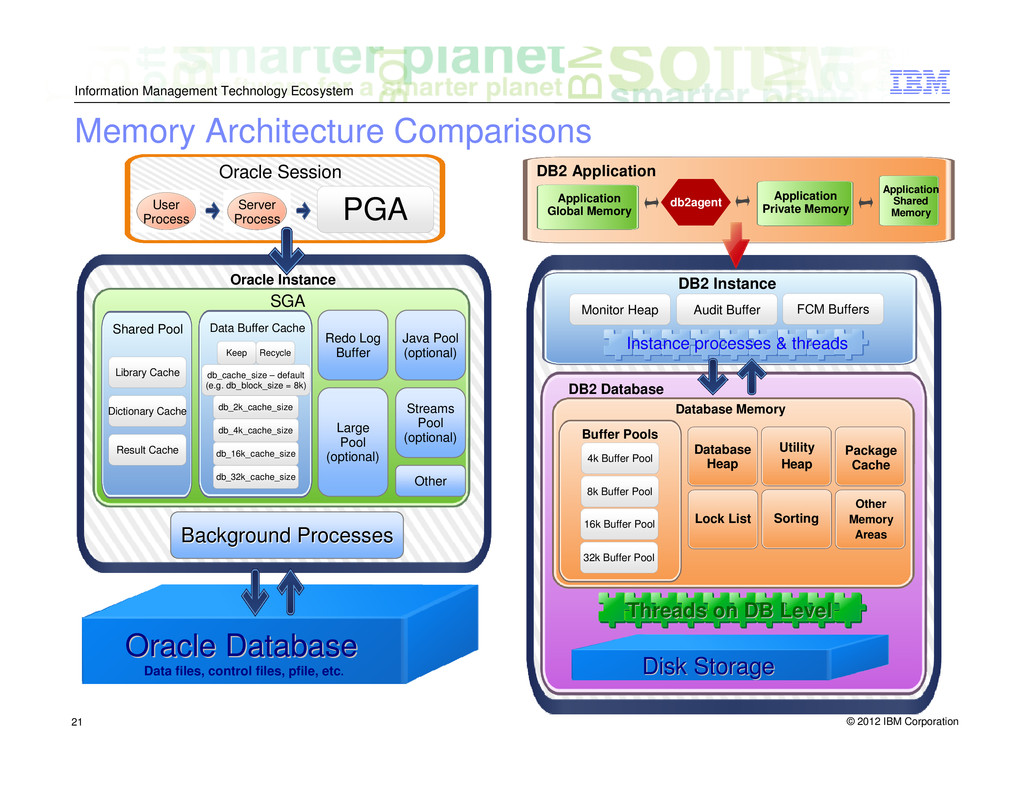
    Architecture Comparisons User Process SGA Oracle Instance Shared Pool Data Buffer Cache Oracle Database Oracle Database Data files, control files, pfile, etc. Server Process DB2 Application Application Private Memory Application Shared Memory DB2 Database Threads on DB Level Threads on DB Level DB2 Instance Instance processes & threads Instance processes & threads Disk Storage Disk Storage Oracle Session PGA Library Cache Dictionary Cache Result Cache db_32k_cache_size db_16k_cache_size db_4k_cache_size db_2k_cache_size db_cache_size – default (e.g. db_block_size = 8k) Keep Recycle Redo Log Buffer Java Pool (optional) Streams Pool (optional) Large Pool (optional) Other Background Processes Background Processes Application Global Memory db2agent Monitor Heap Audit Buffer FCM Buffers Database Memory Buffer Pools Database Heap Utility Heap Package Cache Lock List Sorting Other Memory Areas 4k Buffer Pool 8k Buffer Pool 16k Buffer Pool 32k Buffer Pool
  21. © 2012 IBM Corporation Information Management Technology Ecosystem 22 Process

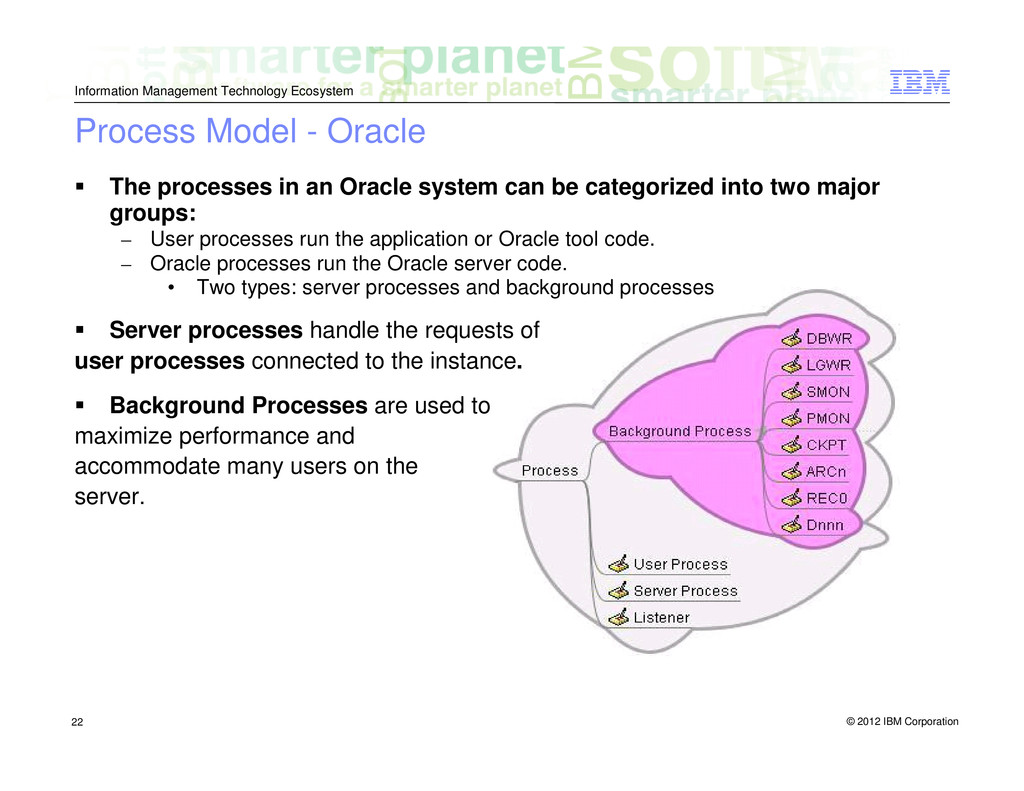
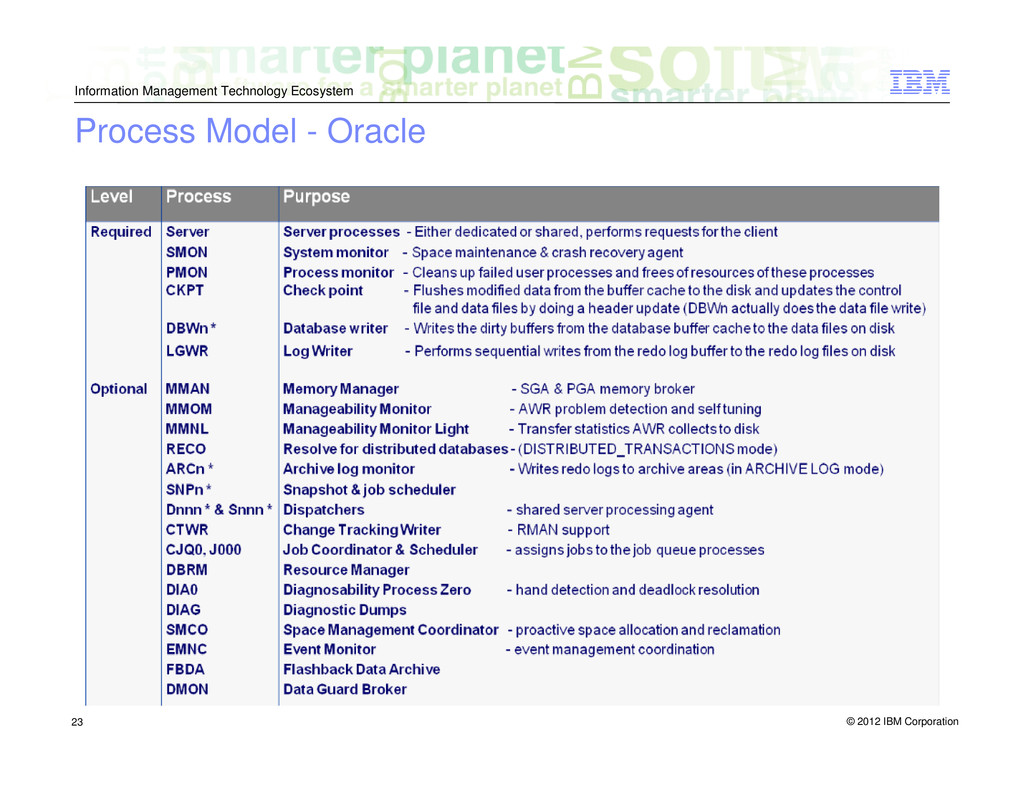
    Model - Oracle The processes in an Oracle system can be categorized into two major groups: – User processes run the application or Oracle tool code. – Oracle processes run the Oracle server code. • Two types: server processes and background processes Server processes handle the requests of user processes connected to the instance. Background Processes are used to maximize performance and accommodate many users on the server.
  22. © 2012 IBM Corporation Information Management Technology Ecosystem 24 DB2

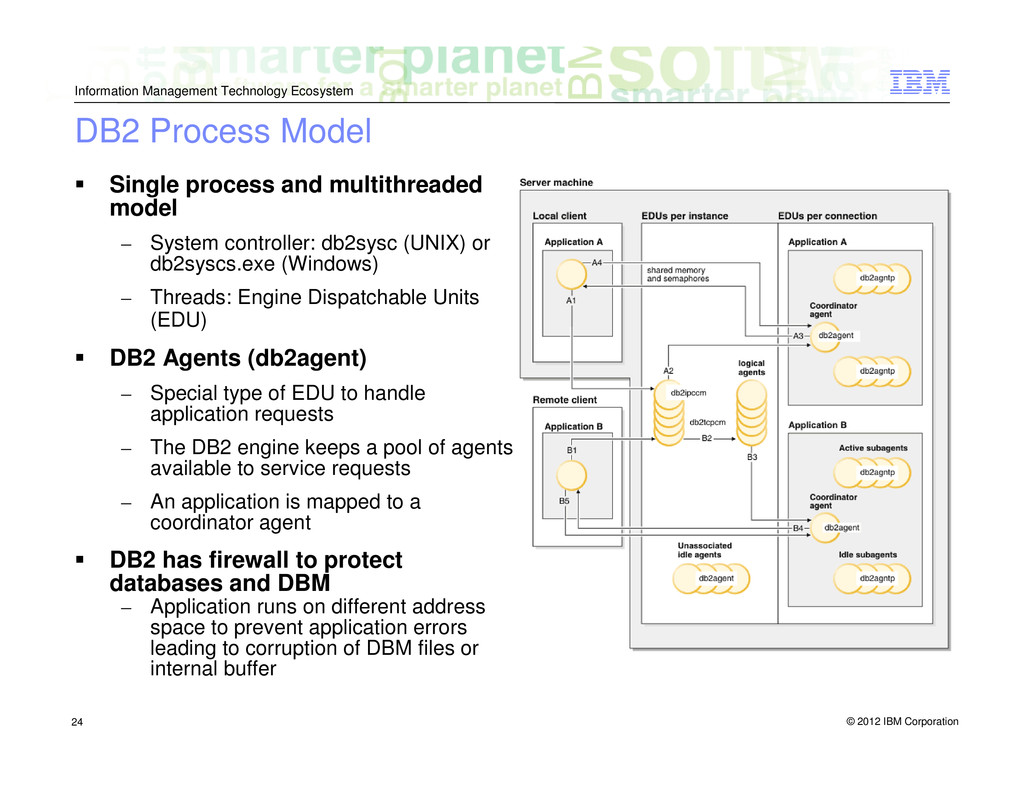
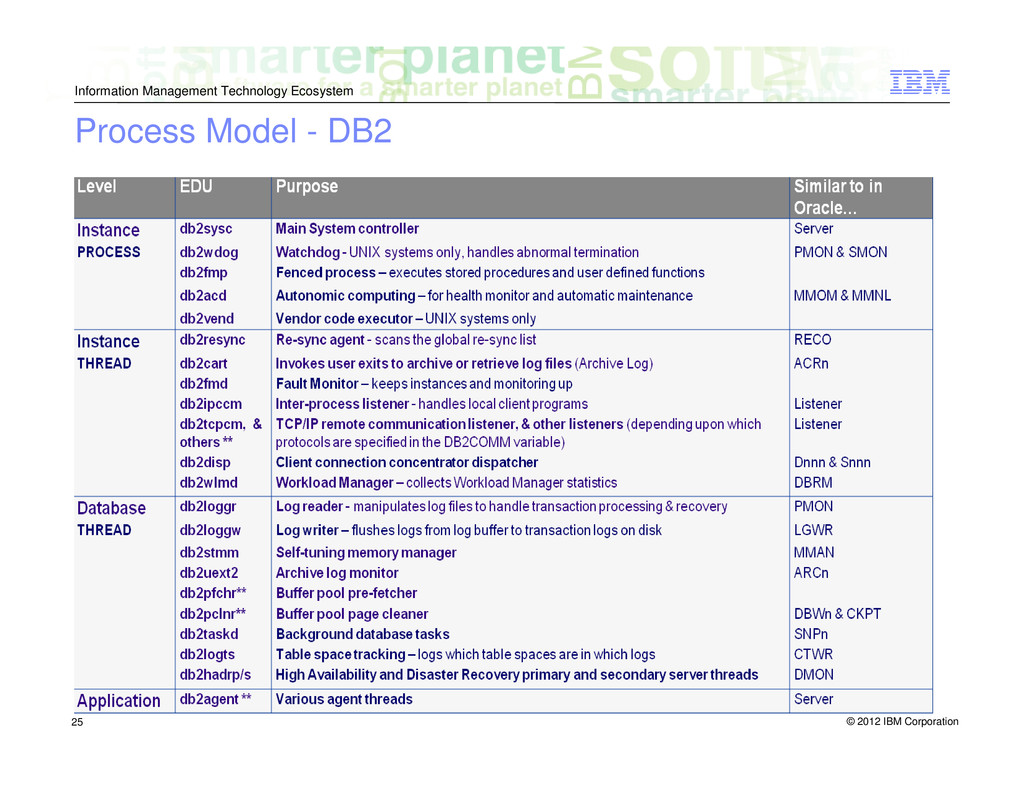
    Process Model Single process and multithreaded model – System controller: db2sysc (UNIX) or db2syscs.exe (Windows) – Threads: Engine Dispatchable Units (EDU) DB2 Agents (db2agent) – Special type of EDU to handle application requests – The DB2 engine keeps a pool of agents available to service requests – An application is mapped to a coordinator agent DB2 has firewall to protect databases and DBM – Application runs on different address space to prevent application errors leading to corruption of DBM files or internal buffer
  23. © 2012 IBM Corporation Information Management Technology Ecosystem 26 Some

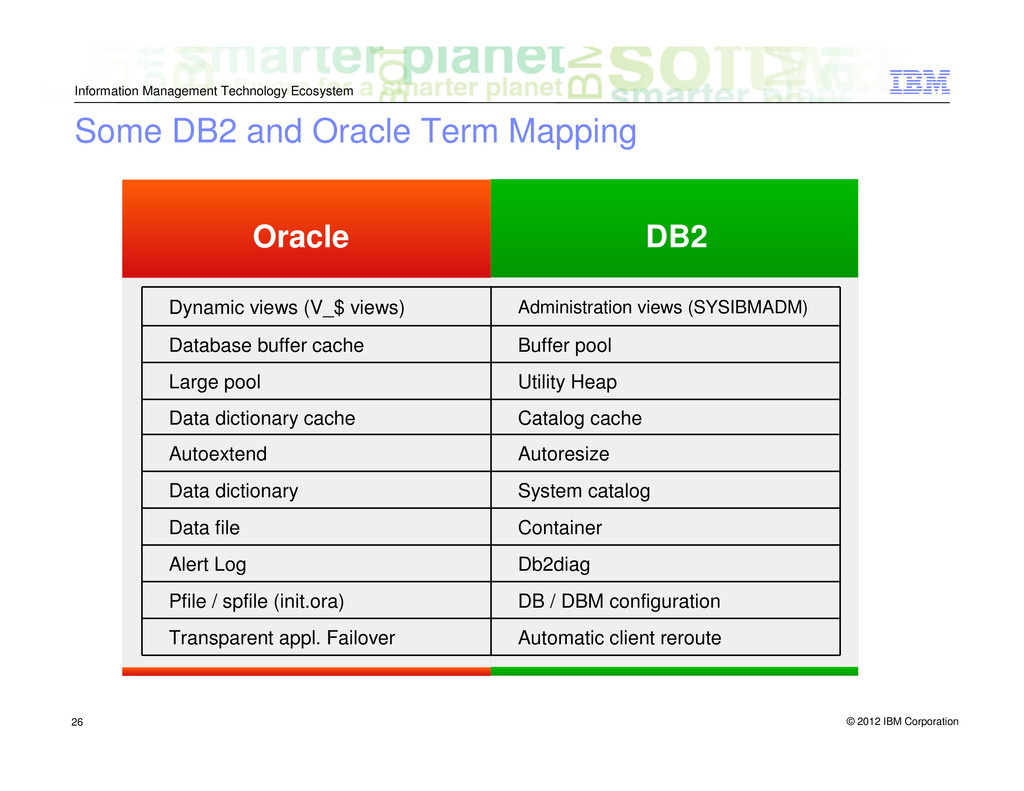
    DB2 and Oracle Term Mapping Automatic client reroute DB / DBM configuration Db2diag Container System catalog Autoresize Catalog cache Utility Heap Buffer pool Administration views (SYSIBMADM) Dynamic views (V_$ views) Database buffer cache Large pool Data dictionary cache Autoextend Data dictionary Data file Alert Log Pfile / spfile (init.ora) Transparent appl. Failover Oracle DB2
  24. © 2012 IBM Corporation Information Management Technology Ecosystem 27 DB2

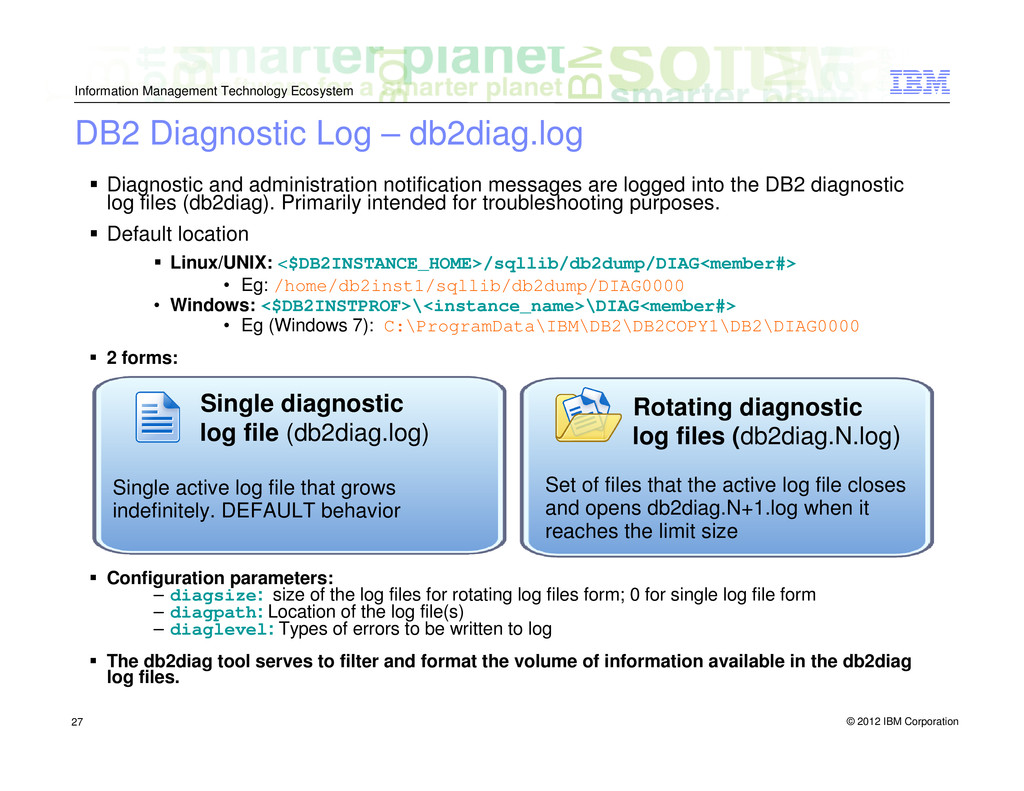
    Diagnostic Log – db2diag.log Diagnostic and administration notification messages are logged into the DB2 diagnostic log files (db2diag). Primarily intended for troubleshooting purposes. Default location Linux/UNIX: <$DB2INSTANCE_HOME>/sqllib/db2dump/DIAG<member#> • Eg: /home/db2inst1/sqllib/db2dump/DIAG0000 • Windows: <$DB2INSTPROF>\<instance_name>\DIAG<member#> • Eg (Windows 7): C:\ProgramData\IBM\DB2\DB2COPY1\DB2\DIAG0000 2 forms: Configuration parameters: – diagsize: size of the log files for rotating log files form; 0 for single log file form – diagpath: Location of the log file(s) – diaglevel: Types of errors to be written to log The db2diag tool serves to filter and format the volume of information available in the db2diag log files. Single diagnostic log file (db2diag.log) Single active log file that grows indefinitely. DEFAULT behavior Rotating diagnostic log files (db2diag.N.log) Set of files that the active log file closes and opens db2diag.N+1.log when it reaches the limit size
  25. © 2012 IBM Corporation Information Management Technology Ecosystem 28 DB2

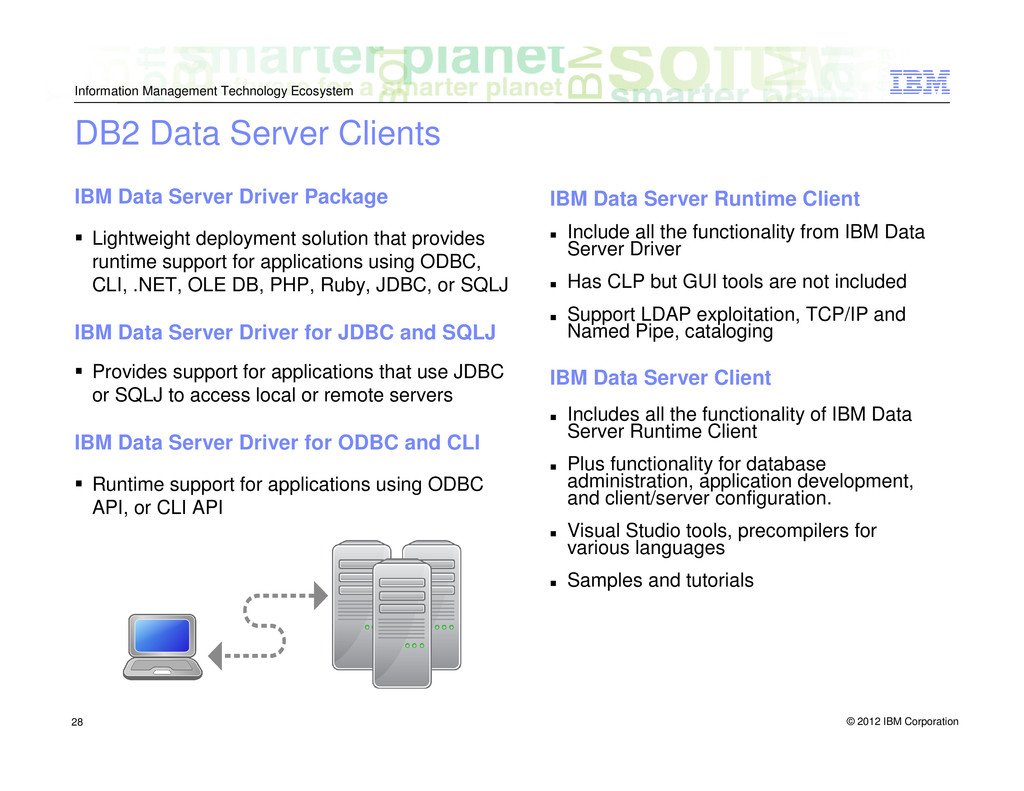
    Data Server Clients IBM Data Server Driver Package Lightweight deployment solution that provides runtime support for applications using ODBC, CLI, .NET, OLE DB, PHP, Ruby, JDBC, or SQLJ IBM Data Server Driver for JDBC and SQLJ Provides support for applications that use JDBC or SQLJ to access local or remote servers IBM Data Server Driver for ODBC and CLI Runtime support for applications using ODBC API, or CLI API IBM Data Server Runtime Client Include all the functionality from IBM Data Server Driver Has CLP but GUI tools are not included Support LDAP exploitation, TCP/IP and Named Pipe, cataloging IBM Data Server Client Includes all the functionality of IBM Data Server Runtime Client Plus functionality for database administration, application development, and client/server configuration. Visual Studio tools, precompilers for various languages Samples and tutorials
  26. © 2012 IBM Corporation Information Management Technology Ecosystem 29 Cataloguing

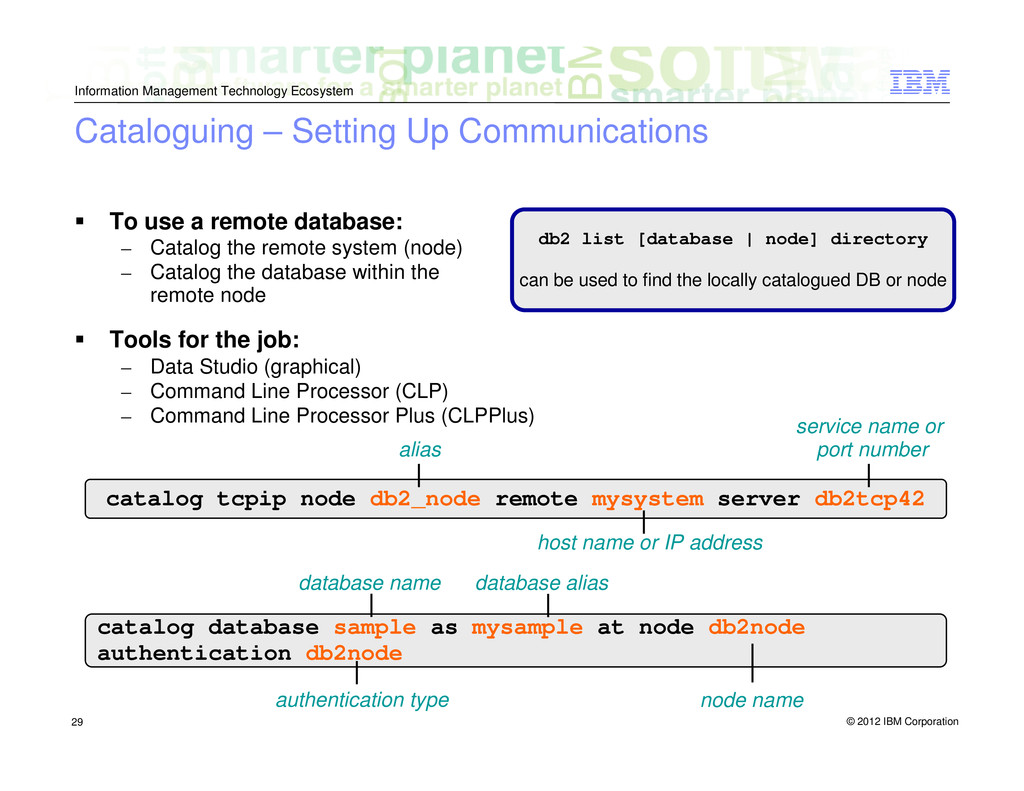
    – Setting Up Communications To use a remote database: – Catalog the remote system (node) – Catalog the database within the remote node Tools for the job: – Data Studio (graphical) – Command Line Processor (CLP) – Command Line Processor Plus (CLPPlus) db2 list [database | node] directory can be used to find the locally catalogued DB or node catalog tcpip node db2_node remote mysystem server db2tcp42 alias service name or port number host name or IP address catalog database sample as mysample at node db2node authentication db2node database name authentication type database alias node name
  27. © 2012 IBM Corporation Information Management Technology Ecosystem 30 Database

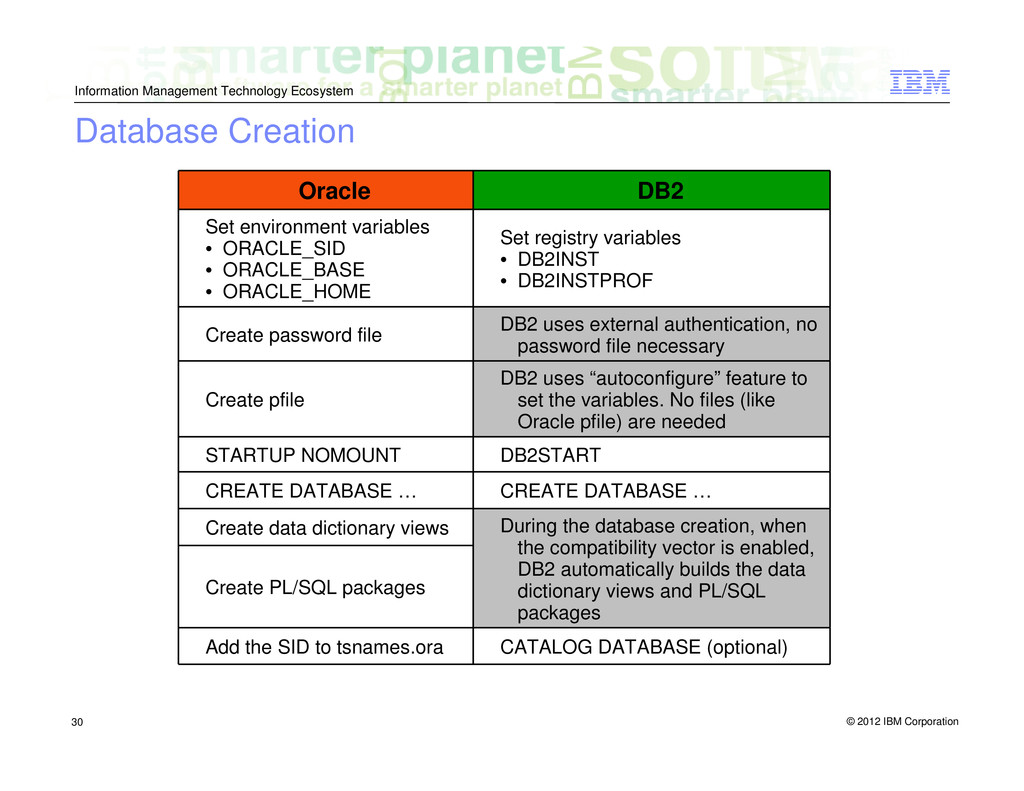
    Creation DB2 Oracle CATALOG DATABASE (optional) During the database creation, when the compatibility vector is enabled, DB2 automatically builds the data dictionary views and PL/SQL packages CREATE DATABASE … DB2START DB2 uses “autoconfigure” feature to set the variables. No files (like Oracle pfile) are needed DB2 uses external authentication, no password file necessary Set registry variables • DB2INST • DB2INSTPROF Set environment variables • ORACLE_SID • ORACLE_BASE • ORACLE_HOME Create password file Create pfile STARTUP NOMOUNT CREATE DATABASE … Create data dictionary views Create PL/SQL packages Add the SID to tsnames.ora
  28. © 2012 IBM Corporation Information Management Technology Ecosystem 31 DB2

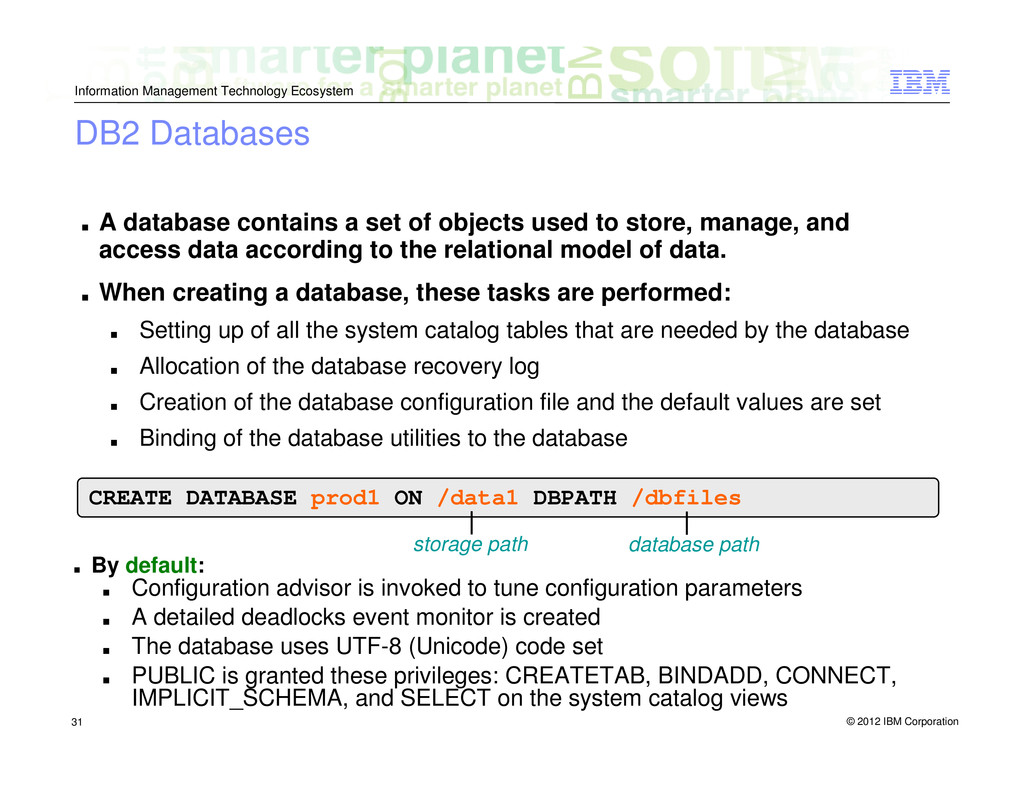
    Databases ▪ A database contains a set of objects used to store, manage, and access data according to the relational model of data. ▪ When creating a database, these tasks are performed: ▪ Setting up of all the system catalog tables that are needed by the database ▪ Allocation of the database recovery log ▪ Creation of the database configuration file and the default values are set ▪ Binding of the database utilities to the database CREATE DATABASE prod1 ON /data1 DBPATH /dbfiles ▪ By default: ▪ Configuration advisor is invoked to tune configuration parameters ▪ A detailed deadlocks event monitor is created ▪ The database uses UTF-8 (Unicode) code set ▪ PUBLIC is granted these privileges: CREATETAB, BINDADD, CONNECT, IMPLICIT_SCHEMA, and SELECT on the system catalog views storage path database path
  29. © 2012 IBM Corporation Information Management Technology Ecosystem 32 Instance

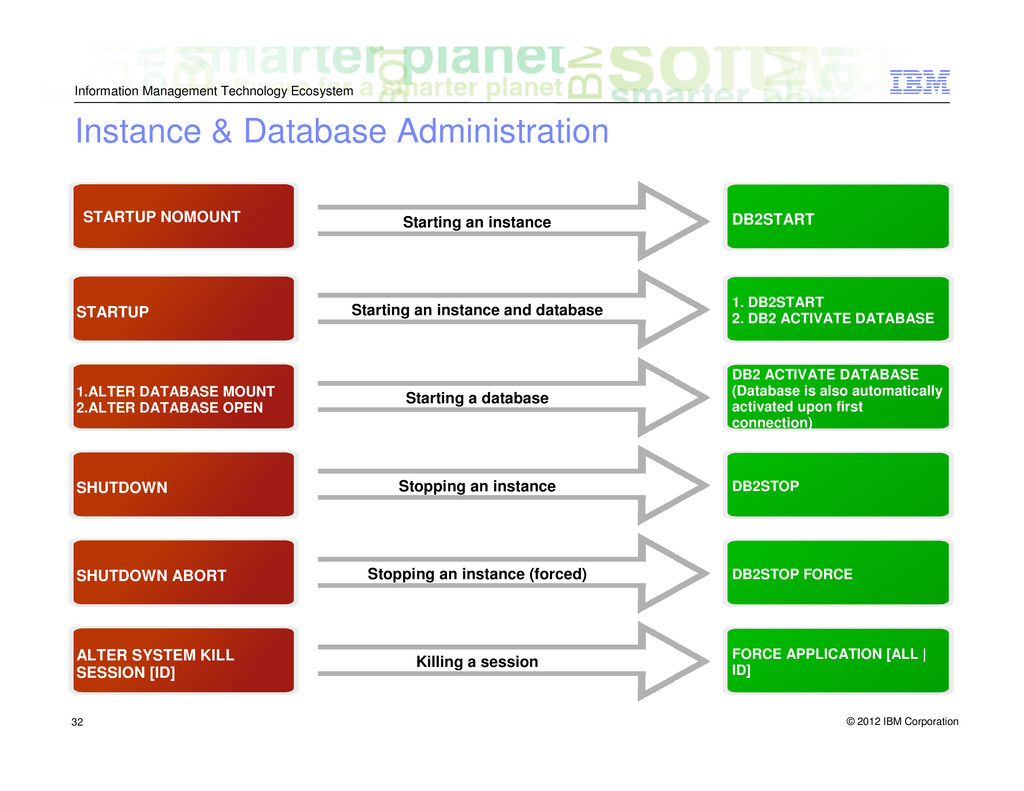
    & Database Administration STARTUP NOMOUNT DB2START Starting an instance STARTUP 1. DB2START 2. DB2 ACTIVATE DATABASE Starting an instance and database 1.ALTER DATABASE MOUNT 2.ALTER DATABASE OPEN DB2 ACTIVATE DATABASE (Database is also automatically activated upon first connection) Starting a database SHUTDOWN DB2STOP Stopping an instance SHUTDOWN ABORT DB2STOP FORCE Stopping an instance (forced) ALTER SYSTEM KILL SESSION [ID] FORCE APPLICATION [ALL | ID] Killing a session
  30. © 2012 IBM Corporation Information Management Technology Ecosystem 33 Oracle

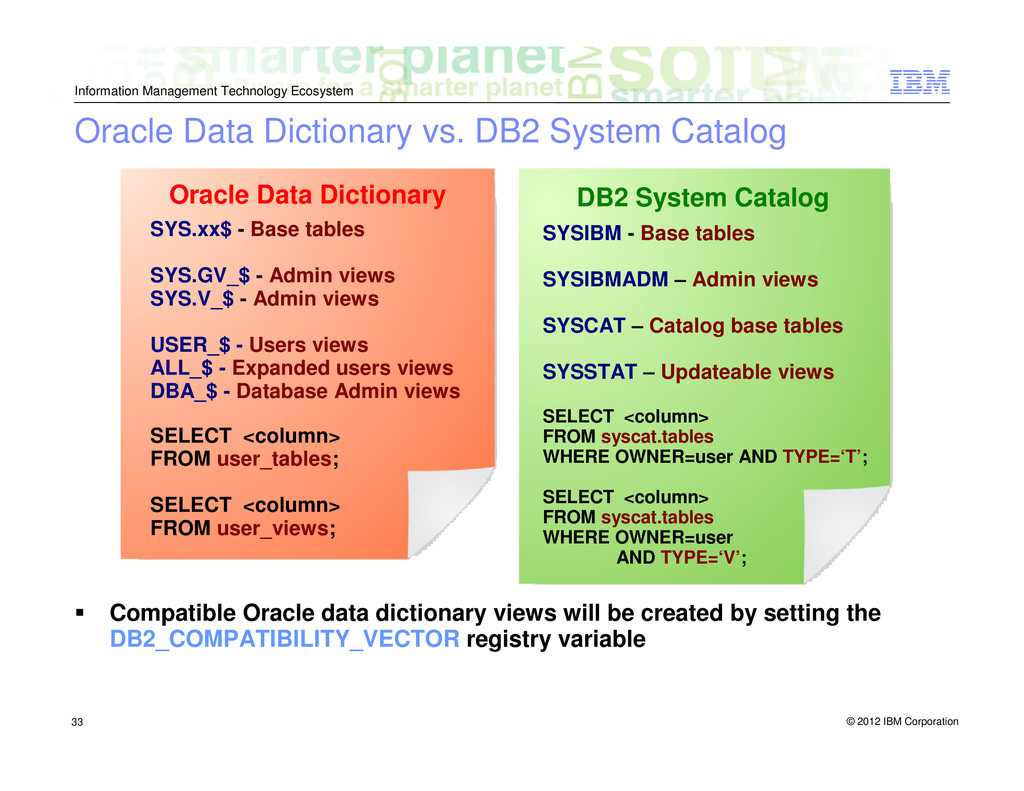
    Data Dictionary vs. DB2 System Catalog Compatible Oracle data dictionary views will be created by setting the DB2_COMPATIBILITY_VECTOR registry variable Oracle Data Dictionary DB2 System Catalog SYSIBM - Base tables SYSIBMADM – Admin views SYSCAT – Catalog base tables SYSSTAT – Updateable views SELECT <column> FROM syscat.tables WHERE OWNER=user AND TYPE=‘T’; SELECT <column> FROM syscat.tables WHERE OWNER=user AND TYPE=‘V’; SYS.xx$ - Base tables SYS.GV_$ - Admin views SYS.V_$ - Admin views USER_$ - Users views ALL_$ - Expanded users views DBA_$ - Database Admin views SELECT <column> FROM user_tables; SELECT <column> FROM user_views;
  31. © 2012 IBM Corporation Information Management Technology Ecosystem 34 Storage

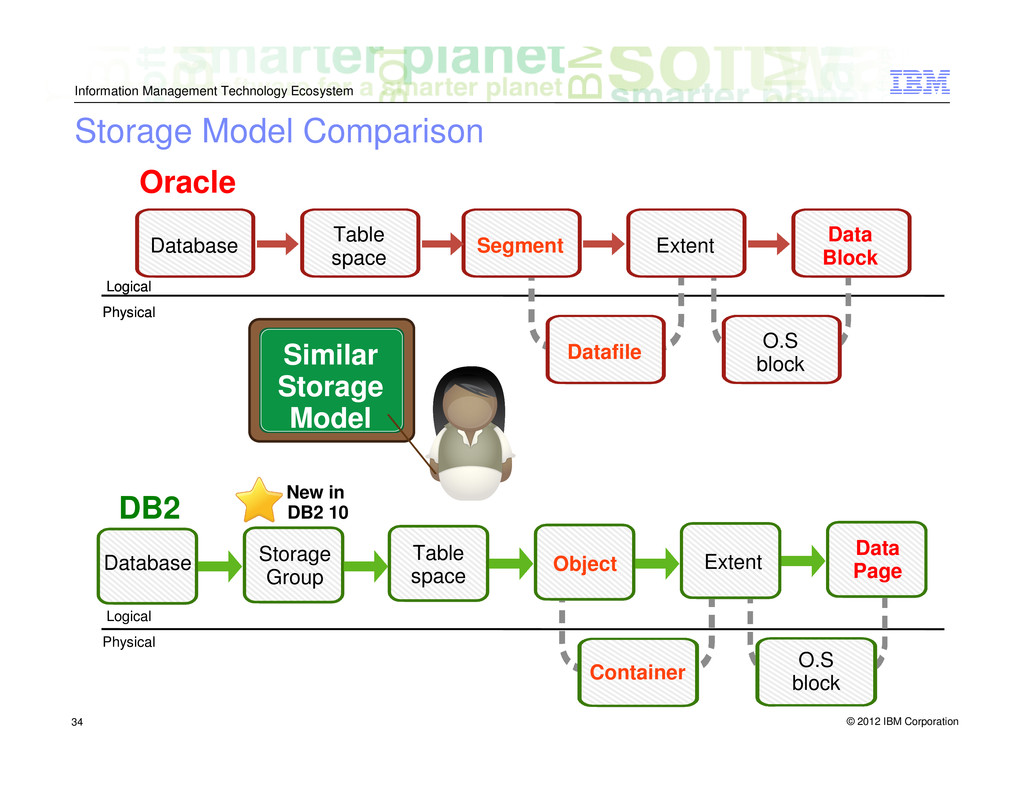
    Model Comparison Oracle Database Table space Segment Extent Data Block O.S block Datafile O.S block Container DB2 Physical Logical Physical Logical Physical Logical Physical Logical Similar Storage Model Database Storage Group Table space Object Extent Data Page New in DB2 10
  32. © 2012 IBM Corporation Information Management Technology Ecosystem 35 Table

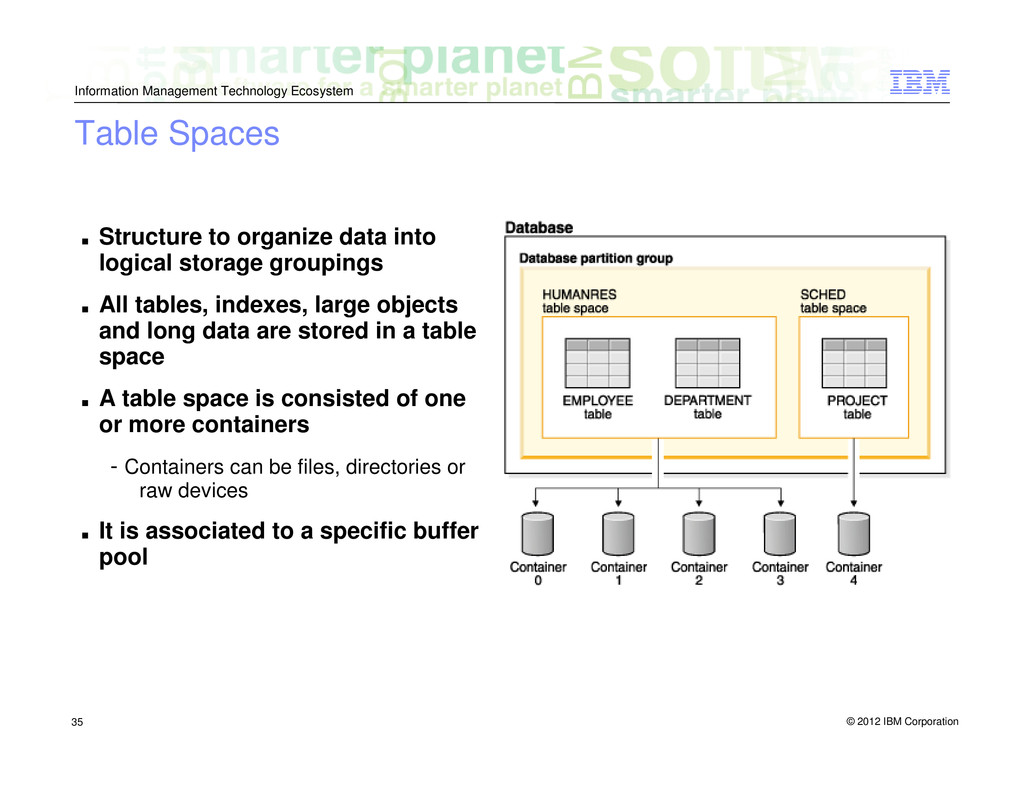
    Spaces ▪ Structure to organize data into logical storage groupings ▪ All tables, indexes, large objects and long data are stored in a table space ▪ A table space is consisted of one or more containers - Containers can be files, directories or raw devices ▪ It is associated to a specific buffer pool
  33. © 2012 IBM Corporation Information Management Technology Ecosystem 36 Types

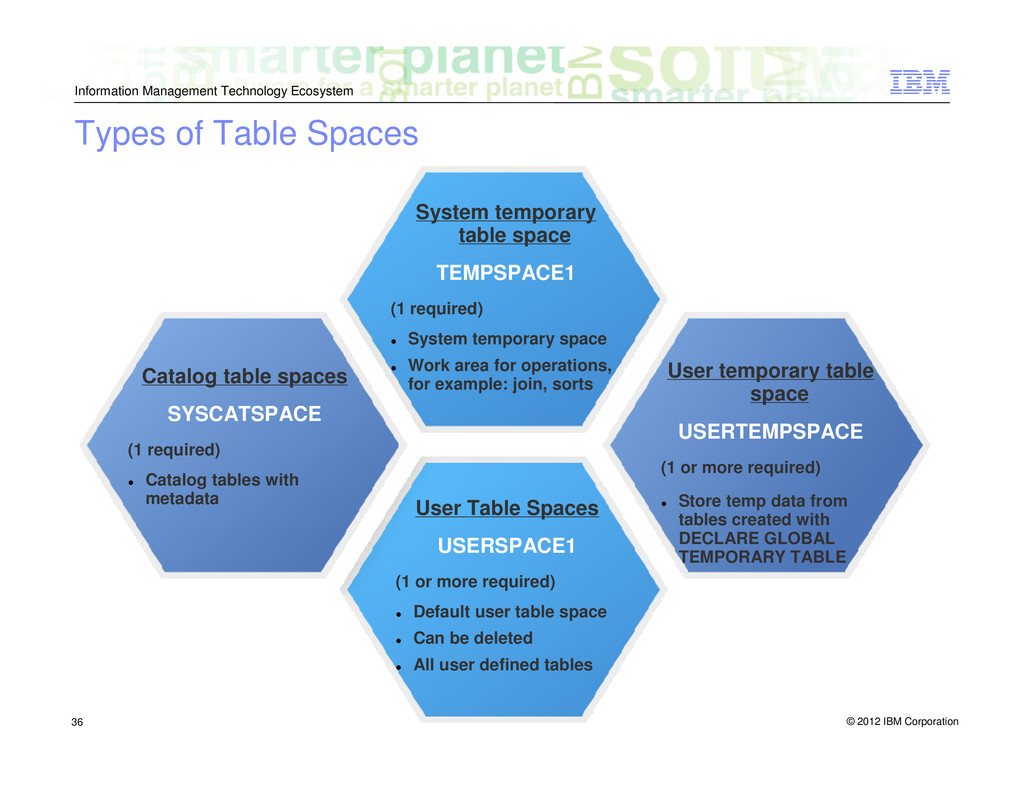
    of Table Spaces Catalog table spaces SYSCATSPACE (1 required) Catalog tables with metadata User temporary table space USERTEMPSPACE (1 or more required) Store temp data from tables created with DECLARE GLOBAL TEMPORARY TABLE User Table Spaces USERSPACE1 (1 or more required) Default user table space Can be deleted All user defined tables System temporary table space TEMPSPACE1 (1 required) System temporary space Work area for operations, for example: join, sorts
  34. © 2012 IBM Corporation Information Management Technology Ecosystem 37 Table

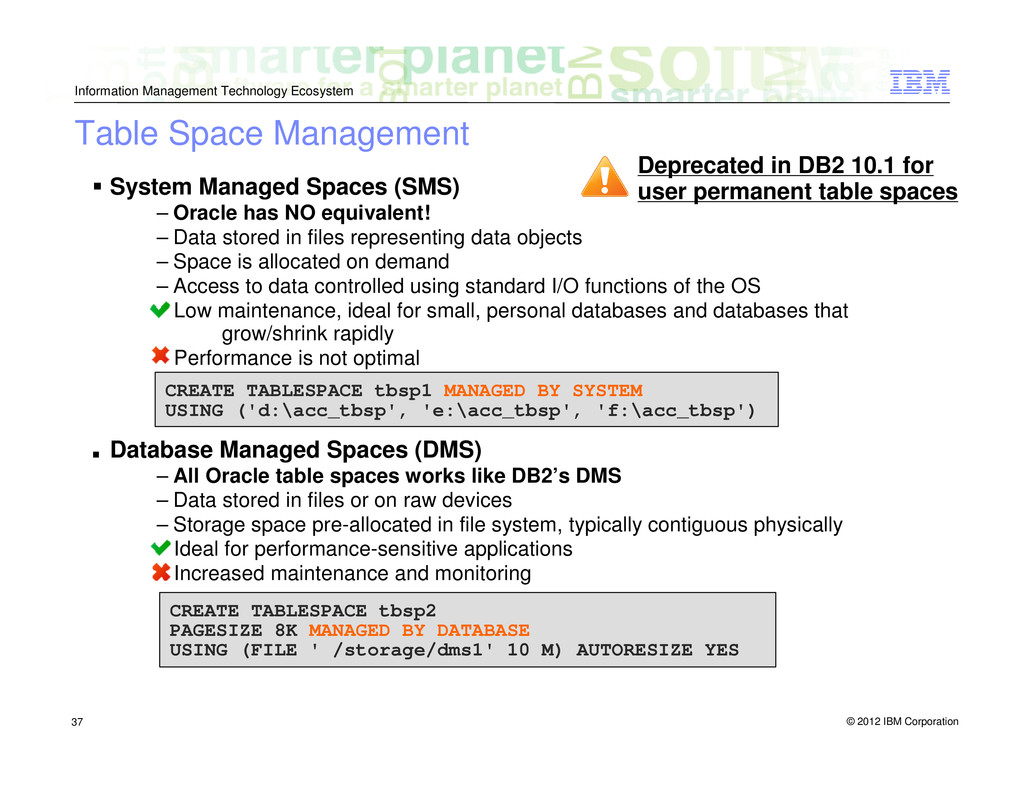
    Space Management System Managed Spaces (SMS) – Oracle has NO equivalent! – Data stored in files representing data objects – Space is allocated on demand – Access to data controlled using standard I/O functions of the OS Low maintenance, ideal for small, personal databases and databases that grow/shrink rapidly Performance is not optimal ▪ Database Managed Spaces (DMS) – All Oracle table spaces works like DB2’s DMS – Data stored in files or on raw devices – Storage space pre-allocated in file system, typically contiguous physically Ideal for performance-sensitive applications Increased maintenance and monitoring CREATE TABLESPACE tbsp1 MANAGED BY SYSTEM USING ('d:\acc_tbsp', 'e:\acc_tbsp', 'f:\acc_tbsp') CREATE TABLESPACE tbsp2 PAGESIZE 8K MANAGED BY DATABASE USING (FILE ' /storage/dms1' 10 M) AUTORESIZE YES Deprecated in DB2 10.1 for user permanent table spaces
  35. © 2012 IBM Corporation Information Management Technology Ecosystem 38 Table

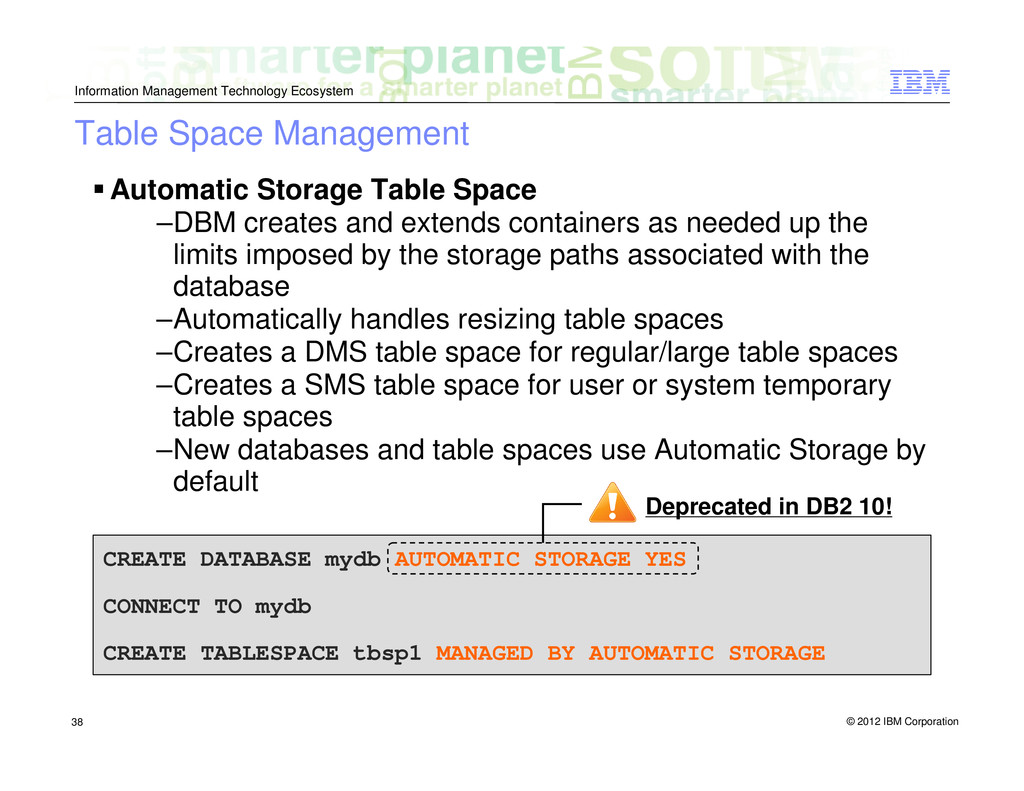
    Space Management Automatic Storage Table Space –DBM creates and extends containers as needed up the limits imposed by the storage paths associated with the database –Automatically handles resizing table spaces –Creates a DMS table space for regular/large table spaces –Creates a SMS table space for user or system temporary table spaces –New databases and table spaces use Automatic Storage by default CREATE DATABASE mydb AUTOMATIC STORAGE YES CONNECT TO mydb CREATE TABLESPACE tbsp1 MANAGED BY AUTOMATIC STORAGE Deprecated in DB2 10!
  36. © 2012 IBM Corporation Information Management Technology Ecosystem 39 Table

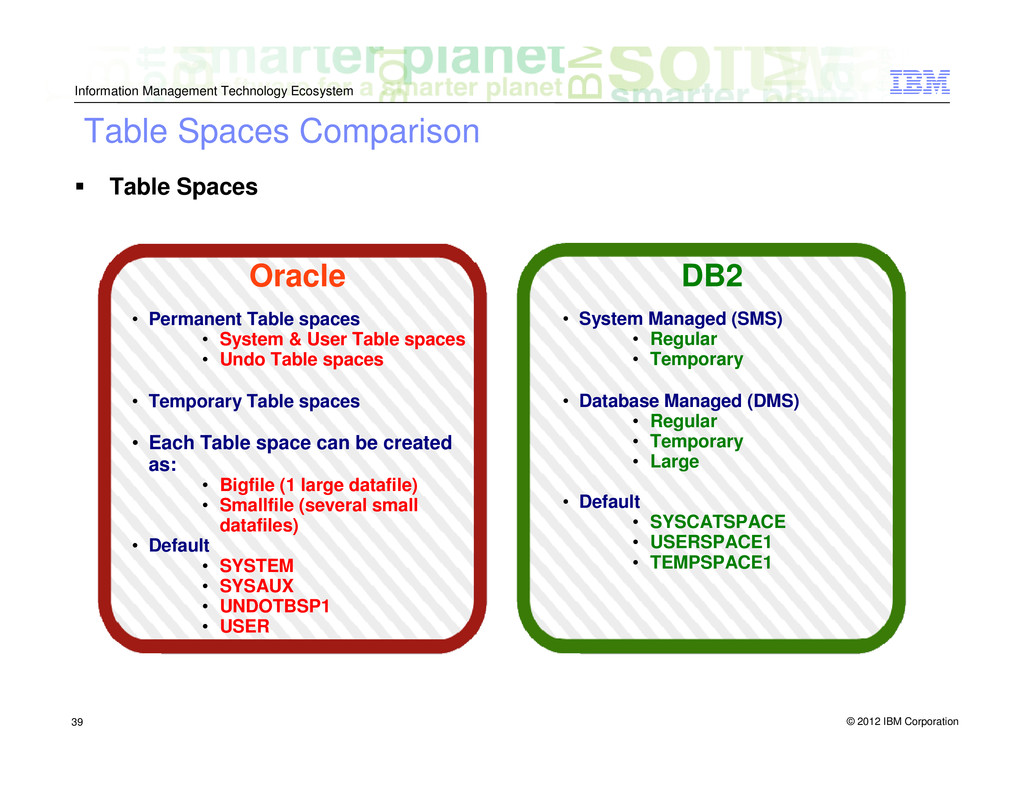
    Spaces Comparison Table Spaces • Permanent Table spaces • System & User Table spaces • Undo Table spaces • Temporary Table spaces • Each Table space can be created as: • Bigfile (1 large datafile) • Smallfile (several small datafiles) • Default • SYSTEM • SYSAUX • UNDOTBSP1 • USER • System Managed (SMS) • Regular • Temporary • Database Managed (DMS) • Regular • Temporary • Large • Default • SYSCATSPACE • USERSPACE1 • TEMPSPACE1 Oracle DB2
  37. © 2012 IBM Corporation Information Management Technology Ecosystem 40 Buffer

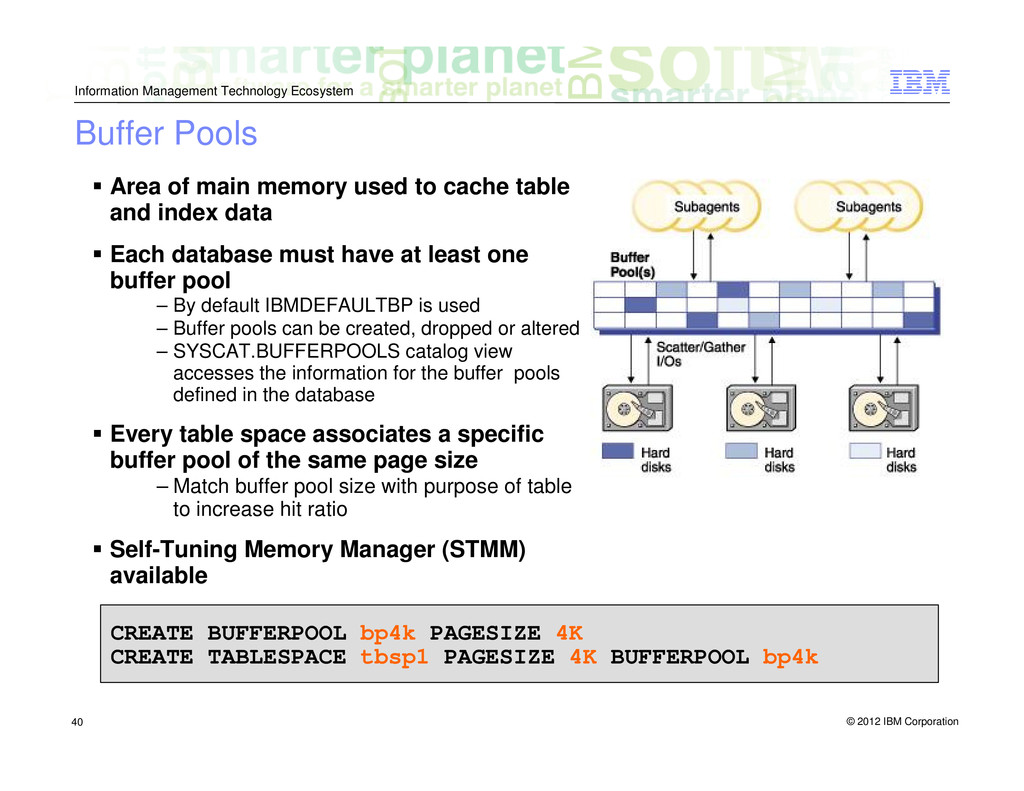
    Pools Area of main memory used to cache table and index data Each database must have at least one buffer pool – By default IBMDEFAULTBP is used – Buffer pools can be created, dropped or altered – SYSCAT.BUFFERPOOLS catalog view accesses the information for the buffer pools defined in the database Every table space associates a specific buffer pool of the same page size – Match buffer pool size with purpose of table to increase hit ratio Self-Tuning Memory Manager (STMM) available CREATE BUFFERPOOL bp4k PAGESIZE 4K CREATE TABLESPACE tbsp1 PAGESIZE 4K BUFFERPOOL bp4k
  38. © 2012 IBM Corporation Information Management Technology Ecosystem 41 Schemas

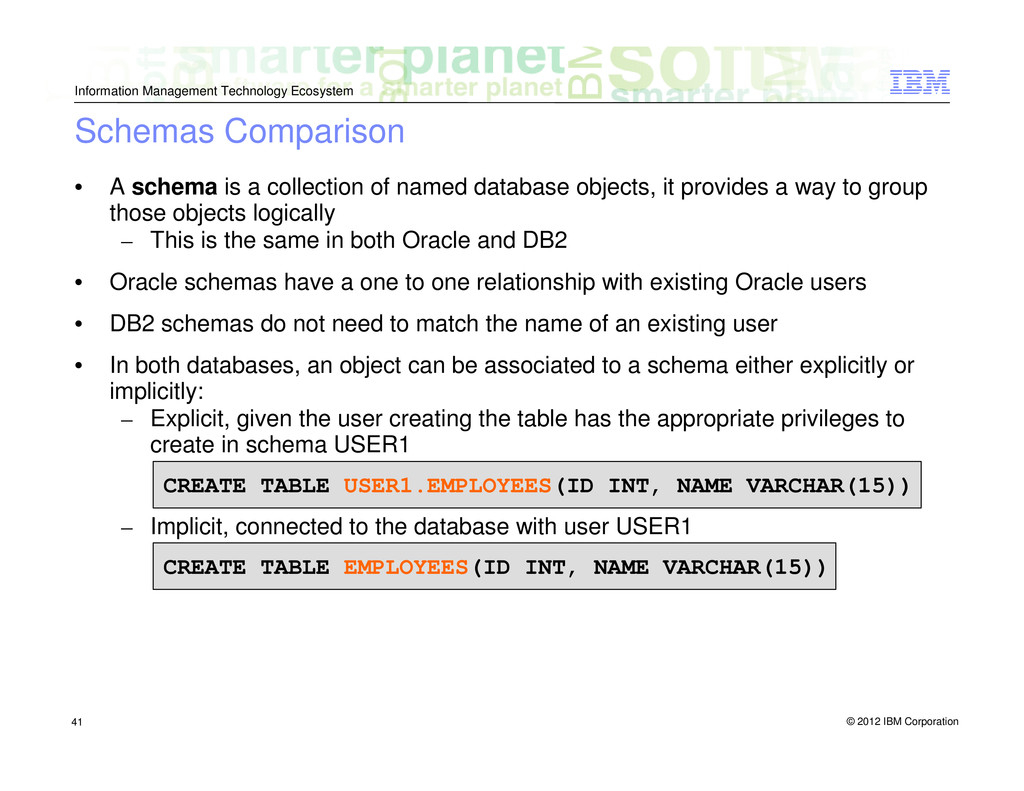
    Comparison • A schema is a collection of named database objects, it provides a way to group those objects logically – This is the same in both Oracle and DB2 • Oracle schemas have a one to one relationship with existing Oracle users • DB2 schemas do not need to match the name of an existing user • In both databases, an object can be associated to a schema either explicitly or implicitly: – Explicit, given the user creating the table has the appropriate privileges to create in schema USER1 – Implicit, connected to the database with user USER1 CREATE TABLE USER1.EMPLOYEES(ID INT, NAME VARCHAR(15)) CREATE TABLE EMPLOYEES(ID INT, NAME VARCHAR(15))
  39. © 2012 IBM Corporation Information Management Technology Ecosystem 42 DB2

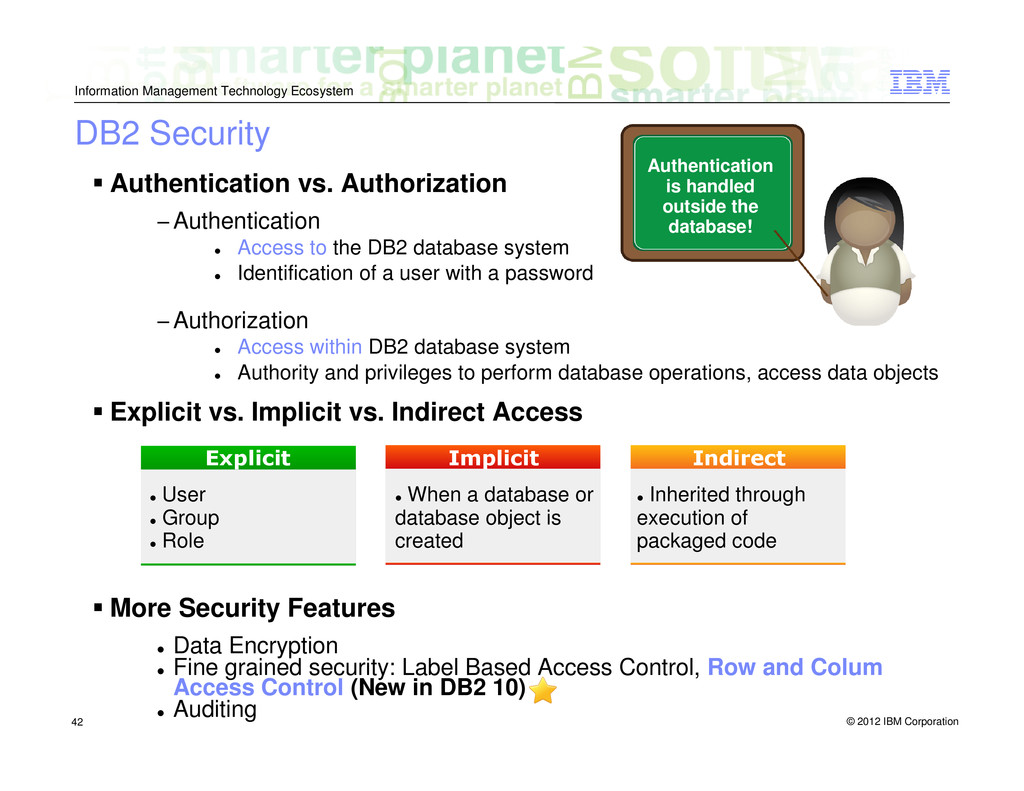
    Security Authentication vs. Authorization −Authentication Access to the DB2 database system Identification of a user with a password −Authorization Access within DB2 database system Authority and privileges to perform database operations, access data objects Explicit vs. Implicit vs. Indirect Access More Security Features Data Encryption Fine grained security: Label Based Access Control, Row and Colum Access Control (New in DB2 10) Auditing Authentication is handled outside the database! Explicit Implicit Indirect User Group Role When a database or database object is created Inherited through execution of packaged code
  40. © 2012 IBM Corporation Information Management Technology Ecosystem 43 Configuration

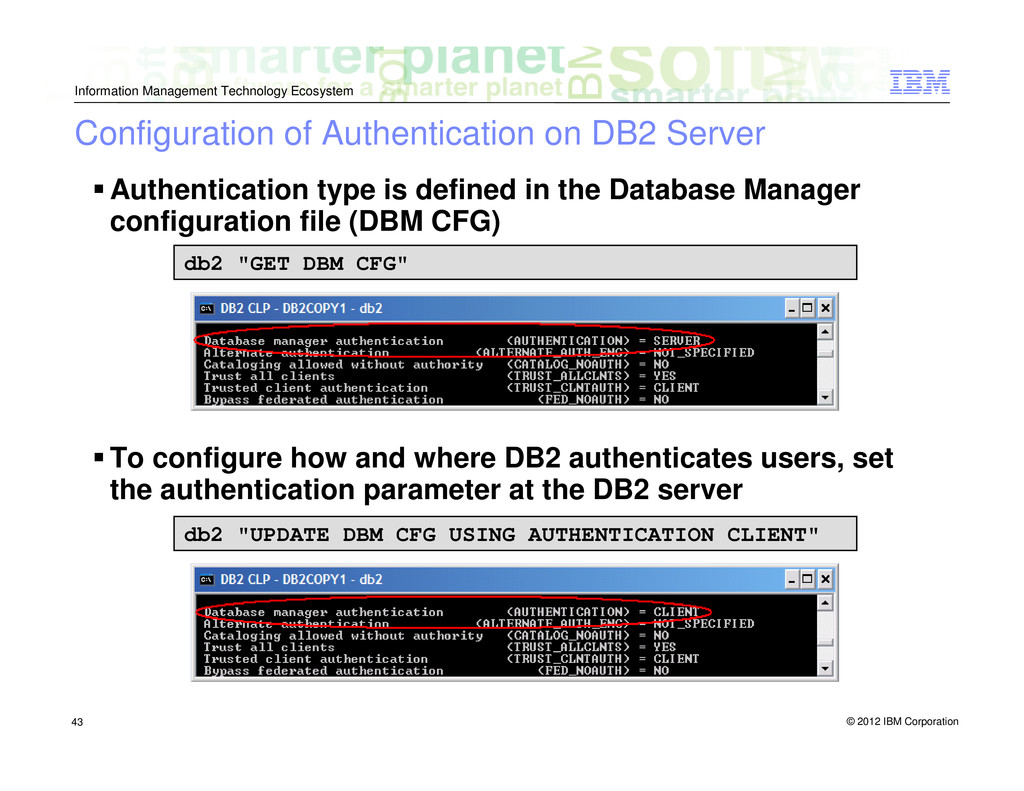
    of Authentication on DB2 Server Authentication type is defined in the Database Manager configuration file (DBM CFG) To configure how and where DB2 authenticates users, set the authentication parameter at the DB2 server db2 "UPDATE DBM CFG USING AUTHENTICATION CLIENT" db2 "GET DBM CFG"
  41. © 2012 IBM Corporation Information Management Technology Ecosystem 44 DB2

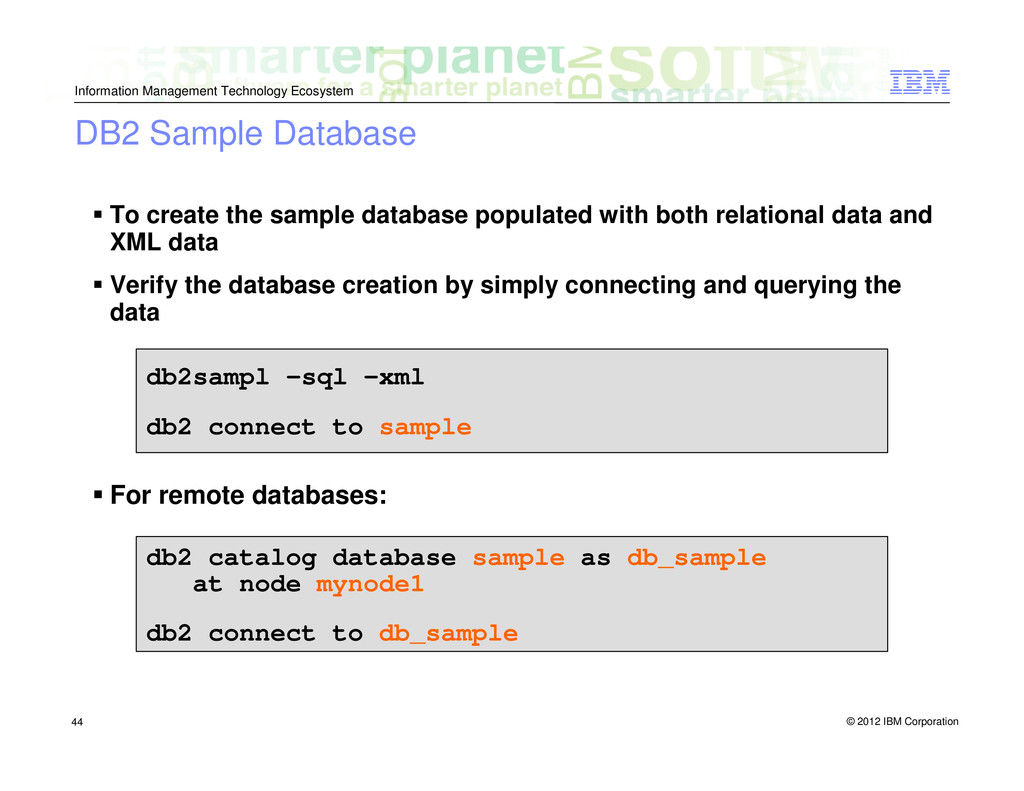
    Sample Database To create the sample database populated with both relational data and XML data Verify the database creation by simply connecting and querying the data For remote databases: db2sampl –sql –xml db2 connect to sample db2 catalog database sample as db_sample at node mynode1 db2 connect to db_sample
  42. © 2012 IBM Corporation Information Management Technology Ecosystem 45 Application

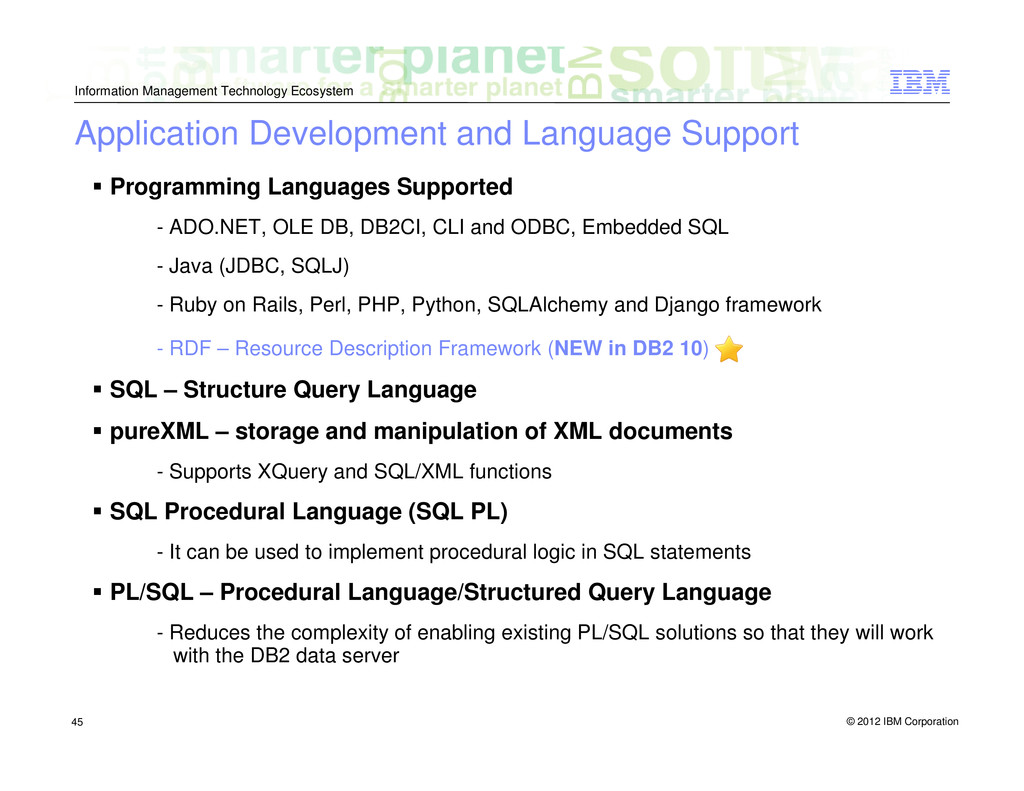
    Development and Language Support Programming Languages Supported - ADO.NET, OLE DB, DB2CI, CLI and ODBC, Embedded SQL - Java (JDBC, SQLJ) - Ruby on Rails, Perl, PHP, Python, SQLAlchemy and Django framework - RDF – Resource Description Framework (NEW in DB2 10) SQL – Structure Query Language pureXML – storage and manipulation of XML documents - Supports XQuery and SQL/XML functions SQL Procedural Language (SQL PL) - It can be used to implement procedural logic in SQL statements PL/SQL – Procedural Language/Structured Query Language - Reduces the complexity of enabling existing PL/SQL solutions so that they will work with the DB2 data server
  43. © 2012 IBM Corporation Information Management Technology Ecosystem 46 Interfaces

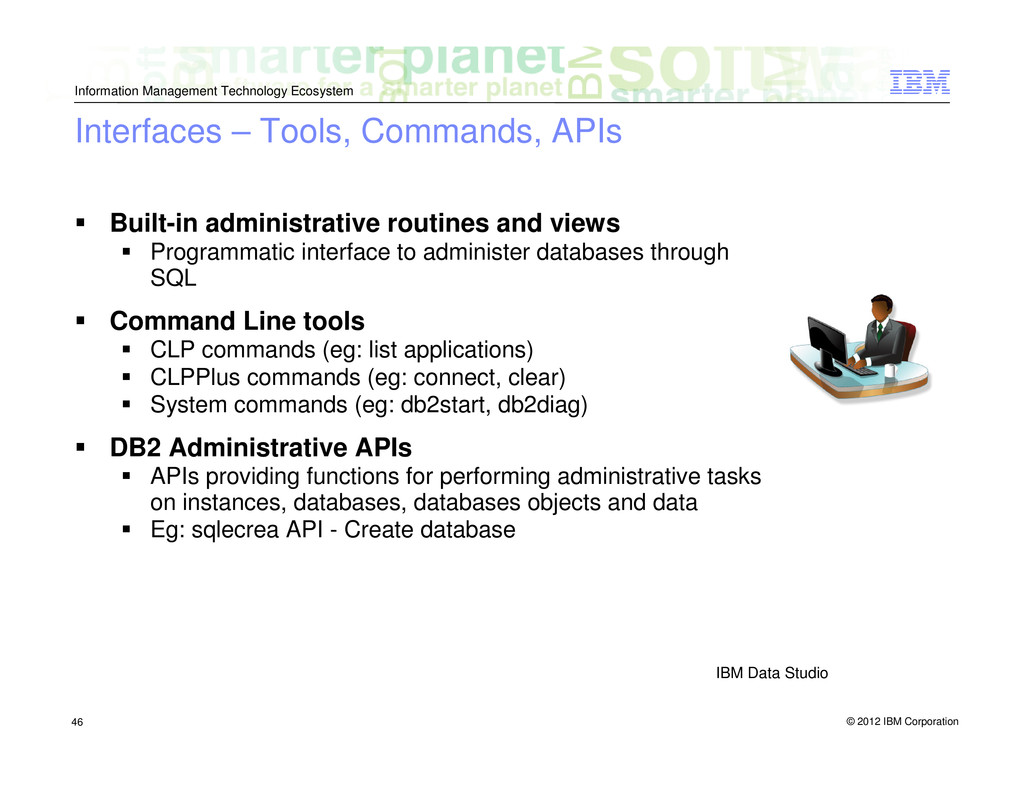
    – Tools, Commands, APIs Built-in administrative routines and views Programmatic interface to administer databases through SQL Command Line tools CLP commands (eg: list applications) CLPPlus commands (eg: connect, clear) System commands (eg: db2start, db2diag) DB2 Administrative APIs APIs providing functions for performing administrative tasks on instances, databases, databases objects and data Eg: sqlecrea API - Create database IBM Data Studio
  44. © 2012 IBM Corporation Information Management Technology Ecosystem 47 Interfaces

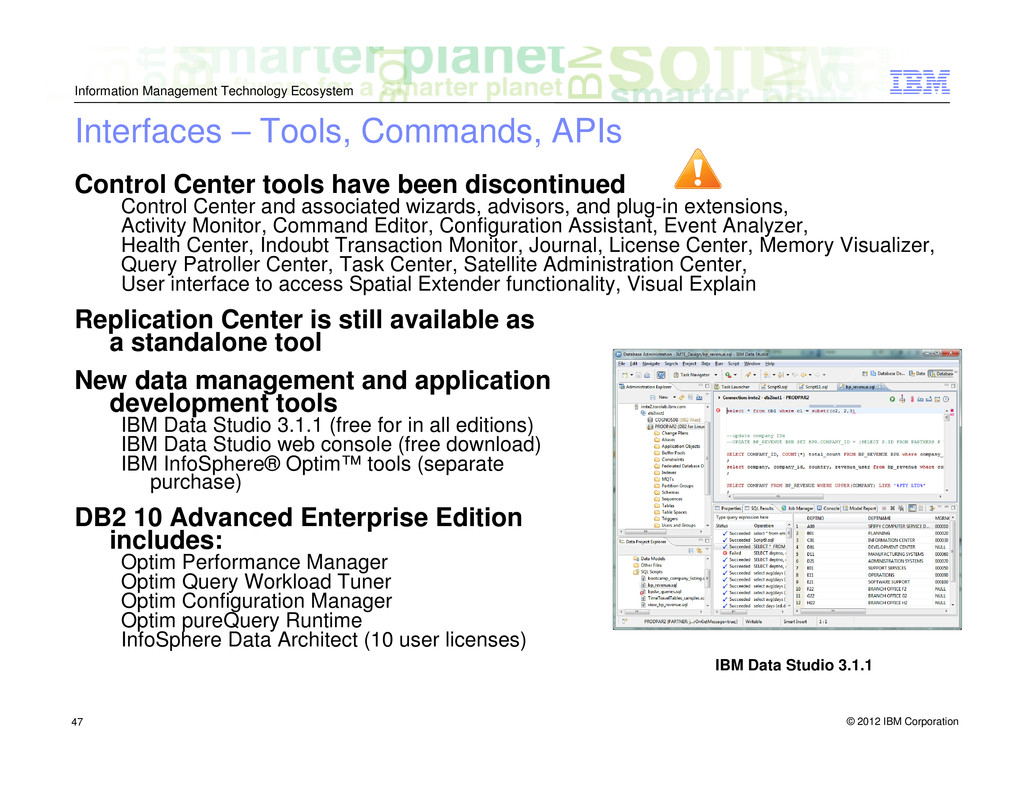
    – Tools, Commands, APIs Control Center tools have been discontinued Control Center and associated wizards, advisors, and plug-in extensions, Activity Monitor, Command Editor, Configuration Assistant, Event Analyzer, Health Center, Indoubt Transaction Monitor, Journal, License Center, Memory Visualizer, Query Patroller Center, Task Center, Satellite Administration Center, User interface to access Spatial Extender functionality, Visual Explain Replication Center is still available as a standalone tool New data management and application development tools IBM Data Studio 3.1.1 (free for in all editions) IBM Data Studio web console (free download) IBM InfoSphere® Optim™ tools (separate purchase) DB2 10 Advanced Enterprise Edition includes: Optim Performance Manager Optim Query Workload Tuner Optim Configuration Manager Optim pureQuery Runtime InfoSphere Data Architect (10 user licenses) IBM Data Studio 3.1.1
  45. © 2012 IBM Corporation Information Management Technology Ecosystem 48 Tools

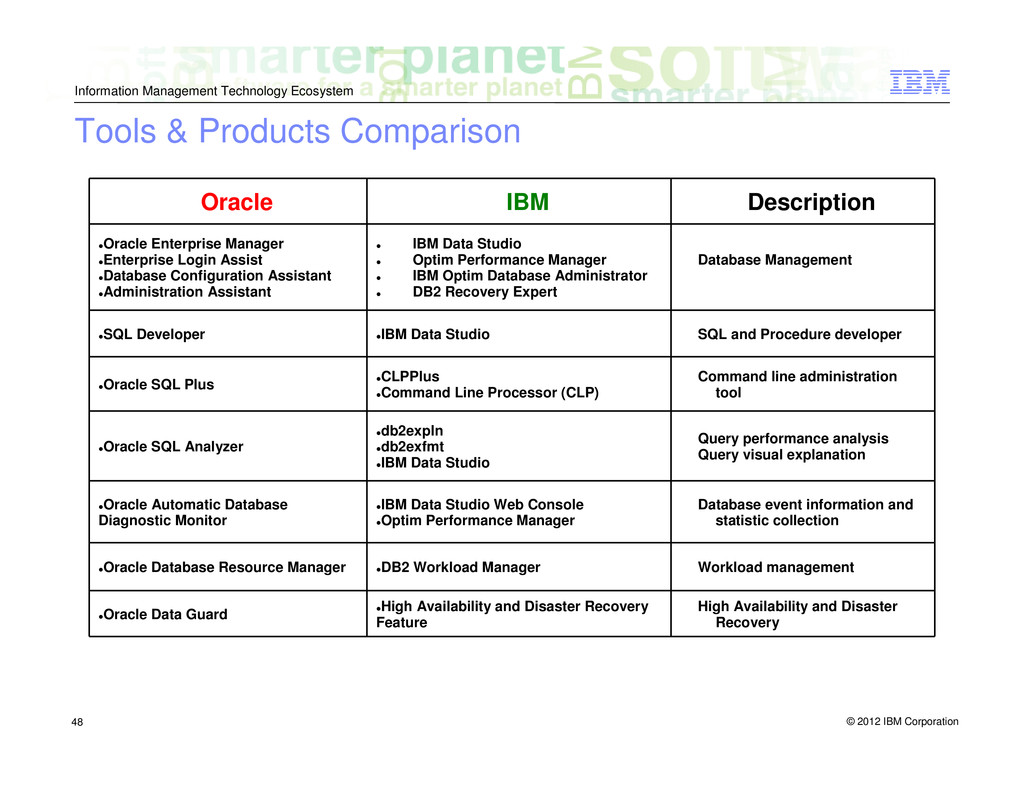
    & Products Comparison Oracle IBM Description Oracle Enterprise Manager Enterprise Login Assist Database Configuration Assistant Administration Assistant IBM Data Studio Optim Performance Manager IBM Optim Database Administrator DB2 Recovery Expert Database Management SQL Developer IBM Data Studio SQL and Procedure developer Oracle SQL Plus CLPPlus Command Line Processor (CLP) Command line administration tool Oracle SQL Analyzer db2expln db2exfmt IBM Data Studio Query performance analysis Query visual explanation Oracle Automatic Database Diagnostic Monitor IBM Data Studio Web Console Optim Performance Manager Database event information and statistic collection Oracle Database Resource Manager DB2 Workload Manager Workload management Oracle Data Guard High Availability and Disaster Recovery Feature High Availability and Disaster Recovery
  46. © 2012 IBM Corporation Information Management Technology Ecosystem 49 Data

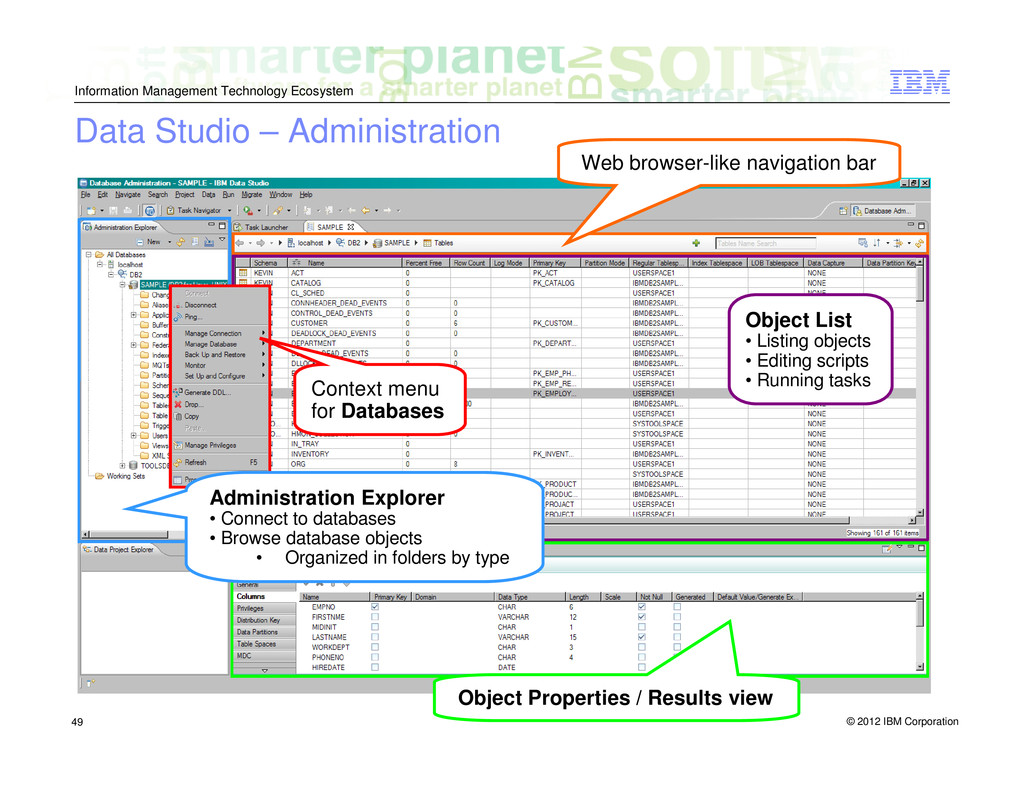
    Studio – Administration Administration Explorer • Connect to databases • Browse database objects • Organized in folders by type Object List • Listing objects • Editing scripts • Running tasks Object Properties / Results view Web browser-like navigation bar Context menu for Databases
  47. © 2012 IBM Corporation Information Management Technology Ecosystem 50 Data

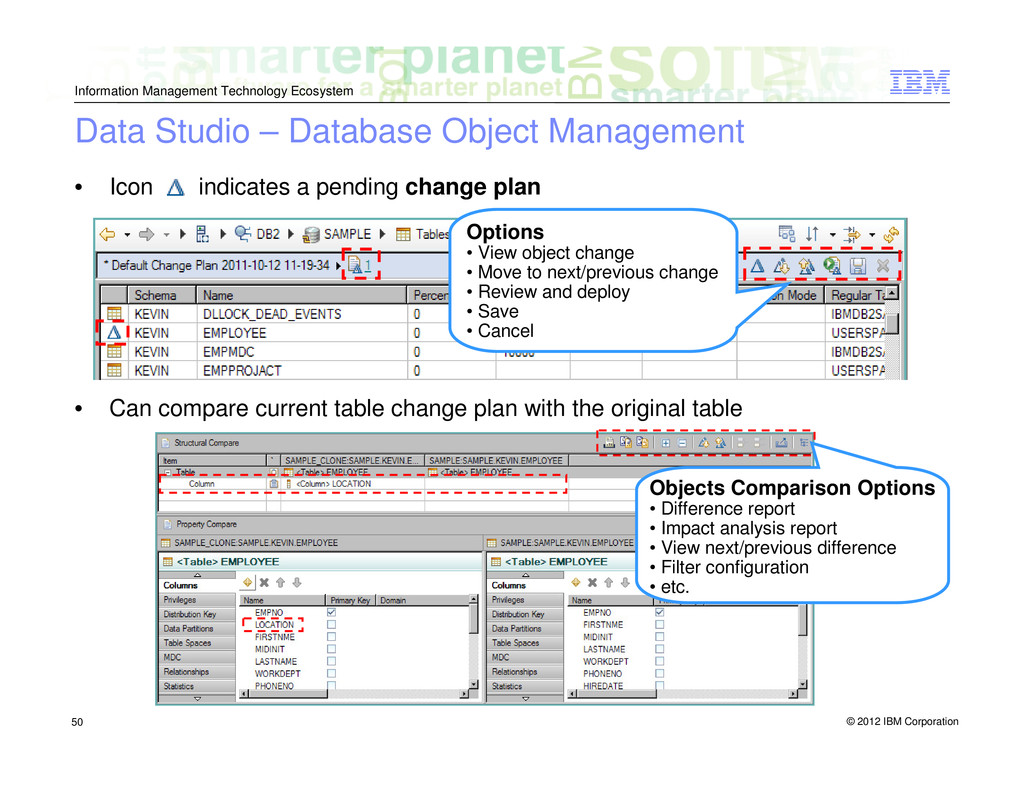
    Studio – Database Object Management • Icon indicates a pending change plan • Can compare current table change plan with the original table Options • View object change • Move to next/previous change • Review and deploy • Save • Cancel Objects Comparison Options • Difference report • Impact analysis report • View next/previous difference • Filter configuration • etc.
  48. © 2012 IBM Corporation Information Management Technology Ecosystem 51 An

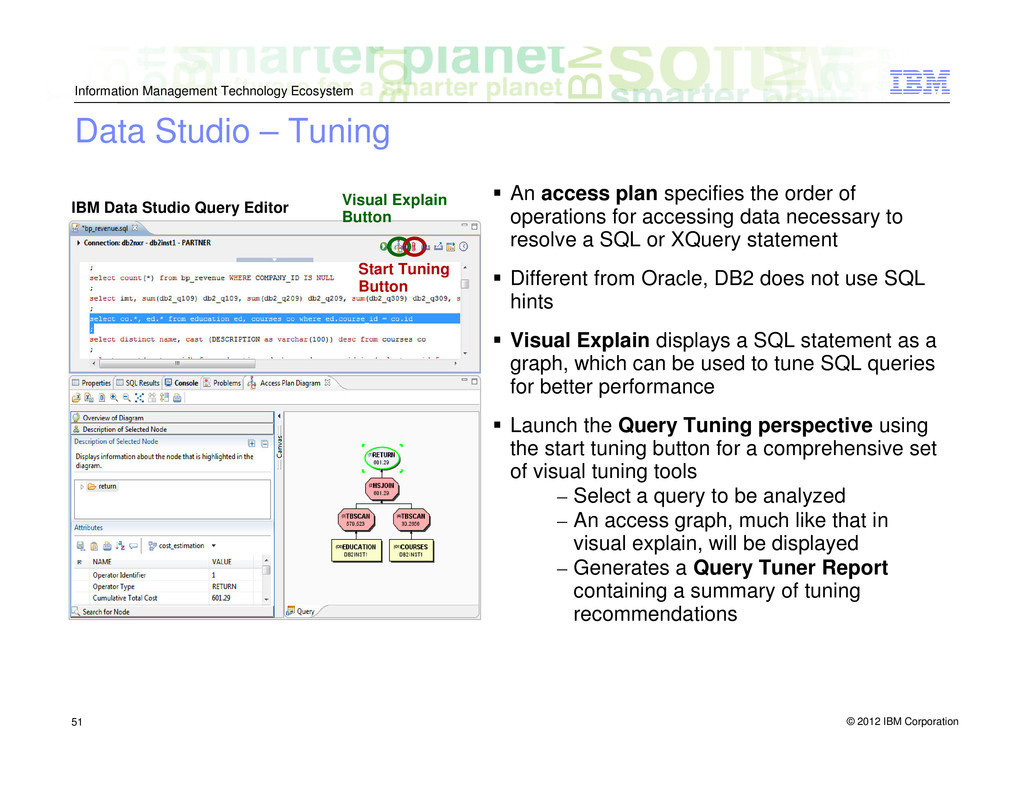
    access plan specifies the order of operations for accessing data necessary to resolve a SQL or XQuery statement Different from Oracle, DB2 does not use SQL hints Visual Explain displays a SQL statement as a graph, which can be used to tune SQL queries for better performance Launch the Query Tuning perspective using the start tuning button for a comprehensive set of visual tuning tools – Select a query to be analyzed – An access graph, much like that in visual explain, will be displayed – Generates a Query Tuner Report containing a summary of tuning recommendations Data Studio – Tuning Visual Explain Button IBM Data Studio Query Editor Start Tuning Button
  49. © 2012 IBM Corporation Information Management Technology Ecosystem 52 Summary

    DB2 for LUW is a multi-platform hybrid data server Several editions to fit your business needs Flexible licensing options Optimized architecture for high performance Practical troubleshooting utilities Comprehensive security structure Full suite of tools for easy data management and application development
  50. © 2012 IBM Corporation Information Management Information Management Technology Ecosystem

    Questions? E-mail: [email protected] Subject: “DB2 10 Workshop for Oracle Professionals”