Upgrade to Pro
— share decks privately, control downloads, hide ads and more …
Speaker Deck
Sign up for free
Menu
Search
Features
All features
Private URLs
Password Protection
Custom URLS
Scheduled publishing
Remove Branding
Restrict embedding
Deck Collections
Notes
Features
All features
Private URLs
Password Protection
Custom URLS
Scheduled publishing
Remove Branding
Restrict embedding
Deck Collections
Notes
Explore
Featured decks
Featured speakers
Programming
Technology
Storyboards
Explore
Featured decks
Featured speakers
Programming
Technology
Storyboards
Pricing
Search
Sign in
Sign up for free
OSM_宣伝文.pdf
Search
misatoteen
May 31, 2017
22
0
Share
Embed
Copy iframe code
Copy JS code
Copy link
Start on current slide
OSM_宣伝文.pdf
misatoteen
May 31, 2017
More Decks by misatoteen
See All by misatoteen
Field Papers マニュアル 自分用
misatoteen
0
80
OSM マニュアル
misatoteen
0
96
多賀谷美里
misatoteen
0
320
空間情報システム入門1#02 2016.06.16
misatoteen
0
78
Featured
See All Featured
How GitHub (no longer) Works
holman
316
150k
[Rails World 2023 - Day 1 Closing Keynote] - The Magic of Rails
eileencodes
38
3.1k
DBのスキルで生き残る技術 - AI時代におけるテーブル設計の勘所
soudai
PRO
68
58k
CSS Pre-Processors: Stylus, Less & Sass
bermonpainter
360
31k
Building Adaptive Systems
keathley
44
3.2k
How to Align SEO within the Product Triangle To Get Buy-In & Support - #RIMC
aleyda
2
1.8k
Navigating the Design Leadership Dip - Product Design Week Design Leaders+ Conference 2024
apolaine
2
480
Side Projects
sachag
456
43k
Docker and Python
trallard
47
4.2k
Creating an realtime collaboration tool: Agile Flush - .NET Oxford
marcduiker
35
2.6k
Keith and Marios Guide to Fast Websites
keithpitt
413
23k
Marketing to machines
jonoalderson
1
5.9k
Transcript
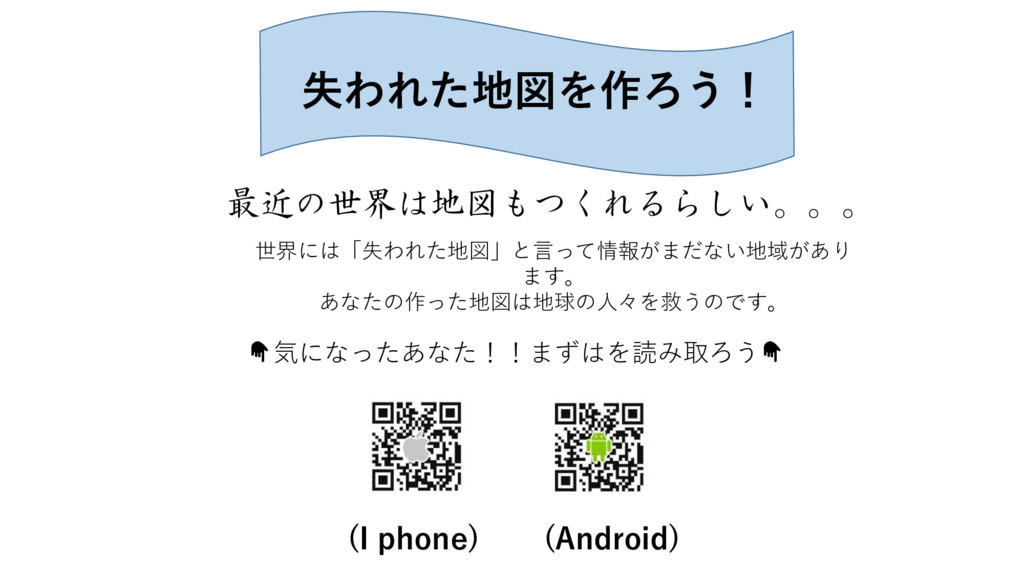
失われた地図を作ろう! 最近の世界は地図もつくれるらしい。。。 世界には「失われた地図」と言って情報がまだない地域があり ます。 あなたの作った地図は地球の人々を救うのです。 気になったあなた!!まずはを読み取ろう (I phone) (Android)
まずはアカウントを開設しよう! ↑をクリックして、ユーザー登録をクリッ ク。必要事項を記入するだけでOK!
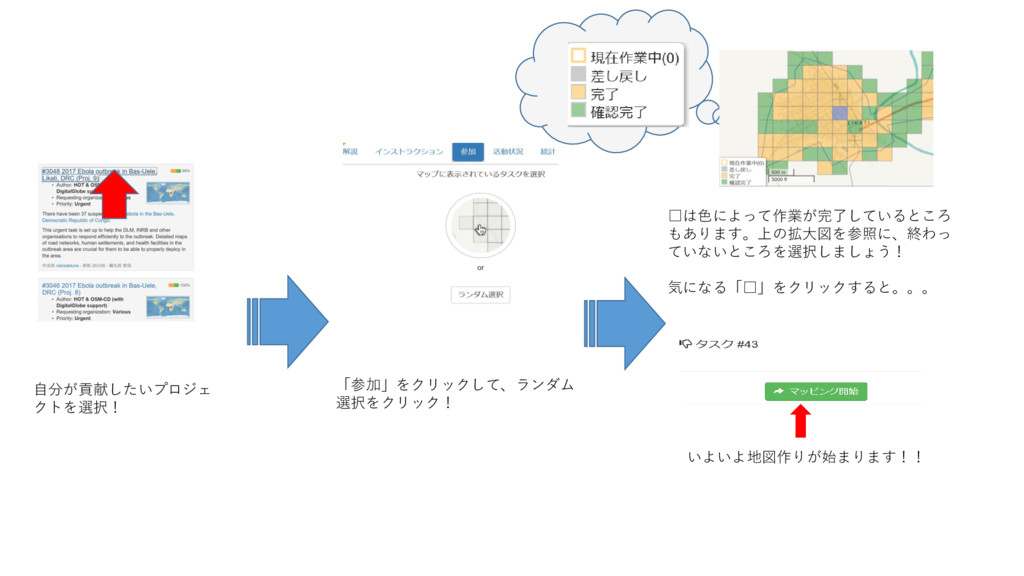
自分が貢献したいプロジェ クトを選択! 「参加」をクリックして、ランダム 選択をクリック! □は色によって作業が完了しているところ もあります。上の拡大図を参照に、終わっ ていないところを選択しましょう! 気になる「□」をクリックすると。。。 いよいよ地図作りが始まります!!
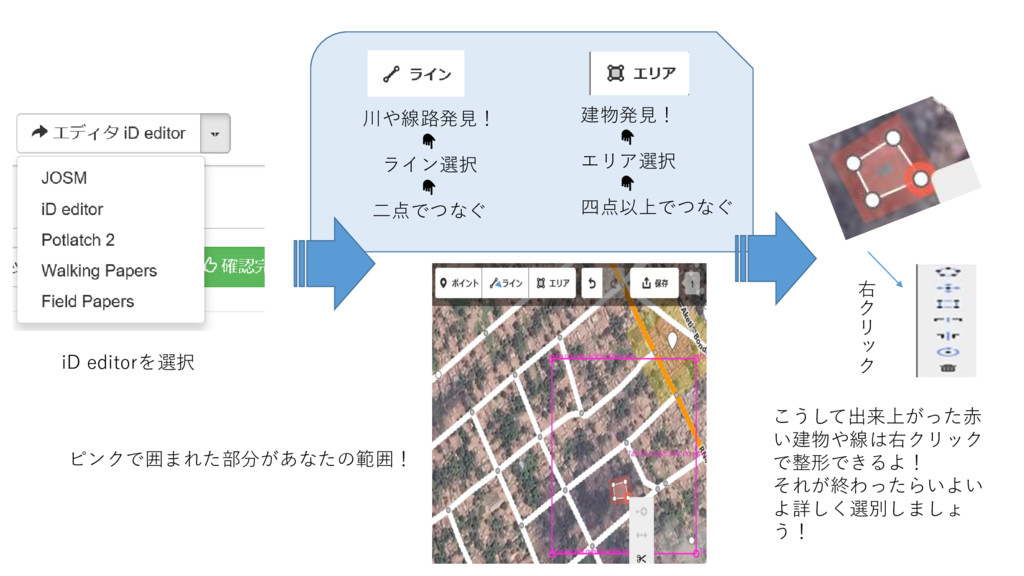
iD editorを選択 ピンクで囲まれた部分があなたの範囲! 川や線路発見! ライン選択 二点でつなぐ 建物発見! エリア選択 四点以上でつなぐ こうして出来上がった赤
い建物や線は右クリック で整形できるよ! それが終わったらいよい よ詳しく選別しましょ う! 右 ク リ ッ ク
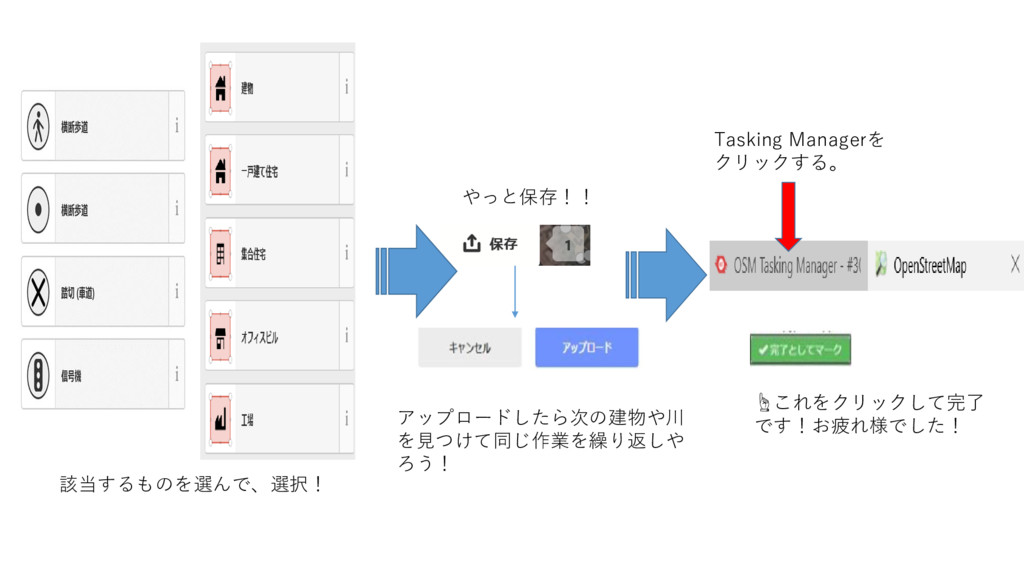
該当するものを選んで、選択! やっと保存!! アップロードしたら次の建物や川 を見つけて同じ作業を繰り返しや ろう! Tasking Managerを クリックする。 ☝これをクリックして完了 です!お疲れ様でした!


 misatoteen
 holman
 eileencodes
 soudai
 bermonpainter
 keathley
 aleyda
 apolaine
 sachag
 trallard
 marcduiker
 keithpitt
 jonoalderson