Upgrade to Pro
— share decks privately, control downloads, hide ads and more …
Speaker Deck
Sign up for free
Menu
Search
Features
All features
Private URLs
Password Protection
Custom URLS
Scheduled publishing
Remove Branding
Restrict embedding
Deck Collections
Notes
Features
All features
Private URLs
Password Protection
Custom URLS
Scheduled publishing
Remove Branding
Restrict embedding
Deck Collections
Notes
Explore
Featured decks
Featured speakers
Programming
Technology
Storyboards
Explore
Featured decks
Featured speakers
Programming
Technology
Storyboards
Pricing
Search
Sign in
Sign up for free
ren nakaoka
Search
Sponsored
·
Your Podcast. Everywhere. Effortlessly.
Share. Educate. Inspire. Entertain. You do you. We'll handle the rest.
→
REN NAKAOKA
June 17, 2016
33
0
Share
Embed
Copy iframe code
Copy JS code
Copy link
Start on current slide
ren nakaoka
REN NAKAOKA
June 17, 2016
More Decks by REN NAKAOKA
See All by REN NAKAOKA
NAKAOKA REN
rennakaoka
0
110
Featured
See All Featured
Bootstrapping a Software Product
garrettdimon
PRO
306
120k
The Power of CSS Pseudo Elements
geoffreycrofte
82
6.6k
Ethics towards AI in product and experience design
skipperchong
2
430
The Impact of AI in SEO - AI Overviews June 2024 Edition
aleyda
6
1.2k
Exploring the relationship between traditional SERPs and Gen AI search
raygrieselhuber
PRO
4
4.4k
Evolving SEO for Evolving Search Engines
ryanjones
0
330
Exploring the Power of Turbo Streams & Action Cable | RailsConf2023
kevinliebholz
37
6.6k
Automating Front-end Workflow
addyosmani
1369
210k
Mozcon NYC 2025: Stop Losing SEO Traffic
samtorres
1
580
Lightning Talk: Beautiful Slides for Beginners
inesmontani
PRO
2
730
Leveraging Curiosity to Care for An Aging Population
cassininazir
1
540
Leveraging LLMs for student feedback in introductory data science courses - posit::conf(2025)
minecr
1
440
Transcript
Tasking Manager ~マッピング作業のマニュアル~ 1a116151 中岡 廉
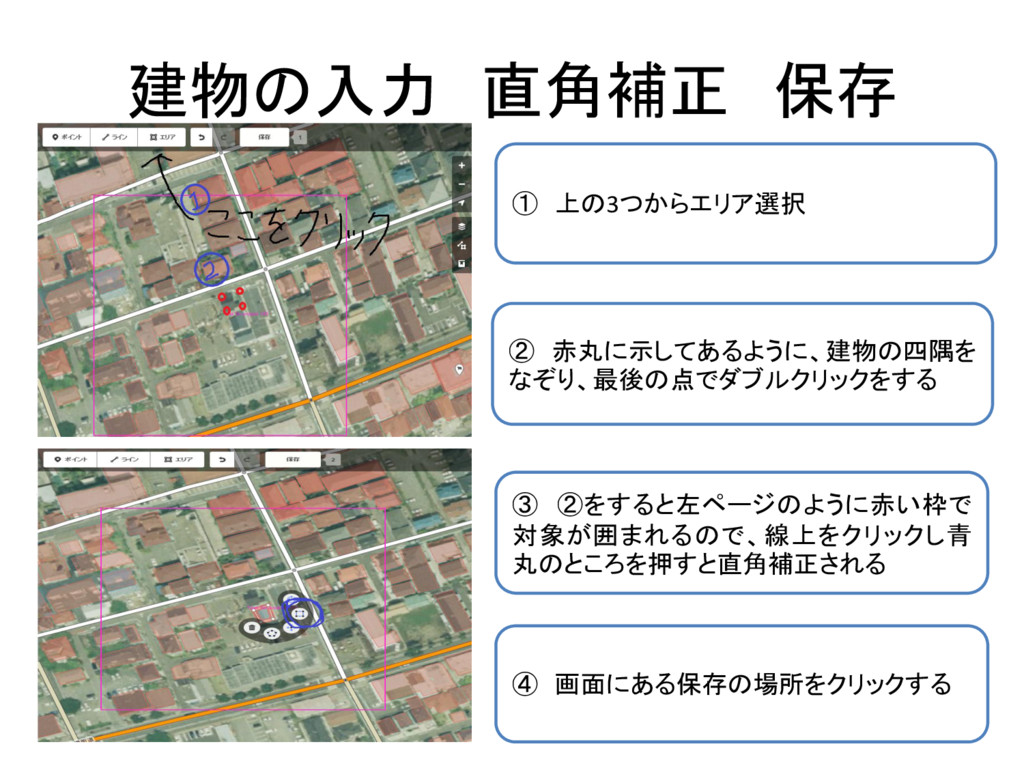
建物の入力 直角補正 保存 ① 上の3つからエリア選択 ② 赤丸に示してあるように、建物の四隅を なぞり、最後の点でダブルクリックをする ③ ②をすると左ページのように赤い枠で
対象が囲まれるので、線上をクリックし青 丸のところを押すと直角補正される ④ 画面にある保存の場所をクリックする
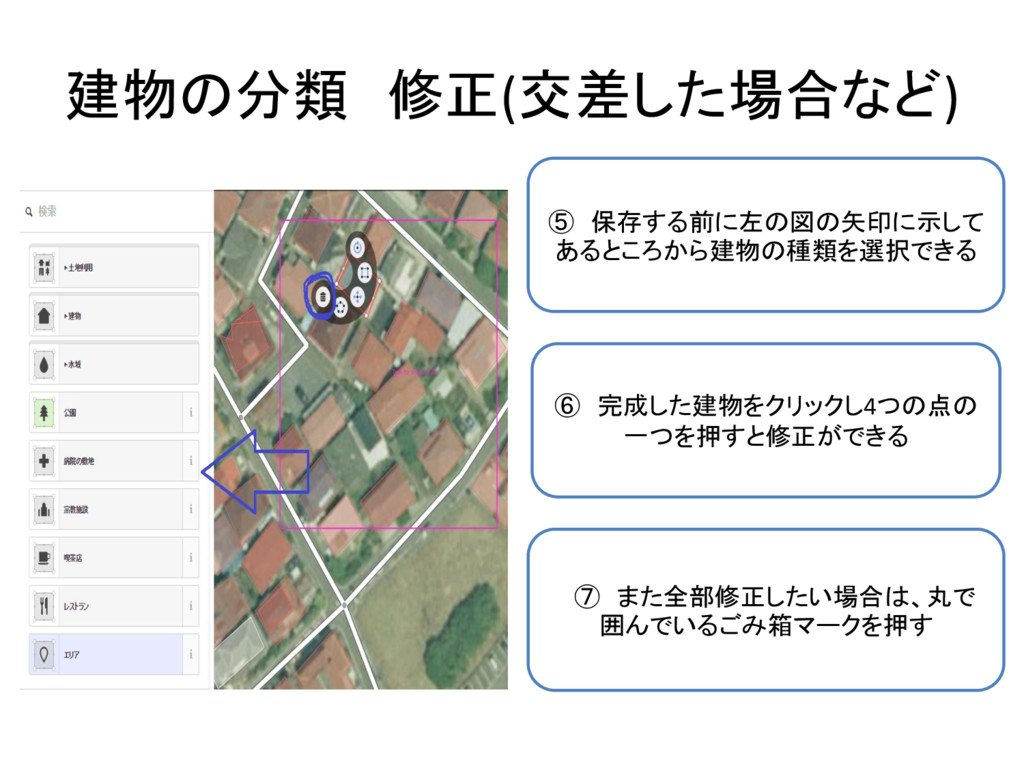
建物の分類 修正(交差した場合など) ⑤ 保存する前に左の図の矢印に示して あるところから建物の種類を選択できる ⑦ また全部修正したい場合は、丸で 囲んでいるごみ箱マークを押す ⑥ 完成した建物をクリックし4つの点の
一つを押すと修正ができる
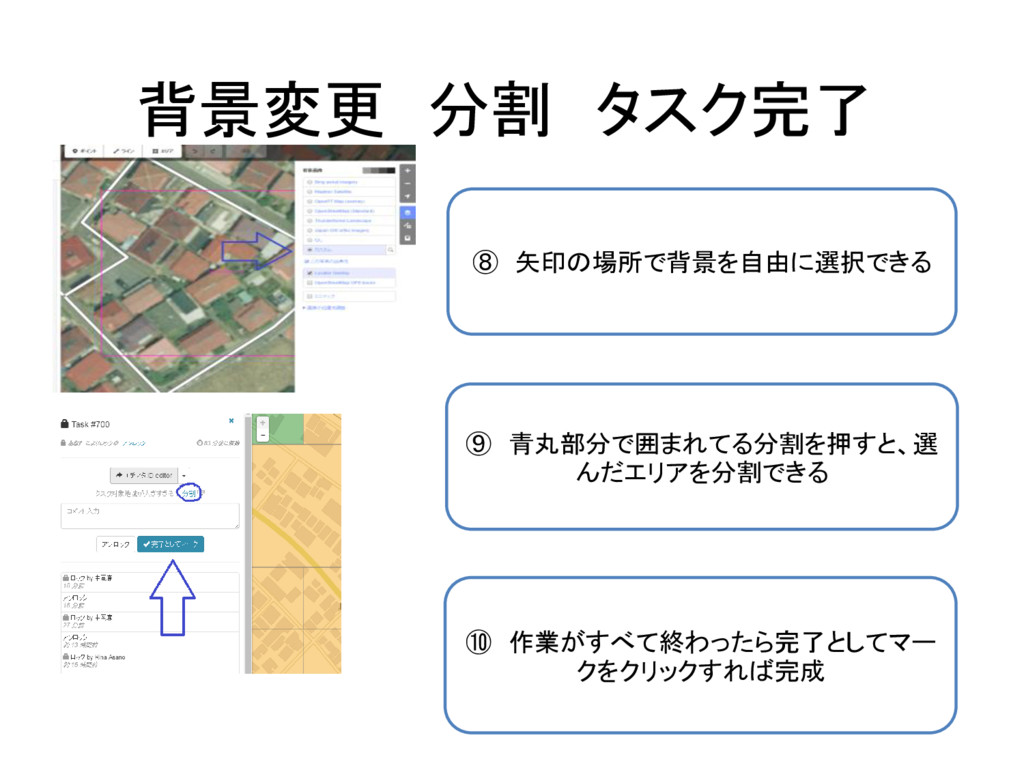
背景変更 分割 タスク完了 ⑧ 矢印の場所で背景を自由に選択できる ⑨ 青丸部分で囲まれてる分割を押すと、選 んだエリアを分割できる ⑩ 作業がすべて終わったら完了としてマー
クをクリックすれば完成


 rennakaoka
 garrettdimon
 geoffreycrofte
 skipperchong
 aleyda
 raygrieselhuber
 ryanjones
 kevinliebholz
 addyosmani
 samtorres
 inesmontani
 cassininazir
 minecr