Upgrade to Pro
— share decks privately, control downloads, hide ads and more …
Speaker Deck
Sign up for free
Menu
Search
Features
All features
Private URLs
Password Protection
Custom URLS
Scheduled publishing
Remove Branding
Restrict embedding
Deck Collections
Notes
Features
All features
Private URLs
Password Protection
Custom URLS
Scheduled publishing
Remove Branding
Restrict embedding
Deck Collections
Notes
Explore
Featured decks
Featured speakers
Programming
Technology
Storyboards
Explore
Featured decks
Featured speakers
Programming
Technology
Storyboards
Pricing
Search
Sign in
Sign up for free
uv + ruff + tyを使ったモダンな環境でdiscord bot作ってみよう(Gens...
Search
thirdlf03
June 18, 2025
95
0
Share
Embed
Copy iframe code
Copy JS code
Copy link
Start on current slide
uv + ruff + tyを使ったモダンな環境でdiscord bot作ってみよう(Genspark製)
thirdlf03
June 18, 2025
More Decks by thirdlf03
See All by thirdlf03
test
thirdlf03
0
21
単語で読み解くクラウドネイティブ会議
thirdlf03
1
73
PHPでGitを実装してみる
thirdlf03
0
240
実務経験なし、資格なしの学生が、AWSとAlexaをフルで活用し福岡の地域課題解決に挑んでみた話
thirdlf03
3
330
とにかく楽して登壇資料を作る/EasyPresentationSlides
thirdlf03
2
300
学生のうちにいろんなカンファレンスへ行こう!
thirdlf03
2
490
MCP登場から約1年!あの頃と今、何が変わった? / MCP One Year Later
thirdlf03
0
190
cursorで実践するContext Engineering
thirdlf03
1
73
Cloudflare Containers使ってみた
thirdlf03
1
55
Featured
See All Featured
The Director’s Chair: Orchestrating AI for Truly Effective Learning
tmiket
1
320
Beyond borders and beyond the search box: How to win the global "messy middle" with AI-driven SEO
davidcarrasco
3
280
Introduction to Domain-Driven Design and Collaborative software design
baasie
1
1k
Speed Design
sergeychernyshev
33
2.1k
The Straight Up "How To Draw Better" Workshop
denniskardys
239
140k
The Cost Of JavaScript in 2023
addyosmani
55
10k
How to train your dragon (web standard)
notwaldorf
96
6.9k
The Pragmatic Product Professional
lauravandoore
37
7.5k
Max Prin - Stacking Signals: How International SEO Comes Together (And Falls Apart)
techseoconnect
PRO
0
480
Bash Introduction
62gerente
615
220k
HDC tutorial
michielstock
2
950
SEO Brein meetup: CTRL+C is not how to scale international SEO
lindahogenes
2
2.9k
Transcript
import discord from astral import uv # モダン環境でのBot開発 Python
Discord API Astral Tools 2025-06-19 uvとdiscord.pyで作る モダンなDiscord Bot開発 Astral社の次世代ツールを活用した実践的なアプローチ $ uv add discord.py ruff ty ✓ パッケージインストール成功 // 10-100x faster than pip
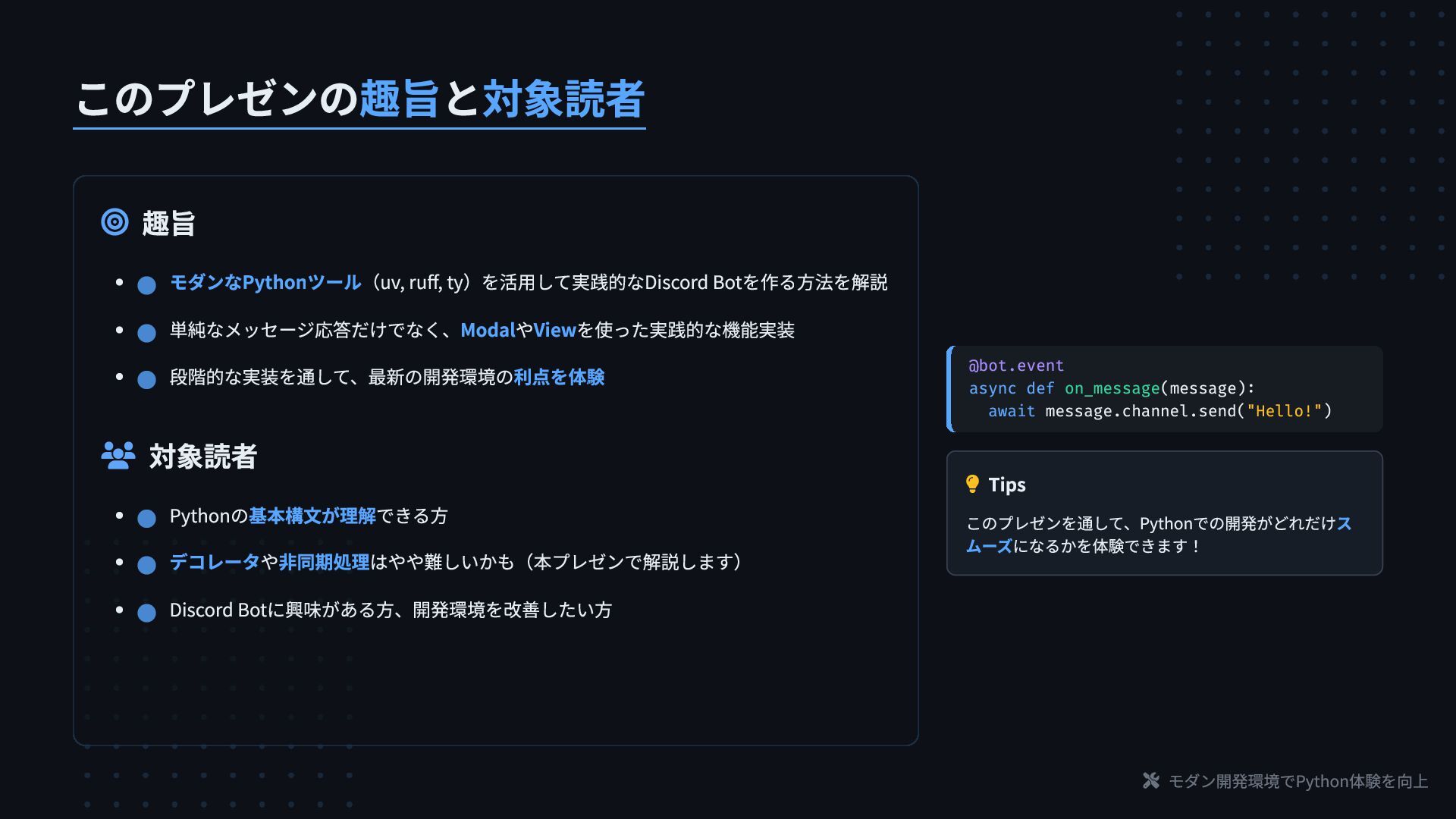
モダン開発環境でPython体験を向上 このプレゼンの趣旨と対象読者 趣旨 対象読者 @bot.event async def
on_message(message): await message.channel.send("Hello!") Tips このプレゼンを通して、Pythonでの開発がどれだけス ムーズになるかを体験できます! モダンなPythonツール(uv, ruff, ty)を活用して実践的なDiscord Botを作る方法を解説 単純なメッセージ応答だけでなく、ModalやViewを使った実践的な機能実装 段階的な実装を通して、最新の開発環境の利点を体験 Pythonの基本構文が理解できる方 デコレータや非同期処理はやや難しいかも(本プレゼンで解説します) Discord Botに興味がある方、開発環境を改善したい方
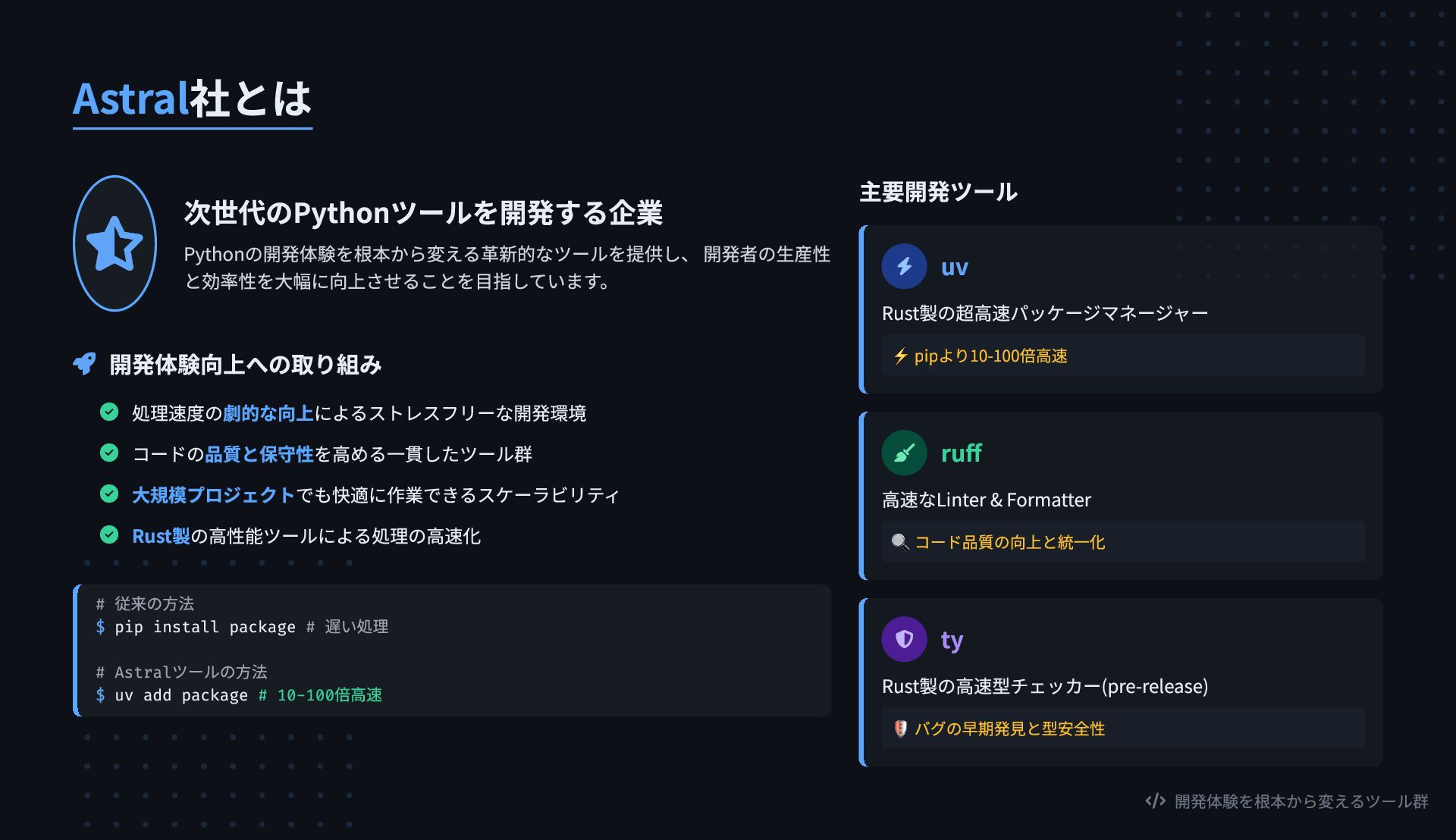
開発体験を根本から変えるツール群 Astral社とは 次世代のPythonツールを開発する企業 Pythonの開発体験を根本から変える革新的なツールを提供し、 開発者の生産性 と効率性を大幅に向上させることを目指しています。 開発体験向上への取り組み
処理速度の劇的な向上によるストレスフリーな開発環境 コードの品質と保守性を高める一貫したツール群 大規模プロジェクトでも快適に作業できるスケーラビリティ Rust製の高性能ツールによる処理の高速化 # 従来の方法 $ pip install package # 遅い処理 # Astralツールの方法 $ uv add package # 10-100倍高速 主要開発ツール uv Rust製の超高速パッケージマネージャー ⚡ pipより10-100倍高速 ruff 高速なLinter & Formatter 🔍 コード品質の向上と統一化 ty Rust製の高速型チェッカー(pre-release) 🛡️ バグの早期発見と型安全性
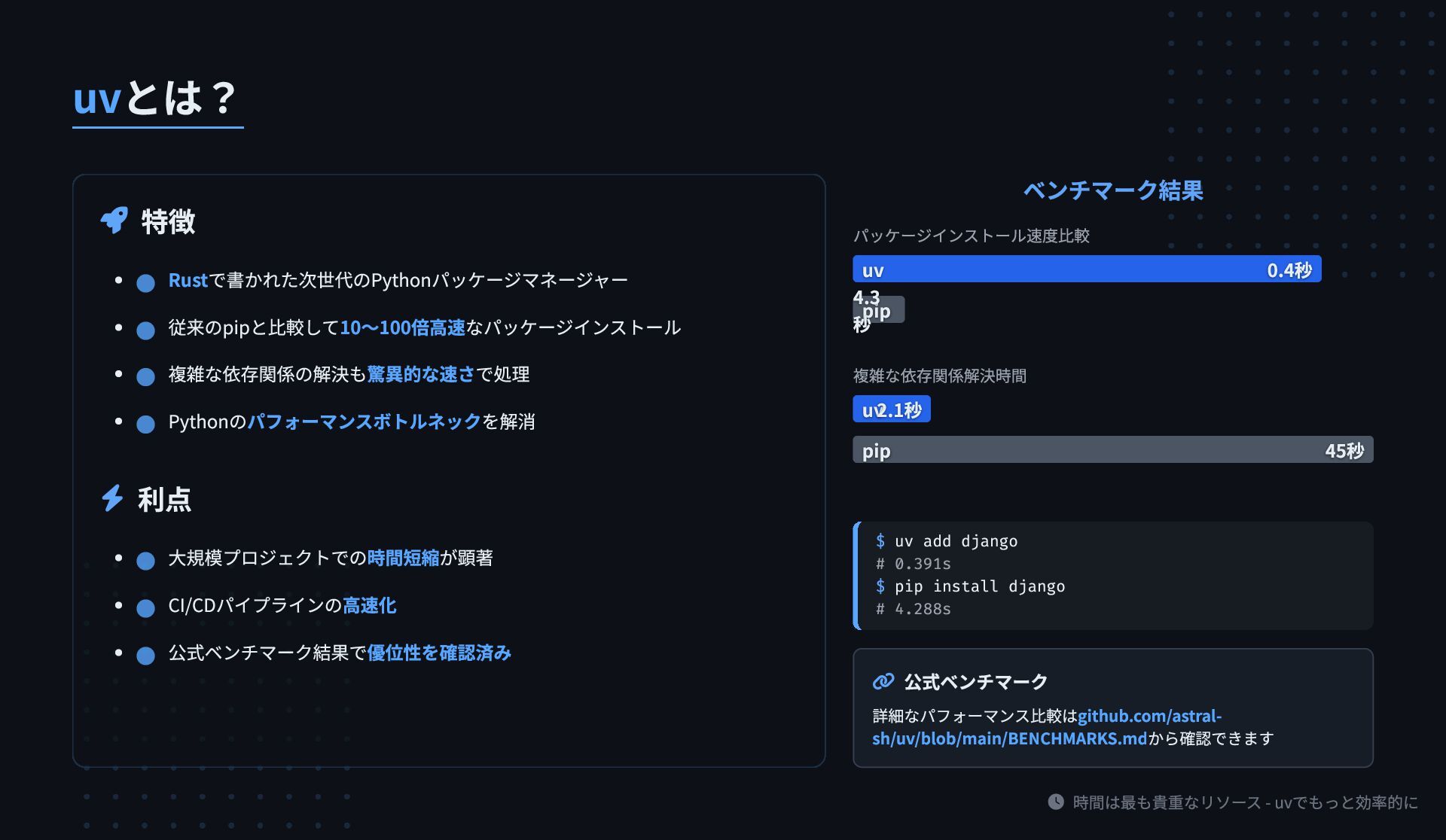
時間は最も貴重なリソース - uvでもっと効率的に uvとは? 特徴 利点 ベンチマーク結果
パッケージインストール速度比較 複雑な依存関係解決時間 $ uv add django # 0.391s $ pip install django # 4.288s 公式ベンチマーク 詳細なパフォーマンス比較はgithub.com/astral- sh/uv/blob/main/BENCHMARKS.mdから確認できます Rustで書かれた次世代のPythonパッケージマネージャー 従来のpipと比較して10〜100倍高速なパッケージインストール 複雑な依存関係の解決も驚異的な速さで処理 Pythonのパフォーマンスボトルネックを解消 大規模プロジェクトでの時間短縮が顕著 CI/CDパイプラインの高速化 公式ベンチマーク結果で優位性を確認済み uv uv 0.4秒 0.4秒 pip pip 4.3 4.3 秒 秒 uv uv2.1秒 2.1秒 pip pip 45秒 45秒
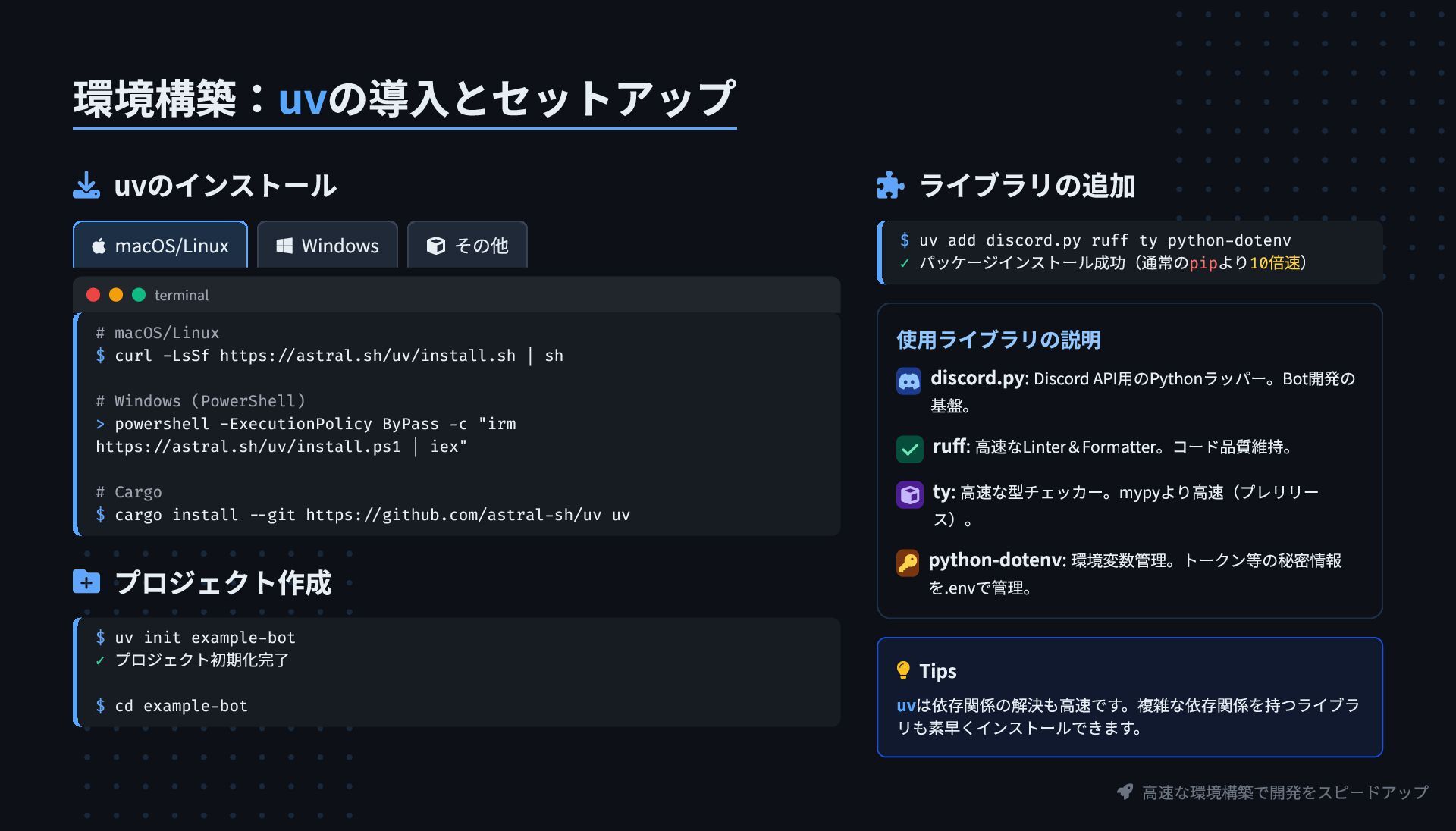
高速な環境構築で開発をスピードアップ 環境構築:uvの導入とセットアップ uvのインストール macOS/Linux Windows
その他 terminal # macOS/Linux $ curl -LsSf https://astral.sh/uv/install.sh | sh # Windows (PowerShell) > powershell -ExecutionPolicy ByPass -c "irm https://astral.sh/uv/install.ps1 | iex" # Cargo $ cargo install --git https://github.com/astral-sh/uv uv プロジェクト作成 $ uv init example-bot ✓ プロジェクト初期化完了 $ cd example-bot ライブラリの追加 $ uv add discord.py ruff ty python-dotenv ✓ パッケージインストール成功(通常のpipより10倍速) 使用ライブラリの説明 discord.py: Discord API用のPythonラッパー。Bot開発の 基盤。 ruff: 高速なLinter&Formatter。コード品質維持。 ty: 高速な型チェッカー。mypyより高速(プレリリー ス)。 python-dotenv: 環境変数管理。トークン等の秘密情報 を.envで管理。 Tips uvは依存関係の解決も高速です。複雑な依存関係を持つライブラ リも素早くインストールできます。
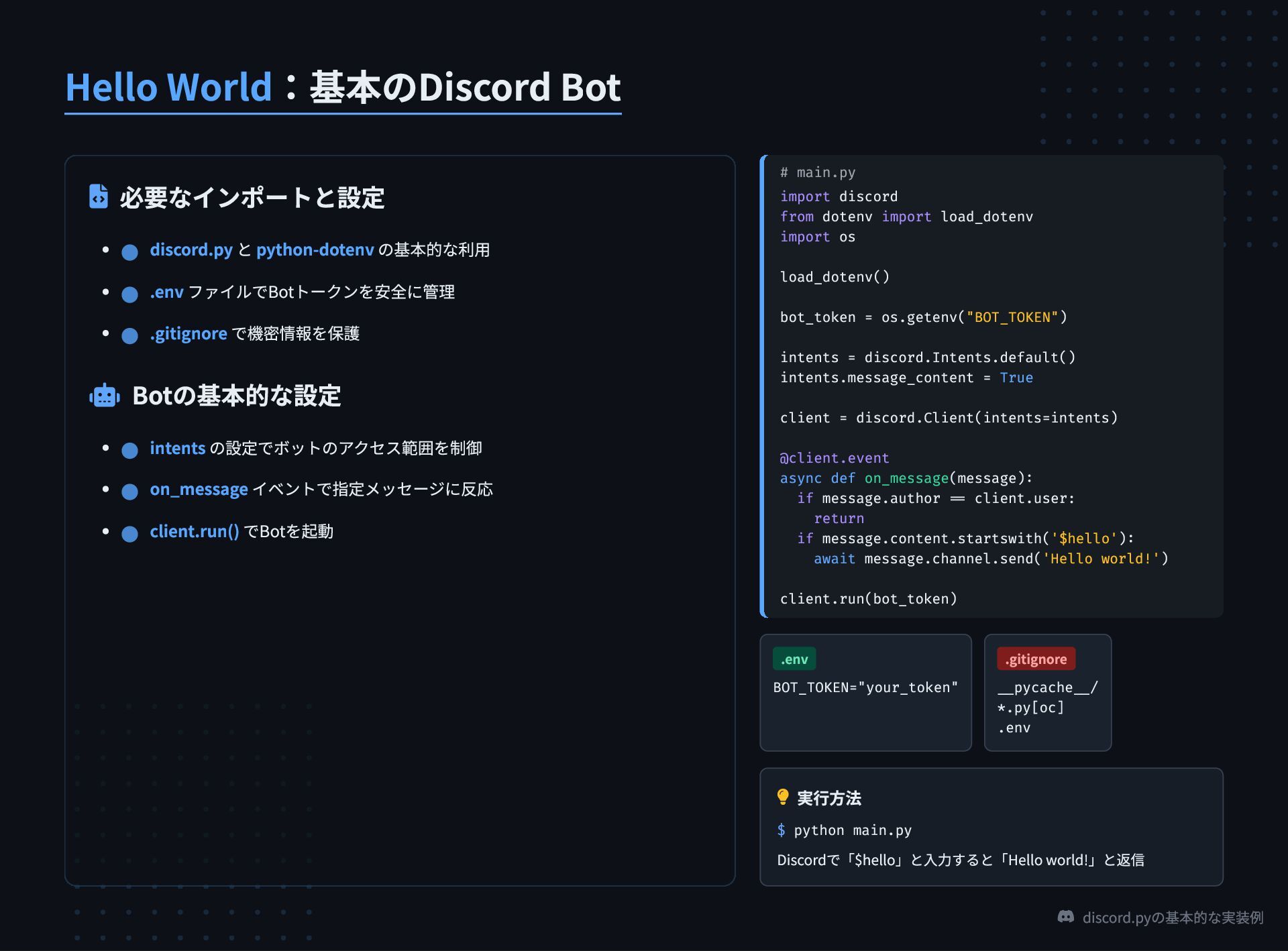
discord.pyの基本的な実装例 Hello World:基本のDiscord Bot 必要なインポートと設定 Botの基本的な設定 #
main.py import discord from dotenv import load_dotenv import os load_dotenv() bot_token = os.getenv("BOT_TOKEN") intents = discord.Intents.default() intents.message_content = True client = discord.Client(intents=intents) @client.event async def on_message(message): if message.author == client.user: return if message.content.startswith('$hello'): await message.channel.send('Hello world!') client.run(bot_token) .env BOT_TOKEN="your_token" .gitignore __pycache__/ *.py[oc] .env 実行方法 $ python main.py Discordで「$hello」と入力すると「Hello world!」と返信 discord.py と python-dotenv の基本的な利用 .env ファイルでBotトークンを安全に管理 .gitignore で機密情報を保護 intents の設定でボットのアクセス範囲を制御 on_message イベントで指定メッセージに反応 client.run() でBotを起動
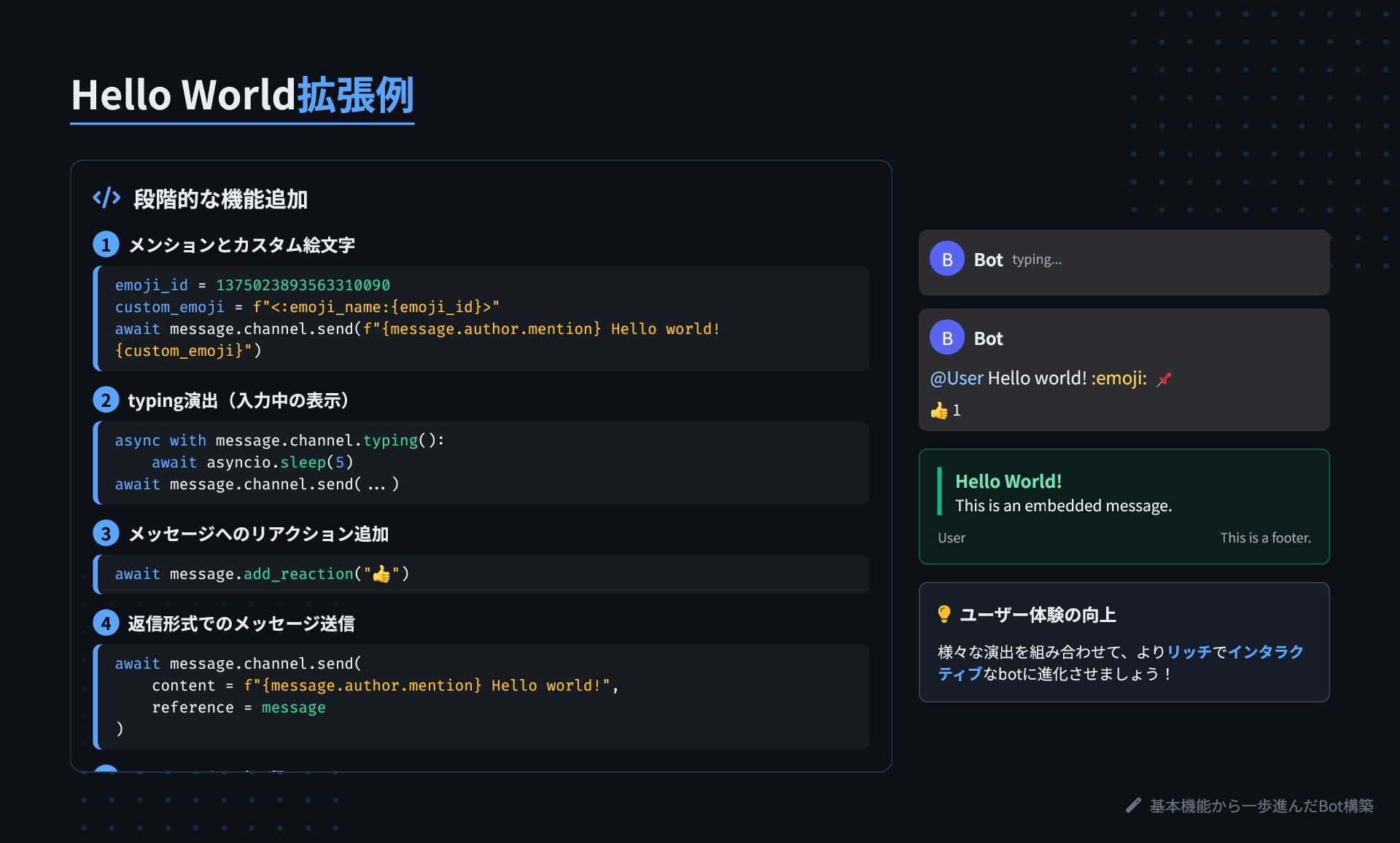
基本機能から一歩進んだBot構築 Hello World拡張例 段階的な機能追加 1 メンションとカスタム絵文字 emoji_id =
1375023893563310090 custom_emoji = f"<:emoji_name:{emoji_id}>" await message.channel.send(f"{message.author.mention} Hello world! {custom_emoji}") 2 typing演出(入力中の表示) async with message.channel.typing(): await asyncio.sleep(5) await message.channel.send(...) 3 メッセージへのリアクション追加 await message.add_reaction(" 👍") 4 返信形式でのメッセージ送信 await message.channel.send( content = f"{message.author.mention} Hello world!", reference = message ) ジ ピ 留 B Bot typing... B Bot @User Hello world! :emoji: 📌 👍 1 Hello World! This is an embedded message. User This is a footer. ユーザー体験の向上 様々な演出を組み合わせて、よりリッチでインタラク ティブなbotに進化させましょう!
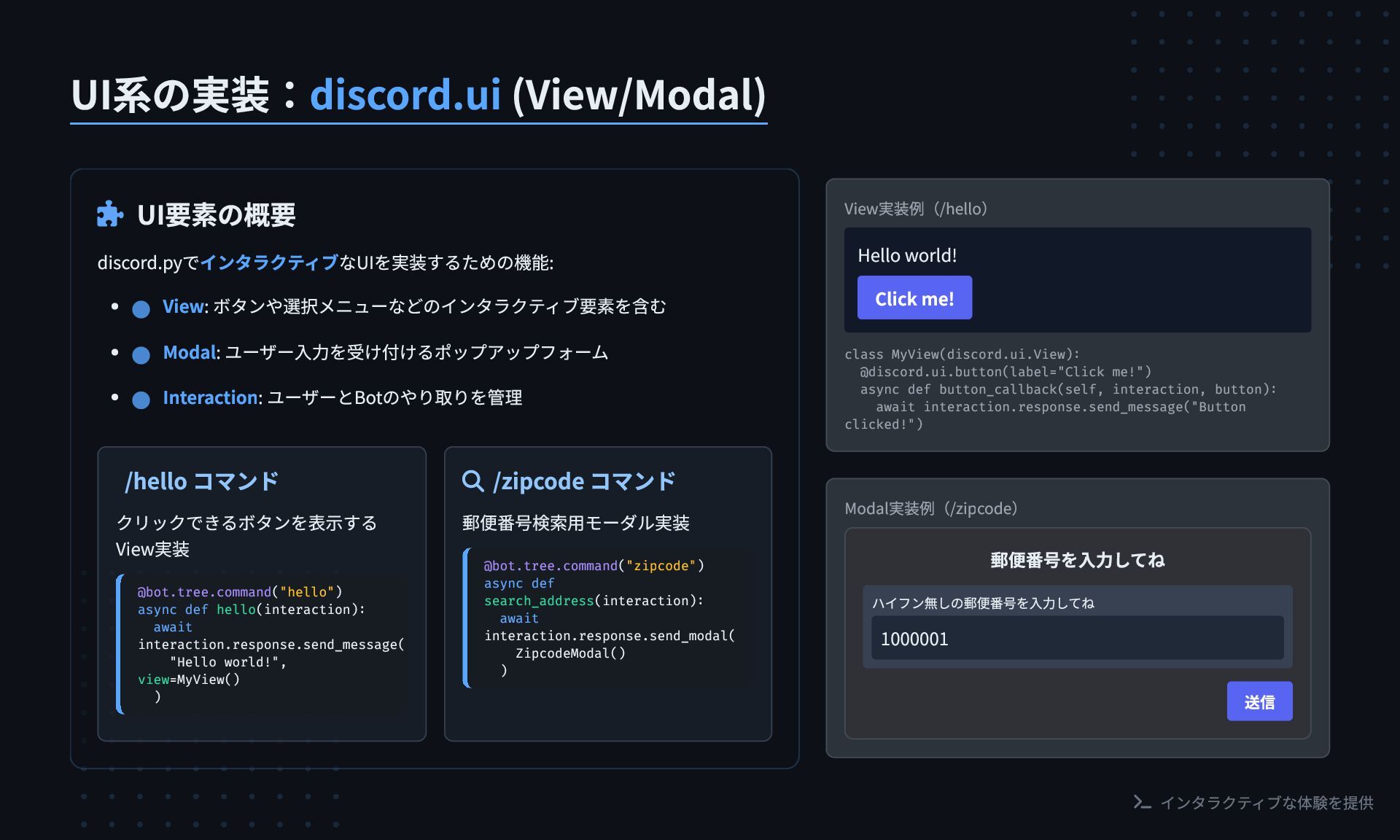
インタラクティブな体験を提供 UI系の実装:discord.ui (View/Modal) UI要素の概要 discord.pyでインタラクティブなUIを実装するための機能: /hello コマンド クリックできるボタンを表示する
View実装 @bot.tree.command("hello") async def hello(interaction): await interaction.response.send_message( "Hello world!", view=MyView() ) /zipcode コマンド 郵便番号検索用モーダル実装 @bot.tree.command("zipcode") async def search_address(interaction): await interaction.response.send_modal( ZipcodeModal() ) View実装例(/hello) Hello world! Click me! class MyView(discord.ui.View): @discord.ui.button(label="Click me!") async def button_callback(self, interaction, button): await interaction.response.send_message("Button clicked!") Modal実装例(/zipcode) 郵便番号を入力してね ハイフン無しの郵便番号を入力してね 1000001 送信 View: ボタンや選択メニューなどのインタラクティブ要素を含む Modal: ユーザー入力を受け付けるポップアップフォーム Interaction: ユーザーとBotのやり取りを管理
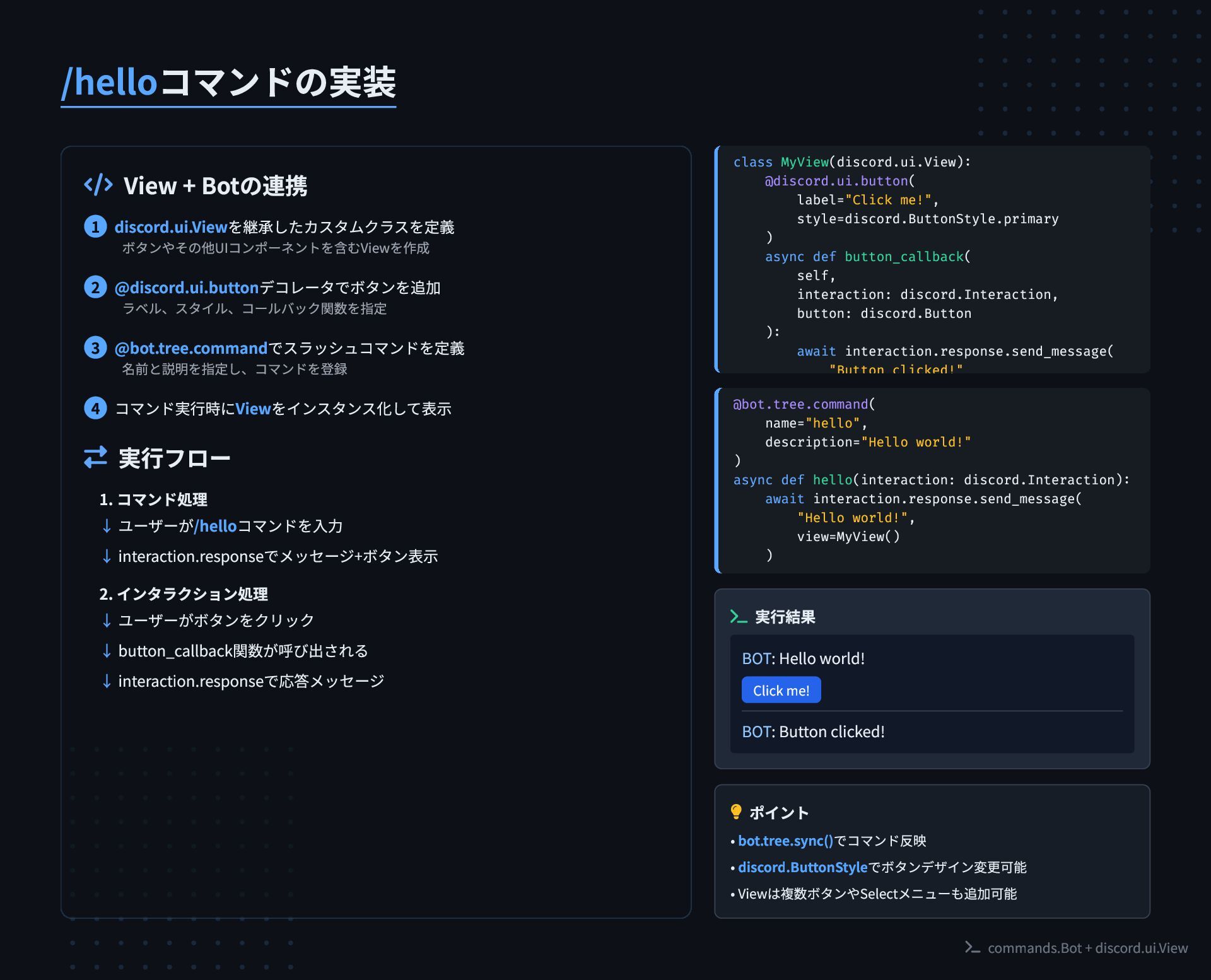
commands.Bot + discord.ui.View /helloコマンドの実装 View + Botの連携
実行フロー 1. コマンド処理 2. インタラクション処理 class MyView(discord.ui.View): @discord.ui.button( label="Click me!", style=discord.ButtonStyle.primary ) async def button_callback( self, interaction: discord.Interaction, button: discord.Button ): await interaction.response.send_message( "Button clicked!" @bot.tree.command( name="hello", description="Hello world!" ) async def hello(interaction: discord.Interaction): await interaction.response.send_message( "Hello world!", view=MyView() ) 実行結果 BOT: Hello world! Click me! BOT: Button clicked! ポイント • bot.tree.sync()でコマンド反映 • discord.ButtonStyleでボタンデザイン変更可能 • Viewは複数ボタンやSelectメニューも追加可能 discord.ui.Viewを継承したカスタムクラスを定義 ボタンやその他UIコンポーネントを含むViewを作成 1 @discord.ui.buttonデコレータでボタンを追加 ラベル、スタイル、コールバック関数を指定 2 @bot.tree.commandでスラッシュコマンドを定義 名前と説明を指定し、コマンドを登録 3 コマンド実行時にViewをインスタンス化して表示 4 ユーザーが/helloコマンドを入力 ↓ interaction.responseでメッセージ+ボタン表示 ↓ ユーザーがボタンをクリック ↓ button_callback関数が呼び出される ↓ interaction.responseで応答メッセージ ↓
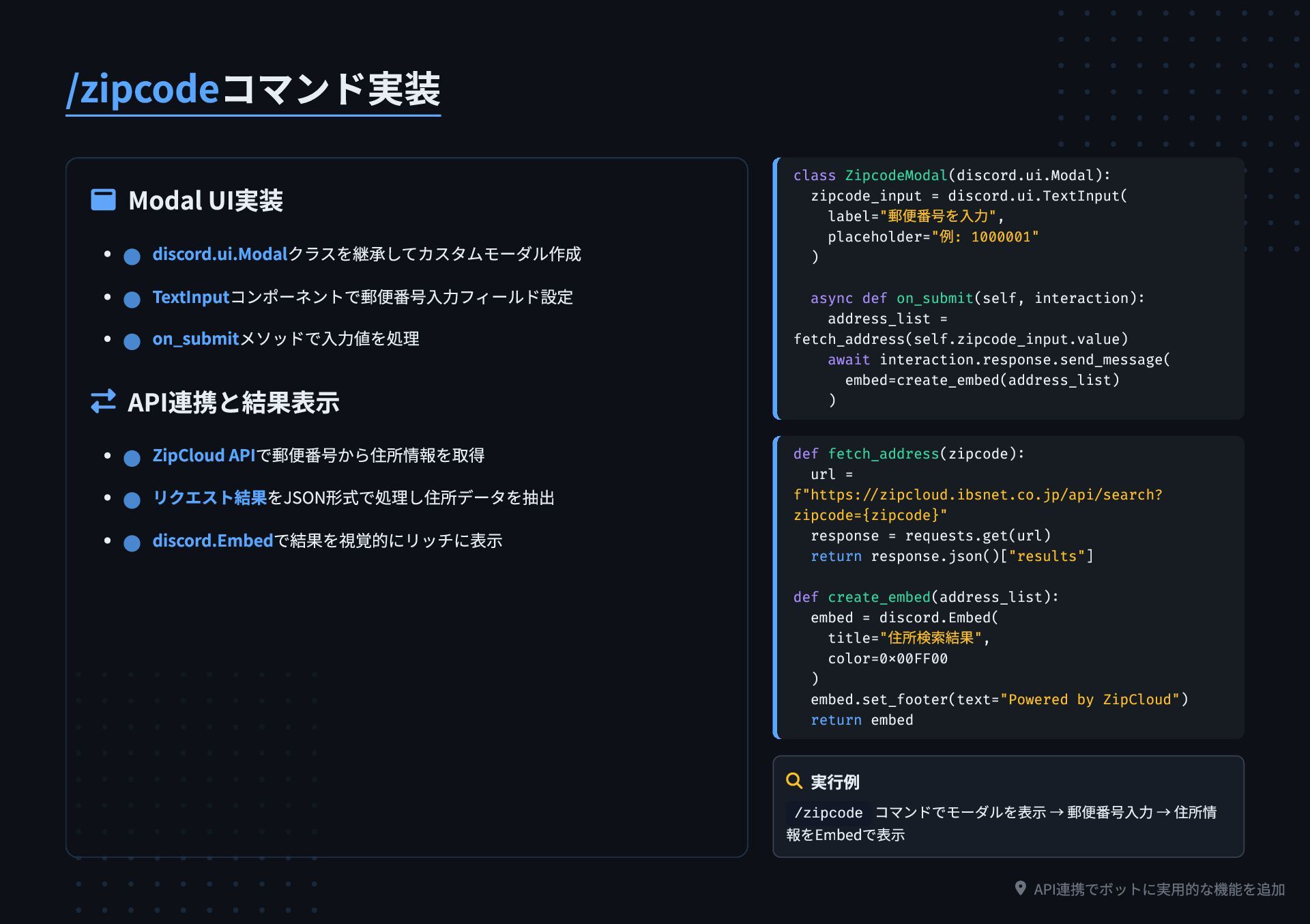
API連携でボットに実用的な機能を追加 /zipcodeコマンド実装 Modal UI実装 API連携と結果表示 class ZipcodeModal(discord.ui.Modal):
zipcode_input = discord.ui.TextInput( label="郵便番号を入力", placeholder="例: 1000001" ) async def on_submit(self, interaction): address_list = fetch_address(self.zipcode_input.value) await interaction.response.send_message( embed=create_embed(address_list) ) def fetch_address(zipcode): url = f"https://zipcloud.ibsnet.co.jp/api/search? zipcode={zipcode}" response = requests.get(url) return response.json()["results"] def create_embed(address_list): embed = discord.Embed( title="住所検索結果", color=0x00FF00 ) embed.set_footer(text="Powered by ZipCloud") return embed 実行例 /zipcode コマンドでモーダルを表示 → 郵便番号入力 → 住所情 報をEmbedで表示 discord.ui.Modalクラスを継承してカスタムモーダル作成 TextInputコンポーネントで郵便番号入力フィールド設定 on_submitメソッドで入力値を処理 ZipCloud APIで郵便番号から住所情報を取得 リクエスト結果をJSON形式で処理し住所データを抽出 discord.Embedで結果を視覚的にリッチに表示
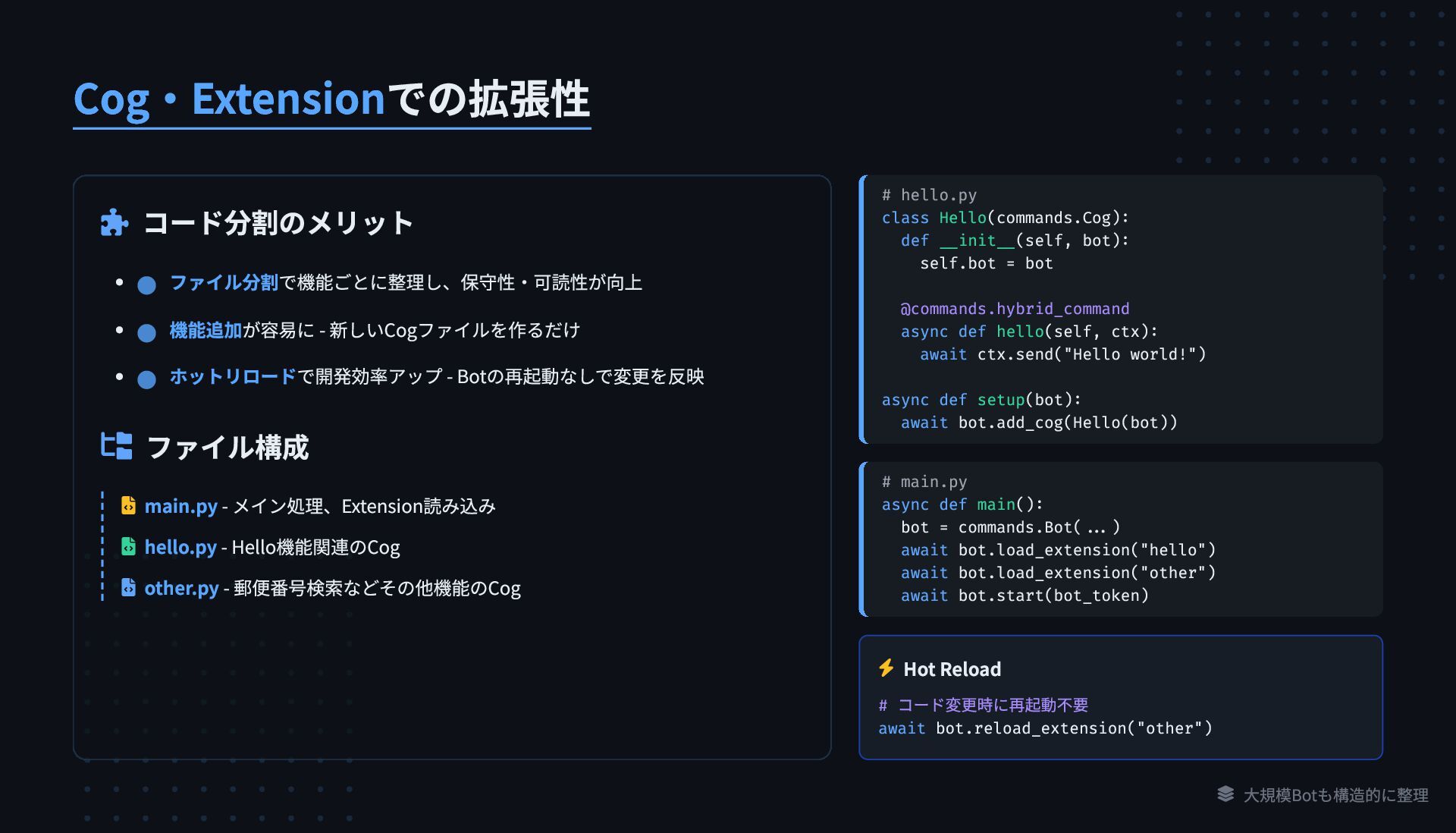
大規模Botも構造的に整理 Cog・Extensionでの拡張性 コード分割のメリット ファイル構成 main.py -
メイン処理、Extension読み込み hello.py - Hello機能関連のCog other.py - 郵便番号検索などその他機能のCog # hello.py class Hello(commands.Cog): def __init__(self, bot): self.bot = bot @commands.hybrid_command async def hello(self, ctx): await ctx.send("Hello world!") async def setup(bot): await bot.add_cog(Hello(bot)) # main.py async def main(): bot = commands.Bot(...) await bot.load_extension("hello") await bot.load_extension("other") await bot.start(bot_token) Hot Reload # コード変更時に再起動不要 await bot.reload_extension("other") ファイル分割で機能ごとに整理し、保守性・可読性が向上 機能追加が容易に - 新しいCogファイルを作るだけ ホットリロードで開発効率アップ - Botの再起動なしで変更を反映
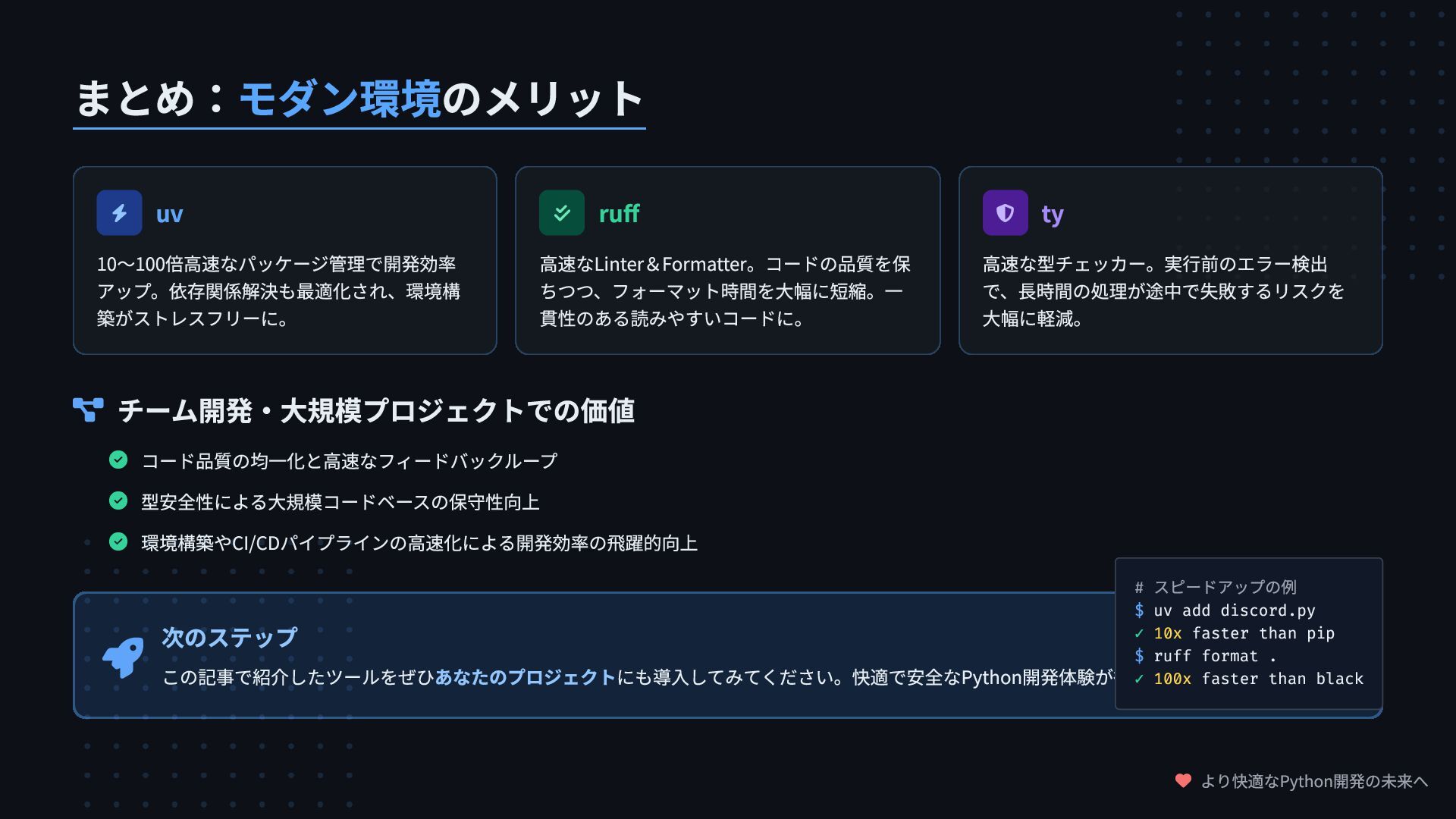
より快適なPython開発の未来へ まとめ:モダン環境のメリット uv 10〜100倍高速なパッケージ管理で開発効率 アップ。依存関係解決も最適化され、環境構 築がストレスフリーに。 ruff
高速なLinter&Formatter。コードの品質を保 ちつつ、フォーマット時間を大幅に短縮。一 貫性のある読みやすいコードに。 ty 高速な型チェッカー。実行前のエラー検出 で、長時間の処理が途中で失敗するリスクを 大幅に軽減。 チーム開発・大規模プロジェクトでの価値 コード品質の均一化と高速なフィードバックループ 型安全性による大規模コードベースの保守性向上 環境構築やCI/CDパイプラインの高速化による開発効率の飛躍的向上 次のステップ この記事で紹介したツールをぜひあなたのプロジェクトにも導入してみてください。快適で安全なPython開発体験が待っています! # スピードアップの例 $ uv add discord.py ✓ 10x faster than pip $ ruff format . ✓ 100x faster than black


 thirdlf03
 tmiket
 davidcarrasco
 baasie
 sergeychernyshev
 denniskardys
 addyosmani
 notwaldorf
 lauravandoore
 techseoconnect
 62gerente
 michielstock
 lindahogenes