Share
Embed
La migration de bases de données avec Django et South
Conférence donnée pour la Django Breizh 2012.
Ordoquy Xavier - Linovia
November 19, 2012
Transcript
18 slides
-
class Product(models.Model): name = models.CharField(max_length=32) Première itération $ python manage.py
syncdb Creating tables ... Creating table step1_project Installing custom SQL ... Installing indexes ... Installed 0 object(s) from 0 fixture(s) -
class Product(models.Model): name = models.CharField(max_length=32) description = models.CharField(max_length=64) Seconde itération
$ python manage.py syncdb Creating tables ... Installing custom SQL ... Installing indexes ... Installed 0 object(s) from 0 fixture(s) -
Et c’est le drame $ python manage.py shell Python 2.7.2
(default, Jun 20 2012, 16:23:33) >>> from demosouth.step1.models import Product >>> p = Product(name='test', description='demo') >>> p.save() Traceback (most recent call last): [...] DatabaseError: table step1_product has no column named description -
South • Pour sqlite, mysql, postgres • Migrations forward et
backward • Code de migration versionnable ! • utilisé par celery, sentry, django-cms... -
Fonctionnement • Le code: <app>/migration/00xx_*.py 0001_initial.py 0002_auto__add_field_product_task_status.py • La base:
SELECT * FROM south_migrationhistory; app_name | migration | applied projects | 0001_initial | 2012-06-20 09:15:01 projects | 0002_auto__add_..._status | 2012-06-21 06:12:25 -
Voir l’état courant $ python manage.py migrate --list accounts (*)
0001_initial projects (*) 0001_initial ( ) 0002_auto__add_field_product_task_status djcelery (*) 0001_initial (*) 0002_v25_changes -
Jouer une migration $ python manage.py migrate projects 0002 -
Soft matched migration 0002 to 0002_auto__add_[...]_status. Running migrations for projects: - Migrating forwards to 0002_auto__add_ [...]_status. > projects:0002_auto__add_ [...]_status -
Créer une migration $ python manage.py schemamigration projects --initial +
Added model projects.EventLog + Added model projects.Project + Added M2M table for project_manager on projects.Project [...] Created 0001_initial.py. You can now apply this migration with: ./manage.py migrate projects -
Exemple 1) Ajouter les tables de traduction 2) Remplir les
traductions 3) Supprimer les colonnes non traduites -
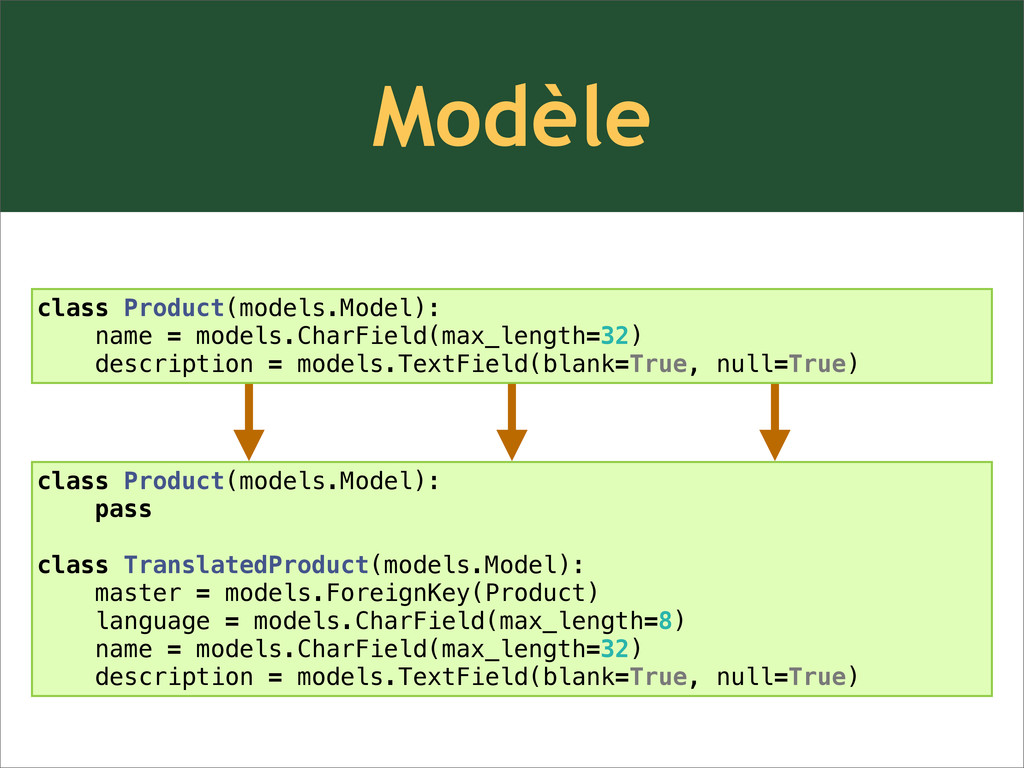
Modèle class Product(models.Model): name = models.CharField(max_length=32) description = models.TextField(blank=True, null=True)
class Product(models.Model): pass class TranslatedProduct(models.Model): master = models.ForeignKey(Product) language = models.CharField(max_length=8) name = models.CharField(max_length=32) description = models.TextField(blank=True, null=True) -
Nouvelle structure class Product(models.Model): name = models.CharField(max_length=32) description = models.TextField(blank=True,
null=True) class TranslatedProduct(models.Model): master = models.ForeignKey(Product) language = models.CharField(max_length=8) name = models.CharField(max_length=32) description = models.TextField(blank=True, null=True) $ python manage.py schemamigration shop --auto -
Migrations des données class Migration(DataMigration): def forwards(self, orm): for product
in orm.Product.objects.all(): trans = orm.ProductTranslation() trans.name = product.name trans.description = product.description trans.language_code = 'fr' trans.master = product trans.save() $ python manage.py datamigration shop default_translation Created 0003_default_translation.py -
Nettoyage class Product(models.Model): pass class TranslatedProduct(models.Model): master = models.ForeignKey(Product) language
= models.CharField(max_length=8) name = models.CharField(max_length=32) description = models.TextField(blank=True, null=True) $ python manage.py schemamigration shop --auto -
Installation $ pip install south settings.py : INSTALLED_APPS = (
[...] 'south', ) -
Retour d’expérience • ça marche • indépendant de la base
• très simple dans 90% des cas • de la rigueur ! • déploiements simples ! • indispensable pour les applications génériques