Upgrade to Pro — share decks privately, control downloads, hide ads and more …

Chinese Binary Options Guide

Avatar for xpmarkets xpmarkets
March 04, 2013
260

Chinese Binary Options Guide

How to Get a Binary Option Account in 6 steps.

Avatar for xpmarkets

xpmarkets

March 04, 2013

Transcript

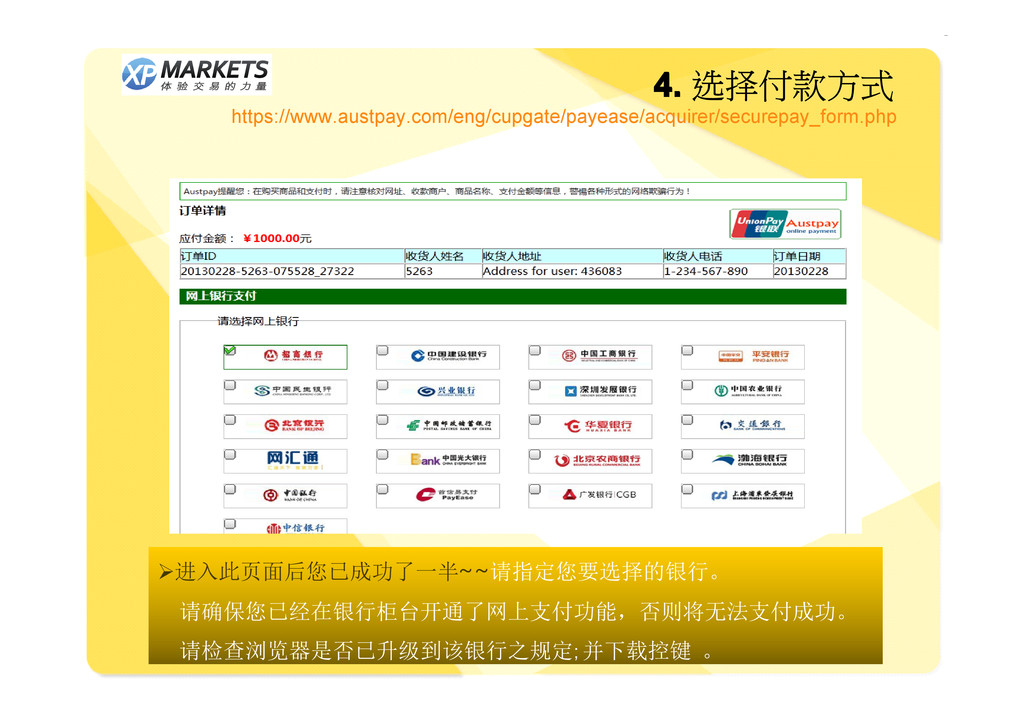
  1. 二元期权开户流程 The steps to open an account 1. 登入注册- sigh

    up 2. 激活MAIL- confirm email 3. 存款入金- deposit money 4. 选择付款方式- choose bank 5. 订单确认- receive bank approval 6. 常见问题处理- frequent problems 恭喜您开户成功... ... ... ...您已可以马上进行操作- - - - Congratulations Congratulations Congratulations Congratulations – – – – you have successfully you have successfully you have successfully you have successfully opened Xpmarkets account opened Xpmarkets account opened Xpmarkets account opened Xpmarkets account
  2. 1. 登入注册 https://www.xpmarkets.com/zh/ � 请选择语言 注册候您将进入另一画面引导 並请确认填写内容无误 � 特别注意 :

    : : : 如您所在的位置为中国, , , , 请务必填写 China, China, China, China, 以免日后无法 以人民币充值以及无法使用银联系 统入金
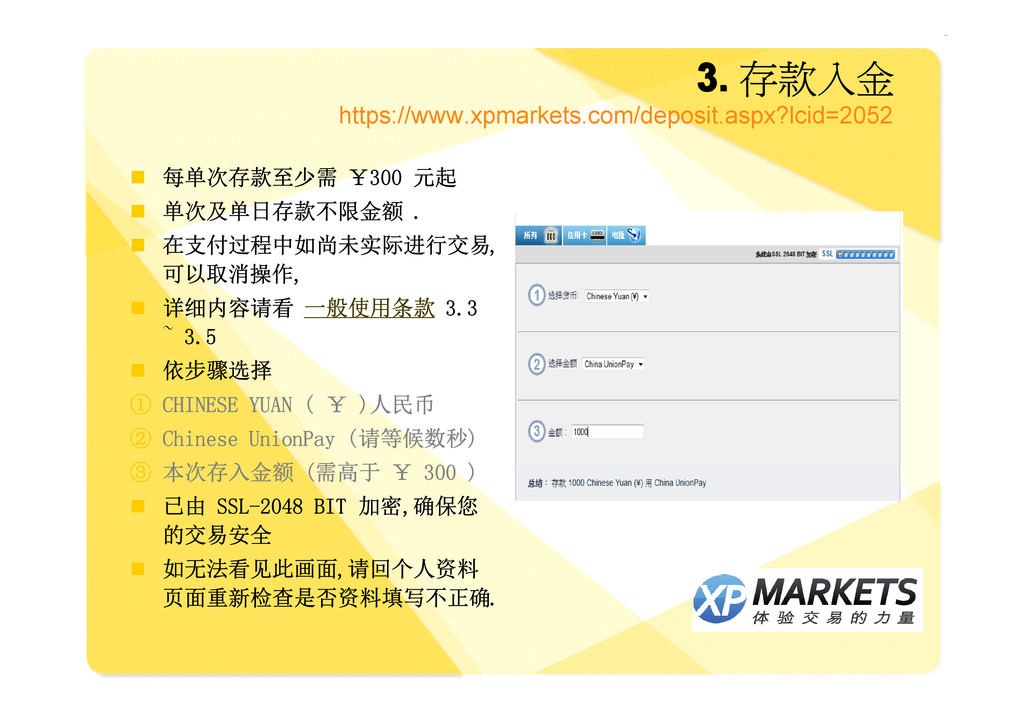
  3. 3. 3. 3. 3. 存款入金 https://www.xpmarkets.com/deposit.aspx?lcid=2052 � 每单次存款至少需 ¥300 元起

    � 单次及单日存款不限金额 . � 在支付过程中如尚未实际进行交易, 可以取消操作, � 详细内容请看 一般使用条款 3.3 ~ 3.5 � 依步骤选择 ① CHINESE YUAN ( ¥ )人民币 ② Chinese UnionPay (请等候数秒) ③ 本次存入金额 (需高于 ¥ 300 ) � 已由 SSL-2048 BIT 加密,确保您 的交易安全 � 如无法看见此画面,请回个人资料 页面重新检查是否资料填写不正确.
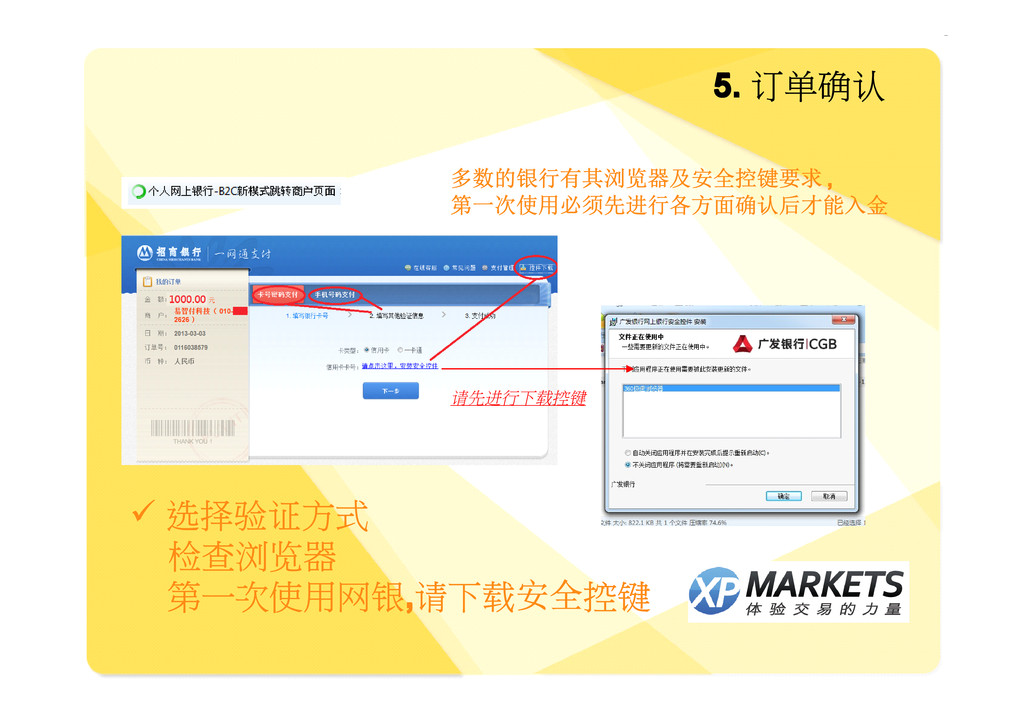
  4. 5. 5. 5. 5. 订单确认 � 选择验证方式 检查浏览器 第一次使用网银, ,

    , ,请下载安全控键 请先进行下载控键 多数的银行有其浏览器及安全控键要求 , , , , 第一次使用必须先进行各方面确认后才能入金
  5. 5. 5. 5. 5. 订单确认 .... .... .... ....恭喜您开户成功... ...

    ... ... � 现在, , , ,您可以进入首页, , , , 开始进行您的投资选项
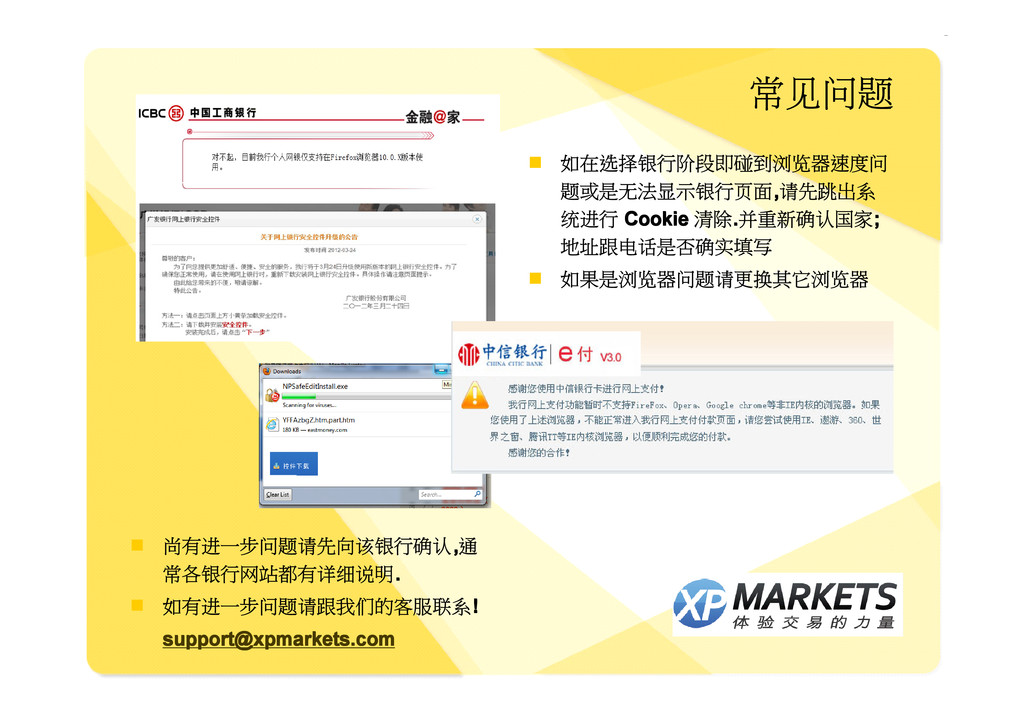
  6. 常见问题 � 如在选择银行阶段即碰到浏览器速度问 题或是无法显示银行页面, , , ,请先跳出系 统进行 Cookie Cookie

    Cookie Cookie 清除. . . .并重新确认国家; ; ; ; 地址跟电话是否确实填写 � 如果是浏览器问题请更换其它浏览器 � 尚有进一步问题请先向该银行确认, , , ,通 常各银行网站都有详细说明. . . . � 如有进一步问题请跟我们的客服联系! ! ! ! [email protected] [email protected] [email protected] [email protected]