2 - Laurent BUTTI – France Télécom Division R&D Agenda A few reminders on Wi-Fi technologies Overview of possible attacks Wi-Fi corporate access architectures Open issues Wi-Fi intrusion detection technology Some recommandations
3 - Laurent BUTTI – France Télécom Division R&D Introduction (1/2) Wi-Fi is an acronym defined by the Wi-Fi Alliance Standards specified in the IEEE 802.11 Working Group Topics are Group 802 : IEEE Standard for Local and Metropolitan Area Network Part 11 : Wireless LAN Medium Access Control (MAC) and Physical Layer (PHY) Specifications Widely available technology Entreprise Residential (wireless gateways) Hot spots
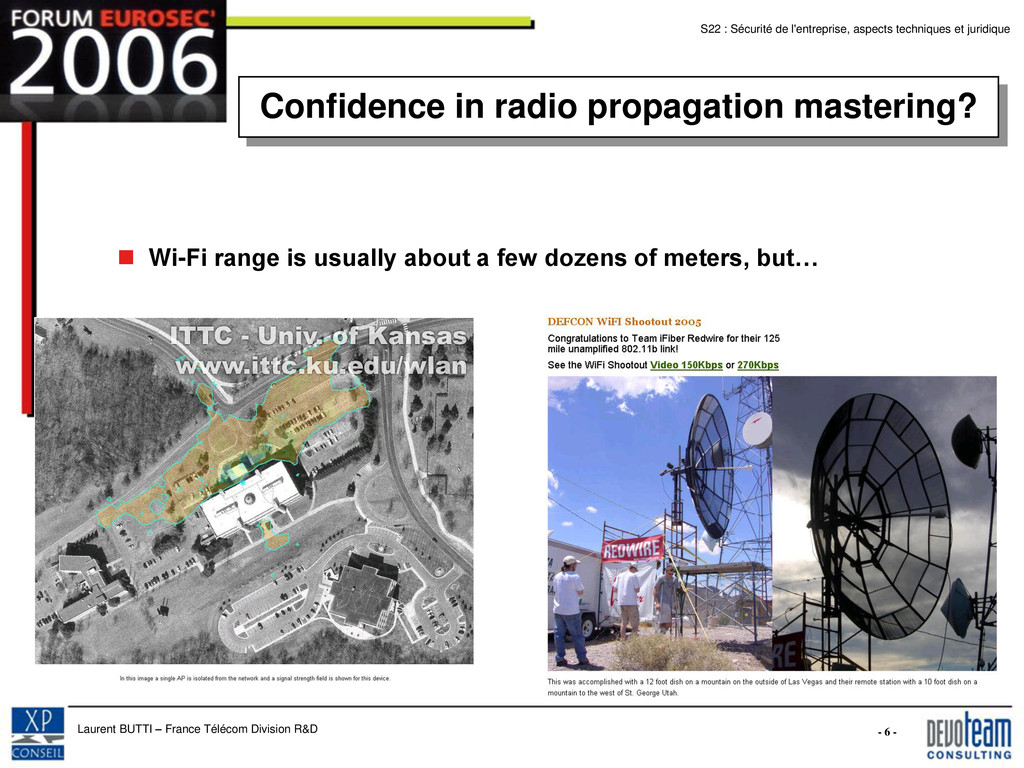
4 - Laurent BUTTI – France Télécom Division R&D Introduction (2/2) Wireless technologies are critical from a security perspective Particularly in corporate environments Any wireless deployment may have serious security impacts Radio propagation is hardly predictable Mastering Wi-Fi deployments in corporate environments is a clear challenge! Wi-Fi corporate access deployment Wi-Fi intrusion detection deployment
5 - Laurent BUTTI – France Télécom Division R&D A bad design… IEEE 802.11-1999 suffered from critical security issues Security mechanisms were unable to satisfy Authentication Data confidentiality and integrity WEP conceptual weaknesses were heavily buzzed WEP is unpractical in corporate environments (shared secret) Most weaknesses were demonstrated in publicly available tools WEP cracking Trafic injection Etc…
7 - Laurent BUTTI – France Télécom Division R&D Normative Enhancements IEEE 802.11i, Medium Access Control (MAC) Security Enhancements, was ratified on June, 2004 It brings some enhanced security mechanisms Medium access control and flexible authentication mechanisms thanks to a framework for authentication transport IEEE 802.1X : Port-Based Network Access Control EAP : Extensible Authentication Protocol Newly designed crypto-protocols TKIP : Temporal Key Integrity Protocol CCMP : CBC-MAC Protocol Key derivation and distribution 4-Way Handshake and Group Key Handshake
8 - Laurent BUTTI – France Télécom Division R&D Wi-Fi Corporate Access (1/2) Securing Wi-Fi data communications thanks to IPsec is classic stuff Deployed at France Télécom Division R&D since early 2002 Use Wi-Fi « open » mode and secure communications above layer 3 WEP is clearly unuseful and cannot improve the security level of the deployed architecture IPsec protocol is considered robust If authentication is robust (thanks to certificates) If selected and negociated crypto-protocol is robust
9 - Laurent BUTTI – France Télécom Division R&D Wi-Fi Corporate Access (2/2) Newly supported security mechanisms in Wi-Fi Protected Access standard (WPA/WPA2) are available A large number of wireless cards and access points support these mechanisms Since 2/3 years, certified products are widely available Refer to http://www.wi-fi.org/ Deploying Wi-Fi secure access thanks to WPA/WPA2 is possible Deployed at France Télécom Division R&D since late 2003 As usual, you must take into account about Robust authentication Robust confidentiality and integrity (mandatory TKIP, recommended CCMP) Robust network architecture (VLAN logical segmentation)
10 - Laurent BUTTI – France Télécom Division R&D Wi-Fi Corporate Access Recommandations Use robust authentication Certificates whenever possible IKE with certificates for IPsec tunneling EAP-TLS for WPA/WPA2 Use smart card storage for private keys One Time Password is also an option Use robust crypto-protocols for data communications 3DES/AES for IPsec tunneling CCMP for WPA2 and TKIP for WPA Consider Wi-Fi access as external networks Logical VLAN segmentation and network filtering
11 - Laurent BUTTI – France Télécom Division R&D Open Issues Robust Wi-Fi access deployments is possible Confidence in security mechanisms if correctly implemented But there are still open issues Weakest links are on client and network infrastructure sides
12 - Laurent BUTTI – France Télécom Division R&D Weakest Link n°1: Client Side Laptops are usually shipped by default with Wi-Fi chipsets Operating systems and auto configuration processes enhance user connectivity Every connection to an open Wi-Fi network update the Preferred Networks List Firstly requested when probing for wireless networks Just create a fake access point emulating these preferred networks The attacker will be able to catch the client and then launch any malicious activity against him Wi-Fi/Ethernet double-attachment is also possible Critical issue!
13 - Laurent BUTTI – France Télécom Division R&D Client Configuration Requirements If Wi-Fi is not a requirement, deactivate physically Wi-Fi Use a double-attachment prevention system Clean regularly Preferred Networks List Use a well configured firewall
14 - Laurent BUTTI – France Télécom Division R&D Weakest Link n°2: Network Infrastructure An open access point interconnected to a wired network is a major security breach Level 2 access without any authentication to all corporate ressources (depending on internal filtering policies) RJ45 plugs in the street ;-) Usually, access control is not performed within networks but at interconnections Misconfigured access points Error prone configurations and interconnexions A fact: every corporate is potentially vulnerable Even environments without Wi-Fi may be attacked Question: how to detect and mitigate these critical security incidents?
15 - Laurent BUTTI – France Télécom Division R&D Wi-Fi Intrusion Detection (1/3) Classical supervision tools cannot listen to the radiowaves Classical tools cannot detect A fake access point catching every corporate laptop A rogue access point interconnected to your wired networks Malicious activities like WarDriving Radio denial of service Listening to the radio side is a requirement! Wi-Fi Intrusion detection technology was bornt
16 - Laurent BUTTI – France Télécom Division R&D Wi-Fi Intrusion Detection (2/3) Listening to the radio will make possible to detect Clients and access points that are « speaking » Known attacks like MAC spoofing WarDriving Trafic injection … Wi-Fi intrusion detection goals are to Detect illegitimate access points Evaluate them in order to determine if they are interconnected to wired networks or not Geolocate any equipment that was detected as the source of a malicious event
17 - Laurent BUTTI – France Télécom Division R&D Wi-Fi Intrusion Detection (3/3) Will automatically audit Wi-Fi networks on the protected network Replacing periodic manual Wi-Fi audits Proactive reaction when a critical security issue is discovered Is a new security event log Will inform network administrators in real time Counter-measures (intrusion prevention) are also possible On radio side in order to prevent the clients from associating to rogue and fake access points On wired side in order to deactivate switch ports where a rogue access point was spotted But must be used carefully DoSing neighbors is not an option!
18 - Laurent BUTTI – France Télécom Division R&D Wi-Fi Intrusion Detection Requirements Must be security evaluated in labs Results are somewhat very variable Attacks aimed at Wi-Fi intrusion detection systems are becoming available Log filling Select solutions that Have minimal impacts on your architecture Have geolocation capabilities Have intrusion prevention techniques Deploy enough wireless sensors at the frontier of your physical perimeter
19 - Laurent BUTTI – France Télécom Division R&D Lessons Learnt Wi-Fi corporate access thanks to IPsec and WPA/WPA2 Robust authentication thanks to certificates and smart cards Robust confidentiality and integrity mandatory Wi-Fi visitor access thanks to a captive portal technique Authentification par jeton crée dynamiquement à l’enregistrement Double-attachment prevention Internal tool Rogue access point and wireless attacks detection Design, development and deployment of a fully-featured wireless intrusion detection system
20 - Laurent BUTTI – France Télécom Division R&D Requirements Apply a restrictive network security policy especially in risky environments (meeting rooms, labs…) Do not activate RJ45 plugs by default Activate ‘Port Security’ feature Activate MAC filtering on switches Keep a list of Wi-Fi equipements Network cards Access points and configuration (MAC address, SSID name…) Laptop configuration hardening Physically deactivate Wi-Fi if not used Anti double-attachment tool Well configured firewall Deploy a Wi-Fi intrusion detection system Listen for the radio
21 - Laurent BUTTI – France Télécom Division R&D Conclusions Radio technologies must be taken seriously into account Do to consider them as negligible Mastering wireless deployments is a global approach Restrictive network security policy Laptop configuration hardening Robust Wi-Fi corporate access Wi-Fi intrusion detection system deployment Wi-Fi was the first wireless technology to be widely deployed in corporate environments, but will not be the last one New potential security breachs that must be addressed!


 0xd012
 shumei_ito
 grimoh
 taketakekaho
 bitkey
 yuuuuuuu168
 willnet
 kairim0
 occhi
occhi
 teamlab
 4o1sobblue
 shogo4131
 ezaki
ezaki
 jmmastey
 lindahogenes
 baasie
 lara
lara
 thekraken
 honzajavorek
 aki_iinuma
 reverentgeek
 marktimemedia
 katarinadahlin
 michielstock
 axbom
axbom