Upgrade to Pro
— share decks privately, control downloads, hide ads and more …
Speaker Deck
Sign up for free
Menu
Search
Features
All features
Private URLs
Password Protection
Custom URLS
Scheduled publishing
Remove Branding
Restrict embedding
Deck Collections
Notes
Features
All features
Private URLs
Password Protection
Custom URLS
Scheduled publishing
Remove Branding
Restrict embedding
Deck Collections
Notes
Explore
Featured decks
Featured speakers
Programming
Technology
Storyboards
Explore
Featured decks
Featured speakers
Programming
Technology
Storyboards
Pricing
Search
Sign in
Sign up for free
Tasking Managerの使い方
Search
Sponsored
·
Your Podcast. Everywhere. Effortlessly.
Share. Educate. Inspire. Entertain. You do you. We'll handle the rest.
→
akariiiiiiiiiii
June 12, 2018
34
0
Share
Embed
Copy iframe code
Copy JS code
Copy link
Start on current slide
Tasking Managerの使い方
akariiiiiiiiiii
June 12, 2018
More Decks by akariiiiiiiiiii
See All by akariiiiiiiiiii
Validateマニュアル
akariiiiiiiiiii
0
25
Tasking_Managerの使い方.pdf
akariiiiiiiiiii
0
26
Featured
See All Featured
Producing Creativity
orderedlist
PRO
348
41k
Six Lessons from altMBA
skipperchong
29
4.5k
Save Time (by Creating Custom Rails Generators)
garrettdimon
PRO
33
5.2k
Imperfection Machines: The Place of Print at Facebook
scottboms
270
14k
Breaking role norms: Why Content Design is so much more than writing copy - Taylor Woolridge
uxyall
1
450
Crafting Experiences
bethany
1
380
Discover your Explorer Soul
emna__ayadi
2
1.3k
How to make the Groovebox
asonas
2
2.5k
Keith and Marios Guide to Fast Websites
keithpitt
413
23k
Avoiding the “Bad Training, Faster” Trap in the Age of AI
tmiket
0
270
AI in Enterprises - Java and Open Source to the Rescue
ivargrimstad
0
1.5k
A Guide to Academic Writing Using Generative AI - A Workshop
ks91
PRO
1
520
Transcript
Tasking Manager の使い方 1A118177 吉川あかり
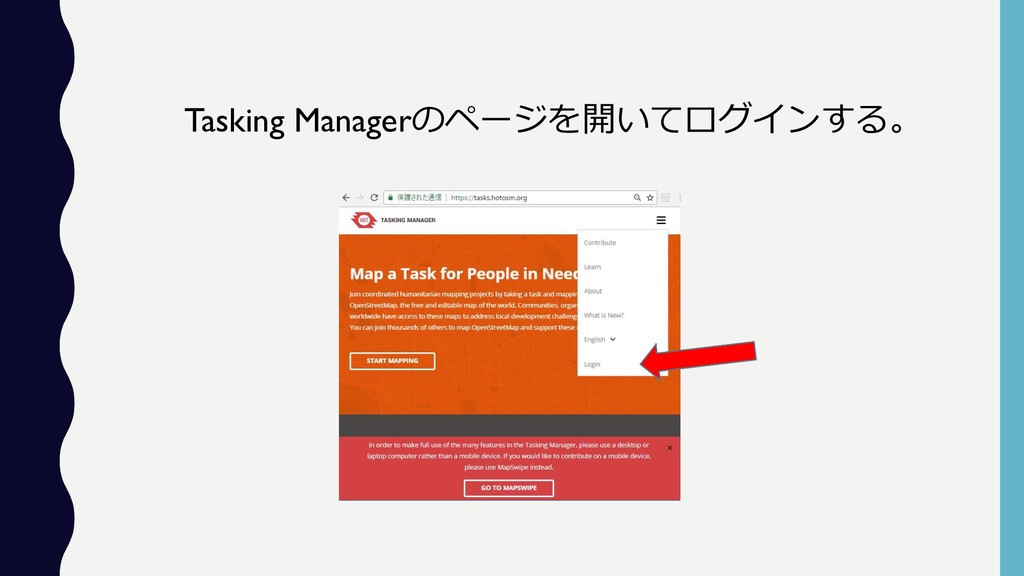
Tasking Managerのページを開いてログインする。
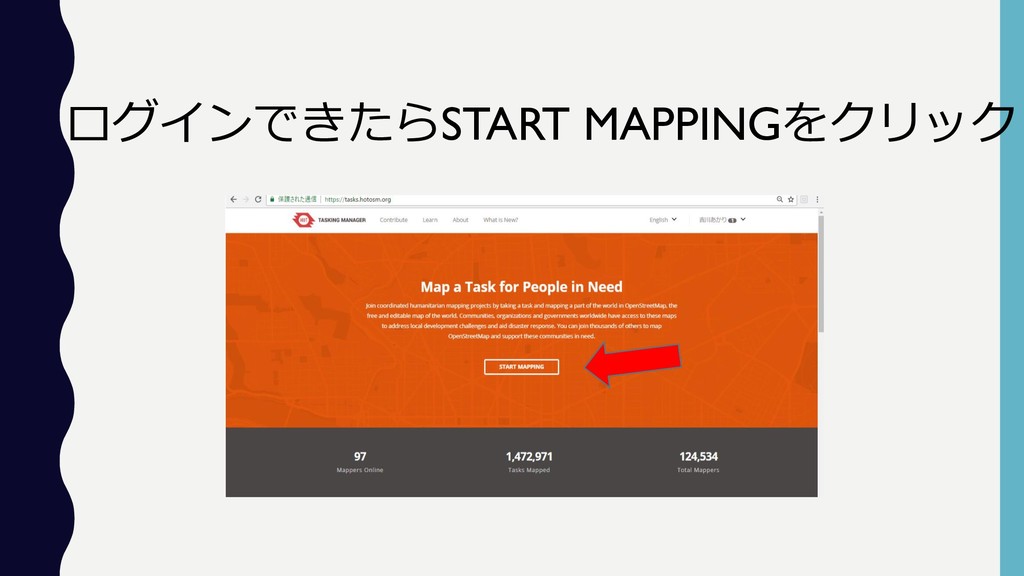
ログインできたらSTART MAPPINGをクリック
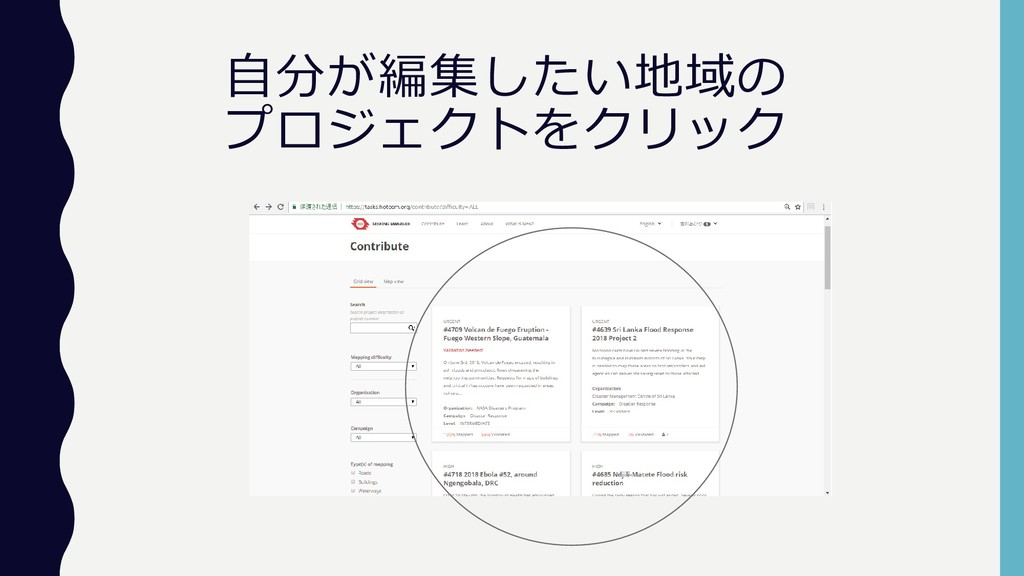
自分が編集したい地域の プロジェクトをクリック
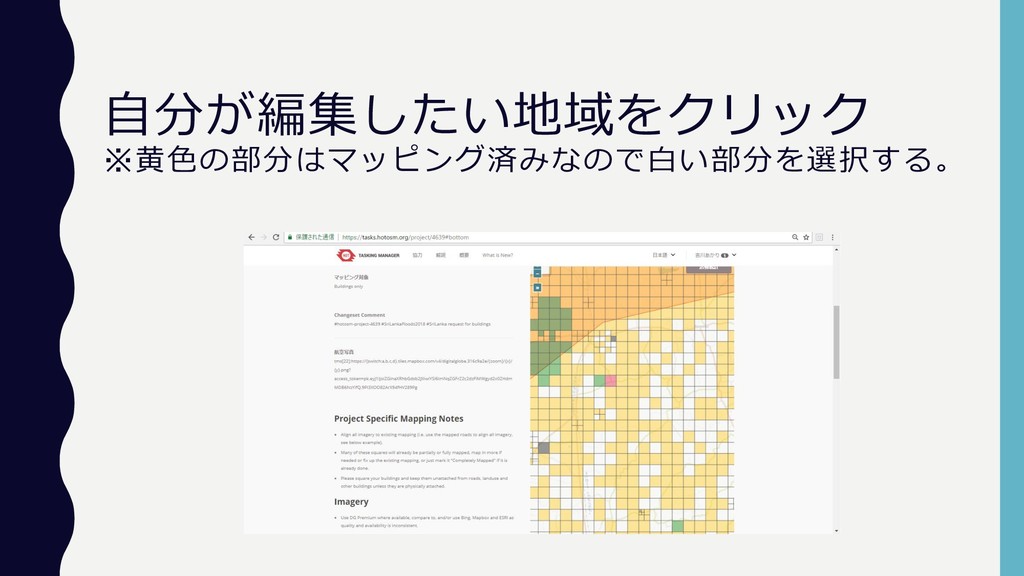
自分が編集したい地域をクリック ※黄色の部分はマッピング済みなので白い部分を選択する。
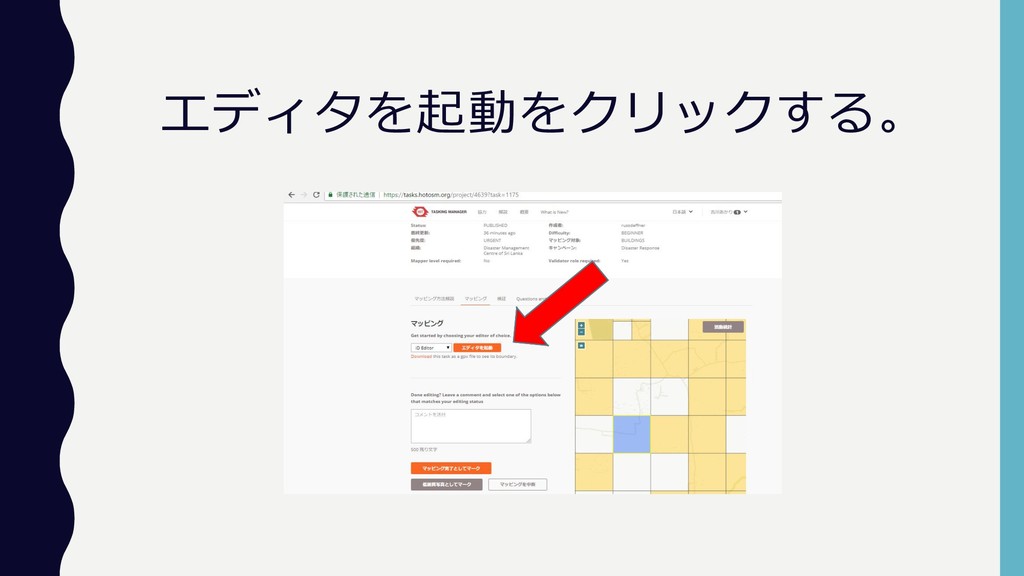
エディタを起動をクリックする。
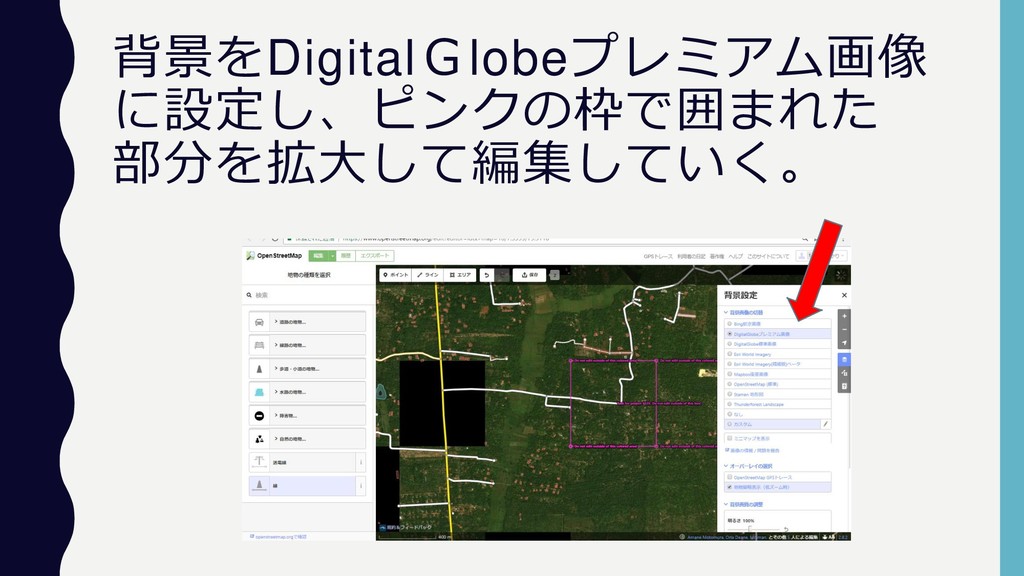
背景をDigitalGlobeプレミアム画像 に設定し、ピンクの枠で囲まれた 部分を拡大して編集していく。
エリアをクリックしたら建物を拡大 し、四方をクリックで囲んでいく。 右クリックで直行化する。
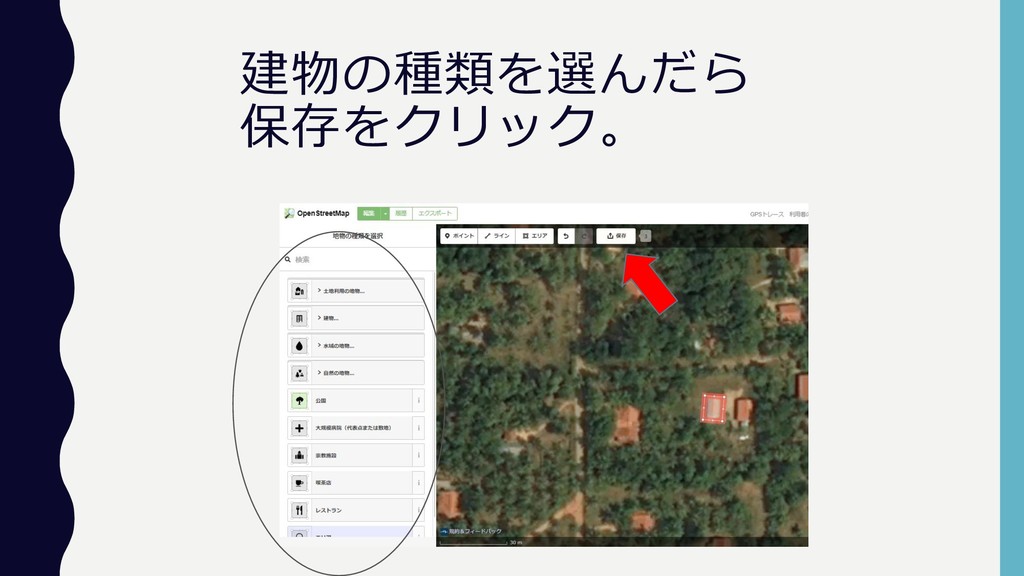
建物の種類を選んだら 保存をクリック。
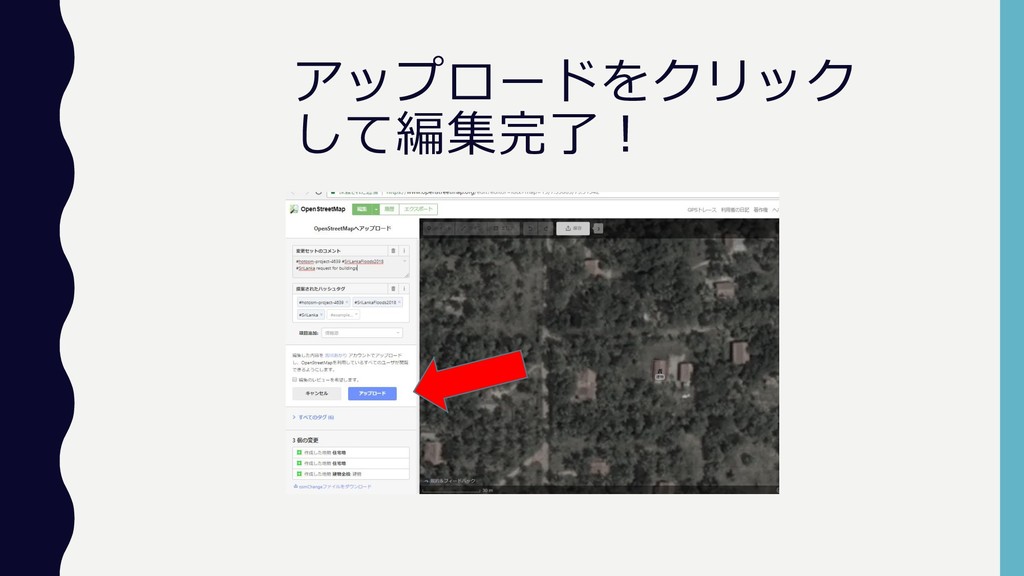
アップロードをクリック して編集完了!
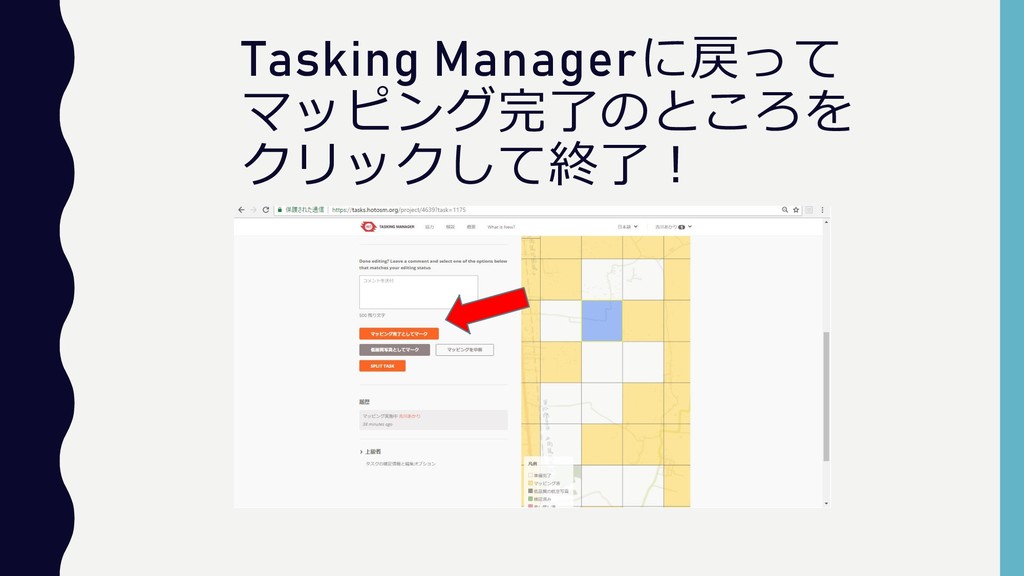
Tasking Managerに戻って マッピング完了のところを クリックして終了!


 akariiiiiiiiiii
 orderedlist
 skipperchong
 garrettdimon
 scottboms
 uxyall
 bethany
 emna__ayadi
 asonas
 keithpitt
 tmiket
 ivargrimstad
 ks91
ks91