Share
Embed
Building an API with Apigility
Apigility is a project that allows you to easily create a web service without having to worry about the nitty-gritty details. Which details? Well, Apigility will handle content negotiation, error handling, versioning and authentication for you, allowing you to concentrate on your application.
In this introductory talk we look at what Apigility is and how to create a simple REST API that allows us to view a list of music albums, showing how to start using Apigility and how to publish an API using this tool.
Rob Allen
February 20, 2015
Transcript
54 slides
-
Things to consider Content negotiation HTTP method negotiation Error reporting
Versioning Discovery Validation Authentication Authorisation Documentation -
API Architecture RPC (Remote Procedure Call) • client executes procedure
on server • POST /send_email or GET /current_time REST (REpresentational State Transfer) • client uses HTTP verbs to manage resources on server • stateless • GET /albums or PUT /albums/1 -
Apigility: Opinionated API builder Simplify the creation and maintenance of
useful, easy to consume, and well structured application programming interfaces. • Administration system • Runtime API engine • PHP, built on Zend Framework 2 -
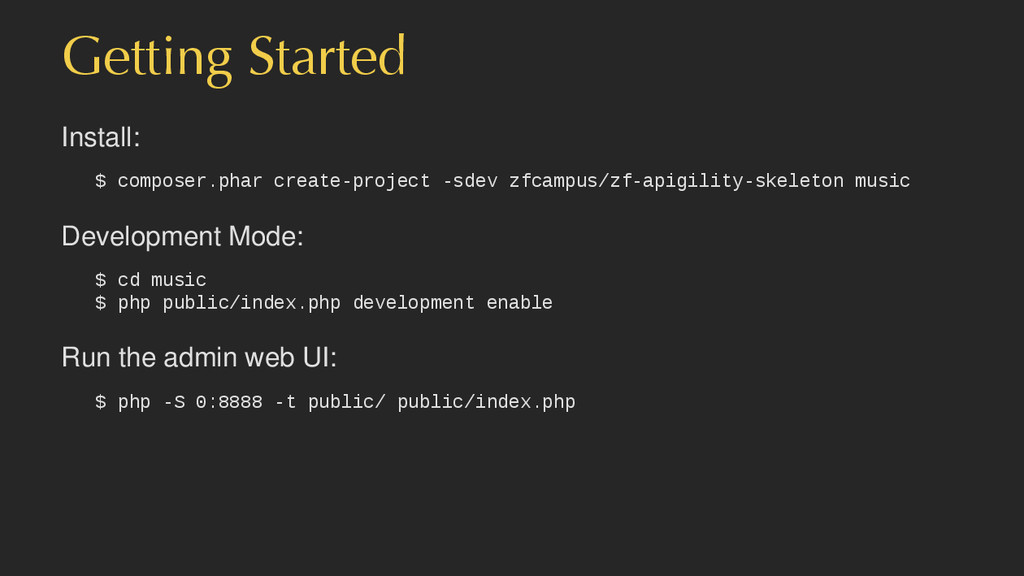
Getting Started Install: $ composer.phar create-project -sdev zfcampus/zf-apigility-skeleton music Development
Mode: $ cd music $ php public/index.php development enable Run the admin web UI: $ php -S 0:8888 -t public/ public/index.php -
Code Apigility has creates a module called Ping for our
API. The code is in the src/Ping/V1/Rpc/Ping directory Classes: • PingControllerFactory • PingController (contains pingAction()) You need to write the action’s code! -
JSON $ httpie -j http://localhost:8888/ping HTTP/1.1 200 OK Host: localhost:8888
Connection: close X-Powered-By: PHP/5.6.5 Content-Type: application/json; charset=utf-8 {"ack":1423431025} -
Method negotiation $ httpie -j POST http://localhost:8888/ping HTTP/1.1 405 Method
Not Allowed Host: localhost:8888 Connection: close X-Powered-By: PHP/5.6.5 Allow: GET Content-type: text/html; charset=UTF-8 -
OPTIONS handling $ httpie -j OPTIONS http://localhost:8888/ping HTTP/1.1 200 OK
Host: localhost:8888 Connection: close X-Powered-By: PHP/5.6.5 Allow: GET Content-type: text/html; charset=UTF-8 -
Error reporting (http-problem) $ httpie -j http://localhost:8888/asdf HTTP/1.1 404 Not
Found Connection: close Content-Type: application/problem+json Host: localhost:8888 X-Powered-By: PHP/5.6.5 { "detail": "Page not found.", "status": 404, "title": "Not Found", "type": "http://www.w3.org/Protocols/rfc2616/rfc2616-sec10.html" } ref: https://tools.ietf.org/html/draft-ietf-appsawg-http-problem -
Accept checking $ httpie http://localhost:8888/ping Accept:application/xml HTTP/1.1 406 Not Acceptable
Connection: close Content-Type: application/problem+json Host: localhost:8888 X-Powered-By: PHP/5.6.5 { "detail": "Cannot honor Accept type specified", "status": 406, "title": "Not Acceptable", "type": "http://www.w3.org/Protocols/rfc2616/rfc2616-sec10.html" } -
Versioning New version changes the namespace <?php namespace Ping\V2\Rpc\Ping; use
Zend\Mvc\Controller\AbstractActionController; class PingController extends AbstractActionController { public function pingAction() { return ['ack' => date('Y-m-d H:i:s')]; } } -
Versioning $ httpie -b -j http://localhost:8888/v1/ping {"ack":1422936306} $ httpie -b
http://localhost:8888/ping 'Accept: application/vnd.ping.v1+json' {"ack":1422936306} $ httpie -b -j http://localhost:8888/v2/ping {"ack":"2015-02-03 04:05:06"} $ httpie -b http://localhost:8888/ping 'Accept: application/vnd.ping.v2+json' {"ack":"2015-02-03 04:05:06"} Note that the default is version 1: $ httpie -b -j http://localhost:8888/ping {"ack":1422936306} -
Two types Database connected API • Use DB adapter, specify
table, All done! • Hard to significantly customise Code connected API • You do all the work • Functionality is all down to you (fill out the stubs) • Persistence is your problem too -
What did we get? • Full RESTful CRUD access to
the album table • Hypermedia links in the JSON output • Pagination • Everything we got with RPC APIs too! • Versioning • HTTP method control • Accept & Content-Type checking • Error reporting -
Code Apigility has creates a module called Music for our
API. The code is in the src/Music/V1/Rest/Album directory Classes: AlbumCollection album collection (Paginator) AlbumEntity single album (ArrayObject) There is no need to alter these classes -
Hypermedia in JSON (Single album) Hypermedia Application Language (HAL): application/hal+json
{ "_links": { "self": { "href": "http://localhost:8888/albums/3" } }, "artist": "Mark Ronson", "id": "3", "title": "Uptown Special" } HATEOAS - Hypertext as the Engine of Application State http://roy.gbiv.com/untangled/2008/rest-apis-must-be-hypertext-driven -
Hypermedia in JSON (Collection) Hypermedia Application Language (HAL): application/hal+json {
"_embedded": { "album": [ /* Array of Album resources here */ ] }, "_links": { "first": { "href": "http://localhost:8888/albums" }, "last": { "href": "http://localhost:8888/albums?page=2" }, "self": { "href": "http://localhost:8888/albums?page=1" } }, "page_count": 1, "page_size": 50, "total_items": 66 } -
Hyperlinking: Pagination Automatic via Zend\Paginator\Paginator { _links: { self: {
href: "/api/albums?page=3" }, first: { href: "/api/albums" }, last: { href: "/api/albums?page=14" }, prev: { href: "/api/albums?page=2" }, next: { href: "/api/albums?page=4" } } } -
Validation • Built into the Apigility admin • Tested when
routing: very fast to fail • Correct 4xx return codes: • 400 Client Error if no fields match • 422 Unprocessable Entity when validation errors occur -
Validation POST with an an empty artist to the collection
$ curl -s -X POST -H "Content-type: application/json" \ -H "Accept: application/vnd.music.v1+json" \ -d '{"title":"Greatest Hits", "artist":""}' \ http://localhost:8888/albums | python -mjson.tool -
Response Header: HTTP/1.1 422 Unprocessable Entity Body: { "detail": "Failed
Validation", "status": 422, "title": "Unprocessable Entity", "type": "http://www.w3.org/Protocols/rfc2616/rfc2616-sec10.html", "validation_messages": { "artist": { "isEmpty": "Value is required and can't be empty" } } } -
Documentation • Written within admin while setting up API •
Automatically populated via validation admin • User documentation: • apigility/documentation/{API name}/V1 • JSON or HTMl based on accept header • Swagger available too -
Code-connected services For more complicated endpoints: src/Music/V1/Rest/Loan Classes: LoanResource entry
point to service LoanCollection a collection of loans LoanEntity a single album -
LoanResource class Methods for the collection: /loans Class method HTTP
method Notes fetchAll GET retrieve all items create POST create an item replaceList PUT replace all items deleteList DELETE Delete all items -
LoanResource class Methods for a single resource: /loans/[loan_id] Class method
HTTP method Notes fetch GET retrieve an item patch PATCH update some fields update PUT replace an item delete DELETE delete an item -
The data model is your code! // Fill in LoanEntity
class LoanEntity { protected $id; protected $artist; protected $title; } // Create other classes as required class LoanService { public function fetchAll() { /* .. */ } public function fetchOne() { /* .. */ } public function createLoan() { /* .. */ } public function saveLoan() { /* .. */ } public function deleteLoan() { /* .. */ } } -
LoanResource code class LoanResource extends AbstractResourceListener { public function fetchAll($params
= array()) { // return a LoanCollection return $this->service->fetchAll($params); } public function create($data) { /* create a new loan */ } public function delete($id) { /* delete a loan */ } public function fetch($id) { /* fetch a loan*/ } public function patch($id, $data) { /* update a loan */ } public function update($id, $data) { /* replace a loan */ } } Your code controls everything! -
Authentication • HTTP Basic and Digest (for internal APIs) •
OAuth2 (for public APIs) • Event-driven, to accommodate anything else • Returns problem response early • Correct errors: 401, 403, etc. -
Authentication • HTTP Basic uses htpassword file • HTTP Digest
uses htdigest file • OAuth2 uses database. • knpuniversity.com/screencast/oauth/intro • bshaffer.github.io/oauth2-server-php-docs/ -
OAuth2 process 1. Get an access token. 2. Send it
on all subsequent requests: Authorization: Bearer 5ce33e13e66c5ff723f997387e183c -
Password grant type Send username/password & get back a token
- good for trusted clients POST /oauth { "grant_type": "password", "client_id" : "testclient", "username": "[email protected]", "password": "password" } Returns: { "access_token": "7f4ac44eb70616204748c41c457b8867e", "expires_in": 3600, "token_type": "Bearer", "scope": null, "refresh_token": "3f0d94d87dd891813feddcb4b24f0963" } -
Request authorization code Redirect user to this URL: http://localhost:8888/oauth/authorize?response_type=code &client_id=testclient&redirect_uri=/oauth/receivecode
Clicking Yes will redirect to 'redirect_uri' with the authorization code in the query string. (You can customise the style!) -
Convert authorization code to token Request access token using authorisation
code POST /oauth { "grant_type": "authorization_code", "client_id" : "testclient", "client_secret": "testpass", "code": "a4dd64ffb43e6bfe16d47acfab1e68d9c" } Returns: { "access_token": "907c762e069589c2cd2a229cdae7b8778", "expires_in": 3600, "token_type": "Bearer", "refresh_token": "43018382188f462f6b0e5784dd44c36f" } -
Protect your API via code in your Resource class: use
ZF\MvcAuth\Identity\AuthenticatedIdentity as Identity; // within a method: if ($this->getIdentity() instanceof Identity) { $identity = $this->getIdentity() $user = $identity->getAuthenticationIdentity(); } -
To sum up Apigility provides the boring bits of API
building: • Content negotiation • Discovery (HATEOS) via application/hal+json • Error reporting via application/problem+json • Versioning • Validation • Authentication • Documentation