Upgrade to Pro
— share decks privately, control downloads, hide ads and more …
Speaker Deck
Sign up for free
Menu
Search
Features
All features
Private URLs
Password Protection
Custom URLS
Scheduled publishing
Remove Branding
Restrict embedding
Deck Collections
Notes
Features
All features
Private URLs
Password Protection
Custom URLS
Scheduled publishing
Remove Branding
Restrict embedding
Deck Collections
Notes
Explore
Featured decks
Featured speakers
Programming
Technology
Storyboards
Explore
Featured decks
Featured speakers
Programming
Technology
Storyboards
Pricing
Search
Sign in
Sign up for free
Tasking Manager の使い方
Search
bisaiji
June 21, 2018
26
0
Share
Embed
Copy iframe code
Copy JS code
Copy link
Start on current slide
Tasking Manager の使い方
bisaiji
June 21, 2018
More Decks by bisaiji
See All by bisaiji
Tasking Manager の使い方
bisaiji
0
25
Featured
See All Featured
Groundhog Day: Seeking Process in Gaming for Health
codingconduct
0
460
Breaking role norms: Why Content Design is so much more than writing copy - Taylor Woolridge
uxyall
1
500
Stewardship and Sustainability of Urban and Community Forests
pwiseman
0
590
Producing Creativity
orderedlist
PRO
348
41k
Context Engineering - Making Every Token Count
addyosmani
9
1.3k
Easily Structure & Communicate Ideas using Wireframe
afnizarnur
194
17k
What does AI have to do with Human Rights?
axbom
PRO
1
2.5k
Bridging the Design Gap: How Collaborative Modelling removes blockers to flow between stakeholders and teams @FastFlow conf
baasie
0
760
Agile Actions for Facilitating Distributed Teams - ADO2019
mkilby
0
330
Building a Modern Day E-commerce SEO Strategy
aleyda
45
9.3k
Organizational Design Perspectives: An Ontology of Organizational Design Elements
kimpetersen
PRO
1
880
Navigating Algorithm Shifts & AI Overviews - #SMXNext
aleyda
1
1.7k
Transcript
TASKING MANAGER VALIDATE 1A118129 美才治凜花
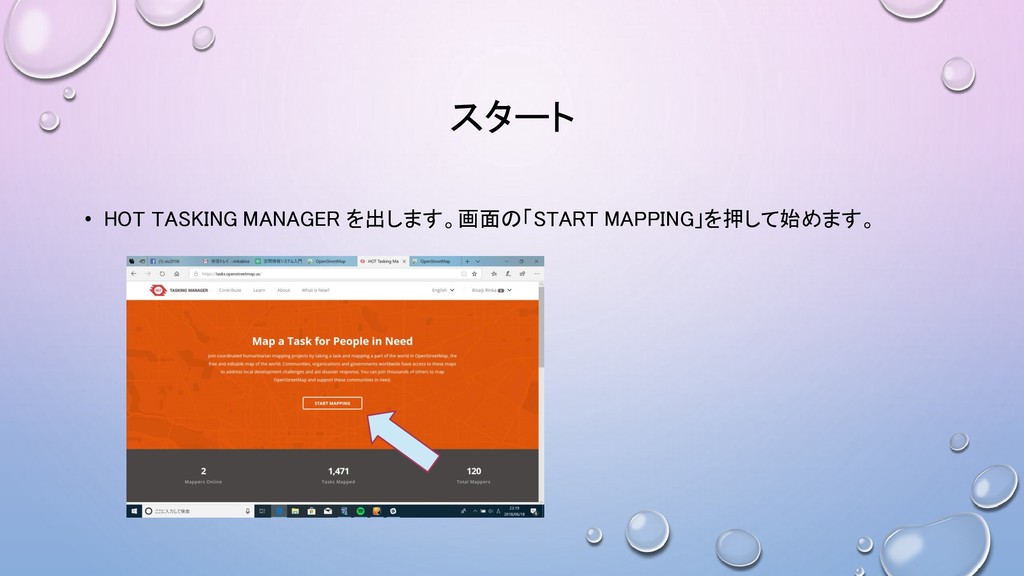
スタート • HOT TASKING MANAGER を出します。画面の「START MAPPING」を押して始めます。
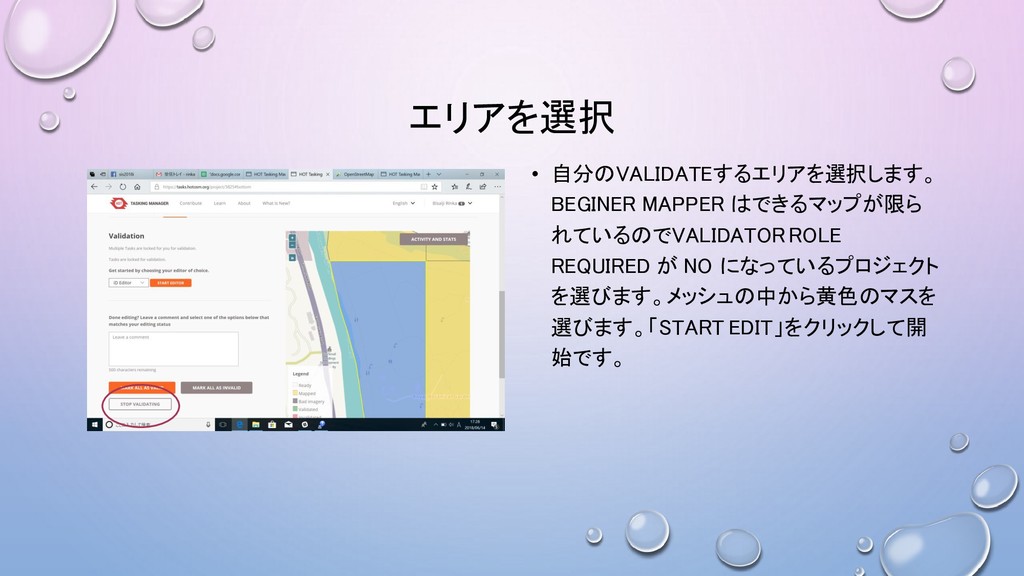
エリアを選択 • 自分のVALIDATEするエリアを選択します。 BEGINER MAPPER はできるマップが限ら れているのでVALIDATOR ROLE REQUIRED が
NO になっているプロジェクト を選びます。メッシュの中から黄色のマスを 選びます。「START EDIT」をクリックして開 始です。
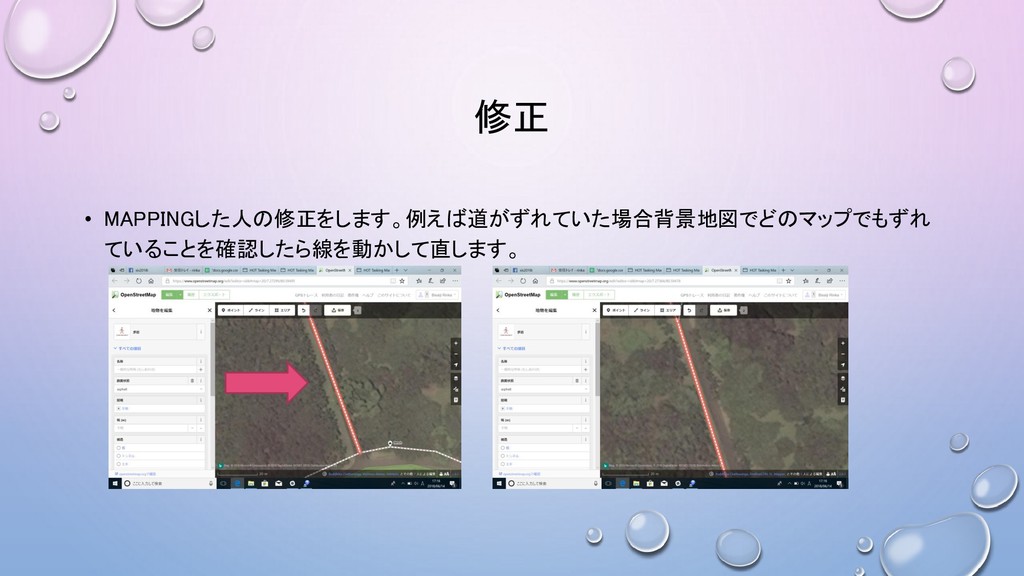
修正 • MAPPINGした人の修正をします。例えば道がずれていた場合背景地図でどのマップでもずれ ていることを確認したら線を動かして直します。
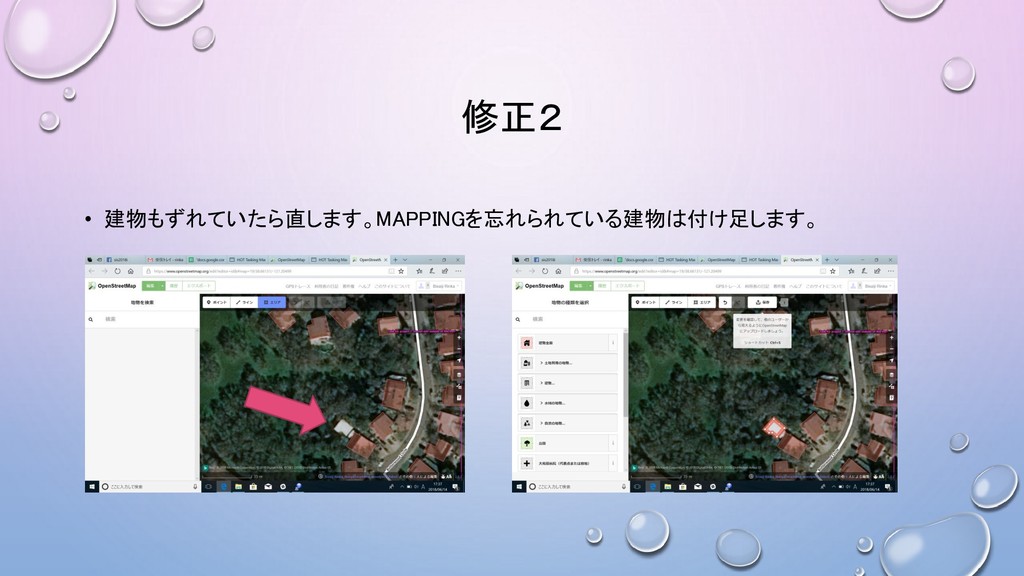
修正2 • 建物もずれていたら直します。MAPPINGを忘れられている建物は付け足します。
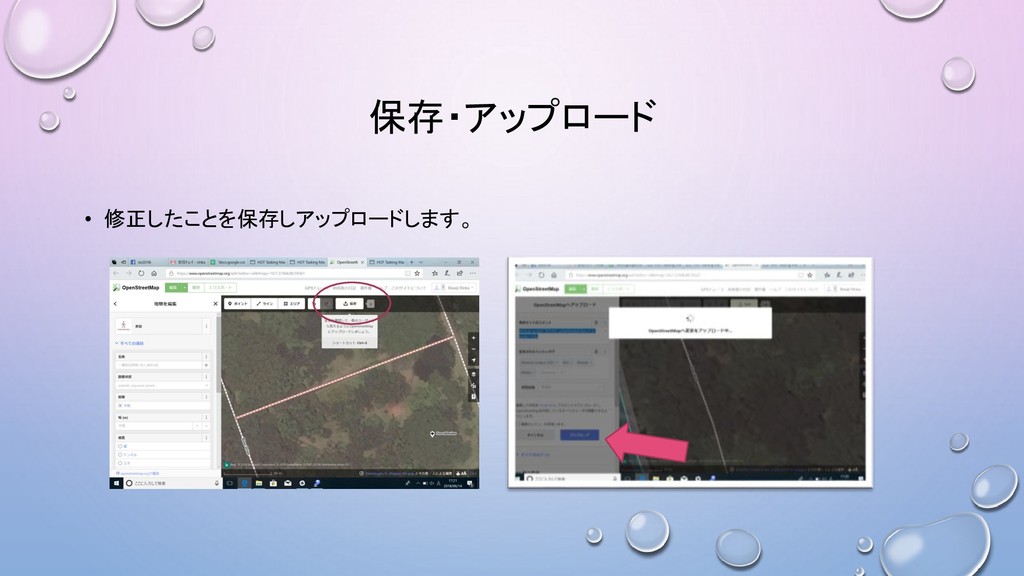
保存・アップロード • 修正したことを保存しアップロードします。
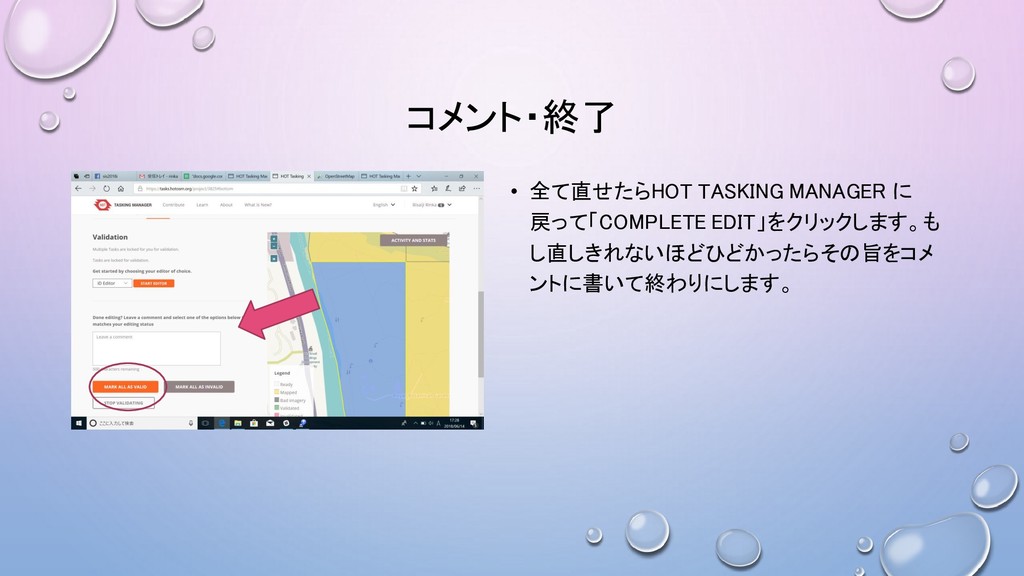
コメント・終了 • 全て直せたらHOT TASKING MANAGER に 戻って「COMPLETE EDIT」をクリックします。も し直しきれないほどひどかったらその旨をコメ ントに書いて終わりにします。


 bisaiji
 codingconduct
 uxyall
 pwiseman
 orderedlist
 addyosmani
 afnizarnur
 axbom
 baasie
 mkilby
 aleyda
 kimpetersen