Upgrade to Pro
— share decks privately, control downloads, hide ads and more …
Speaker Deck
Sign up for free
Menu
Search
Features
All features
Private URLs
Password Protection
Custom URLS
Scheduled publishing
Remove Branding
Restrict embedding
Deck Collections
Notes
Features
All features
Private URLs
Password Protection
Custom URLS
Scheduled publishing
Remove Branding
Restrict embedding
Deck Collections
Notes
Explore
Featured decks
Featured speakers
Programming
Technology
Storyboards
Explore
Featured decks
Featured speakers
Programming
Technology
Storyboards
Pricing
Search
Sign in
Sign up for free
空間情報システム入門1 #02 2016/06/16
Search
内海晴香
June 16, 2016
70
0
Share
Embed
Copy iframe code
Copy JS code
Copy link
Start on current slide
空間情報システム入門1 #02 2016/06/16
マッピングマニュアル
内海晴香
June 16, 2016
More Decks by 内海晴香
See All by 内海晴香
空間情報基礎1
boeing1124
0
55
Featured
See All Featured
Taking LLMs out of the black box: A practical guide to human-in-the-loop distillation
inesmontani
PRO
3
2.5k
Leveraging Curiosity to Care for An Aging Population
cassininazir
1
540
Six Lessons from altMBA
skipperchong
29
4.5k
A Tale of Four Properties
chriscoyier
163
24k
Leo the Paperboy
mayatellez
10
2.4k
Self-Hosted WebAssembly Runtime for Runtime-Neutral Checkpoint/Restore in Edge–Cloud Continuum
chikuwait
0
890
世界の人気アプリ100個を分析して見えたペイウォール設計の心得
akihiro_kokubo
PRO
74
43k
Making the Leap to Tech Lead
cromwellryan
135
10k
Bridging the Design Gap: How Collaborative Modelling removes blockers to flow between stakeholders and teams @FastFlow conf
baasie
0
730
Designing for Timeless Needs
cassininazir
1
530
Chasing Engaging Ingredients in Design
codingconduct
0
360
Color Theory Basics | Prateek | Gurzu
gurzu
1
490
Transcript
OSM Tasking Manager 作成 マニュアル 1A115042 内海 晴香
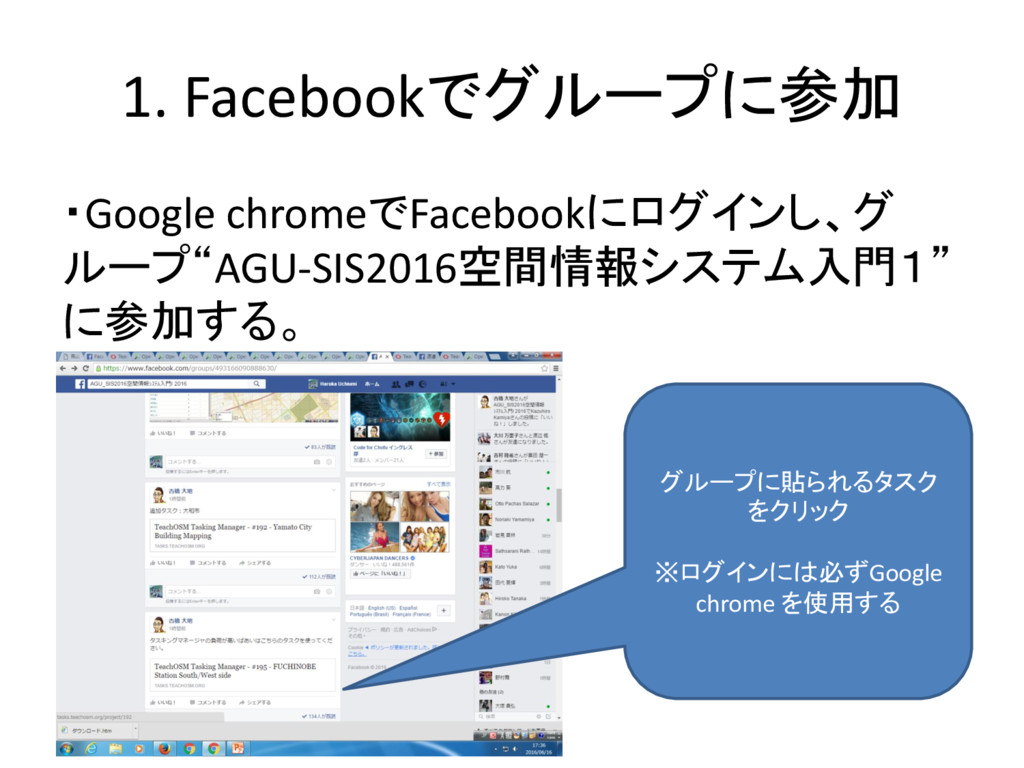
1. Facebookでグループに参加 ・Google chromeでFacebookにログインし、グ ループ“AGU-SIS2016空間情報システム入門1” に参加する。 グループに貼られるタスク をクリック ※ログインには必ずGoogle chrome
を使用する
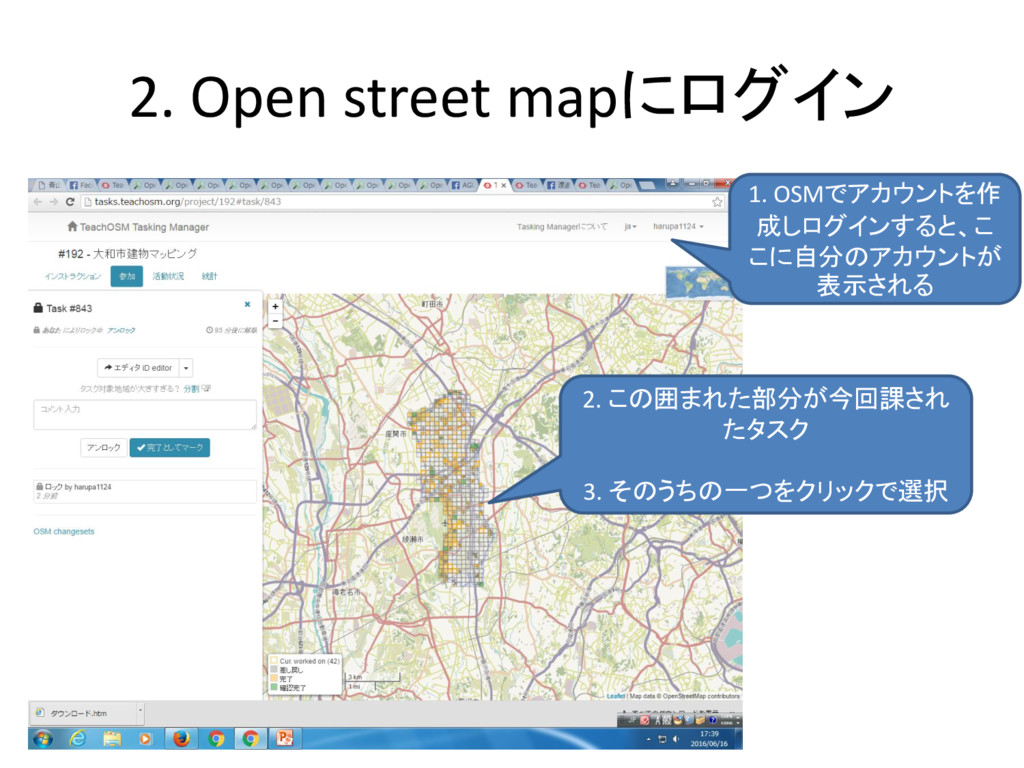
2. Open street mapにログイン 1. OSMでアカウントを作 成しログインすると、こ こに自分のアカウントが 表示される 2.
この囲まれた部分が今回課され たタスク 3. そのうちの一つをクリックで選択
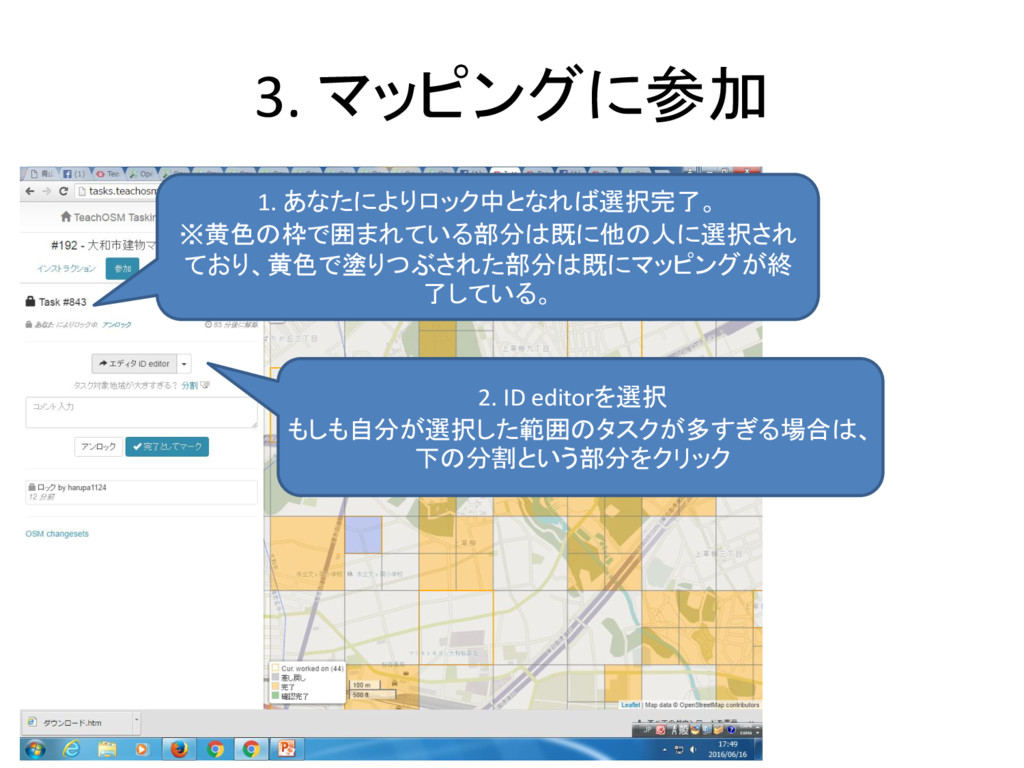
3. マッピングに参加 1. あなたによりロック中となれば選択完了。 ※黄色の枠で囲まれている部分は既に他の人に選択され ており、黄色で塗りつぶされた部分は既にマッピングが終 了している。 2. ID editorを選択
もしも自分が選択した範囲のタスクが多すぎる場合は、 下の分割という部分をクリック
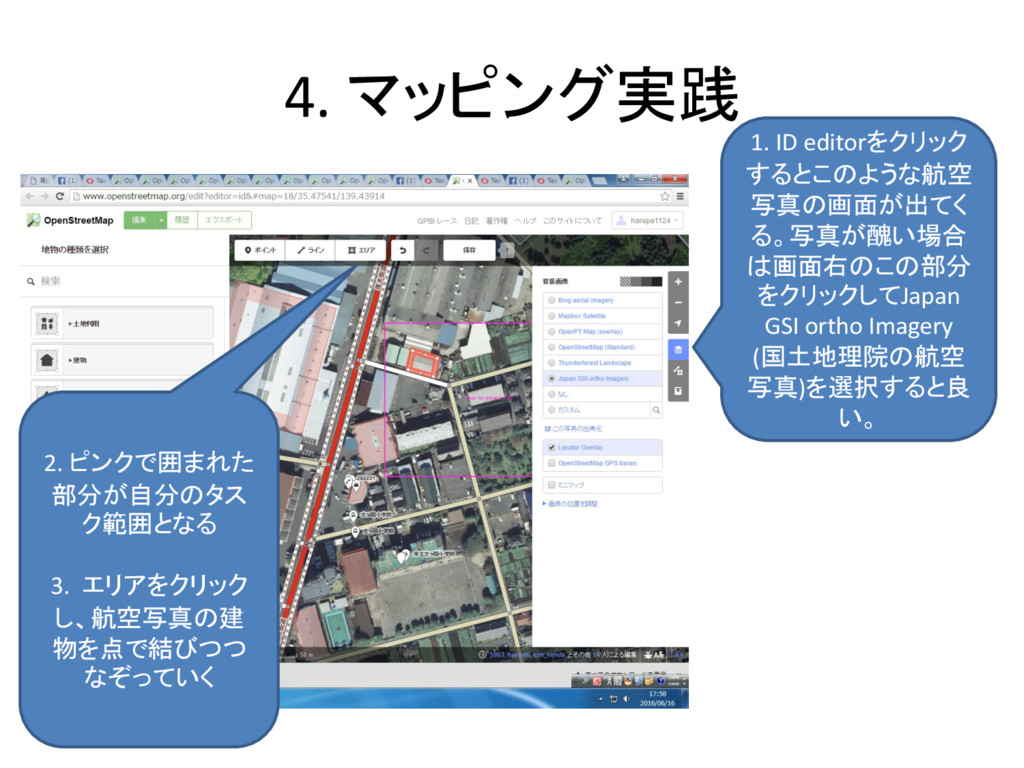
4. マッピング実践 1. ID editorをクリック するとこのような航空 写真の画面が出てく る。写真が醜い場合 は画面右のこの部分 をクリックしてJapan
GSI ortho Imagery (国土地理院の航空 写真)を選択すると良 い。 2. ピンクで囲まれた 部分が自分のタス ク範囲となる 3. エリアをクリック し、航空写真の建 物を点で結びつつ なぞっていく
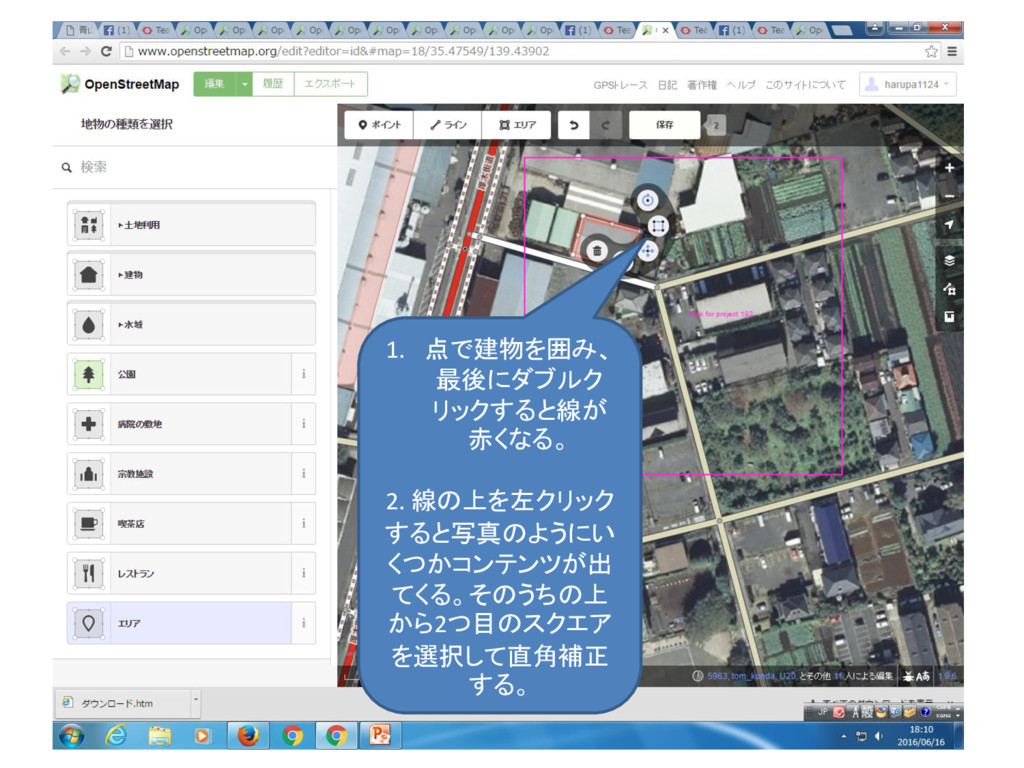
1. 点で建物を囲み、 最後にダブルク リックすると線が 赤くなる。 2. 線の上を左クリック すると写真のようにい くつかコンテンツが出 てくる。そのうちの上
から2つ目のスクエア を選択して直角補正 する。
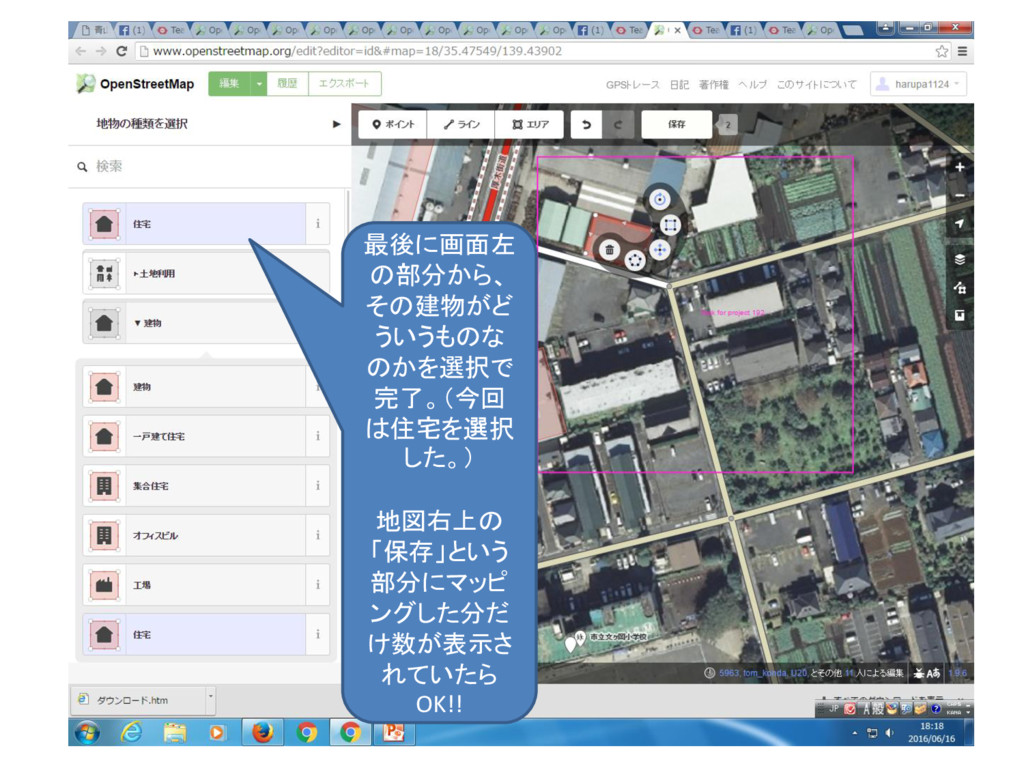
最後に画面左 の部分から、 その建物がど ういうものな のかを選択で 完了。(今回 は住宅を選択 した。) 地図右上の 「保存」という
部分にマッピ ングした分だ け数が表示さ れていたら OK!!
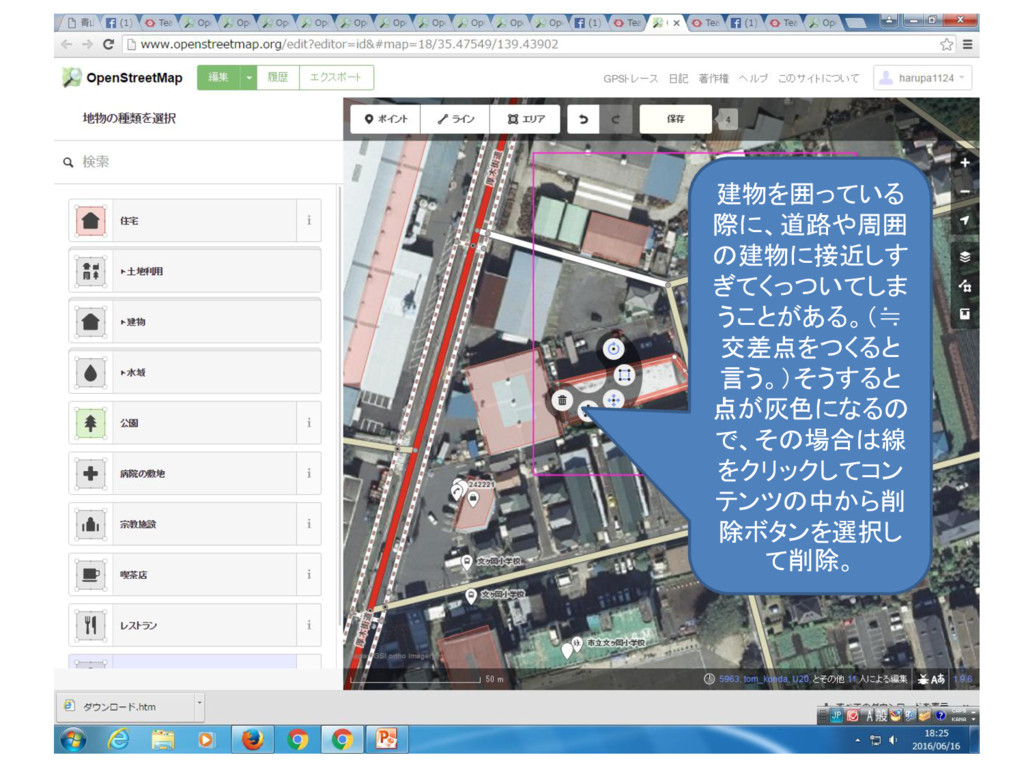
建物を囲っている 際に、道路や周囲 の建物に接近しす ぎてくっついてしま うことがある。(≒ 交差点をつくると 言う。)そうすると 点が灰色になるの で、その場合は線 をクリックしてコン
テンツの中から削 除ボタンを選択し て削除。
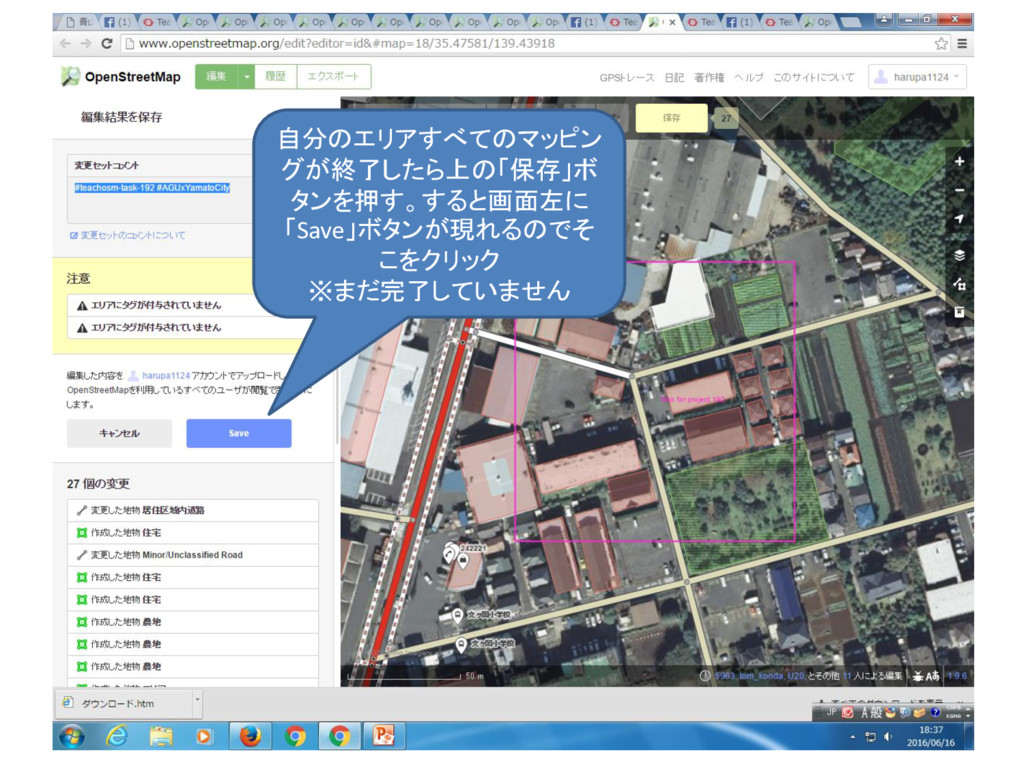
自分のエリアすべてのマッピン グが終了したら上の「保存」ボ タンを押す。すると画面左に 「Save」ボタンが現れるのでそ こをクリック ※まだ完了していません
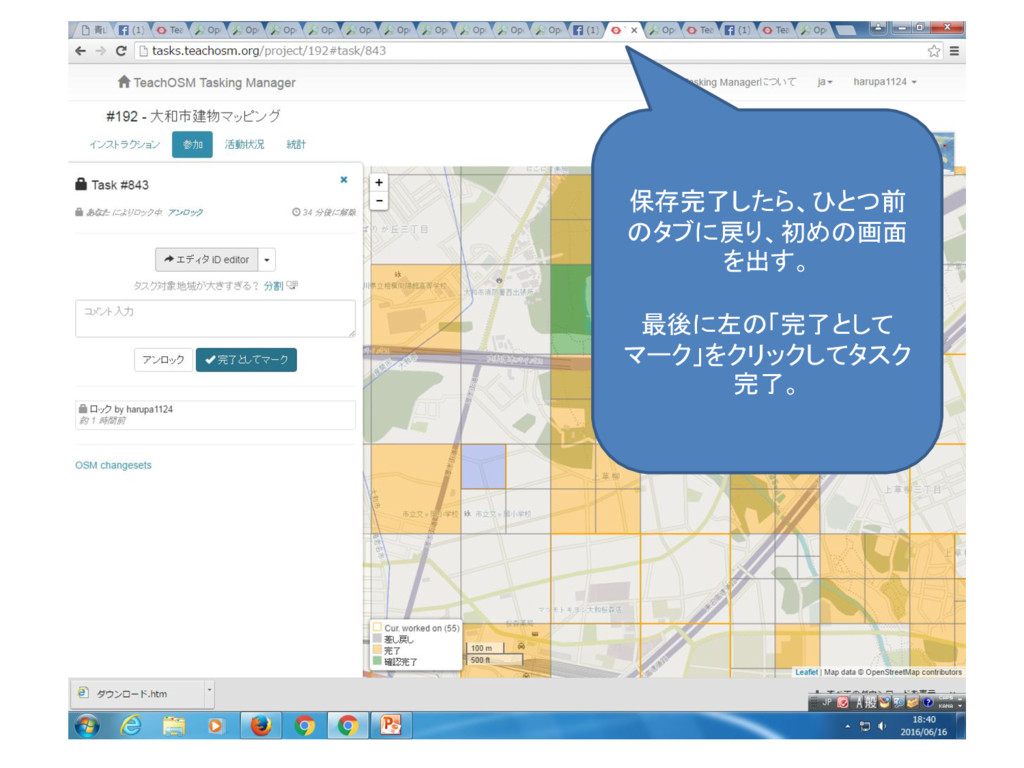
保存完了したら、ひとつ前 のタブに戻り、初めの画面 を出す。 最後に左の「完了として マーク」をクリックしてタスク 完了。


 boeing1124
 inesmontani
 cassininazir
 skipperchong
 chriscoyier
 mayatellez
 chikuwait
 akihiro_kokubo
 cromwellryan
 baasie
 codingconduct
 gurzu
gurzu