Upgrade to Pro — share decks privately, control downloads, hide ads and more …

Introduction to GPU and CUDA

Sponsored · Your Podcast. Everywhere. Effortlessly. Share. Educate. Inspire. Entertain. You do you. We'll handle the rest. →

Introduction to GPU and CUDA

Description of GPU architecture and abstractions and programming models that CUDA provides and how to program them.

Avatar for Yuri Takigawa

Yuri Takigawa

March 21, 2026

More Decks by Yuri Takigawa

Other Decks in Programming

Transcript

  1. CUDA: understand to be a genuine user takigawa July 17,

    2025 The university of Tokyo, EEIC, Taura Lab 1
  2. Contents 1. What is CUDA?: Introduction 2. A CUDA program

    for beginners 3. How CUDA works 4. Optimize CUDA program 5. Practice Problems 2
  3. Contents What is CUDA? A CUDA program for beginners HOW

    CUDA works Optimize CUDA program Practice Problems Appendices 3
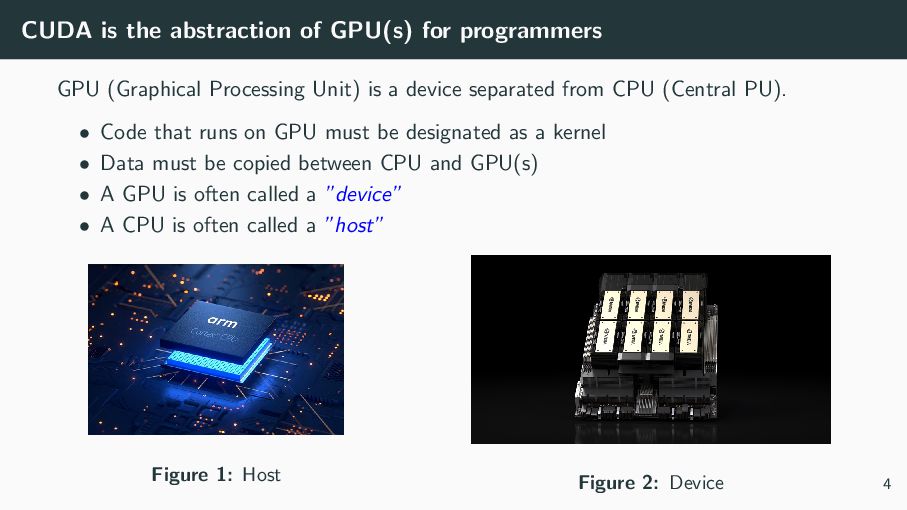
  4. CUDA is the abstraction of GPU(s) for programmers GPU (Graphical

    Processing Unit) is a device separated from CPU (Central PU). • Code that runs on GPU must be designated as a kernel • Data must be copied between CPU and GPU(s) • A GPU is often called a ”device” • A CPU is often called a ”host” Figure 1: Host Figure 2: Device 4
  5. CUDA is the abstraction of GPU(s) for programmers CUDA is

    a platform for parallel computing on NVIDIA GPU. • language extension: C/C++, Fortran • tools: compiler(nvcc), debugger(cuda-gdb), profiler(Nsight Systems) • APIs: Driver API, Runtime API • Libraries: cuBLAS, cuFFT, cuDNN, etc. Their common goal is to provide programmers with a ”good” abstraction of GPU(s). How ”good”?: usable, simple, highly affine to hardware(=easy to bring out the performance) 5
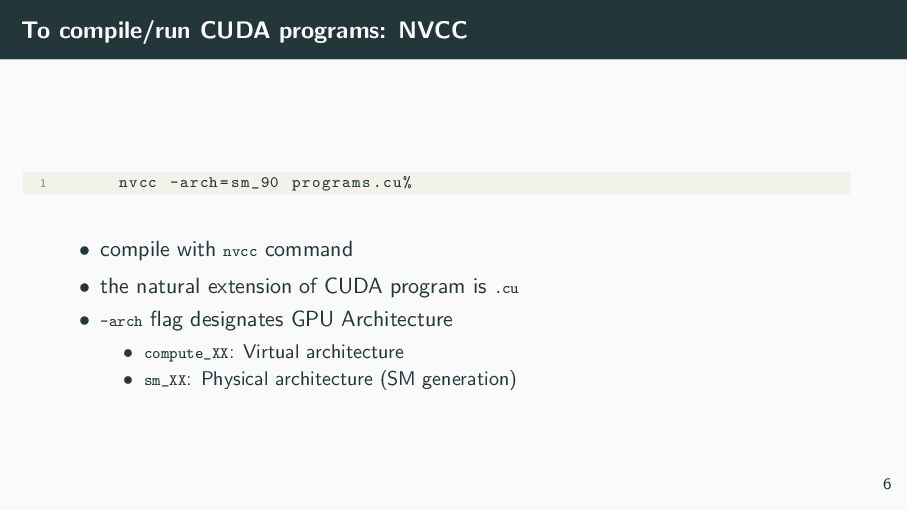
  6. To compile/run CUDA programs: NVCC 1 nvcc -arch=sm_90 programs.cu% •

    compile with nvcc command • the natural extension of CUDA program is .cu • -arch flag designates GPU Architecture • compute_XX: Virtual architecture • sm_XX: Physical architecture (SM generation) 6
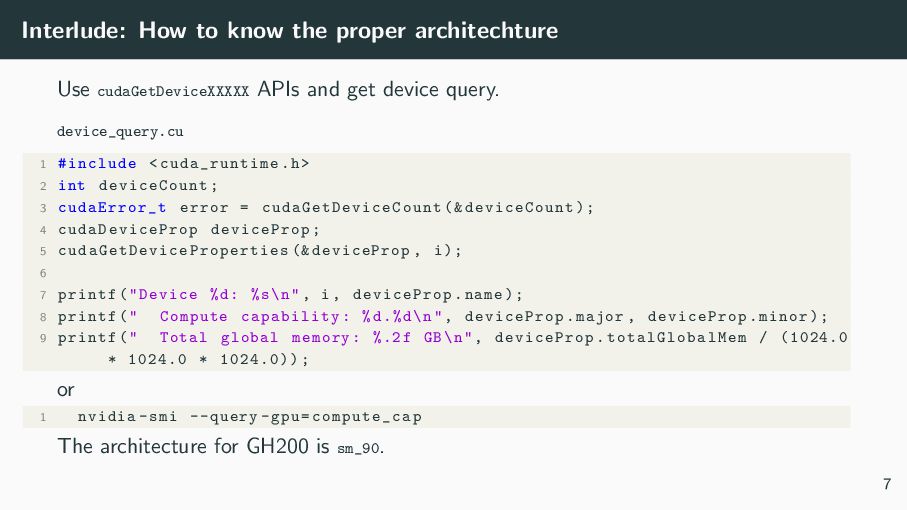
  7. Interlude: How to know the proper architechture Use cudaGetDeviceXXXXX APIs

    and get device query. device_query.cu 1 #include <cuda_runtime .h> 2 int deviceCount ; 3 cudaError_t error = cudaGetDeviceCount (& deviceCount ); 4 cudaDeviceProp deviceProp; 5 cudaGetDeviceProperties (& deviceProp , i); 6 7 printf("Device %d: %s\n", i, deviceProp.name); 8 printf(" Compute capability: %d.%d\n", deviceProp .major , deviceProp .minor); 9 printf(" Total global memory: %.2f GB\n", deviceProp . totalGlobalMem / (1024.0 * 1024.0 * 1024.0)); or 1 nvidia -smi --query -gpu=compute_cap The architecture for GH200 is sm_90. 7
  8. Contents What is CUDA? A CUDA program for beginners Setting

    environment hello world hello gpu HOW CUDA works Optimize CUDA program Practice Problems Appendices 8
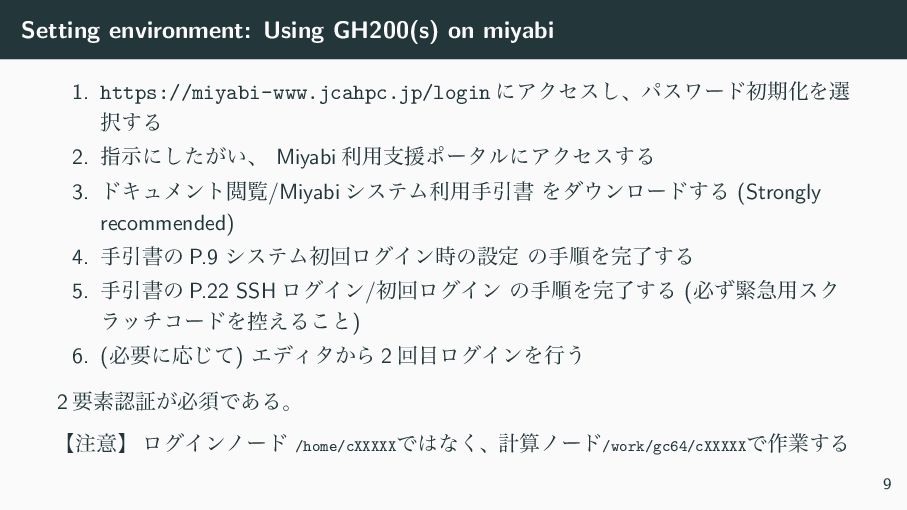
  9. Setting environment: Using GH200(s) on miyabi 1. https://miyabi-www.jcahpc.jp/login ʹΞΫηε͠ɺύεϫʔυॳظԽΛબ ୒͢Δ

    2. ࢦࣔʹ͕͍ͨ͠ɺ Miyabi ར༻ࢧԉϙʔλϧʹΞΫηε͢Δ 3. υΩϡϝϯτӾཡ/Miyabi γεςϜར༻खҾॻ Λμ΢ϯϩʔυ͢Δ (Strongly recommended) 4. खҾॻͷ P.9 γεςϜॳճϩάΠϯ࣌ͷઃఆ ͷखॱΛ׬ྃ͢Δ 5. खҾॻͷ P.22 SSH ϩάΠϯ/ॳճϩάΠϯ ͷखॱΛ׬ྃ͢Δ (ඞͣۓٸ༻εΫ ϥονίʔυΛ߇͑Δ͜ͱ) 6. (ඞཁʹԠͯ͡) ΤσΟλ͔Β 2 ճ໨ϩάΠϯΛߦ͏ 2 ཁૉೝূ͕ඞਢͰ͋Δɻ ʲ஫ҙʳ ϩάΠϯϊʔυ /home/cXXXXXͰ͸ͳ͘ɺܭࢉϊʔυ/work/gc64/cXXXXXͰ࡞ۀ͢Δ 9
  10. Contents What is CUDA? A CUDA program for beginners Setting

    environment hello world hello gpu HOW CUDA works Optimize CUDA program Practice Problems Appendices 10
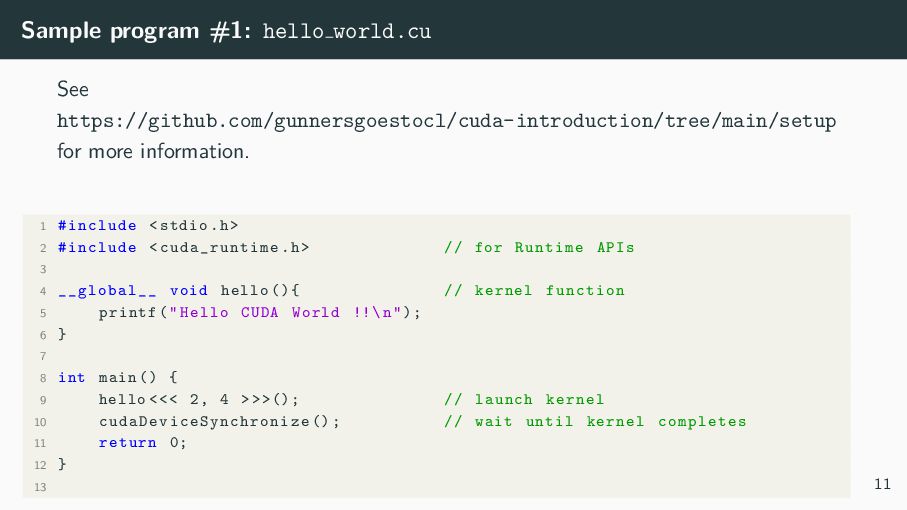
  11. Sample program #1: hello world.cu See https://github.com/gunnersgoestocl/cuda-introduction/tree/main/setup for more information.

    1 #include <stdio.h> 2 #include <cuda_runtime .h> // for Runtime APIs 3 4 __global__ void hello (){ // kernel function 5 printf("Hello CUDA World !!\n"); 6 } 7 8 int main () { 9 hello <<< 2, 4 >>>(); // launch kernel 10 cudaDeviceSynchronize (); // wait until kernel completes 11 return 0; 12 } 13 11
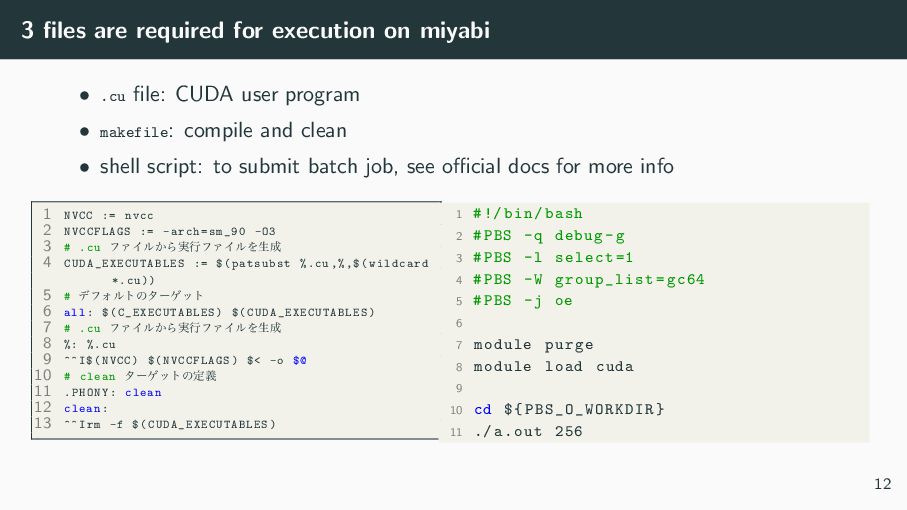
  12. 3 files are required for execution on miyabi • .cu

    file: CUDA user program • makefile: compile and clean • shell script: to submit batch job, see official docs for more info 1 NVCC := nvcc 2 NVCCFLAGS := -arch=sm_90 -O3 3 # .cu ϑΝΠϧ͔Β࣮ߦϑΝΠϧΛੜ੒ 4 CUDA_EXECUTABLES := $(patsubst %.cu ,%,$(wildcard *.cu)) 5 # σϑΥϧτͷλʔήοτ 6 all: $( C_EXECUTABLES ) $( CUDA_EXECUTABLES ) 7 # .cu ϑΝΠϧ͔Β࣮ߦϑΝΠϧΛੜ੒ 8 %: %.cu 9 ^^I$(NVCC) $(NVCCFLAGS) $< -o $@ 10 # clean λʔήοτͷఆٛ 11 .PHONY: clean 12 clean: 13 ^^ Irm -f $( CUDA_EXECUTABLES ) 1 #!/ bin/bash 2 #PBS -q debug -g 3 #PBS -l select =1 4 #PBS -W group_list=gc64 5 #PBS -j oe 6 7 module purge 8 module load cuda 9 10 cd ${ PBS_O_WORKDIR } 11 ./a.out 256 12
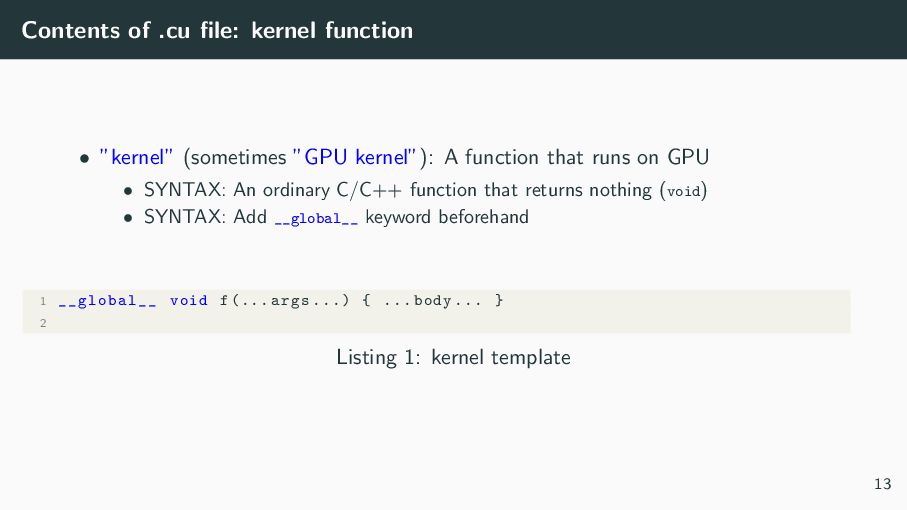
  13. Contents of .cu file: kernel function • ”kernel” (sometimes ”GPU

    kernel”): A function that runs on GPU • SYNTAX: An ordinary C/C++ function that returns nothing (void) • SYNTAX: Add __global__ keyword beforehand 1 __global__ void f(... args ...) { ... body ... } 2 Listing 1: kernel template 13
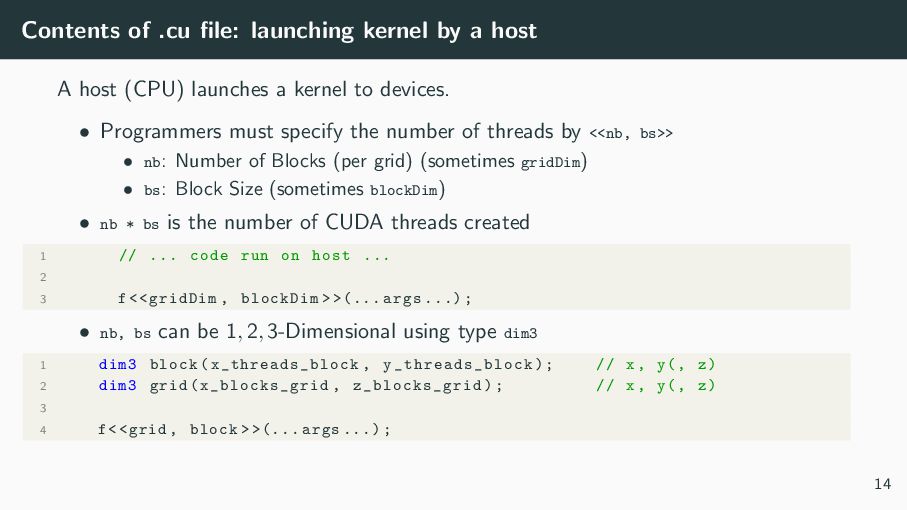
  14. Contents of .cu file: launching kernel by a host A

    host (CPU) launches a kernel to devices. • Programmers must specify the number of threads by <<nb, bs>> • nb: Number of Blocks (per grid) (sometimes gridDim) • bs: Block Size (sometimes blockDim) • nb * bs is the number of CUDA threads created 1 // ... code run on host ... 2 3 f<<gridDim , blockDim > >(... args ...); • nb, bs can be 1, 2, 3-Dimensional using type dim3 1 dim3 block(x_threads_block , y_threads_block ); // x, y(, z) 2 dim3 grid(x_blocks_grid , z_blocks_grid ); // x, y(, z) 3 4 f<<grid , block > >(... args ...); 14
  15. Interlude: register values programs can explicitly use • Threads which

    executes a single instruction can be executed in parallel. • So, programmers are expected to make the kernel visible to all threads as the same instruction. • For this perspective, a unique ID of each thread (= the loop index) is the key. In CUDA, each kernel can access its own thread ID through built-in variables on the Special Registers. • blockDim.{x,y} = bs (the block size) • gridDim.{x,y} = nb (the number of blocks) • threadIdx.{x,y} = the thread ID within a block (∈ [0, bs)) • blockIdx.{x,y} = the thread’s block ID (∈ [0, nb)) -¿ blockDim.x * blockIdx.x + threadIdx.x could be the loop index 15
  16. Contents What is CUDA? A CUDA program for beginners Setting

    environment hello world hello gpu HOW CUDA works Optimize CUDA program Practice Problems Appendices 16
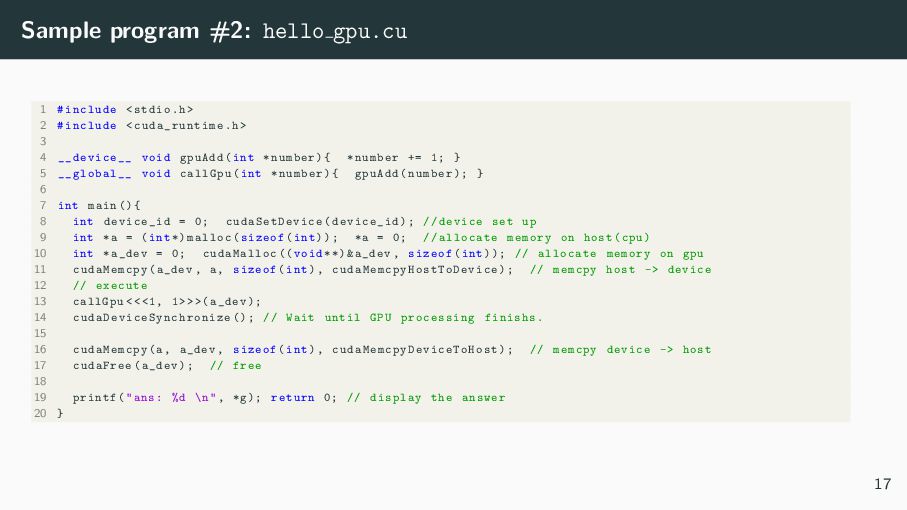
  17. Sample program #2: hello gpu.cu 1 #include <stdio.h> 2 #include

    <cuda_runtime .h> 3 4 __device__ void gpuAdd(int *number){ *number += 1; } 5 __global__ void callGpu(int *number){ gpuAdd(number); } 6 7 int main (){ 8 int device_id = 0; cudaSetDevice (device_id); // device set up 9 int *a = (int *) malloc(sizeof(int)); *a = 0; // allocate memory on host(cpu) 10 int *a_dev = 0; cudaMalloc (( void **)&a_dev , sizeof(int)); // allocate memory on gpu 11 cudaMemcpy (a_dev , a, sizeof(int), cudaMemcpyHostToDevice ); // memcpy host -> device 12 // execute 13 callGpu <<<1, 1>>>(a_dev); 14 cudaDeviceSynchronize (); // Wait until GPU processing finishs. 15 16 cudaMemcpy (a, a_dev , sizeof(int), cudaMemcpyDeviceToHost ); // memcpy device -> host 17 cudaFree(a_dev); // free 18 19 printf("ans: %d \n", *g); return 0; // display the answer 20 } 17
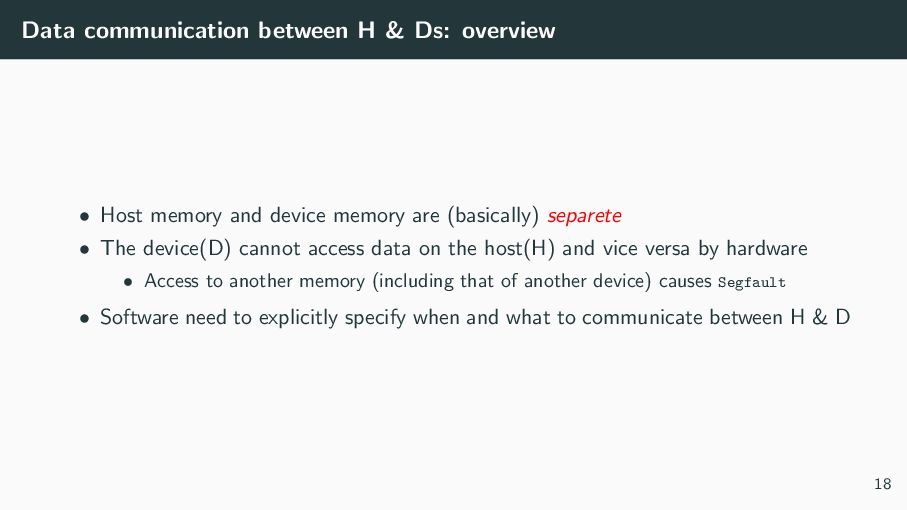
  18. Data communication between H & Ds: overview • Host memory

    and device memory are (basically) separete • The device(D) cannot access data on the host(H) and vice versa by hardware • Access to another memory (including that of another device) causes Segfault • Software need to explicitly specify when and what to communicate between H & D 18
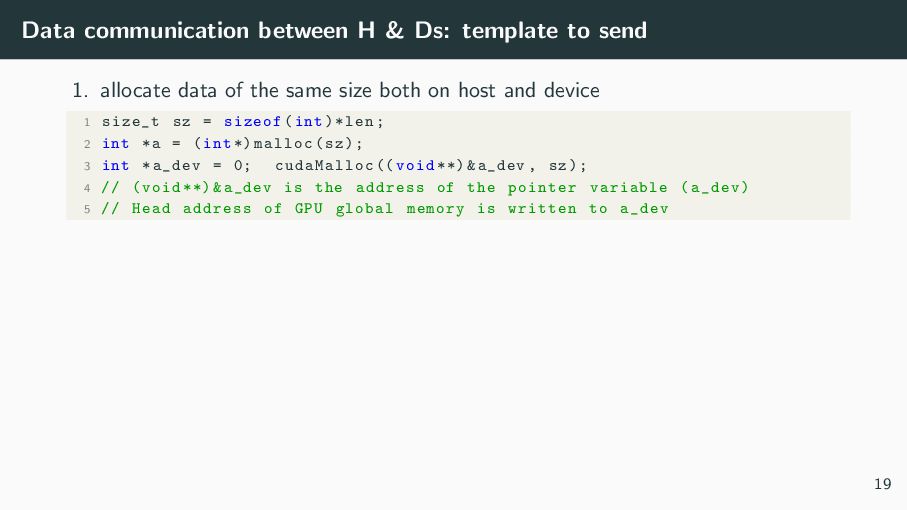
  19. Data communication between H & Ds: template to send 1.

    allocate data of the same size both on host and device 1 size_t sz = sizeof(int)*len; 2 int *a = (int *) malloc(sz); 3 int *a_dev = 0; cudaMalloc (( void **)&a_dev , sz); 4 // (void **)&a_dev is the address of the pointer variable (a_dev) 5 // Head address of GPU global memory is written to a_dev 19
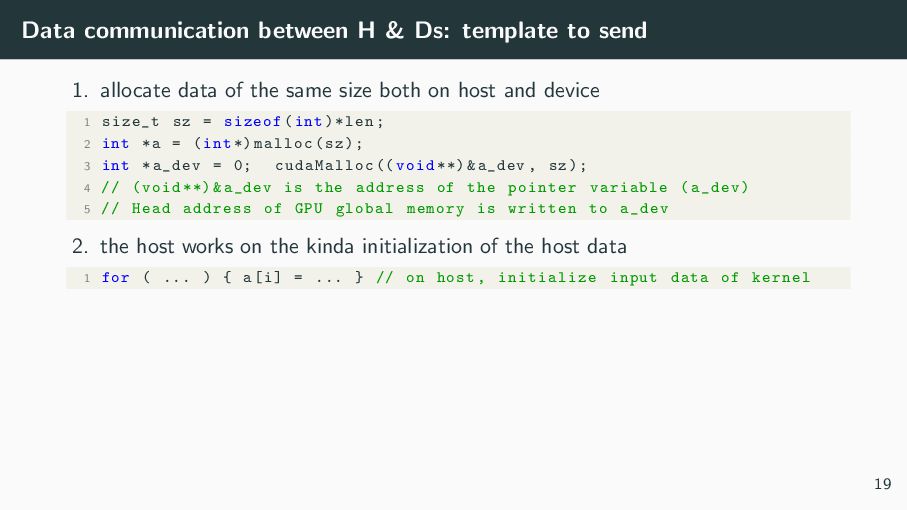
  20. Data communication between H & Ds: template to send 1.

    allocate data of the same size both on host and device 1 size_t sz = sizeof(int)*len; 2 int *a = (int *) malloc(sz); 3 int *a_dev = 0; cudaMalloc (( void **)&a_dev , sz); 4 // (void **)&a_dev is the address of the pointer variable (a_dev) 5 // Head address of GPU global memory is written to a_dev 2. the host works on the kinda initialization of the host data 1 for ( ... ) { a[i] = ... } // on host , initialize input data of kernel 19
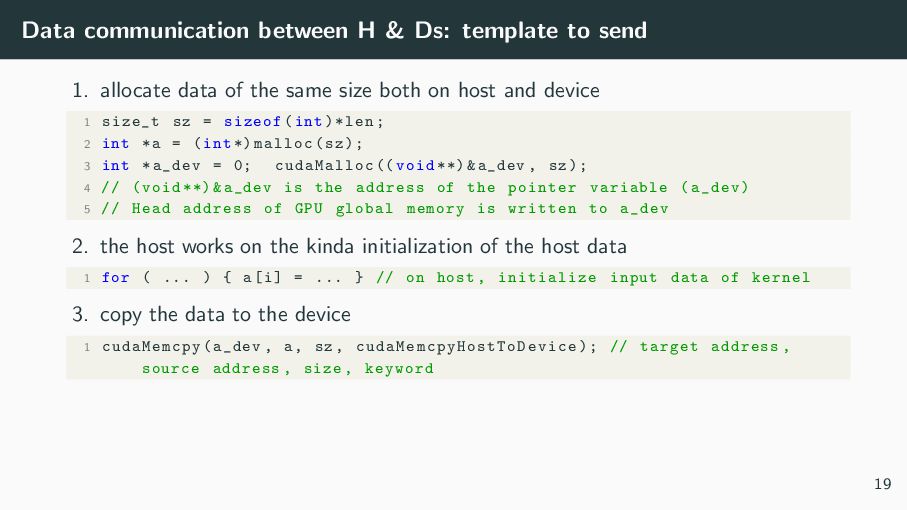
  21. Data communication between H & Ds: template to send 1.

    allocate data of the same size both on host and device 1 size_t sz = sizeof(int)*len; 2 int *a = (int *) malloc(sz); 3 int *a_dev = 0; cudaMalloc (( void **)&a_dev , sz); 4 // (void **)&a_dev is the address of the pointer variable (a_dev) 5 // Head address of GPU global memory is written to a_dev 2. the host works on the kinda initialization of the host data 1 for ( ... ) { a[i] = ... } // on host , initialize input data of kernel 3. copy the data to the device 1 cudaMemcpy (a_dev , a, sz , cudaMemcpyHostToDevice ); // target address , source address , size , keyword 19
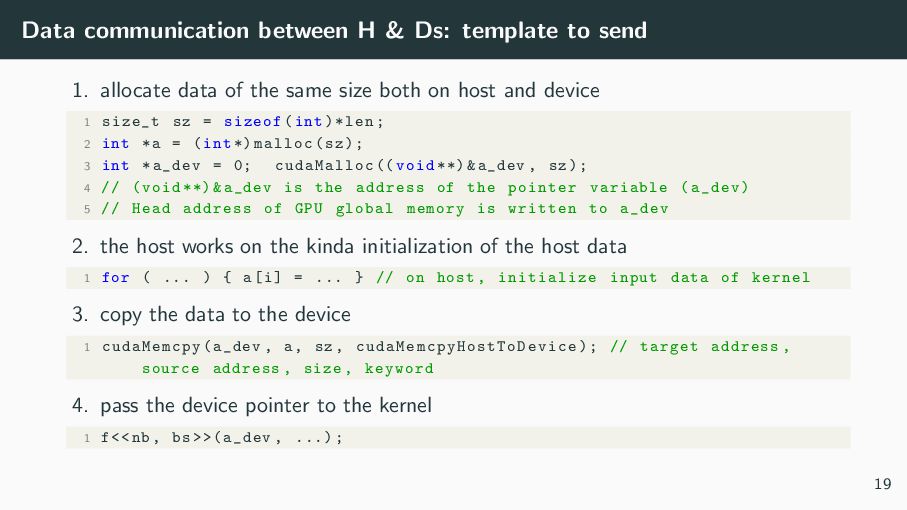
  22. Data communication between H & Ds: template to send 1.

    allocate data of the same size both on host and device 1 size_t sz = sizeof(int)*len; 2 int *a = (int *) malloc(sz); 3 int *a_dev = 0; cudaMalloc (( void **)&a_dev , sz); 4 // (void **)&a_dev is the address of the pointer variable (a_dev) 5 // Head address of GPU global memory is written to a_dev 2. the host works on the kinda initialization of the host data 1 for ( ... ) { a[i] = ... } // on host , initialize input data of kernel 3. copy the data to the device 1 cudaMemcpy (a_dev , a, sz , cudaMemcpyHostToDevice ); // target address , source address , size , keyword 4. pass the device pointer to the kernel 1 f<<nb , bs >>(a_dev , ...); 19
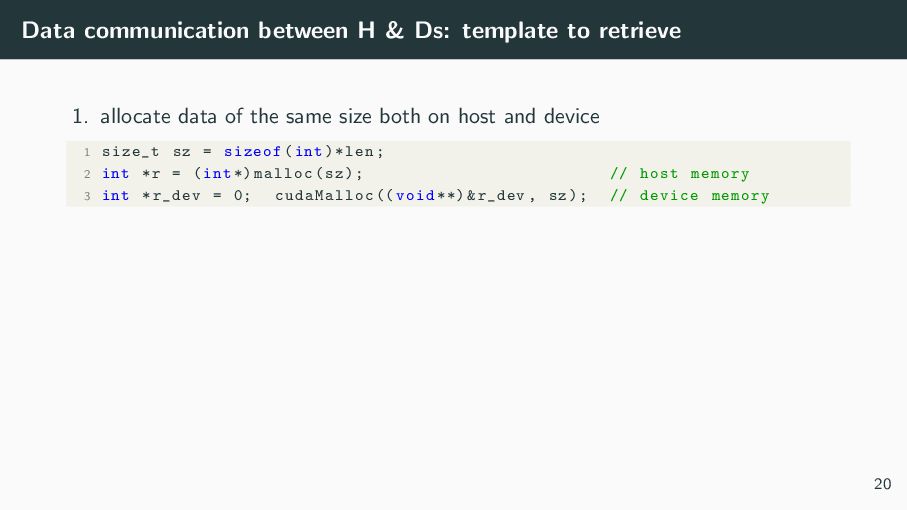
  23. Data communication between H & Ds: template to retrieve 1.

    allocate data of the same size both on host and device 1 size_t sz = sizeof(int)*len; 2 int *r = (int *) malloc(sz); // host memory 3 int *r_dev = 0; cudaMalloc (( void **)&r_dev , sz); // device memory 20
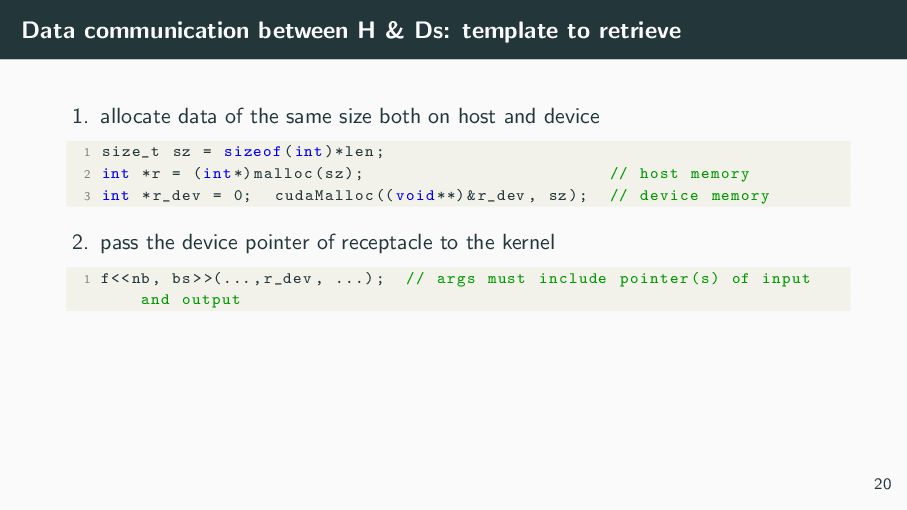
  24. Data communication between H & Ds: template to retrieve 1.

    allocate data of the same size both on host and device 1 size_t sz = sizeof(int)*len; 2 int *r = (int *) malloc(sz); // host memory 3 int *r_dev = 0; cudaMalloc (( void **)&r_dev , sz); // device memory 2. pass the device pointer of receptacle to the kernel 1 f<<nb , bs >>(..., r_dev , ...); // args must include pointer(s) of input and output 20
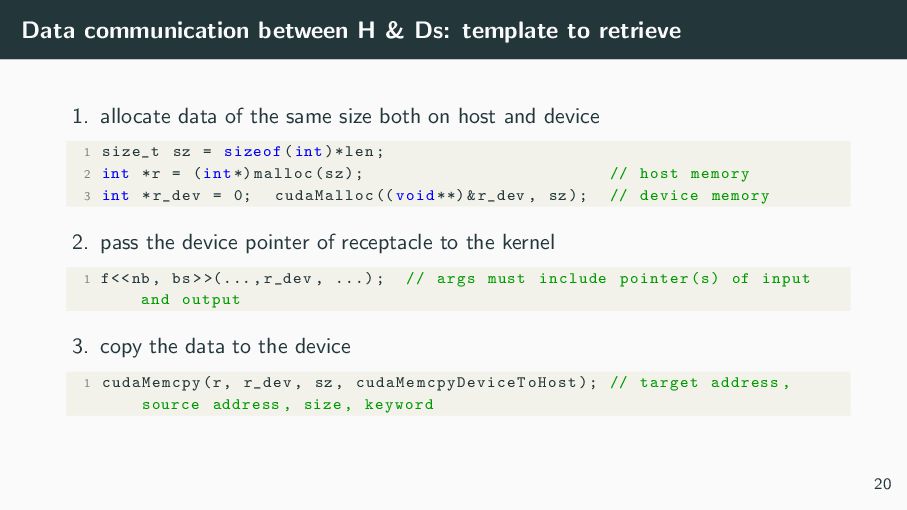
  25. Data communication between H & Ds: template to retrieve 1.

    allocate data of the same size both on host and device 1 size_t sz = sizeof(int)*len; 2 int *r = (int *) malloc(sz); // host memory 3 int *r_dev = 0; cudaMalloc (( void **)&r_dev , sz); // device memory 2. pass the device pointer of receptacle to the kernel 1 f<<nb , bs >>(..., r_dev , ...); // args must include pointer(s) of input and output 3. copy the data to the device 1 cudaMemcpy (r, r_dev , sz , cudaMemcpyDeviceToHost ); // target address , source address , size , keyword 20
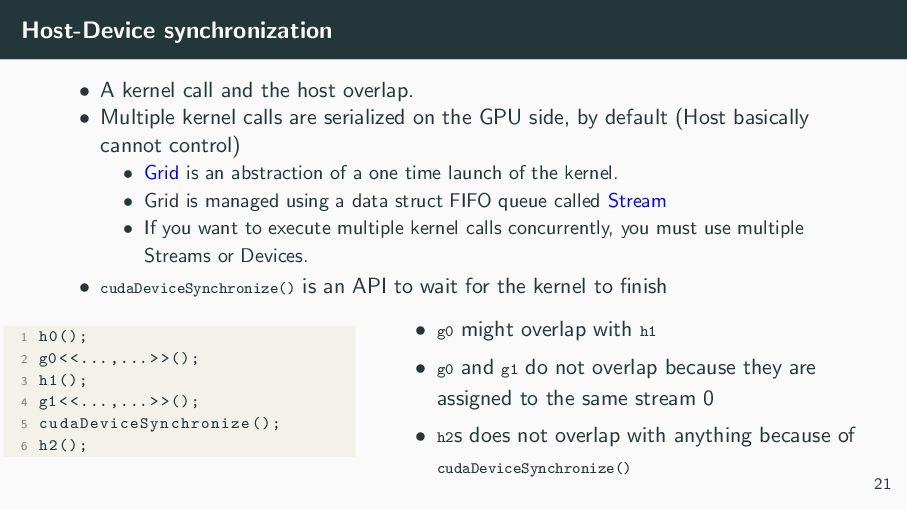
  26. Host-Device synchronization • A kernel call and the host overlap.

    • Multiple kernel calls are serialized on the GPU side, by default (Host basically cannot control) • Grid is an abstraction of a one time launch of the kernel. • Grid is managed using a data struct FIFO queue called Stream • If you want to execute multiple kernel calls concurrently, you must use multiple Streams or Devices. • cudaDeviceSynchronize() is an API to wait for the kernel to finish 1 h0(); 2 g0 < <... ,... > >(); 3 h1(); 4 g1 < <... ,... > >(); 5 cudaDeviceSynchronize (); 6 h2(); • g0 might overlap with h1 • g0 and g1 do not overlap because they are assigned to the same stream 0 • h2s does not overlap with anything because of cudaDeviceSynchronize() 21
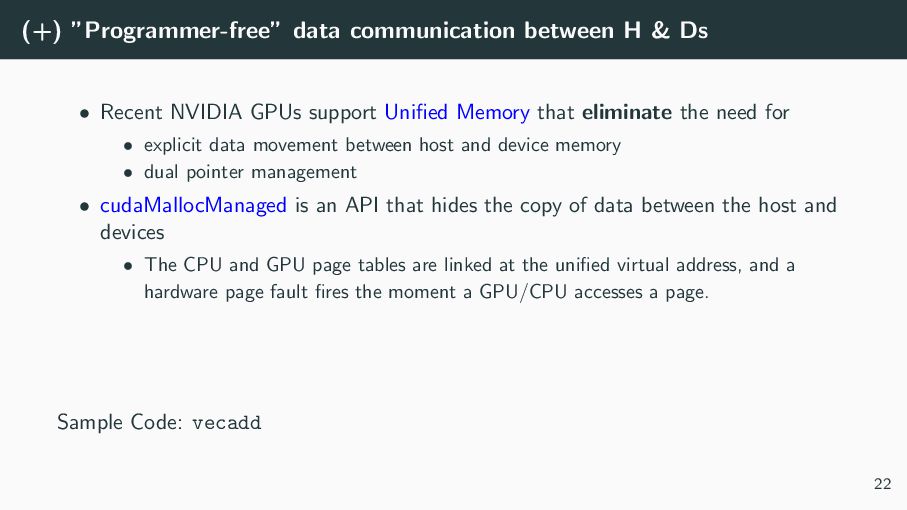
  27. (+) ”Programmer-free” data communication between H & Ds • Recent

    NVIDIA GPUs support Unified Memory that eliminate the need for Sample Code: vecadd 22
  28. (+) ”Programmer-free” data communication between H & Ds • Recent

    NVIDIA GPUs support Unified Memory that eliminate the need for • explicit data movement between host and device memory Sample Code: vecadd 22
  29. (+) ”Programmer-free” data communication between H & Ds • Recent

    NVIDIA GPUs support Unified Memory that eliminate the need for • explicit data movement between host and device memory • dual pointer management Sample Code: vecadd 22
  30. (+) ”Programmer-free” data communication between H & Ds • Recent

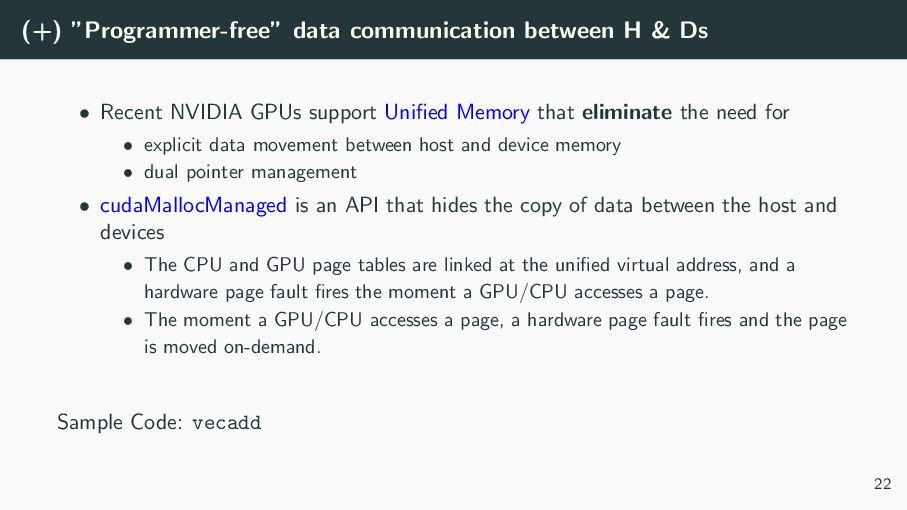
    NVIDIA GPUs support Unified Memory that eliminate the need for • explicit data movement between host and device memory • dual pointer management • cudaMallocManaged is an API that hides the copy of data between the host and devices Sample Code: vecadd 22
  31. (+) ”Programmer-free” data communication between H & Ds • Recent

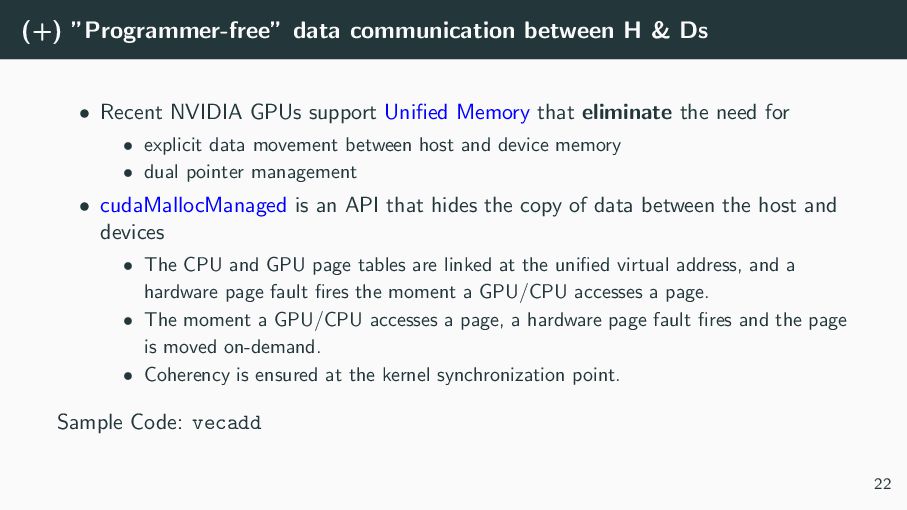
    NVIDIA GPUs support Unified Memory that eliminate the need for • explicit data movement between host and device memory • dual pointer management • cudaMallocManaged is an API that hides the copy of data between the host and devices • The CPU and GPU page tables are linked at the unified virtual address, and a hardware page fault fires the moment a GPU/CPU accesses a page. Sample Code: vecadd 22
  32. (+) ”Programmer-free” data communication between H & Ds • Recent

    NVIDIA GPUs support Unified Memory that eliminate the need for • explicit data movement between host and device memory • dual pointer management • cudaMallocManaged is an API that hides the copy of data between the host and devices • The CPU and GPU page tables are linked at the unified virtual address, and a hardware page fault fires the moment a GPU/CPU accesses a page. • The moment a GPU/CPU accesses a page, a hardware page fault fires and the page is moved on-demand. Sample Code: vecadd 22
  33. (+) ”Programmer-free” data communication between H & Ds • Recent

    NVIDIA GPUs support Unified Memory that eliminate the need for • explicit data movement between host and device memory • dual pointer management • cudaMallocManaged is an API that hides the copy of data between the host and devices • The CPU and GPU page tables are linked at the unified virtual address, and a hardware page fault fires the moment a GPU/CPU accesses a page. • The moment a GPU/CPU accesses a page, a hardware page fault fires and the page is moved on-demand. • Coherency is ensured at the kernel synchronization point. Sample Code: vecadd 22
  34. Conventional vs Unified Memory Purpose Conventional (cudaMalloc+cudaMemcpy) Unified Memory (cudaMallocManaged)

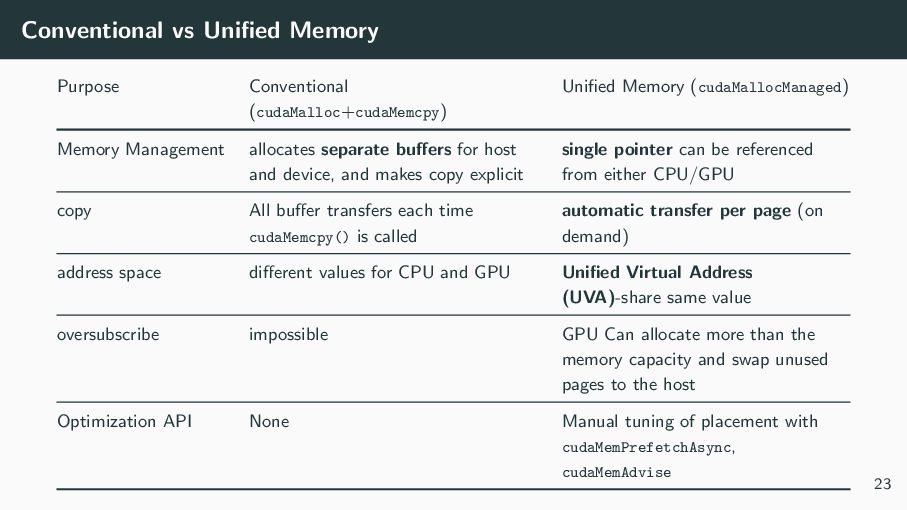
    Memory Management allocates separate buffers for host and device, and makes copy explicit single pointer can be referenced from either CPU/GPU copy All buffer transfers each time cudaMemcpy() is called automatic transfer per page (on demand) address space different values for CPU and GPU Unified Virtual Address (UVA)-share same value oversubscribe impossible GPU Can allocate more than the memory capacity and swap unused pages to the host Optimization API None Manual tuning of placement with cudaMemPrefetchAsync, cudaMemAdvise 23
  35. Contents What is CUDA? A CUDA program for beginners HOW

    CUDA works Architecture of NVIDIA GPU Grid, block, thread; abstractions by CUDA Warp: Parallel Thread eXecution Stream: beyond Grid Memory Hierarchy in CUDA Optimize CUDA program Practice Problems Appendices 24
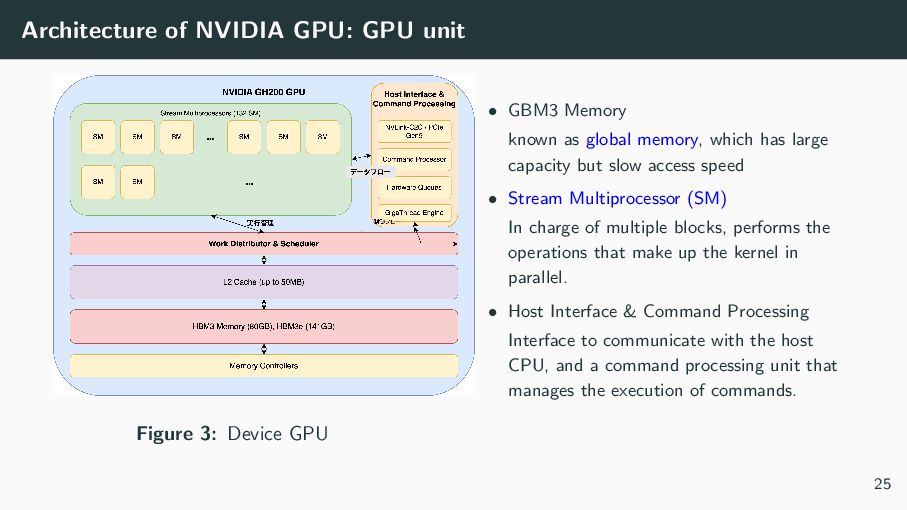
  36. Architecture of NVIDIA GPU: GPU unit Figure 3: Device GPU

    • GBM3 Memory known as global memory, which has large capacity but slow access speed • Stream Multiprocessor (SM) In charge of multiple blocks, performs the operations that make up the kernel in parallel. • Host Interface & Command Processing Interface to communicate with the host CPU, and a command processing unit that manages the execution of commands. 25
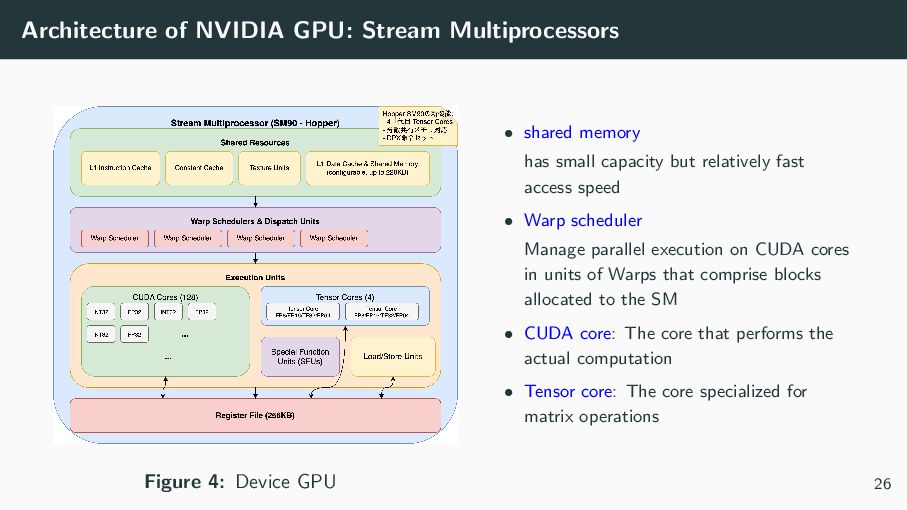
  37. Architecture of NVIDIA GPU: Stream Multiprocessors Figure 4: Device GPU

    • shared memory has small capacity but relatively fast access speed • Warp scheduler Manage parallel execution on CUDA cores in units of Warps that comprise blocks allocated to the SM • CUDA core: The core that performs the actual computation • Tensor core: The core specialized for matrix operations 26
  38. Contents What is CUDA? A CUDA program for beginners HOW

    CUDA works Architecture of NVIDIA GPU Grid, block, thread; abstractions by CUDA Warp: Parallel Thread eXecution Stream: beyond Grid Memory Hierarchy in CUDA Optimize CUDA program Practice Problems Appendices 27
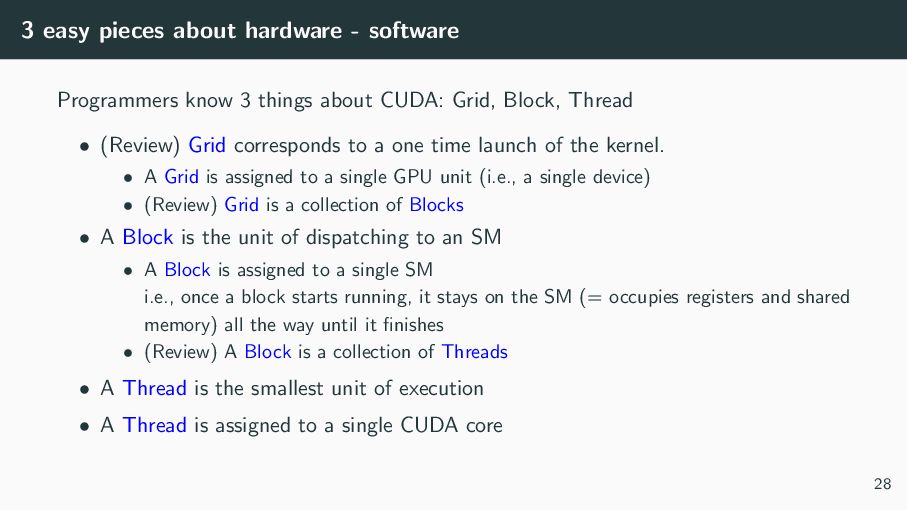
  39. 3 easy pieces about hardware - software Programmers know 3

    things about CUDA: Grid, Block, Thread • (Review) Grid corresponds to a one time launch of the kernel. • A Grid is assigned to a single GPU unit (i.e., a single device) • (Review) Grid is a collection of Blocks • A Block is the unit of dispatching to an SM • A Block is assigned to a single SM i.e., once a block starts running, it stays on the SM (= occupies registers and shared memory) all the way until it finishes • (Review) A Block is a collection of Threads • A Thread is the smallest unit of execution • A Thread is assigned to a single CUDA core 28
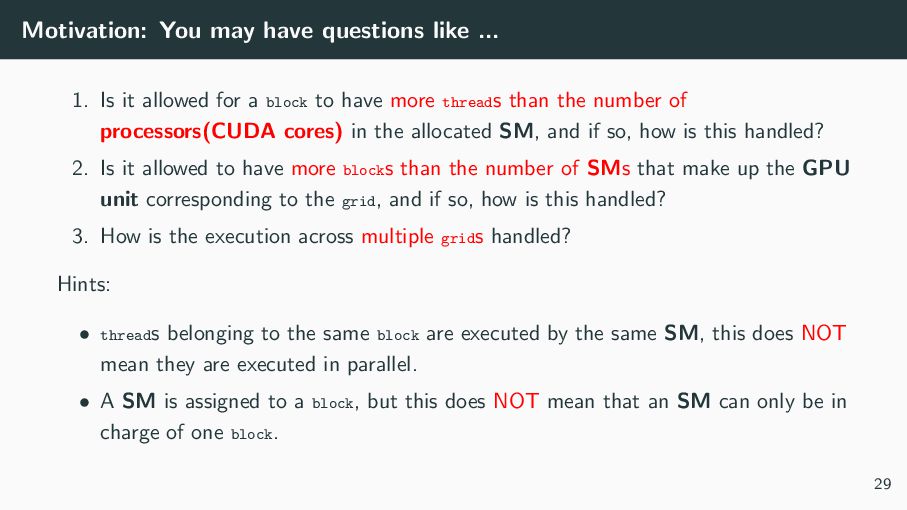
  40. Motivation: You may have questions like ... 1. Is it

    allowed for a block to have more threads than the number of processors(CUDA cores) in the allocated SM, and if so, how is this handled? 2. Is it allowed to have more blocks than the number of SMs that make up the GPU unit corresponding to the grid, and if so, how is this handled? 3. How is the execution across multiple grids handled? Hints: • threads belonging to the same block are executed by the same SM, this does NOT mean they are executed in parallel. • A SM is assigned to a block, but this does NOT mean that an SM can only be in charge of one block. 29
  41. Contents What is CUDA? A CUDA program for beginners HOW

    CUDA works Architecture of NVIDIA GPU Grid, block, thread; abstractions by CUDA Warp: Parallel Thread eXecution Stream: beyond Grid Memory Hierarchy in CUDA Optimize CUDA program Practice Problems Appendices 30
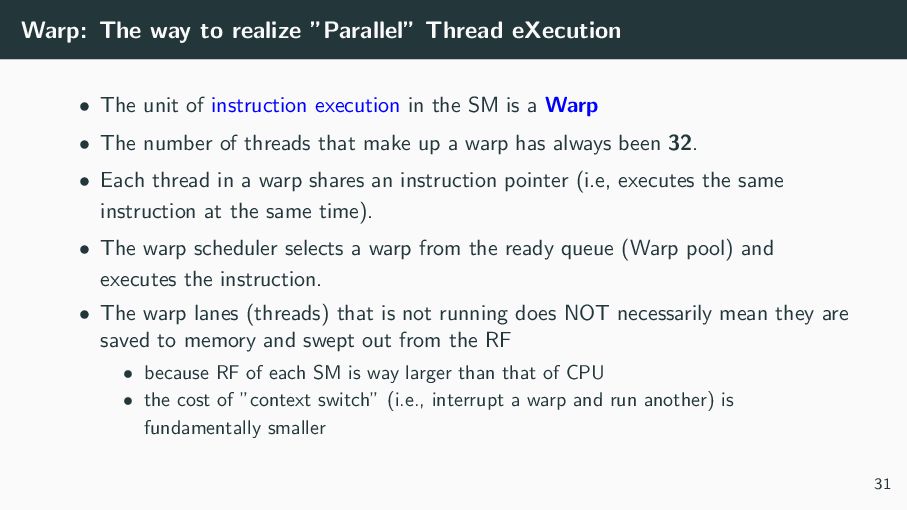
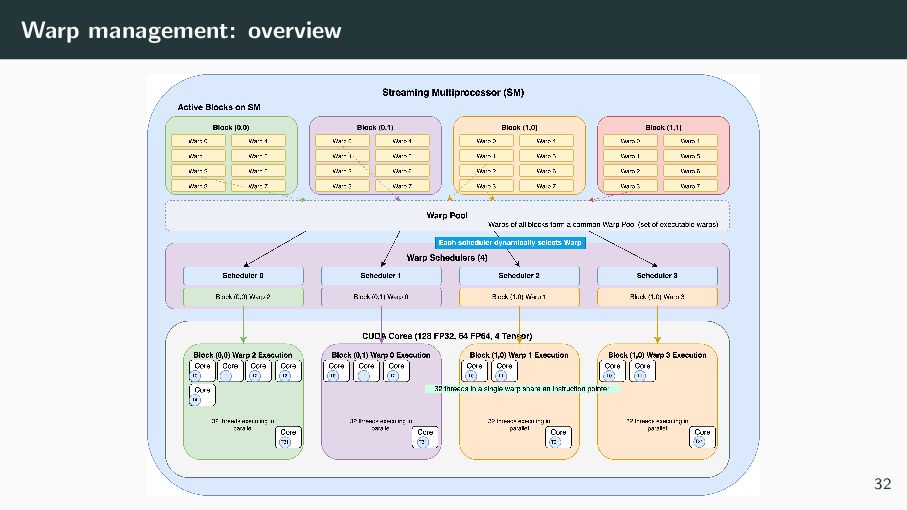
  42. Warp: The way to realize ”Parallel” Thread eXecution • The

    unit of instruction execution in the SM is a Warp • The number of threads that make up a warp has always been 32. • Each thread in a warp shares an instruction pointer (i.e, executes the same instruction at the same time). • The warp scheduler selects a warp from the ready queue (Warp pool) and executes the instruction. • The warp lanes (threads) that is not running does NOT necessarily mean they are saved to memory and swept out from the RF • because RF of each SM is way larger than that of CPU • the cost of ”context switch” (i.e., interrupt a warp and run another) is fundamentally smaller 31
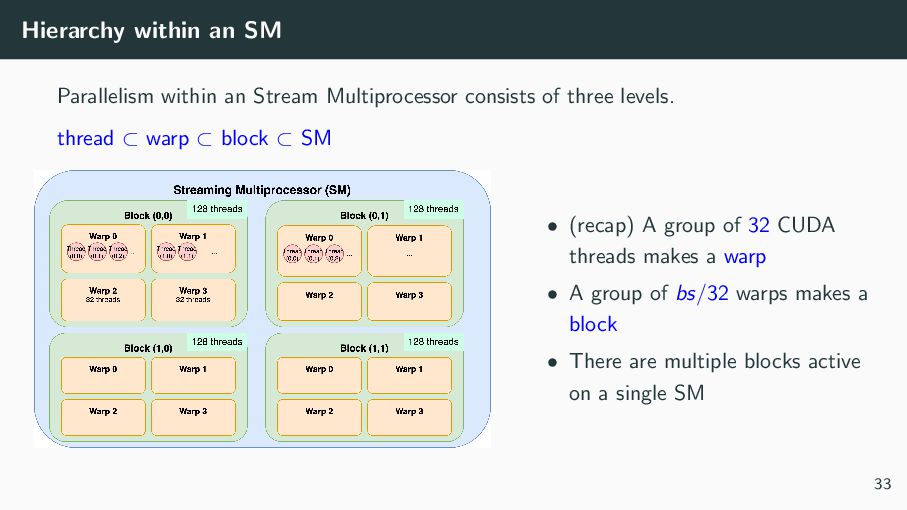
  43. Hierarchy within an SM Parallelism within an Stream Multiprocessor consists

    of three levels. thread ⊂ warp ⊂ block ⊂ SM • (recap) A group of 32 CUDA threads makes a warp • A group of bs/32 warps makes a block • There are multiple blocks active on a single SM 33
  44. Advantages of larger number of threads per block, blocks: increase

    Occupancy • One of the target is to ensure that CUDA cores are always occupied by warps • Data dependencies or synchronization often make warps inactive(waiting) • Thus, we make sure that (at least) one of the warps are active on every SM by setting the number of threads per block to several times the number of CUDA cores • Another target is to use all the available SMs in a balanced manner (i.e., SMs are always occupied by blocks) • To fulfill this goal, several times greater number of thread blocks than that of SMs are required. • In order to know the best GridSize and blockSize, CUDA offers a tool cudaOccupancyMaxPotentialBlockSize(&(int)minGridSize, &(int)blockSize, kernel, 0, 0); 34
  45. Limitation of Hardware: performance degradation However, too many threads per

    block or blocks are sometimes problematic • If each thread uses large amount of registers, too many threads per block can raise register pressure • Register Spill costs performance • For example, using Tensor Cores raises register pressure • If each thread block accesses large data, too many thread blocks per SM can raise Cache pressure • Retire from L1 cache (SM specific memory) will occur too often • Thus, the execution of block will pay the cost of global memory access too often 35
  46. Contents What is CUDA? A CUDA program for beginners HOW

    CUDA works Architecture of NVIDIA GPU Grid, block, thread; abstractions by CUDA Warp: Parallel Thread eXecution Stream: beyond Grid Memory Hierarchy in CUDA Optimize CUDA program Practice Problems Appendices 36
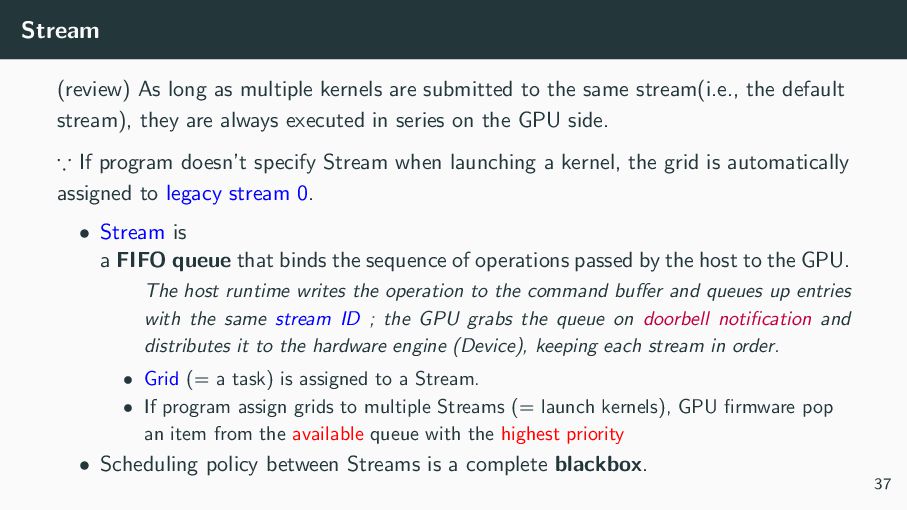
  47. Stream (review) As long as multiple kernels are submitted to

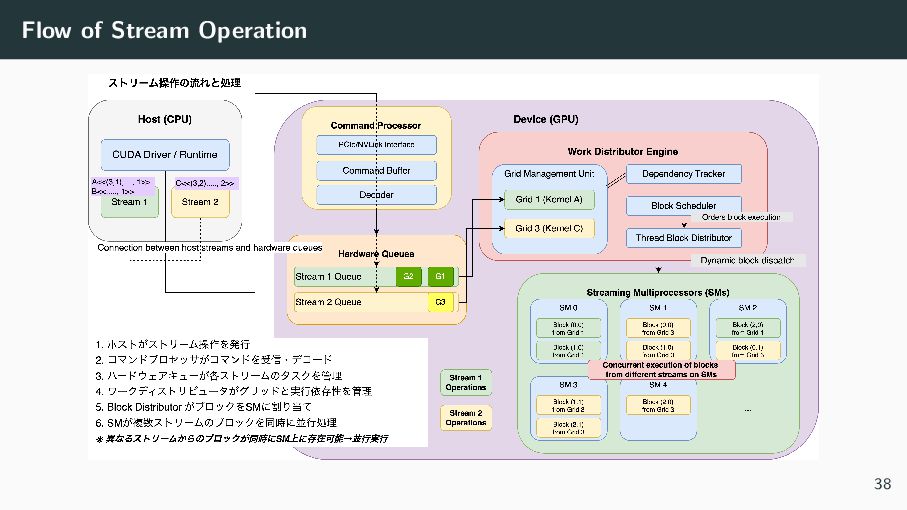
    the same stream(i.e., the default stream), they are always executed in series on the GPU side. ∵ If program doesn’t specify Stream when launching a kernel, the grid is automatically assigned to legacy stream 0. • Stream is a FIFO queue that binds the sequence of operations passed by the host to the GPU. The host runtime writes the operation to the command buffer and queues up entries with the same stream ID ; the GPU grabs the queue on doorbell notification and distributes it to the hardware engine (Device), keeping each stream in order. • Grid (= a task) is assigned to a Stream. • If program assign grids to multiple Streams (= launch kernels), GPU firmware pop an item from the available queue with the highest priority • Scheduling policy between Streams is a complete blackbox. 37
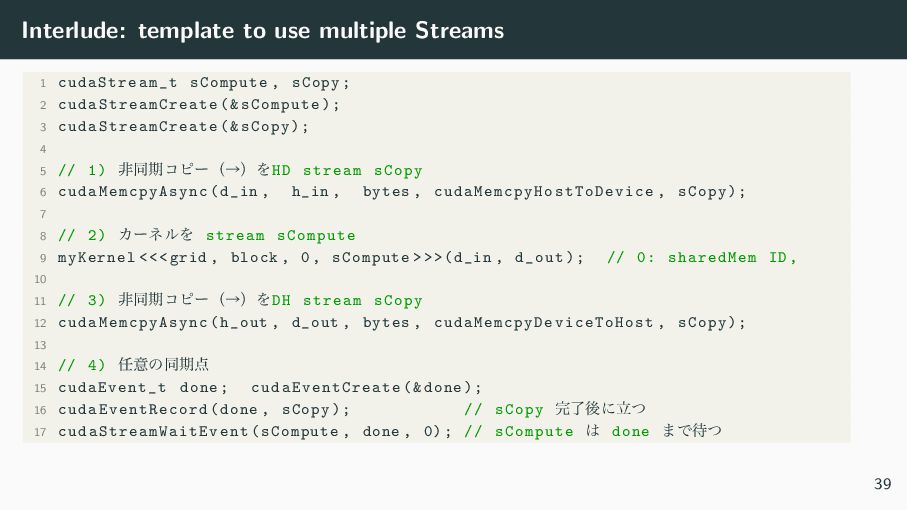
  48. Interlude: template to use multiple Streams 1 cudaStream_t sCompute ,

    sCopy; 2 cudaStreamCreate (& sCompute); 3 cudaStreamCreate (& sCopy); 4 5 // 1) ඇಉظίϐʔʢˠʣΛHD stream sCopy 6 cudaMemcpyAsync (d_in , h_in , bytes , cudaMemcpyHostToDevice , sCopy); 7 8 // 2) ΧʔωϧΛ stream sCompute 9 myKernel <<<grid , block , 0, sCompute >>>(d_in , d_out); // 0: sharedMem ID , 10 11 // 3) ඇಉظίϐʔʢˠʣΛDH stream sCopy 12 cudaMemcpyAsync (h_out , d_out , bytes , cudaMemcpyDeviceToHost , sCopy); 13 14 // 4) ೚ҙͷಉظ఺ 15 cudaEvent_t done; cudaEventCreate (& done); 16 cudaEventRecord (done , sCopy); // sCopy ׬ྃޙʹཱͭ 17 cudaStreamWaitEvent (sCompute , done , 0); // sCompute ͸ done ·Ͱ଴ͭ 39
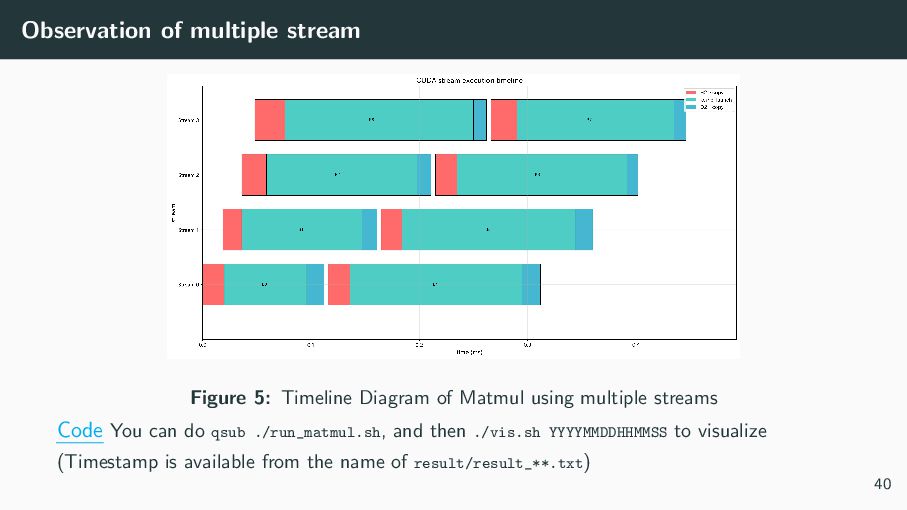
  49. Observation of multiple stream Figure 5: Timeline Diagram of Matmul

    using multiple streams Code You can do qsub ./run_matmul.sh, and then ./vis.sh YYYYMMDDHHMMSS to visualize (Timestamp is available from the name of result/result_**.txt) 40
  50. (+) Using multiple Devices in a single Node : thread

    ̈ You CANNOT try this on Miyabi, because each node has only 1 device. Sample Codes However, I don’t have the environment where the program can execute. 41
  51. (+) Using multiple nodes: MPI Simple Idea: • Create a

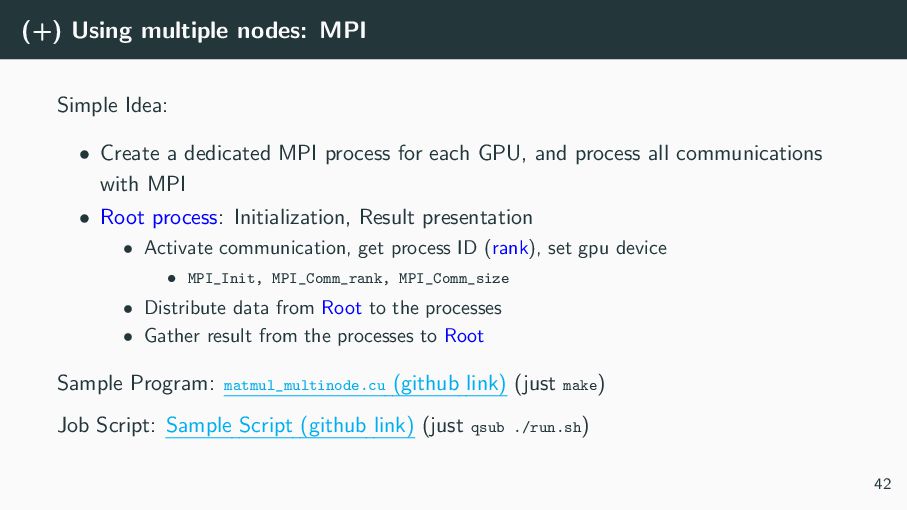
    dedicated MPI process for each GPU, and process all communications with MPI • Root process: Initialization, Result presentation • Activate communication, get process ID (rank), set gpu device • MPI_Init, MPI_Comm_rank, MPI_Comm_size • Distribute data from Root to the processes • Gather result from the processes to Root Sample Program: matmul_multinode.cu (github link) (just make) Job Script: Sample Script (github link) (just qsub ./run.sh) 42
  52. Contents What is CUDA? A CUDA program for beginners HOW

    CUDA works Architecture of NVIDIA GPU Grid, block, thread; abstractions by CUDA Warp: Parallel Thread eXecution Stream: beyond Grid Memory Hierarchy in CUDA Optimize CUDA program Practice Problems Appendices 43
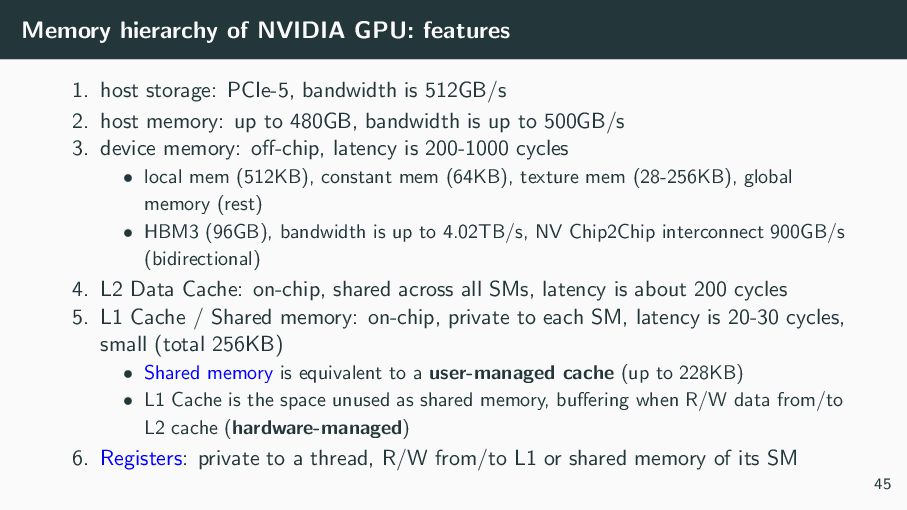
  53. Memory hierarchy of NVIDIA GPU: features 1. host storage: PCIe-5,

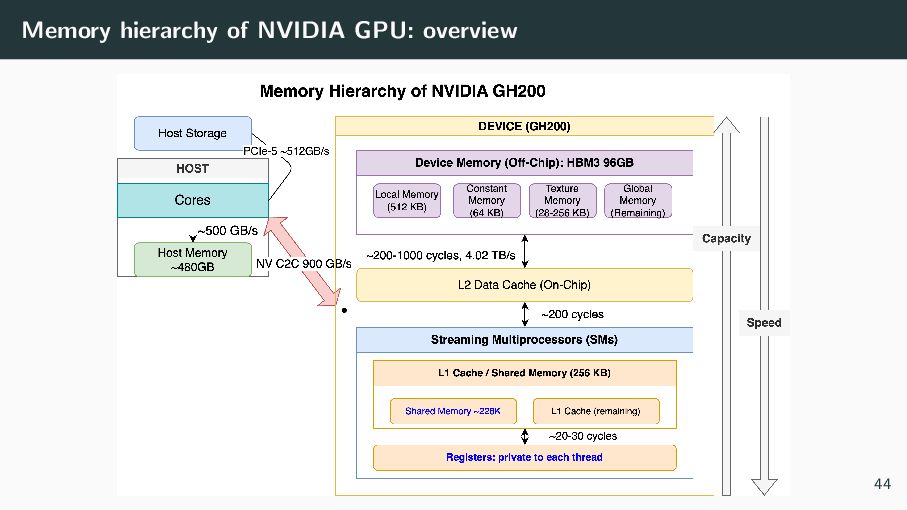
    bandwidth is 512GB/s 2. host memory: up to 480GB, bandwidth is up to 500GB/s 3. device memory: off-chip, latency is 200-1000 cycles • local mem (512KB), constant mem (64KB), texture mem (28-256KB), global memory (rest) • HBM3 (96GB), bandwidth is up to 4.02TB/s, NV Chip2Chip interconnect 900GB/s (bidirectional) 4. L2 Data Cache: on-chip, shared across all SMs, latency is about 200 cycles 5. L1 Cache / Shared memory: on-chip, private to each SM, latency is 20-30 cycles, small (total 256KB) • Shared memory is equivalent to a user-managed cache (up to 228KB) • L1 Cache is the space unused as shared memory, buffering when R/W data from/to L2 cache (hardware-managed) 6. Registers: private to a thread, R/W from/to L1 or shared memory of its SM 45
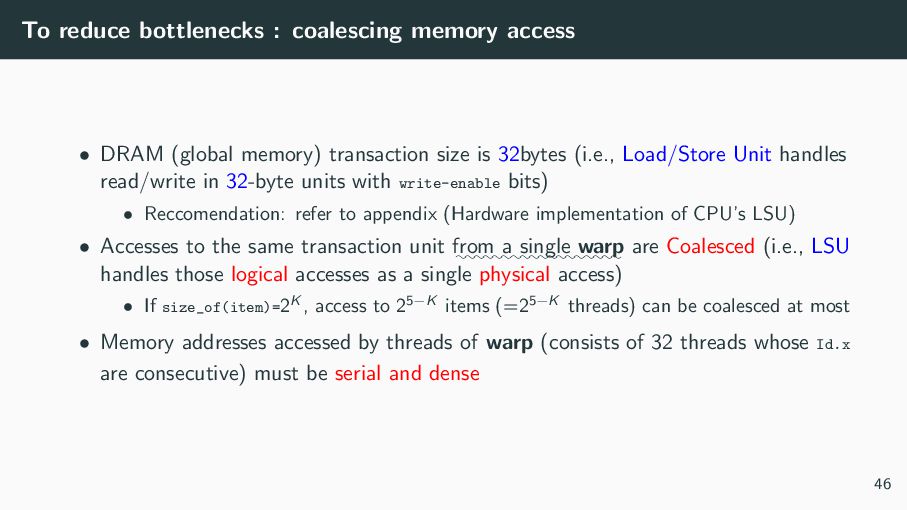
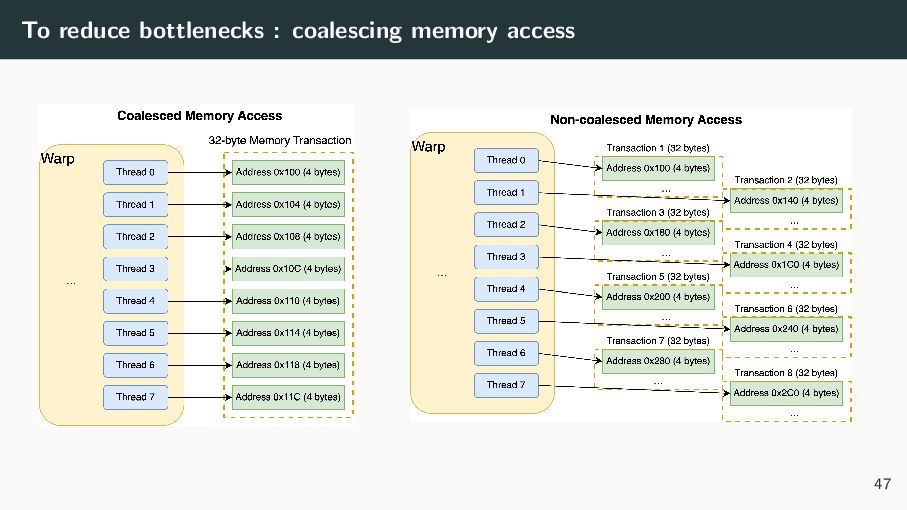
  54. To reduce bottlenecks : coalescing memory access • DRAM (global

    memory) transaction size is 32bytes (i.e., Load/Store Unit handles read/write in 32-byte units with write-enable bits) • Reccomendation: refer to appendix (Hardware implementation of CPU’s LSU) • Accesses to the same transaction unit :::: from :: a ::::::: single ::::: warp are Coalesced (i.e., LSU handles those logical accesses as a single physical access) • If size_of(item)=2K , access to 25−K items (=25−K threads) can be coalesced at most • Memory addresses accessed by threads of warp (consists of 32 threads whose Id.x are consecutive) must be serial and dense 46
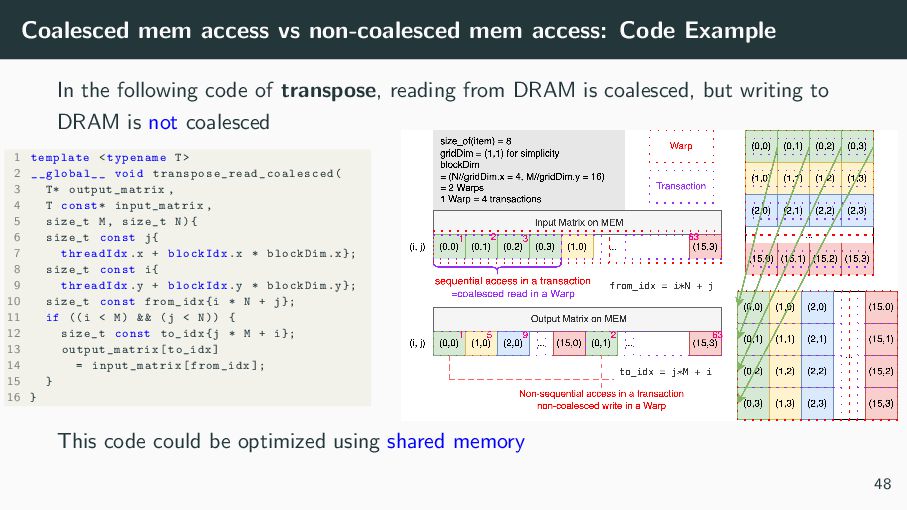
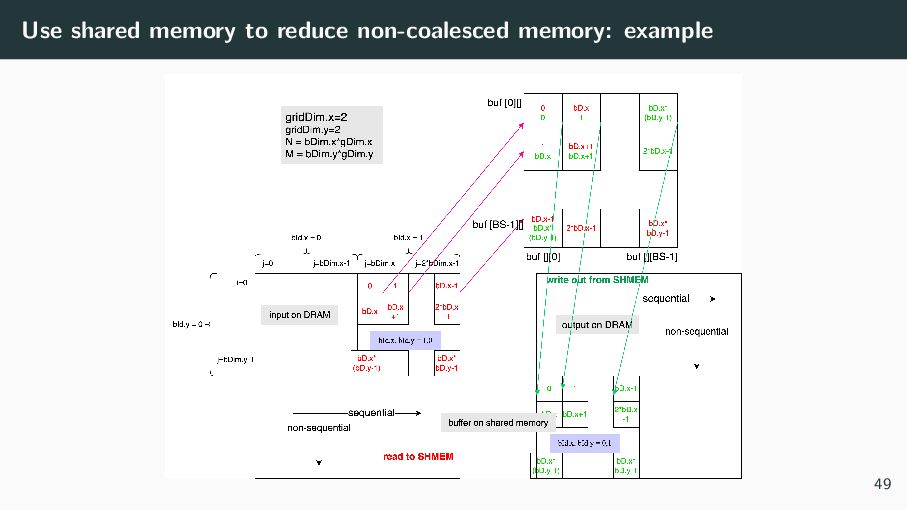
  55. Coalesced mem access vs non-coalesced mem access: Code Example In

    the following code of transpose, reading from DRAM is coalesced, but writing to DRAM is not coalesced 1 template <typename T> 2 __global__ void transpose_read_coalesced ( 3 T* output_matrix , 4 T const* input_matrix , 5 size_t M, size_t N){ 6 size_t const j{ 7 threadIdx.x + blockIdx.x * blockDim.x}; 8 size_t const i{ 9 threadIdx.y + blockIdx.y * blockDim.y}; 10 size_t const from_idx{i * N + j}; 11 if ((i < M) && (j < N)) { 12 size_t const to_idx{j * M + i}; 13 output_matrix [to_idx] 14 = input_matrix [from_idx ]; 15 } 16 } This code could be optimized using shared memory 48
  56. Contents What is CUDA? A CUDA program for beginners HOW

    CUDA works Optimize CUDA program How to measure performance Using Tensore Core Practice Problems Appendices 50
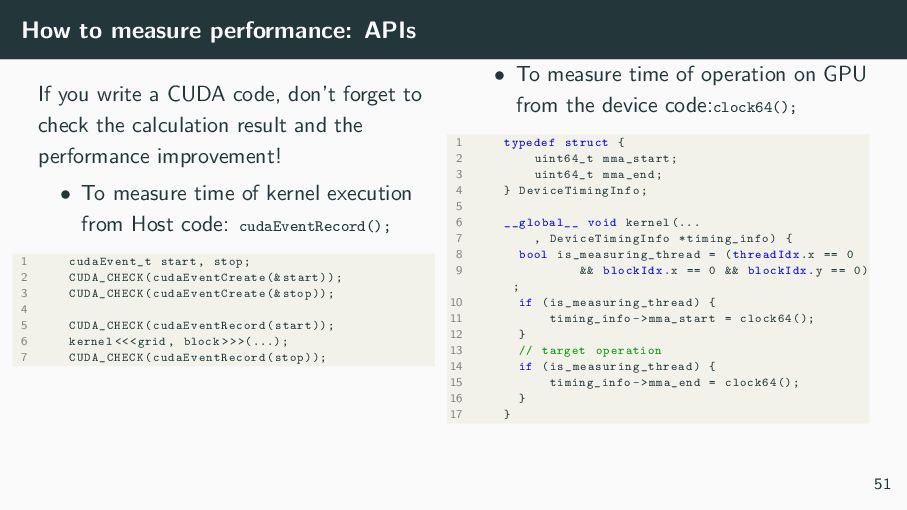
  57. How to measure performance: APIs If you write a CUDA

    code, don’t forget to check the calculation result and the performance improvement! • To measure time of kernel execution from Host code: cudaEventRecord(); 1 cudaEvent_t start , stop; 2 CUDA_CHECK ( cudaEventCreate (& start)); 3 CUDA_CHECK ( cudaEventCreate (& stop)); 4 5 CUDA_CHECK ( cudaEventRecord (start)); 6 kernel <<<grid , block > > >(...); 7 CUDA_CHECK ( cudaEventRecord (stop)); • To measure time of operation on GPU from the device code:clock64(); 1 typedef struct { 2 uint64_t mma_start; 3 uint64_t mma_end; 4 } DeviceTimingInfo ; 5 6 __global__ void kernel (... 7 , DeviceTimingInfo * timing_info) { 8 bool is_measuring_thread = (threadIdx.x == 0 9 && blockIdx.x == 0 && blockIdx.y == 0) ; 10 if ( is_measuring_thread ) { 11 timing_info ->mma_start = clock64 (); 12 } 13 // target operation 14 if ( is_measuring_thread ) { 15 timing_info ->mma_end = clock64 (); 16 } 17 } 51
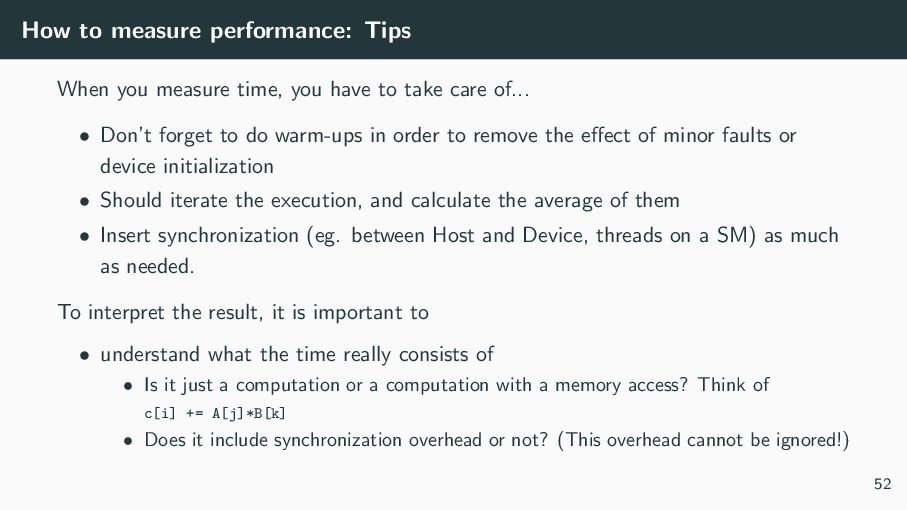
  58. How to measure performance: Tips When you measure time, you

    have to take care of... • Don’t forget to do warm-ups in order to remove the effect of minor faults or device initialization • Should iterate the execution, and calculate the average of them • Insert synchronization (eg. between Host and Device, threads on a SM) as much as needed. To interpret the result, it is important to • understand what the time really consists of • Is it just a computation or a computation with a memory access? Think of c[i] += A[j]*B[k] • Does it include synchronization overhead or not? (This overhead cannot be ignored!) 52
  59. Using Tensor Core • Tensor Cores are specialized high-performance compute

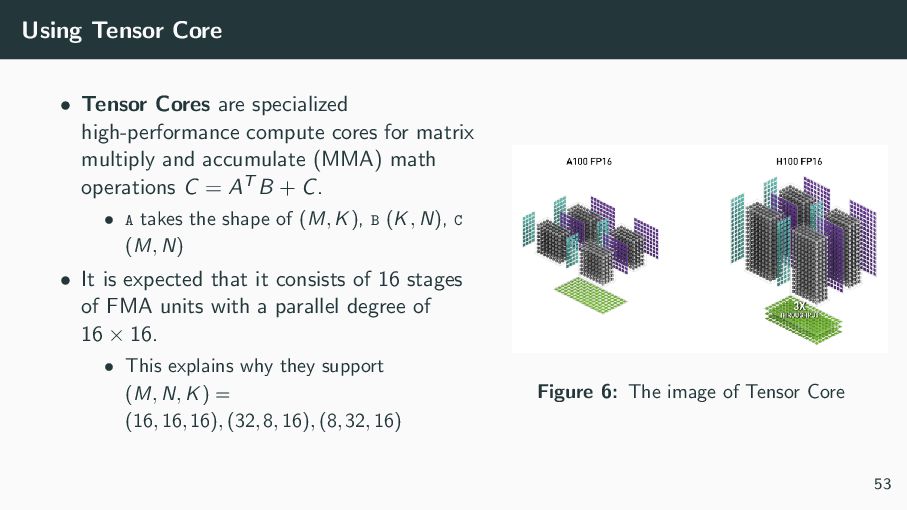
    cores for matrix multiply and accumulate (MMA) math operations C = AT B + C. • A takes the shape of (M, K), B (K, N), C (M, N) • It is expected that it consists of 16 stages of FMA units with a parallel degree of 16 × 16. • This explains why they support (M, N, K) = (16, 16, 16), (32, 8, 16), (8, 32, 16) Figure 6: The image of Tensor Core 53
  60. Using Tensor Core: Step by Step Four steps are required

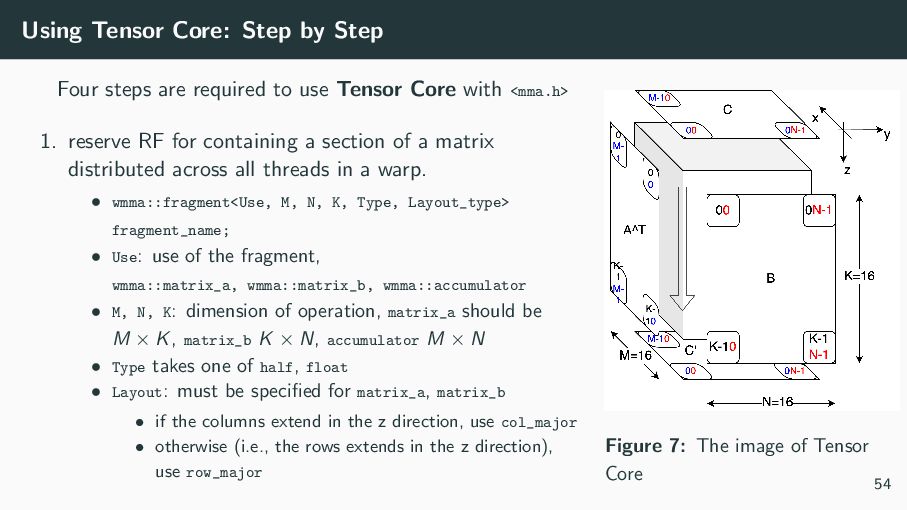
    to use Tensor Core with <mma.h> 1. reserve RF for containing a section of a matrix distributed across all threads in a warp. • wmma::fragment<Use, M, N, K, Type, Layout_type> fragment_name; • Use: use of the fragment, wmma::matrix_a, wmma::matrix_b, wmma::accumulator • M, N, K: dimension of operation, matrix_a should be M × K, matrix_b K × N, accumulator M × N • Type takes one of half, float • Layout: must be specified for matrix_a, matrix_b • if the columns extend in the z direction, use col_major • otherwise (i.e., the rows extends in the z direction), use row_major Figure 7: The image of Tensor Core 54
  61. Using Tensor Core: Step by Step 2. fill a matrix

    fragment (mainly wmma::accumulator) with a constant value, with wmma::fill_fragment 3. waits until all warp lanes(threads) have arrived at, and then loads the matrix fragment from memory onto RF region that has been secure in the Step1 • wmma::load_matrix_sync(fragment_name, mat_ptr, ldm, Layout_type); • mat_ptr: the top address of the matrix (the submatrix of matrix)1 • ldm: the number of elements you want to load at once (eg. the number of columns if you load a row) • Layout_type: the one for matrix_a and matrix_b is inferred (you can skip this), but must specify the one for an accumulator (most of the time, wmma::mem_row_major) 1In C/C++, A+offset is equivalent to A+(offset*sizeof(item)) 55
  62. Using Tensor Core: Step by Step 4. Waits until all

    warp lanes have arrived at, then performs the warp-synchronous MMA operation • wmma::mma_sync(d_frag, a_frag, b_frag, c_frag [, satf]); • d_frag and c_frag could be the same, if satf is true, saturation to finite value will be applied 5. Syncs, then stores the matrix fragment to memory, the arguments are the same with load_matrix_sync 56
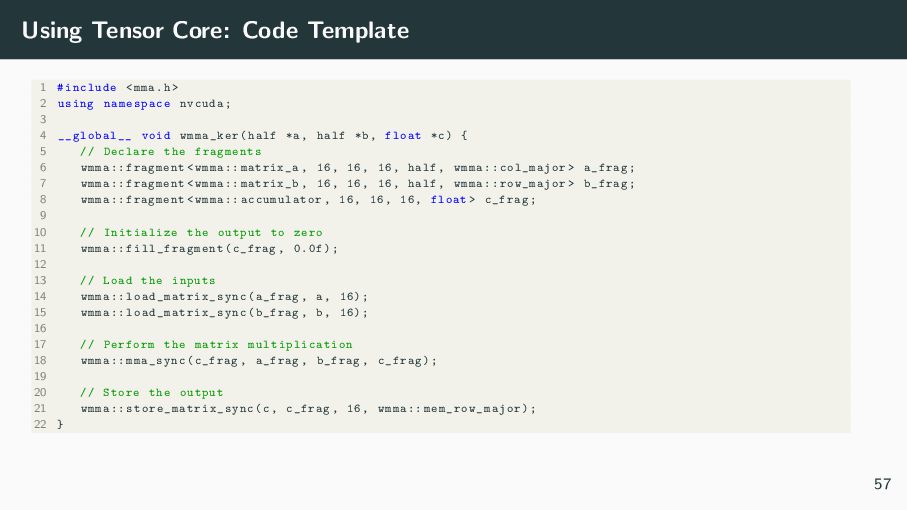
  63. Using Tensor Core: Code Template 1 #include <mma.h> 2 using

    namespace nvcuda; 3 4 __global__ void wmma_ker(half *a, half *b, float *c) { 5 // Declare the fragments 6 wmma :: fragment <wmma :: matrix_a , 16, 16, 16, half , wmma :: col_major > a_frag; 7 wmma :: fragment <wmma :: matrix_b , 16, 16, 16, half , wmma :: row_major > b_frag; 8 wmma :: fragment <wmma :: accumulator , 16, 16, 16, float > c_frag; 9 10 // Initialize the output to zero 11 wmma :: fill_fragment (c_frag , 0.0f); 12 13 // Load the inputs 14 wmma :: load_matrix_sync (a_frag , a, 16); 15 wmma :: load_matrix_sync (b_frag , b, 16); 16 17 // Perform the matrix multiplication 18 wmma :: mma_sync(c_frag , a_frag , b_frag , c_frag); 19 20 // Store the output 21 wmma :: store_matrix_sync (c, c_frag , 16, wmma :: mem_row_major ); 22 } 57
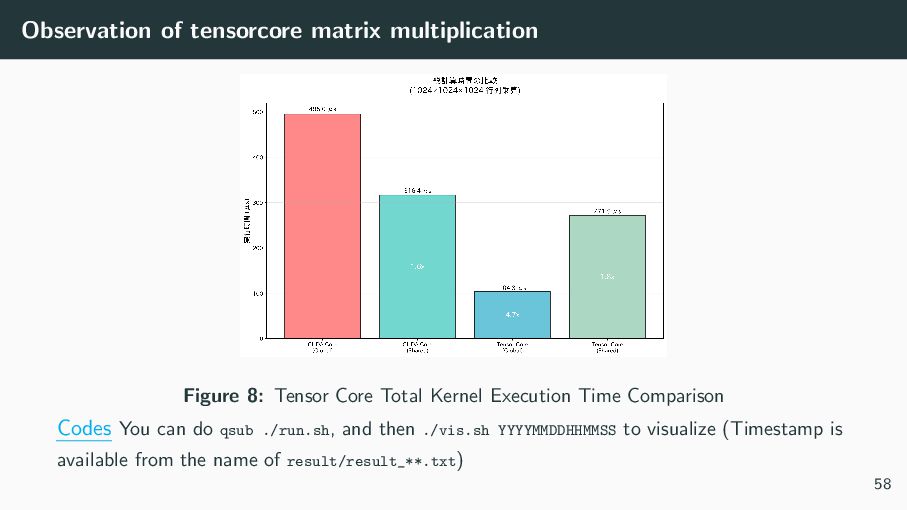
  64. Observation of tensorcore matrix multiplication Figure 8: Tensor Core Total

    Kernel Execution Time Comparison Codes You can do qsub ./run.sh, and then ./vis.sh YYYYMMDDHHMMSS to visualize (Timestamp is available from the name of result/result_**.txt) 58
  65. Contents What is CUDA? A CUDA program for beginners HOW

    CUDA works Optimize CUDA program Practice Problems Appendices 59
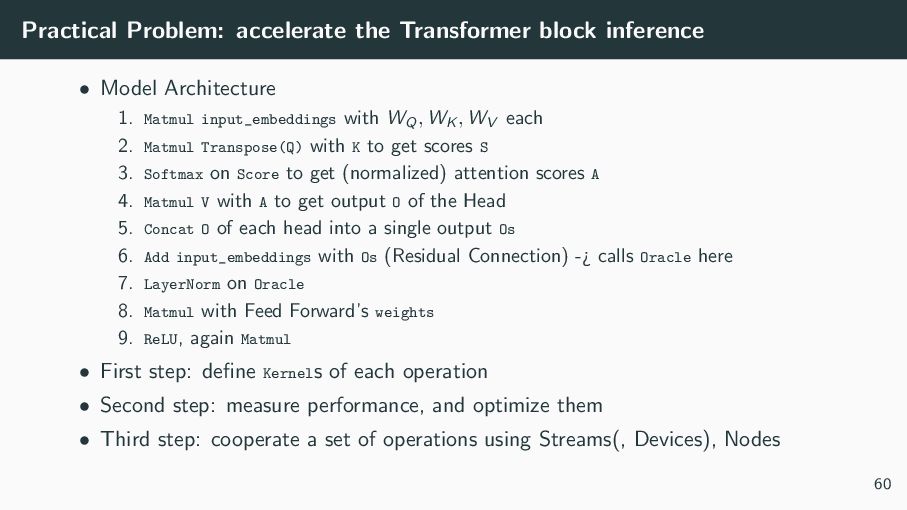
  66. Practical Problem: accelerate the Transformer block inference • Model Architecture

    1. Matmul input_embeddings with WQ, WK , WV each 2. Matmul Transpose(Q) with K to get scores S 3. Softmax on Score to get (normalized) attention scores A 4. Matmul V with A to get output O of the Head 5. Concat O of each head into a single output Os 6. Add input_embeddings with Os (Residual Connection) -¿ calls Oracle here 7. LayerNorm on Oracle 8. Matmul with Feed Forward’s weights 9. ReLU, again Matmul • First step: define Kernels of each operation • Second step: measure performance, and optimize them • Third step: cooperate a set of operations using Streams(, Devices), Nodes 60
  67. Further problems ... 1. k-NN for vector Database (on huge

    vectors) 2. local alignment of DNA arrays: Smith Watermann’s DP 3. Sort on GPU 61
  68. Contents What is CUDA? A CUDA program for beginners HOW

    CUDA works Optimize CUDA program Practice Problems Appendices Hardware implementation of LSU 62
  69. • How to avoid race conditions between threads • Register

    shared threads intra warp • Cuda Graph • Usage of profiler (nsys, ncu) 63
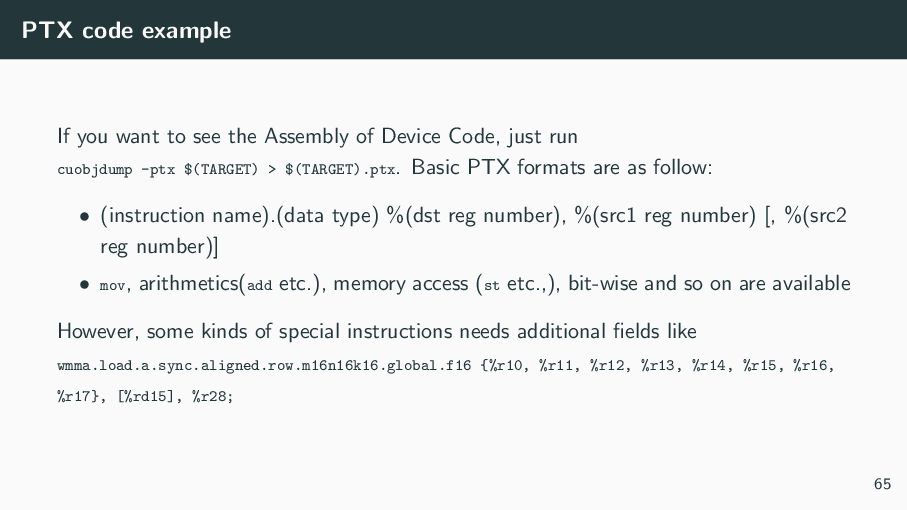
  70. PTX code example If you want to see the Assembly

    of Device Code, just run cuobjdump -ptx $(TARGET) > $(TARGET).ptx. Basic PTX formats are as follow: • (instruction name).(data type) %(dst reg number), %(src1 reg number) [, %(src2 reg number)] • mov, arithmetics(add etc.), memory access (st etc.,), bit-wise and so on are available However, some kinds of special instructions needs additional fields like wmma.load.a.sync.aligned.row.m16n16k16.global.f16 {%r10, %r11, %r12, %r13, %r14, %r15, %r16, %r17}, [%rd15], %r28; 65
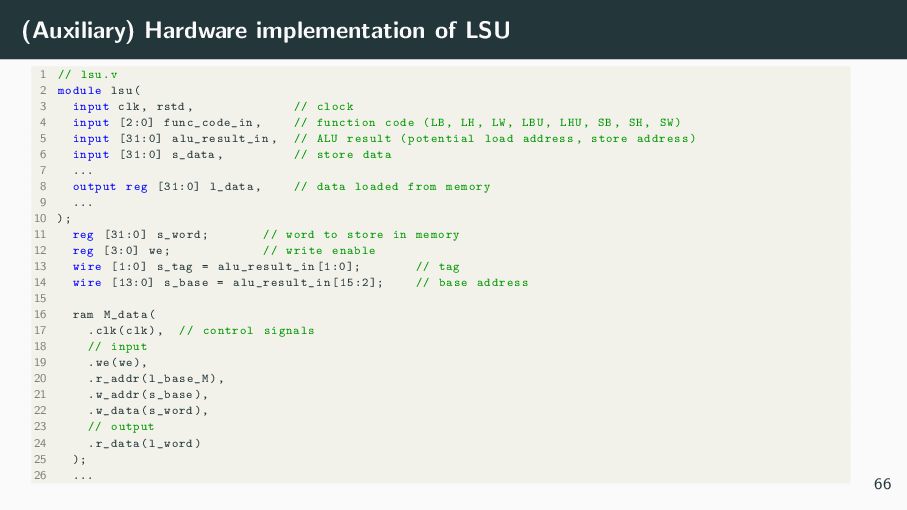
  71. (Auxiliary) Hardware implementation of LSU 1 // lsu.v 2 module

    lsu( 3 input clk , rstd , // clock 4 input [2:0] func_code_in , // function code (LB , LH , LW , LBU , LHU , SB , SH , SW) 5 input [31:0] alu_result_in , // ALU result (potential load address , store address) 6 input [31:0] s_data , // store data 7 ... 8 output reg [31:0] l_data , // data loaded from memory 9 ... 10 ); 11 reg [31:0] s_word; // word to store in memory 12 reg [3:0] we; // write enable 13 wire [1:0] s_tag = alu_result_in [1:0]; // tag 14 wire [13:0] s_base = alu_result_in [15:2]; // base address 15 16 ram M_data( 17 .clk(clk), // control signals 18 // input 19 .we(we), 20 .r_addr(l_base_M), 21 .w_addr(s_base), 22 .w_data(s_word), 23 // output 24 .r_data(l_word) 25 ); 26 ... 66
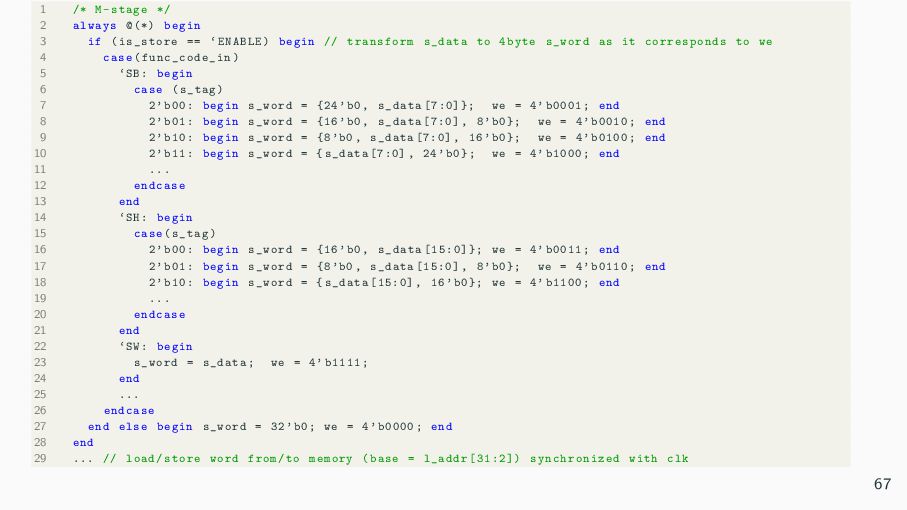
  72. 1 /* M-stage */ 2 always @(*) begin 3 if

    (is_store == ‘ENABLE) begin // transform s_data to 4byte s_word as it corresponds to we 4 case( func_code_in ) 5 ‘SB: begin 6 case (s_tag) 7 2’b00: begin s_word = {24’b0 , s_data [7:0]}; we = 4’b0001; end 8 2’b01: begin s_word = {16’b0 , s_data [7:0] , 8’b0}; we = 4’b0010; end 9 2’b10: begin s_word = {8’b0 , s_data [7:0] , 16’b0}; we = 4’b0100; end 10 2’b11: begin s_word = {s_data [7:0] , 24’b0}; we = 4’b1000; end 11 ... 12 endcase 13 end 14 ‘SH: begin 15 case(s_tag) 16 2’b00: begin s_word = {16’b0 , s_data [15:0]}; we = 4’b0011; end 17 2’b01: begin s_word = {8’b0 , s_data [15:0] , 8’b0}; we = 4’b0110; end 18 2’b10: begin s_word = {s_data [15:0] , 16’b0}; we = 4’b1100; end 19 ... 20 endcase 21 end 22 ‘SW: begin 23 s_word = s_data; we = 4’b1111; 24 end 25 ... 26 endcase 27 end else begin s_word = 32’b0; we = 4’b0000; end 28 end 29 ... // load/store word from/to memory (base = l_addr [31:2]) synchronized with clk 67
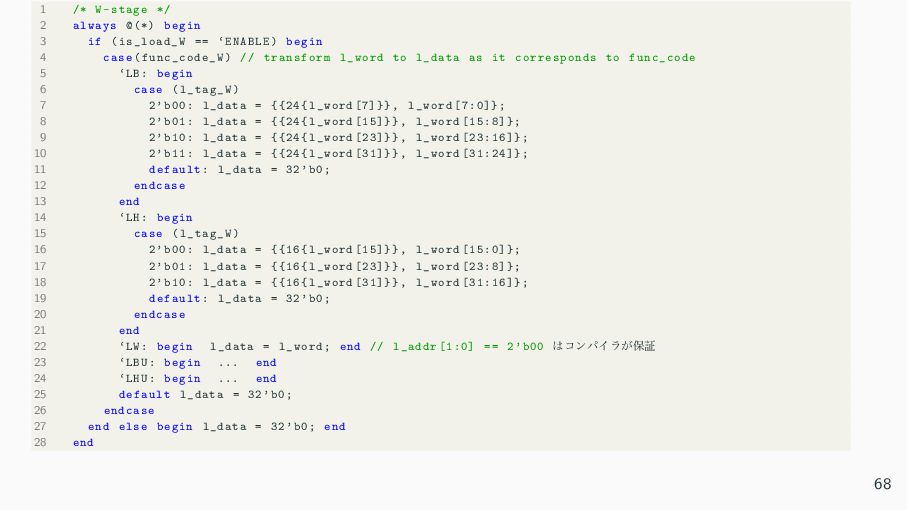
  73. 1 /* W-stage */ 2 always @(*) begin 3 if

    (is_load_W == ‘ENABLE) begin 4 case(func_code_W ) // transform l_word to l_data as it corresponds to func_code 5 ‘LB: begin 6 case (l_tag_W) 7 2’b00: l_data = {{24{ l_word [7]}} , l_word [7:0]}; 8 2’b01: l_data = {{24{ l_word [15]}} , l_word [15:8]}; 9 2’b10: l_data = {{24{ l_word [23]}} , l_word [23:16]}; 10 2’b11: l_data = {{24{ l_word [31]}} , l_word [31:24]}; 11 default: l_data = 32’b0; 12 endcase 13 end 14 ‘LH: begin 15 case (l_tag_W) 16 2’b00: l_data = {{16{ l_word [15]}} , l_word [15:0]}; 17 2’b01: l_data = {{16{ l_word [23]}} , l_word [23:8]}; 18 2’b10: l_data = {{16{ l_word [31]}} , l_word [31:16]}; 19 default: l_data = 32’b0; 20 endcase 21 end 22 ‘LW: begin l_data = l_word; end // l_addr [1:0] == 2’b00 ͸ίϯύΠϥ͕อূ 23 ‘LBU: begin ... end 24 ‘LHU: begin ... end 25 default l_data = 32’b0; 26 endcase 27 end else begin l_data = 32’b0; end 28 end 68
  74. References 1. https://docs.nvidia.com/cuda/parallel-thread-execution/ 2. https://docs.nvidia.com/cuda/cuda-c-programming-guide/index.html 3. https://resources.nvidia.com/en-us-data-center-overview-mc/ en-us-data-center-overview/grace-hopper-superchip-datasheet-partner 4. https://docs.nvidia.com/cuda/cuda-runtime-api/index.html

    5. https://www.nas.nasa.gov/hecc/support/kb/ basics-on-nvidia-gpu-hardware-architecture 704.html 6. https://developer.nvidia.com/blog/unified-memory-cuda-beginners/ 7. https://leimao.github.io/blog/CUDA-Coalesced-Memory-Access/ 8. https://www.nvidia.com/content/pdf/fermi white papers/p.glaskowsky nvidia’ s fermi-the first complete gpu architecture.pdf 9. https://developer.nvidia.com/ja-jp/blog/nvidia-hopper-architecture-in-depth/ 10. https://qiita.com/tarako1889/items/963e8972daa8c490efd4 11. https://www.docswell.com/s/fixstars/5RXQJ2-20220623 69