Upgrade to Pro — share decks privately, control downloads, hide ads and more …

How to program Cerebras SDK

How to program Cerebras SDK

Introduction to Cerebras Wafer Scale Engine Architecture, Programming Model of Cerebras SDK

Avatar for Yuri Takigawa

Yuri Takigawa

March 21, 2026

More Decks by Yuri Takigawa

Other Decks in Programming

Transcript

  1. Cerebras System remarkable hardware accelarator architecure & its programming model

    Yuri Takigawa July 2, 2025 The university of Tokyo, EEIC, Taura Lab 1
  2. Contents Installation and Setup A Conceptual View: Hardware organization PE

    (Processing Elements) A Conceptual View: Programming model Programming Language Communication Code Execution Unit: Task Management of data which wavelets deliver : Data Struct Descriptor layout and host code 2
  3. Contents Installation and Setup A Conceptual View: Hardware organization PE

    (Processing Elements) A Conceptual View: Programming model Programming Language Communication Code Execution Unit: Task Management of data which wavelets deliver : Data Struct Descriptor layout and host code 3
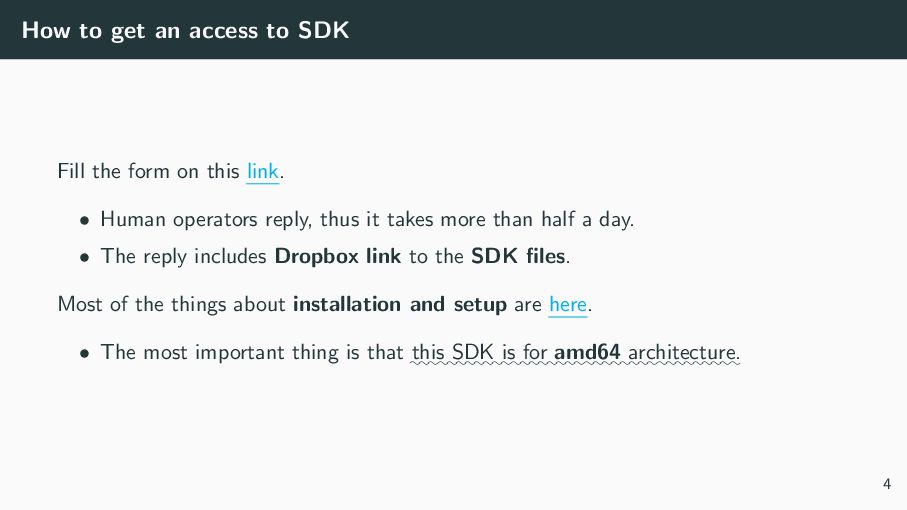
  4. How to get an access to SDK Fill the form

    on this link. • Human operators reply, thus it takes more than half a day. • The reply includes Dropbox link to the SDK files. Most of the things about installation and setup are here. • The most important thing is that :::: this ::::: SDK :: is :::: for :::::::: amd64 ::::::::::::: architecture. 4
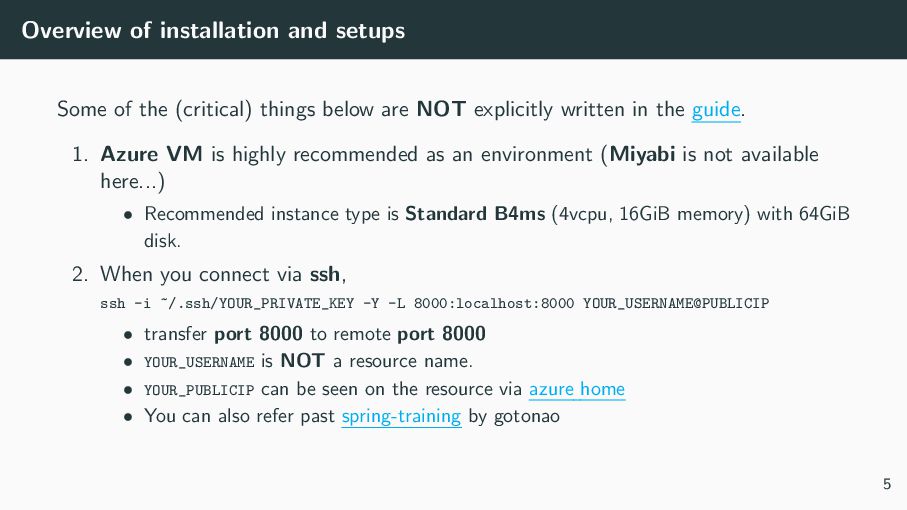
  5. Overview of installation and setups Some of the (critical) things

    below are NOT explicitly written in the guide. 1. Azure VM is highly recommended as an environment (Miyabi is not available here...) • Recommended instance type is Standard B4ms (4vcpu, 16GiB memory) with 64GiB disk. 2. When you connect via ssh, ssh -i ~/.ssh/YOUR_PRIVATE_KEY -Y -L 8000:localhost:8000 YOUR_USERNAME@PUBLICIP • transfer port 8000 to remote port 8000 • YOUR_USERNAME is NOT a resource name. • YOUR_PUBLICIP can be seen on the resource via azure home • You can also refer past spring-training by gotonao 5
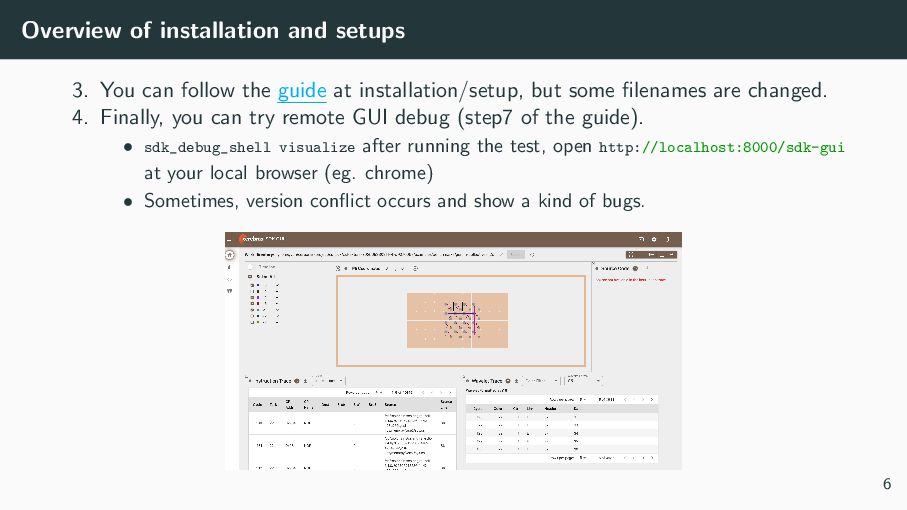
  6. Overview of installation and setups 3. You can follow the

    guide at installation/setup, but some filenames are changed. 4. Finally, you can try remote GUI debug (step7 of the guide). • sdk_debug_shell visualize after running the test, open http://localhost:8000/sdk-gui at your local browser (eg. chrome) • Sometimes, version conflict occurs and show a kind of bugs. 6
  7. Contents Installation and Setup A Conceptual View: Hardware organization PE

    (Processing Elements) A Conceptual View: Programming model 7
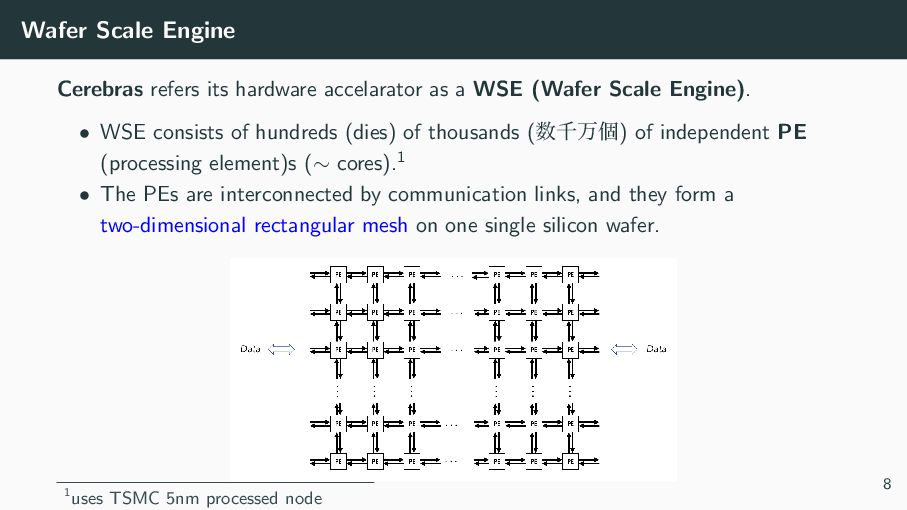
  8. Wafer Scale Engine Cerebras refers its hardware accelarator as a

    WSE (Wafer Scale Engine). • WSE consists of hundreds (dies) of thousands (਺ઍສݸ) of independent PE (processing element)s (∼ cores).1 • The PEs are interconnected by communication links, and they form a two-dimensional rectangular mesh on one single silicon wafer. 1uses TSMC 5nm processed node 8
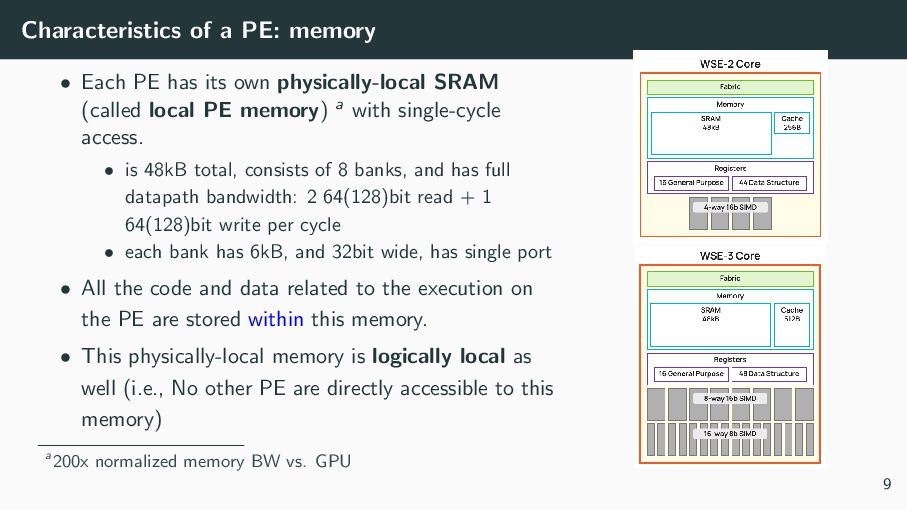
  9. Characteristics of a PE: memory • Each PE has its

    own physically-local SRAM (called local PE memory) a with single-cycle access. • is 48kB total, consists of 8 banks, and has full datapath bandwidth: 2 64(128)bit read + 1 64(128)bit write per cycle • each bank has 6kB, and 32bit wide, has single port • All the code and data related to the execution on the PE are stored within this memory. • This physically-local memory is logically local as well (i.e., No other PE are directly accessible to this memory) a200x normalized memory BW vs. GPU 9
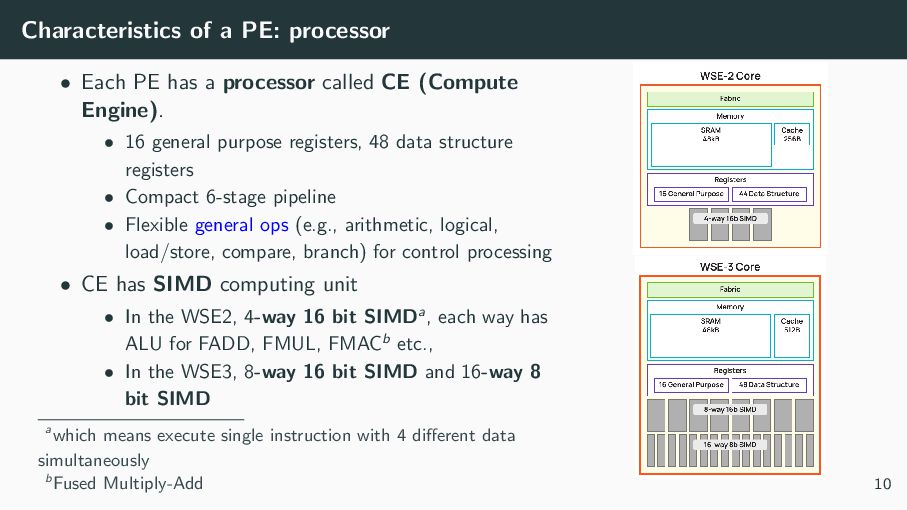
  10. Characteristics of a PE: processor • Each PE has a

    processor called CE (Compute Engine). • 16 general purpose registers, 48 data structure registers • Compact 6-stage pipeline • Flexible general ops (e.g., arithmetic, logical, load/store, compare, branch) for control processing • CE has SIMD computing unit • In the WSE2, 4-way 16 bit SIMDa, each way has ALU for FADD, FMUL, FMACb etc., • In the WSE3, 8-way 16 bit SIMD and 16-way 8 bit SIMD awhich means execute single instruction with 4 different data simultaneously bFused Multiply-Add 10
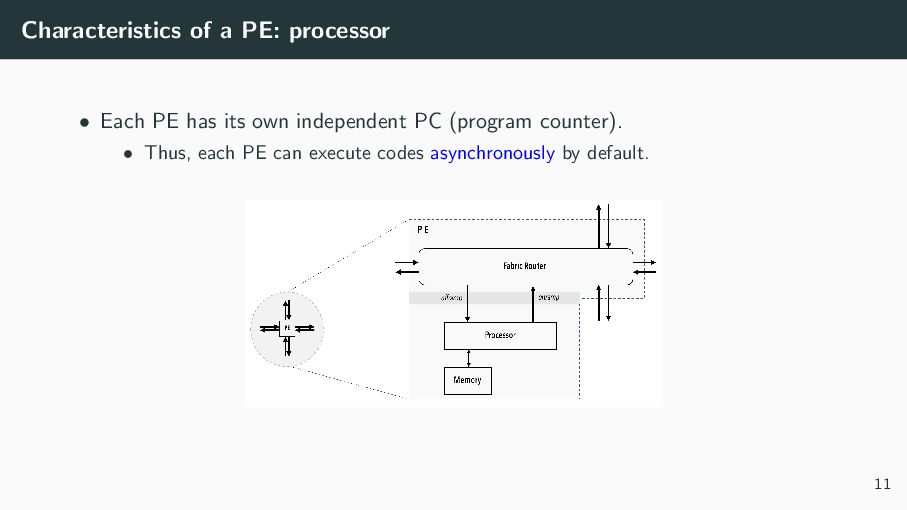
  11. Characteristics of a PE: processor • Each PE has its

    own independent PC (program counter). • Thus, each PE can execute codes asynchronously by default. 11
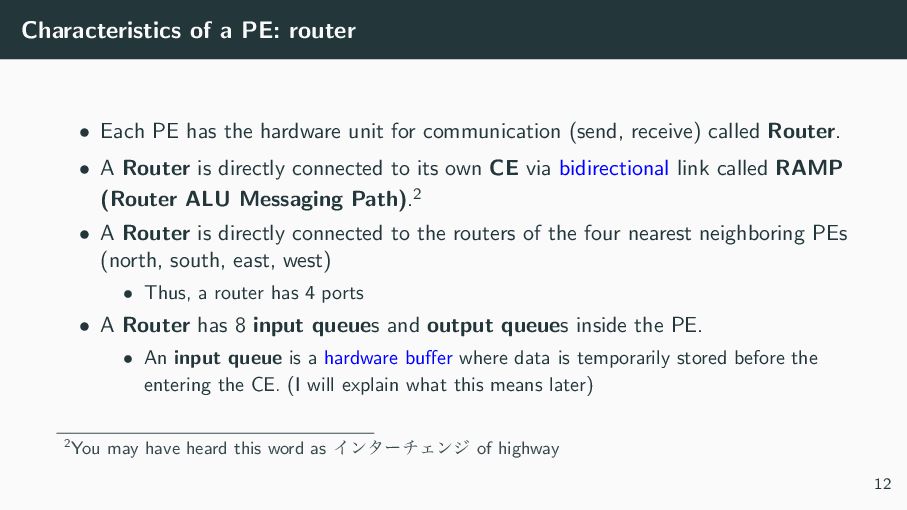
  12. Characteristics of a PE: router • Each PE has the

    hardware unit for communication (send, receive) called Router. • A Router is directly connected to its own CE via bidirectional link called RAMP (Router ALU Messaging Path).2 • A Router is directly connected to the routers of the four nearest neighboring PEs (north, south, east, west) • Thus, a router has 4 ports • A Router has 8 input queues and output queues inside the PE. • An input queue is a hardware buffer where data is temporarily stored before the entering the CE. (I will explain what this means later) 2You may have heard this word as ΠϯλʔνΣϯδ of highway 12
  13. Contents Installation and Setup A Conceptual View: Hardware organization A

    Conceptual View: Programming model Programming Language Communication Code Execution Unit: Task Management of data which wavelets deliver : Data Struct Descriptor layout and host code 13
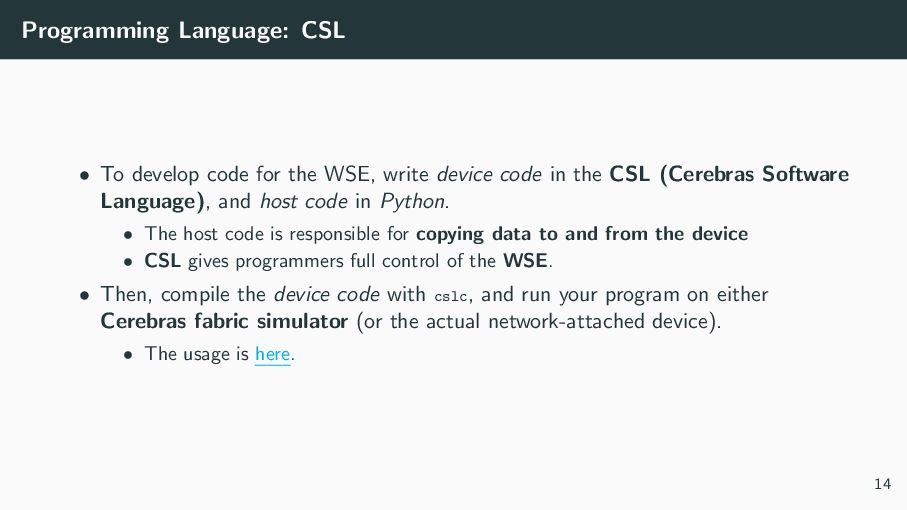
  14. Programming Language: CSL • To develop code for the WSE,

    write device code in the CSL (Cerebras Software Language), and host code in Python. • The host code is responsible for copying data to and from the device • CSL gives programmers full control of the WSE. • Then, compile the device code with cslc, and run your program on either Cerebras fabric simulator (or the actual network-attached device). • The usage is here. 14
  15. Programs and Tasks A CSL program consists of one or

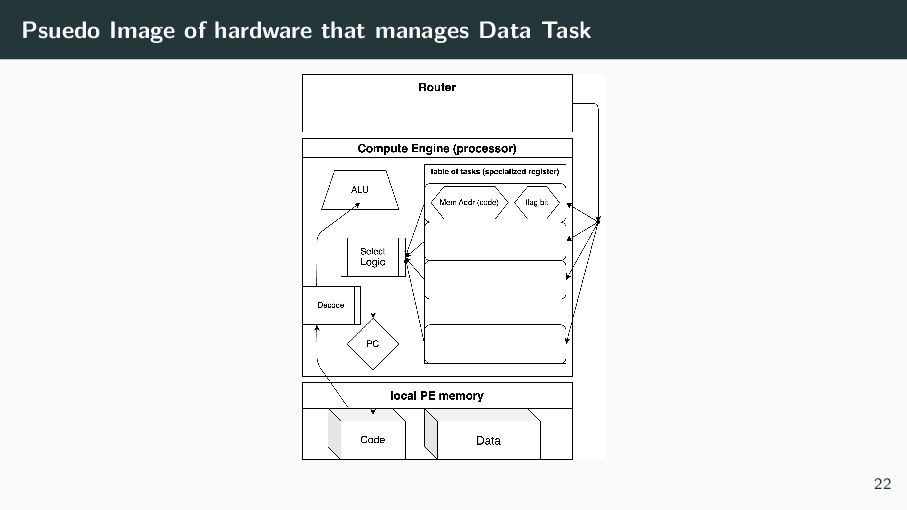
    more subprograms. Subprogram has two types (declaration). • function: callable • task: a procedure that cannot be called from other code • something like atomic (i.e., unsplittable) code block managed by hardware • tasks are managed at the specialized hardware unit of CE similar to rich NPC generator • A task can be activated (i.e., ready for running) by some hardware trigger (imagine a flip of a flag bit) • tasks are started by PE hardware (specifically NPC generator of CE) • Only one task can be executed at a time on the CE • Once a task is started by hardware, : it ::::: runs ::::: until :: it ::::::::: complete. Then, the NPC generator chooses a new task to run. 15
  16. Contents Installation and Setup A Conceptual View: Hardware organization PE

    (Processing Elements) A Conceptual View: Programming model Programming Language Communication Code Execution Unit: Task Management of data which wavelets deliver : Data Struct Descriptor layout and host code 16
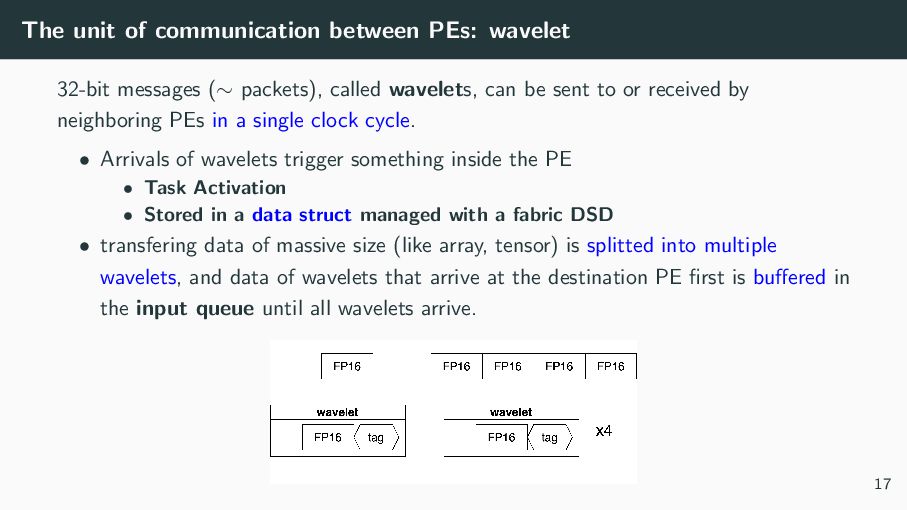
  17. The unit of communication between PEs: wavelet 32-bit messages (∼

    packets), called wavelets, can be sent to or received by neighboring PEs in a single clock cycle. • Arrivals of wavelets trigger something inside the PE • Task Activation • Stored in a data struct managed with a fabric DSD • transfering data of massive size (like array, tensor) is splitted into multiple wavelets, and data of wavelets that arrive at the destination PE first is buffered in the input queue until all wavelets arrive. 17
  18. Virtual Communication Channel: Color The virtual communication path (channel) through

    which wavelets (packets) travel is called color. • There exists 24 virtual channels used by hardware. • All colors transfer data on a single physical channel. • If multiple colors have wavelets to send via physical path from PE X to PE Y, those colors (not wavelets) are scheduled by hardware arbiter on router. • IMPORTANT: The congestion of one color does NOT block traffic of another color; Fairness between colors (not wavelets) • For example, RR algorighm could be used as a policy. • Each wavelet has a 5-bit tag that encodes its color 18
  19. Contents Installation and Setup A Conceptual View: Hardware organization PE

    (Processing Elements) A Conceptual View: Programming model Programming Language Communication Code Execution Unit: Task Management of data which wavelets deliver : Data Struct Descriptor layout and host code 19
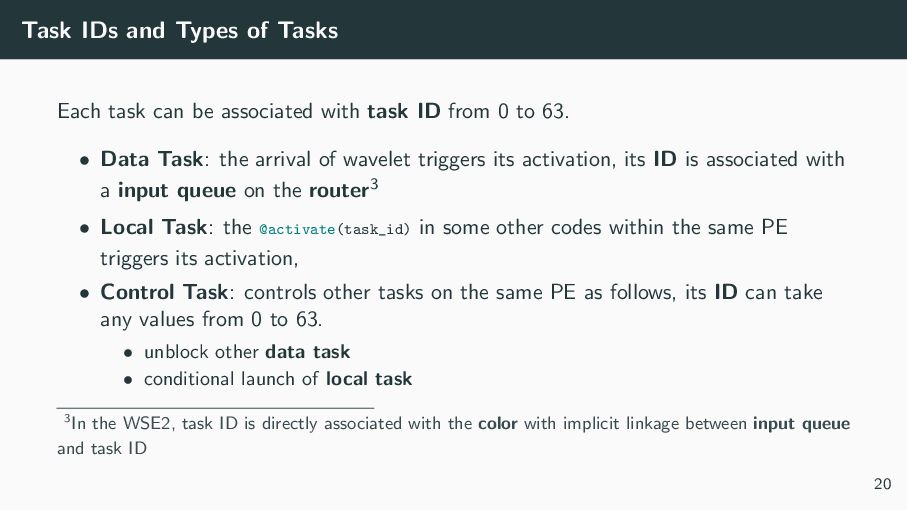
  20. Task IDs and Types of Tasks Each task can be

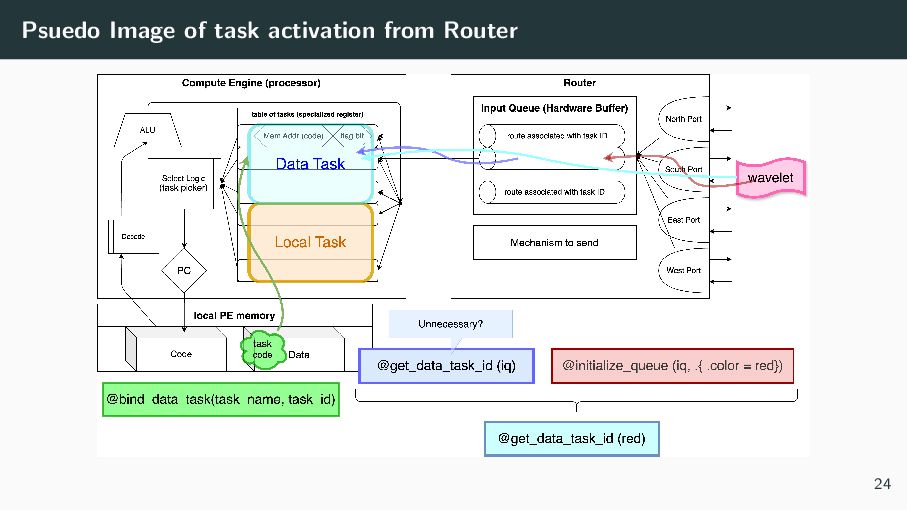
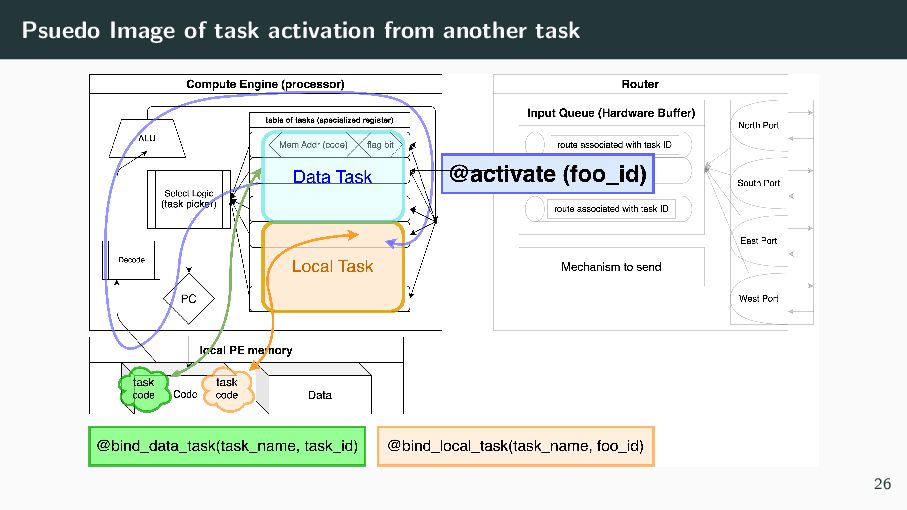
    associated with task ID from 0 to 63. • Data Task: the arrival of wavelet triggers its activation, its ID is associated with a input queue on the router3 • Local Task: the @activate(task_id) in some other codes within the same PE triggers its activation, • Control Task: controls other tasks on the same PE as follows, its ID can take any values from 0 to 63. • unblock other data task • conditional launch of local task 3In the WSE2, task ID is directly associated with the color with implicit linkage between input queue and task ID 20
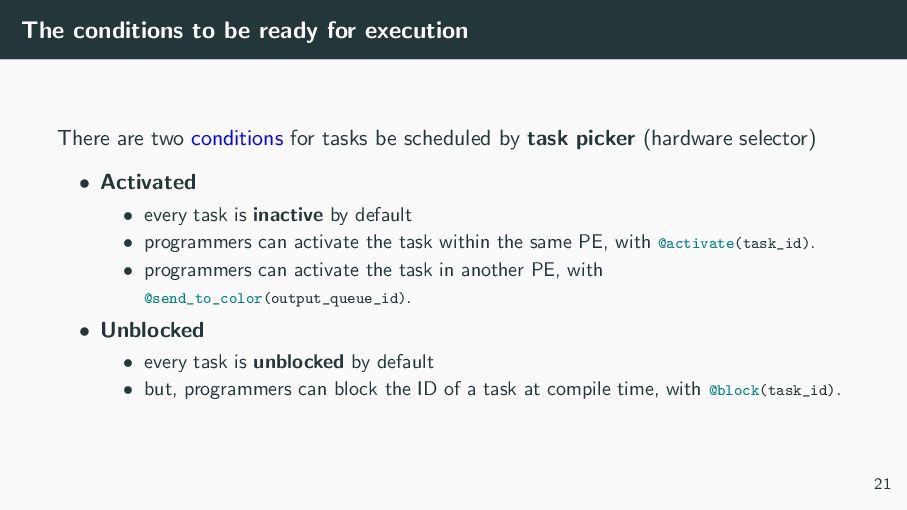
  21. The conditions to be ready for execution There are two

    conditions for tasks be scheduled by task picker (hardware selector) • Activated • every task is inactive by default • programmers can activate the task within the same PE, with @activate(task_id). • programmers can activate the task in another PE, with @send_to_color(output_queue_id). • Unblocked • every task is unblocked by default • but, programmers can block the ID of a task at compile time, with @block(task_id). 21
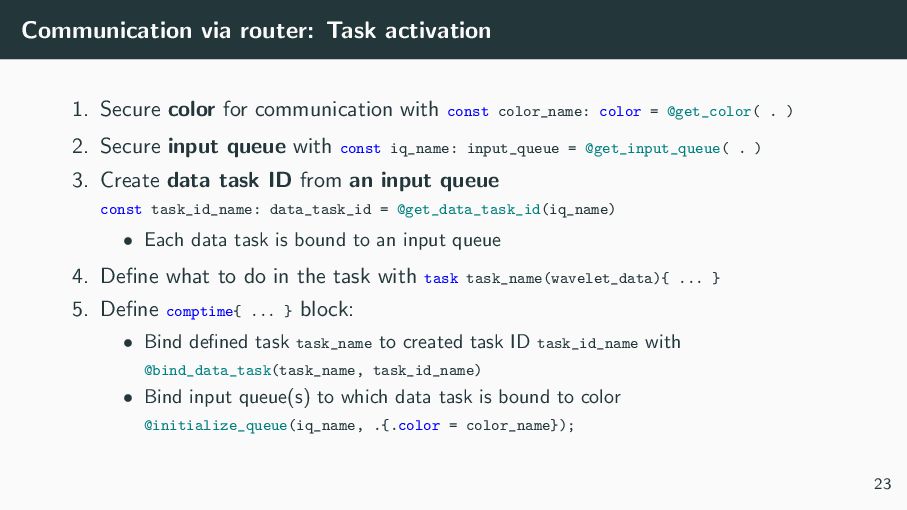
  22. Communication via router: Task activation 1. Secure color for communication

    with const color_name: color = @get_color( . ) 2. Secure input queue with const iq_name: input_queue = @get_input_queue( . ) 3. Create data task ID from an input queue const task_id_name: data_task_id = @get_data_task_id(iq_name) • Each data task is bound to an input queue 4. Define what to do in the task with task task_name(wavelet_data){ ... } 5. Define comptime{ ... } block: • Bind defined task task_name to created task ID task_id_name with @bind_data_task(task_name, task_id_name) • Bind input queue(s) to which data task is bound to color @initialize_queue(iq_name, .{.color = color_name}); 23
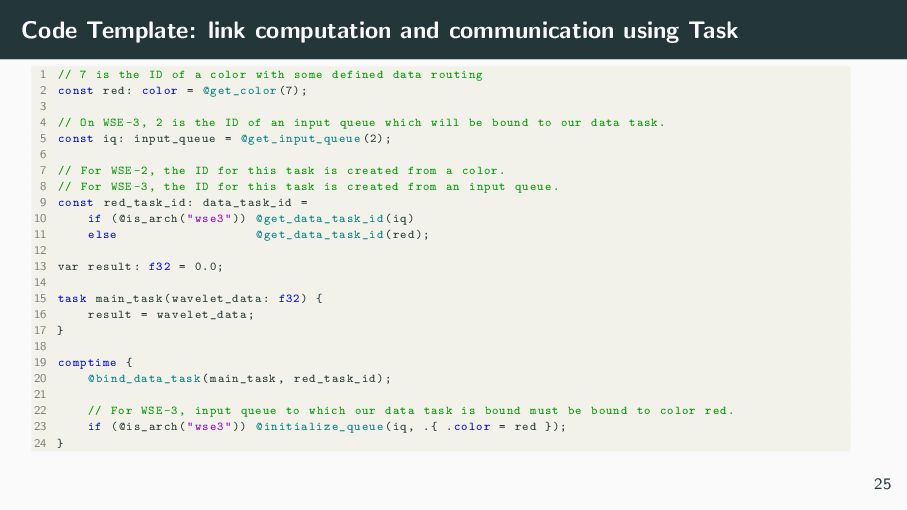
  23. Code Template: link computation and communication using Task 1 //

    7 is the ID of a color with some defined data routing 2 const red: color = @get_color (7); 3 4 // On WSE -3, 2 is the ID of an input queue which will be bound to our data task. 5 const iq: input_queue = @get_input_queue (2); 6 7 // For WSE -2, the ID for this task is created from a color. 8 // For WSE -3, the ID for this task is created from an input queue. 9 const red_task_id: data_task_id = 10 if (@is_arch("wse3")) @get_data_task_id (iq) 11 else @get_data_task_id (red); 12 13 var result: f32 = 0.0; 14 15 task main_task( wavelet_data : f32) { 16 result = wavelet_data ; 17 } 18 19 comptime { 20 @bind_data_task (main_task , red_task_id ); 21 22 // For WSE -3, input queue to which our data task is bound must be bound to color red. 23 if (@is_arch("wse3")) @initialize_queue (iq , .{ .color = red }); 24 } 25
  24. Code Template: link computations using Task A data task (main_task)

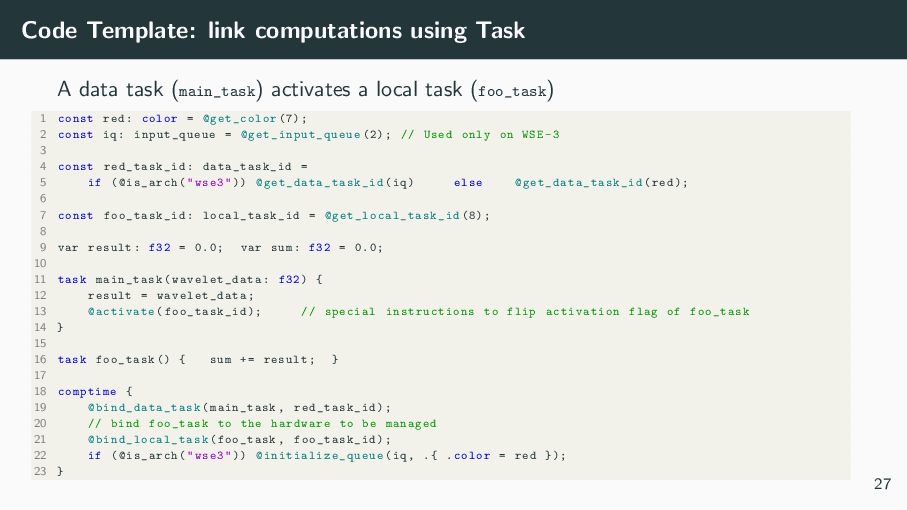
    activates a local task (foo_task) 1 const red: color = @get_color (7); 2 const iq: input_queue = @get_input_queue (2); // Used only on WSE -3 3 4 const red_task_id: data_task_id = 5 if (@is_arch("wse3")) @get_data_task_id (iq) else @get_data_task_id (red); 6 7 const foo_task_id: local_task_id = @get_local_task_id (8); 8 9 var result: f32 = 0.0; var sum: f32 = 0.0; 10 11 task main_task( wavelet_data : f32) { 12 result = wavelet_data ; 13 @activate( foo_task_id ); // special instructions to flip activation flag of foo_task 14 } 15 16 task foo_task () { sum += result; } 17 18 comptime { 19 @bind_data_task (main_task , red_task_id ); 20 // bind foo_task to the hardware to be managed 21 @bind_local_task (foo_task , foo_task_id ); 22 if (@is_arch("wse3")) @initialize_queue (iq , .{ .color = red }); 23 } 27
  25. Contents Installation and Setup A Conceptual View: Hardware organization PE

    (Processing Elements) A Conceptual View: Programming model Programming Language Communication Code Execution Unit: Task Management of data which wavelets deliver : Data Struct Descriptor layout and host code 28
  26. Preliminaries: the hardware instruction of Tensor CSL supports several tensor

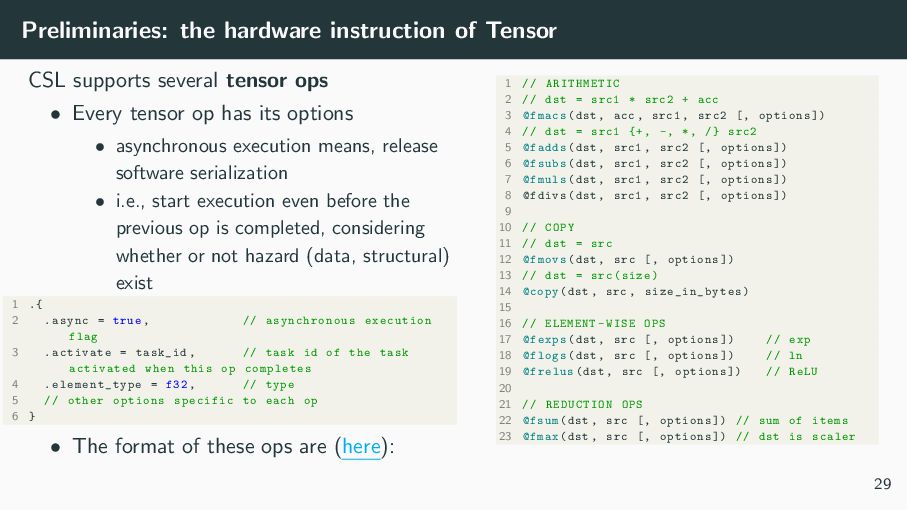
    ops • Every tensor op has its options • asynchronous execution means, release software serialization • i.e., start execution even before the previous op is completed, considering whether or not hazard (data, structural) exist 1 .{ 2 .async = true , // asynchronous execution flag 3 .activate = task_id , // task id of the task activated when this op completes 4 . element_type = f32 , // type 5 // other options specific to each op 6 } • The format of these ops are (here): 1 // ARITHMETIC 2 // dst = src1 * src2 + acc 3 @fmacs(dst , acc , src1 , src2 [, options ]) 4 // dst = src1 {+, -, *, /} src2 5 @fadds(dst , src1 , src2 [, options ]) 6 @fsubs(dst , src1 , src2 [, options ]) 7 @fmuls(dst , src1 , src2 [, options ]) 8 @fdivs(dst , src1 , src2 [, options ]) 9 10 // COPY 11 // dst = src 12 @fmovs(dst , src [, options ]) 13 // dst = src(size) 14 @copy(dst , src , size_in_bytes ) 15 16 // ELEMENT -WISE OPS 17 @fexps(dst , src [, options ]) // exp 18 @flogs(dst , src [, options ]) // ln 19 @frelus(dst , src [, options ]) // ReLU 20 21 // REDUCTION OPS 22 @fsum(dst , src [, options ]) // sum of items 23 @fmax(dst , src [, options ]) // dst is scaler 29
  27. DSD: Abstraction of data consists of multiple values like tensor

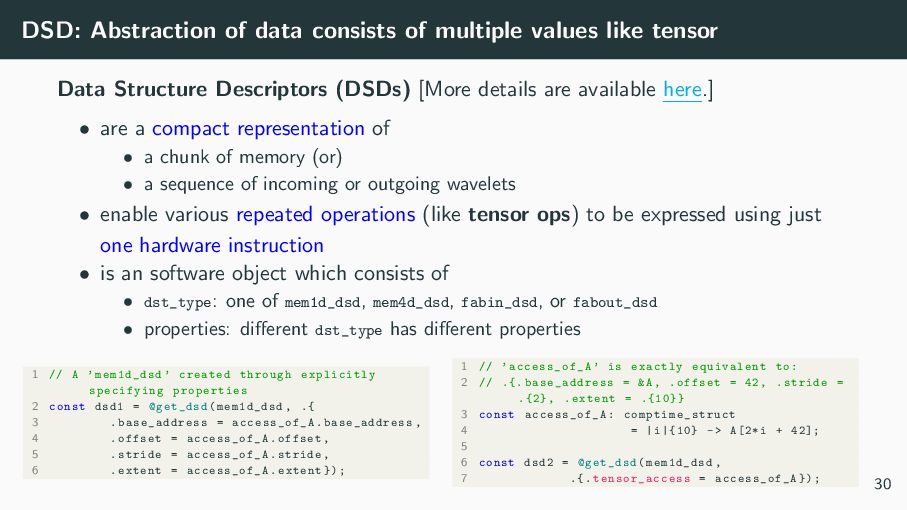
    Data Structure Descriptors (DSDs) [More details are available here.] • are a compact representation of • a chunk of memory (or) • a sequence of incoming or outgoing wavelets • enable various repeated operations (like tensor ops) to be expressed using just one hardware instruction • is an software object which consists of • dst_type: one of mem1d_dsd, mem4d_dsd, fabin_dsd, or fabout_dsd • properties: different dst_type has different properties 1 // A ’mem1d_dsd ’ created through explicitly specifying properties 2 const dsd1 = @get_dsd(mem1d_dsd , .{ 3 . base_address = access_of_A .base_address , 4 .offset = access_of_A.offset , 5 .stride = access_of_A.stride , 6 .extent = access_of_A.extent }); 1 // ’access_of_A ’ is exactly equivalent to: 2 // .{. base_address = &A, .offset = 42, .stride = .{2} , .extent = .{10}} 3 const access_of_A : comptime_struct 4 = |i|{10} -> A[2*i + 42]; 5 6 const dsd2 = @get_dsd(mem1d_dsd , 7 .{. tensor_access = access_of_A }); 30
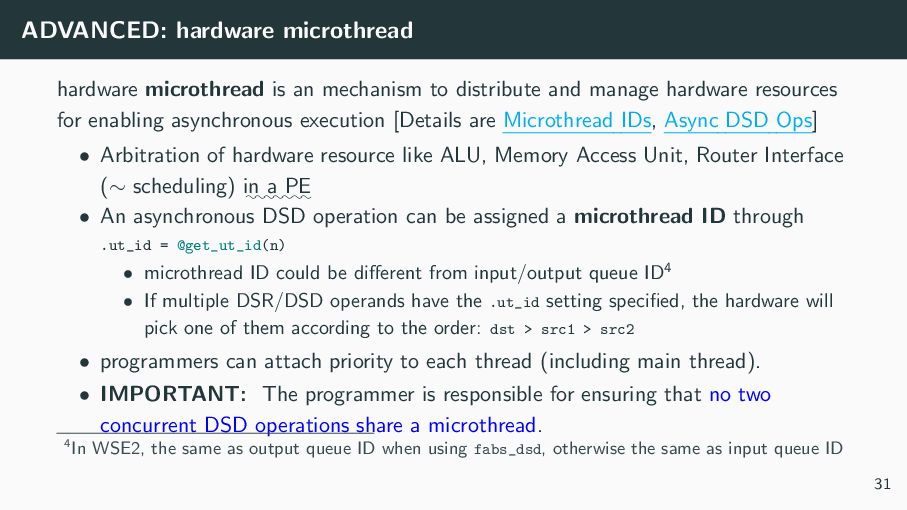
  28. ADVANCED: hardware microthread hardware microthread is an mechanism to distribute

    and manage hardware resources for enabling asynchronous execution [Details are Microthread IDs, Async DSD Ops] • Arbitration of hardware resource like ALU, Memory Access Unit, Router Interface (∼ scheduling) : in :: a :::: PE • An asynchronous DSD operation can be assigned a microthread ID through .ut_id = @get_ut_id(n) • microthread ID could be different from input/output queue ID4 • If multiple DSR/DSD operands have the .ut_id setting specified, the hardware will pick one of them according to the order: dst > src1 > src2 • programmers can attach priority to each thread (including main thread). • IMPORTANT: The programmer is responsible for ensuring that no two concurrent DSD operations share a microthread. 4In WSE2, the same as output queue ID when using fabs_dsd, otherwise the same as input queue ID 31
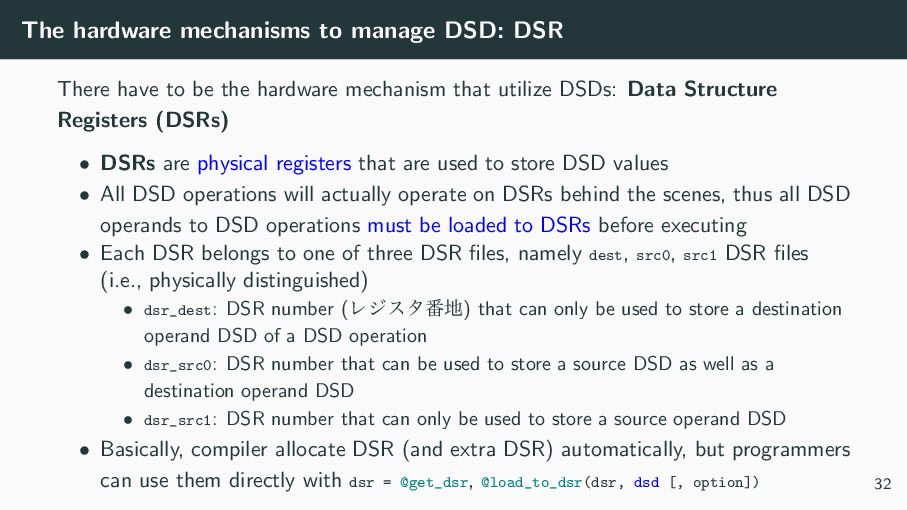
  29. The hardware mechanisms to manage DSD: DSR There have to

    be the hardware mechanism that utilize DSDs: Data Structure Registers (DSRs) • DSRs are physical registers that are used to store DSD values • All DSD operations will actually operate on DSRs behind the scenes, thus all DSD operands to DSD operations must be loaded to DSRs before executing • Each DSR belongs to one of three DSR files, namely dest, src0, src1 DSR files (i.e., physically distinguished) • dsr_dest: DSR number (Ϩδελ൪஍) that can only be used to store a destination operand DSD of a DSD operation • dsr_src0: DSR number that can be used to store a source DSD as well as a destination operand DSD • dsr_src1: DSR number that can only be used to store a source operand DSD • Basically, compiler allocate DSR (and extra DSR) automatically, but programmers can use them directly with dsr = @get_dsr, @load_to_dsr(dsr, dsd [, option]) 32
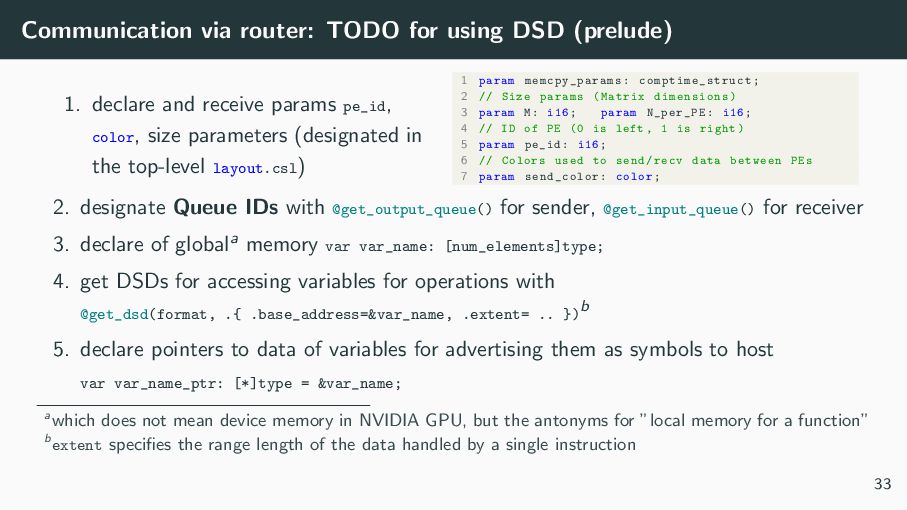
  30. Communication via router: TODO for using DSD (prelude) 1. declare

    and receive params pe_id, color, size parameters (designated in the top-level layout.csl) 1 param memcpy_params : comptime_struct ; 2 // Size params (Matrix dimensions) 3 param M: i16; param N_per_PE: i16; 4 // ID of PE (0 is left , 1 is right) 5 param pe_id: i16; 6 // Colors used to send/recv data between PEs 7 param send_color : color; 2. designate Queue IDs with @get_output_queue() for sender, @get_input_queue() for receiver 3. declare of globala memory var var_name: [num_elements]type; 4. get DSDs for accessing variables for operations with @get_dsd(format, .{ .base_address=&var_name, .extent= .. }) b 5. declare pointers to data of variables for advertising them as symbols to host var var_name_ptr: [*]type = &var_name; awhich does not mean device memory in NVIDIA GPU, but the antonyms for ”local memory for a function” b extent specifies the range length of the data handled by a single instruction 33
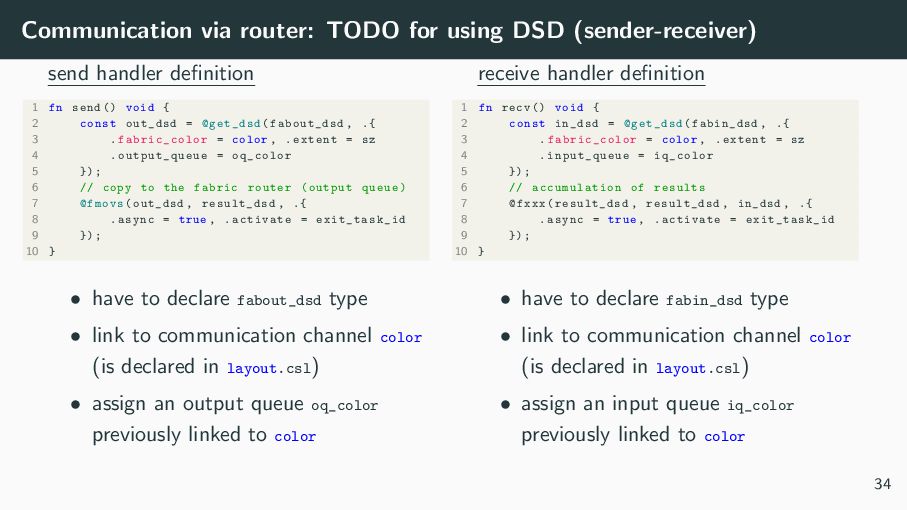
  31. Communication via router: TODO for using DSD (sender-receiver) send handler

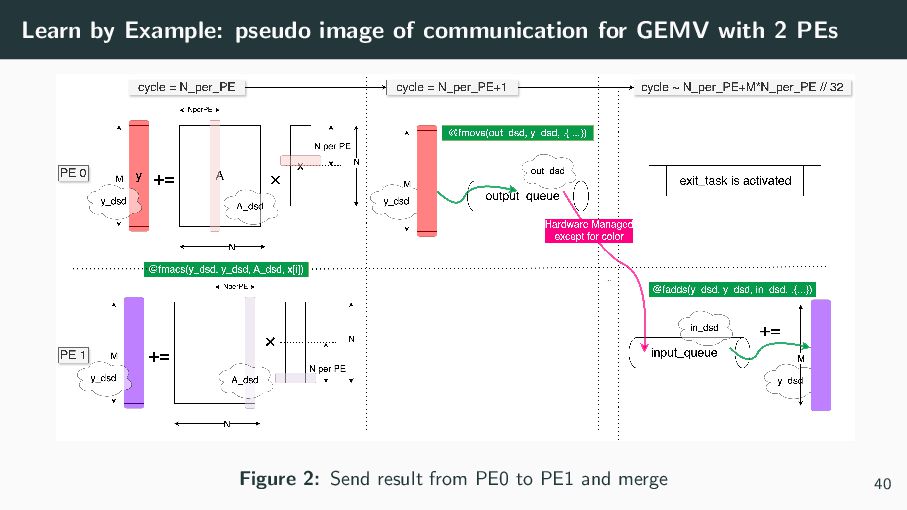
    definition 1 fn send () void { 2 const out_dsd = @get_dsd(fabout_dsd , .{ 3 . fabric_color = color , .extent = sz 4 . output_queue = oq_color 5 }); 6 // copy to the fabric router (output queue) 7 @fmovs(out_dsd , result_dsd , .{ 8 .async = true , .activate = exit_task_id 9 }); 10 } • have to declare fabout_dsd type • link to communication channel color (is declared in layout.csl) • assign an output queue oq_color previously linked to color receive handler definition 1 fn recv () void { 2 const in_dsd = @get_dsd(fabin_dsd , .{ 3 . fabric_color = color , .extent = sz 4 .input_queue = iq_color 5 }); 6 // accumulation of results 7 @fxxx(result_dsd , result_dsd , in_dsd , .{ 8 .async = true , .activate = exit_task_id 9 }); 10 } • have to declare fabin_dsd type • link to communication channel color (is declared in layout.csl) • assign an input queue iq_color previously linked to color 34
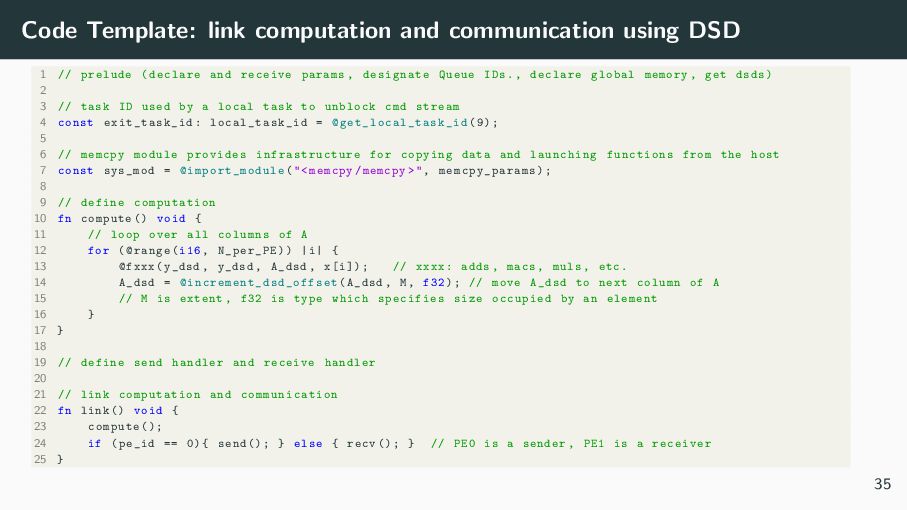
  32. Code Template: link computation and communication using DSD 1 //

    prelude (declare and receive params , designate Queue IDs., declare global memory , get dsds) 2 3 // task ID used by a local task to unblock cmd stream 4 const exit_task_id : local_task_id = @get_local_task_id (9); 5 6 // memcpy module provides infrastructure for copying data and launching functions from the host 7 const sys_mod = @import_module ("<memcpy/memcpy >", memcpy_params ); 8 9 // define computation 10 fn compute () void { 11 // loop over all columns of A 12 for (@range(i16 , N_per_PE)) |i| { 13 @fxxx(y_dsd , y_dsd , A_dsd , x[i]); // xxxx: adds , macs , muls , etc. 14 A_dsd = @increment_dsd_offset (A_dsd , M, f32); // move A_dsd to next column of A 15 // M is extent , f32 is type which specifies size occupied by an element 16 } 17 } 18 19 // define send handler and receive handler 20 21 // link computation and communication 22 fn link () void { 23 compute (); 24 if (pe_id == 0){ send (); } else { recv (); } // PE0 is a sender , PE1 is a receiver 25 } 35
  33. Code Template: link computation and communication using DSD 1 //

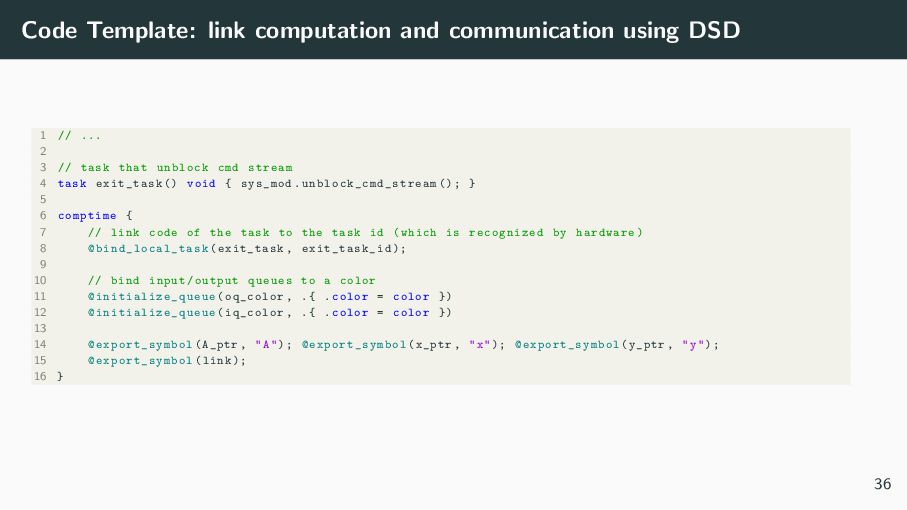
    ... 2 3 // task that unblock cmd stream 4 task exit_task () void { sys_mod. unblock_cmd_stream (); } 5 6 comptime { 7 // link code of the task to the task id (which is recognized by hardware) 8 @bind_local_task (exit_task , exit_task_id ); 9 10 // bind input/output queues to a color 11 @initialize_queue (oq_color , .{ .color = color }) 12 @initialize_queue (iq_color , .{ .color = color }) 13 14 @export_symbol (A_ptr , "A"); @export_symbol (x_ptr , "x"); @export_symbol (y_ptr , "y"); 15 @export_symbol (link); 16 } 36
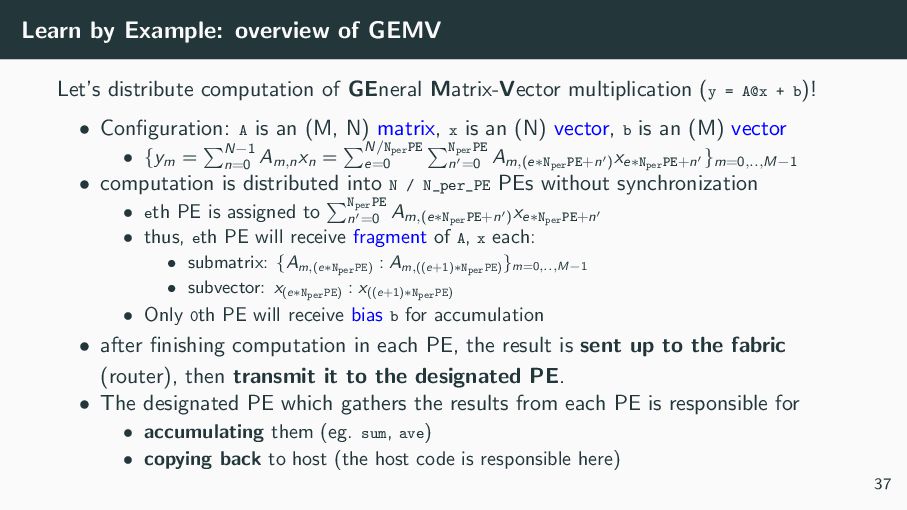
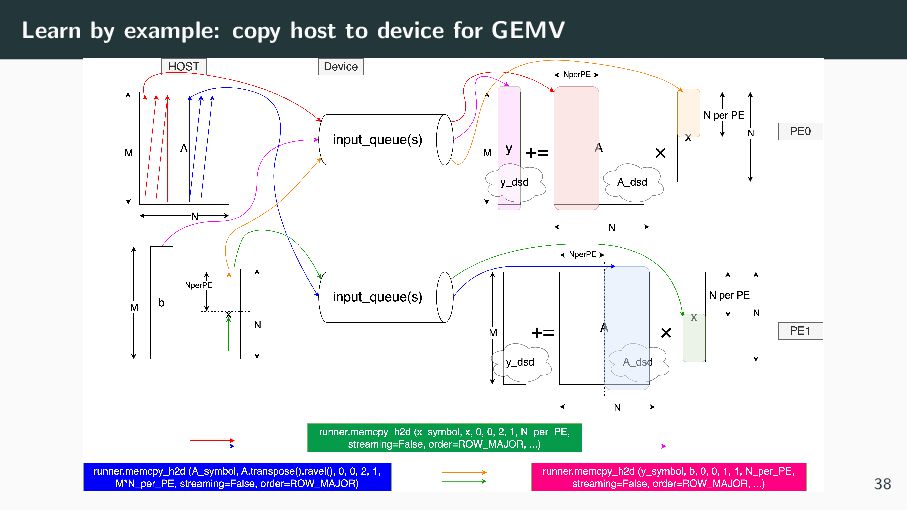
  34. Learn by Example: overview of GEMV Let’s distribute computation of

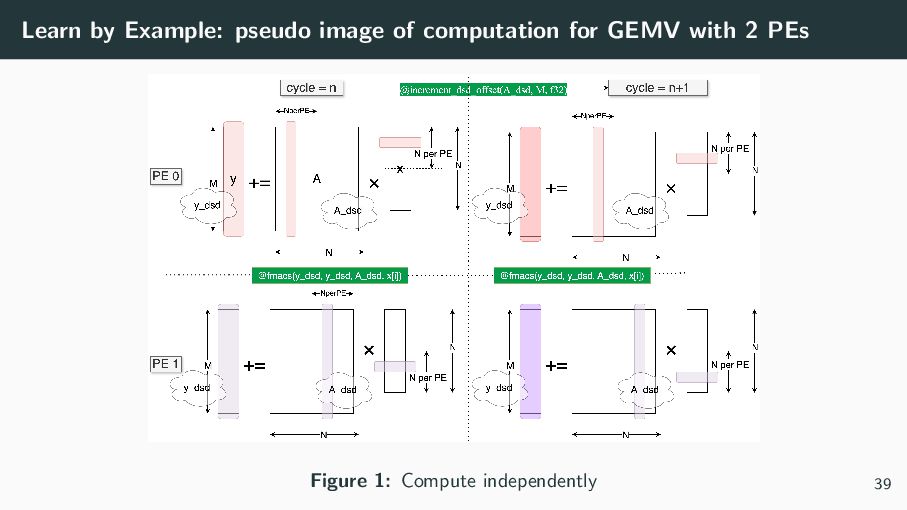
    GEneral Matrix-Vector multiplication (y = A@x + b)! • Configuration: A is an (M, N) matrix, x is an (N) vector, b is an (M) vector • {ym = ∑ N−1 n=0 Am,n xn = ∑N/NperPE e=0 ∑ NperPE n =0 Am,(e∗NperPE+n ) xe∗NperPE+n }m=0,..,M−1 • computation is distributed into N / N_per_PE PEs without synchronization • eth PE is assigned to ∑ NperPE n =0 Am,(e∗NperPE+n ) xe∗NperPE+n • thus, eth PE will receive fragment of A, x each: • submatrix: {Am,(e∗NperPE) : Am,((e+1)∗NperPE) }m=0,..,M−1 • subvector: x(e∗NperPE) : x((e+1)∗NperPE) • Only 0th PE will receive bias b for accumulation • after finishing computation in each PE, the result is sent up to the fabric (router), then transmit it to the designated PE. • The designated PE which gathers the results from each PE is responsible for • accumulating them (eg. sum, ave) • copying back to host (the host code is responsible here) 37
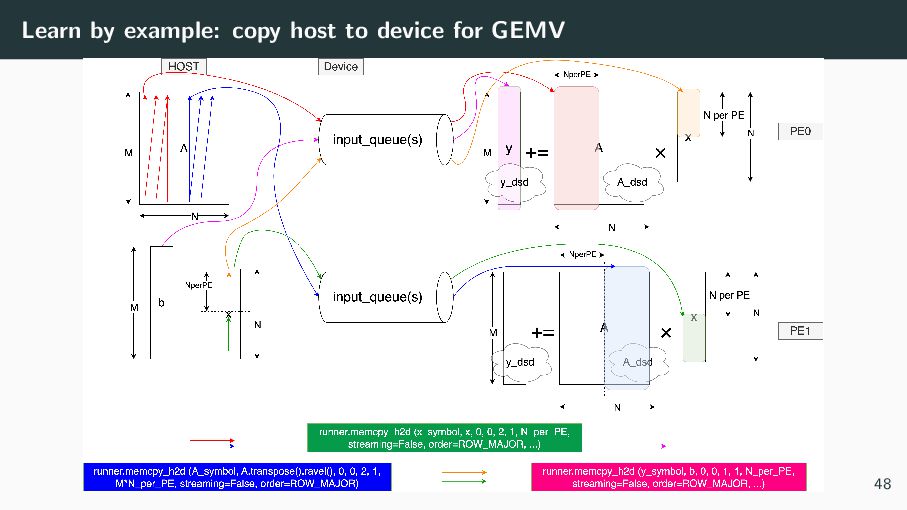
  35. Learn by Example: pseudo image of computation for GEMV with

    2 PEs Figure 1: Compute independently 39
  36. Learn by Example: pseudo image of communication for GEMV with

    2 PEs Figure 2: Send result from PE0 to PE1 and merge 40
  37. Contents Installation and Setup A Conceptual View: Hardware organization PE

    (Processing Elements) A Conceptual View: Programming model Programming Language Communication Code Execution Unit: Task Management of data which wavelets deliver : Data Struct Descriptor layout and host code 41
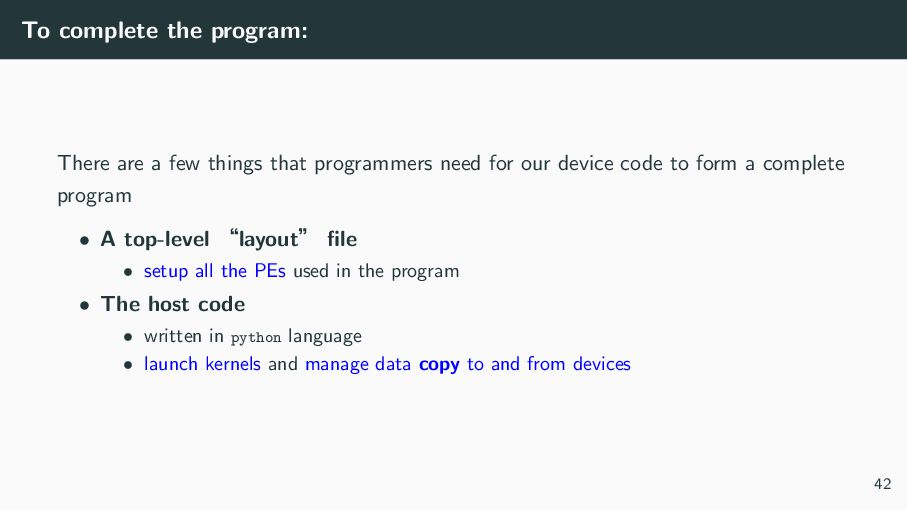
  38. To complete the program: There are a few things that

    programmers need for our device code to form a complete program • A top-level ʠlayoutʡ file • setup all the PEs used in the program • The host code • written in python language • launch kernels and manage data copy to and from devices 42
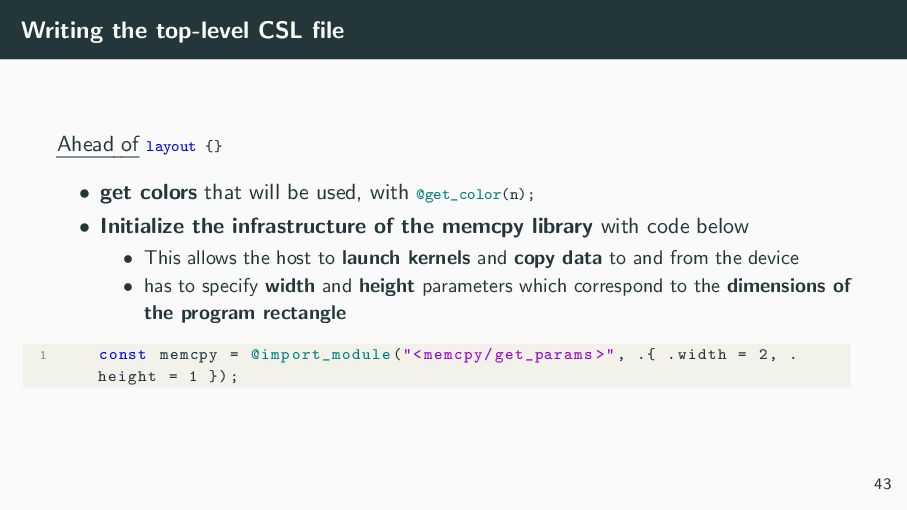
  39. Writing the top-level CSL file Ahead of layout {} •

    get colors that will be used, with @get_color(n); • Initialize the infrastructure of the memcpy library with code below • This allows the host to launch kernels and copy data to and from the device • has to specify width and height parameters which correspond to the dimensions of the program rectangle 1 const memcpy = @import_module ("<memcpy/get_params >", .{ .width = 2, . height = 1 }); 43
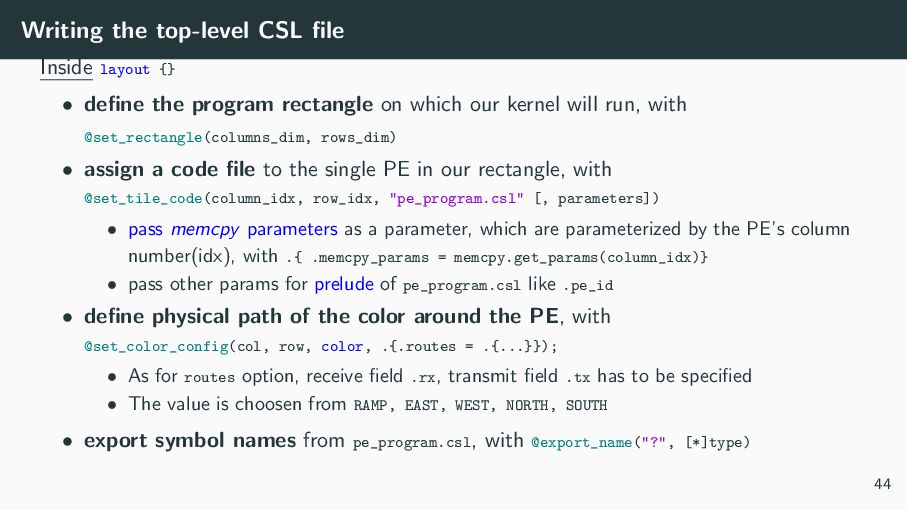
  40. Writing the top-level CSL file Inside layout {} • define

    the program rectangle on which our kernel will run, with @set_rectangle(columns_dim, rows_dim) • assign a code file to the single PE in our rectangle, with @set_tile_code(column_idx, row_idx, "pe_program.csl" [, parameters]) • pass memcpy parameters as a parameter, which are parameterized by the PE’s column number(idx), with .{ .memcpy_params = memcpy.get_params(column_idx)} • pass other params for prelude of pe_program.csl like .pe_id • define physical path of the color around the PE, with @set_color_config(col, row, color, .{.routes = .{...}}); • As for routes option, receive field .rx, transmit field .tx has to be specified • The value is choosen from RAMP, EAST, WEST, NORTH, SOUTH • export symbol names from pe_program.csl, with @export_name("?", [*]type) 44
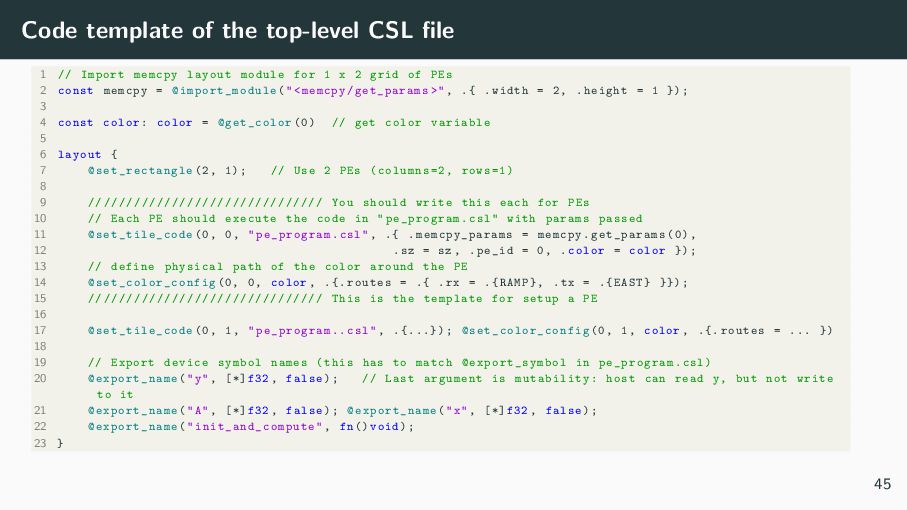
  41. Code template of the top-level CSL file 1 // Import

    memcpy layout module for 1 x 2 grid of PEs 2 const memcpy = @import_module ("<memcpy/get_params >", .{ .width = 2, .height = 1 }); 3 4 const color: color = @get_color (0) // get color variable 5 6 layout { 7 @set_rectangle (2, 1); // Use 2 PEs (columns =2, rows =1) 8 9 // ///////////////////////////// You should write this each for PEs 10 // Each PE should execute the code in "pe_program.csl" with params passed 11 @set_tile_code (0, 0, "pe_program.csl", .{ . memcpy_params = memcpy.get_params (0), 12 .sz = sz , .pe_id = 0, .color = color }); 13 // define physical path of the color around the PE 14 @set_color_config (0, 0, color , .{. routes = .{ .rx = .{ RAMP}, .tx = .{ EAST} }}); 15 // ///////////////////////////// This is the template for setup a PE 16 17 @set_tile_code (0, 1, "pe_program .. csl", .{...}); @set_color_config (0, 1, color , .{. routes = ... }) 18 19 // Export device symbol names (this has to match @export_symbol in pe_program.csl) 20 @export_name ("y", [*]f32 , false); // Last argument is mutability: host can read y, but not write to it 21 @export_name ("A", [*]f32 , false); @export_name ("x", [*]f32 , false); 22 @export_name (" init_and_compute ", fn() void); 23 } 45
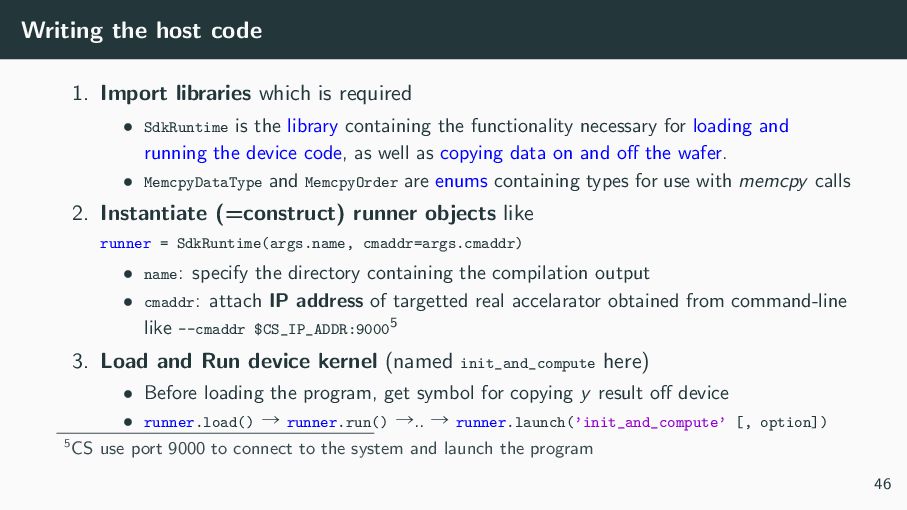
  42. Writing the host code 1. Import libraries which is required

    • SdkRuntime is the library containing the functionality necessary for loading and running the device code, as well as copying data on and off the wafer. • MemcpyDataType and MemcpyOrder are enums containing types for use with memcpy calls 2. Instantiate (=construct) runner objects like runner = SdkRuntime(args.name, cmaddr=args.cmaddr) • name: specify the directory containing the compilation output • cmaddr: attach IP address of targetted real accelarator obtained from command-line like --cmaddr $CS_IP_ADDR:90005 3. Load and Run device kernel (named init_and_compute here) • Before loading the program, get symbol for copying y result off device • runner.load() ˠ runner.run() ˠ.. ˠ runner.launch(’init_and_compute’ [, option]) 5CS use port 9000 to connect to the system and launch the program 46
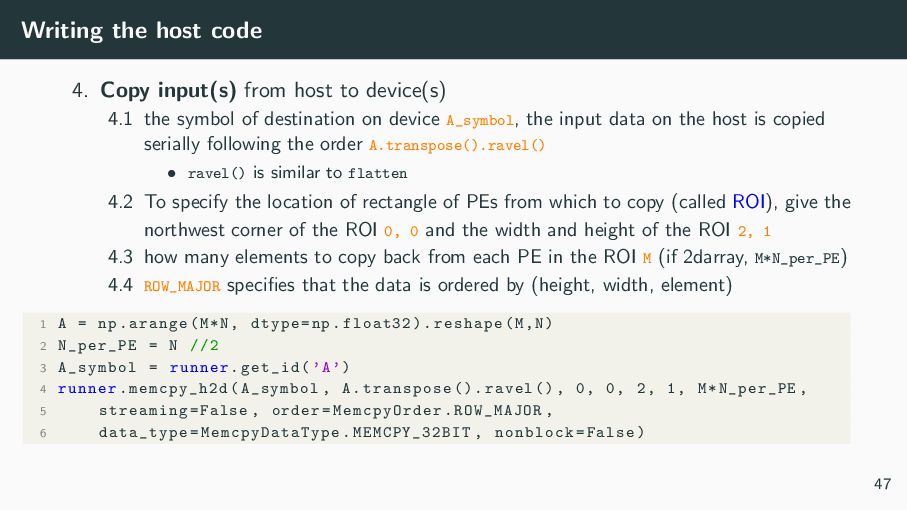
  43. Writing the host code 4. Copy input(s) from host to

    device(s) 4.1 the symbol of destination on device A_symbol, the input data on the host is copied serially following the order A.transpose().ravel() • ravel() is similar to flatten 4.2 To specify the location of rectangle of PEs from which to copy (called ROI), give the northwest corner of the ROI 0, 0 and the width and height of the ROI 2, 1 4.3 how many elements to copy back from each PE in the ROI M (if 2darray, M*N_per_PE) 4.4 ROW_MAJOR specifies that the data is ordered by (height, width, element) 1 A = np.arange(M*N, dtype=np.float32).reshape(M,N) 2 N_per_PE = N //2 3 A_symbol = runner.get_id(’A’) 4 runner.memcpy_h2d(A_symbol , A.transpose ().ravel (), 0, 0, 2, 1, M*N_per_PE , 5 streaming=False , order=MemcpyOrder .ROW_MAJOR , 6 data_type= MemcpyDataType .MEMCPY_32BIT , nonblock=False) 47
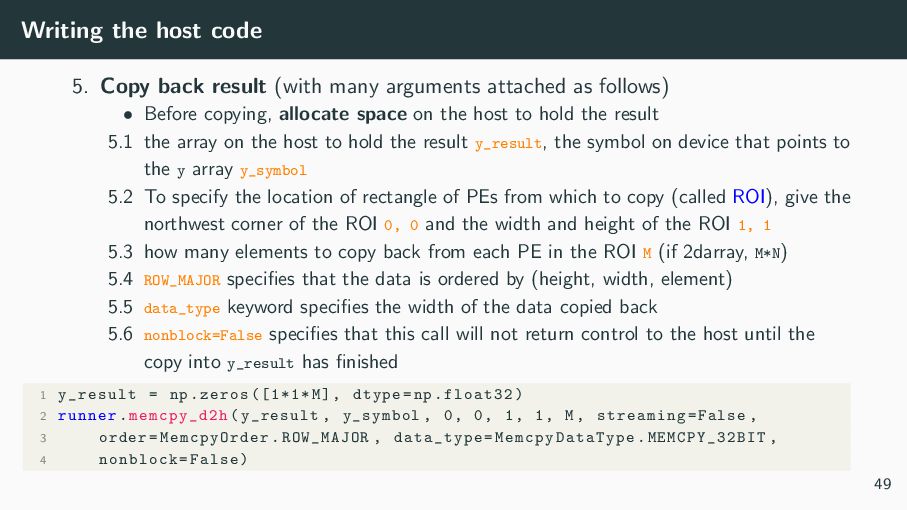
  44. Writing the host code 5. Copy back result (with many

    arguments attached as follows) • Before copying, allocate space on the host to hold the result 5.1 the array on the host to hold the result y_result, the symbol on device that points to the y array y_symbol 5.2 To specify the location of rectangle of PEs from which to copy (called ROI), give the northwest corner of the ROI 0, 0 and the width and height of the ROI 1, 1 5.3 how many elements to copy back from each PE in the ROI M (if 2darray, M*N) 5.4 ROW_MAJOR specifies that the data is ordered by (height, width, element) 5.5 data_type keyword specifies the width of the data copied back 5.6 nonblock=False specifies that this call will not return control to the host until the copy into y_result has finished 1 y_result = np.zeros ([1*1*M], dtype=np.float32) 2 runner.memcpy_d2h(y_result , y_symbol , 0, 0, 1, 1, M, streaming=False , 3 order= MemcpyOrder .ROW_MAJOR , data_type= MemcpyDataType .MEMCPY_32BIT , 4 nonblock=False) 49
  45. [Appendix] ROW MAJOR and COLUMN MAJOR ”Learn by example” is

    the best way to understand the concept. Here is the example of copying from multiple PEs. • Configuration • Size of ROI: height = 2, width = 3 • Calculated Data in each PE • In each PE, mem1d_dsd is used to manage data 1 PE0 = [[1, 2, 3], 2 [4, 5, 6]] 3 PE1 = [[7, 8, 9], 4 [10, 11, 12]] • ROW_MAJOR case • Each PE data is copied continuously • Copied result (1d):[1, 2, 3, 4, 5, 6, 7, 8, 9, 10, 11, 12] • COLUMN_MAJOR case • Elements with the same index in each PE are copied continuously • Copied result (1d):[1, 7, 2, 8, 3, 9, 4, 10, 5, 11, 6, 12] 50
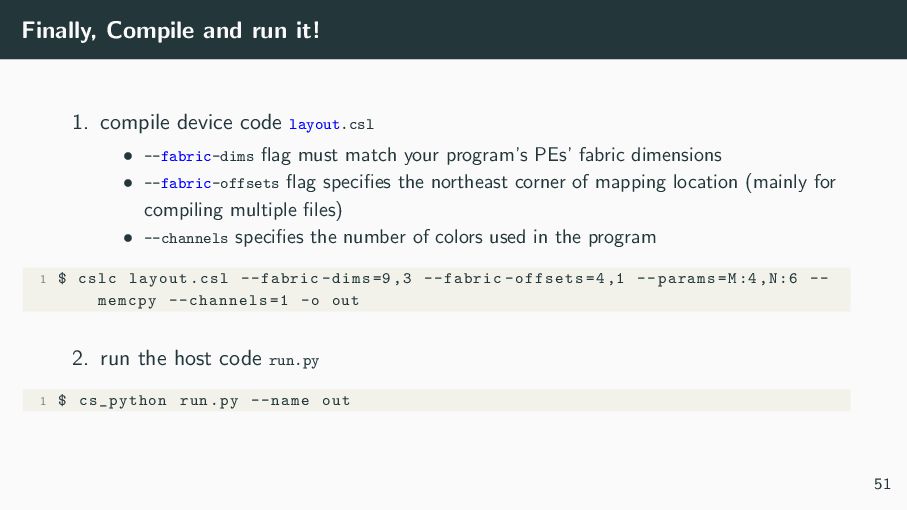
  46. Finally, Compile and run it! 1. compile device code layout.csl

    • --fabric-dims flag must match your program’s PEs’ fabric dimensions • --fabric-offsets flag specifies the northeast corner of mapping location (mainly for compiling multiple files) • --channels specifies the number of colors used in the program 1 $ cslc layout.csl --fabric -dims =9,3 --fabric -offsets =4,1 --params=M:4,N:6 -- memcpy --channels =1 -o out 2. run the host code run.py 1 $ cs_python run.py --name out 51
  47. References 1. cerebras SDK Documentation (1.4.0) 2. Cerebras AI Day

    Deck: A closer look at the world’s fastest AI Chip 3. Cerebras Architecture Deep Dive: First Look Inside the HW/SW Co-Design for Deep Learning 52