Upgrade to Pro
— share decks privately, control downloads, hide ads and more …
Speaker Deck
Sign up for free
Menu
Search
Features
All features
Private URLs
Password Protection
Custom URLS
Scheduled publishing
Remove Branding
Restrict embedding
Deck Collections
Notes
Features
All features
Private URLs
Password Protection
Custom URLS
Scheduled publishing
Remove Branding
Restrict embedding
Deck Collections
Notes
Explore
Featured decks
Featured speakers
Programming
Technology
Storyboards
Explore
Featured decks
Featured speakers
Programming
Technology
Storyboards
Pricing
Search
Sign in
Sign up for free
AWS Security Agent触ってみた
Search
Sponsored
·
Your Podcast. Everywhere. Effortlessly.
Share. Educate. Inspire. Entertain. You do you. We'll handle the rest.
→
濱口莉生
February 13, 2026
730
1
Share
Embed
Copy iframe code
Copy JS code
Copy link
Start on current slide
AWS Security Agent触ってみた
濱口莉生
February 13, 2026
Transcript
15 slides
クラウドで「ワクワク」を。 Excitement with the Cloud. AWS Security Agent触ってみた 2026年2月13日 クラウドセントリック株式会社
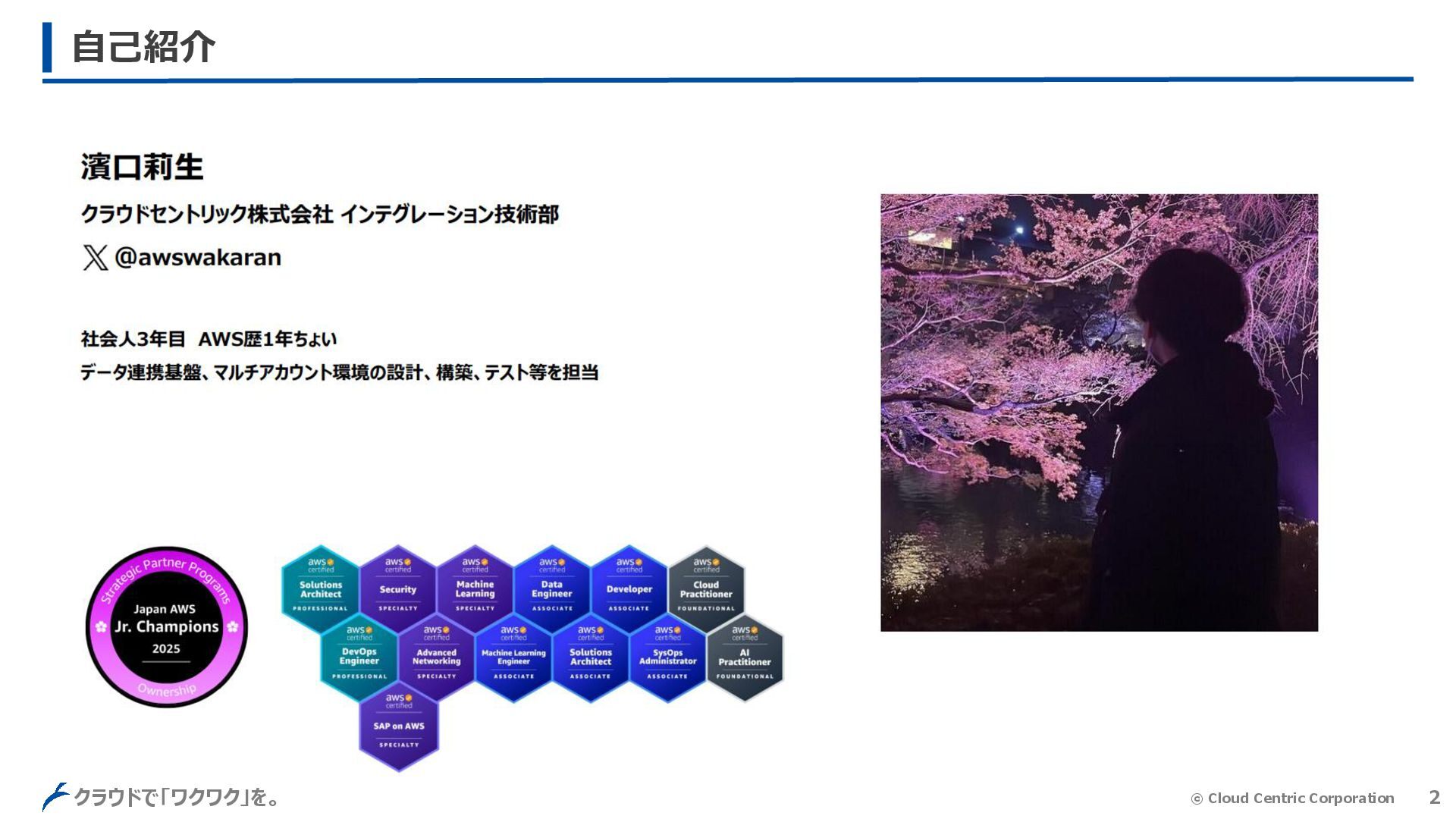
濱口莉生
© Cloud Centric Corporation 2 クラウドで「ワクワク」を。 自己紹介 あ あ
© Cloud Centric Corporation 3 クラウドで「ワクワク」を。 1. AWS Security Agentとは
2. セットアップ 3. 設計レビュー 4. コードレビュー 5. ペネトレーションテスト 6. まとめ
© Cloud Centric Corporation 4 クラウドで「ワクワク」を。 1. AWS Security Agentとは
設計〜デプロイまでの開発ライフサイクル全体でアプリケーションを、プロアクティブに保護するためのエージェント型サービスです。 ①設計書レビュー、②コードレビュー、③ペネトレーションテストを統合し、脆弱性発見から修正提案までを自動化できます。 主な特徴・メリット • 設計段階でのセキュリティレビュー(ドキュメント解析) • プルリクエスト内での自動コード解析と修正提案 • オンデマンドのペネトレーションテスト • プレビュー期間中なので無償利用可(期間未定)
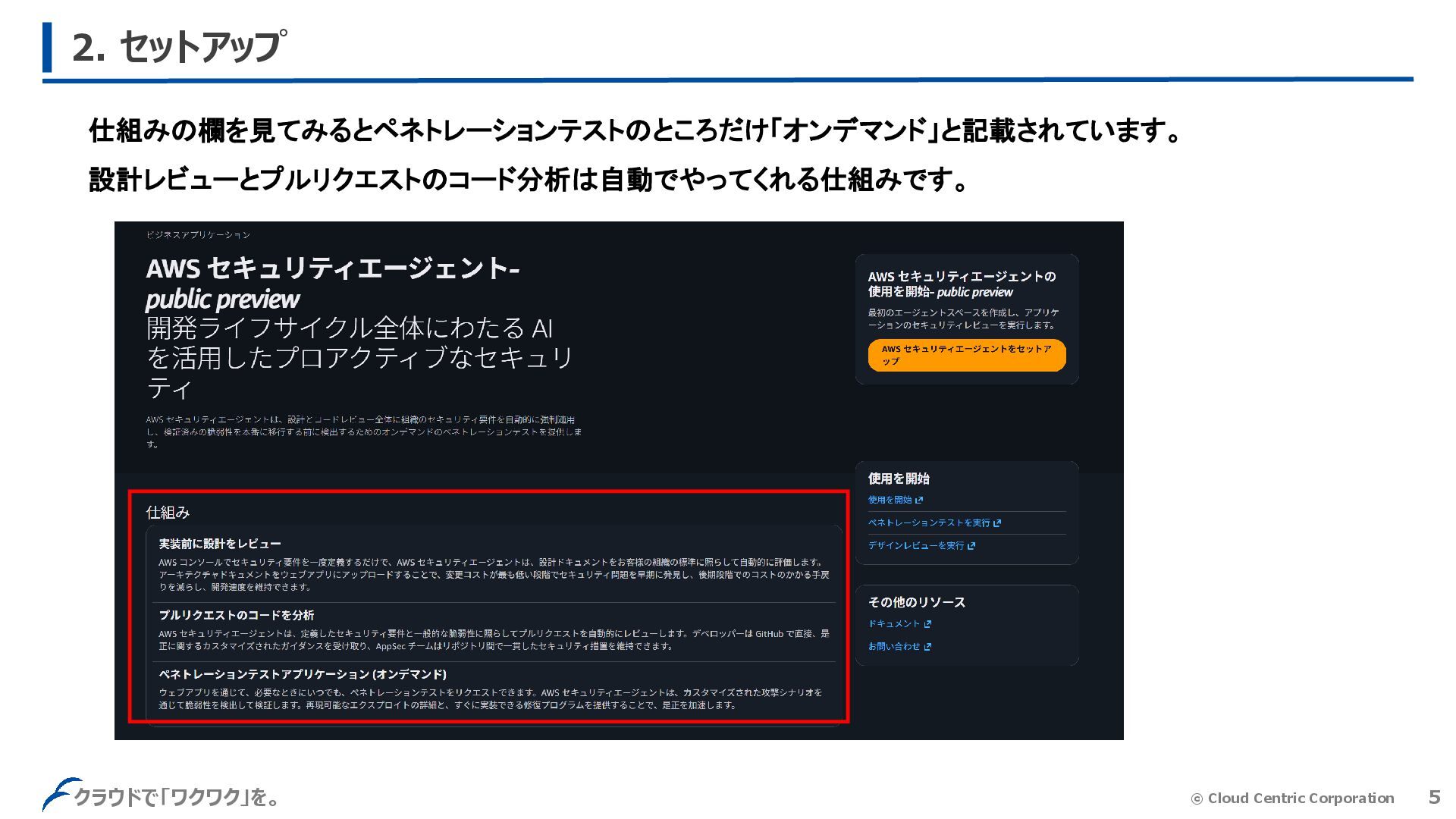
© Cloud Centric Corporation 5 クラウドで「ワクワク」を。 2. セットアップ 仕組みの欄を見てみるとペネトレーションテストのところだけ「オンデマンド」と記載されています。 設計レビューとプルリクエストのコード分析は自動でやってくれる仕組みです。
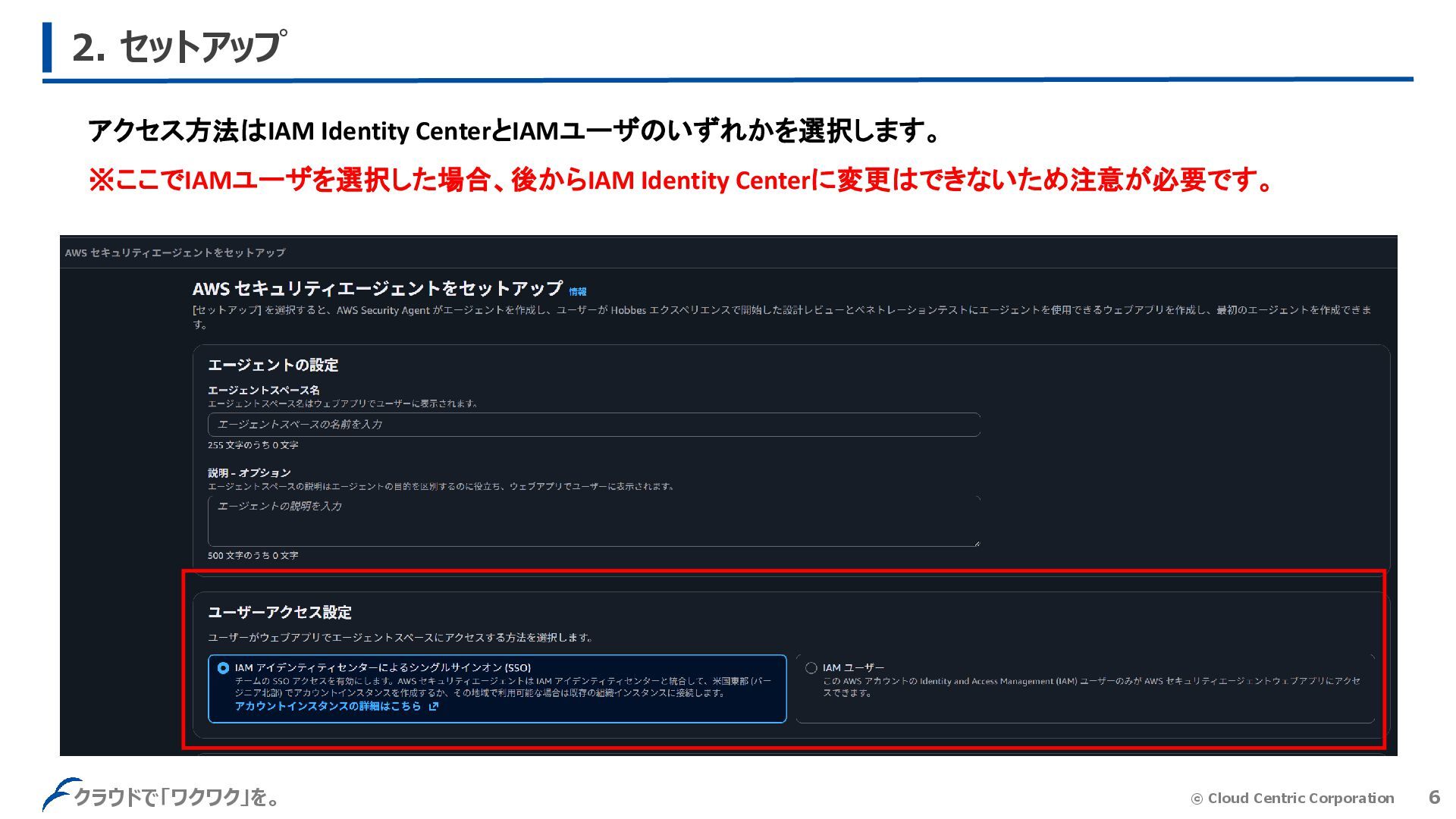
© Cloud Centric Corporation 6 クラウドで「ワクワク」を。 2. セットアップ アクセス方法はIAM Identity
CenterとIAMユーザのいずれかを選択します。 ※ここでIAMユーザを選択した場合、後からIAM Identity Centerに変更はできないため注意が必要です。
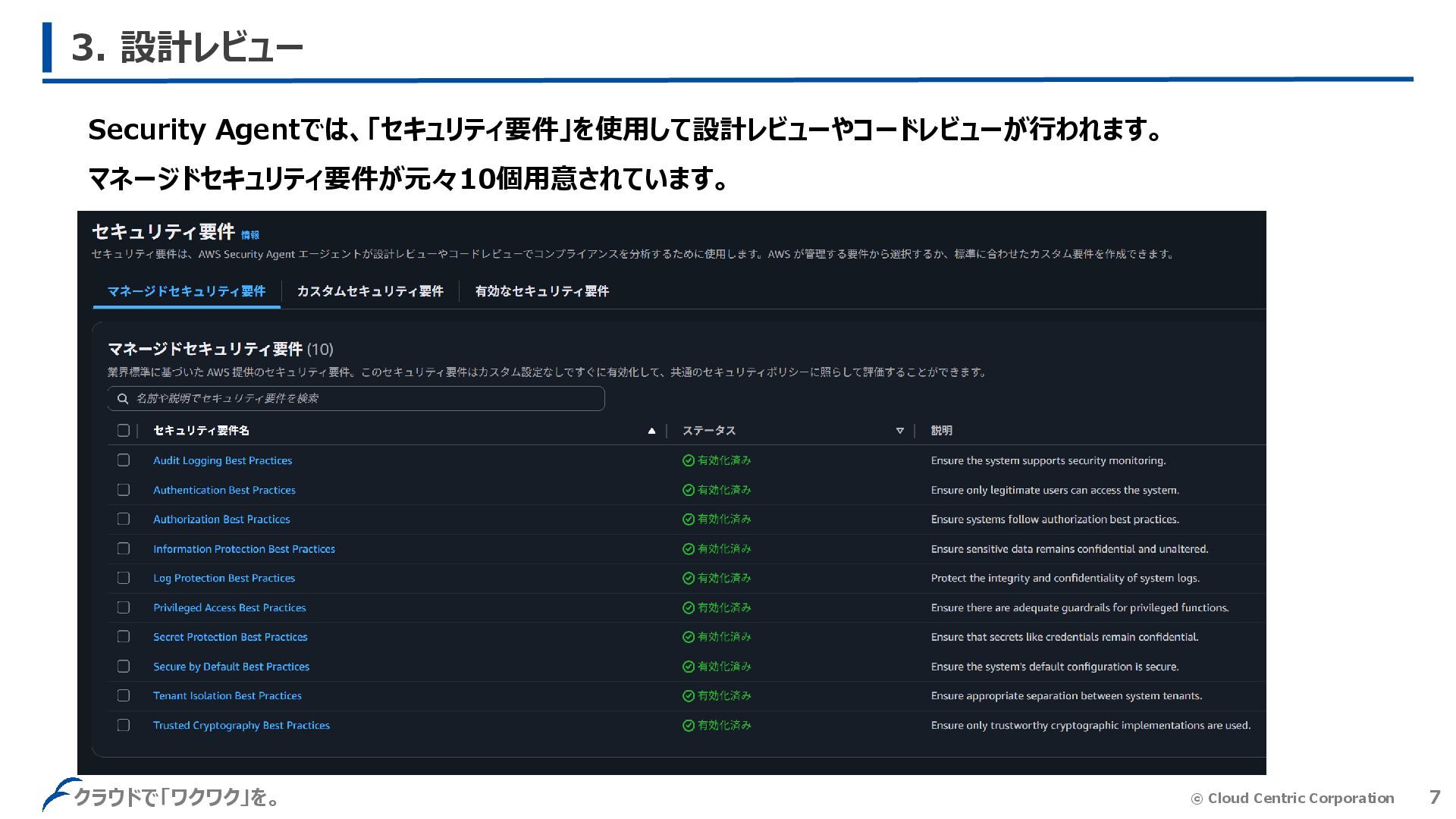
© Cloud Centric Corporation 7 クラウドで「ワクワク」を。 3. 設計レビュー Security Agentでは、「セキュリティ要件」を使用して設計レビューやコードレビューが行われます。
マネージドセキュリティ要件が元々10個用意されています。
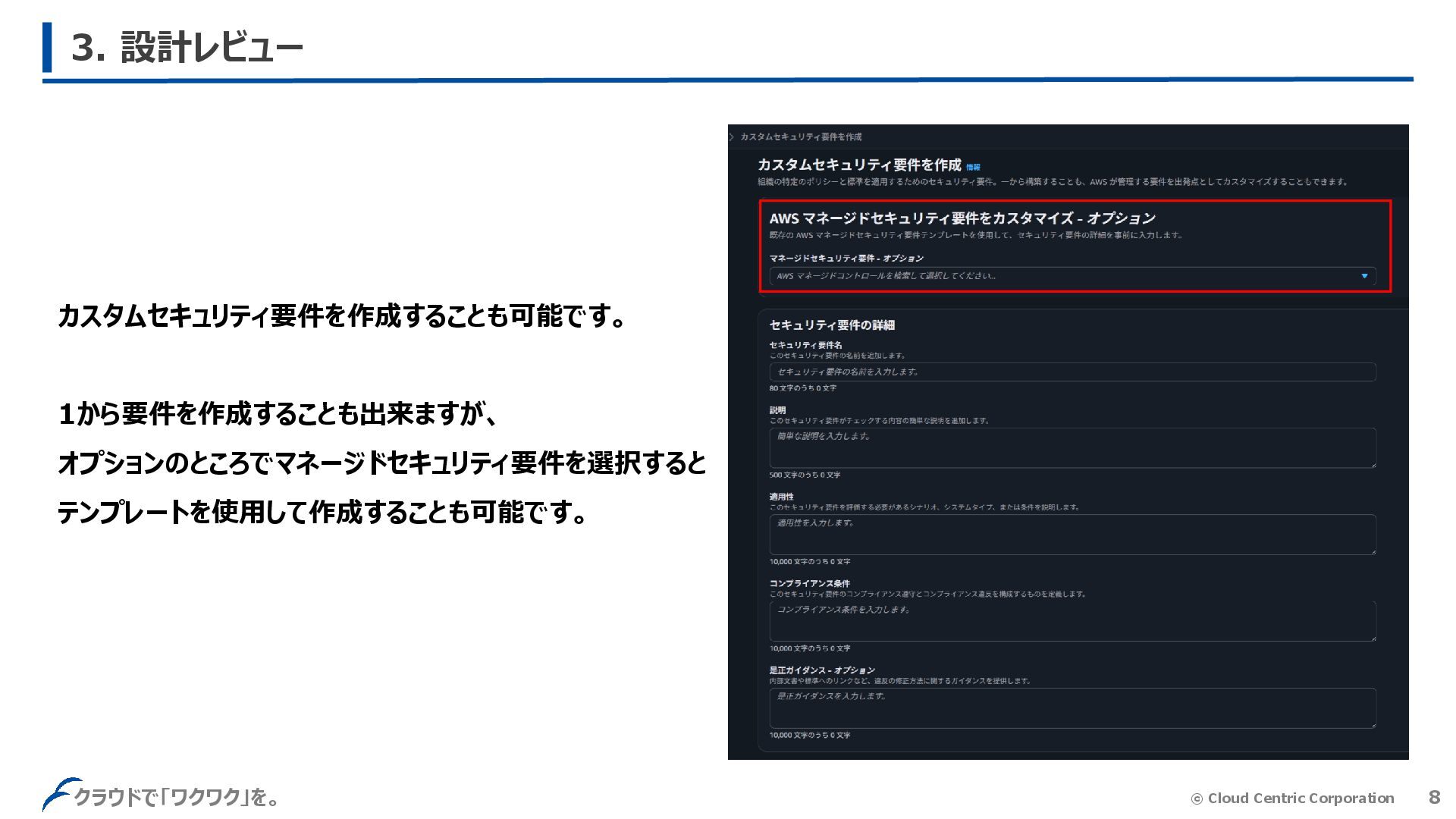
© Cloud Centric Corporation 8 クラウドで「ワクワク」を。 3. 設計レビュー カスタムセキュリティ要件を作成することも可能です。 1から要件を作成することも出来ますが、
オプションのところでマネージドセキュリティ要件を選択すると テンプレートを使用して作成することも可能です。
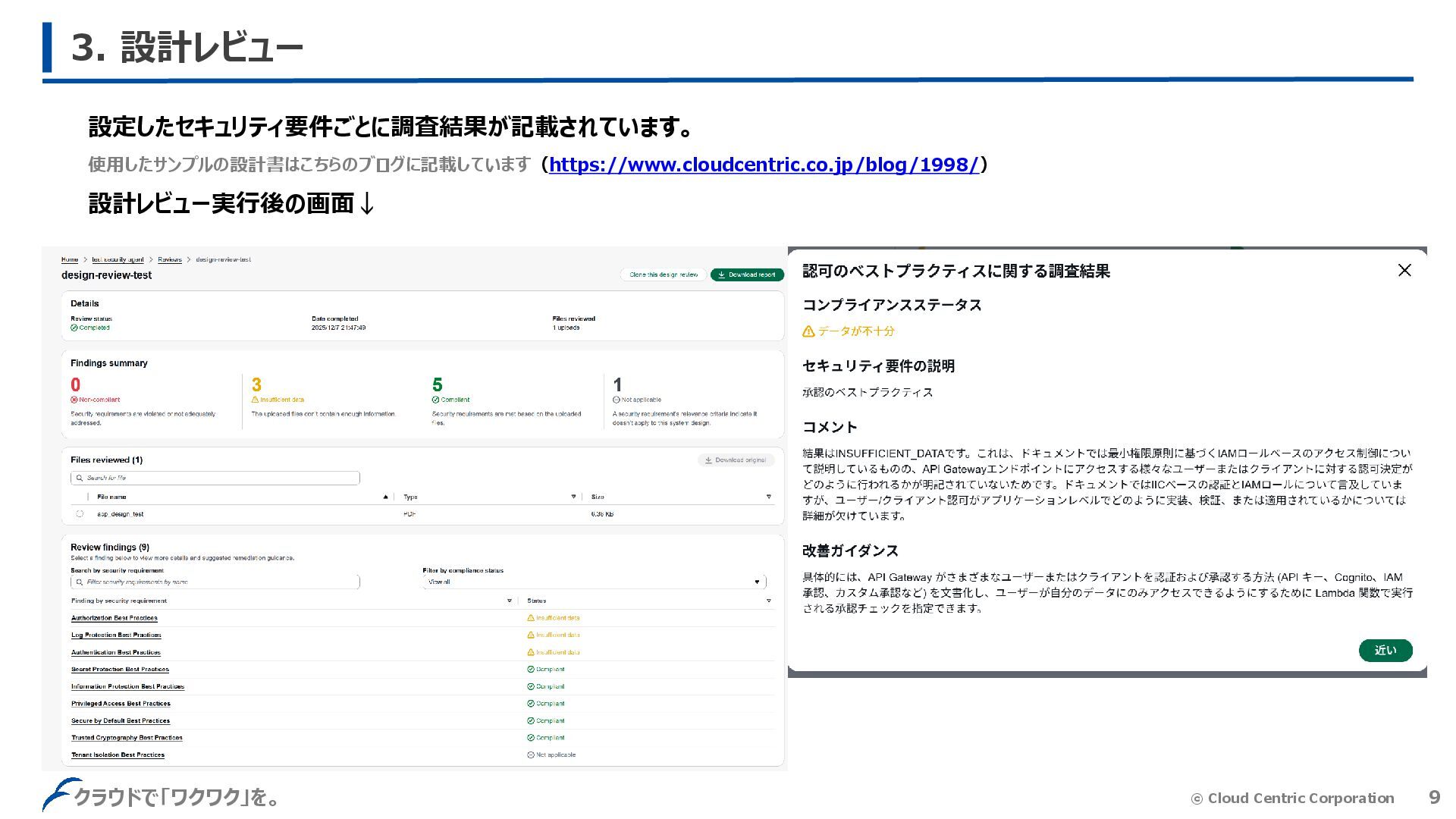
© Cloud Centric Corporation 9 クラウドで「ワクワク」を。 3. 設計レビュー 設定したセキュリティ要件ごとに調査結果が記載されています。 使用したサンプルの設計書はこちらのブログに記載しています(https://www.cloudcentric.co.jp/blog/1998/)
設計レビュー実行後の画面↓
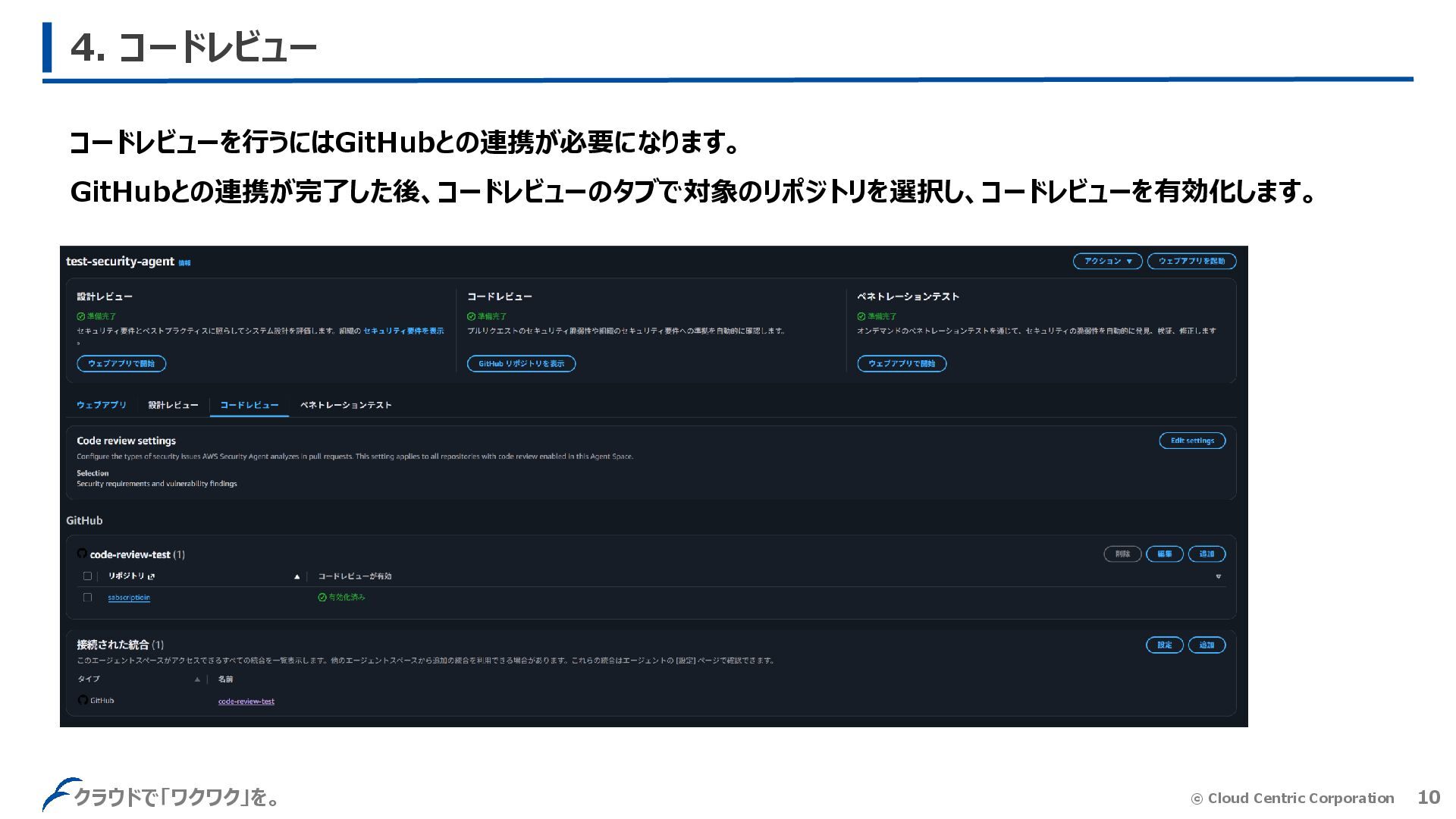
© Cloud Centric Corporation 10 クラウドで「ワクワク」を。 4. コードレビュー コードレビューを行うにはGitHubとの連携が必要になります。 GitHubとの連携が完了した後、コードレビューのタブで対象のリポジトリを選択し、コードレビューを有効化します。
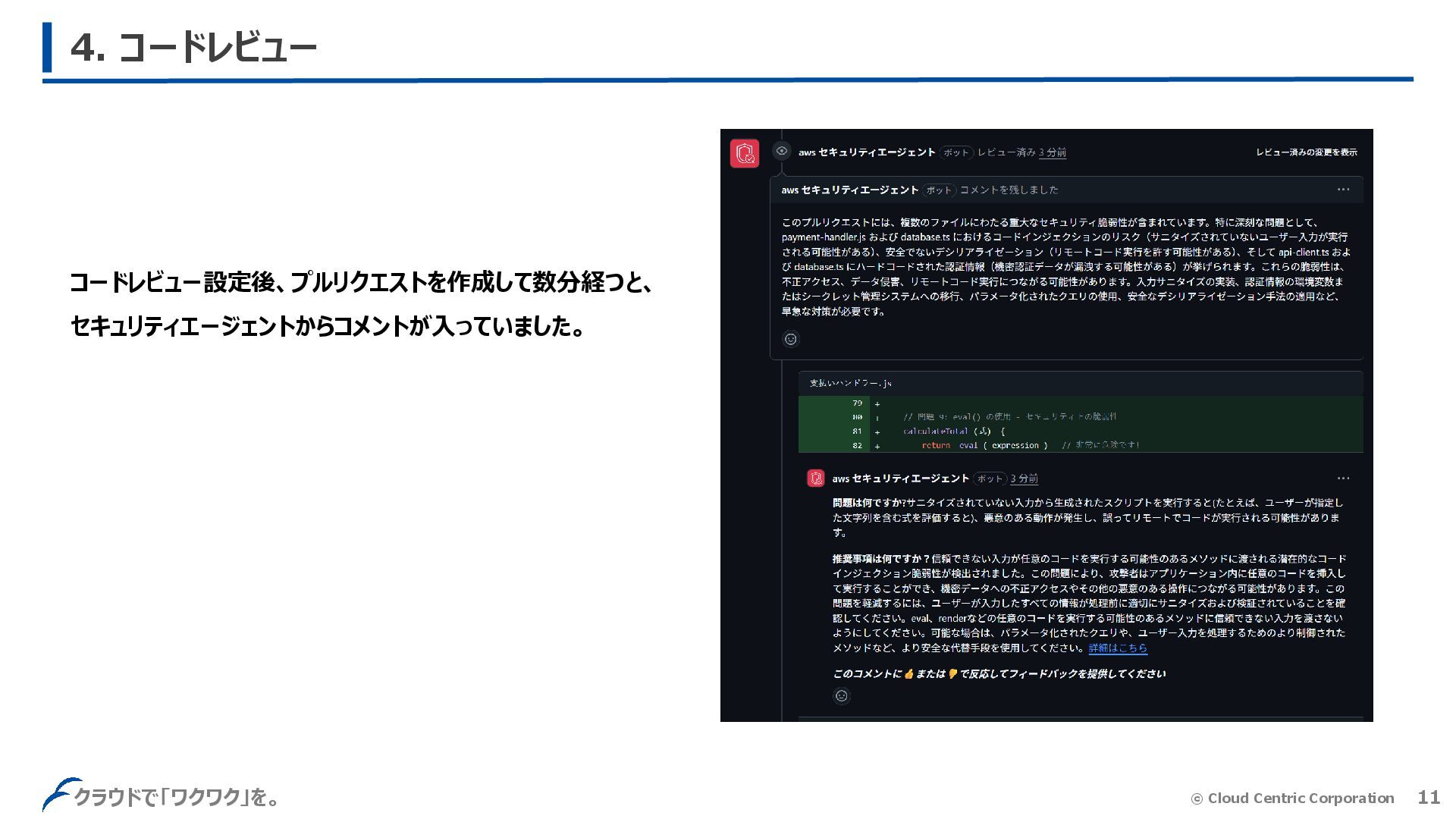
© Cloud Centric Corporation 11 クラウドで「ワクワク」を。 4. コードレビュー コードレビュー設定後、プルリクエストを作成して数分経つと、 セキュリティエージェントからコメントが入っていました。
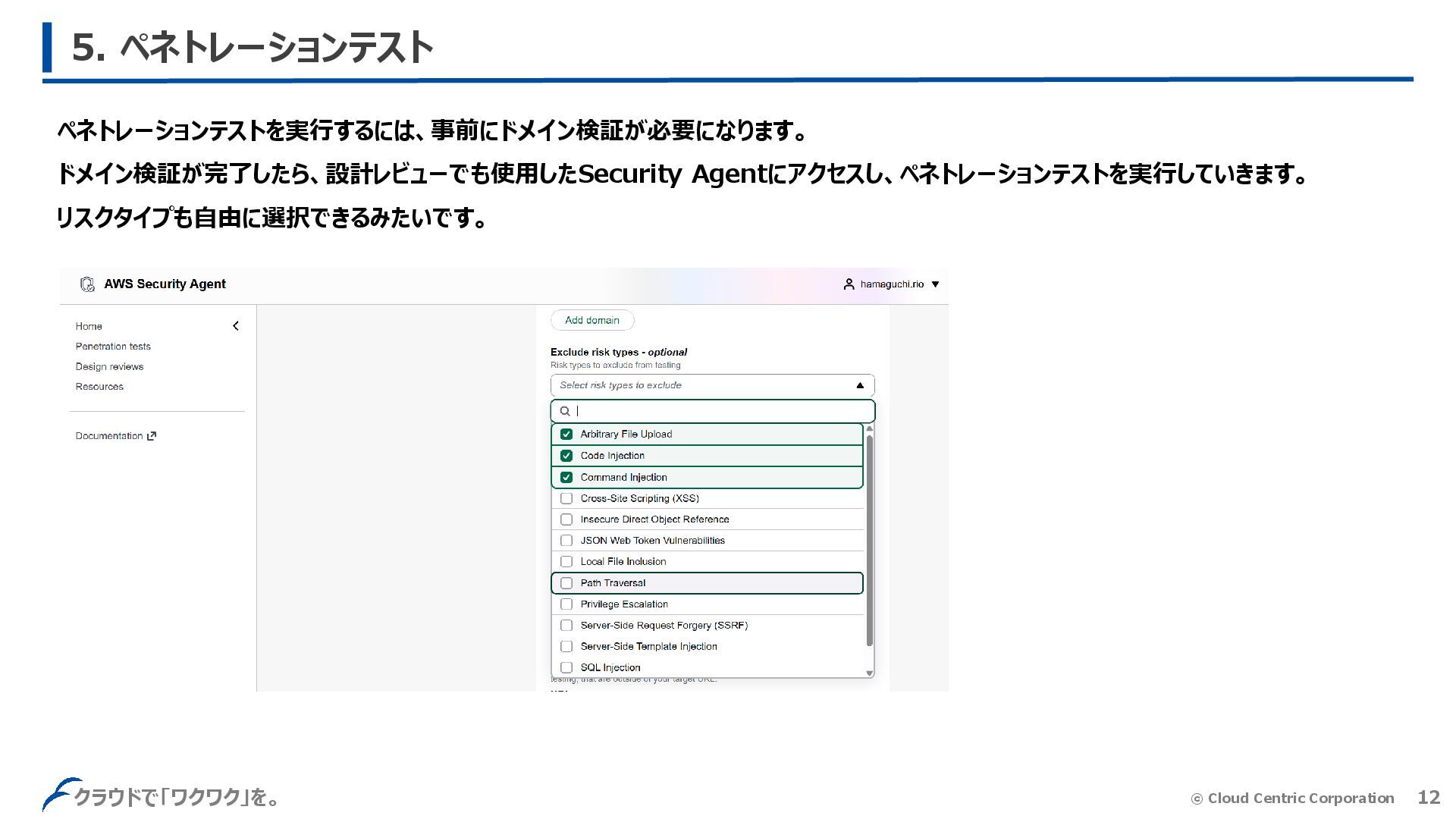
© Cloud Centric Corporation 12 クラウドで「ワクワク」を。 5. ペネトレーションテスト ペネトレーションテストを実行するには、事前にドメイン検証が必要になります。 ドメイン検証が完了したら、設計レビューでも使用したSecurity
Agentにアクセスし、ペネトレーションテストを実行していきます。 リスクタイプも自由に選択できるみたいです。
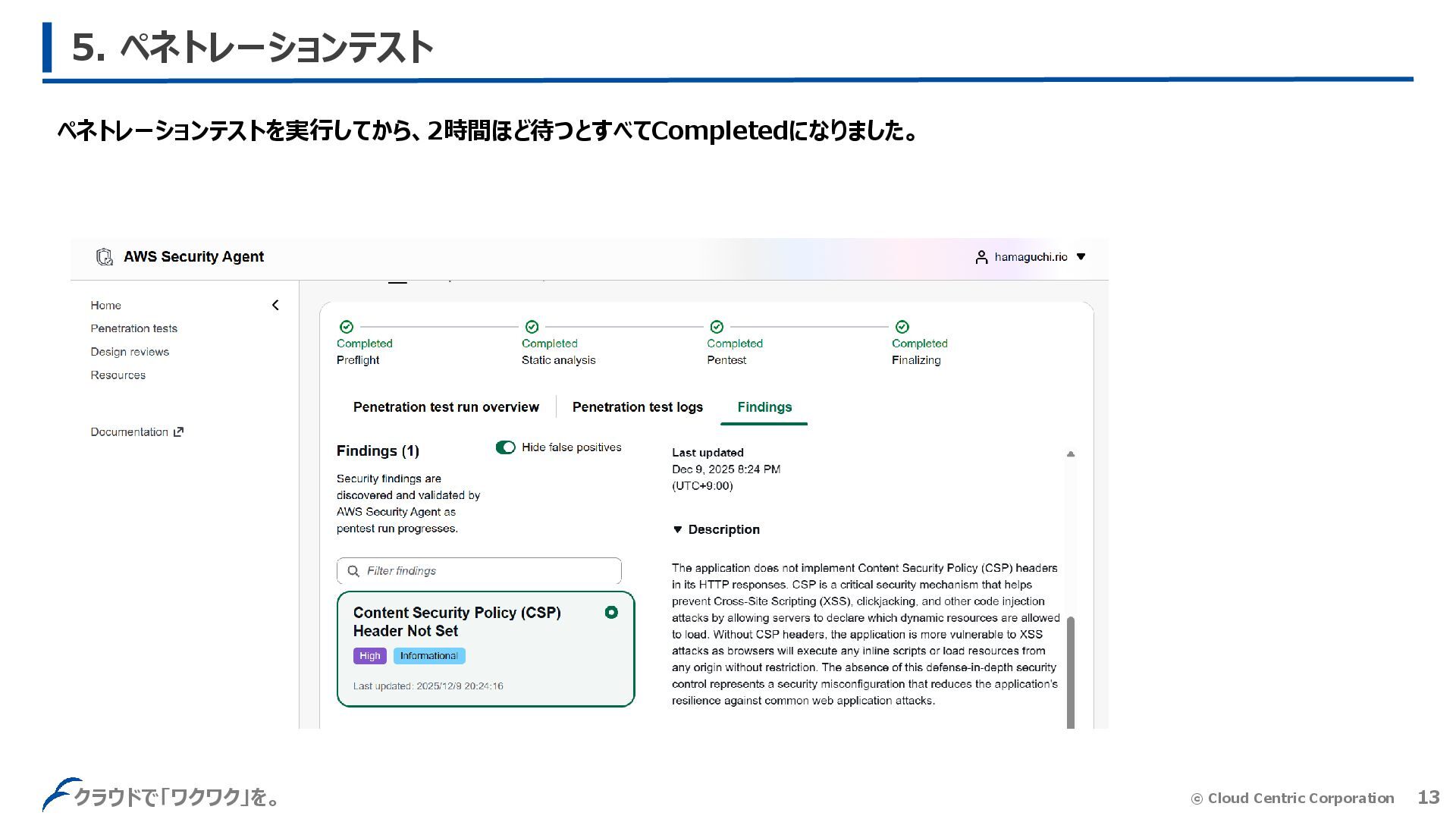
© Cloud Centric Corporation 13 クラウドで「ワクワク」を。 5. ペネトレーションテスト ペネトレーションテストを実行してから、2時間ほど待つとすべてCompletedになりました。
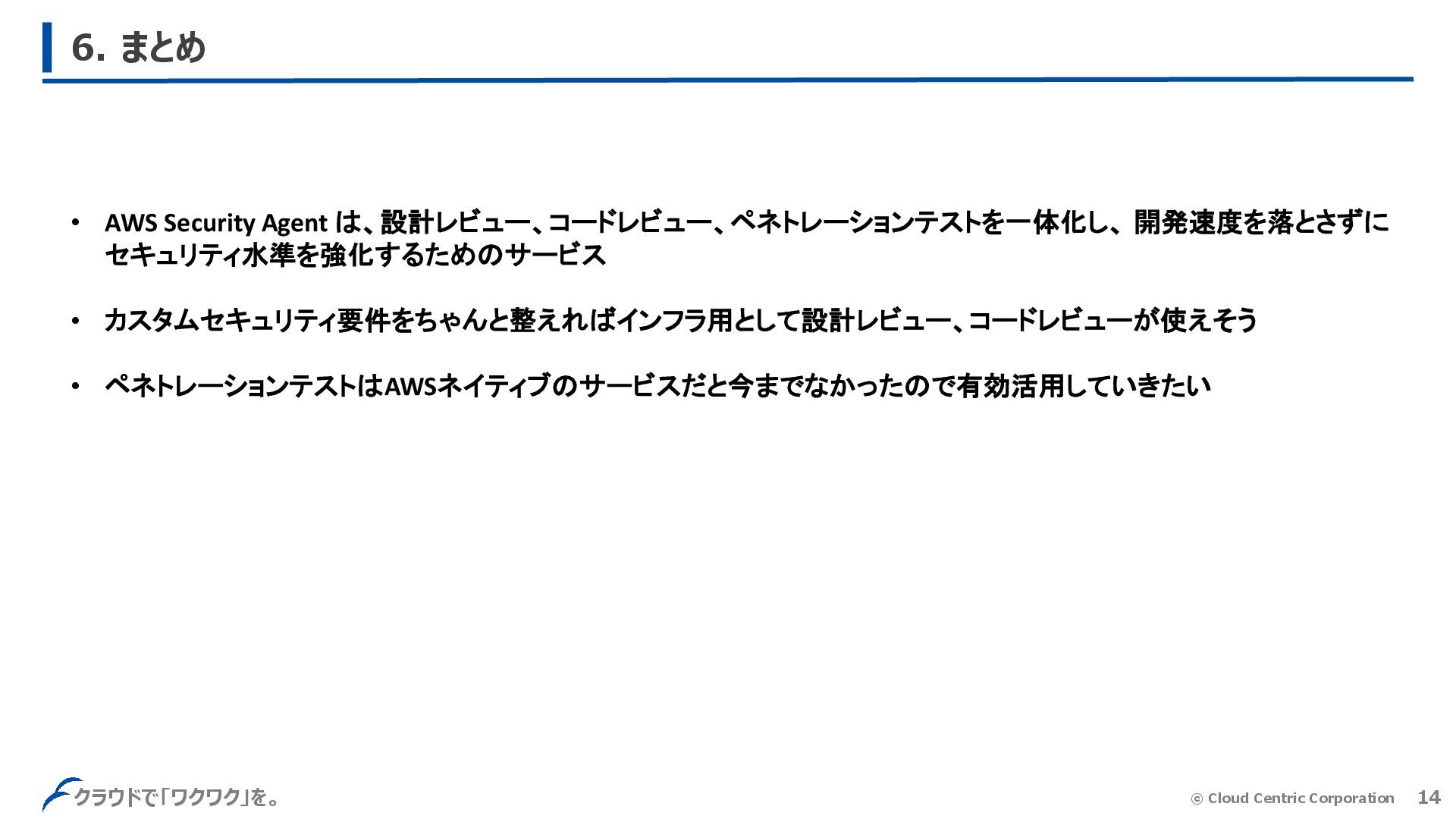
© Cloud Centric Corporation 14 クラウドで「ワクワク」を。 6. まとめ • AWS
Security Agent は、設計レビュー、コードレビュー、ペネトレーションテストを一体化し、 開発速度を落とさずに セキュリティ水準を強化するためのサービス • カスタムセキュリティ要件をちゃんと整えればインフラ用として設計レビュー、コードレビューが使えそう • ペネトレーションテストはAWSネイティブのサービスだと今までなかったので有効活用していきたい
クラウドで「ワクワク」を。 Excitement with the Cloud.
More Decks by 濱口莉生
See All by 濱口莉生
Control Tower リージョン制限の仕組み JAWS-UG東京 ランチタイムLT会 #29
hamaguchi323
1
69
【発見的統制・予防的統制周りのおさらい】 JAWS-UG東京 ランチタイムLT会 #27
hamaguchi323
0
190
JAWS-UG 東京 ランチタイムLT#20 登壇資料
hamaguchi323
1
95
MAWS#4 登壇資料
hamaguchi323
0
52
Featured
See All Featured
Avoiding the “Bad Training, Faster” Trap in the Age of AI
tmiket
1
320
Creating an realtime collaboration tool: Agile Flush - .NET Oxford
marcduiker
35
2.6k
Done Done
chrislema
187
17k
Ethics towards AI in product and experience design
skipperchong
2
470
Skip the Path - Find Your Career Trail
mkilby
1
300
From π to Pie charts
rasagy
1
460
Digital Ethics as a Driver of Design Innovation
axbom
PRO
2
560
Amusing Abliteration
ianozsvald
1
400
RailsConf 2023
tenderlove
30
1.6k
How GitHub (no longer) Works
holman
316
150k
JAMstack: Web Apps at Ludicrous Speed - All Things Open 2022
reverentgeek
1
690
HDC tutorial
michielstock
2
1k


 hamaguchi323
 tmiket
 marcduiker
 chrislema
 skipperchong
 mkilby
 rasagy
 axbom
 ianozsvald
 tenderlove
 holman
 reverentgeek
 michielstock