Upgrade to Pro
— share decks privately, control downloads, hide ads and more …
Speaker Deck
Sign up for free
Menu
Search
Features
All features
Private URLs
Password Protection
Custom URLS
Scheduled publishing
Remove Branding
Restrict embedding
Deck Collections
Notes
Features
All features
Private URLs
Password Protection
Custom URLS
Scheduled publishing
Remove Branding
Restrict embedding
Deck Collections
Notes
Explore
Featured decks
Featured speakers
Programming
Technology
Storyboards
Explore
Featured decks
Featured speakers
Programming
Technology
Storyboards
Pricing
Search
Sign in
Sign up for free
空間情報システム入門1 ♯02 2016/06/16
Search
Honoka T
June 16, 2016
74
0
Share
Embed
Copy iframe code
Copy JS code
Copy link
Start on current slide
空間情報システム入門1 ♯02 2016/06/16
Honoka T
June 16, 2016
More Decks by Honoka T
See All by Honoka T
GitHubのGist上に展開する方法.pdf
honotokitoki
0
130
GitHubのGist上に展開する方法
honotokitoki
0
81
Featured
See All Featured
Redefining SEO in the New Era of Traffic Generation
szymonslowik
1
480
Digital Projects Gone Horribly Wrong (And the UX Pros Who Still Save the Day) - Dean Schuster
uxyall
1
3.4k
Hiding What from Whom? A Critical Review of the History of Programming languages for Music
tomoyanonymous
3
1.3k
HU Berlin: Industrial-Strength Natural Language Processing with spaCy and Prodigy
inesmontani
PRO
0
750
GraphQLとの向き合い方2022年版
quramy
50
15k
Lessons Learnt from Crawling 1000+ Websites
charlesmeaden
PRO
1
1.6k
Paper Plane
katiecoart
PRO
5
54k
Tell your own story through comics
letsgokoyo
1
1.1k
Creating an realtime collaboration tool: Agile Flush - .NET Oxford
marcduiker
35
2.6k
Building the Perfect Custom Keyboard
takai
2
910
Groundhog Day: Seeking Process in Gaming for Health
codingconduct
0
410
Beyond borders and beyond the search box: How to win the global "messy middle" with AI-driven SEO
davidcarrasco
3
280
Transcript
None
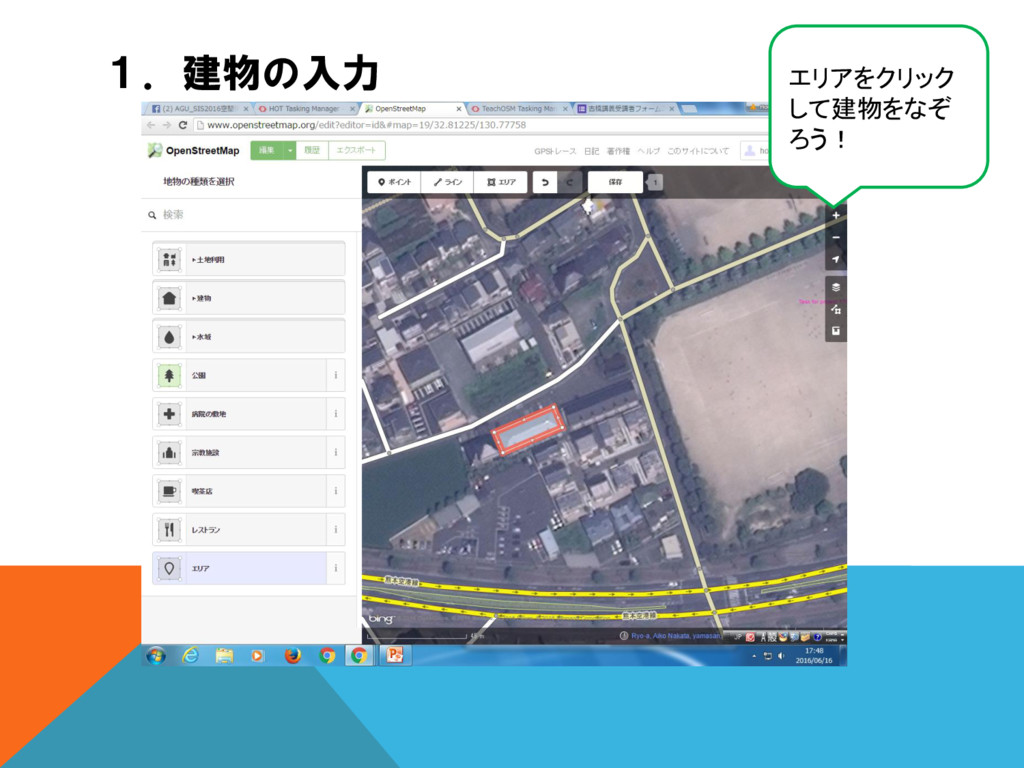
1.建物の入力 エリアをクリック して建物をなぞ ろう!
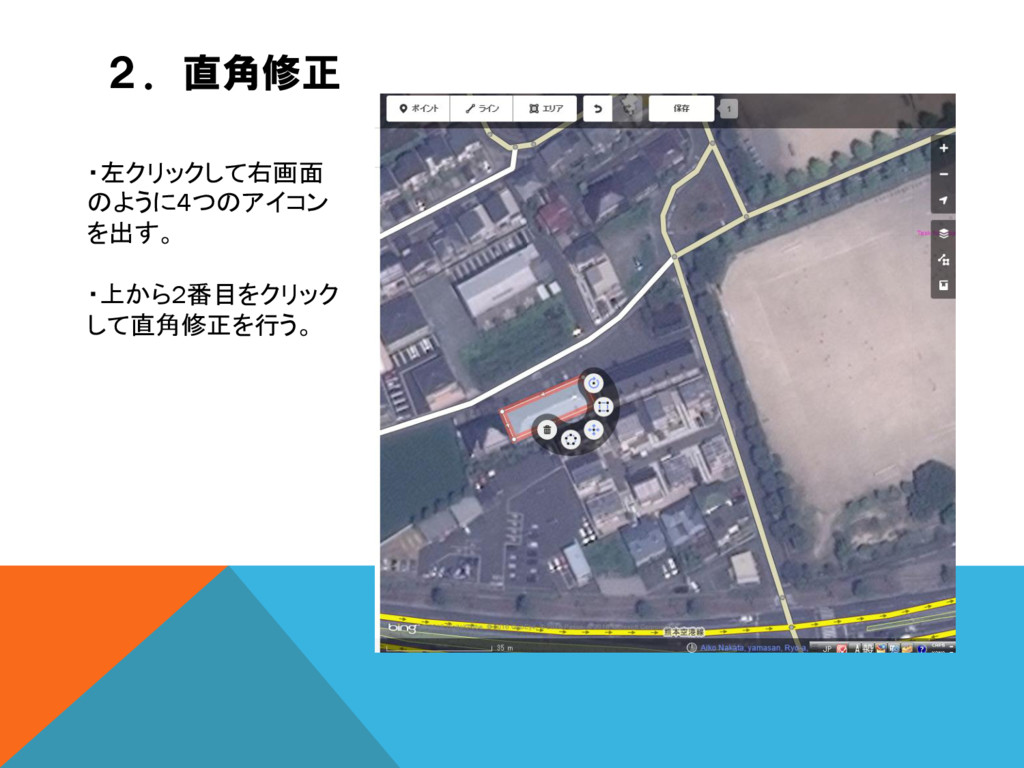
2.直角修正 ・左クリックして右画面 のように4つのアイコン を出す。 ・上から2番目をクリック して直角修正を行う。
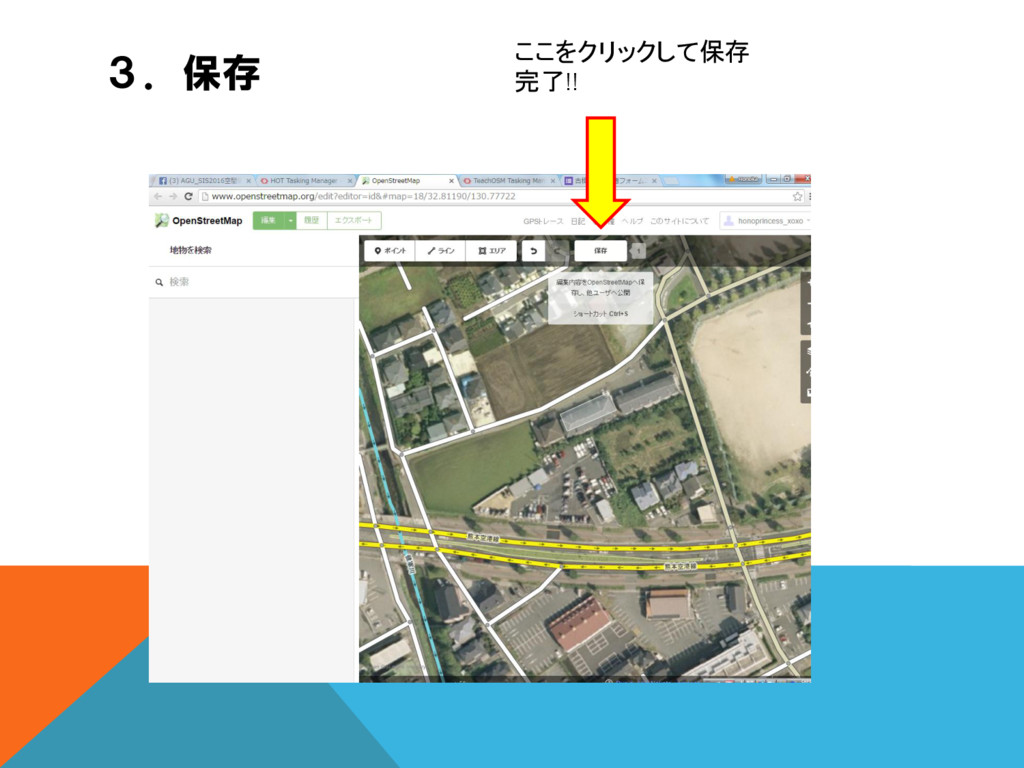
3.保存 ここをクリックして保存 完了!!
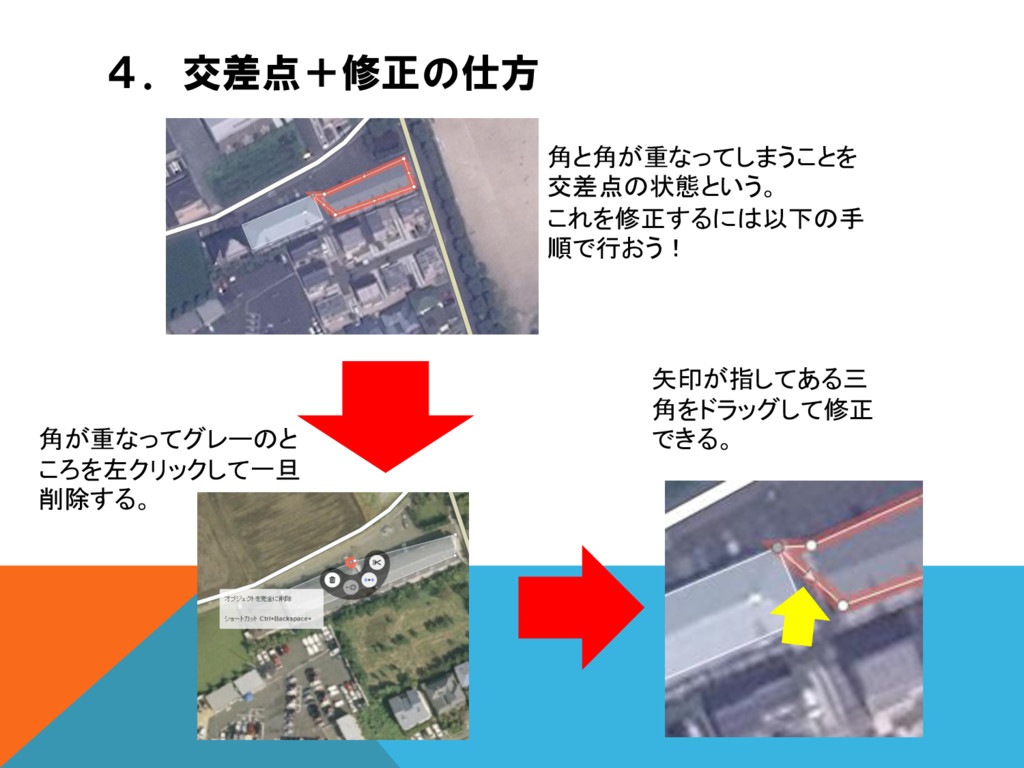
4.交差点+修正の仕方 角と角が重なってしまうことを 交差点の状態という。 これを修正するには以下の手 順で行おう! 矢印が指してある三 角をドラッグして修正 できる。 角が重なってグレーのと ころを左クリックして一旦
削除する。
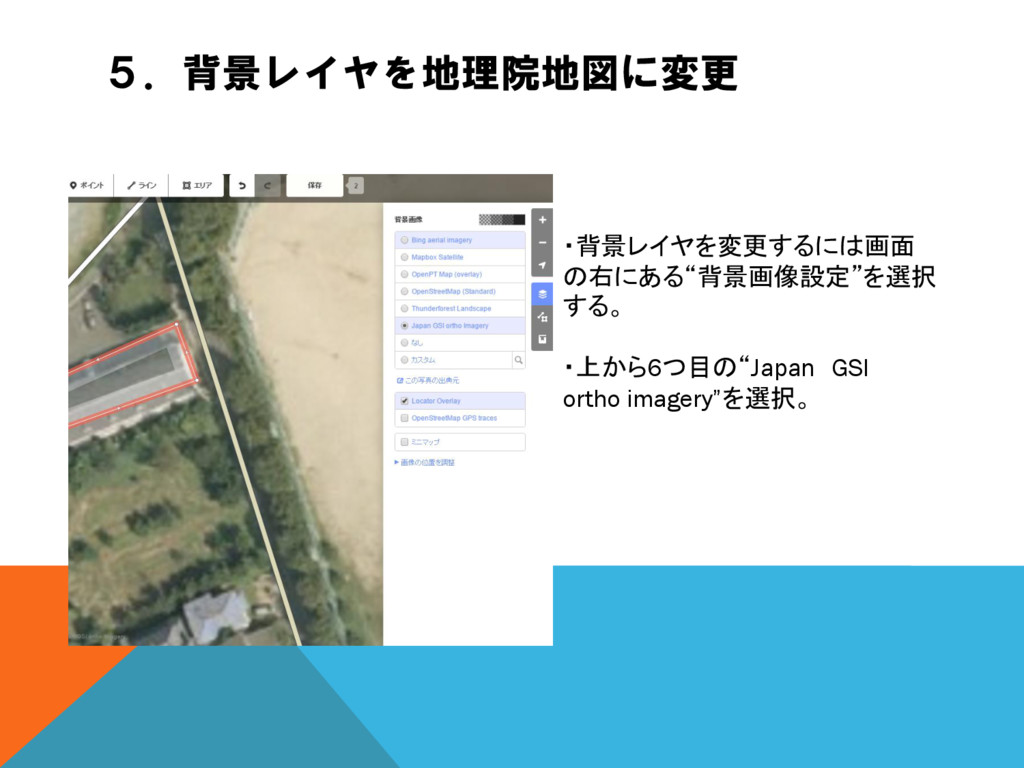
5.背景レイヤを地理院地図に変更 ・背景レイヤを変更するには画面 の右にある“背景画像設定”を選択 する。 ・上から6つ目の“Japan GSI ortho imagery”を選択。
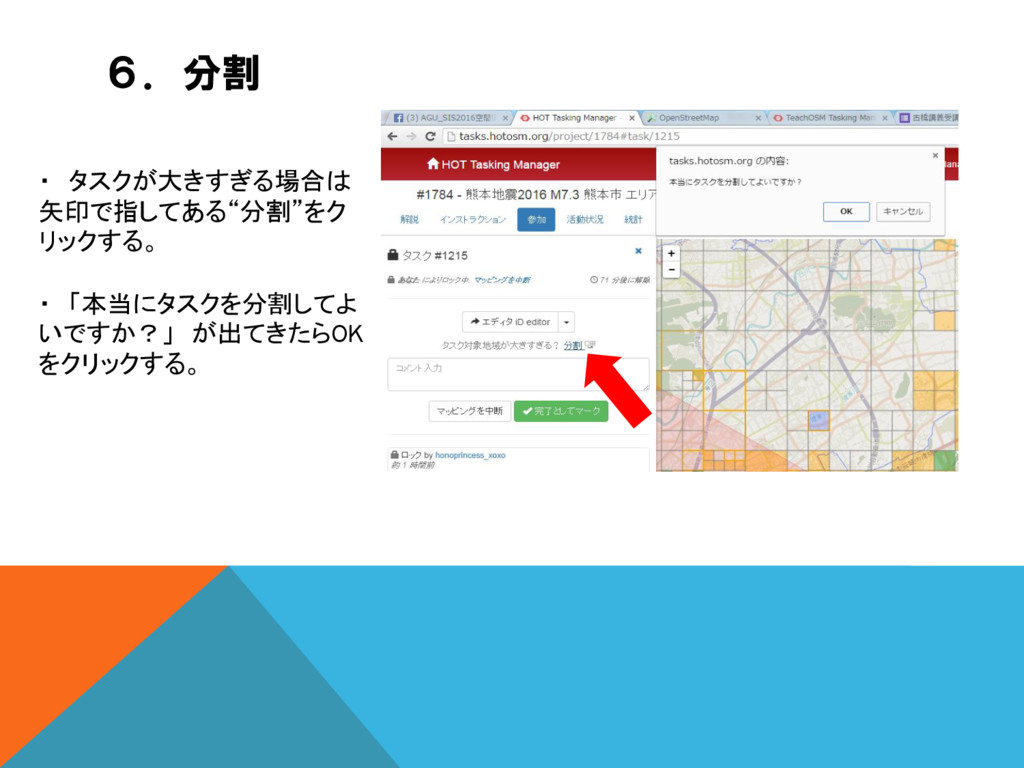
6.分割 ・ タスクが大きすぎる場合は 矢印で指してある“分割”をク リックする。 ・ 「本当にタスクを分割してよ いですか?」 が出てきたらOK をクリックする。
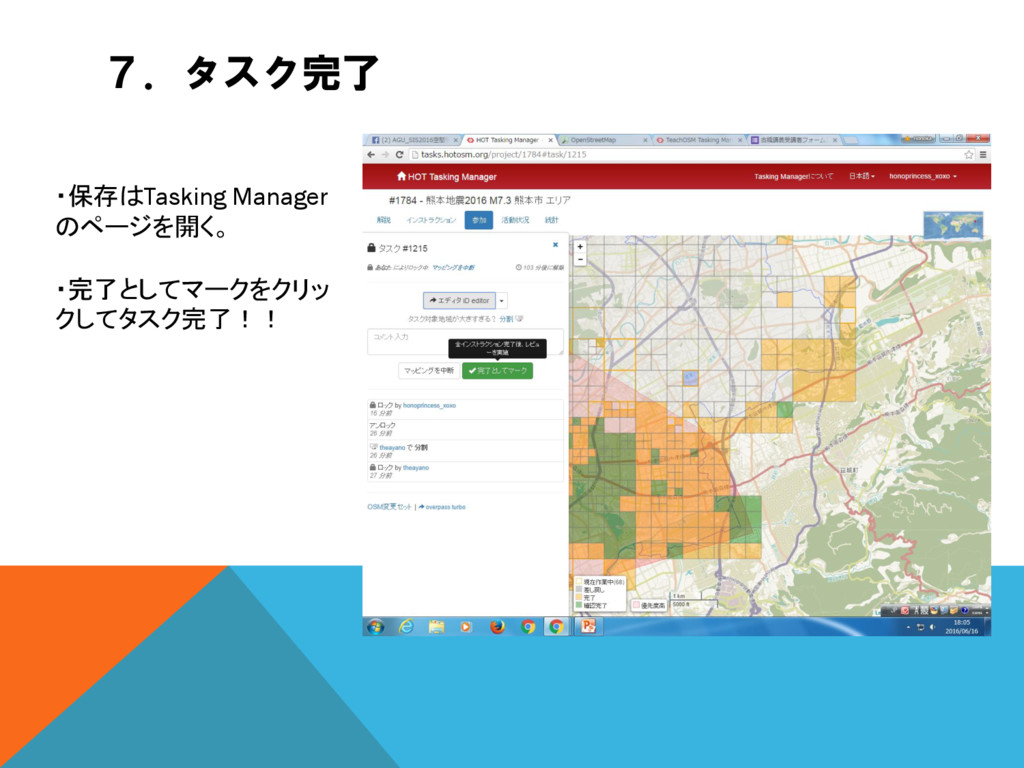
7.タスク完了 ・保存はTasking Manager のページを開く。 ・完了としてマークをクリッ クしてタスク完了!!


 honotokitoki
 szymonslowik
 uxyall
 tomoyanonymous
 inesmontani
 quramy
 charlesmeaden
 katiecoart
 letsgokoyo
 marcduiker
 takai
takai
 codingconduct
 davidcarrasco