Runtime を使いこなす | Kiro と学ぶ Amazon Bedrock AgentC...

Riku INADA PRO
November 10, 2026

Runtime を使いこなす | Kiro と学ぶ Amazon Bedrock AgentCore 02

Level 300。01 で載せた問い合わせ窓口を、大勢で使える形にします。会話ごとに専用の microVM で分かれるセッションと、誰のセッションかを呼ぶ側が持つこと、先に受付番号を返して裏のスレッドで続ける長い仕事 (add_async_task と /ping の HealthyBusy)、中身を変えるたびに増える版と、出す版を選ぶ endpoint を、公式のアイコンを使った構成図と流れの図で説明します。2 人のお客さんを別のセッションで呼ぶところ、同じ session ID で続きを聞くところ、答えを少しずつ流して返すところ、月末の返金の一覧をあとで同じセッションで受け取るところ、test の endpoint だけが新しい指示で答えるところ、片付けたあとも版が残るところは、何が起きたかの図と、この資料で流した端末の画面の大事な行で見せます。test で試してから prod を進める手順、入口の確かめ (IAM か JWT)、MCP や A2A のサーバーを載せる形、起動の速さと長く動かす形、zip かコンテナかも扱います。シリーズ「Kiro と学ぶ Amazon Bedrock AgentCore」の 02 (はじめる) です。

Riku INADA PRO

November 10, 2026

Annual Pro sale · Save $30

Have presentations of your own?

Share with private links, password protection, and more control over your work.

Transcript

36 slides
  1. Kiro と学ぶ Amazon Bedrock AgentCore 02 はじめる Level 300 Runtime

    を使いこなす セッション、版と endpoint、⻑い仕事 2026-11 時点 (AgentCore CLI 1.0.2) 2026 年 11 ⽉ 稲⽥ ⼤陸 アマゾン ウェブ サービス ジャパン © 2026, Amazon Web Services, Inc. or its affiliates. All rights reserved. 02 Kiro + AgentCore 1
  2. はじめに ⾃⼰紹介 稲⽥ ⼤陸 いなだ りく (いなりく) アマゾン ウェブ サービス

    ジャパン合同会社 ソリューションアーキテクト 製造業のお客様を中⼼に⽀援 最近の取り組み AI 駆動開発ライフサイクルの推進 Kiro と AWS Amplify の情報発信 © 2026, Amazon Web Services, Inc. or its affiliates. All rights reserved. X @inada_riku Speaker Deck speakerdeck.com/inariku Zenn zenn.dev/inariku GitHub github.com/inariku 2
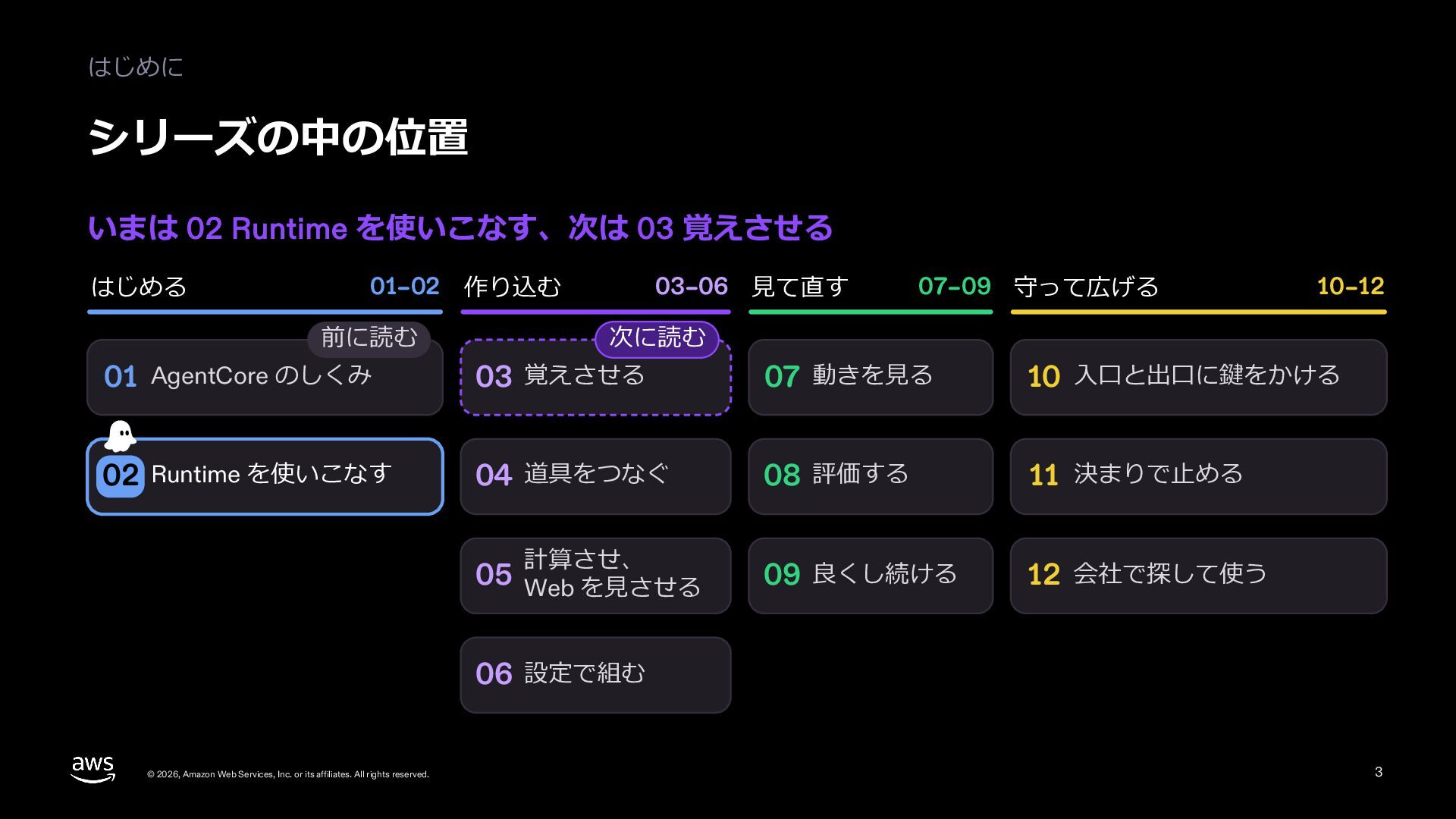
  3. はじめに シリーズの中の位置 いまは 02 Runtime を使いこなす、次は 03 覚えさせる はじめる 01–02

    作り込む 前に読む 03–06 ⾒て直す 07–09 守って広げる 10–12 次に読む 01 AgentCore のしくみ 03 覚えさせる 07 動きを⾒る 10 ⼊⼝と出⼝に鍵をかける 02 Runtime を使いこなす 04 道具をつなぐ 08 評価する 11 決まりで⽌める 09 良くし続ける 12 会社で探して使う 計算させ、 05 Web を⾒させる 06 設定で組む © 2026, Amazon Web Services, Inc. or its affiliates. All rights reserved. 3
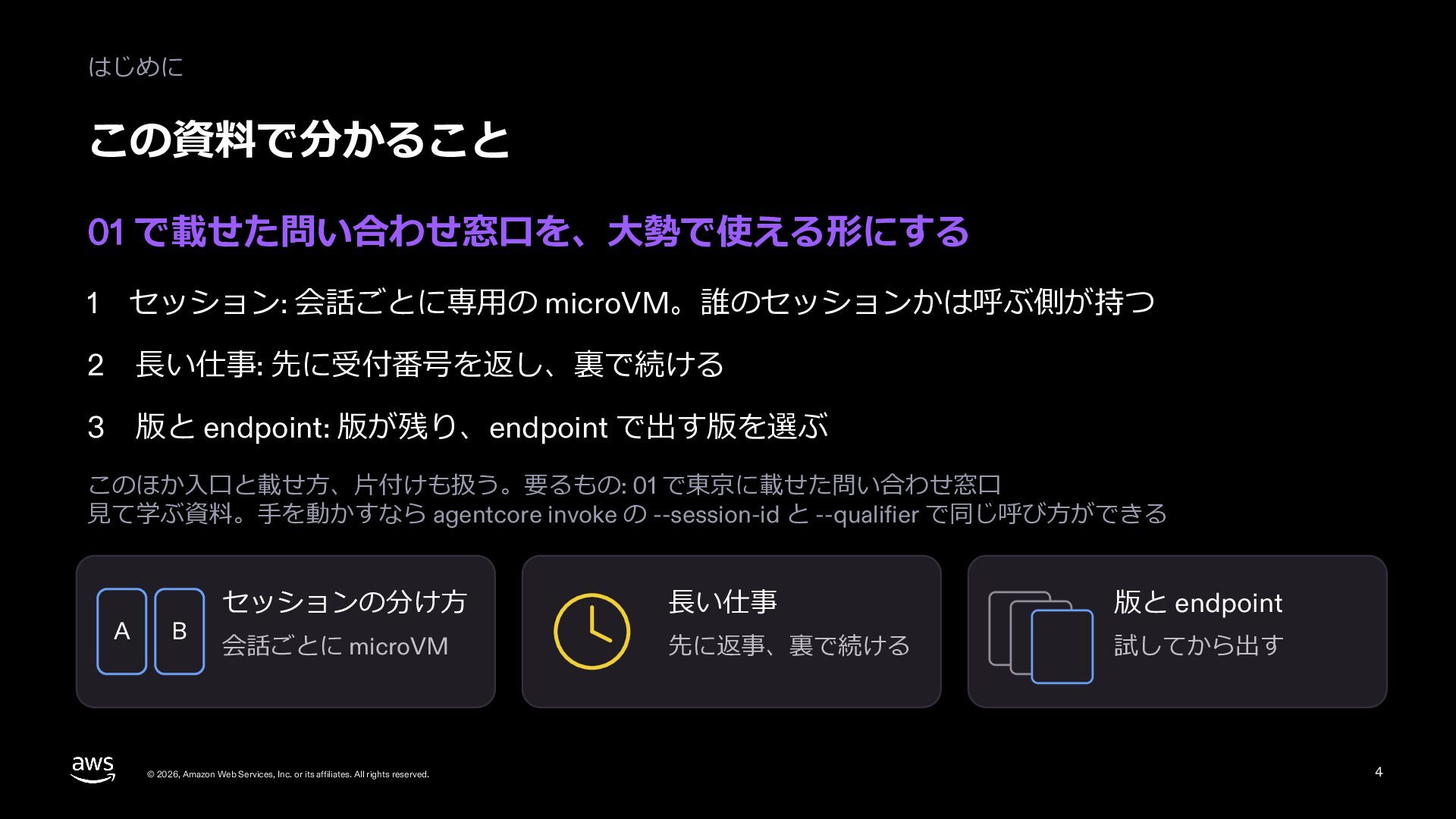
  4. はじめに この資料で分かること 01 で載せた問い合わせ窓⼝を、⼤勢で使える形にする 1 セッション: 会話ごとに専⽤の microVM。誰のセッションかは呼ぶ側が持つ 2 ⻑い仕事:

    先に受付番号を返し、裏で続ける 版と endpoint: 版が残り、endpoint で出す版を選ぶ 3 このほか⼊⼝と載せ⽅、⽚付けも扱う。要るもの: 01 で東京に載せた問い合わせ窓⼝ ⾒て学ぶ資料。⼿を動かすなら agentcore invoke の --session-id と --qualifier で同じ呼び⽅ができる A B セッションの分け⽅ ⻑い仕事 版と endpoint 会話ごとに microVM 先に返事、裏で続ける 試してから出す © 2026, Amazon Web Services, Inc. or its affiliates. All rights reserved. 4
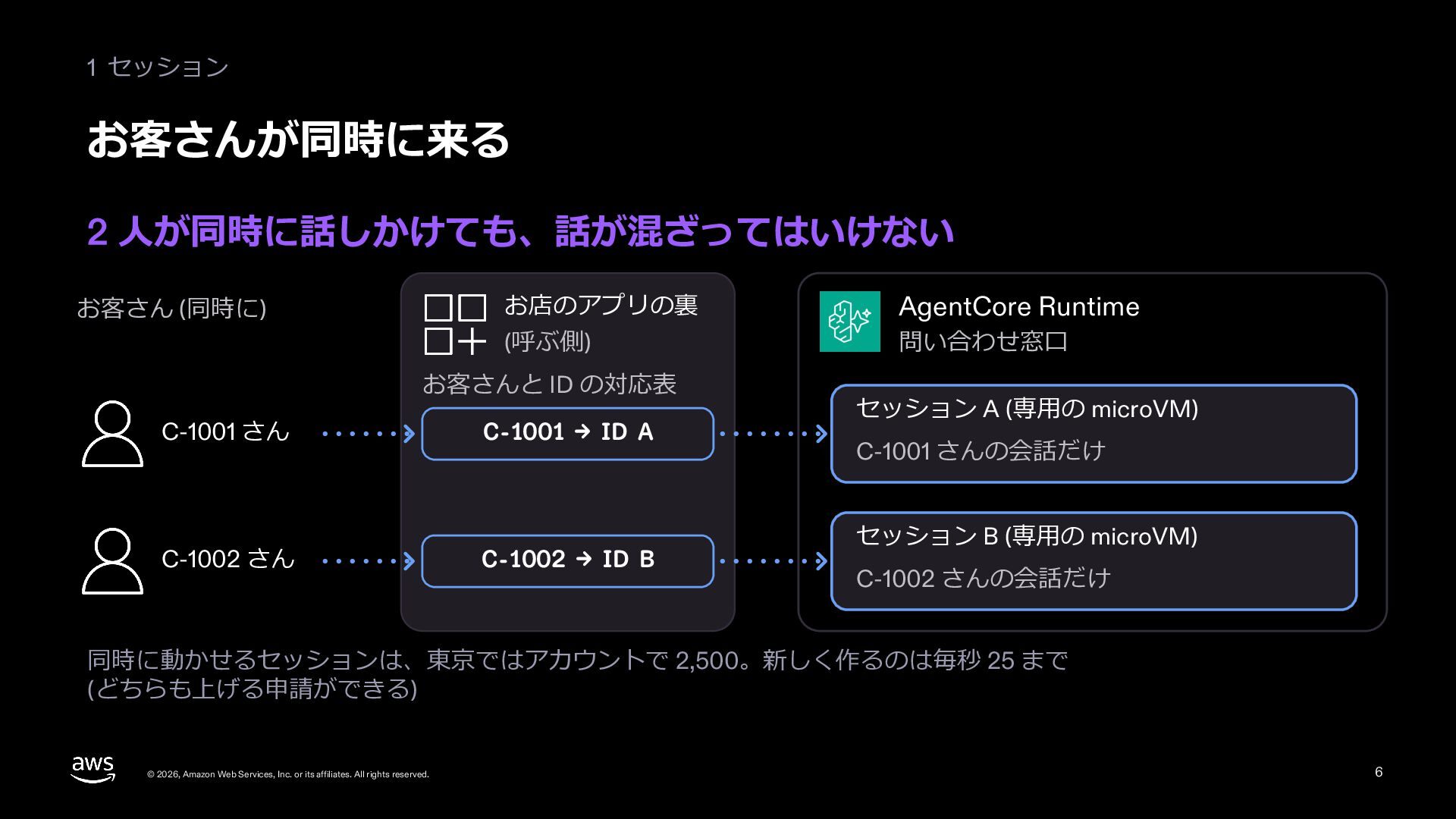
  5. 1 セッション お客さんが同時に来る 2 ⼈が同時に話しかけても、話が混ざってはいけない お客さん (同時に) お店のアプリの裏 AgentCore Runtime

    (呼ぶ側) 問い合わせ窓⼝ お客さんと ID の対応表 C-1001 さん C-1002 さん C-1001 → ID A C-1002 → ID B セッション A (専⽤の microVM) C-1001 さんの会話だけ セッション B (専⽤の microVM) C-1002 さんの会話だけ 同時に動かせるセッションは、東京ではアカウントで 2,500。新しく作るのは毎秒 25 まで (どちらも上げる申請ができる) © 2026, Amazon Web Services, Inc. or its affiliates. All rights reserved. 6
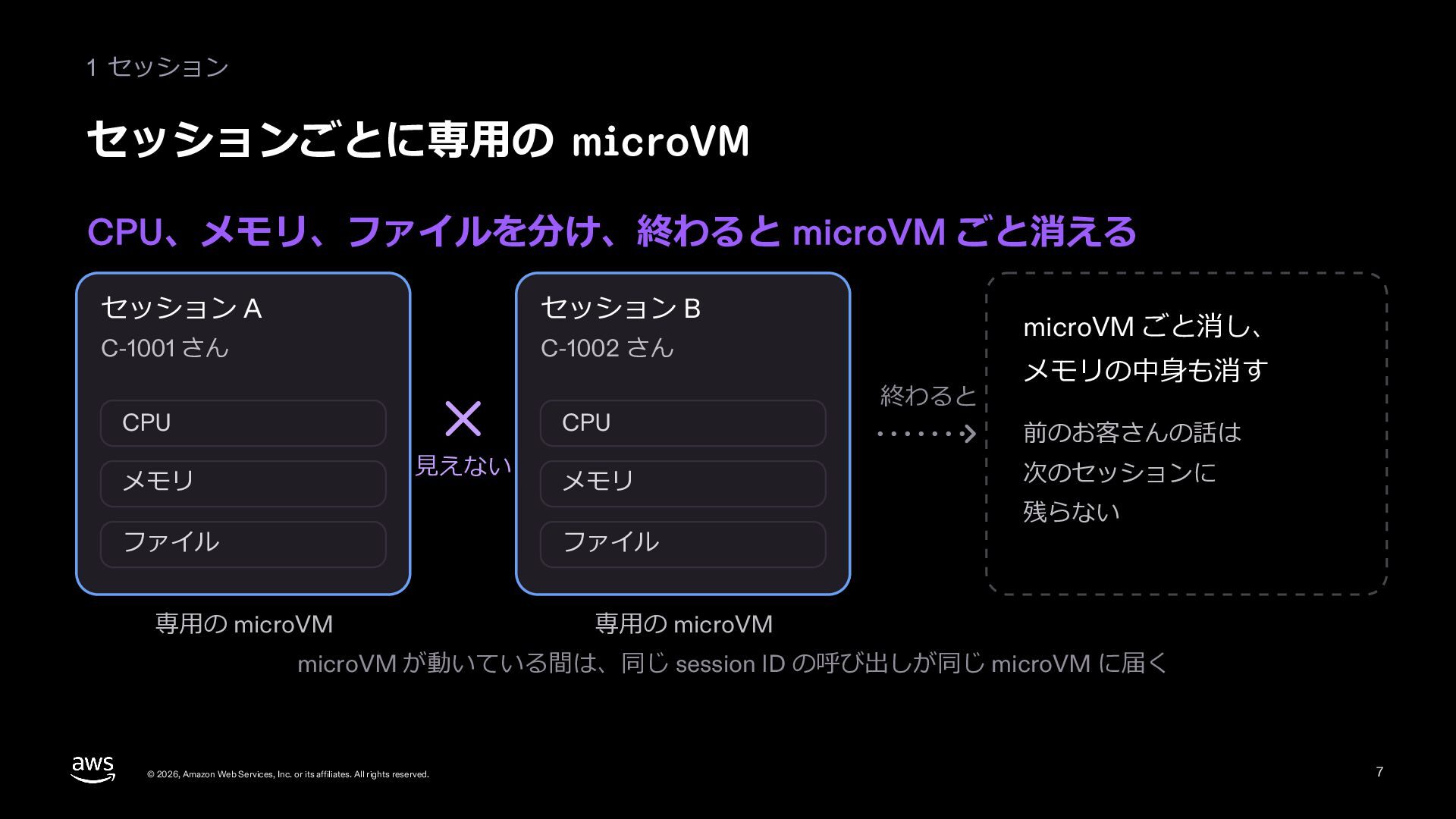
  6. 1 セッション セッションごとに専⽤の microVM CPU、メモリ、ファイルを分け、終わると microVM ごと消える セッション A セッション

    B C-1001 さん C-1002 さん CPU CPU ⾒えない メモリ ファイル メモリ ファイル 専⽤の microVM microVM ごと消し、 終わると メモリの中⾝も消す 前のお客さんの話は 次のセッションに 残らない 専⽤の microVM microVM が動いている間は、同じ session ID の呼び出しが同じ microVM に届く © 2026, Amazon Web Services, Inc. or its affiliates. All rights reserved. 7
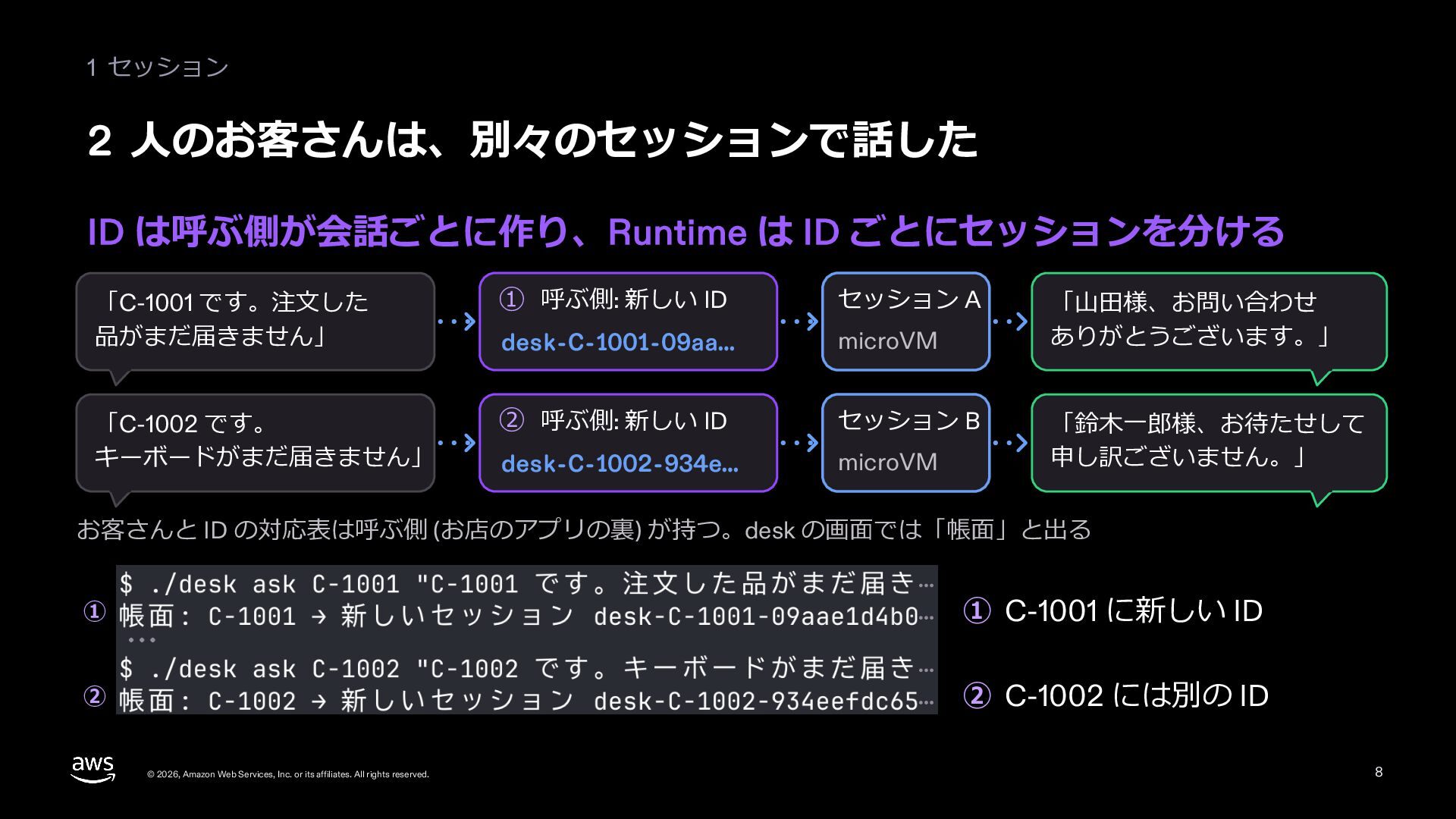
  7. 1 セッション 2 ⼈のお客さんは、別々のセッションで話した ID は呼ぶ側が会話ごとに作り、Runtime は ID ごとにセッションを分ける 「C-1001

    です。注⽂した 品がまだ届きません」 ① 呼ぶ側: 新しい ID セッション A desk-C-1001-09aa… microVM 「C-1002 です。 キーボードがまだ届きません」 ② 呼ぶ側: 新しい ID セッション B desk-C-1002-934e… microVM 「⼭⽥様、お問い合わせ ありがとうございます。」 「鈴⽊⼀郎様、お待たせして 申し訳ございません。」 お客さんと ID の対応表は呼ぶ側 (お店のアプリの裏) が持つ。desk の画⾯では「帳⾯」と出る ① ① C-1001 に新しい ID ② ② C-1002 には別の ID © 2026, Amazon Web Services, Inc. or its affiliates. All rights reserved. 8
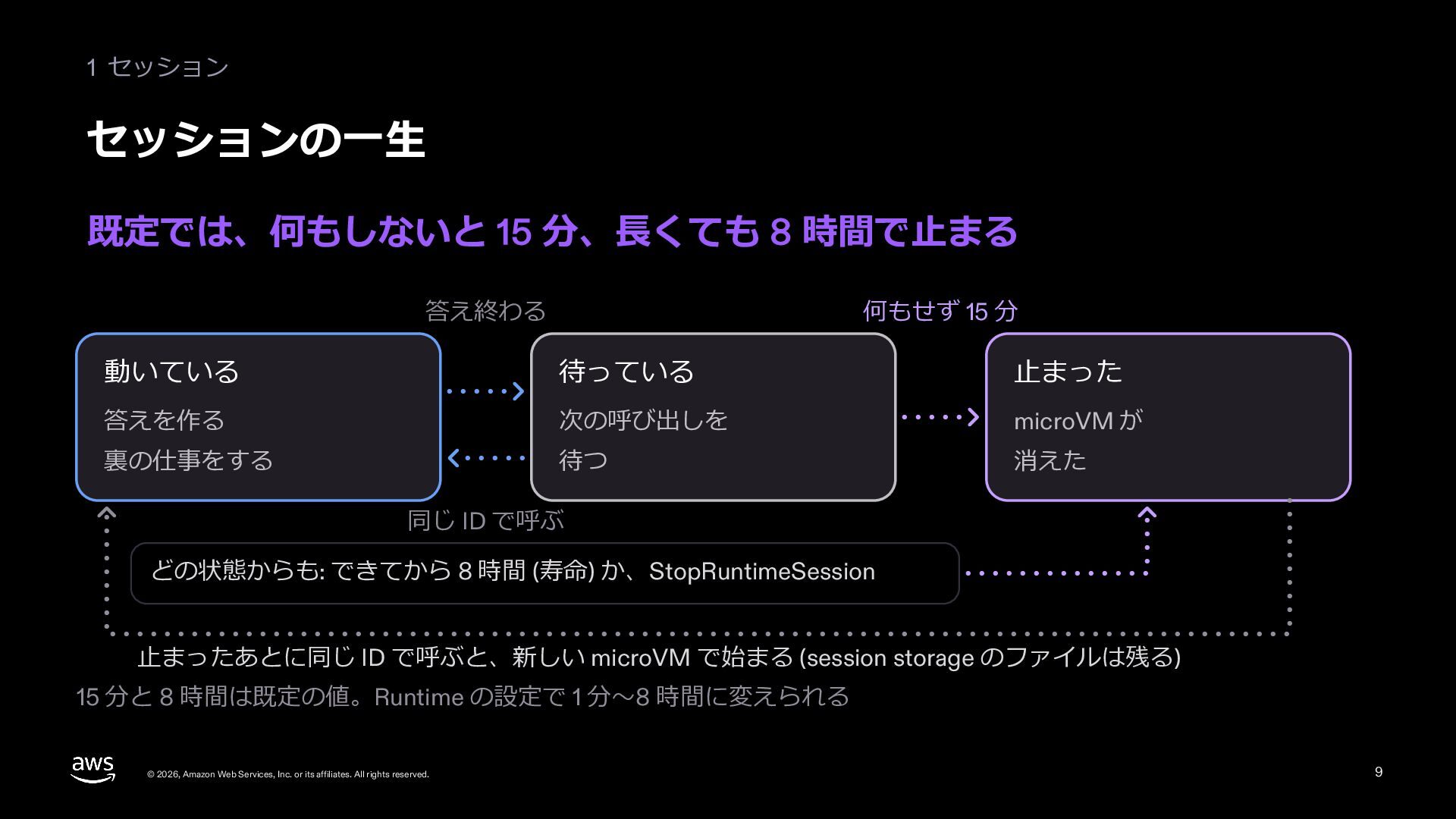
  8. 1 セッション セッションの⼀⽣ 既定では、何もしないと 15 分、⻑くても 8 時間で⽌まる 答え終わる 何もせず

    15 分 動いている 待っている ⽌まった 答えを作る 次の呼び出しを microVM が 裏の仕事をする 待つ 消えた 同じ ID で呼ぶ どの状態からも: できてから 8 時間 (寿命) か、StopRuntimeSession ⽌まったあとに同じ ID で呼ぶと、新しい microVM で始まる (session storage のファイルは残る) 15 分と 8 時間は既定の値。Runtime の設定で 1 分〜8 時間に変えられる © 2026, Amazon Web Services, Inc. or its affiliates. All rights reserved. 9
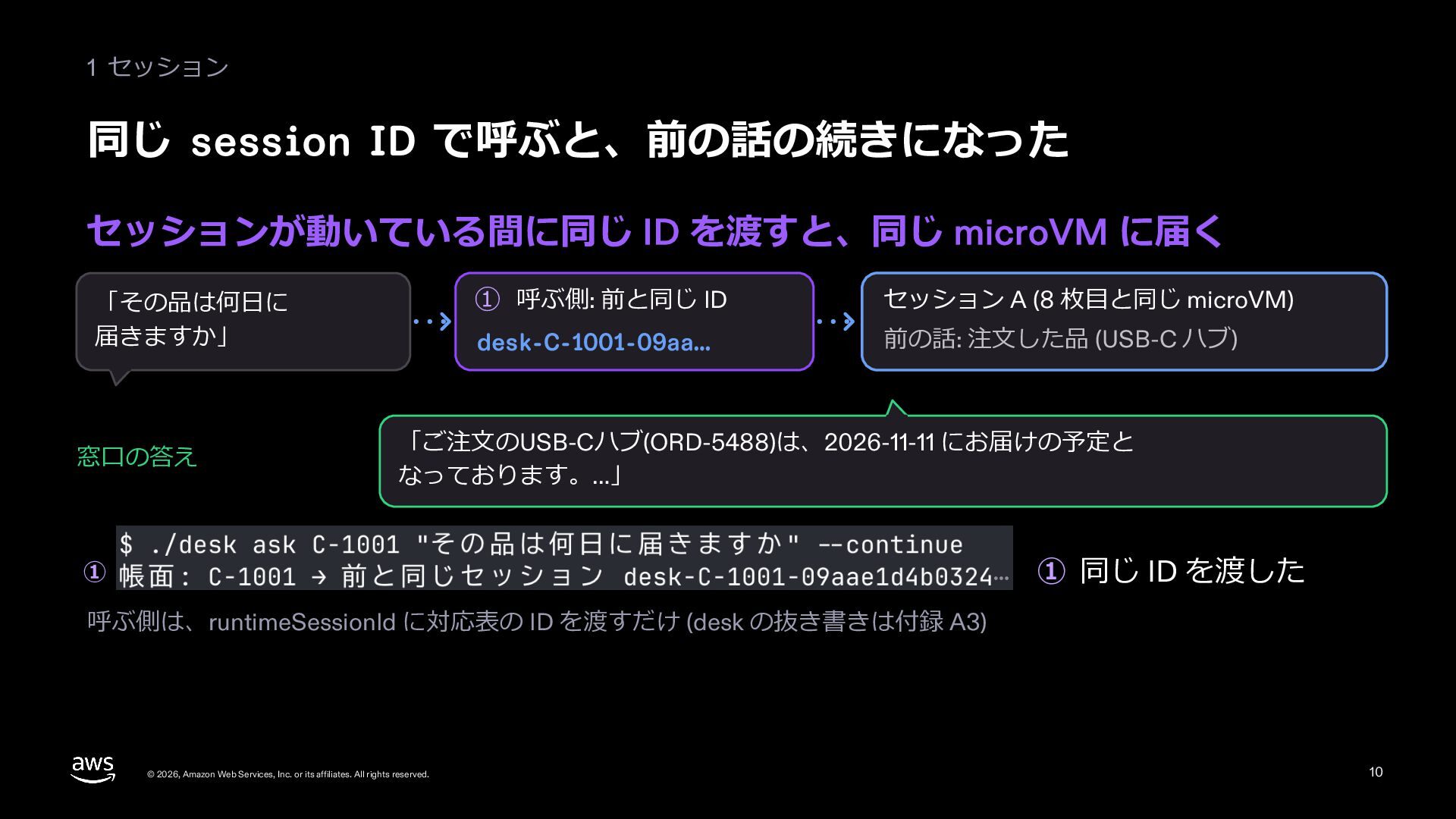
  9. 1 セッション 同じ session ID で呼ぶと、前の話の続きになった セッションが動いている間に同じ ID を渡すと、同じ microVM

    に届く 「その品は何⽇に 届きますか」 窓⼝の答え ① 呼ぶ側: 前と同じ ID セッション A (8 枚⽬と同じ microVM) desk-C-1001-09aa… 前の話: 注⽂した品 (USB-C ハブ) 「ご注⽂のUSB-Cハブ(ORD-5488)は、2026-11-11 にお届けの予定と なっております。…」 ① 同じ ID を渡した ① 呼ぶ側は、runtimeSessionId に対応表の ID を渡すだけ (desk の抜き書きは付録 A3) © 2026, Amazon Web Services, Inc. or its affiliates. All rights reserved. 10
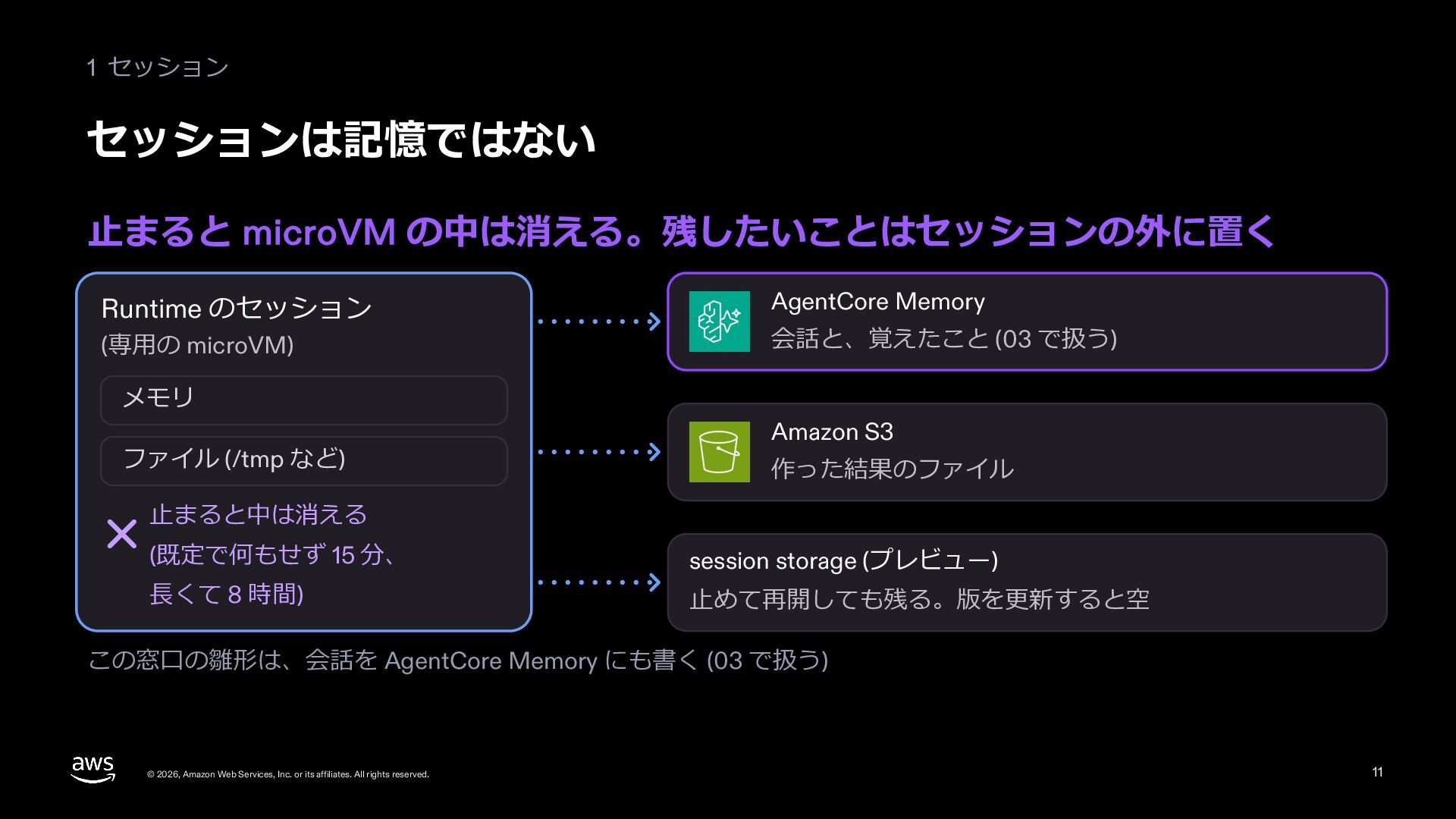
  10. 1 セッション セッションは記憶ではない ⽌まると microVM の中は消える。残したいことはセッションの外に置く Runtime のセッション (専⽤の microVM)

    メモリ ファイル (/tmp など) AgentCore Memory 会話と、覚えたこと (03 で扱う) Amazon S3 作った結果のファイル ⽌まると中は消える (既定で何もせず 15 分、 session storage (プレビュー) ⻑くて 8 時間) ⽌めて再開しても残る。版を更新すると空 この窓⼝の雛形は、会話を AgentCore Memory にも書く (03 で扱う) © 2026, Amazon Web Services, Inc. or its affiliates. All rights reserved. 11
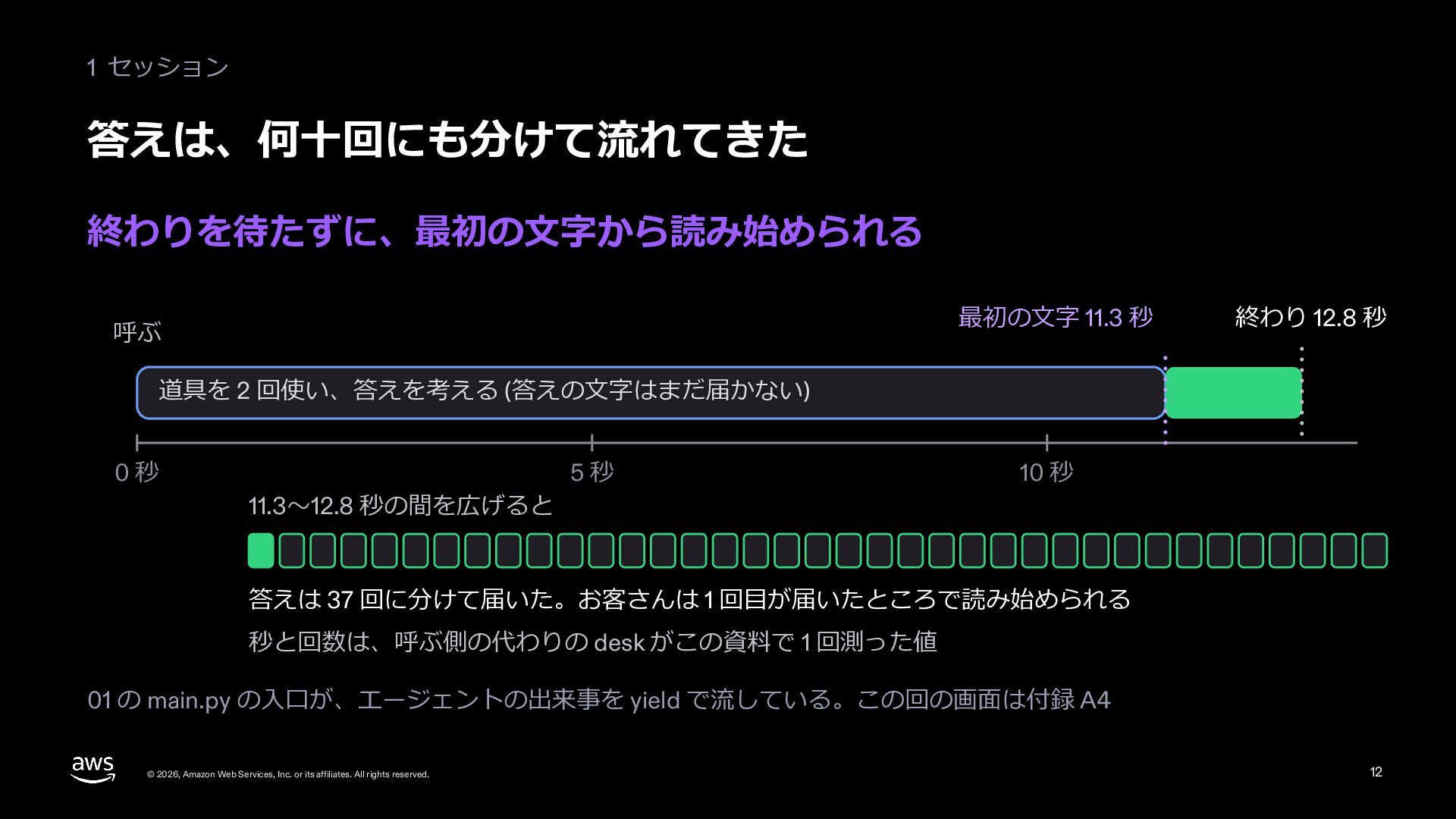
  11. 1 セッション 答えは、何⼗回にも分けて流れてきた 終わりを待たずに、最初の⽂字から読み始められる 最初の⽂字 11.3 秒 呼ぶ 終わり 12.8

    秒 道具を 2 回使い、答えを考える (答えの⽂字はまだ届かない) 0秒 11.3〜12.8 秒の間を広げると 5秒 10 秒 答えは 37 回に分けて届いた。お客さんは 1 回⽬が届いたところで読み始められる 秒と回数は、呼ぶ側の代わりの desk がこの資料で 1 回測った値 01 の main.py の⼊⼝が、エージェントの出来事を yield で流している。この回の画⾯は付録 A4 © 2026, Amazon Web Services, Inc. or its affiliates. All rights reserved. 12
  12. 2 ⻑い仕事 © 2026, Amazon Web Services, Inc. or its

    affiliates. All rights reserved. 13
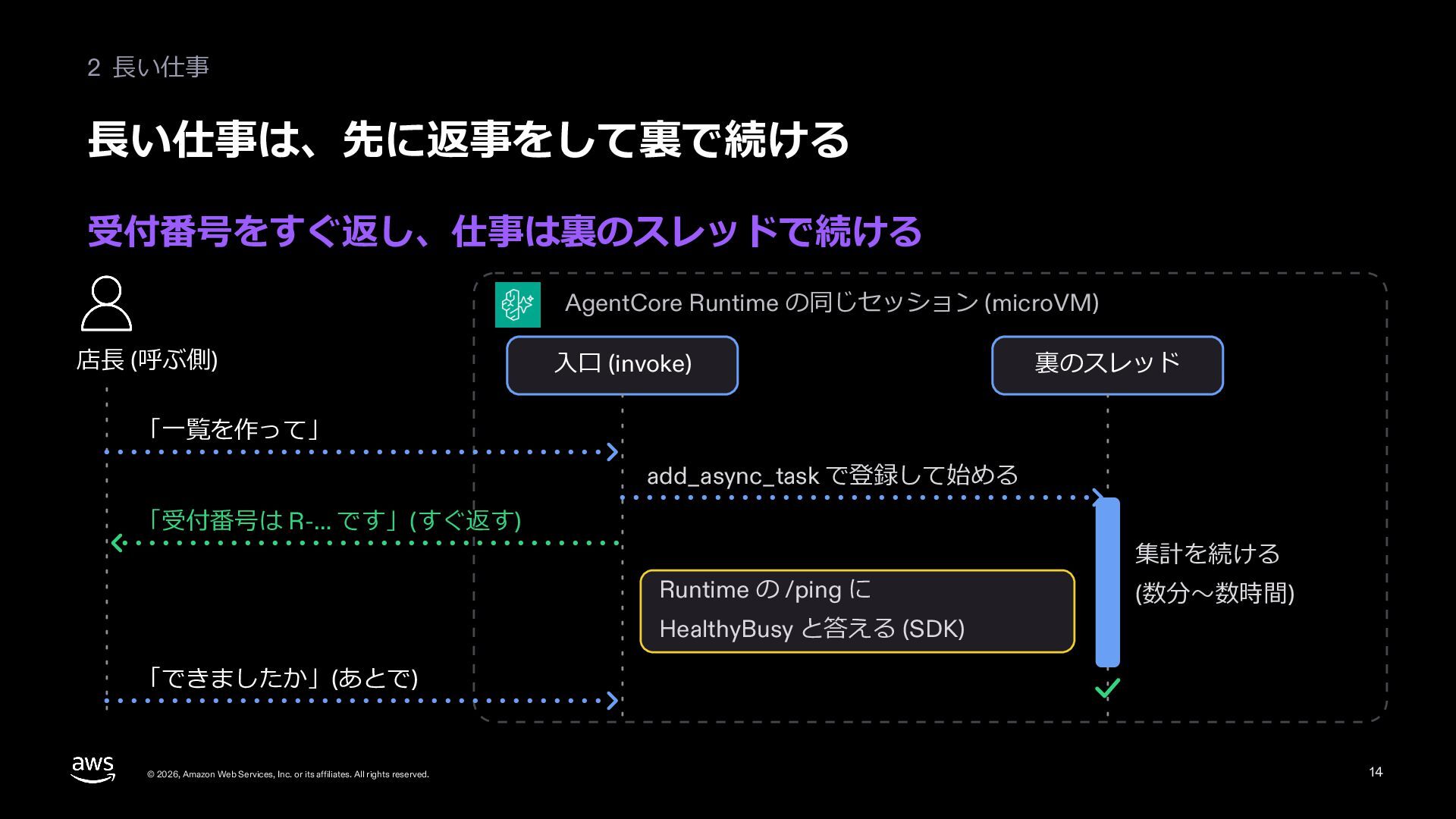
  13. 2 ⻑い仕事 ⻑い仕事は、先に返事をして裏で続ける 受付番号をすぐ返し、仕事は裏のスレッドで続ける AgentCore Runtime の同じセッション (microVM) 店⻑ (呼ぶ側)

    ⼊⼝ (invoke) 裏のスレッド 「⼀覧を作って」 add_async_task で登録して始める 「受付番号は R-… です」(すぐ返す) Runtime の /ping に 集計を続ける (数分〜数時間) HealthyBusy と答える (SDK) 「できましたか」(あとで) © 2026, Amazon Web Services, Inc. or its affiliates. All rights reserved. 14
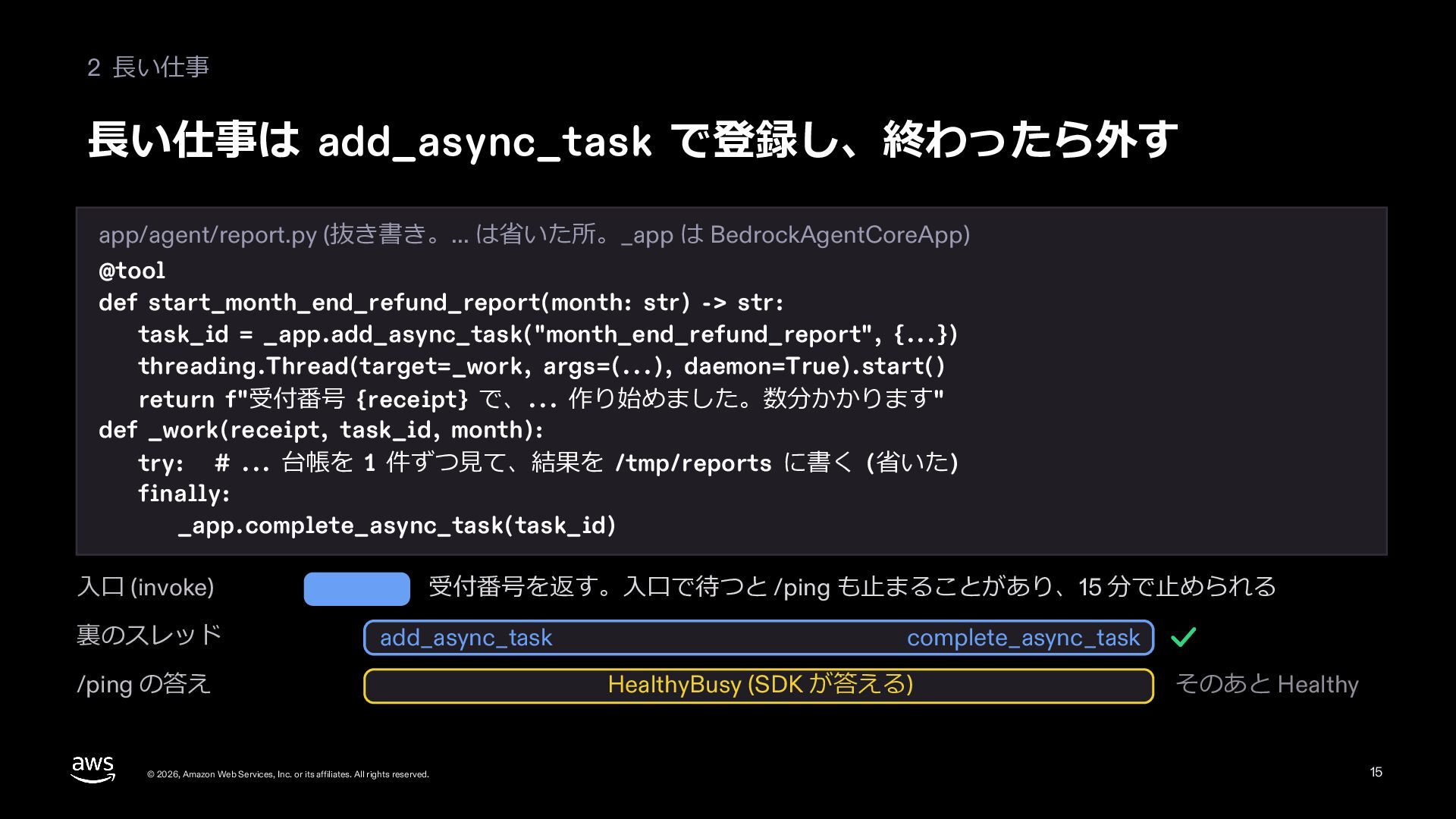
  14. 2 ⻑い仕事 ⻑い仕事は add_async_task で登録し、終わったら外す app/agent/report.py (抜き書き。... は省いた所。_app は BedrockAgentCoreApp)

    @tool def start_month_end_refund_report(month: str) -> str: task_id = _app.add_async_task("month_end_refund_report", {...}) threading.Thread(target=_work, args=(...), daemon=True).start() return f"受付番号 {receipt} で、... 作り始めました。数分かかります" def _work(receipt, task_id, month): try: # ... 台帳を 1 件ずつ⾒て、結果を /tmp/reports に書く (省いた) finally: _app.complete_async_task(task_id) ⼊⼝ (invoke) 裏のスレッド 受付番号を返す。⼊⼝で待つと /ping も⽌まることがあり、15 分で⽌められる add_async_task /ping の答え © 2026, Amazon Web Services, Inc. or its affiliates. All rights reserved. complete_async_task HealthyBusy (SDK が答える) そのあと Healthy 15
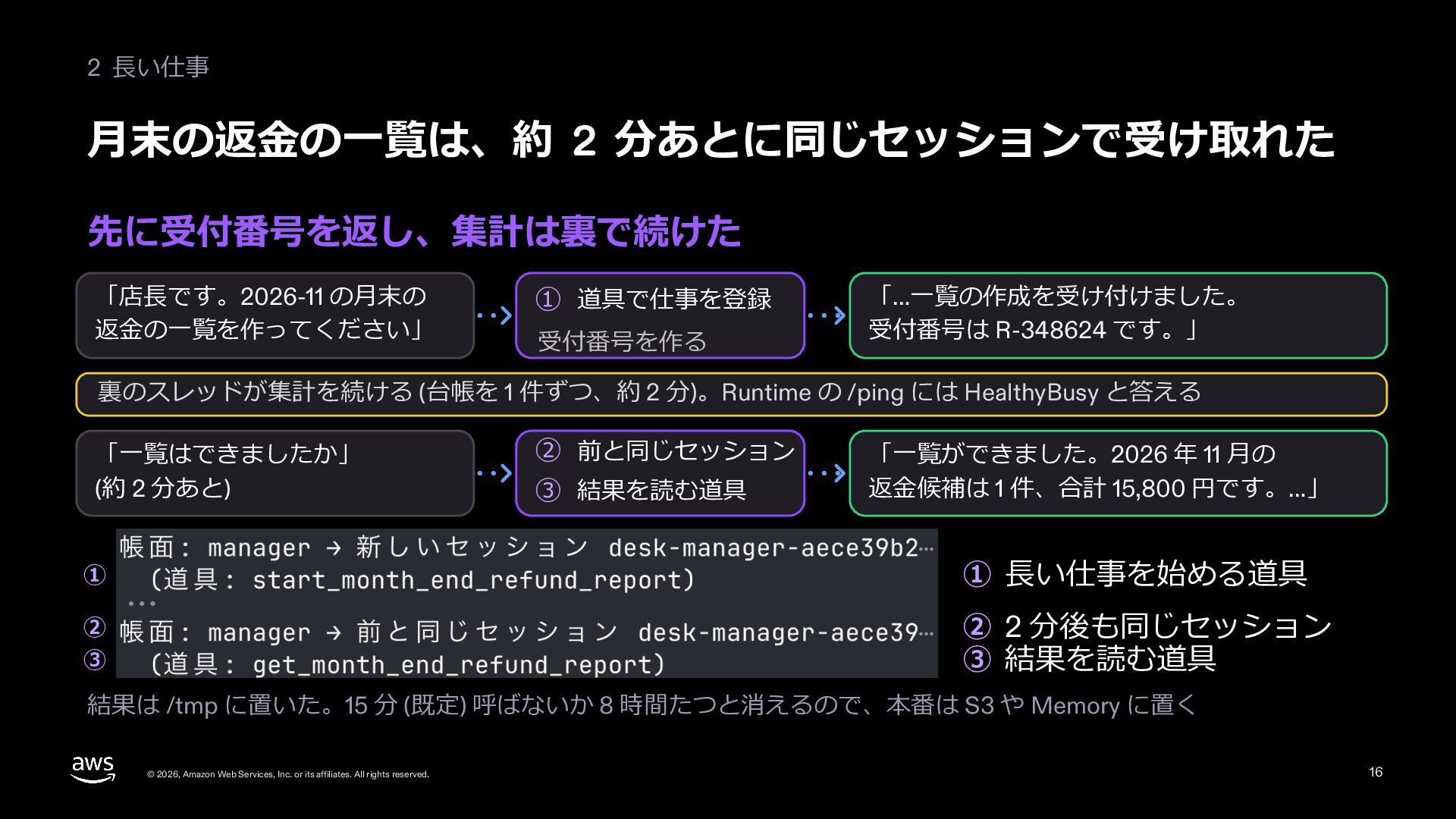
  15. 2 ⻑い仕事 ⽉末の返⾦の⼀覧は、約 2 分あとに同じセッションで受け取れた 先に受付番号を返し、集計は裏で続けた 「店⻑です。2026-11 の⽉末の 返⾦の⼀覧を作ってください」 ①

    道具で仕事を登録 受付番号を作る 「…⼀覧の作成を受け付けました。 受付番号は R-348624 です。」 裏のスレッドが集計を続ける (台帳を 1 件ずつ、約 2 分)。Runtime の /ping には HealthyBusy と答える 「⼀覧はできましたか」 (約 2 分あと) ② 前と同じセッション ③ 結果を読む道具 「⼀覧ができました。2026 年 11 ⽉の 返⾦候補は 1 件、合計 15,800 円です。…」 ① ① ⻑い仕事を始める道具 ② ③ ② 2 分後も同じセッション ③ 結果を読む道具 結果は /tmp に置いた。15 分 (既定) 呼ばないか 8 時間たつと消えるので、本番は S3 や Memory に置く © 2026, Amazon Web Services, Inc. or its affiliates. All rights reserved. 16
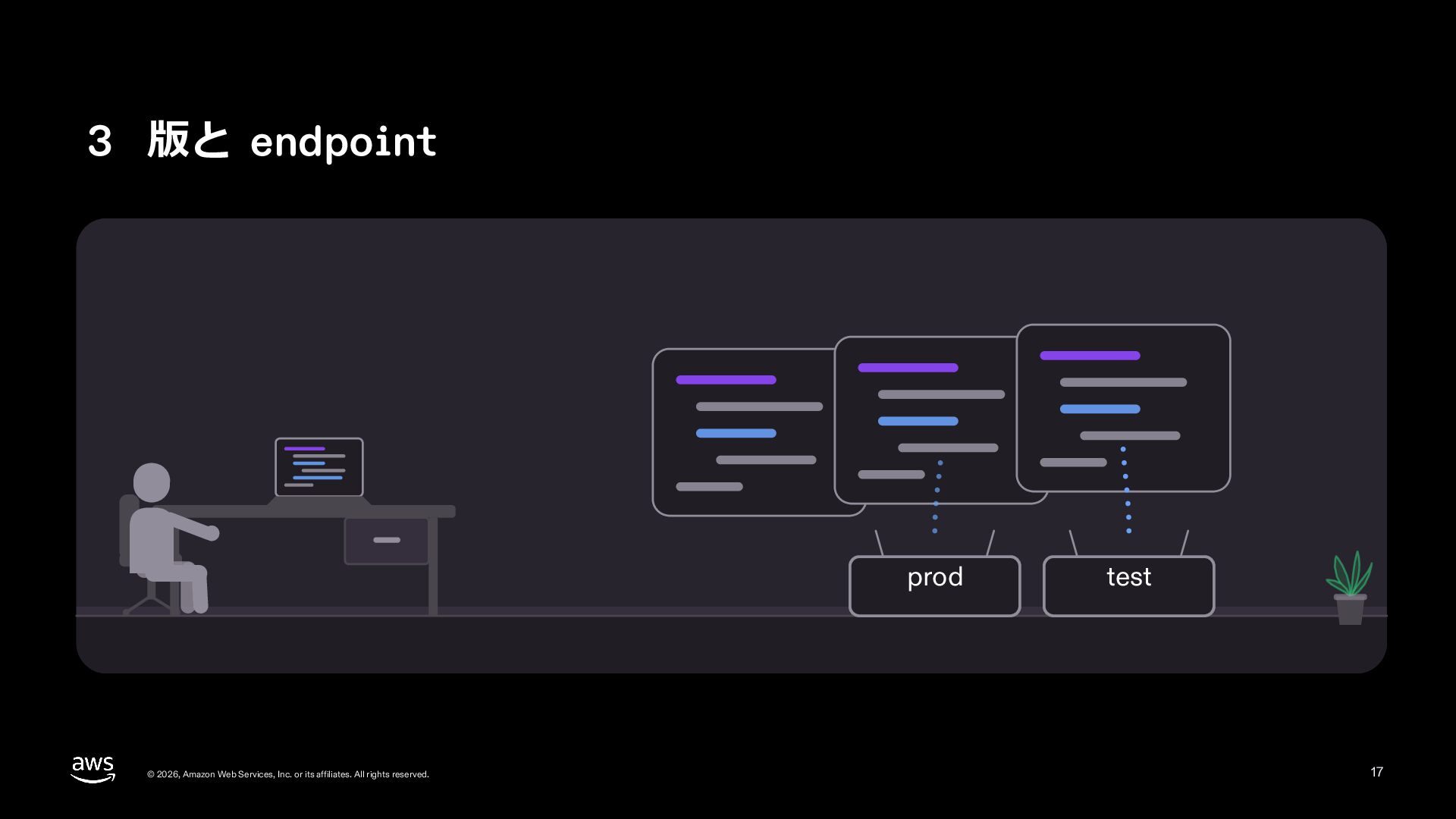
  16. 3 版と endpoint prod © 2026, Amazon Web Services, Inc.

    or its affiliates. All rights reserved. test 17
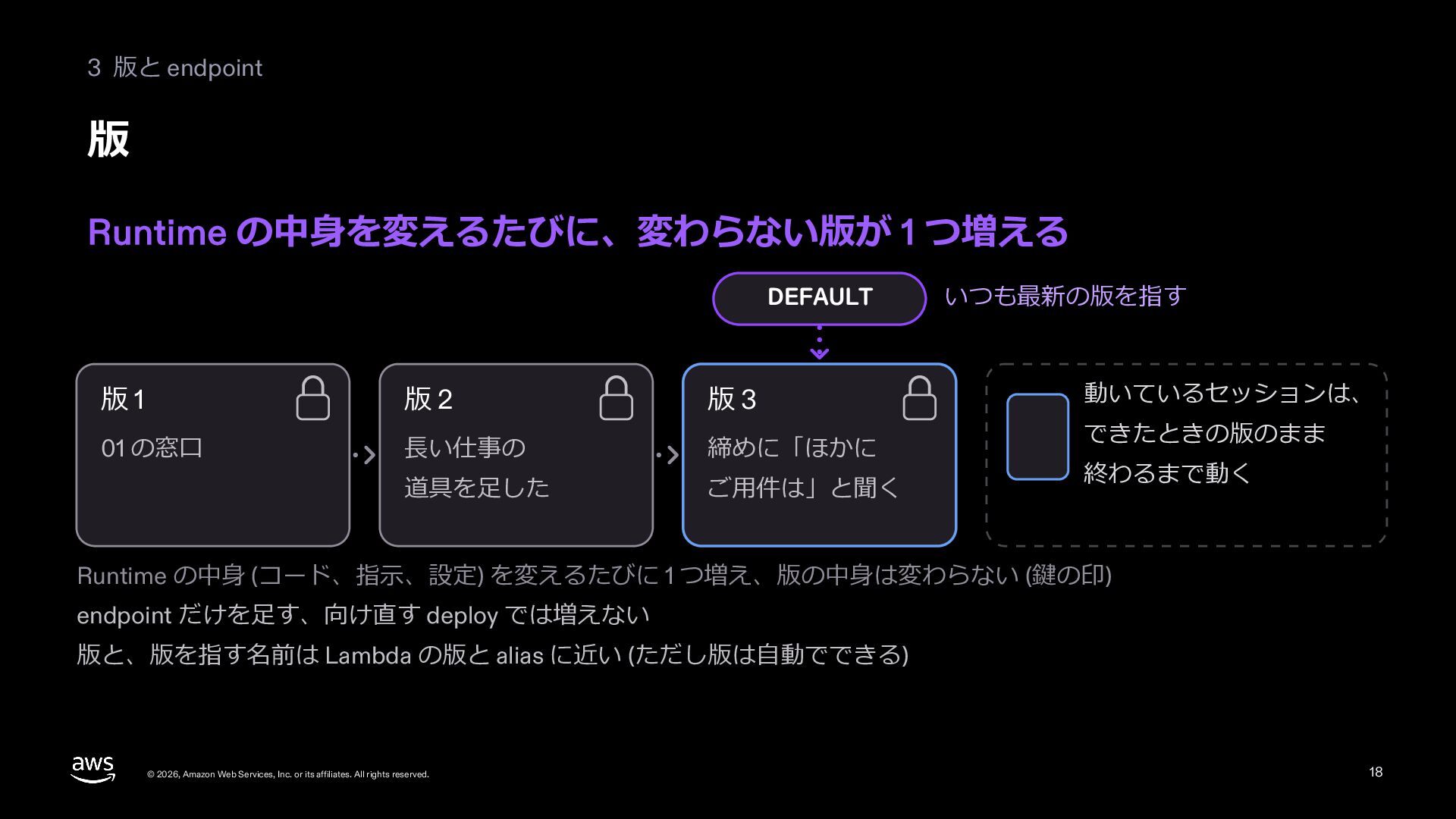
  17. 3 版と endpoint 版 Runtime の中⾝を変えるたびに、変わらない版が 1 つ増える DEFAULT 版1

    版2 版3 01 の窓⼝ ⻑い仕事の 締めに「ほかに 道具を⾜した ご⽤件は」と聞く いつも最新の版を指す 動いているセッションは、 できたときの版のまま 終わるまで動く Runtime の中⾝ (コード、指⽰、設定) を変えるたびに 1 つ増え、版の中⾝は変わらない (鍵の印) endpoint だけを⾜す、向け直す deploy では増えない 版と、版を指す名前は Lambda の版と alias に近い (ただし版は⾃動でできる) © 2026, Amazon Web Services, Inc. or its affiliates. All rights reserved. 18
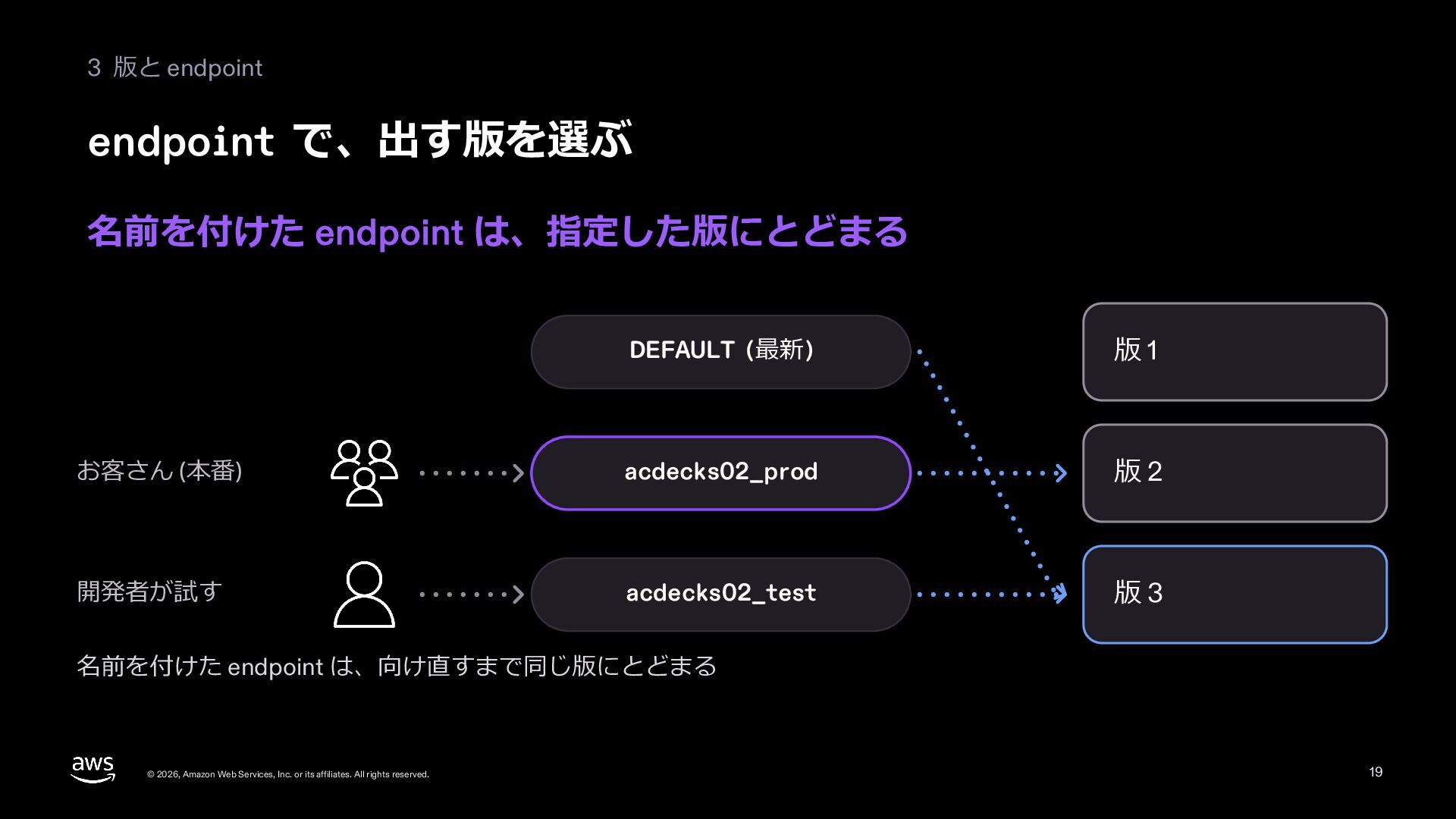
  18. 3 版と endpoint endpoint で、出す版を選ぶ 名前を付けた endpoint は、指定した版にとどまる DEFAULT (最新)

    版1 お客さん (本番) acdecks02_prod 版2 開発者が試す acdecks02_test 版3 名前を付けた endpoint は、向け直すまで同じ版にとどまる © 2026, Amazon Web Services, Inc. or its affiliates. All rights reserved. 19
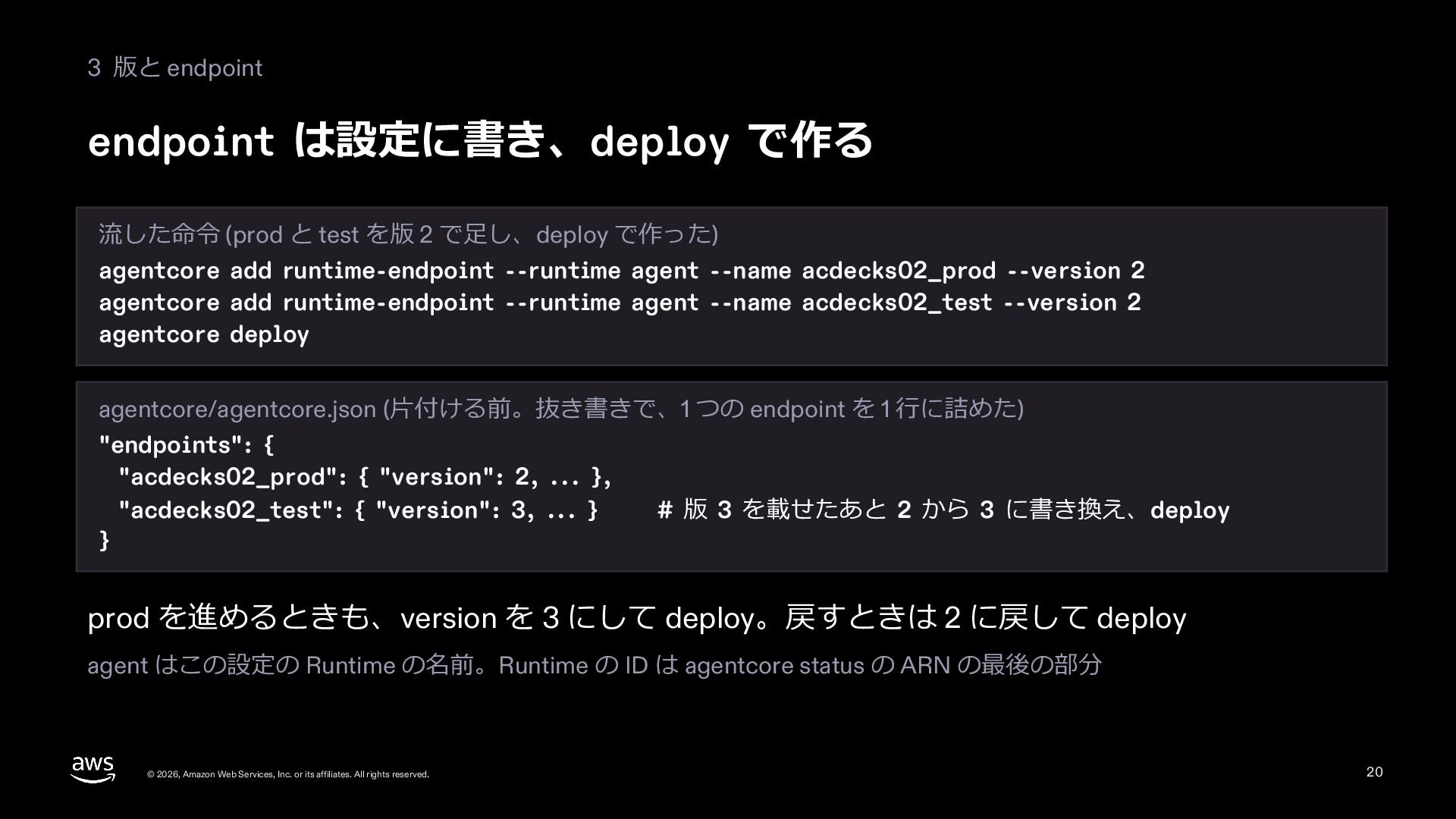
  19. 3 版と endpoint endpoint は設定に書き、deploy で作る 流した命令 (prod と test

    を版 2 で⾜し、deploy で作った) agentcore add runtime-endpoint --runtime agent --name acdecks02_prod --version 2 agentcore add runtime-endpoint --runtime agent --name acdecks02_test --version 2 agentcore deploy agentcore/agentcore.json (⽚付ける前。抜き書きで、1 つの endpoint を 1 ⾏に詰めた) "endpoints": { "acdecks02_prod": { "version": 2, ... }, "acdecks02_test": { "version": 3, ... } # 版 3 を載せたあと 2 から 3 に書き換え、deploy } prod を進めるときも、version を 3 にして deploy。戻すときは 2 に戻して deploy agent はこの設定の Runtime の名前。Runtime の ID は agentcore status の ARN の最後の部分 © 2026, Amazon Web Services, Inc. or its affiliates. All rights reserved. 20
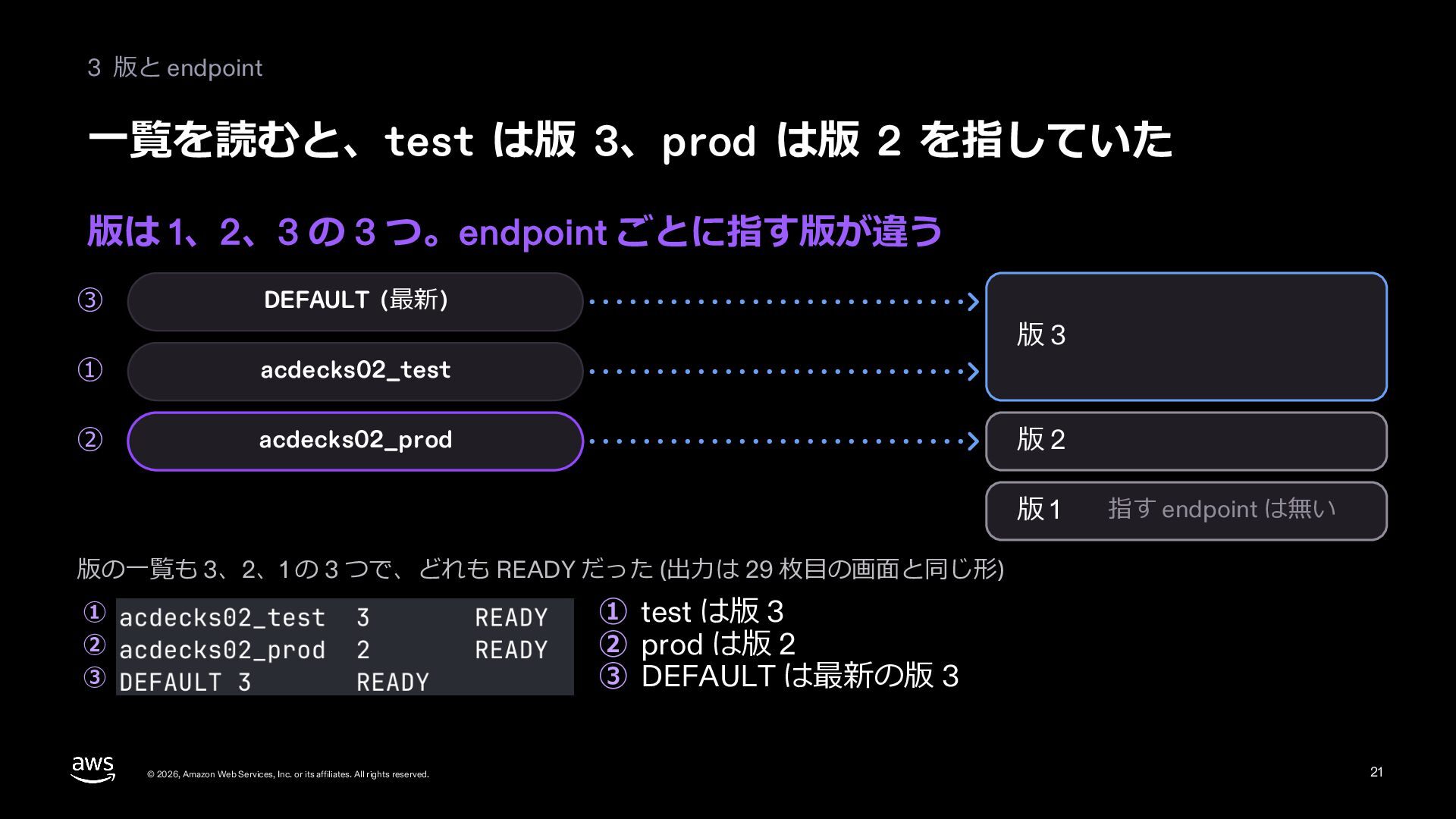
  20. 3 版と endpoint ⼀覧を読むと、test は版 3、prod は版 2 を指していた 版は

    1、2、3 の 3 つ。endpoint ごとに指す版が違う ③ DEFAULT (最新) ① acdecks02_test ② acdecks02_prod 版3 版2 版1 指す endpoint は無い 版の⼀覧も 3、2、1 の 3 つで、どれも READY だった (出⼒は 29 枚⽬の画⾯と同じ形) ① test は版 3 ② prod は版 2 ③ DEFAULT は最新の版 3 ① ② ③ © 2026, Amazon Web Services, Inc. or its affiliates. All rights reserved. 21
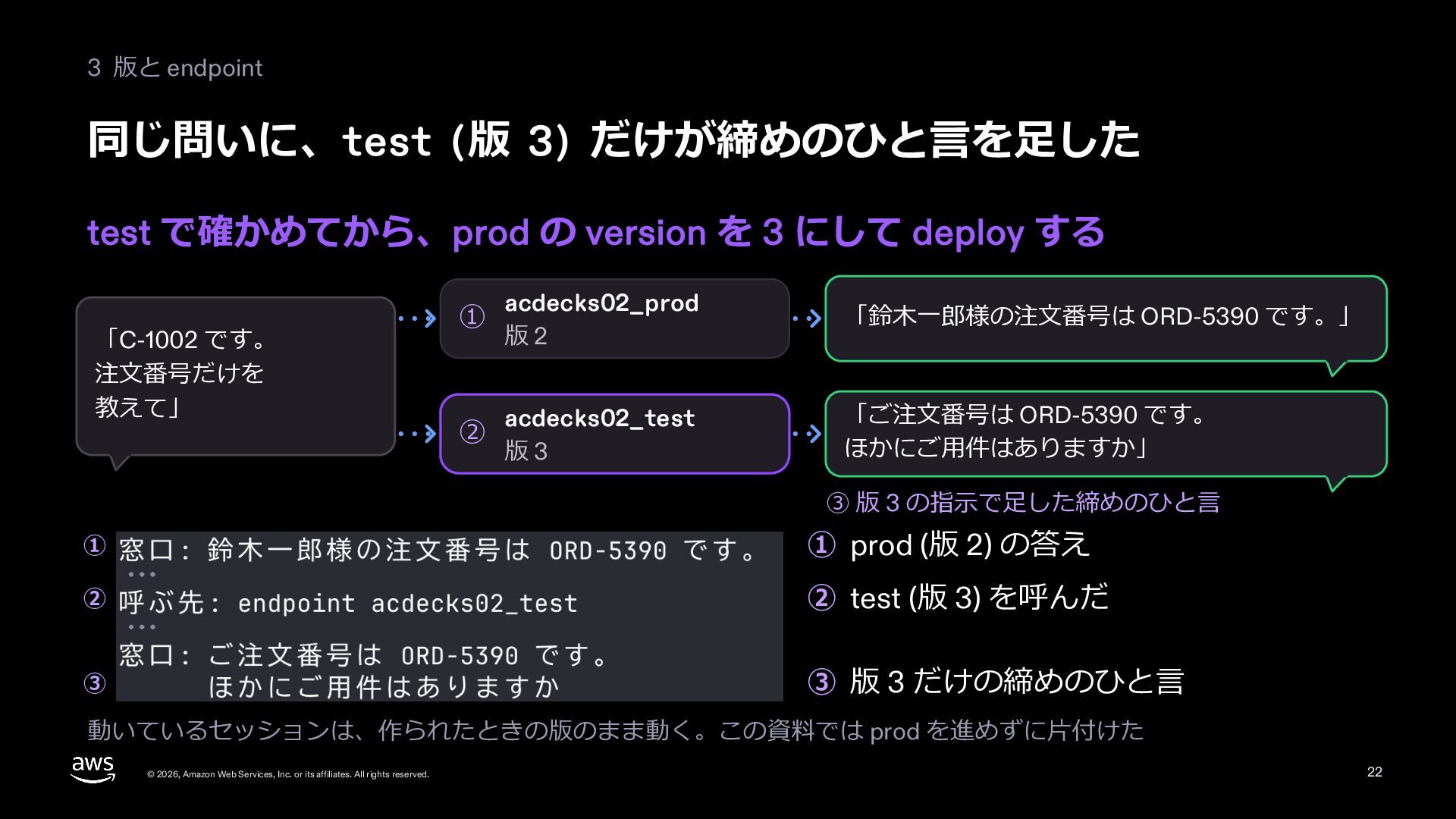
  21. 3 版と endpoint 同じ問いに、test (版 3) だけが締めのひと⾔を⾜した test で確かめてから、prod の

    version を 3 にして deploy する 「C-1002 です。 注⽂番号だけを 教えて」 ① acdecks02_prod 版2 「鈴⽊⼀郎様の注⽂番号は ORD-5390 です。」 ② acdecks02_test 版3 「ご注⽂番号は ORD-5390 です。 ほかにご⽤件はありますか」 ③ 版 3 の指⽰で⾜した締めのひと⾔ ① ① prod (版 2) の答え ② ② test (版 3) を呼んだ ③ ③ 版 3 だけの締めのひと⾔ 動いているセッションは、作られたときの版のまま動く。この資料では prod を進めずに⽚付けた © 2026, Amazon Web Services, Inc. or its affiliates. All rights reserved. 22
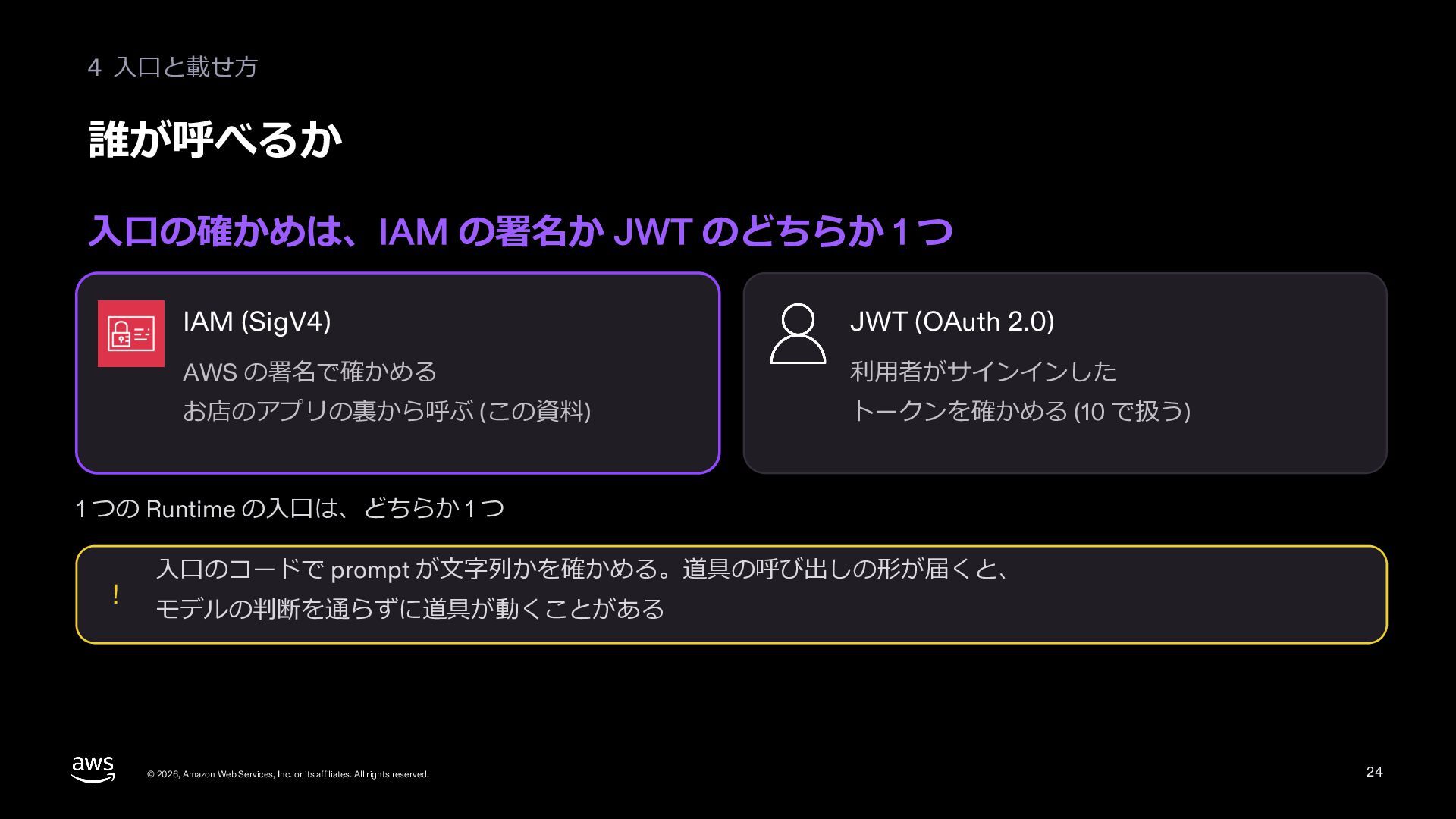
  22. 4 ⼊⼝と載せ⽅ 誰が呼べるか ⼊⼝の確かめは、IAM の署名か JWT のどちらか 1 つ IAM

    (SigV4) JWT (OAuth 2.0) AWS の署名で確かめる 利⽤者がサインインした お店のアプリの裏から呼ぶ (この資料) トークンを確かめる (10 で扱う) 1 つの Runtime の⼊⼝は、どちらか 1 つ ! ⼊⼝のコードで prompt が⽂字列かを確かめる。道具の呼び出しの形が届くと、 モデルの判断を通らずに道具が動くことがある © 2026, Amazon Web Services, Inc. or its affiliates. All rights reserved. 24
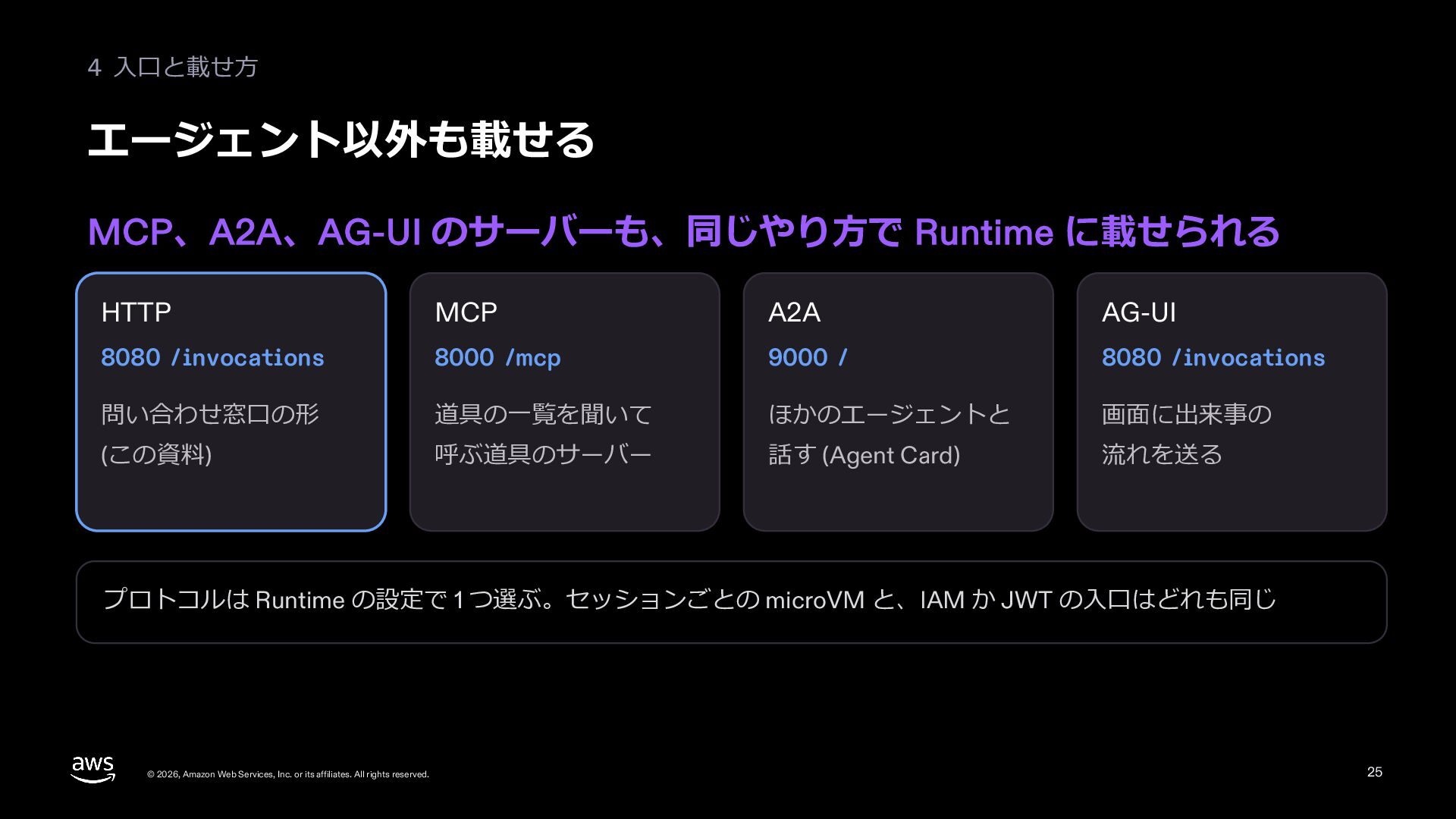
  23. 4 ⼊⼝と載せ⽅ エージェント以外も載せる MCP、A2A、AG-UI のサーバーも、同じやり⽅で Runtime に載せられる HTTP MCP A2A

    AG-UI 8080 /invocations 8000 /mcp 9000 / 8080 /invocations 問い合わせ窓⼝の形 道具の⼀覧を聞いて ほかのエージェントと 画⾯に出来事の (この資料) 呼ぶ道具のサーバー 話す (Agent Card) 流れを送る プロトコルは Runtime の設定で 1 つ選ぶ。セッションごとの microVM と、IAM か JWT の⼊⼝はどれも同じ © 2026, Amazon Web Services, Inc. or its affiliates. All rights reserved. 25
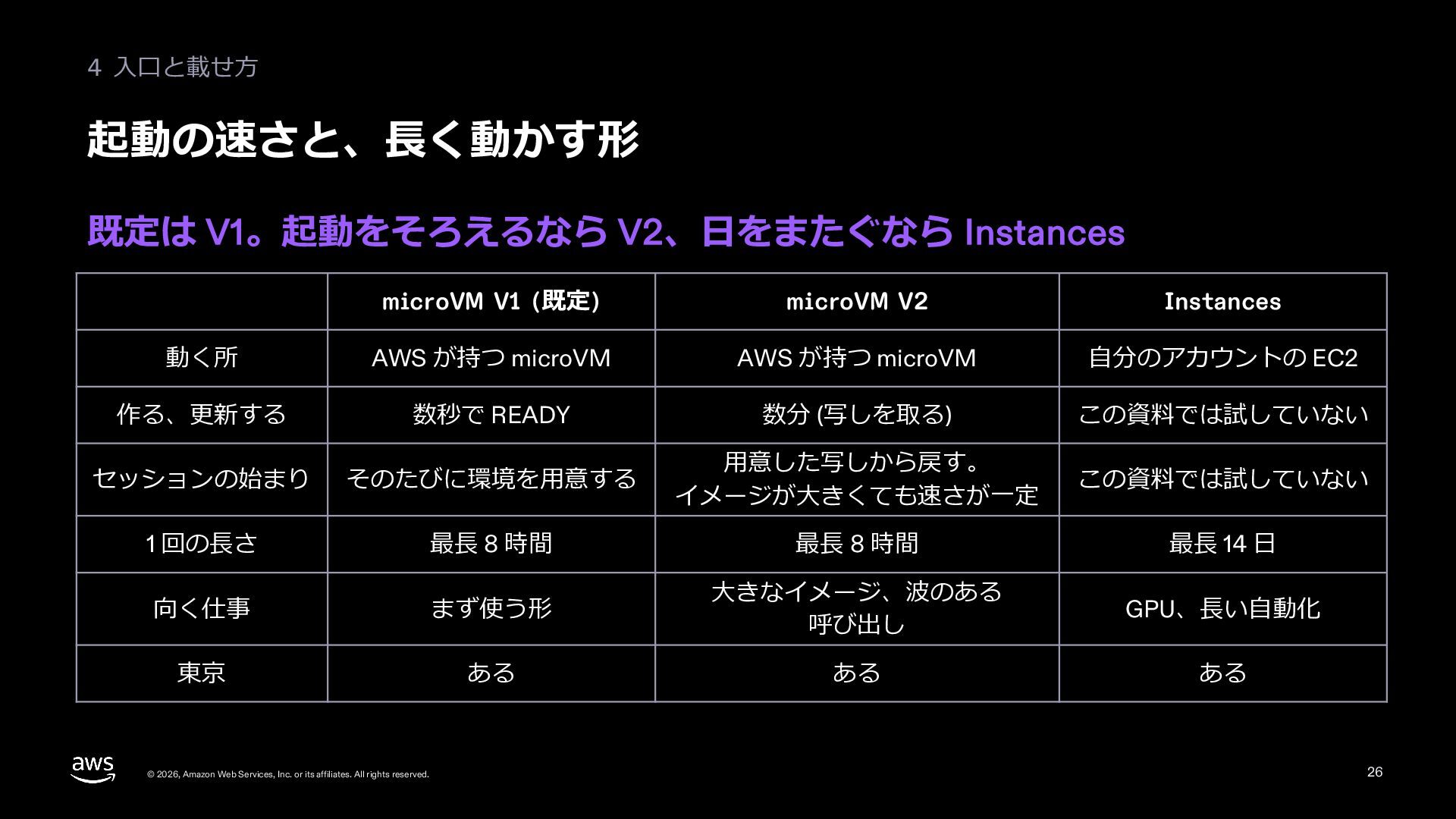
  24. 4 ⼊⼝と載せ⽅ 起動の速さと、⻑く動かす形 既定は V1。起動をそろえるなら V2、⽇をまたぐなら Instances microVM V1 (既定)

    microVM V2 Instances 動く所 AWS が持つ microVM AWS が持つ microVM ⾃分のアカウントの EC2 作る、更新する 数秒で READY 数分 (写しを取る) この資料では試していない セッションの始まり そのたびに環境を⽤意する ⽤意した写しから戻す。 イメージが⼤きくても速さが⼀定 この資料では試していない 1 回の⻑さ 最⻑ 8 時間 最⻑ 8 時間 最⻑ 14 ⽇ 向く仕事 まず使う形 ⼤きなイメージ、波のある 呼び出し GPU、⻑い⾃動化 東京 ある ある ある © 2026, Amazon Web Services, Inc. or its affiliates. All rights reserved. 26
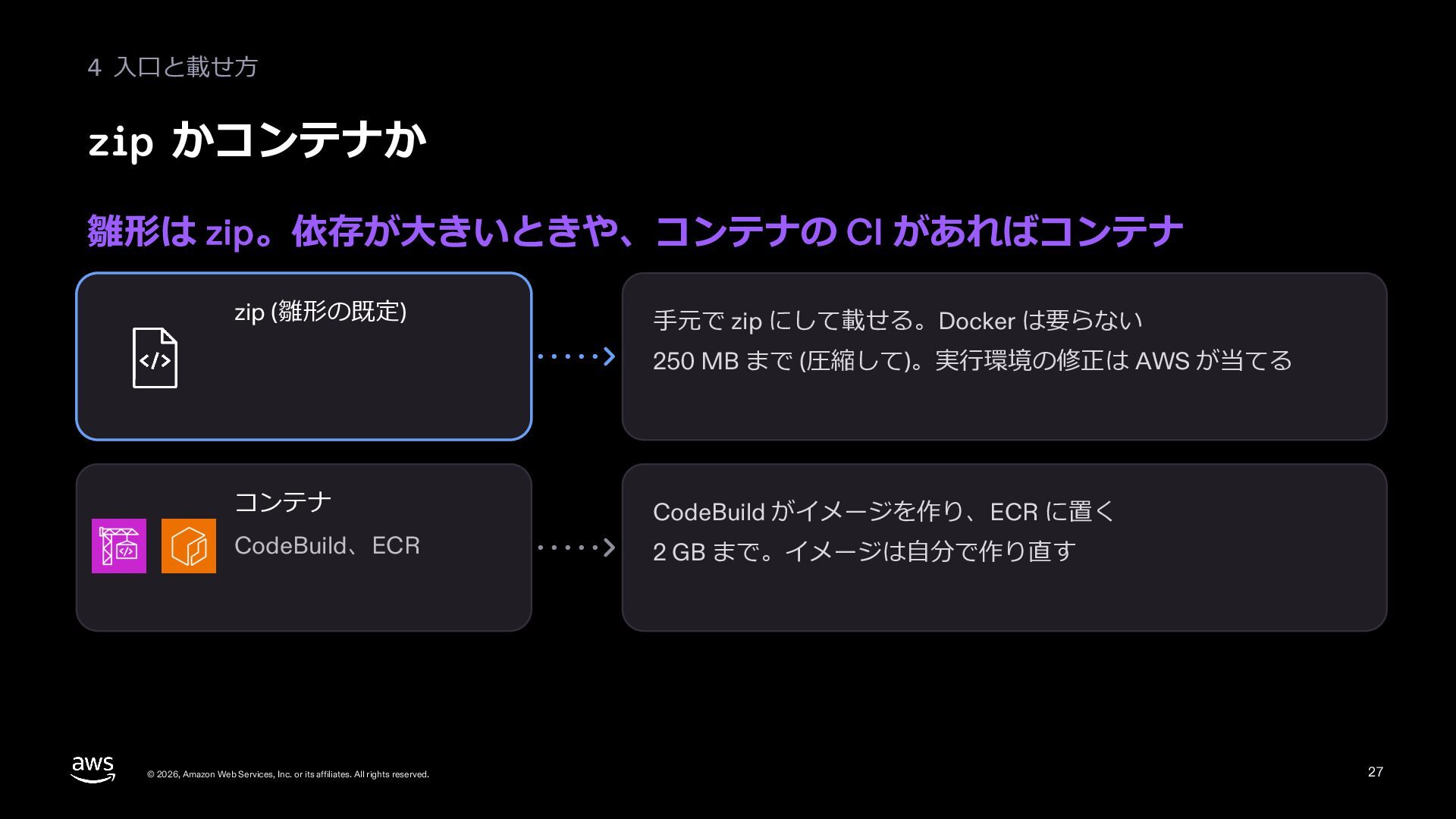
  25. 4 ⼊⼝と載せ⽅ zip かコンテナか 雛形は zip。依存が⼤きいときや、コンテナの CI があればコンテナ zip (雛形の既定)

    ⼿元で zip にして載せる。Docker は要らない 250 MB まで (圧縮して)。実⾏環境の修正は AWS が当てる コンテナ CodeBuild、ECR © 2026, Amazon Web Services, Inc. or its affiliates. All rights reserved. CodeBuild がイメージを作り、ECR に置く 2 GB まで。イメージは⾃分で作り直す 27
  26. 5 ⽚付け © 2026, Amazon Web Services, Inc. or its

    affiliates. All rights reserved. 28
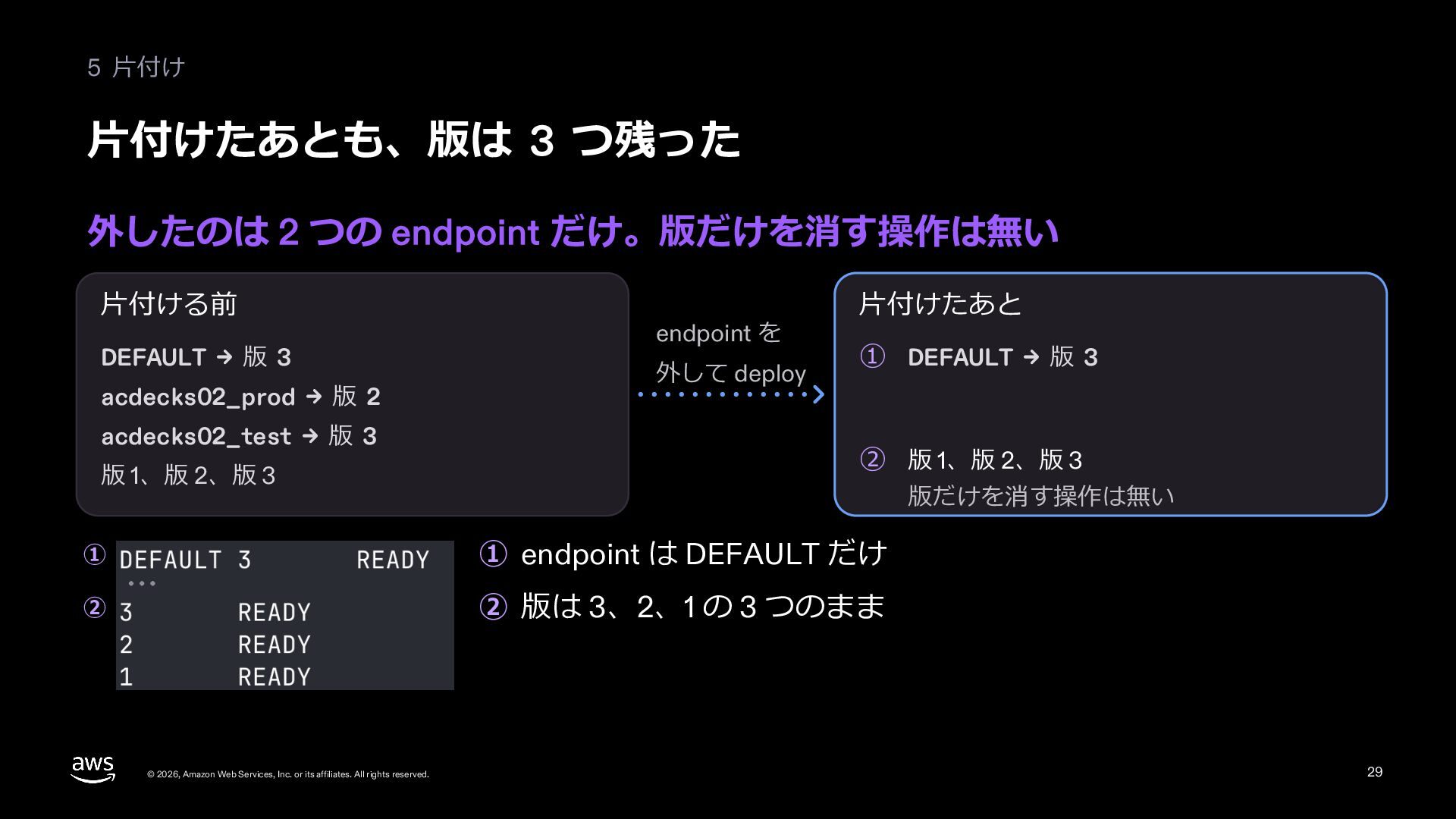
  27. 5 ⽚付け ⽚付けたあとも、版は 3 つ残った 外したのは 2 つの endpoint だけ。版だけを消す操作は無い

    ⽚付ける前 DEFAULT → 版 3 acdecks02_prod → 版 2 acdecks02_test → 版 3 版 1、版 2、版 3 endpoint を 外して deploy ⽚付けたあと ① DEFAULT → 版 3 ② 版 1、版 2、版 3 版だけを消す操作は無い ① ① endpoint は DEFAULT だけ ② ② 版は 3、2、1 の 3 つのまま © 2026, Amazon Web Services, Inc. or its affiliates. All rights reserved. 29
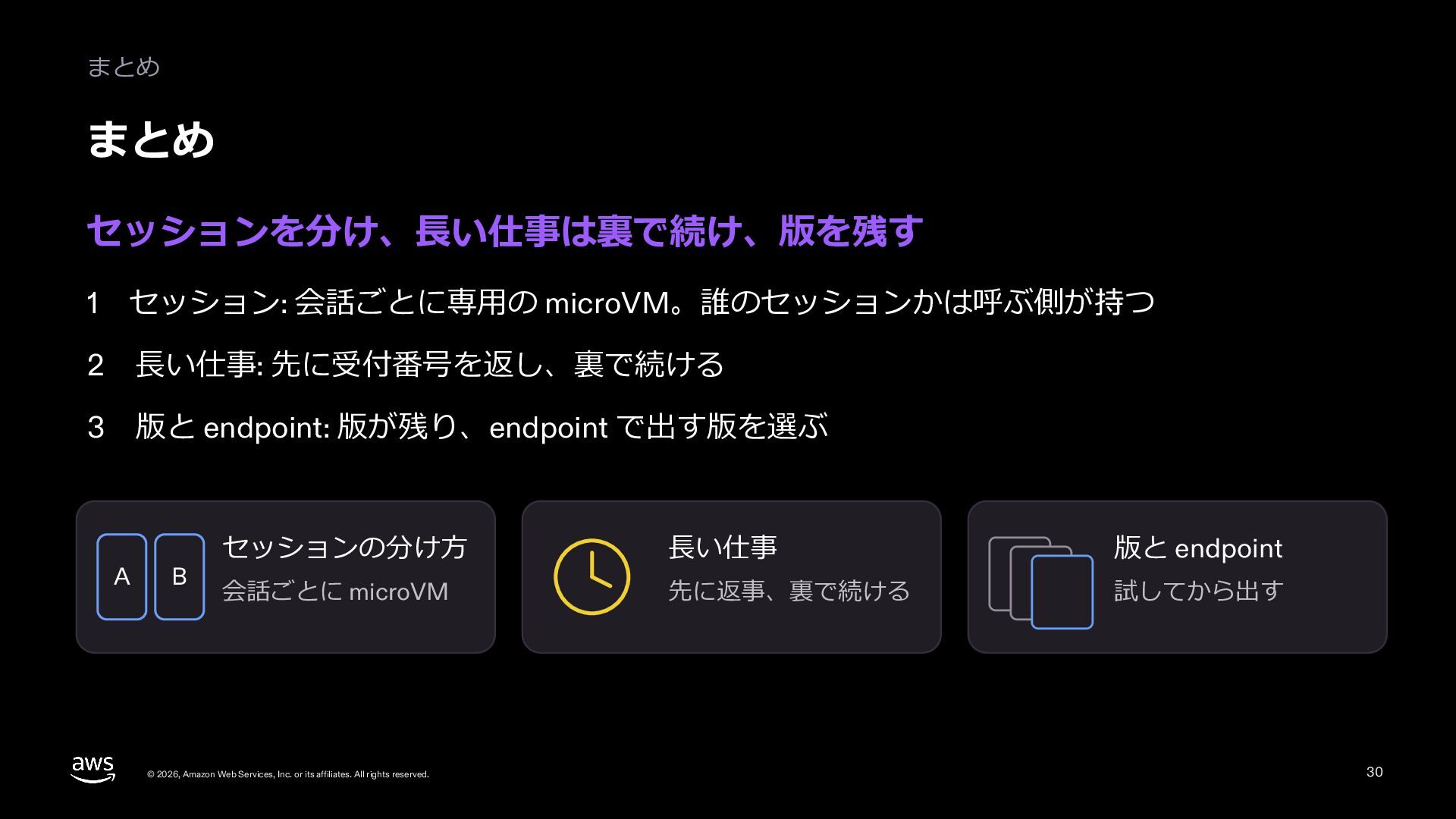
  28. まとめ まとめ セッションを分け、⻑い仕事は裏で続け、版を残す 1 セッション: 会話ごとに専⽤の microVM。誰のセッションかは呼ぶ側が持つ 2 ⻑い仕事: 先に受付番号を返し、裏で続ける

    版と endpoint: 版が残り、endpoint で出す版を選ぶ 3 A B セッションの分け⽅ ⻑い仕事 版と endpoint 会話ごとに microVM 先に返事、裏で続ける 試してから出す © 2026, Amazon Web Services, Inc. or its affiliates. All rights reserved. 30
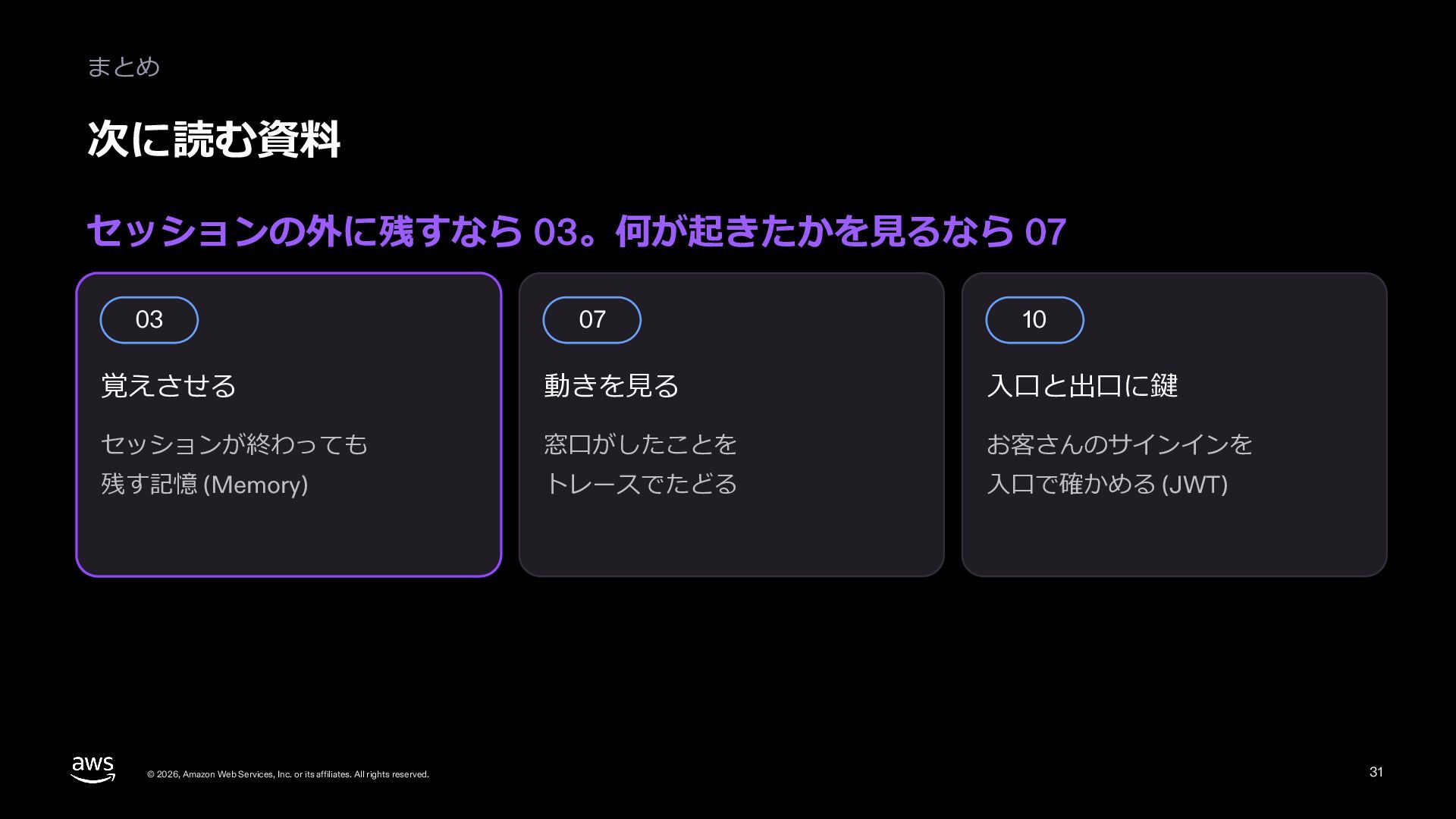
  29. まとめ 次に読む資料 セッションの外に残すなら 03。何が起きたかを⾒るなら 07 03 07 10 覚えさせる 動きを⾒る

    ⼊⼝と出⼝に鍵 セッションが終わっても 窓⼝がしたことを お客さんのサインインを 残す記憶 (Memory) トレースでたどる ⼊⼝で確かめる (JWT) © 2026, Amazon Web Services, Inc. or its affiliates. All rights reserved. 31
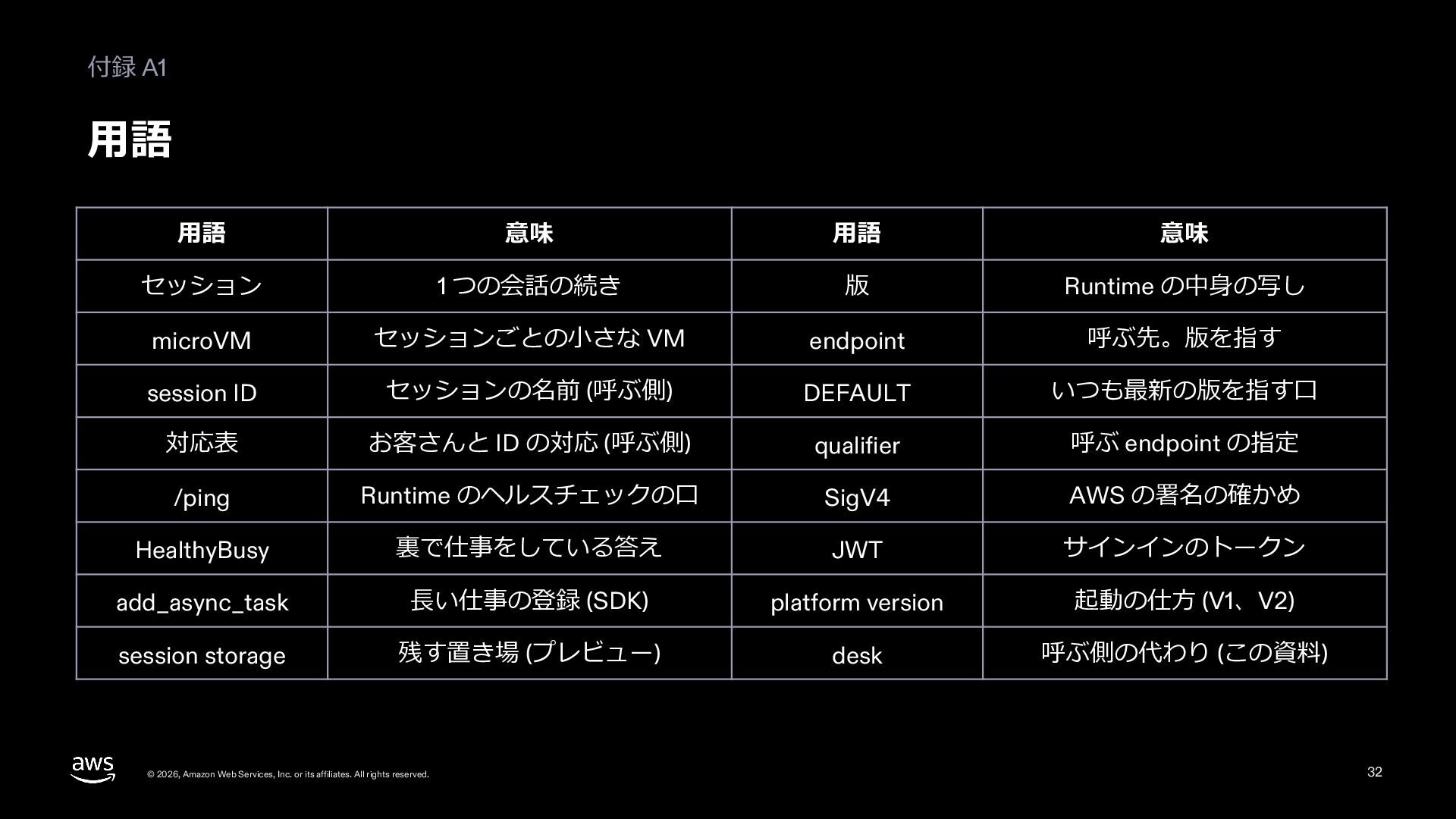
  30. 付録 A1 ⽤語 ⽤語 意味 ⽤語 意味 セッション 1 つの会話の続き

    版 Runtime の中⾝の写し microVM セッションごとの⼩さな VM endpoint 呼ぶ先。版を指す session ID セッションの名前 (呼ぶ側) DEFAULT いつも最新の版を指す⼝ 対応表 お客さんと ID の対応 (呼ぶ側) qualifier 呼ぶ endpoint の指定 /ping Runtime のヘルスチェックの⼝ SigV4 AWS の署名の確かめ HealthyBusy 裏で仕事をしている答え JWT サインインのトークン add_async_task ⻑い仕事の登録 (SDK) platform version 起動の仕⽅ (V1、V2) session storage 残す置き場 (プレビュー) desk 呼ぶ側の代わり (この資料) © 2026, Amazon Web Services, Inc. or its affiliates. All rights reserved. 32
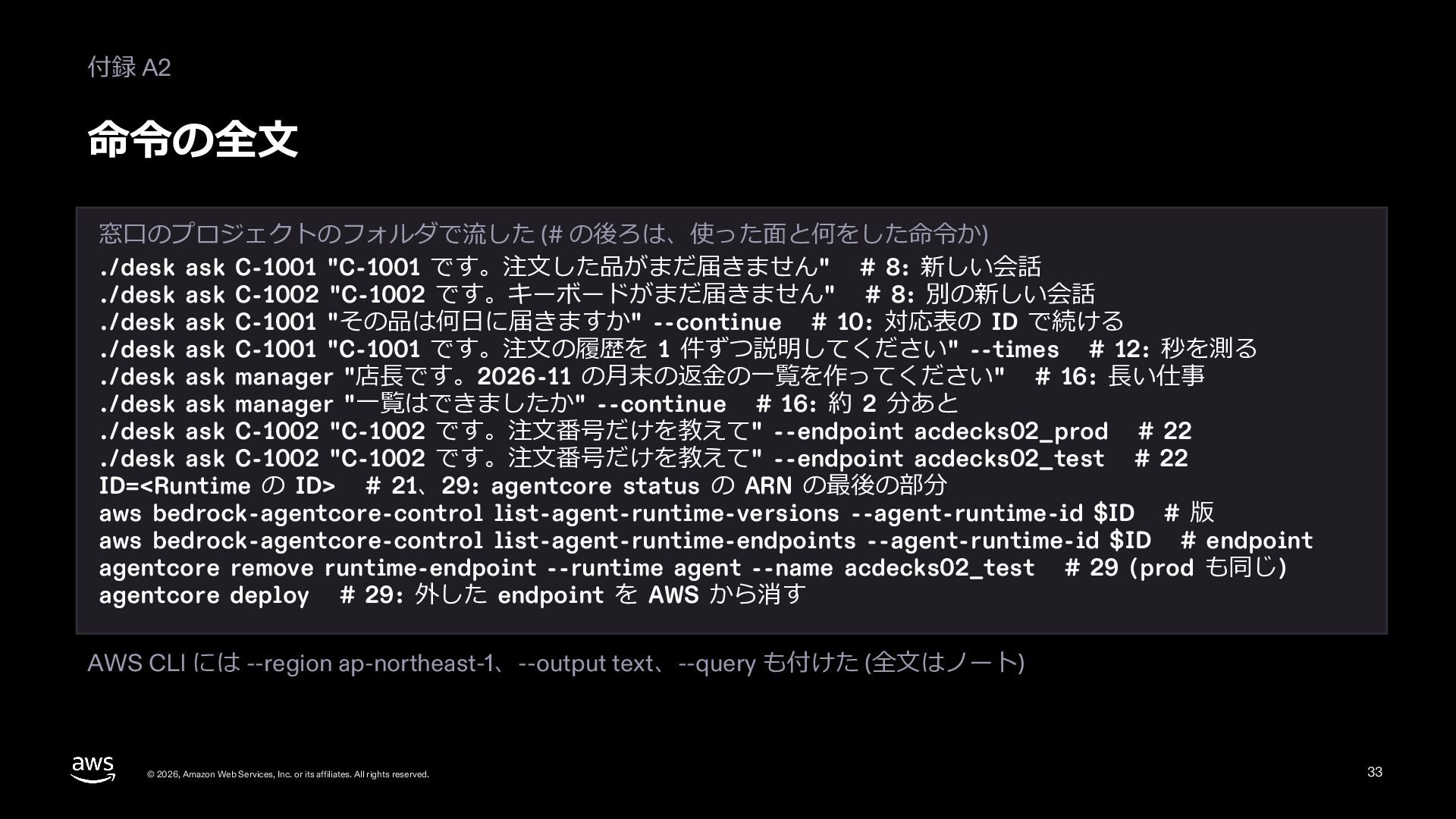
  31. 付録 A2 命令の全⽂ 窓⼝のプロジェクトのフォルダで流した (# の後ろは、使った⾯と何をした命令か) ./desk ask C-1001 "C-1001

    です。注⽂した品がまだ届きません" # 8: 新しい会話 ./desk ask C-1002 "C-1002 です。キーボードがまだ届きません" # 8: 別の新しい会話 ./desk ask C-1001 "その品は何⽇に届きますか" --continue # 10: 対応表の ID で続ける ./desk ask C-1001 "C-1001 です。注⽂の履歴を 1 件ずつ説明してください" --times # 12: 秒を測る ./desk ask manager "店⻑です。2026-11 の⽉末の返⾦の⼀覧を作ってください" # 16: ⻑い仕事 ./desk ask manager "⼀覧はできましたか" --continue # 16: 約 2 分あと ./desk ask C-1002 "C-1002 です。注⽂番号だけを教えて" --endpoint acdecks02_prod # 22 ./desk ask C-1002 "C-1002 です。注⽂番号だけを教えて" --endpoint acdecks02_test # 22 ID=<Runtime の ID> # 21、29: agentcore status の ARN の最後の部分 aws bedrock-agentcore-control list-agent-runtime-versions --agent-runtime-id $ID # 版 aws bedrock-agentcore-control list-agent-runtime-endpoints --agent-runtime-id $ID # endpoint agentcore remove runtime-endpoint --runtime agent --name acdecks02_test # 29 (prod も同じ) agentcore deploy # 29: 外した endpoint を AWS から消す AWS CLI には --region ap-northeast-1、--output text、--query も付けた (全⽂はノート) © 2026, Amazon Web Services, Inc. or its affiliates. All rights reserved. 33
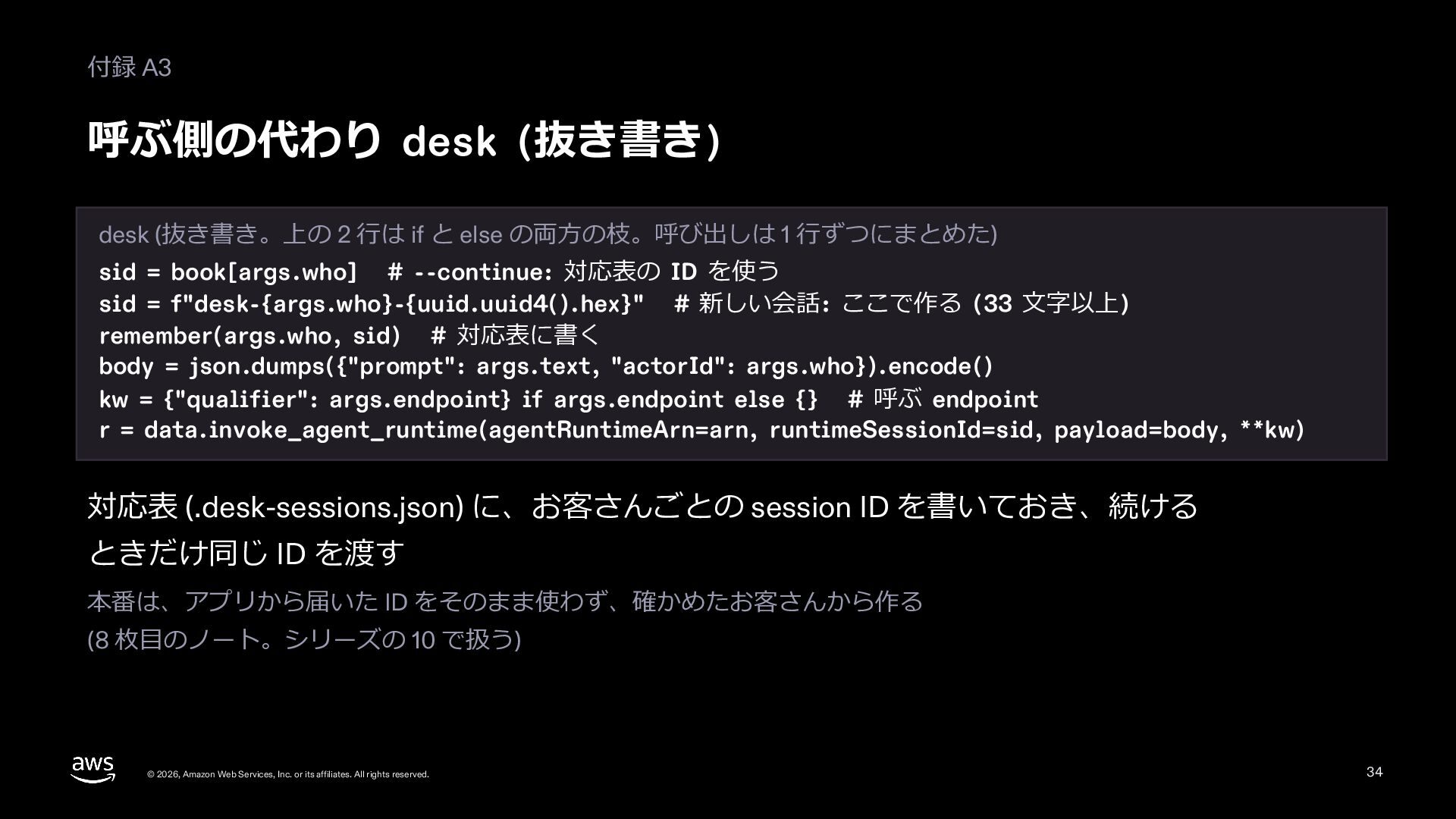
  32. 付録 A3 呼ぶ側の代わり desk (抜き書き) desk (抜き書き。上の 2 ⾏は if

    と else の両⽅の枝。呼び出しは 1 ⾏ずつにまとめた) sid = book[args.who] # --continue: 対応表の ID を使う sid = f"desk-{args.who}-{uuid.uuid4().hex}" # 新しい会話: ここで作る (33 ⽂字以上) remember(args.who, sid) # 対応表に書く body = json.dumps({"prompt": args.text, "actorId": args.who}).encode() kw = {"qualifier": args.endpoint} if args.endpoint else {} # 呼ぶ endpoint r = data.invoke_agent_runtime(agentRuntimeArn=arn, runtimeSessionId=sid, payload=body, **kw) 対応表 (.desk-sessions.json) に、お客さんごとの session ID を書いておき、続ける ときだけ同じ ID を渡す 本番は、アプリから届いた ID をそのまま使わず、確かめたお客さんから作る (8 枚⽬のノート。シリーズの 10 で扱う) © 2026, Amazon Web Services, Inc. or its affiliates. All rights reserved. 34
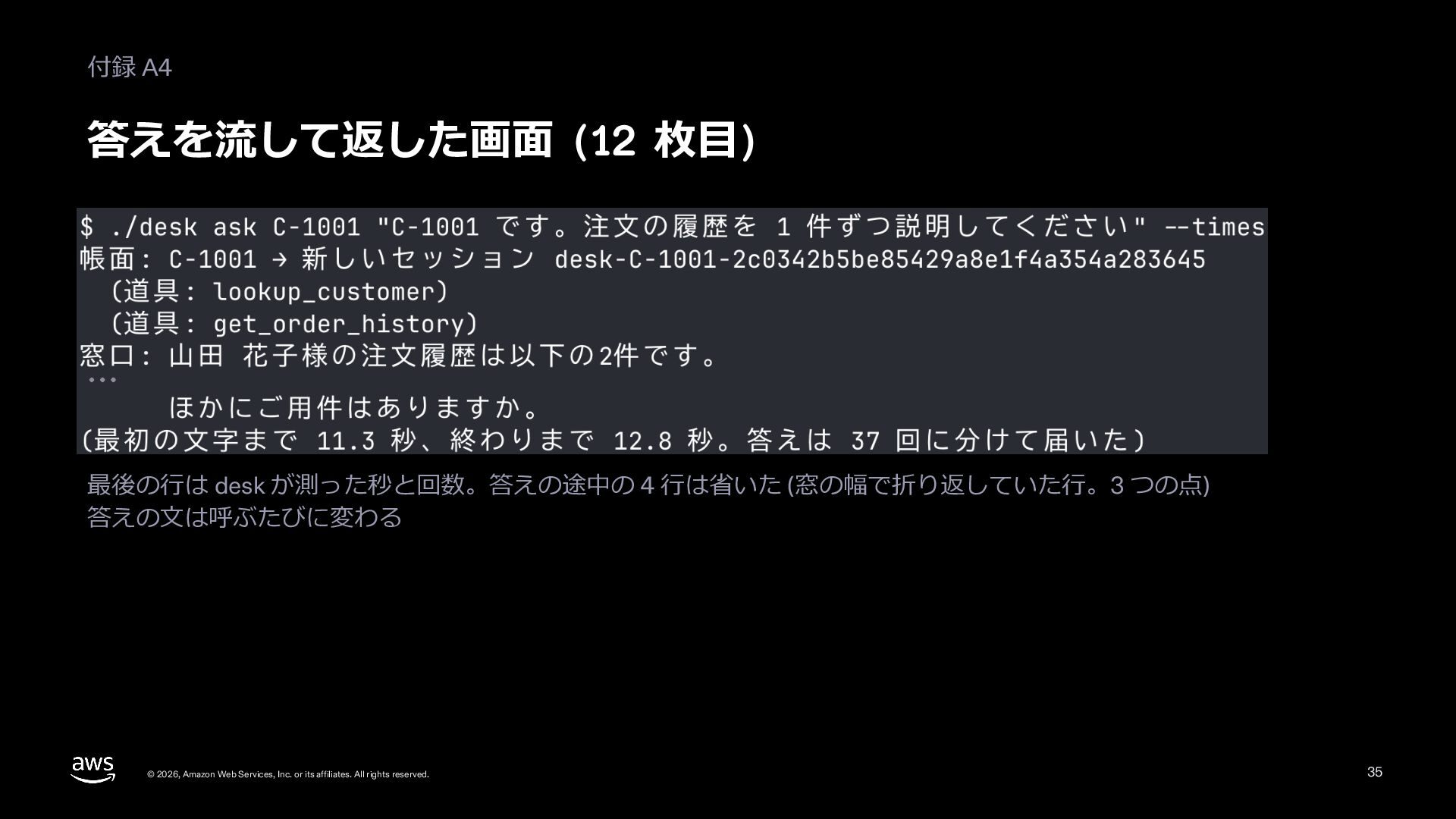
  33. 付録 A4 答えを流して返した画⾯ (12 枚⽬) 最後の⾏は desk が測った秒と回数。答えの途中の 4 ⾏は省いた

    (窓の幅で折り返していた⾏。3 つの点) 答えの⽂は呼ぶたびに変わる © 2026, Amazon Web Services, Inc. or its affiliates. All rights reserved. 35
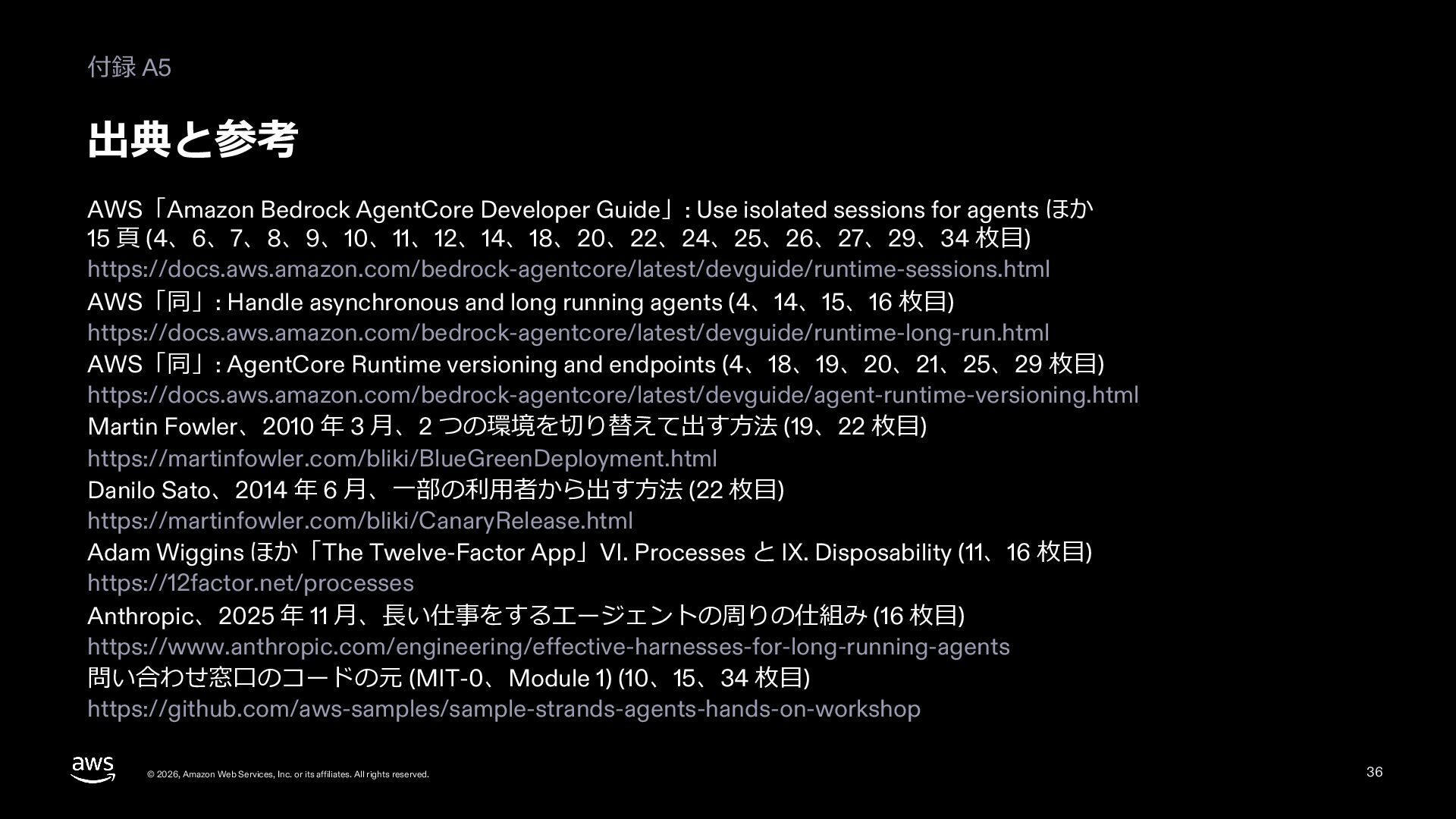
  34. 付録 A5 出典と参考 AWS「Amazon Bedrock AgentCore Developer Guide」: Use isolated

    sessions for agents ほか 15 ⾴ (4、6、7、8、9、10、11、12、14、18、20、22、24、25、26、27、29、34 枚⽬) https://docs.aws.amazon.com/bedrock-agentcore/latest/devguide/runtime-sessions.html AWS「同」: Handle asynchronous and long running agents (4、14、15、16 枚⽬) https://docs.aws.amazon.com/bedrock-agentcore/latest/devguide/runtime-long-run.html AWS「同」: AgentCore Runtime versioning and endpoints (4、18、19、20、21、25、29 枚⽬) https://docs.aws.amazon.com/bedrock-agentcore/latest/devguide/agent-runtime-versioning.html Martin Fowler、2010 年 3 ⽉、2 つの環境を切り替えて出す⽅法 (19、22 枚⽬) https://martinfowler.com/bliki/BlueGreenDeployment.html Danilo Sato、2014 年 6 ⽉、⼀部の利⽤者から出す⽅法 (22 枚⽬) https://martinfowler.com/bliki/CanaryRelease.html Adam Wiggins ほか「The Twelve-Factor App」VI. Processes と IX. Disposability (11、16 枚⽬) https://12factor.net/processes Anthropic、2025 年 11 ⽉、⻑い仕事をするエージェントの周りの仕組み (16 枚⽬) https://www.anthropic.com/engineering/effective-harnesses-for-long-running-agents 問い合わせ窓⼝のコードの元 (MIT-0、Module 1) (10、15、34 枚⽬) https://github.com/aws-samples/sample-strands-agents-hands-on-workshop © 2026, Amazon Web Services, Inc. or its affiliates. All rights reserved. 36

More Decks by Riku INADA

Other Decks in Technology