Upgrade to Pro — share decks privately, control downloads, hide ads and more …

Intro to Kiro CLI (Use it in your terminal and ...

Avatar for Riku INADA Riku INADA PRO
November 08, 2026

Intro to Kiro CLI (Use it in your terminal and in CI) | Kiro: Zero to Hero 03

Use Kiro from the terminal: install and sign in, chat and sessions, specs, /goal (Kiro iterates until a condition holds), Approve for me (Kiro allows safe actions and asks when unsure), the command sandbox, cloud sessions, and headless runs in CI, with a GitHub Actions setup for pull-request reviews (its review step was run by hand, not in Actions). Also covers moving from CLI 2.x to 3. Includes a running example (a meeting-room booking app). As of November 2026 (Kiro CLI 3.1; screens from Kiro CLI 3.0.0).

Avatar for Riku INADA

Riku INADA PRO

November 08, 2026

More Decks by Riku INADA

Other Decks in Technology

Transcript

  1. Kiro: Zero to Hero Get started Intro to Kiro CLI

    Use it in your terminal and in CI As of November 2026 (Kiro CLI 3.1; screens from 3.0.0) 03 November 2026 Riku Inada Amazon Web Services Japan © 2026, Amazon Web Services, Inc. or its affiliates. All rights reserved. 1
  2. Introduction About me Riku Inada Amazon Web Services Japan G.K.

    Solutions Architect Works mainly with manufacturing customers Recent work Promoting the AI-Driven Development Life Cycle (AI-DLC) Writing and speaking about Kiro and AWS Amplify © 2026, Amazon Web Services, Inc. or its affiliates. All rights reserved. X @inada_riku Speaker Deck speakerdeck.com/inariku Zenn zenn.dev/inariku GitHub github.com/inariku 2
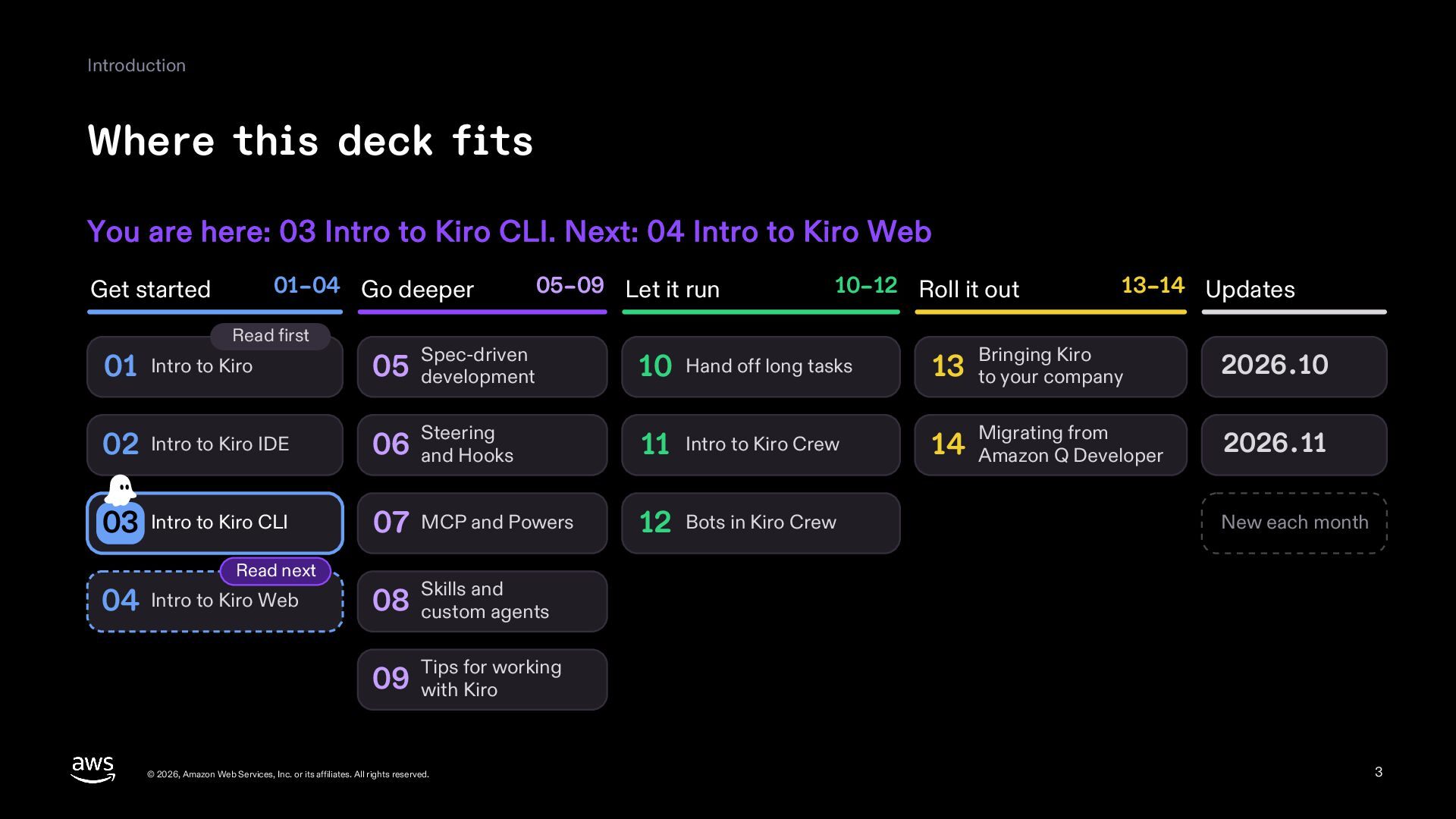
  3. Introduction Where this deck fits You are here: 03 Intro

    to Kiro CLI. Next: 04 Intro to Kiro Web 01–04 Go deeper Get started Read first 05–09 Let it run 10–12 Roll it out 13–14 Updates 01 Intro to Kiro 05 development Spec-driven 10 Hand off long tasks 13 to your company 02 Intro to Kiro IDE 06 and Hooks Steering 11 Intro to Kiro Crew 14 Amazon Q Developer 03 Intro to Kiro CLI 07 MCP and Powers 12 Bots in Kiro Crew Read next 04 Intro to Kiro Web Bringing Kiro 2026.10 Migrating from 2026.11 New each month and 08 Skills custom agents for working 09 Tips with Kiro © 2026, Amazon Web Services, Inc. or its affiliates. All rights reserved. 3
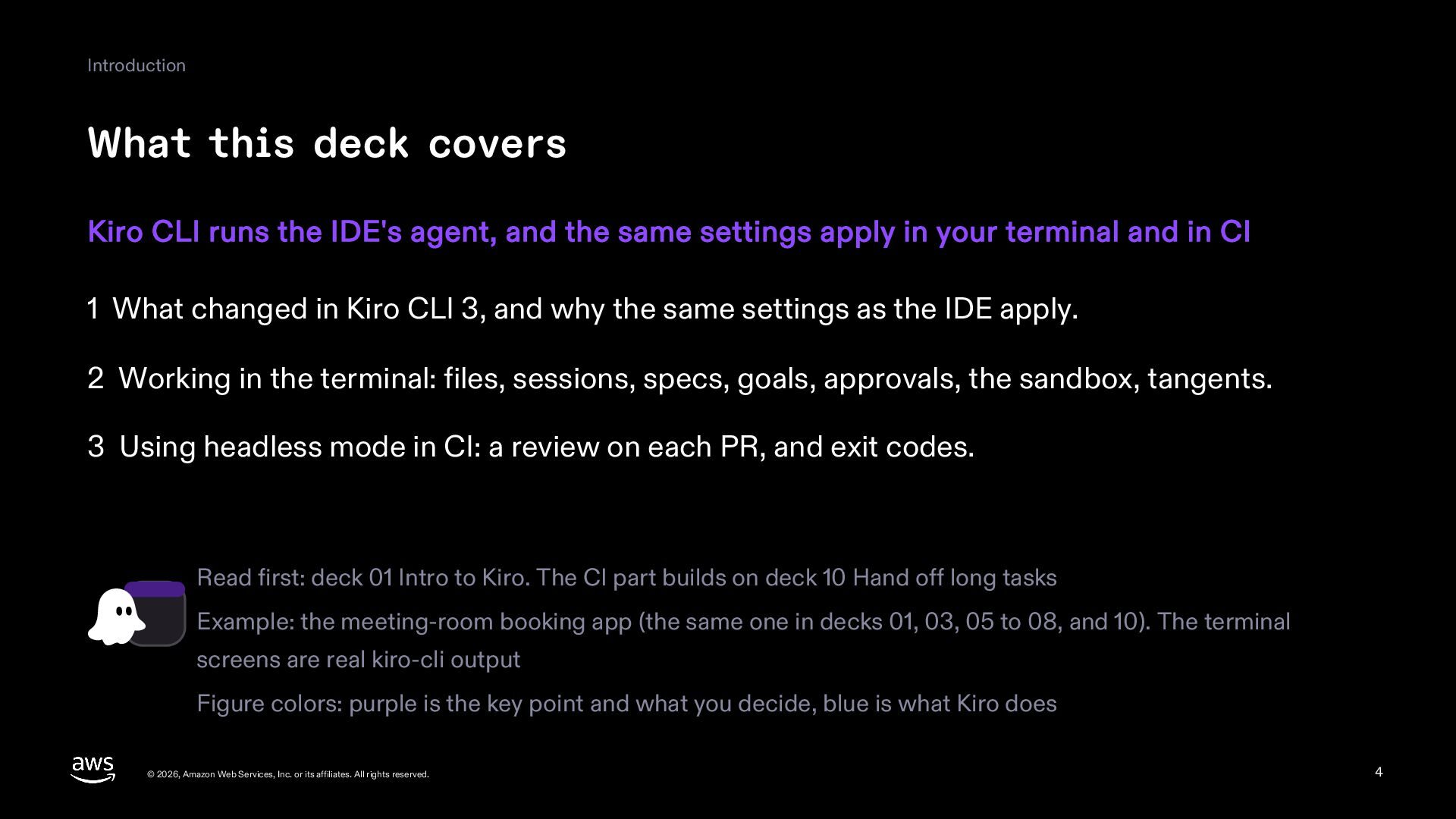
  4. Introduction What this deck covers Kiro CLI runs the IDE's

    agent, and the same settings apply in your terminal and in CI 1 What changed in Kiro CLI 3, and why the same settings as the IDE apply. 2 Working in the terminal: files, sessions, specs, goals, approvals, the sandbox, tangents. 3 Using headless mode in CI: a review on each PR, and exit codes. Read first: deck 01 Intro to Kiro. The CI part builds on deck 10 Hand off long tasks Example: the meeting-room booking app (the same one in decks 01, 03, 05 to 08, and 10). The terminal screens are real kiro-cli output Figure colors: purple is the key point and what you decide, blue is what Kiro does © 2026, Amazon Web Services, Inc. or its affiliates. All rights reserved. 4
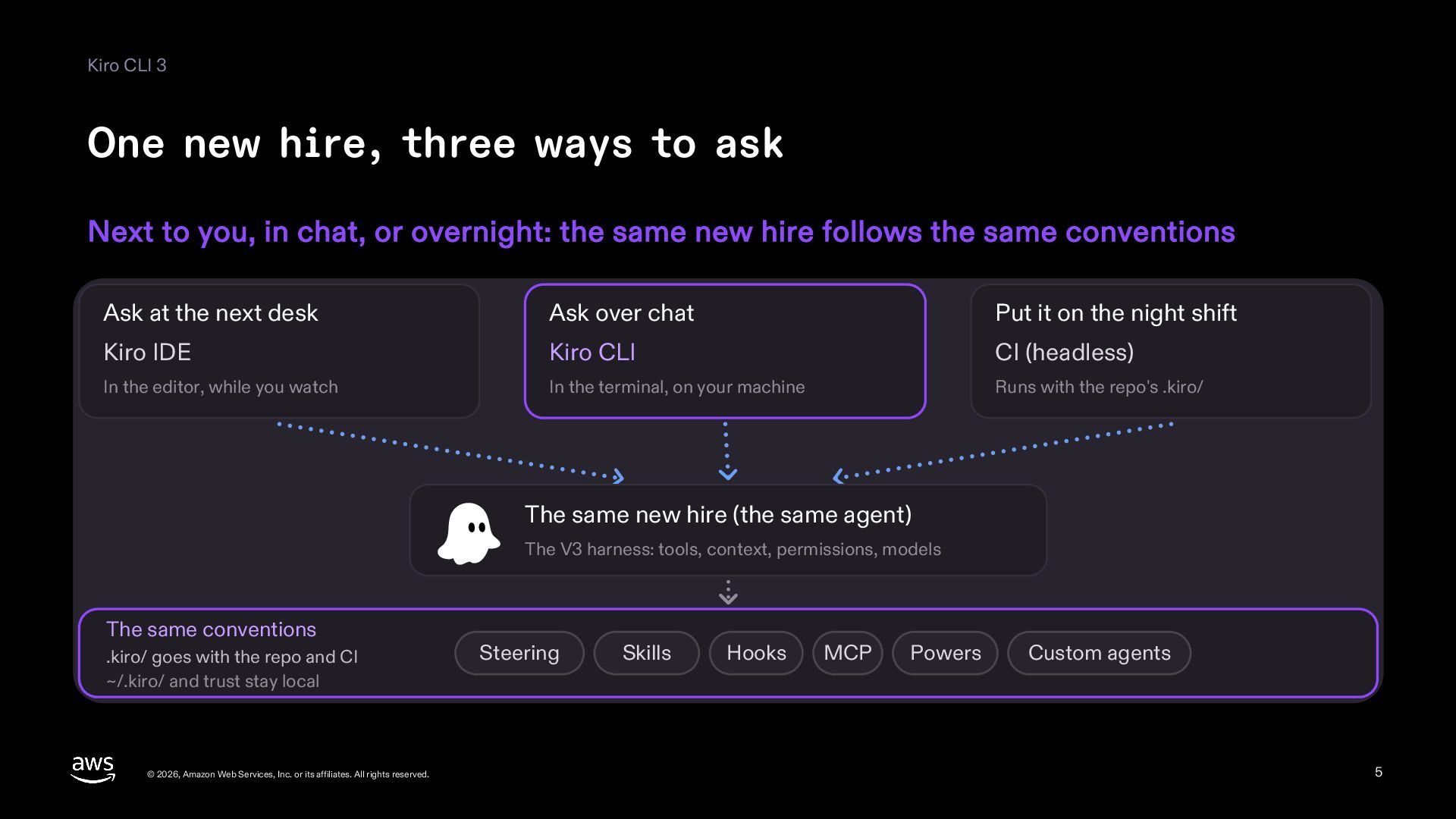
  5. Kiro CLI 3 One new hire, three ways to ask

    Next to you, in chat, or overnight: the same new hire follows the same conventions Ask at the next desk Ask over chat Put it on the night shift Kiro IDE Kiro CLI CI (headless) In the editor, while you watch In the terminal, on your machine Runs with the repo's .kiro/ The same new hire (the same agent) The V3 harness: tools, context, permissions, models The same conventions .kiro/ goes with the repo and CI ~/.kiro/ and trust stay local © 2026, Amazon Web Services, Inc. or its affiliates. All rights reserved. Steering Skills Hooks MCP Powers Custom agents 5
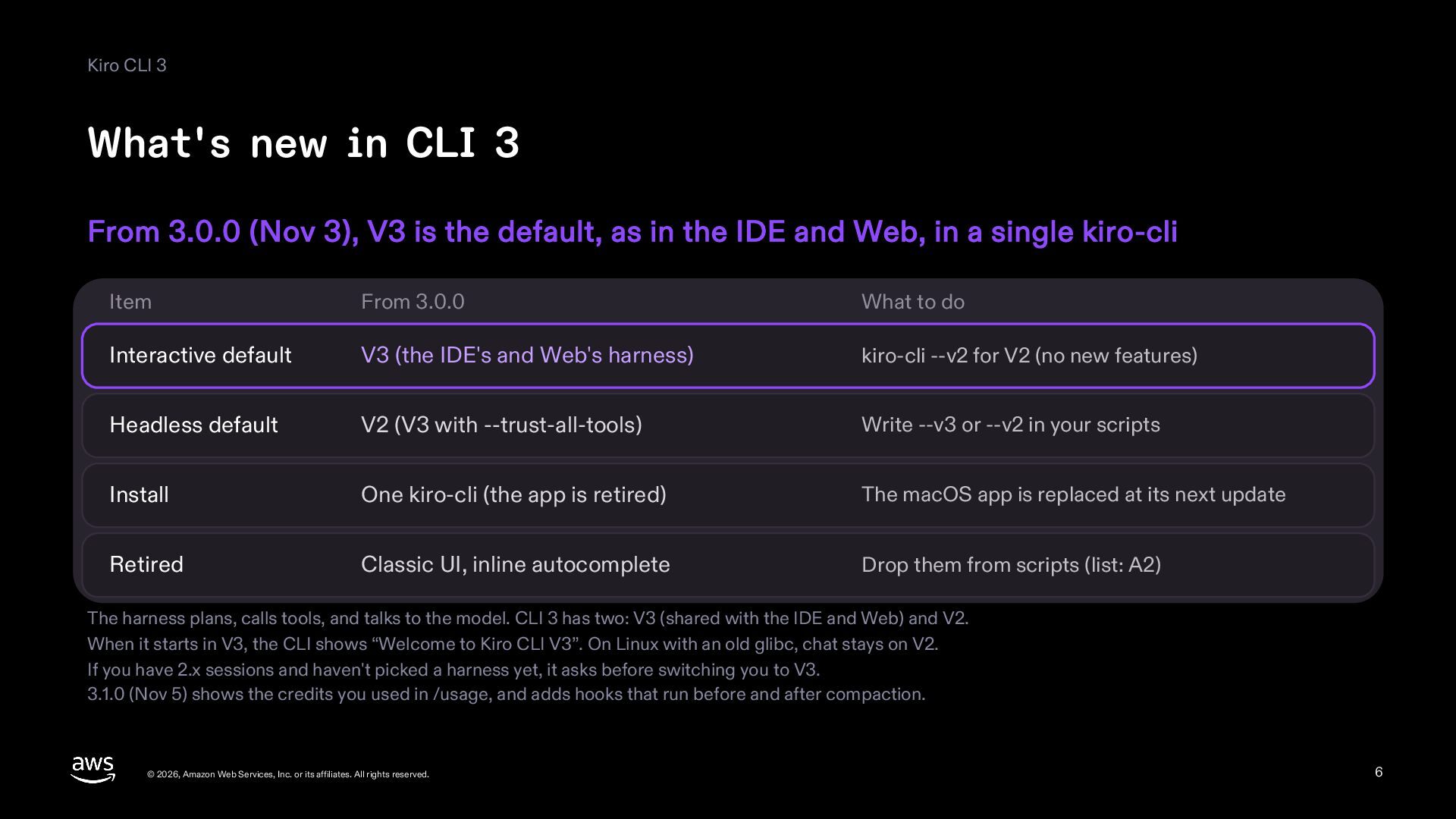
  6. Kiro CLI 3 What's new in CLI 3 From 3.0.0

    (Nov 3), V3 is the default, as in the IDE and Web, in a single kiro-cli Item From 3.0.0 What to do Interactive default V3 (the IDE's and Web's harness) kiro-cli --v2 for V2 (no new features) Headless default V2 (V3 with --trust-all-tools) Write --v3 or --v2 in your scripts Install One kiro-cli (the app is retired) The macOS app is replaced at its next update Retired Classic UI, inline autocomplete Drop them from scripts (list: A2) The harness plans, calls tools, and talks to the model. CLI 3 has two: V3 (shared with the IDE and Web) and V2. When it starts in V3, the CLI shows “Welcome to Kiro CLI V3”. On Linux with an old glibc, chat stays on V2. If you have 2.x sessions and haven't picked a harness yet, it asks before switching you to V3. 3.1.0 (Nov 5) shows the credits you used in /usage, and adds hooks that run before and after compaction. © 2026, Amazon Web Services, Inc. or its affiliates. All rights reserved. 6
  7. In the terminal Install and sign in Install, then sign

    in through your browser, or with device flow where there is none macOS, Linux curl -fsSL https://cli.kiro.dev/install | bash macOS (Homebrew) brew install kiro-cli Windows 11 (PowerShell) irm 'https://cli.kiro.dev/install.ps1' | iex A machine with a browser A machine with no browser (device flow) GitHub, Google, AWS Builder ID, your company's ID Over SSH or SSM, in a container. No external IdP 1 Type kiro-cli login (or kiro-cli), press Enter 1 Choose how to sign in after kiro-cli login 2 In the browser that opens, choose how to sign in 2 A URL and a one-time code appear 3 Go back to the terminal when it says done 3 Enter the code in a browser elsewhere 4 The CLI notices, and you're signed in Linux needs glibc 2.34 or later (for older ones, the musl build). kiro-cli whoami shows your sign-in; kiro-cli logout signs out CI and headless can use an API key: make one under API Keys on app.kiro.dev and set KIRO_API_KEY (Pro and up, if your admin allows) © 2026, Amazon Web Services, Inc. or its affiliates. All rights reserved. 7
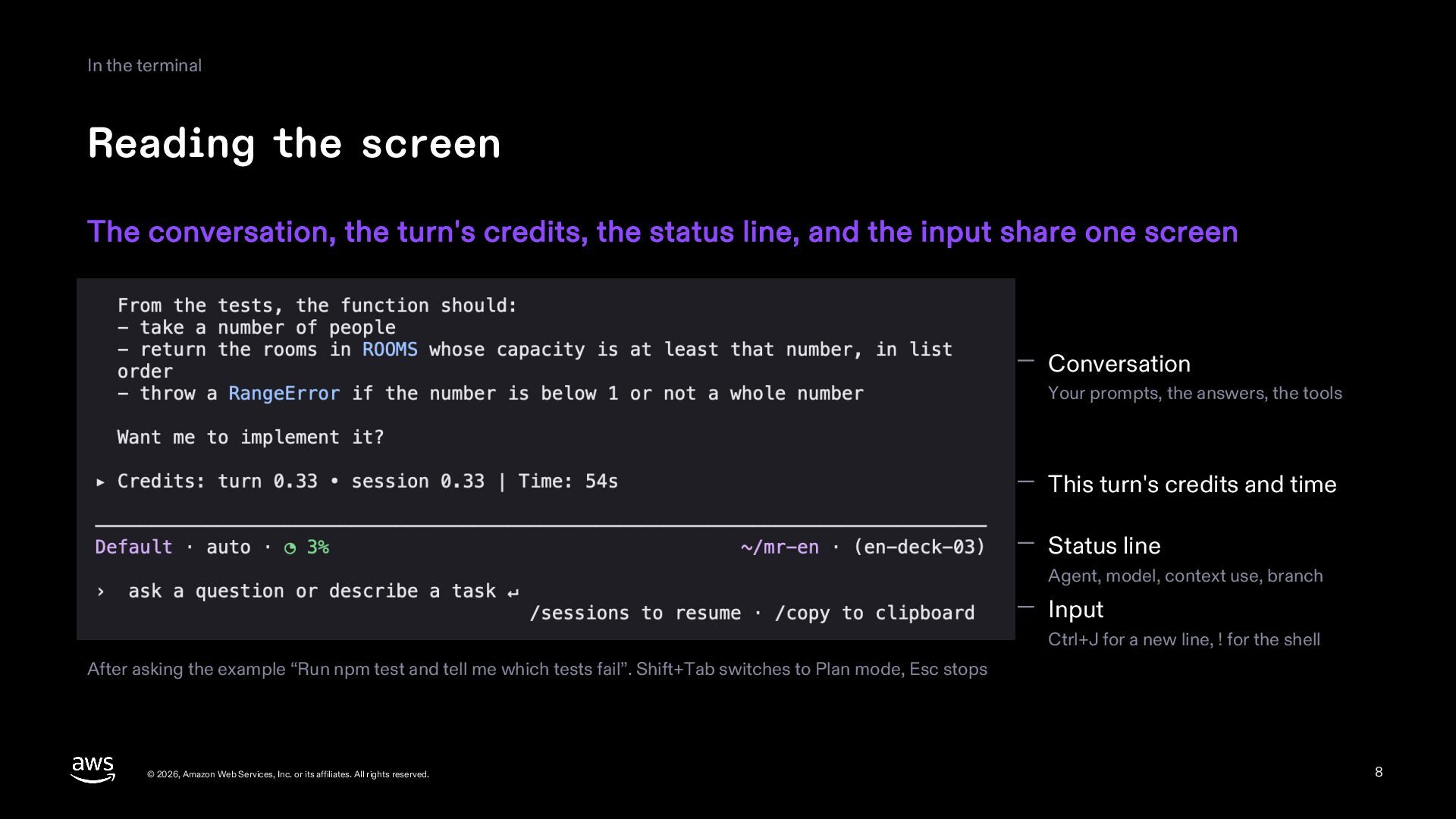
  8. In the terminal Reading the screen The conversation, the turn's

    credits, the status line, and the input share one screen Conversation Your prompts, the answers, the tools This turn's credits and time Status line Agent, model, context use, branch Input Ctrl+J for a new line, ! for the shell After asking the example “Run npm test and tell me which tests fail”. Shift+Tab switches to Plan mode, Esc stops © 2026, Amazon Web Services, Inc. or its affiliates. All rights reserved. 8
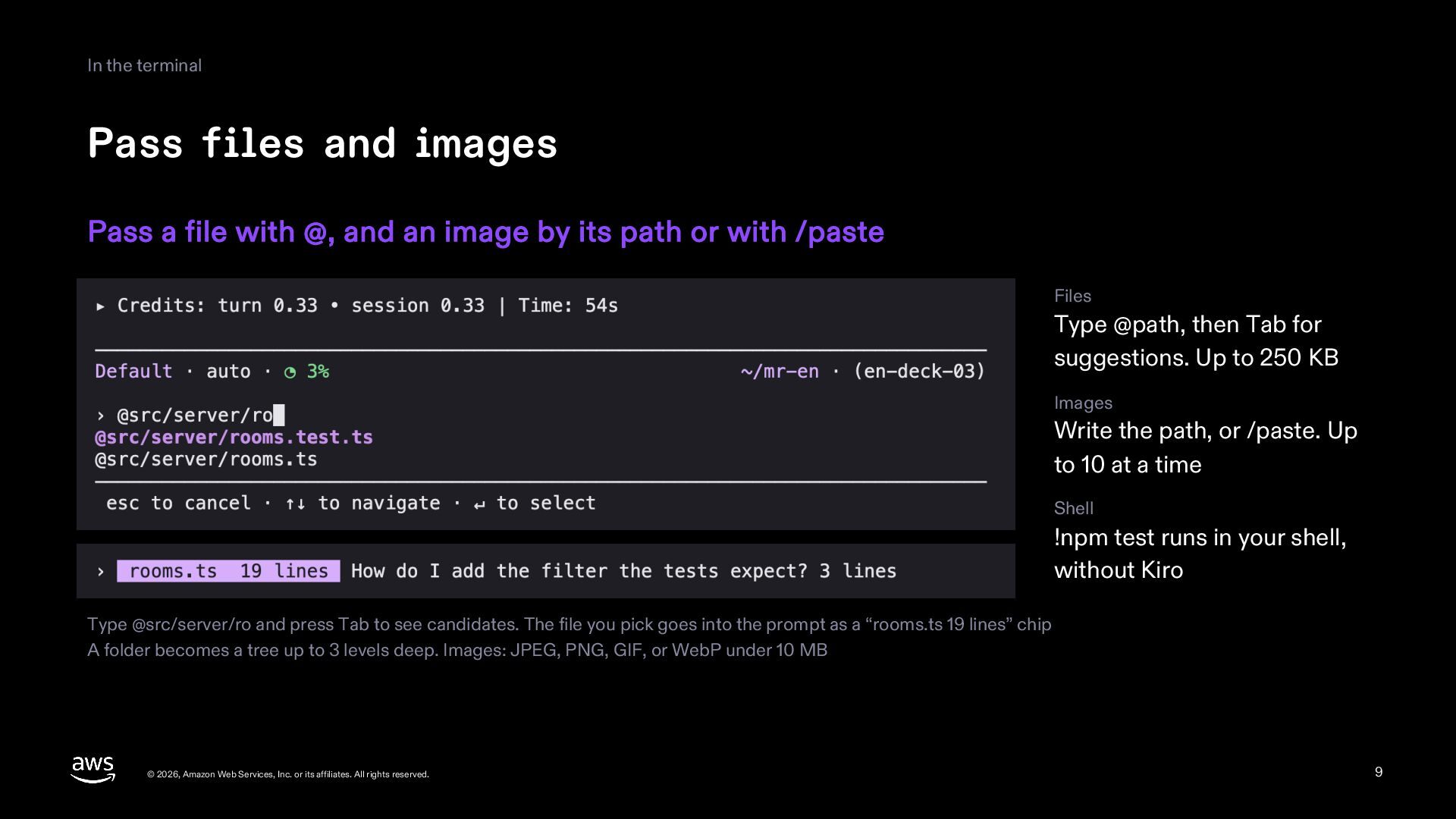
  9. In the terminal Pass files and images Pass a file

    with @, and an image by its path or with /paste Files Type @path, then Tab for suggestions. Up to 250 KB Images Write the path, or /paste. Up to 10 at a time Shell !npm test runs in your shell, without Kiro Type @src/server/ro and press Tab to see candidates. The file you pick goes into the prompt as a “rooms.ts 19 lines” chip A folder becomes a tree up to 3 levels deep. Images: JPEG, PNG, GIF, or WebP under 10 MB © 2026, Amazon Web Services, Inc. or its affiliates. All rights reserved. 9
  10. In the terminal Sessions Every conversation is saved; pick one

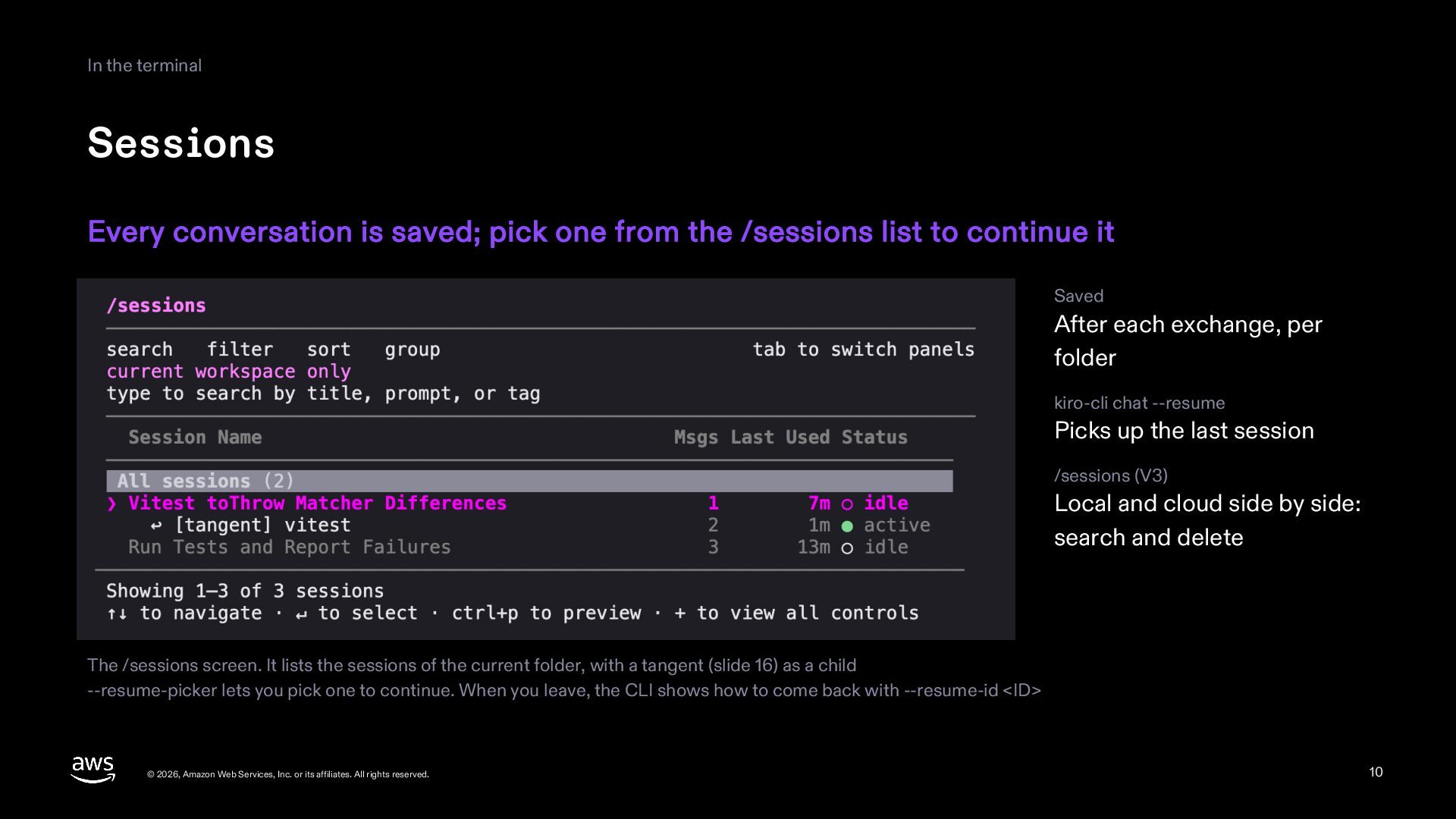
    from the /sessions list to continue it Saved After each exchange, per folder kiro-cli chat --resume Picks up the last session /sessions (V3) Local and cloud side by side: search and delete The /sessions screen. It lists the sessions of the current folder, with a tangent (slide 16) as a child --resume-picker lets you pick one to continue. When you leave, the CLI shows how to come back with --resume-id <ID> © 2026, Amazon Web Services, Inc. or its affiliates. All rights reserved. 10
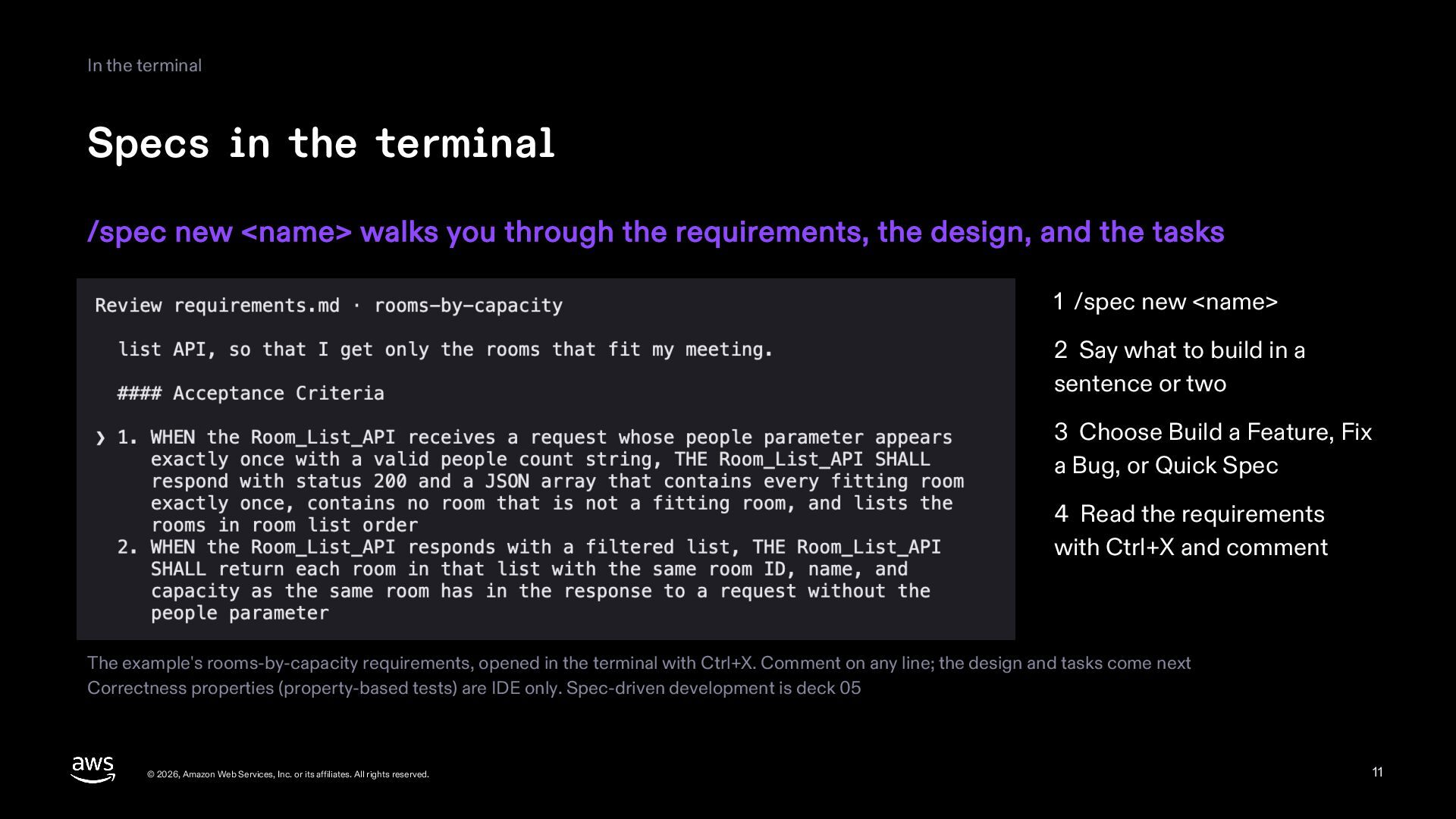
  11. In the terminal Specs in the terminal /spec new <name>

    walks you through the requirements, the design, and the tasks 1 /spec new <name> 2 Say what to build in a sentence or two 3 Choose Build a Feature, Fix a Bug, or Quick Spec 4 Read the requirements with Ctrl+X and comment The example's rooms-by-capacity requirements, opened in the terminal with Ctrl+X. Comment on any line; the design and tasks come next Correctness properties (property-based tests) are IDE only. Spec-driven development is deck 05 © 2026, Amazon Web Services, Inc. or its affiliates. All rights reserved. 11
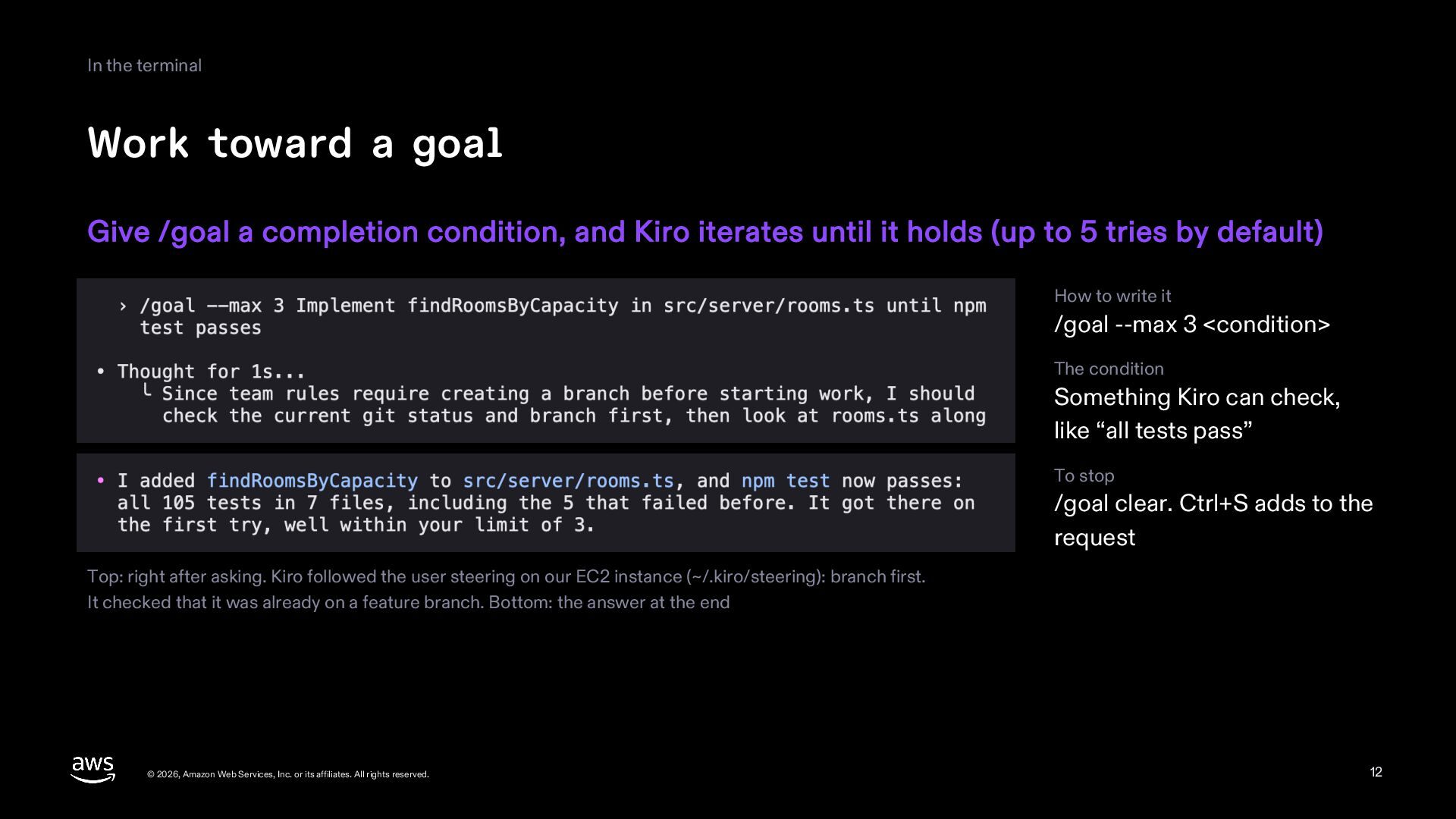
  12. In the terminal Work toward a goal Give /goal a

    completion condition, and Kiro iterates until it holds (up to 5 tries by default) How to write it /goal --max 3 <condition> The condition Something Kiro can check, like “all tests pass” To stop /goal clear. Ctrl+S adds to the request Top: right after asking. Kiro followed the user steering on our EC2 instance (~/.kiro/steering): branch first. It checked that it was already on a feature branch. Bottom: the answer at the end © 2026, Amazon Web Services, Inc. or its affiliates. All rights reserved. 12
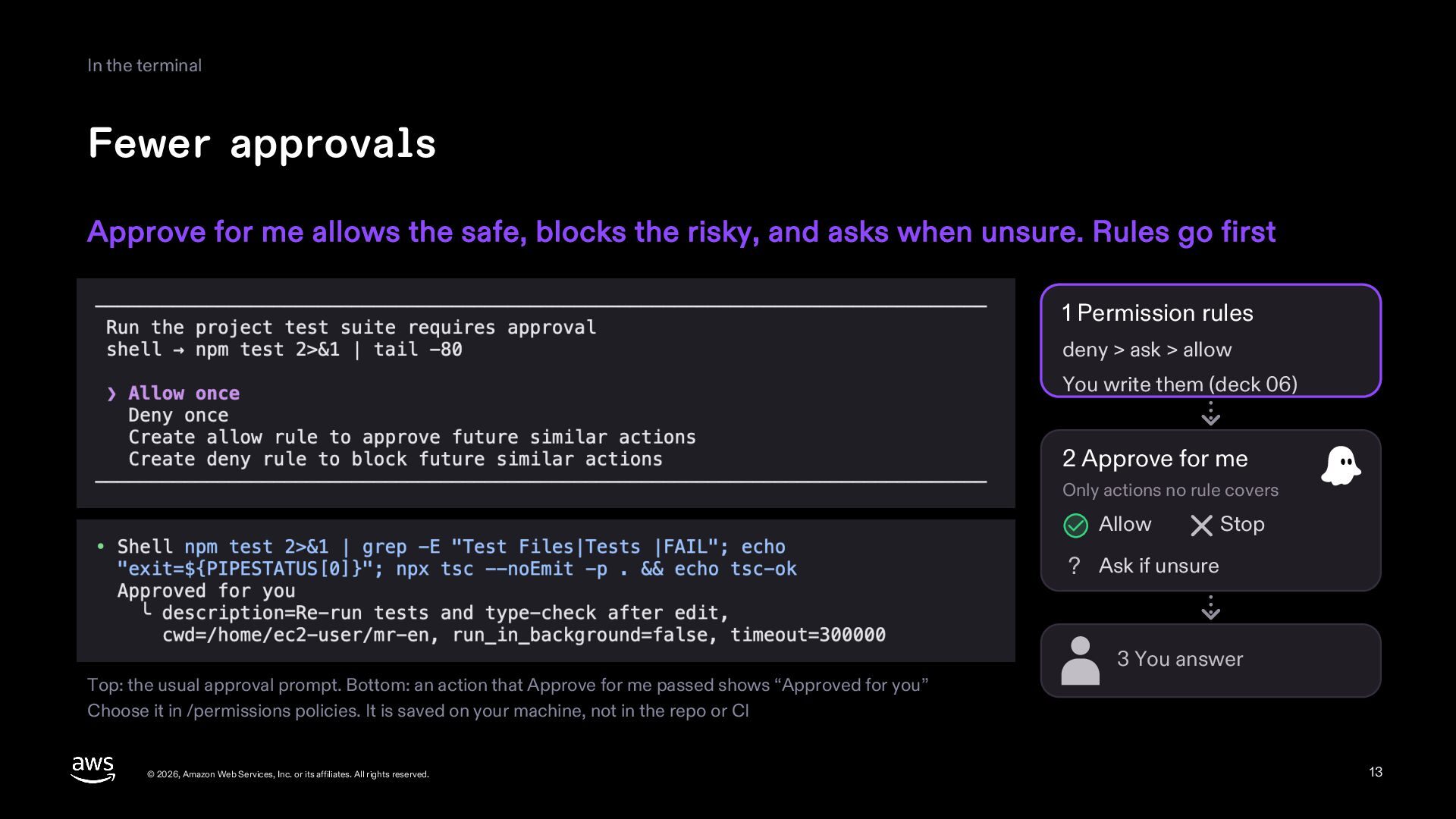
  13. In the terminal Fewer approvals Approve for me allows the

    safe, blocks the risky, and asks when unsure. Rules go first 1 Permission rules deny > ask > allow You write them (deck 06) 2 Approve for me Only actions no rule covers Allow Stop ? Ask if unsure 3 You answer Top: the usual approval prompt. Bottom: an action that Approve for me passed shows “Approved for you” Choose it in /permissions policies. It is saved on your machine, not in the repo or CI © 2026, Amazon Web Services, Inc. or its affiliates. All rights reserved. 13
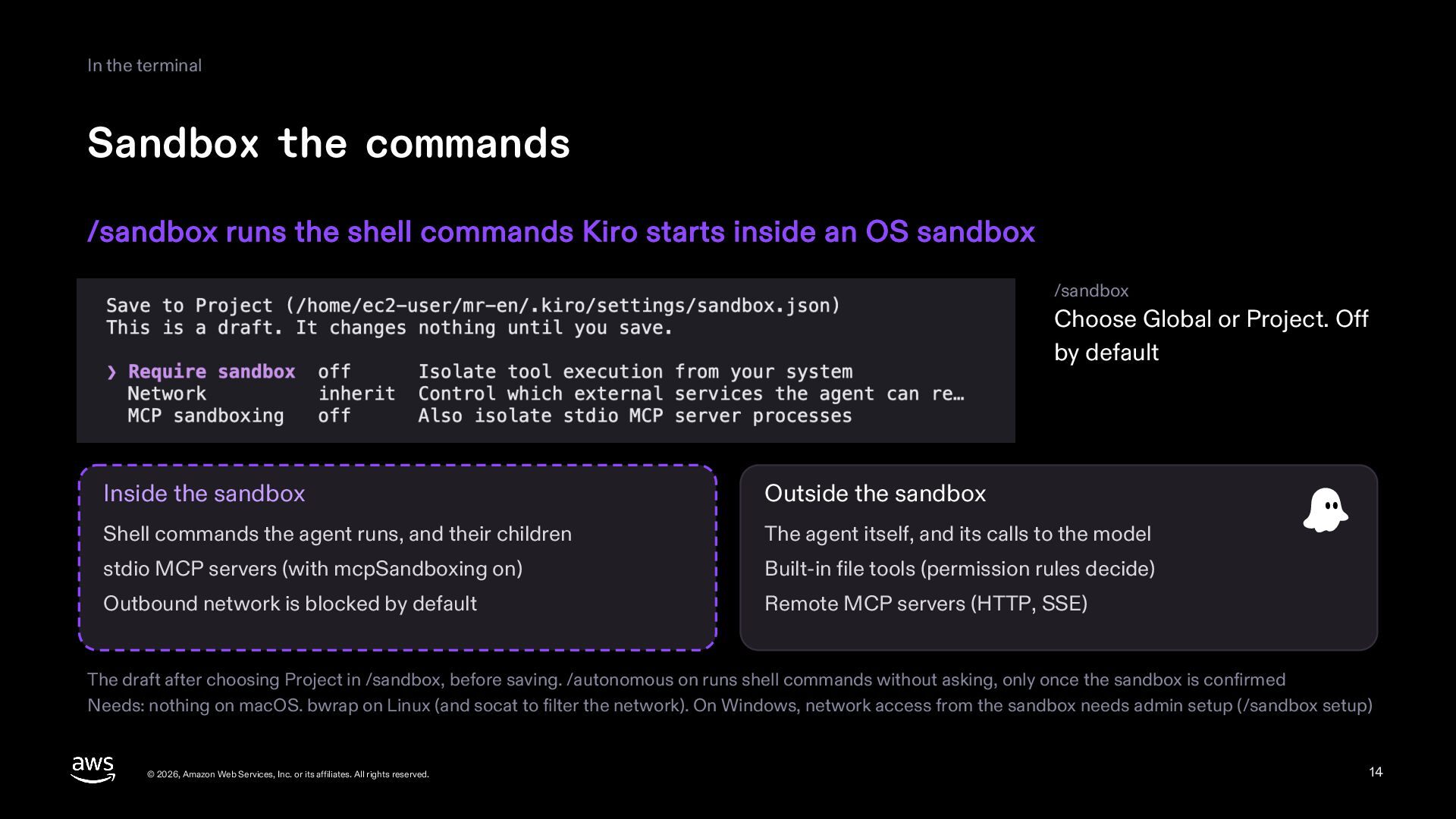
  14. In the terminal Sandbox the commands /sandbox runs the shell

    commands Kiro starts inside an OS sandbox /sandbox Choose Global or Project. Off by default Inside the sandbox Outside the sandbox Shell commands the agent runs, and their children The agent itself, and its calls to the model stdio MCP servers (with mcpSandboxing on) Built-in file tools (permission rules decide) Outbound network is blocked by default Remote MCP servers (HTTP, SSE) The draft after choosing Project in /sandbox, before saving. /autonomous on runs shell commands without asking, only once the sandbox is confirmed Needs: nothing on macOS. bwrap on Linux (and socat to filter the network). On Windows, network access from the sandbox needs admin setup (/sandbox setup) © 2026, Amazon Web Services, Inc. or its affiliates. All rights reserved. 14
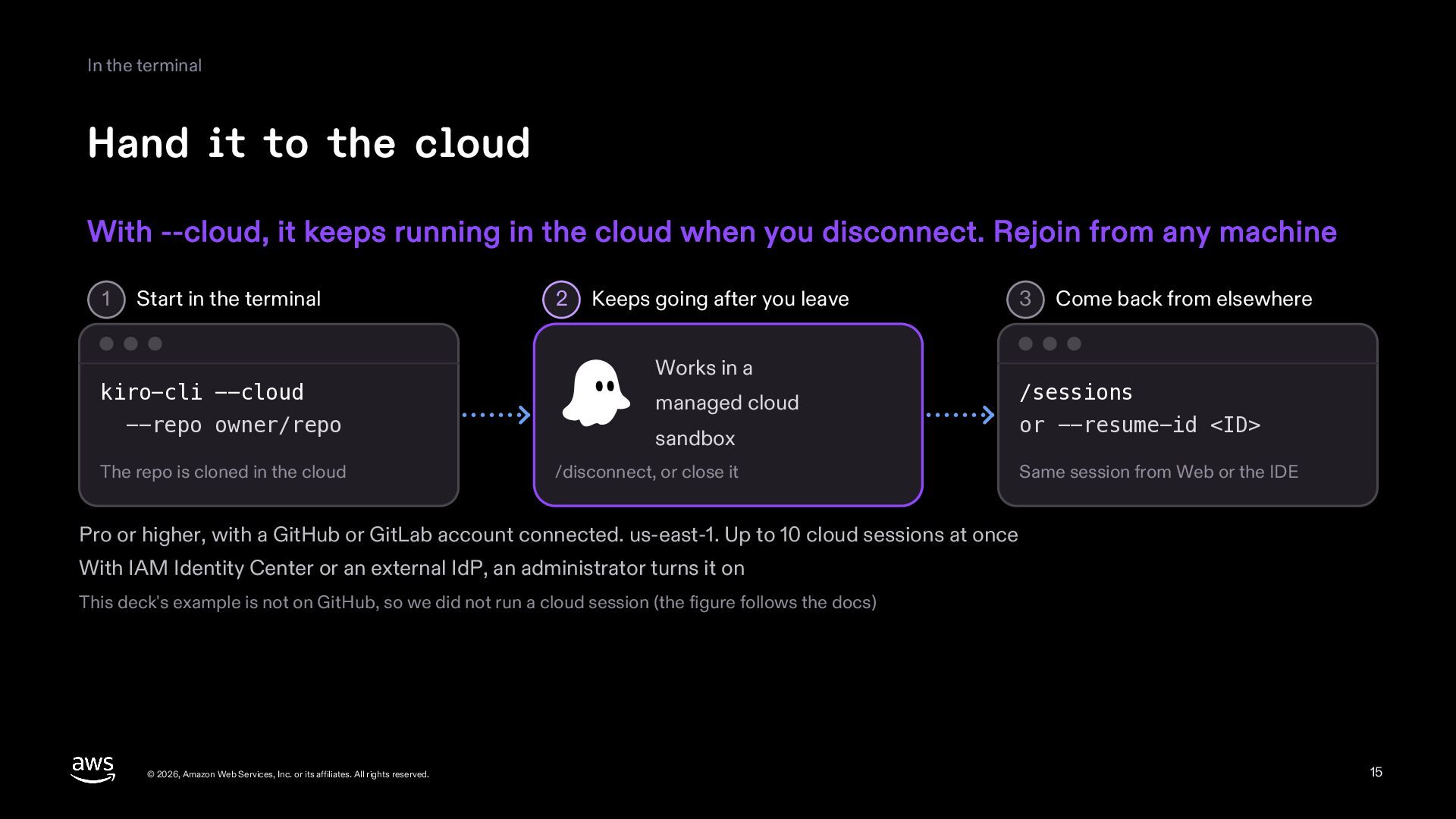
  15. In the terminal Hand it to the cloud With --cloud,

    it keeps running in the cloud when you disconnect. Rejoin from any machine 1 Start in the terminal kiro-cli --cloud --repo owner/repo The repo is cloned in the cloud 2 Keeps going after you leave Works in a managed cloud sandbox /disconnect, or close it 3 Come back from elsewhere /sessions or --resume-id <ID> Same session from Web or the IDE Pro or higher, with a GitHub or GitLab account connected. us-east-1. Up to 10 cloud sessions at once With IAM Identity Center or an external IdP, an administrator turns it on This deck's example is not on GitHub, so we did not run a cloud session (the figure follows the docs) © 2026, Amazon Web Services, Inc. or its affiliates. All rights reserved. 15
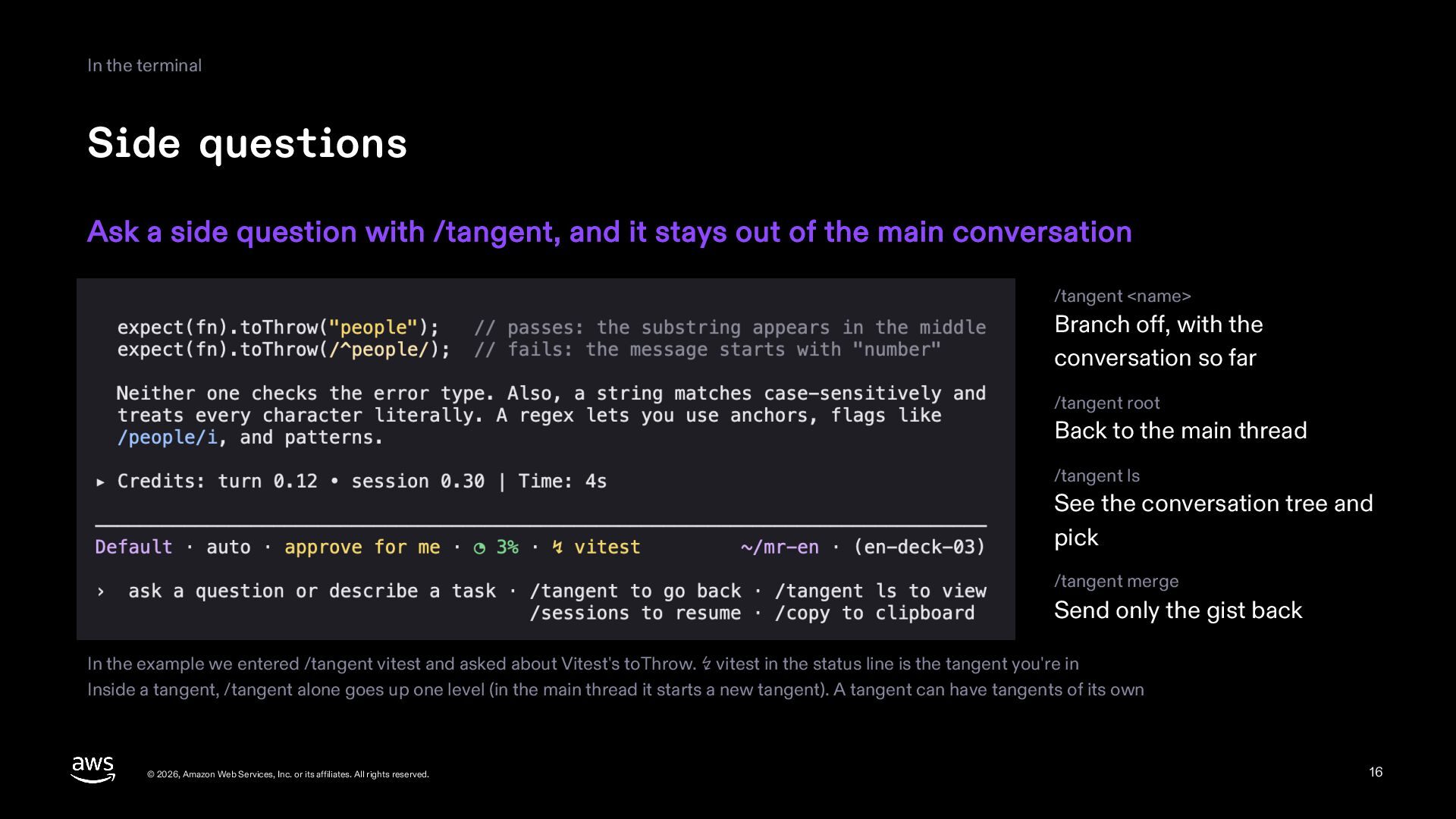
  16. In the terminal Side questions Ask a side question with

    /tangent, and it stays out of the main conversation /tangent <name> Branch off, with the conversation so far /tangent root Back to the main thread /tangent ls See the conversation tree and pick /tangent merge Send only the gist back In the example we entered /tangent vitest and asked about Vitest's toThrow. ↯ vitest in the status line is the tangent you're in Inside a tangent, /tangent alone goes up one level (in the main thread it starts a new tangent). A tangent can have tangents of its own © 2026, Amazon Web Services, Inc. or its affiliates. All rights reserved. 16
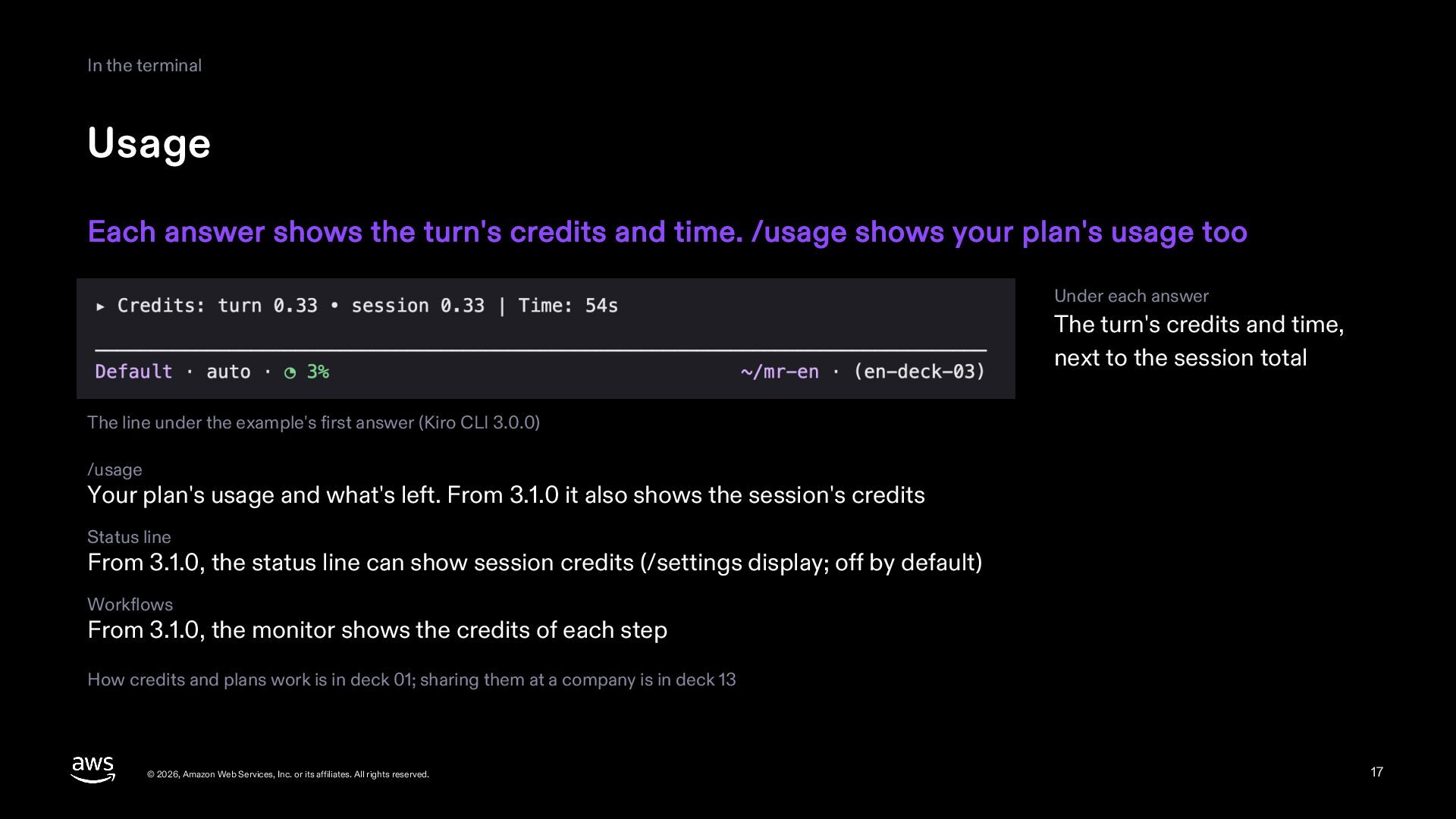
  17. In the terminal Usage Each answer shows the turn's credits

    and time. /usage shows your plan's usage too Under each answer The turn's credits and time, next to the session total The line under the example's first answer (Kiro CLI 3.0.0) /usage Your plan's usage and what's left. From 3.1.0 it also shows the session's credits Status line From 3.1.0, the status line can show session credits (/settings display; off by default) Workflows From 3.1.0, the monitor shows the credits of each step How credits and plans work is in deck 01; sharing them at a company is in deck 13 © 2026, Amazon Web Services, Inc. or its affiliates. All rights reserved. 17
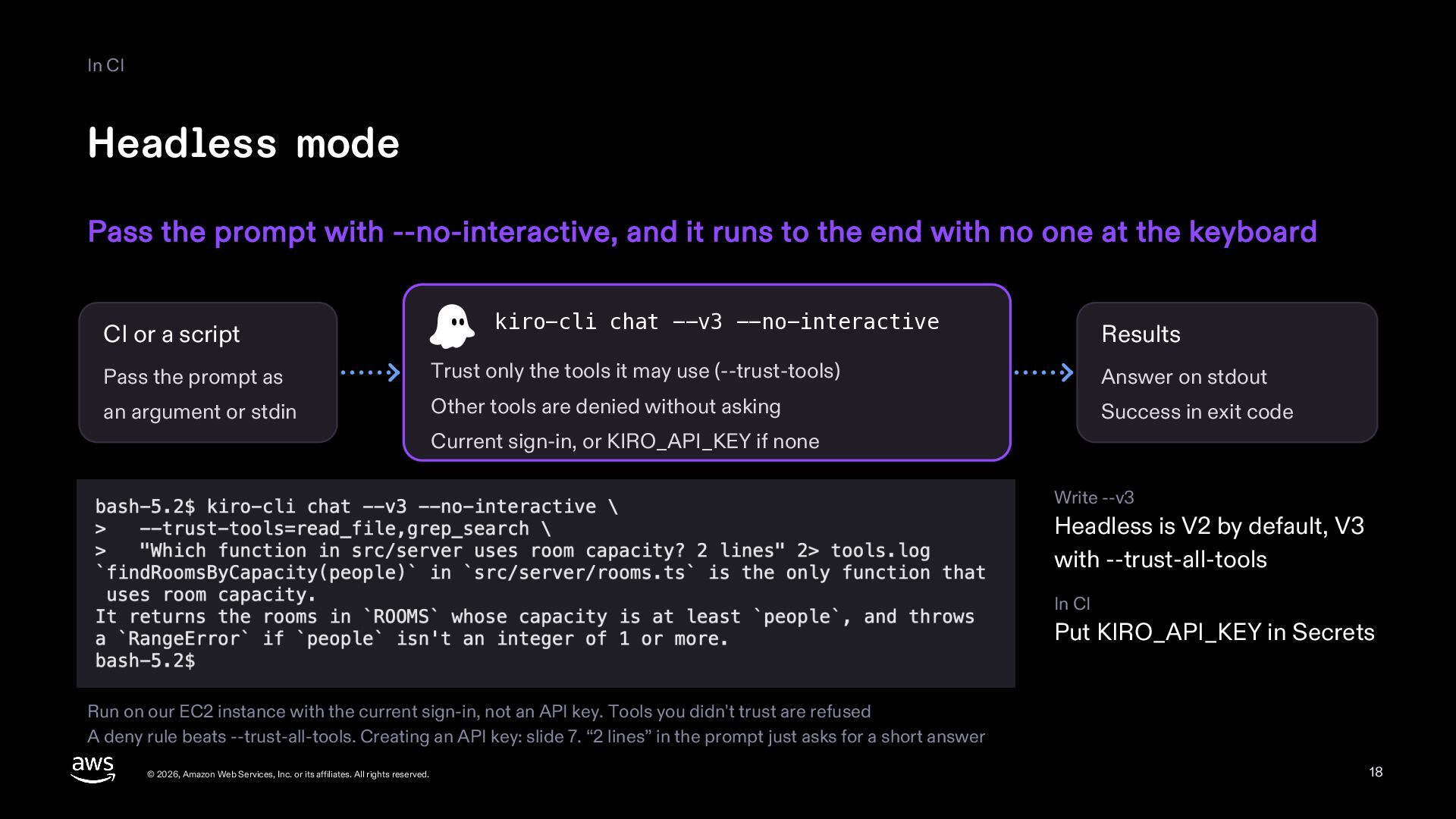
  18. In CI Headless mode Pass the prompt with --no-interactive, and

    it runs to the end with no one at the keyboard CI or a script kiro-cli chat --v3 --no-interactive Results Pass the prompt as Trust only the tools it may use (--trust-tools) Answer on stdout an argument or stdin Other tools are denied without asking Success in exit code Current sign-in, or KIRO_API_KEY if none Write --v3 Headless is V2 by default, V3 with --trust-all-tools In CI Put KIRO_API_KEY in Secrets Run on our EC2 instance with the current sign-in, not an API key. Tools you didn't trust are refused A deny rule beats --trust-all-tools. Creating an API key: slide 7. “2 lines” in the prompt just asks for a short answer © 2026, Amazon Web Services, Inc. or its affiliates. All rights reserved. 18
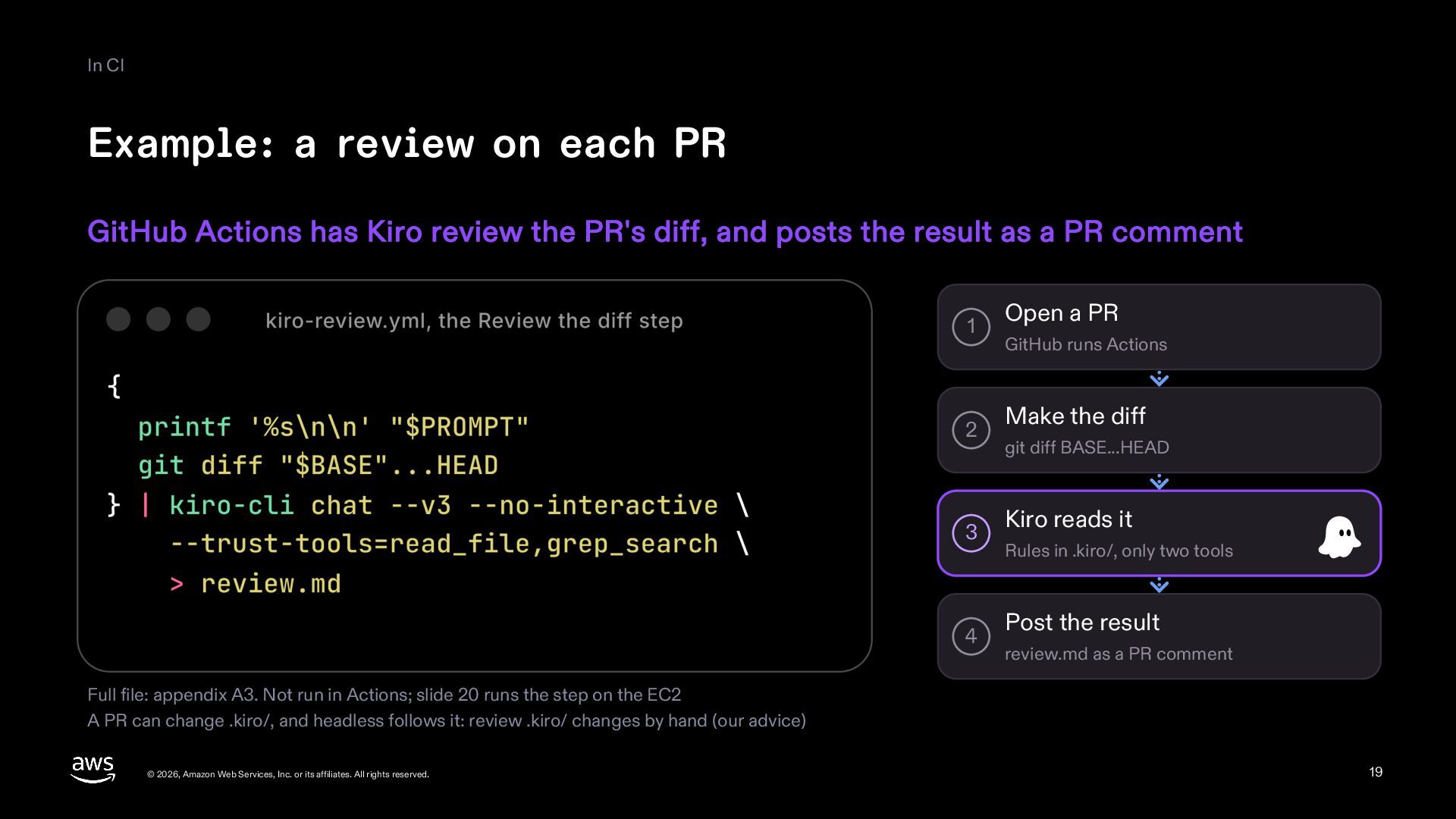
  19. In CI Example: a review on each PR GitHub Actions

    has Kiro review the PR's diff, and posts the result as a PR comment 1 2 3 4 Open a PR GitHub runs Actions Make the diff git diff BASE...HEAD Kiro reads it Rules in .kiro/, only two tools Post the result review.md as a PR comment Full file: appendix A3. Not run in Actions; slide 20 runs the step on the EC2 A PR can change .kiro/, and headless follows it: review .kiro/ changes by hand (our advice) © 2026, Amazon Web Services, Inc. or its affiliates. All rights reserved. 19
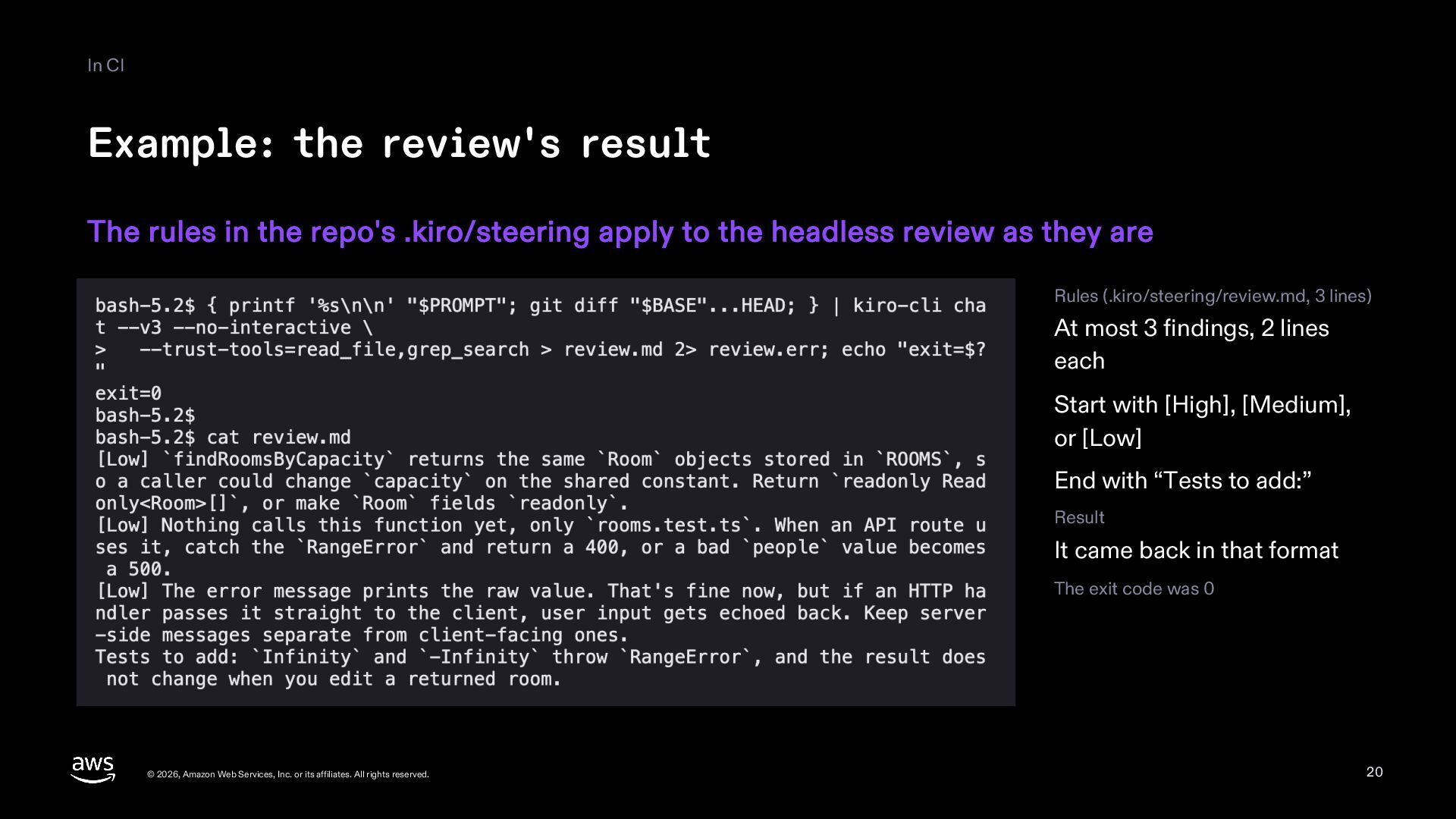
  20. In CI Example: the review's result The rules in the

    repo's .kiro/steering apply to the headless review as they are Rules (.kiro/steering/review.md, 3 lines) At most 3 findings, 2 lines each Start with [High], [Medium], or [Low] End with “Tests to add:” Result It came back in that format The exit code was 0 © 2026, Amazon Web Services, Inc. or its affiliates. All rights reserved. 20
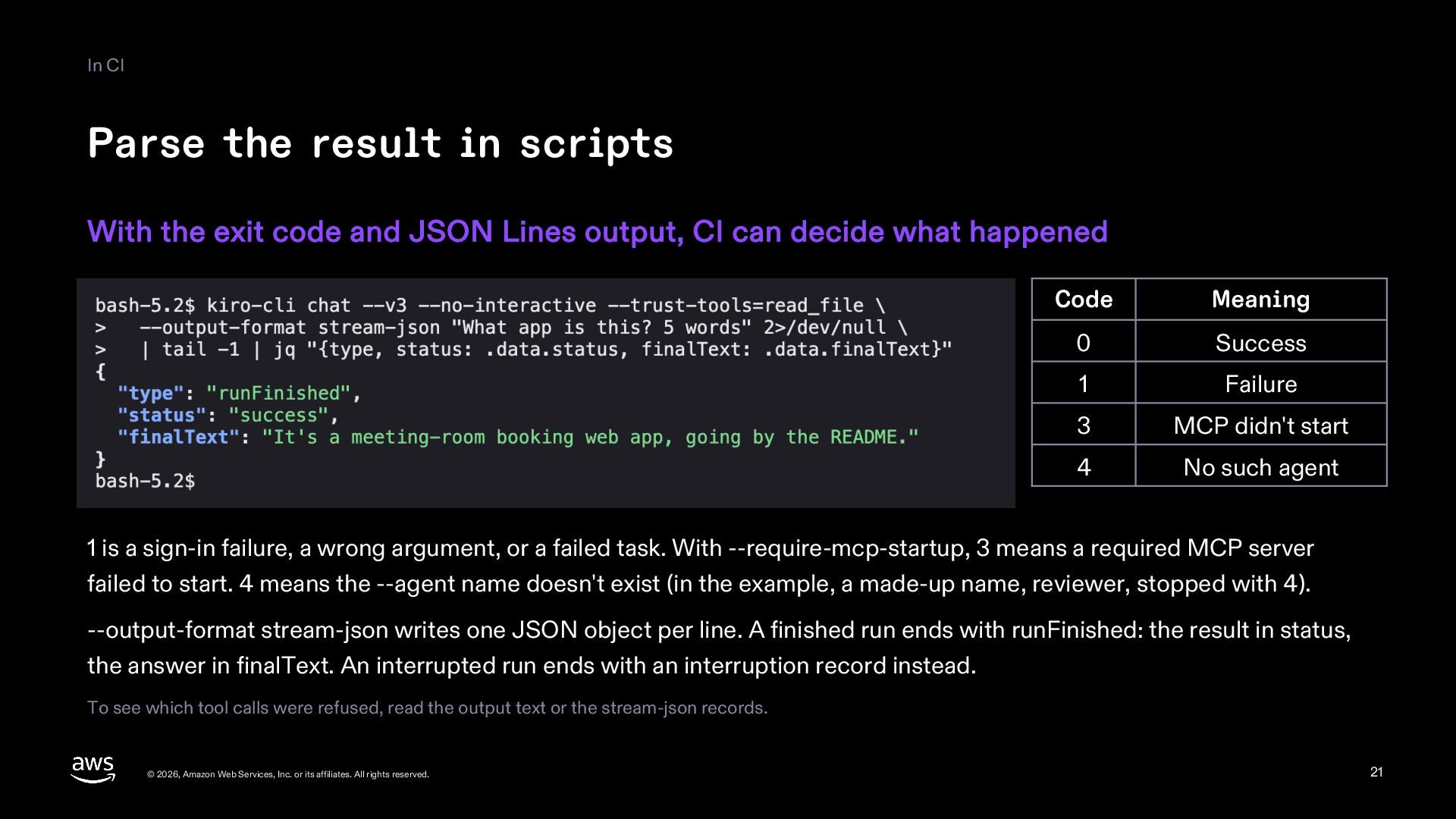
  21. In CI Parse the result in scripts With the exit

    code and JSON Lines output, CI can decide what happened Code Meaning 0 Success 1 Failure 3 MCP didn't start 4 No such agent 1 is a sign-in failure, a wrong argument, or a failed task. With --require-mcp-startup, 3 means a required MCP server failed to start. 4 means the --agent name doesn't exist (in the example, a made-up name, reviewer, stopped with 4). --output-format stream-json writes one JSON object per line. A finished run ends with runFinished: the result in status, the answer in finalText. An interrupted run ends with an interruption record instead. To see which tool calls were refused, read the output text or the stream-json records. © 2026, Amazon Web Services, Inc. or its affiliates. All rights reserved. 21
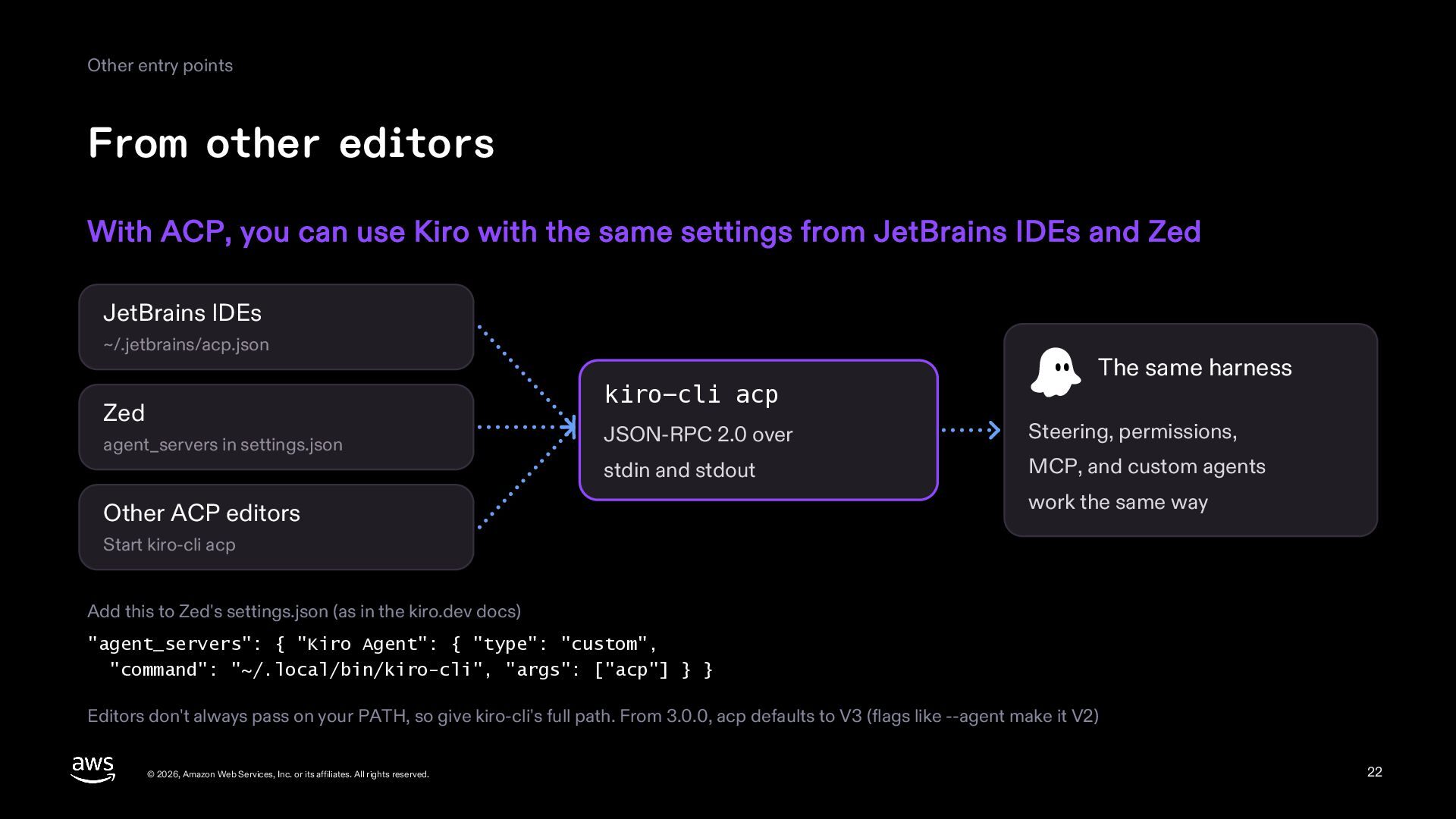
  22. Other entry points From other editors With ACP, you can

    use Kiro with the same settings from JetBrains IDEs and Zed JetBrains IDEs ~/.jetbrains/acp.json kiro-cli acp Zed agent_servers in settings.json The same harness JSON-RPC 2.0 over Steering, permissions, stdin and stdout MCP, and custom agents Other ACP editors work the same way Start kiro-cli acp Add this to Zed's settings.json (as in the kiro.dev docs) "agent_servers": { "Kiro Agent": { "type": "custom", "command": "~/.local/bin/kiro-cli", "args": ["acp"] } } Editors don't always pass on your PATH, so give kiro-cli's full path. From 3.0.0, acp defaults to V3 (flags like --agent make it V2) © 2026, Amazon Web Services, Inc. or its affiliates. All rights reserved. 22
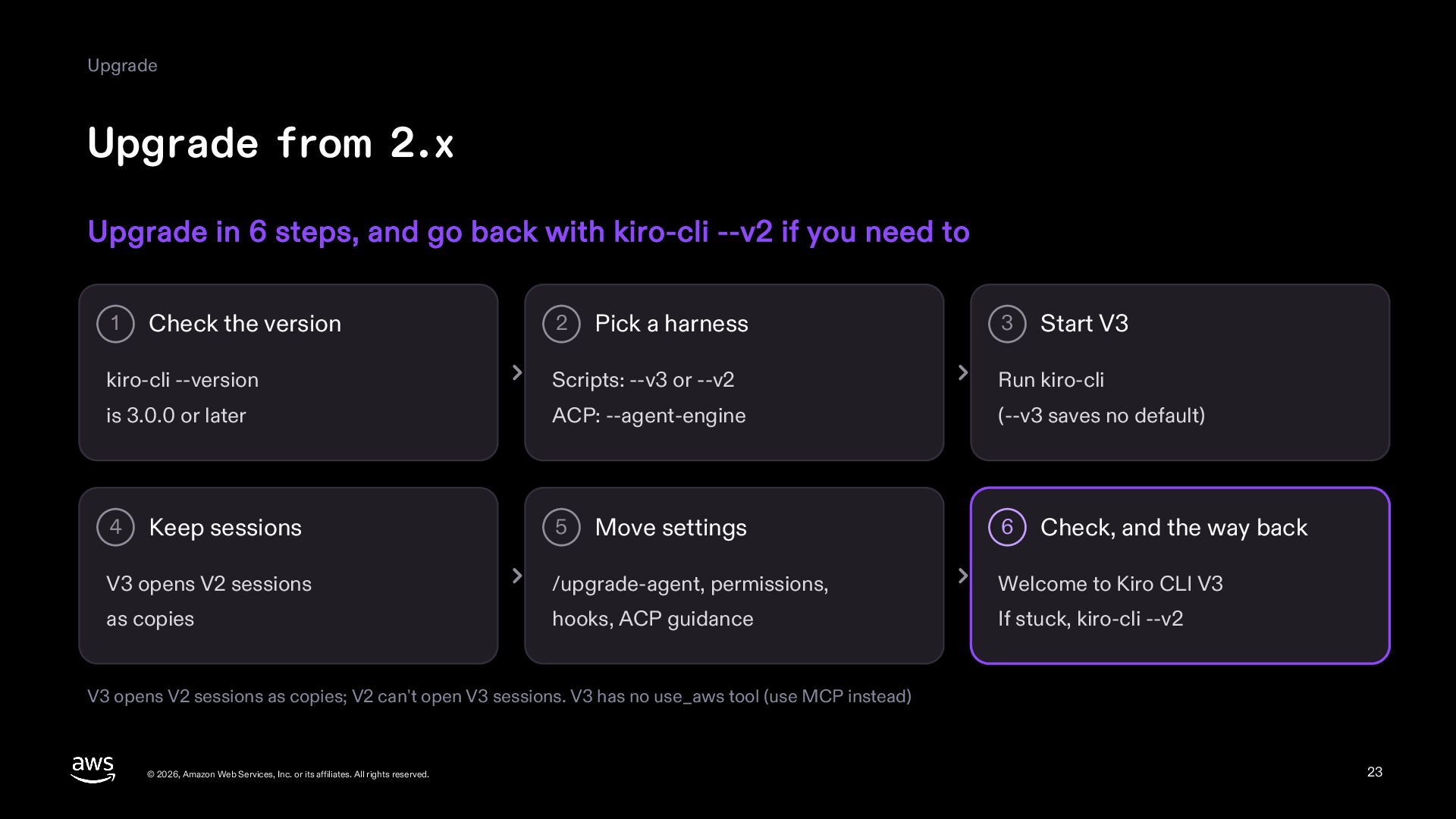
  23. Upgrade Upgrade from 2.x Upgrade in 6 steps, and go

    back with kiro-cli --v2 if you need to 1 Check the version 2 Pick a harness 3 Start V3 kiro-cli --version Scripts: --v3 or --v2 Run kiro-cli is 3.0.0 or later ACP: --agent-engine (--v3 saves no default) 4 Keep sessions 5 Move settings 6 Check, and the way back V3 opens V2 sessions /upgrade-agent, permissions, Welcome to Kiro CLI V3 as copies hooks, ACP guidance If stuck, kiro-cli --v2 V3 opens V2 sessions as copies; V2 can't open V3 sessions. V3 has no use_aws tool (use MCP instead) © 2026, Amazon Web Services, Inc. or its affiliates. All rights reserved. 23
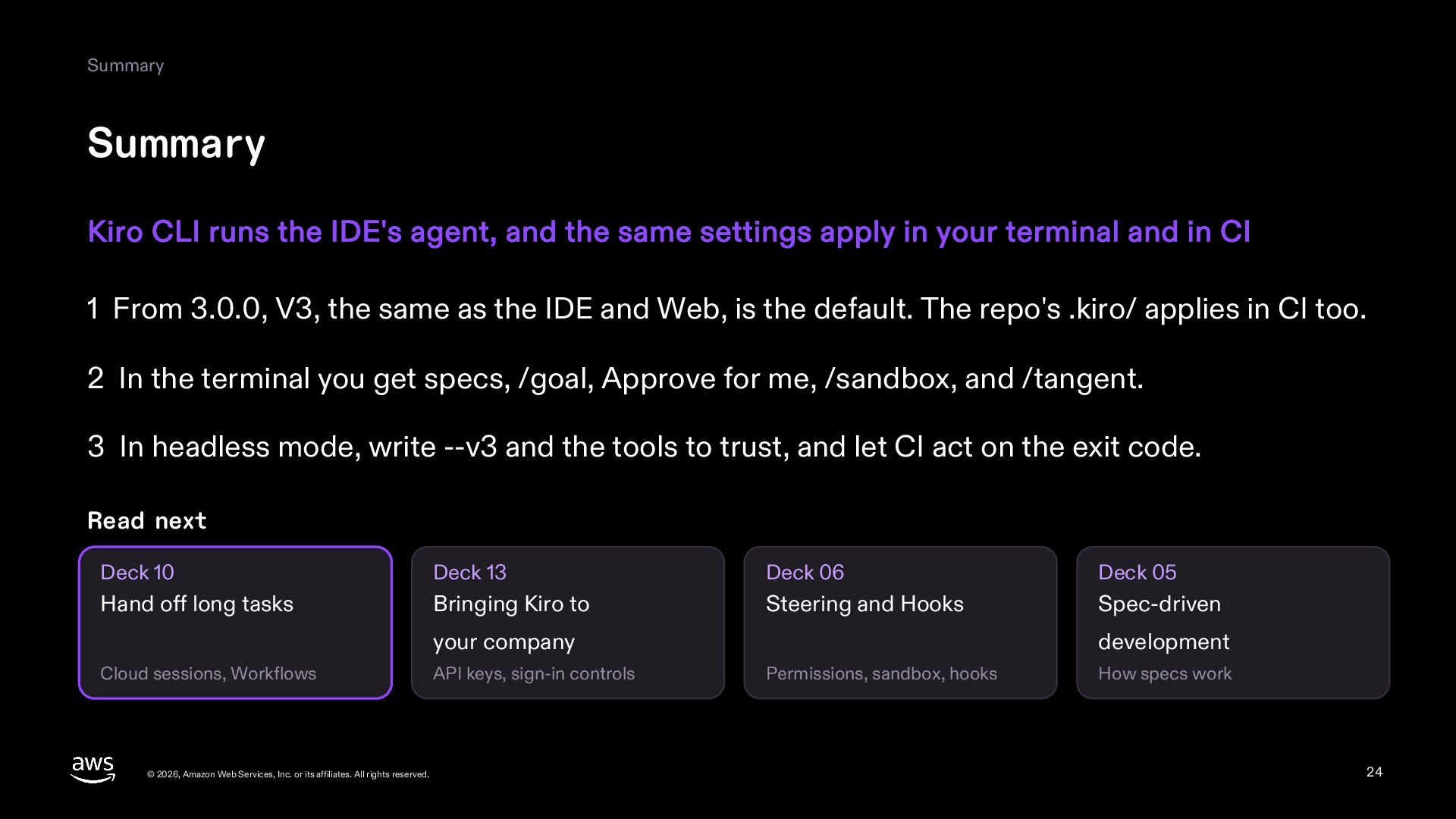
  24. Summary Summary Kiro CLI runs the IDE's agent, and the

    same settings apply in your terminal and in CI 1 From 3.0.0, V3, the same as the IDE and Web, is the default. The repo's .kiro/ applies in CI too. 2 In the terminal you get specs, /goal, Approve for me, /sandbox, and /tangent. 3 In headless mode, write --v3 and the tools to trust, and let CI act on the exit code. Read next Deck 10 Deck 13 Deck 06 Deck 05 Hand off long tasks Bringing Kiro to Steering and Hooks Spec-driven your company Cloud sessions, Workflows © 2026, Amazon Web Services, Inc. or its affiliates. All rights reserved. API keys, sign-in controls development Permissions, sandbox, hooks How specs work 24
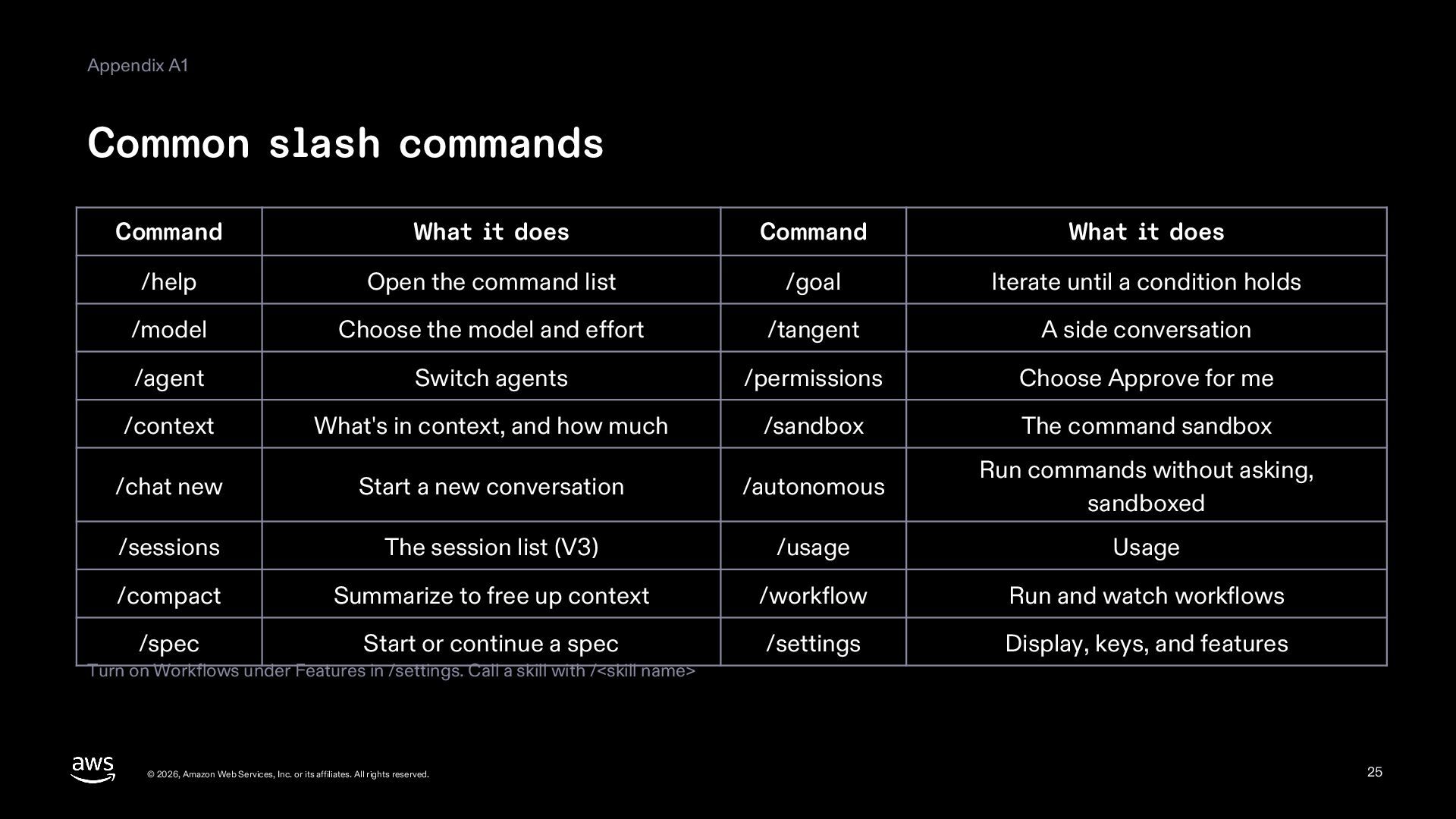
  25. Appendix A1 Common slash commands Command What it does Command

    What it does /help Open the command list /goal Iterate until a condition holds /model Choose the model and effort /tangent A side conversation /agent Switch agents /permissions Choose Approve for me /context What's in context, and how much /sandbox The command sandbox /chat new Start a new conversation /autonomous Run commands without asking, sandboxed /sessions The session list (V3) /usage Usage /compact Summarize to free up context /workflow Run and watch workflows /spec Start or continue a spec /settings Display, keys, and features Turn on Workflows under Features in /settings. Call a skill with /<skill name> © 2026, Amazon Web Services, Inc. or its affiliates. All rights reserved. 25
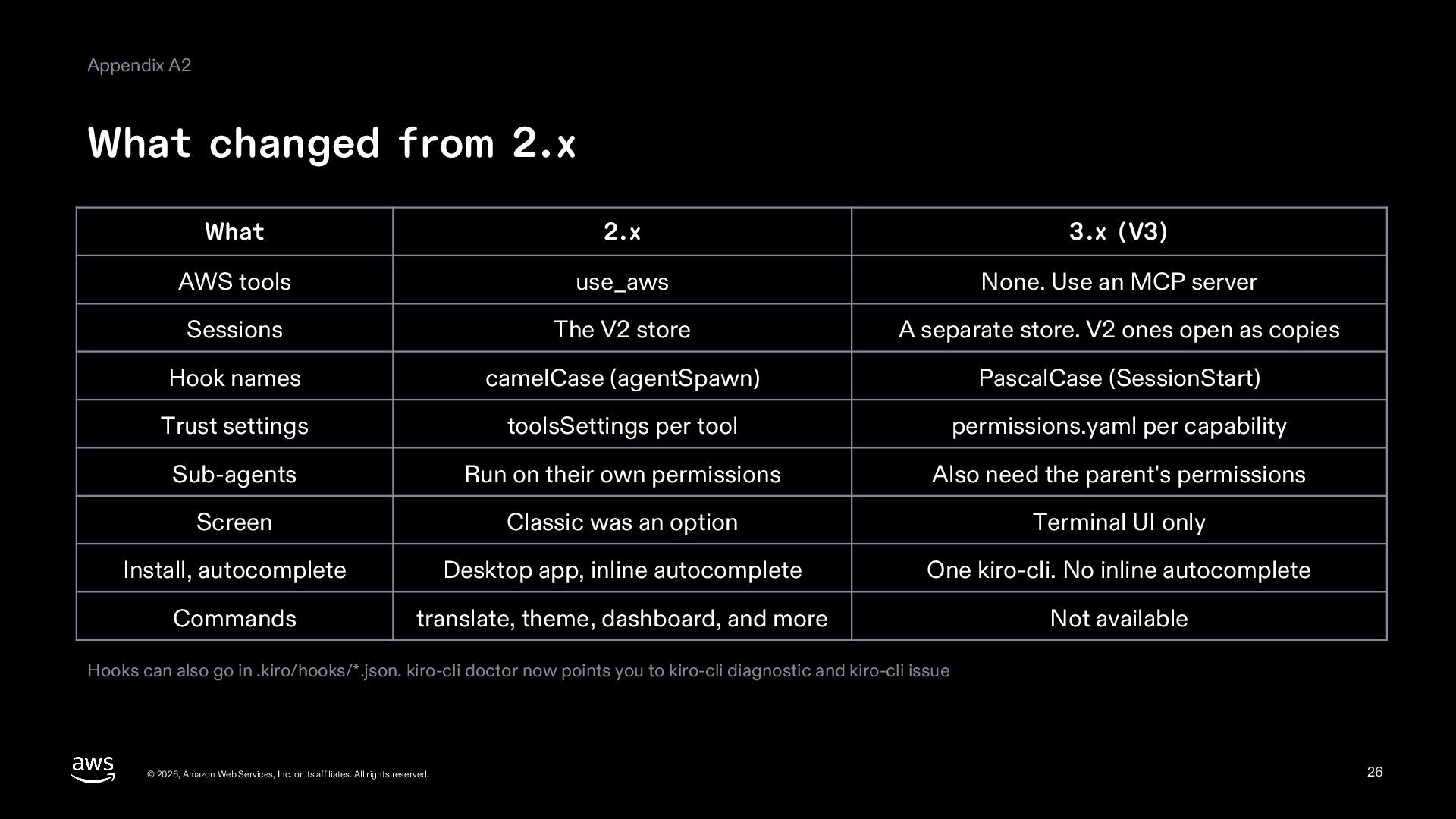
  26. Appendix A2 What changed from 2.x What 2.x 3.x (V3)

    AWS tools use_aws None. Use an MCP server Sessions The V2 store A separate store. V2 ones open as copies Hook names camelCase (agentSpawn) PascalCase (SessionStart) Trust settings toolsSettings per tool permissions.yaml per capability Sub-agents Run on their own permissions Also need the parent's permissions Screen Classic was an option Terminal UI only Install, autocomplete Desktop app, inline autocomplete One kiro-cli. No inline autocomplete Commands translate, theme, dashboard, and more Not available Hooks can also go in .kiro/hooks/*.json. kiro-cli doctor now points you to kiro-cli diagnostic and kiro-cli issue © 2026, Amazon Web Services, Inc. or its affiliates. All rights reserved. 26
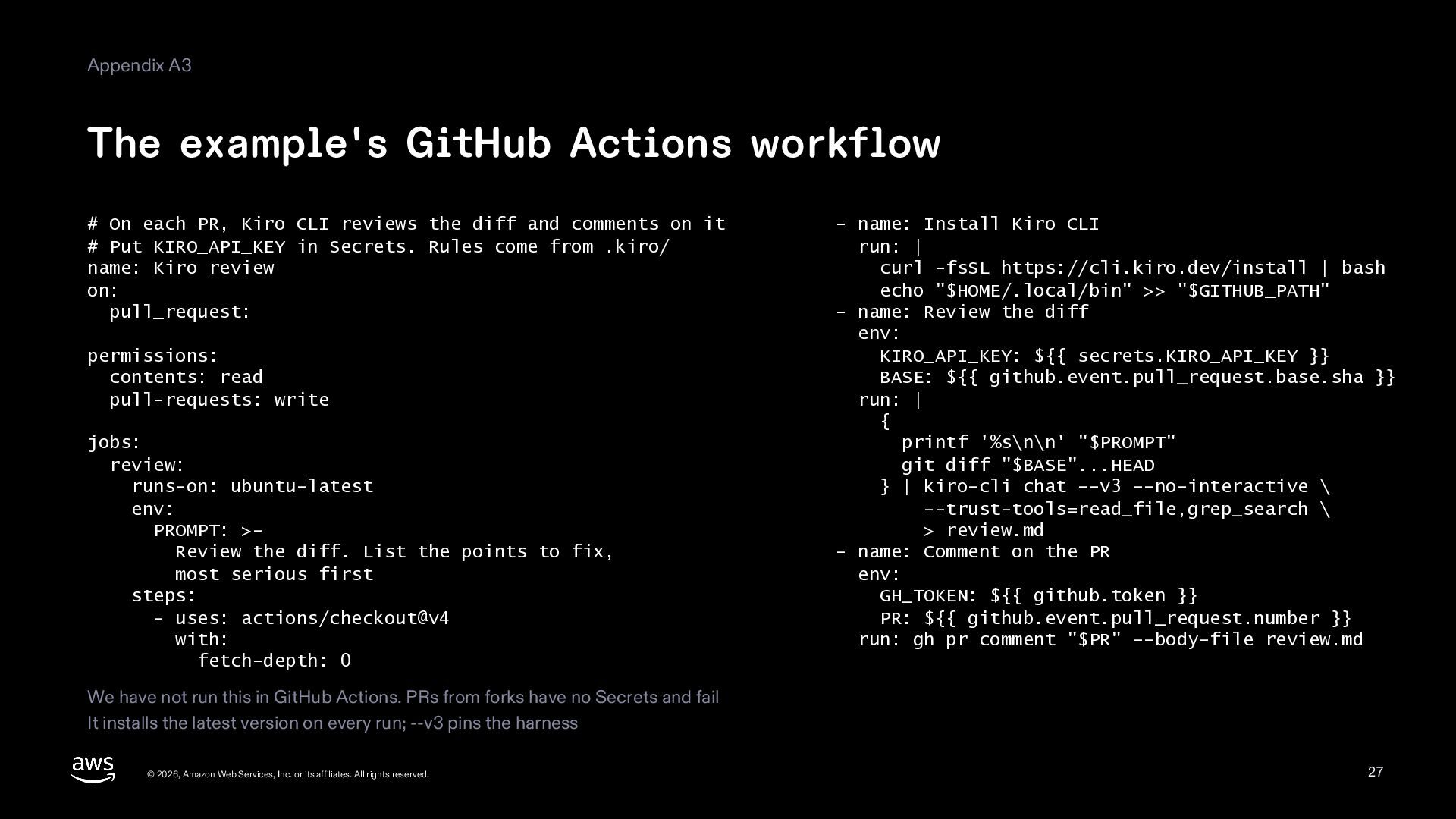
  27. Appendix A3 The example's GitHub Actions workflow # On each

    PR, Kiro CLI reviews the diff and comments on it # Put KIRO_API_KEY in Secrets. Rules come from .kiro/ name: Kiro review on: pull_request: permissions: contents: read pull-requests: write jobs: review: runs-on: ubuntu-latest env: PROMPT: >Review the diff. List the points to fix, most serious first steps: - uses: actions/checkout@v4 with: fetch-depth: 0 - name: Install Kiro CLI run: | curl -fsSL https://cli.kiro.dev/install | bash echo "$HOME/.local/bin" >> "$GITHUB_PATH" - name: Review the diff env: KIRO_API_KEY: ${{ secrets.KIRO_API_KEY }} BASE: ${{ github.event.pull_request.base.sha }} run: | { printf '%s\n\n' "$PROMPT" git diff "$BASE"...HEAD } | kiro-cli chat --v3 --no-interactive \ --trust-tools=read_file,grep_search \ > review.md - name: Comment on the PR env: GH_TOKEN: ${{ github.token }} PR: ${{ github.event.pull_request.number }} run: gh pr comment "$PR" --body-file review.md We have not run this in GitHub Actions. PRs from forks have no Secrets and fail It installs the latest version on every run; --v3 pins the harness © 2026, Amazon Web Services, Inc. or its affiliates. All rights reserved. 27
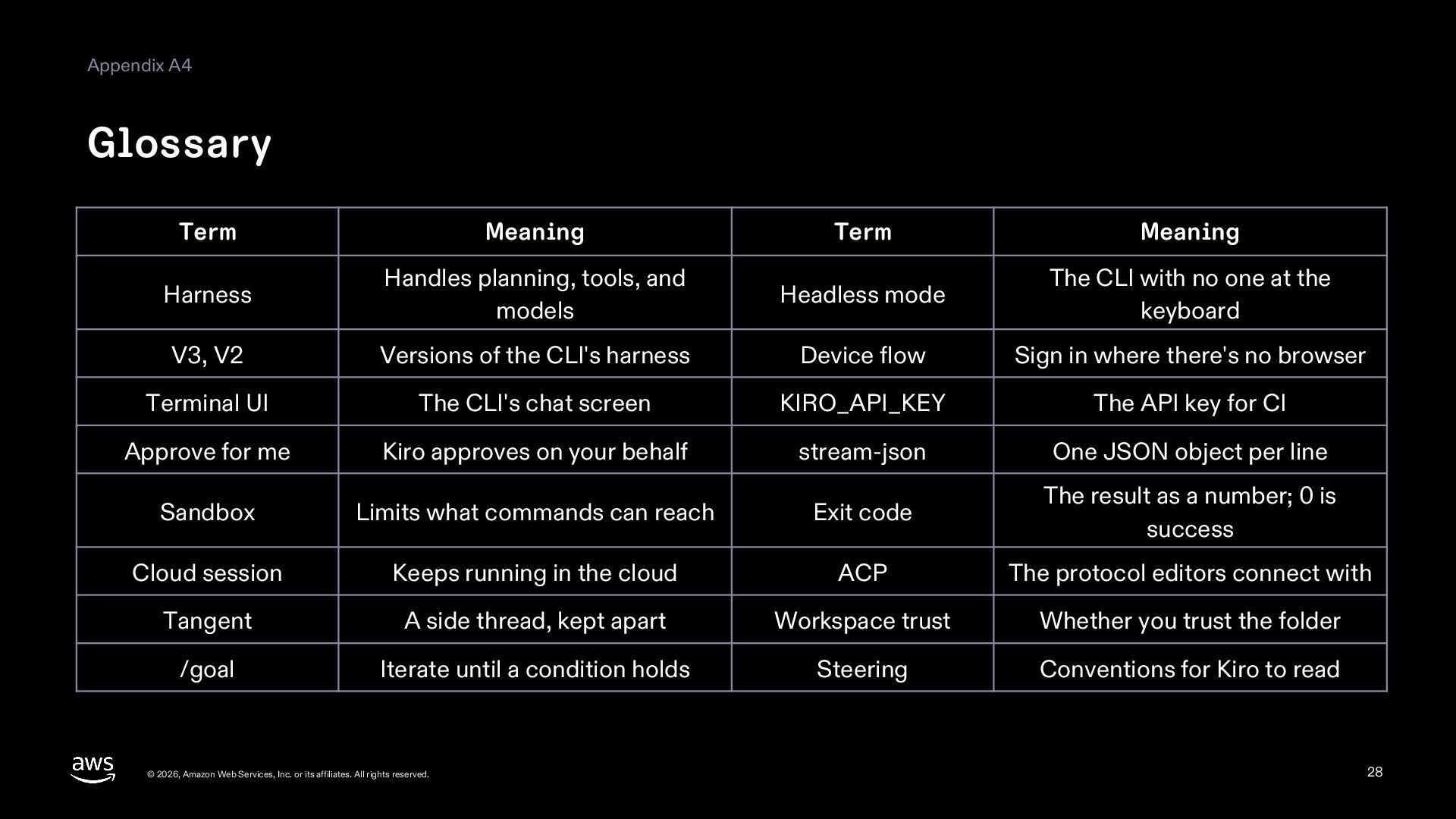
  28. Appendix A4 Glossary Term Meaning Term Meaning Harness Handles planning,

    tools, and models Headless mode The CLI with no one at the keyboard V3, V2 Versions of the CLI's harness Device flow Sign in where there's no browser Terminal UI The CLI's chat screen KIRO_API_KEY The API key for CI Approve for me Kiro approves on your behalf stream-json One JSON object per line Sandbox Limits what commands can reach Exit code The result as a number; 0 is success Cloud session Keeps running in the cloud ACP The protocol editors connect with Tangent A side thread, kept apart Workspace trust Whether you trust the folder /goal Iterate until a condition holds Steering Conventions for Kiro to read © 2026, Amazon Web Services, Inc. or its affiliates. All rights reserved. 28
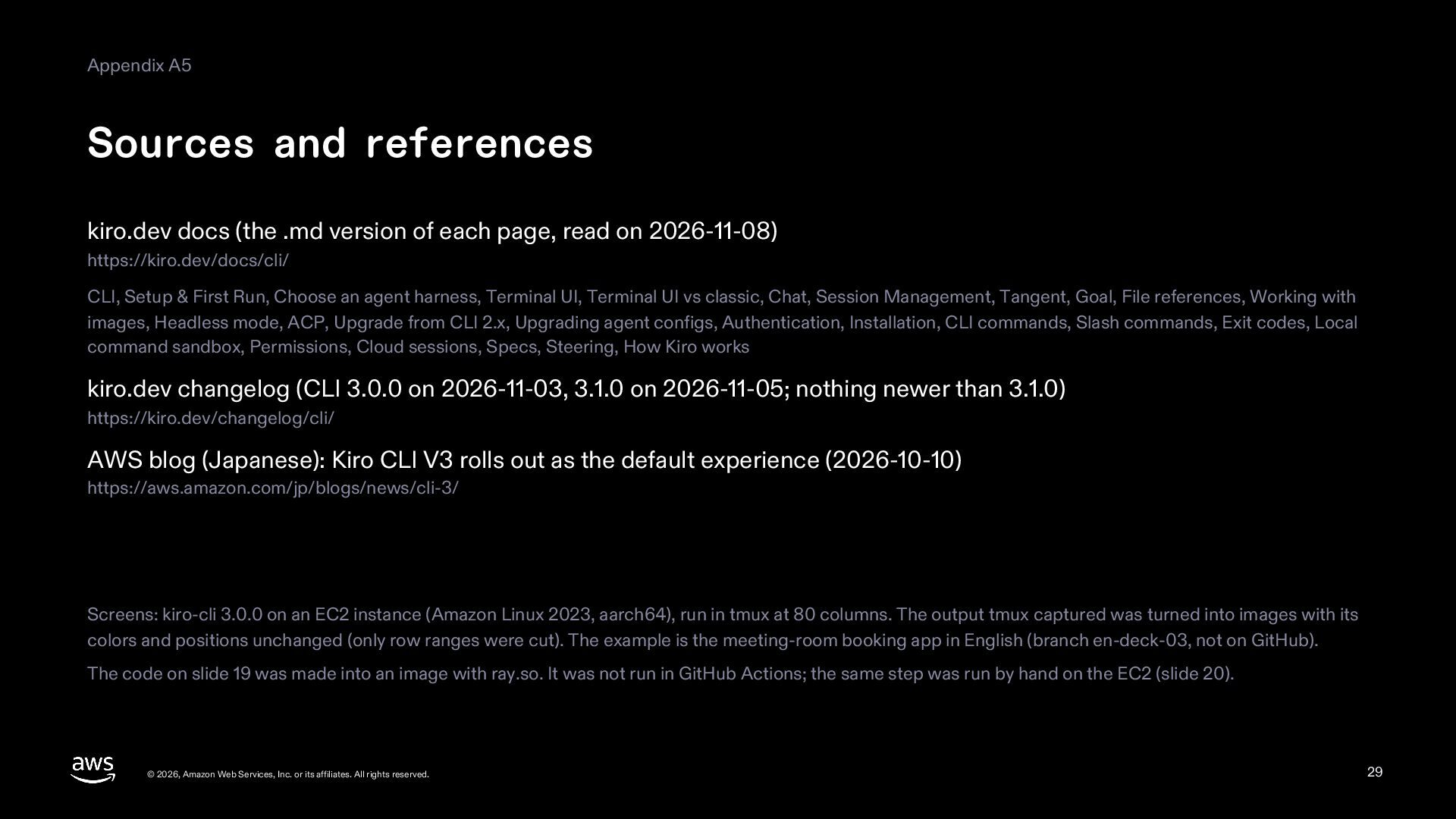
  29. Appendix A5 Sources and references kiro.dev docs (the .md version

    of each page, read on 2026-11-08) https://kiro.dev/docs/cli/ CLI, Setup & First Run, Choose an agent harness, Terminal UI, Terminal UI vs classic, Chat, Session Management, Tangent, Goal, File references, Working with images, Headless mode, ACP, Upgrade from CLI 2.x, Upgrading agent configs, Authentication, Installation, CLI commands, Slash commands, Exit codes, Local command sandbox, Permissions, Cloud sessions, Specs, Steering, How Kiro works kiro.dev changelog (CLI 3.0.0 on 2026-11-03, 3.1.0 on 2026-11-05; nothing newer than 3.1.0) https://kiro.dev/changelog/cli/ AWS blog (Japanese): Kiro CLI V3 rolls out as the default experience (2026-10-10) https://aws.amazon.com/jp/blogs/news/cli-3/ Screens: kiro-cli 3.0.0 on an EC2 instance (Amazon Linux 2023, aarch64), run in tmux at 80 columns. The output tmux captured was turned into images with its colors and positions unchanged (only row ranges were cut). The example is the meeting-room booking app in English (branch en-deck-03, not on GitHub). The code on slide 19 was made into an image with ray.so. It was not run in GitHub Actions; the same step was run by hand on the EC2 (slide 20). © 2026, Amazon Web Services, Inc. or its affiliates. All rights reserved. 29