Upgrade to Pro — share decks privately, control downloads, hide ads and more …

Intro to Kiro (One agent, every surface) | Kiro...

Avatar for Riku INADA Riku INADA PRO
November 08, 2026

Intro to Kiro (One agent, every surface) | Kiro: Zero to Hero 01

An introduction for developers who are new to Kiro. Kiro lets you use the same agent from the IDE, the CLI, Kiro Web, and the Kiro mobile app. Web needs a paid plan, and the iOS app is in early access. Using a meeting-room booking app as the running example, with real screenshots and diagrams, this deck walks you through installing Kiro and making your first request. It then covers how to ask and which built-in agent to pick, Autopilot and Supervised modes, approving commands, reviewing diffs and undoing changes, and how models and credits work. Two short examples give a first look at steering, hooks, specs, and MCP, which later decks in the series cover in depth. As of November 2026 (Kiro IDE 1.4, Kiro CLI 3.1). This is deck 01, in the Get started part of the Kiro: Zero to Hero series.

Avatar for Riku INADA

Riku INADA PRO

November 08, 2026

More Decks by Riku INADA

Other Decks in Technology

Transcript

  1. Kiro: Zero to Hero Get started Intro to Kiro One

    agent, every surface As of November 2026 (Kiro IDE 1.4, Kiro CLI 3.1) 01 November 2026 Riku Inada Amazon Web Services Japan © 2026, Amazon Web Services, Inc. or its affiliates. All rights reserved. 1
  2. Introduction About me Riku Inada Amazon Web Services Japan G.K.

    Solutions Architect Works mainly with manufacturing customers Recent work Promoting the AI-Driven Development Life Cycle (AI-DLC) Writing and speaking about Kiro and AWS Amplify © 2026, Amazon Web Services, Inc. or its affiliates. All rights reserved. X @inada_riku Speaker Deck speakerdeck.com/inariku Zenn zenn.dev/inariku GitHub github.com/inariku 2
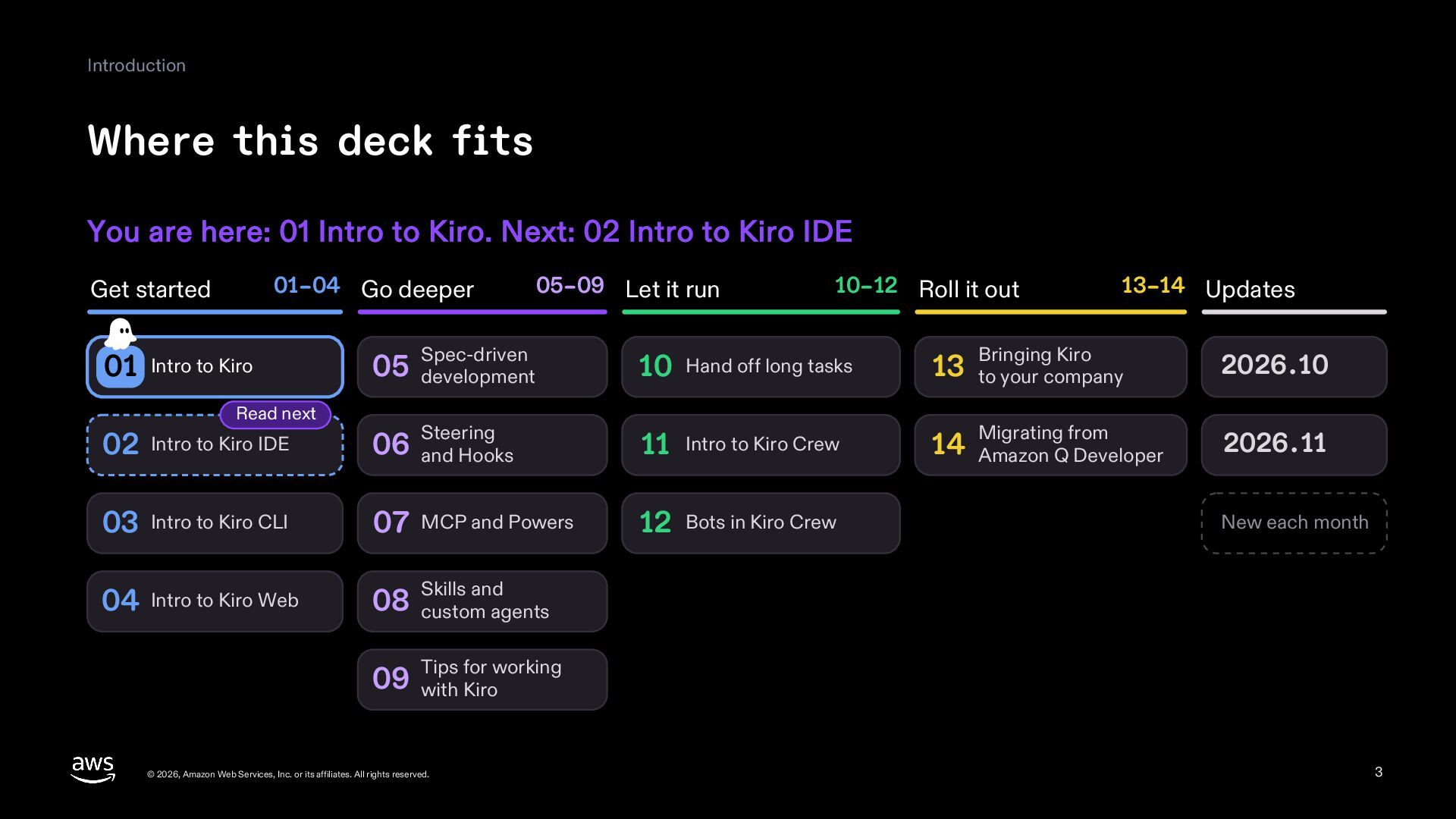
  3. Introduction Where this deck fits You are here: 01 Intro

    to Kiro. Next: 02 Intro to Kiro IDE 01–04 Go deeper Get started 01 Intro to Kiro Read next 05–09 Let it run 10–12 Roll it out 13–14 Updates 05 development Spec-driven 10 Hand off long tasks 13 to your company Steering 14 Amazon Q Developer 02 Intro to Kiro IDE 06 and Hooks 11 Intro to Kiro Crew 03 Intro to Kiro CLI 07 MCP and Powers 12 Bots in Kiro Crew 04 Intro to Kiro Web and 08 Skills custom agents Bringing Kiro 2026.10 Migrating from 2026.11 New each month for working 09 Tips with Kiro © 2026, Amazon Web Services, Inc. or its affiliates. All rights reserved. 3
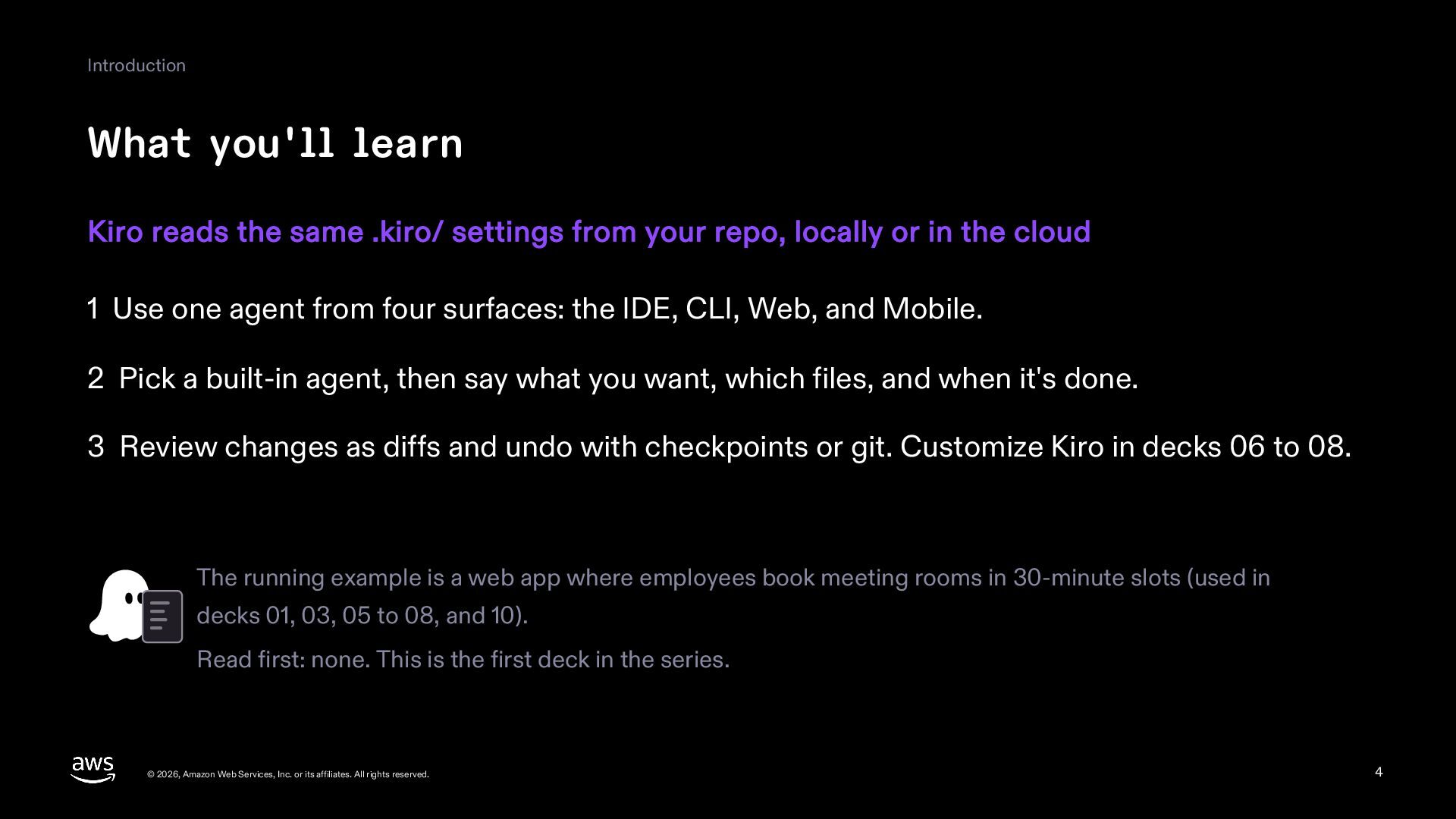
  4. Introduction What you'll learn Kiro reads the same .kiro/ settings

    from your repo, locally or in the cloud 1 Use one agent from four surfaces: the IDE, CLI, Web, and Mobile. 2 Pick a built-in agent, then say what you want, which files, and when it's done. 3 Review changes as diffs and undo with checkpoints or git. Customize Kiro in decks 06 to 08. The running example is a web app where employees book meeting rooms in 30-minute slots (used in decks 01, 03, 05 to 08, and 10). Read first: none. This is the first deck in the series. © 2026, Amazon Web Services, Inc. or its affiliates. All rights reserved. 4
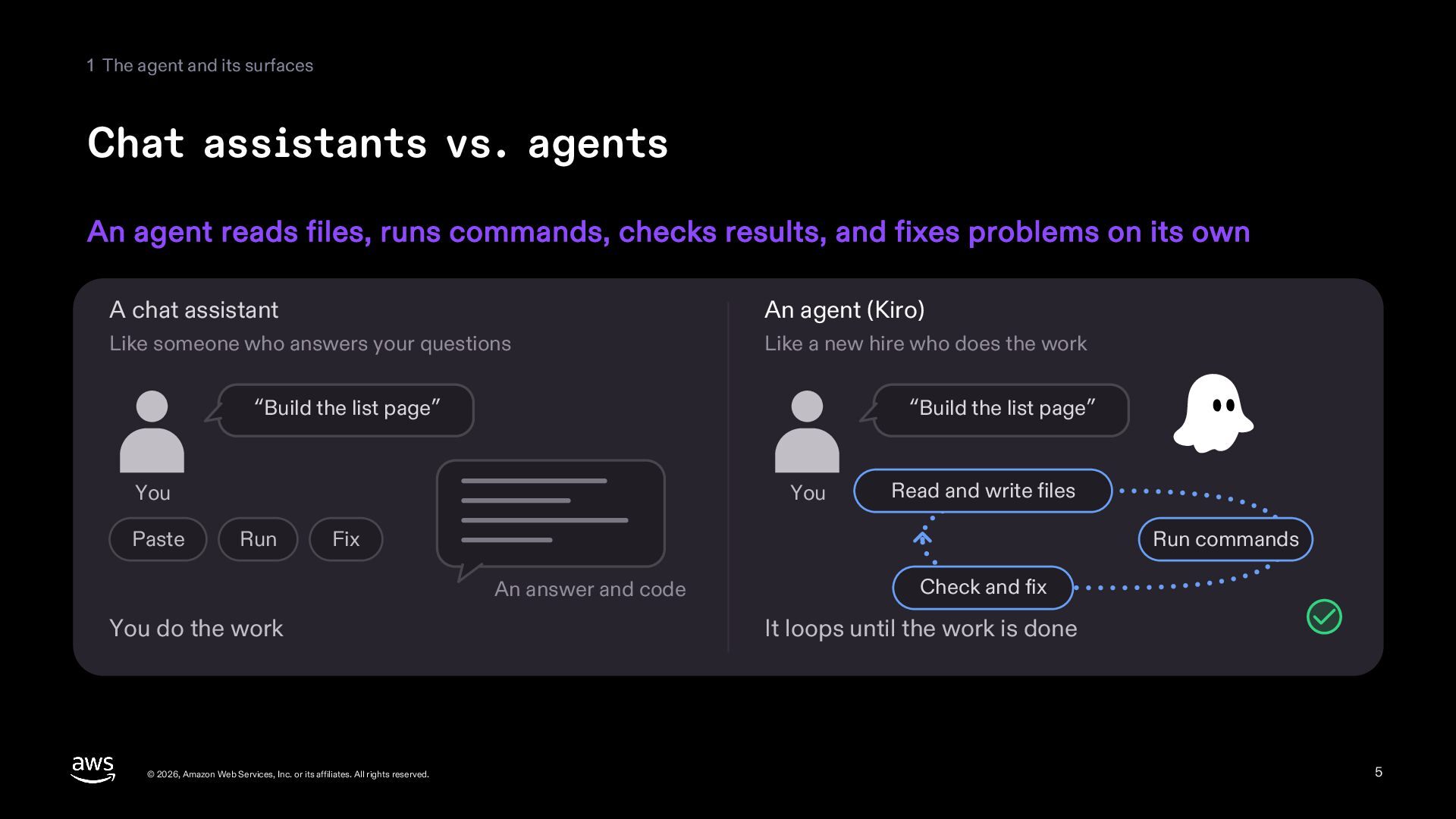
  5. 1 The agent and its surfaces Chat assistants vs. agents

    An agent reads files, runs commands, checks results, and fixes problems on its own A chat assistant An agent (Kiro) Like someone who answers your questions Like a new hire who does the work “Build the list page” “Build the list page” You Paste You Run Read and write files Fix Run commands An answer and code You do the work © 2026, Amazon Web Services, Inc. or its affiliates. All rights reserved. Check and fix It loops until the work is done 5
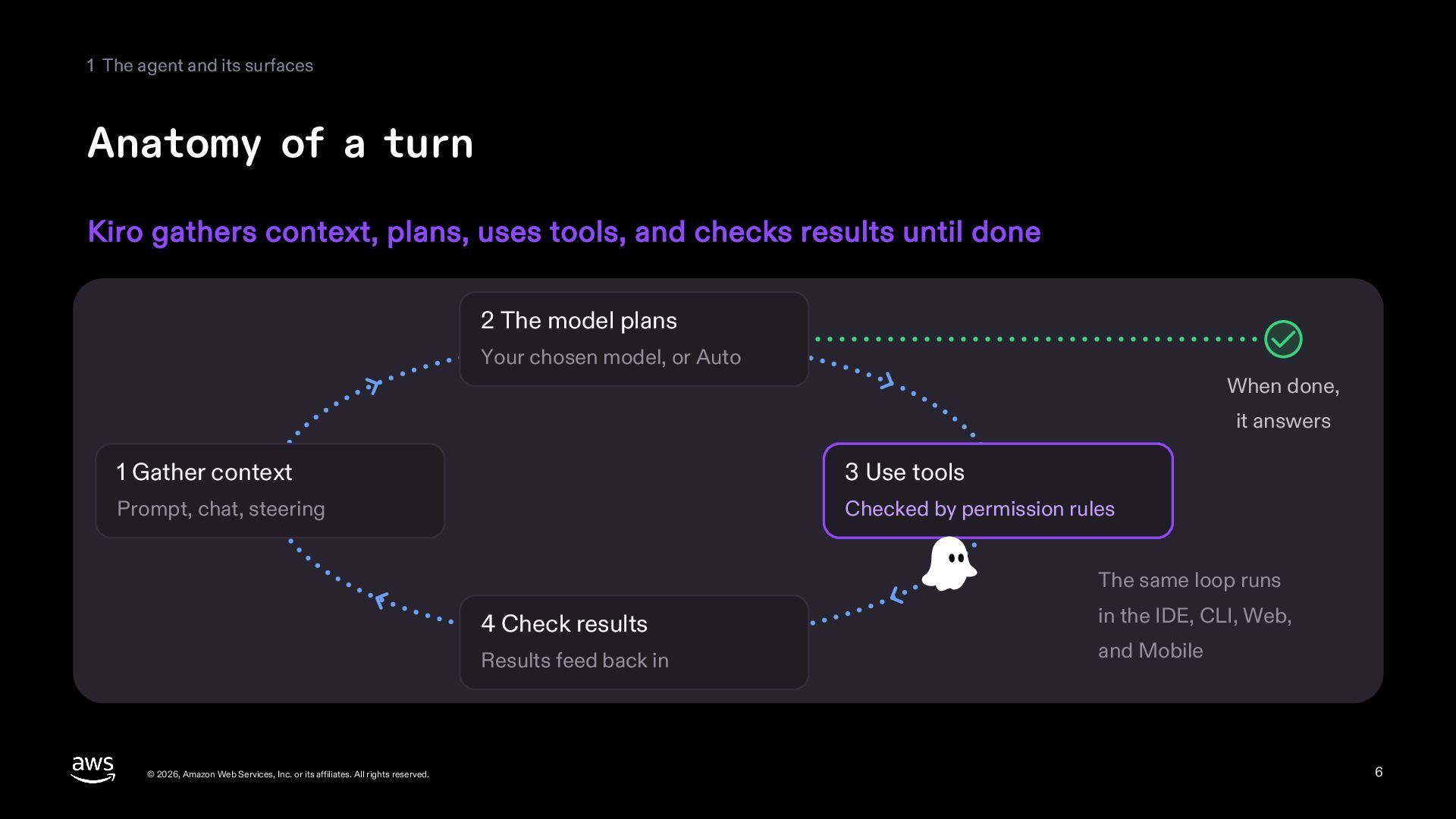
  6. 1 The agent and its surfaces Anatomy of a turn

    Kiro gathers context, plans, uses tools, and checks results until done 2 The model plans Your chosen model, or Auto When done, it answers 1 Gather context 3 Use tools Prompt, chat, steering Checked by permission rules The same loop runs 4 Check results Results feed back in © 2026, Amazon Web Services, Inc. or its affiliates. All rights reserved. in the IDE, CLI, Web, and Mobile 6
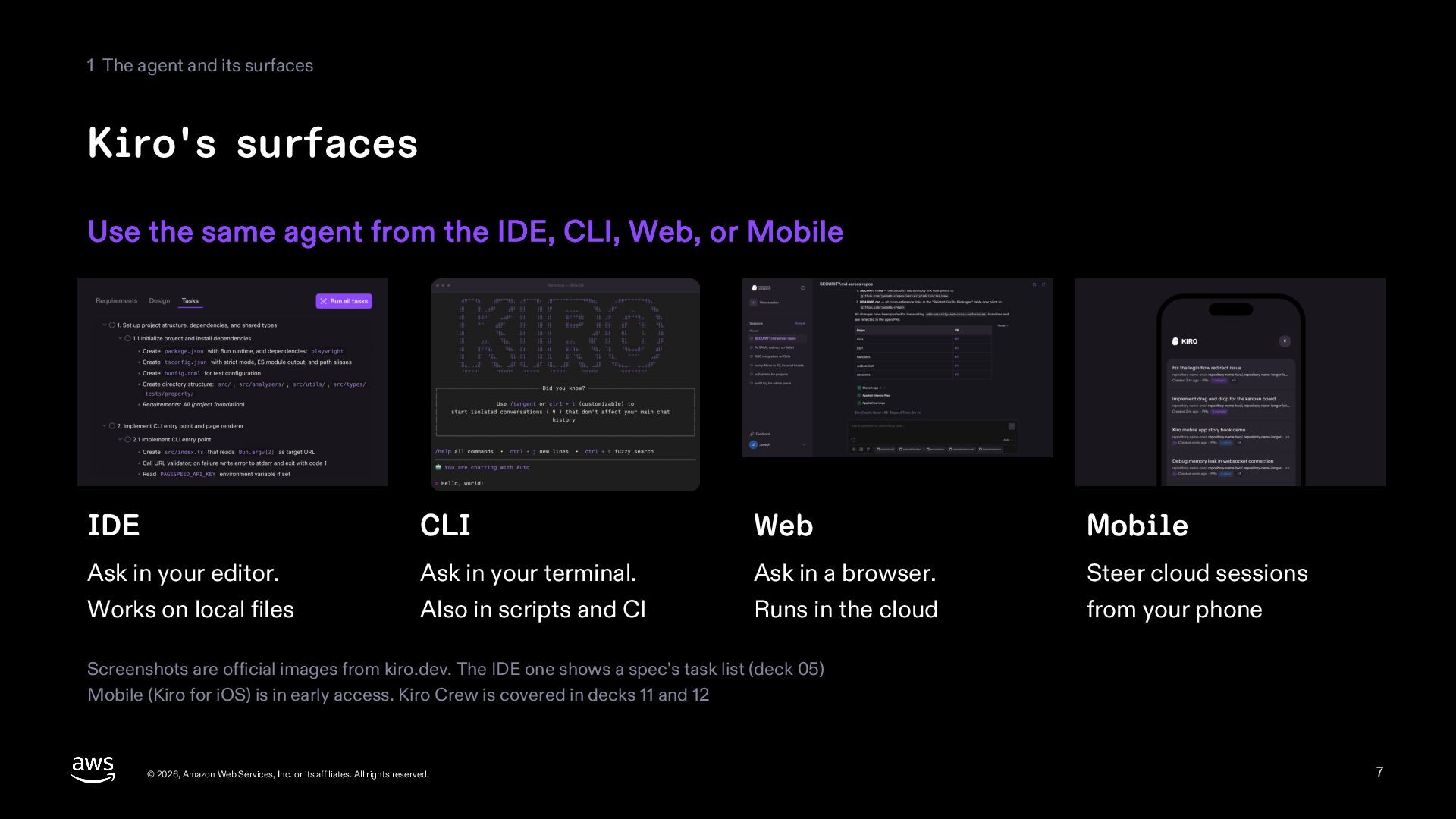
  7. 1 The agent and its surfaces Kiro's surfaces Use the

    same agent from the IDE, CLI, Web, or Mobile IDE CLI Web Mobile Ask in your editor. Ask in your terminal. Ask in a browser. Steer cloud sessions Works on local files Also in scripts and CI Runs in the cloud from your phone Screenshots are official images from kiro.dev. The IDE one shows a spec's task list (deck 05) Mobile (Kiro for iOS) is in early access. Kiro Crew is covered in decks 11 and 12 © 2026, Amazon Web Services, Inc. or its affiliates. All rights reserved. 7
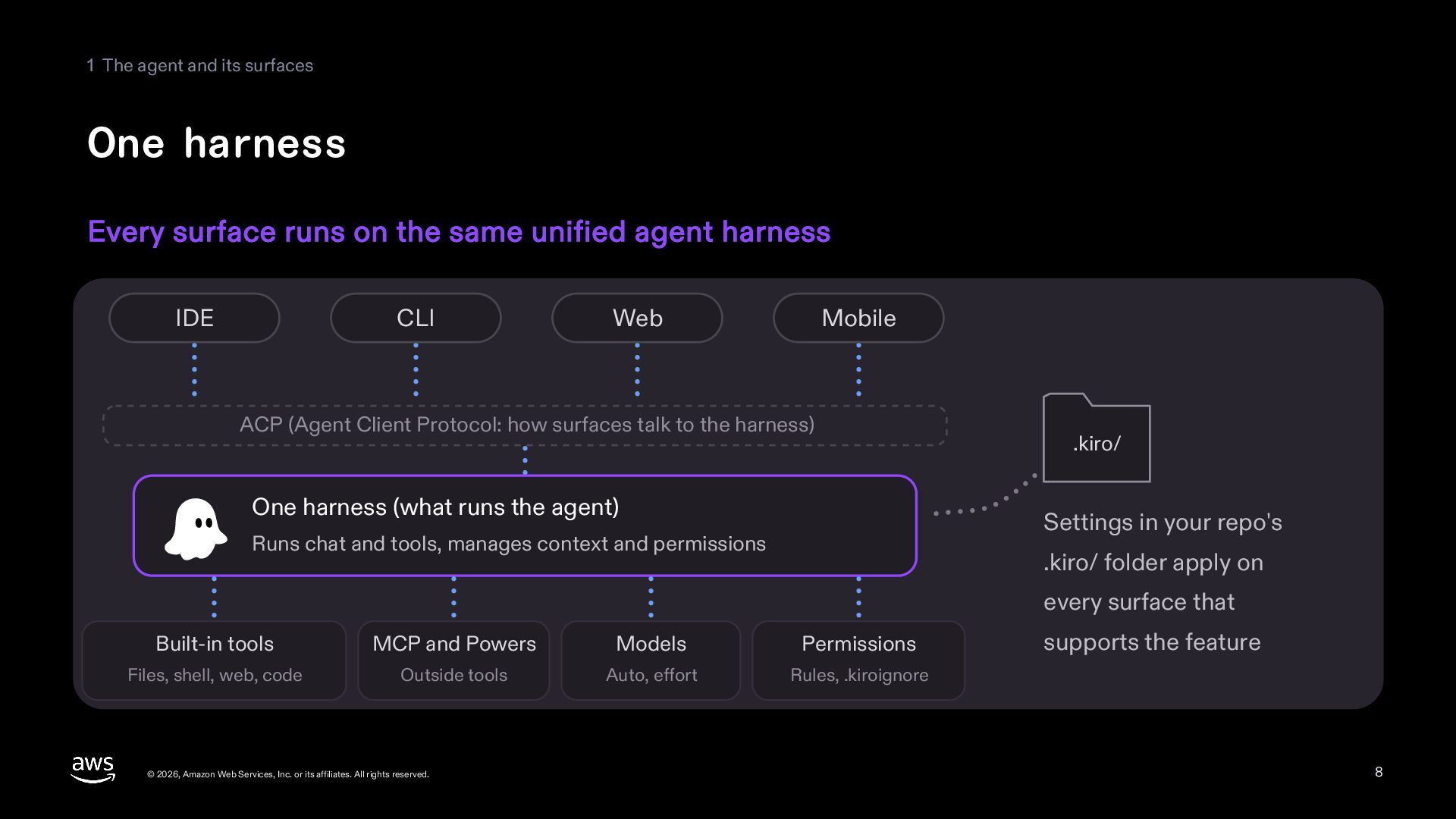
  8. 1 The agent and its surfaces One harness Every surface

    runs on the same unified agent harness IDE CLI Web Mobile ACP (Agent Client Protocol: how surfaces talk to the harness) One harness (what runs the agent) .kiro/ Settings in your repo's Runs chat and tools, manages context and permissions .kiro/ folder apply on every surface that Built-in tools MCP and Powers Models Permissions Files, shell, web, code Outside tools Auto, effort Rules, .kiroignore © 2026, Amazon Web Services, Inc. or its affiliates. All rights reserved. supports the feature 8
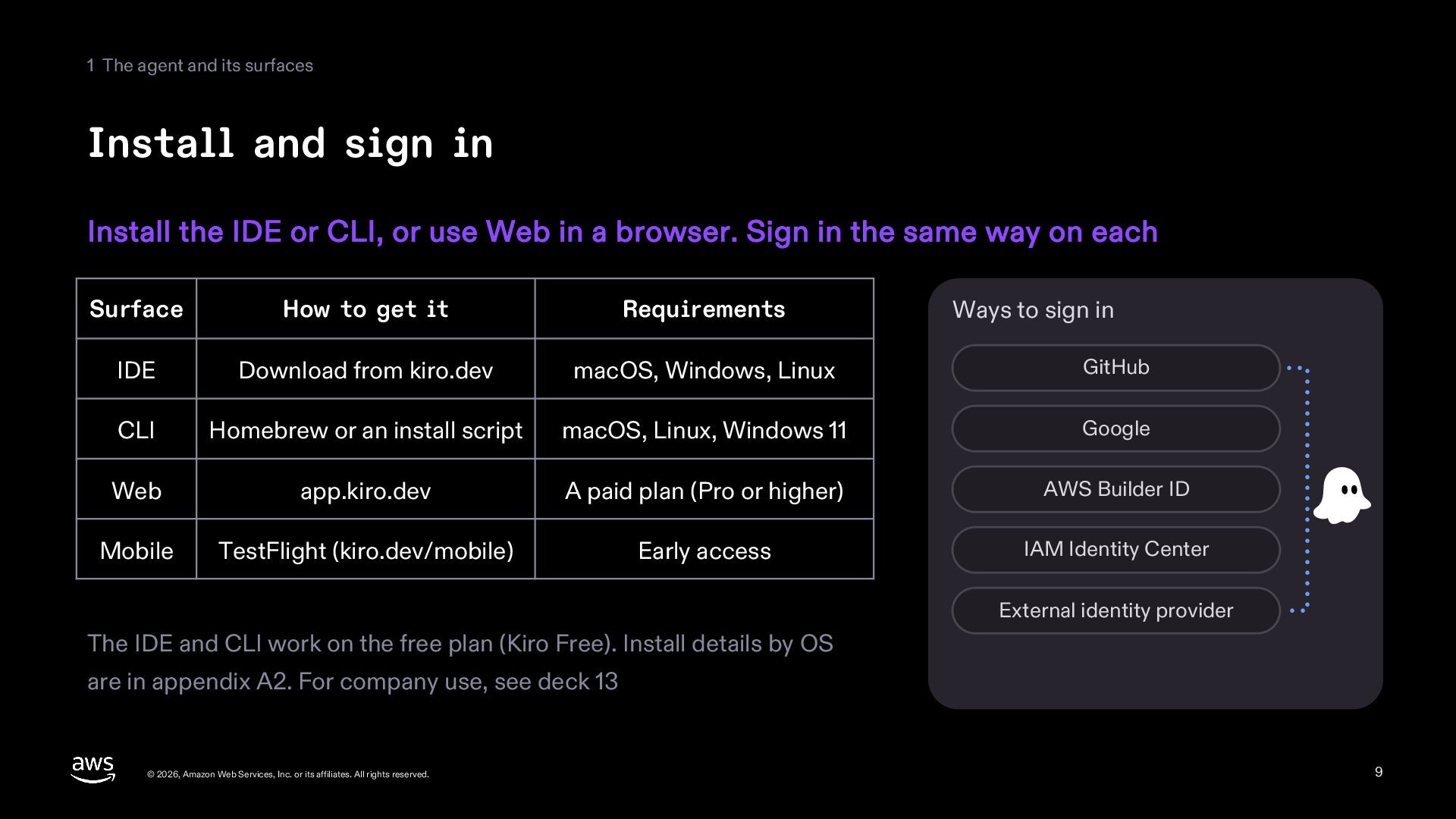
  9. 1 The agent and its surfaces Install and sign in

    Install the IDE or CLI, or use Web in a browser. Sign in the same way on each Surface How to get it Requirements IDE Download from kiro.dev macOS, Windows, Linux GitHub CLI Homebrew or an install script macOS, Linux, Windows 11 Google Web app.kiro.dev A paid plan (Pro or higher) AWS Builder ID Mobile TestFlight (kiro.dev/mobile) Early access IAM Identity Center Ways to sign in External identity provider The IDE and CLI work on the free plan (Kiro Free). Install details by OS are in appendix A2. For company use, see deck 13 © 2026, Amazon Web Services, Inc. or its affiliates. All rights reserved. 9
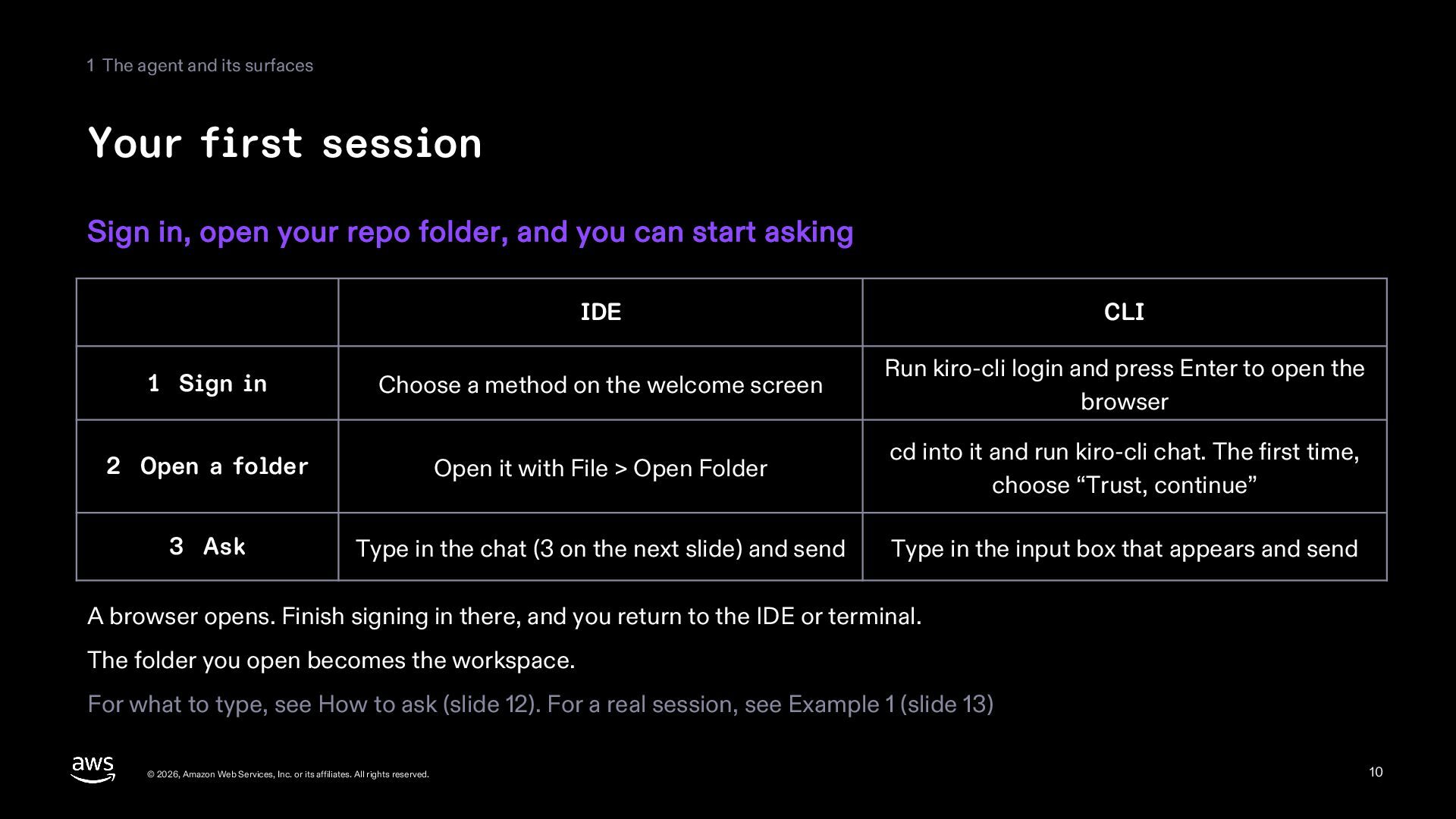
  10. 1 The agent and its surfaces Your first session Sign

    in, open your repo folder, and you can start asking IDE CLI 1 Sign in Choose a method on the welcome screen Run kiro-cli login and press Enter to open the browser 2 Open a folder Open it with File > Open Folder cd into it and run kiro-cli chat. The first time, choose “Trust, continue” 3 Ask Type in the chat (3 on the next slide) and send Type in the input box that appears and send A browser opens. Finish signing in there, and you return to the IDE or terminal. The folder you open becomes the workspace. For what to type, see How to ask (slide 12). For a real session, see Example 1 (slide 13) © 2026, Amazon Web Services, Inc. or its affiliates. All rights reserved. 10
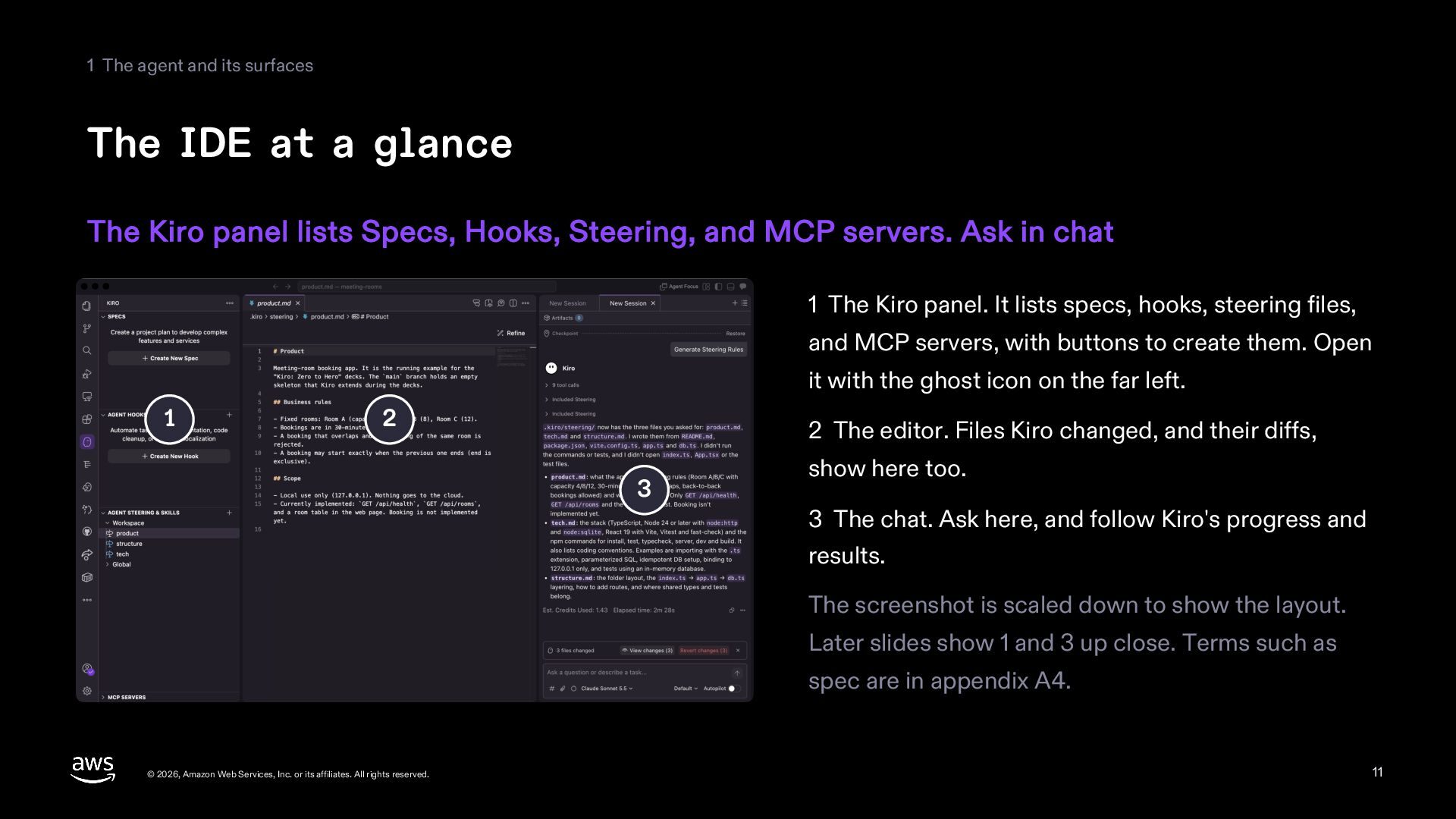
  11. 1 The agent and its surfaces The IDE at a

    glance The Kiro panel lists Specs, Hooks, Steering, and MCP servers. Ask in chat 1 The Kiro panel. It lists specs, hooks, steering files, and MCP servers, with buttons to create them. Open it with the ghost icon on the far left. 1 2 2 The editor. Files Kiro changed, and their diffs, 3 show here too. 3 The chat. Ask here, and follow Kiro's progress and results. The screenshot is scaled down to show the layout. Later slides show 1 and 3 up close. Terms such as spec are in appendix A4. © 2026, Amazon Web Services, Inc. or its affiliates. All rights reserved. 11
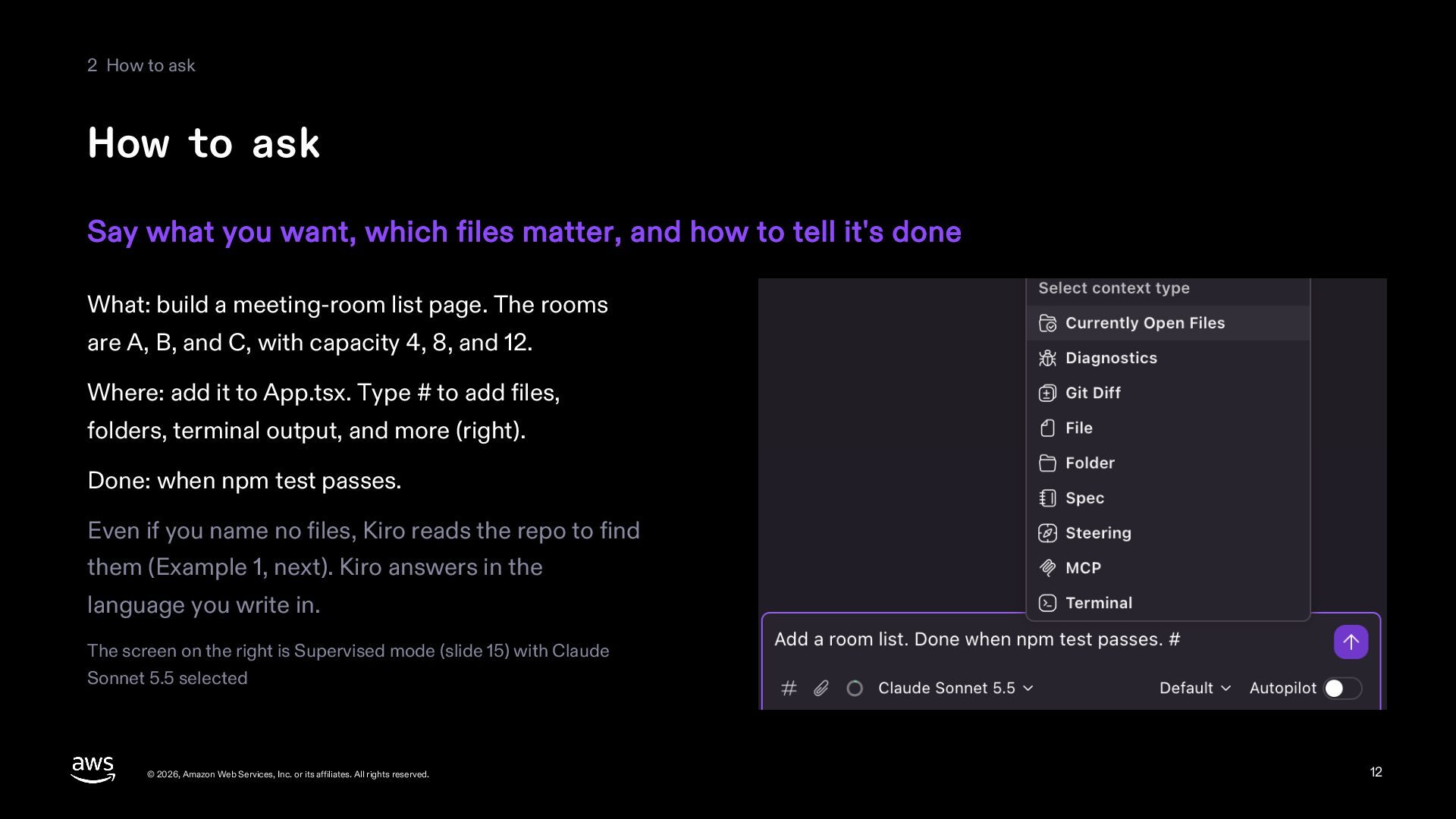
  12. 2 How to ask How to ask Say what you

    want, which files matter, and how to tell it's done What: build a meeting-room list page. The rooms are A, B, and C, with capacity 4, 8, and 12. Where: add it to App.tsx. Type # to add files, folders, terminal output, and more (right). Done: when npm test passes. Even if you name no files, Kiro reads the repo to find them (Example 1, next). Kiro answers in the language you write in. The screen on the right is Supervised mode (slide 15) with Claude Sonnet 5.5 selected © 2026, Amazon Web Services, Inc. or its affiliates. All rights reserved. 12
  13. 2 How to ask Example 1: Build a page from

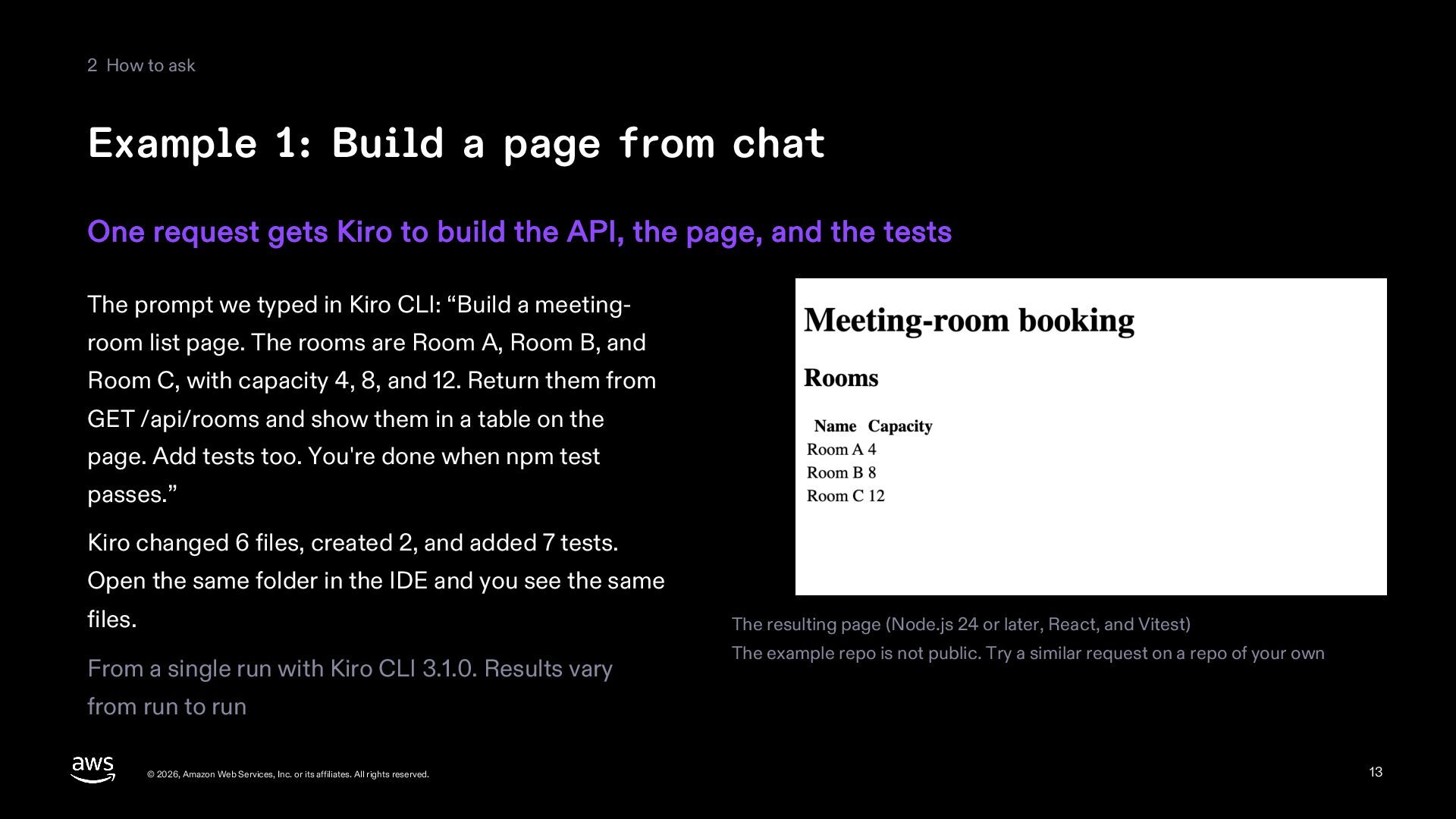
    chat One request gets Kiro to build the API, the page, and the tests The prompt we typed in Kiro CLI: “Build a meetingroom list page. The rooms are Room A, Room B, and Room C, with capacity 4, 8, and 12. Return them from GET /api/rooms and show them in a table on the page. Add tests too. You're done when npm test passes.” Kiro changed 6 files, created 2, and added 7 tests. Open the same folder in the IDE and you see the same files. The resulting page (Node.js 24 or later, React, and Vitest) From a single run with Kiro CLI 3.1.0. Results vary The example repo is not public. Try a similar request on a repo of your own from run to run © 2026, Amazon Web Services, Inc. or its affiliates. All rights reserved. 13
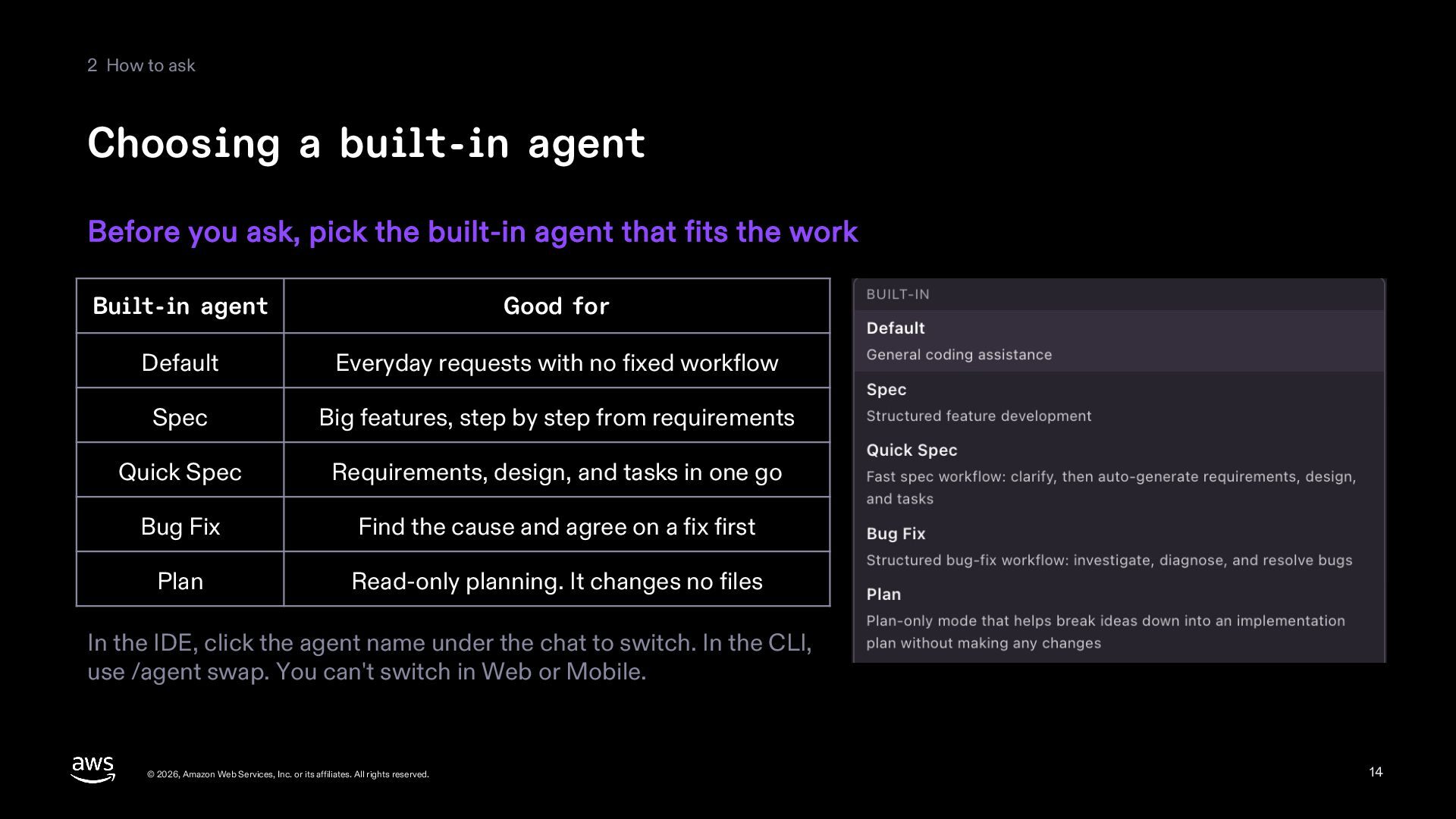
  14. 2 How to ask Choosing a built-in agent Before you

    ask, pick the built-in agent that fits the work Built-in agent Good for Default Everyday requests with no fixed workflow Spec Big features, step by step from requirements Quick Spec Requirements, design, and tasks in one go Bug Fix Find the cause and agree on a fix first Plan Read-only planning. It changes no files In the IDE, click the agent name under the chat to switch. In the CLI, use /agent swap. You can't switch in Web or Mobile. © 2026, Amazon Web Services, Inc. or its affiliates. All rights reserved. 14
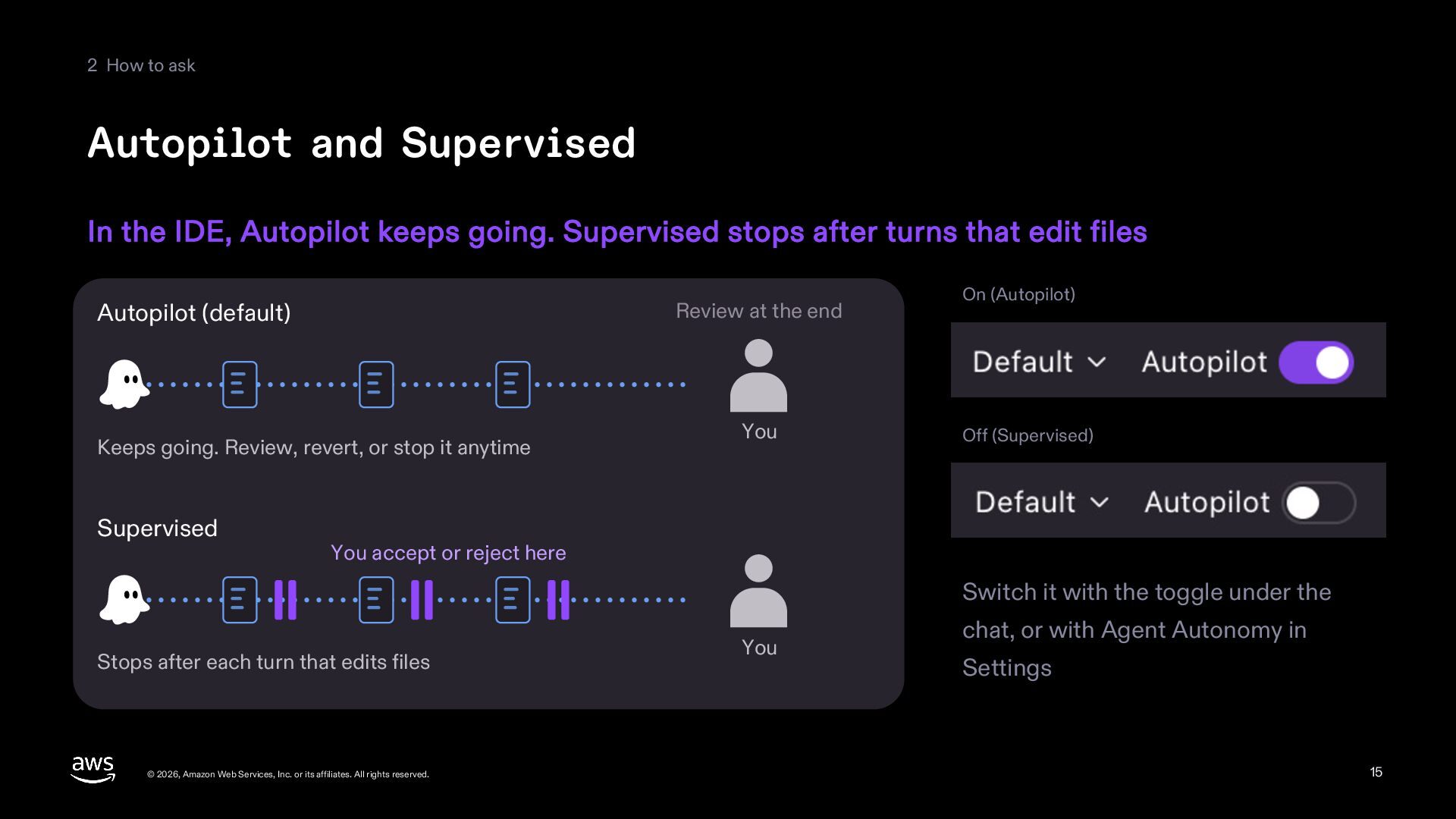
  15. 2 How to ask Autopilot and Supervised In the IDE,

    Autopilot keeps going. Supervised stops after turns that edit files Review at the end Autopilot (default) Keeps going. Review, revert, or stop it anytime Supervised You On (Autopilot) Off (Supervised) You accept or reject here Switch it with the toggle under the Stops after each turn that edits files © 2026, Amazon Web Services, Inc. or its affiliates. All rights reserved. You chat, or with Agent Autonomy in Settings 15
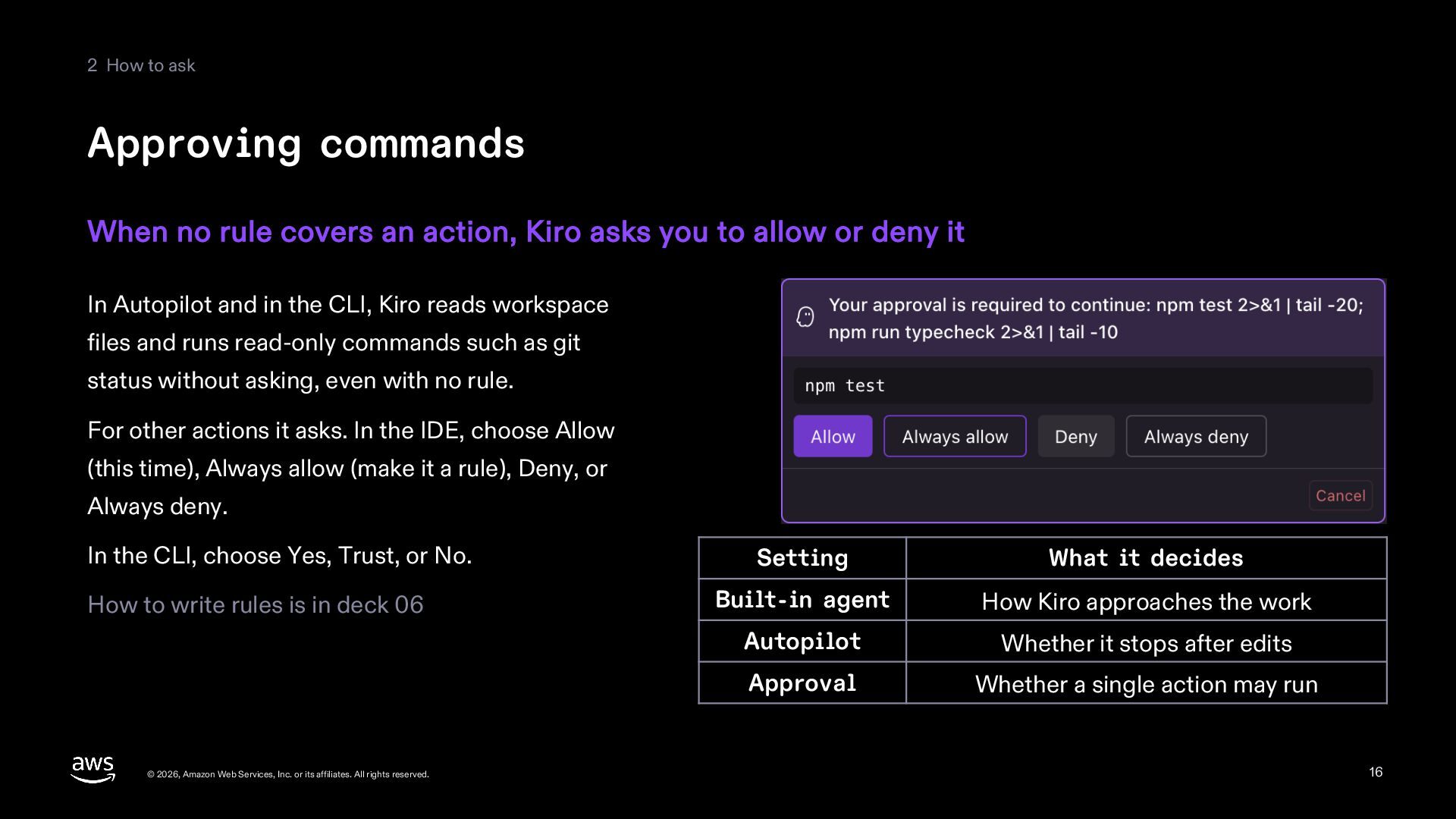
  16. 2 How to ask Approving commands When no rule covers

    an action, Kiro asks you to allow or deny it In Autopilot and in the CLI, Kiro reads workspace files and runs read-only commands such as git status without asking, even with no rule. For other actions it asks. In the IDE, choose Allow (this time), Always allow (make it a rule), Deny, or Always deny. In the CLI, choose Yes, Trust, or No. How to write rules is in deck 06 © 2026, Amazon Web Services, Inc. or its affiliates. All rights reserved. Setting What it decides Built-in agent How Kiro approaches the work Autopilot Whether it stops after edits Approval Whether a single action may run 16
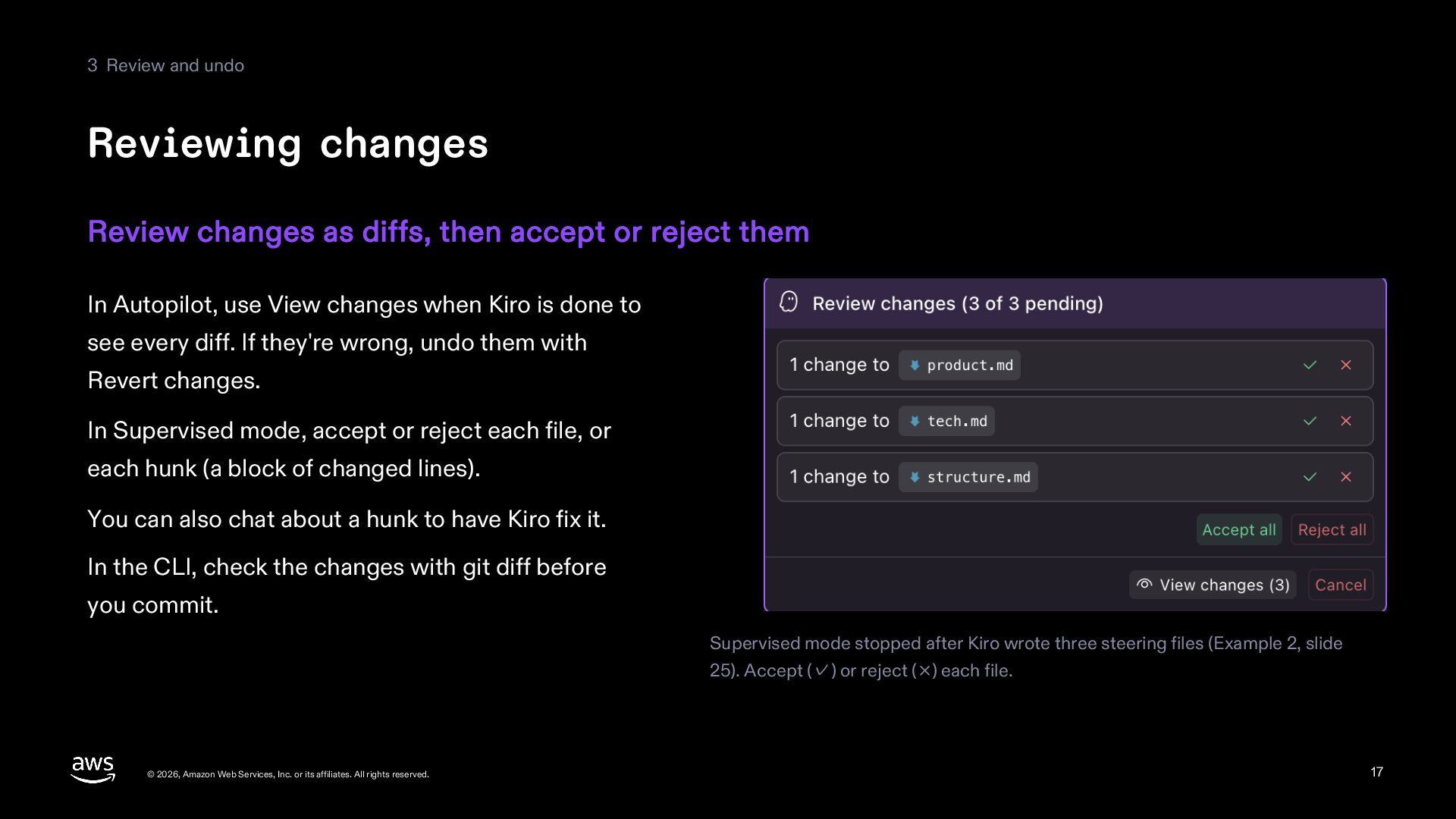
  17. 3 Review and undo Reviewing changes Review changes as diffs,

    then accept or reject them In Autopilot, use View changes when Kiro is done to see every diff. If they're wrong, undo them with Revert changes. In Supervised mode, accept or reject each file, or each hunk (a block of changed lines). You can also chat about a hunk to have Kiro fix it. In the CLI, check the changes with git diff before you commit. Supervised mode stopped after Kiro wrote three steering files (Example 2, slide 25). Accept (✓) or reject (×) each file. © 2026, Amazon Web Services, Inc. or its affiliates. All rights reserved. 17
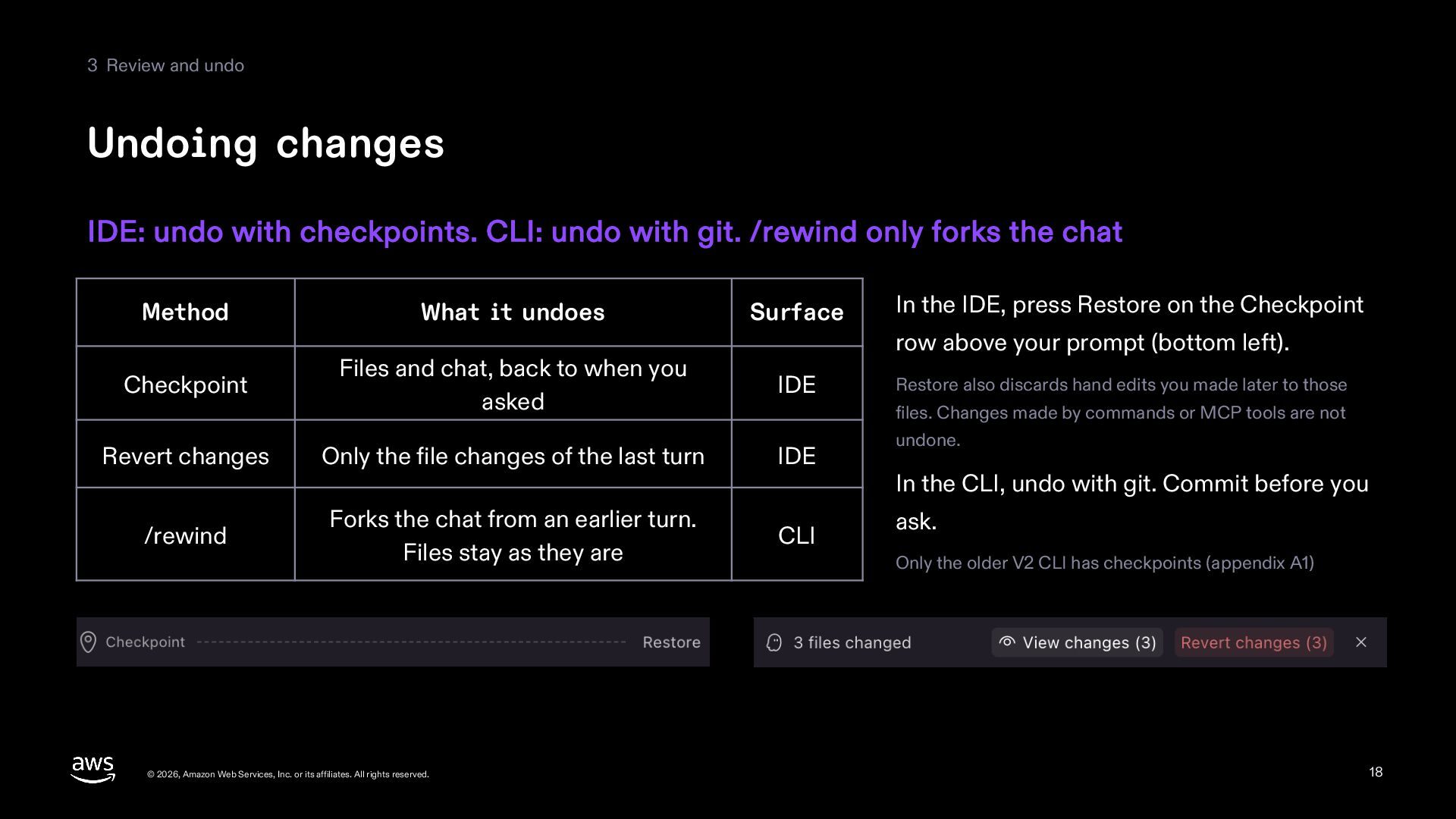
  18. 3 Review and undo Undoing changes IDE: undo with checkpoints.

    CLI: undo with git. /rewind only forks the chat Method What it undoes Surface In the IDE, press Restore on the Checkpoint Checkpoint Files and chat, back to when you asked IDE Restore also discards hand edits you made later to those Revert changes Only the file changes of the last turn IDE /rewind Forks the chat from an earlier turn. Files stay as they are CLI © 2026, Amazon Web Services, Inc. or its affiliates. All rights reserved. row above your prompt (bottom left). files. Changes made by commands or MCP tools are not undone. In the CLI, undo with git. Commit before you ask. Only the older V2 CLI has checkpoints (appendix A1) 18
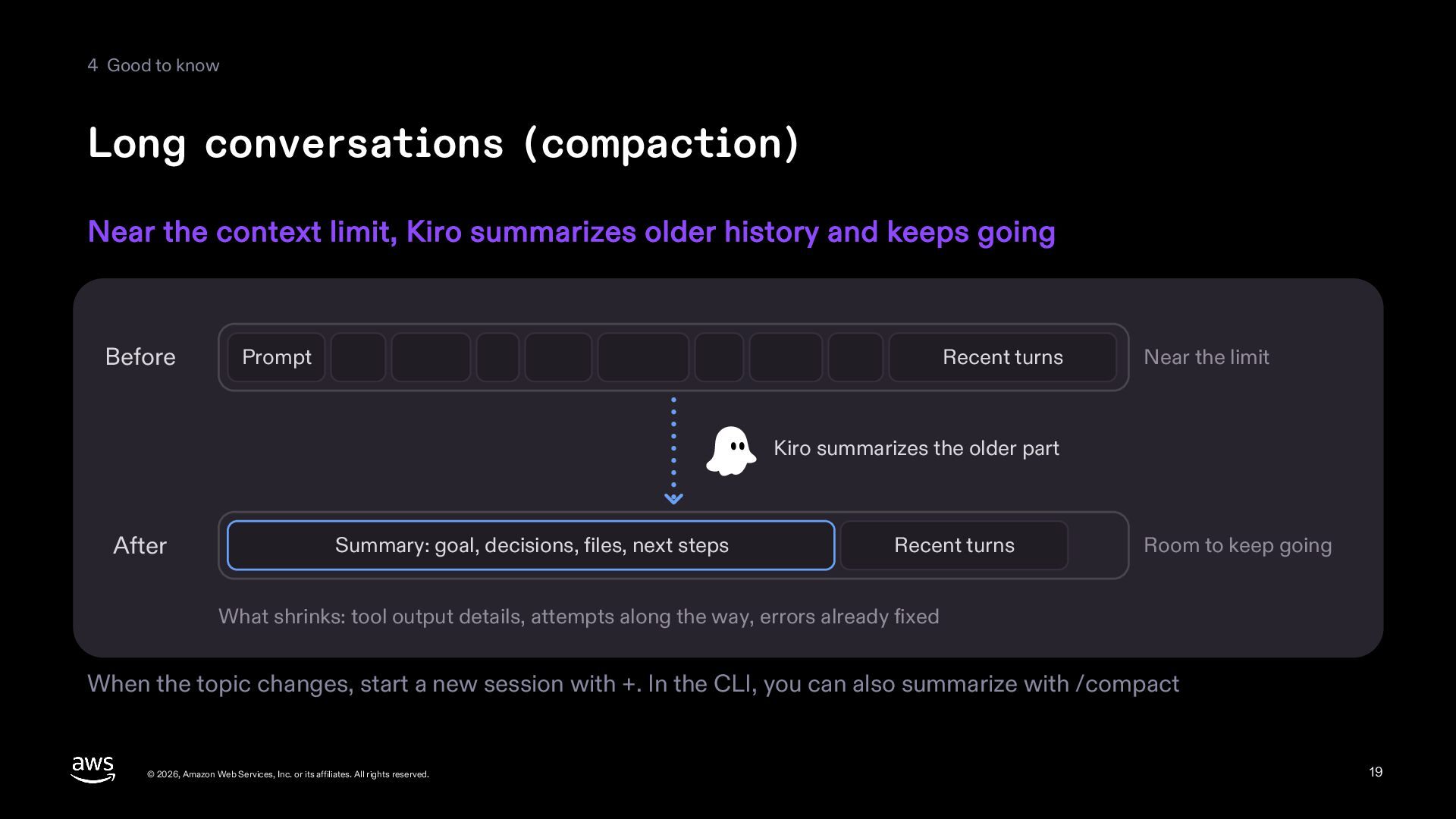
  19. 4 Good to know Long conversations (compaction) Near the context

    limit, Kiro summarizes older history and keeps going Before Prompt Recent turns Near the limit Kiro summarizes the older part After Summary: goal, decisions, files, next steps Recent turns Room to keep going What shrinks: tool output details, attempts along the way, errors already fixed When the topic changes, start a new session with +. In the CLI, you can also summarize with /compact © 2026, Amazon Web Services, Inc. or its affiliates. All rights reserved. 19
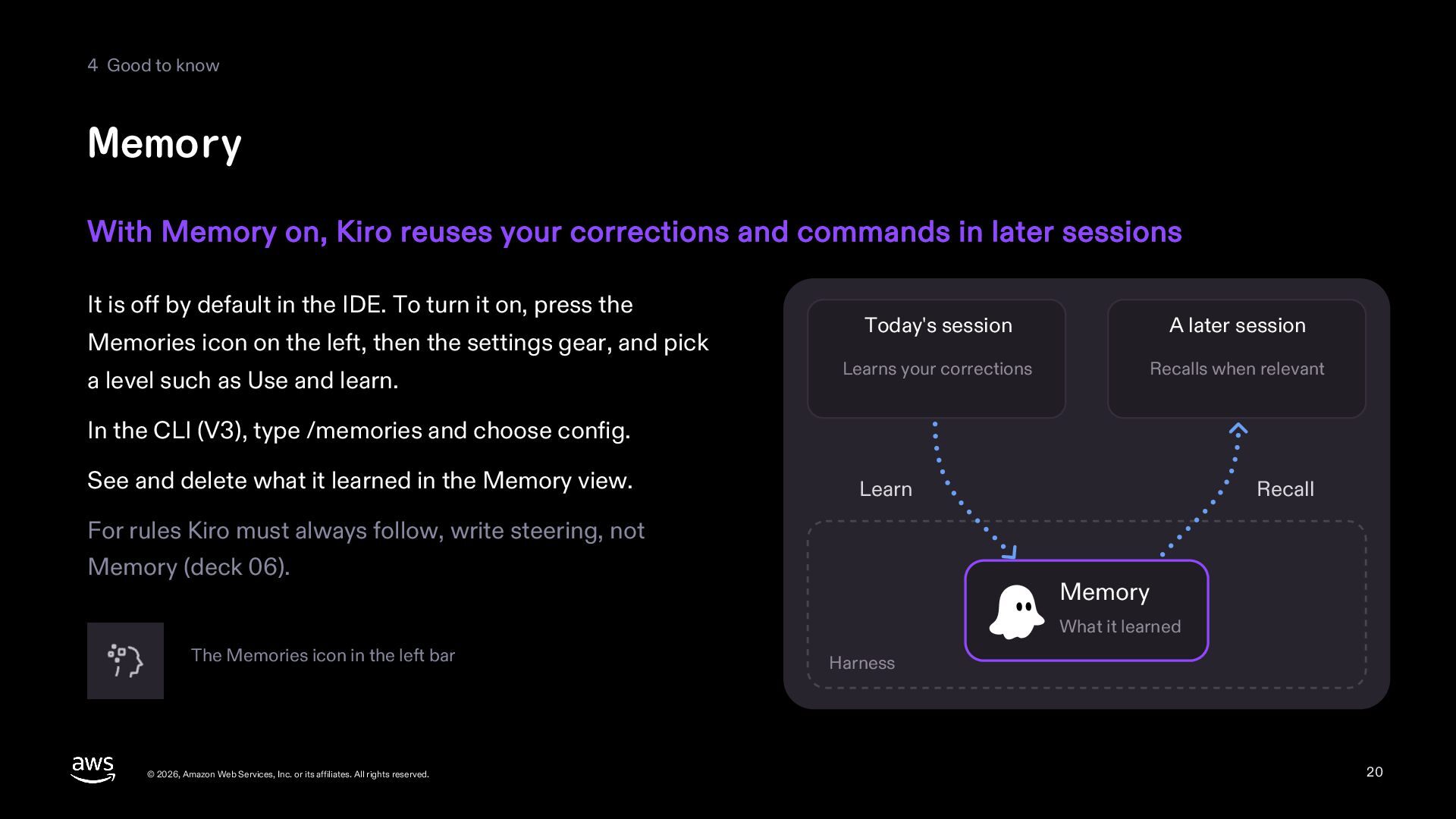
  20. 4 Good to know Memory With Memory on, Kiro reuses

    your corrections and commands in later sessions It is off by default in the IDE. To turn it on, press the Memories icon on the left, then the settings gear, and pick a level such as Use and learn. Today's session A later session Learns your corrections Recalls when relevant In the CLI (V3), type /memories and choose config. See and delete what it learned in the Memory view. Learn Recall For rules Kiro must always follow, write steering, not Memory (deck 06). Memory What it learned The Memories icon in the left bar © 2026, Amazon Web Services, Inc. or its affiliates. All rights reserved. Harness 20
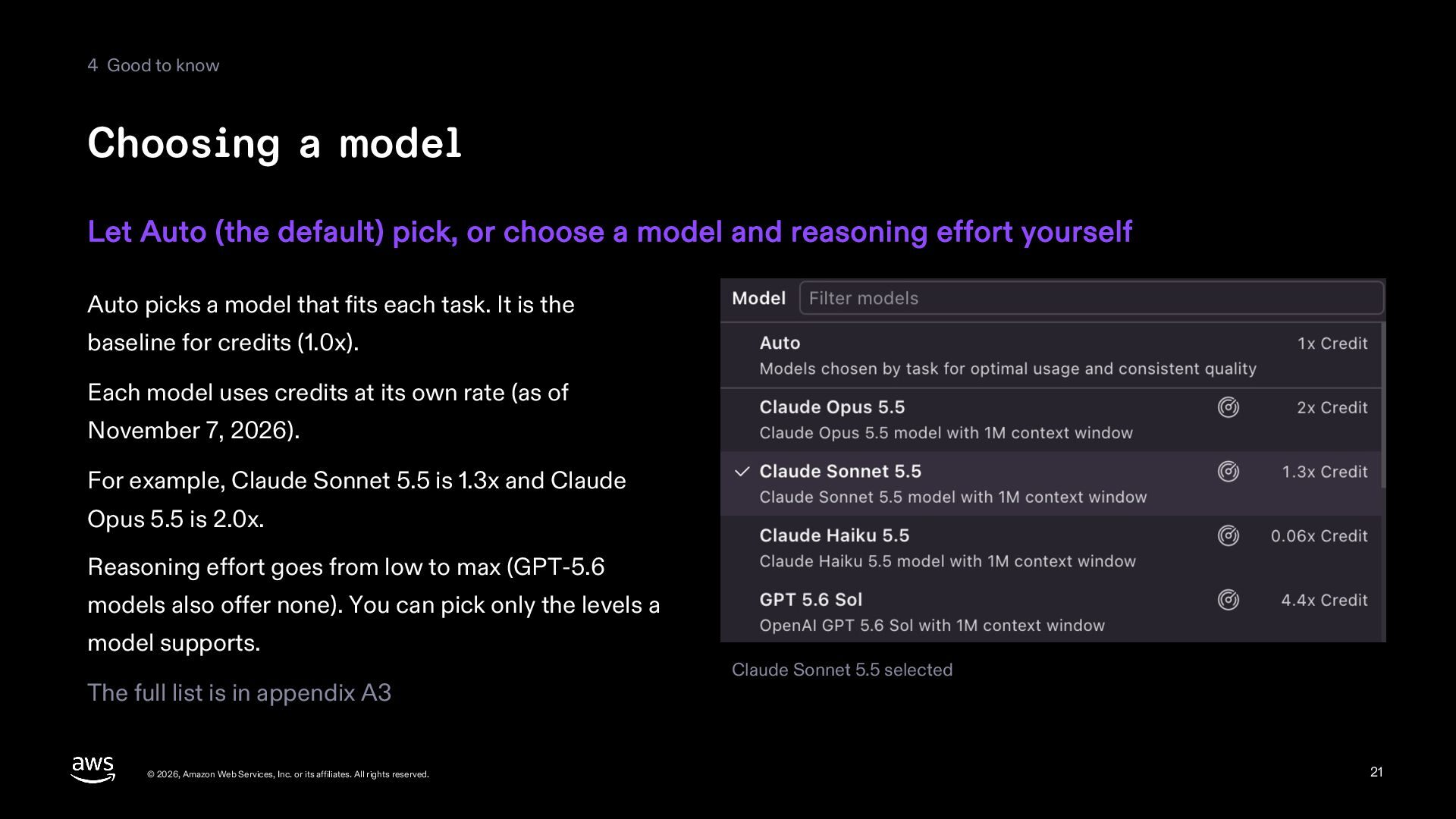
  21. 4 Good to know Choosing a model Let Auto (the

    default) pick, or choose a model and reasoning effort yourself Auto picks a model that fits each task. It is the baseline for credits (1.0x). Each model uses credits at its own rate (as of November 7, 2026). For example, Claude Sonnet 5.5 is 1.3x and Claude Opus 5.5 is 2.0x. Reasoning effort goes from low to max (GPT-5.6 models also offer none). You can pick only the levels a model supports. The full list is in appendix A3 © 2026, Amazon Web Services, Inc. or its affiliates. All rights reserved. Claude Sonnet 5.5 selected 21
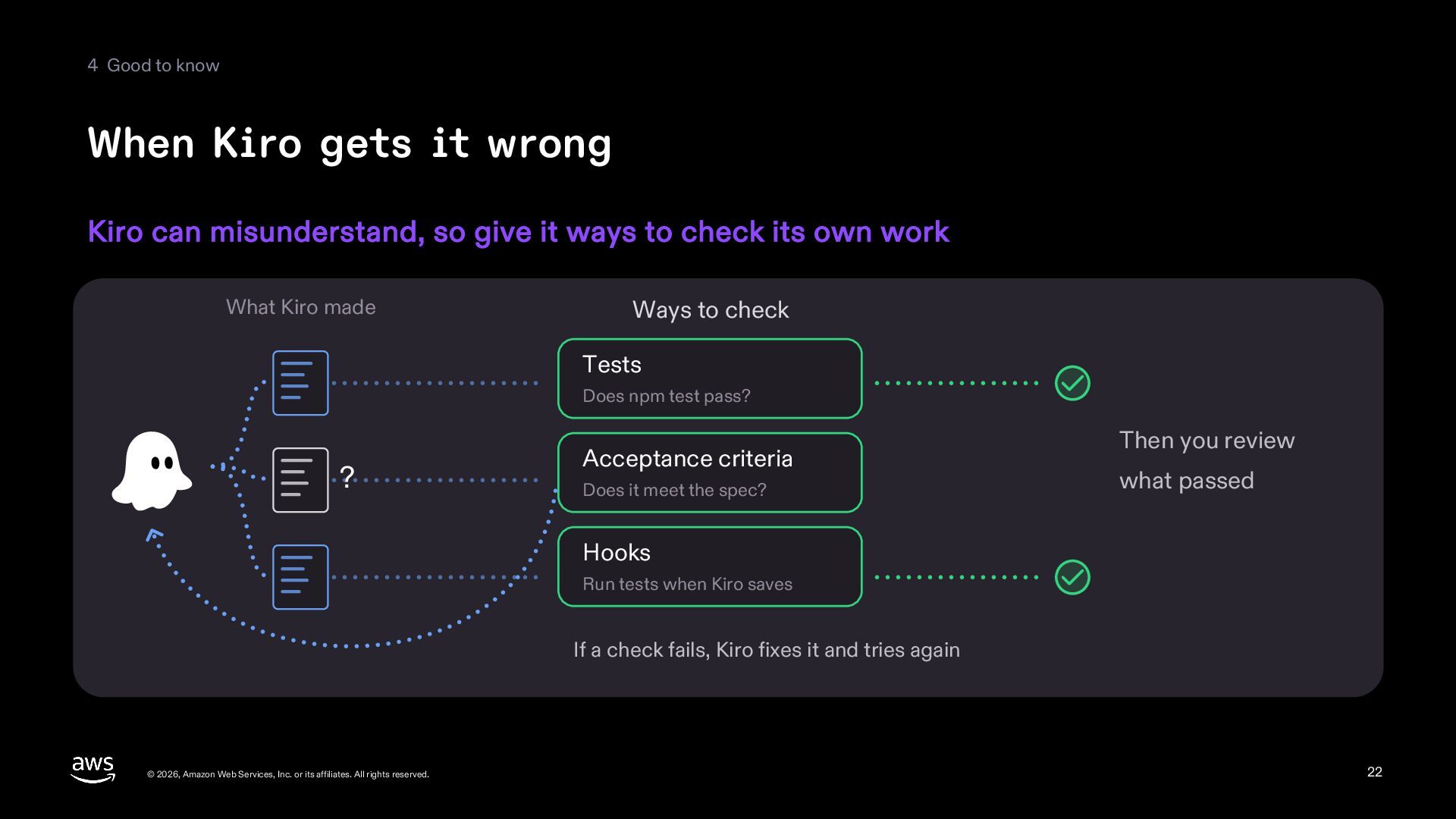
  22. 4 Good to know When Kiro gets it wrong Kiro

    can misunderstand, so give it ways to check its own work What Kiro made Ways to check Tests Does npm test pass? ? Acceptance criteria Does it meet the spec? Then you review what passed Hooks Run tests when Kiro saves If a check fails, Kiro fixes it and tries again © 2026, Amazon Web Services, Inc. or its affiliates. All rights reserved. 22
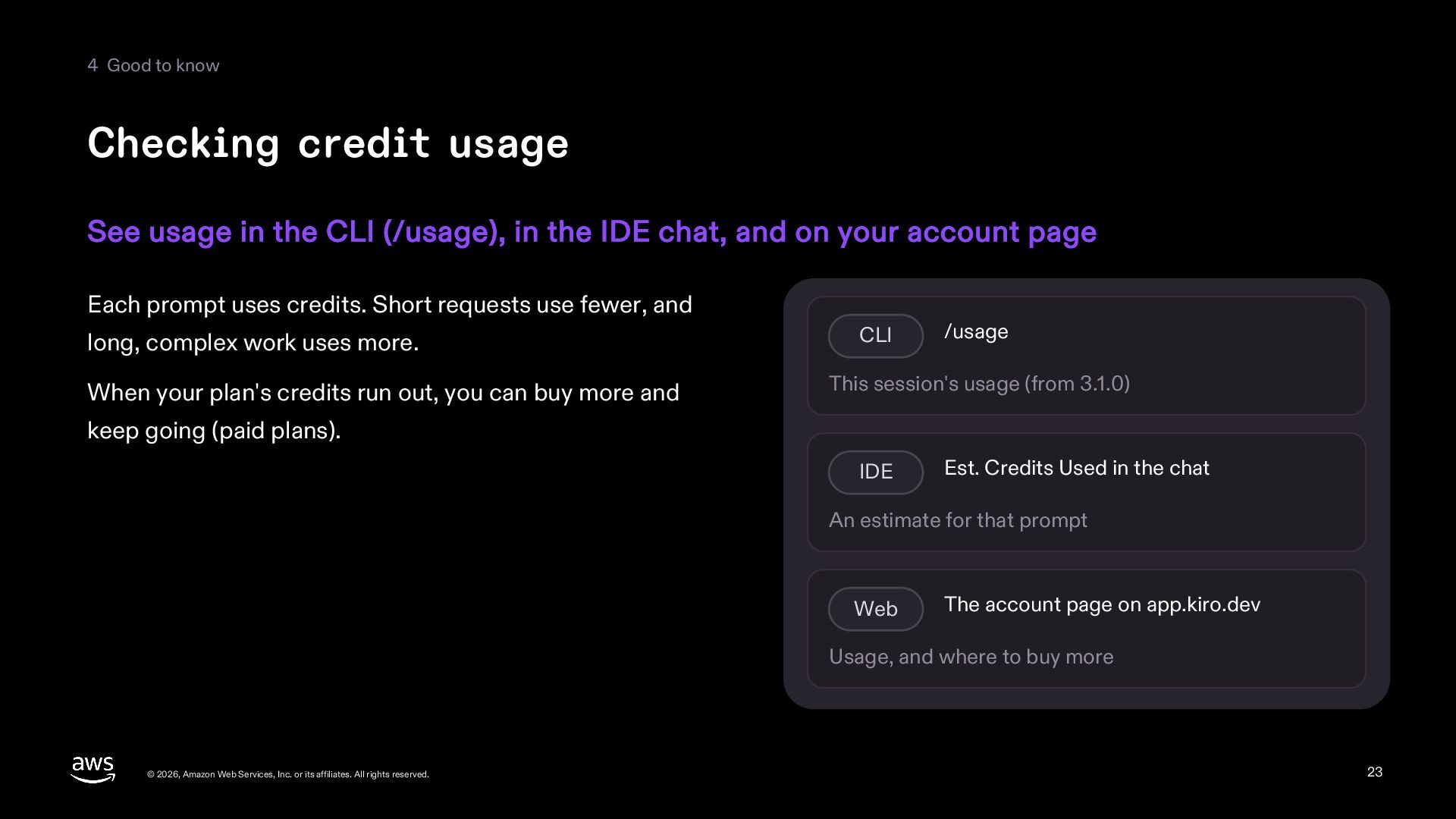
  23. 4 Good to know Checking credit usage See usage in

    the CLI (/usage), in the IDE chat, and on your account page Each prompt uses credits. Short requests use fewer, and long, complex work uses more. When your plan's credits run out, you can buy more and CLI /usage This session's usage (from 3.1.0) keep going (paid plans). IDE Est. Credits Used in the chat An estimate for that prompt Web The account page on app.kiro.dev Usage, and where to buy more © 2026, Amazon Web Services, Inc. or its affiliates. All rights reserved. 23
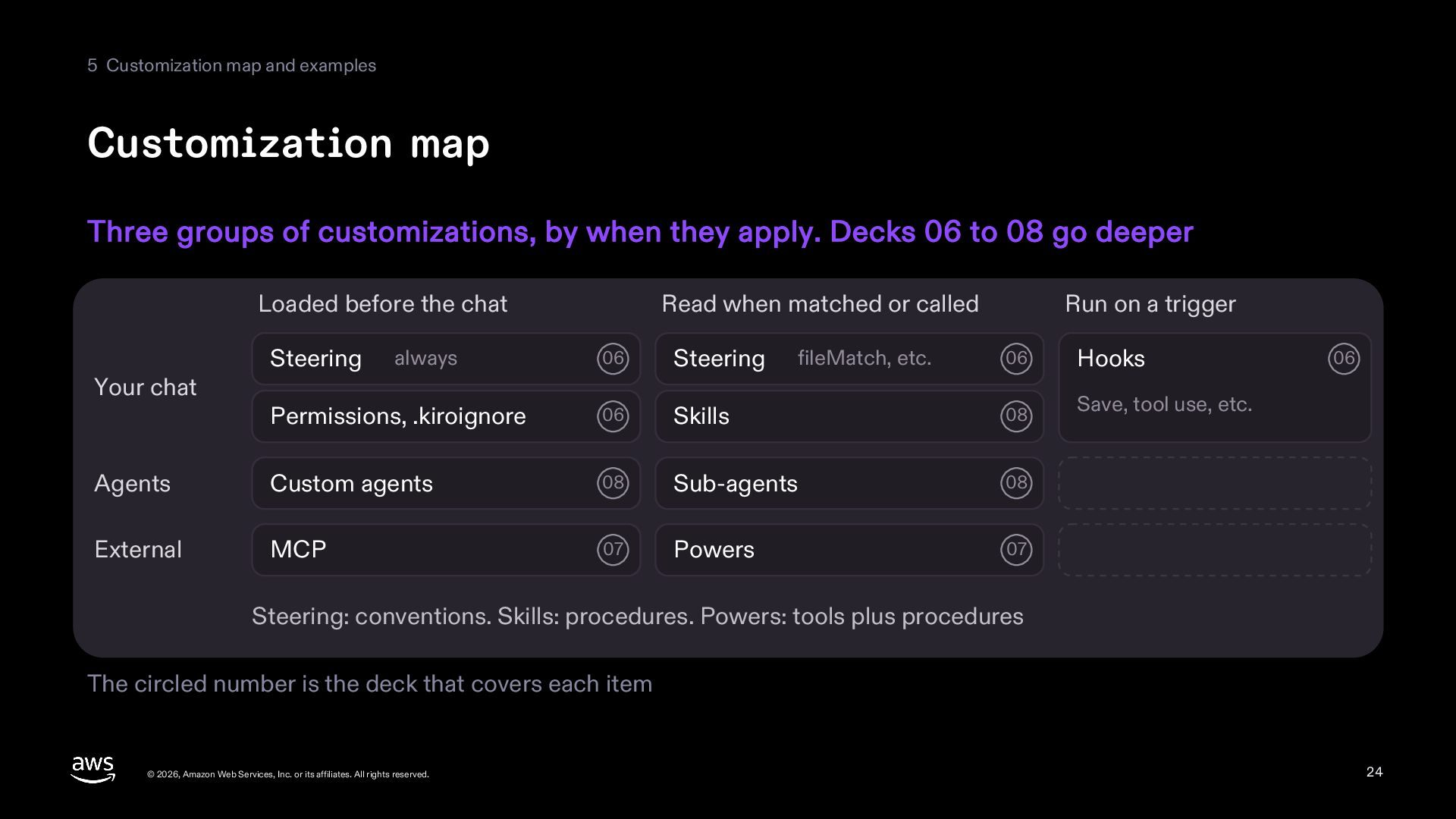
  24. 5 Customization map and examples Customization map Three groups of

    customizations, by when they apply. Decks 06 to 08 go deeper Loaded before the chat 06 Steering Permissions, .kiroignore 06 Agents Custom agents External MCP Your chat Steering Read when matched or called always Run on a trigger 06 Hooks Skills 08 Save, tool use, etc. 08 Sub-agents 08 07 Powers 07 fileMatch, etc. 06 Steering: conventions. Skills: procedures. Powers: tools plus procedures The circled number is the deck that covers each item © 2026, Amazon Web Services, Inc. or its affiliates. All rights reserved. 24
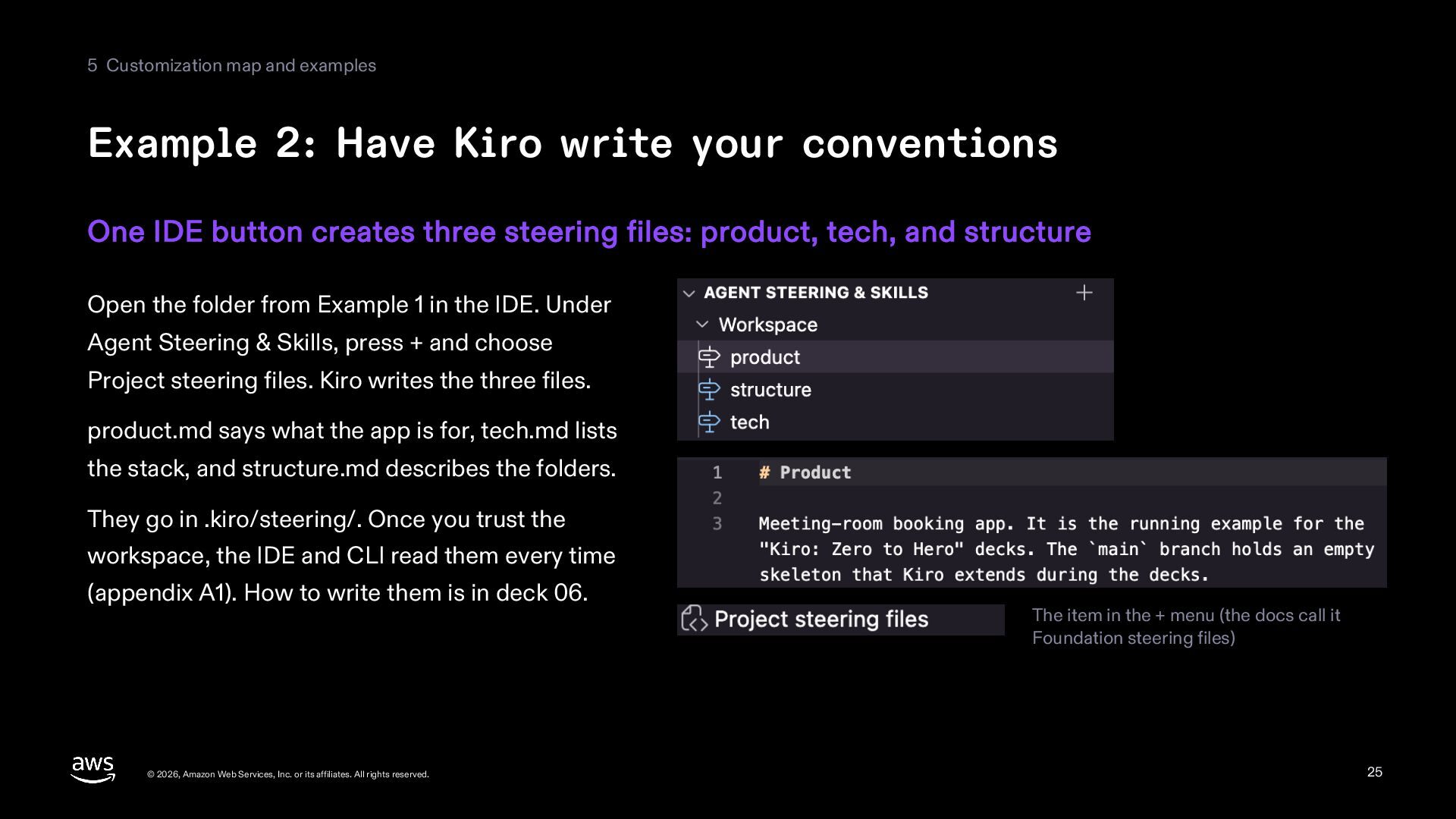
  25. 5 Customization map and examples Example 2: Have Kiro write

    your conventions One IDE button creates three steering files: product, tech, and structure Open the folder from Example 1 in the IDE. Under Agent Steering & Skills, press + and choose Project steering files. Kiro writes the three files. product.md says what the app is for, tech.md lists the stack, and structure.md describes the folders. They go in .kiro/steering/. Once you trust the workspace, the IDE and CLI read them every time (appendix A1). How to write them is in deck 06. © 2026, Amazon Web Services, Inc. or its affiliates. All rights reserved. The item in the + menu (the docs call it Foundation steering files) 25
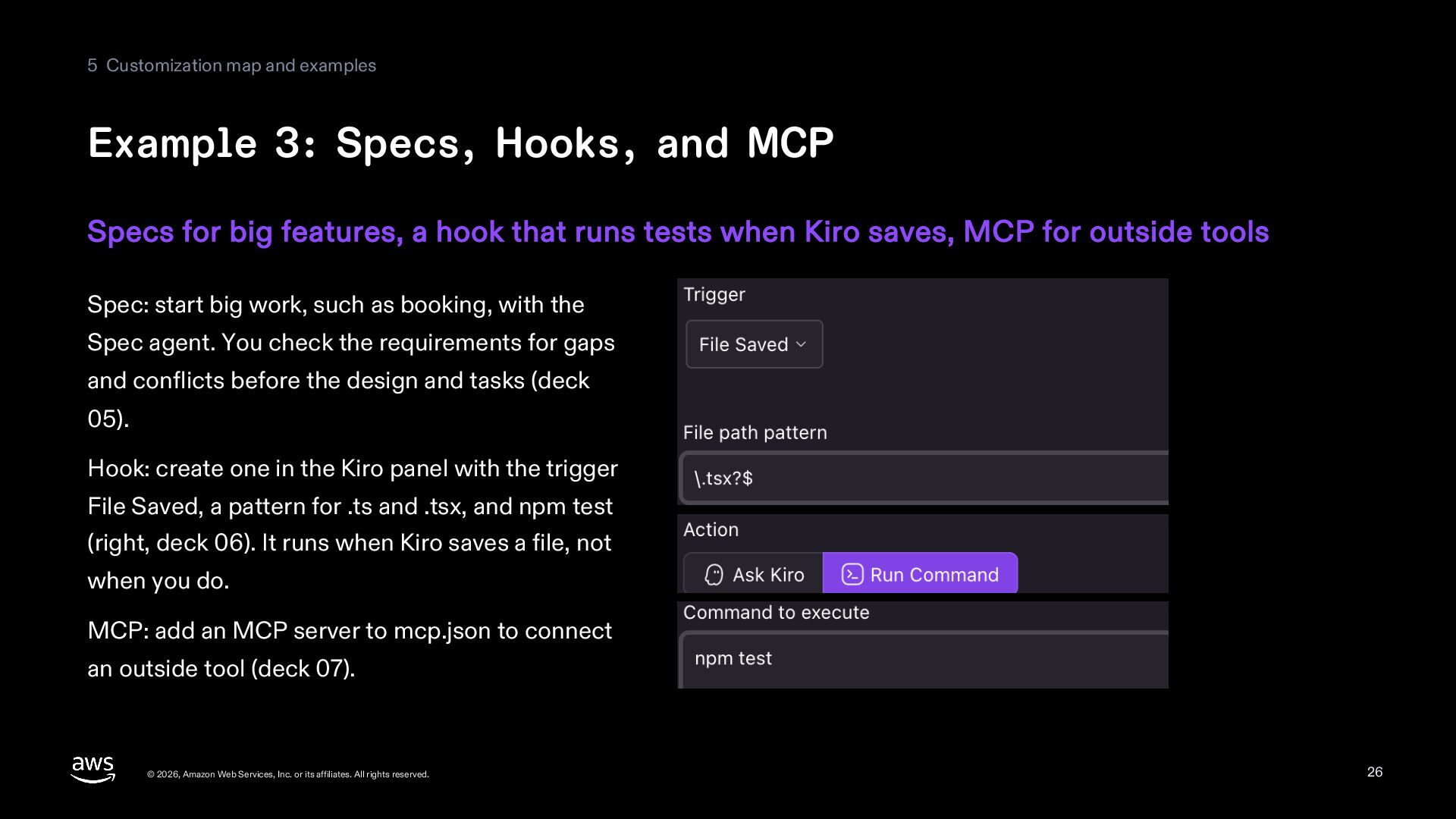
  26. 5 Customization map and examples Example 3: Specs, Hooks, and

    MCP Specs for big features, a hook that runs tests when Kiro saves, MCP for outside tools Spec: start big work, such as booking, with the Spec agent. You check the requirements for gaps and conflicts before the design and tasks (deck 05). Hook: create one in the Kiro panel with the trigger File Saved, a pattern for .ts and .tsx, and npm test (right, deck 06). It runs when Kiro saves a file, not when you do. MCP: add an MCP server to mcp.json to connect an outside tool (deck 07). © 2026, Amazon Web Services, Inc. or its affiliates. All rights reserved. 26
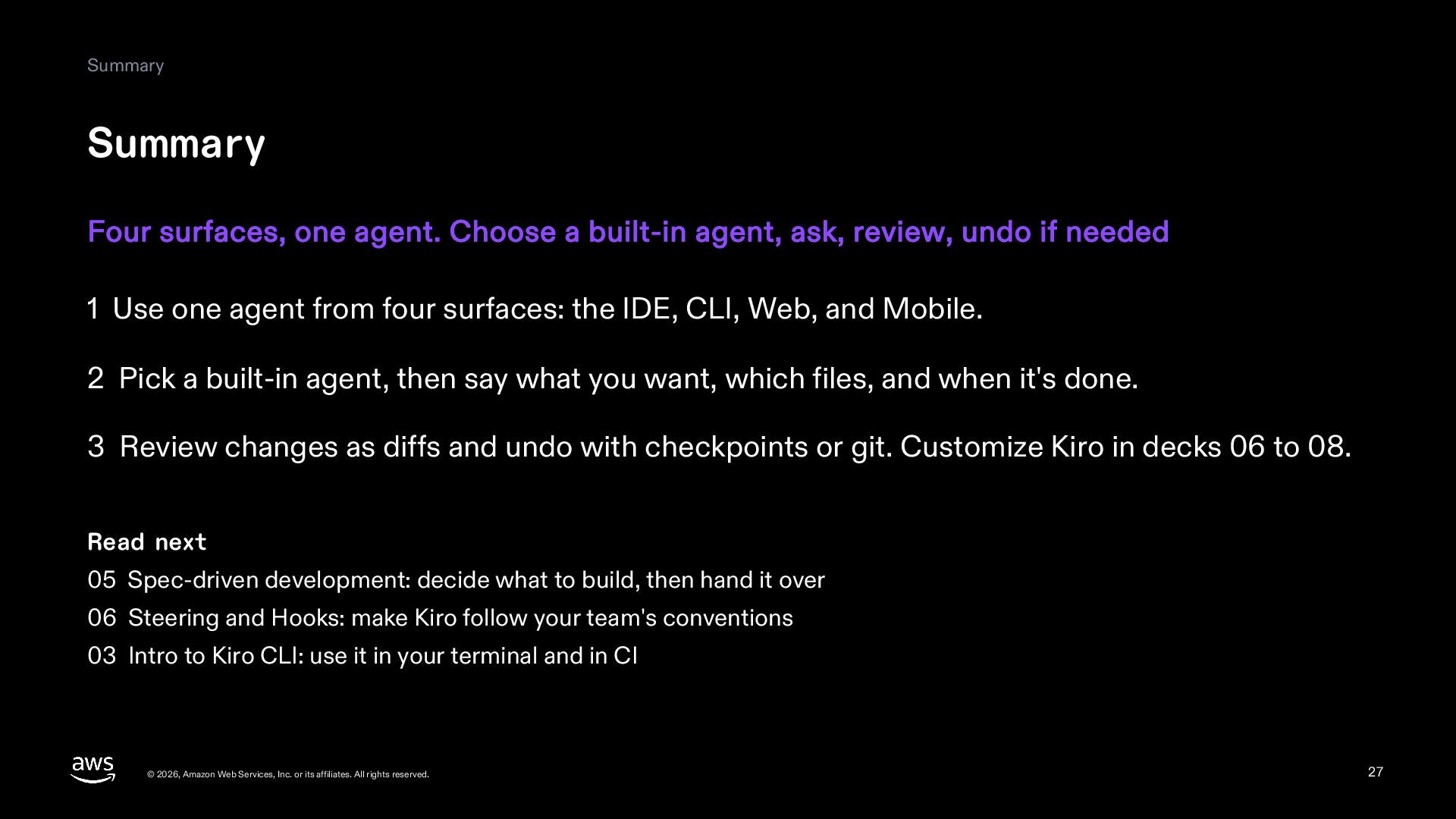
  27. Summary Summary Four surfaces, one agent. Choose a built-in agent,

    ask, review, undo if needed 1 Use one agent from four surfaces: the IDE, CLI, Web, and Mobile. 2 Pick a built-in agent, then say what you want, which files, and when it's done. 3 Review changes as diffs and undo with checkpoints or git. Customize Kiro in decks 06 to 08. Read next 05 Spec-driven development: decide what to build, then hand it over 06 Steering and Hooks: make Kiro follow your team's conventions 03 Intro to Kiro CLI: use it in your terminal and in CI © 2026, Amazon Web Services, Inc. or its affiliates. All rights reserved. 27
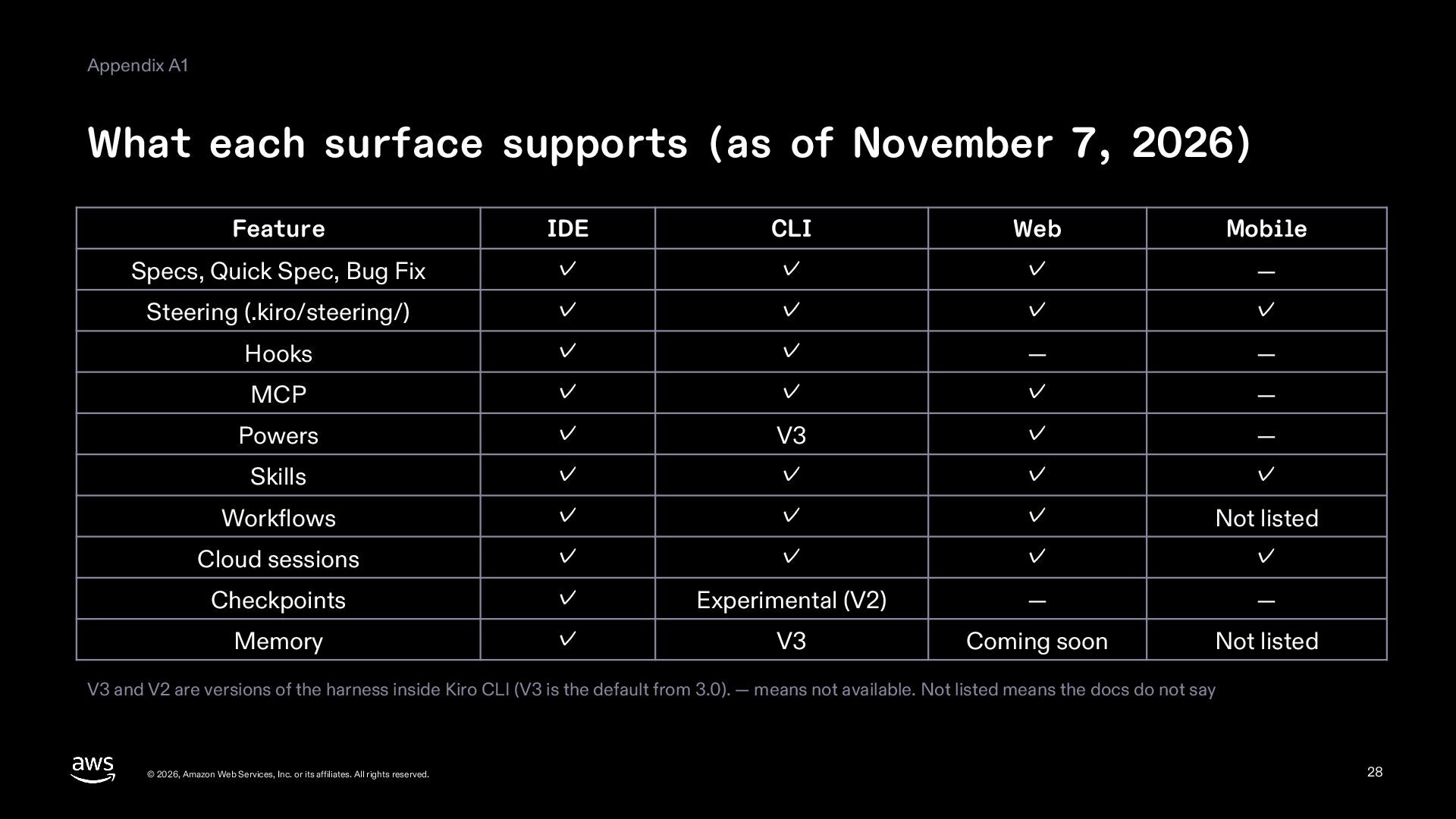
  28. Appendix A1 What each surface supports (as of November 7,

    2026) Feature IDE CLI Web Mobile Specs, Quick Spec, Bug Fix ✓ ✓ ✓ — Steering (.kiro/steering/) ✓ ✓ ✓ ✓ Hooks ✓ ✓ — — MCP ✓ ✓ ✓ — Powers ✓ V3 ✓ — Skills ✓ ✓ ✓ ✓ Workflows ✓ ✓ ✓ Not listed Cloud sessions ✓ ✓ ✓ ✓ Checkpoints ✓ Experimental (V2) — — Memory ✓ V3 Coming soon Not listed V3 and V2 are versions of the harness inside Kiro CLI (V3 is the default from 3.0). — means not available. Not listed means the docs do not say © 2026, Amazon Web Services, Inc. or its affiliates. All rights reserved. 28
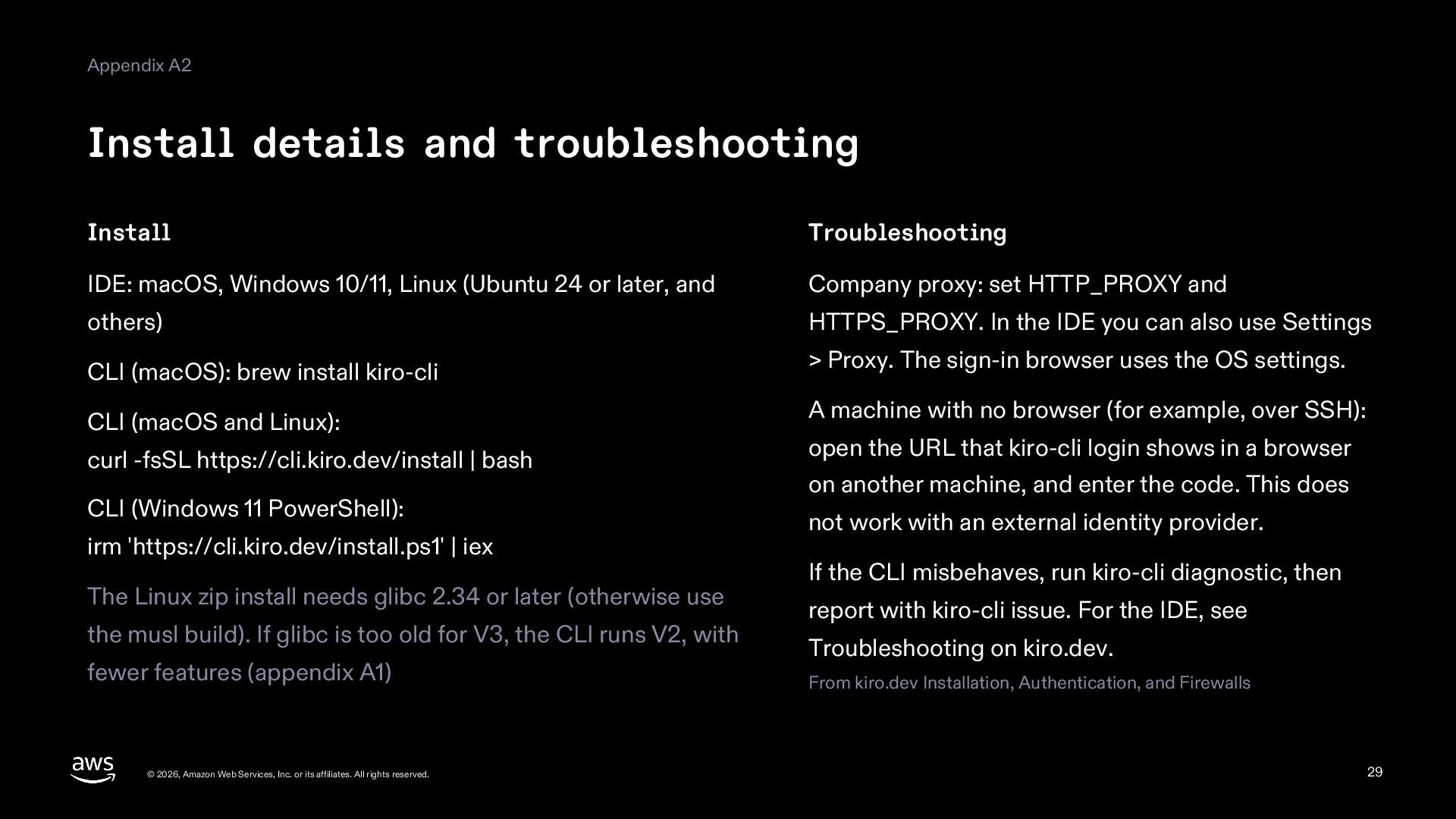
  29. Appendix A2 Install details and troubleshooting Install Troubleshooting IDE: macOS,

    Windows 10/11, Linux (Ubuntu 24 or later, and Company proxy: set HTTP_PROXY and others) HTTPS_PROXY. In the IDE you can also use Settings CLI (macOS): brew install kiro-cli > Proxy. The sign-in browser uses the OS settings. CLI (macOS and Linux): curl -fsSL https://cli.kiro.dev/install | bash CLI (Windows 11 PowerShell): irm 'https://cli.kiro.dev/install.ps1' | iex The Linux zip install needs glibc 2.34 or later (otherwise use the musl build). If glibc is too old for V3, the CLI runs V2, with fewer features (appendix A1) © 2026, Amazon Web Services, Inc. or its affiliates. All rights reserved. A machine with no browser (for example, over SSH): open the URL that kiro-cli login shows in a browser on another machine, and enter the code. This does not work with an external identity provider. If the CLI misbehaves, run kiro-cli diagnostic, then report with kiro-cli issue. For the IDE, see Troubleshooting on kiro.dev. From kiro.dev Installation, Authentication, and Firewalls 29
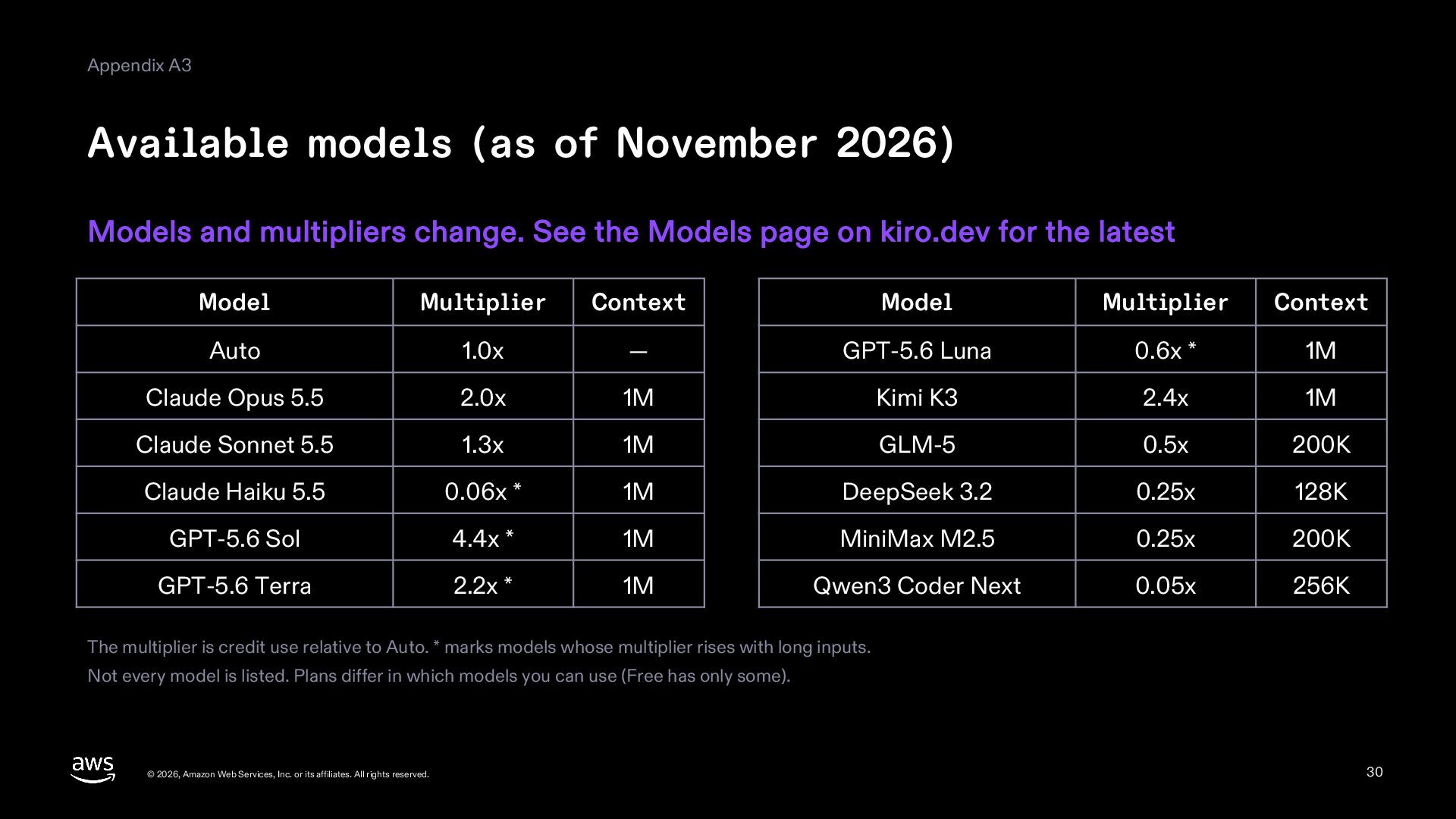
  30. Appendix A3 Available models (as of November 2026) Models and

    multipliers change. See the Models page on kiro.dev for the latest Model Multiplier Context Model Multiplier Context Auto 1.0x — GPT-5.6 Luna 0.6x * 1M Claude Opus 5.5 2.0x 1M Kimi K3 2.4x 1M Claude Sonnet 5.5 1.3x 1M GLM-5 0.5x 200K Claude Haiku 5.5 0.06x * 1M DeepSeek 3.2 0.25x 128K GPT-5.6 Sol 4.4x * 1M MiniMax M2.5 0.25x 200K GPT-5.6 Terra 2.2x * 1M Qwen3 Coder Next 0.05x 256K The multiplier is credit use relative to Auto. * marks models whose multiplier rises with long inputs. Not every model is listed. Plans differ in which models you can use (Free has only some). © 2026, Amazon Web Services, Inc. or its affiliates. All rights reserved. 30
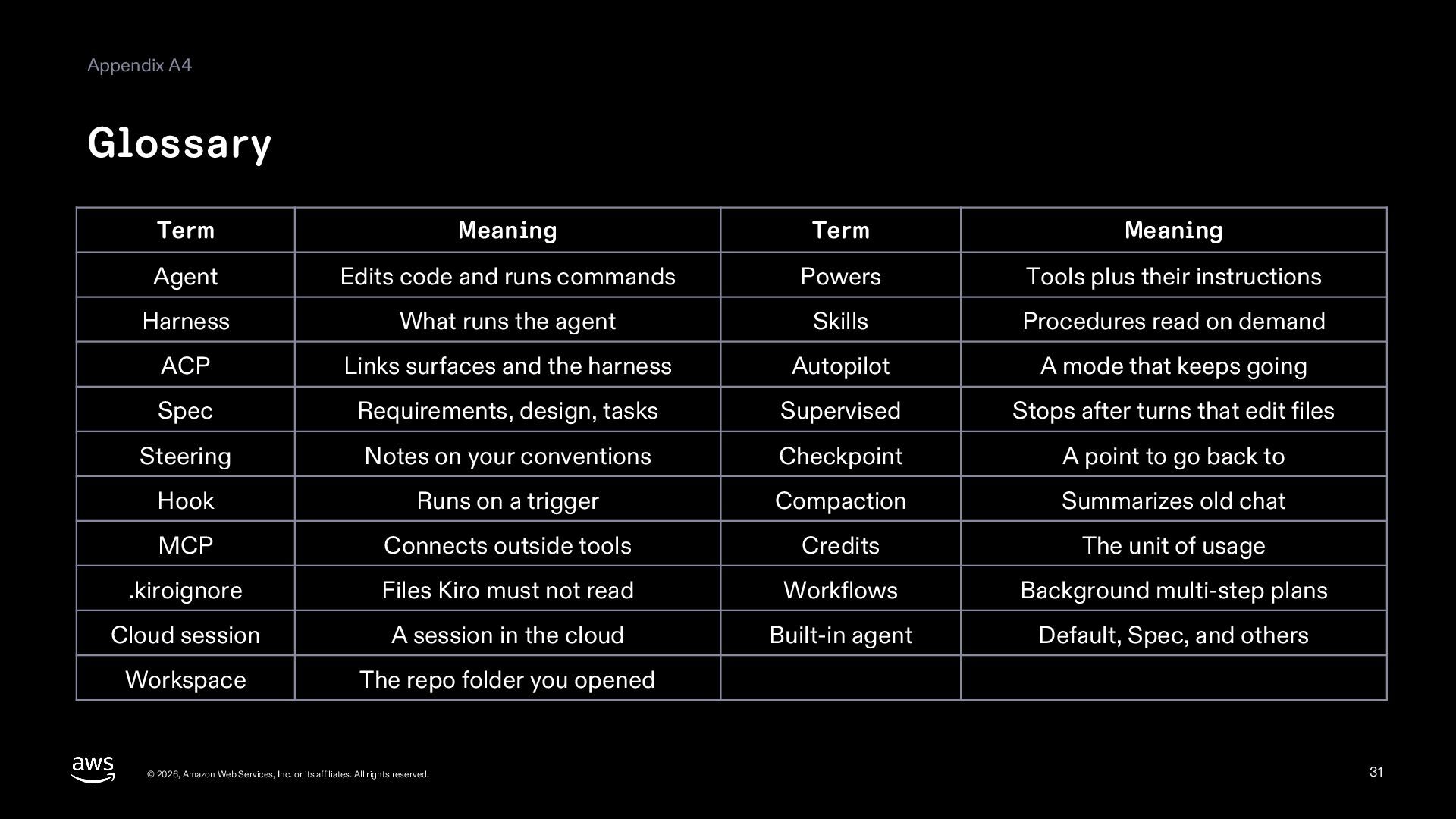
  31. Appendix A4 Glossary Term Meaning Term Meaning Agent Edits code

    and runs commands Powers Tools plus their instructions Harness What runs the agent Skills Procedures read on demand ACP Links surfaces and the harness Autopilot A mode that keeps going Spec Requirements, design, tasks Supervised Stops after turns that edit files Steering Notes on your conventions Checkpoint A point to go back to Hook Runs on a trigger Compaction Summarizes old chat MCP Connects outside tools Credits The unit of usage .kiroignore Files Kiro must not read Workflows Background multi-step plans Cloud session A session in the cloud Built-in agent Default, Spec, and others Workspace The repo folder you opened © 2026, Amazon Web Services, Inc. or its affiliates. All rights reserved. 31
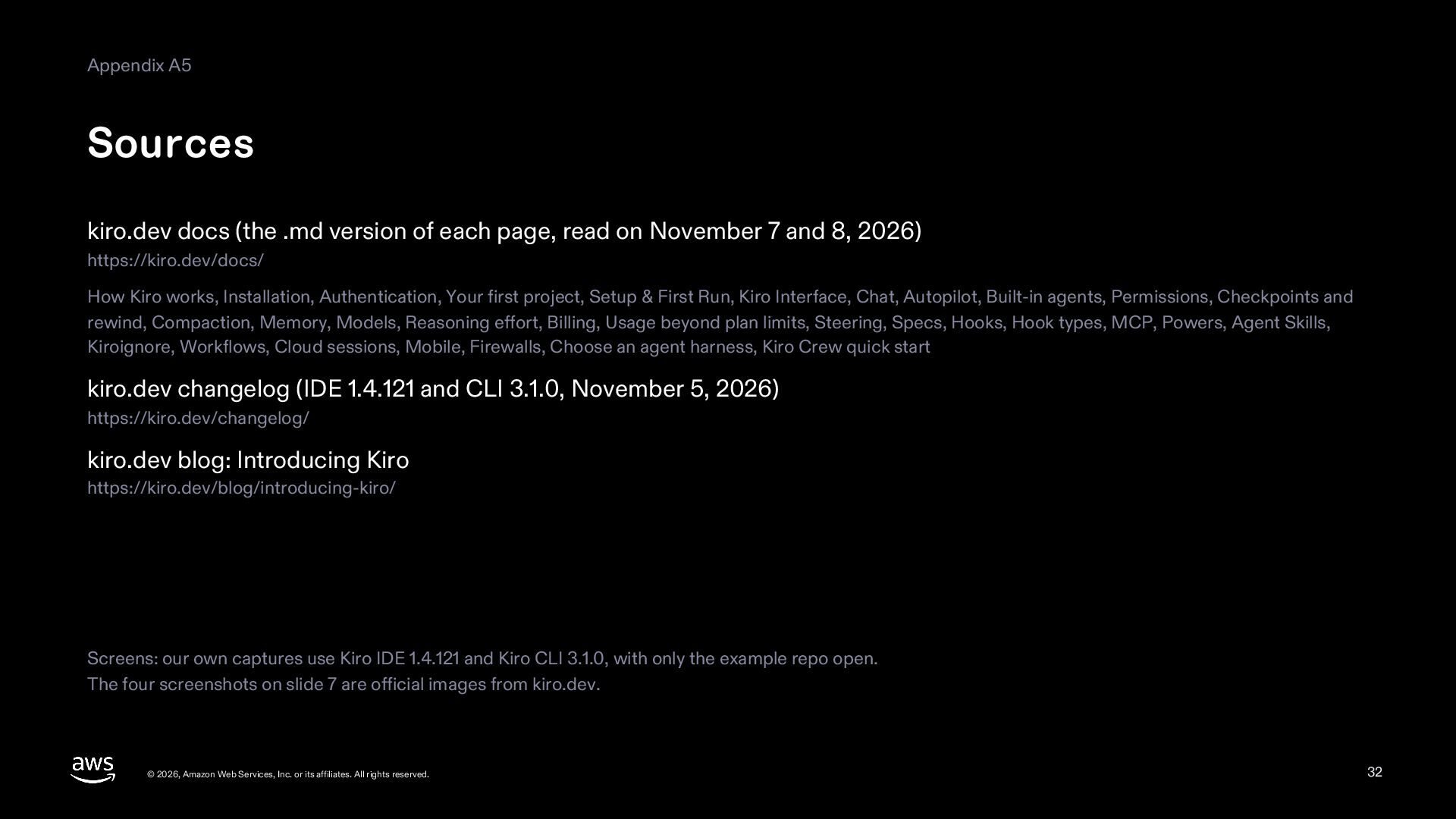
  32. Appendix A5 Sources kiro.dev docs (the .md version of each

    page, read on November 7 and 8, 2026) https://kiro.dev/docs/ How Kiro works, Installation, Authentication, Your first project, Setup & First Run, Kiro Interface, Chat, Autopilot, Built-in agents, Permissions, Checkpoints and rewind, Compaction, Memory, Models, Reasoning effort, Billing, Usage beyond plan limits, Steering, Specs, Hooks, Hook types, MCP, Powers, Agent Skills, Kiroignore, Workflows, Cloud sessions, Mobile, Firewalls, Choose an agent harness, Kiro Crew quick start kiro.dev changelog (IDE 1.4.121 and CLI 3.1.0, November 5, 2026) https://kiro.dev/changelog/ kiro.dev blog: Introducing Kiro https://kiro.dev/blog/introducing-kiro/ Screens: our own captures use Kiro IDE 1.4.121 and Kiro CLI 3.1.0, with only the example repo open. The four screenshots on slide 7 are official images from kiro.dev. © 2026, Amazon Web Services, Inc. or its affiliates. All rights reserved. 32