Upgrade to Pro — share decks privately, control downloads, hide ads and more …

How to use AI as a Teammate

How to use AI as a Teammate

Most of a developer's time isn't spent on hard problems — it's spent on scaffolding, boilerplate, and repetitive lookups. This talk explores how to change that.

Covering four phases of an AI-augmented development workflow — Architecture Planning, Code Generation, Tool Integration, and Team Conventions — this session shows how to move from using AI as a fancy autocomplete to treating it as a genuine teammate: one that holds context, follows your conventions, and works across your entire codebase.

Key topics include how to prompt effectively for architecture decisions, the anatomy of a great AI prompt, strategies for persistent context (including AGENTS.md), Gemini inside Android Studio, and how to enforce team standards at the prompt level rather than in code review.

Built around a real Android project using Kotlin, Jetpack Compose, Clean Architecture, Koin, and Room.

Avatar for Jacquiline Gitau

Jacquiline Gitau

April 29, 2026

More Decks by Jacquiline Gitau

Other Decks in Programming

Transcript

  1. How to Use AI as a Teammate Building high-impact development

    workflows with Gemini and Android Studio Jacquiline Gitau Android Engineer
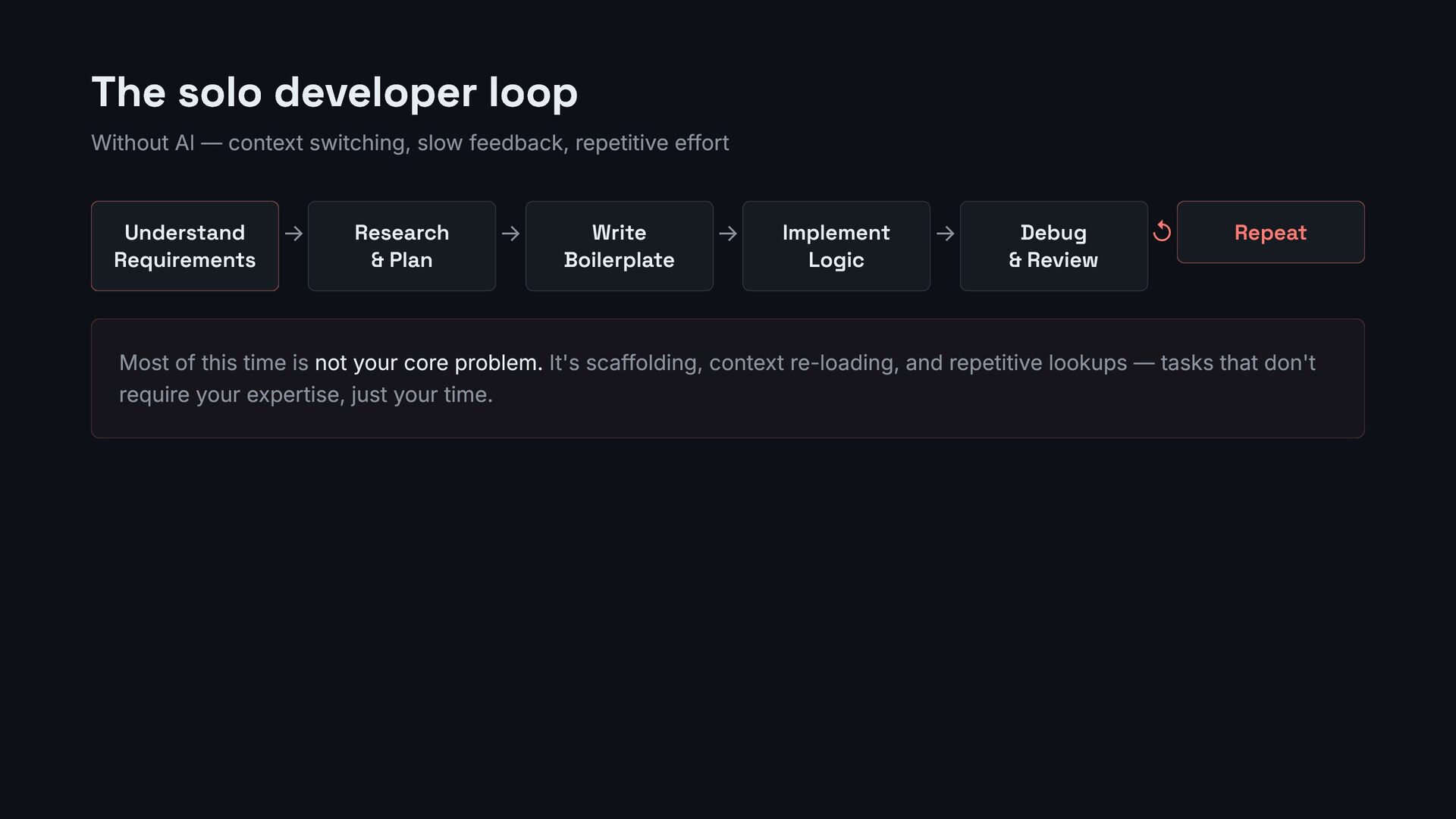
  2. The solo developer loop Without AI — context switching, slow

    feedback, repetitive effort Understand Requirements → Research & Plan → Write Boilerplate → Implement Logic → Debug & Review ↺ Repeat Most of this time is not your core problem. It's scaffolding, context re-loading, and repetitive lookups — tasks that don't require your expertise, just your time.
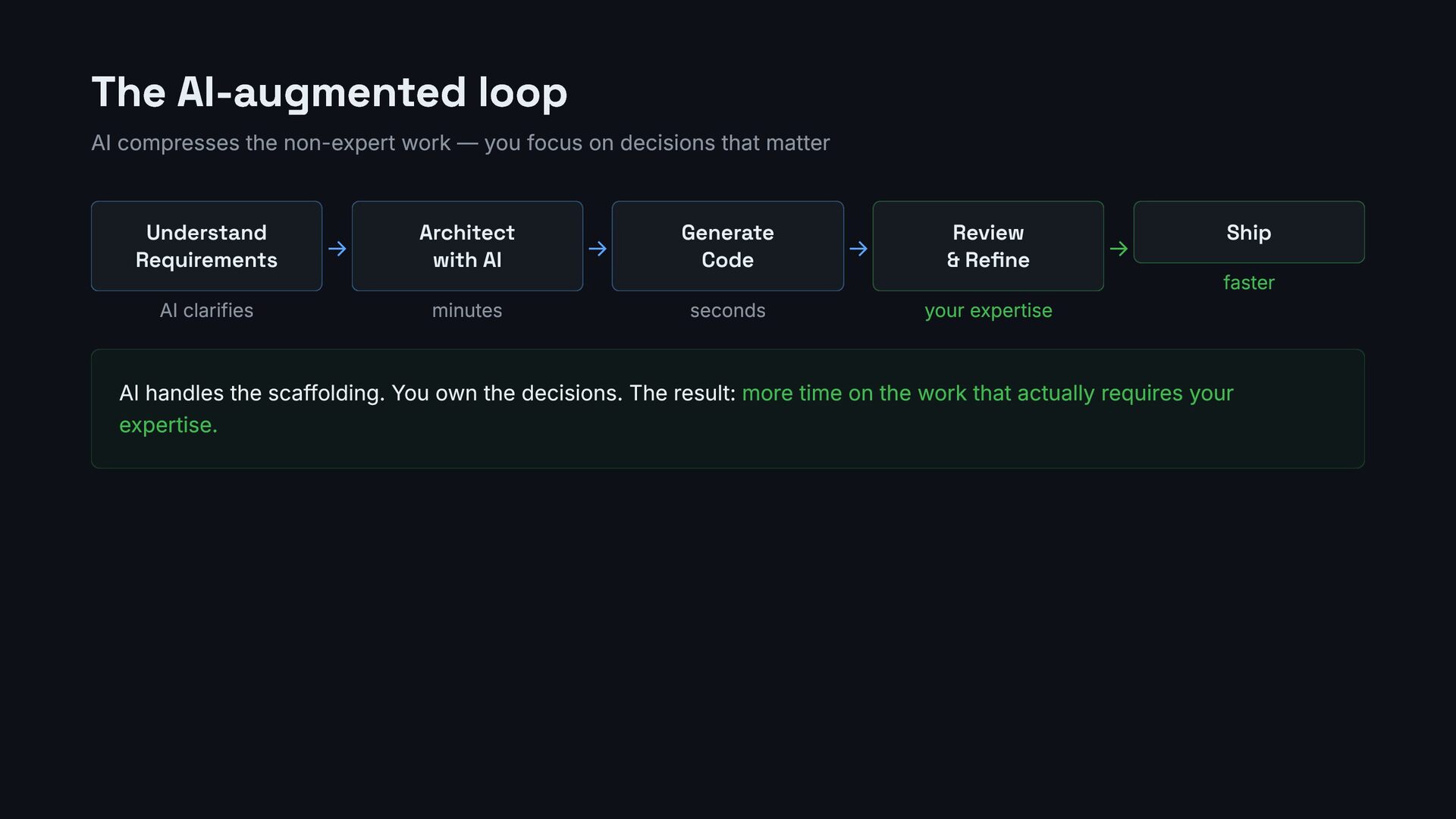
  3. The AI-augmented loop AI compresses the non-expert work — you

    focus on decisions that matter Understand Requirements AI clarifies → Architect with AI minutes → Generate Code seconds → Review & Refine your expertise → Ship faster AI handles the scaffolding. You own the decisions. The result: more time on the work that actually requires your expertise.
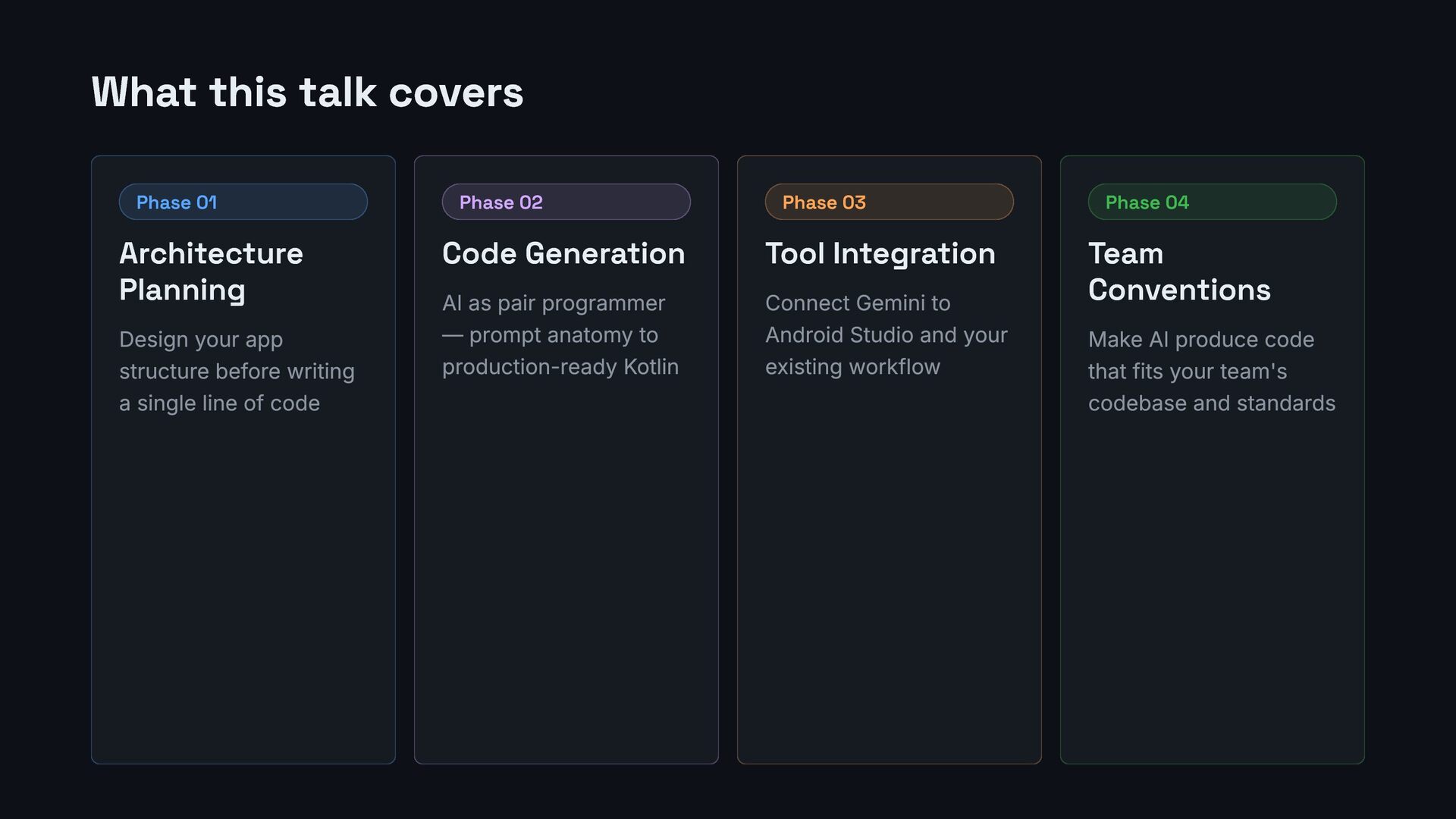
  4. What this talk covers Phase 01 Architecture Planning Design your

    app structure before writing a single line of code Phase 02 Code Generation AI as pair programmer — prompt anatomy to production-ready Kotlin Phase 03 Tool Integration Connect Gemini to Android Studio and your existing workflow Phase 04 Team Conventions Make AI produce code that fits your team's codebase and standards
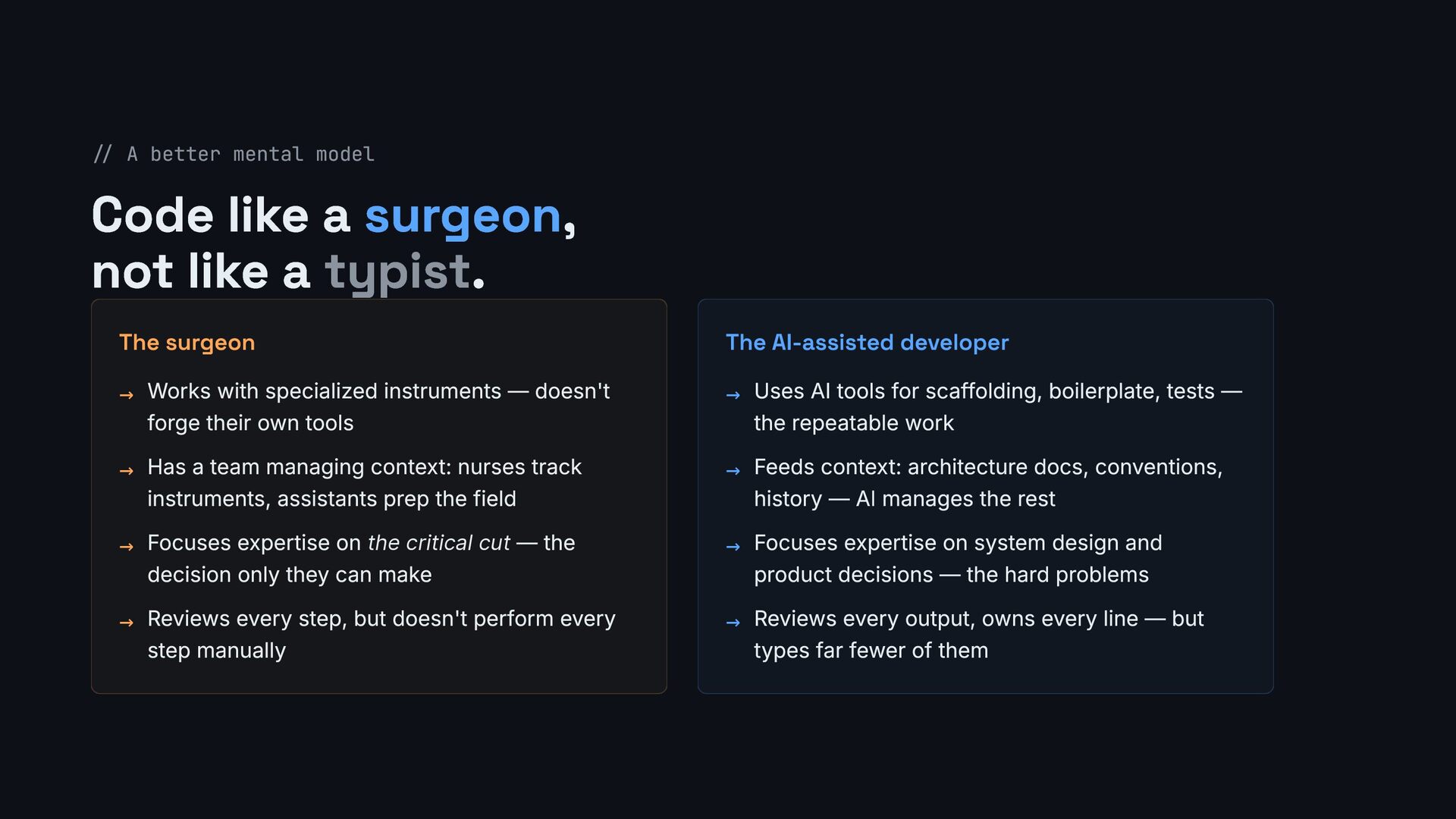
  5. // A better mental model Code like a surgeon, not

    like a typist. The surgeon → Works with specialized instruments — doesn't forge their own tools → Has a team managing context: nurses track instruments, assistants prep the field → Focuses expertise on the critical cut — the decision only they can make → Reviews every step, but doesn't perform every step manually The AI-assisted developer → Uses AI tools for scaffolding, boilerplate, tests — the repeatable work → Feeds context: architecture docs, conventions, history — AI manages the rest → Focuses expertise on system design and product decisions — the hard problems → Reviews every output, owns every line — but types far fewer of them
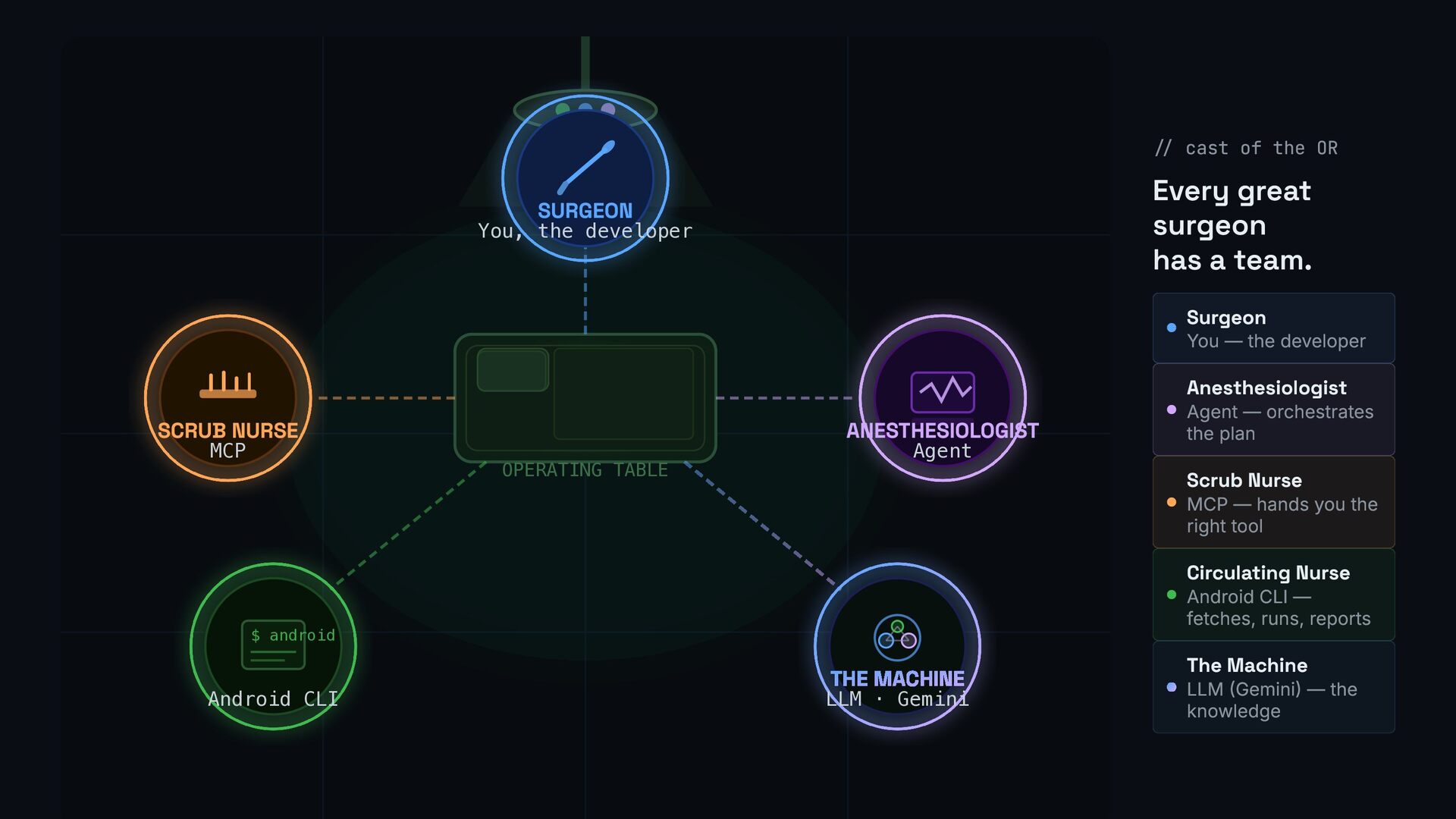
  6. OPERATING TABLE SURGEON You, the developer SCRUB NURSE MCP ANESTHESIOLOGIST

    Agent $ android Android CLI THE MACHINE LLM · Gemini // cast of the OR Every great surgeon has a team. Surgeon You — the developer Anesthesiologist Agent — orchestrates the plan Scrub Nurse MCP — hands you the right tool Circulating Nurse Android CLI — fetches, runs, reports The Machine LLM (Gemini) — the knowledge
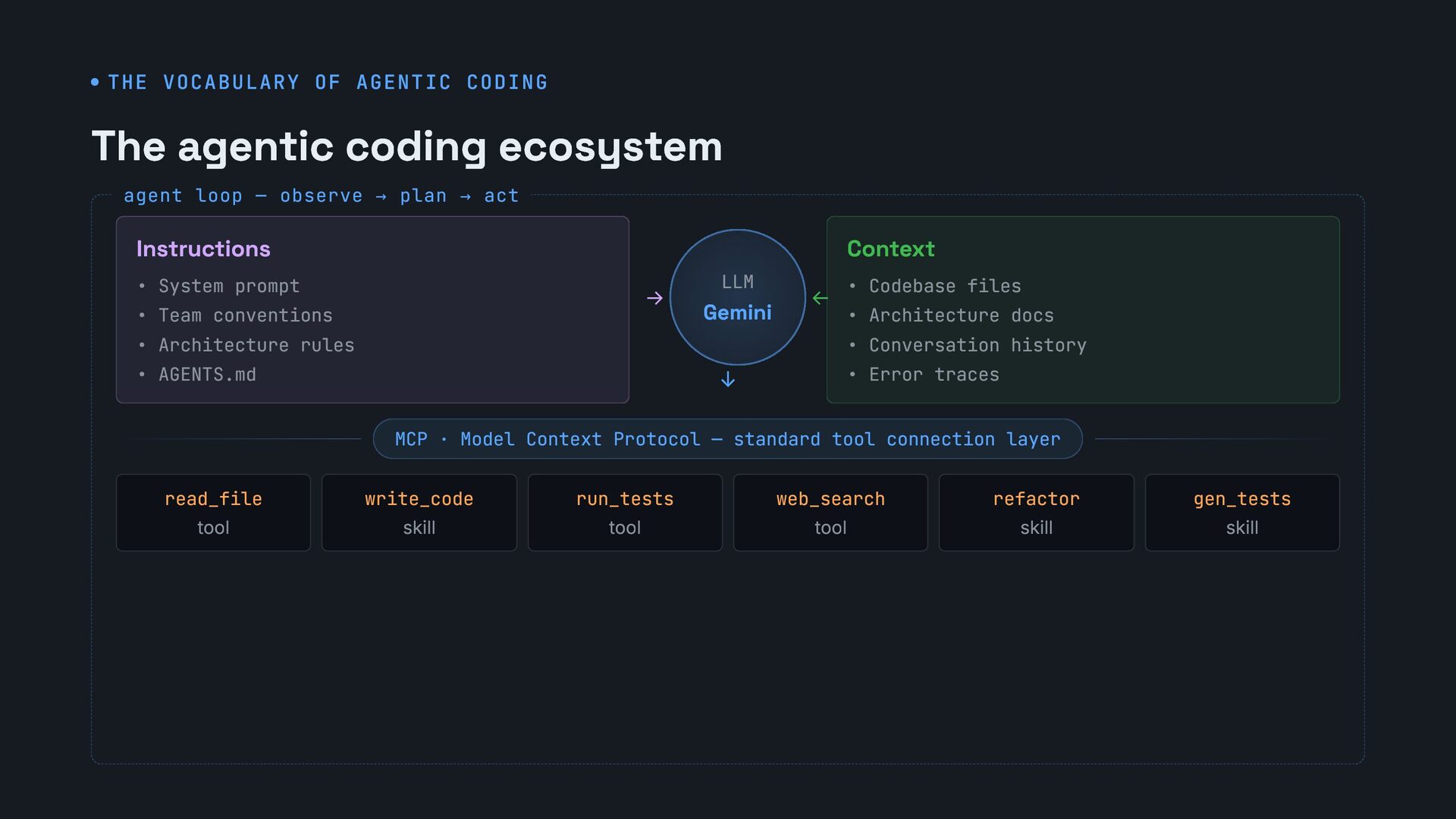
  7. THE VOCABULARY OF AGENTIC CODING The agentic coding ecosystem Instructions

    • System prompt • Team conventions • Architecture rules • AGENTS.md → LLM Gemini ← ↓ Context • Codebase files • Architecture docs • Conversation history • Error traces MCP · Model Context Protocol — standard tool connection layer read_file tool write_code skill run_tests tool web_search tool refactor skill gen_tests skill agent loop — observe → plan → act
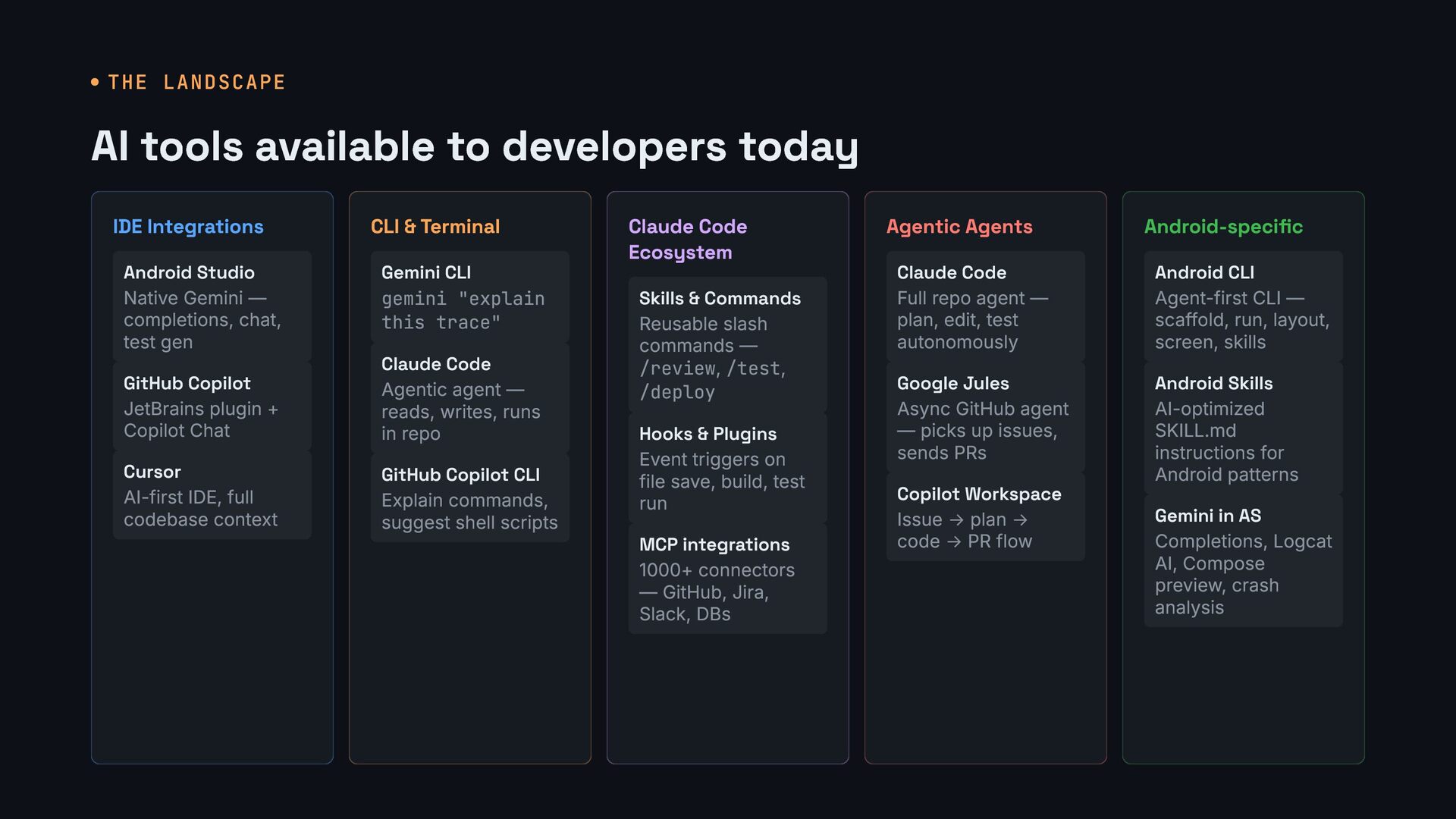
  8. THE LANDSCAPE AI tools available to developers today IDE Integrations

    Android Studio Native Gemini — completions, chat, test gen GitHub Copilot JetBrains plugin + Copilot Chat Cursor AI-first IDE, full codebase context CLI & Terminal Gemini CLI gemini "explain this trace" Claude Code Agentic agent — reads, writes, runs in repo GitHub Copilot CLI Explain commands, suggest shell scripts Claude Code Ecosystem Skills & Commands Reusable slash commands — /review, /test, /deploy Hooks & Plugins Event triggers on file save, build, test run MCP integrations 1000+ connectors — GitHub, Jira, Slack, DBs Agentic Agents Claude Code Full repo agent — plan, edit, test autonomously Google Jules Async GitHub agent — picks up issues, sends PRs Copilot Workspace Issue → plan → code → PR flow Android-specific Android CLI Agent-first CLI — scaffold, run, layout, screen, skills Android Skills AI-optimized SKILL.md instructions for Android patterns Gemini in AS Completions, Logcat AI, Compose preview, crash analysis
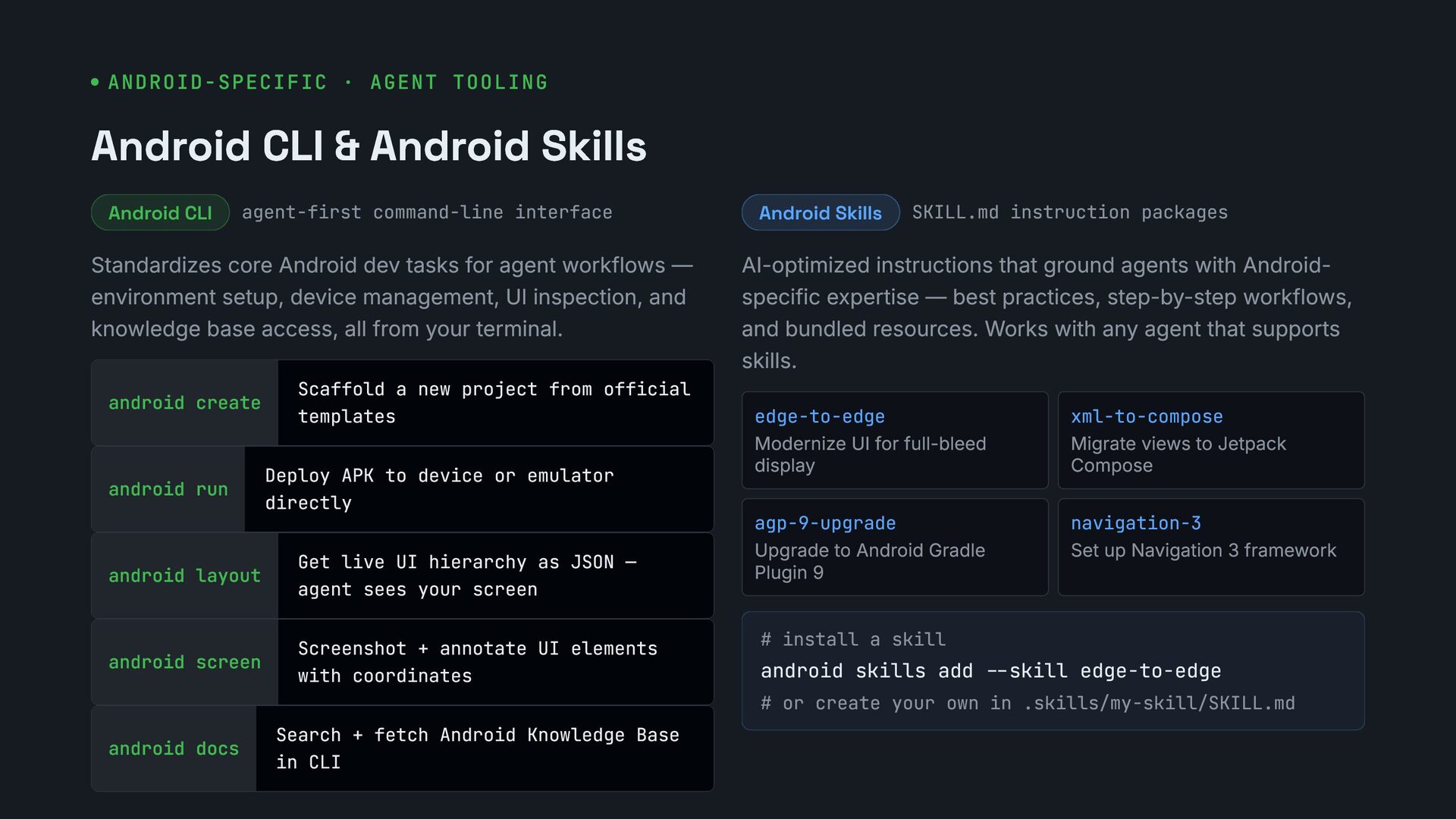
  9. ANDROID-SPECIFIC · AGENT TOOLING Android CLI & Android Skills Android

    CLI agent-first command-line interface Standardizes core Android dev tasks for agent workflows — environment setup, device management, UI inspection, and knowledge base access, all from your terminal. android create Scaffold a new project from official templates android run Deploy APK to device or emulator directly android layout Get live UI hierarchy as JSON — agent sees your screen android screen Screenshot + annotate UI elements with coordinates android docs Search + fetch Android Knowledge Base in CLI Android Skills SKILL.md instruction packages AI-optimized instructions that ground agents with Android- specific expertise — best practices, step-by-step workflows, and bundled resources. Works with any agent that supports skills. edge-to-edge Modernize UI for full-bleed display xml-to-compose Migrate views to Jetpack Compose agp-9-upgrade Upgrade to Android Gradle Plugin 9 navigation-3 Set up Navigation 3 framework # install a skill android skills add --skill edge-to-edge # or create your own in .skills/my-skill/SKILL.md
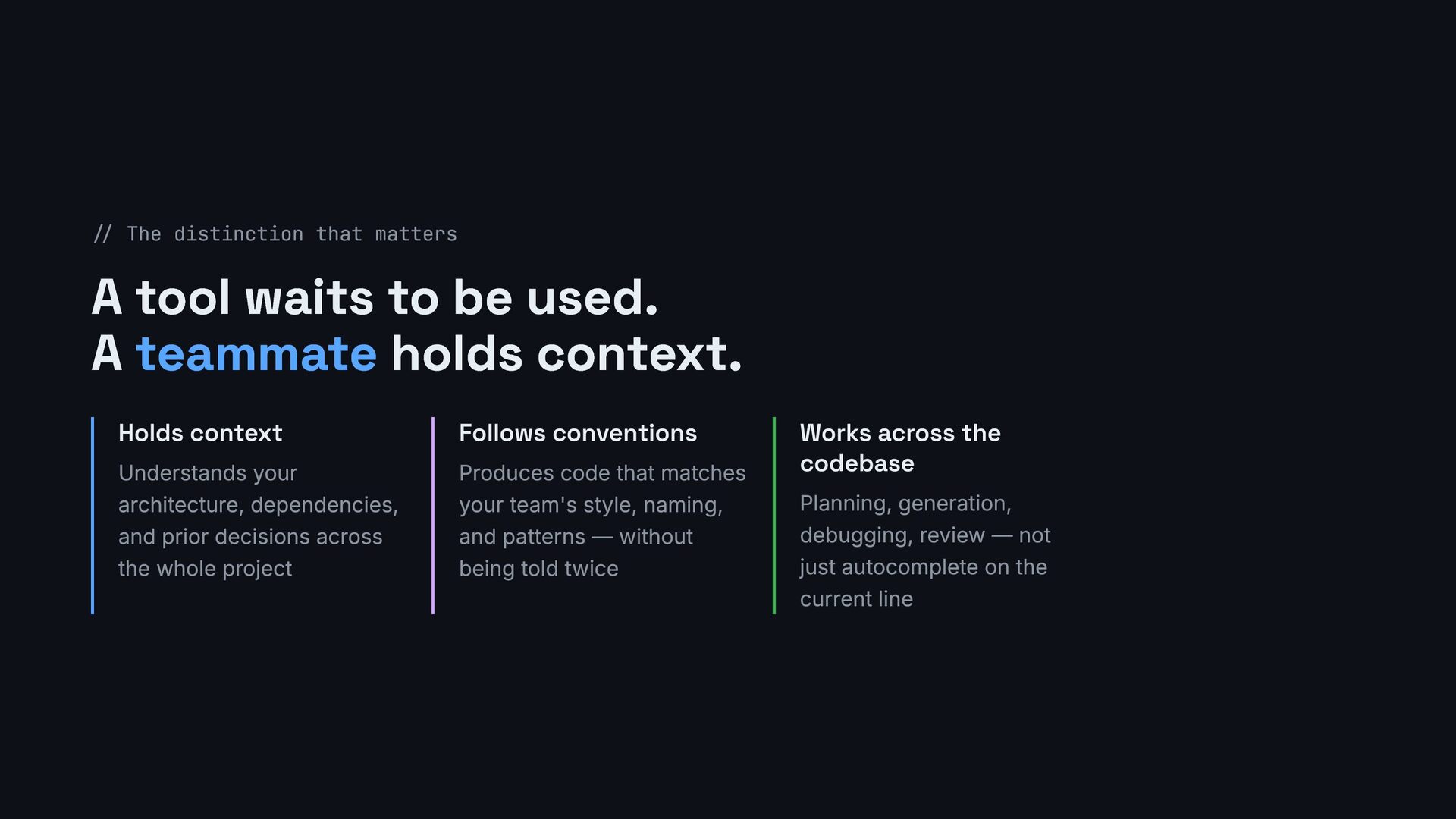
  10. // The distinction that matters A tool waits to be

    used. A teammate holds context. Holds context Understands your architecture, dependencies, and prior decisions across the whole project Follows conventions Produces code that matches your team's style, naming, and patterns — without being told twice Works across the codebase Planning, generation, debugging, review — not just autocomplete on the current line
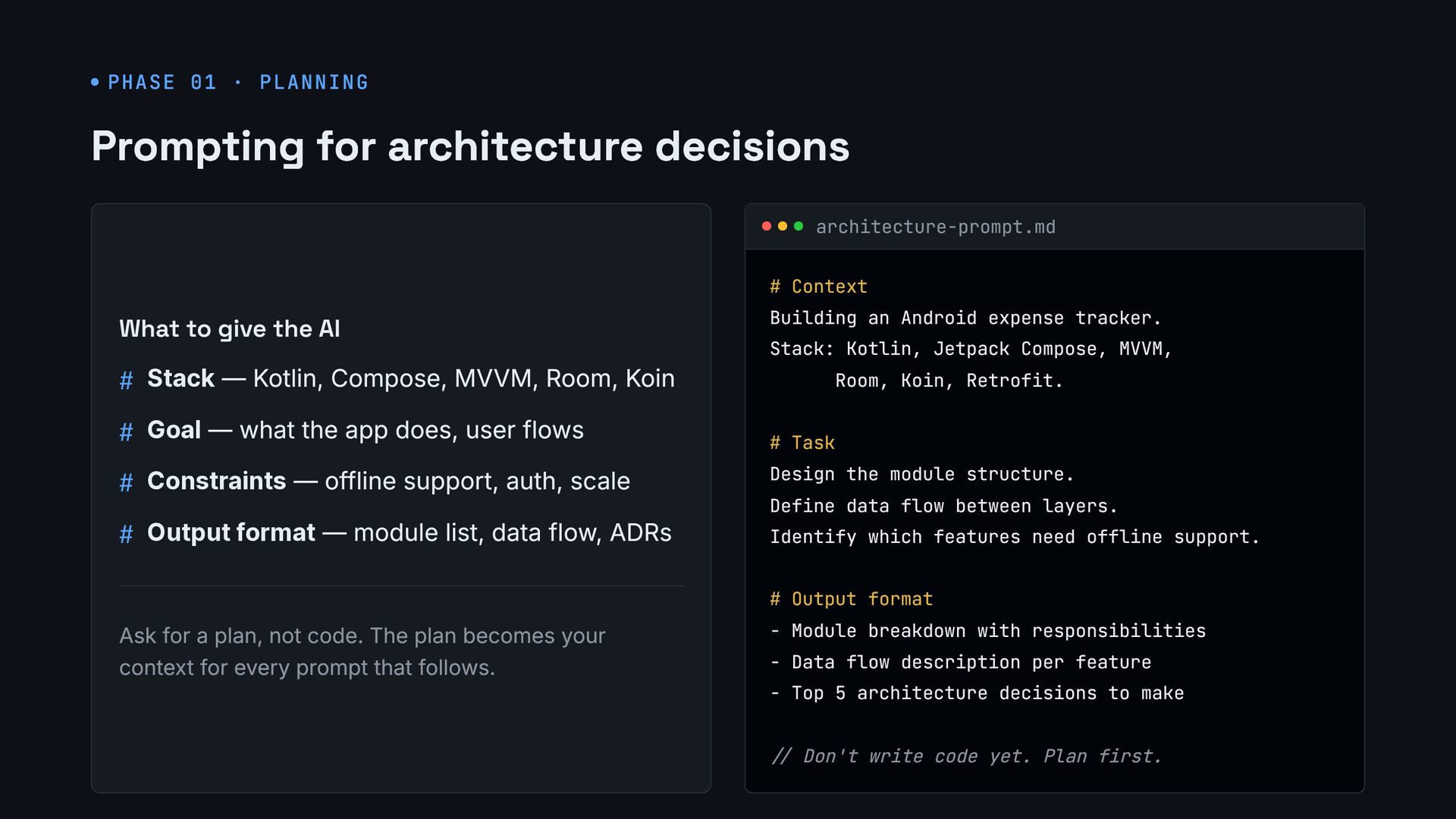
  11. PHASE 01 · PLANNING Prompting for architecture decisions What to

    give the AI # Stack — Kotlin, Compose, MVVM, Room, Koin # Goal — what the app does, user flows # Constraints — offline support, auth, scale # Output format — module list, data flow, ADRs Ask for a plan, not code. The plan becomes your context for every prompt that follows. architecture-prompt.md # Context Building an Android expense tracker. Stack: Kotlin, Jetpack Compose, MVVM, Room, Koin, Retrofit. # Task Design the module structure. Define data flow between layers. Identify which features need offline support. # Output format - Module breakdown with responsibilities - Data flow description per feature - Top 5 architecture decisions to make // Don't write code yet. Plan first.
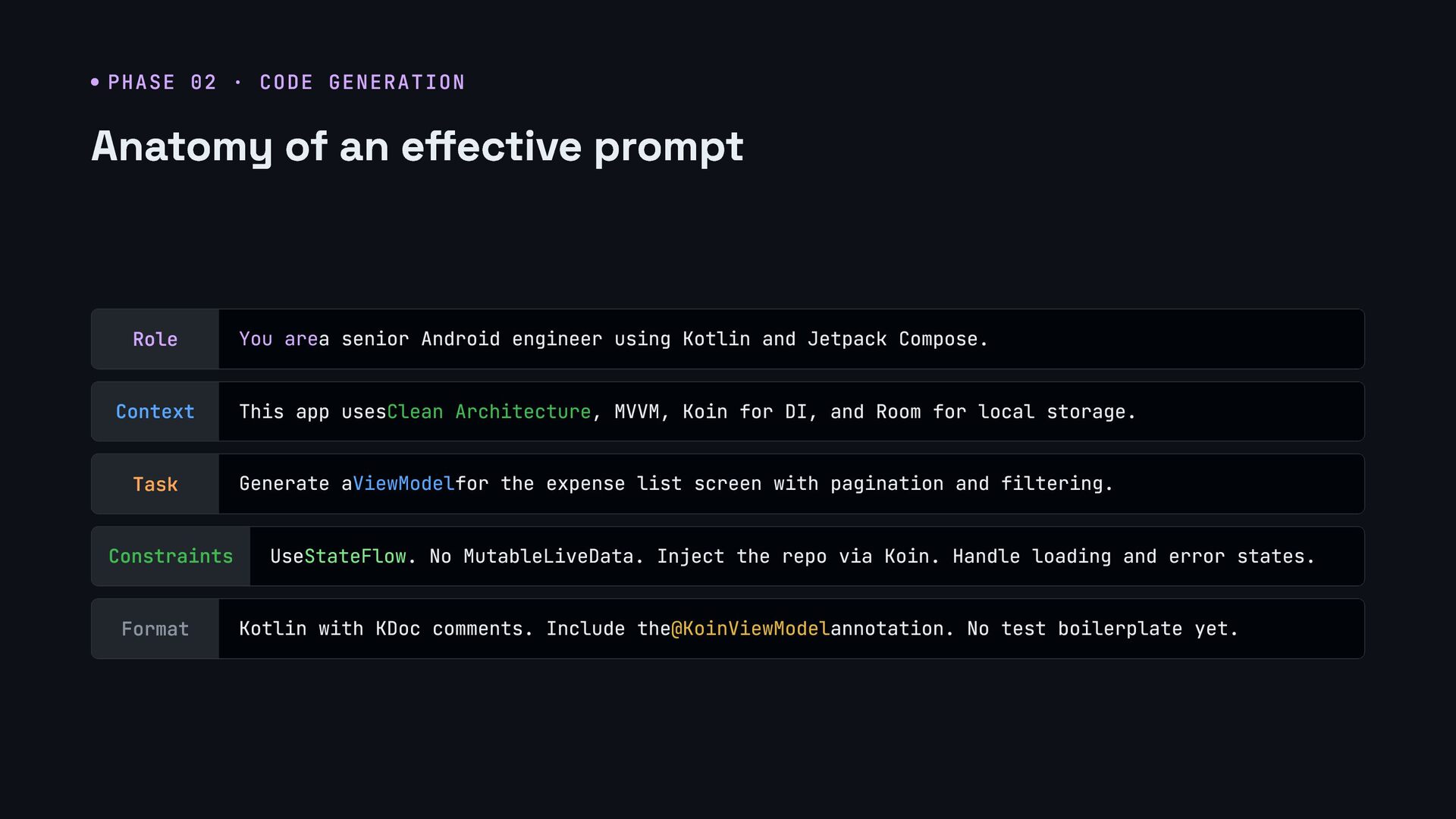
  12. PHASE 02 · CODE GENERATION Anatomy of an effective prompt

    Role You area senior Android engineer using Kotlin and Jetpack Compose. Context This app usesClean Architecture, MVVM, Koin for DI, and Room for local storage. Task Generate aViewModelfor the expense list screen with pagination and filtering. Constraints UseStateFlow. No MutableLiveData. Inject the repo via Koin. Handle loading and error states. Format Kotlin with KDoc comments. Include the@KoinViewModelannotation. No test boilerplate yet.
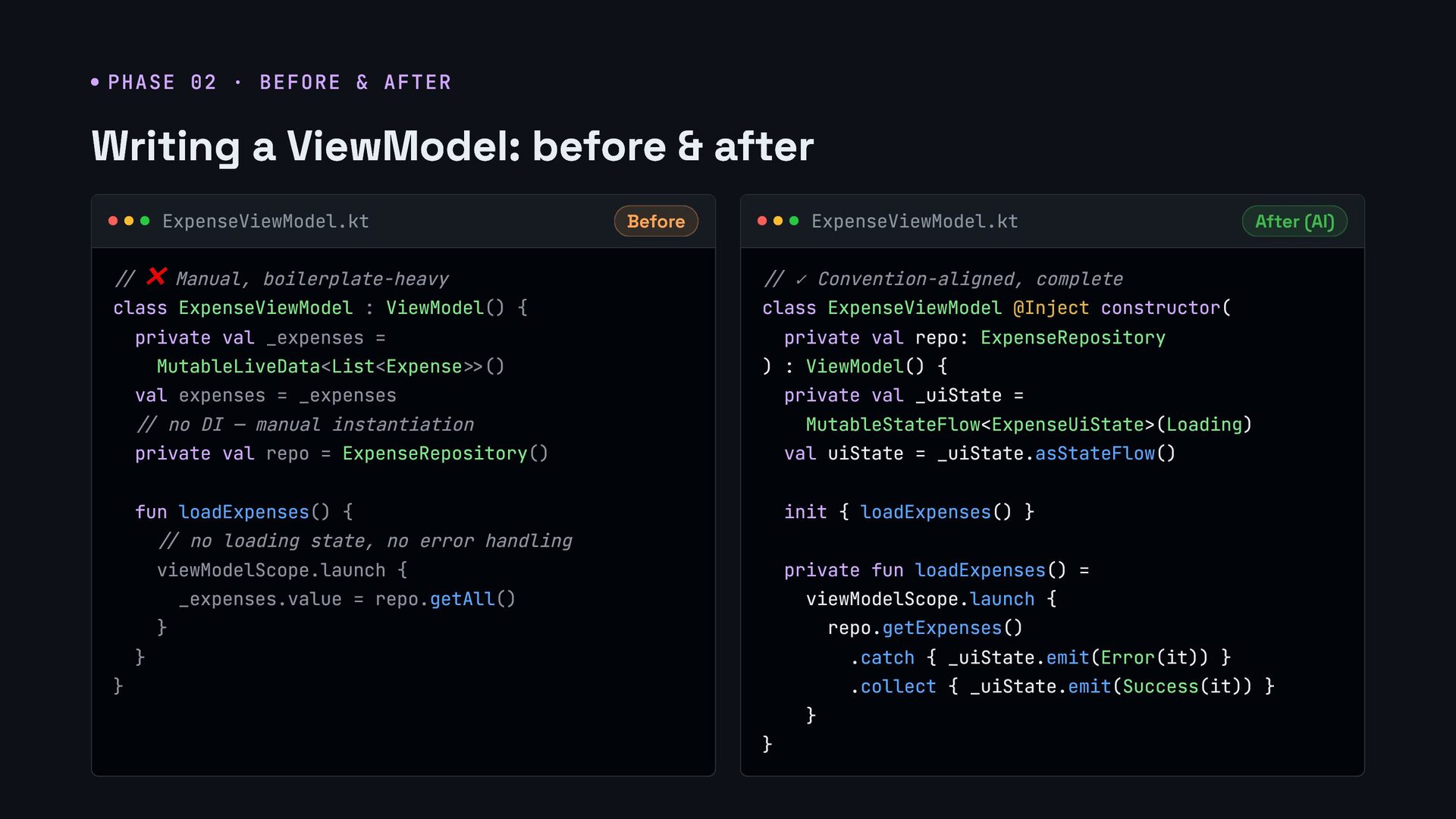
  13. PHASE 02 · BEFORE & AFTER Writing a ViewModel: before

    & after ExpenseViewModel.kt Before // ❌ Manual, boilerplate-heavy class ExpenseViewModel : ViewModel() { private val _expenses = MutableLiveData<List<Expense>>() val expenses = _expenses // no DI — manual instantiation private val repo = ExpenseRepository() fun loadExpenses() { // no loading state, no error handling viewModelScope.launch { _expenses.value = repo.getAll() } } } ExpenseViewModel.kt After (AI) // ✓ Convention-aligned, complete class ExpenseViewModel @Inject constructor( private val repo: ExpenseRepository ) : ViewModel() { private val _uiState = MutableStateFlow<ExpenseUiState>(Loading) val uiState = _uiState.asStateFlow() init { loadExpenses() } private fun loadExpenses() = viewModelScope.launch { repo.getExpenses() .catch { _uiState.emit(Error(it)) } .collect { _uiState.emit(Success(it)) } } }
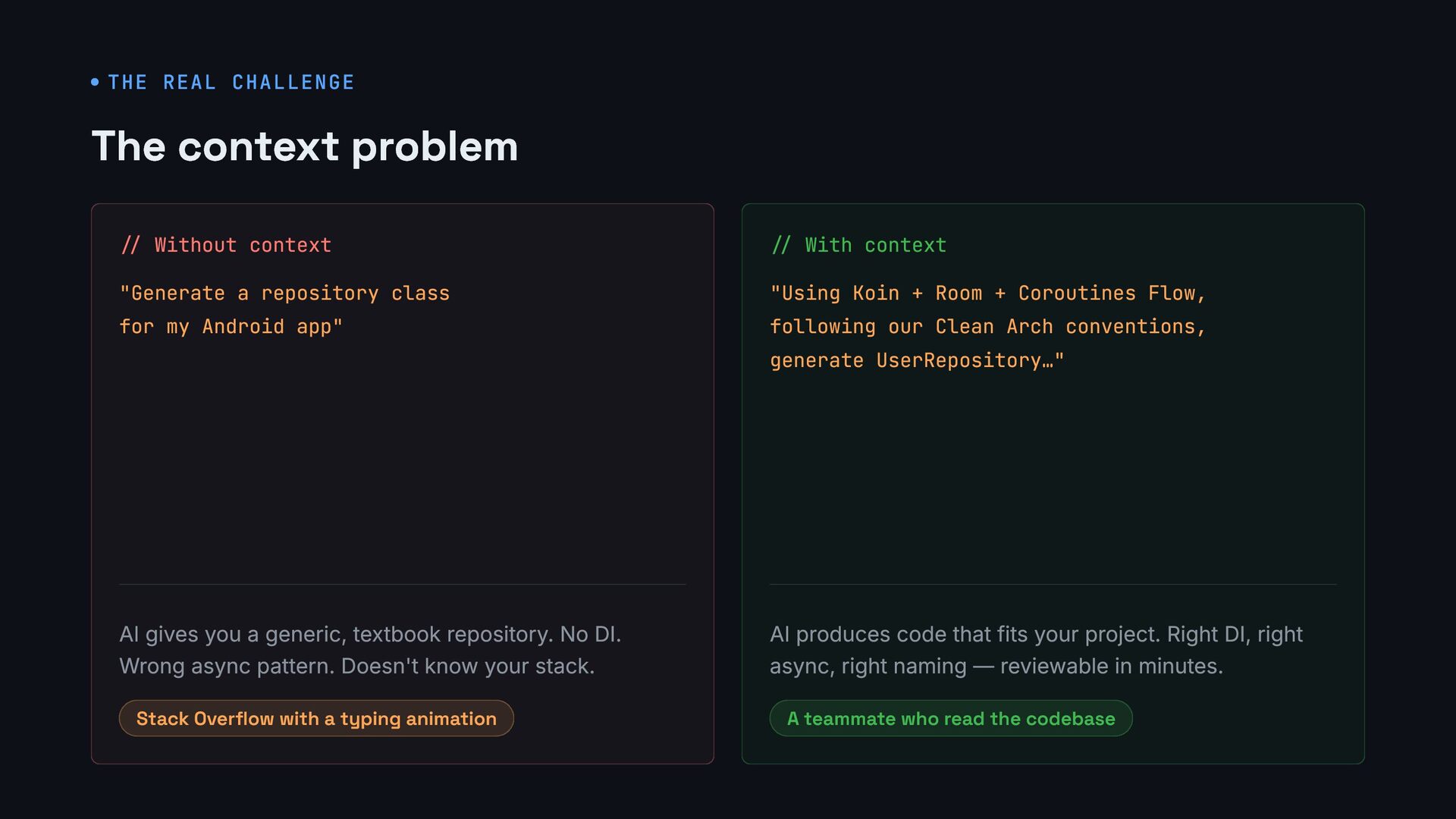
  14. THE REAL CHALLENGE The context problem // Without context "Generate

    a repository class for my Android app" AI gives you a generic, textbook repository. No DI. Wrong async pattern. Doesn't know your stack. Stack Overflow with a typing animation // With context "Using Koin + Room + Coroutines Flow, following our Clean Arch conventions, generate UserRepository…" AI produces code that fits your project. Right DI, right async, right naming — reviewable in minutes. A teammate who read the codebase
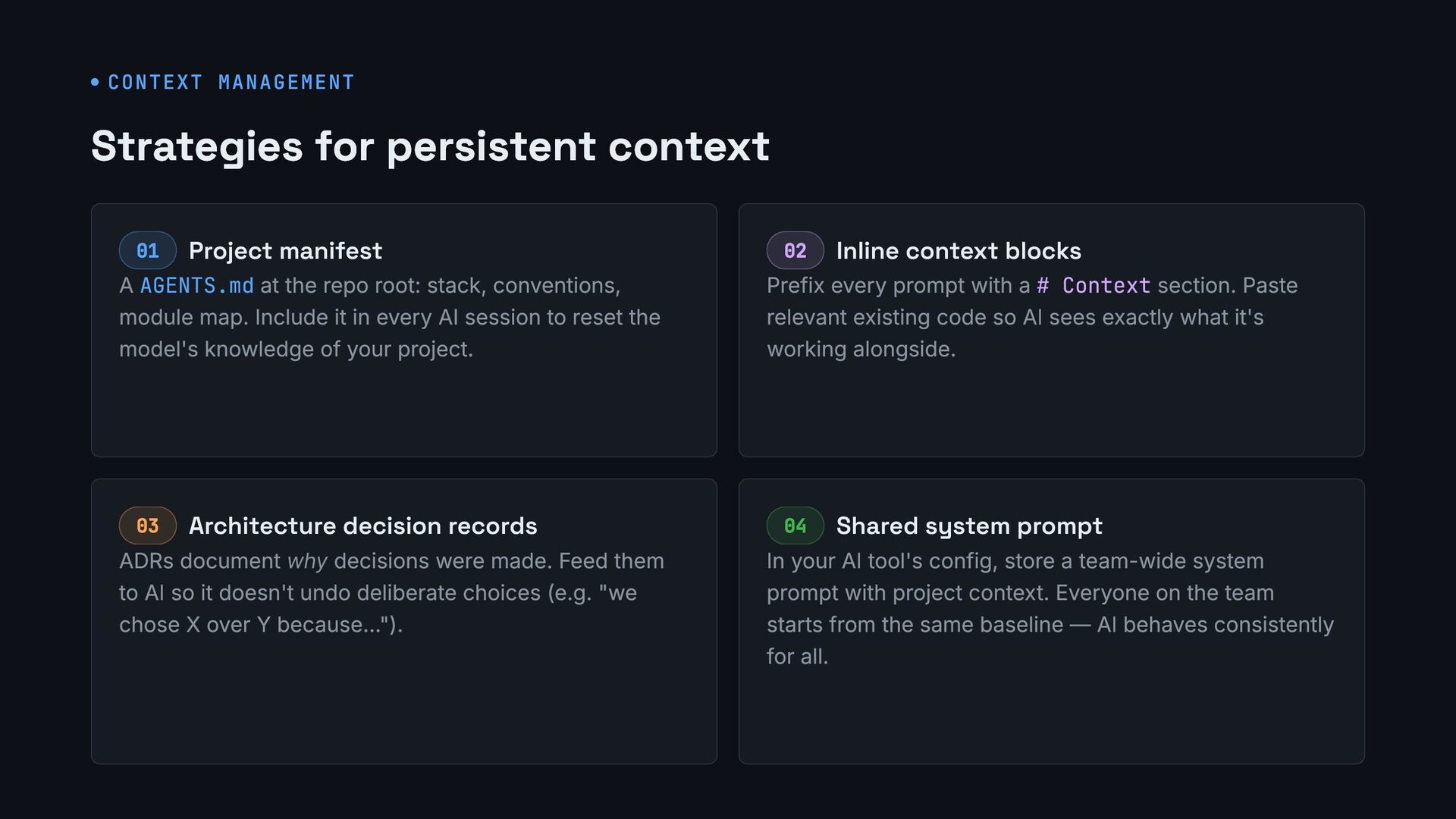
  15. CONTEXT MANAGEMENT Strategies for persistent context 01 Project manifest A

    AGENTS.md at the repo root: stack, conventions, module map. Include it in every AI session to reset the model's knowledge of your project. 02 Inline context blocks Prefix every prompt with a # Context section. Paste relevant existing code so AI sees exactly what it's working alongside. 03 Architecture decision records ADRs document why decisions were made. Feed them to AI so it doesn't undo deliberate choices (e.g. "we chose X over Y because…"). 04 Shared system prompt In your AI tool's config, store a team-wide system prompt with project context. Everyone on the team starts from the same baseline — AI behaves consistently for all.
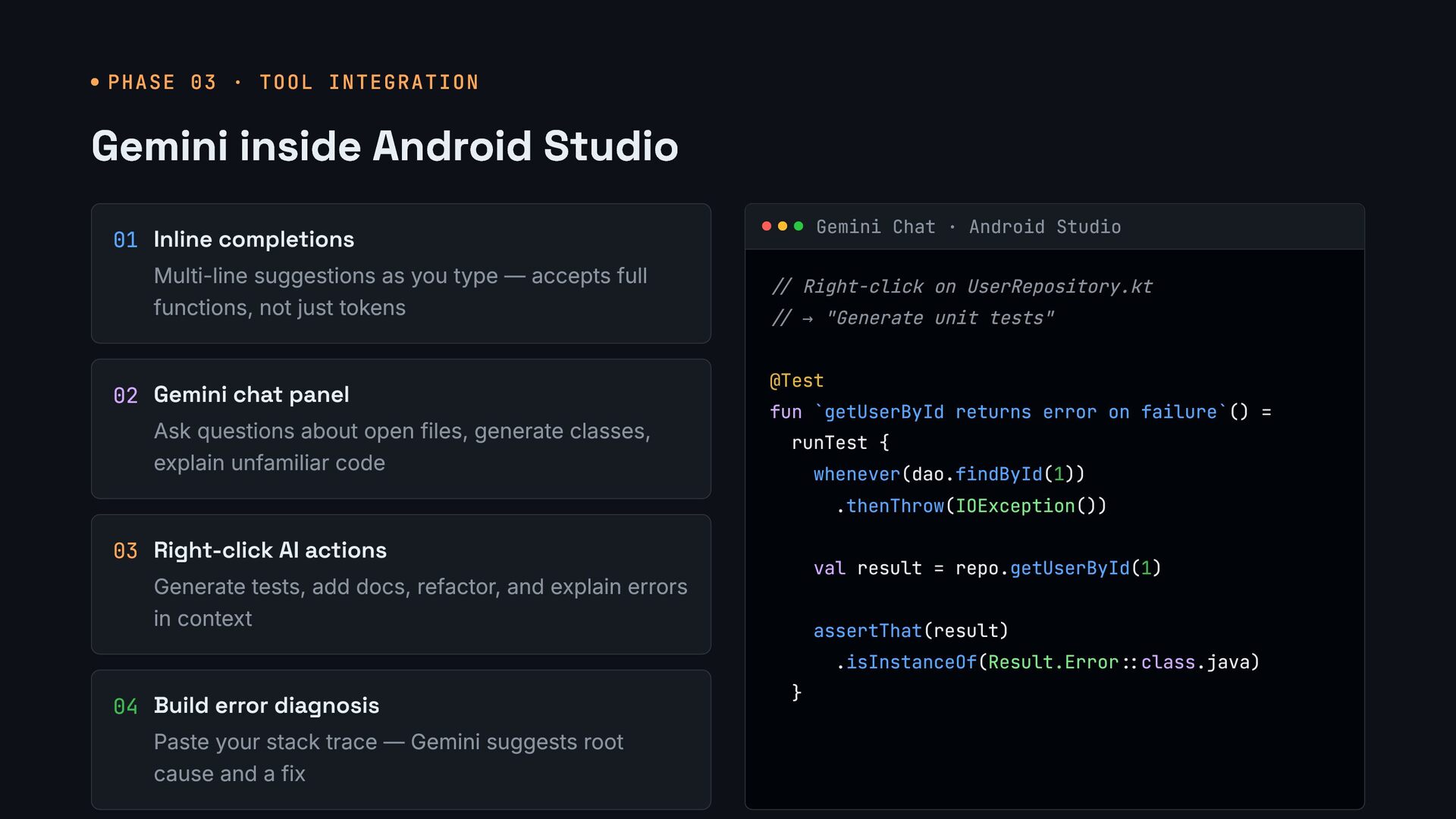
  16. PHASE 03 · TOOL INTEGRATION Gemini inside Android Studio 01

    Inline completions Multi-line suggestions as you type — accepts full functions, not just tokens 02 Gemini chat panel Ask questions about open files, generate classes, explain unfamiliar code 03 Right-click AI actions Generate tests, add docs, refactor, and explain errors in context 04 Build error diagnosis Paste your stack trace — Gemini suggests root cause and a fix Gemini Chat · Android Studio // Right-click on UserRepository.kt // → "Generate unit tests" @Test fun `getUserById returns error on failure`() = runTest { whenever(dao.findById(1)) .thenThrow(IOException()) val result = repo.getUserById(1) assertThat(result) .isInstanceOf(Result.Error::class.java) }
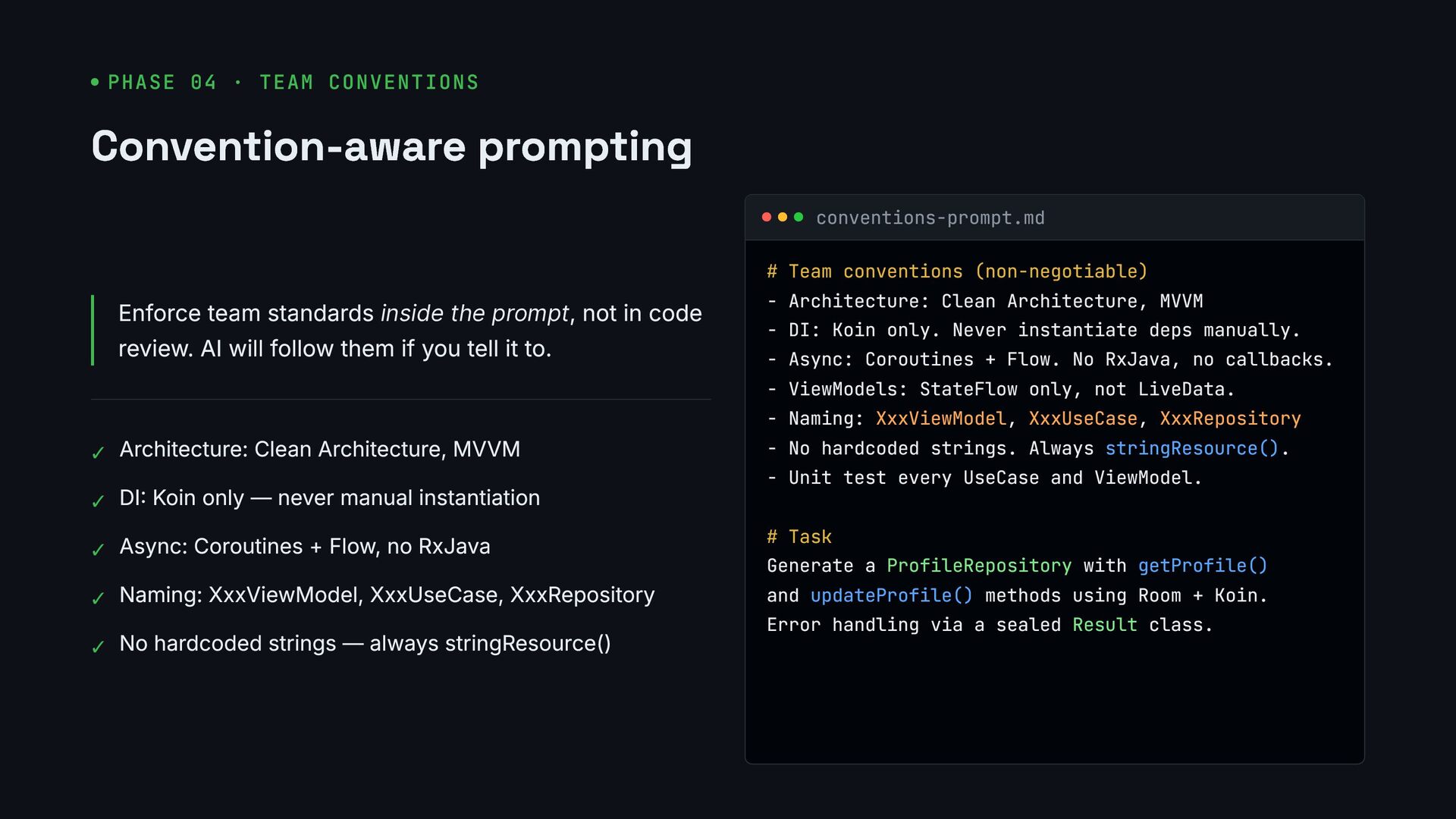
  17. PHASE 04 · TEAM CONVENTIONS Convention-aware prompting Enforce team standards

    inside the prompt, not in code review. AI will follow them if you tell it to. ✓ Architecture: Clean Architecture, MVVM ✓ DI: Koin only — never manual instantiation ✓ Async: Coroutines + Flow, no RxJava ✓ Naming: XxxViewModel, XxxUseCase, XxxRepository ✓ No hardcoded strings — always stringResource() conventions-prompt.md # Team conventions (non-negotiable) - Architecture: Clean Architecture, MVVM - DI: Koin only. Never instantiate deps manually. - Async: Coroutines + Flow. No RxJava, no callbacks. - ViewModels: StateFlow only, not LiveData. - Naming: XxxViewModel, XxxUseCase, XxxRepository - No hardcoded strings. Always stringResource(). - Unit test every UseCase and ViewModel. # Task Generate a ProfileRepository with getProfile() and updateProfile() methods using Room + Koin. Error handling via a sealed Result class.
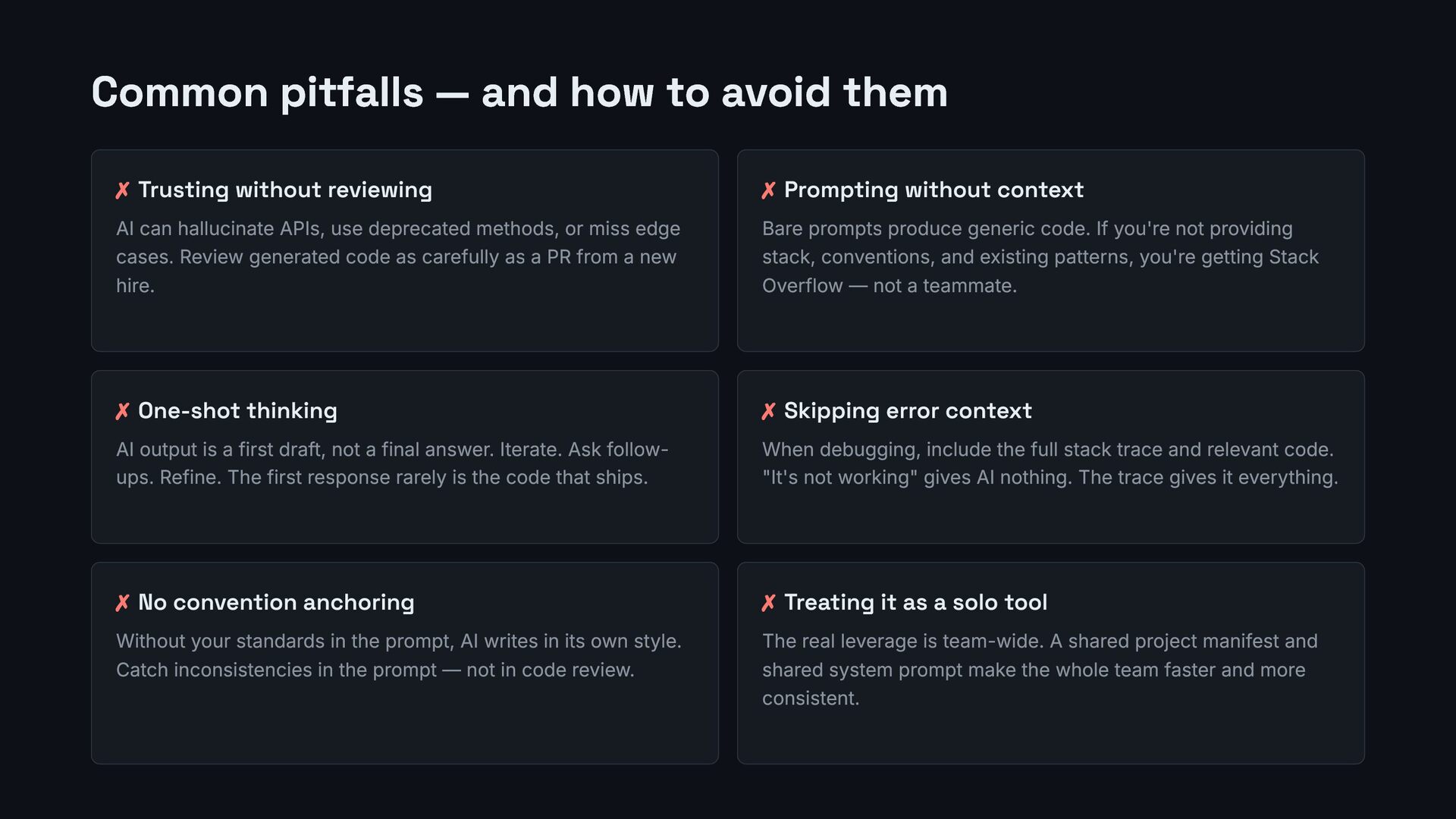
  18. Common pitfalls — and how to avoid them ✗ Trusting

    without reviewing AI can hallucinate APIs, use deprecated methods, or miss edge cases. Review generated code as carefully as a PR from a new hire. ✗ Prompting without context Bare prompts produce generic code. If you're not providing stack, conventions, and existing patterns, you're getting Stack Overflow — not a teammate. ✗ One-shot thinking AI output is a first draft, not a final answer. Iterate. Ask follow- ups. Refine. The first response rarely is the code that ships. ✗ Skipping error context When debugging, include the full stack trace and relevant code. "It's not working" gives AI nothing. The trace gives it everything. ✗ No convention anchoring Without your standards in the prompt, AI writes in its own style. Catch inconsistencies in the prompt — not in code review. ✗ Treating it as a solo tool The real leverage is team-wide. A shared project manifest and shared system prompt make the whole team faster and more consistent.
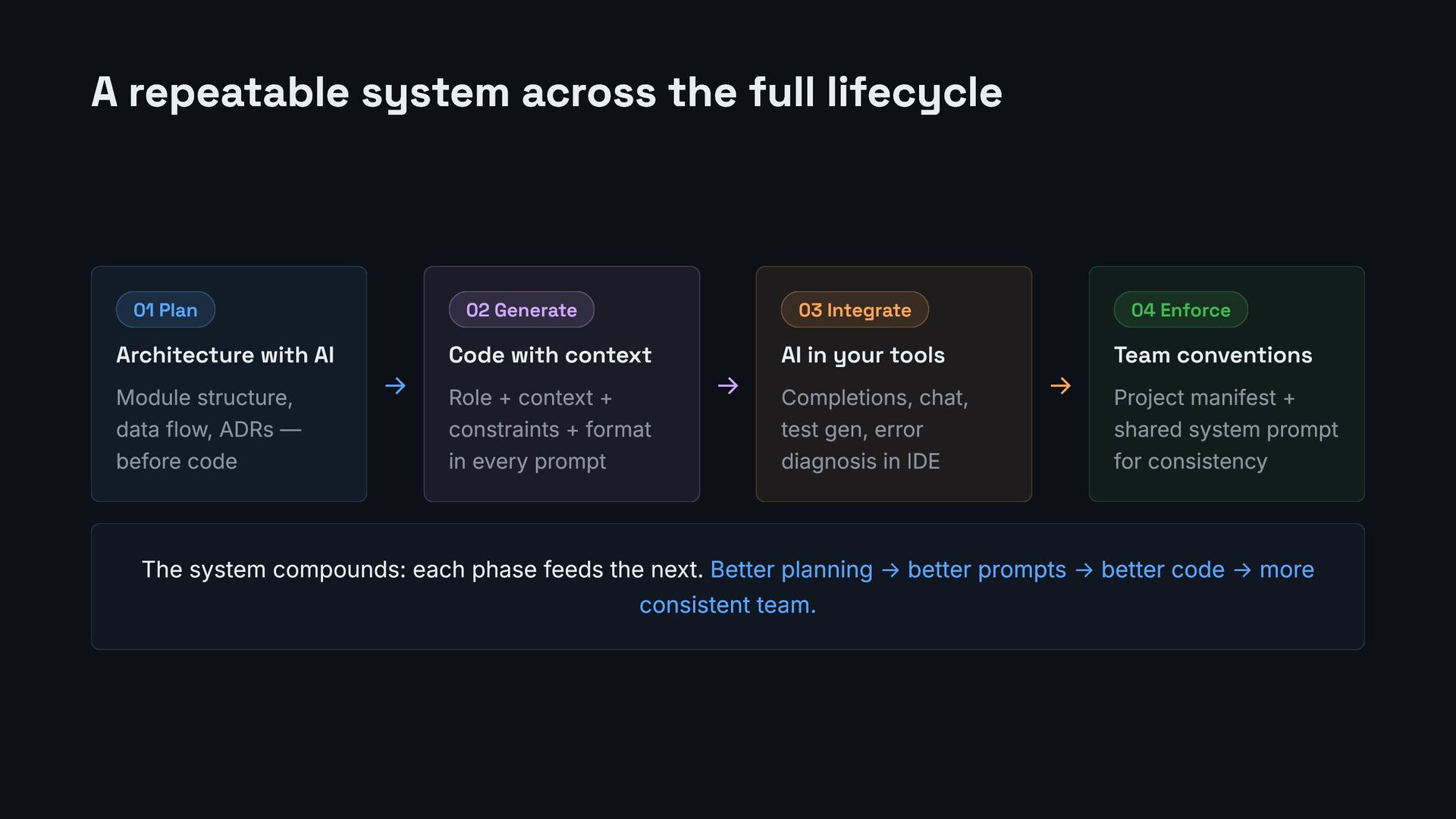
  19. A repeatable system across the full lifecycle 01 Plan Architecture

    with AI Module structure, data flow, ADRs — before code → 02 Generate Code with context Role + context + constraints + format in every prompt → 03 Integrate AI in your tools Completions, chat, test gen, error diagnosis in IDE → 04 Enforce Team conventions Project manifest + shared system prompt for consistency The system compounds: each phase feeds the next. Better planning → better prompts → better code → more consistent team.
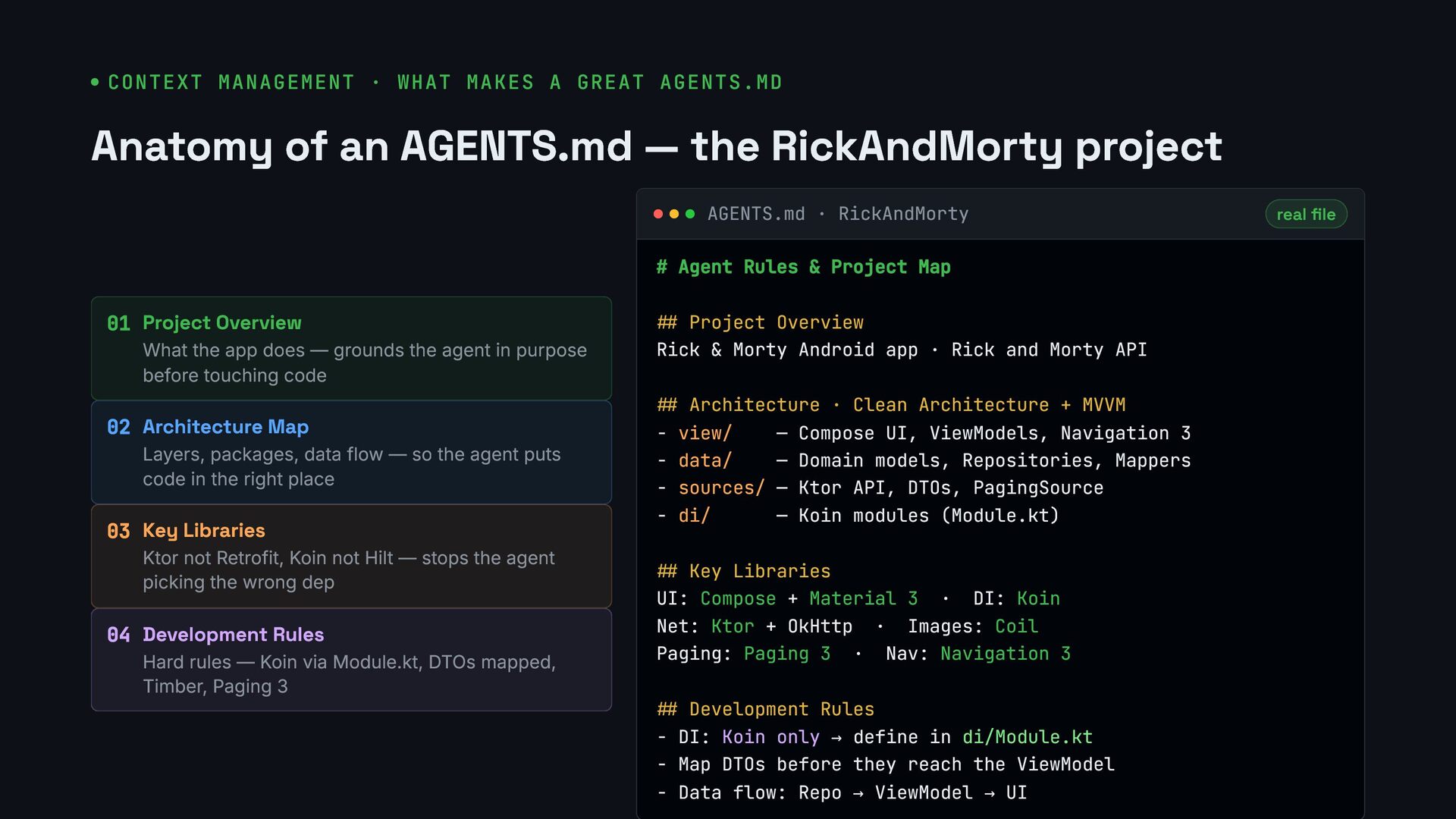
  20. CONTEXT MANAGEMENT · WHAT MAKES A GREAT AGENTS.MD Anatomy of

    an AGENTS.md — the RickAndMorty project 01 Project Overview What the app does — grounds the agent in purpose before touching code 02 Architecture Map Layers, packages, data flow — so the agent puts code in the right place 03 Key Libraries Ktor not Retrofit, Koin not Hilt — stops the agent picking the wrong dep 04 Development Rules Hard rules — Koin via Module.kt, DTOs mapped, Timber, Paging 3 AGENTS.md · RickAndMorty real file # Agent Rules & Project Map ## Project Overview Rick & Morty Android app · Rick and Morty API ## Architecture · Clean Architecture + MVVM - view/ — Compose UI, ViewModels, Navigation 3 - data/ — Domain models, Repositories, Mappers - sources/ — Ktor API, DTOs, PagingSource - di/ — Koin modules (Module.kt) ## Key Libraries UI: Compose + Material 3 · DI: Koin Net: Ktor + OkHttp · Images: Coil Paging: Paging 3 · Nav: Navigation 3 ## Development Rules - DI: Koin only → define in di/Module.kt - Map DTOs before they reach the ViewModel - Data flow: Repo → ViewModel → UI
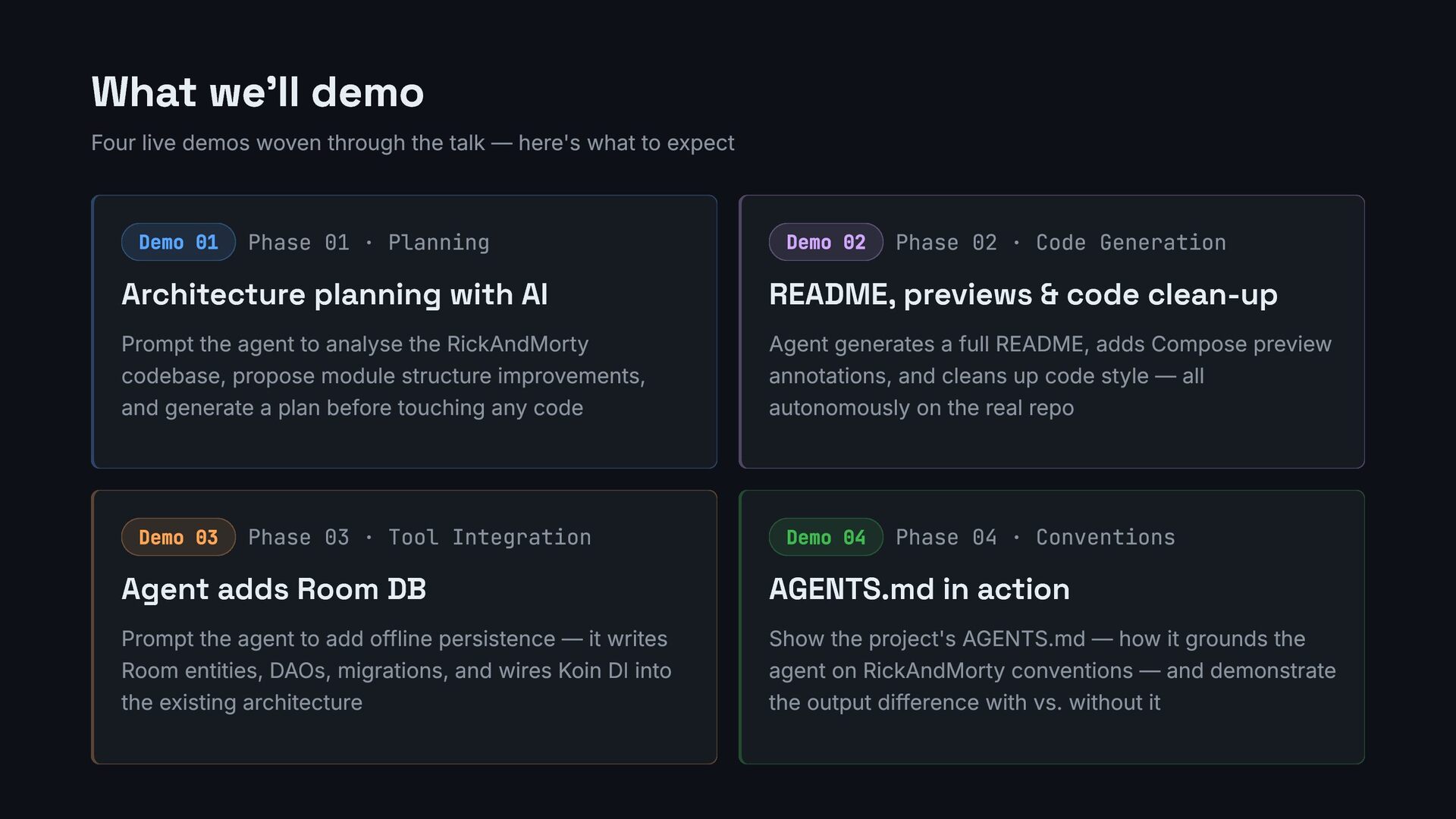
  21. What we'll demo Four live demos woven through the talk

    — here's what to expect Demo 01 Phase 01 · Planning Architecture planning with AI Prompt the agent to analyse the RickAndMorty codebase, propose module structure improvements, and generate a plan before touching any code Demo 02 Phase 02 · Code Generation README, previews & code clean-up Agent generates a full README, adds Compose preview annotations, and cleans up code style — all autonomously on the real repo Demo 03 Phase 03 · Tool Integration Agent adds Room DB Prompt the agent to add offline persistence — it writes Room entities, DAOs, migrations, and wires Koin DI into the existing architecture Demo 04 Phase 04 · Conventions AGENTS.md in action Show the project's AGENTS.md — how it grounds the agent on RickAndMorty conventions — and demonstrate the output difference with vs. without it
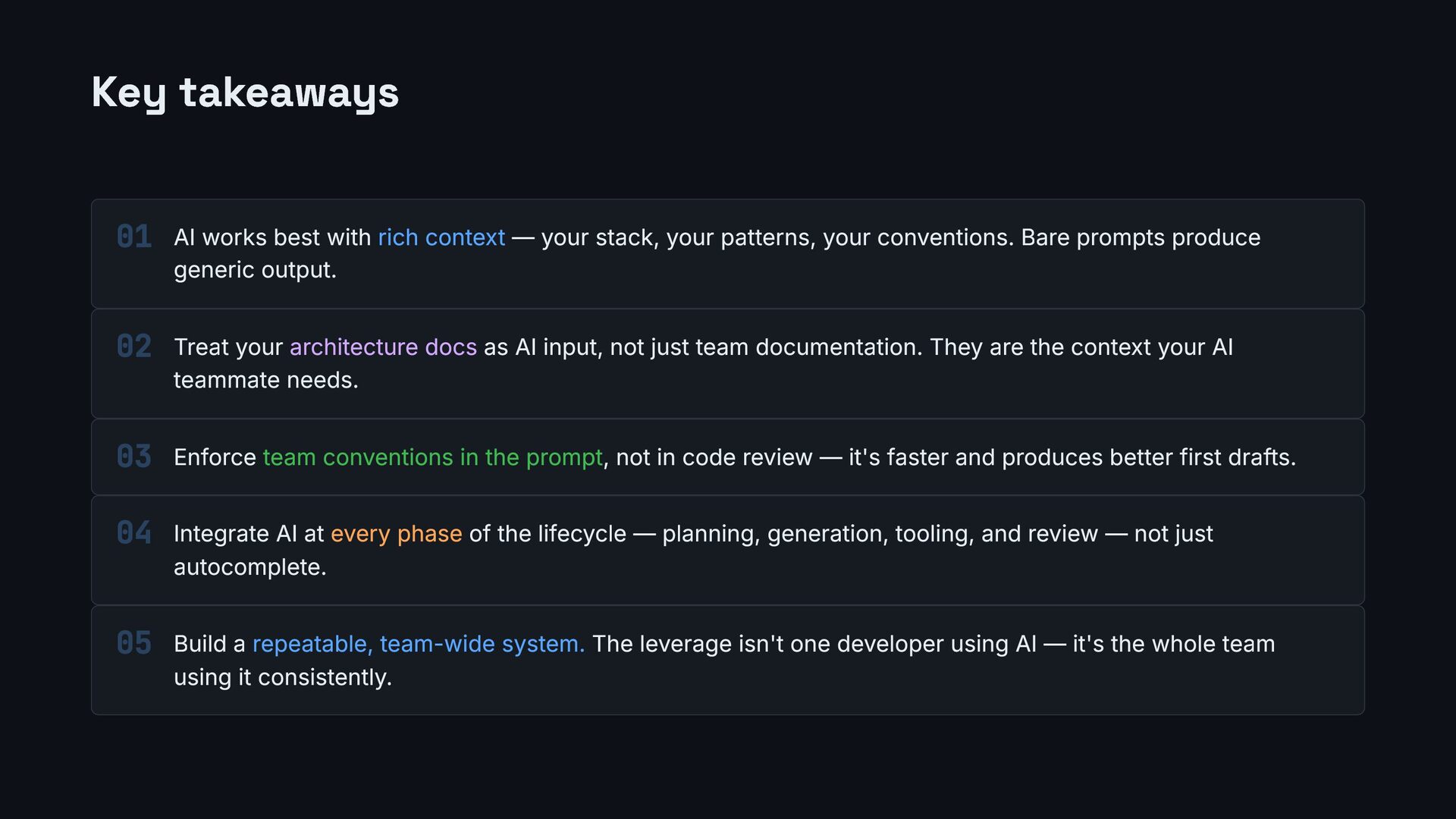
  22. Key takeaways AI works best with rich context — your

    stack, your patterns, your conventions. Bare prompts produce generic output. Treat your architecture docs as AI input, not just team documentation. They are the context your AI teammate needs. Enforce team conventions in the prompt, not in code review — it's faster and produces better first drafts. Integrate AI at every phase of the lifecycle — planning, generation, tooling, and review — not just autocomplete. Build a repeatable, team-wide system. The leverage isn't one developer using AI — it's the whole team using it consistently. 01 02 03 04 05
  23. QUESTIONS Thank you What questions do you have? Jacquiline Gitau

    Android Engineer @Jacqui_Gitau Jacquiline Gitau