Share
Embed
Subjective Crypto Currency
If we package the PGP / GPG web of trust model as an easy to use photo sharing app, maybe we can overcome the usability limitations of traditional crypto. Plus philosophy and anthropology. #noblockchain
Chris Anderson
June 27, 2014
Transcript
35 slides
-
S U B J E C T I V E
C RY P T O C U R R E N C Y # n o b l o c k c h a i n -
I D E O L O G Y B A
C K G R O U N D A S S U M P T I O N S -
L E G I B I L I T Y
W H E R E W O U L D Y O U R A T H E R L I V E ? -
VA L U E H O W W E K
N O W S O M E T H I N G I S I M P O R TA N T -
D E T E R R I T O R
I A L I Z AT I O N & R E T E R R I T O R I A L I Z AT I O N W H E N VA L U E S Y S T E M S C O L L I D E -
G E N T R I F I C AT
I O N -
I N E Q U A L I T Y
9 9 % O F P E O P L E H A V E 6 0 % O F T H E W E A LT H -
P R O G R E S S I V
I S M A D J U S T I N G T H E C U R V E -
G L O B A L PA R T I
A L O R D E R I N G D O W E N E E D I T ? -
P I R A H Ã W E C A
N L I V E W I T H O U T N U M B E R S -
G I F T E C O N O M
Y C A N W E S C A L E I T ? -
S U B J E C T I V E
VA L U E E V E RY O N E S E E S A D I F F E R E N T PA R T I A L O R D E R I N G -
# n o b l o c k c h
a i n -
W E B O F T R U S T
K E Y S I G N I N G PA R T Y -
P U B L I C K E Y C
RY P T O G R A P H Y • Alice creates a keypair (public, private) • Alice shares her public key with Bob • Bob can use Alice’s public key to encrypt messages so only Alice can read them. • Alice can use her private key to sign messages, and Bob can use Alice’s public key to verify the signature • How do we know it is really Alice’s key? -
C E R T I F I C AT E
A U T H O R I T Y W H O WA T C H E S T H E WA T C H E R S ? -
N O W W E H AV E N P
R O B L E M S K E Y S I G N I N G PA R T Y -
Schema 19 Document Coin Public Side - Publicly visible JSON.
Signatures - Public array of signatures. Bearer Side - Encrypted JSON only visible to bearer (and seen by past bearers). History - Transaction log is the stored history of sign-off of the coin to transaction partners. -
Wallet < [Home] flick up to give coins • Touch
coins to view • Select “Offer” to visit staging area • Each row of coins is tactile: scrolling left and right so the top row, the middle row, and the bottom row each contain as many coins as the user keeps. • The user can arrange their wallet however they want, too put coins “on the table” they flick them up to the offer area. Offer -
Offer < [Wallet] flick down to keep coins Give •
Touch coins to view • Select “Give” up to select a recipient for this gift • Offer is for conversational purposes. So after the “give” menu you have the option to “preview” instead of handing over the offer. • You can tell the merchant “pick a coin” and maybe the merchant asks for two. It’s expected that you’ll offer more than you give, the offer is more about giving someone a fair basis to ask. -
Extracto Coffeehouse Recipient < [Offer] Jane Smith Search Concordia Neighborhood
via Facebook Jason Doe • Select a recipient or enter email address • Copy url to send coin • This URL has a place where the visitor can put in an e-‐ mail address for the giver to send to. e.g.: ! ! ! • Always default to the last selected recipient. Only clear the previously selected after a successful transaction, if ever. click here to copy offer url web [email protected] Jay Smolik -
< [Offer] Transfer Extracto Coffeehouse Concordia Neighborhood give 2 coins
to • Select “Transfer” to transfer the coin to the recipient. • Getting to this stage automatically send the coin’s public face to the recipient for review. Really like sharing a bookmark to the coins in the offer. Its expected that the offer will be modified before the transaction is complete. • We set up accounts for all publicly listed businesses and e-‐ mail them anytime someone gives a coin. • Should there be a message? Offer is visible. Maybe show someone five coins and say “pick two.” Then revise offer before signing the transfer. Give -
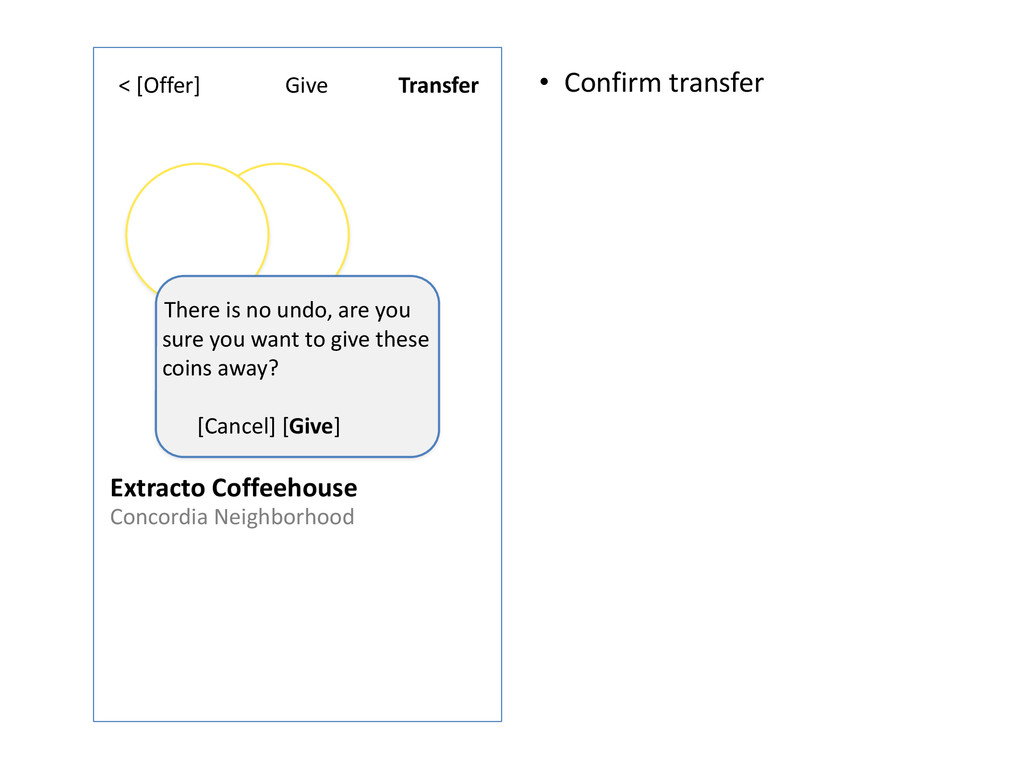
Give < [Offer] Extracto Coffeehouse Concordia Neighborhood give 2 coins
to There is no undo, are you sure you want to give these coins away? ! [Cancel] [Give] • Confirm transfer Transfer -
Thanks < [Home] Extracto Coffeehouse Concordia Neighborhood You gave 2
coins to • Touch coins to view • Touch Recipient to visit profile -
Mint < [Home] Invite J Chris Anderson B-‐Tree Whisperer take
a picture to mint a new coin • Do coins need messages / captions / names? • “Invite” is grey until you take a picture. • Select “Invite” to share your coin with other people. • “take a picture” button can change to “replace photo” or something after the first photo is taken but before invites sent Name Your Coin -
Extracto Coffeehouse Invite < [Offer] Jane Smith Search Concordia Neighborhood
via Facebook Jason Doe • Select multiple people and email addresses to mint with. • Copy url to send minting opportunity to people on their mobile devices. • The suggestions should be adaptive and correct. A combination of local and friend data should make identifying people to invite easy. click here to copy mint url Send Your Coin Name -
Minting < [Home] • Waiting for minters the coin
creator has the option to mint at any time and stop waiting for others to join. • People may contribute signatures that the mentor rejects. • Future versions of the software may allow for more private coin minting, for instance coins that are invisible outside of a select group until after they are minted. Mint touch “Mint”, or keep waiting for minters J Chris Anderson B-‐Tree Whisperer minting… -
Minting < [Home] • Touch “Mint” to edit the list
of attachments and encrypt the coin to become it’s first bearer. • Some businesses may set up a bot that auto joins nearby coins when reputable people are minting, it’s up to the minter if they include the business in the signed coin. • A multi/party coin will have a split view. • When you click mint there are magic sparkles, then a transition to the bearer coin view. Mint J Chris Anderson B-‐Tree Whisperer Extracto Coffeehouse Concordia Neighborhood minting… -
Coin < [Home] • The bearer view of the Coin
• As the bearer of the coin you see the full image, and you can give the coin to a new bearer. • “Give” kicks off the same flow as “Give” from the Offer screen. • Giving it to another user encrypts the coin with their public key. Now you can only see the filtered image. • Scroll for bearer history, comments J Chris Anderson B-‐Tree Whisperer Extracto Coffeehouse Concordia Neighborhood Give minted by -
Coin < [Home] • This view is the same for
bearers or anyone else. • The minters are anyone the first minter allowed to sign. • The first minter is the first bearer. • The comments are stored on separate documents, signed by their authors. J Chris Anderson B-‐Tree Whisperer Give bearer history J Chris Anderson B-‐Tree Whisperer Extracto Coffeehouse Concordia Neighborhood minted by JeffWJ Stop drinking so much coffee! comments J Chris Anderson I’m climbing a tree, Jeff. -
Profile < [Menu] Search Give J Chris Anderson B-‐Tree Whisperer
J Chris Anderson B-‐Tree Whisperer Minted Coins ! Held Coins ! Comments ! Send Message Minted Coins Held Coins ! -
Extracto Coffeehouse Message < [Offer] Search Concordia Neighborhood • The
point of the message feature is to illustrate the secure communications that are enabled by the web-‐of-‐trust key distribution / signing. • Messages are encrypted with the recipient public keys. • The app should expose its secure communication channel for other applications to use. Send recipient(s) Compose message here. -
R E A D I N G L I S
T • David Graeber - Debt, the First 5,000 Years & Toward an Anthropological Theory of Value • Franco Berardi - After the Future • Slavoj Žižek • Ribbonfarm • Alexander R. Galloway - Protocol -
L I N K S • Fish tank • Legiblity
• Potlatch Stock Ticker • Oil and Water • Wealth Inequality • Desks • Pirahã language and culture