how to capitalize on technology in the classroom (i.e., iPads, iMacs, and presentation capabilities) in a meaningful way to support student learning. Students will… • …identify key concepts that describe the information need in order to prepare for searching for appropriate sources. • … demonstrate the ability to use a range of evaluative criteria in order to explain the rationale for source selection and select source(s) appropriate to the information need.
your final grade? OR … write a research paper for 50% of your final grade? • Open the Poll Everywhere site from the iPad home screen • Enter the correct code for your answer: • 212723 for “Take an exam” • 212743 for “Write a paper”
my project? Understanding your assignment Brainstorming What is “good” information? Scholarly vs. Popular Formats Evaluation criteria How do I use the library? Search Strategies Finding Books & Articles How should I use the information I find in my paper? Plagiarism Citing Information
my project? Understanding your assignment Brainstorming What is “good” information? Scholarly vs. Popular Formats Evaluation criteria How do I use the library? Search Strategies Finding Books & Articles How should I use the information I find in my paper? Plagiarism Citing Information
– why should we do some brainstorming before we start our research? • Discover: • What you know about a topic • What you want to learn about a topic • What questions you can ask about a topic • Which direction you want to pursue in your project
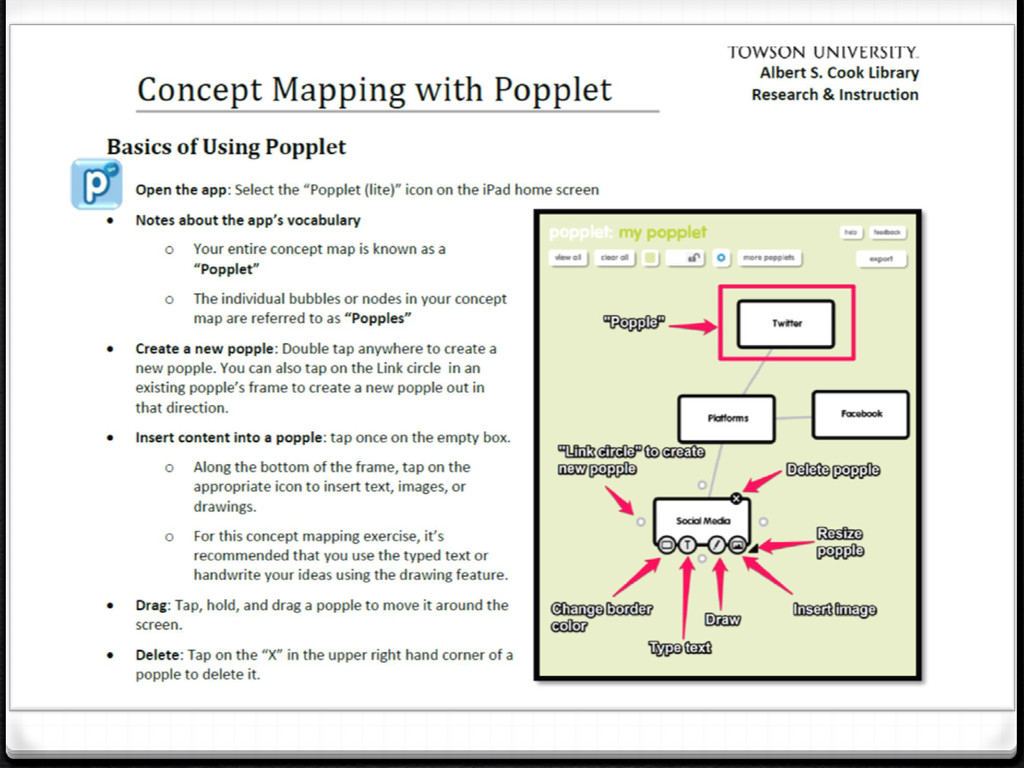
diagram that can be created to show connections between different aspects of a topic. • Sample: “Social media” • Use the iPad app “Popplet (lite)” to create a concept map for your own group project topic • Demo of app • See handout and ask for more help if need it
picture of your concept map (see the handout for directions to do this). • Open the TU Student Email link on the home screen • Email a copy of your map to yourself and to your librarian ([email protected]) along with the answer to the question: • What is one new question you have about your topic?


 kimberlymiller3
 helmedeiros
 frankvandijk
 morganepeng
 holman
 cassininazir
 aki_iinuma
 aleyda
 codingconduct
 davidcarrasco
 hannesfritz
 bermonpainter