Upgrade to Pro
— share decks privately, control downloads, hide ads and more …
Speaker Deck
Sign up for free
Menu
Search
Features
All features
Private URLs
Password Protection
Custom URLS
Scheduled publishing
Remove Branding
Restrict embedding
Deck Collections
Notes
Features
All features
Private URLs
Password Protection
Custom URLS
Scheduled publishing
Remove Branding
Restrict embedding
Deck Collections
Notes
Explore
Featured decks
Featured speakers
Programming
Technology
Storyboards
Explore
Featured decks
Featured speakers
Programming
Technology
Storyboards
Pricing
Search
Sign in
Sign up for free
002不適切コメントがあった場合-「ブロック」「強制退室」を 解除する
Search
Sponsored
·
Your Podcast. Everywhere. Effortlessly.
Share. Educate. Inspire. Entertain. You do you. We'll handle the rest.
→
live_cottage
PRO
June 24, 2025
120
0
Share
Embed
Copy iframe code
Copy JS code
Copy link
Start on current slide
002不適切コメントがあった場合-「ブロック」「強制退室」を 解除する
live_cottage
PRO
June 24, 2025
More Decks by live_cottage
See All by live_cottage
配信機材の配置
live_cottage
PRO
0
60
(旧)Live cottage管理画面の ログイン方法 ーご契約担当者様用
live_cottage
PRO
0
190
012ログイン方法 ー新規ユーザー用
live_cottage
PRO
0
190
(旧)パスワード再設定方法 -「パスワードをお忘れの場合」から
live_cottage
PRO
0
69
003商品を登録する
live_cottage
PRO
0
300
004視聴画面に商品を表示する(管理画面)
live_cottage
PRO
0
540
006ライブの予定を登録する(テスト配信用)
live_cottage
PRO
0
160
006-02ライブの予定を登録する(本番配信用)
live_cottage
PRO
0
83
008配信者固定コメントを表示する(管理画面)
live_cottage
PRO
0
180
Featured
See All Featured
The MySQL Ecosystem @ GitHub 2015
samlambert
251
13k
実際に使うSQLの書き方 徹底解説 / pgcon21j-tutorial
soudai
PRO
203
77k
Distributed Sagas: A Protocol for Coordinating Microservices
caitiem20
333
23k
AI Search: Where Are We & What Can We Do About It?
aleyda
0
8.1k
The Curious Case for Waylosing
cassininazir
1
570
Easily Structure & Communicate Ideas using Wireframe
afnizarnur
194
17k
Design and Strategy: How to Deal with People Who Don’t "Get" Design
morganepeng
133
20k
XXLCSS - How to scale CSS and keep your sanity
sugarenia
250
1.3M
Art, The Web, and Tiny UX
lynnandtonic
304
22k
Information Architects: The Missing Link in Design Systems
soysaucechin
1
1.2k
How Fast Is Fast Enough? [PerfNow 2025]
tammyeverts
3
940
Helping Users Find Their Own Way: Creating Modern Search Experiences
danielanewman
31
3.4k
Transcript
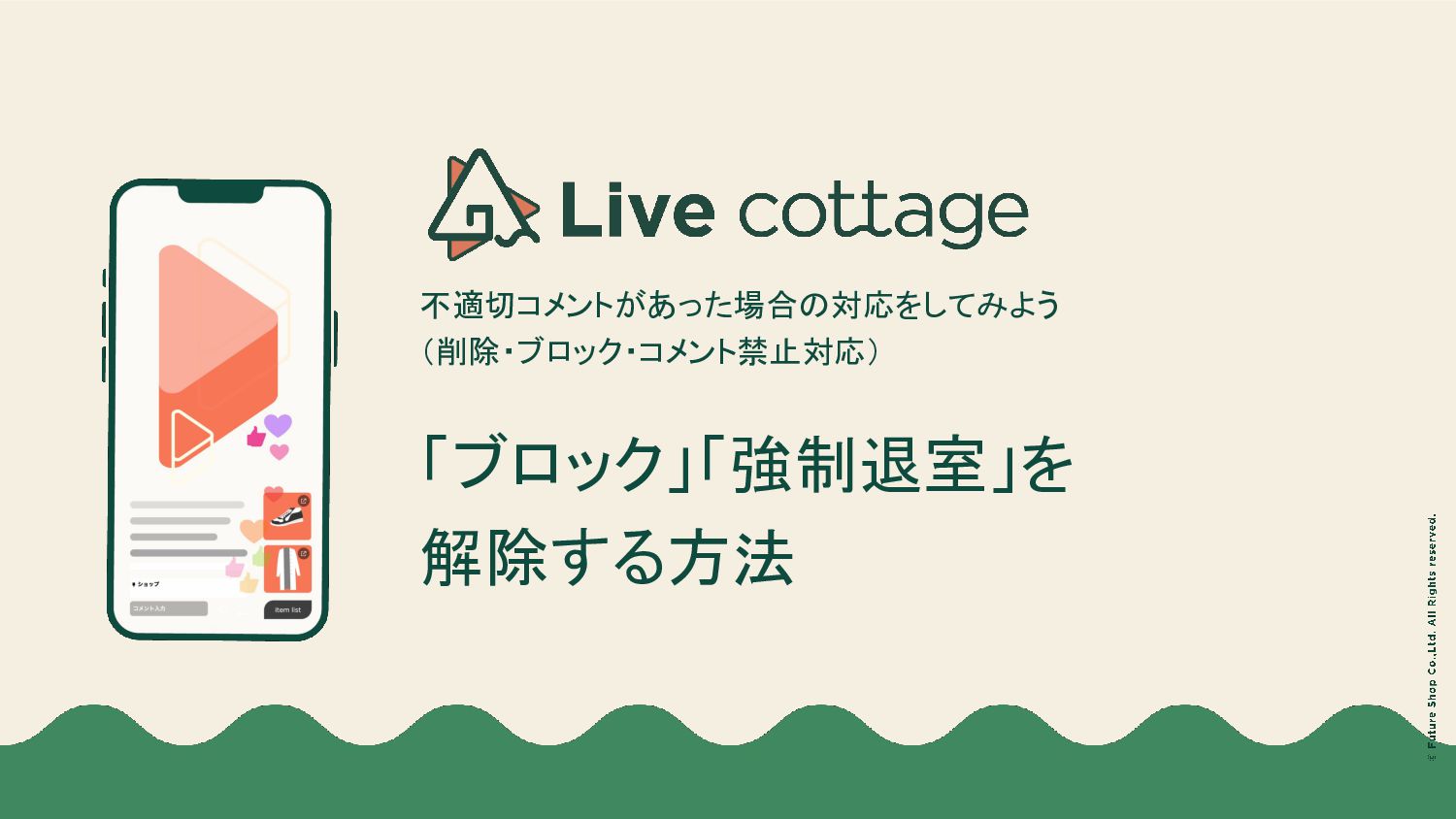
不適切コメントがあった場合の対応をしてみよう (削除・ブロック・コメント禁止対応) 「ブロック」「強制退室」を 解除する方法
2 誤操作などを取り消す場合、あるいは、 「ブロック」「強制退室」操作で対応したユーザー(視聴者)に 対して、該当操作を解除をする場合の操作方法をご説明します。
3 「配信管理」画面-[コメント]タブからコメントの各種操作が行えます。 「配信管理-コメントタブマニュアル」は、スライド下の<関連マニュアル>からご確認ください。 コメントに関する基本操作
4 1 [コメント]タブの[・・・]にマウスオーバーします。
5 2 メニューから[視聴者一覧]を選択します。
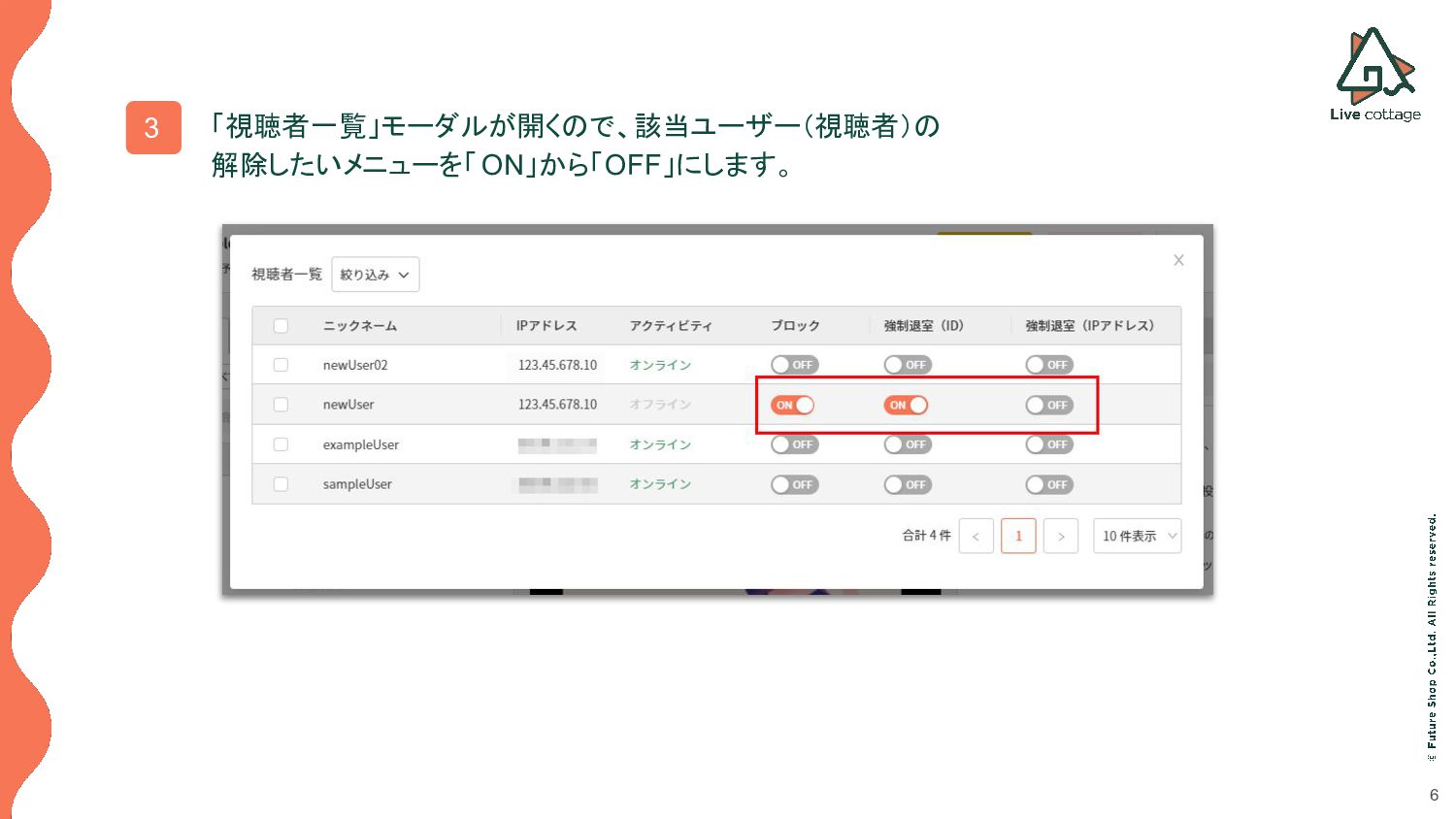
6 3 「視聴者一覧」モーダルが開くので、該当ユーザー(視聴者)の 解除したいメニューを「 ON」から「OFF」にします。
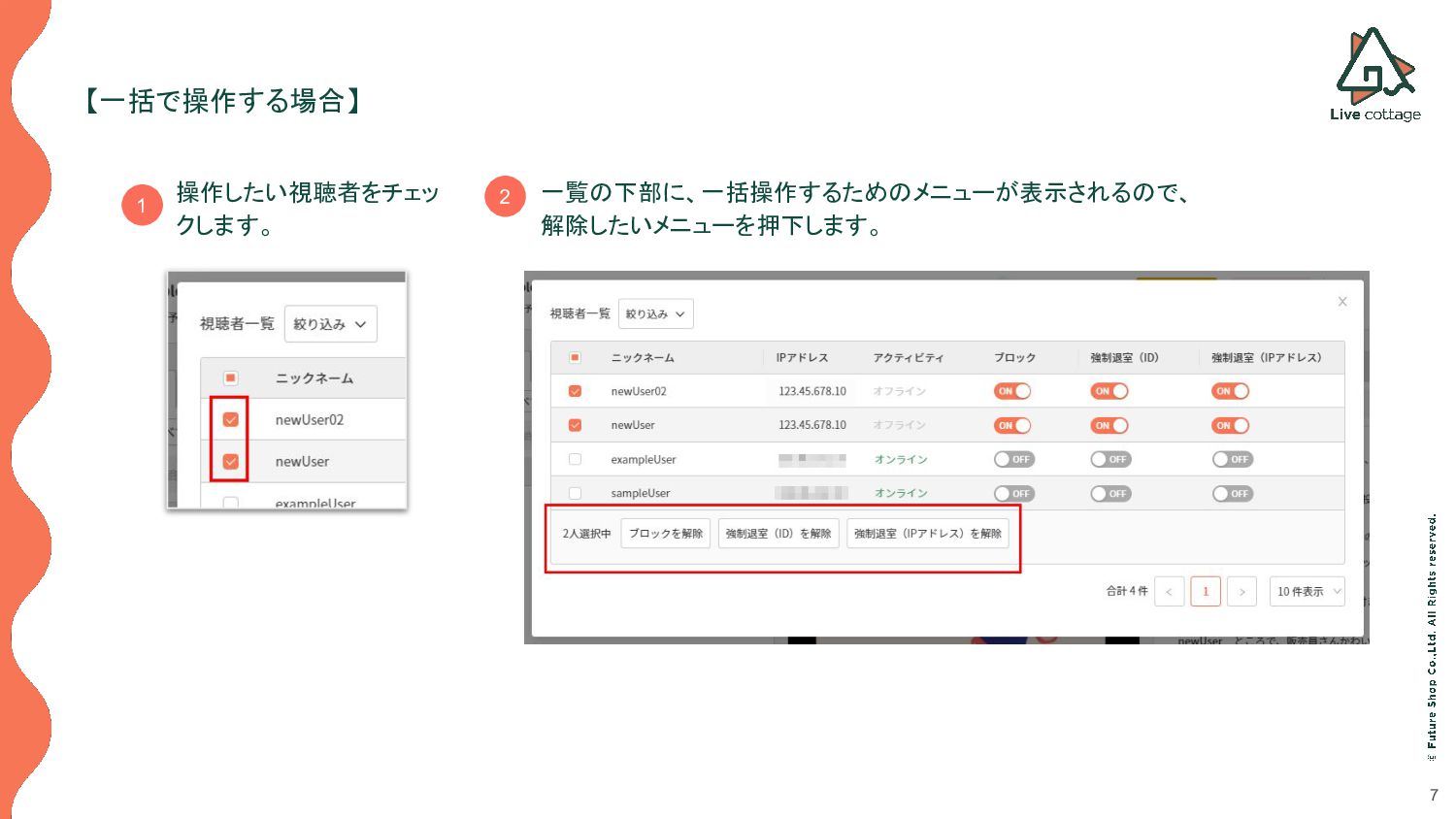
7 【一括で操作する場合】 操作したい視聴者をチェッ クします。 一覧の下部に、一括操作するためのメニューが表示されるので、 解除したいメニューを押下します。 1 2
Thank You


 live_cottage
 samlambert
 soudai
 caitiem20
 aleyda
 cassininazir
 afnizarnur
 morganepeng
 sugarenia
 lynnandtonic
 soysaucechin
 tammyeverts
 danielanewman
![3 「配信管理」画面-[コメント]タブからコメントの各種操作が行えます。 「配信管理-コメントタブマニュアル」は、スライド下の<関連マニュアル>からご確認ください。 コメントに関する基本操作](https://files.speakerdeck.com/presentations/5806c2ccf05c485994661db5002d84b0/slide_2.jpg)
![4 1 [コメント]タブの[・・・]にマウスオーバーします。](https://files.speakerdeck.com/presentations/5806c2ccf05c485994661db5002d84b0/slide_3.jpg)
![5 2 メニューから[視聴者一覧]を選択します。](https://files.speakerdeck.com/presentations/5806c2ccf05c485994661db5002d84b0/slide_4.jpg)