Upgrade to Pro
— share decks privately, control downloads, hide ads and more …
Speaker Deck
Sign up for free
Menu
Search
Features
All features
Private URLs
Password Protection
Custom URLS
Scheduled publishing
Remove Branding
Restrict embedding
Deck Collections
Notes
Features
All features
Private URLs
Password Protection
Custom URLS
Scheduled publishing
Remove Branding
Restrict embedding
Deck Collections
Notes
Explore
Featured decks
Featured speakers
Programming
Technology
Storyboards
Explore
Featured decks
Featured speakers
Programming
Technology
Storyboards
Pricing
Search
Sign in
Sign up for free
Open Street Map マニュアル 改
Search
Sponsored
·
Your Podcast. Everywhere. Effortlessly.
Share. Educate. Inspire. Entertain. You do you. We'll handle the rest.
→
reina
June 16, 2016
41
0
Share
Embed
Copy iframe code
Copy JS code
Copy link
Start on current slide
Open Street Map マニュアル 改
reina
June 16, 2016
More Decks by reina
See All by reina
マニュアル
reina_sbni
0
59
Featured
See All Featured
Exploring the Power of Turbo Streams & Action Cable | RailsConf2023
kevinliebholz
37
6.6k
Distributed Sagas: A Protocol for Coordinating Microservices
caitiem20
333
23k
Getting science done with accelerated Python computing platforms
jacobtomlinson
2
540
Heart Work Chapter 1 - Part 1
lfama
PRO
10
37k
Learning to Love Humans: Emotional Interface Design
aarron
275
41k
Building Applications with DynamoDB
mza
96
7.2k
DBのスキルで生き残る技術 - AI時代におけるテーブル設計の勘所
soudai
PRO
68
58k
Avoiding the “Bad Training, Faster” Trap in the Age of AI
tmiket
0
270
BBQ
matthewcrist
90
10k
Agile Leadership in an Agile Organization
kimpetersen
PRO
0
290
"I'm Feeling Lucky" - Building Great Search Experiences for Today's Users (#IAC19)
danielanewman
230
23k
ReactJS: Keep Simple. Everything can be a component!
pedronauck
666
130k
Transcript
空間情報システムⅠ Open Street Map マニュアル 1A116112 柴内玲奈
建物の入力 • エリアを選択する • 建物や公園など入力したいところをクリックし、その輪郭に 沿って赤い線で囲む • 囲み終わったら、赤い線上を左クリックし、「エリアの角を直 角に整形」をクリックすると、直角補正される •
修正がある場合は、「もとに戻す:タグの変更」をクリックする • 画面左側に「地物の種類を選択」という欄があり、そこから適 切な建物の種類を選択する • 画面上の「保存」をクリックする • 別のタブに移動し、「完了としてマーク」をクリックする
交差点を作った時の対処法 • 交差点を作ったときは、左クリックでごみ箱マークを クリックすると消える • また交差点が作成されると灰色の点が表示され、そ こをクリックし、ごみ箱マークをクリックすると点が消 える • 囲み終わった地物の点をクリックし、ドラッグすると
囲んだ形を変更できる
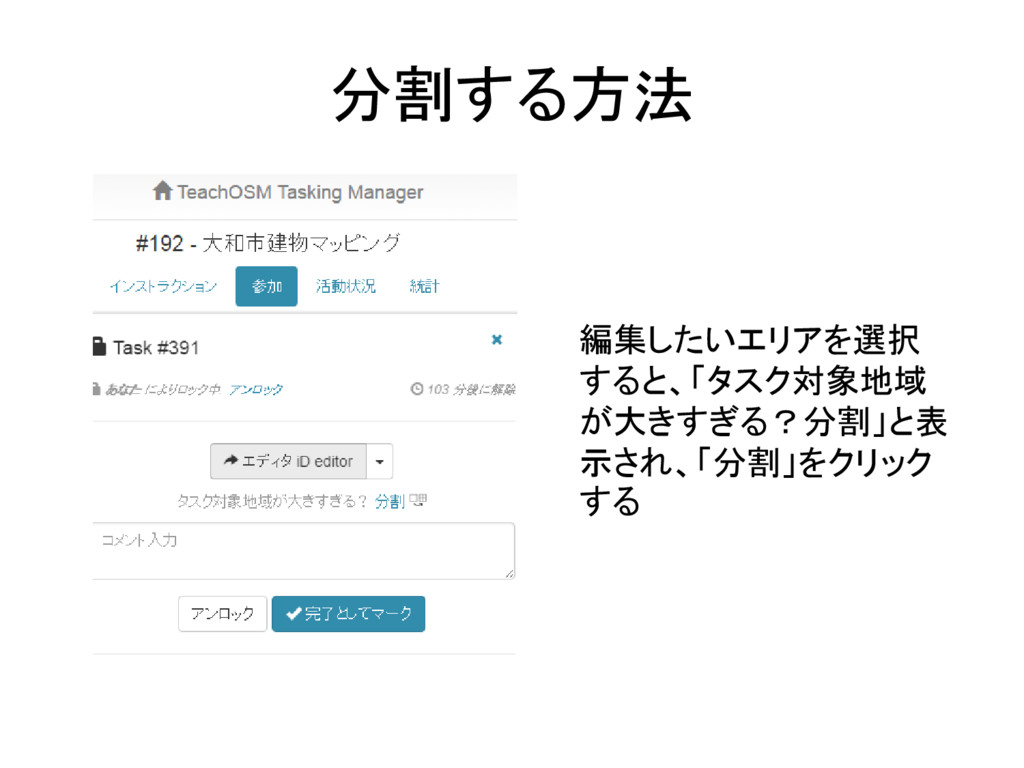
分割する方法 編集したいエリアを選択 すると、「タスク対象地域 が大きすぎる?分割」と表 示され、「分割」をクリック する
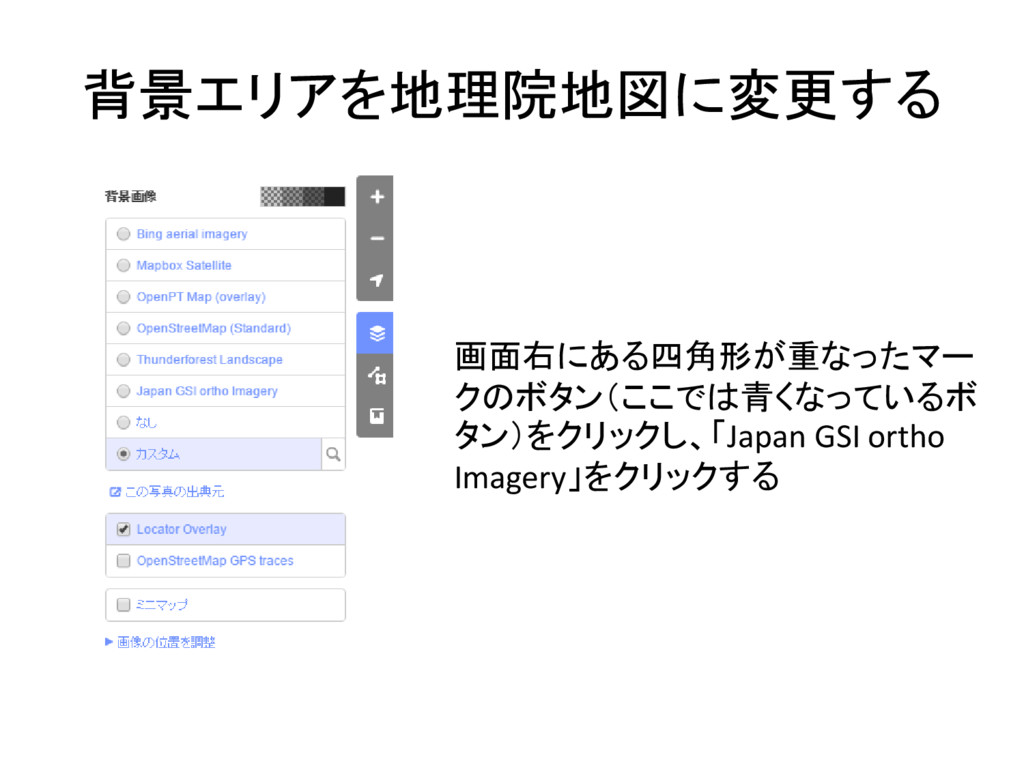
背景エリアを地理院地図に変更する 画面右にある四角形が重なったマー クのボタン(ここでは青くなっているボ タン)をクリックし、「Japan GSI ortho Imagery」をクリックする


 reina_sbni
 kevinliebholz
 caitiem20
 jacobtomlinson
 lfama
lfama
 aarron
 mza
mza
 soudai
 tmiket
 matthewcrist
 kimpetersen
 danielanewman
 pedronauck