Upgrade to Pro
— share decks privately, control downloads, hide ads and more …
Speaker Deck
Sign up for free
Menu
Search
Features
All features
Private URLs
Password Protection
Custom URLS
Scheduled publishing
Remove Branding
Restrict embedding
Deck Collections
Notes
Features
All features
Private URLs
Password Protection
Custom URLS
Scheduled publishing
Remove Branding
Restrict embedding
Deck Collections
Notes
Explore
Featured decks
Featured speakers
Programming
Technology
Storyboards
Explore
Featured decks
Featured speakers
Programming
Technology
Storyboards
Pricing
Search
Sign in
Sign up for free
マニュアル.pdf
Search
R.Mattsu
June 30, 2016
36
0
Share
Embed
Copy iframe code
Copy JS code
Copy link
Start on current slide
マニュアル.pdf
R.Mattsu
June 30, 2016
More Decks by R.Mattsu
See All by R.Mattsu
空間情報システム入門 7/14
rmatsu88
0
190
空間情報システム入門 7/14
rmatsu88
0
100
空間情報システム入門 #02 2016/06/16
rmatsu88
0
51
Featured
See All Featured
Typedesign – Prime Four
hannesfritz
42
3.2k
Impact Scores and Hybrid Strategies: The future of link building
tamaranovitovic
0
460
Public Speaking Without Barfing On Your Shoes - THAT 2023
reverentgeek
1
600
Heart Work Chapter 1 - Part 1
lfama
PRO
10
37k
Future Trends and Review - Lecture 12 - Web Technologies (1019888BNR)
signer
PRO
0
3.8k
Why Our Code Smells
bkeepers
PRO
340
58k
The SEO identity crisis: Don't let AI make you average
varn
0
590
We Have a Design System, Now What?
morganepeng
55
8.4k
The Art of Programming - Codeland 2020
erikaheidi
57
14k
RailsConf 2023
tenderlove
30
1.6k
HU Berlin: Industrial-Strength Natural Language Processing with spaCy and Prodigy
inesmontani
PRO
0
750
How People are Using Generative and Agentic AI to Supercharge Their Products, Projects, Services and Value Streams Today
helenjbeal
2
360
Transcript
マッピング作業による マニュアル 1A116207 松田遼介
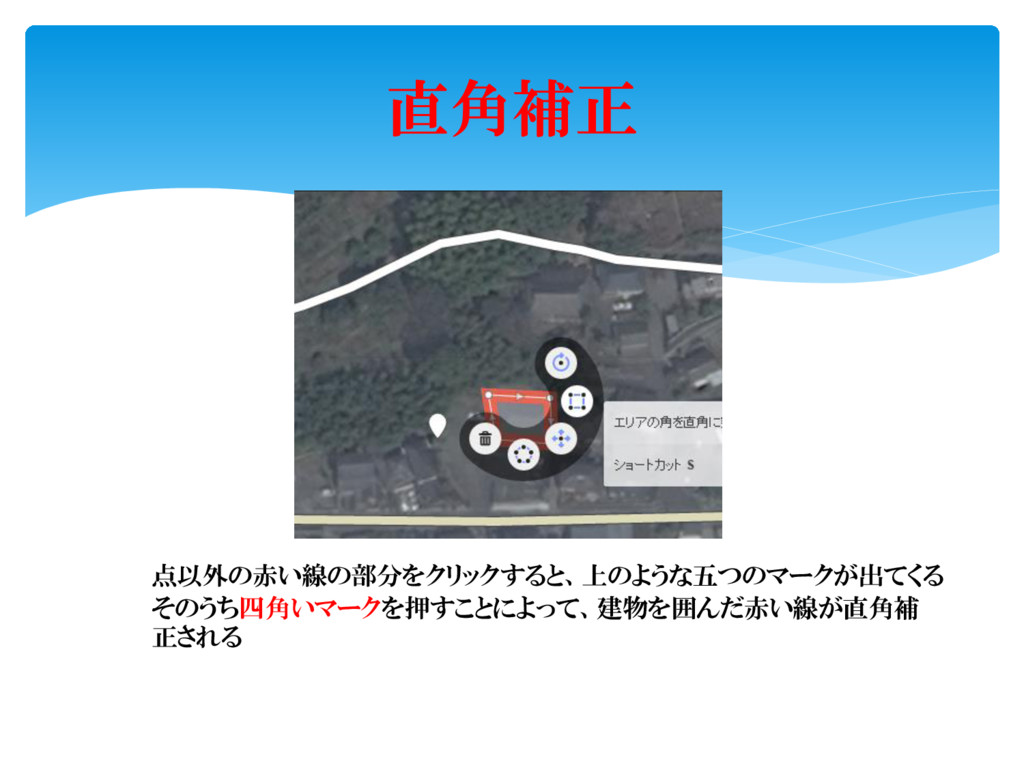
直角補正 点以外の赤い線の部分をクリックすると、上のような五つのマークが出てくる そのうち四角いマークを押すことによって、建物を囲んだ赤い線が直角補 正される
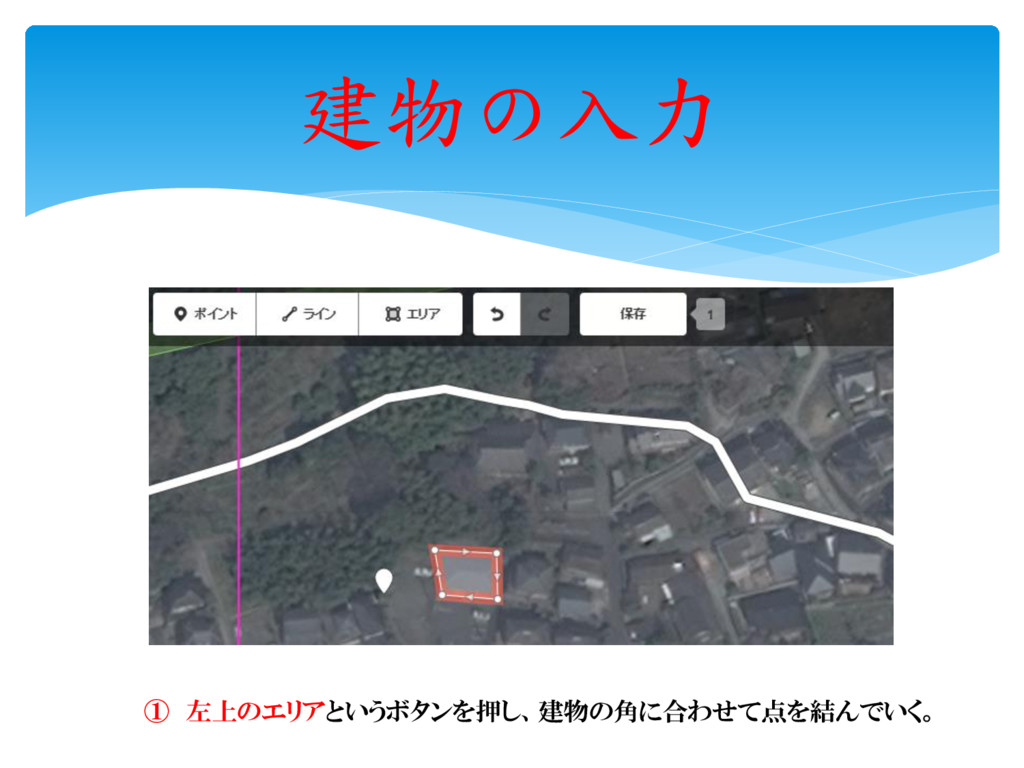
建物の入力 ① 左上のエリアというボタンを押し、建物の角に合わせて点を結んでいく。
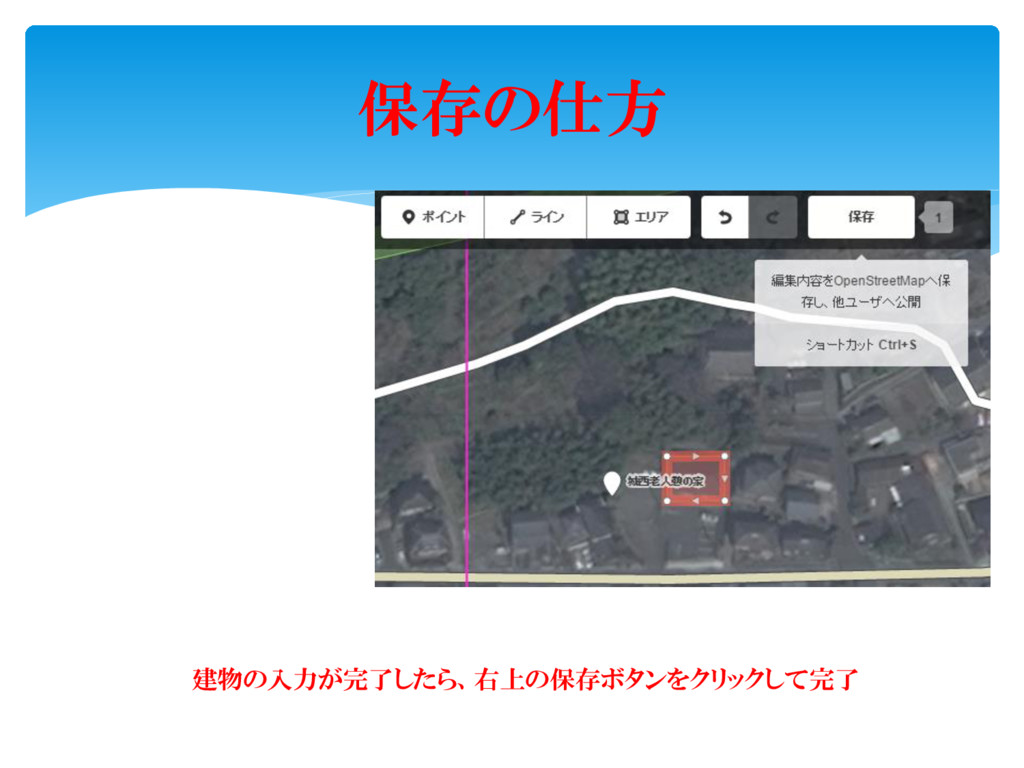
保存の仕方 建物の入力が完了したら、右上の保存ボタンをクリックして完了
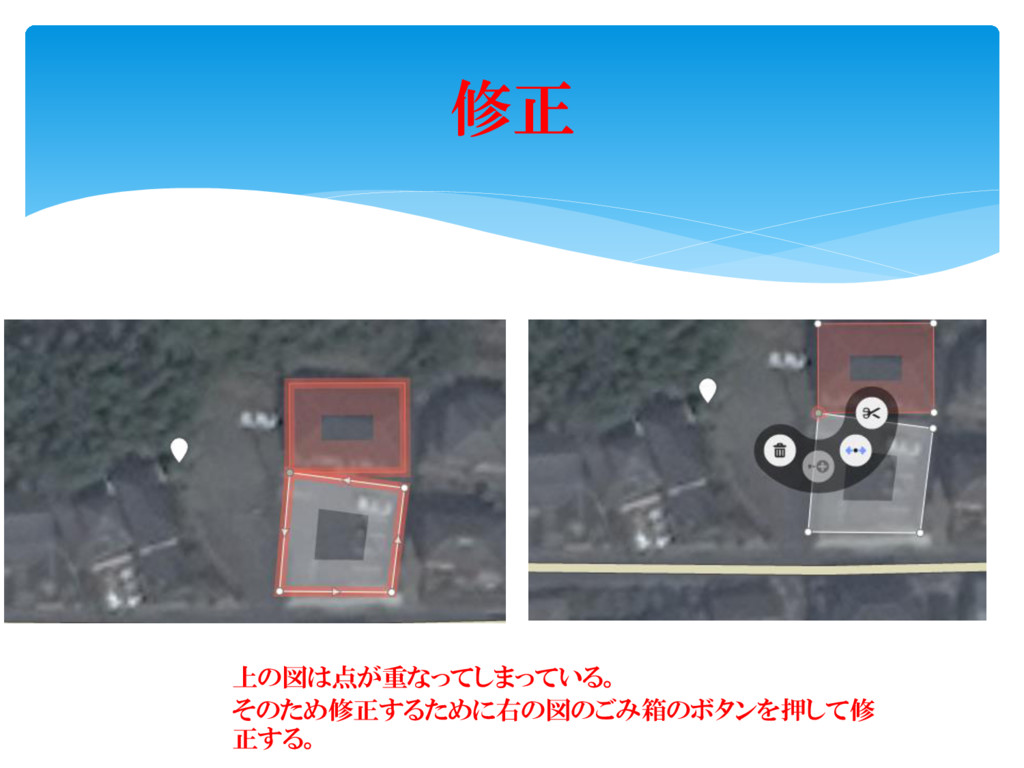
修正 上の図は点が重なってしまっている。 そのため修正するために右の図のごみ箱のボタンを押して修 正する。
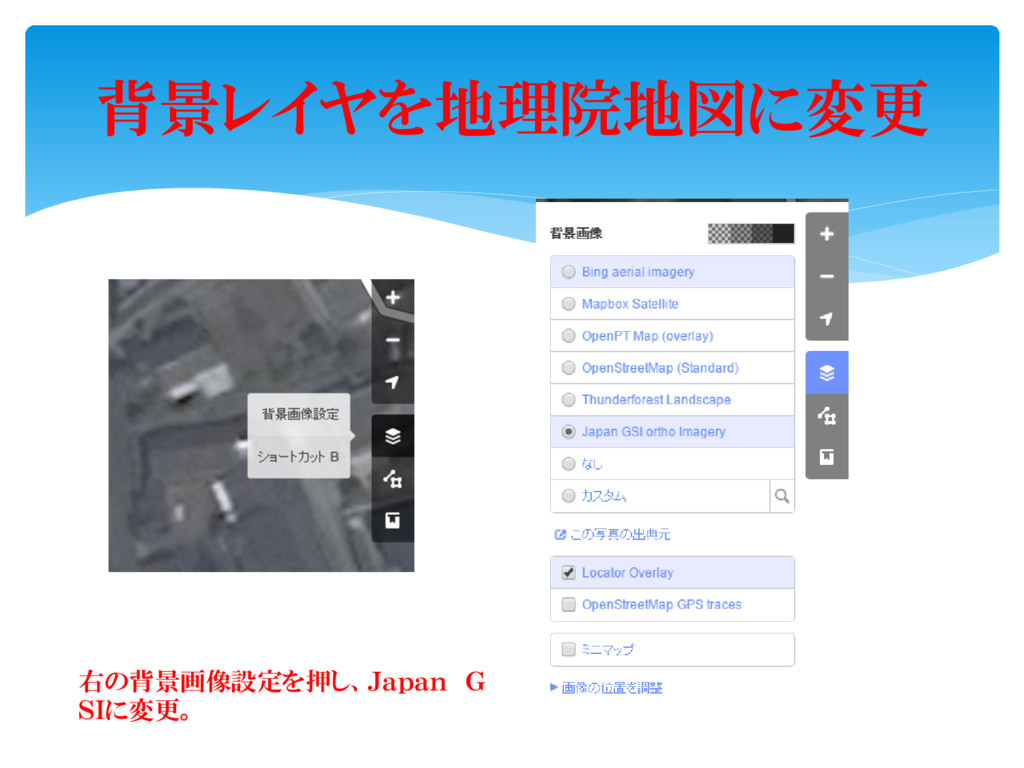
背景レイヤを地理院地図に変更 右の背景画像設定を押し、Japan G SIに変更。
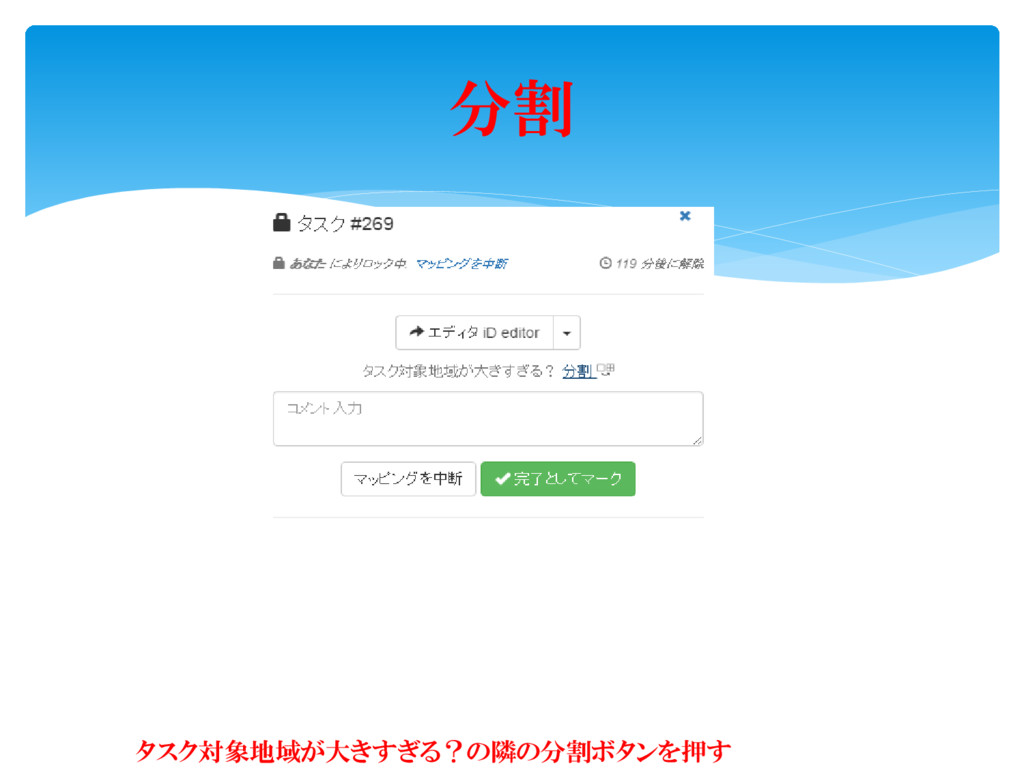
分割 タスク対象地域が大きすぎる?の隣の分割ボタンを押す
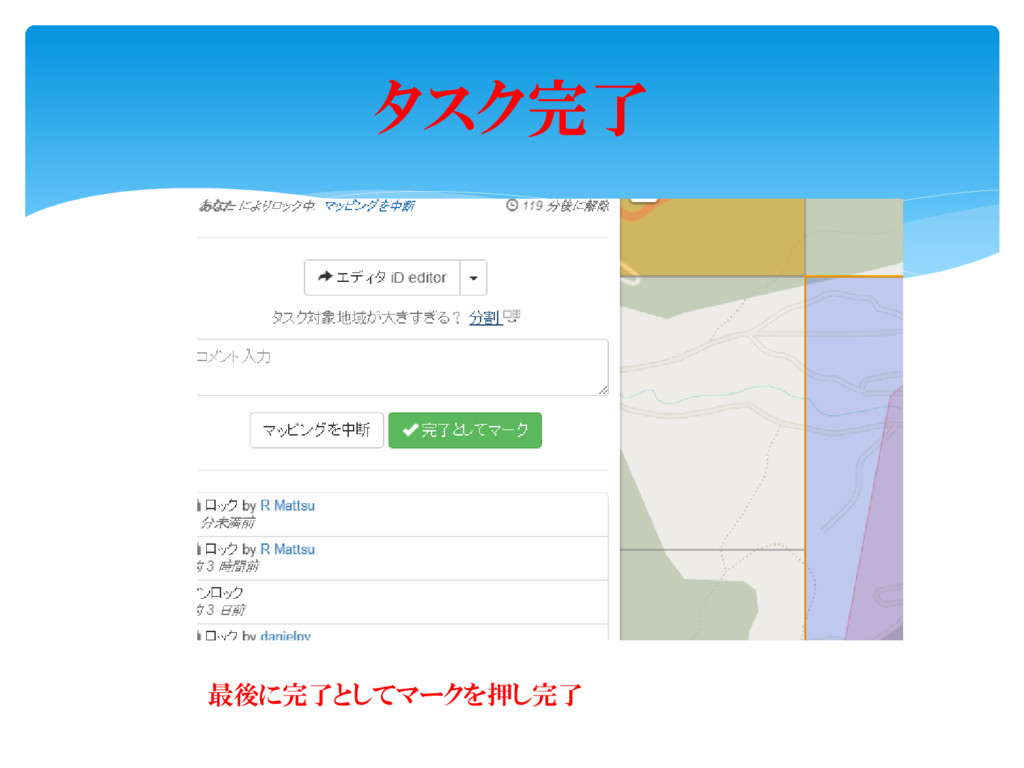
タスク完了 最後に完了としてマークを押し完了


 rmatsu88
 hannesfritz
 tamaranovitovic
 reverentgeek
 lfama
lfama
 signer
 bkeepers
 varn
varn
 morganepeng
 erikaheidi
 tenderlove
 inesmontani
.png) helenjbeal
helenjbeal