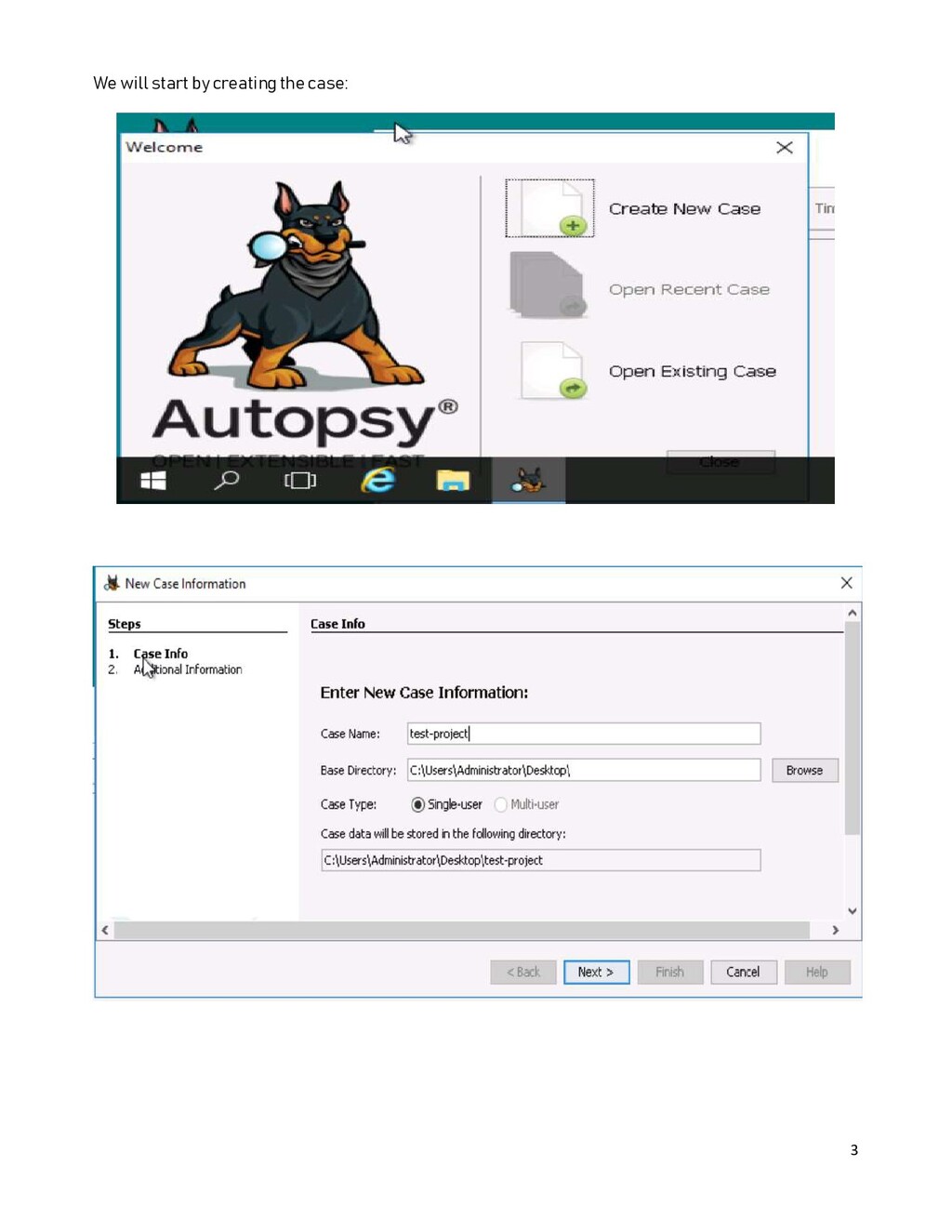
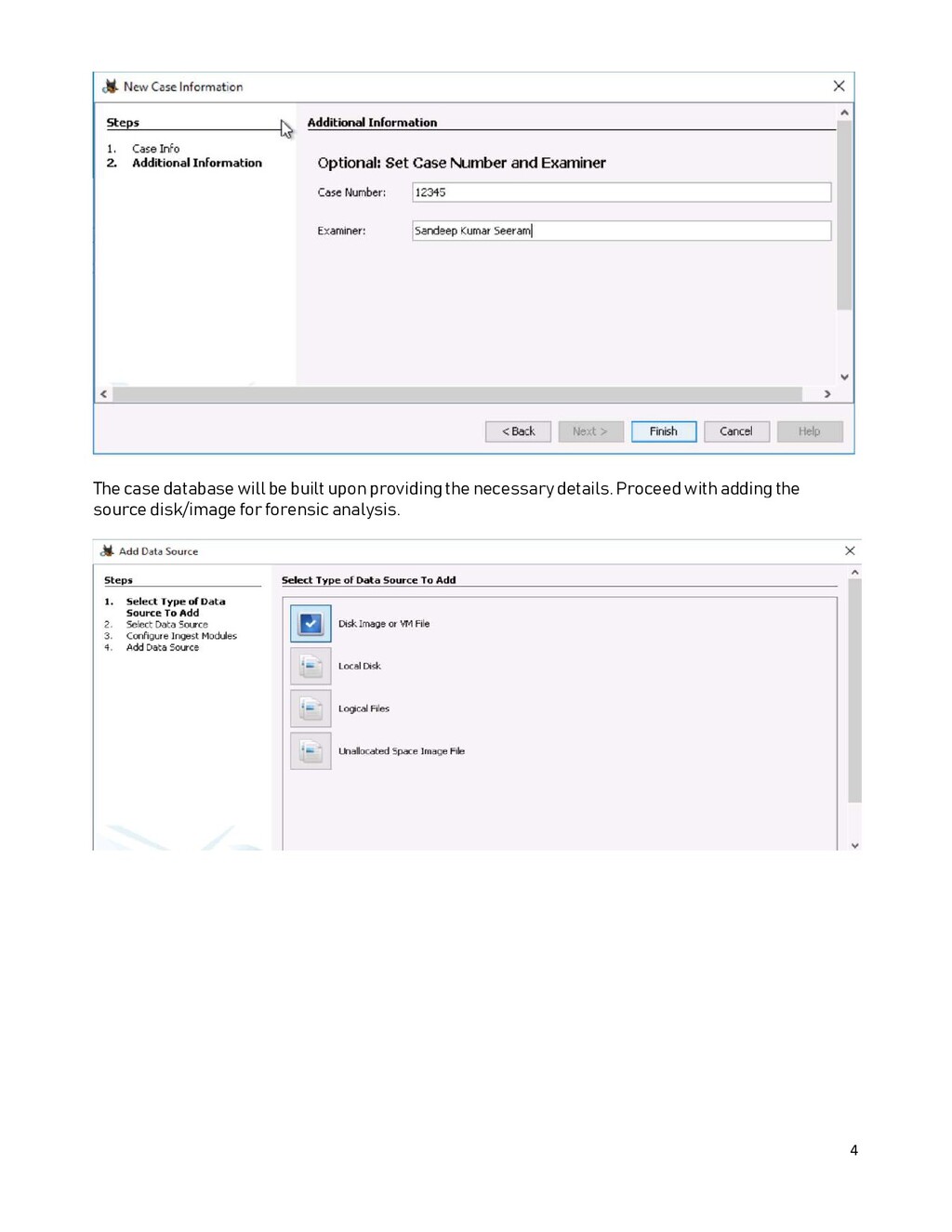
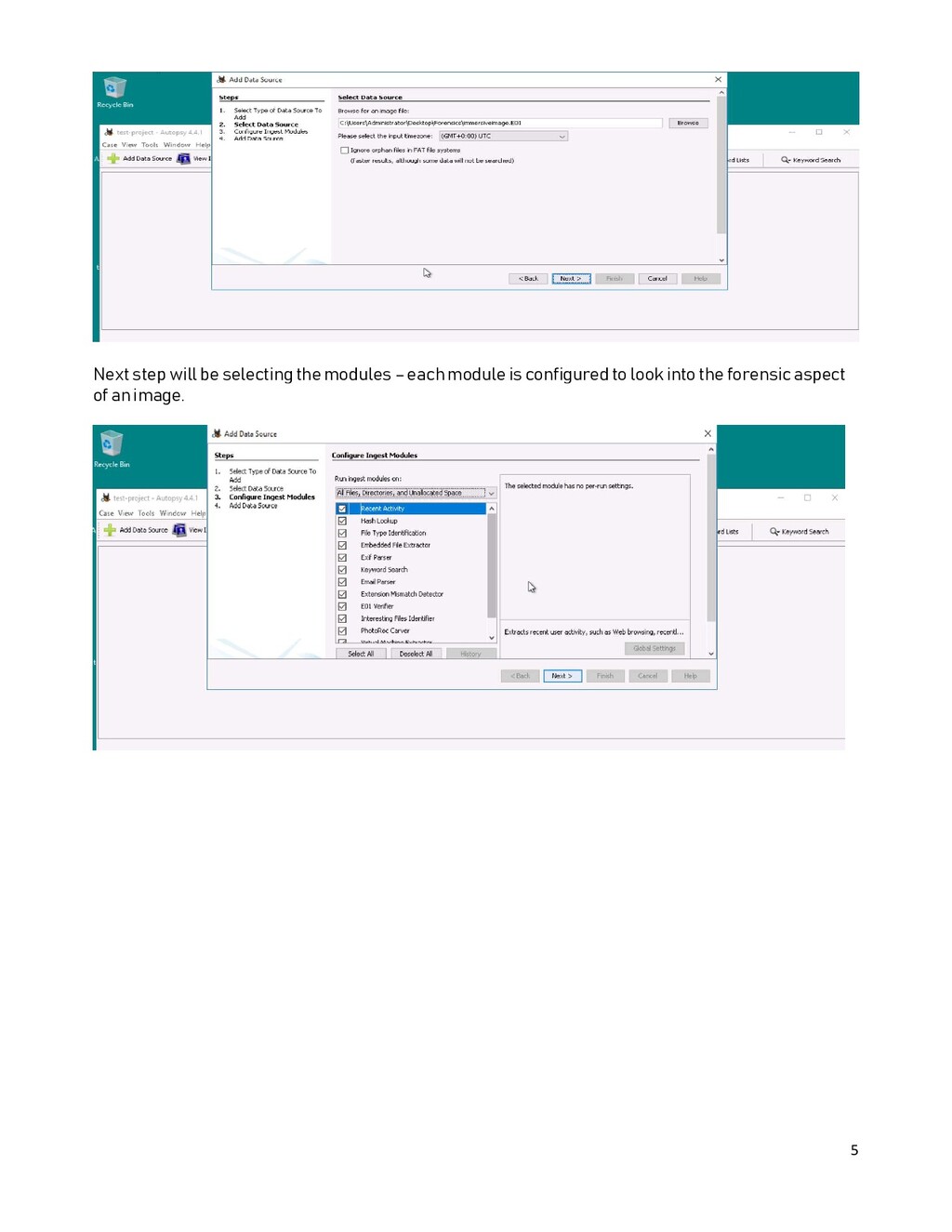
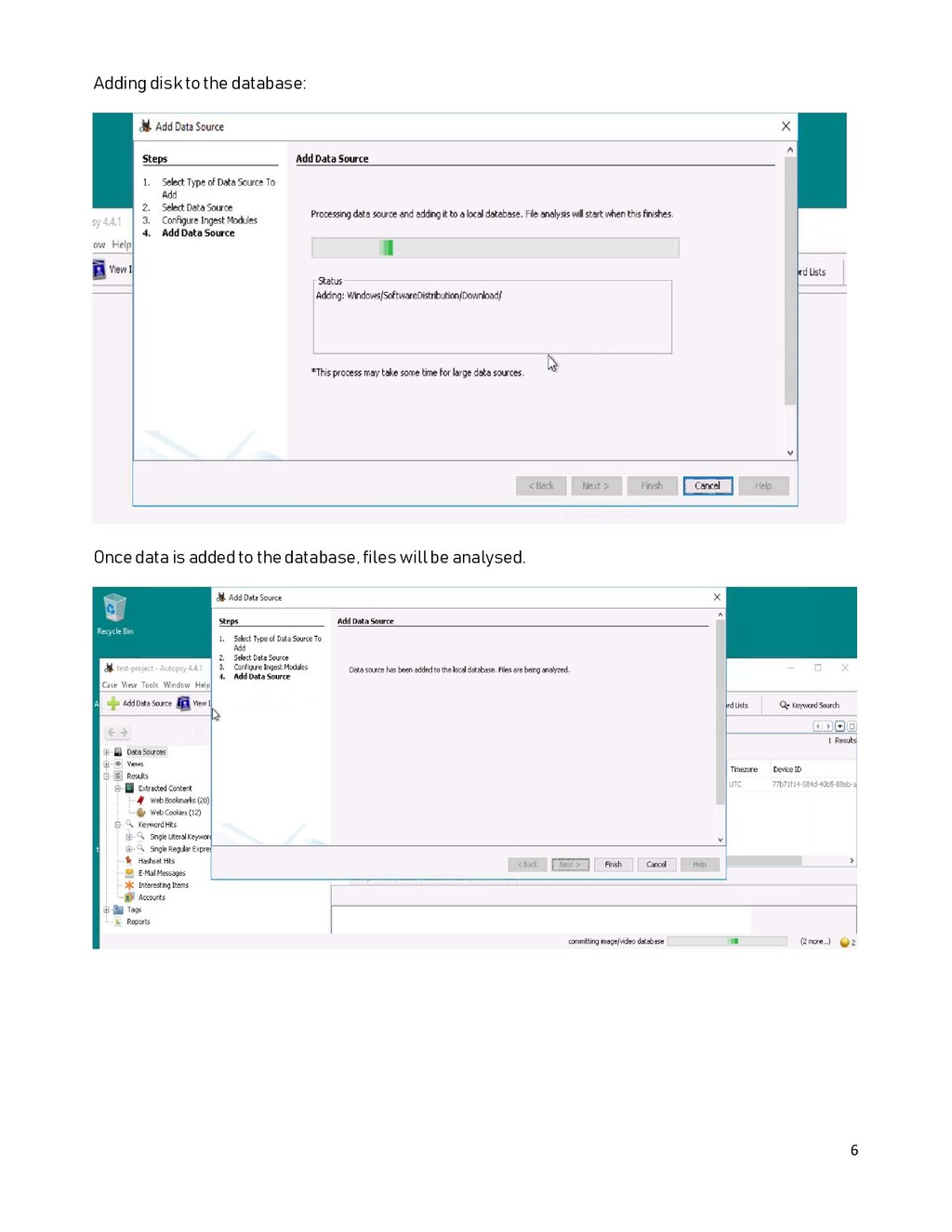
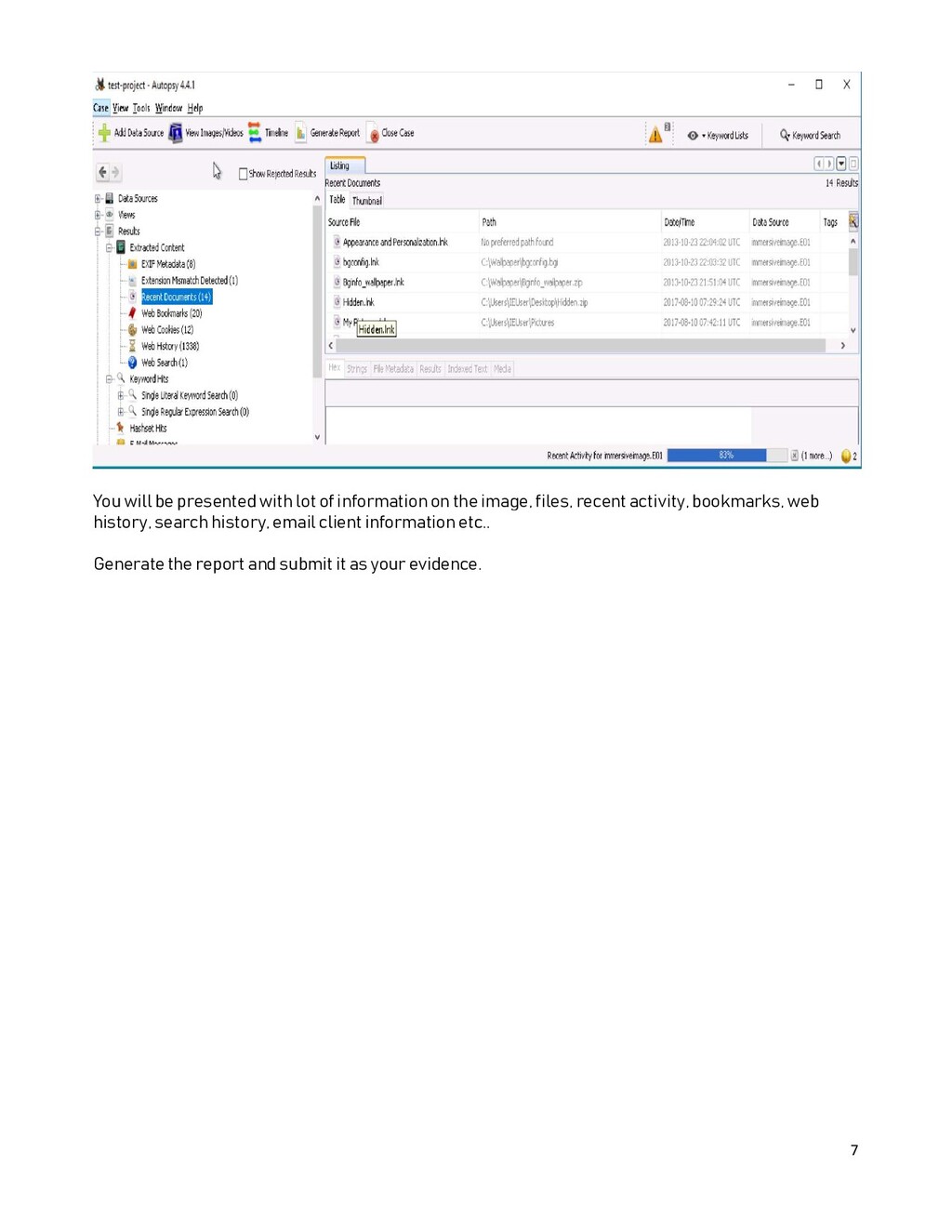
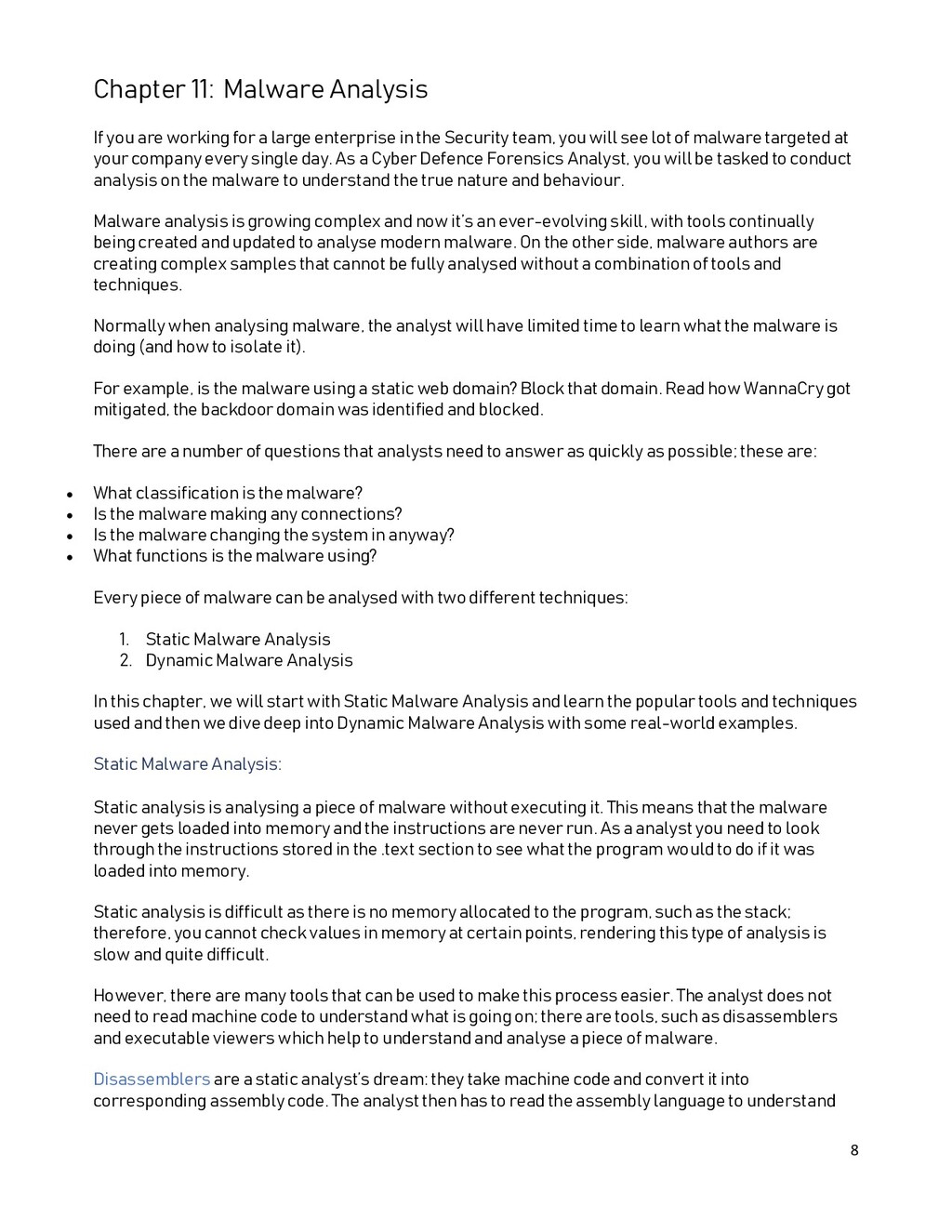
as computer forensic science) is a branch of digital forensic science pertaining to evidence found in computers and digital storage media. The goal of computer forensics is to examine digital media in a forensically sound manner with the aim of identifying, preserving, recovering, analysing and presenting facts and opinions about digital information. For this chapter, we will use Autopsy - an open source forensic analysis tool. Using the tool, you’ll need to identify user behaviour and files inside a system image. We will use Autopsy and create a case to analyse the Windows Forensics image. Using Autopsy’s features, and through browsing the file system to understand the image.
the image, files, recent activity, bookmarks, web history, search history, email client information etc.. Generate the report and submit it as your evidence.
a large enterprise in the Security team, you will see lot of malware targeted at your company every single day. As a Cyber Defence Forensics Analyst, you will be tasked to conduct analysis on the malware to understand the true nature and behaviour. Malware analysis is growing complex and now it’s an ever-evolving skill, with tools continually being created and updated to analyse modern malware. On the other side, malware authors are creating complex samples that cannot be fully analysed without a combination of tools and techniques. Normally when analysing malware, the analyst will have limited time to learn what the malware is doing (and how to isolate it). For example, is the malware using a static web domain? Block that domain. Read how WannaCry got mitigated, the backdoor domain was identified and blocked. There are a number of questions that analysts need to answer as quickly as possible; these are: What classification is the malware? Is the malware making any connections? Is the malware changing the system in anyway? What functions is the malware using? Every piece of malware can be analysed with two different techniques: 1. Static Malware Analysis 2. Dynamic Malware Analysis In this chapter, we will start with Static Malware Analysis and learn the popular tools and techniques used and then we dive deep into Dynamic Malware Analysis with some real-world examples. Static Malware Analysis: Static analysis is analysing a piece of malware without executing it. This means that the malware never gets loaded into memory and the instructions are never run. As a analyst you need to look through the instructions stored in the .text section to see what the program would to do if it was loaded into memory. Static analysis is difficult as there is no memory allocated to the program, such as the stack; therefore, you cannot check values in memory at certain points, rendering this type of analysis is slow and quite difficult. However, there are many tools that can be used to make this process easier. The analyst does not need to read machine code to understand what is going on; there are tools, such as disassemblers and executable viewers which help to understand and analyse a piece of malware. Disassemblers are a static analyst’s dream: they take machine code and convert it into corresponding assembly code. The analyst then has to read the assembly language to understand
of disassemblers on the market, but to get the best tools you will have to pay. Luckily, there are free demo versions of the paid-for tools. IDA pro (demo version IDA free) Radare2 Go through the chapter Reverse Engineering to see how Radare2 performed a binary analysis. Executable Viewer: When analysing a piece of malware, it is worth looking at the type of data, not just instructions to be run. Sometimes malware holds valuable information in other sections – such as the .data section, where initialised global variables are stored. Other tools can be used to get data about a file, which will change the way you analyse it. Is the file a PE file or an ELF file? Understanding this information changes the way you will analyse the file. The following are OpenSource tools commonly used for this File Strings Readelf PEStudio Dynamic Analysis Dynamic analysis is interacting with malware in a way that executes it. Once the malware is executed and running, there is an active effort to understand what it is doing to the system it’s running on. This can be done in a number of ways. First, The Malware Analyst can execute the malware before taking a snapshot of the system for further investigation to see what has changed. Have any files changed? Any connections been made? Second, The analyst can also use a debugger to execute a program step by step. But running malware can be scary, especially when the result is unknown. Because of this, the analyst needs to think about the system that they are running the malware on. There are a few guidelines that are important to think about when executing malware: Do not connect the system to the internet Do not run on a host machine that has important information stored Give the malware least possible privileges and work your way up If the malware needs internet in order to fully unpack itself, then there are a few tools that can be used to simulate network connections. My favourite one is “fakenet”. These tools will reply to any request with the relevant acknowledgement that the protocol specifies. For example, it will respond with a SYN ACK packet to a SYN TCP packet. The best in class debuggers are not limited to the list, but the below listed products are widely used: Ollydbg X64dbg Windbg
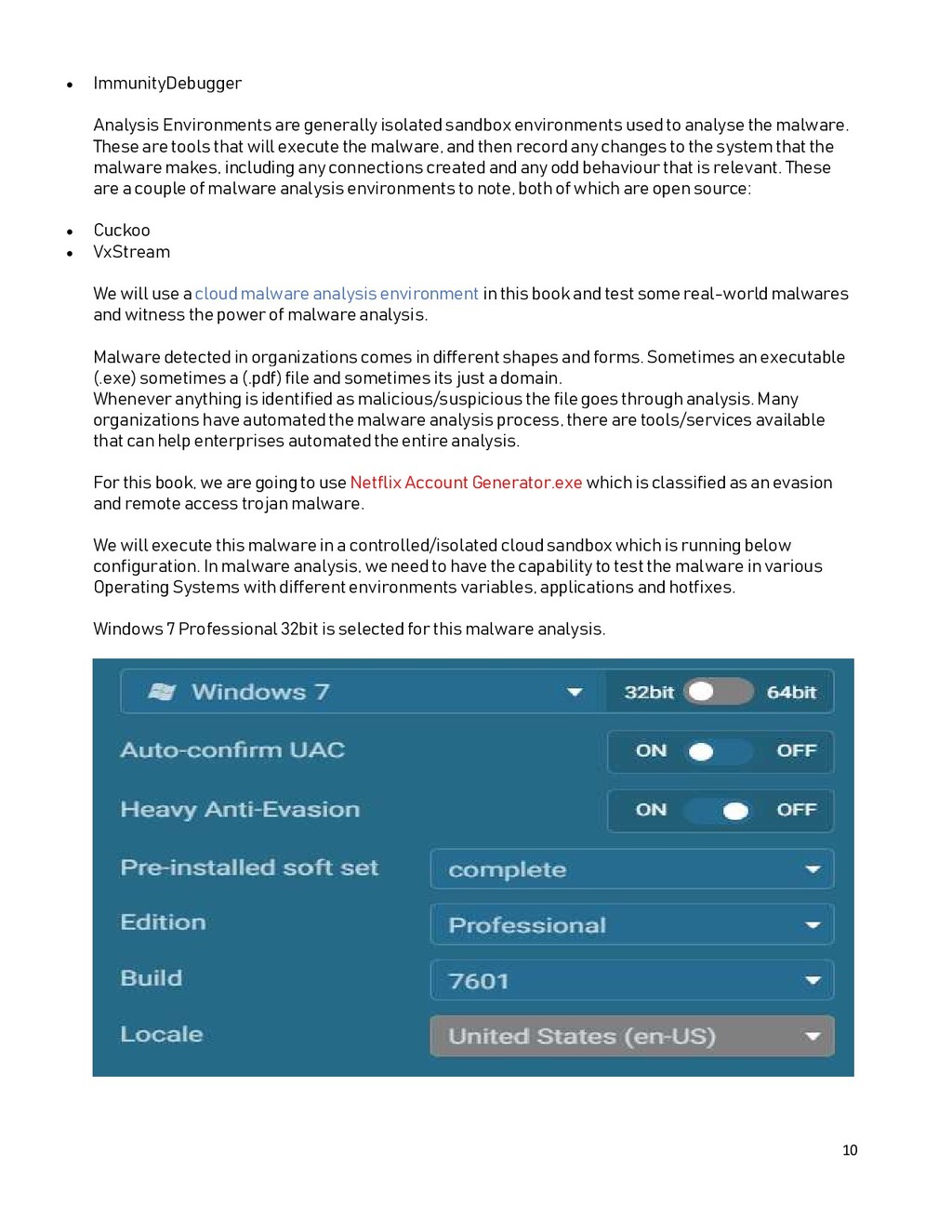
used to analyse the malware. These are tools that will execute the malware, and then record any changes to the system that the malware makes, including any connections created and any odd behaviour that is relevant. These are a couple of malware analysis environments to note, both of which are open source: Cuckoo VxStream We will use a cloud malware analysis environment in this book and test some real-world malwares and witness the power of malware analysis. Malware detected in organizations comes in different shapes and forms. Sometimes an executable (.exe) sometimes a (.pdf) file and sometimes its just a domain. Whenever anything is identified as malicious/suspicious the file goes through analysis. Many organizations have automated the malware analysis process, there are tools/services available that can help enterprises automated the entire analysis. For this book, we are going to use Netflix Account Generator.exe which is classified as an evasion and remote access trojan malware. We will execute this malware in a controlled/isolated cloud sandbox which is running below configuration. In malware analysis, we need to have the capability to test the malware in various Operating Systems with different environments variables, applications and hotfixes. Windows 7 Professional 32bit is selected for this malware analysis.
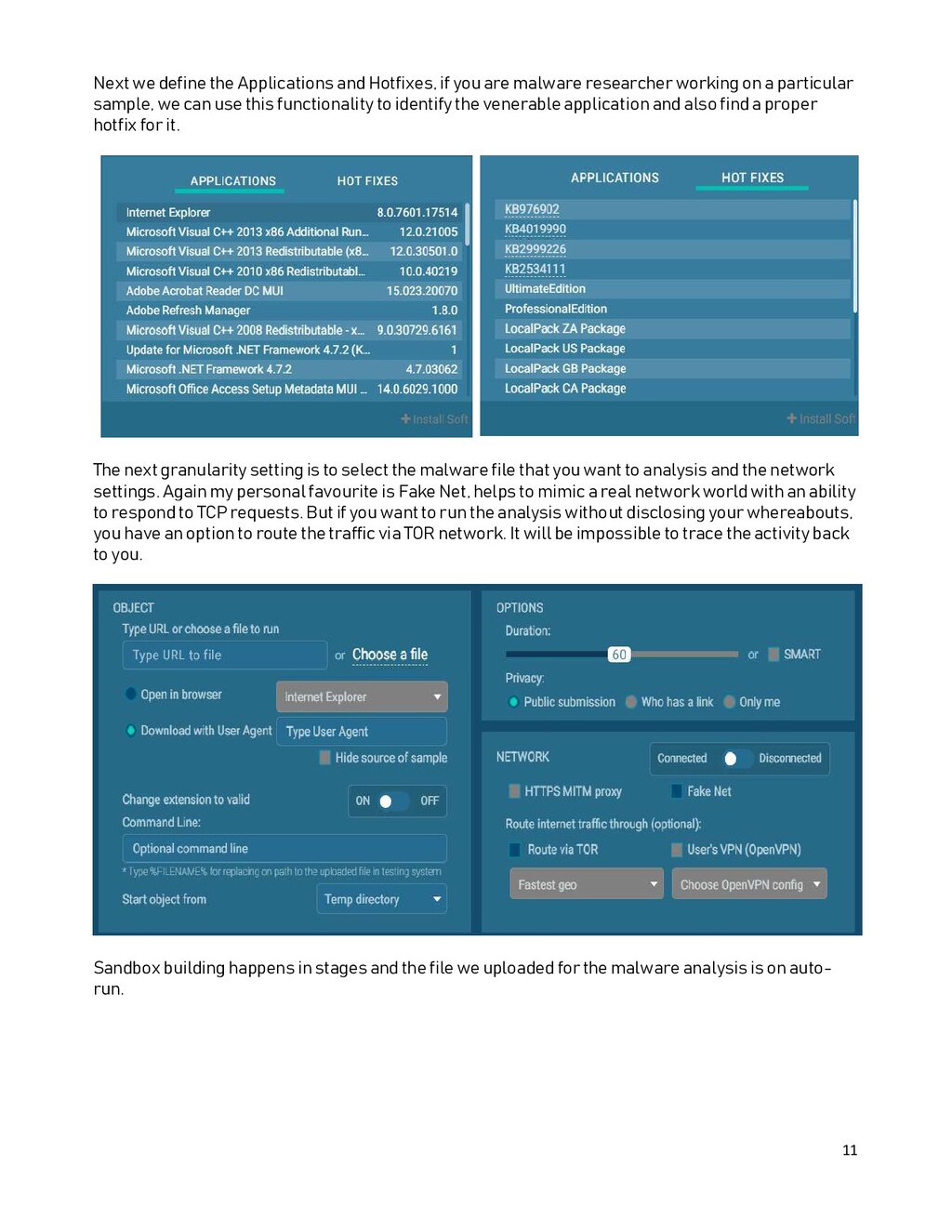
are malware researcher working on a particular sample, we can use this functionality to identify the venerable application and also find a proper hotfix for it. The next granularity setting is to select the malware file that you want to analysis and the network settings. Again my personal favourite is Fake Net, helps to mimic a real network world with an ability to respond to TCP requests. But if you want to run the analysis without disclosing your whereabouts, you have an option to route the traffic via TOR network. It will be impossible to trace the activity back to you. Sandbox building happens in stages and the file we uploaded for the malware analysis is on auto- run.
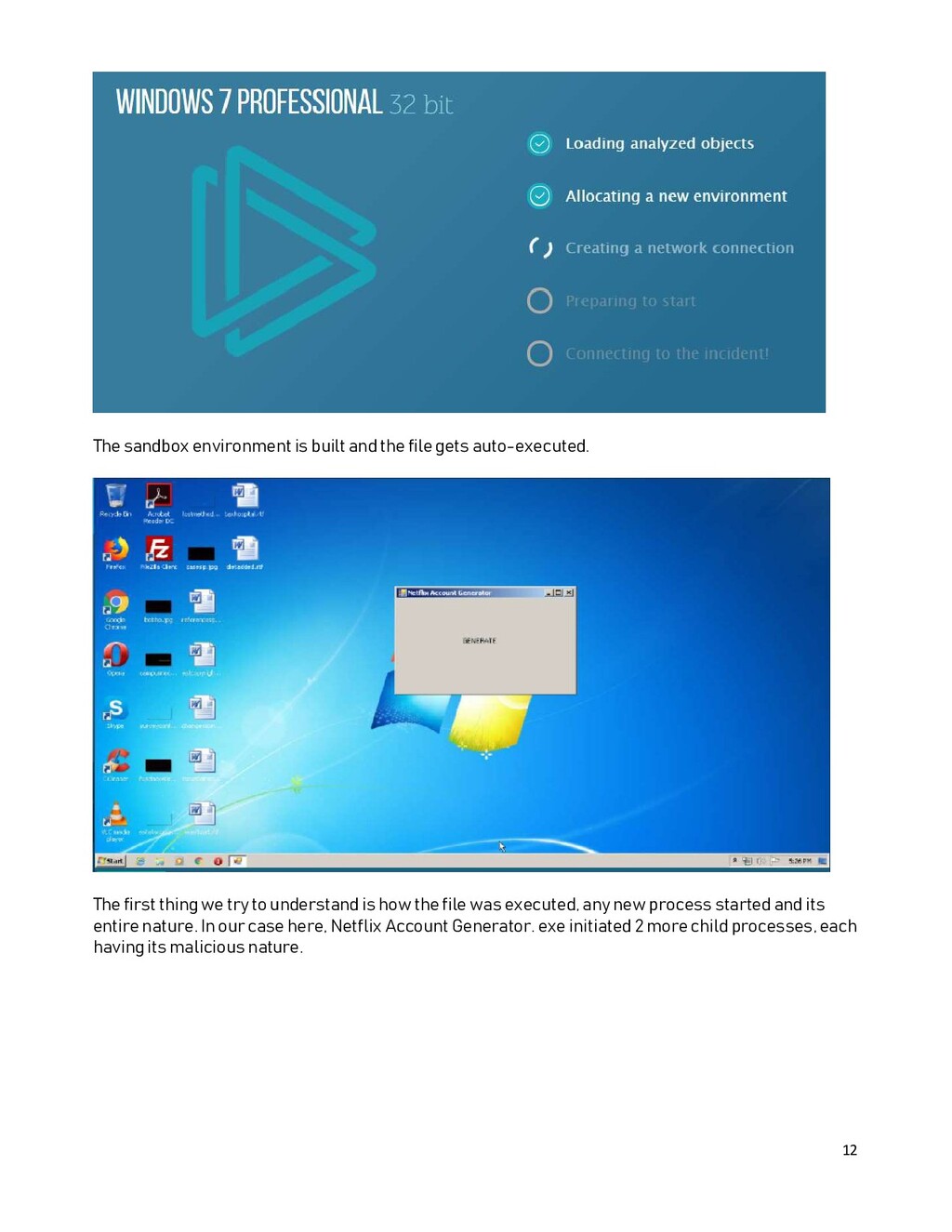
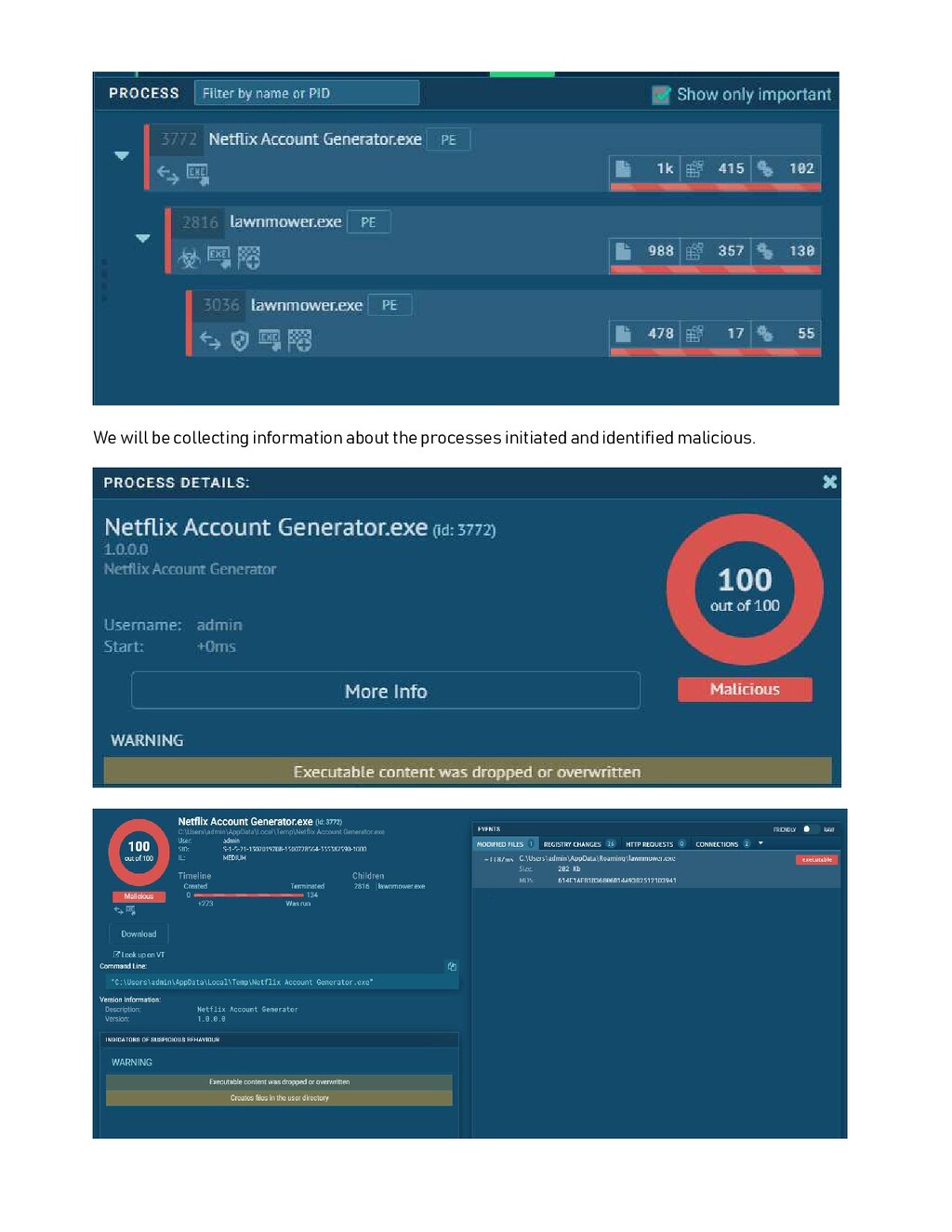
auto-executed. The first thing we try to understand is how the file was executed, any new process started and its entire nature. In our case here, Netflix Account Generator. exe initiated 2 more child processes, each having its malicious nature.
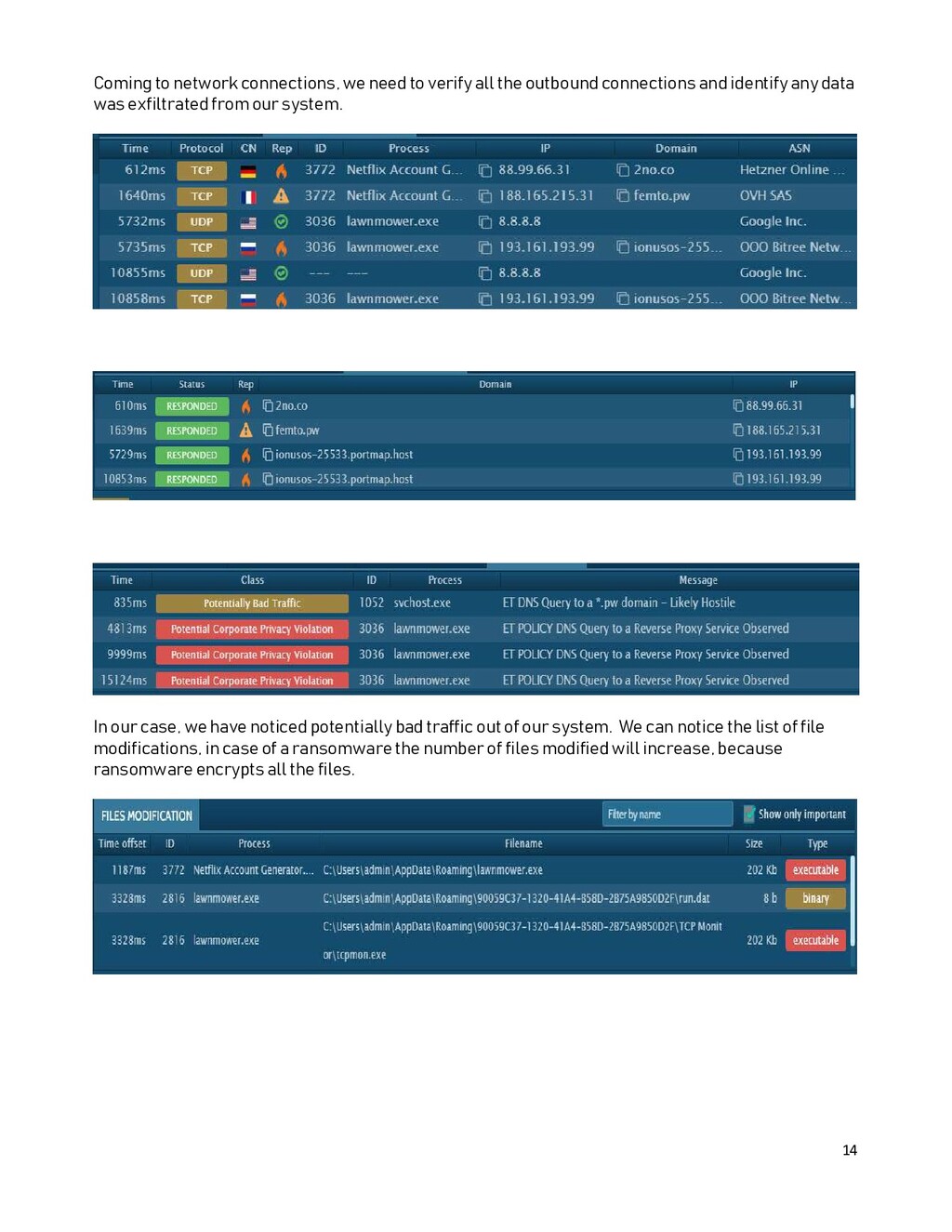
the outbound connections and identify any data was exfiltrated from our system. In our case, we have noticed potentially bad traffic out of our system. We can notice the list of file modifications, in case of a ransomware the number of files modified will increase, because ransomware encrypts all the files.
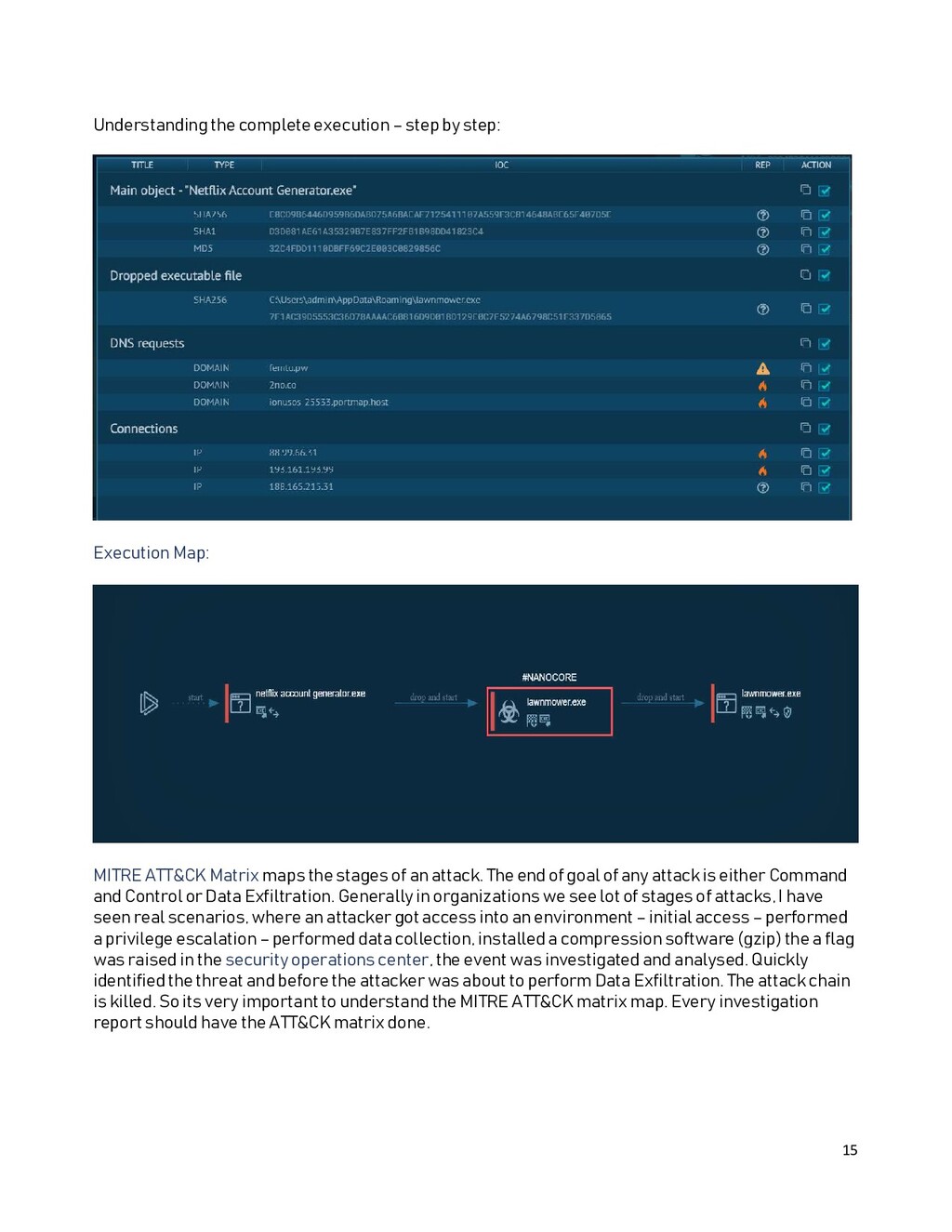
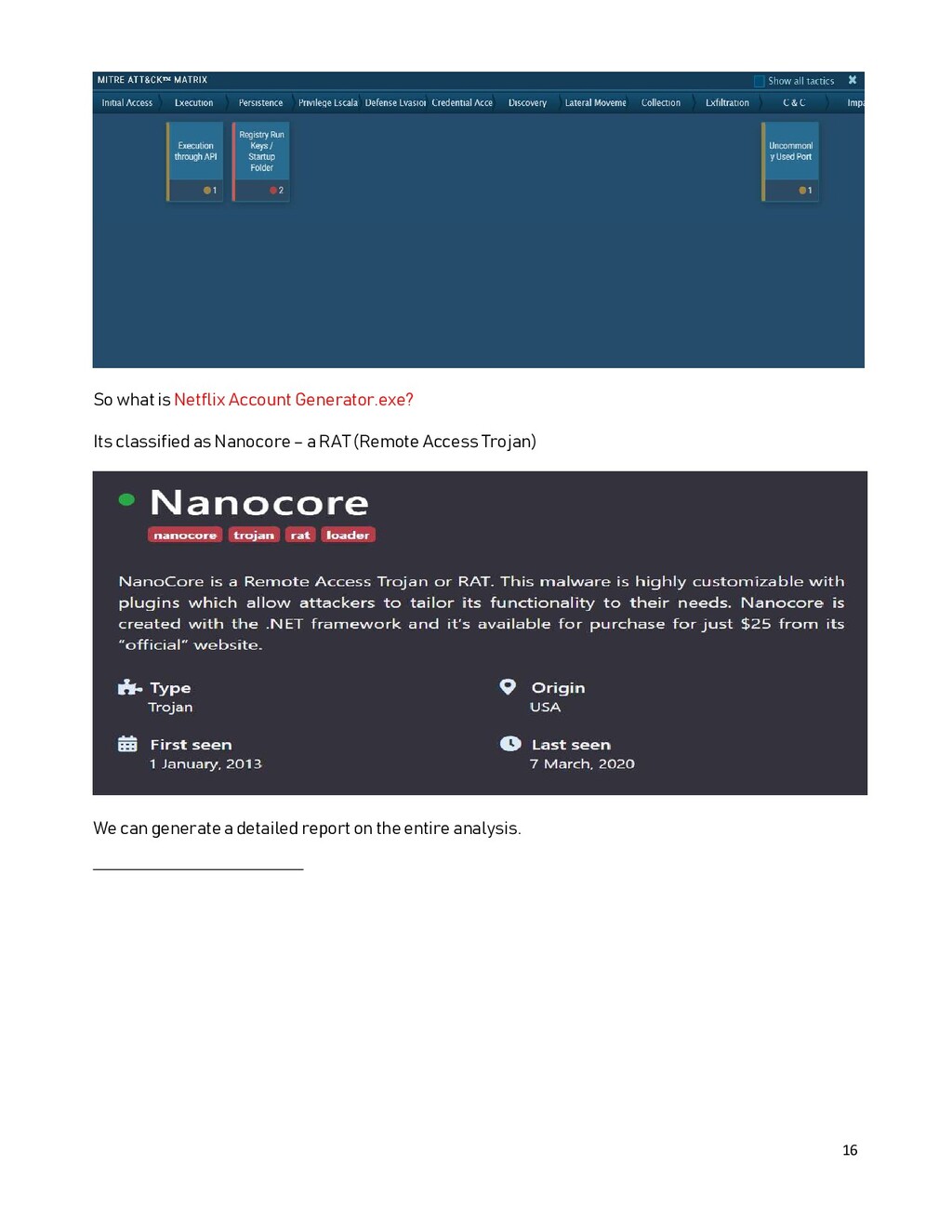
Map: MITRE ATT&CK Matrix maps the stages of an attack. The end of goal of any attack is either Command and Control or Data Exfiltration. Generally in organizations we see lot of stages of attacks, I have seen real scenarios, where an attacker got access into an environment – initial access – performed a privilege escalation – performed data collection, installed a compression software (gzip) the a flag was raised in the security operations center, the event was investigated and analysed. Quickly identified the threat and before the attacker was about to perform Data Exfiltration. The attack chain is killed. So its very important to understand the MITRE ATT&CK matrix map. Every investigation report should have the ATT&CK matrix done.


 sandeepseeram
 kakehashi
 prog893
 puhitaku
 onk
onk
 teamlab
 ishikawa_satoru
 tokuty
 gogutan
 yazm
yazm
 techtekt
 kworkdev
 endonanana
 ryanjones
 khoart
 eileencodes
 jdejongh
 sarafernandez
 thirion
 mraible
 techseoconnect
 stephenakadiri
 kastner