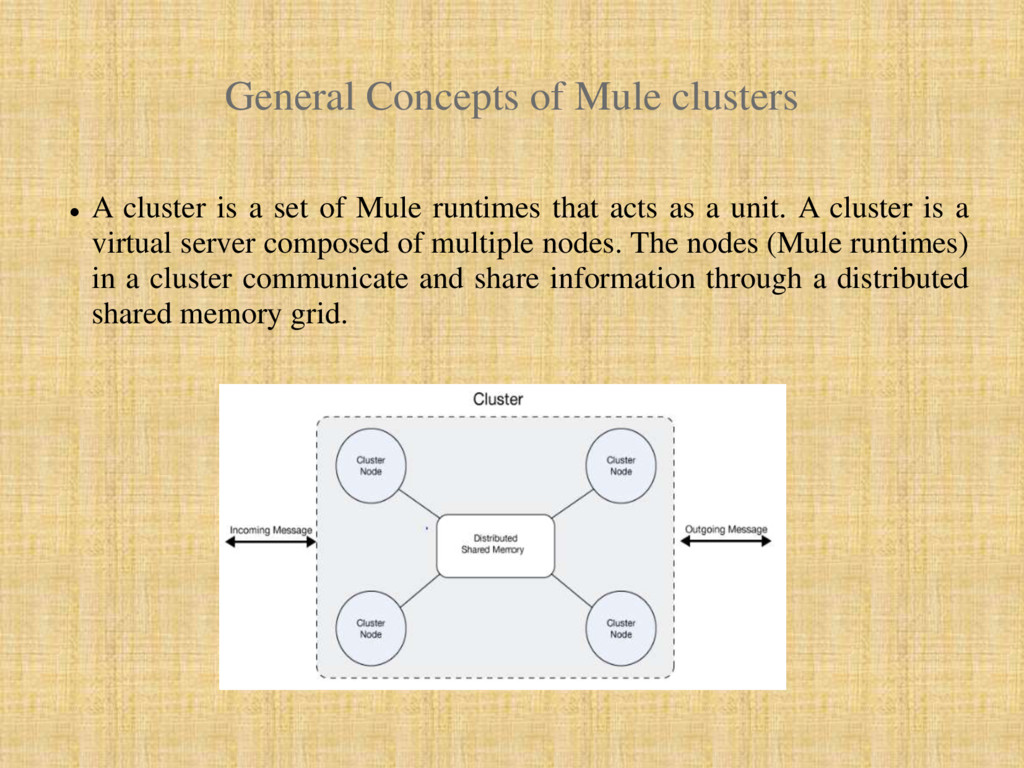
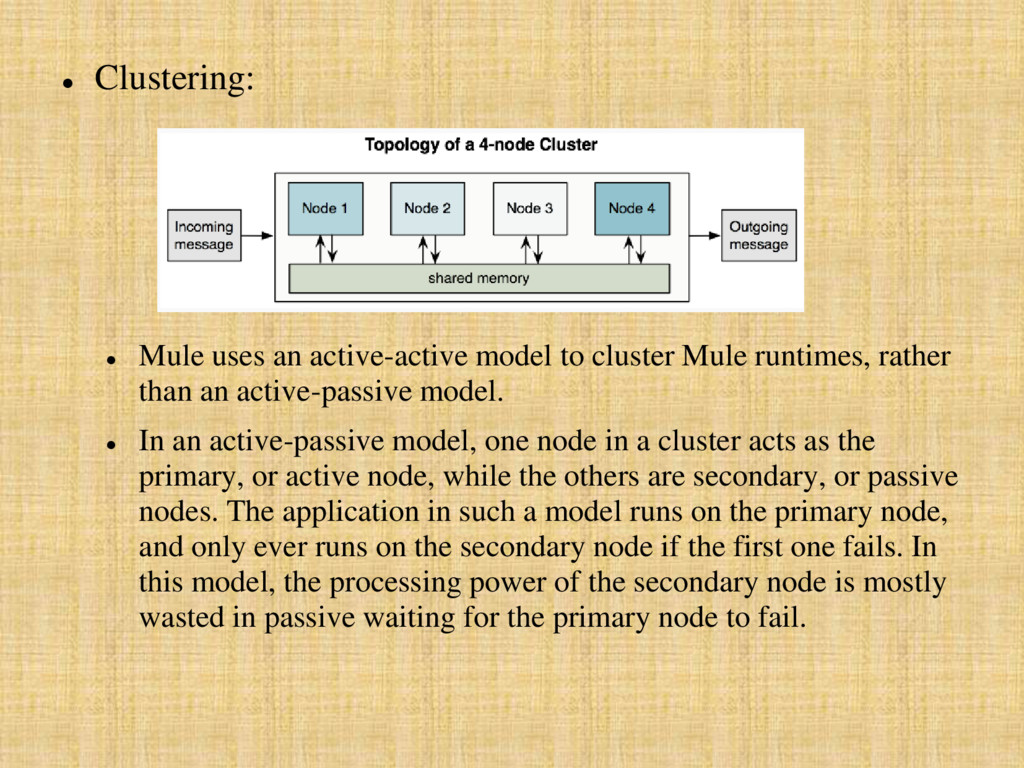
set of Mule runtimes that acts as a unit. A cluster is a virtual server composed of multiple nodes. The nodes (Mule runtimes) in a cluster communicate and share information through a distributed shared memory grid.
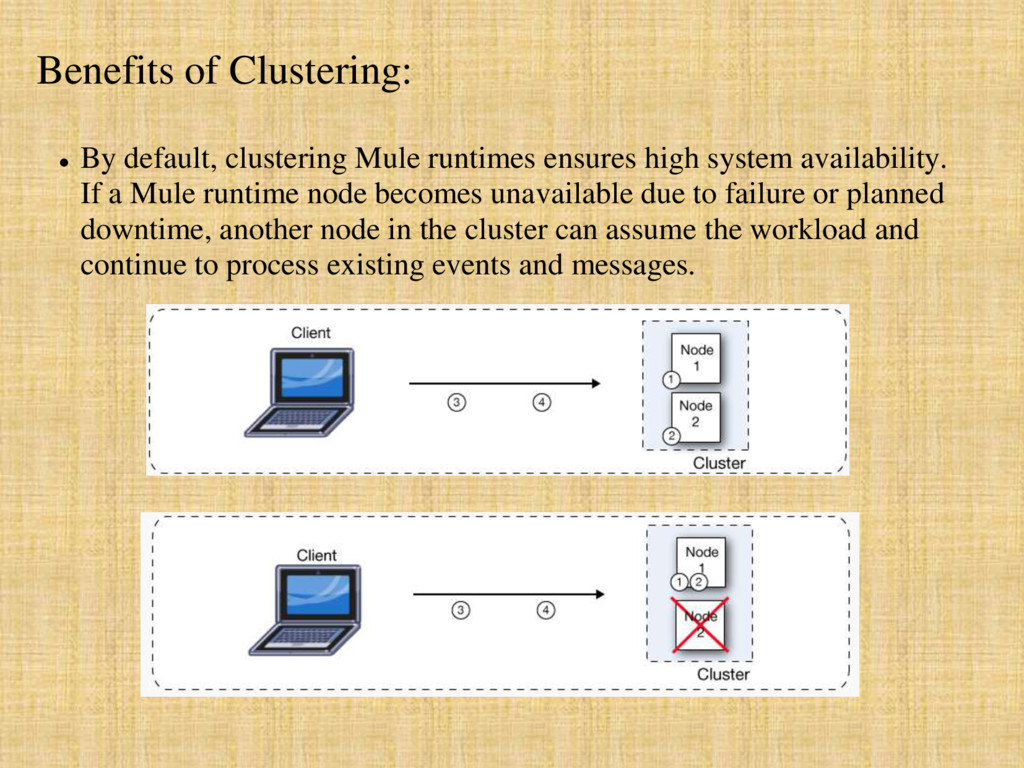
high system availability. If a Mule runtime node becomes unavailable due to failure or planned downtime, another node in the cluster can assume the workload and continue to process existing events and messages.
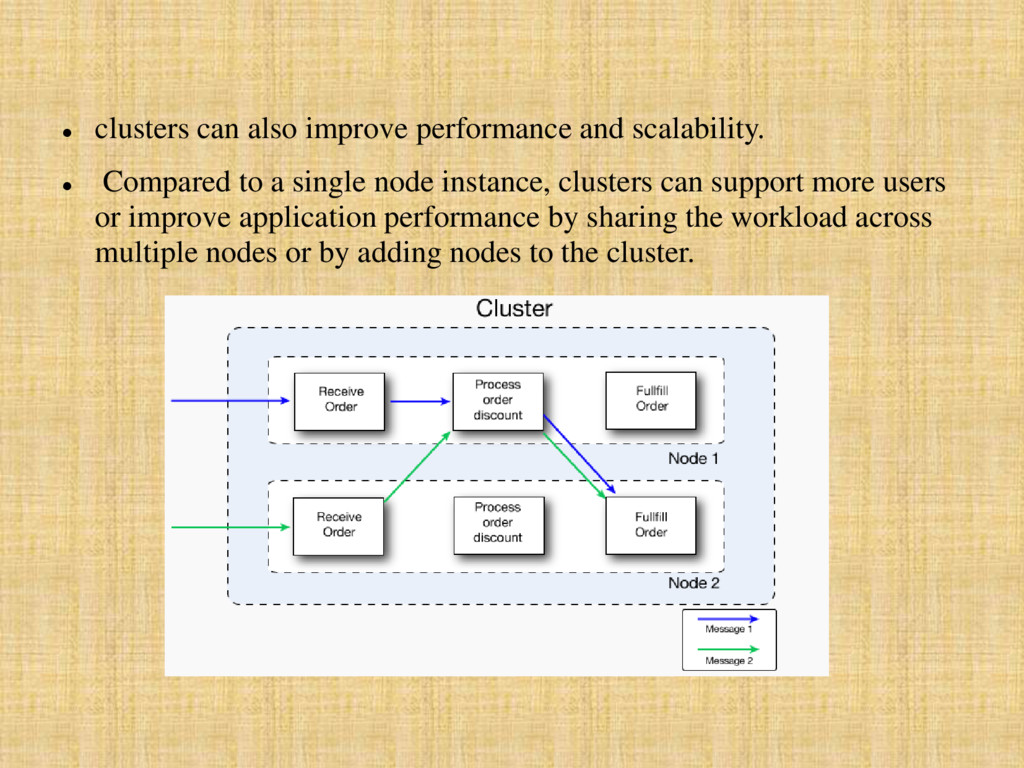
to a single node instance, clusters can support more users or improve application performance by sharing the workload across multiple nodes or by adding nodes to the cluster.
improved performance, and enhanced scalability, clustering Mule runtimes offers the following benefits: i. Automatic coordination of access to resources such as files, databases, and FTP sources. The Mule runtime cluster automatically manages which node (Mule runtime) will handle communication from a data source. ii. Automatic load balancing of processing within a cluster. If you divide your flows into a series of steps and connect these steps with a transport such as VM, each step is put in a queue, making it cluster enabled. The cluster of Mule runtimes can then process each step in any node, and so better balance the load across nodes. iii.Cluster lifecycle management and control. iv.Cluster and node performance monitoring. v. Raised alerts. You can set up an alert to appear when a node goes down and when a node comes back up.
configure a Mule cluster or an individual application for maximum performance using a performance profile. By implementing the performance profile for specific applications within a cluster, you can maximize the scalability of your deployments while deploying applications with different performance and reliability requirements in the same cluster. By implementing the performance profile at the container level, you apply it to all applications within that container. Application-level configuration overrides container-level configuration. Setting the performance profile has two effects: (a) It disables distributed queues, using local queues instead to prevent data serialization/deserialization and distribution in the shared data grid. (b) It implements the object store without backups, to avoid replication.
All Mule instances access the same mule file folders concurrently, which can lead to duplicate file processing and even possible failures if a file is deleted or modified by the Mule application Multicast transport: All mule instances get the same TCP requests and then process duplicate messages JMS Topics: All mule instances connect to the same JMS topic, which may lead to repeated processing of messages when scaling the non clustered Mule instance horizontally JMS request-reply/request-response: All Mule instances are listening for messages in the same response queue, this implies that a Mule instance might obtain a response that isn’t correlated to the request it sent. This can result in incorrect responses or make a flow fail with timeout.
received by different Mule instances. Duplicated messages aren’t possible. Salesforce streaming API: if multiple instances of the same application are deployed, they will fail since the API only supports a single consumer. No failover support in case the instance connected is stopped or crashes.
Mule runtimes, rather than an active-passive model. In an active-passive model, one node in a cluster acts as the primary, or active node, while the others are secondary, or passive nodes. The application in such a model runs on the primary node, and only ever runs on the secondary node if the first one fails. In this model, the processing power of the secondary node is mostly wasted in passive waiting for the primary node to fail.
cluster acts as the primary node all nodes in the cluster support the application. This application in this model runs on all the nodes, even splitting apart message processing between nodes to expedite processing across nodes.
gives you the ability to manage server clusters. A cluster is a group of linked servers that work closely together. Once servers are added to a cluster, they function in many ways as if they were a single server. You can perform the following cluster-related tasks with the console: Create a cluster Deploy, redeploy, or undeploy an application to or from a cluster Monitor a cluster, including its status "Disband" or delete a cluster
cluster, be sure to keep the following ports open: port 5701, which is used for communication between Mule and the cluster nodes port 54327, which is used for discovery of new cluster members New cluster member discovery is performed using multicast, thus the multicast IP 224.2.2.3 must be enabled as well.


 thangloispkt
 grimoh
 gionn
gionn
 syuchimu
 codmoninc
 sh_fk2
 makocchi
 prog893
 masakiokuda
 ymotongpoo
 taketakekaho
 pfn
pfn
 ezaki
ezaki
 apolaine
 sarafernandez
 jnunemaker
 sferik
 kimpetersen
 pwiseman
 destraynor
 cassininazir
 aki_iinuma
 aleyda
 smashingmag
 garrettdimon