Upgrade to Pro
— share decks privately, control downloads, hide ads and more …
Speaker Deck
Sign up for free
Menu
Search
Features
All features
Private URLs
Password Protection
Custom URLS
Scheduled publishing
Remove Branding
Restrict embedding
Deck Collections
Notes
Features
All features
Private URLs
Password Protection
Custom URLS
Scheduled publishing
Remove Branding
Restrict embedding
Deck Collections
Notes
Explore
Featured decks
Featured speakers
Programming
Technology
Storyboards
Explore
Featured decks
Featured speakers
Programming
Technology
Storyboards
Pricing
Search
Sign in
Sign up for free
Hub & Spoke 環境のネットワークルーティングを分解してみる
Search
Sponsored
·
SiteGround - Reliable hosting with speed, security, and support you can count on.
→
Tsuyataku
September 01, 2026
Technology
700
1
Share
Embed
Copy iframe code
Copy JS code
Copy link
Start on current slide
Hub & Spoke 環境のネットワークルーティングを分解してみる
Tsuyataku
September 01, 2026
More Decks by Tsuyataku
See All by Tsuyataku
CloudMapとService Connectの名前解決方法を比較してみた
tsuyataku
1
1.5k
Other Decks in Technology
See All in Technology
AI駆動開発におけるハーネスエンジニアリングの勘所
tsukuboshi
1
870
AIコーディングエージェント開発_全体像
happysamurai294
0
130
Autonomous AI Lakehouse - Live AI Hubから始めるセキュアなAIデータ活用 -
oracle4engineer
PRO
2
180
国際カードブランドルール変更に伴うクレジットカード決済取引仕様変更について
k1style
0
270
Patterns in AI Driven Software Development
akosma
PRO
0
360
Draft AIエージェントの トークン消費を最小化する 8つの原則
kinopeee
6
1.9k
渡米前の準備を制す!re:Invent 2026徹底準備術 / The Ultimate Preparation Guide for re:Invent 2026
yuj1osm
1
420
Flutter Webを「SDK」として配る — 50以上のゲームを支える埋め込みアーキテクチャ
masayukisuda
0
160
AIテスト自動化と評価駆動開発EDD
happysamurai294
0
110
DevelopersIO 2026 Tokyo 現時点の衛星通信サービスの現状を整理してみる
maroon1st
0
350
2拠点SRE活動始めてみた | sogaoh's LT @ ホンマでっかSRE勉強会 #3
sogaoh
PRO
0
190
Snowflake でできることが増えたら、 ABAC が必要になった
kaeton
0
120
Featured
See All Featured
Designing Dashboards & Data Visualisations in Web Apps
destraynor
232
55k
Money Talks: Using Revenue to Get Sh*t Done
nikkihalliwell
0
540
Measuring & Analyzing Core Web Vitals
bluesmoon
9
1k
We Have a Design System, Now What?
morganepeng
55
8.4k
Into the Great Unknown - MozCon
thekraken
41
2.8k
職位にかかわらず全員がリーダーシップを発揮するチーム作り / Building a team where everyone can demonstrate leadership regardless of position
madoxten
70
68k
StorybookのUI Testing Handbookを読んだ
zakiyama
31
7k
What the history of the web can teach us about the future of AI
inesmontani
PRO
2
760
Navigating the moral maze — ethical principles for Al-driven product design
skipperchong
2
660
Future Trends and Review - Lecture 12 - Web Technologies (1019888BNR)
signer
PRO
0
3.8k
HDC tutorial
michielstock
2
980
Test your architecture with Archunit
thirion
2
2.5k
Transcript
Hub&Spoke環境のネットワークルーティングを分解してみる 津⾕拓郎
⽬次 2 内容 ◦ はじめに ◦ ルーティングサービス(VPCルートテーブル‧TGWルートテーブル) ◦ Hub&Spoke環境でのネットワークルーティング設定 ▪
閉域接続 ▪ インターネット接続 ▪ Appendix:東阪Peering接続
はじめに 3 Organization統制下のマルチアカウント環境でネットワーク設計を⾏ったこと はありますか? ないです そうですか。試しにシステム構成図を⾒せてみますね。
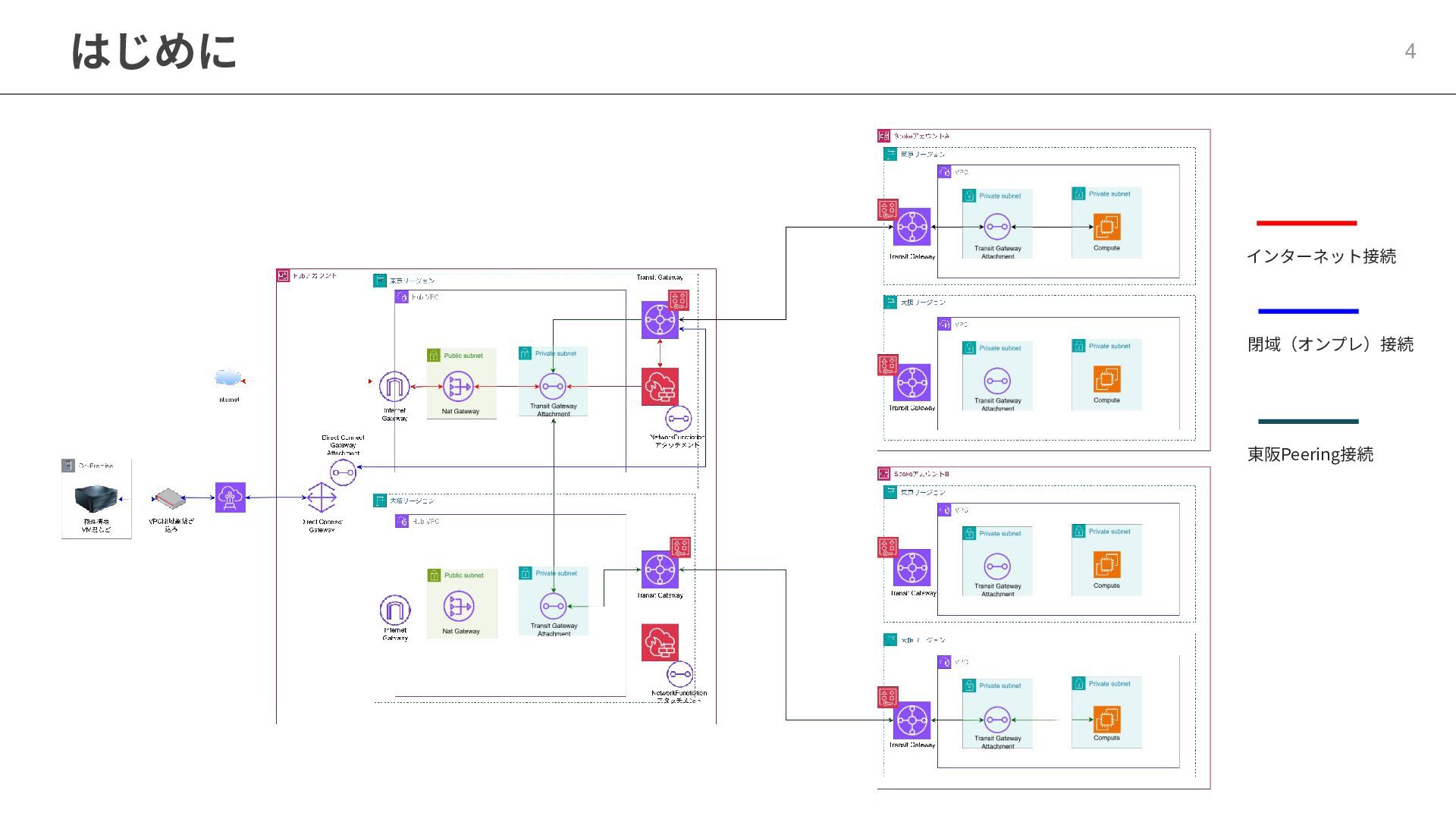
はじめに 4 インターネット接続 閉域(オンプレ)接続 東阪Peering接続
はじめに 5 気分悪くなってきた。 同感です。ただ、複雑なネットワークはルーティングをかみ砕けば、個⼈的に 楽になると思うのです。 ルーティングはSGなどのステートフルなものと違い、戻りも考慮する必要があ ります。なので各アクセスパターンごとに往路復路で分解してみます。 時間がないので、東阪PeeringはAppendixでご容赦ください
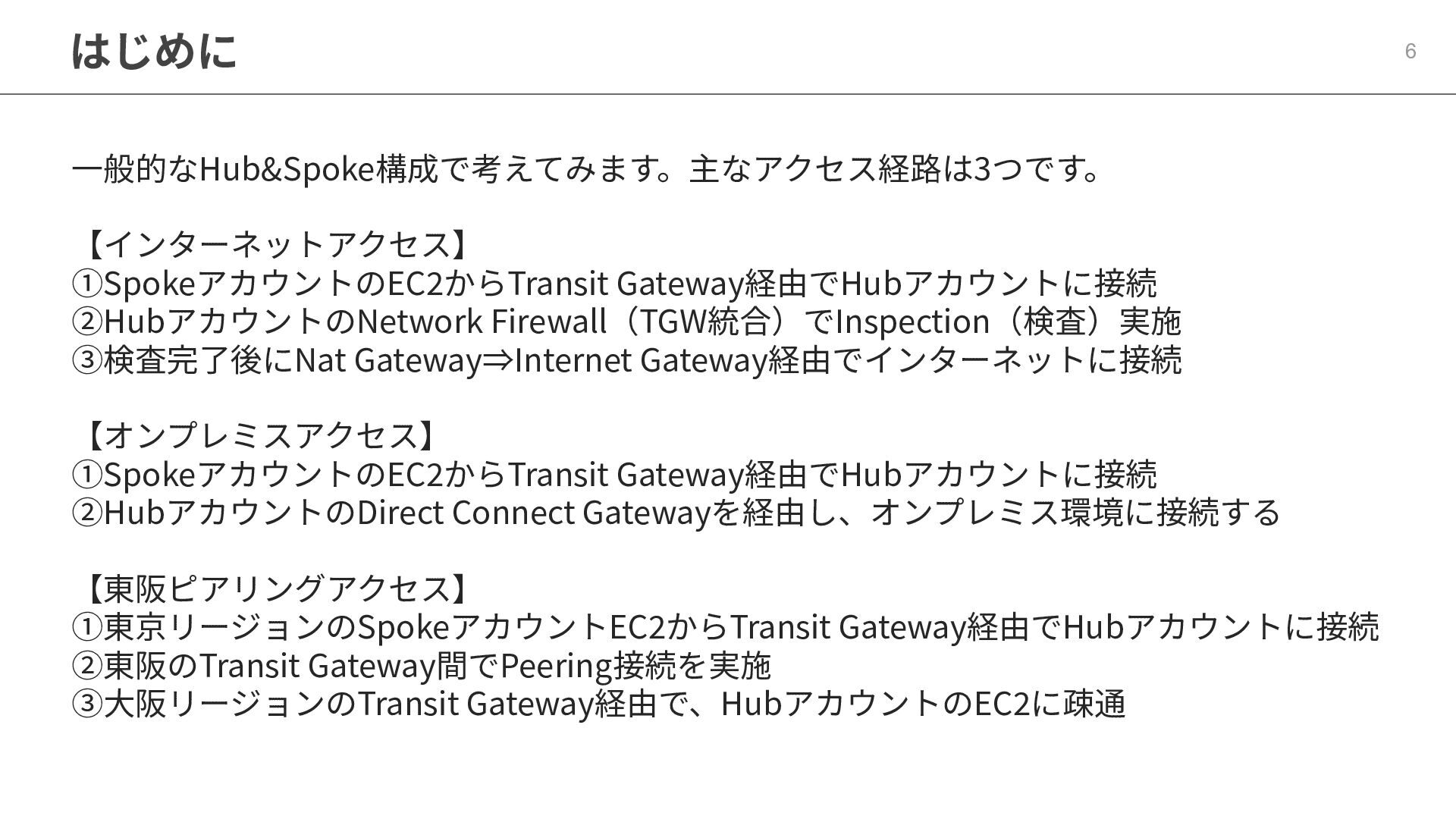
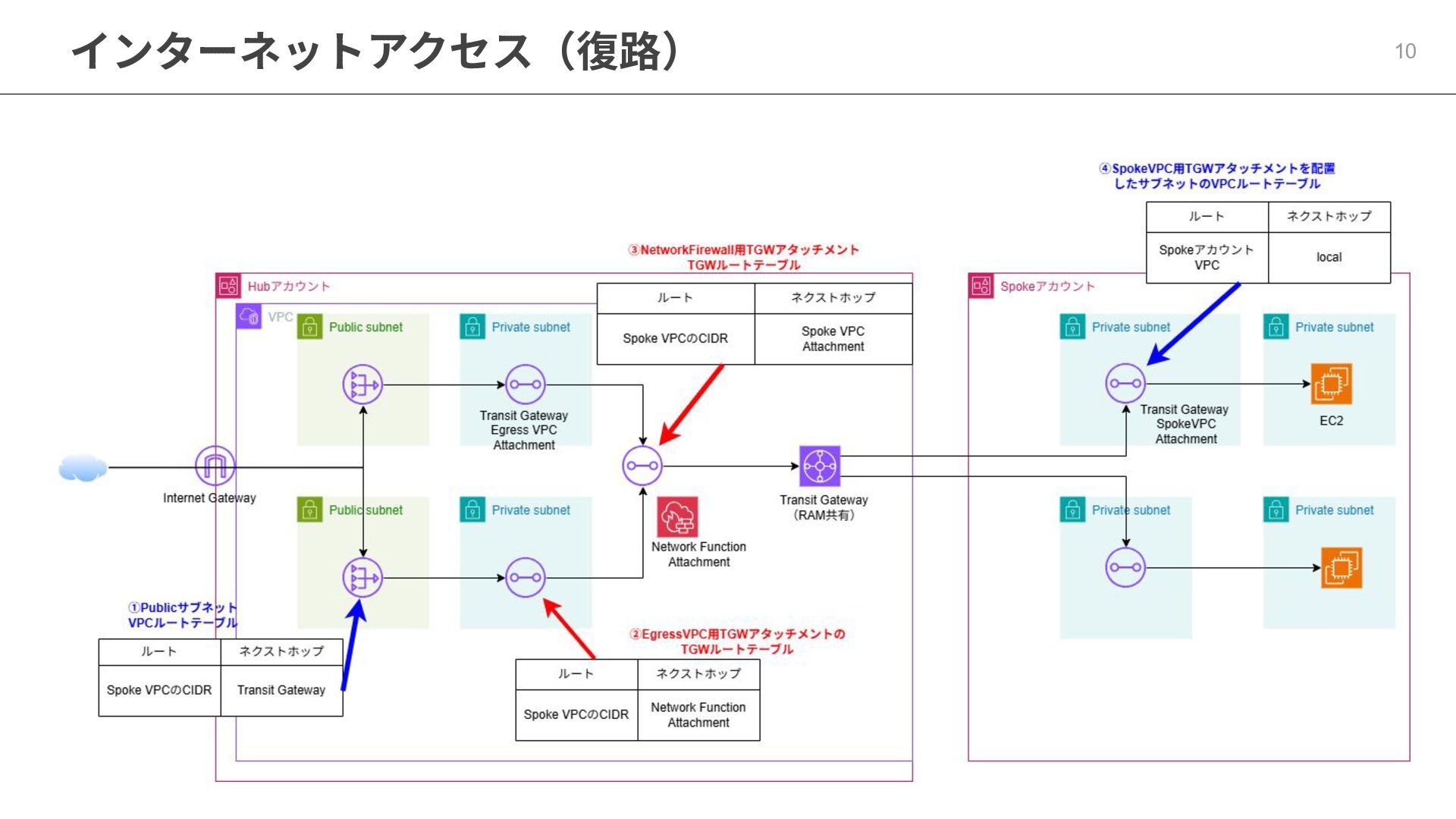
はじめに ⼀般的なHub&Spoke構成で考えてみます。主なアクセス経路は3つです。 【インターネットアクセス】 ①SpokeアカウントのEC2からTransit Gateway経由でHubアカウントに接続 ②HubアカウントのNetwork Firewall(TGW統合)でInspection(検査)実施 ③検査完了後にNat Gateway⇒Internet Gateway経由でインターネットに接続
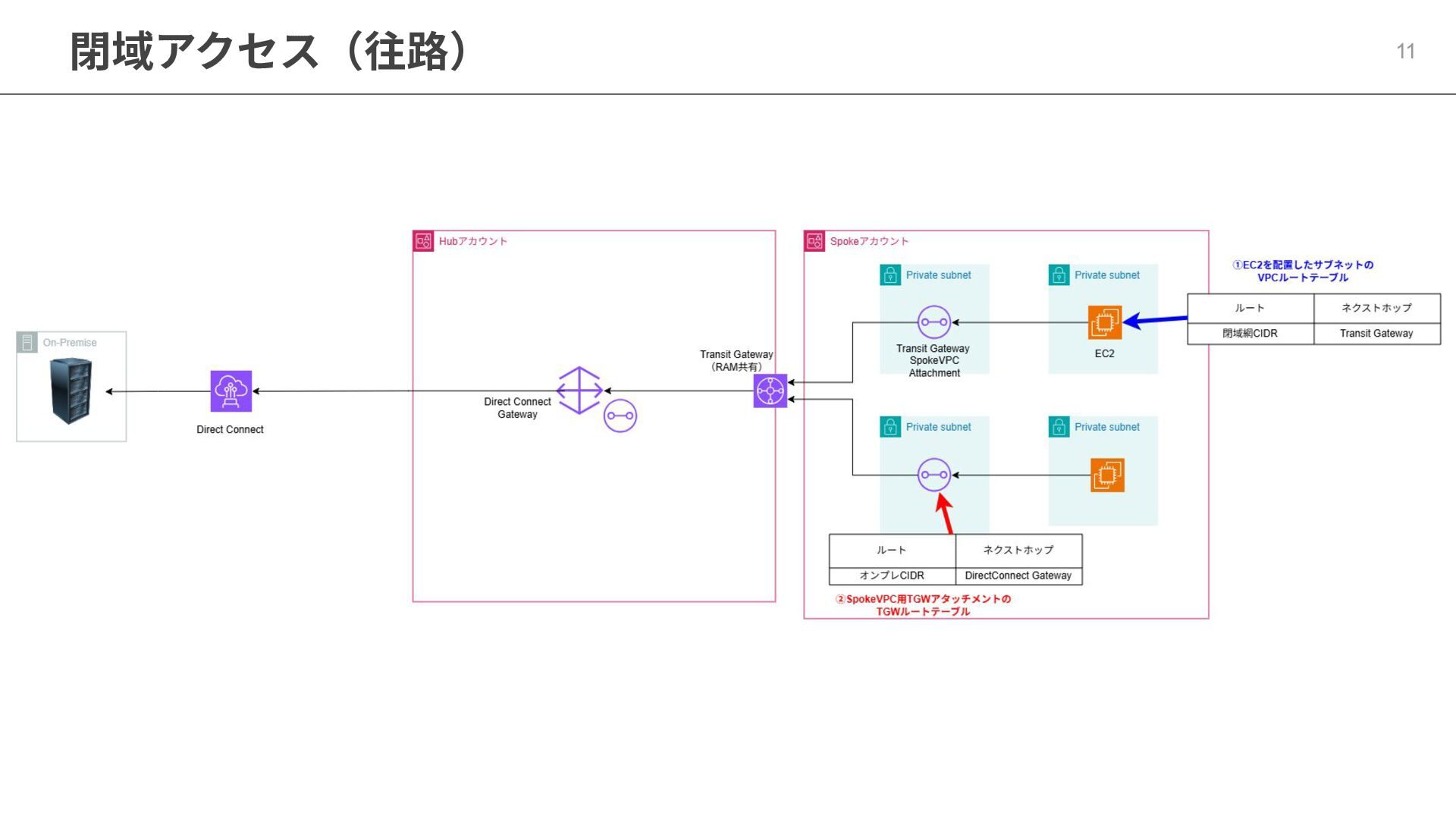
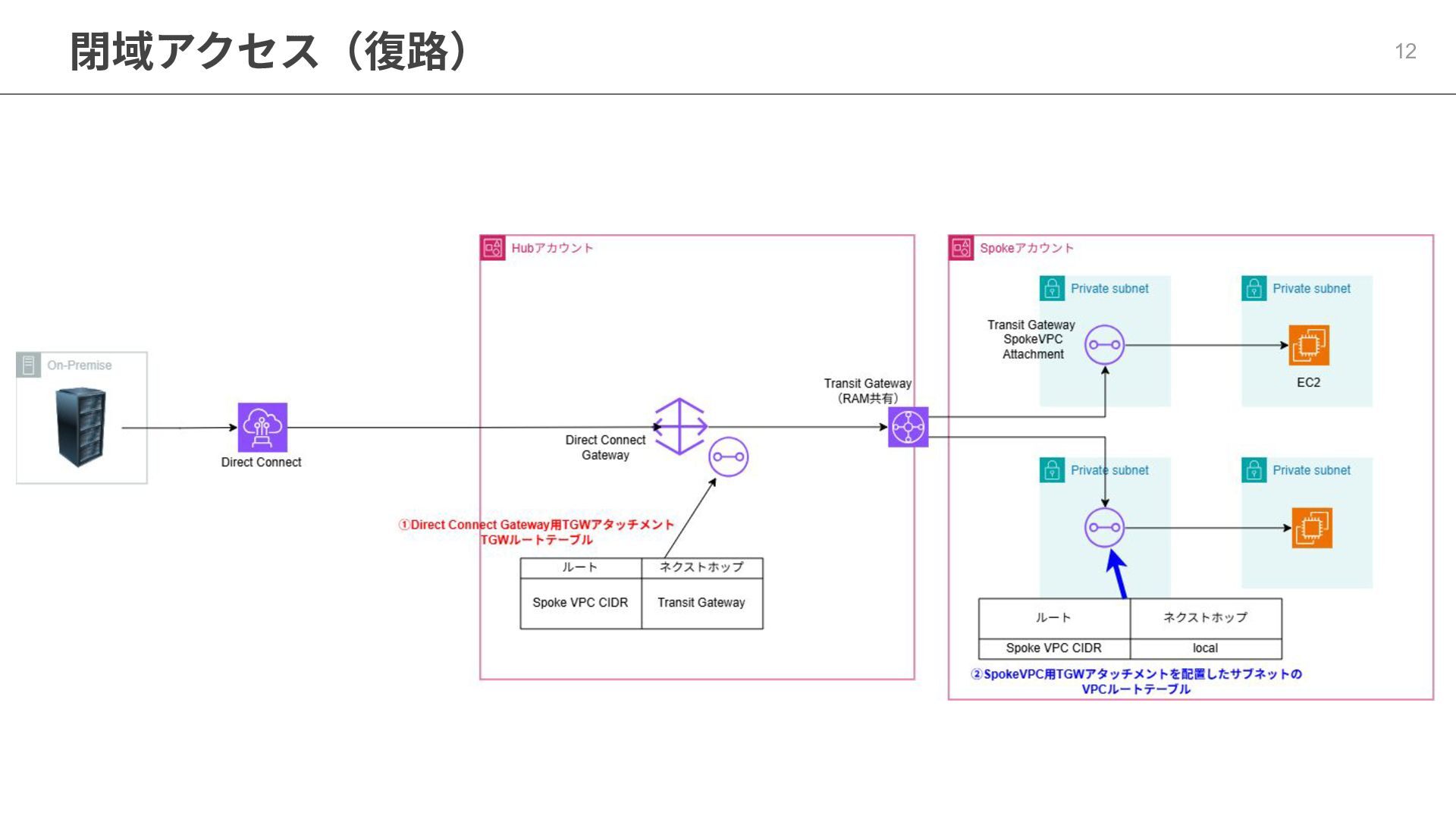
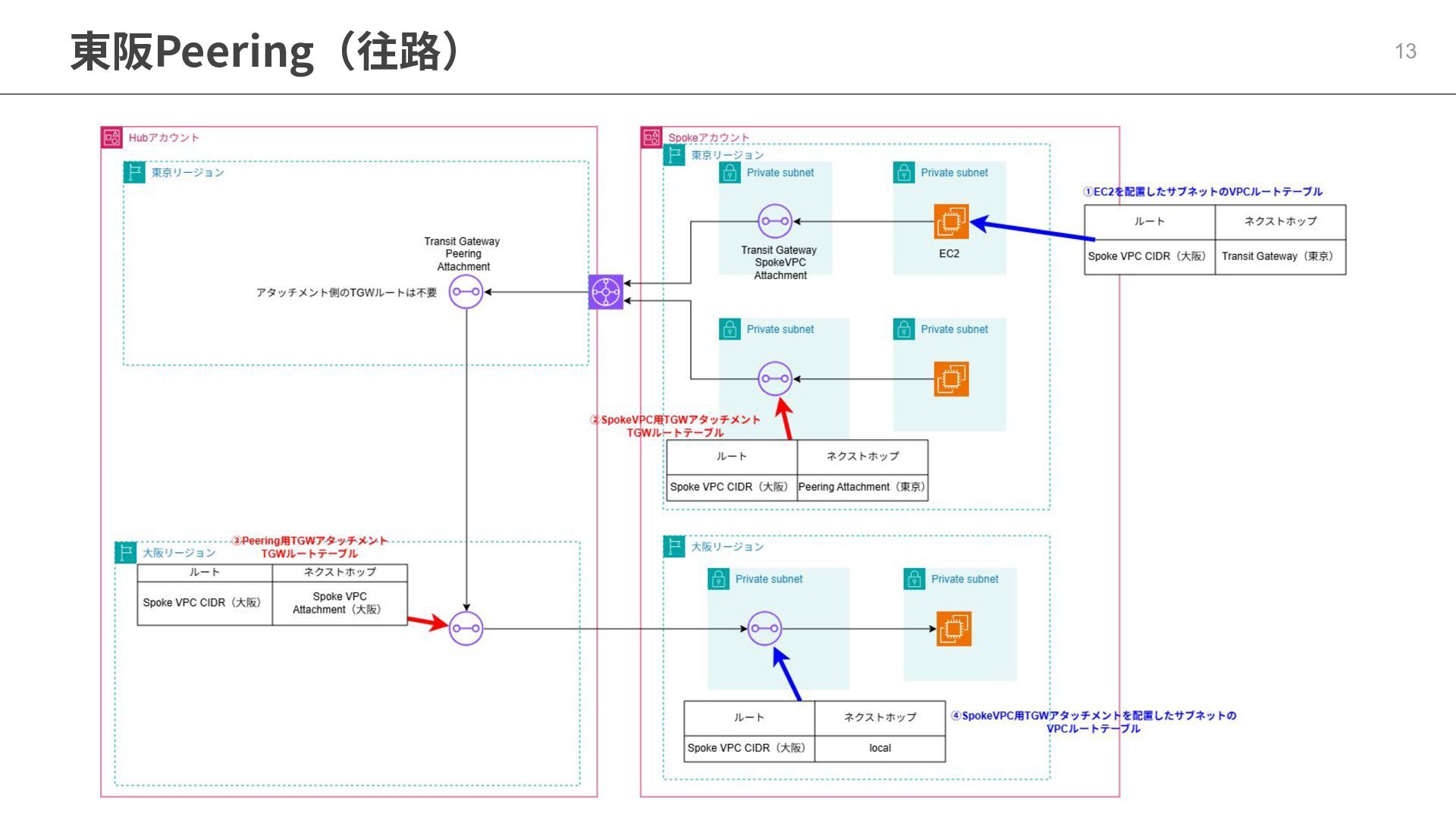
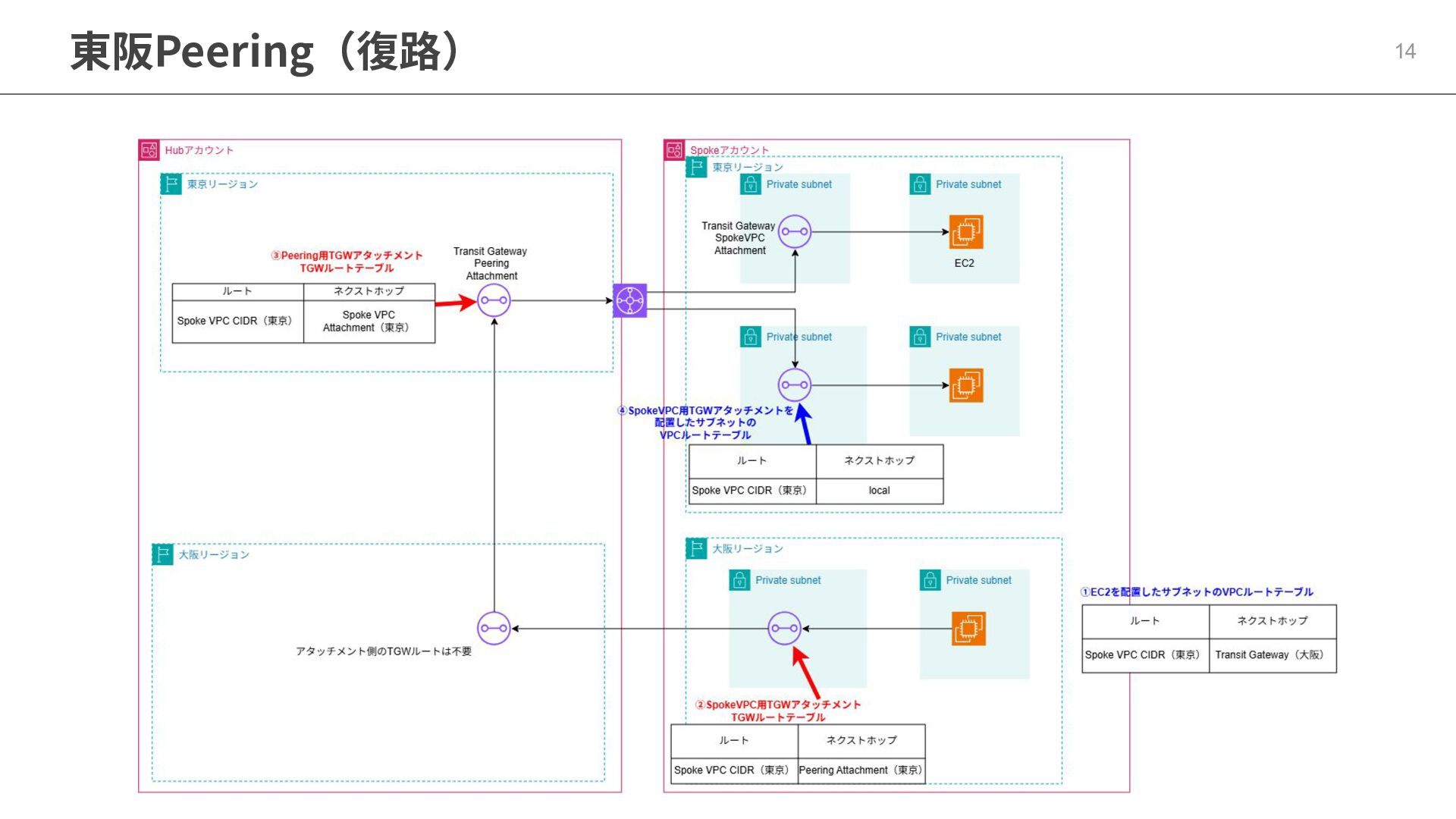
【オンプレミスアクセス】 ①SpokeアカウントのEC2からTransit Gateway経由でHubアカウントに接続 ②HubアカウントのDirect Connect Gatewayを経由し、オンプレミス環境に接続する 【東阪ピアリングアクセス】 ①東京リージョンのSpokeアカウントEC2からTransit Gateway経由でHubアカウントに接続 ②東阪のTransit Gateway間でPeering接続を実施 ③⼤阪リージョンのTransit Gateway経由で、HubアカウントのEC2に疎通 6
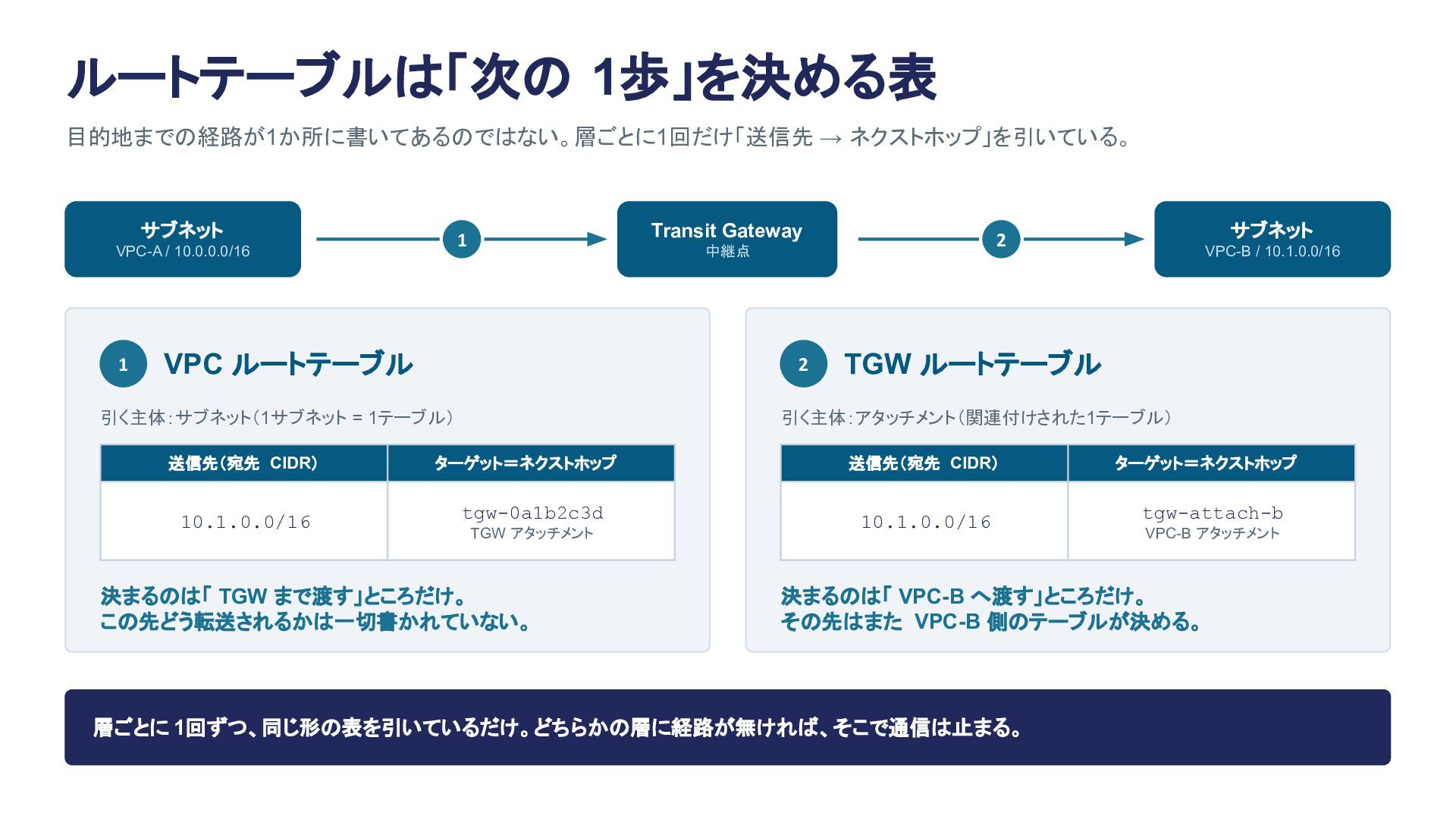
ルートテーブルは「次の 1歩」を決める表 目的地までの経路が1か所に書いてあるのではない。層ごとに1回だけ「送信先 → ネクストホップ」を引いている。 サブネット 1 Transit Gateway 1
VPC-A / 10.0.0.0/16 VPC ルートテーブル 2 引く主体:サブネット(1サブネット = 1テーブル) 送信先(宛先 CIDR) 10.1.0.0/16 サブネット 2 中継点 VPC-B / 10.1.0.0/16 TGW ルートテーブル 引く主体:アタッチメント(関連付けされた1テーブル) ターゲット=ネクストホップ tgw-0a1b2c3d TGW アタッチメント 決まるのは「 TGW まで渡す」ところだけ。 この先どう転送されるかは一切書かれていない。 送信先(宛先 CIDR) 10.1.0.0/16 ターゲット=ネクストホップ tgw-attach-b VPC-B アタッチメント 決まるのは「 VPC-B へ渡す」ところだけ。 その先はまた VPC-B 側のテーブルが決める。 層ごとに 1回ずつ、同じ形の表を引いているだけ。どちらかの層に経路が無ければ、そこで通信は止まる。
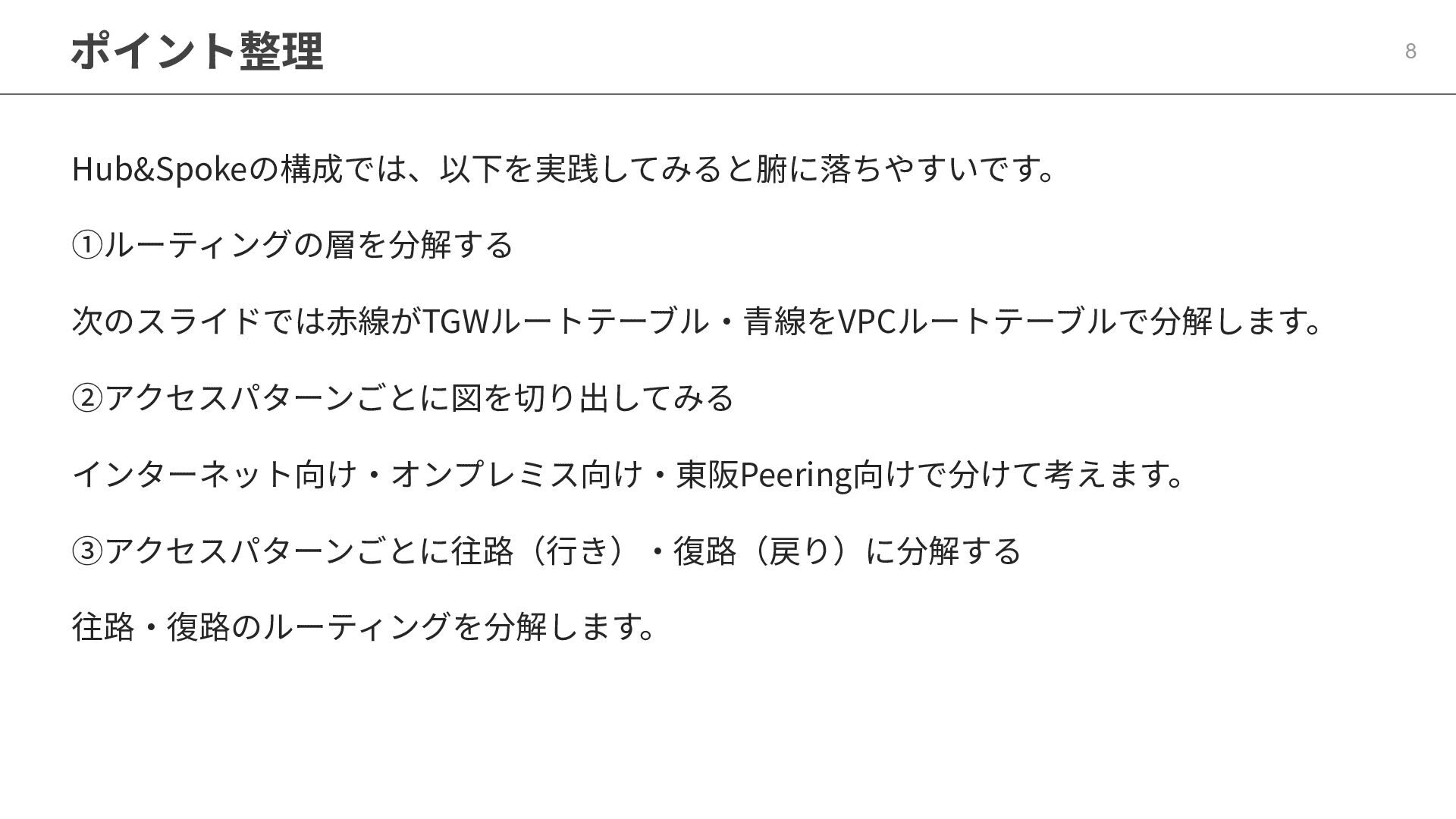
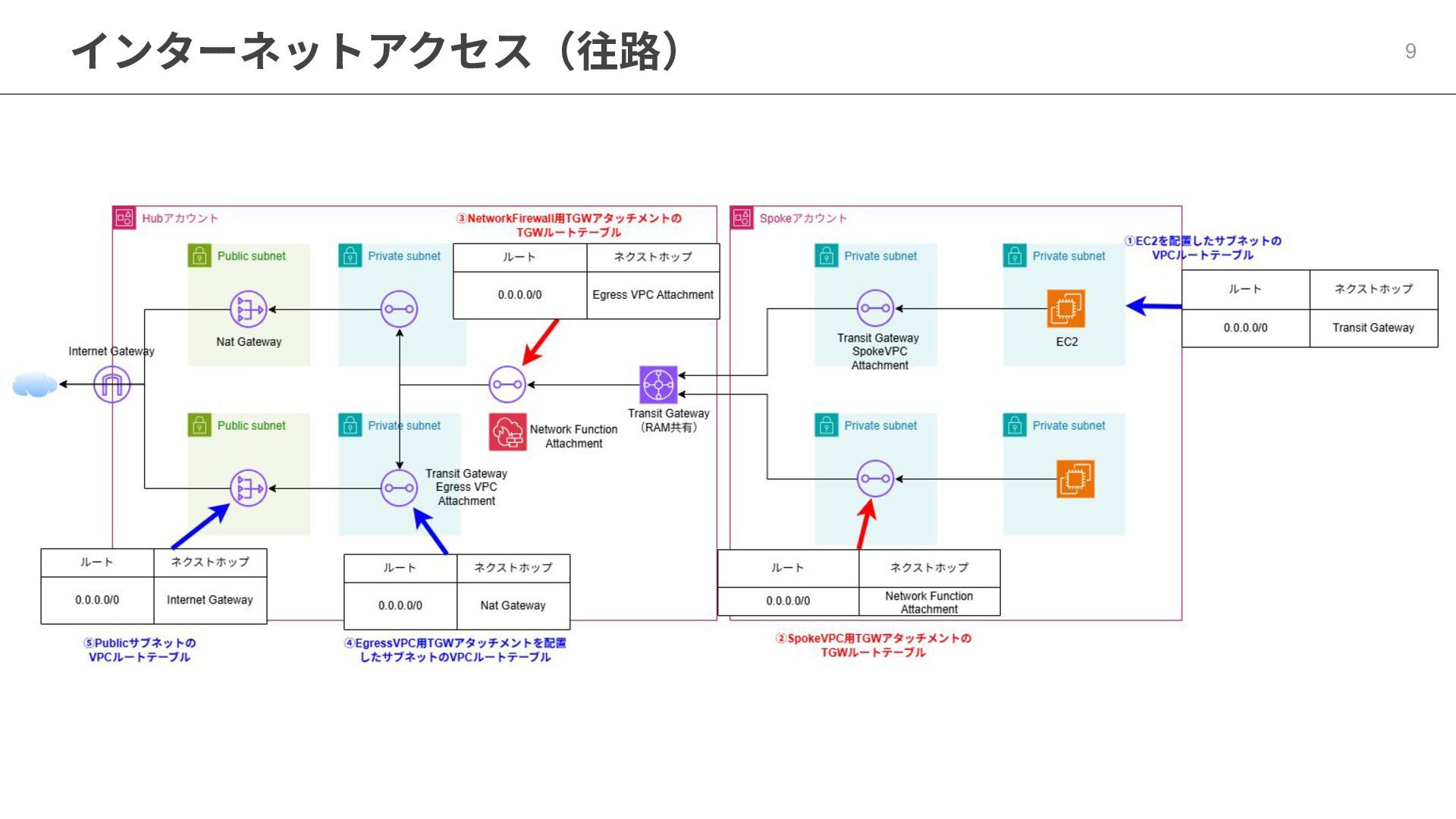
ポイント整理 Hub&Spokeの構成では、以下を実践してみると腑に落ちやすいです。 ①ルーティングの層を分解する 次のスライドでは⾚線がTGWルートテーブル‧⻘線をVPCルートテーブルで分解します。 ②アクセスパターンごとに図を切り出してみる インターネット向け‧オンプレミス向け‧東阪Peering向けで分けて考えます。 ③アクセスパターンごとに往路(⾏き)‧復路(戻り)に分解する 往路‧復路のルーティングを分解します。 8
インターネットアクセス(往路) 9
インターネットアクセス(復路) 10
閉域アクセス(往路) 11
閉域アクセス(復路) 12
東阪Peering(往路) 13
東阪Peering(復路) 14
None

 SiteGround - Reliable hosting with speed, security, and support you can count on.


 tsuyataku
 tsukuboshi
 happysamurai294
 oracle4engineer
 k1style
 akosma
 kinopeee
 yuj1osm
 masayukisuda
 maroon1st
 sogaoh
 kaeton
 destraynor
 nikkihalliwell
 bluesmoon
 morganepeng
 thekraken
 madoxten
 zakiyama
 inesmontani
 skipperchong
 signer
 michielstock
 thirion