Upgrade to PRO for Only $50/Year—Limited-Time Offer! 🔥

Centricity Archive 2.0 DICOM Conformance Statem...

Avatar for victorlee victorlee
October 18, 2011
200

Centricity Archive 2.0 DICOM Conformance Statement .pdf

Avatar for victorlee

victorlee

October 18, 2011
Tweet

Transcript

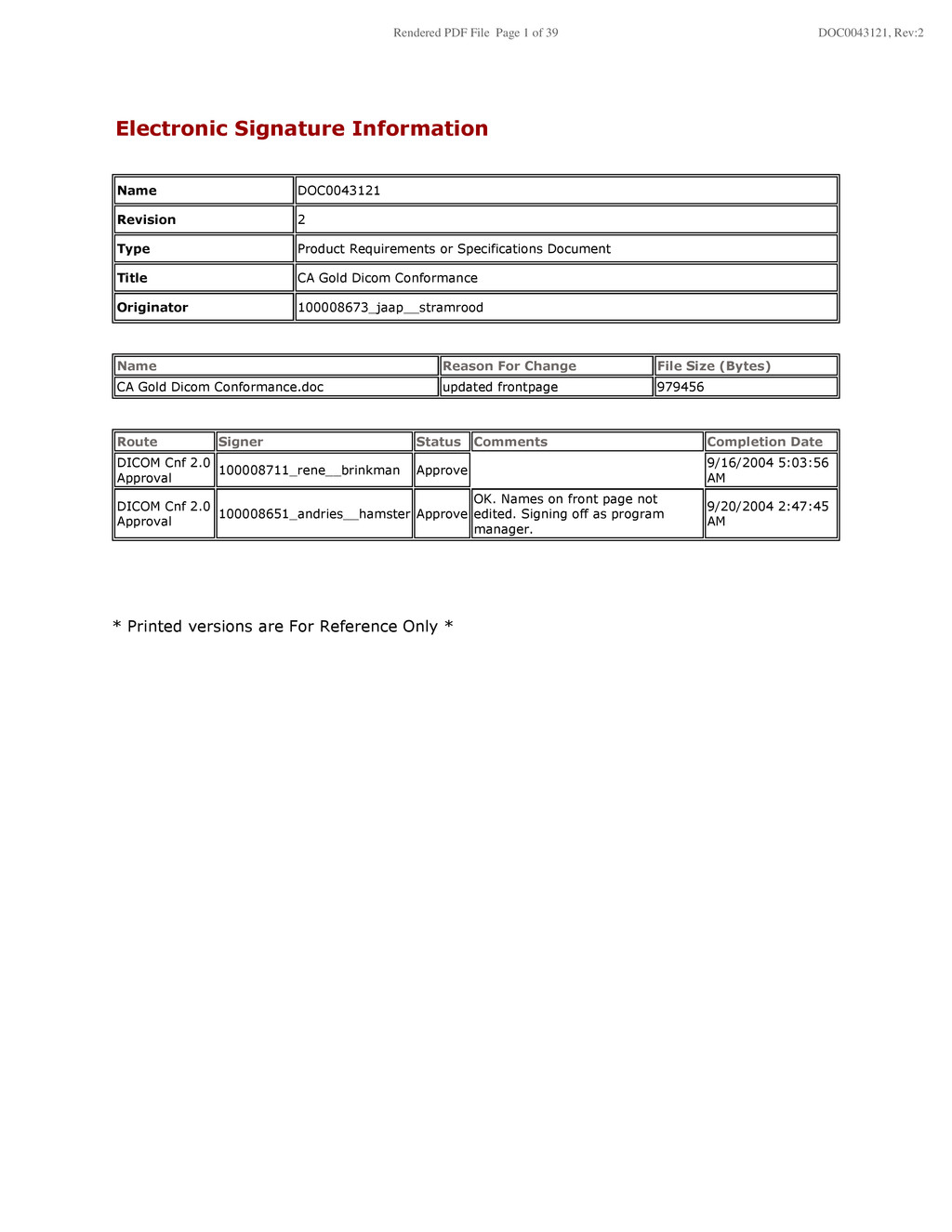
  1. Electronic Signature Information Name DOC0043121 Revision 2 Type Product Requirements

    or Specifications Document Title CA Gold Dicom Conformance Originator 100008673_jaap__stramrood Name Reason For Change File Size (Bytes) CA Gold Dicom Conformance.doc updated frontpage 979456 Route Signer Status Comments Completion Date DICOM Cnf 2.0 Approval 100008711_rene__brinkman Approve 9/16/2004 5:03:56 AM DICOM Cnf 2.0 Approval 100008651_andries__hamster Approve OK. Names on front page not edited. Signing off as program manager. 9/20/2004 2:47:45 AM * Printed versions are For Reference Only * Rendered PDF File Page 1 of 39 DOC0043121, Rev:2
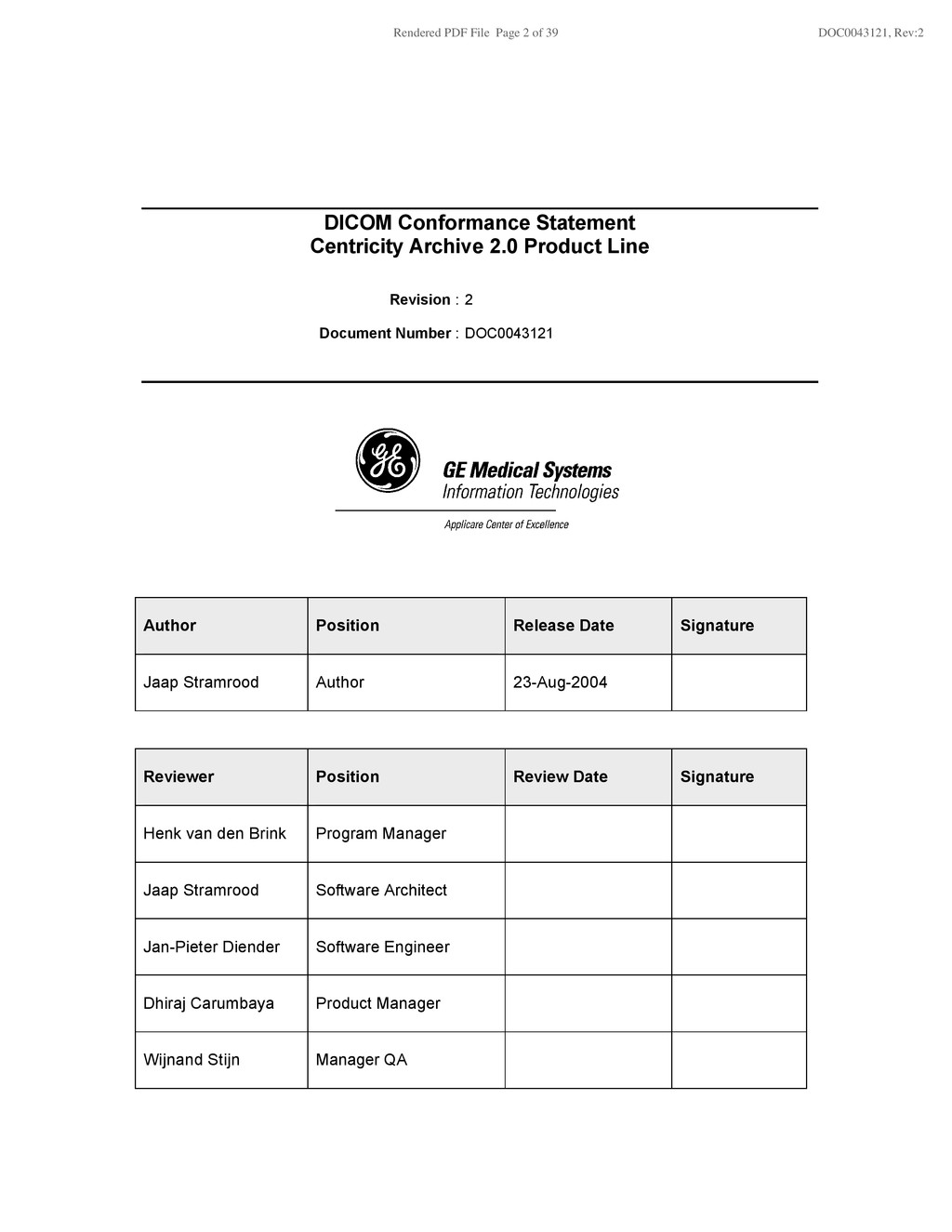
  2. Rendered PDF File Page 2 of 39 DOC0043121, Rev:2 Author

    Position Release Date Signature Jaap Stramrood Author 23-Aug-2004 Reviewer Position Review Date Signature Henk van den Brink Program Manager Jaap Stramrood Software Architect Jan-Pieter Diender Software Engineer Dhiraj Carumbaya Product Manager Wijnand Stijn Manager QA DICOM Conformance Statement Centricity Archive 2.0 Product Line Revision : 2 Document Number : DOC0043121
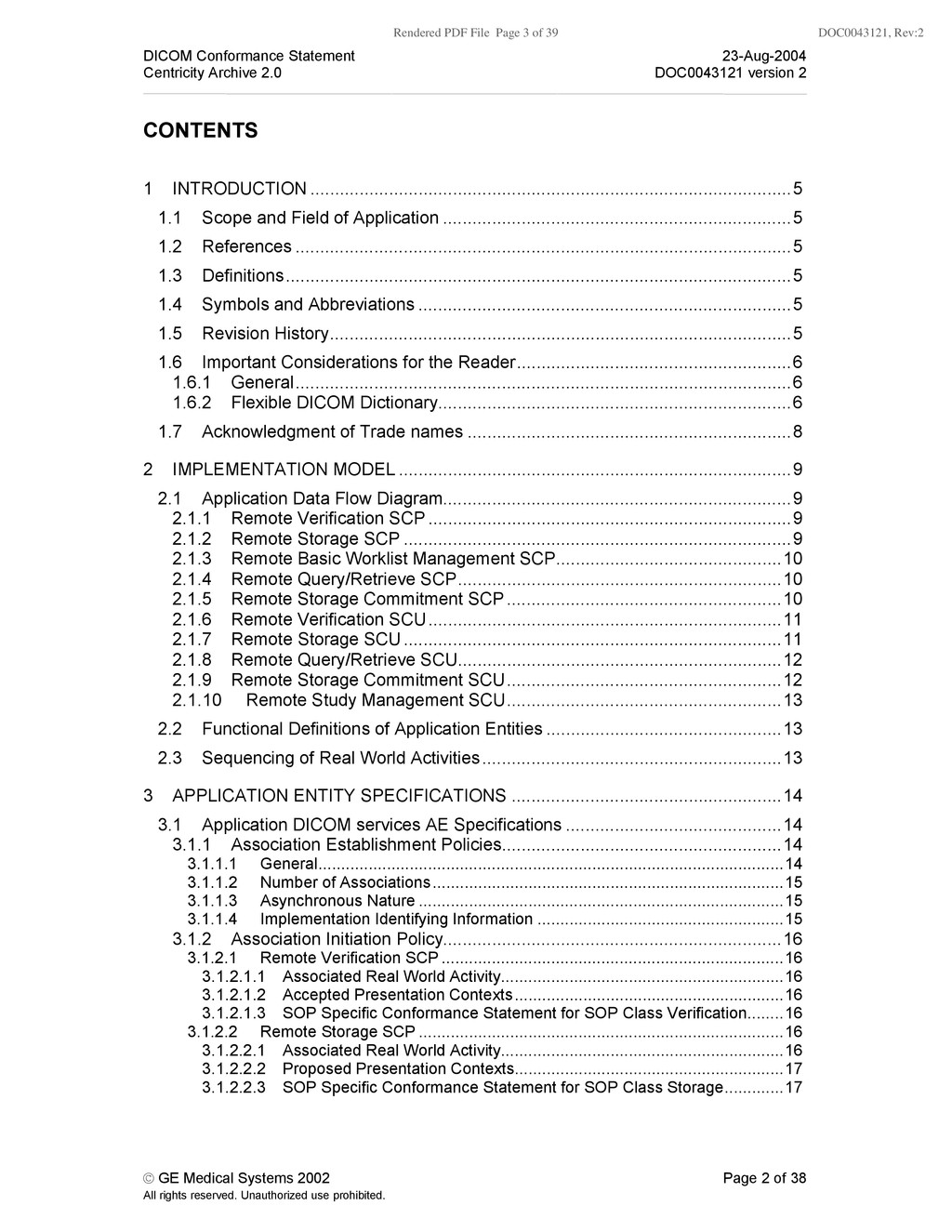
  3. Rendered PDF File Page 3 of 39 DOC0043121, Rev:2 DICOM

    Conformance Statement 23-Aug-2004 Centricity Archive 2.0 DOC0043121 version 2 © GE Medical Systems 2002 Page 2 of 38 All rights reserved. Unauthorized use prohibited. CONTENTS 1 INTRODUCTION ..................................................................................................5 1.1 Scope and Field of Application .......................................................................5 1.2 References .....................................................................................................5 1.3 Definitions.......................................................................................................5 1.4 Symbols and Abbreviations ............................................................................5 1.5 Revision History..............................................................................................5 1.6 Important Considerations for the Reader........................................................6 1.6.1 General.....................................................................................................6 1.6.2 Flexible DICOM Dictionary........................................................................6 1.7 Acknowledgment of Trade names ..................................................................8 2 IMPLEMENTATION MODEL ................................................................................9 2.1 Application Data Flow Diagram.......................................................................9 2.1.1 Remote Verification SCP ..........................................................................9 2.1.2 Remote Storage SCP ...............................................................................9 2.1.3 Remote Basic Worklist Management SCP..............................................10 2.1.4 Remote Query/Retrieve SCP..................................................................10 2.1.5 Remote Storage Commitment SCP........................................................10 2.1.6 Remote Verification SCU........................................................................11 2.1.7 Remote Storage SCU .............................................................................11 2.1.8 Remote Query/Retrieve SCU..................................................................12 2.1.9 Remote Storage Commitment SCU........................................................12 2.1.10 Remote Study Management SCU........................................................13 2.2 Functional Definitions of Application Entities ................................................13 2.3 Sequencing of Real World Activities.............................................................13 3 APPLICATION ENTITY SPECIFICATIONS .......................................................14 3.1 Application DICOM services AE Specifications ............................................14 3.1.1 Association Establishment Policies.........................................................14 3.1.1.1 General......................................................................................................14 3.1.1.2 Number of Associations.............................................................................15 3.1.1.3 Asynchronous Nature ................................................................................15 3.1.1.4 Implementation Identifying Information ......................................................15 3.1.2 Association Initiation Policy.....................................................................16 3.1.2.1 Remote Verification SCP ...........................................................................16 3.1.2.1.1 Associated Real World Activity..............................................................16 3.1.2.1.2 Accepted Presentation Contexts...........................................................16 3.1.2.1.3 SOP Specific Conformance Statement for SOP Class Verification........16 3.1.2.2 Remote Storage SCP ................................................................................16 3.1.2.2.1 Associated Real World Activity..............................................................16 3.1.2.2.2 Proposed Presentation Contexts...........................................................17 3.1.2.2.3 SOP Specific Conformance Statement for SOP Class Storage.............17
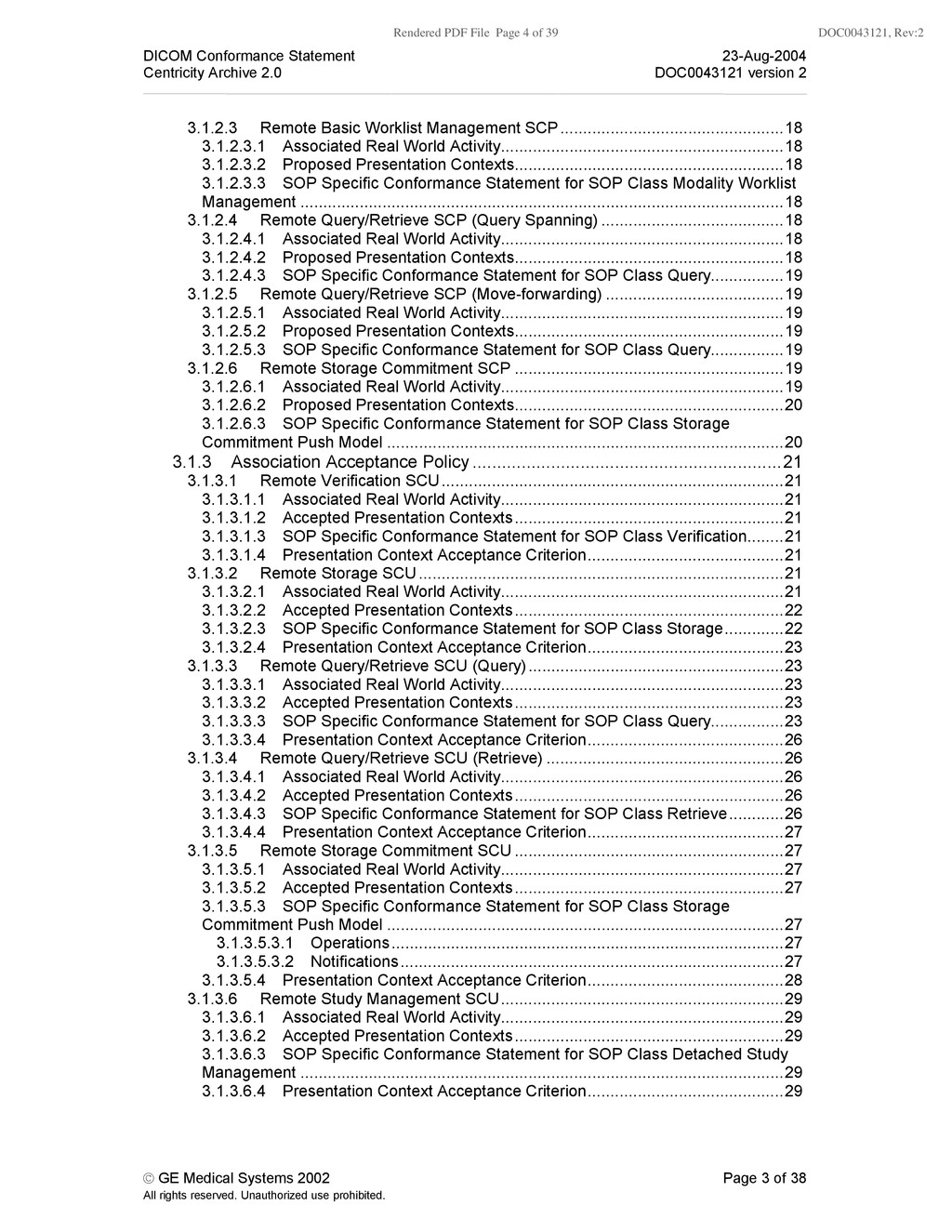
  4. Rendered PDF File Page 4 of 39 DOC0043121, Rev:2 DICOM

    Conformance Statement 23-Aug-2004 Centricity Archive 2.0 DOC0043121 version 2 © GE Medical Systems 2002 Page 3 of 38 All rights reserved. Unauthorized use prohibited. 3.1.2.3 Remote Basic Worklist Management SCP.................................................18 3.1.2.3.1 Associated Real World Activity..............................................................18 3.1.2.3.2 Proposed Presentation Contexts...........................................................18 3.1.2.3.3 SOP Specific Conformance Statement for SOP Class Modality Worklist Management ..........................................................................................................18 3.1.2.4 Remote Query/Retrieve SCP (Query Spanning) ........................................18 3.1.2.4.1 Associated Real World Activity..............................................................18 3.1.2.4.2 Proposed Presentation Contexts...........................................................18 3.1.2.4.3 SOP Specific Conformance Statement for SOP Class Query................19 3.1.2.5 Remote Query/Retrieve SCP (Move-forwarding) .......................................19 3.1.2.5.1 Associated Real World Activity..............................................................19 3.1.2.5.2 Proposed Presentation Contexts...........................................................19 3.1.2.5.3 SOP Specific Conformance Statement for SOP Class Query................19 3.1.2.6 Remote Storage Commitment SCP ...........................................................19 3.1.2.6.1 Associated Real World Activity..............................................................19 3.1.2.6.2 Proposed Presentation Contexts...........................................................20 3.1.2.6.3 SOP Specific Conformance Statement for SOP Class Storage Commitment Push Model .......................................................................................20 3.1.3 Association Acceptance Policy ...............................................................21 3.1.3.1 Remote Verification SCU...........................................................................21 3.1.3.1.1 Associated Real World Activity..............................................................21 3.1.3.1.2 Accepted Presentation Contexts...........................................................21 3.1.3.1.3 SOP Specific Conformance Statement for SOP Class Verification........21 3.1.3.1.4 Presentation Context Acceptance Criterion...........................................21 3.1.3.2 Remote Storage SCU................................................................................21 3.1.3.2.1 Associated Real World Activity..............................................................21 3.1.3.2.2 Accepted Presentation Contexts...........................................................22 3.1.3.2.3 SOP Specific Conformance Statement for SOP Class Storage.............22 3.1.3.2.4 Presentation Context Acceptance Criterion...........................................23 3.1.3.3 Remote Query/Retrieve SCU (Query)........................................................23 3.1.3.3.1 Associated Real World Activity..............................................................23 3.1.3.3.2 Accepted Presentation Contexts...........................................................23 3.1.3.3.3 SOP Specific Conformance Statement for SOP Class Query................23 3.1.3.3.4 Presentation Context Acceptance Criterion...........................................26 3.1.3.4 Remote Query/Retrieve SCU (Retrieve) ....................................................26 3.1.3.4.1 Associated Real World Activity..............................................................26 3.1.3.4.2 Accepted Presentation Contexts...........................................................26 3.1.3.4.3 SOP Specific Conformance Statement for SOP Class Retrieve............26 3.1.3.4.4 Presentation Context Acceptance Criterion...........................................27 3.1.3.5 Remote Storage Commitment SCU ...........................................................27 3.1.3.5.1 Associated Real World Activity..............................................................27 3.1.3.5.2 Accepted Presentation Contexts...........................................................27 3.1.3.5.3 SOP Specific Conformance Statement for SOP Class Storage Commitment Push Model .......................................................................................27 3.1.3.5.3.1 Operations......................................................................................27 3.1.3.5.3.2 Notifications....................................................................................27 3.1.3.5.4 Presentation Context Acceptance Criterion...........................................28 3.1.3.6 Remote Study Management SCU..............................................................29 3.1.3.6.1 Associated Real World Activity..............................................................29 3.1.3.6.2 Accepted Presentation Contexts...........................................................29 3.1.3.6.3 SOP Specific Conformance Statement for SOP Class Detached Study Management ..........................................................................................................29 3.1.3.6.4 Presentation Context Acceptance Criterion...........................................29
  5. Rendered PDF File Page 5 of 39 DOC0043121, Rev:2 DICOM

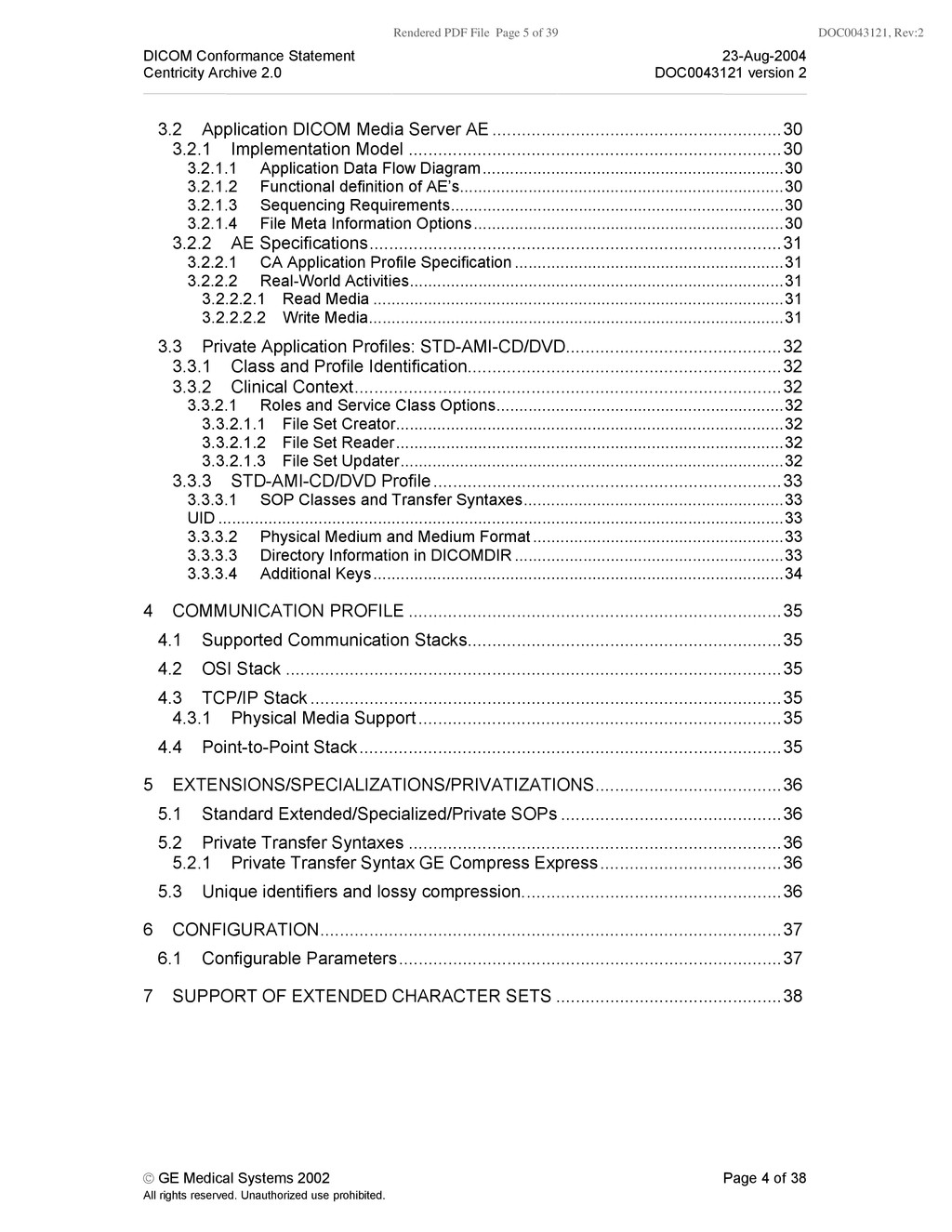
    Conformance Statement 23-Aug-2004 Centricity Archive 2.0 DOC0043121 version 2 © GE Medical Systems 2002 Page 4 of 38 All rights reserved. Unauthorized use prohibited. 3.2 Application DICOM Media Server AE ...........................................................30 3.2.1 Implementation Model ............................................................................30 3.2.1.1 Application Data Flow Diagram..................................................................30 3.2.1.2 Functional definition of AE’s.......................................................................30 3.2.1.3 Sequencing Requirements.........................................................................30 3.2.1.4 File Meta Information Options....................................................................30 3.2.2 AE Specifications....................................................................................31 3.2.2.1 CA Application Profile Specification ...........................................................31 3.2.2.2 Real-World Activities..................................................................................31 3.2.2.2.1 Read Media ..........................................................................................31 3.2.2.2.2 Write Media...........................................................................................31 3.3 Private Application Profiles: STD-AMI-CD/DVD............................................32 3.3.1 Class and Profile Identification................................................................32 3.3.2 Clinical Context.......................................................................................32 3.3.2.1 Roles and Service Class Options...............................................................32 3.3.2.1.1 File Set Creator.....................................................................................32 3.3.2.1.2 File Set Reader.....................................................................................32 3.3.2.1.3 File Set Updater....................................................................................32 3.3.3 STD-AMI-CD/DVD Profile.......................................................................33 3.3.3.1 SOP Classes and Transfer Syntaxes.........................................................33 UID ............................................................................................................................33 3.3.3.2 Physical Medium and Medium Format.......................................................33 3.3.3.3 Directory Information in DICOMDIR ...........................................................33 3.3.3.4 Additional Keys..........................................................................................34 4 COMMUNICATION PROFILE ............................................................................35 4.1 Supported Communication Stacks................................................................35 4.2 OSI Stack .....................................................................................................35 4.3 TCP/IP Stack ................................................................................................35 4.3.1 Physical Media Support..........................................................................35 4.4 Point-to-Point Stack......................................................................................35 5 EXTENSIONS/SPECIALIZATIONS/PRIVATIZATIONS......................................36 5.1 Standard Extended/Specialized/Private SOPs .............................................36 5.2 Private Transfer Syntaxes ............................................................................36 5.2.1 Private Transfer Syntax GE Compress Express.....................................36 5.3 Unique identifiers and lossy compression.....................................................36 6 CONFIGURATION..............................................................................................37 6.1 Configurable Parameters..............................................................................37 7 SUPPORT OF EXTENDED CHARACTER SETS ..............................................38
  6. Rendered PDF File Page 6 of 39 DOC0043121, Rev:2 DICOM

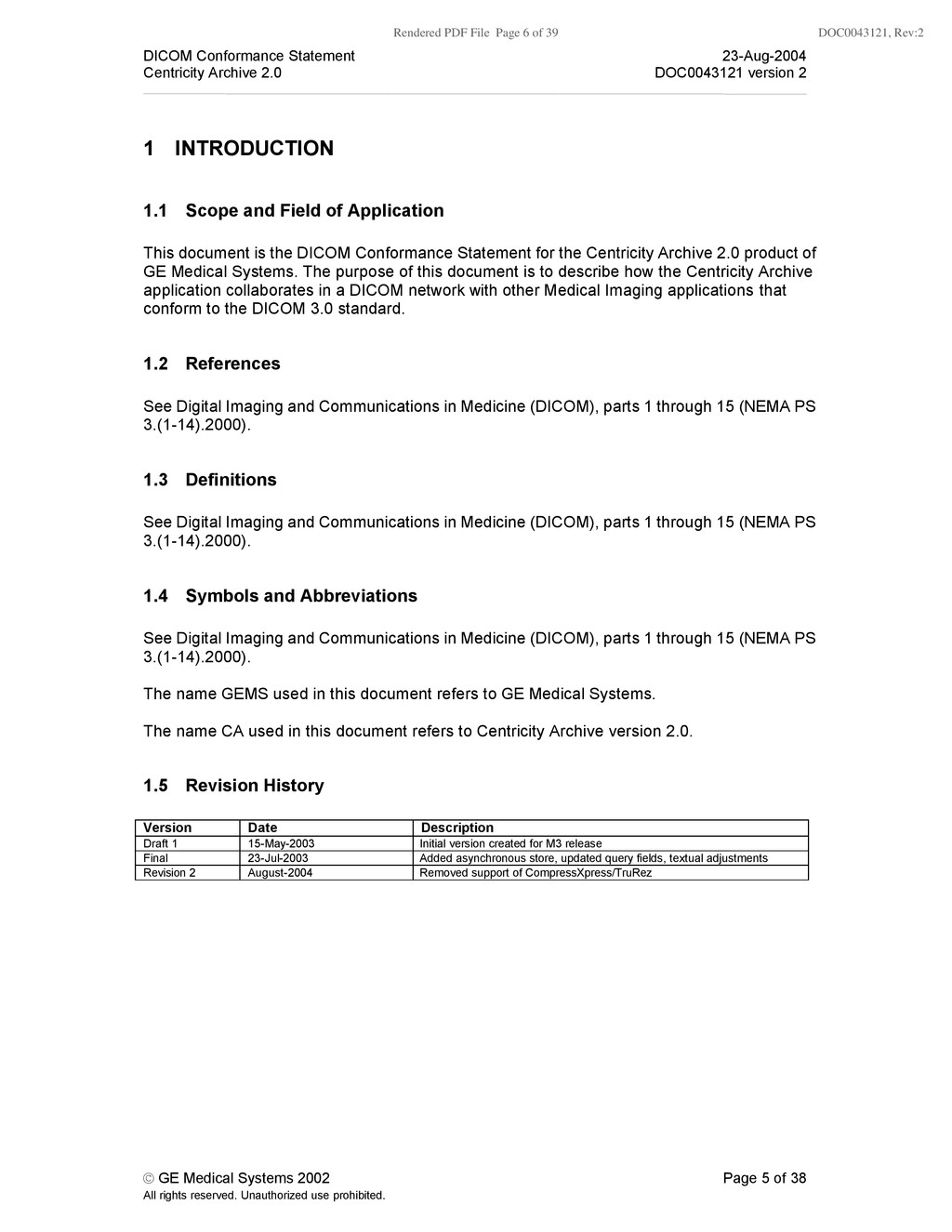
    Conformance Statement 23-Aug-2004 Centricity Archive 2.0 DOC0043121 version 2 © GE Medical Systems 2002 Page 5 of 38 All rights reserved. Unauthorized use prohibited. 1 INTRODUCTION 1.1 Scope and Field of Application This document is the DICOM Conformance Statement for the Centricity Archive 2.0 product of GE Medical Systems. The purpose of this document is to describe how the Centricity Archive application collaborates in a DICOM network with other Medical Imaging applications that conform to the DICOM 3.0 standard. 1.2 References See Digital Imaging and Communications in Medicine (DICOM), parts 1 through 15 (NEMA PS 3.(1-14).2000). 1.3 Definitions See Digital Imaging and Communications in Medicine (DICOM), parts 1 through 15 (NEMA PS 3.(1-14).2000). 1.4 Symbols and Abbreviations See Digital Imaging and Communications in Medicine (DICOM), parts 1 through 15 (NEMA PS 3.(1-14).2000). The name GEMS used in this document refers to GE Medical Systems. The name CA used in this document refers to Centricity Archive version 2.0. 1.5 Revision History Version Date Description Draft 1 15-May-2003 Initial version created for M3 release Final 23-Jul-2003 Added asynchronous store, updated query fields, textual adjustments Revision 2 August-2004 Removed support of CompressXpress/TruRez
  7. Rendered PDF File Page 7 of 39 DOC0043121, Rev:2 DICOM

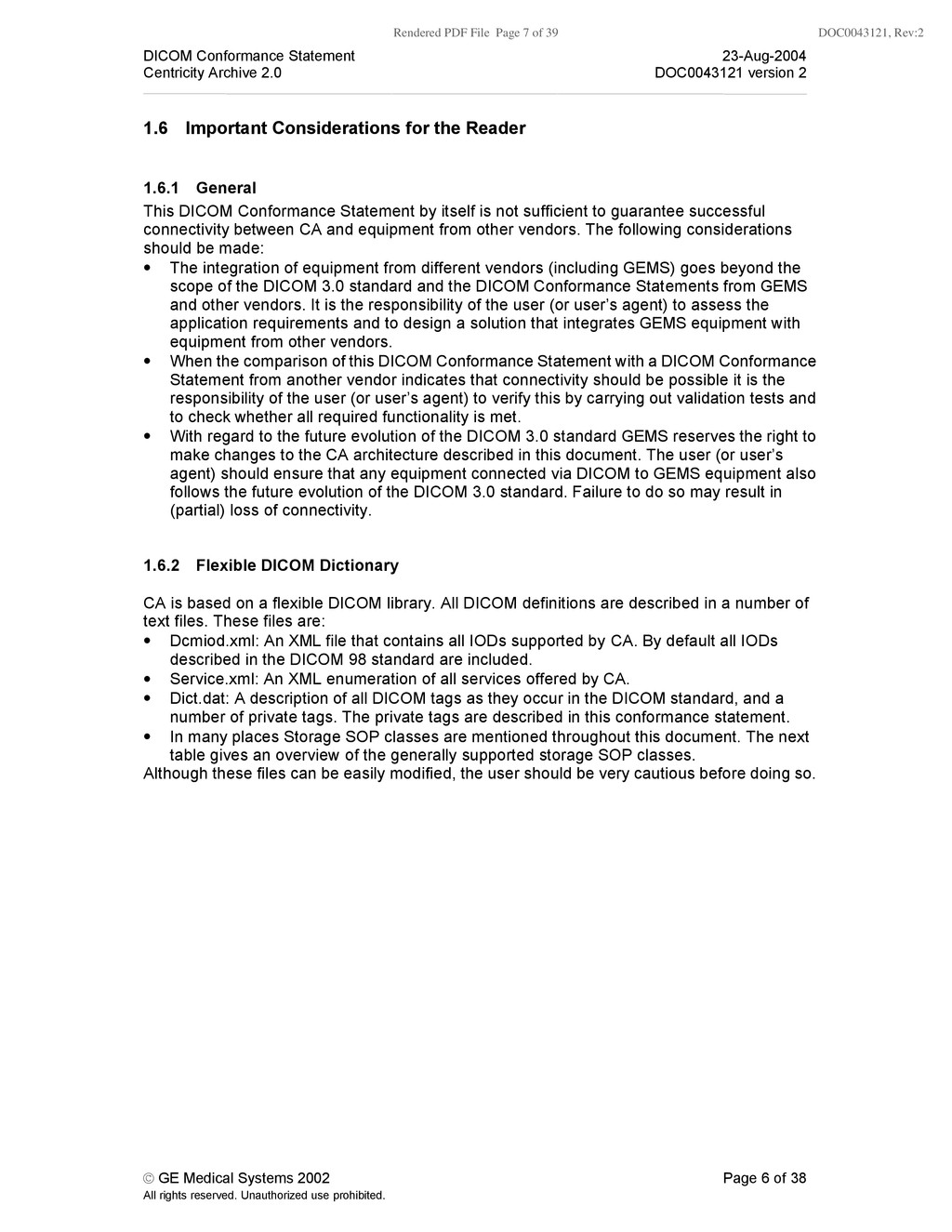
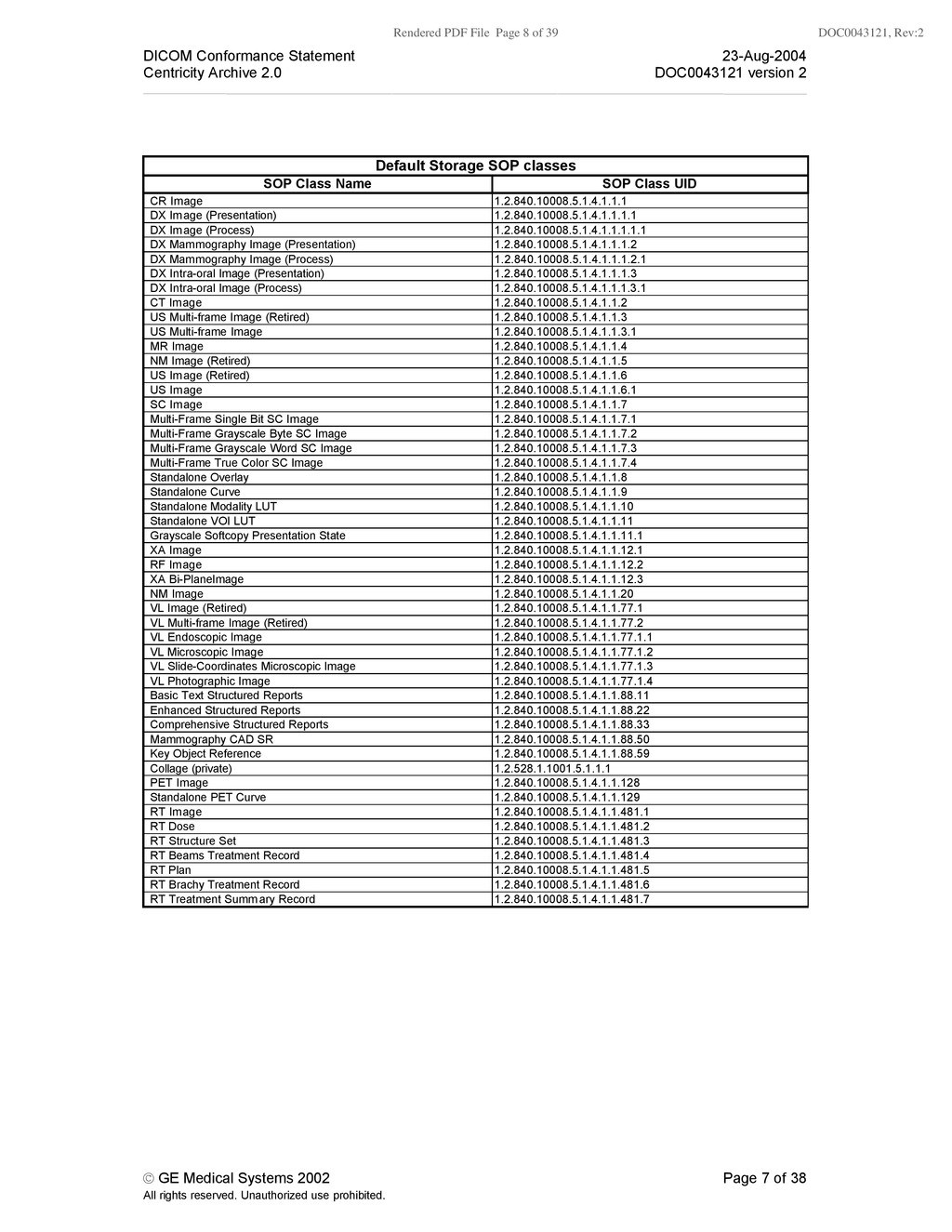
    Conformance Statement 23-Aug-2004 Centricity Archive 2.0 DOC0043121 version 2 © GE Medical Systems 2002 Page 6 of 38 All rights reserved. Unauthorized use prohibited. 1.6 Important Considerations for the Reader 1.6.1 General This DICOM Conformance Statement by itself is not sufficient to guarantee successful connectivity between CA and equipment from other vendors. The following considerations should be made: • The integration of equipment from different vendors (including GEMS) goes beyond the scope of the DICOM 3.0 standard and the DICOM Conformance Statements from GEMS and other vendors. It is the responsibility of the user (or user’s agent) to assess the application requirements and to design a solution that integrates GEMS equipment with equipment from other vendors. • When the comparison of this DICOM Conformance Statement with a DICOM Conformance Statement from another vendor indicates that connectivity should be possible it is the responsibility of the user (or user’s agent) to verify this by carrying out validation tests and to check whether all required functionality is met. • With regard to the future evolution of the DICOM 3.0 standard GEMS reserves the right to make changes to the CA architecture described in this document. The user (or user’s agent) should ensure that any equipment connected via DICOM to GEMS equipment also follows the future evolution of the DICOM 3.0 standard. Failure to do so may result in (partial) loss of connectivity. 1.6.2 Flexible DICOM Dictionary CA is based on a flexible DICOM library. All DICOM definitions are described in a number of text files. These files are: • Dcmiod.xml: An XML file that contains all IODs supported by CA. By default all IODs described in the DICOM 98 standard are included. • Service.xml: An XML enumeration of all services offered by CA. • Dict.dat: A description of all DICOM tags as they occur in the DICOM standard, and a number of private tags. The private tags are described in this conformance statement. • In many places Storage SOP classes are mentioned throughout this document. The next table gives an overview of the generally supported storage SOP classes. Although these files can be easily modified, the user should be very cautious before doing so.
  8. Rendered PDF File Page 8 of 39 DOC0043121, Rev:2 DICOM

    Conformance Statement 23-Aug-2004 Centricity Archive 2.0 DOC0043121 version 2 © GE Medical Systems 2002 Page 7 of 38 All rights reserved. Unauthorized use prohibited. Default Storage SOP classes SOP Class Name SOP Class UID CR Image 1.2.840.10008.5.1.4.1.1.1 DX Image (Presentation) 1.2.840.10008.5.1.4.1.1.1.1 DX Image (Process) 1.2.840.10008.5.1.4.1.1.1.1.1 DX Mammography Image (Presentation) 1.2.840.10008.5.1.4.1.1.1.2 DX Mammography Image (Process) 1.2.840.10008.5.1.4.1.1.1.2.1 DX Intra-oral Image (Presentation) 1.2.840.10008.5.1.4.1.1.1.3 DX Intra-oral Image (Process) 1.2.840.10008.5.1.4.1.1.1.3.1 CT Image 1.2.840.10008.5.1.4.1.1.2 US Multi-frame Image (Retired) 1.2.840.10008.5.1.4.1.1.3 US Multi-frame Image 1.2.840.10008.5.1.4.1.1.3.1 MR Image 1.2.840.10008.5.1.4.1.1.4 NM Image (Retired) 1.2.840.10008.5.1.4.1.1.5 US Image (Retired) 1.2.840.10008.5.1.4.1.1.6 US Image 1.2.840.10008.5.1.4.1.1.6.1 SC Image 1.2.840.10008.5.1.4.1.1.7 Multi-Frame Single Bit SC Image 1.2.840.10008.5.1.4.1.1.7.1 Multi-Frame Grayscale Byte SC Image 1.2.840.10008.5.1.4.1.1.7.2 Multi-Frame Grayscale Word SC Image 1.2.840.10008.5.1.4.1.1.7.3 Multi-Frame True Color SC Image 1.2.840.10008.5.1.4.1.1.7.4 Standalone Overlay 1.2.840.10008.5.1.4.1.1.8 Standalone Curve 1.2.840.10008.5.1.4.1.1.9 Standalone Modality LUT 1.2.840.10008.5.1.4.1.1.10 Standalone VOI LUT 1.2.840.10008.5.1.4.1.1.11 Grayscale Softcopy Presentation State 1.2.840.10008.5.1.4.1.1.11.1 XA Image 1.2.840.10008.5.1.4.1.1.12.1 RF Image 1.2.840.10008.5.1.4.1.1.12.2 XA Bi-PlaneImage 1.2.840.10008.5.1.4.1.1.12.3 NM Image 1.2.840.10008.5.1.4.1.1.20 VL Image (Retired) 1.2.840.10008.5.1.4.1.1.77.1 VL Multi-frame Image (Retired) 1.2.840.10008.5.1.4.1.1.77.2 VL Endoscopic Image 1.2.840.10008.5.1.4.1.1.77.1.1 VL Microscopic Image 1.2.840.10008.5.1.4.1.1.77.1.2 VL Slide-Coordinates Microscopic Image 1.2.840.10008.5.1.4.1.1.77.1.3 VL Photographic Image 1.2.840.10008.5.1.4.1.1.77.1.4 Basic Text Structured Reports 1.2.840.10008.5.1.4.1.1.88.11 Enhanced Structured Reports 1.2.840.10008.5.1.4.1.1.88.22 Comprehensive Structured Reports 1.2.840.10008.5.1.4.1.1.88.33 Mammography CAD SR 1.2.840.10008.5.1.4.1.1.88.50 Key Object Reference 1.2.840.10008.5.1.4.1.1.88.59 Collage (private) 1.2.528.1.1001.5.1.1.1 PET Image 1.2.840.10008.5.1.4.1.1.128 Standalone PET Curve 1.2.840.10008.5.1.4.1.1.129 RT Image 1.2.840.10008.5.1.4.1.1.481.1 RT Dose 1.2.840.10008.5.1.4.1.1.481.2 RT Structure Set 1.2.840.10008.5.1.4.1.1.481.3 RT Beams Treatment Record 1.2.840.10008.5.1.4.1.1.481.4 RT Plan 1.2.840.10008.5.1.4.1.1.481.5 RT Brachy Treatment Record 1.2.840.10008.5.1.4.1.1.481.6 RT Treatment Summary Record 1.2.840.10008.5.1.4.1.1.481.7
  9. Rendered PDF File Page 9 of 39 DOC0043121, Rev:2 DICOM

    Conformance Statement 23-Aug-2004 Centricity Archive 2.0 DOC0043121 version 2 © GE Medical Systems 2002 Page 8 of 38 All rights reserved. Unauthorized use prohibited. 1.7 Acknowledgment of Trade names All trade names mentioned in this document are recognized.
  10. Rendered PDF File Page 10 of 39 DOC0043121, Rev:2 DICOM

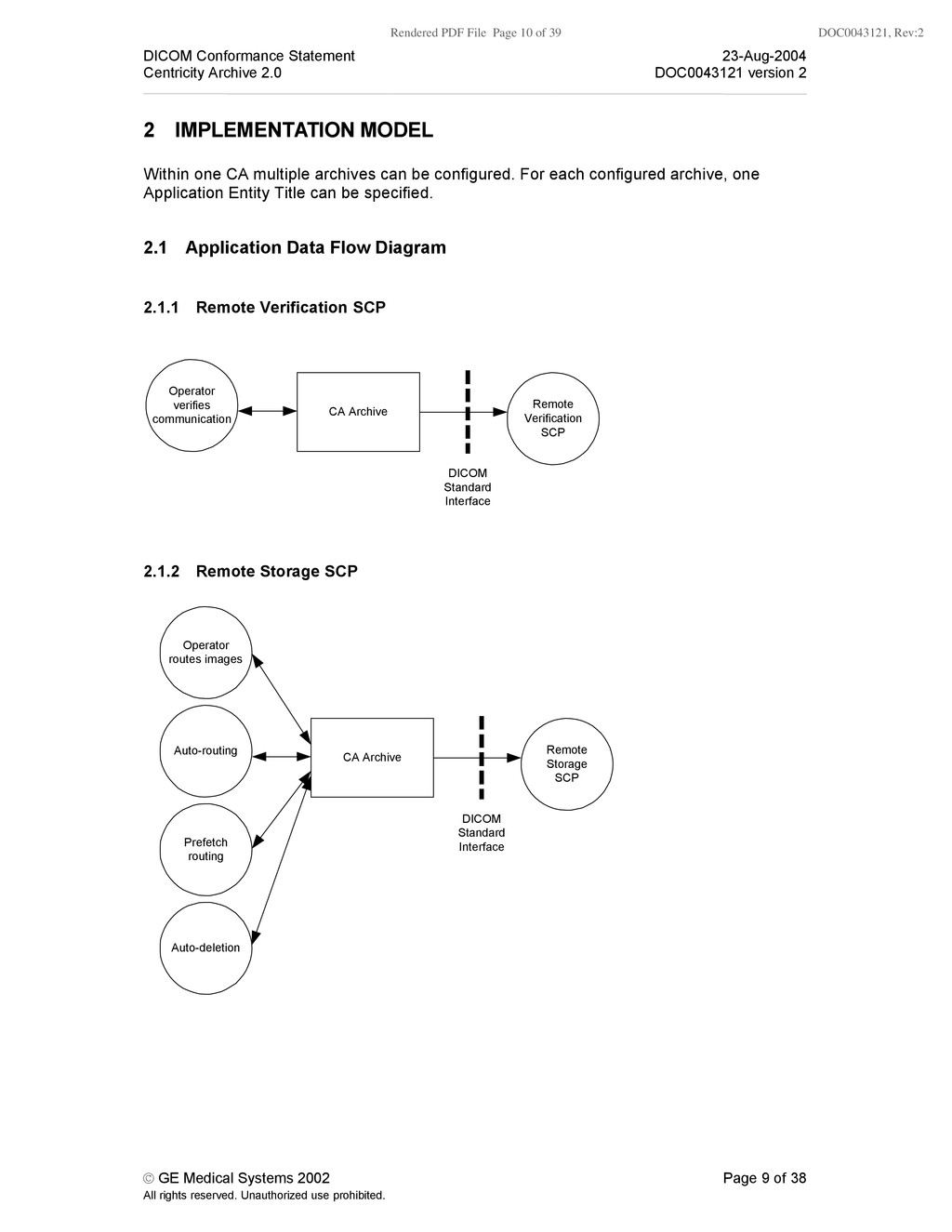
    Conformance Statement 23-Aug-2004 Centricity Archive 2.0 DOC0043121 version 2 © GE Medical Systems 2002 Page 9 of 38 All rights reserved. Unauthorized use prohibited. 2 IMPLEMENTATION MODEL Within one CA multiple archives can be configured. For each configured archive, one Application Entity Title can be specified. 2.1 Application Data Flow Diagram 2.1.1 Remote Verification SCP CA Archive Operator verifies communication Remote Verification SCP DICOM Standard Interface 2.1.2 Remote Storage SCP CA Archive Auto-routing Remote Storage SCP DICOM Standard Interface Prefetch routing Operator routes images Auto-deletion
  11. Rendered PDF File Page 11 of 39 DOC0043121, Rev:2 DICOM

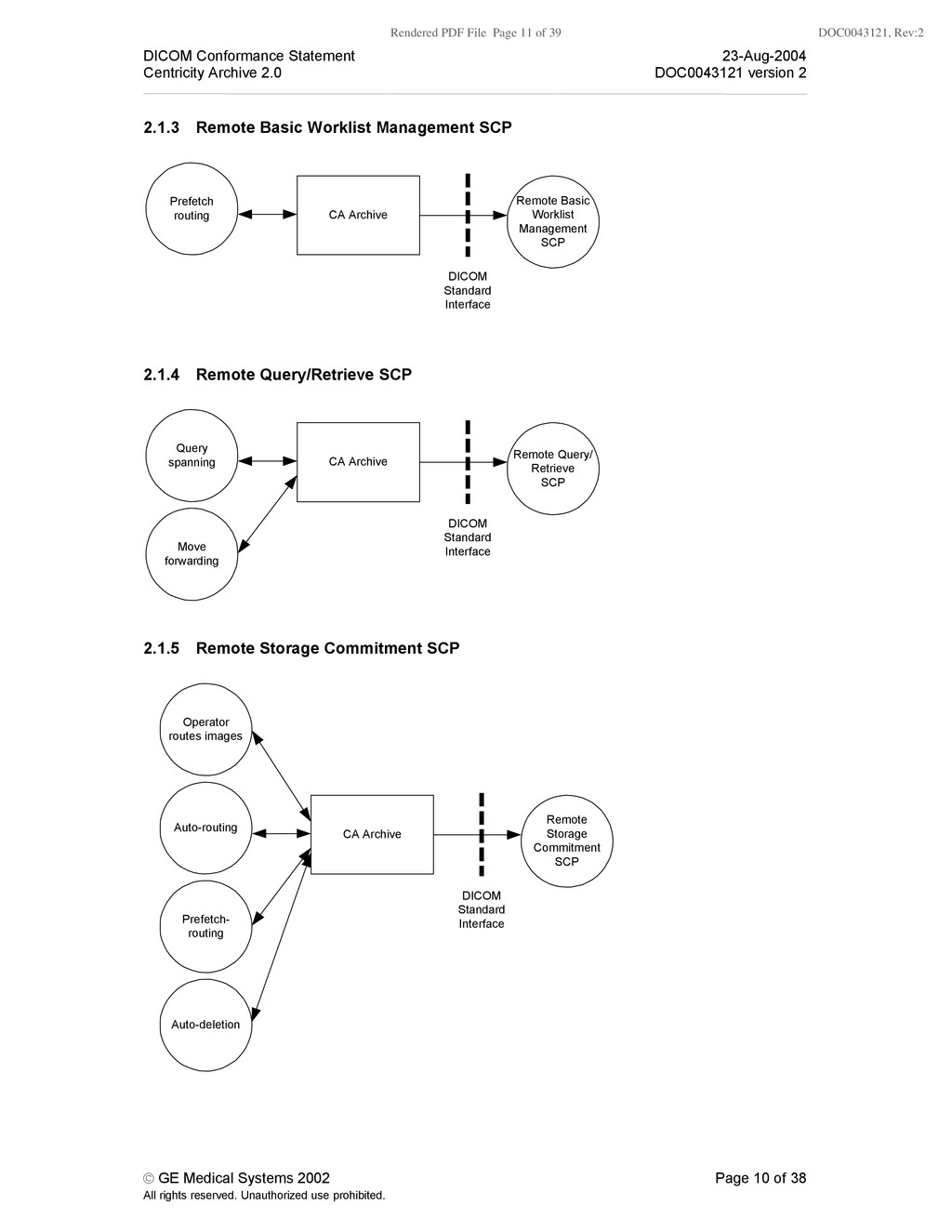
    Conformance Statement 23-Aug-2004 Centricity Archive 2.0 DOC0043121 version 2 © GE Medical Systems 2002 Page 10 of 38 All rights reserved. Unauthorized use prohibited. 2.1.3 Remote Basic Worklist Management SCP CA Archive Prefetch routing Remote Basic Worklist Management SCP DICOM Standard Interface 2.1.4 Remote Query/Retrieve SCP CA Archive Query spanning Remote Query/ Retrieve SCP DICOM Standard Interface Move forwarding 2.1.5 Remote Storage Commitment SCP CA Archive Auto-routing Remote Storage Commitment SCP DICOM Standard Interface Prefetch- routing Operator routes images Auto-deletion
  12. Rendered PDF File Page 12 of 39 DOC0043121, Rev:2 DICOM

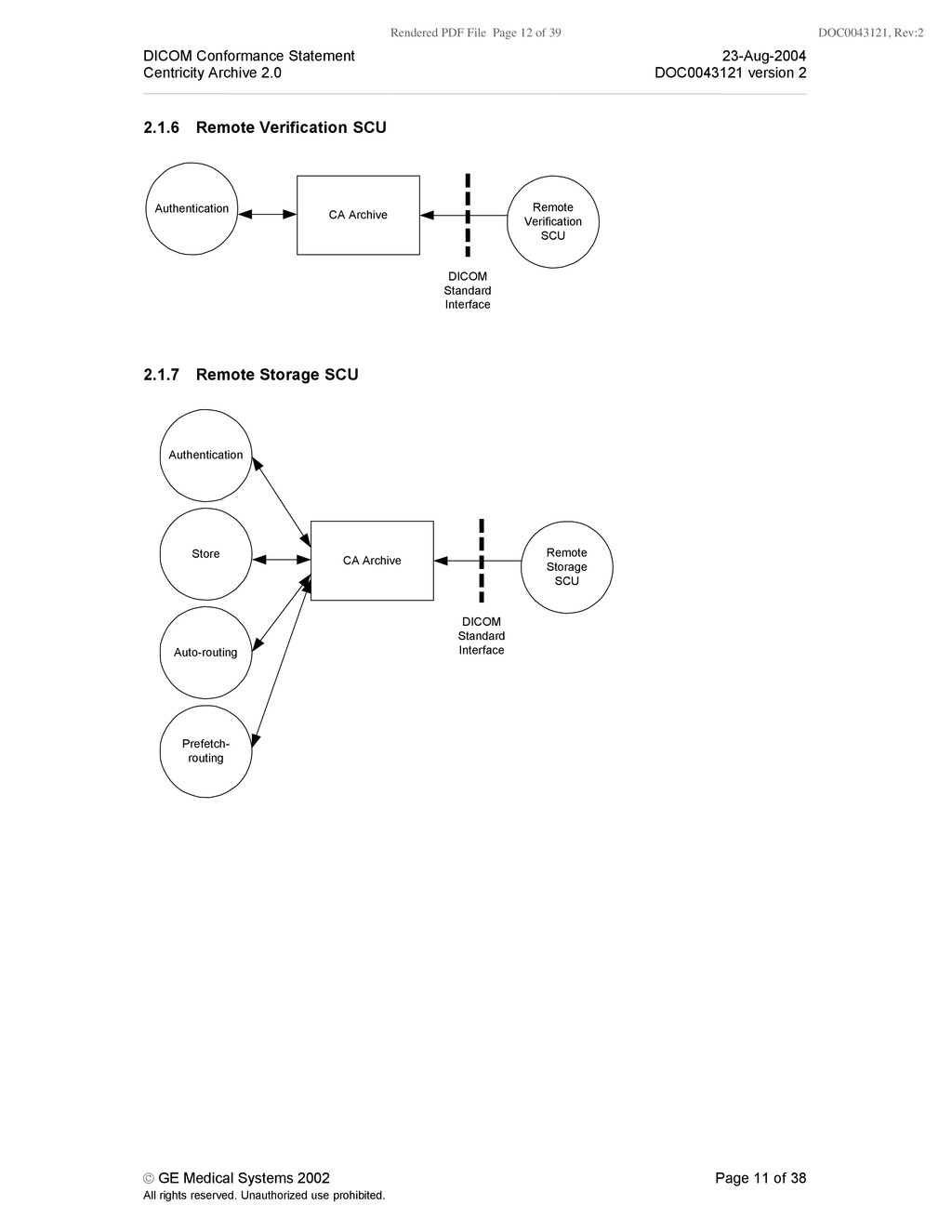
    Conformance Statement 23-Aug-2004 Centricity Archive 2.0 DOC0043121 version 2 © GE Medical Systems 2002 Page 11 of 38 All rights reserved. Unauthorized use prohibited. 2.1.6 Remote Verification SCU CA Archive Authentication Remote Verification SCU DICOM Standard Interface 2.1.7 Remote Storage SCU CA Archive Store Remote Storage SCU DICOM Standard Interface Auto-routing Authentication Prefetch- routing
  13. Rendered PDF File Page 13 of 39 DOC0043121, Rev:2 DICOM

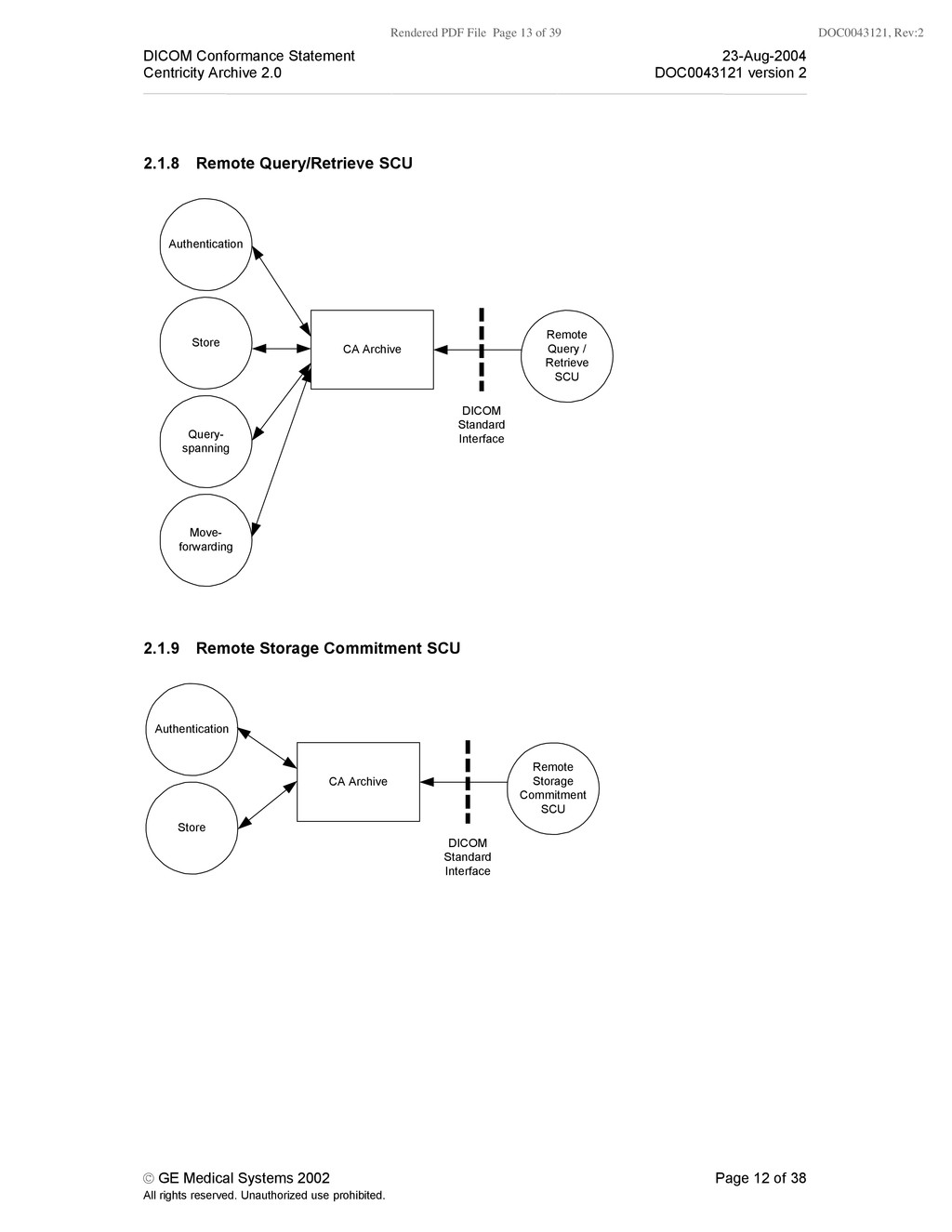
    Conformance Statement 23-Aug-2004 Centricity Archive 2.0 DOC0043121 version 2 © GE Medical Systems 2002 Page 12 of 38 All rights reserved. Unauthorized use prohibited. 2.1.8 Remote Query/Retrieve SCU CA Archive Store Remote Query / Retrieve SCU DICOM Standard Interface Query- spanning Authentication Move- forwarding 2.1.9 Remote Storage Commitment SCU CA Archive Store Remote Storage Commitment SCU DICOM Standard Interface Authentication
  14. Rendered PDF File Page 14 of 39 DOC0043121, Rev:2 DICOM

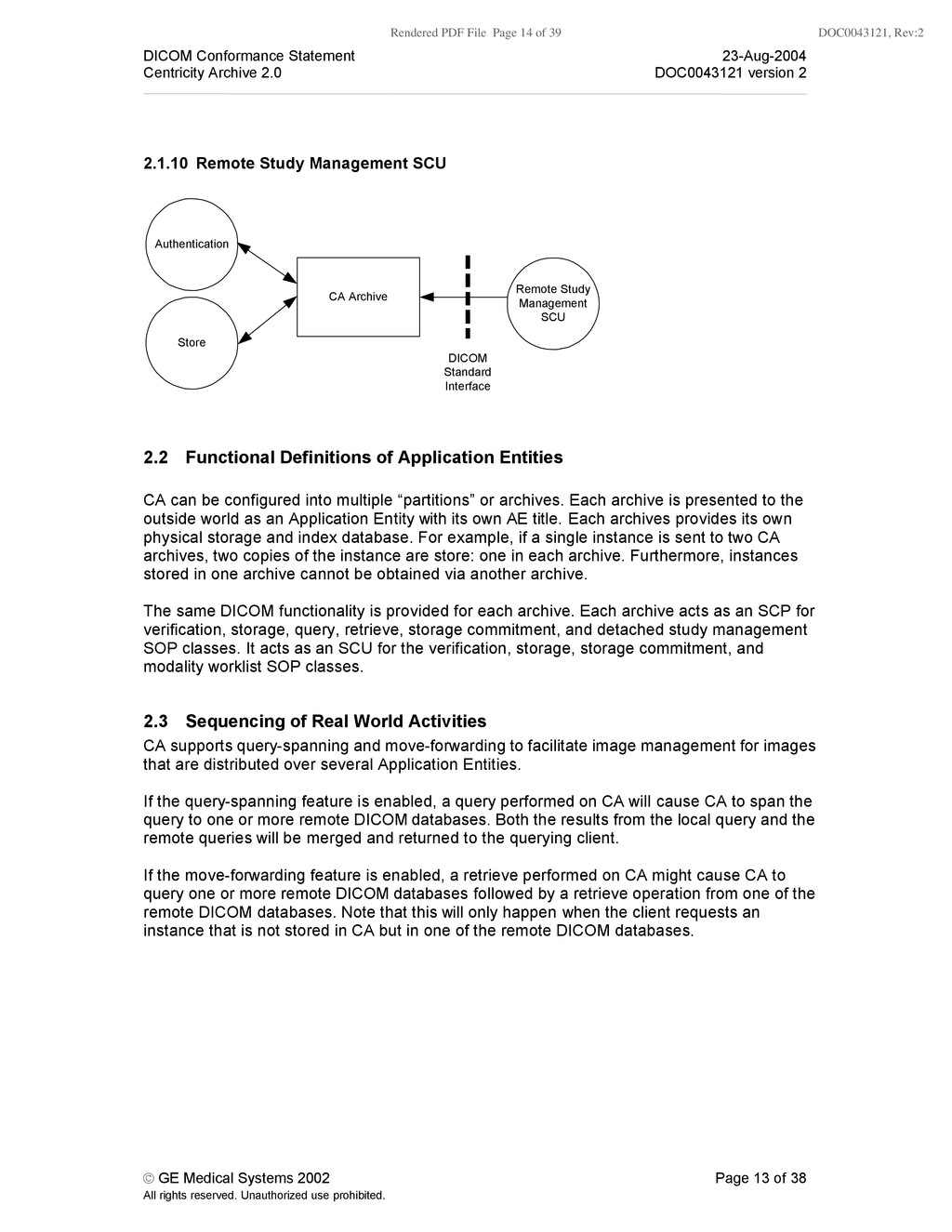
    Conformance Statement 23-Aug-2004 Centricity Archive 2.0 DOC0043121 version 2 © GE Medical Systems 2002 Page 13 of 38 All rights reserved. Unauthorized use prohibited. 2.1.10 Remote Study Management SCU CA Archive Store Remote Study Management SCU DICOM Standard Interface Authentication 2.2 Functional Definitions of Application Entities CA can be configured into multiple “partitions” or archives. Each archive is presented to the outside world as an Application Entity with its own AE title. Each archives provides its own physical storage and index database. For example, if a single instance is sent to two CA archives, two copies of the instance are store: one in each archive. Furthermore, instances stored in one archive cannot be obtained via another archive. The same DICOM functionality is provided for each archive. Each archive acts as an SCP for verification, storage, query, retrieve, storage commitment, and detached study management SOP classes. It acts as an SCU for the verification, storage, storage commitment, and modality worklist SOP classes. 2.3 Sequencing of Real World Activities CA supports query-spanning and move-forwarding to facilitate image management for images that are distributed over several Application Entities. If the query-spanning feature is enabled, a query performed on CA will cause CA to span the query to one or more remote DICOM databases. Both the results from the local query and the remote queries will be merged and returned to the querying client. If the move-forwarding feature is enabled, a retrieve performed on CA might cause CA to query one or more remote DICOM databases followed by a retrieve operation from one of the remote DICOM databases. Note that this will only happen when the client requests an instance that is not stored in CA but in one of the remote DICOM databases.
  15. Rendered PDF File Page 15 of 39 DOC0043121, Rev:2 DICOM

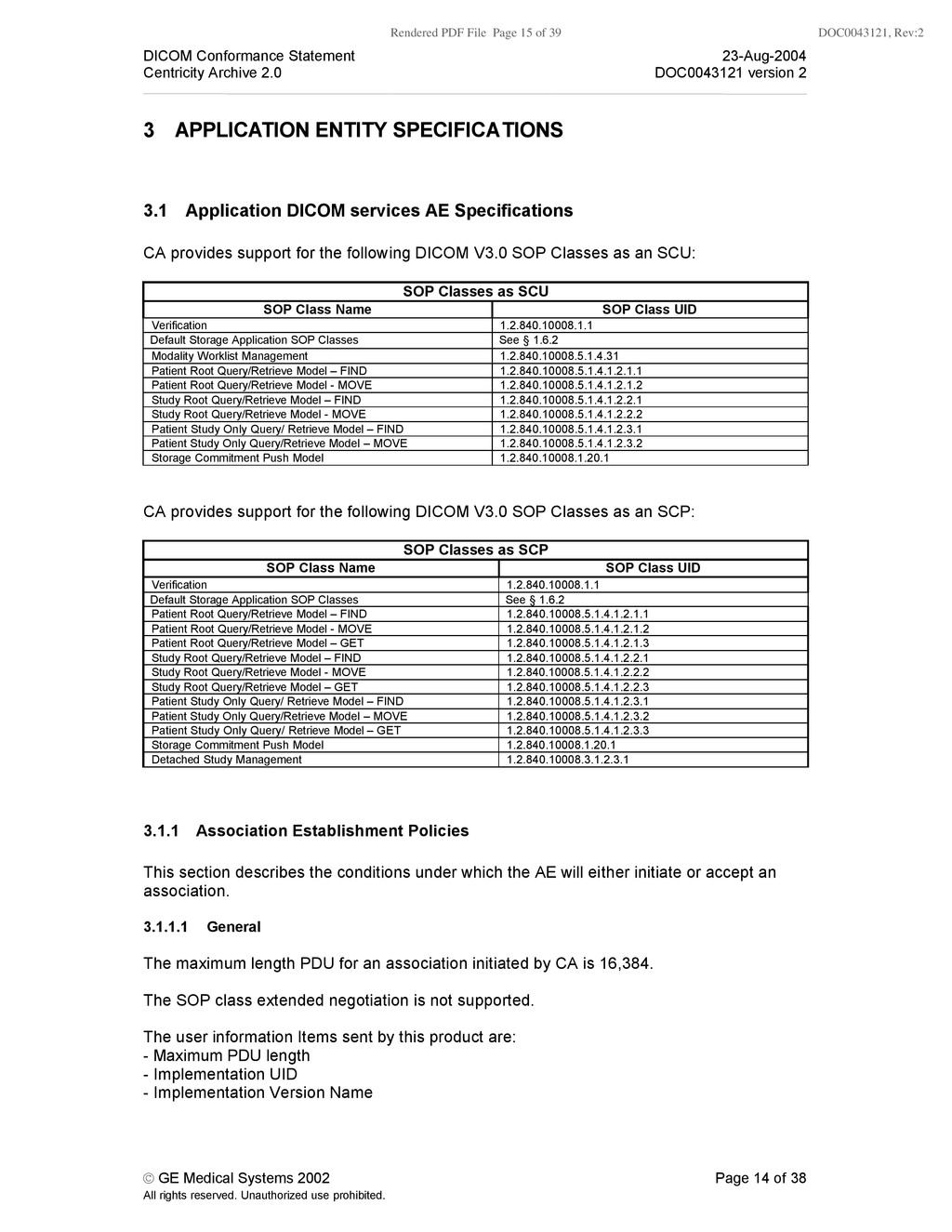
    Conformance Statement 23-Aug-2004 Centricity Archive 2.0 DOC0043121 version 2 © GE Medical Systems 2002 Page 14 of 38 All rights reserved. Unauthorized use prohibited. 3 APPLICATION ENTITY SPECIFICATIONS 3.1 Application DICOM services AE Specifications CA provides support for the following DICOM V3.0 SOP Classes as an SCU: SOP Classes as SCU SOP Class Name SOP Class UID Verification 1.2.840.10008.1.1 Default Storage Application SOP Classes See § 1.6.2 Modality Worklist Management 1.2.840.10008.5.1.4.31 Patient Root Query/Retrieve Model – FIND 1.2.840.10008.5.1.4.1.2.1.1 Patient Root Query/Retrieve Model - MOVE 1.2.840.10008.5.1.4.1.2.1.2 Study Root Query/Retrieve Model – FIND 1.2.840.10008.5.1.4.1.2.2.1 Study Root Query/Retrieve Model - MOVE 1.2.840.10008.5.1.4.1.2.2.2 Patient Study Only Query/ Retrieve Model – FIND 1.2.840.10008.5.1.4.1.2.3.1 Patient Study Only Query/Retrieve Model – MOVE 1.2.840.10008.5.1.4.1.2.3.2 Storage Commitment Push Model 1.2.840.10008.1.20.1 CA provides support for the following DICOM V3.0 SOP Classes as an SCP: SOP Classes as SCP SOP Class Name SOP Class UID Verification 1.2.840.10008.1.1 Default Storage Application SOP Classes See § 1.6.2 Patient Root Query/Retrieve Model – FIND 1.2.840.10008.5.1.4.1.2.1.1 Patient Root Query/Retrieve Model - MOVE 1.2.840.10008.5.1.4.1.2.1.2 Patient Root Query/Retrieve Model – GET 1.2.840.10008.5.1.4.1.2.1.3 Study Root Query/Retrieve Model – FIND 1.2.840.10008.5.1.4.1.2.2.1 Study Root Query/Retrieve Model - MOVE 1.2.840.10008.5.1.4.1.2.2.2 Study Root Query/Retrieve Model – GET 1.2.840.10008.5.1.4.1.2.2.3 Patient Study Only Query/ Retrieve Model – FIND 1.2.840.10008.5.1.4.1.2.3.1 Patient Study Only Query/Retrieve Model – MOVE 1.2.840.10008.5.1.4.1.2.3.2 Patient Study Only Query/ Retrieve Model – GET 1.2.840.10008.5.1.4.1.2.3.3 Storage Commitment Push Model 1.2.840.10008.1.20.1 Detached Study Management 1.2.840.10008.3.1.2.3.1 3.1.1 Association Establishment Policies This section describes the conditions under which the AE will either initiate or accept an association. 3.1.1.1 General The maximum length PDU for an association initiated by CA is 16,384. The SOP class extended negotiation is not supported. The user information Items sent by this product are: - Maximum PDU length - Implementation UID - Implementation Version Name
  16. Rendered PDF File Page 16 of 39 DOC0043121, Rev:2 DICOM

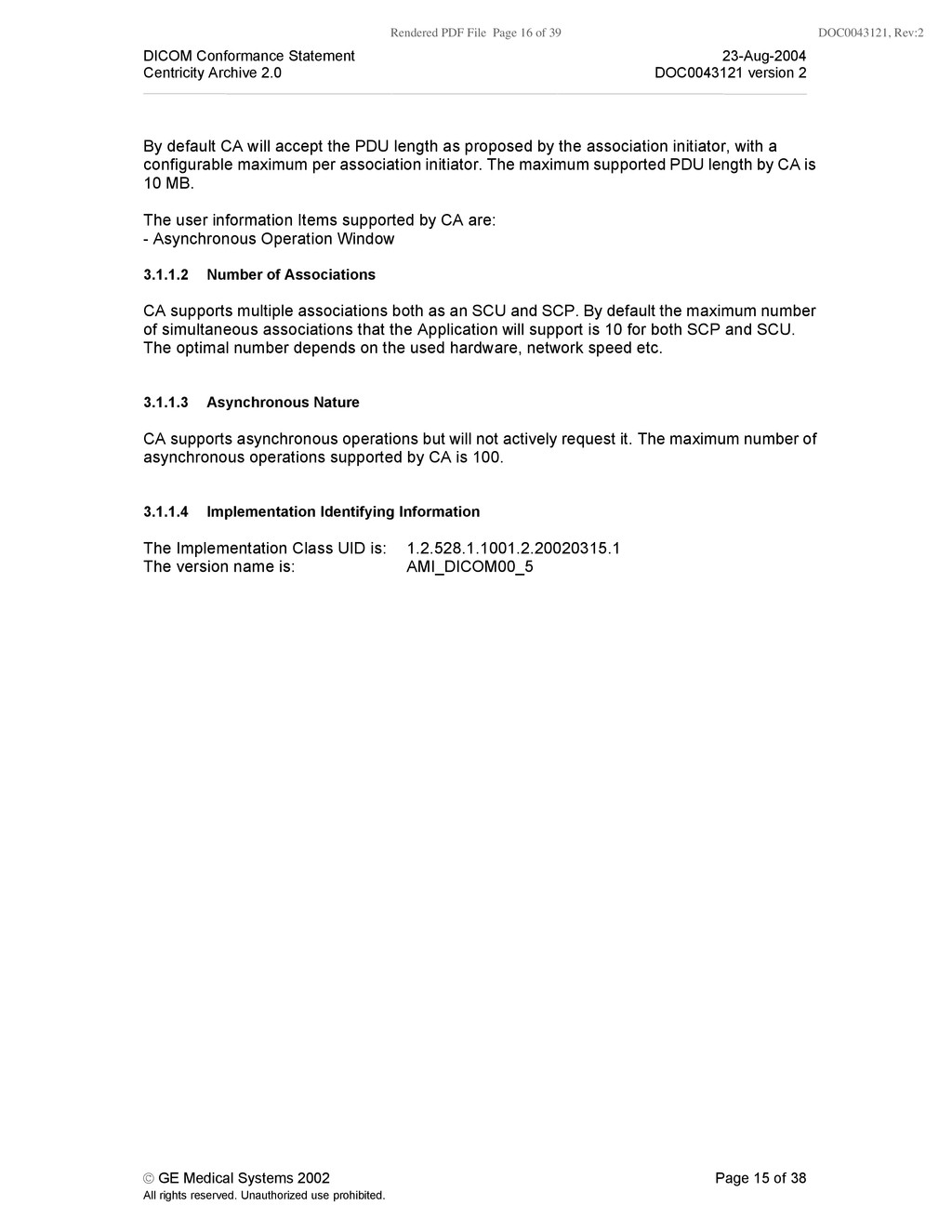
    Conformance Statement 23-Aug-2004 Centricity Archive 2.0 DOC0043121 version 2 © GE Medical Systems 2002 Page 15 of 38 All rights reserved. Unauthorized use prohibited. By default CA will accept the PDU length as proposed by the association initiator, with a configurable maximum per association initiator. The maximum supported PDU length by CA is 10 MB. The user information Items supported by CA are: - Asynchronous Operation Window 3.1.1.2 Number of Associations CA supports multiple associations both as an SCU and SCP. By default the maximum number of simultaneous associations that the Application will support is 10 for both SCP and SCU. The optimal number depends on the used hardware, network speed etc. 3.1.1.3 Asynchronous Nature CA supports asynchronous operations but will not actively request it. The maximum number of asynchronous operations supported by CA is 100. 3.1.1.4 Implementation Identifying Information The Implementation Class UID is: 1.2.528.1.1001.2.20020315.1 The version name is: AMI_DICOM00_5
  17. Rendered PDF File Page 17 of 39 DOC0043121, Rev:2 DICOM

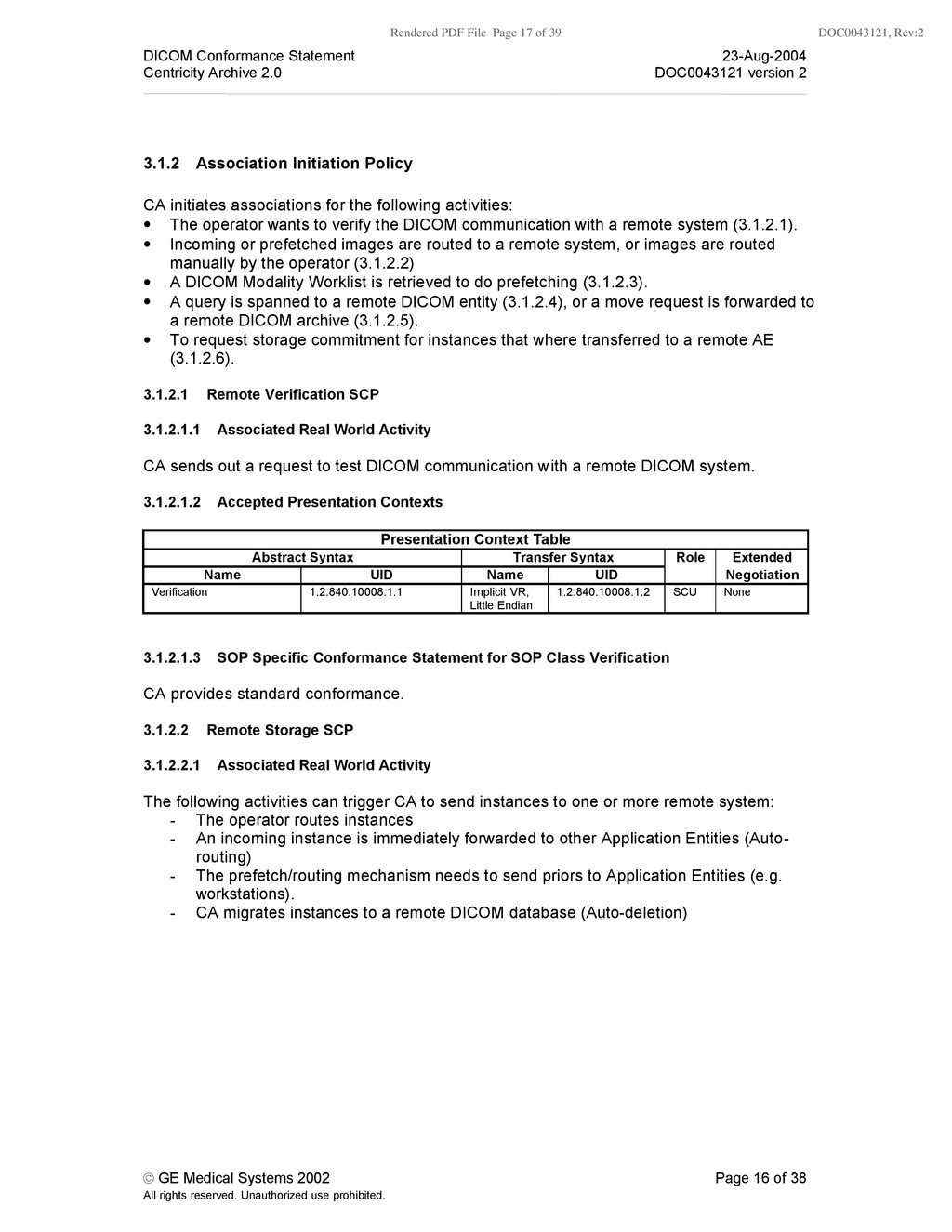
    Conformance Statement 23-Aug-2004 Centricity Archive 2.0 DOC0043121 version 2 © GE Medical Systems 2002 Page 16 of 38 All rights reserved. Unauthorized use prohibited. 3.1.2 Association Initiation Policy CA initiates associations for the following activities: • The operator wants to verify the DICOM communication with a remote system (3.1.2.1). • Incoming or prefetched images are routed to a remote system, or images are routed manually by the operator (3.1.2.2) • A DICOM Modality Worklist is retrieved to do prefetching (3.1.2.3). • A query is spanned to a remote DICOM entity (3.1.2.4), or a move request is forwarded to a remote DICOM archive (3.1.2.5). • To request storage commitment for instances that where transferred to a remote AE (3.1.2.6). 3.1.2.1 Remote Verification SCP 3.1.2.1.1 Associated Real World Activity CA sends out a request to test DICOM communication with a remote DICOM system. 3.1.2.1.2 Accepted Presentation Contexts Presentation Context Table Abstract Syntax Transfer Syntax Role Extended Name UID Name UID Negotiation Verification 1.2.840.10008.1.1 Implicit VR, Little Endian 1.2.840.10008.1.2 SCU None 3.1.2.1.3 SOP Specific Conformance Statement for SOP Class Verification CA provides standard conformance. 3.1.2.2 Remote Storage SCP 3.1.2.2.1 Associated Real World Activity The following activities can trigger CA to send instances to one or more remote system: - The operator routes instances - An incoming instance is immediately forwarded to other Application Entities (Auto- routing) - The prefetch/routing mechanism needs to send priors to Application Entities (e.g. workstations). - CA migrates instances to a remote DICOM database (Auto-deletion)
  18. Rendered PDF File Page 18 of 39 DOC0043121, Rev:2 DICOM

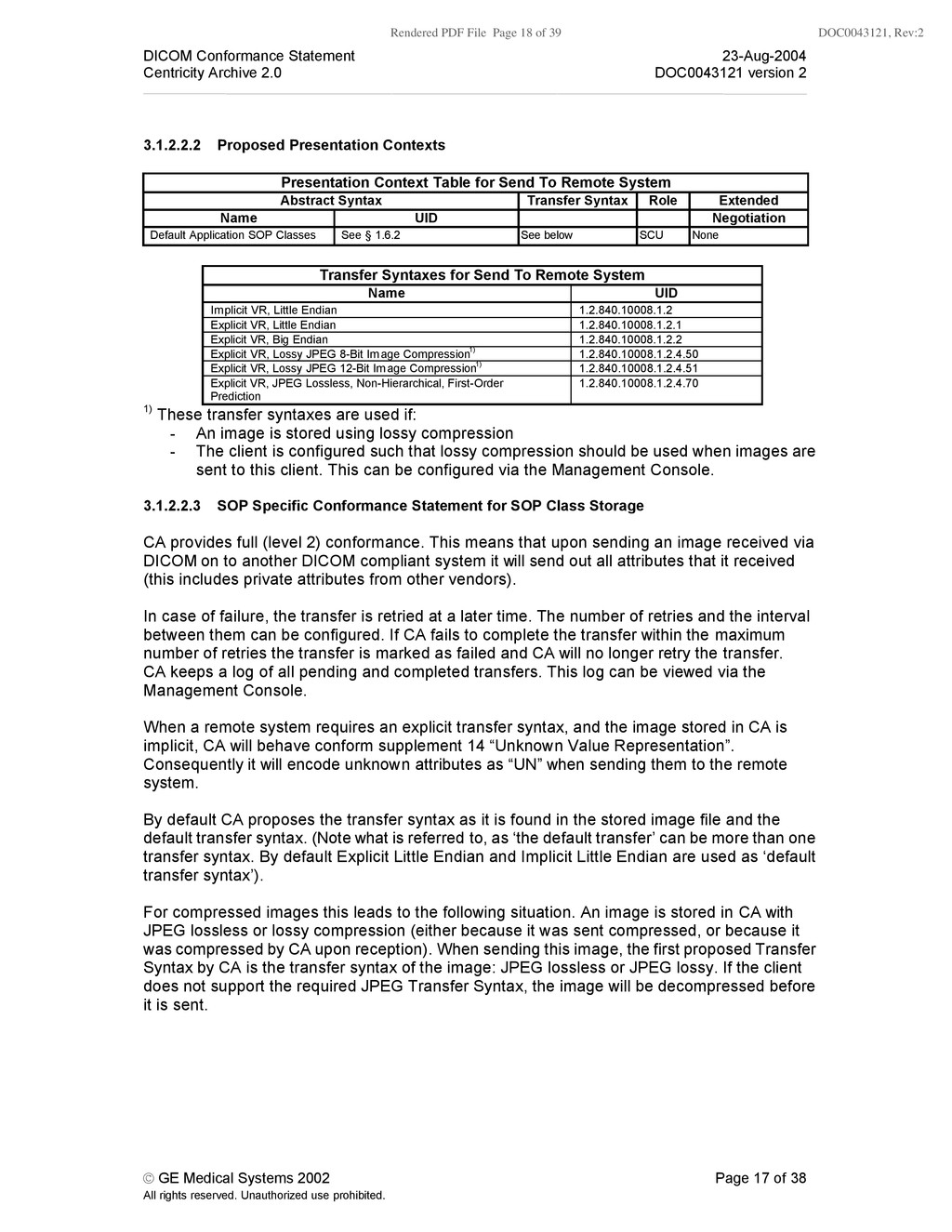
    Conformance Statement 23-Aug-2004 Centricity Archive 2.0 DOC0043121 version 2 © GE Medical Systems 2002 Page 17 of 38 All rights reserved. Unauthorized use prohibited. 3.1.2.2.2 Proposed Presentation Contexts Presentation Context Table for Send To Remote System Abstract Syntax Transfer Syntax Role Extended Name UID Negotiation Default Application SOP Classes See § 1.6.2 See below SCU None Transfer Syntaxes for Send To Remote System Name UID Implicit VR, Little Endian 1.2.840.10008.1.2 Explicit VR, Little Endian 1.2.840.10008.1.2.1 Explicit VR, Big Endian 1.2.840.10008.1.2.2 Explicit VR, Lossy JPEG 8-Bit Image Compression1) 1.2.840.10008.1.2.4.50 Explicit VR, Lossy JPEG 12-Bit Image Compression1) 1.2.840.10008.1.2.4.51 Explicit VR, JPEG Lossless, Non-Hierarchical, First-Order Prediction 1.2.840.10008.1.2.4.70 1) These transfer syntaxes are used if: - An image is stored using lossy compression - The client is configured such that lossy compression should be used when images are sent to this client. This can be configured via the Management Console. 3.1.2.2.3 SOP Specific Conformance Statement for SOP Class Storage CA provides full (level 2) conformance. This means that upon sending an image received via DICOM on to another DICOM compliant system it will send out all attributes that it received (this includes private attributes from other vendors). In case of failure, the transfer is retried at a later time. The number of retries and the interval between them can be configured. If CA fails to complete the transfer within the maximum number of retries the transfer is marked as failed and CA will no longer retry the transfer. CA keeps a log of all pending and completed transfers. This log can be viewed via the Management Console. When a remote system requires an explicit transfer syntax, and the image stored in CA is implicit, CA will behave conform supplement 14 “Unknown Value Representation”. Consequently it will encode unknown attributes as “UN” when sending them to the remote system. By default CA proposes the transfer syntax as it is found in the stored image file and the default transfer syntax. (Note what is referred to, as ‘the default transfer’ can be more than one transfer syntax. By default Explicit Little Endian and Implicit Little Endian are used as ‘default transfer syntax’). For compressed images this leads to the following situation. An image is stored in CA with JPEG lossless or lossy compression (either because it was sent compressed, or because it was compressed by CA upon reception). When sending this image, the first proposed Transfer Syntax by CA is the transfer syntax of the image: JPEG lossless or JPEG lossy. If the client does not support the required JPEG Transfer Syntax, the image will be decompressed before it is sent.
  19. Rendered PDF File Page 19 of 39 DOC0043121, Rev:2 DICOM

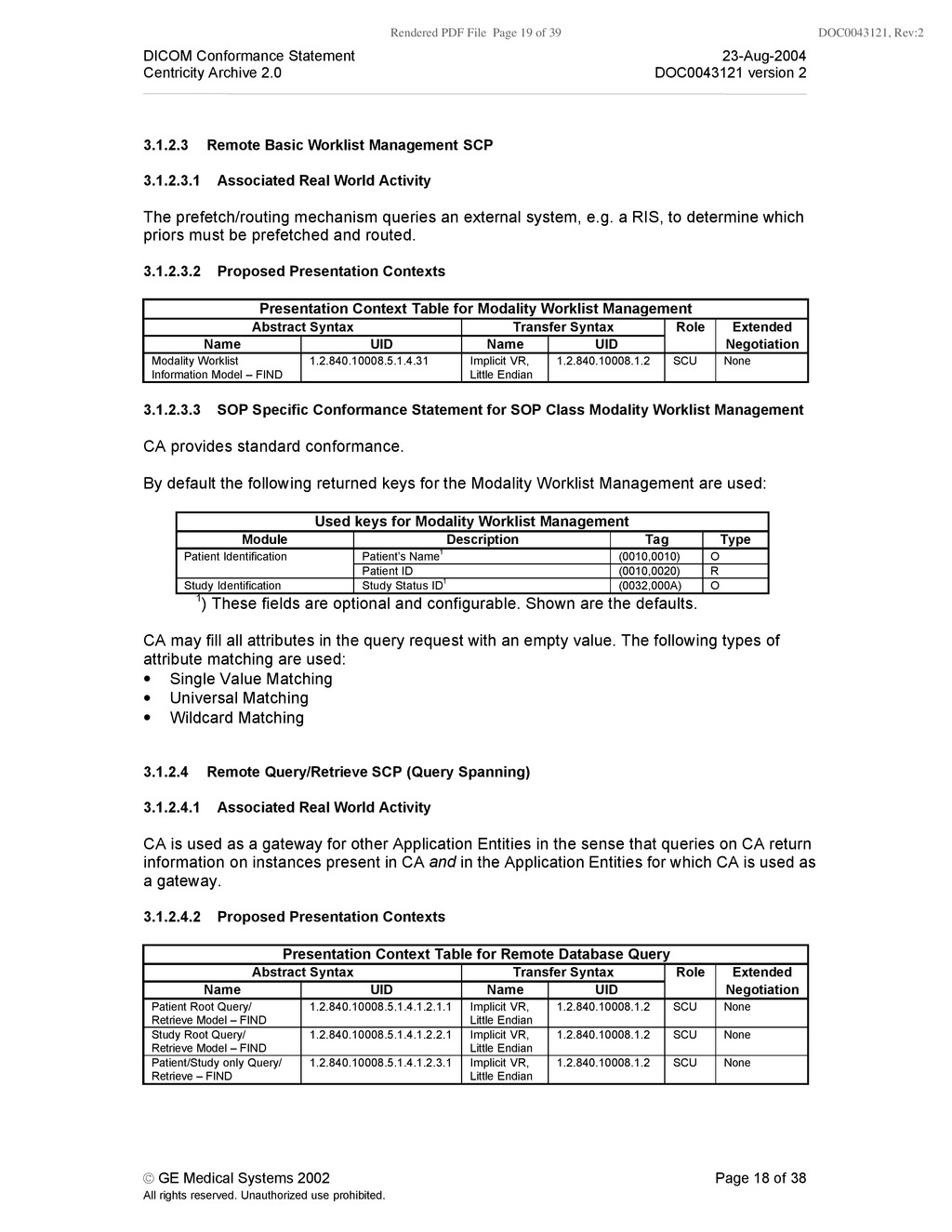
    Conformance Statement 23-Aug-2004 Centricity Archive 2.0 DOC0043121 version 2 © GE Medical Systems 2002 Page 18 of 38 All rights reserved. Unauthorized use prohibited. 3.1.2.3 Remote Basic Worklist Management SCP 3.1.2.3.1 Associated Real World Activity The prefetch/routing mechanism queries an external system, e.g. a RIS, to determine which priors must be prefetched and routed. 3.1.2.3.2 Proposed Presentation Contexts Presentation Context Table for Modality Worklist Management Abstract Syntax Transfer Syntax Role Extended Name UID Name UID Negotiation Modality Worklist Information Model – FIND 1.2.840.10008.5.1.4.31 Implicit VR, Little Endian 1.2.840.10008.1.2 SCU None 3.1.2.3.3 SOP Specific Conformance Statement for SOP Class Modality Worklist Management CA provides standard conformance. By default the following returned keys for the Modality Worklist Management are used: Used keys for Modality Worklist Management Module Description Tag Type Patient’s Name1 (0010,0010) O Patient Identification Patient ID (0010,0020) R Study Identification Study Status ID1 (0032,000A) O 1) These fields are optional and configurable. Shown are the defaults. CA may fill all attributes in the query request with an empty value. The following types of attribute matching are used: • Single Value Matching • Universal Matching • Wildcard Matching 3.1.2.4 Remote Query/Retrieve SCP (Query Spanning) 3.1.2.4.1 Associated Real World Activity CA is used as a gateway for other Application Entities in the sense that queries on CA return information on instances present in CA and in the Application Entities for which CA is used as a gateway. 3.1.2.4.2 Proposed Presentation Contexts Presentation Context Table for Remote Database Query Abstract Syntax Transfer Syntax Role Extended Name UID Name UID Negotiation Patient Root Query/ Retrieve Model – FIND 1.2.840.10008.5.1.4.1.2.1.1 Implicit VR, Little Endian 1.2.840.10008.1.2 SCU None Study Root Query/ Retrieve Model – FIND 1.2.840.10008.5.1.4.1.2.2.1 Implicit VR, Little Endian 1.2.840.10008.1.2 SCU None Patient/Study only Query/ Retrieve – FIND 1.2.840.10008.5.1.4.1.2.3.1 Implicit VR, Little Endian 1.2.840.10008.1.2 SCU None
  20. Rendered PDF File Page 20 of 39 DOC0043121, Rev:2 DICOM

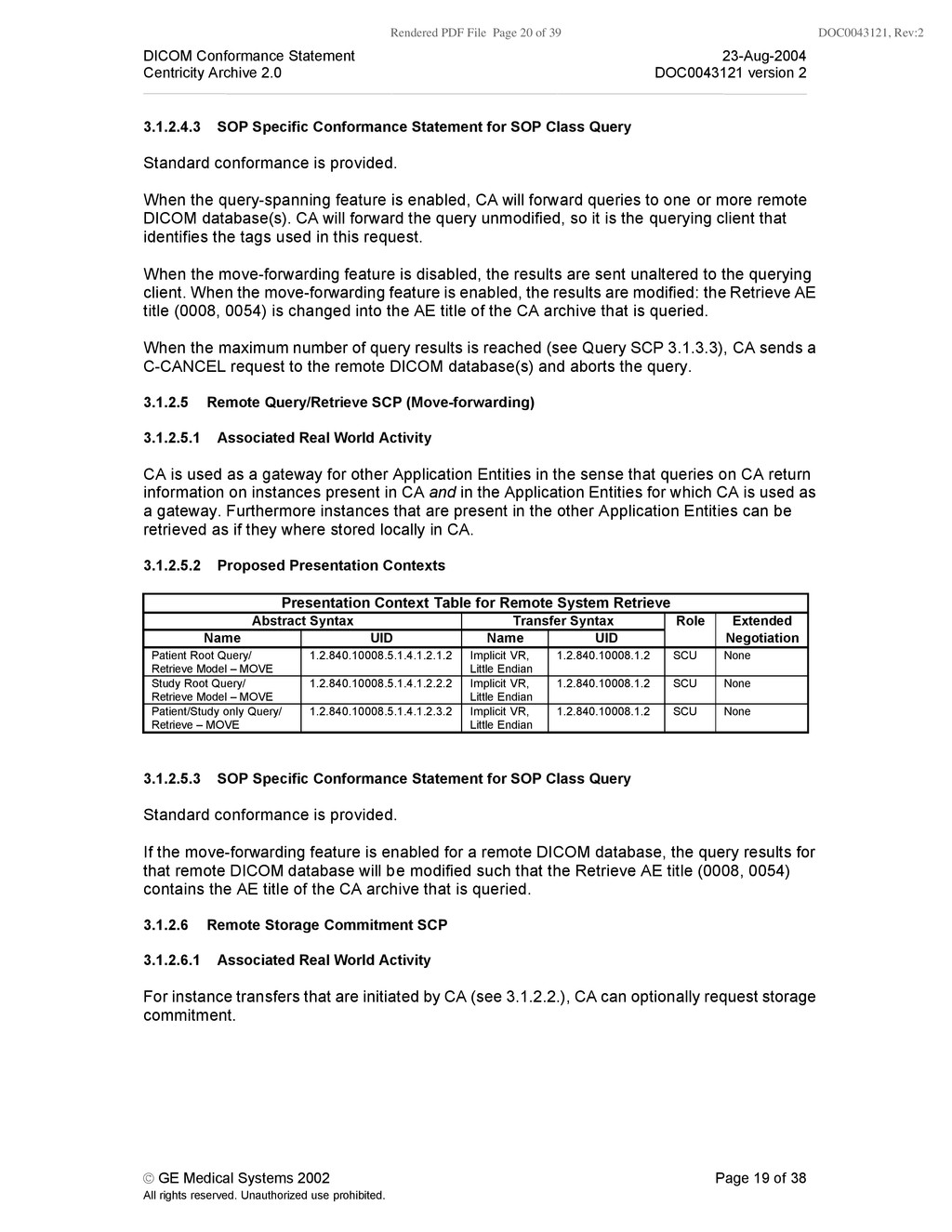
    Conformance Statement 23-Aug-2004 Centricity Archive 2.0 DOC0043121 version 2 © GE Medical Systems 2002 Page 19 of 38 All rights reserved. Unauthorized use prohibited. 3.1.2.4.3 SOP Specific Conformance Statement for SOP Class Query Standard conformance is provided. When the query-spanning feature is enabled, CA will forward queries to one or more remote DICOM database(s). CA will forward the query unmodified, so it is the querying client that identifies the tags used in this request. When the move-forwarding feature is disabled, the results are sent unaltered to the querying client. When the move-forwarding feature is enabled, the results are modified: the Retrieve AE title (0008, 0054) is changed into the AE title of the CA archive that is queried. When the maximum number of query results is reached (see Query SCP 3.1.3.3), CA sends a C-CANCEL request to the remote DICOM database(s) and aborts the query. 3.1.2.5 Remote Query/Retrieve SCP (Move-forwarding) 3.1.2.5.1 Associated Real World Activity CA is used as a gateway for other Application Entities in the sense that queries on CA return information on instances present in CA and in the Application Entities for which CA is used as a gateway. Furthermore instances that are present in the other Application Entities can be retrieved as if they where stored locally in CA. 3.1.2.5.2 Proposed Presentation Contexts Presentation Context Table for Remote System Retrieve Abstract Syntax Transfer Syntax Role Extended Name UID Name UID Negotiation Patient Root Query/ Retrieve Model – MOVE 1.2.840.10008.5.1.4.1.2.1.2 Implicit VR, Little Endian 1.2.840.10008.1.2 SCU None Study Root Query/ Retrieve Model – MOVE 1.2.840.10008.5.1.4.1.2.2.2 Implicit VR, Little Endian 1.2.840.10008.1.2 SCU None Patient/Study only Query/ Retrieve – MOVE 1.2.840.10008.5.1.4.1.2.3.2 Implicit VR, Little Endian 1.2.840.10008.1.2 SCU None 3.1.2.5.3 SOP Specific Conformance Statement for SOP Class Query Standard conformance is provided. If the move-forwarding feature is enabled for a remote DICOM database, the query results for that remote DICOM database will be modified such that the Retrieve AE title (0008, 0054) contains the AE title of the CA archive that is queried. 3.1.2.6 Remote Storage Commitment SCP 3.1.2.6.1 Associated Real World Activity For instance transfers that are initiated by CA (see 3.1.2.2.), CA can optionally request storage commitment.
  21. Rendered PDF File Page 21 of 39 DOC0043121, Rev:2 DICOM

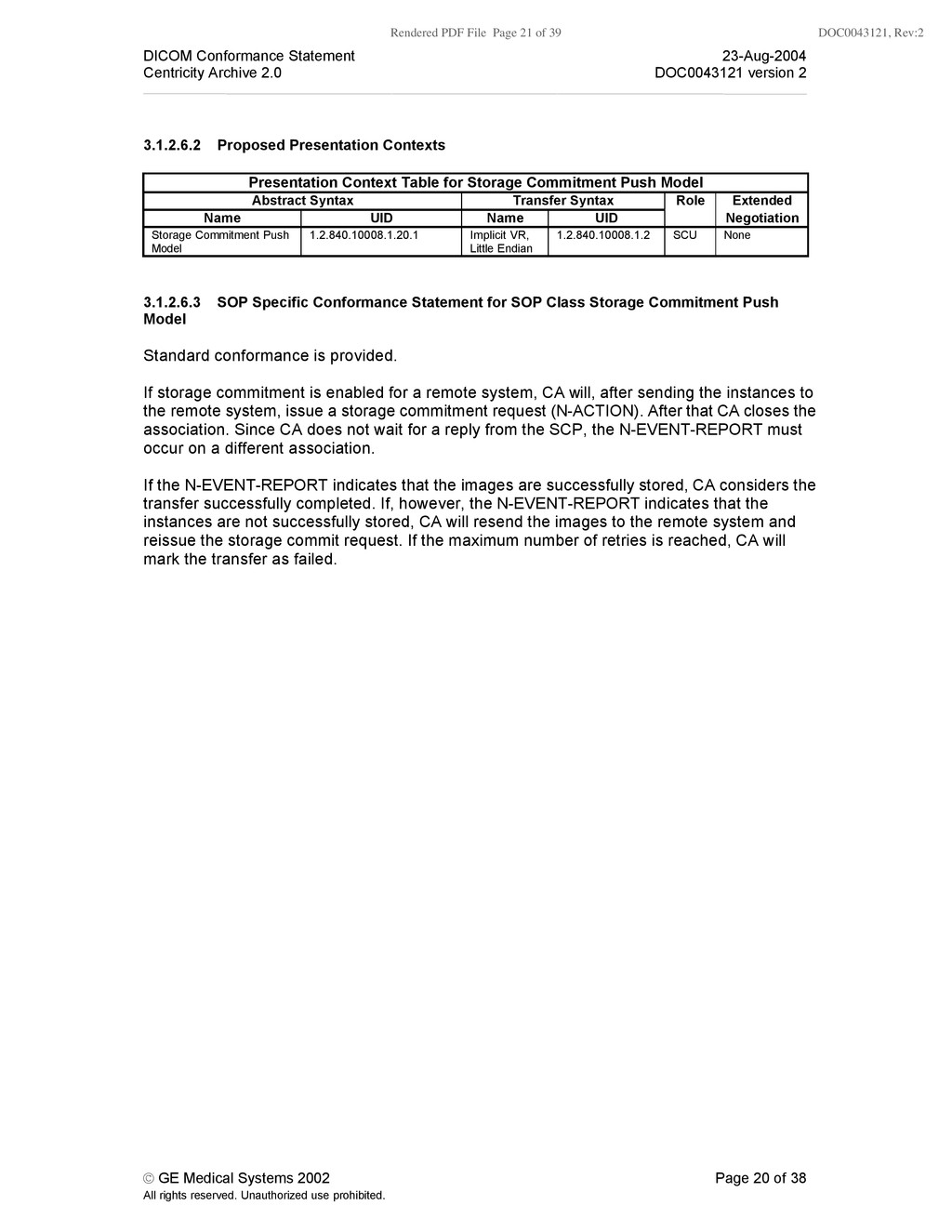
    Conformance Statement 23-Aug-2004 Centricity Archive 2.0 DOC0043121 version 2 © GE Medical Systems 2002 Page 20 of 38 All rights reserved. Unauthorized use prohibited. 3.1.2.6.2 Proposed Presentation Contexts Presentation Context Table for Storage Commitment Push Model Abstract Syntax Transfer Syntax Role Extended Name UID Name UID Negotiation Storage Commitment Push Model 1.2.840.10008.1.20.1 Implicit VR, Little Endian 1.2.840.10008.1.2 SCU None 3.1.2.6.3 SOP Specific Conformance Statement for SOP Class Storage Commitment Push Model Standard conformance is provided. If storage commitment is enabled for a remote system, CA will, after sending the instances to the remote system, issue a storage commitment request (N-ACTION). After that CA closes the association. Since CA does not wait for a reply from the SCP, the N-EVENT-REPORT must occur on a different association. If the N-EVENT-REPORT indicates that the images are successfully stored, CA considers the transfer successfully completed. If, however, the N-EVENT-REPORT indicates that the instances are not successfully stored, CA will resend the images to the remote system and reissue the storage commit request. If the maximum number of retries is reached, CA will mark the transfer as failed.
  22. Rendered PDF File Page 22 of 39 DOC0043121, Rev:2 DICOM

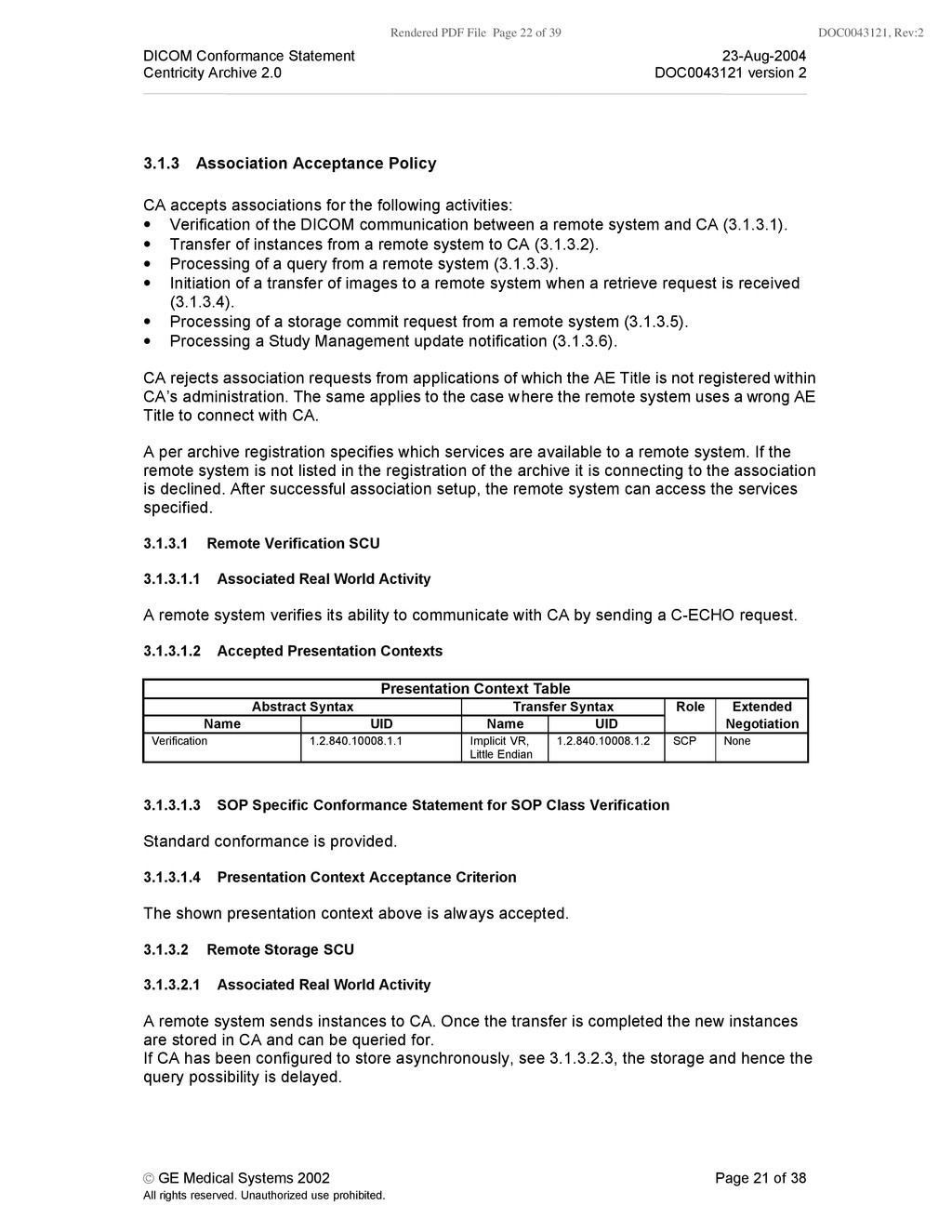
    Conformance Statement 23-Aug-2004 Centricity Archive 2.0 DOC0043121 version 2 © GE Medical Systems 2002 Page 21 of 38 All rights reserved. Unauthorized use prohibited. 3.1.3 Association Acceptance Policy CA accepts associations for the following activities: • Verification of the DICOM communication between a remote system and CA (3.1.3.1). • Transfer of instances from a remote system to CA (3.1.3.2). • Processing of a query from a remote system (3.1.3.3). • Initiation of a transfer of images to a remote system when a retrieve request is received (3.1.3.4). • Processing of a storage commit request from a remote system (3.1.3.5). • Processing a Study Management update notification (3.1.3.6). CA rejects association requests from applications of which the AE Title is not registered within CA’s administration. The same applies to the case where the remote system uses a wrong AE Title to connect with CA. A per archive registration specifies which services are available to a remote system. If the remote system is not listed in the registration of the archive it is connecting to the association is declined. After successful association setup, the remote system can access the services specified. 3.1.3.1 Remote Verification SCU 3.1.3.1.1 Associated Real World Activity A remote system verifies its ability to communicate with CA by sending a C-ECHO request. 3.1.3.1.2 Accepted Presentation Contexts Presentation Context Table Abstract Syntax Transfer Syntax Role Extended Name UID Name UID Negotiation Verification 1.2.840.10008.1.1 Implicit VR, Little Endian 1.2.840.10008.1.2 SCP None 3.1.3.1.3 SOP Specific Conformance Statement for SOP Class Verification Standard conformance is provided. 3.1.3.1.4 Presentation Context Acceptance Criterion The shown presentation context above is always accepted. 3.1.3.2 Remote Storage SCU 3.1.3.2.1 Associated Real World Activity A remote system sends instances to CA. Once the transfer is completed the new instances are stored in CA and can be queried for. If CA has been configured to store asynchronously, see 3.1.3.2.3, the storage and hence the query possibility is delayed.
  23. Rendered PDF File Page 23 of 39 DOC0043121, Rev:2 DICOM

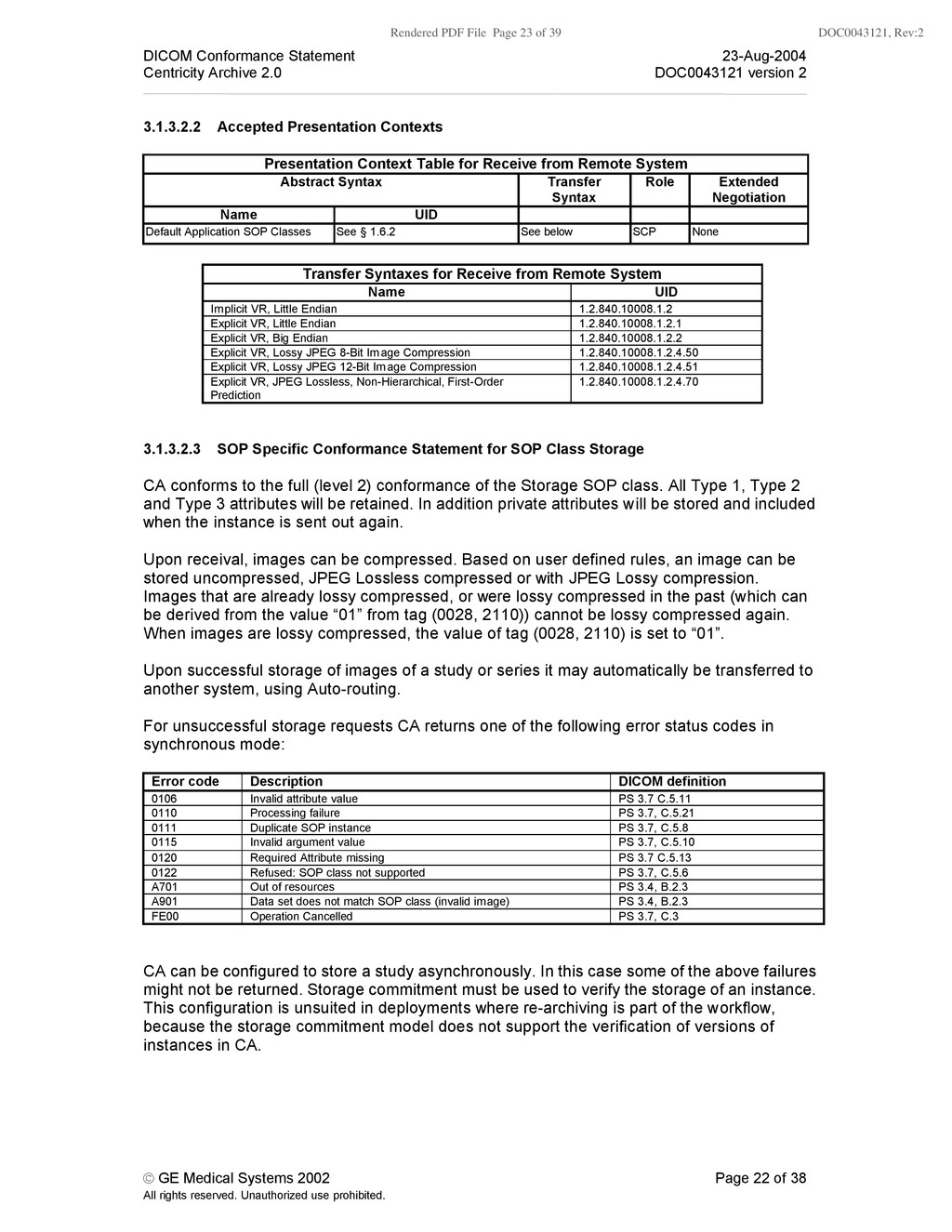
    Conformance Statement 23-Aug-2004 Centricity Archive 2.0 DOC0043121 version 2 © GE Medical Systems 2002 Page 22 of 38 All rights reserved. Unauthorized use prohibited. 3.1.3.2.2 Accepted Presentation Contexts Presentation Context Table for Receive from Remote System Abstract Syntax Transfer Syntax Role Extended Negotiation Name UID Default Application SOP Classes See § 1.6.2 See below SCP None Transfer Syntaxes for Receive from Remote System Name UID Implicit VR, Little Endian 1.2.840.10008.1.2 Explicit VR, Little Endian 1.2.840.10008.1.2.1 Explicit VR, Big Endian 1.2.840.10008.1.2.2 Explicit VR, Lossy JPEG 8-Bit Image Compression 1.2.840.10008.1.2.4.50 Explicit VR, Lossy JPEG 12-Bit Image Compression 1.2.840.10008.1.2.4.51 Explicit VR, JPEG Lossless, Non-Hierarchical, First-Order Prediction 1.2.840.10008.1.2.4.70 3.1.3.2.3 SOP Specific Conformance Statement for SOP Class Storage CA conforms to the full (level 2) conformance of the Storage SOP class. All Type 1, Type 2 and Type 3 attributes will be retained. In addition private attributes will be stored and included when the instance is sent out again. Upon receival, images can be compressed. Based on user defined rules, an image can be stored uncompressed, JPEG Lossless compressed or with JPEG Lossy compression. Images that are already lossy compressed, or were lossy compressed in the past (which can be derived from the value “01” from tag (0028, 2110)) cannot be lossy compressed again. When images are lossy compressed, the value of tag (0028, 2110) is set to “01”. Upon successful storage of images of a study or series it may automatically be transferred to another system, using Auto-routing. For unsuccessful storage requests CA returns one of the following error status codes in synchronous mode: Error code Description DICOM definition 0106 Invalid attribute value PS 3.7 C.5.11 0110 Processing failure PS 3.7, C.5.21 0111 Duplicate SOP instance PS 3.7, C.5.8 0115 Invalid argument value PS 3.7, C.5.10 0120 Required Attribute missing PS 3.7 C.5.13 0122 Refused: SOP class not supported PS 3.7, C.5.6 A701 Out of resources PS 3.4, B.2.3 A901 Data set does not match SOP class (invalid image) PS 3.4, B.2.3 FE00 Operation Cancelled PS 3.7, C.3 CA can be configured to store a study asynchronously. In this case some of the above failures might not be returned. Storage commitment must be used to verify the storage of an instance. This configuration is unsuited in deployments where re-archiving is part of the workflow, because the storage commitment model does not support the verification of versions of instances in CA.
  24. Rendered PDF File Page 24 of 39 DOC0043121, Rev:2 DICOM

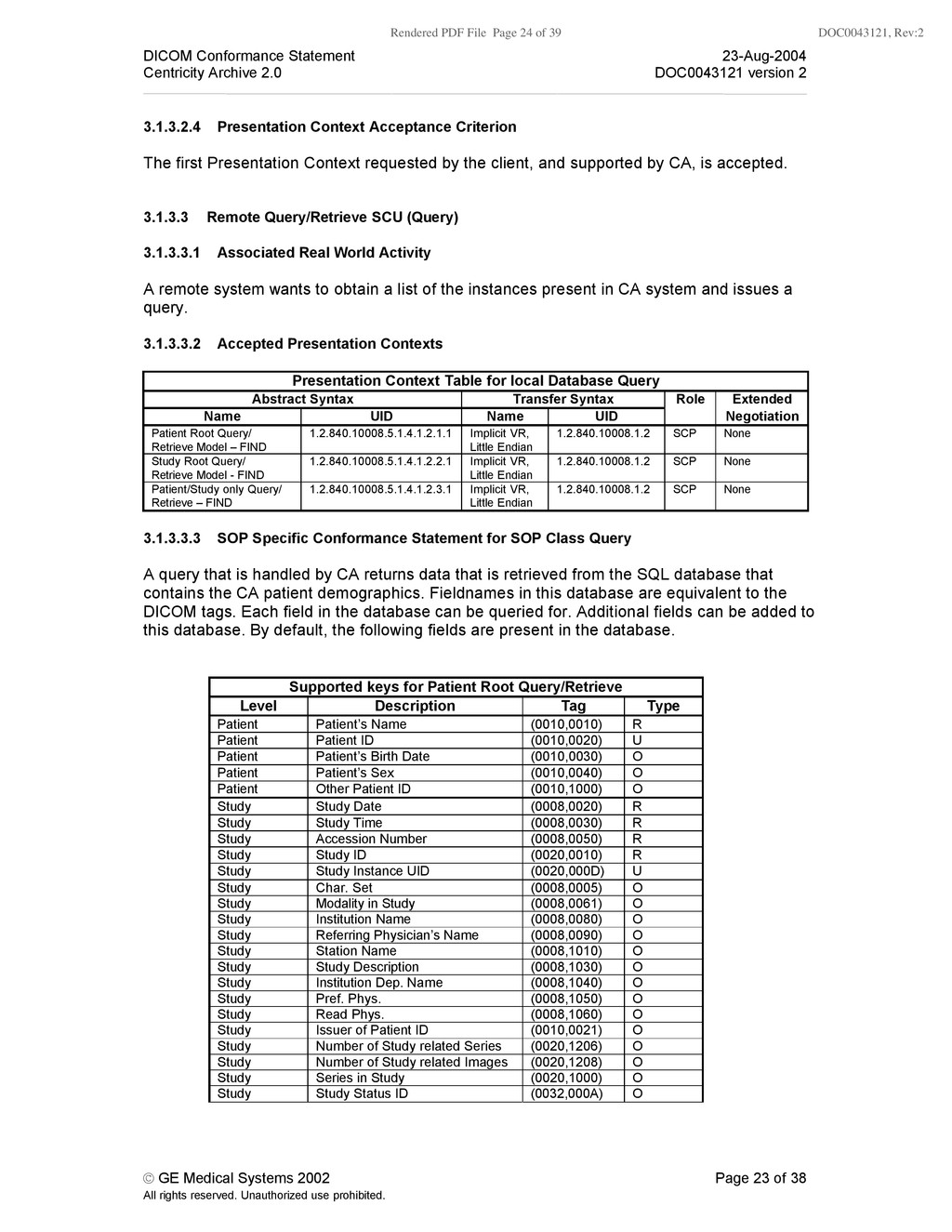
    Conformance Statement 23-Aug-2004 Centricity Archive 2.0 DOC0043121 version 2 © GE Medical Systems 2002 Page 23 of 38 All rights reserved. Unauthorized use prohibited. 3.1.3.2.4 Presentation Context Acceptance Criterion The first Presentation Context requested by the client, and supported by CA, is accepted. 3.1.3.3 Remote Query/Retrieve SCU (Query) 3.1.3.3.1 Associated Real World Activity A remote system wants to obtain a list of the instances present in CA system and issues a query. 3.1.3.3.2 Accepted Presentation Contexts Presentation Context Table for local Database Query Abstract Syntax Transfer Syntax Role Extended Name UID Name UID Negotiation Patient Root Query/ Retrieve Model – FIND 1.2.840.10008.5.1.4.1.2.1.1 Implicit VR, Little Endian 1.2.840.10008.1.2 SCP None Study Root Query/ Retrieve Model - FIND 1.2.840.10008.5.1.4.1.2.2.1 Implicit VR, Little Endian 1.2.840.10008.1.2 SCP None Patient/Study only Query/ Retrieve – FIND 1.2.840.10008.5.1.4.1.2.3.1 Implicit VR, Little Endian 1.2.840.10008.1.2 SCP None 3.1.3.3.3 SOP Specific Conformance Statement for SOP Class Query A query that is handled by CA returns data that is retrieved from the SQL database that contains the CA patient demographics. Fieldnames in this database are equivalent to the DICOM tags. Each field in the database can be queried for. Additional fields can be added to this database. By default, the following fields are present in the database. Supported keys for Patient Root Query/Retrieve Level Description Tag Type Patient Patient’s Name (0010,0010) R Patient Patient ID (0010,0020) U Patient Patient’s Birth Date (0010,0030) O Patient Patient’s Sex (0010,0040) O Patient Other Patient ID (0010,1000) O Study Study Date (0008,0020) R Study Study Time (0008,0030) R Study Accession Number (0008,0050) R Study Study ID (0020,0010) R Study Study Instance UID (0020,000D) U Study Char. Set (0008,0005) O Study Modality in Study (0008,0061) O Study Institution Name (0008,0080) O Study Referring Physician’s Name (0008,0090) O Study Station Name (0008,1010) O Study Study Description (0008,1030) O Study Institution Dep. Name (0008,1040) O Study Pref. Phys. (0008,1050) O Study Read Phys. (0008,1060) O Study Issuer of Patient ID (0010,0021) O Study Number of Study related Series (0020,1206) O Study Number of Study related Images (0020,1208) O Study Series in Study (0020,1000) O Study Study Status ID (0032,000A) O
  25. Rendered PDF File Page 25 of 39 DOC0043121, Rev:2 DICOM

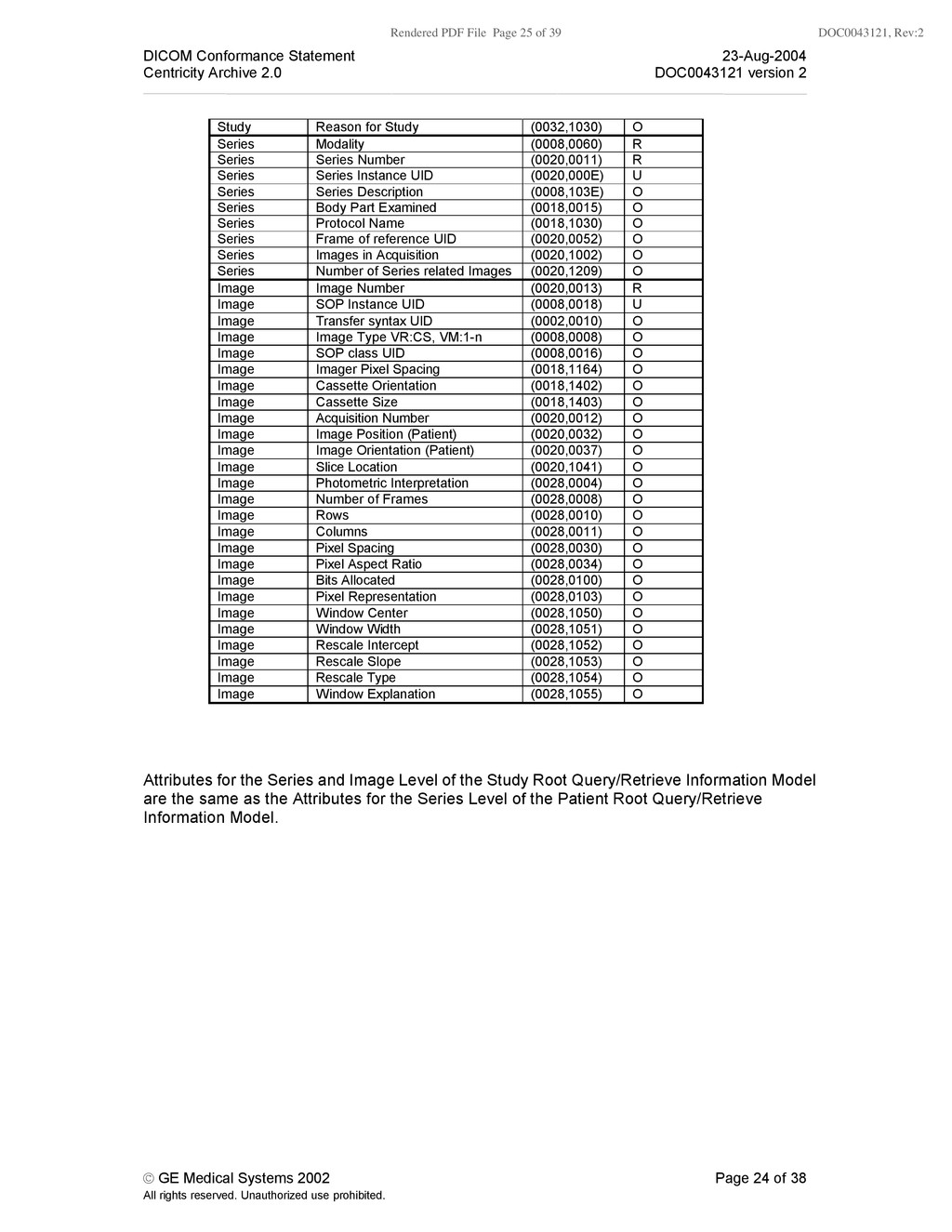
    Conformance Statement 23-Aug-2004 Centricity Archive 2.0 DOC0043121 version 2 © GE Medical Systems 2002 Page 24 of 38 All rights reserved. Unauthorized use prohibited. Study Reason for Study (0032,1030) O Series Modality (0008,0060) R Series Series Number (0020,0011) R Series Series Instance UID (0020,000E) U Series Series Description (0008,103E) O Series Body Part Examined (0018,0015) O Series Protocol Name (0018,1030) O Series Frame of reference UID (0020,0052) O Series Images in Acquisition (0020,1002) O Series Number of Series related Images (0020,1209) O Image Image Number (0020,0013) R Image SOP Instance UID (0008,0018) U Image Transfer syntax UID (0002,0010) O Image Image Type VR:CS, VM:1-n (0008,0008) O Image SOP class UID (0008,0016) O Image Imager Pixel Spacing (0018,1164) O Image Cassette Orientation (0018,1402) O Image Cassette Size (0018,1403) O Image Acquisition Number (0020,0012) O Image Image Position (Patient) (0020,0032) O Image Image Orientation (Patient) (0020,0037) O Image Slice Location (0020,1041) O Image Photometric Interpretation (0028,0004) O Image Number of Frames (0028,0008) O Image Rows (0028,0010) O Image Columns (0028,0011) O Image Pixel Spacing (0028,0030) O Image Pixel Aspect Ratio (0028,0034) O Image Bits Allocated (0028,0100) O Image Pixel Representation (0028,0103) O Image Window Center (0028,1050) O Image Window Width (0028,1051) O Image Rescale Intercept (0028,1052) O Image Rescale Slope (0028,1053) O Image Rescale Type (0028,1054) O Image Window Explanation (0028,1055) O Attributes for the Series and Image Level of the Study Root Query/Retrieve Information Model are the same as the Attributes for the Series Level of the Patient Root Query/Retrieve Information Model.
  26. Rendered PDF File Page 26 of 39 DOC0043121, Rev:2 DICOM

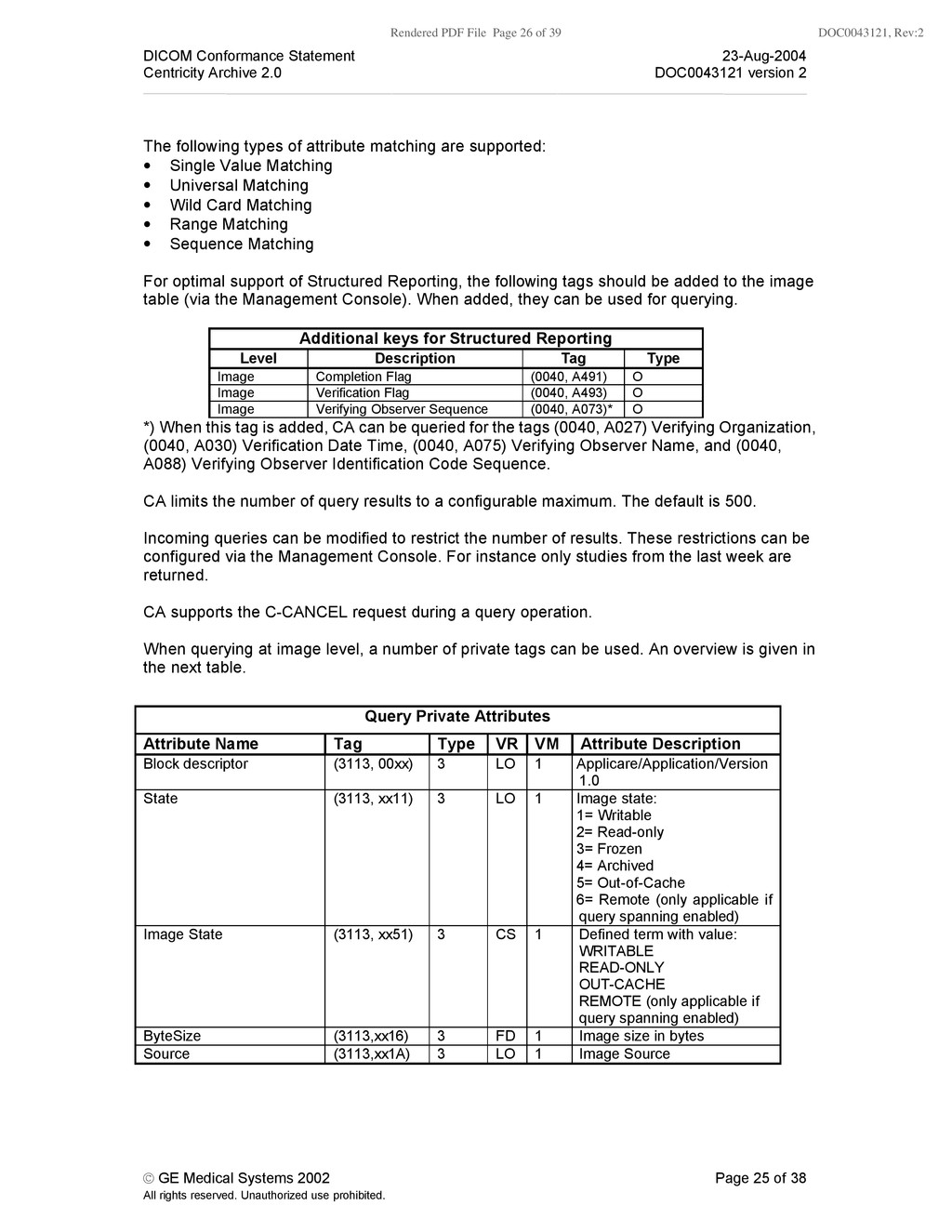
    Conformance Statement 23-Aug-2004 Centricity Archive 2.0 DOC0043121 version 2 © GE Medical Systems 2002 Page 25 of 38 All rights reserved. Unauthorized use prohibited. The following types of attribute matching are supported: • Single Value Matching • Universal Matching • Wild Card Matching • Range Matching • Sequence Matching For optimal support of Structured Reporting, the following tags should be added to the image table (via the Management Console). When added, they can be used for querying. Additional keys for Structured Reporting Level Description Tag Type Image Completion Flag (0040, A491) O Image Verification Flag (0040, A493) O Image Verifying Observer Sequence (0040, A073)* O *) When this tag is added, CA can be queried for the tags (0040, A027) Verifying Organization, (0040, A030) Verification Date Time, (0040, A075) Verifying Observer Name, and (0040, A088) Verifying Observer Identification Code Sequence. CA limits the number of query results to a configurable maximum. The default is 500. Incoming queries can be modified to restrict the number of results. These restrictions can be configured via the Management Console. For instance only studies from the last week are returned. CA supports the C-CANCEL request during a query operation. When querying at image level, a number of private tags can be used. An overview is given in the next table. Query Private Attributes Attribute Name Tag Type VR VM Attribute Description Block descriptor (3113, 00xx) 3 LO 1 Applicare/Application/Version 1.0 State (3113, xx11) 3 LO 1 Image state: 1= Writable 2= Read-only 3= Frozen 4= Archived 5= Out-of-Cache 6= Remote (only applicable if query spanning enabled) Image State (3113, xx51) 3 CS 1 Defined term with value: WRITABLE READ-ONLY OUT-CACHE REMOTE (only applicable if query spanning enabled) ByteSize (3113,xx16) 3 FD 1 Image size in bytes Source (3113,xx1A) 3 LO 1 Image Source
  27. Rendered PDF File Page 27 of 39 DOC0043121, Rev:2 DICOM

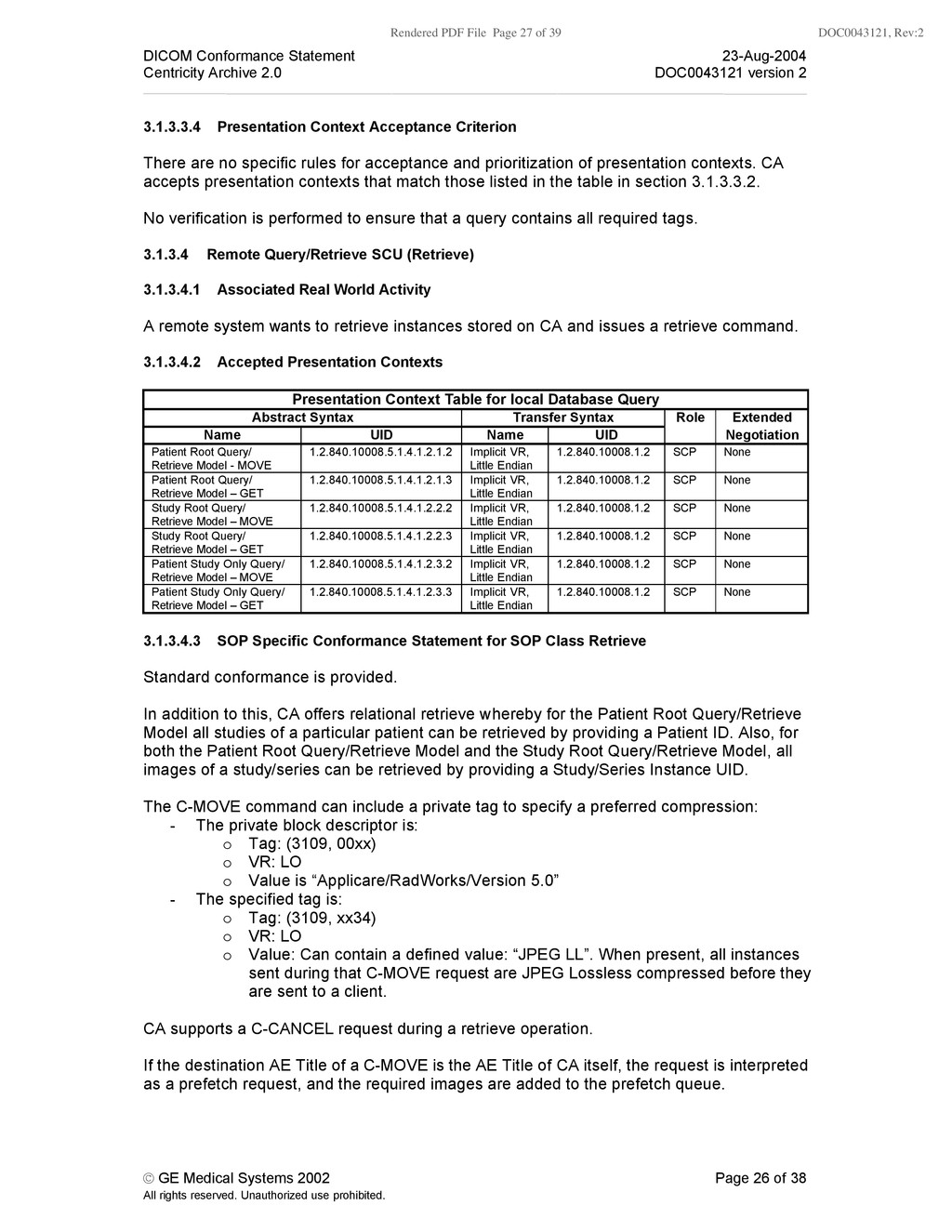
    Conformance Statement 23-Aug-2004 Centricity Archive 2.0 DOC0043121 version 2 © GE Medical Systems 2002 Page 26 of 38 All rights reserved. Unauthorized use prohibited. 3.1.3.3.4 Presentation Context Acceptance Criterion There are no specific rules for acceptance and prioritization of presentation contexts. CA accepts presentation contexts that match those listed in the table in section 3.1.3.3.2. No verification is performed to ensure that a query contains all required tags. 3.1.3.4 Remote Query/Retrieve SCU (Retrieve) 3.1.3.4.1 Associated Real World Activity A remote system wants to retrieve instances stored on CA and issues a retrieve command. 3.1.3.4.2 Accepted Presentation Contexts Presentation Context Table for local Database Query Abstract Syntax Transfer Syntax Role Extended Name UID Name UID Negotiation Patient Root Query/ Retrieve Model - MOVE 1.2.840.10008.5.1.4.1.2.1.2 Implicit VR, Little Endian 1.2.840.10008.1.2 SCP None Patient Root Query/ Retrieve Model – GET 1.2.840.10008.5.1.4.1.2.1.3 Implicit VR, Little Endian 1.2.840.10008.1.2 SCP None Study Root Query/ Retrieve Model – MOVE 1.2.840.10008.5.1.4.1.2.2.2 Implicit VR, Little Endian 1.2.840.10008.1.2 SCP None Study Root Query/ Retrieve Model – GET 1.2.840.10008.5.1.4.1.2.2.3 Implicit VR, Little Endian 1.2.840.10008.1.2 SCP None Patient Study Only Query/ Retrieve Model – MOVE 1.2.840.10008.5.1.4.1.2.3.2 Implicit VR, Little Endian 1.2.840.10008.1.2 SCP None Patient Study Only Query/ Retrieve Model – GET 1.2.840.10008.5.1.4.1.2.3.3 Implicit VR, Little Endian 1.2.840.10008.1.2 SCP None 3.1.3.4.3 SOP Specific Conformance Statement for SOP Class Retrieve Standard conformance is provided. In addition to this, CA offers relational retrieve whereby for the Patient Root Query/Retrieve Model all studies of a particular patient can be retrieved by providing a Patient ID. Also, for both the Patient Root Query/Retrieve Model and the Study Root Query/Retrieve Model, all images of a study/series can be retrieved by providing a Study/Series Instance UID. The C-MOVE command can include a private tag to specify a preferred compression: - The private block descriptor is: o Tag: (3109, 00xx) o VR: LO o Value is “Applicare/RadWorks/Version 5.0” - The specified tag is: o Tag: (3109, xx34) o VR: LO o Value: Can contain a defined value: “JPEG LL”. When present, all instances sent during that C-MOVE request are JPEG Lossless compressed before they are sent to a client. CA supports a C-CANCEL request during a retrieve operation. If the destination AE Title of a C-MOVE is the AE Title of CA itself, the request is interpreted as a prefetch request, and the required images are added to the prefetch queue.
  28. Rendered PDF File Page 28 of 39 DOC0043121, Rev:2 DICOM

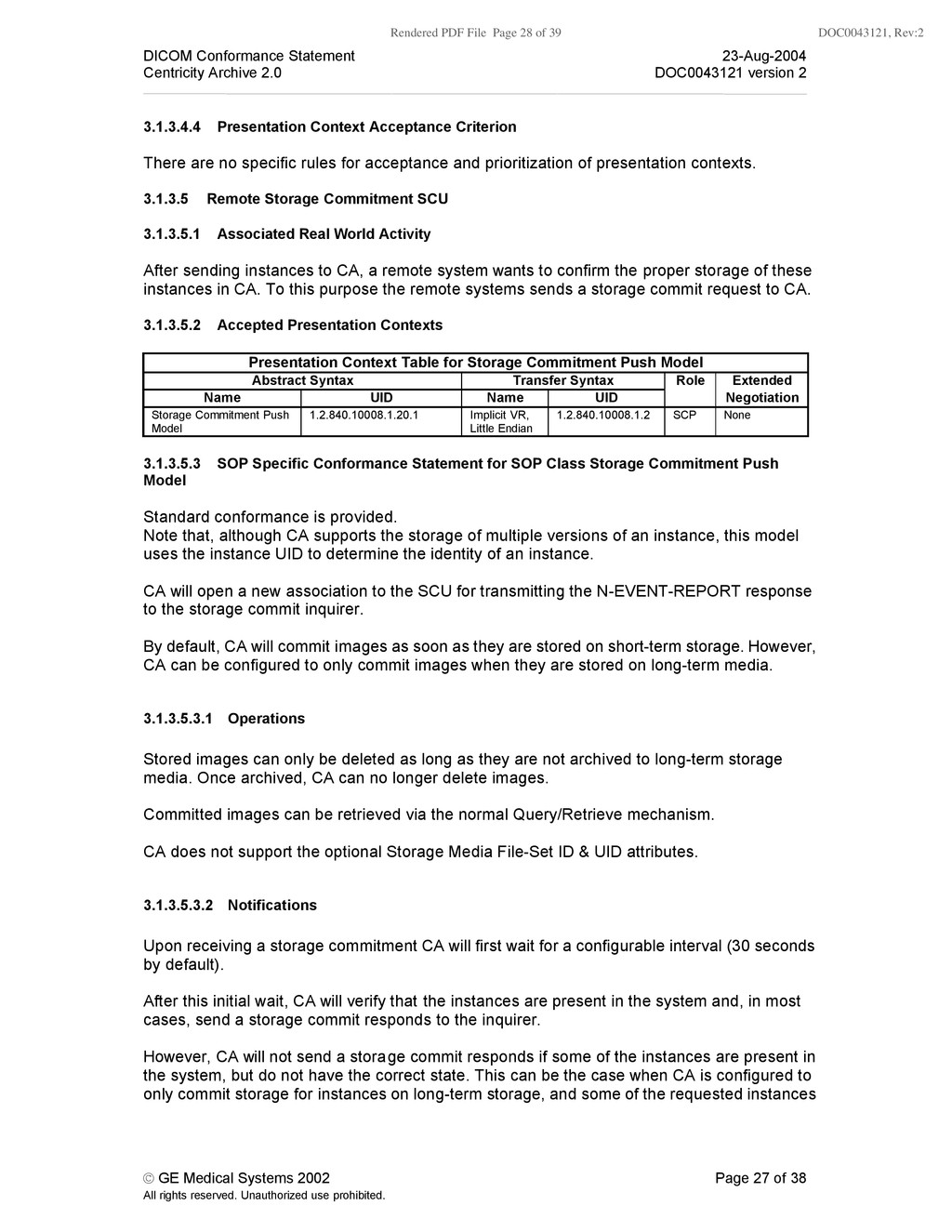
    Conformance Statement 23-Aug-2004 Centricity Archive 2.0 DOC0043121 version 2 © GE Medical Systems 2002 Page 27 of 38 All rights reserved. Unauthorized use prohibited. 3.1.3.4.4 Presentation Context Acceptance Criterion There are no specific rules for acceptance and prioritization of presentation contexts. 3.1.3.5 Remote Storage Commitment SCU 3.1.3.5.1 Associated Real World Activity After sending instances to CA, a remote system wants to confirm the proper storage of these instances in CA. To this purpose the remote systems sends a storage commit request to CA. 3.1.3.5.2 Accepted Presentation Contexts Presentation Context Table for Storage Commitment Push Model Abstract Syntax Transfer Syntax Role Extended Name UID Name UID Negotiation Storage Commitment Push Model 1.2.840.10008.1.20.1 Implicit VR, Little Endian 1.2.840.10008.1.2 SCP None 3.1.3.5.3 SOP Specific Conformance Statement for SOP Class Storage Commitment Push Model Standard conformance is provided. Note that, although CA supports the storage of multiple versions of an instance, this model uses the instance UID to determine the identity of an instance. CA will open a new association to the SCU for transmitting the N-EVENT-REPORT response to the storage commit inquirer. By default, CA will commit images as soon as they are stored on short-term storage. However, CA can be configured to only commit images when they are stored on long-term media. 3.1.3.5.3.1 Operations Stored images can only be deleted as long as they are not archived to long-term storage media. Once archived, CA can no longer delete images. Committed images can be retrieved via the normal Query/Retrieve mechanism. CA does not support the optional Storage Media File-Set ID & UID attributes. 3.1.3.5.3.2 Notifications Upon receiving a storage commitment CA will first wait for a configurable interval (30 seconds by default). After this initial wait, CA will verify that the instances are present in the system and, in most cases, send a storage commit responds to the inquirer. However, CA will not send a storage commit responds if some of the instances are present in the system, but do not have the correct state. This can be the case when CA is configured to only commit storage for instances on long-term storage, and some of the requested instances
  29. Rendered PDF File Page 29 of 39 DOC0043121, Rev:2 DICOM

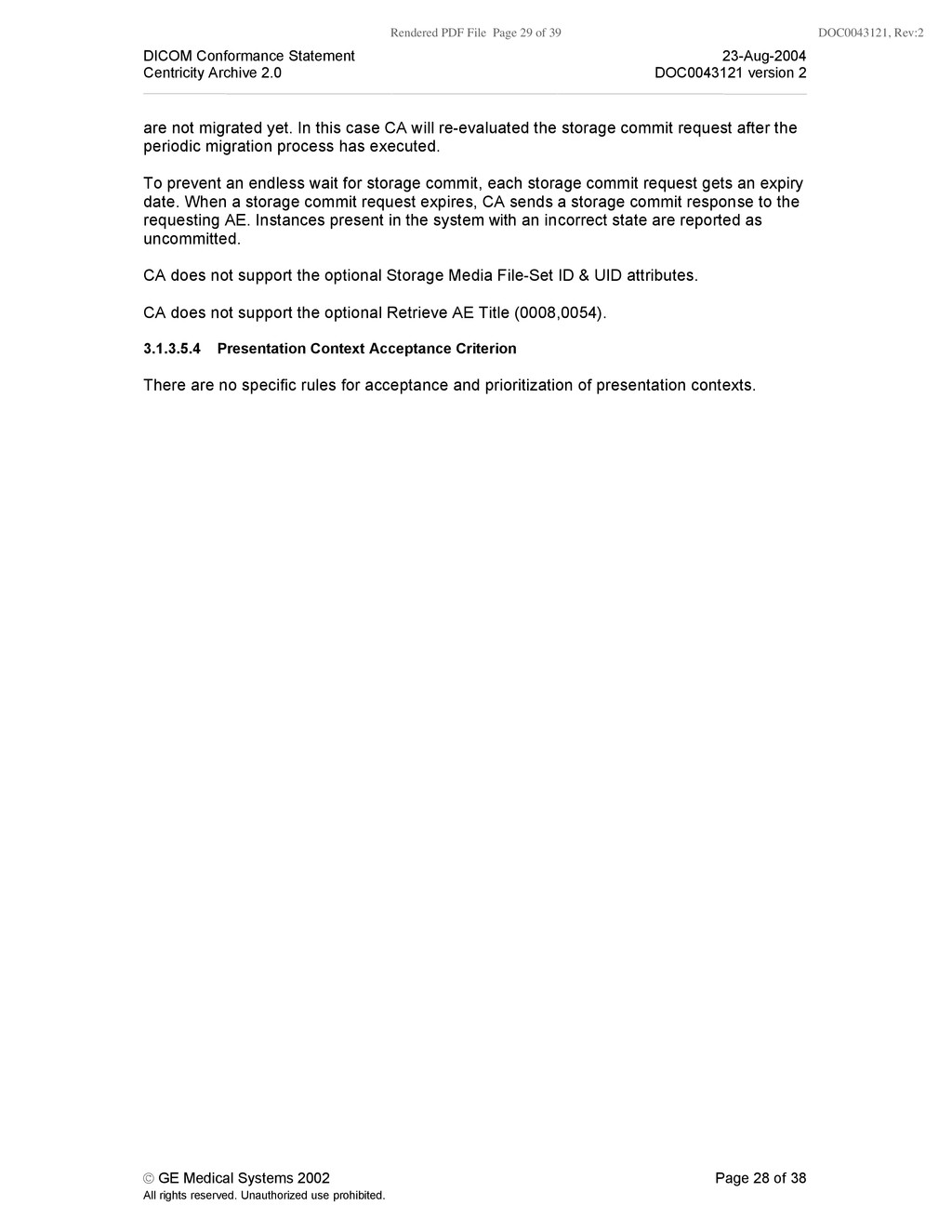
    Conformance Statement 23-Aug-2004 Centricity Archive 2.0 DOC0043121 version 2 © GE Medical Systems 2002 Page 28 of 38 All rights reserved. Unauthorized use prohibited. are not migrated yet. In this case CA will re-evaluated the storage commit request after the periodic migration process has executed. To prevent an endless wait for storage commit, each storage commit request gets an expiry date. When a storage commit request expires, CA sends a storage commit response to the requesting AE. Instances present in the system with an incorrect state are reported as uncommitted. CA does not support the optional Storage Media File-Set ID & UID attributes. CA does not support the optional Retrieve AE Title (0008,0054). 3.1.3.5.4 Presentation Context Acceptance Criterion There are no specific rules for acceptance and prioritization of presentation contexts.
  30. Rendered PDF File Page 30 of 39 DOC0043121, Rev:2 DICOM

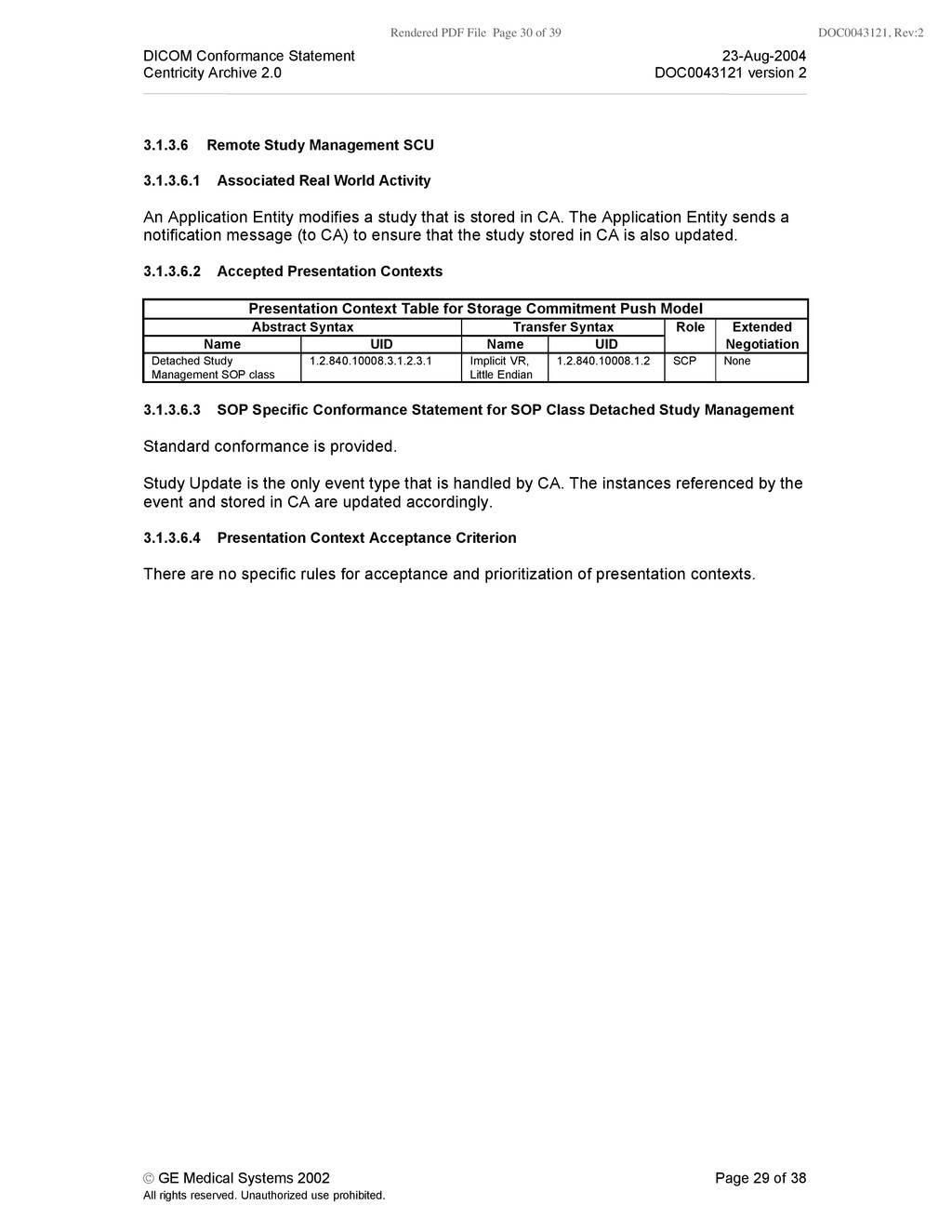
    Conformance Statement 23-Aug-2004 Centricity Archive 2.0 DOC0043121 version 2 © GE Medical Systems 2002 Page 29 of 38 All rights reserved. Unauthorized use prohibited. 3.1.3.6 Remote Study Management SCU 3.1.3.6.1 Associated Real World Activity An Application Entity modifies a study that is stored in CA. The Application Entity sends a notification message (to CA) to ensure that the study stored in CA is also updated. 3.1.3.6.2 Accepted Presentation Contexts Presentation Context Table for Storage Commitment Push Model Abstract Syntax Transfer Syntax Role Extended Name UID Name UID Negotiation Detached Study Management SOP class 1.2.840.10008.3.1.2.3.1 Implicit VR, Little Endian 1.2.840.10008.1.2 SCP None 3.1.3.6.3 SOP Specific Conformance Statement for SOP Class Detached Study Management Standard conformance is provided. Study Update is the only event type that is handled by CA. The instances referenced by the event and stored in CA are updated accordingly. 3.1.3.6.4 Presentation Context Acceptance Criterion There are no specific rules for acceptance and prioritization of presentation contexts.
  31. Rendered PDF File Page 31 of 39 DOC0043121, Rev:2 DICOM

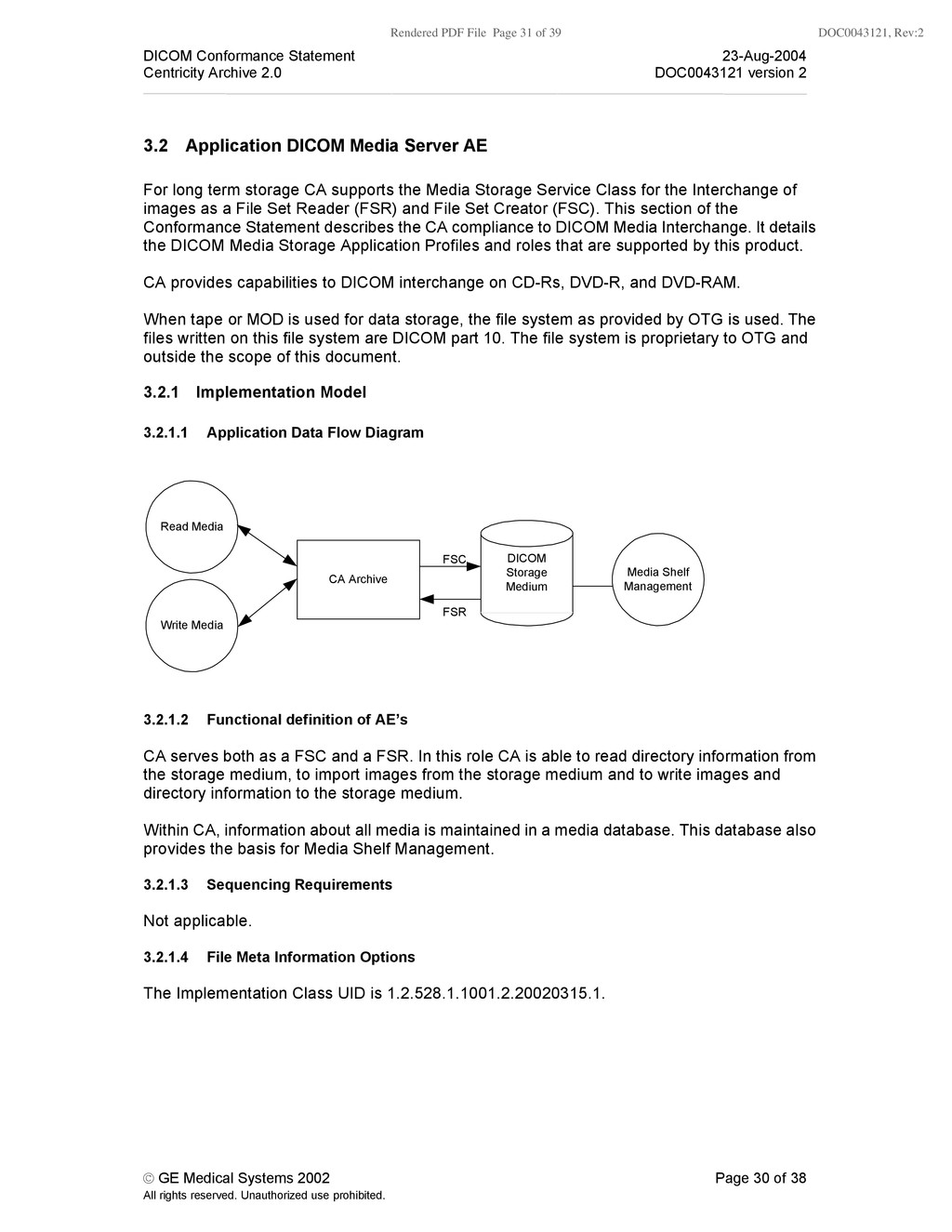
    Conformance Statement 23-Aug-2004 Centricity Archive 2.0 DOC0043121 version 2 © GE Medical Systems 2002 Page 30 of 38 All rights reserved. Unauthorized use prohibited. 3.2 Application DICOM Media Server AE For long term storage CA supports the Media Storage Service Class for the Interchange of images as a File Set Reader (FSR) and File Set Creator (FSC). This section of the Conformance Statement describes the CA compliance to DICOM Media Interchange. It details the DICOM Media Storage Application Profiles and roles that are supported by this product. CA provides capabilities to DICOM interchange on CD-Rs, DVD-R, and DVD-RAM. When tape or MOD is used for data storage, the file system as provided by OTG is used. The files written on this file system are DICOM part 10. The file system is proprietary to OTG and outside the scope of this document. 3.2.1 Implementation Model 3.2.1.1 Application Data Flow Diagram CA Archive Write Media Media Shelf Management Read Media DICOM Storage Medium FSR FSC 3.2.1.2 Functional definition of AE’s CA serves both as a FSC and a FSR. In this role CA is able to read directory information from the storage medium, to import images from the storage medium and to write images and directory information to the storage medium. Within CA, information about all media is maintained in a media database. This database also provides the basis for Media Shelf Management. 3.2.1.3 Sequencing Requirements Not applicable. 3.2.1.4 File Meta Information Options The Implementation Class UID is 1.2.528.1.1001.2.20020315.1.
  32. Rendered PDF File Page 32 of 39 DOC0043121, Rev:2 DICOM

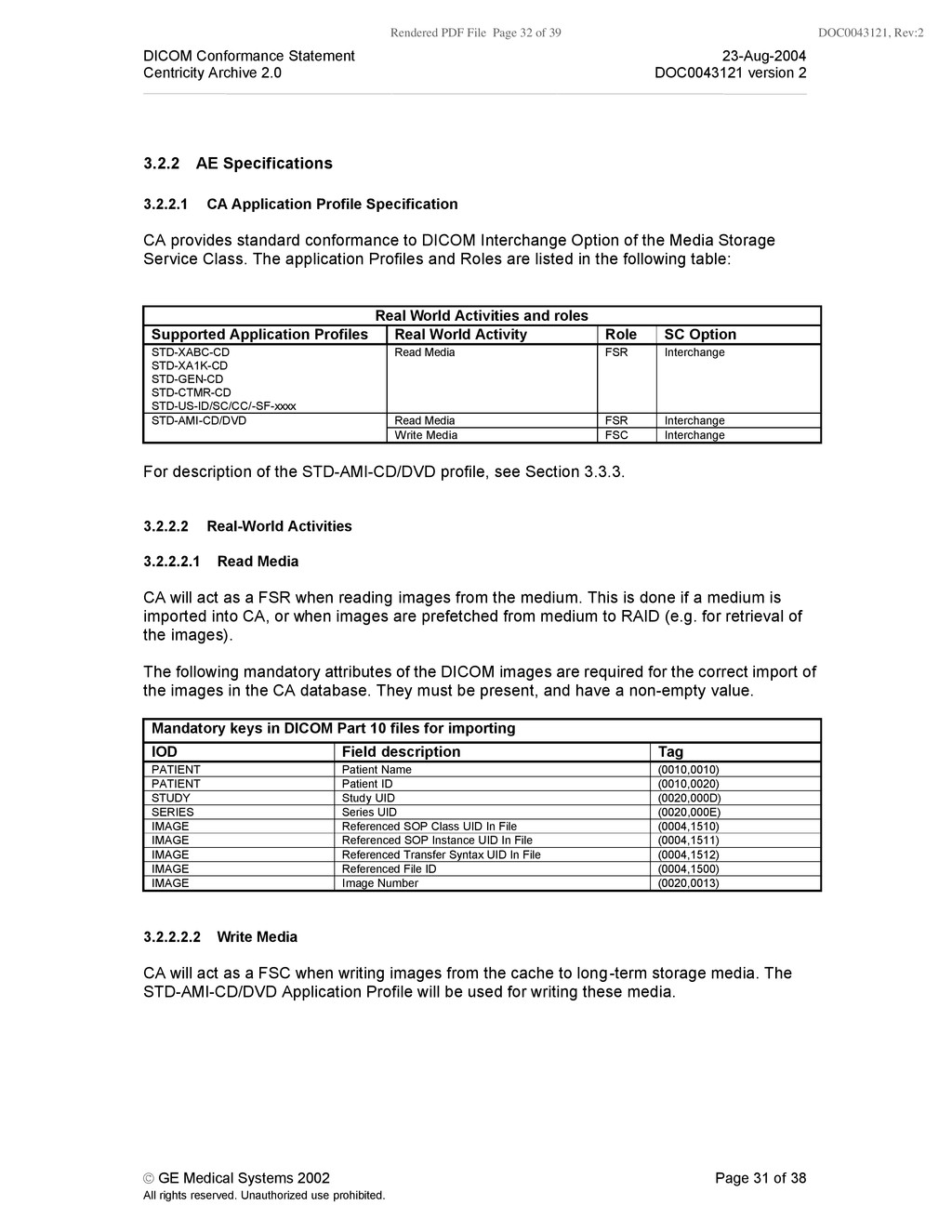
    Conformance Statement 23-Aug-2004 Centricity Archive 2.0 DOC0043121 version 2 © GE Medical Systems 2002 Page 31 of 38 All rights reserved. Unauthorized use prohibited. 3.2.2 AE Specifications 3.2.2.1 CA Application Profile Specification CA provides standard conformance to DICOM Interchange Option of the Media Storage Service Class. The application Profiles and Roles are listed in the following table: Real World Activities and roles Supported Application Profiles Real World Activity Role SC Option STD-XABC-CD STD-XA1K-CD STD-GEN-CD STD-CTMR-CD STD-US-ID/SC/CC/-SF-xxxx Read Media FSR Interchange Read Media FSR Interchange STD-AMI-CD/DVD Write Media FSC Interchange For description of the STD-AMI-CD/DVD profile, see Section 3.3.3. 3.2.2.2 Real-World Activities 3.2.2.2.1 Read Media CA will act as a FSR when reading images from the medium. This is done if a medium is imported into CA, or when images are prefetched from medium to RAID (e.g. for retrieval of the images). The following mandatory attributes of the DICOM images are required for the correct import of the images in the CA database. They must be present, and have a non-empty value. Mandatory keys in DICOM Part 10 files for importing IOD Field description Tag PATIENT Patient Name (0010,0010) PATIENT Patient ID (0010,0020) STUDY Study UID (0020,000D) SERIES Series UID (0020,000E) IMAGE Referenced SOP Class UID In File (0004,1510) IMAGE Referenced SOP Instance UID In File (0004,1511) IMAGE Referenced Transfer Syntax UID In File (0004,1512) IMAGE Referenced File ID (0004,1500) IMAGE Image Number (0020,0013) 3.2.2.2.2 Write Media CA will act as a FSC when writing images from the cache to long-term storage media. The STD-AMI-CD/DVD Application Profile will be used for writing these media.
  33. Rendered PDF File Page 33 of 39 DOC0043121, Rev:2 DICOM

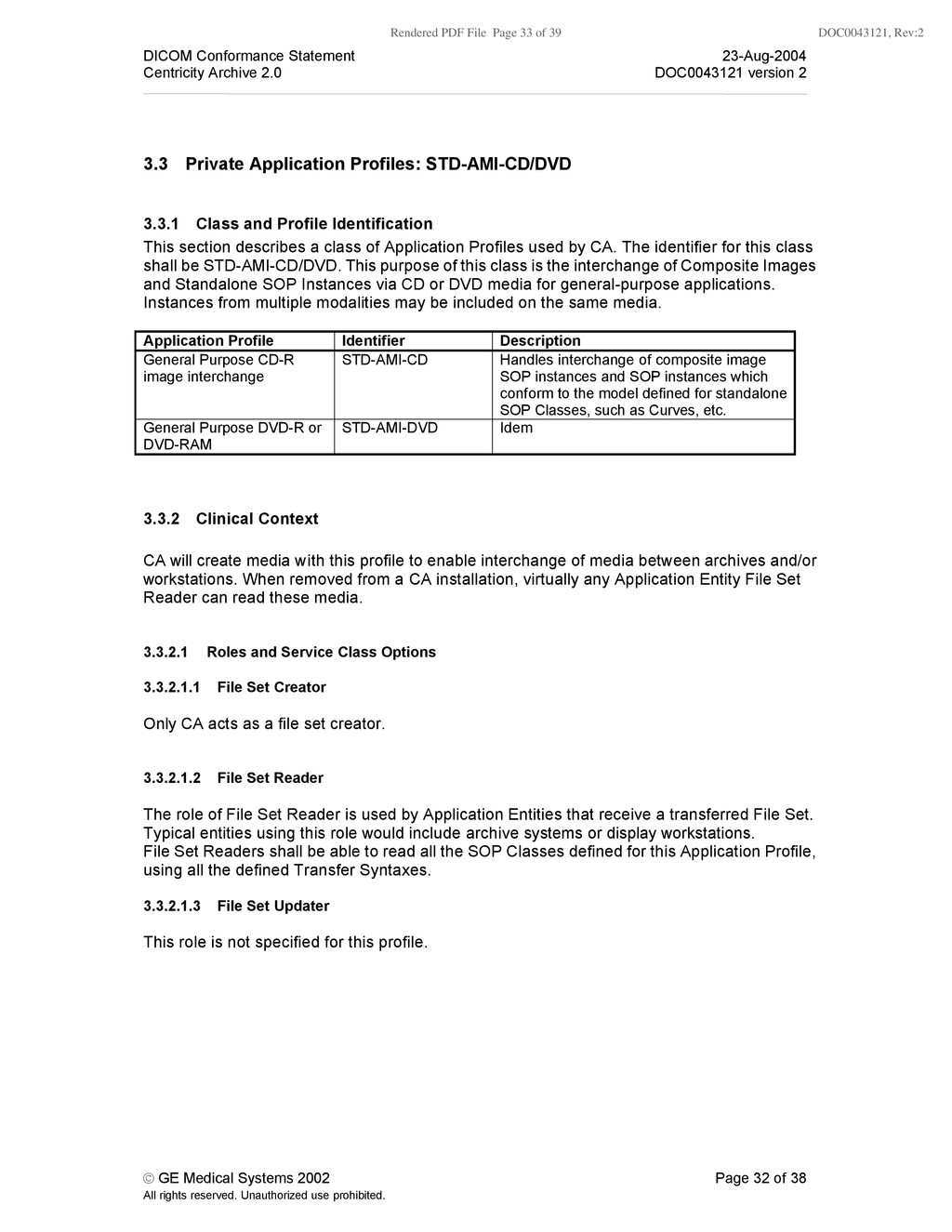
    Conformance Statement 23-Aug-2004 Centricity Archive 2.0 DOC0043121 version 2 © GE Medical Systems 2002 Page 32 of 38 All rights reserved. Unauthorized use prohibited. 3.3 Private Application Profiles: STD-AMI-CD/DVD 3.3.1 Class and Profile Identification This section describes a class of Application Profiles used by CA. The identifier for this class shall be STD-AMI-CD/DVD. This purpose of this class is the interchange of Composite Images and Standalone SOP Instances via CD or DVD media for general-purpose applications. Instances from multiple modalities may be included on the same media. Application Profile Identifier Description General Purpose CD-R image interchange STD-AMI-CD Handles interchange of composite image SOP instances and SOP instances which conform to the model defined for standalone SOP Classes, such as Curves, etc. General Purpose DVD-R or DVD-RAM STD-AMI-DVD Idem 3.3.2 Clinical Context CA will create media with this profile to enable interchange of media between archives and/or workstations. When removed from a CA installation, virtually any Application Entity File Set Reader can read these media. 3.3.2.1 Roles and Service Class Options 3.3.2.1.1 File Set Creator Only CA acts as a file set creator. 3.3.2.1.2 File Set Reader The role of File Set Reader is used by Application Entities that receive a transferred File Set. Typical entities using this role would include archive systems or display workstations. File Set Readers shall be able to read all the SOP Classes defined for this Application Profile, using all the defined Transfer Syntaxes. 3.3.2.1.3 File Set Updater This role is not specified for this profile.
  34. Rendered PDF File Page 34 of 39 DOC0043121, Rev:2 DICOM

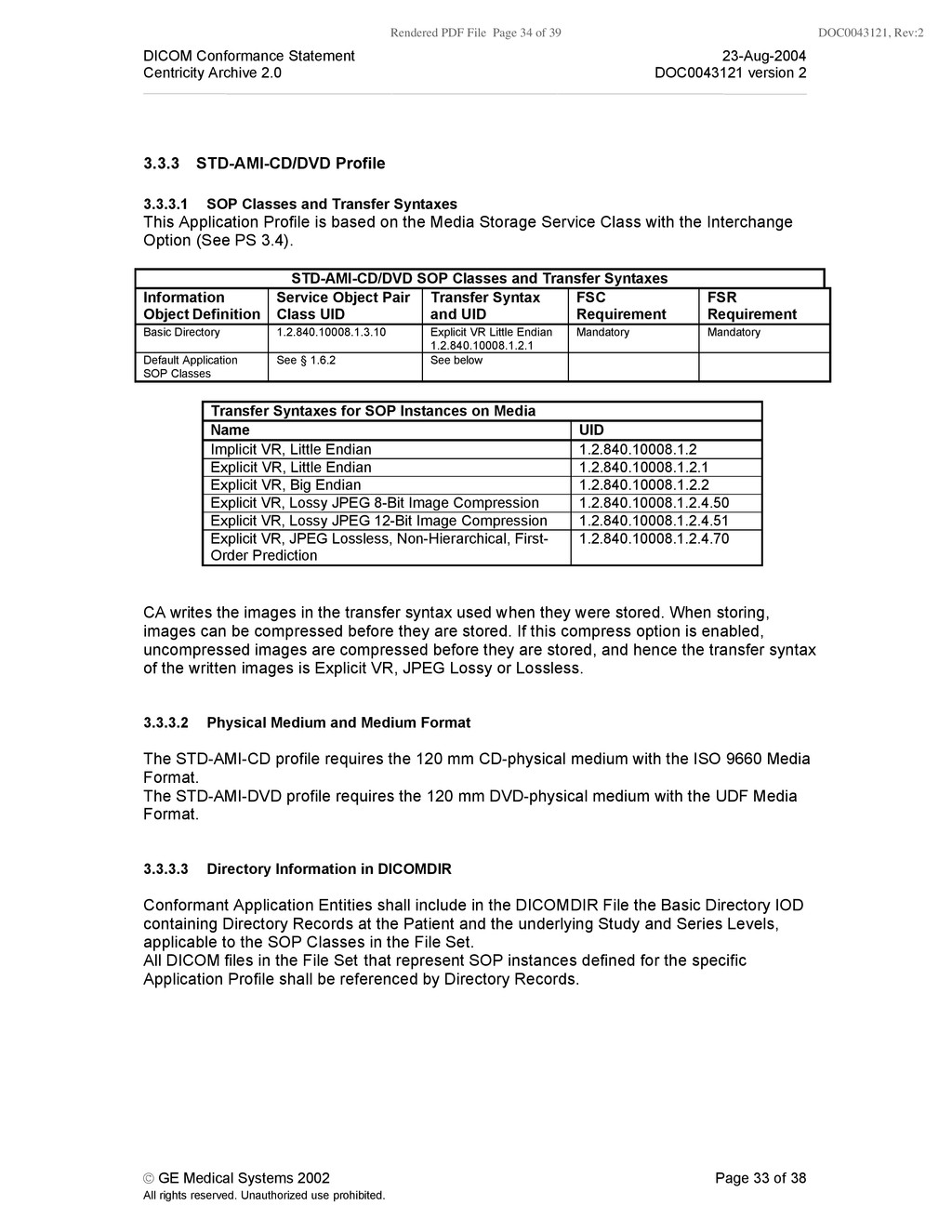
    Conformance Statement 23-Aug-2004 Centricity Archive 2.0 DOC0043121 version 2 © GE Medical Systems 2002 Page 33 of 38 All rights reserved. Unauthorized use prohibited. 3.3.3 STD-AMI-CD/DVD Profile 3.3.3.1 SOP Classes and Transfer Syntaxes This Application Profile is based on the Media Storage Service Class with the Interchange Option (See PS 3.4). STD-AMI-CD/DVD SOP Classes and Transfer Syntaxes Information Object Definition Service Object Pair Class UID Transfer Syntax and UID FSC Requirement FSR Requirement Basic Directory 1.2.840.10008.1.3.10 Explicit VR Little Endian 1.2.840.10008.1.2.1 Mandatory Mandatory Default Application SOP Classes See § 1.6.2 See below Transfer Syntaxes for SOP Instances on Media Name UID Implicit VR, Little Endian 1.2.840.10008.1.2 Explicit VR, Little Endian 1.2.840.10008.1.2.1 Explicit VR, Big Endian 1.2.840.10008.1.2.2 Explicit VR, Lossy JPEG 8-Bit Image Compression 1.2.840.10008.1.2.4.50 Explicit VR, Lossy JPEG 12-Bit Image Compression 1.2.840.10008.1.2.4.51 Explicit VR, JPEG Lossless, Non-Hierarchical, First- Order Prediction 1.2.840.10008.1.2.4.70 CA writes the images in the transfer syntax used when they were stored. When storing, images can be compressed before they are stored. If this compress option is enabled, uncompressed images are compressed before they are stored, and hence the transfer syntax of the written images is Explicit VR, JPEG Lossy or Lossless. 3.3.3.2 Physical Medium and Medium Format The STD-AMI-CD profile requires the 120 mm CD-physical medium with the ISO 9660 Media Format. The STD-AMI-DVD profile requires the 120 mm DVD-physical medium with the UDF Media Format. 3.3.3.3 Directory Information in DICOMDIR Conformant Application Entities shall include in the DICOMDIR File the Basic Directory IOD containing Directory Records at the Patient and the underlying Study and Series Levels, applicable to the SOP Classes in the File Set. All DICOM files in the File Set that represent SOP instances defined for the specific Application Profile shall be referenced by Directory Records.
  35. Rendered PDF File Page 35 of 39 DOC0043121, Rev:2 DICOM

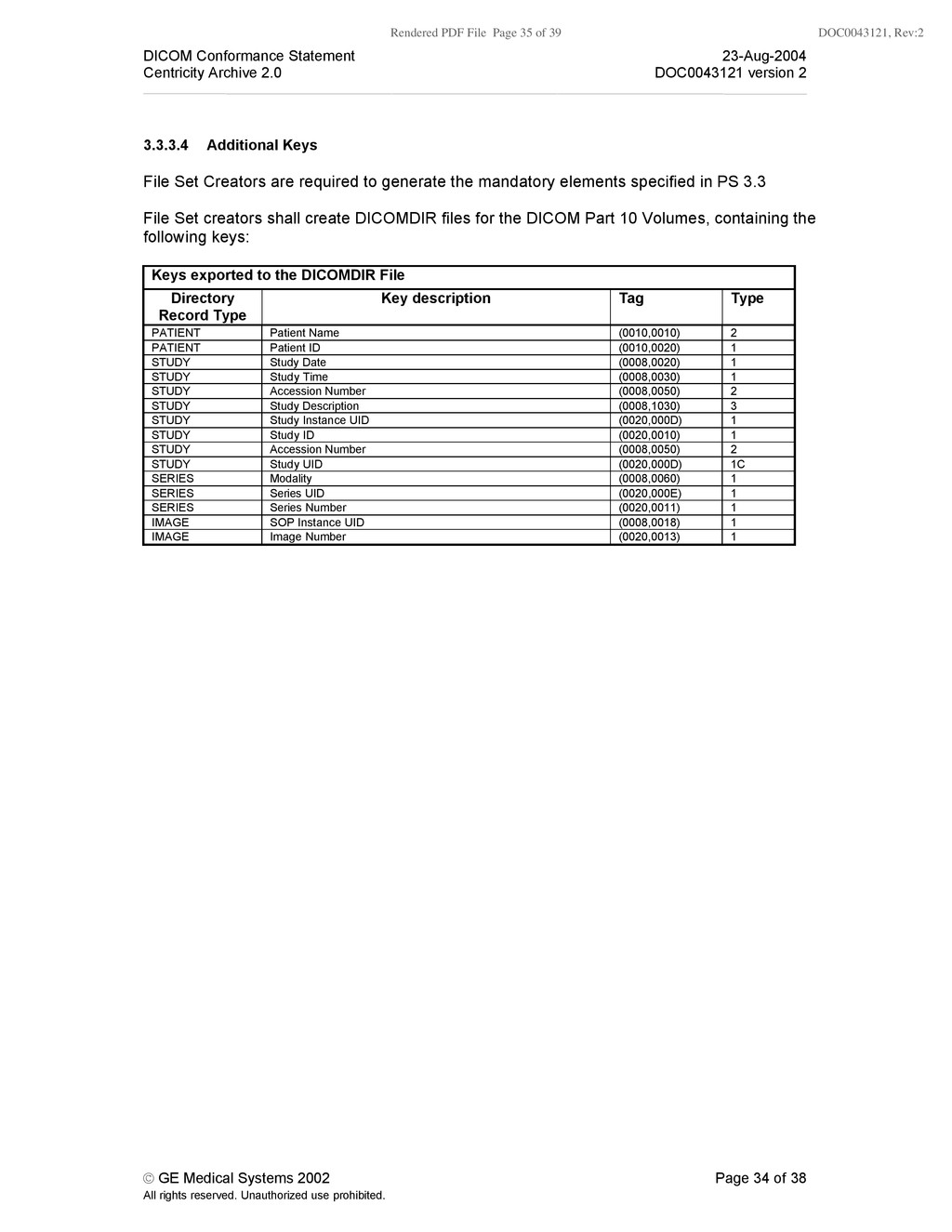
    Conformance Statement 23-Aug-2004 Centricity Archive 2.0 DOC0043121 version 2 © GE Medical Systems 2002 Page 34 of 38 All rights reserved. Unauthorized use prohibited. 3.3.3.4 Additional Keys File Set Creators are required to generate the mandatory elements specified in PS 3.3 File Set creators shall create DICOMDIR files for the DICOM Part 10 Volumes, containing the following keys: Keys exported to the DICOMDIR File Directory Record Type Key description Tag Type PATIENT Patient Name (0010,0010) 2 PATIENT Patient ID (0010,0020) 1 STUDY Study Date (0008,0020) 1 STUDY Study Time (0008,0030) 1 STUDY Accession Number (0008,0050) 2 STUDY Study Description (0008,1030) 3 STUDY Study Instance UID (0020,000D) 1 STUDY Study ID (0020,0010) 1 STUDY Accession Number (0008,0050) 2 STUDY Study UID (0020,000D) 1C SERIES Modality (0008,0060) 1 SERIES Series UID (0020,000E) 1 SERIES Series Number (0020,0011) 1 IMAGE SOP Instance UID (0008,0018) 1 IMAGE Image Number (0020,0013) 1
  36. Rendered PDF File Page 36 of 39 DOC0043121, Rev:2 DICOM

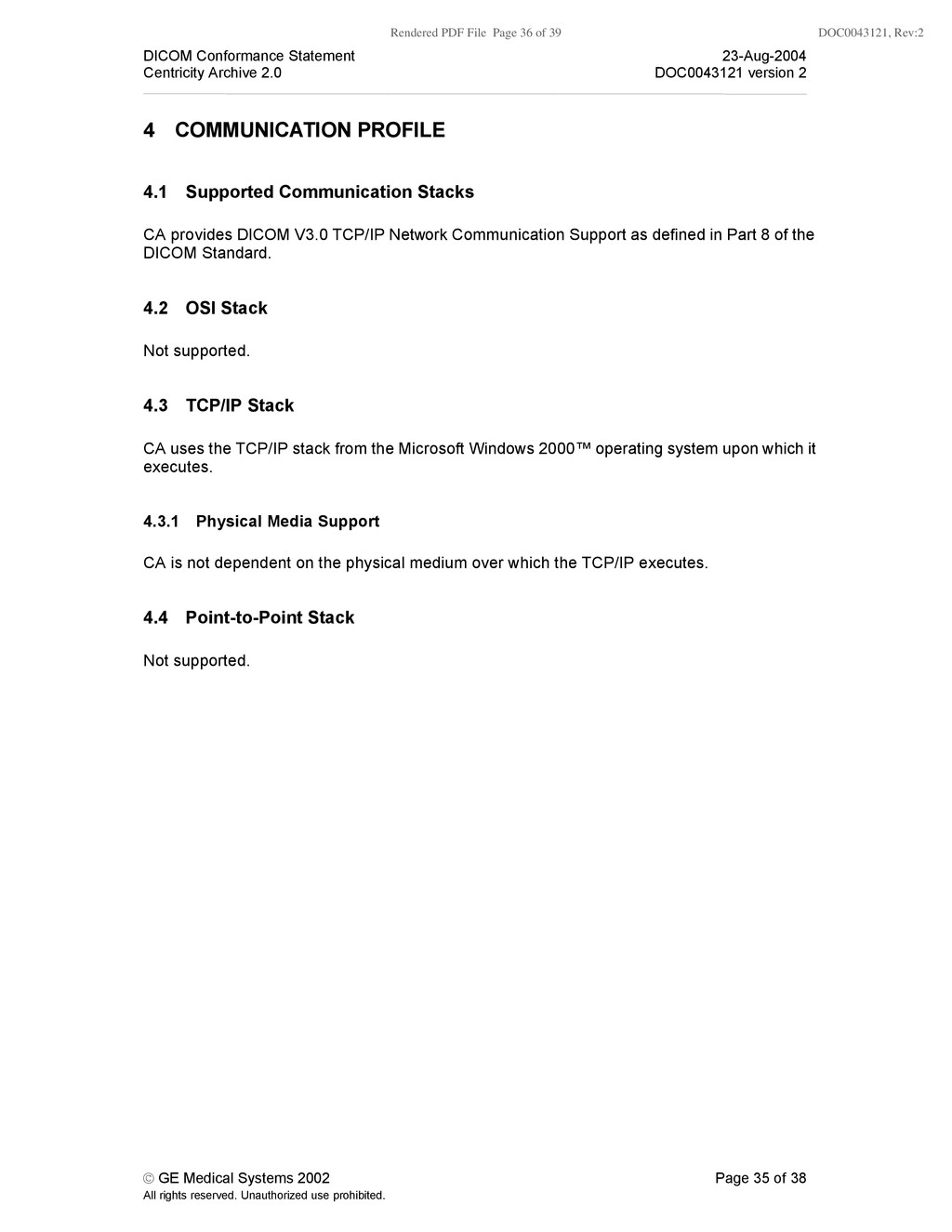
    Conformance Statement 23-Aug-2004 Centricity Archive 2.0 DOC0043121 version 2 © GE Medical Systems 2002 Page 35 of 38 All rights reserved. Unauthorized use prohibited. 4 COMMUNICATION PROFILE 4.1 Supported Communication Stacks CA provides DICOM V3.0 TCP/IP Network Communication Support as defined in Part 8 of the DICOM Standard. 4.2 OSI Stack Not supported. 4.3 TCP/IP Stack CA uses the TCP/IP stack from the Microsoft Windows 2000™ operating system upon which it executes. 4.3.1 Physical Media Support CA is not dependent on the physical medium over which the TCP/IP executes. 4.4 Point-to-Point Stack Not supported.
  37. Rendered PDF File Page 37 of 39 DOC0043121, Rev:2 DICOM

    Conformance Statement 23-Aug-2004 Centricity Archive 2.0 DOC0043121 version 2 © GE Medical Systems 2002 Page 36 of 38 All rights reserved. Unauthorized use prohibited. 5 EXTENSIONS/SPECIALIZATIONS/PRIVATIZATIONS 5.1 Standard Extended/Specialized/Private SOPs Not applicable. No non-standard SOPs are defined or used. 5.2 Unique identifiers and lossy compression. To enable the traceability of instances within a PACS, CA can be configured NOT to change the UID of an instance at lossy compression. This should only be used in combination with a GE-PACS that relies on instance UIDs. This configuration will be supported until CP309 has been approved.
  38. Rendered PDF File Page 38 of 39 DOC0043121, Rev:2 DICOM

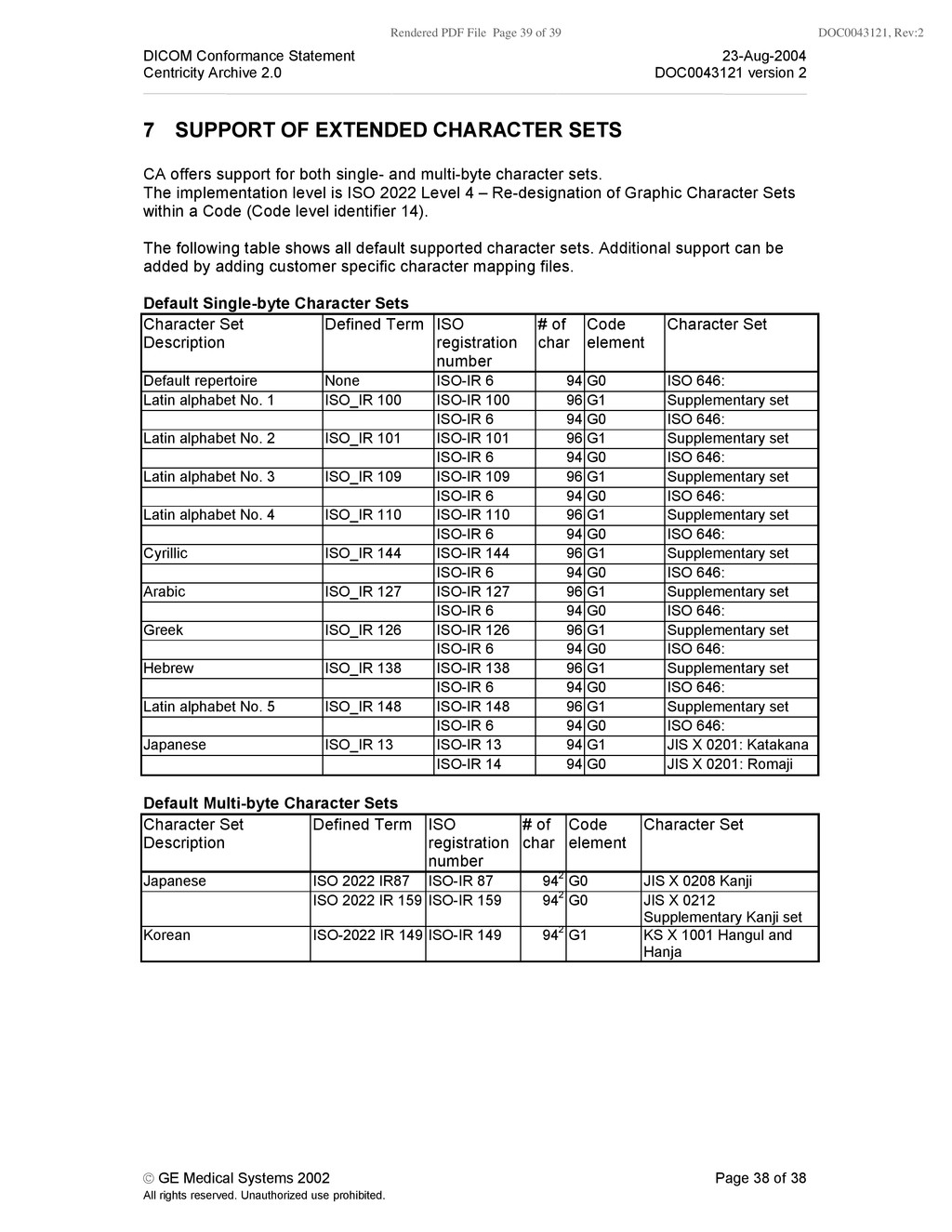
    Conformance Statement 23-Aug-2004 Centricity Archive 2.0 DOC0043121 version 2 © GE Medical Systems 2002 Page 37 of 38 All rights reserved. Unauthorized use prohibited. 6 CONFIGURATION The configuration of the Application DICOM services is stored in the Windows NT™ Registry. Only accounts (secured by passwords) with the right level of security will be able to change the configuration. Typically support personnel does this. 6.1 Configurable Parameters The following fields are configurable for CA: - Local AE title, each archive has its own AE title - Local listening port number, same for all AE titles in CA - Local IP address - Local IP netmask - Maximum number of query results - Maximum number of concurrent SCP associations - Maximum number of concurrent SCU associations The following fields are configurable for every remote DICOM AE: - Remote AE title - Remote listening port number - Remote IP address - Maximum PDU length - Supported services per CA AE title. For instance, is this DICOM AE entitled to query a particular CA archive. - Default transfer syntax used when instances are send to this DICOM AE - Whether or not storage commitment is used when instances are send to this DICOM AE - Time window that CA should use when communicating with this DICOM AE - Number of retries and the period between each retry when CA fails to transfer instances to this DICOM AE - Backup DICOM AE in case communication with the DICOM AE fails (even after multiple retries) The following fields are configurable: - Association operation inactivity timer - Storage Commit request timeout - CA can validate that association request of a specific AE are coming from a specific IP address. A configuration option turns this checking on or off. - CA can validate incoming DICOM messages to see if the messages conform to the DICOM standard. A configuration option turns this checking on or off.
  39. Rendered PDF File Page 39 of 39 DOC0043121, Rev:2 DICOM

    Conformance Statement 23-Aug-2004 Centricity Archive 2.0 DOC0043121 version 2 © GE Medical Systems 2002 Page 38 of 38 All rights reserved. Unauthorized use prohibited. 7 SUPPORT OF EXTENDED CHARACTER SETS CA offers support for both single- and multi-byte character sets. The implementation level is ISO 2022 Level 4 – Re-designation of Graphic Character Sets within a Code (Code level identifier 14). The following table shows all default supported character sets. Additional support can be added by adding customer specific character mapping files. Default Single-byte Character Sets Character Set Description Defined Term ISO registration number # of char Code element Character Set Default repertoire None ISO-IR 6 94 G0 ISO 646: Latin alphabet No. 1 ISO_IR 100 ISO-IR 100 96 G1 Supplementary set ISO-IR 6 94 G0 ISO 646: Latin alphabet No. 2 ISO_IR 101 ISO-IR 101 96 G1 Supplementary set ISO-IR 6 94 G0 ISO 646: Latin alphabet No. 3 ISO_IR 109 ISO-IR 109 96 G1 Supplementary set ISO-IR 6 94 G0 ISO 646: Latin alphabet No. 4 ISO_IR 110 ISO-IR 110 96 G1 Supplementary set ISO-IR 6 94 G0 ISO 646: Cyrillic ISO_IR 144 ISO-IR 144 96 G1 Supplementary set ISO-IR 6 94 G0 ISO 646: Arabic ISO_IR 127 ISO-IR 127 96 G1 Supplementary set ISO-IR 6 94 G0 ISO 646: Greek ISO_IR 126 ISO-IR 126 96 G1 Supplementary set ISO-IR 6 94 G0 ISO 646: Hebrew ISO_IR 138 ISO-IR 138 96 G1 Supplementary set ISO-IR 6 94 G0 ISO 646: Latin alphabet No. 5 ISO_IR 148 ISO-IR 148 96 G1 Supplementary set ISO-IR 6 94 G0 ISO 646: Japanese ISO_IR 13 ISO-IR 13 94 G1 JIS X 0201: Katakana ISO-IR 14 94 G0 JIS X 0201: Romaji Default Multi-byte Character Sets Character Set Description Defined Term ISO registration number # of char Code element Character Set Japanese ISO 2022 IR87 ISO-IR 87 942 G0 JIS X 0208 Kanji ISO 2022 IR 159 ISO-IR 159 942 G0 JIS X 0212 Supplementary Kanji set Korean ISO-2022 IR 149 ISO-IR 149 942 G1 KS X 1001 Hangul and Hanja