Creating an Anypoint Connector Project Authentication Defining Attributes, Operations, and a Data Model Building Unit and Functional Tests Documenting Your Connector Packaging and Releasing Your Connector
in many ways depending on the provider. Cloud APIs need special authorization to use them based on user subscription. Local Standalone APIs may have basic authentication. Having access to them beforehand saves development time. Along with APIs access, these APIs also provides usage documents which will help in implementing the functionality.
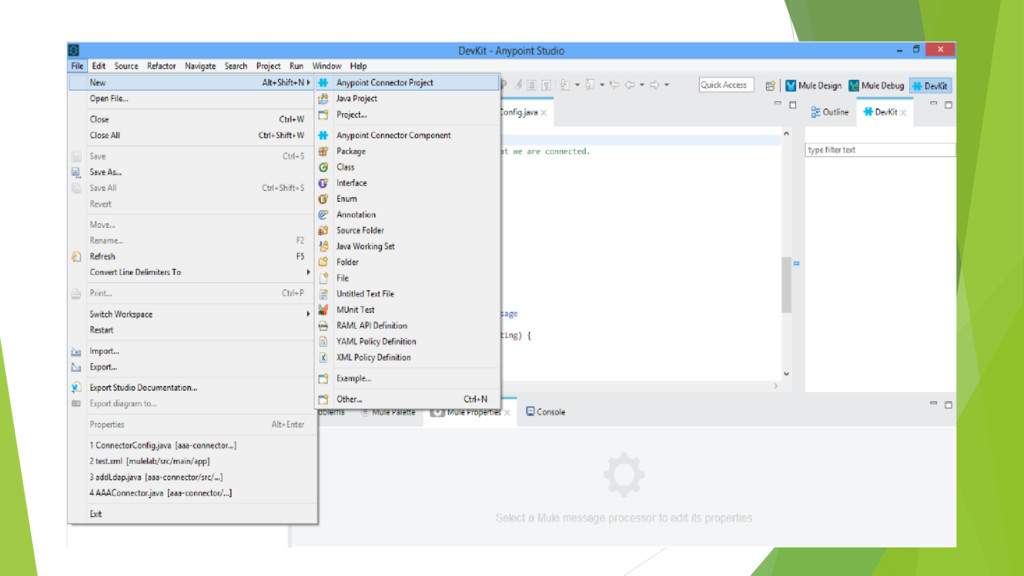
Java SDK 1.7 + and Anypoint Studio on their machine Configure Anypoint Studio with Apache Maven and Anypoint DevKit Plugin Create New Anypoint Connector Project File -> New -> Anypoint Connector Project Add the dependent libraries, if any, to the project build path
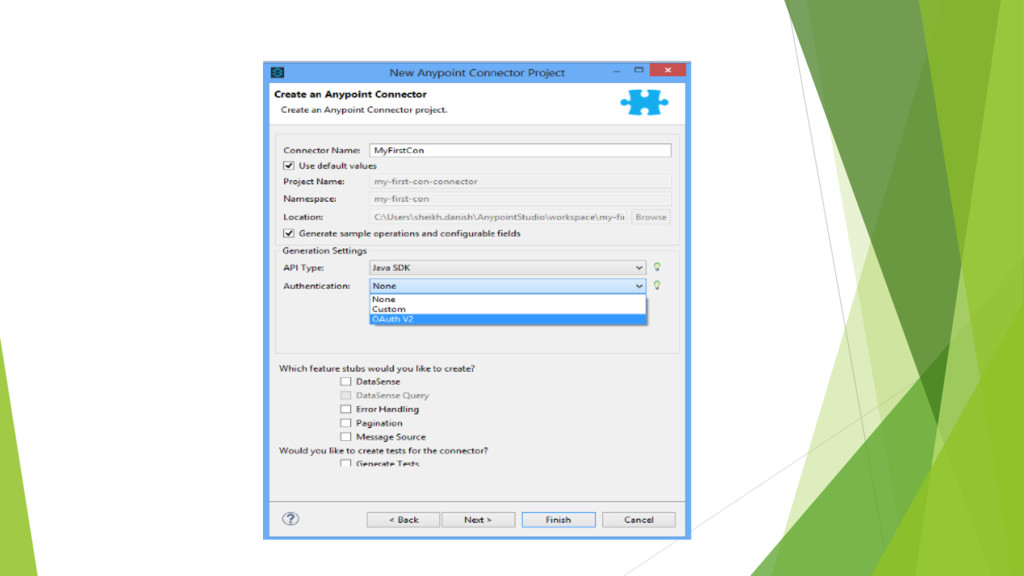
use them. We need to identify the type of authentication required Connection Management is simplest mode of authentication used for any non- OAuth protocols such as SAML, Kerberos, LDAP, NTLM, or to create a custom connection For Restful Web services Oauth V2 is used.
three API type for which we write our connector They are Java Client Library, SOAP API and REST-ful API Depending on the API type Attributes ,Operation and Data Model varies in the Devkit generated skeleton code which in turn effects our way of implementing java code
a suite of unit and functional tests in order to test it thoroughly. Before releasing the connector to the world, run a thorough test suite that covers all operations and exercises each major code path. The Maven-generated project contains one sample test case under /src/test/java directory to get you started.
reference documentation including code samples. DevKit automatically adds documentation snippets when we add functionality to the connector. For instance, if we are adding operations then Devkit adds automatically adds snippets to connector documentation.
ready for outside world . In Case, there is third party APIs used in creating the connector, then check if the license approves your connector for wide audience usage. Share connector on Anypoint Exchange, Mulesoft’s official Connector discovery platform.


 lef237
 texmeijin
 ryu1013
 steliosf
 iwiwi
iwiwi
 nao_randd
 jame2408
 koic
koic
 rollbear
 teyamagu
 findyinc
 andpad
 hatefulcrawdad
 cassininazir
 mfonobong
 lemiorhan
 tammyeverts
 productmarketing
 jacobtomlinson
 akihiro_kokubo
 signer
 dugsong
 stuffmc
 jonrohan