Upgrade to Pro — share decks privately, control downloads, hide ads and more …

Forex Broker Execution Safety Guide

Forex Broker Execution Safety Guide

The Gold Algo Lab MT5 Broker & Execution Safety Guide is a practical handbook for XAUUSD and gold traders who want to understand how broker conditions affect risk, trading costs, order execution and MT5 tools.
Many traders focus only on strategy while overlooking the environment in which every trade is executed. Contract size, tick value, spread, commission, volume step, stop restrictions, swap, margin requirements and filling modes can vary between brokers and account types. These differences can cause the same EA, indicator or trade manager to behave differently across trading accounts.
Inside this guide, you will learn how to:
• Read the MT5 Symbol Specification window correctly
• Understand digits, point size, tick size and tick value
• Calculate approximate XAUUSD risk from contract size and lot size
• Evaluate floating spreads, commission, swap and margin requirements
• Understand stops level, freeze level and order-filling rules
• Compare RAW and Standard trading accounts
• Recognize important differences between demo and live execution
• Test an EA or MT5 utility before using real money
• Apply a structured pre-live broker testing framework
• Use a practical broker checklist and notes worksheet
The guide includes an EC Markets RAW account example for educational purposes, together with universal checks that can be applied to other MT5 brokers and broker-specific gold symbols such as XAUUSD, XAUUSD.n, XAUUSDm and XAUUSD.pro.
This publication is designed for gold traders, MQL5 buyers, new MetaTrader 5 users and anyone preparing to move from demo testing to live trading.
Author: Gold Algo Lab
Focus: XAUUSD risk management, broker awareness and safer MT5 execution
This guide is educational and does not provide profit guarantees or personalized financial advice.

Avatar for Gold Algo Lab

Gold Algo Lab

June 21, 2026

More Decks by Gold Algo Lab

Other Decks in Education

Transcript

  1. Gold Algo Lab MT5 Broker & Execution Safety Guide XAUUSD

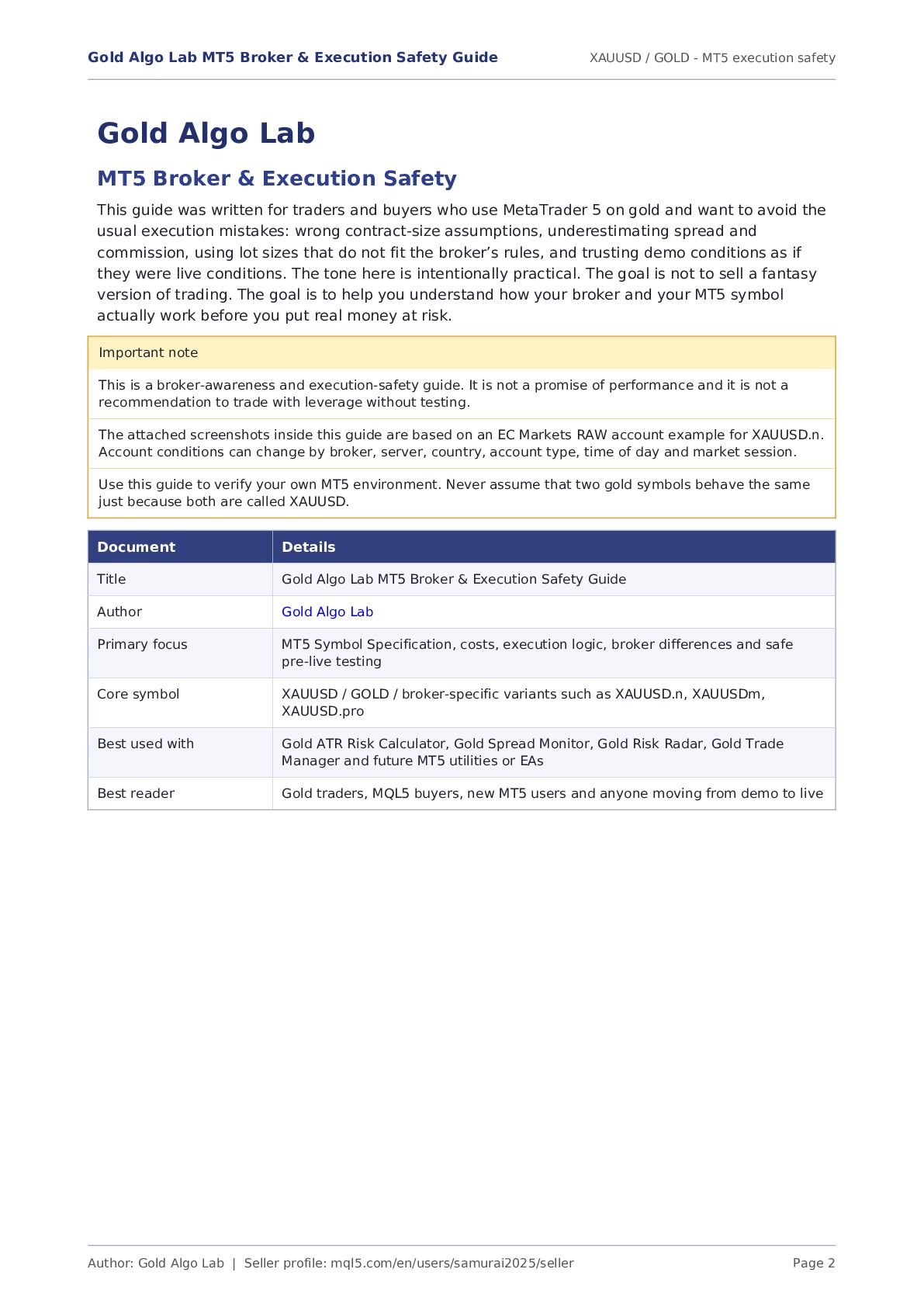
    / GOLD - MT5 execution safety Author: Gold Algo Lab | Seller profile: mql5.com/en/users/samurai2025/seller Page 2 Gold Algo Lab MT5 Broker & Execution Safety This guide was written for traders and buyers who use MetaTrader 5 on gold and want to avoid the usual execution mistakes: wrong contract-size assumptions, underestimating spread and commission, using lot sizes that do not fit the broker’s rules, and trusting demo conditions as if they were live conditions. The tone here is intentionally practical. The goal is not to sell a fantasy version of trading. The goal is to help you understand how your broker and your MT5 symbol actually work before you put real money at risk. Important note This is a broker-awareness and execution-safety guide. It is not a promise of performance and it is not a recommendation to trade with leverage without testing. The attached screenshots inside this guide are based on an EC Markets RAW account example for XAUUSD.n. Account conditions can change by broker, server, country, account type, time of day and market session. Use this guide to verify your own MT5 environment. Never assume that two gold symbols behave the same just because both are called XAUUSD. Document Details Title Gold Algo Lab MT5 Broker & Execution Safety Guide Author Gold Algo Lab Primary focus MT5 Symbol Specification, costs, execution logic, broker differences and safe pre-live testing Core symbol XAUUSD / GOLD / broker-specific variants such as XAUUSD.n, XAUUSDm, XAUUSD.pro Best used with Gold ATR Risk Calculator, Gold Spread Monitor, Gold Risk Radar, Gold Trade Manager and future MT5 utilities or EAs Best reader Gold traders, MQL5 buyers, new MT5 users and anyone moving from demo to live
  2. Gold Algo Lab MT5 Broker & Execution Safety Guide XAUUSD

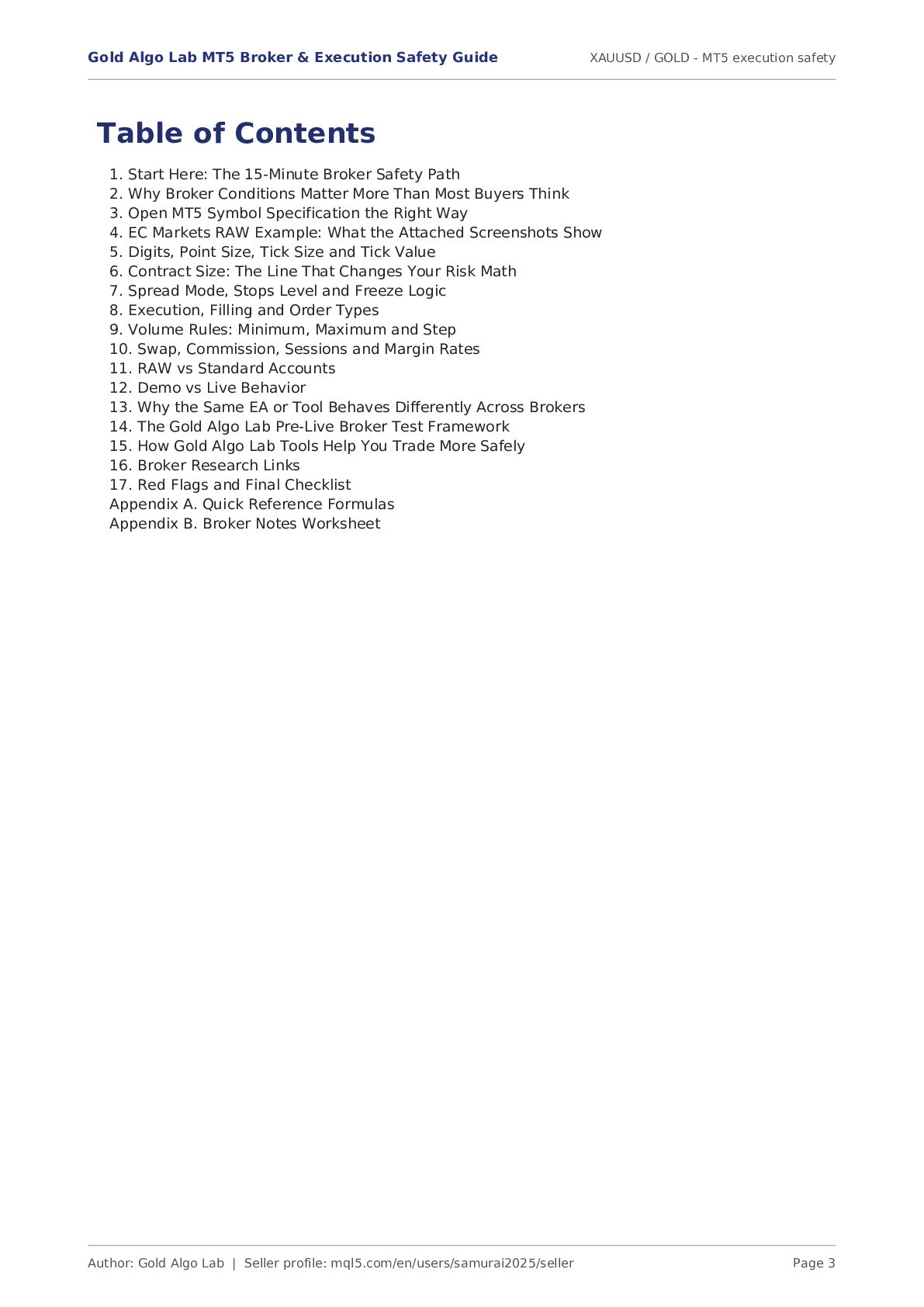
    / GOLD - MT5 execution safety Author: Gold Algo Lab | Seller profile: mql5.com/en/users/samurai2025/seller Page 3 Table of Contents 1. Start Here: The 15-Minute Broker Safety Path 2. Why Broker Conditions Matter More Than Most Buyers Think 3. Open MT5 Symbol Specification the Right Way 4. EC Markets RAW Example: What the Attached Screenshots Show 5. Digits, Point Size, Tick Size and Tick Value 6. Contract Size: The Line That Changes Your Risk Math 7. Spread Mode, Stops Level and Freeze Logic 8. Execution, Filling and Order Types 9. Volume Rules: Minimum, Maximum and Step 10. Swap, Commission, Sessions and Margin Rates 11. RAW vs Standard Accounts 12. Demo vs Live Behavior 13. Why the Same EA or Tool Behaves Differently Across Brokers 14. The Gold Algo Lab Pre-Live Broker Test Framework 15. How Gold Algo Lab Tools Help You Trade More Safely 16. Broker Research Links 17. Red Flags and Final Checklist Appendix A. Quick Reference Formulas Appendix B. Broker Notes Worksheet
  3. Gold Algo Lab MT5 Broker & Execution Safety Guide XAUUSD

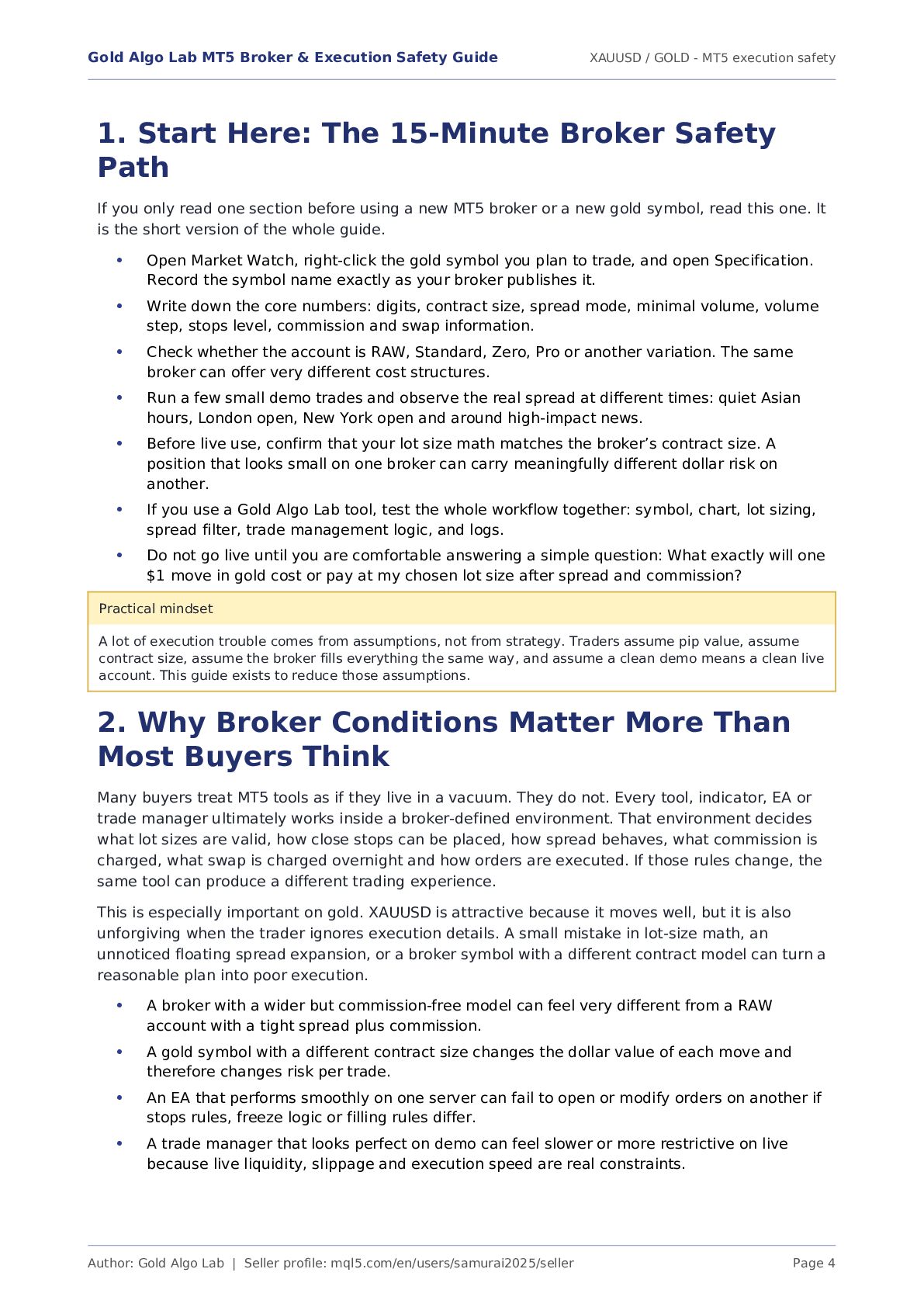
    / GOLD - MT5 execution safety Author: Gold Algo Lab | Seller profile: mql5.com/en/users/samurai2025/seller Page 4 1. Start Here: The 15-Minute Broker Safety Path If you only read one section before using a new MT5 broker or a new gold symbol, read this one. It is the short version of the whole guide. Open Market Watch, right-click the gold symbol you plan to trade, and open Specification. Record the symbol name exactly as your broker publishes it. Write down the core numbers: digits, contract size, spread mode, minimal volume, volume step, stops level, commission and swap information. Check whether the account is RAW, Standard, Zero, Pro or another variation. The same broker can offer very different cost structures. Run a few small demo trades and observe the real spread at different times: quiet Asian hours, London open, New York open and around high-impact news. Before live use, confirm that your lot size math matches the broker’s contract size. A position that looks small on one broker can carry meaningfully different dollar risk on another. If you use a Gold Algo Lab tool, test the whole workflow together: symbol, chart, lot sizing, spread filter, trade management logic, and logs. Do not go live until you are comfortable answering a simple question: What exactly will one $1 move in gold cost or pay at my chosen lot size after spread and commission? Practical mindset A lot of execution trouble comes from assumptions, not from strategy. Traders assume pip value, assume contract size, assume the broker fills everything the same way, and assume a clean demo means a clean live account. This guide exists to reduce those assumptions. 2. Why Broker Conditions Matter More Than Most Buyers Think Many buyers treat MT5 tools as if they live in a vacuum. They do not. Every tool, indicator, EA or trade manager ultimately works inside a broker-defined environment. That environment decides what lot sizes are valid, how close stops can be placed, how spread behaves, what commission is charged, what swap is charged overnight and how orders are executed. If those rules change, the same tool can produce a different trading experience. This is especially important on gold. XAUUSD is attractive because it moves well, but it is also unforgiving when the trader ignores execution details. A small mistake in lot-size math, an unnoticed floating spread expansion, or a broker symbol with a different contract model can turn a reasonable plan into poor execution. A broker with a wider but commission-free model can feel very different from a RAW account with a tight spread plus commission. A gold symbol with a different contract size changes the dollar value of each move and therefore changes risk per trade. An EA that performs smoothly on one server can fail to open or modify orders on another if stops rules, freeze logic or filling rules differ. A trade manager that looks perfect on demo can feel slower or more restrictive on live because live liquidity, slippage and execution speed are real constraints. • • • • • • • • • • •
  4. Gold Algo Lab MT5 Broker & Execution Safety Guide XAUUSD

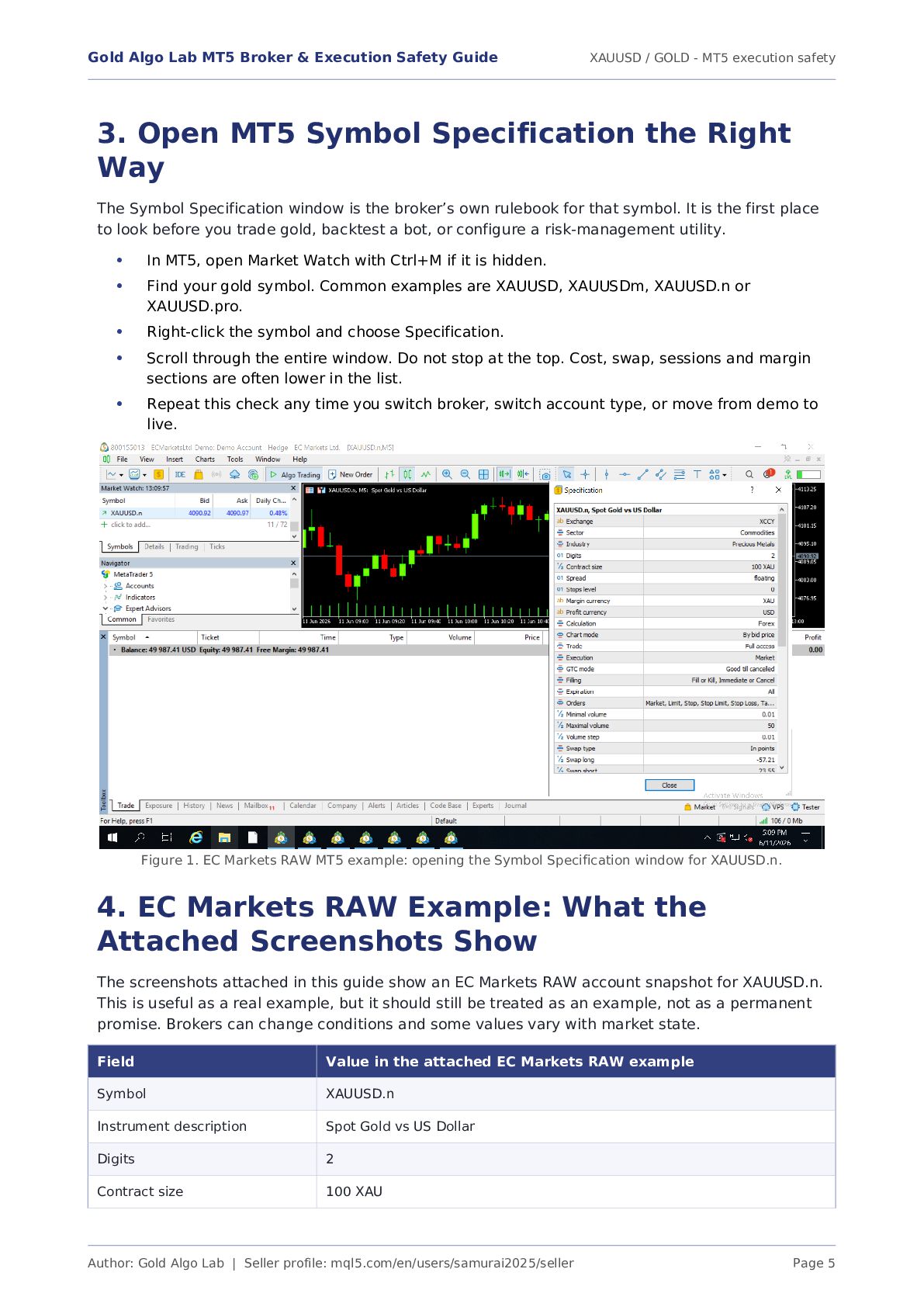
    / GOLD - MT5 execution safety Author: Gold Algo Lab | Seller profile: mql5.com/en/users/samurai2025/seller Page 5 3. Open MT5 Symbol Specification the Right Way The Symbol Specification window is the broker’s own rulebook for that symbol. It is the first place to look before you trade gold, backtest a bot, or configure a risk-management utility. In MT5, open Market Watch with Ctrl+M if it is hidden. Find your gold symbol. Common examples are XAUUSD, XAUUSDm, XAUUSD.n or XAUUSD.pro. Right-click the symbol and choose Specification. Scroll through the entire window. Do not stop at the top. Cost, swap, sessions and margin sections are often lower in the list. Repeat this check any time you switch broker, switch account type, or move from demo to live. Figure 1. EC Markets RAW MT5 example: opening the Symbol Specification window for XAUUSD.n. 4. EC Markets RAW Example: What the Attached Screenshots Show The screenshots attached in this guide show an EC Markets RAW account snapshot for XAUUSD.n. This is useful as a real example, but it should still be treated as an example, not as a permanent promise. Brokers can change conditions and some values vary with market state. Field Value in the attached EC Markets RAW example Symbol XAUUSD.n Instrument description Spot Gold vs US Dollar Digits 2 Contract size 100 XAU • • • • •
  5. Gold Algo Lab MT5 Broker & Execution Safety Guide XAUUSD

    / GOLD - MT5 execution safety Author: Gold Algo Lab | Seller profile: mql5.com/en/users/samurai2025/seller Page 6 Field Value in the attached EC Markets RAW example Spread mode Floating Stops level 0 Margin currency XAU Profit currency USD Calculation mode Forex Chart mode By bid price Trade / Execution Full access / Market execution Filling Fill or Kill, Immediate or Cancel Expiration All Orders supported Market, Limit, Stop, Stop Limit, Stop Loss, Take Profit Minimal volume 0.01 lot Maximum volume 50 lots Volume step 0.01 lot Swap type In points Swap long / short -57.21 / 23.55 Commission snapshot shown 3 USD per lot The point of this table is not to make you memorize one broker. The point is to train your eye. These are the lines that matter when you want to understand risk, order validity and execution cost. 5. Digits, Point Size, Tick Size and Tick Value The screenshot shows Digits = 2. That matters. On a two-digit gold quote, the platform displays prices such as 4090.92. In practical terms, the smallest displayed point is 0.01. A 1.00 move in gold therefore equals 100 points on that symbol. Many traders are lazy with this step. They say “gold moved 100 pips” without defining what they mean. For execution work, vague language is not good enough. You want a clean chain of logic: Digits tell you how the broker quotes the price. Point size is the smallest visible price increment on the symbol. Tick size is the smallest allowed market movement. On many gold symbols it is functionally aligned with the point size, but you should still verify it in your platform if the broker shows it. Tick value translates that smallest movement into money at a specific contract size. Some brokers show it directly; others force the trader to infer it from contract size and quote structure. Why this matters in plain English • • • •
  6. Gold Algo Lab MT5 Broker & Execution Safety Guide XAUUSD

    / GOLD - MT5 execution safety Author: Gold Algo Lab | Seller profile: mql5.com/en/users/samurai2025/seller Page 7 If you do not know whether a 0.10 move, a 1.00 move or a 10.00 move equals meaningful money on your broker, you cannot size trades with confidence. Every risk tool becomes weaker if the underlying symbol math is fuzzy. 6. Contract Size: The Line That Changes Your Risk Math For the attached EC Markets RAW example, the specification shows Contract size = 100 XAU. This is one of the most important lines in the entire window. It means that one standard lot represents 100 ounces of gold. That lets you convert price movement into money with simple approximate math. When contract size is 100 XAU: A $1.00 move in gold is roughly $100 per 1.00 lot before costs. A $1.00 move is roughly $10 per 0.10 lot before costs. A $1.00 move is roughly $1 per 0.01 lot before costs. A $5.00 stop on 0.10 lot is roughly $50 of price risk before spread, commission and slippage. This is why buyers get into trouble when they blindly port settings from one broker to another. If the contract model changes, the same lot size no longer means the same dollar risk. Example Approximate price-risk math before costs 0.01 lot, $3.00 stop $3 risk 0.05 lot, $4.00 stop $20 risk 0.10 lot, $5.00 stop $50 risk 0.25 lot, $8.00 stop $200 risk 1.00 lot, $2.00 stop $200 risk The table is approximate because real execution adds spread, commission and sometimes slippage. That extra cost is exactly why broker-aware tools matter. 7. Spread Mode, Stops Level and Freeze Logic The EC Markets RAW screenshot shows Spread = floating. This is healthy information because it tells you immediately that the spread is not fixed. The spread you see at one calm moment is not a permanent spread. The number can widen during rollover, news spikes, illiquid hours and even during normal session transitions. The same screenshot shows Stops level = 0. A zero stops level is useful because it means the broker is not imposing an additional minimum distance requirement in that field. That said, zero does not mean friction-free trading. Order rejection can still happen because of fast price change, freeze logic, spread expansion or execution timing. Freeze level is not visible in the attached snapshot. That is a reminder in itself: if your broker shows a freeze level, pay attention to it. Freeze rules can prevent immediate order modification when price is too close to the market. That matters to trailing-stop logic, break-even logic and rapid trade management. Use floating spread as a warning label, not as a marketing slogan. A low spread at one moment says nothing about the spread ten minutes before major news. • • • • •
  7. Gold Algo Lab MT5 Broker & Execution Safety Guide XAUUSD

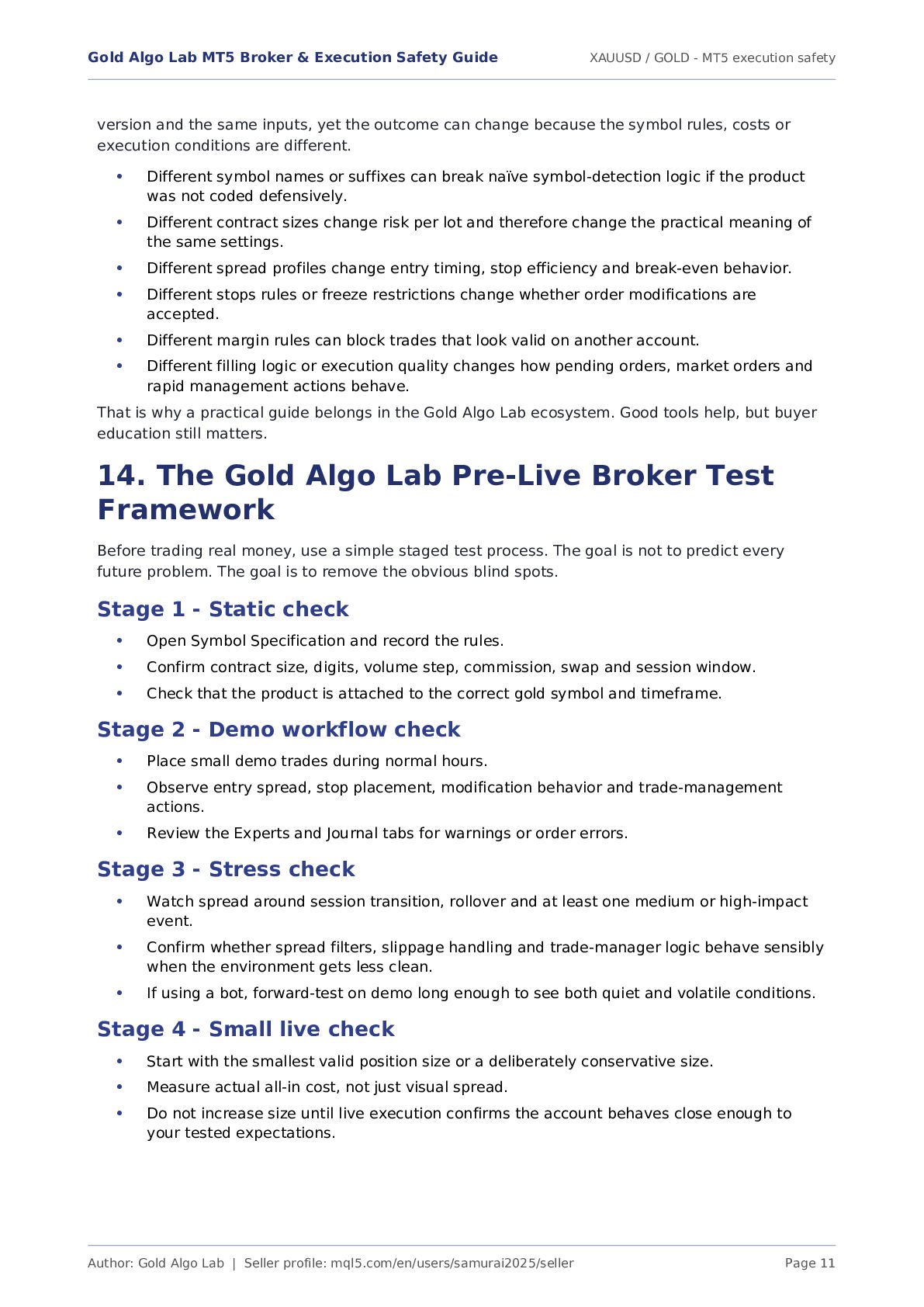
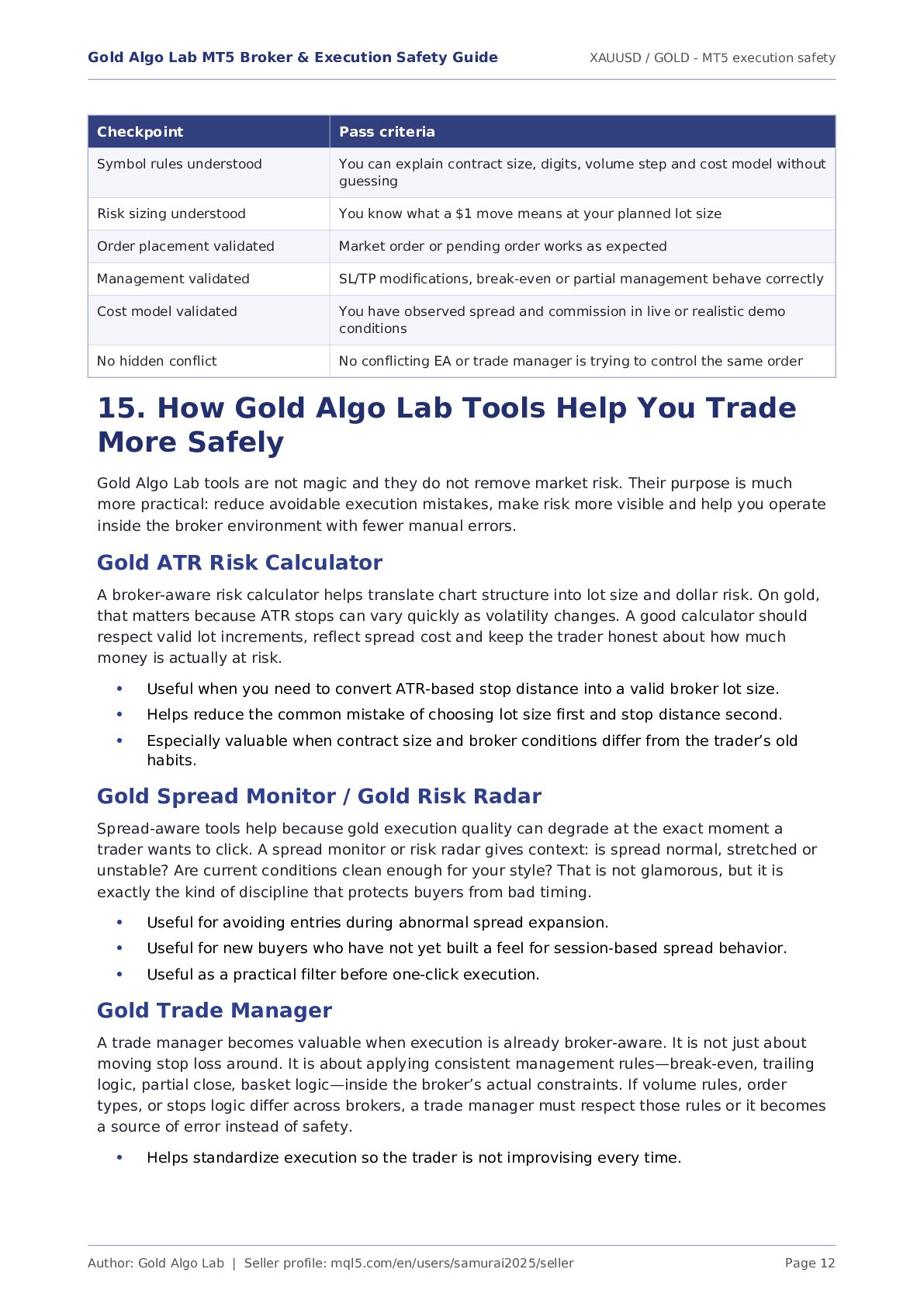
    / GOLD - MT5 execution safety Author: Gold Algo Lab | Seller profile: mql5.com/en/users/samurai2025/seller Page 8 Treat “Stops level = 0” as a helpful condition, not as permission to place unrealistic stops during volatile conditions. If your trade manager or EA modifies orders often, freeze restrictions matter more than many traders realize. 8. Execution, Filling and Order Types The specification shows Market execution together with filling modes Fill or Kill and Immediate or Cancel. This tells you something important about how your orders are processed. MT5 is not just showing decorative text here. It is telling you which execution logic your broker supports. Market execution means your order is filled at the best available market price, not at a guaranteed fixed quote you see on screen. Fill or Kill means the order must be filled completely at acceptable conditions or cancelled. Immediate or Cancel allows partial filling logic in some contexts and then cancels the rest that cannot be filled immediately. The supported order list matters because some tools or workflows rely on pending orders, stop orders or stop-limit behavior. If the broker does not support the order type you expect, the tool can fail or behave differently. This is one reason the same EA can pass smoothly on one broker and behave awkwardly on another. The broker is not a neutral background. The broker defines the operating environment. 9. Volume Rules: Minimum, Maximum and Step The EC Markets RAW example shows a minimal volume of 0.01, a maximum volume of 50 and a volume step of 0.01. These three lines are simple, but they prevent a lot of failed orders. Minimal volume tells you the smallest position size you can send. Maximum volume tells you the largest single position the symbol allows. Volume step tells you the allowed increment. If step is 0.01, then 0.01, 0.02, 0.03 and 0.10 are valid, but 0.015 is not. If you use an ATR-based lot calculator, this is where theory meets broker reality. Your desired risk may produce a raw lot value such as 0.137. If the broker step is 0.01, the final lot must be rounded to a valid step. Good tools handle this. Weak tools do not. 10. Swap, Commission, Sessions and Margin Rates The lower part of the specification window often gets ignored by beginners, which is unfortunate because that is where some of the most expensive details live. The attached EC Markets RAW screenshots show swap, swap multipliers, commission, trading sessions and margin-rate information. • • • • • • • • •
  8. Gold Algo Lab MT5 Broker & Execution Safety Guide XAUUSD

    / GOLD - MT5 execution safety Author: Gold Algo Lab | Seller profile: mql5.com/en/users/samurai2025/seller Page 9 Figure 2. EC Markets RAW example: swap, swap multipliers, commission and session schedule. Figure 3. EC Markets RAW example: lower specification section showing sessions and margin-rate snapshot. The example shows Swap type = In points. This means the overnight holding cost is expressed in points rather than as a flat dollar number. The example shows Swap long = -57.21 and Swap short = 23.55. These are not symmetrical. Holding long and short positions overnight does not carry the same cost. Wednesday has a triple swap multiplier in the example. This is common market practice because brokers account for weekend rollover through midweek swap charging. The example shows Commission = 3 USD per lot. Verify on your own platform and trade history whether this is applied per deal or per side in your account environment. Do not assume from memory. Sessions matter because not every symbol is priced and tradable the same way across the entire 24-hour day. The screenshot shows defined quotes and trade sessions. A trader who ignores session structure can misread spread behavior, liquidity and order responsiveness. • • • •
  9. Gold Algo Lab MT5 Broker & Execution Safety Guide XAUUSD

    / GOLD - MT5 execution safety Author: Gold Algo Lab | Seller profile: mql5.com/en/users/samurai2025/seller Page 10 Margin-rate information matters because leverage advertisements often sound bigger than the real trading experience. The platform-level margin snapshot tells you what capital the broker expects for position exposure. If you ignore this, you can discover margin pressure only after the trade is already on. 11. RAW vs Standard Accounts Category RAW-style account Standard-style account Spread Usually tighter base spread, but not fixed Usually wider all-in spread Commission Often charged separately Often built into spread Best for Traders who care about cost clarity, execution detail and tool-based risk control Traders who want simpler visual pricing and are willing to pay through wider spread Common mistake Looking only at spread and forgetting commission Thinking “no commission” means cheaper execution Why it matters to tools Risk and execution utilities can model entry cost more precisely Spread-sensitive tools may trigger differently if the spread is structurally wider A RAW account is not automatically better. It is simply more transparent for some workflows. If you scalp or actively manage trades on gold, you usually want to know exactly how much cost is spread and how much is commission. If you swing trade with wide stops, the account-type difference may matter less than you expect. Context matters. 12. Demo vs Live Behavior Area Demo account Live account Spread impression Often stable enough for testing, but can still be unrealistic Real liquidity, real expansions, real market stress Slippage Often lighter or less painful Can be very real during news or thin liquidity Psychology No real pain, easier decision-making Emotions appear, hesitation appears, discipline gets tested Execution comfort Usually feels smooth May reveal rejection, delay or modification friction Use case Workflow and feature validation Only after you trust your rules, your symbol math and your broker conditions Demo is useful, but it is not the full truth. Use demo to validate the product, the chart workflow, the symbol, the lot-size logic and the general behavior of your broker’s MT5 setup. Then move to small live size if and only if the environment remains acceptable. Do not skip the small-live phase. 13. Why the Same EA or Tool Behaves Differently Across Brokers This is one of the most common buyer questions on MQL5, and the answer is usually boring but important: because the broker environment is different. The tool may be the same file, the same
  10. Gold Algo Lab MT5 Broker & Execution Safety Guide XAUUSD

    / GOLD - MT5 execution safety Author: Gold Algo Lab | Seller profile: mql5.com/en/users/samurai2025/seller Page 11 version and the same inputs, yet the outcome can change because the symbol rules, costs or execution conditions are different. Different symbol names or suffixes can break naïve symbol-detection logic if the product was not coded defensively. Different contract sizes change risk per lot and therefore change the practical meaning of the same settings. Different spread profiles change entry timing, stop efficiency and break-even behavior. Different stops rules or freeze restrictions change whether order modifications are accepted. Different margin rules can block trades that look valid on another account. Different filling logic or execution quality changes how pending orders, market orders and rapid management actions behave. That is why a practical guide belongs in the Gold Algo Lab ecosystem. Good tools help, but buyer education still matters. 14. The Gold Algo Lab Pre-Live Broker Test Framework Before trading real money, use a simple staged test process. The goal is not to predict every future problem. The goal is to remove the obvious blind spots. Stage 1 - Static check Open Symbol Specification and record the rules. Confirm contract size, digits, volume step, commission, swap and session window. Check that the product is attached to the correct gold symbol and timeframe. Stage 2 - Demo workflow check Place small demo trades during normal hours. Observe entry spread, stop placement, modification behavior and trade-management actions. Review the Experts and Journal tabs for warnings or order errors. Stage 3 - Stress check Watch spread around session transition, rollover and at least one medium or high-impact event. Confirm whether spread filters, slippage handling and trade-manager logic behave sensibly when the environment gets less clean. If using a bot, forward-test on demo long enough to see both quiet and volatile conditions. Stage 4 - Small live check Start with the smallest valid position size or a deliberately conservative size. Measure actual all-in cost, not just visual spread. Do not increase size until live execution confirms the account behaves close enough to your tested expectations. • • • • • • • • • • • • • • • • • •
  11. Gold Algo Lab MT5 Broker & Execution Safety Guide XAUUSD

    / GOLD - MT5 execution safety Author: Gold Algo Lab | Seller profile: mql5.com/en/users/samurai2025/seller Page 12 Checkpoint Pass criteria Symbol rules understood You can explain contract size, digits, volume step and cost model without guessing Risk sizing understood You know what a $1 move means at your planned lot size Order placement validated Market order or pending order works as expected Management validated SL/TP modifications, break-even or partial management behave correctly Cost model validated You have observed spread and commission in live or realistic demo conditions No hidden conflict No conflicting EA or trade manager is trying to control the same order 15. How Gold Algo Lab Tools Help You Trade More Safely Gold Algo Lab tools are not magic and they do not remove market risk. Their purpose is much more practical: reduce avoidable execution mistakes, make risk more visible and help you operate inside the broker environment with fewer manual errors. Gold ATR Risk Calculator A broker-aware risk calculator helps translate chart structure into lot size and dollar risk. On gold, that matters because ATR stops can vary quickly as volatility changes. A good calculator should respect valid lot increments, reflect spread cost and keep the trader honest about how much money is actually at risk. Useful when you need to convert ATR-based stop distance into a valid broker lot size. Helps reduce the common mistake of choosing lot size first and stop distance second. Especially valuable when contract size and broker conditions differ from the trader’s old habits. Gold Spread Monitor / Gold Risk Radar Spread-aware tools help because gold execution quality can degrade at the exact moment a trader wants to click. A spread monitor or risk radar gives context: is spread normal, stretched or unstable? Are current conditions clean enough for your style? That is not glamorous, but it is exactly the kind of discipline that protects buyers from bad timing. Useful for avoiding entries during abnormal spread expansion. Useful for new buyers who have not yet built a feel for session-based spread behavior. Useful as a practical filter before one-click execution. Gold Trade Manager A trade manager becomes valuable when execution is already broker-aware. It is not just about moving stop loss around. It is about applying consistent management rules—break-even, trailing logic, partial close, basket logic—inside the broker’s actual constraints. If volume rules, order types, or stops logic differ across brokers, a trade manager must respect those rules or it becomes a source of error instead of safety. Helps standardize execution so the trader is not improvising every time. • • • • • • •
  12. Gold Algo Lab MT5 Broker & Execution Safety Guide XAUUSD

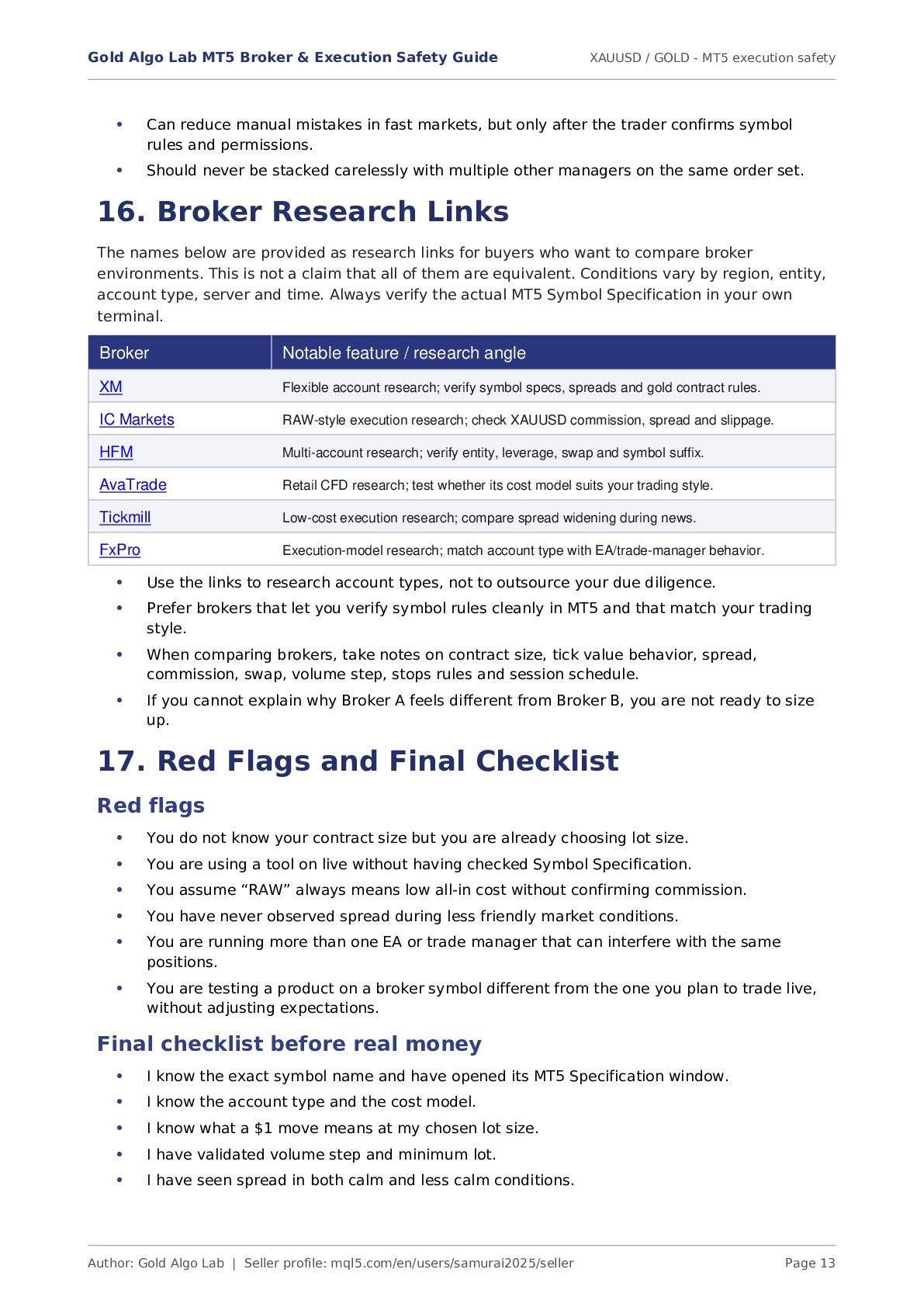
    / GOLD - MT5 execution safety Author: Gold Algo Lab | Seller profile: mql5.com/en/users/samurai2025/seller Page 13 Can reduce manual mistakes in fast markets, but only after the trader confirms symbol rules and permissions. Should never be stacked carelessly with multiple other managers on the same order set. 16. Broker Research Links The names below are provided as research links for buyers who want to compare broker environments. This is not a claim that all of them are equivalent. Conditions vary by region, entity, account type, server and time. Always verify the actual MT5 Symbol Specification in your own terminal. Broker Research link XM https://affs.click/oJ1tX IC Markets https://icmarkets.com/?camp=91539 HFM https://www.hfm.com/sv/en/?refid=30523907 AvaTrade https://www.avatrade.com?tag=220539 Tickmill Tickmill affiliate research link FXPRO https://www.fxpro.com/?ib=2jFYJZpGx Use the links to research account types, not to outsource your due diligence. Prefer brokers that let you verify symbol rules cleanly in MT5 and that match your trading style. When comparing brokers, take notes on contract size, tick value behavior, spread, commission, swap, volume step, stops rules and session schedule. If you cannot explain why Broker A feels different from Broker B, you are not ready to size up. 17. Red Flags and Final Checklist Red flags You do not know your contract size but you are already choosing lot size. You are using a tool on live without having checked Symbol Specification. You assume “RAW” always means low all-in cost without confirming commission. You have never observed spread during less friendly market conditions. You are running more than one EA or trade manager that can interfere with the same positions. You are testing a product on a broker symbol different from the one you plan to trade live, without adjusting expectations. Final checklist before real money I know the exact symbol name and have opened its MT5 Specification window. I know the account type and the cost model. I know what a $1 move means at my chosen lot size. I have validated volume step and minimum lot. I have seen spread in both calm and less calm conditions. Broker Notable feature / research angle XM Flexible account research; verify symbol specs, spreads and gold contract rules. IC Markets RAW-style execution research; check XAUUSD commission, spread and slippage. HFM Multi-account research; verify entity, leverage, swap and symbol suffix. AvaTrade Retail CFD research; test whether its cost model suits your trading style. Tickmill Low-cost execution research; compare spread widening during news. FxPro Execution-model research; match account type with EA/trade-manager behavior. • • • • • • • • • • • • • • • • •
  13. Gold Algo Lab MT5 Broker & Execution Safety Guide XAUUSD

    / GOLD - MT5 execution safety Author: Gold Algo Lab | Seller profile: mql5.com/en/users/samurai2025/seller Page 14 I have tested my tool or EA on demo and, ideally, at small live size. I am not depending on hope, assumptions or memory. Bottom line The best broker for your workflow is not the broker with the prettiest marketing page. It is the broker whose symbol rules, execution quality and cost structure you have actually tested and understood. Gold Algo Lab tools are designed to work best when the buyer approaches execution in that same practical way. • •
  14. Gold Algo Lab MT5 Broker & Execution Safety Guide XAUUSD

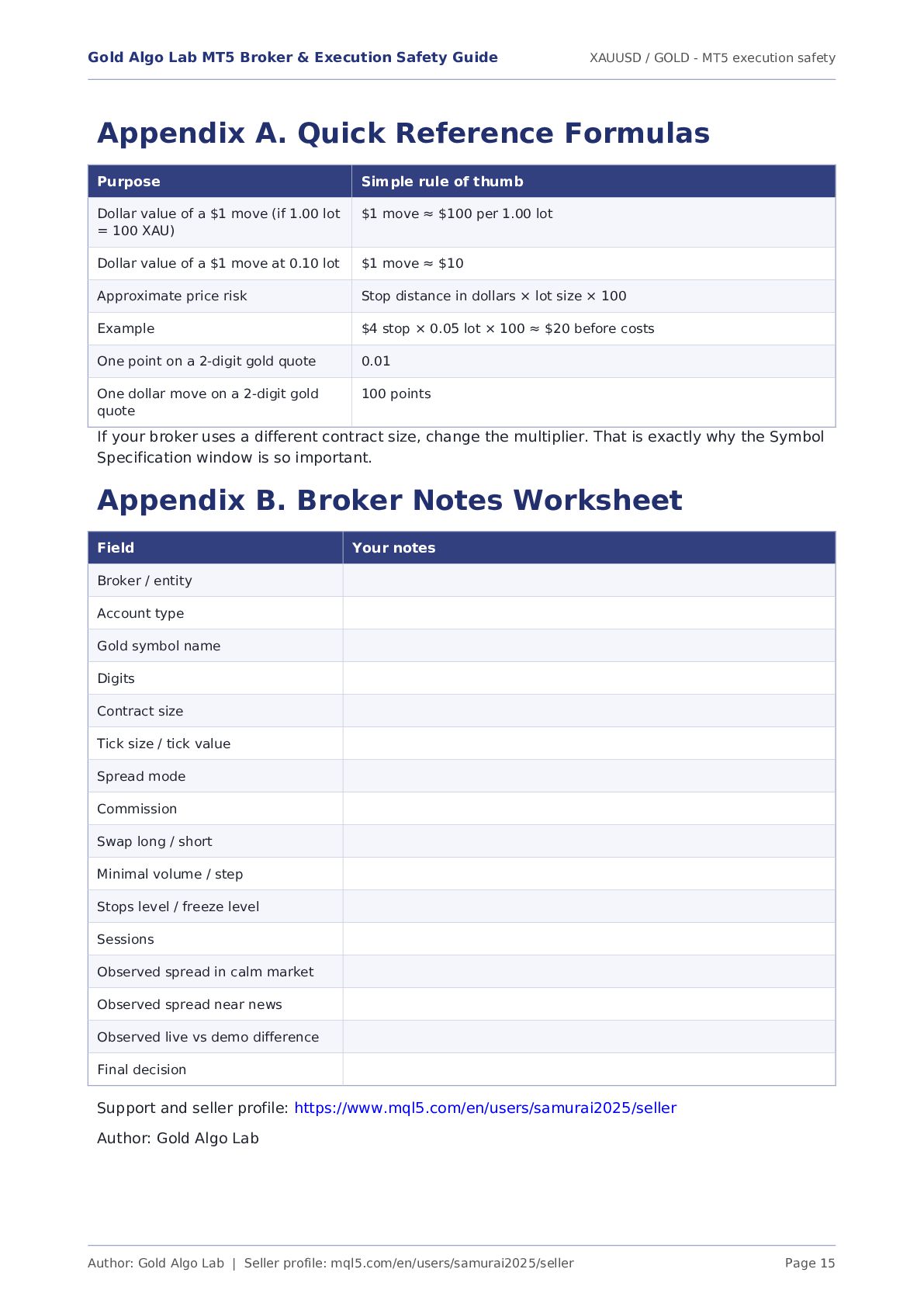
    / GOLD - MT5 execution safety Author: Gold Algo Lab | Seller profile: mql5.com/en/users/samurai2025/seller Page 15 Appendix A. Quick Reference Formulas Purpose Simple rule of thumb Dollar value of a $1 move (if 1.00 lot = 100 XAU) $1 move ≈ $100 per 1.00 lot Dollar value of a $1 move at 0.10 lot $1 move ≈ $10 Approximate price risk Stop distance in dollars × lot size × 100 Example $4 stop × 0.05 lot × 100 ≈ $20 before costs One point on a 2-digit gold quote 0.01 One dollar move on a 2-digit gold quote 100 points If your broker uses a different contract size, change the multiplier. That is exactly why the Symbol Specification window is so important. Appendix B. Broker Notes Worksheet Field Your notes Broker / entity Account type Gold symbol name Digits Contract size Tick size / tick value Spread mode Commission Swap long / short Minimal volume / step Stops level / freeze level Sessions Observed spread in calm market Observed spread near news Observed live vs demo difference Final decision Support and seller profile: https://www.mql5.com/en/users/samurai2025/seller Author: Gold Algo Lab