Share
Find and share across teams (AWS Agent Registry) | Learn Amazon Bedrock AgentCore with Kiro 12
This Level 300 deck shows how AWS Agent Registry lets teams publish the agents, tools and skills they build so that others in the company find only approved ones, with the help desk agent of a made-up online electronics shop: an English registry in the Tokyo Region with IAM inbound auth and manual approval, the AgentCore Gateway of deck 04 put in as an MCP record and approved by a curator, a search with the AWS CLI and with the MCP endpoint of the registry that finds it by words not in the record, and unsigned requests that are refused, all with real terminal screens and figures that use the official AWS icons. It then covers the four roles and their IAM permissions, the record life cycle, approval notices through Amazon EventBridge, organization auto-detection, sharing with AWS RAM and AWS PrivateLink, clean-up and pricing, as deck 12 (Govern and share) of the series Learn Amazon Bedrock AgentCore with Kiro.

Riku INADA PRO
Annual Pro sale · Save $30
Have presentations of your own?
Share with private links, password protection, and more control over your work.
Transcript
43 slides
-
Learn Amazon Bedrock AgentCore with Kiro 12 Govern and share
Level 300 Find and share across teams AWS Agent Registry As of November 2026 (AWS CLI 2.38.5) November 2026 Riku Inada Amazon Web Services Japan © 2026, Amazon Web Services, Inc. or its affiliates. All rights reserved. 12 Kiro + AgentCore 1 -
Introduction About me Riku Inada Amazon Web Services Japan G.K.
Solutions Architect Works mainly with manufacturing customers Recent work Promoting the AI-Driven Development Life Cycle (AI-DLC) Writing and speaking about Kiro and AWS Amplify © 2026, Amazon Web Services, Inc. or its affiliates. All rights reserved. X @inada_riku Speaker Deck speakerdeck.com/inariku Zenn zenn.dev/inariku GitHub github.com/inariku 2 -
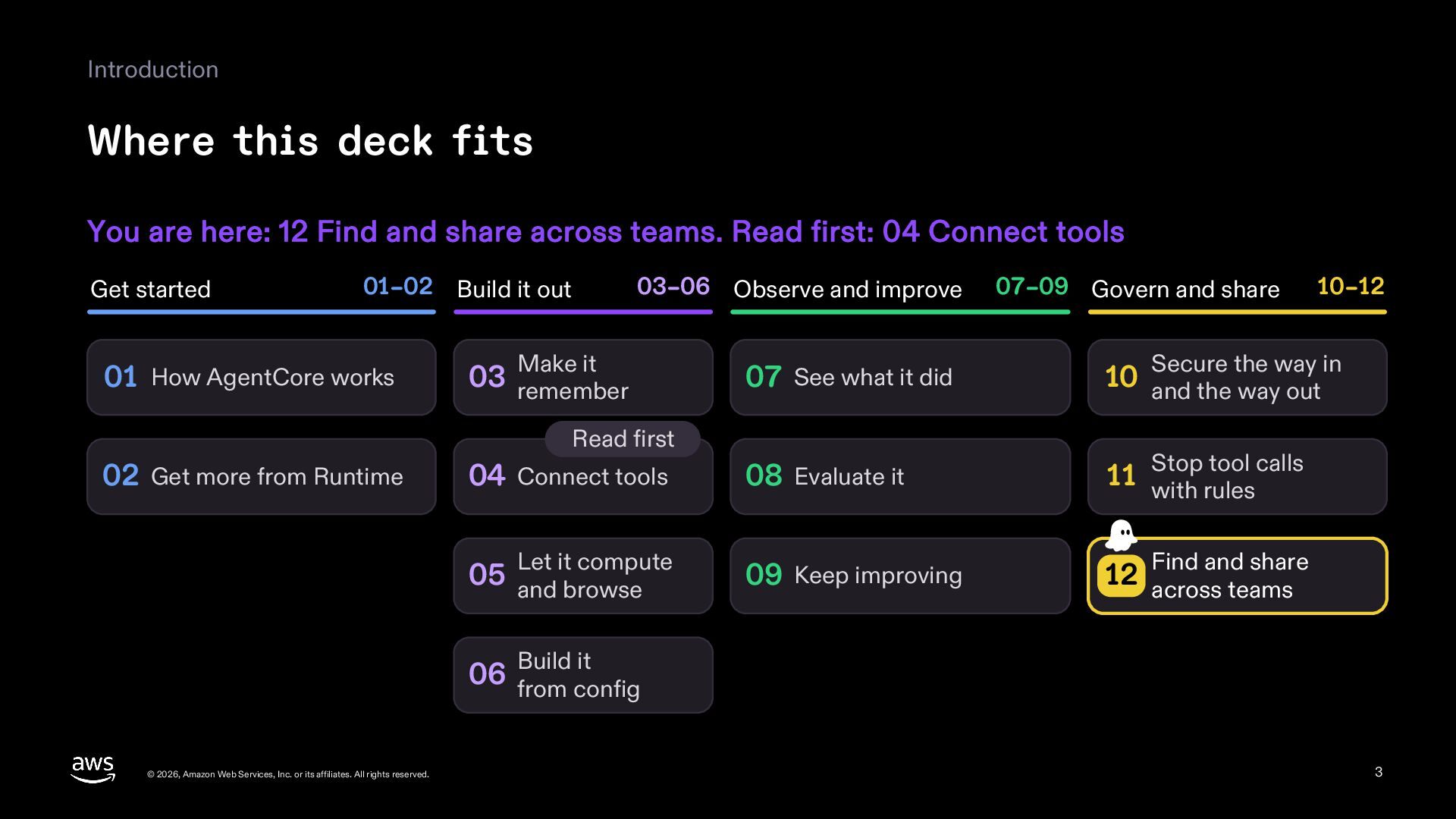
Introduction Where this deck fits You are here: 12 Find
and share across teams. Read first: 04 Connect tools Get started 01–02 Build it out 01 How AgentCore works 03–06 Observe and improve Make it 03 remember 04 Connect tools Let it compute 05 and browse 10–12 Secure the way in 07 See what it did 10 and the way out 08 Evaluate it tool calls 11 Stop with rules 09 Keep improving 12 across teams Read first 02 Get more from Runtime 07–09 Govern and share Find and share Build it 06 from config © 2026, Amazon Web Services, Inc. or its affiliates. All rights reserved. 3 -
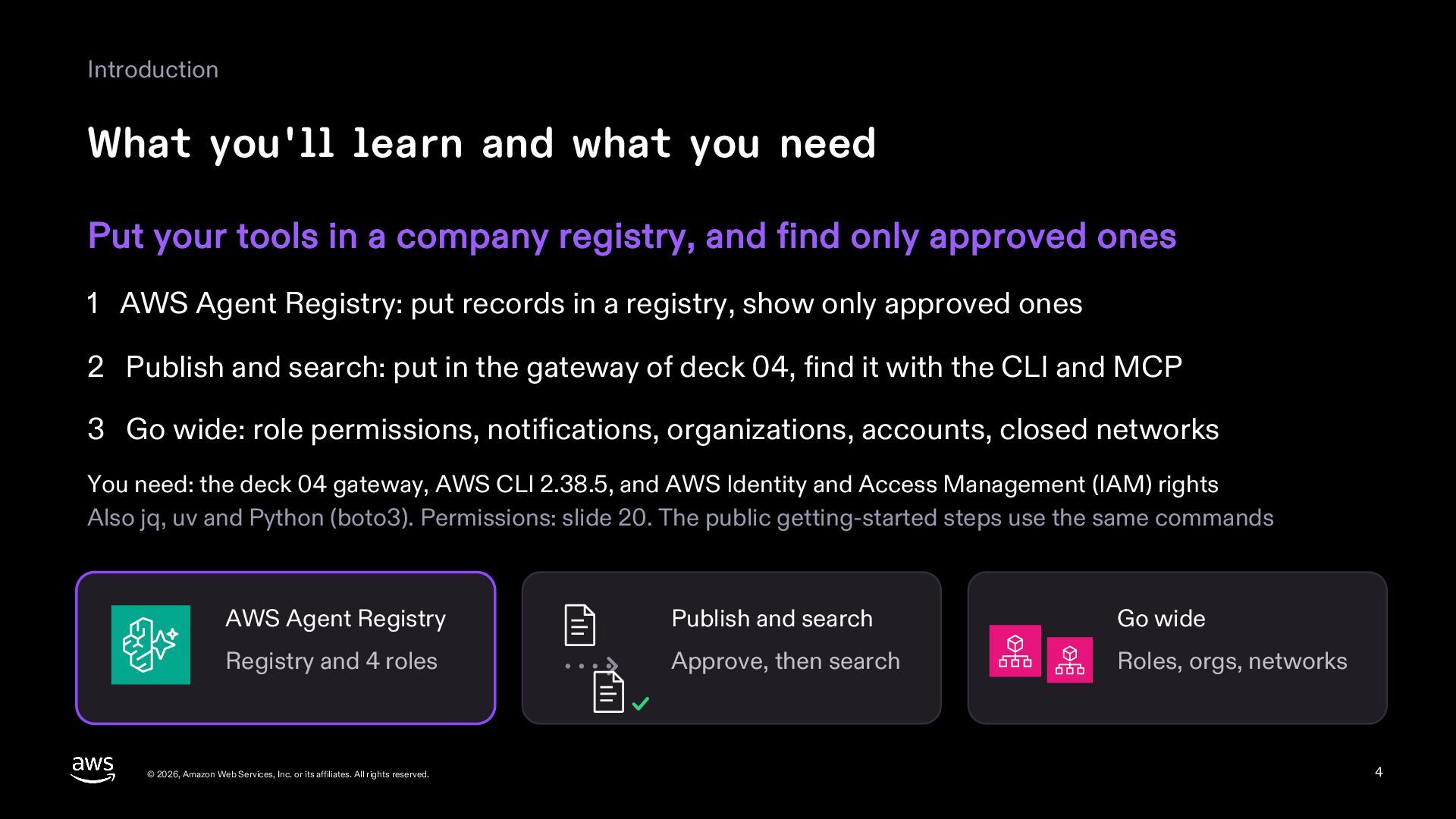
Introduction What you'll learn and what you need Put your
tools in a company registry, and find only approved ones 1 AWS Agent Registry: put records in a registry, show only approved ones 2 Publish and search: put in the gateway of deck 04, find it with the CLI and MCP 3 Go wide: role permissions, notifications, organizations, accounts, closed networks You need: the deck 04 gateway, AWS CLI 2.38.5, and AWS Identity and Access Management (IAM) rights Also jq, uv and Python (boto3). Permissions: slide 20. The public getting-started steps use the same commands AWS Agent Registry Publish and search Go wide Registry and 4 roles Approve, then search Roles, orgs, networks © 2026, Amazon Web Services, Inc. or its affiliates. All rights reserved. 4 -
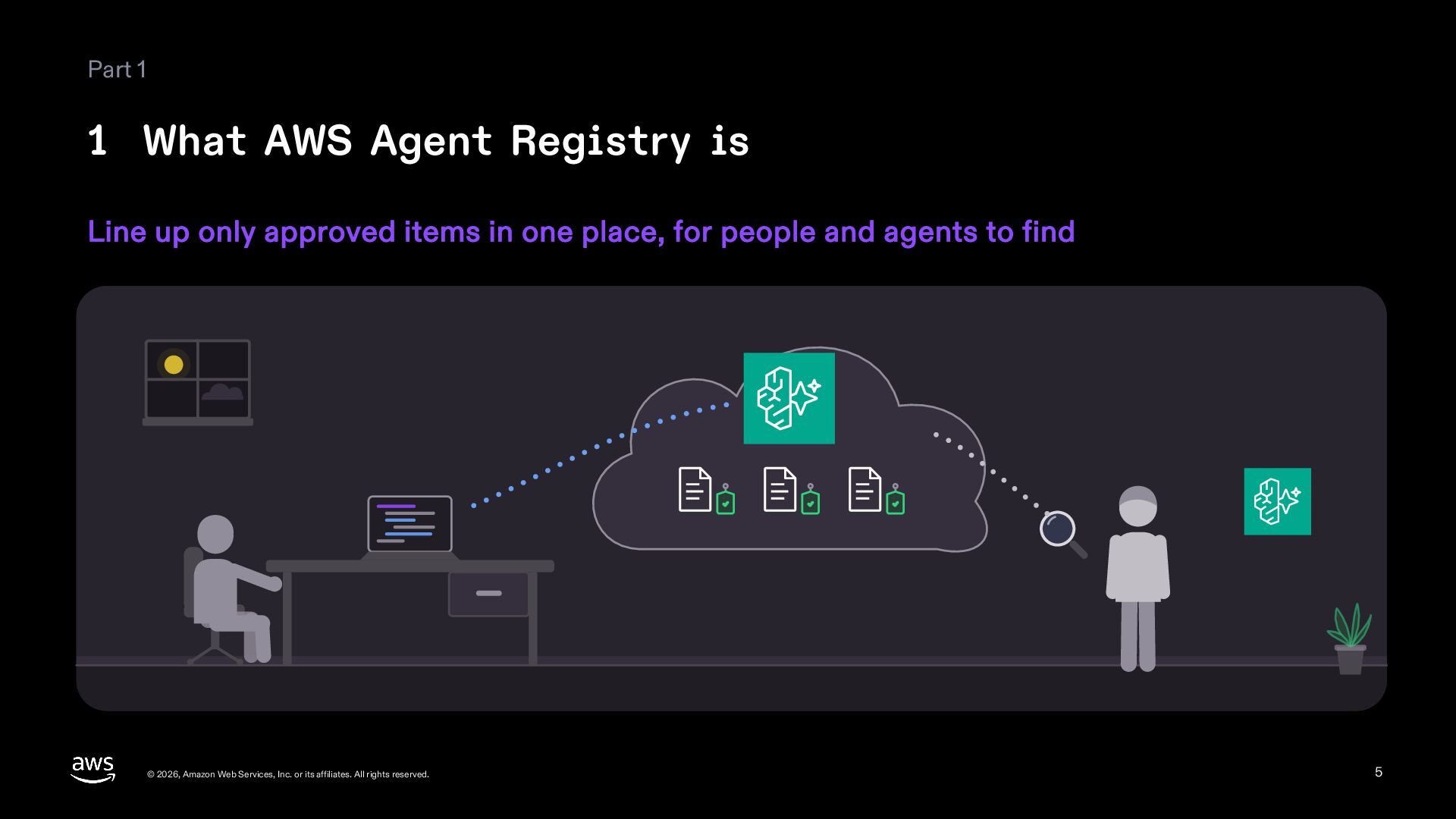
Part 1 1 What AWS Agent Registry is Line up
only approved items in one place, for people and agents to find © 2026, Amazon Web Services, Inc. or its affiliates. All rights reserved. 5 -
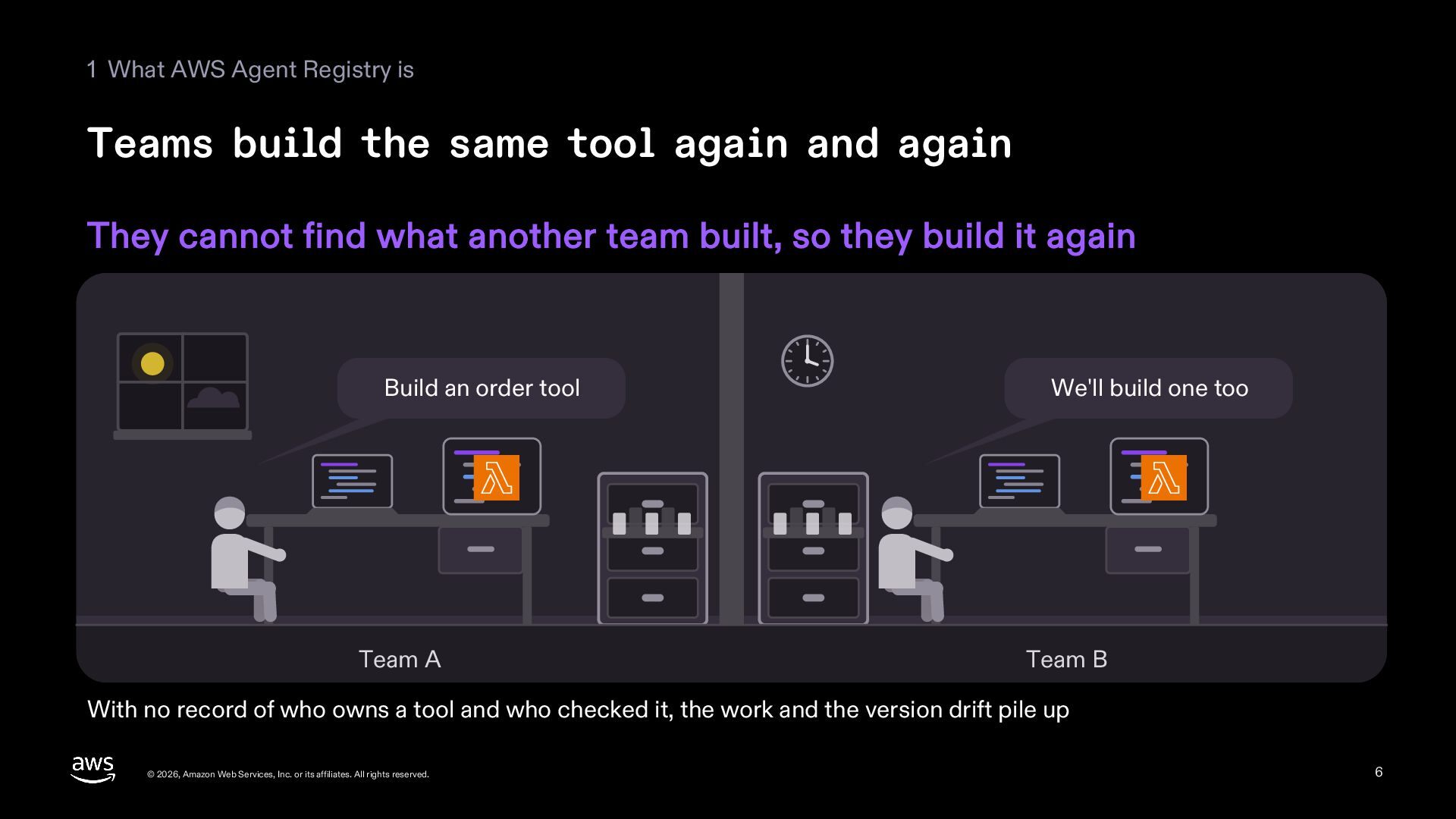
1 What AWS Agent Registry is Teams build the same
tool again and again They cannot find what another team built, so they build it again Build an order tool Team A We'll build one too Team B With no record of who owns a tool and who checked it, the work and the version drift pile up © 2026, Amazon Web Services, Inc. or its affiliates. All rights reserved. 6 -
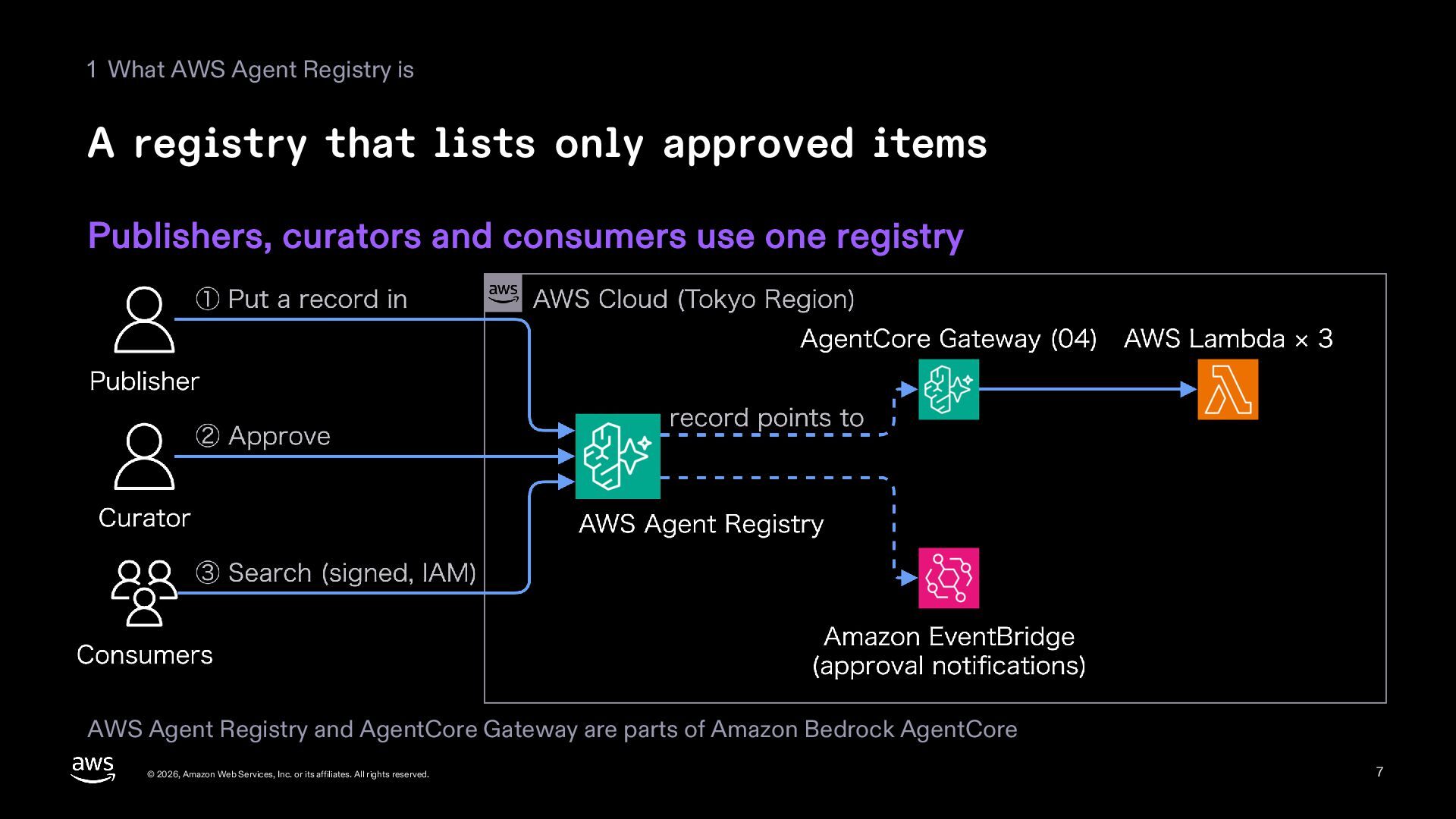
1 What AWS Agent Registry is A registry that lists
only approved items Publishers, curators and consumers use one registry AWS Agent Registry and AgentCore Gateway are parts of Amazon Bedrock AgentCore © 2026, Amazon Web Services, Inc. or its affiliates. All rights reserved. 7 -
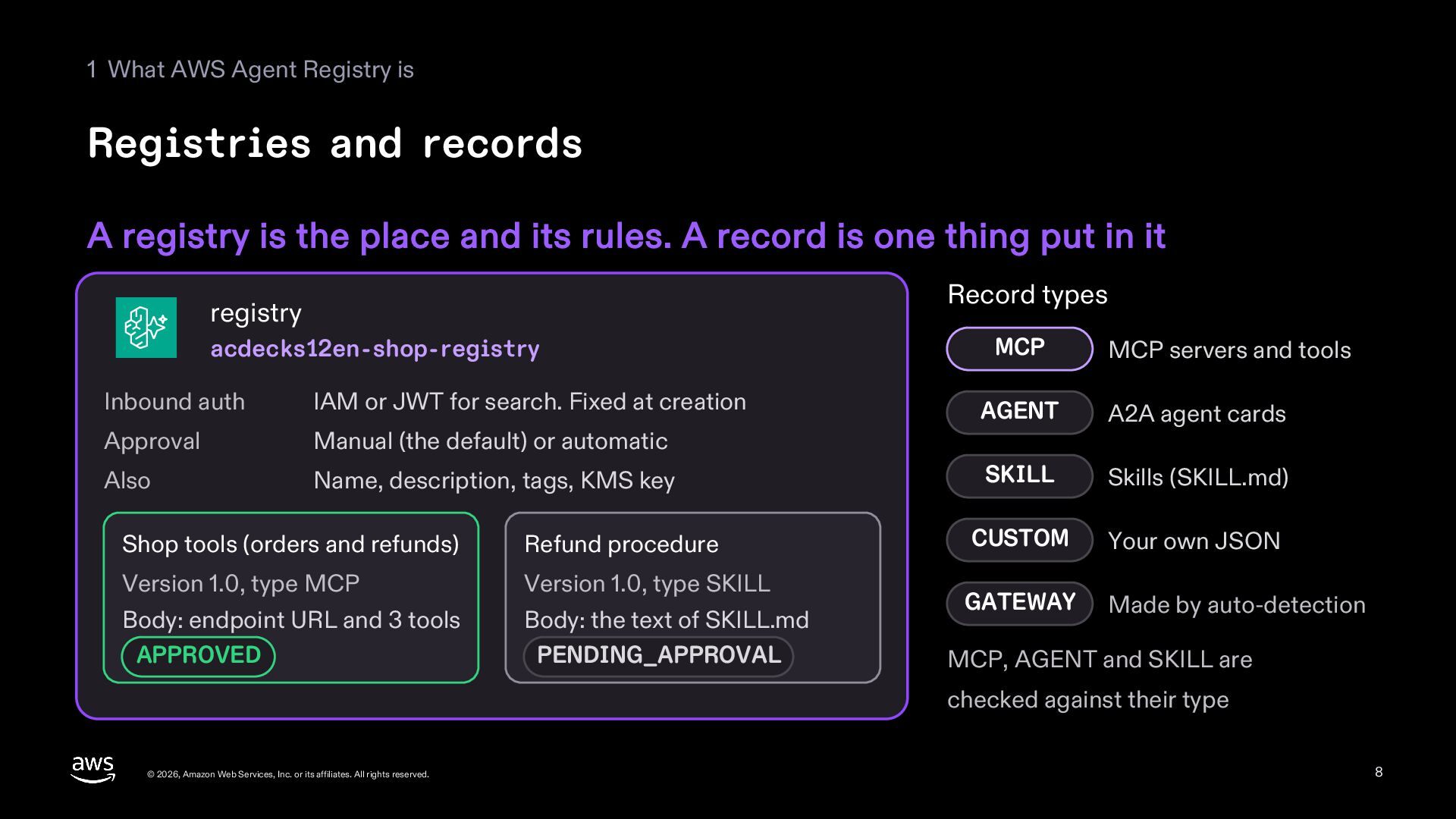
1 What AWS Agent Registry is Registries and records A
registry is the place and its rules. A record is one thing put in it Record types registry acdecks12en-shop-registry Inbound auth IAM or JWT for search. Fixed at creation Approval Manual (the default) or automatic Also Name, description, tags, KMS key Shop tools (orders and refunds) Refund procedure Version 1.0, type MCP Version 1.0, type SKILL Body: endpoint URL and 3 tools APPROVED Body: the text of SKILL.md PENDING_APPROVAL MCP MCP servers and tools AGENT A2A agent cards SKILL Skills (SKILL.md) CUSTOM Your own JSON GATEWAY Made by auto-detection MCP, AGENT and SKILL are checked against their type © 2026, Amazon Web Services, Inc. or its affiliates. All rights reserved. 8 -
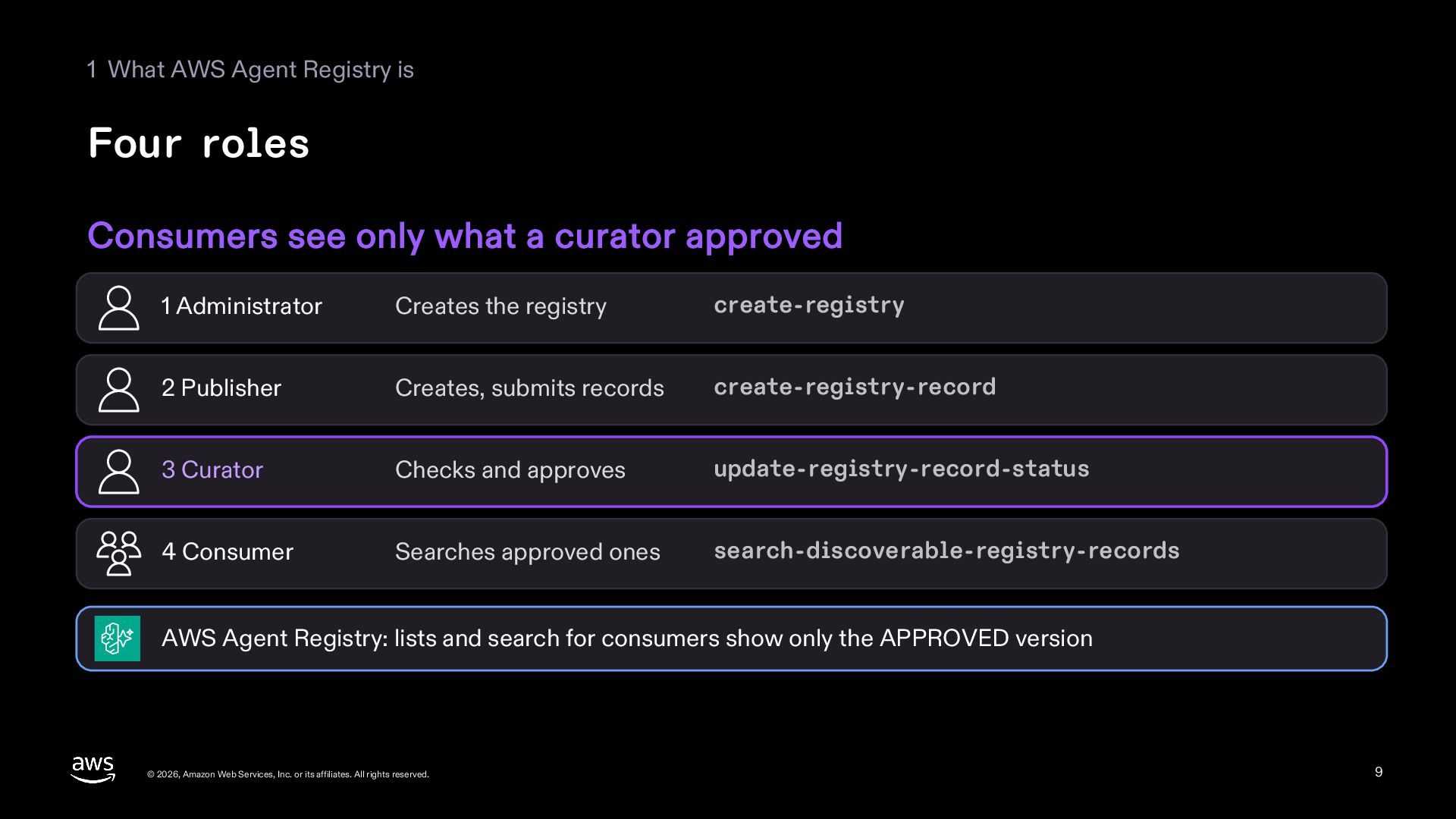
1 What AWS Agent Registry is Four roles Consumers see
only what a curator approved 1 Administrator Creates the registry create-registry 2 Publisher Creates, submits records create-registry-record 3 Curator Checks and approves update-registry-record-status 4 Consumer Searches approved ones search-discoverable-registry-records AWS Agent Registry: lists and search for consumers show only the APPROVED version © 2026, Amazon Web Services, Inc. or its affiliates. All rights reserved. 9 -
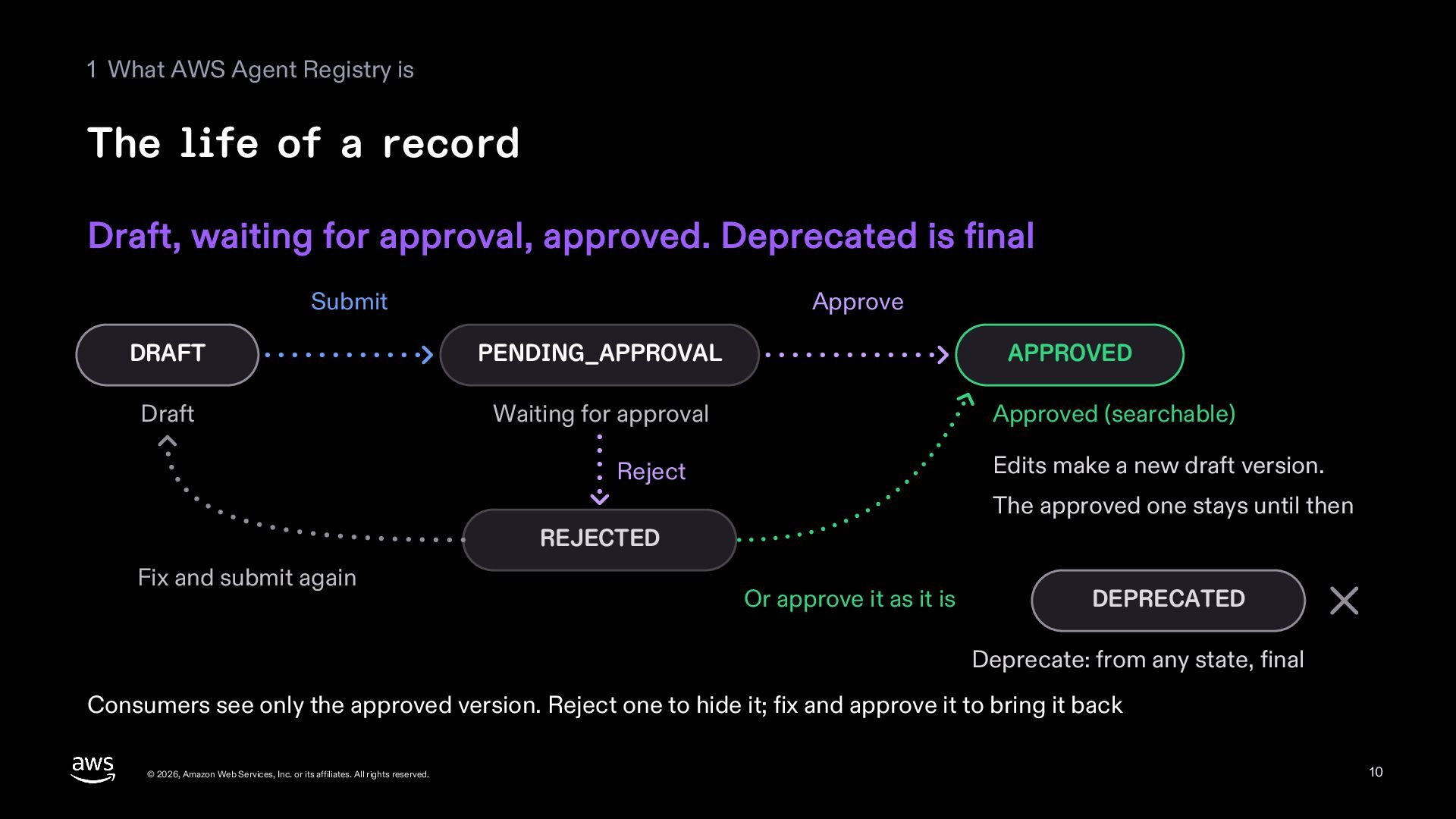
1 What AWS Agent Registry is The life of a
record Draft, waiting for approval, approved. Deprecated is final Submit Approve DRAFT PENDING_APPROVAL APPROVED Draft Waiting for approval Approved (searchable) Edits make a new draft version. Reject The approved one stays until then REJECTED Fix and submit again Or approve it as it is DEPRECATED Deprecate: from any state, final Consumers see only the approved version. Reject one to hide it; fix and approve it to bring it back © 2026, Amazon Web Services, Inc. or its affiliates. All rights reserved. 10 -
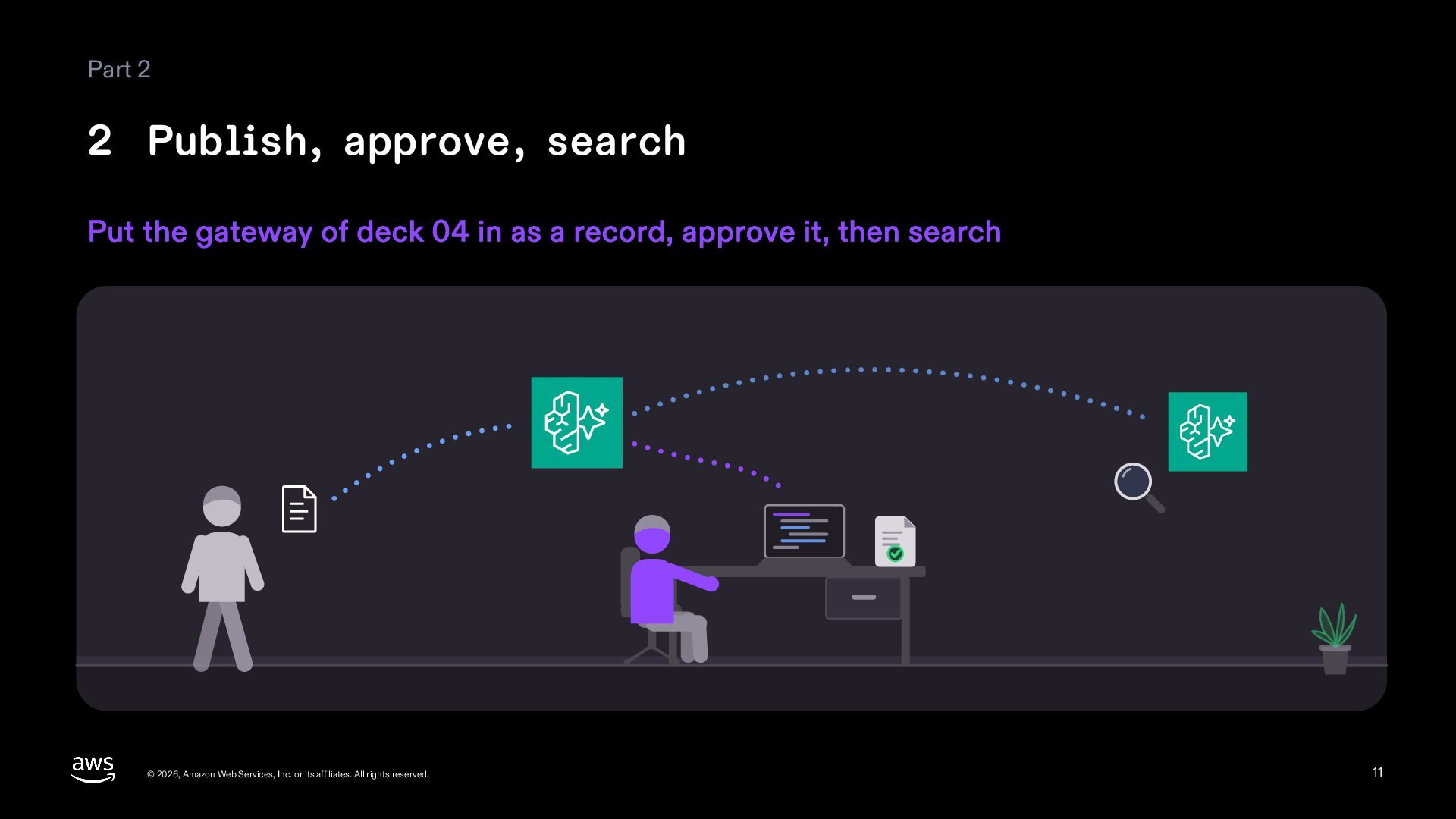
Part 2 2 Publish, approve, search Put the gateway of
deck 04 in as a record, approve it, then search © 2026, Amazon Web Services, Inc. or its affiliates. All rights reserved. 11 -
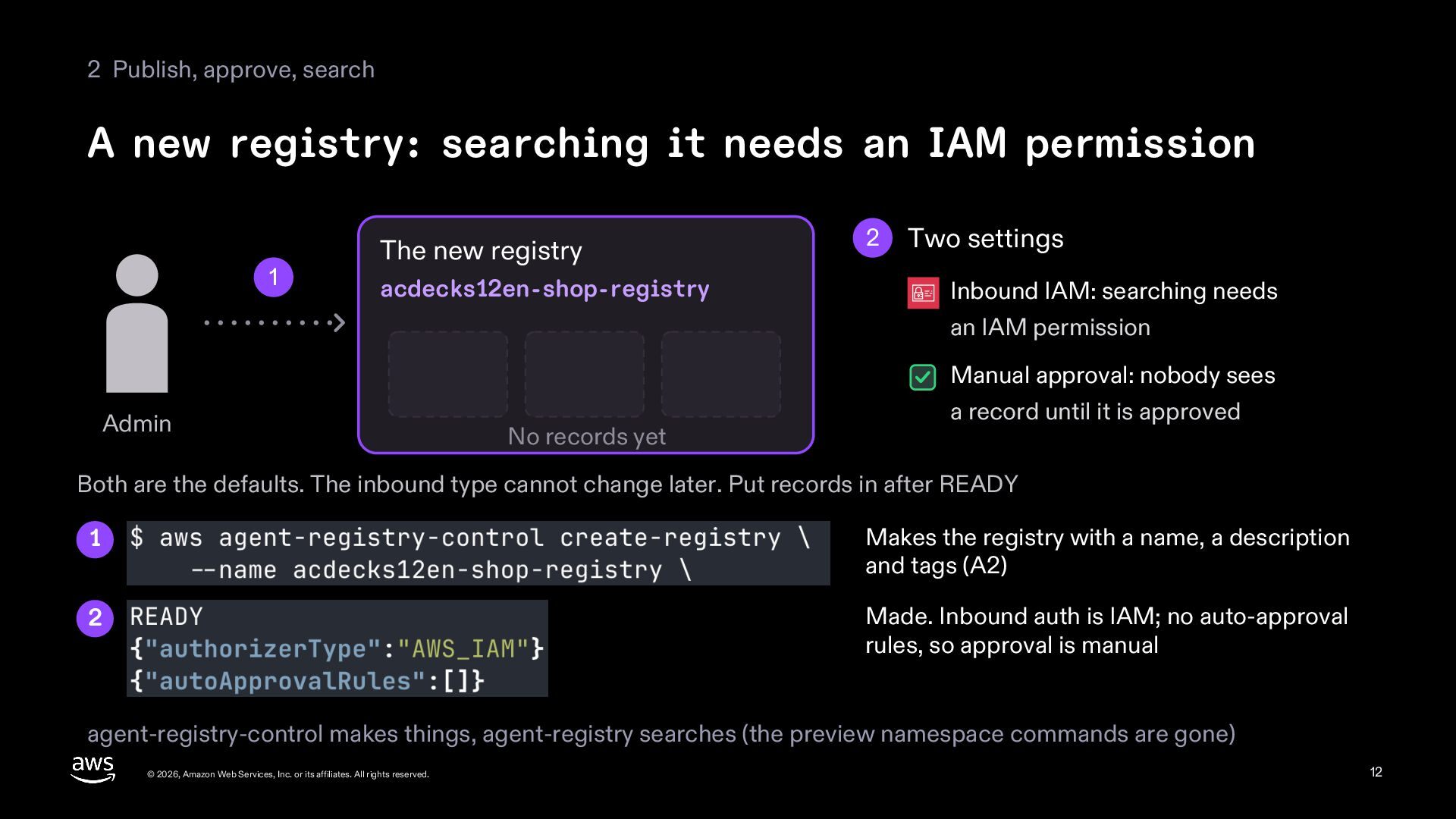
2 Publish, approve, search A new registry: searching it needs
an IAM permission 1 The new registry acdecks12en-shop-registry 2 Two settings Inbound IAM: searching needs an IAM permission Manual approval: nobody sees Admin No records yet a record until it is approved Both are the defaults. The inbound type cannot change later. Put records in after READY 1 Makes the registry with a name, a description and tags (A2) 2 Made. Inbound auth is IAM; no auto-approval rules, so approval is manual agent-registry-control makes things, agent-registry searches (the preview namespace commands are gone) © 2026, Amazon Web Services, Inc. or its affiliates. All rights reserved. 12 -
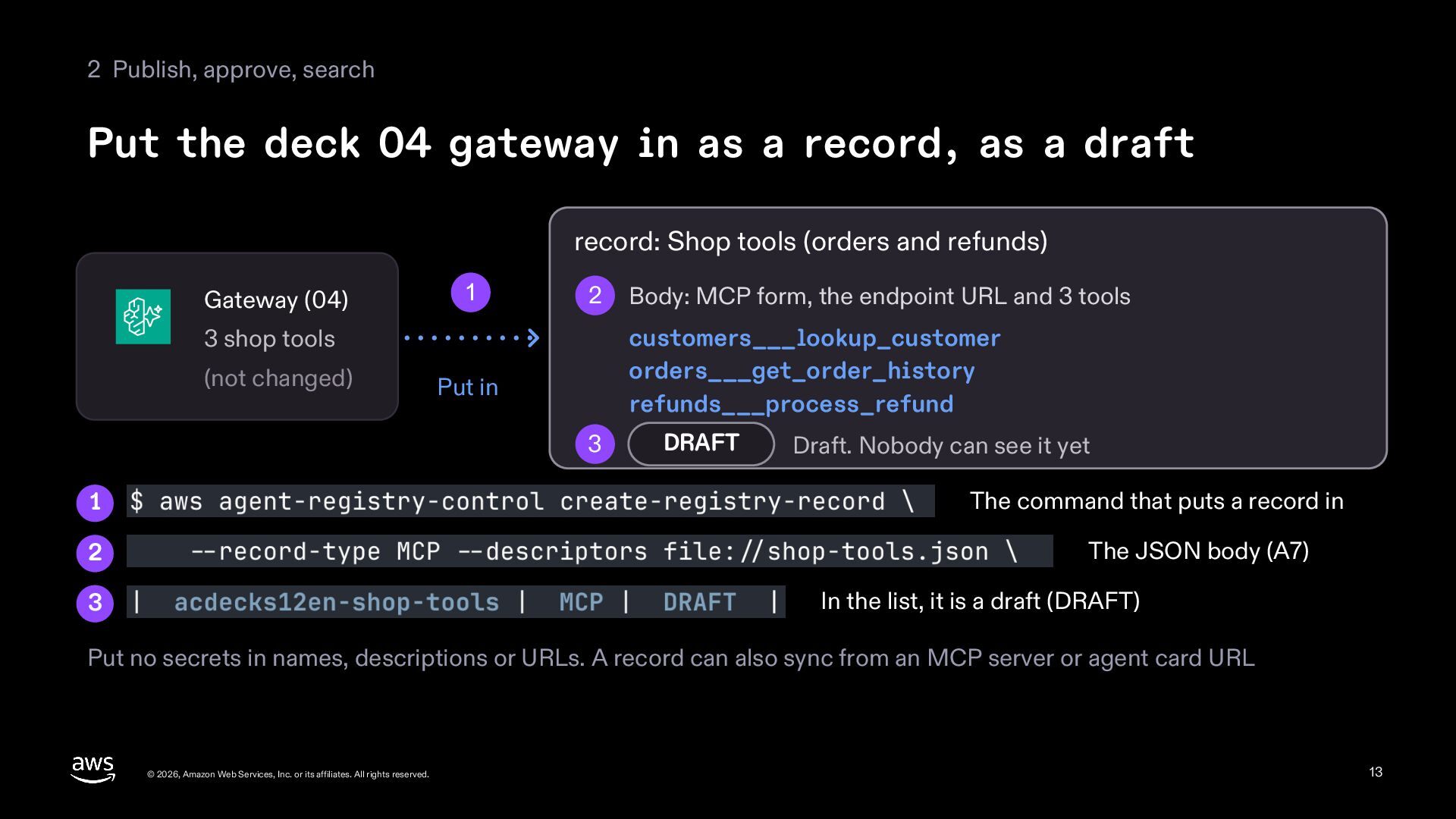
2 Publish, approve, search Put the deck 04 gateway in
as a record, as a draft record: Shop tools (orders and refunds) Gateway (04) 1 2 customers___lookup_customer orders___get_order_history refunds___process_refund 3 shop tools (not changed) Body: MCP form, the endpoint URL and 3 tools Put in 3 DRAFT Draft. Nobody can see it yet The command that puts a record in 1 The JSON body (A7) 2 In the list, it is a draft (DRAFT) 3 Put no secrets in names, descriptions or URLs. A record can also sync from an MCP server or agent card URL © 2026, Amazon Web Services, Inc. or its affiliates. All rights reserved. 13 -
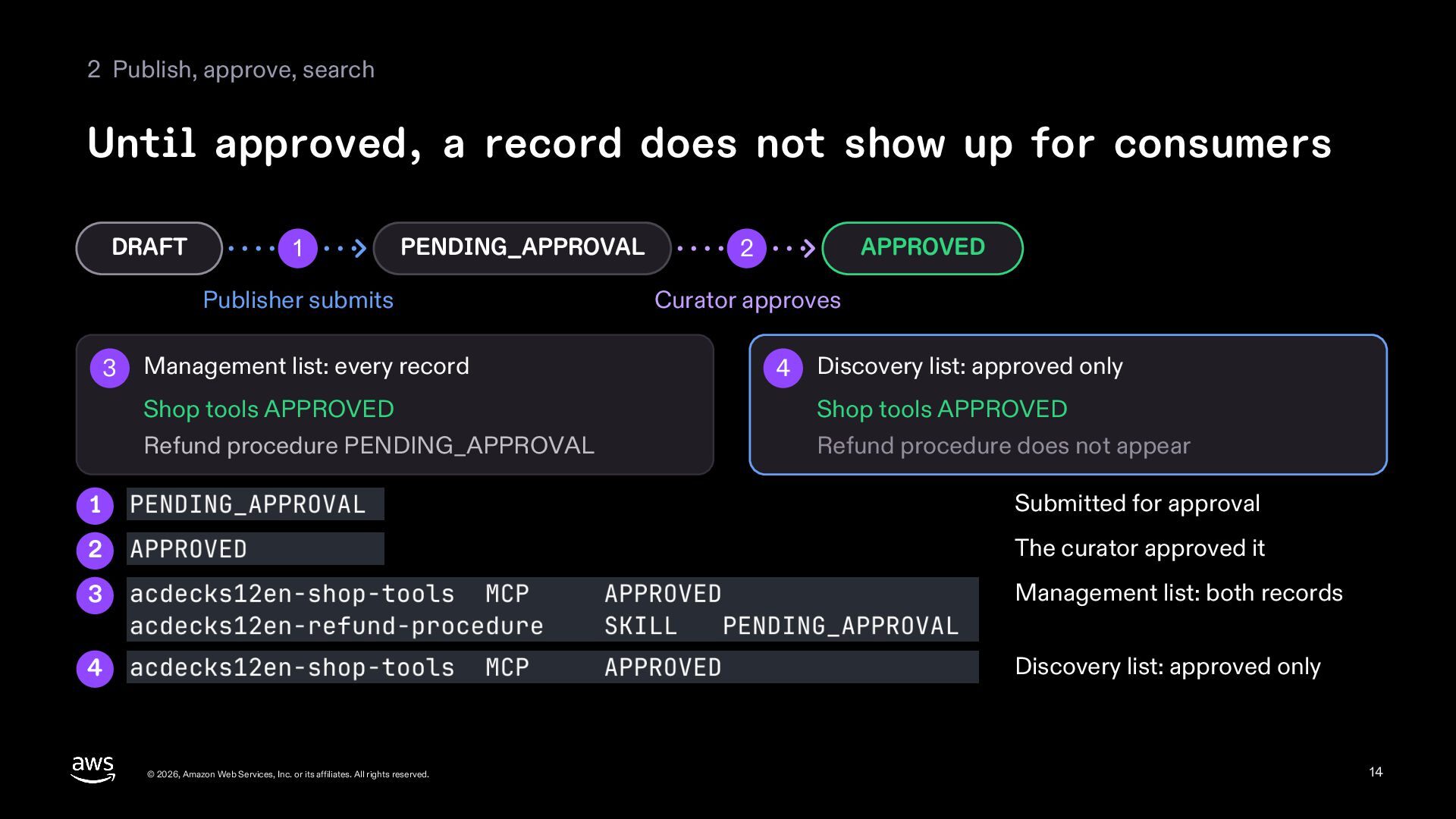
2 Publish, approve, search Until approved, a record does not
show up for consumers DRAFT 1 PENDING_APPROVAL Publisher submits 3 Management list: every record APPROVED 2 Curator approves 4 Discovery list: approved only Shop tools APPROVED Shop tools APPROVED Refund procedure PENDING_APPROVAL Refund procedure does not appear 1 Submitted for approval 2 The curator approved it 3 Management list: both records 4 Discovery list: approved only © 2026, Amazon Web Services, Inc. or its affiliates. All rights reserved. 14 -
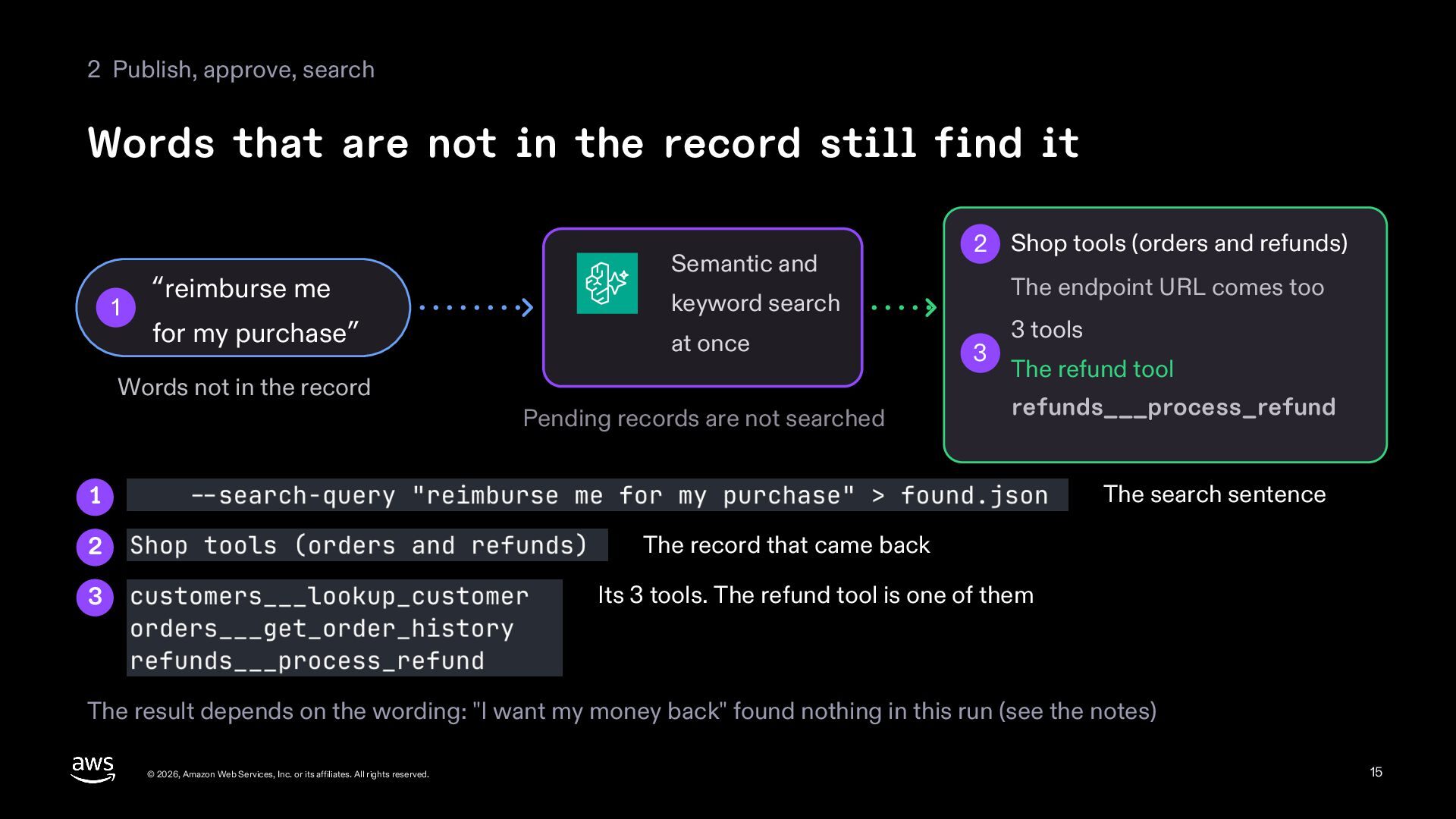
2 Publish, approve, search Words that are not in the
record still find it 1 “reimburse me for my purchase” Semantic and 2 Shop tools (orders and refunds) The endpoint URL comes too keyword search at once Words not in the record Pending records are not searched 3 3 tools The refund tool refunds___process_refund The search sentence 1 The record that came back 2 Its 3 tools. The refund tool is one of them 3 The result depends on the wording: "I want my money back" found nothing in this run (see the notes) © 2026, Amazon Web Services, Inc. or its affiliates. All rights reserved. 15 -
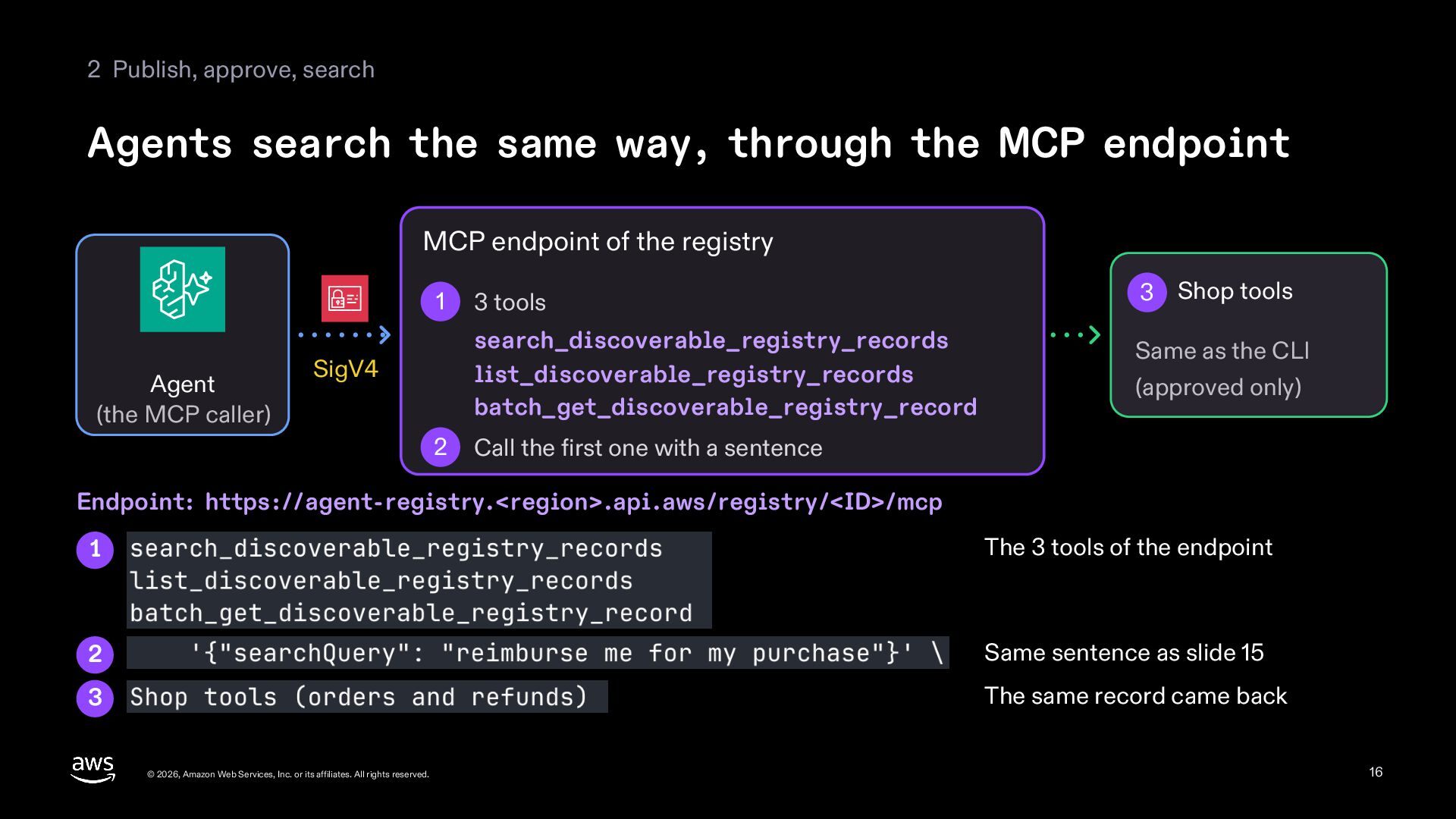
2 Publish, approve, search Agents search the same way, through
the MCP endpoint MCP endpoint of the registry 1 Agent (the MCP caller) SigV4 2 3 tools 3 Shop tools search_discoverable_registry_records list_discoverable_registry_records batch_get_discoverable_registry_record Same as the CLI (approved only) Call the first one with a sentence Endpoint: https://agent-registry.<region>.api.aws/registry/<ID>/mcp 1 The 3 tools of the endpoint 2 Same sentence as slide 15 3 The same record came back © 2026, Amazon Web Services, Inc. or its affiliates. All rights reserved. 16 -
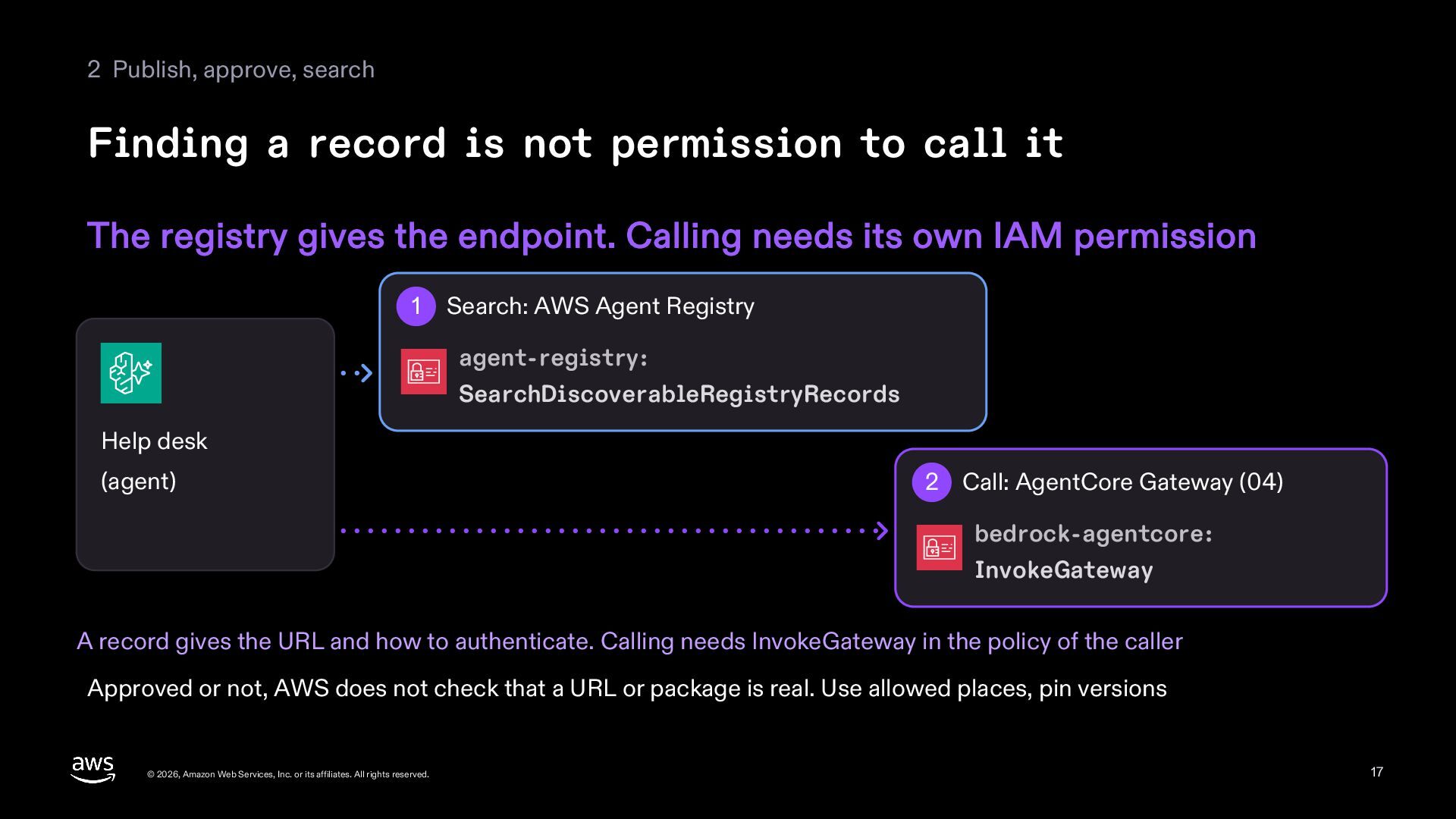
2 Publish, approve, search Finding a record is not permission
to call it The registry gives the endpoint. Calling needs its own IAM permission 1 Search: AWS Agent Registry agent-registry: SearchDiscoverableRegistryRecords Help desk (agent) 2 Call: AgentCore Gateway (04) bedrock-agentcore: InvokeGateway A record gives the URL and how to authenticate. Calling needs InvokeGateway in the policy of the caller Approved or not, AWS does not check that a URL or package is real. Use allowed places, pin versions © 2026, Amazon Web Services, Inc. or its affiliates. All rights reserved. 17 -
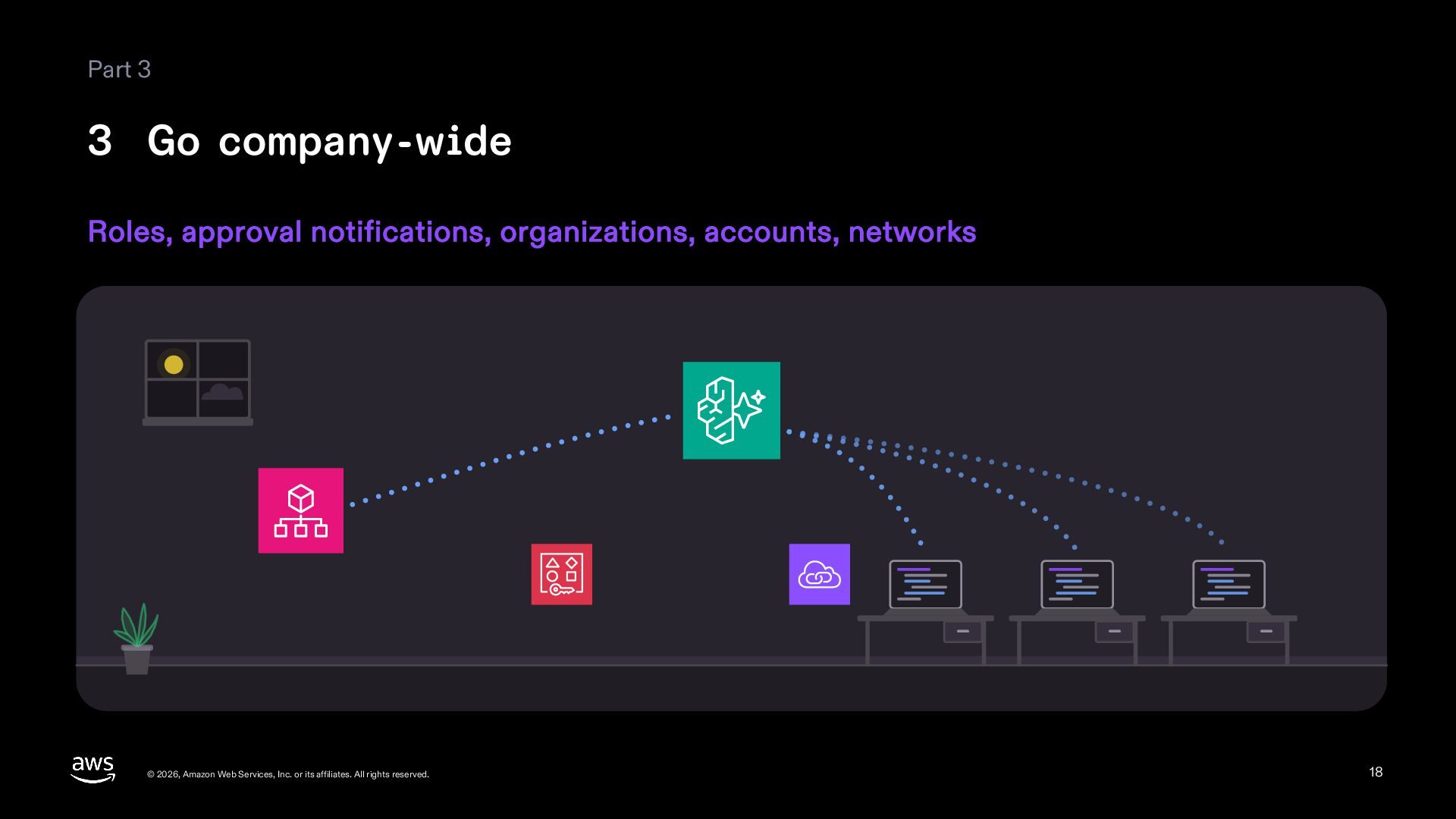
Part 3 3 Go company-wide Roles, approval notifications, organizations, accounts,
networks © 2026, Amazon Web Services, Inc. or its affiliates. All rights reserved. 18 -
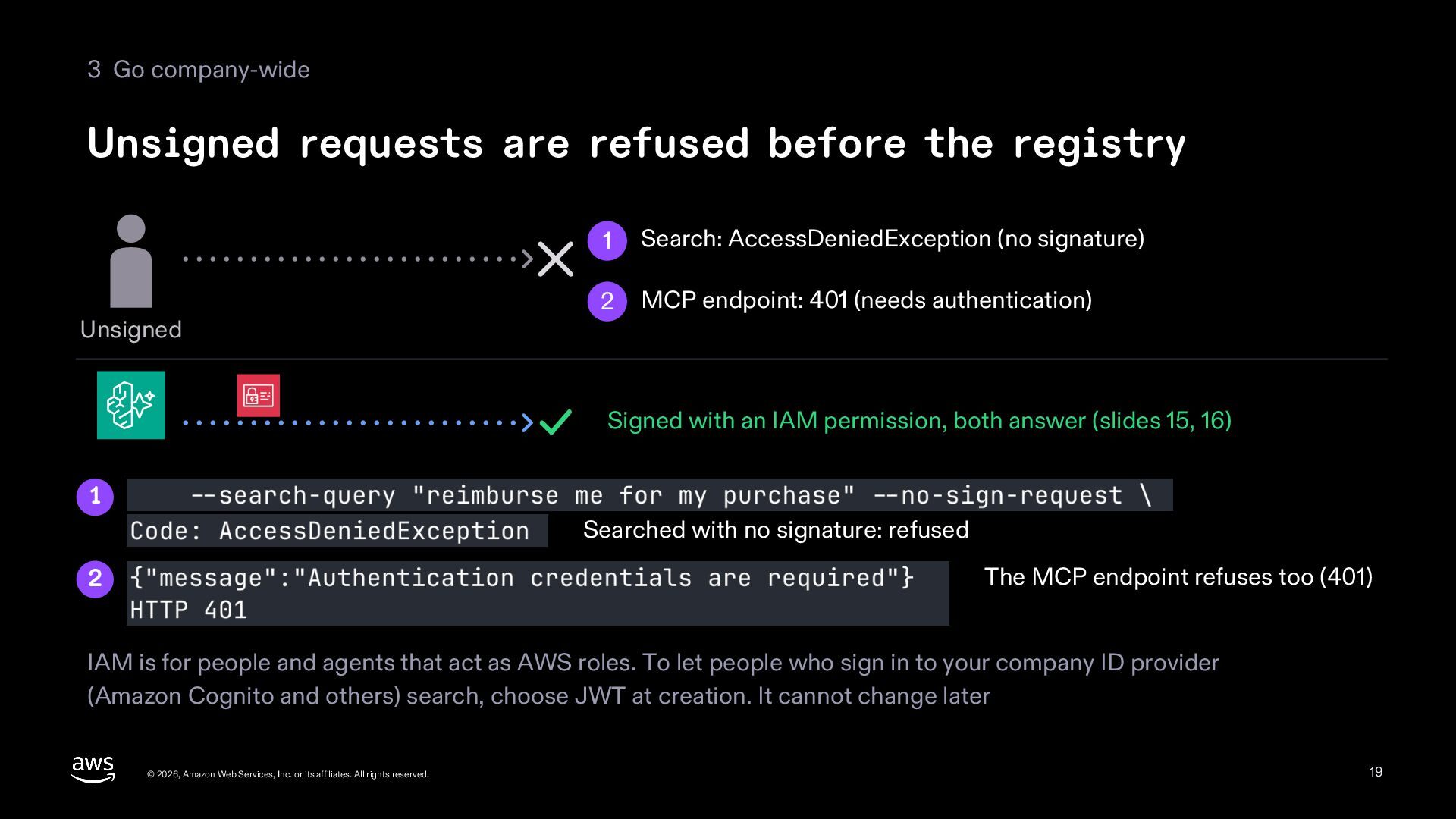
3 Go company-wide Unsigned requests are refused before the registry
Unsigned 1 Search: AccessDeniedException (no signature) 2 MCP endpoint: 401 (needs authentication) Signed with an IAM permission, both answer (slides 15, 16) 1 Searched with no signature: refused The MCP endpoint refuses too (401) 2 IAM is for people and agents that act as AWS roles. To let people who sign in to your company ID provider (Amazon Cognito and others) search, choose JWT at creation. It cannot change later © 2026, Amazon Web Services, Inc. or its affiliates. All rights reserved. 19 -
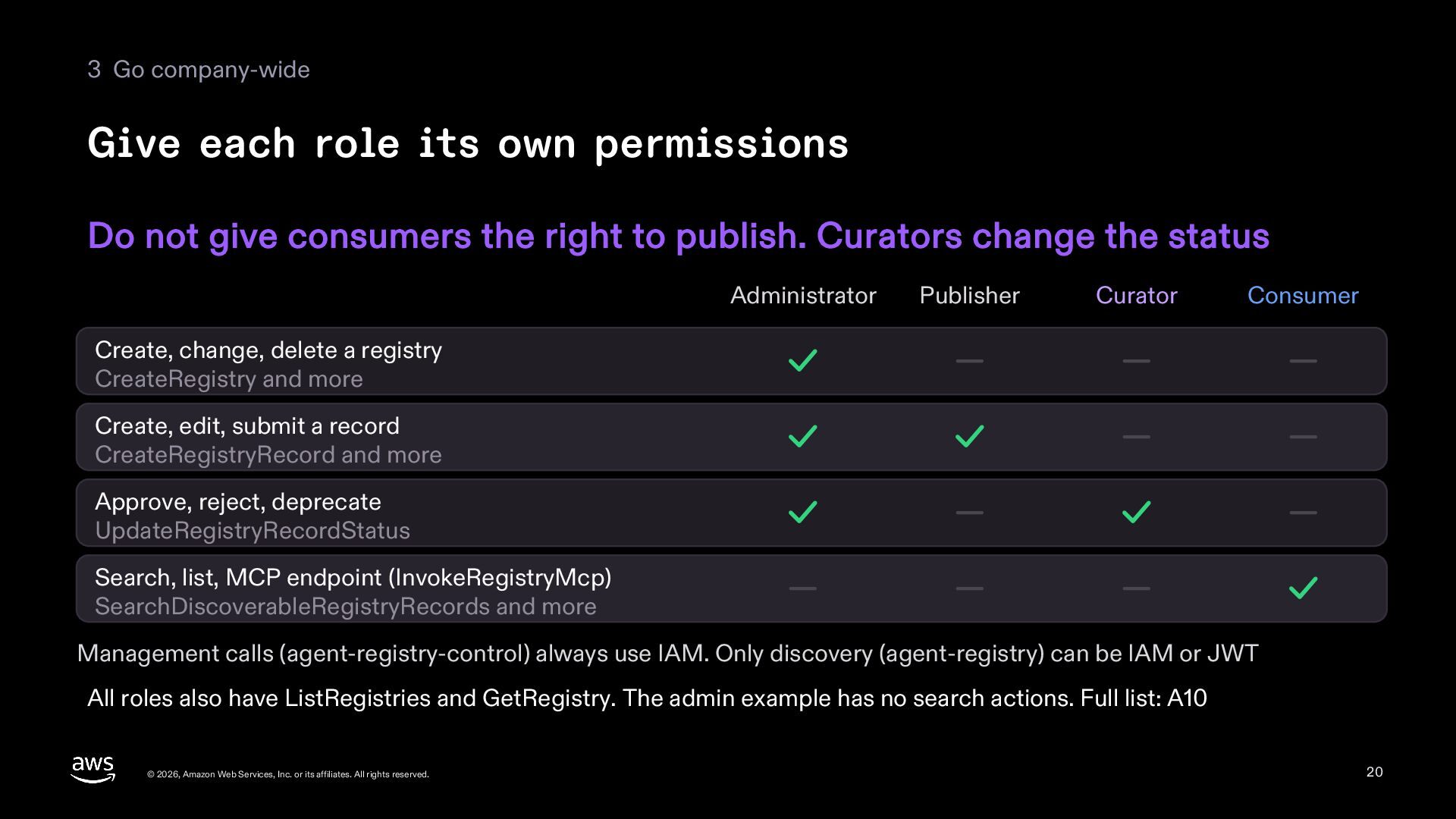
3 Go company-wide Give each role its own permissions Do
not give consumers the right to publish. Curators change the status Administrator Publisher Curator Consumer Create, change, delete a registry CreateRegistry and more Create, edit, submit a record CreateRegistryRecord and more Approve, reject, deprecate UpdateRegistryRecordStatus Search, list, MCP endpoint (InvokeRegistryMcp) SearchDiscoverableRegistryRecords and more Management calls (agent-registry-control) always use IAM. Only discovery (agent-registry) can be IAM or JWT All roles also have ListRegistries and GetRegistry. The admin example has no search actions. Full list: A10 © 2026, Amazon Web Services, Inc. or its affiliates. All rights reserved. 20 -
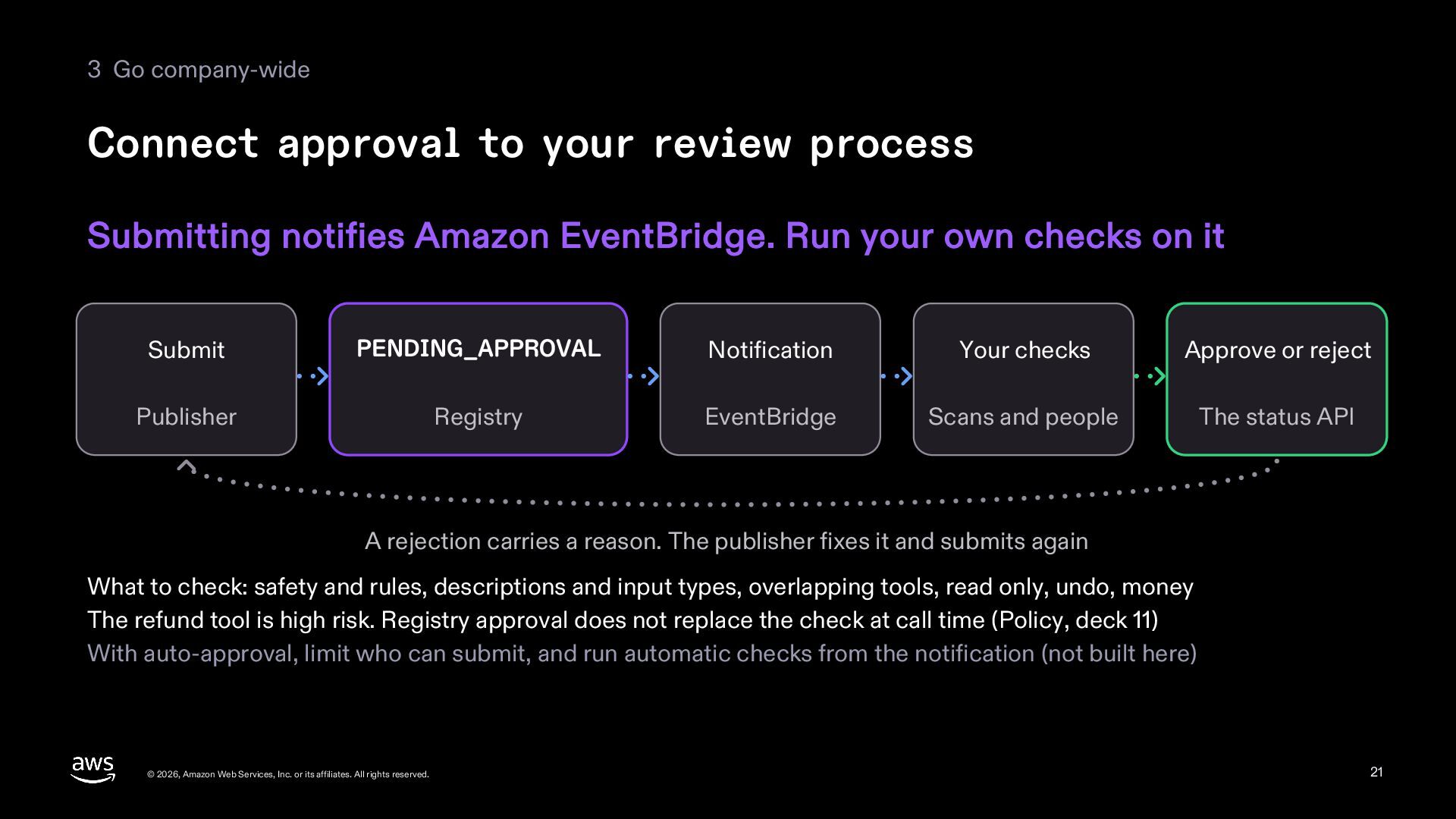
3 Go company-wide Connect approval to your review process Submitting
notifies Amazon EventBridge. Run your own checks on it Submit PENDING_APPROVAL Notification Your checks Approve or reject Publisher Registry EventBridge Scans and people The status API A rejection carries a reason. The publisher fixes it and submits again What to check: safety and rules, descriptions and input types, overlapping tools, read only, undo, money The refund tool is high risk. Registry approval does not replace the check at call time (Policy, deck 11) With auto-approval, limit who can submit, and run automatic checks from the notification (not built here) © 2026, Amazon Web Services, Inc. or its affiliates. All rights reserved. 21 -
3 Go company-wide Put records in automatically across the organization
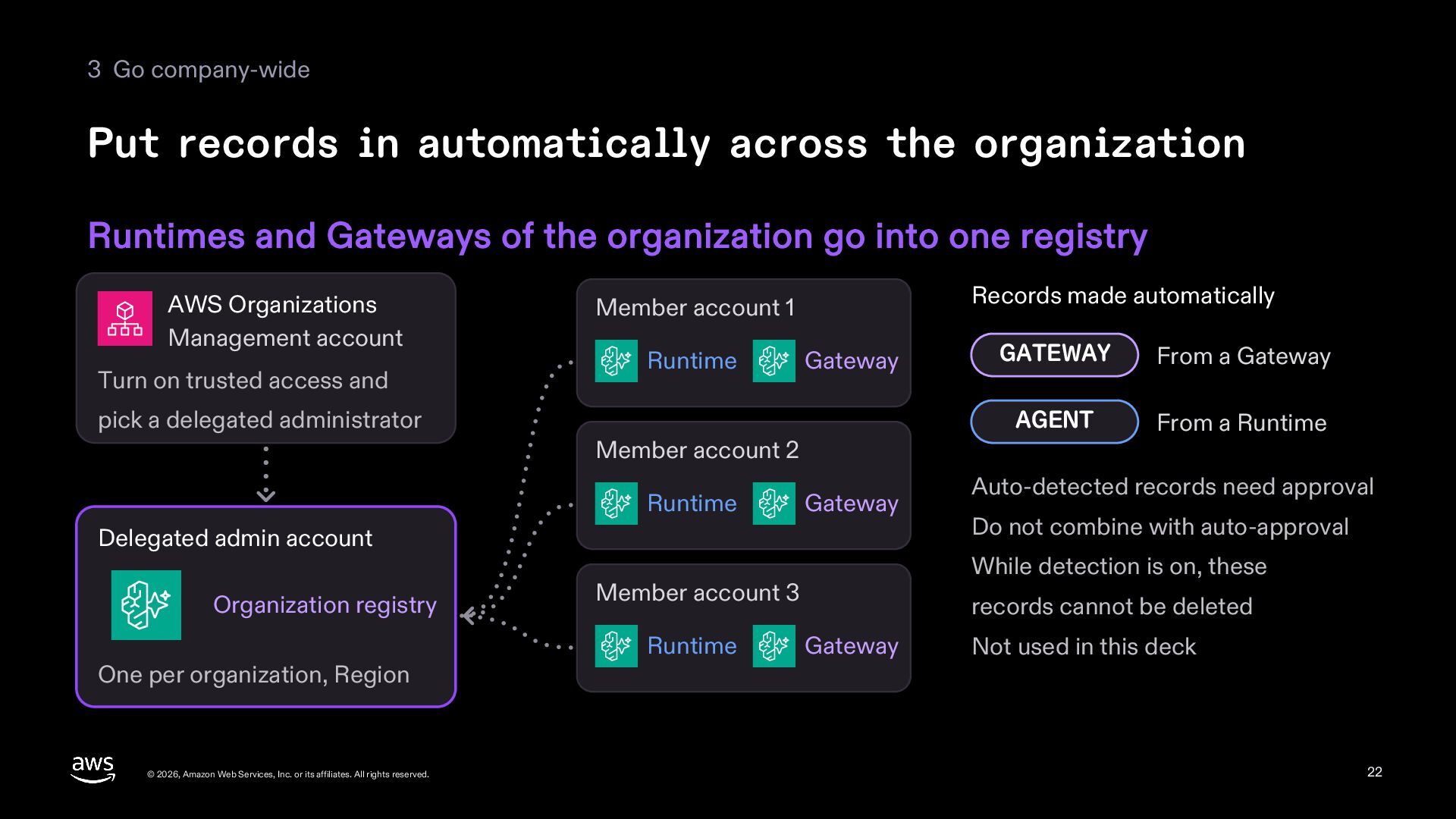
Runtimes and Gateways of the organization go into one registry AWS Organizations Management account Turn on trusted access and pick a delegated administrator Records made automatically Member account 1 Runtime Gateway Member account 2 Runtime Gateway Delegated admin account Organization registry One per organization, Region © 2026, Amazon Web Services, Inc. or its affiliates. All rights reserved. From a Gateway AGENT From a Runtime Auto-detected records need approval Do not combine with auto-approval While detection is on, these Member account 3 Runtime GATEWAY records cannot be deleted Gateway Not used in this deck 22 -
3 Go company-wide Use it across accounts and from a
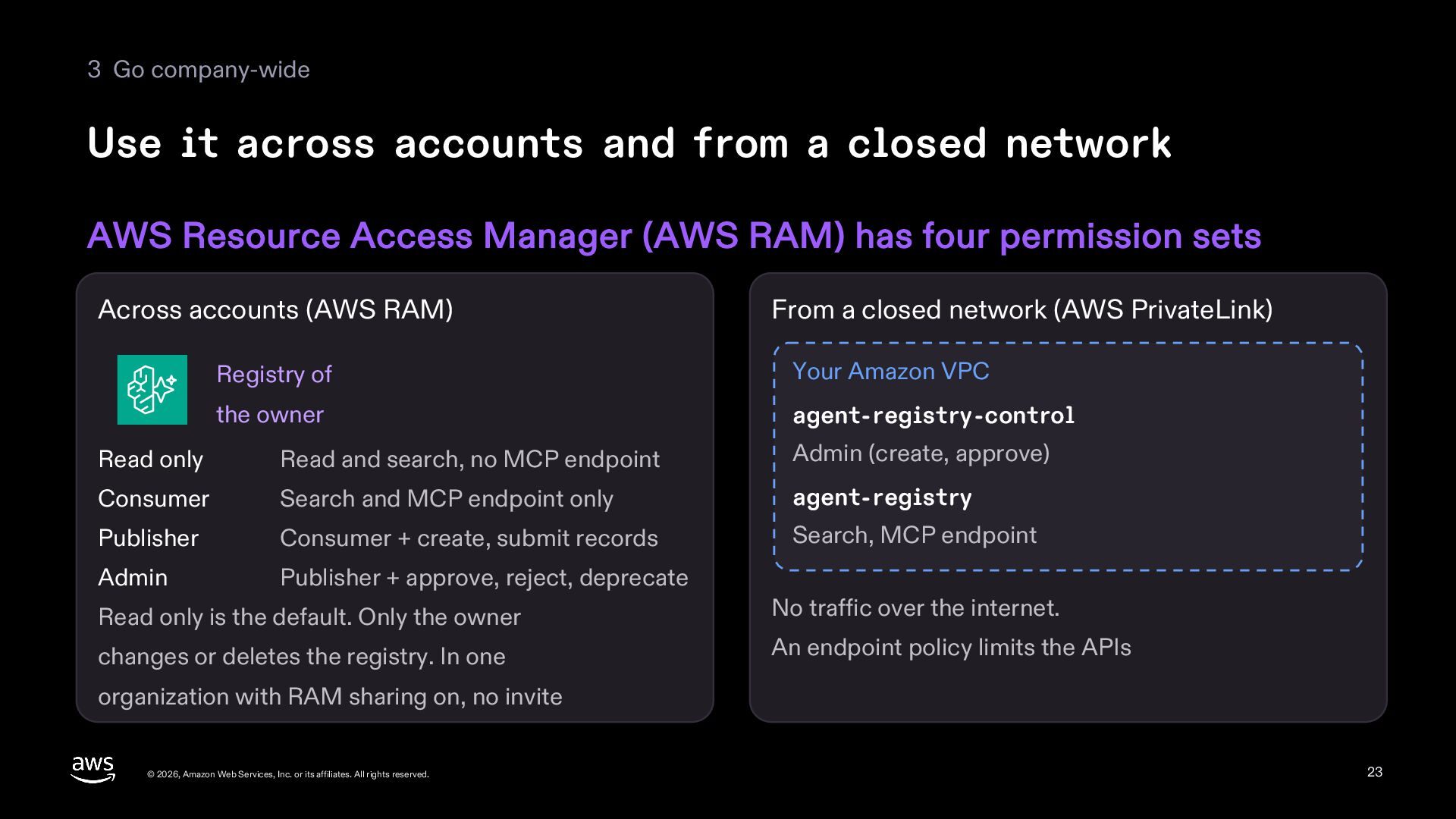
closed network AWS Resource Access Manager (AWS RAM) has four permission sets Across accounts (AWS RAM) From a closed network (AWS PrivateLink) Registry of Your Amazon VPC the owner agent-registry-control Read only Read and search, no MCP endpoint Admin (create, approve) Consumer Search and MCP endpoint only agent-registry Publisher Consumer + create, submit records Search, MCP endpoint Admin Publisher + approve, reject, deprecate Read only is the default. Only the owner No traffic over the internet. changes or deletes the registry. In one An endpoint policy limits the APIs organization with RAM sharing on, no invite © 2026, Amazon Web Services, Inc. or its affiliates. All rights reserved. 23 -
Part 4 4 Clean up and look back Delete the
records and the registry, and look back at the 12 decks © 2026, Amazon Web Services, Inc. or its affiliates. All rights reserved. 24 -
4 Clean up and look back Clean up Delete the
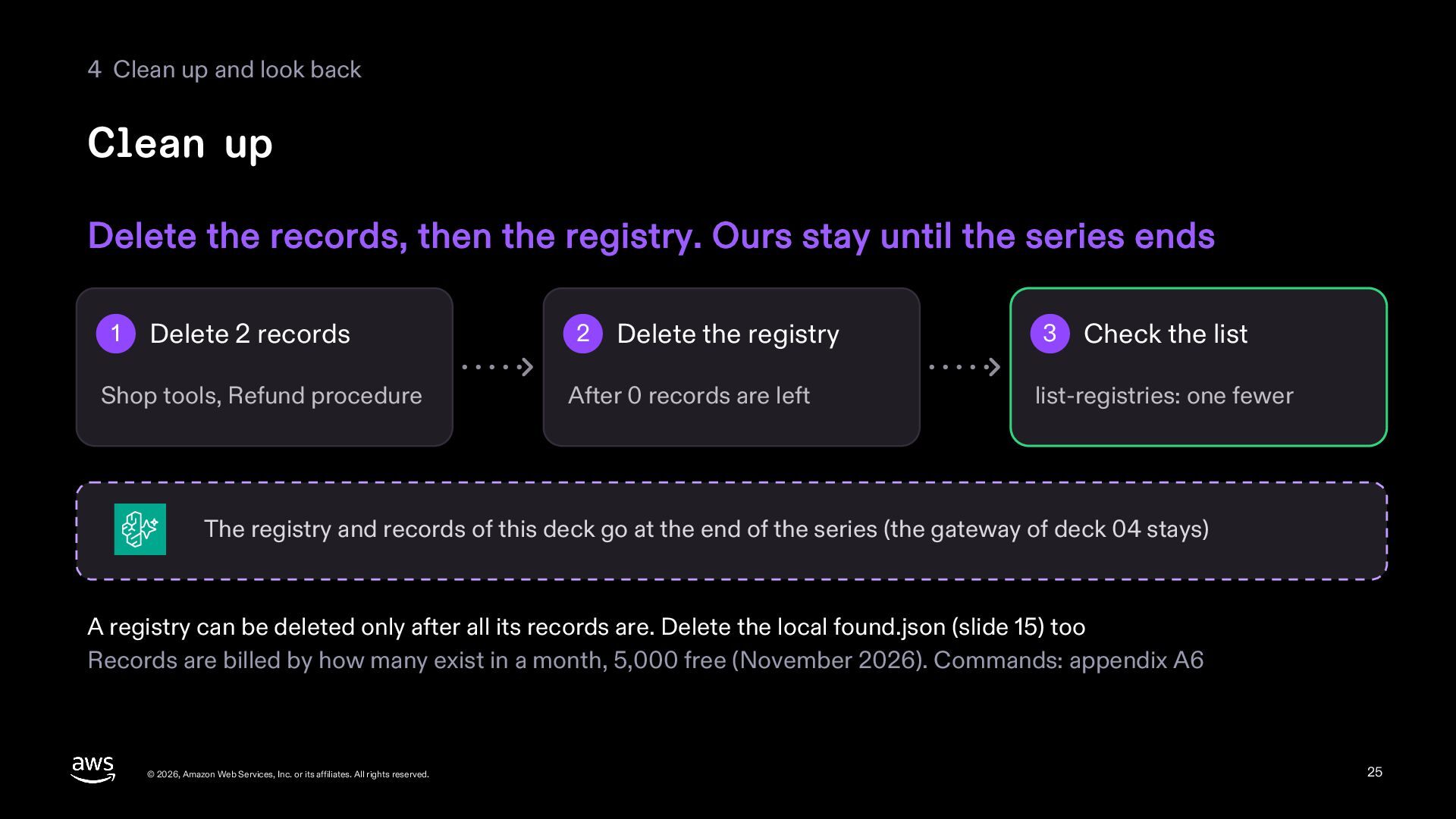
records, then the registry. Ours stay until the series ends 1 Delete 2 records Shop tools, Refund procedure 2 Delete the registry After 0 records are left 3 Check the list list-registries: one fewer The registry and records of this deck go at the end of the series (the gateway of deck 04 stays) A registry can be deleted only after all its records are. Delete the local found.json (slide 15) too Records are billed by how many exist in a month, 5,000 free (November 2026). Commands: appendix A6 © 2026, Amazon Web Services, Inc. or its affiliates. All rights reserved. 25 -
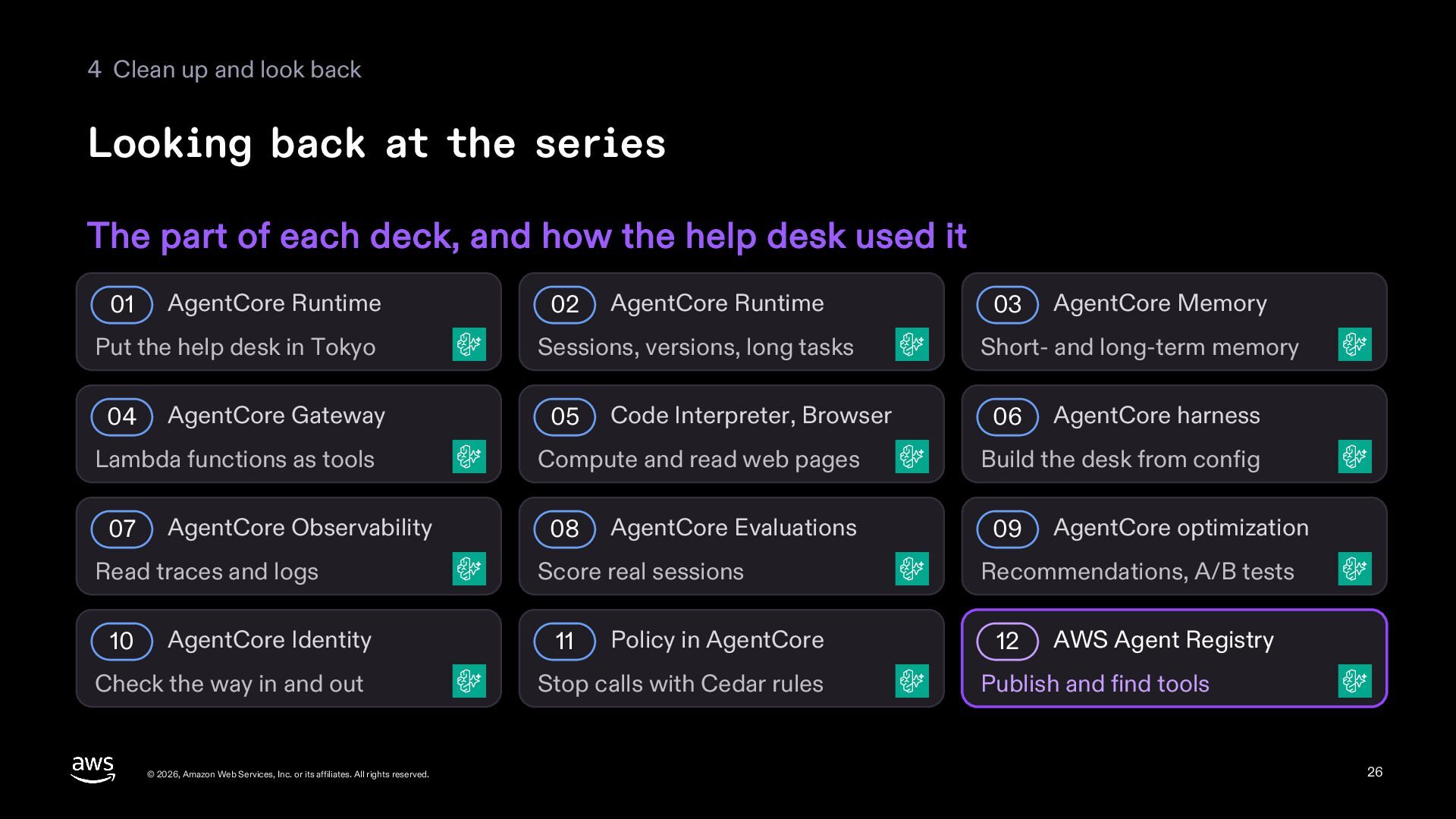
4 Clean up and look back Looking back at the
series The part of each deck, and how the help desk used it 01 AgentCore Runtime Put the help desk in Tokyo 04 AgentCore Gateway Lambda functions as tools 07 AgentCore Observability Read traces and logs 10 AgentCore Identity Check the way in and out © 2026, Amazon Web Services, Inc. or its affiliates. All rights reserved. 02 AgentCore Runtime Sessions, versions, long tasks 05 Code Interpreter, Browser Compute and read web pages 08 AgentCore Evaluations Score real sessions 11 Policy in AgentCore Stop calls with Cedar rules 03 AgentCore Memory Short- and long-term memory 06 AgentCore harness Build the desk from config 09 AgentCore optimization Recommendations, A/B tests 12 AWS Agent Registry Publish and find tools 26 -
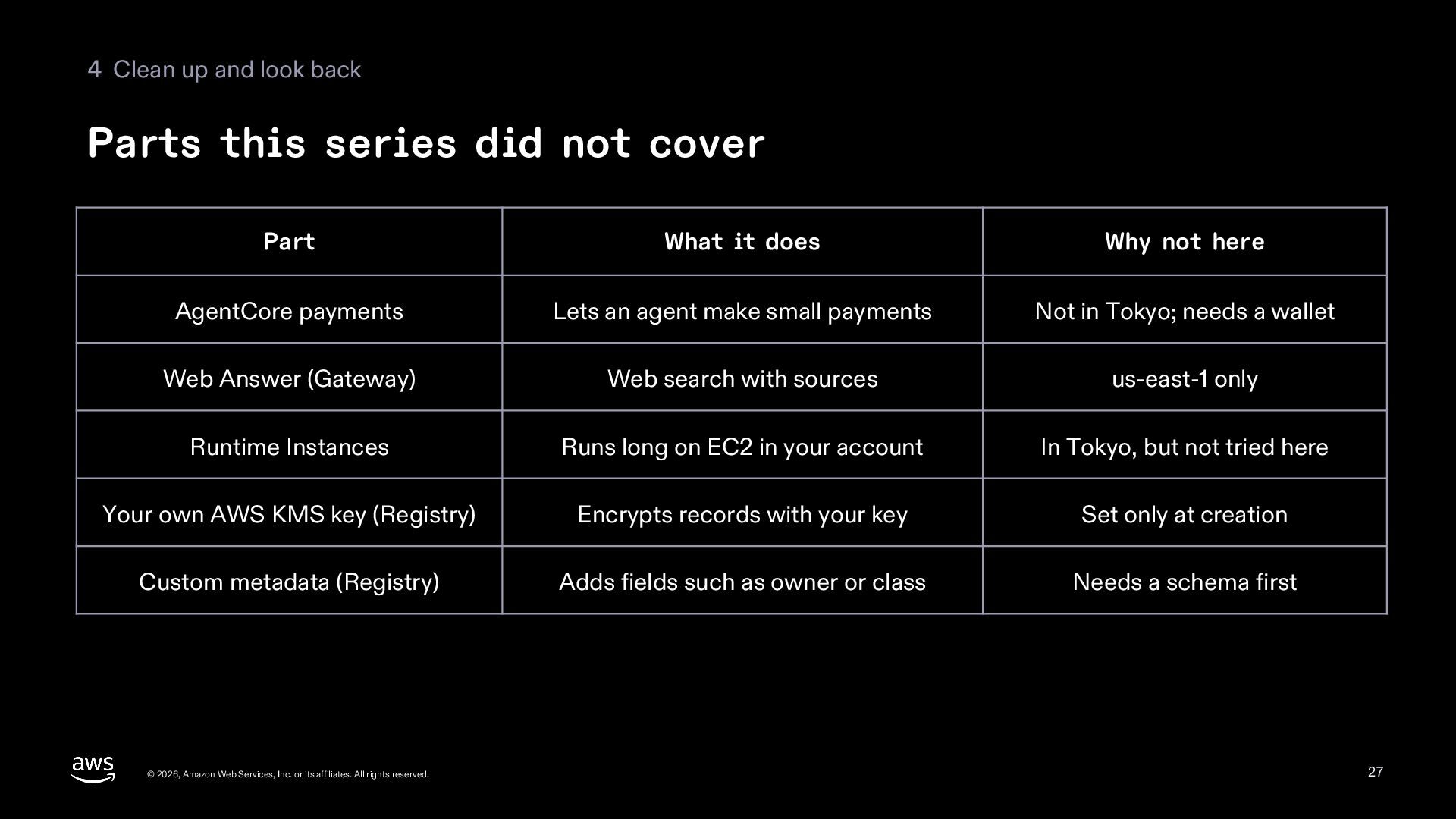
4 Clean up and look back Parts this series did
not cover Part What it does Why not here AgentCore payments Lets an agent make small payments Not in Tokyo; needs a wallet Web Answer (Gateway) Web search with sources us-east-1 only Runtime Instances Runs long on EC2 in your account In Tokyo, but not tried here Your own AWS KMS key (Registry) Encrypts records with your key Set only at creation Custom metadata (Registry) Adds fields such as owner or class Needs a schema first © 2026, Amazon Web Services, Inc. or its affiliates. All rights reserved. 27 -
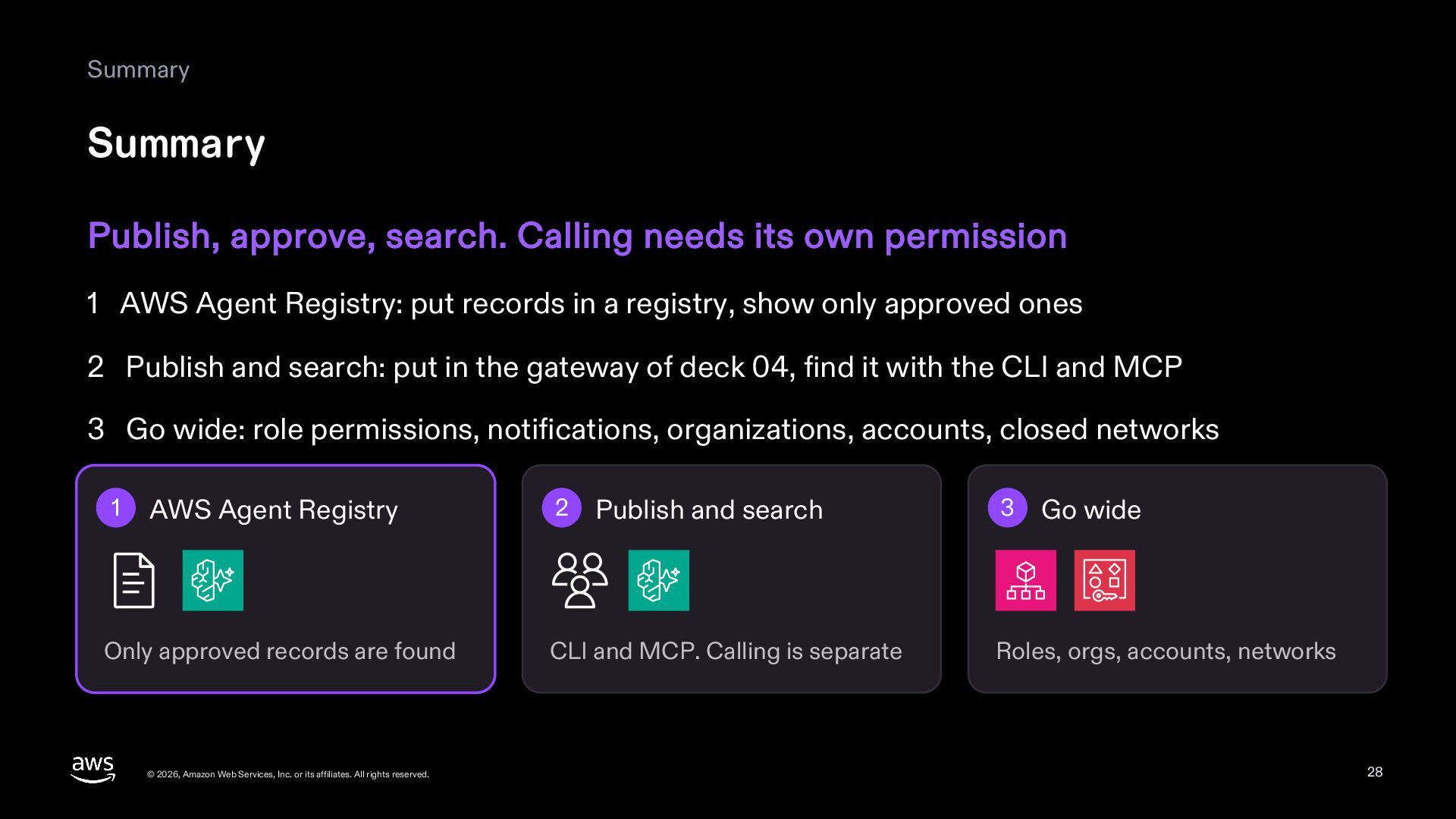
Summary Summary Publish, approve, search. Calling needs its own permission
1 AWS Agent Registry: put records in a registry, show only approved ones 2 Publish and search: put in the gateway of deck 04, find it with the CLI and MCP 3 Go wide: role permissions, notifications, organizations, accounts, closed networks 1 AWS Agent Registry Only approved records are found © 2026, Amazon Web Services, Inc. or its affiliates. All rights reserved. 2 Publish and search CLI and MCP. Calling is separate 3 Go wide Roles, orgs, accounts, networks 28 -
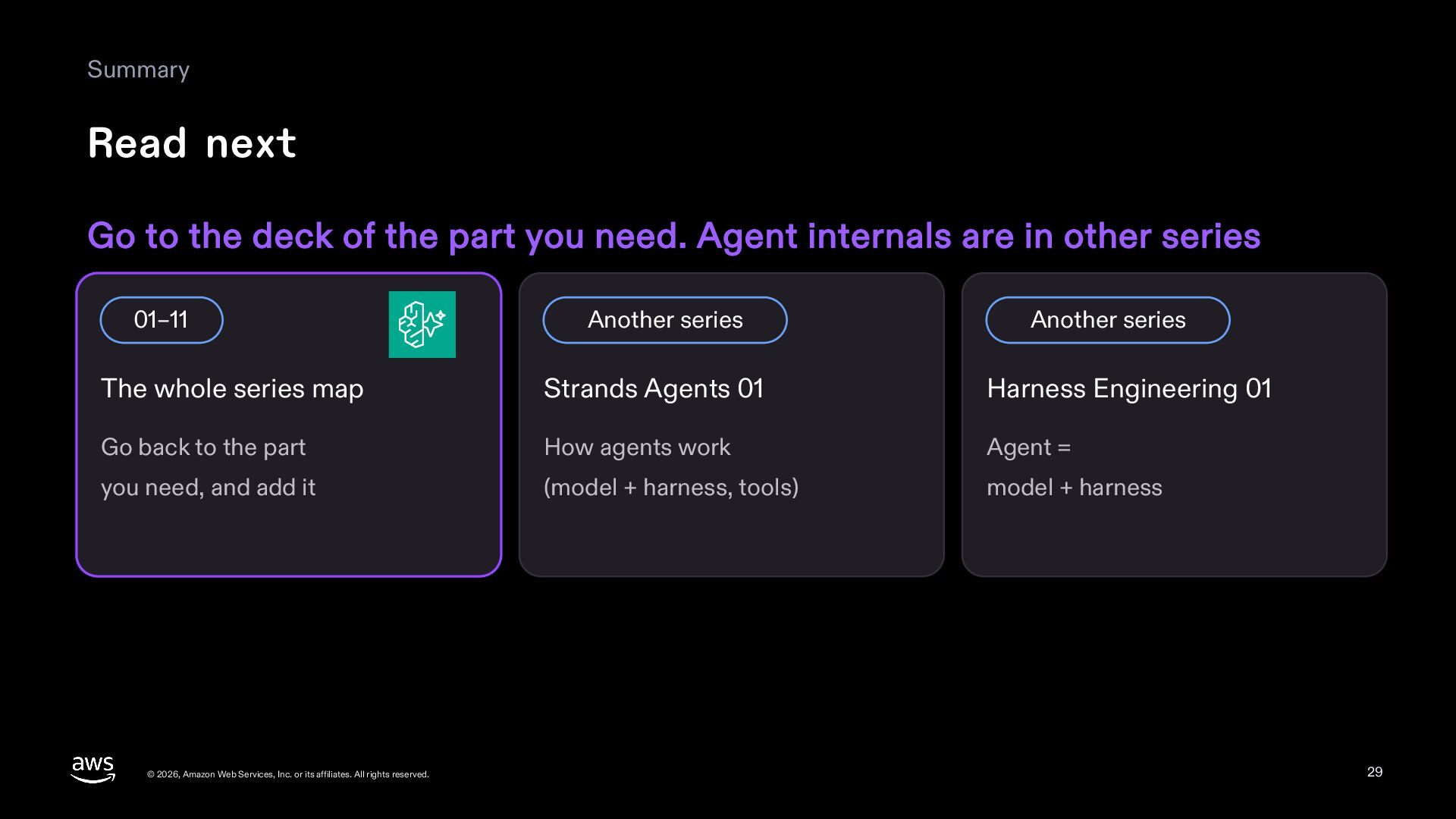
Summary Read next Go to the deck of the part
you need. Agent internals are in other series 01–11 Another series Another series The whole series map Strands Agents 01 Harness Engineering 01 Go back to the part How agents work Agent = you need, and add it (model + harness, tools) model + harness © 2026, Amazon Web Services, Inc. or its affiliates. All rights reserved. 29 -
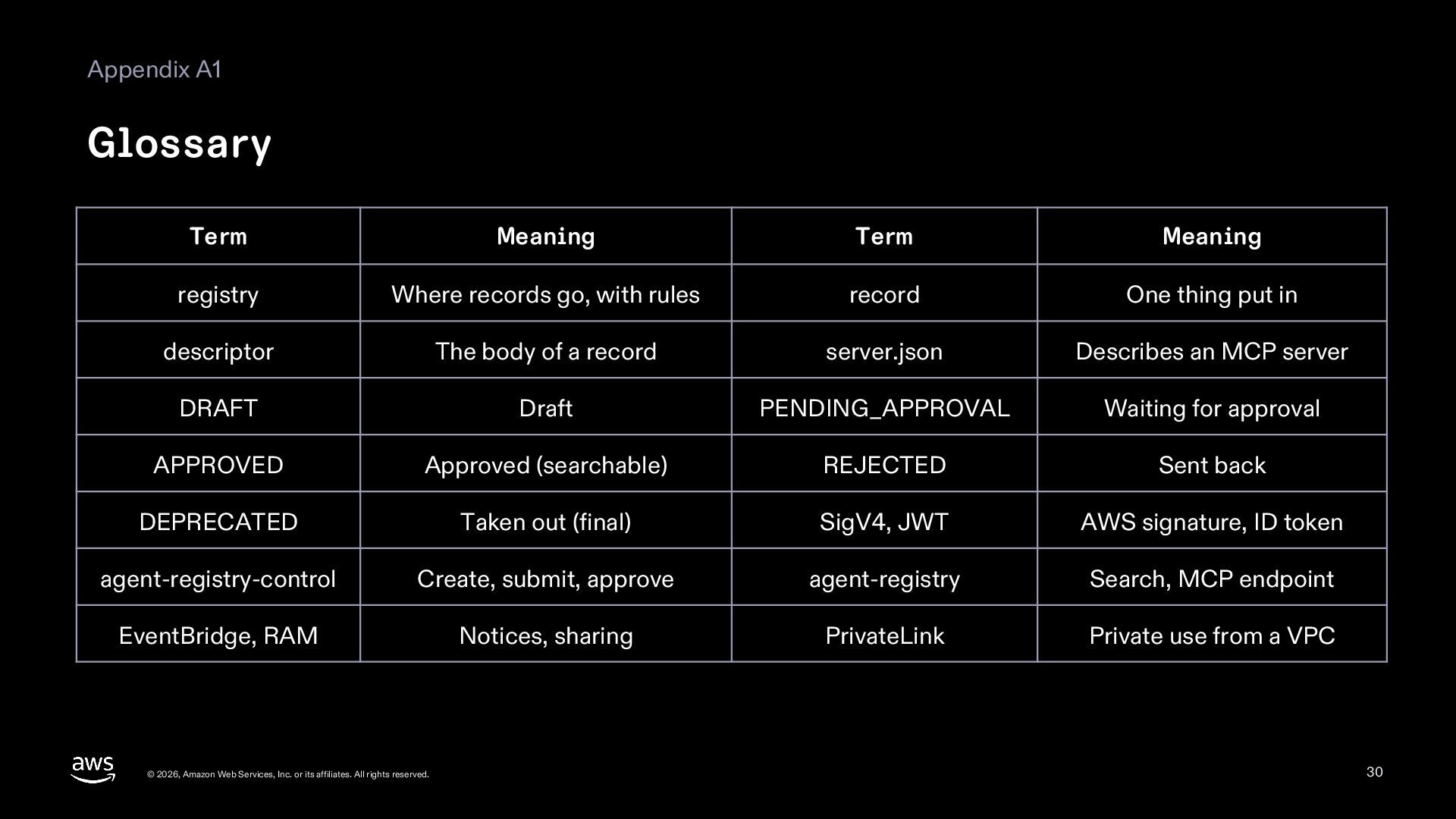
Appendix A1 Glossary Term Meaning Term Meaning registry Where records
go, with rules record One thing put in descriptor The body of a record server.json Describes an MCP server DRAFT Draft PENDING_APPROVAL Waiting for approval APPROVED Approved (searchable) REJECTED Sent back DEPRECATED Taken out (final) SigV4, JWT AWS signature, ID token agent-registry-control Create, submit, approve agent-registry Search, MCP endpoint EventBridge, RAM Notices, sharing PrivateLink Private use from a VPC © 2026, Amazon Web Services, Inc. or its affiliates. All rights reserved. 30 -
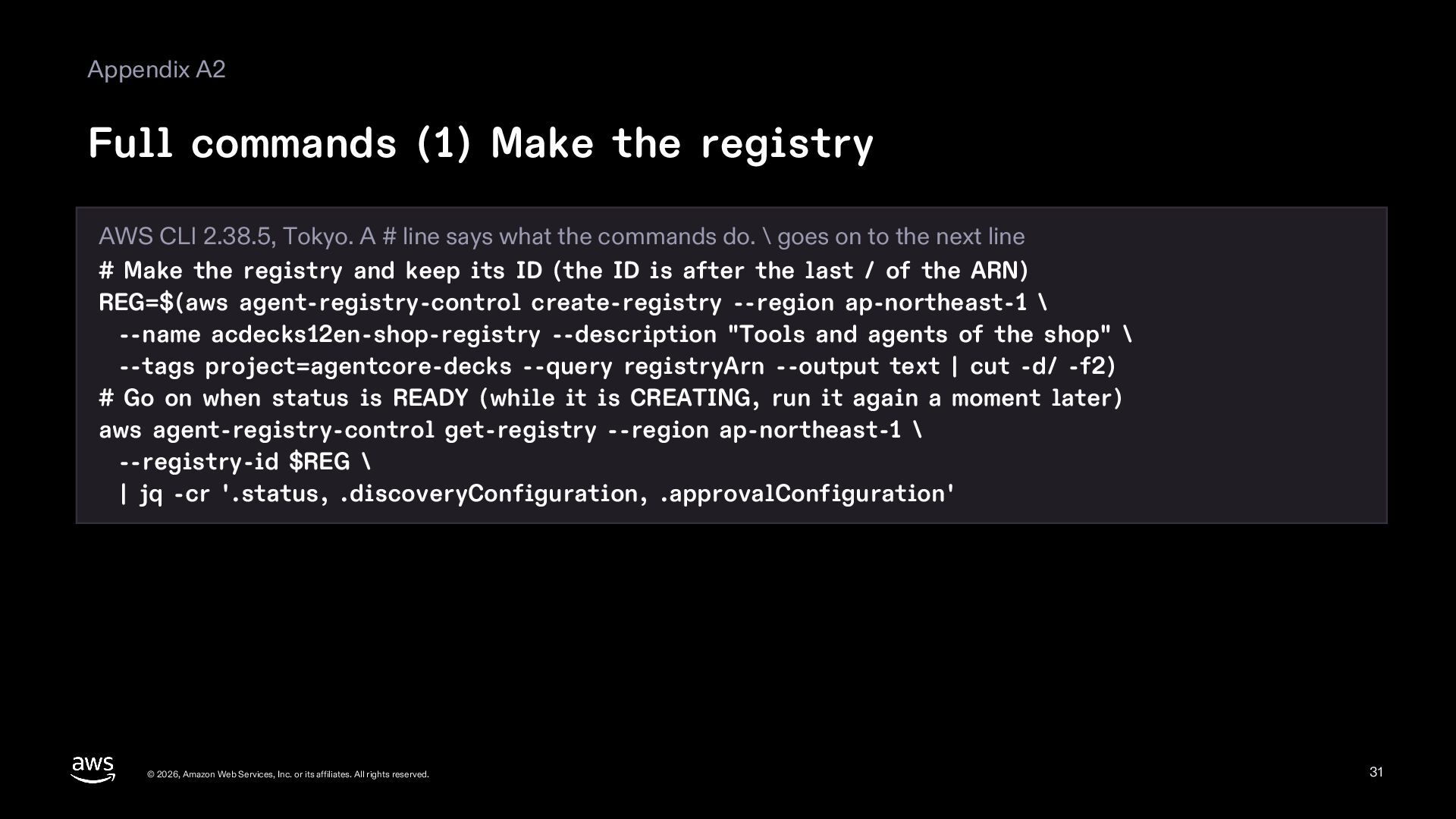
Appendix A2 Full commands (1) Make the registry AWS CLI
2.38.5, Tokyo. A # line says what the commands do. \ goes on to the next line # Make the registry and keep its ID (the ID is after the last / of the ARN) REG=$(aws agent-registry-control create-registry --region ap-northeast-1 \ --name acdecks12en-shop-registry --description "Tools and agents of the shop" \ --tags project=agentcore-decks --query registryArn --output text | cut -d/ -f2) # Go on when status is READY (while it is CREATING, run it again a moment later) aws agent-registry-control get-registry --region ap-northeast-1 \ --registry-id $REG \ | jq -cr '.status, .discoveryConfiguration, .approvalConfiguration' © 2026, Amazon Web Services, Inc. or its affiliates. All rights reserved. 31 -
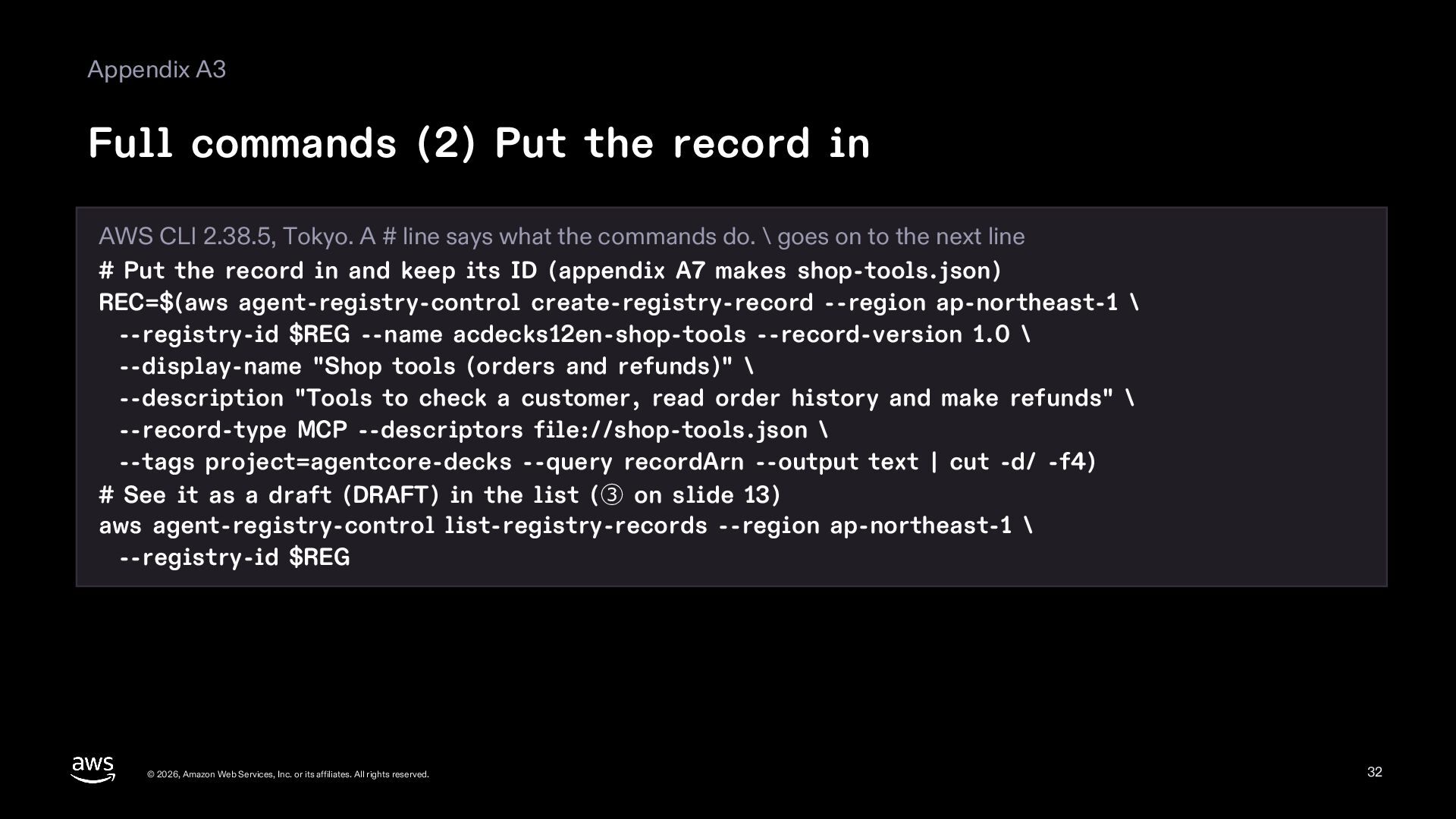
Appendix A3 Full commands (2) Put the record in AWS
CLI 2.38.5, Tokyo. A # line says what the commands do. \ goes on to the next line # Put the record in and keep its ID (appendix A7 makes shop-tools.json) REC=$(aws agent-registry-control create-registry-record --region ap-northeast-1 \ --registry-id $REG --name acdecks12en-shop-tools --record-version 1.0 \ --display-name "Shop tools (orders and refunds)" \ --description "Tools to check a customer, read order history and make refunds" \ --record-type MCP --descriptors file://shop-tools.json \ --tags project=agentcore-decks --query recordArn --output text | cut -d/ -f4) # See it as a draft (DRAFT) in the list (③ on slide 13) aws agent-registry-control list-registry-records --region ap-northeast-1 \ --registry-id $REG © 2026, Amazon Web Services, Inc. or its affiliates. All rights reserved. 32 -
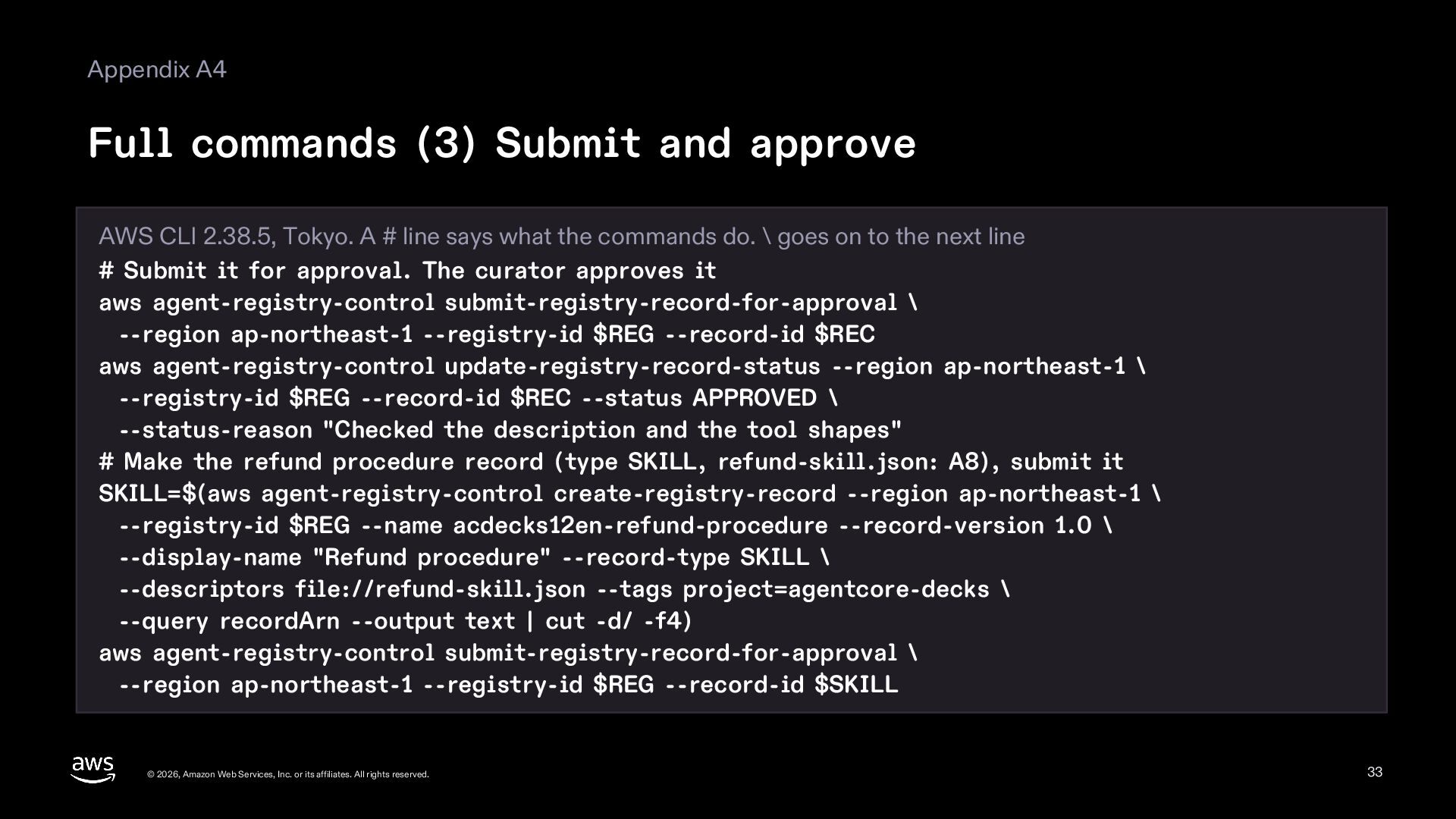
Appendix A4 Full commands (3) Submit and approve AWS CLI
2.38.5, Tokyo. A # line says what the commands do. \ goes on to the next line # Submit it for approval. The curator approves it aws agent-registry-control submit-registry-record-for-approval \ --region ap-northeast-1 --registry-id $REG --record-id $REC aws agent-registry-control update-registry-record-status --region ap-northeast-1 \ --registry-id $REG --record-id $REC --status APPROVED \ --status-reason "Checked the description and the tool shapes" # Make the refund procedure record (type SKILL, refund-skill.json: A8), submit it SKILL=$(aws agent-registry-control create-registry-record --region ap-northeast-1 \ --registry-id $REG --name acdecks12en-refund-procedure --record-version 1.0 \ --display-name "Refund procedure" --record-type SKILL \ --descriptors file://refund-skill.json --tags project=agentcore-decks \ --query recordArn --output text | cut -d/ -f4) aws agent-registry-control submit-registry-record-for-approval \ --region ap-northeast-1 --registry-id $REG --record-id $SKILL © 2026, Amazon Web Services, Inc. or its affiliates. All rights reserved. 33 -
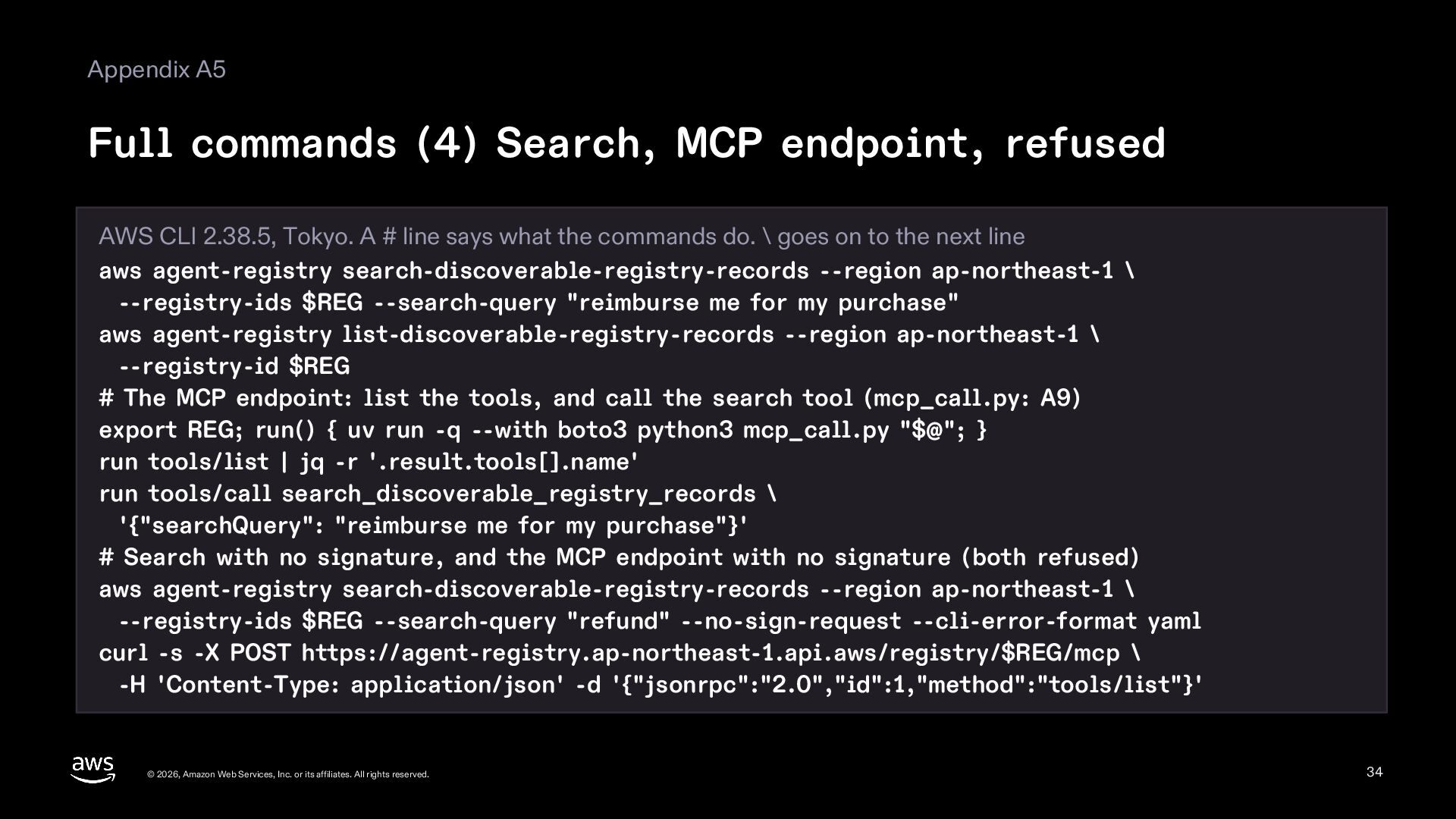
Appendix A5 Full commands (4) Search, MCP endpoint, refused AWS
CLI 2.38.5, Tokyo. A # line says what the commands do. \ goes on to the next line aws agent-registry search-discoverable-registry-records --region ap-northeast-1 \ --registry-ids $REG --search-query "reimburse me for my purchase" aws agent-registry list-discoverable-registry-records --region ap-northeast-1 \ --registry-id $REG # The MCP endpoint: list the tools, and call the search tool (mcp_call.py: A9) export REG; run() { uv run -q --with boto3 python3 mcp_call.py "$@"; } run tools/list | jq -r '.result.tools[].name' run tools/call search_discoverable_registry_records \ '{"searchQuery": "reimburse me for my purchase"}' # Search with no signature, and the MCP endpoint with no signature (both refused) aws agent-registry search-discoverable-registry-records --region ap-northeast-1 \ --registry-ids $REG --search-query "refund" --no-sign-request --cli-error-format yaml curl -s -X POST https://agent-registry.ap-northeast-1.api.aws/registry/$REG/mcp \ -H 'Content-Type: application/json' -d '{"jsonrpc":"2.0","id":1,"method":"tools/list"}' © 2026, Amazon Web Services, Inc. or its affiliates. All rights reserved. 34 -
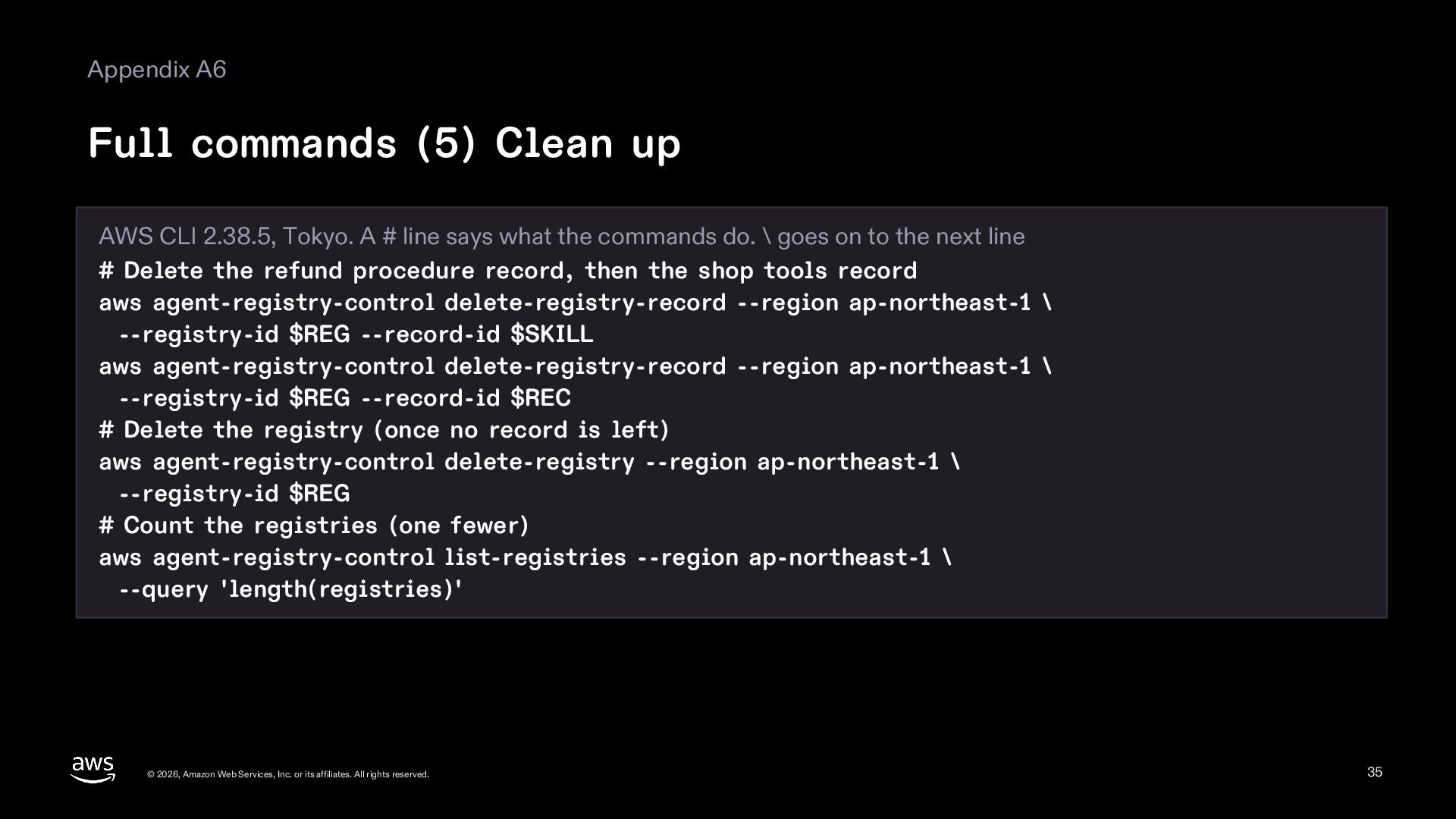
Appendix A6 Full commands (5) Clean up AWS CLI 2.38.5,
Tokyo. A # line says what the commands do. \ goes on to the next line # Delete the refund procedure record, then the shop tools record aws agent-registry-control delete-registry-record --region ap-northeast-1 \ --registry-id $REG --record-id $SKILL aws agent-registry-control delete-registry-record --region ap-northeast-1 \ --registry-id $REG --record-id $REC # Delete the registry (once no record is left) aws agent-registry-control delete-registry --region ap-northeast-1 \ --registry-id $REG # Count the registries (one fewer) aws agent-registry-control list-registries --region ap-northeast-1 \ --query 'length(registries)' © 2026, Amazon Web Services, Inc. or its affiliates. All rights reserved. 35 -
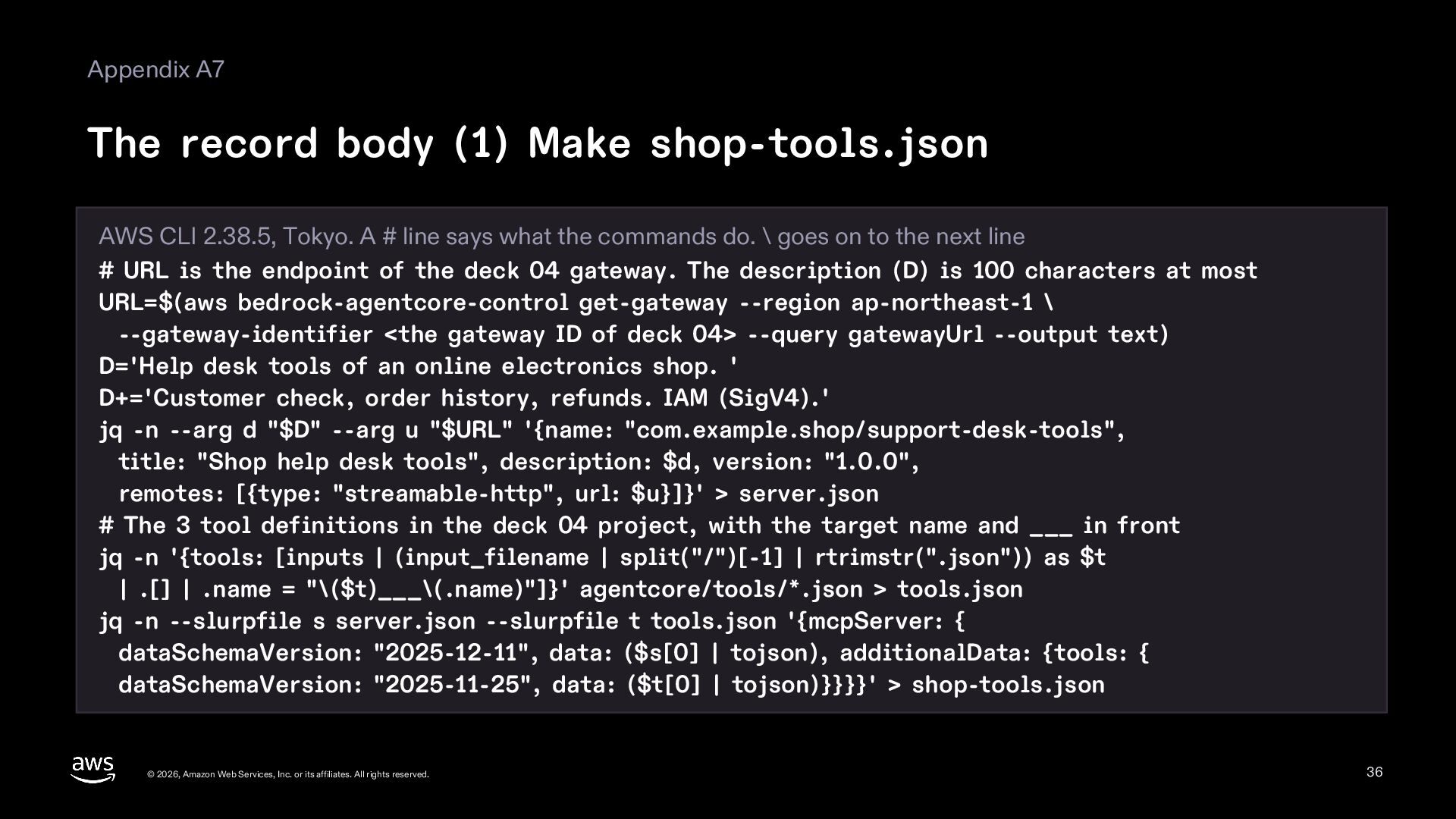
Appendix A7 The record body (1) Make shop-tools.json AWS CLI
2.38.5, Tokyo. A # line says what the commands do. \ goes on to the next line # URL is the endpoint of the deck 04 gateway. The description (D) is 100 characters at most URL=$(aws bedrock-agentcore-control get-gateway --region ap-northeast-1 \ --gateway-identifier <the gateway ID of deck 04> --query gatewayUrl --output text) D='Help desk tools of an online electronics shop. ' D+='Customer check, order history, refunds. IAM (SigV4).' jq -n --arg d "$D" --arg u "$URL" '{name: "com.example.shop/support-desk-tools", title: "Shop help desk tools", description: $d, version: "1.0.0", remotes: [{type: "streamable-http", url: $u}]}' > server.json # The 3 tool definitions in the deck 04 project, with the target name and ___ in front jq -n '{tools: [inputs | (input_filename | split("/")[-1] | rtrimstr(".json")) as $t | .[] | .name = "\($t)___\(.name)"]}' agentcore/tools/*.json > tools.json jq -n --slurpfile s server.json --slurpfile t tools.json '{mcpServer: { dataSchemaVersion: "2025-12-11", data: ($s[0] | tojson), additionalData: {tools: { dataSchemaVersion: "2025-11-25", data: ($t[0] | tojson)}}}}' > shop-tools.json © 2026, Amazon Web Services, Inc. or its affiliates. All rights reserved. 36 -
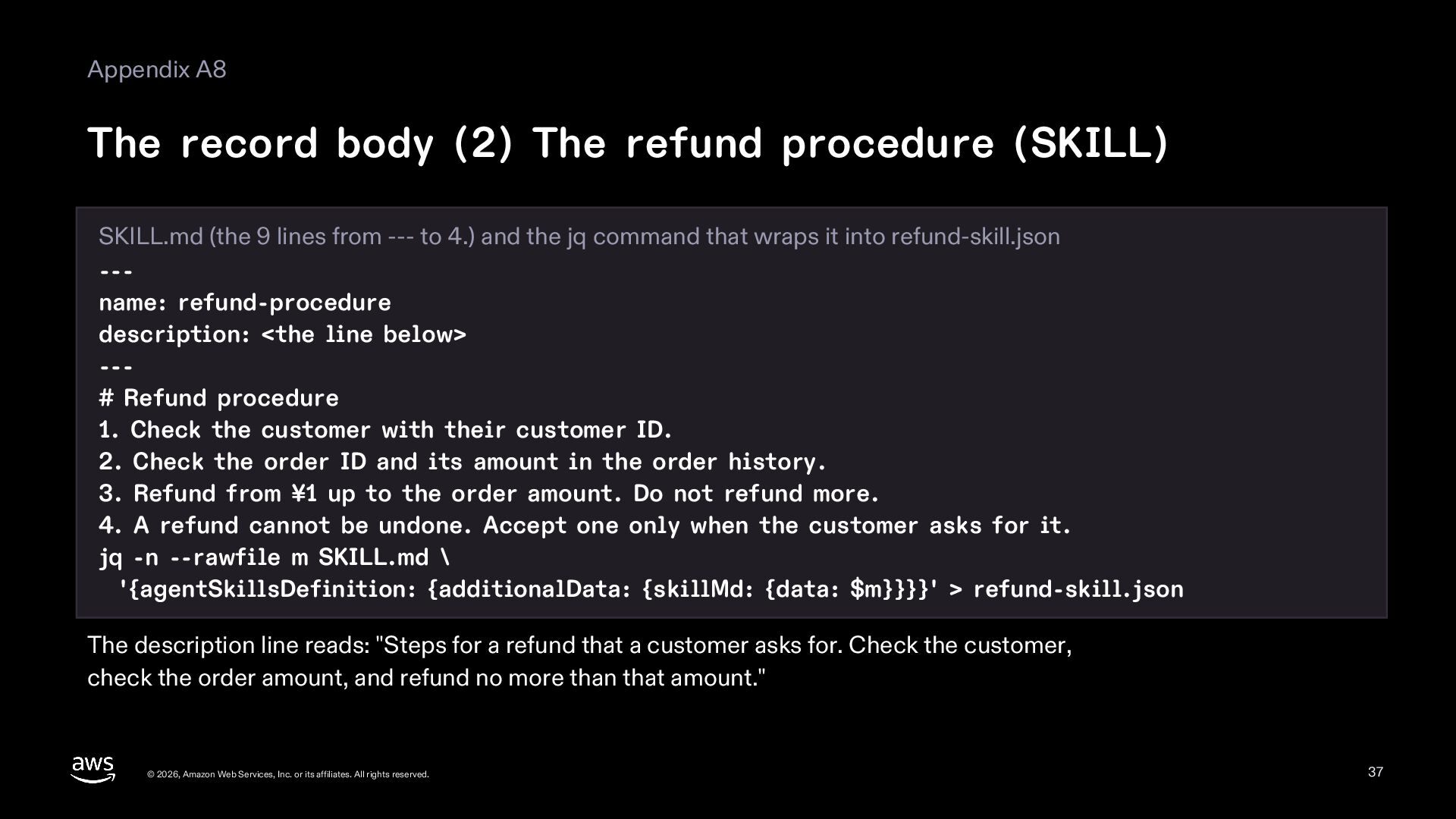
Appendix A8 The record body (2) The refund procedure (SKILL)
SKILL.md (the 9 lines from --- to 4.) and the jq command that wraps it into refund-skill.json --name: refund-procedure description: <the line below> --# Refund procedure 1. Check the customer with their customer ID. 2. Check the order ID and its amount in the order history. 3. Refund from ¥1 up to the order amount. Do not refund more. 4. A refund cannot be undone. Accept one only when the customer asks for it. jq -n --rawfile m SKILL.md \ '{agentSkillsDefinition: {additionalData: {skillMd: {data: $m}}}}' > refund-skill.json The description line reads: "Steps for a refund that a customer asks for. Check the customer, check the order amount, and refund no more than that amount." © 2026, Amazon Web Services, Inc. or its affiliates. All rights reserved. 37 -
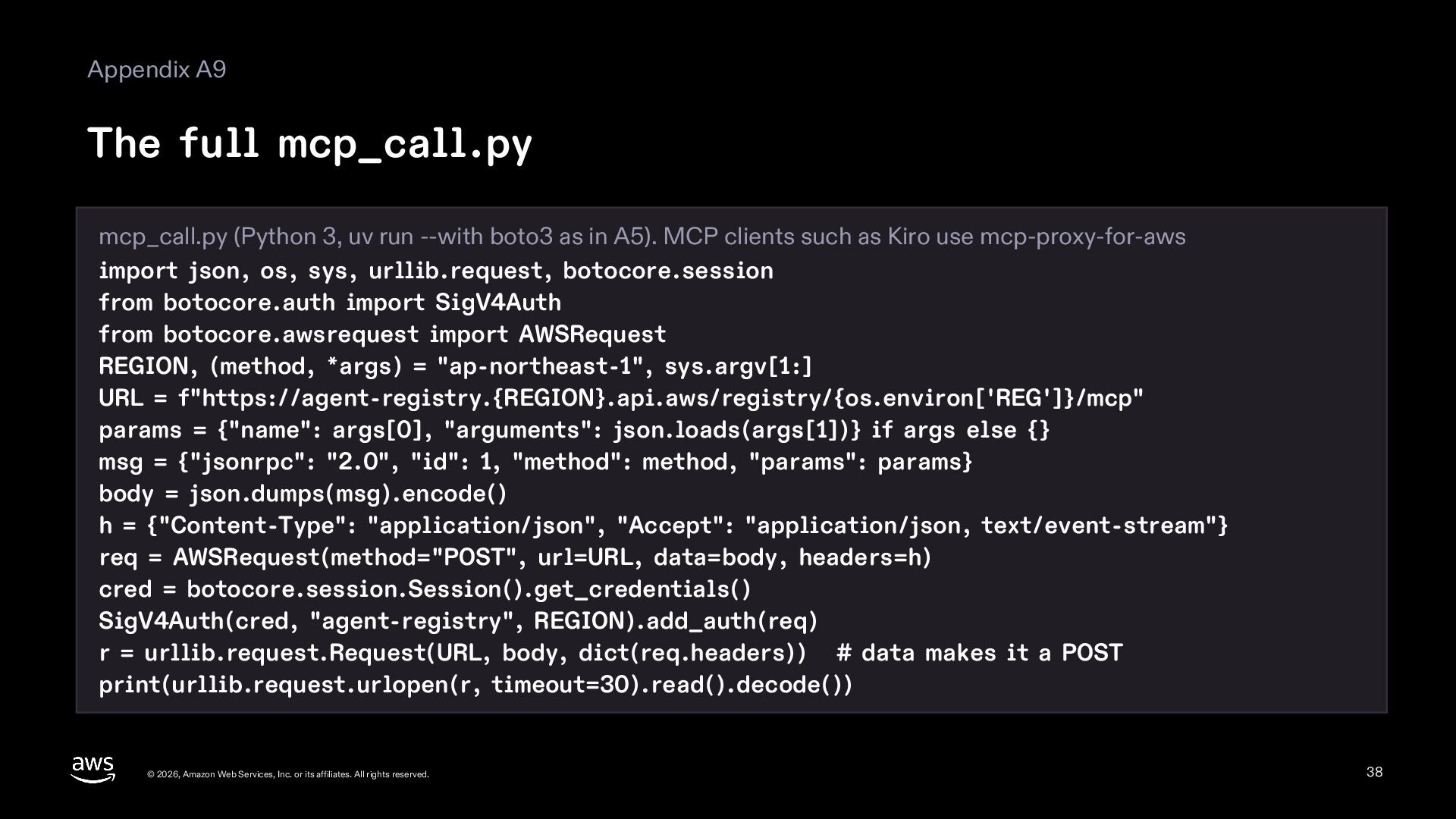
Appendix A9 The full mcp_call.py mcp_call.py (Python 3, uv run
--with boto3 as in A5). MCP clients such as Kiro use mcp-proxy-for-aws import json, os, sys, urllib.request, botocore.session from botocore.auth import SigV4Auth from botocore.awsrequest import AWSRequest REGION, (method, *args) = "ap-northeast-1", sys.argv[1:] URL = f"https://agent-registry.{REGION}.api.aws/registry/{os.environ['REG']}/mcp" params = {"name": args[0], "arguments": json.loads(args[1])} if args else {} msg = {"jsonrpc": "2.0", "id": 1, "method": method, "params": params} body = json.dumps(msg).encode() h = {"Content-Type": "application/json", "Accept": "application/json, text/event-stream"} req = AWSRequest(method="POST", url=URL, data=body, headers=h) cred = botocore.session.Session().get_credentials() SigV4Auth(cred, "agent-registry", REGION).add_auth(req) r = urllib.request.Request(URL, body, dict(req.headers)) # data makes it a POST print(urllib.request.urlopen(r, timeout=30).read().decode()) © 2026, Amazon Web Services, Inc. or its affiliates. All rights reserved. 38 -
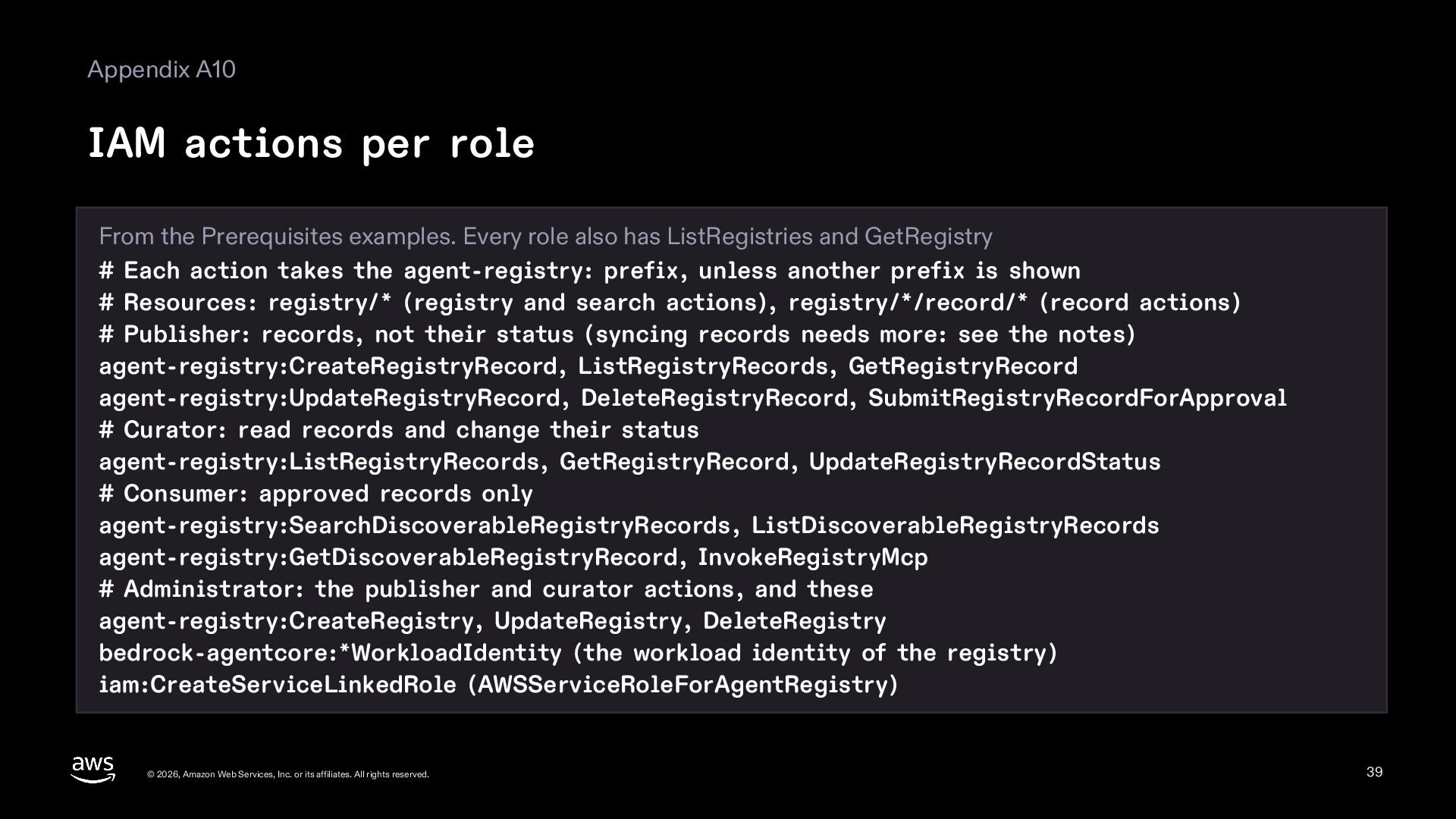
Appendix A10 IAM actions per role From the Prerequisites examples.
Every role also has ListRegistries and GetRegistry # Each action takes the agent-registry: prefix, unless another prefix is shown # Resources: registry/* (registry and search actions), registry/*/record/* (record actions) # Publisher: records, not their status (syncing records needs more: see the notes) agent-registry:CreateRegistryRecord, ListRegistryRecords, GetRegistryRecord agent-registry:UpdateRegistryRecord, DeleteRegistryRecord, SubmitRegistryRecordForApproval # Curator: read records and change their status agent-registry:ListRegistryRecords, GetRegistryRecord, UpdateRegistryRecordStatus # Consumer: approved records only agent-registry:SearchDiscoverableRegistryRecords, ListDiscoverableRegistryRecords agent-registry:GetDiscoverableRegistryRecord, InvokeRegistryMcp # Administrator: the publisher and curator actions, and these agent-registry:CreateRegistry, UpdateRegistry, DeleteRegistry bedrock-agentcore:*WorkloadIdentity (the workload identity of the registry) iam:CreateServiceLinkedRole (AWSServiceRoleForAgentRegistry) © 2026, Amazon Web Services, Inc. or its affiliates. All rights reserved. 39 -
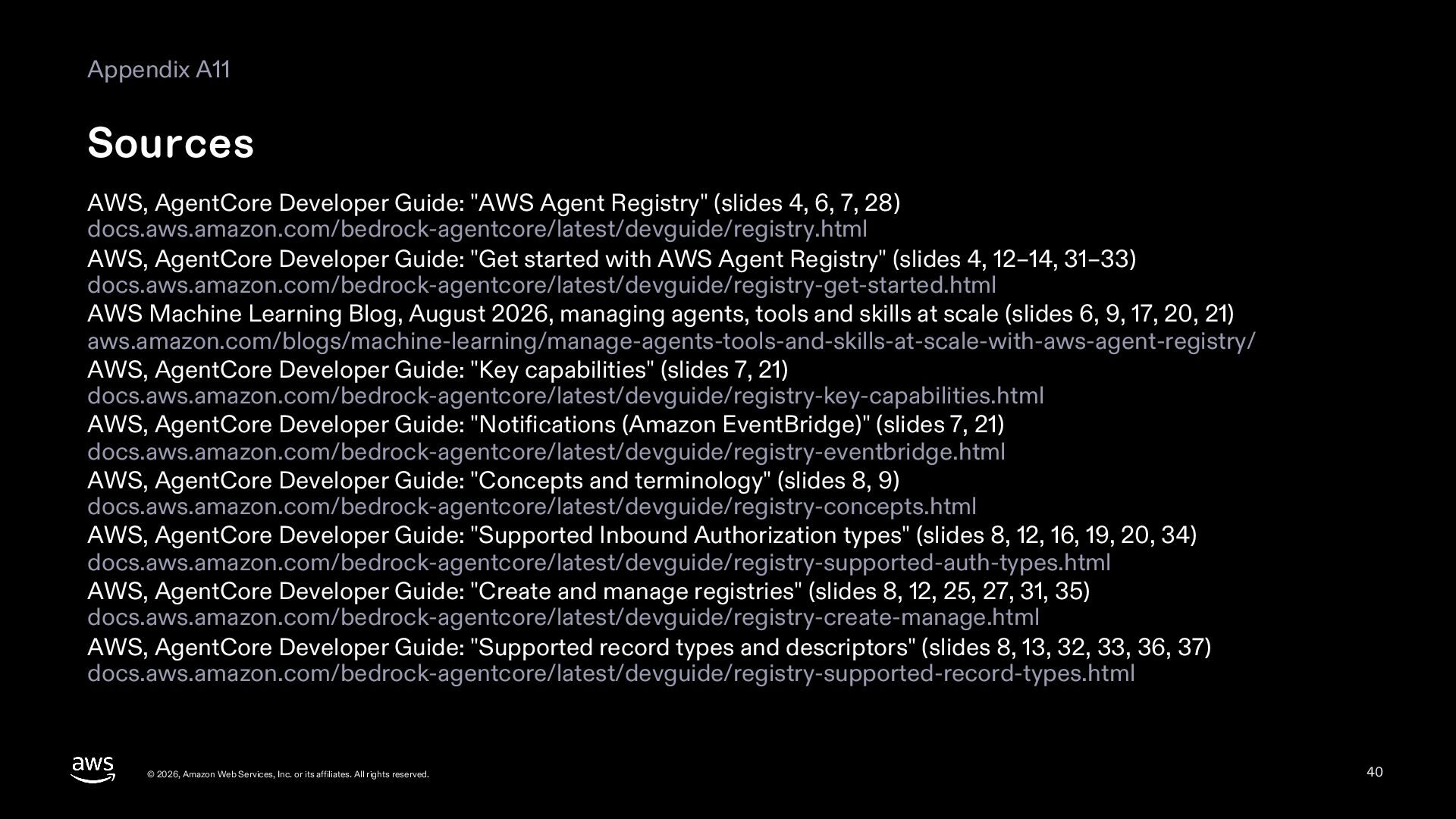
Appendix A11 Sources AWS, AgentCore Developer Guide: "AWS Agent Registry"
(slides 4, 6, 7, 28) docs.aws.amazon.com/bedrock-agentcore/latest/devguide/registry.html AWS, AgentCore Developer Guide: "Get started with AWS Agent Registry" (slides 4, 12–14, 31–33) docs.aws.amazon.com/bedrock-agentcore/latest/devguide/registry-get-started.html AWS Machine Learning Blog, August 2026, managing agents, tools and skills at scale (slides 6, 9, 17, 20, 21) aws.amazon.com/blogs/machine-learning/manage-agents-tools-and-skills-at-scale-with-aws-agent-registry/ AWS, AgentCore Developer Guide: "Key capabilities" (slides 7, 21) docs.aws.amazon.com/bedrock-agentcore/latest/devguide/registry-key-capabilities.html AWS, AgentCore Developer Guide: "Notifications (Amazon EventBridge)" (slides 7, 21) docs.aws.amazon.com/bedrock-agentcore/latest/devguide/registry-eventbridge.html AWS, AgentCore Developer Guide: "Concepts and terminology" (slides 8, 9) docs.aws.amazon.com/bedrock-agentcore/latest/devguide/registry-concepts.html AWS, AgentCore Developer Guide: "Supported Inbound Authorization types" (slides 8, 12, 16, 19, 20, 34) docs.aws.amazon.com/bedrock-agentcore/latest/devguide/registry-supported-auth-types.html AWS, AgentCore Developer Guide: "Create and manage registries" (slides 8, 12, 25, 27, 31, 35) docs.aws.amazon.com/bedrock-agentcore/latest/devguide/registry-create-manage.html AWS, AgentCore Developer Guide: "Supported record types and descriptors" (slides 8, 13, 32, 33, 36, 37) docs.aws.amazon.com/bedrock-agentcore/latest/devguide/registry-supported-record-types.html © 2026, Amazon Web Services, Inc. or its affiliates. All rights reserved. 40 -
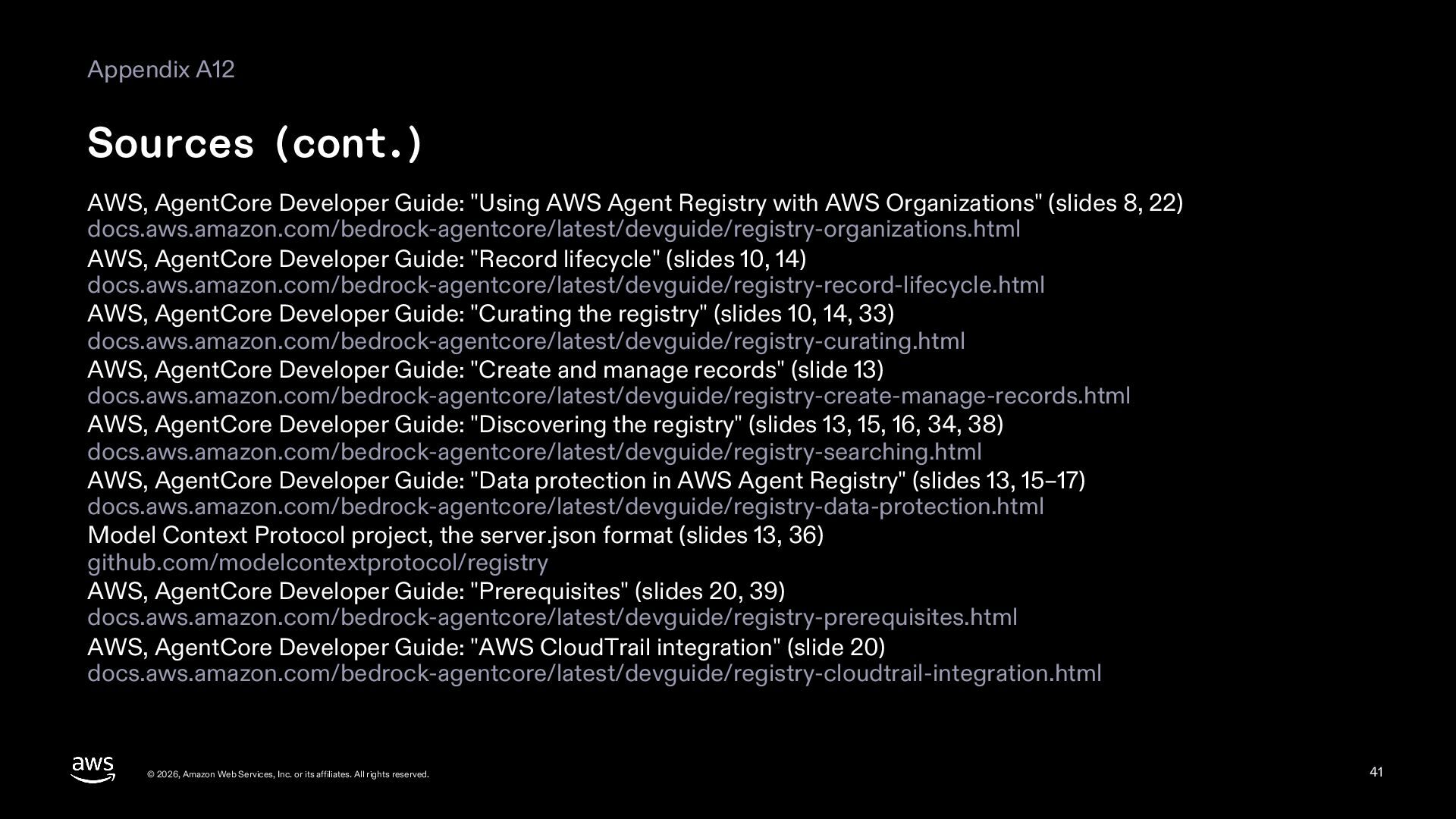
Appendix A12 Sources (cont.) AWS, AgentCore Developer Guide: "Using AWS
Agent Registry with AWS Organizations" (slides 8, 22) docs.aws.amazon.com/bedrock-agentcore/latest/devguide/registry-organizations.html AWS, AgentCore Developer Guide: "Record lifecycle" (slides 10, 14) docs.aws.amazon.com/bedrock-agentcore/latest/devguide/registry-record-lifecycle.html AWS, AgentCore Developer Guide: "Curating the registry" (slides 10, 14, 33) docs.aws.amazon.com/bedrock-agentcore/latest/devguide/registry-curating.html AWS, AgentCore Developer Guide: "Create and manage records" (slide 13) docs.aws.amazon.com/bedrock-agentcore/latest/devguide/registry-create-manage-records.html AWS, AgentCore Developer Guide: "Discovering the registry" (slides 13, 15, 16, 34, 38) docs.aws.amazon.com/bedrock-agentcore/latest/devguide/registry-searching.html AWS, AgentCore Developer Guide: "Data protection in AWS Agent Registry" (slides 13, 15–17) docs.aws.amazon.com/bedrock-agentcore/latest/devguide/registry-data-protection.html Model Context Protocol project, the server.json format (slides 13, 36) github.com/modelcontextprotocol/registry AWS, AgentCore Developer Guide: "Prerequisites" (slides 20, 39) docs.aws.amazon.com/bedrock-agentcore/latest/devguide/registry-prerequisites.html AWS, AgentCore Developer Guide: "AWS CloudTrail integration" (slide 20) docs.aws.amazon.com/bedrock-agentcore/latest/devguide/registry-cloudtrail-integration.html © 2026, Amazon Web Services, Inc. or its affiliates. All rights reserved. 41 -
Appendix A13 Sources (cont.) AWS, AgentCore Developer Guide: "Reviewing registry
records" (slide 21) docs.aws.amazon.com/bedrock-agentcore/latest/devguide/registry-reviewing-records.html Anthropic, September 2025, writing tools for agents (slide 21) anthropic.com/engineering/writing-tools-for-agents OpenAI, April 2025, A practical guide to building agents (slide 21) cdn.openai.com/business-guides-and-resources/a-practical-guide-to-building-agents.pdf AWS, AgentCore Developer Guide: "Release notes" (slide 22) docs.aws.amazon.com/bedrock-agentcore/latest/devguide/release-notes.html AWS, August 2026, AWS Agent Registry is generally available (slide 22) aws.amazon.com/about-aws/whats-new/2026/08/aws-agent-registry-generally-available/ AWS, AgentCore Developer Guide: "Sharing a registry across accounts with AWS RAM" (slide 23) docs.aws.amazon.com/bedrock-agentcore/latest/devguide/registry-cross-account-sharing.html AWS, AgentCore Developer Guide: "VPC and AWS PrivateLink" (slide 23) docs.aws.amazon.com/bedrock-agentcore/latest/devguide/registry-privatelink.html AWS, AgentCore Developer Guide: "Supported AWS Regions" (slides 25, 27) docs.aws.amazon.com/bedrock-agentcore/latest/devguide/agentcore-regions.html AWS, Amazon Bedrock AgentCore pricing (slides 25, 27) aws.amazon.com/bedrock/agentcore/pricing/ © 2026, Amazon Web Services, Inc. or its affiliates. All rights reserved. 42 -
Appendix A14 Sources (cont.) AWS, AgentCore Developer Guide: "Overview" (slide
26) docs.aws.amazon.com/bedrock-agentcore/latest/devguide/what-is-bedrock-agentcore.html AWS, AgentCore Developer Guide: "Web Answer" (slide 27) docs.aws.amazon.com/bedrock-agentcore/latest/devguide/gateway-target-connector-web-answer-tool.html AWS, AgentCore Developer Guide: "Define a custom metadata schema" (slide 27) docs.aws.amazon.com/bedrock-agentcore/latest/devguide/registry-custom-metadata-schema.html © 2026, Amazon Web Services, Inc. or its affiliates. All rights reserved. 43
 inariku
 oracle4engineer
 timakin
 tetsuyaoi
 tascript
 kanfab1
 taka_aki
 raybugg
 qatonchan
 kaminashi
 i35_267
 kumaiu
 ren8k
 watany
 malarkey
 aemeredith
 mza
 marketingsoph
 cassininazir
 baasie
 reverentgeek
 sonatard
 inesmontani
 ammeep
 aki_iinuma