Upgrade to Pro — share decks privately, control downloads, hide ads and more …

Skills and custom agents (Hand over procedures ...

Skills and custom agents (Hand over procedures and roles, sub-agents included) | Kiro: Zero to Hero 08

Hand Kiro your team's procedures and roles. Write skills that Kiro loads when a request fits or when you call them by name, make custom agents with a fixed set of tools and files (such as a read-only reviewer), and split big investigations into sub-agents that report back only their results. Includes a running example (a meeting-room booking app). As of November 2026 (Kiro IDE 1.4, Kiro CLI 3.1). This is deck 08, in the Go deeper part of the Kiro: Zero to Hero series.

Avatar for Riku INADA

Riku INADA PRO

November 08, 2026

More Decks by Riku INADA

Other Decks in Technology

Transcript

  1. Kiro: Zero to Hero Go deeper Skills and custom agents

    Hand over procedures and roles (sub-agents included) 08 As of November 2026 (Kiro IDE 1.4, Kiro CLI 3.1, Kiro Crew 0.12) November 2026 Riku Inada Amazon Web Services Japan © 2026, Amazon Web Services, Inc. or its affiliates. All rights reserved. 1
  2. Introduction About me Riku Inada Amazon Web Services Japan G.K.

    Solutions Architect Works mainly with manufacturing customers Recent work Promoting the AI-Driven Development Life Cycle (AI-DLC) Writing and speaking about Kiro and AWS Amplify © 2026, Amazon Web Services, Inc. or its affiliates. All rights reserved. X @inada_riku Speaker Deck speakerdeck.com/inariku Zenn zenn.dev/inariku GitHub github.com/inariku 2
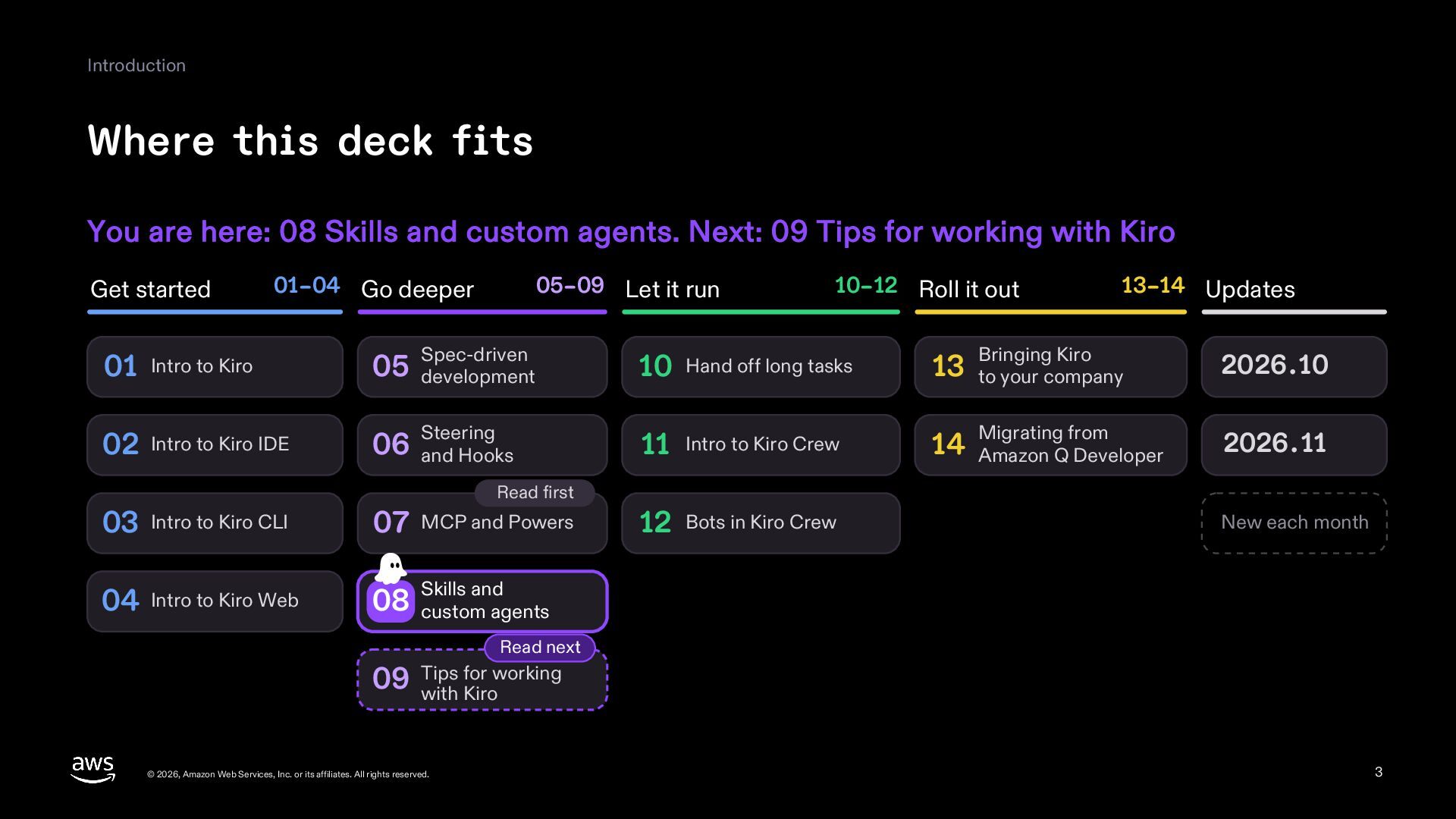
  3. Introduction Where this deck fits You are here: 08 Skills

    and custom agents. Next: 09 Tips for working with Kiro Get started 01–04 Go deeper 05–09 Let it run 10–12 Roll it out 13–14 Updates 01 Intro to Kiro 05 development Spec-driven 10 Hand off long tasks 13 to your company 02 Intro to Kiro IDE 06 and Hooks Steering 11 Intro to Kiro Crew 14 Amazon Q Developer Read first 03 Intro to Kiro CLI 07 MCP and Powers 04 Intro to Kiro Web and 08 Skills custom agents 12 Bots in Kiro Crew Bringing Kiro 2026.10 Migrating from 2026.11 New each month Read next for working 09 Tips with Kiro © 2026, Amazon Web Services, Inc. or its affiliates. All rights reserved. 3
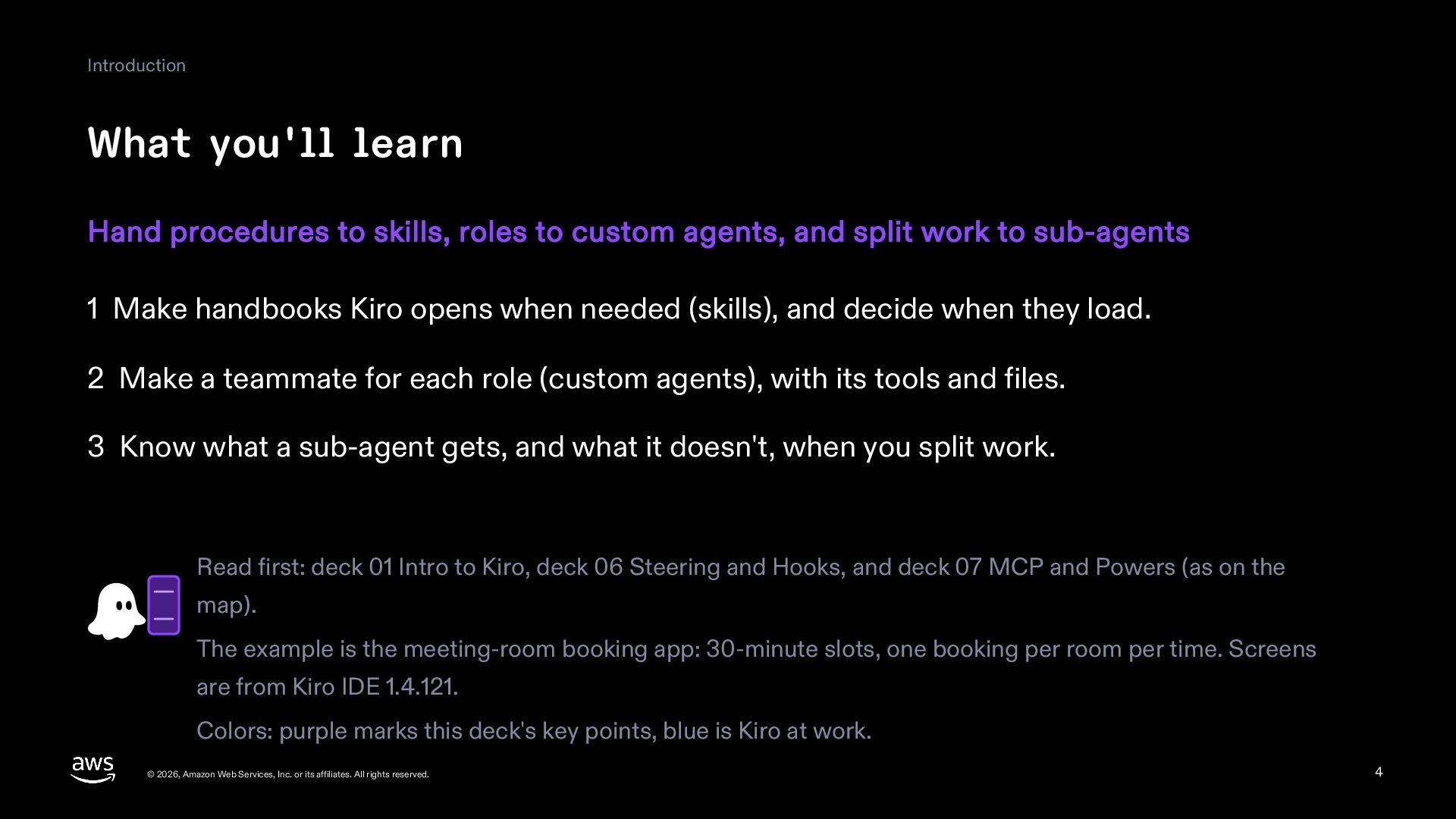
  4. Introduction What you'll learn Hand procedures to skills, roles to

    custom agents, and split work to sub-agents 1 Make handbooks Kiro opens when needed (skills), and decide when they load. 2 Make a teammate for each role (custom agents), with its tools and files. 3 Know what a sub-agent gets, and what it doesn't, when you split work. Read first: deck 01 Intro to Kiro, deck 06 Steering and Hooks, and deck 07 MCP and Powers (as on the map). The example is the meeting-room booking app: 30-minute slots, one booking per room per time. Screens are from Kiro IDE 1.4.121. Colors: purple marks this deck's key points, blue is Kiro at work. © 2026, Amazon Web Services, Inc. or its affiliates. All rights reserved. 4
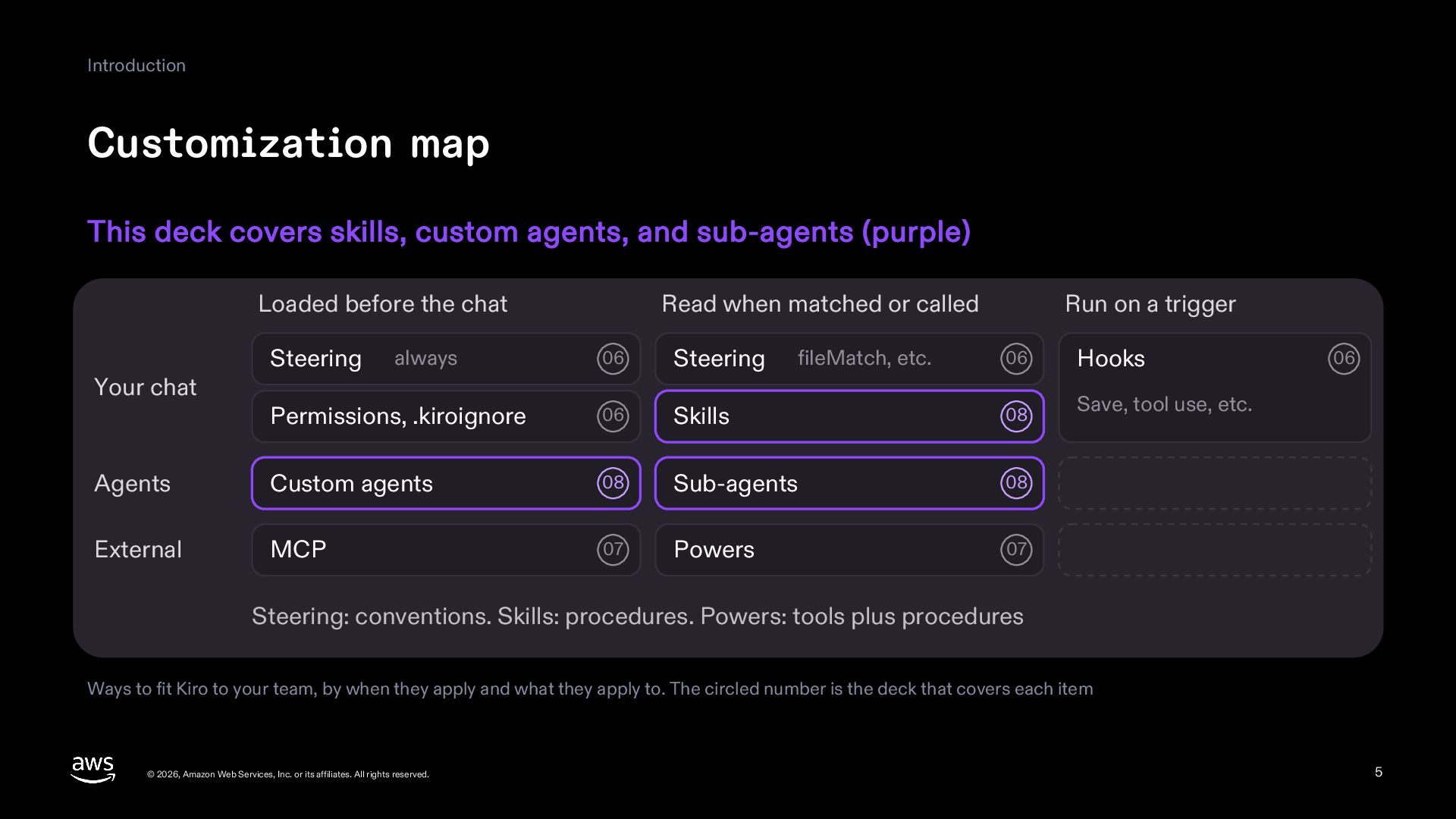
  5. Introduction Customization map This deck covers skills, custom agents, and

    sub-agents (purple) Loaded before the chat 06 Steering Permissions, .kiroignore 06 Agents Custom agents External MCP Your chat Steering Read when matched or called always Run on a trigger 06 Hooks Skills 08 Save, tool use, etc. 08 Sub-agents 08 07 Powers 07 fileMatch, etc. 06 Steering: conventions. Skills: procedures. Powers: tools plus procedures Ways to fit Kiro to your team, by when they apply and what they apply to. The circled number is the deck that covers each item © 2026, Amazon Web Services, Inc. or its affiliates. All rights reserved. 5
  6. Introduction Handbooks, roles, and helpers for a new hire With

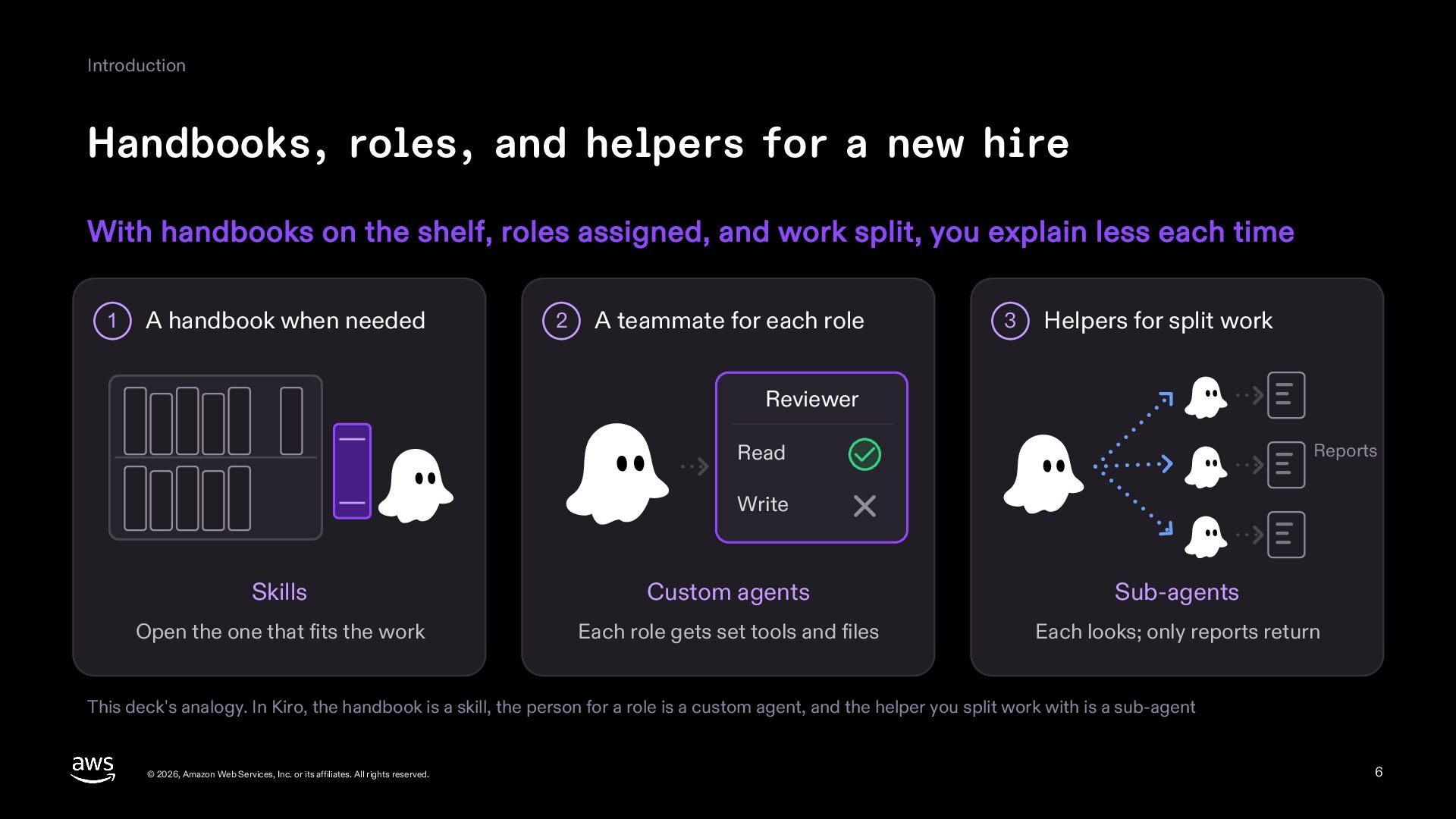
    handbooks on the shelf, roles assigned, and work split, you explain less each time 1 A handbook when needed 2 A teammate for each role 3 Helpers for split work Reviewer Reports Read Write Skills Custom agents Sub-agents Open the one that fits the work Each role gets set tools and files Each looks; only reports return This deck's analogy. In Kiro, the handbook is a skill, the person for a role is a custom agent, and the helper you split work with is a sub-agent © 2026, Amazon Web Services, Inc. or its affiliates. All rights reserved. 6
  7. Introduction What the mechanisms handle Compared with a plain handbook,

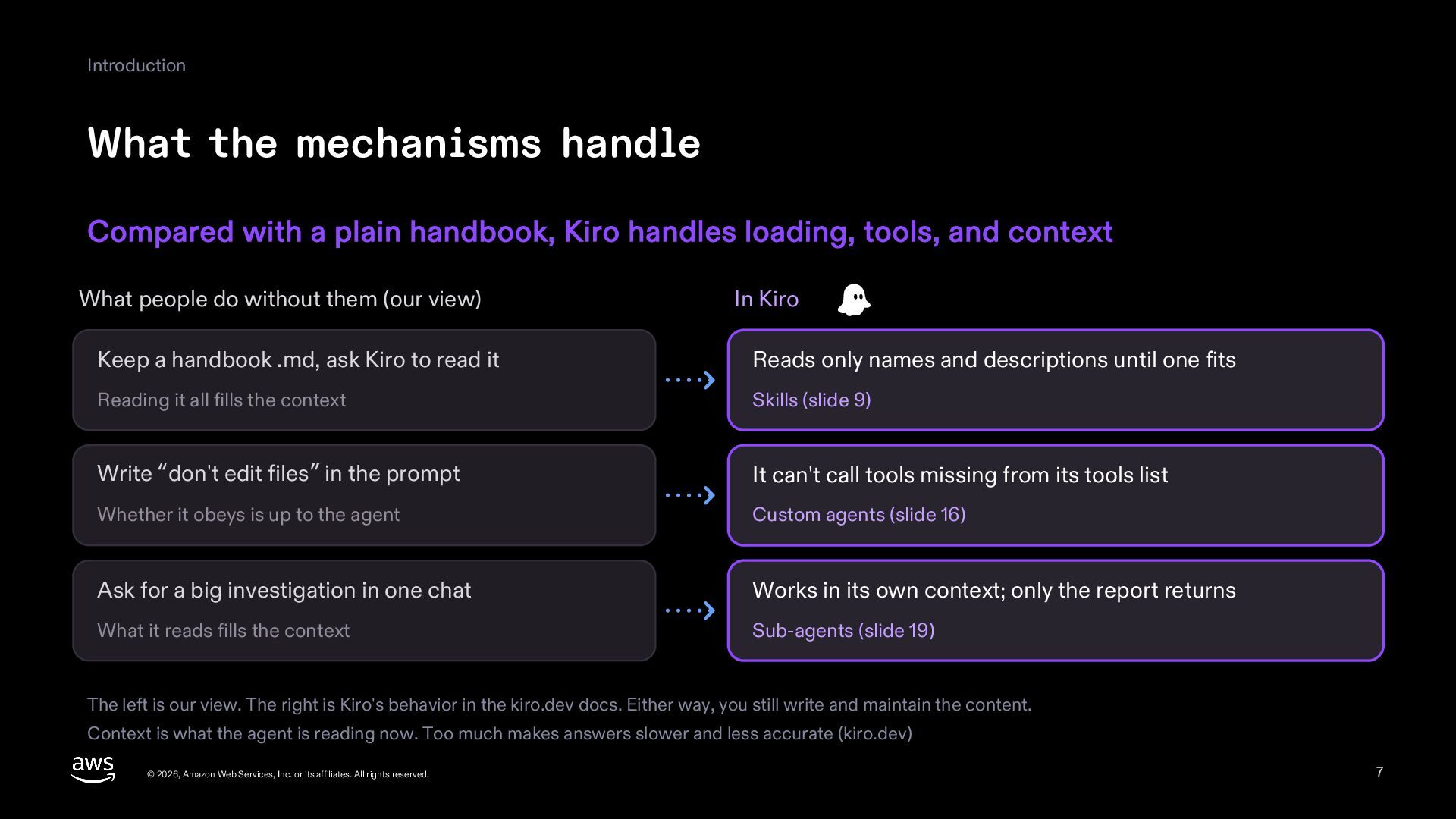
    Kiro handles loading, tools, and context What people do without them (our view) In Kiro Keep a handbook .md, ask Kiro to read it Reads only names and descriptions until one fits Reading it all fills the context Skills (slide 9) Write “don't edit files” in the prompt It can't call tools missing from its tools list Whether it obeys is up to the agent Custom agents (slide 16) Ask for a big investigation in one chat Works in its own context; only the report returns What it reads fills the context Sub-agents (slide 19) The left is our view. The right is Kiro's behavior in the kiro.dev docs. Either way, you still write and maintain the content. Context is what the agent is reading now. Too much makes answers slower and less accurate (kiro.dev) © 2026, Amazon Web Services, Inc. or its affiliates. All rights reserved. 7
  8. 1 Skills Skills A handbook Kiro opens when needed: steps

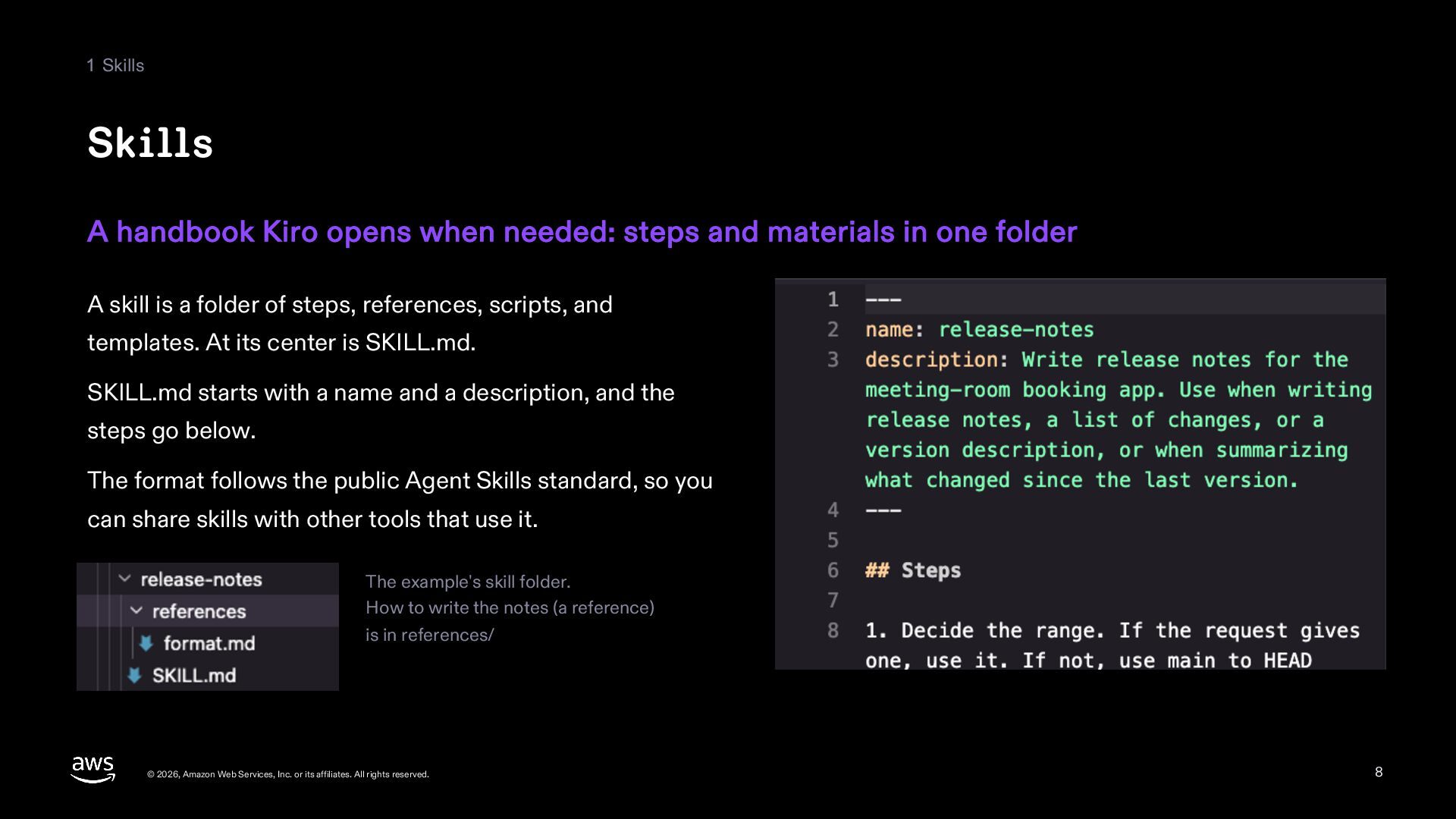
    and materials in one folder A skill is a folder of steps, references, scripts, and templates. At its center is SKILL.md. SKILL.md starts with a name and a description, and the steps go below. The format follows the public Agent Skills standard, so you can share skills with other tools that use it. The example's skill folder. How to write the notes (a reference) is in references/ © 2026, Amazon Web Services, Inc. or its affiliates. All rights reserved. 8
  9. 1 Skills How a skill gets read At first Kiro

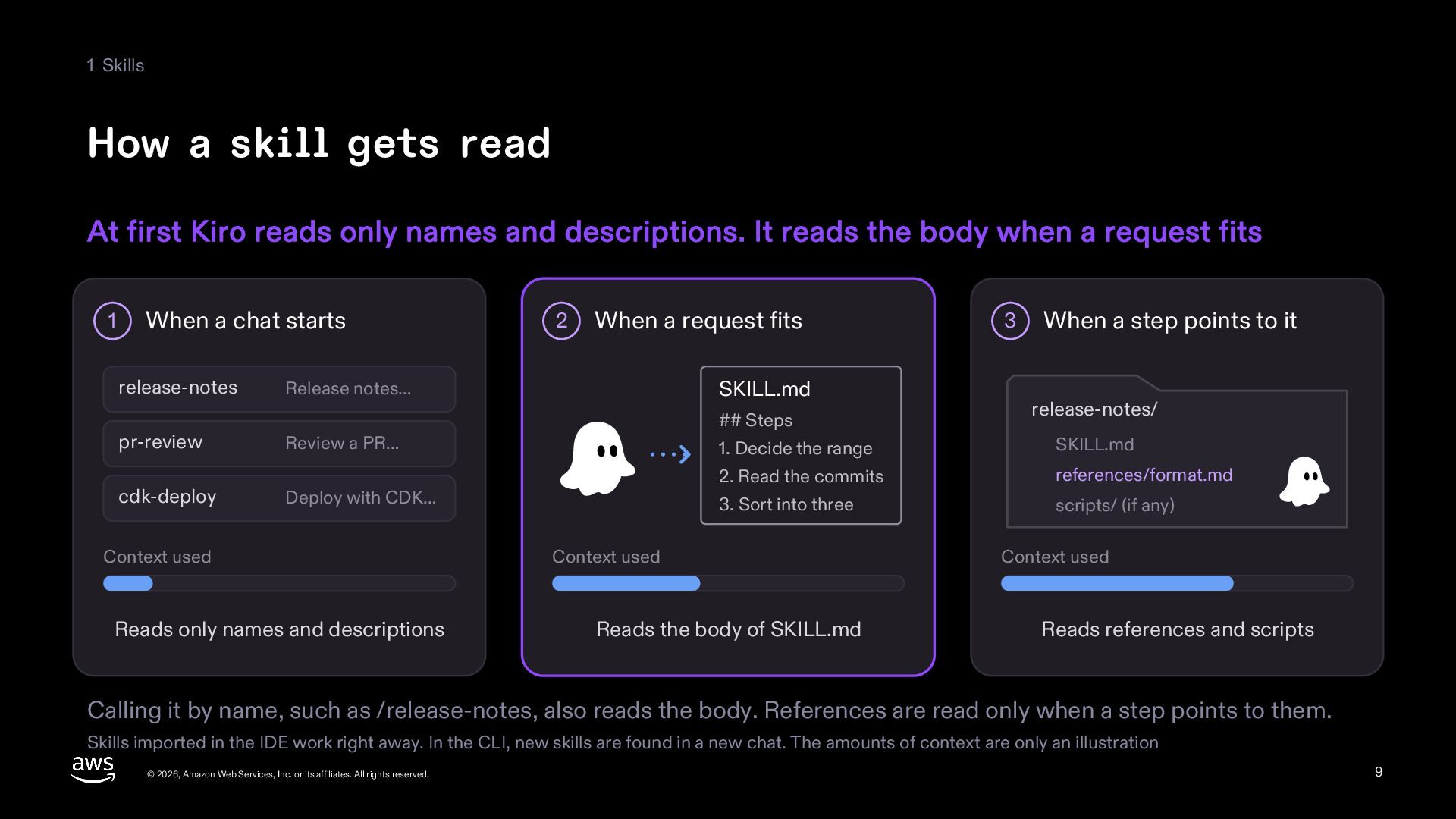
    reads only names and descriptions. It reads the body when a request fits 1 When a chat starts release-notes 2 When a request fits SKILL.md Release notes… ## Steps pr-review Review a PR… cdk-deploy Deploy with CDK… Context used Reads only names and descriptions 3 When a step points to it release-notes/ 1. Decide the range SKILL.md 2. Read the commits references/format.md 3. Sort into three scripts/ (if any) Context used Reads the body of SKILL.md Context used Reads references and scripts Calling it by name, such as /release-notes, also reads the body. References are read only when a step points to them. Skills imported in the IDE work right away. In the CLI, new skills are found in a new chat. The amounts of context are only an illustration © 2026, Amazon Web Services, Inc. or its affiliates. All rights reserved. 9
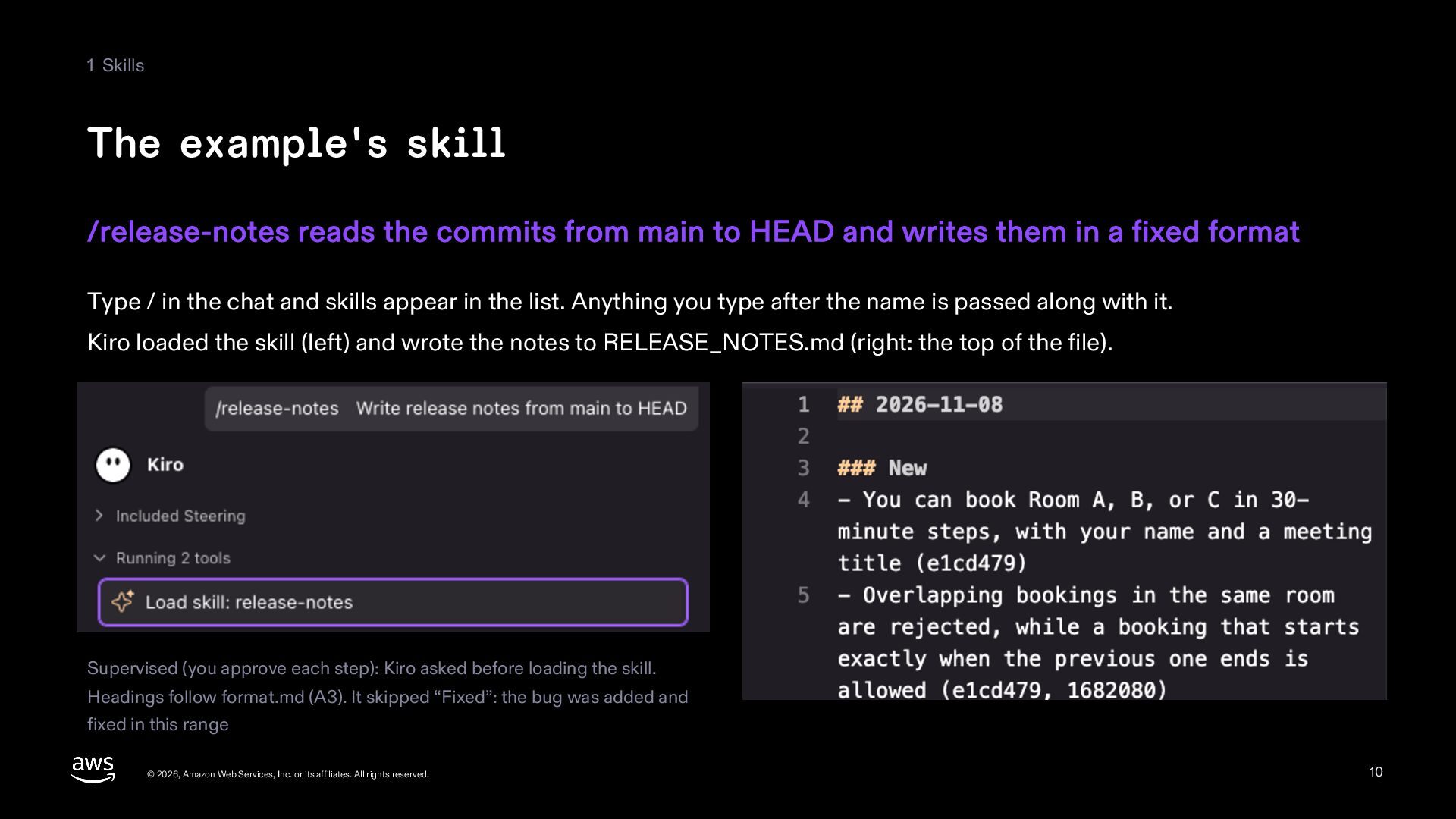
  10. 1 Skills The example's skill /release-notes reads the commits from

    main to HEAD and writes them in a fixed format Type / in the chat and skills appear in the list. Anything you type after the name is passed along with it. Kiro loaded the skill (left) and wrote the notes to RELEASE_NOTES.md (right: the top of the file). Supervised (you approve each step): Kiro asked before loading the skill. Headings follow format.md (A3). It skipped “Fixed”: the bug was added and fixed in this range © 2026, Amazon Web Services, Inc. or its affiliates. All rights reserved. 10
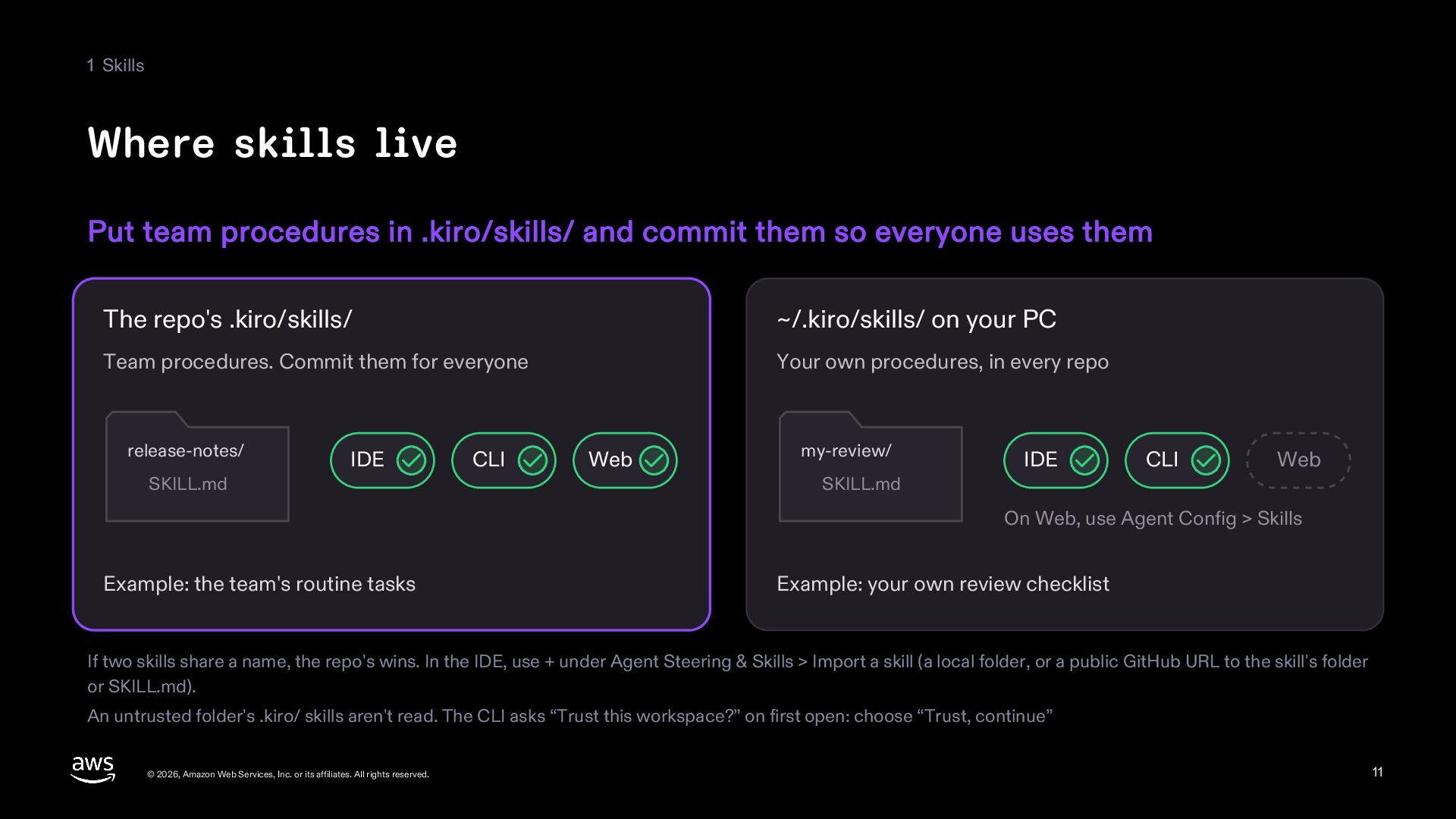
  11. 1 Skills Where skills live Put team procedures in .kiro/skills/

    and commit them so everyone uses them The repo's .kiro/skills/ ~/.kiro/skills/ on your PC Team procedures. Commit them for everyone Your own procedures, in every repo release-notes/ SKILL.md IDE CLI Web my-review/ SKILL.md IDE CLI Web On Web, use Agent Config > Skills Example: the team's routine tasks Example: your own review checklist If two skills share a name, the repo's wins. In the IDE, use + under Agent Steering & Skills > Import a skill (a local folder, or a public GitHub URL to the skill's folder or SKILL.md). An untrusted folder's .kiro/ skills aren't read. The CLI asks “Trust this workspace?” on first open: choose “Trust, continue” © 2026, Amazon Web Services, Inc. or its affiliates. All rights reserved. 11
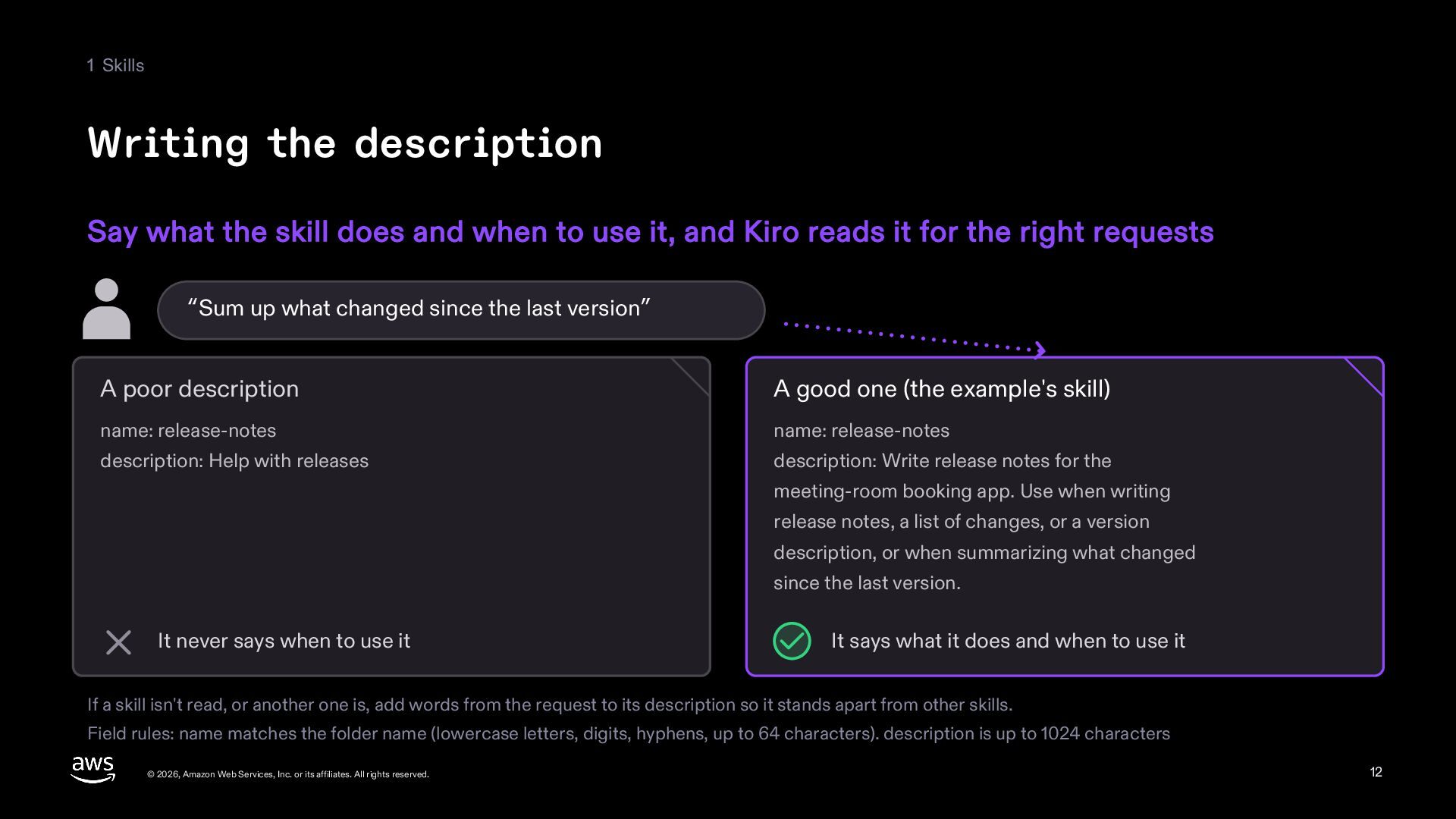
  12. 1 Skills Writing the description Say what the skill does

    and when to use it, and Kiro reads it for the right requests “Sum up what changed since the last version” A poor description A good one (the example's skill) name: release-notes name: release-notes description: Help with releases description: Write release notes for the meeting-room booking app. Use when writing release notes, a list of changes, or a version description, or when summarizing what changed since the last version. It never says when to use it It says what it does and when to use it If a skill isn't read, or another one is, add words from the request to its description so it stands apart from other skills. Field rules: name matches the folder name (lowercase letters, digits, hyphens, up to 64 characters). description is up to 1024 characters © 2026, Amazon Web Services, Inc. or its affiliates. All rights reserved. 12
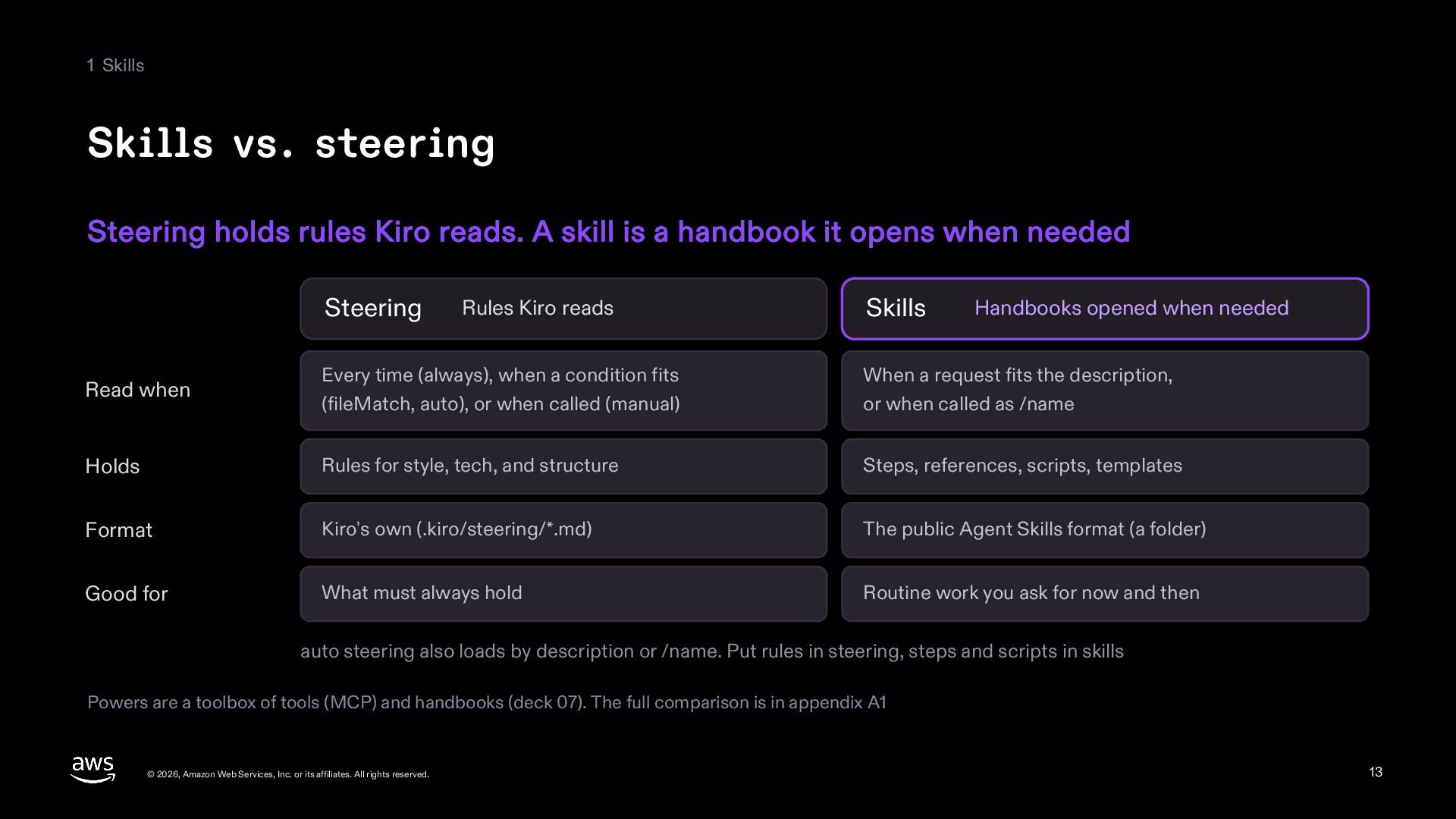
  13. 1 Skills Skills vs. steering Steering holds rules Kiro reads.

    A skill is a handbook it opens when needed Steering Rules Kiro reads Skills Handbooks opened when needed Read when Every time (always), when a condition fits (fileMatch, auto), or when called (manual) When a request fits the description, or when called as /name Holds Rules for style, tech, and structure Steps, references, scripts, templates Format Kiro's own (.kiro/steering/*.md) The public Agent Skills format (a folder) Good for What must always hold Routine work you ask for now and then auto steering also loads by description or /name. Put rules in steering, steps and scripts in skills Powers are a toolbox of tools (MCP) and handbooks (deck 07). The full comparison is in appendix A1 © 2026, Amazon Web Services, Inc. or its affiliates. All rights reserved. 13
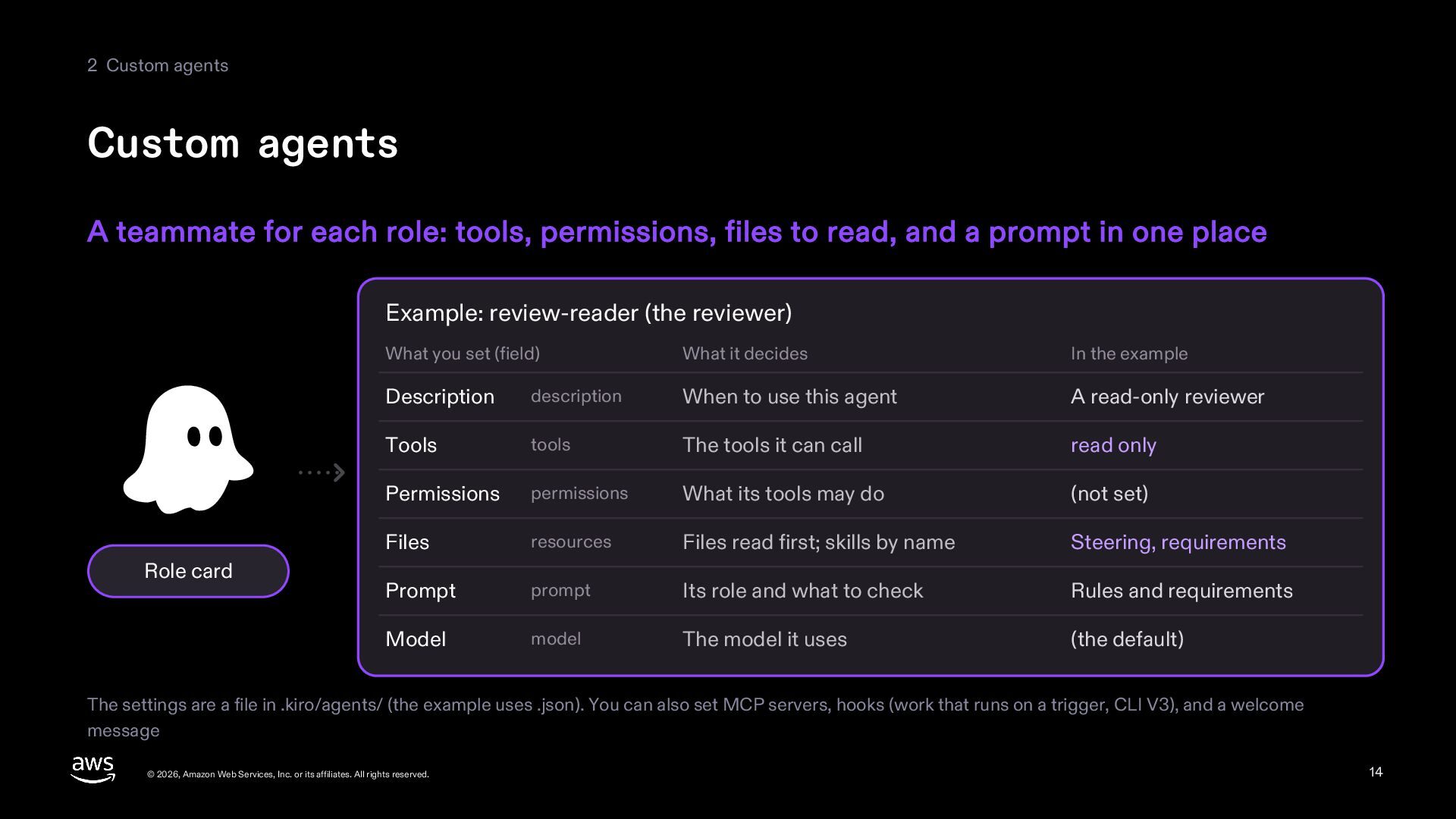
  14. 2 Custom agents Custom agents A teammate for each role:

    tools, permissions, files to read, and a prompt in one place Example: review-reader (the reviewer) Role card What you set (field) What it decides In the example Description description When to use this agent A read-only reviewer Tools tools The tools it can call read only Permissions permissions What its tools may do (not set) Files resources Files read first; skills by name Steering, requirements Prompt prompt Its role and what to check Rules and requirements Model model The model it uses (the default) The settings are a file in .kiro/agents/ (the example uses .json). You can also set MCP servers, hooks (work that runs on a trigger, CLI V3), and a welcome message © 2026, Amazon Web Services, Inc. or its affiliates. All rights reserved. 14
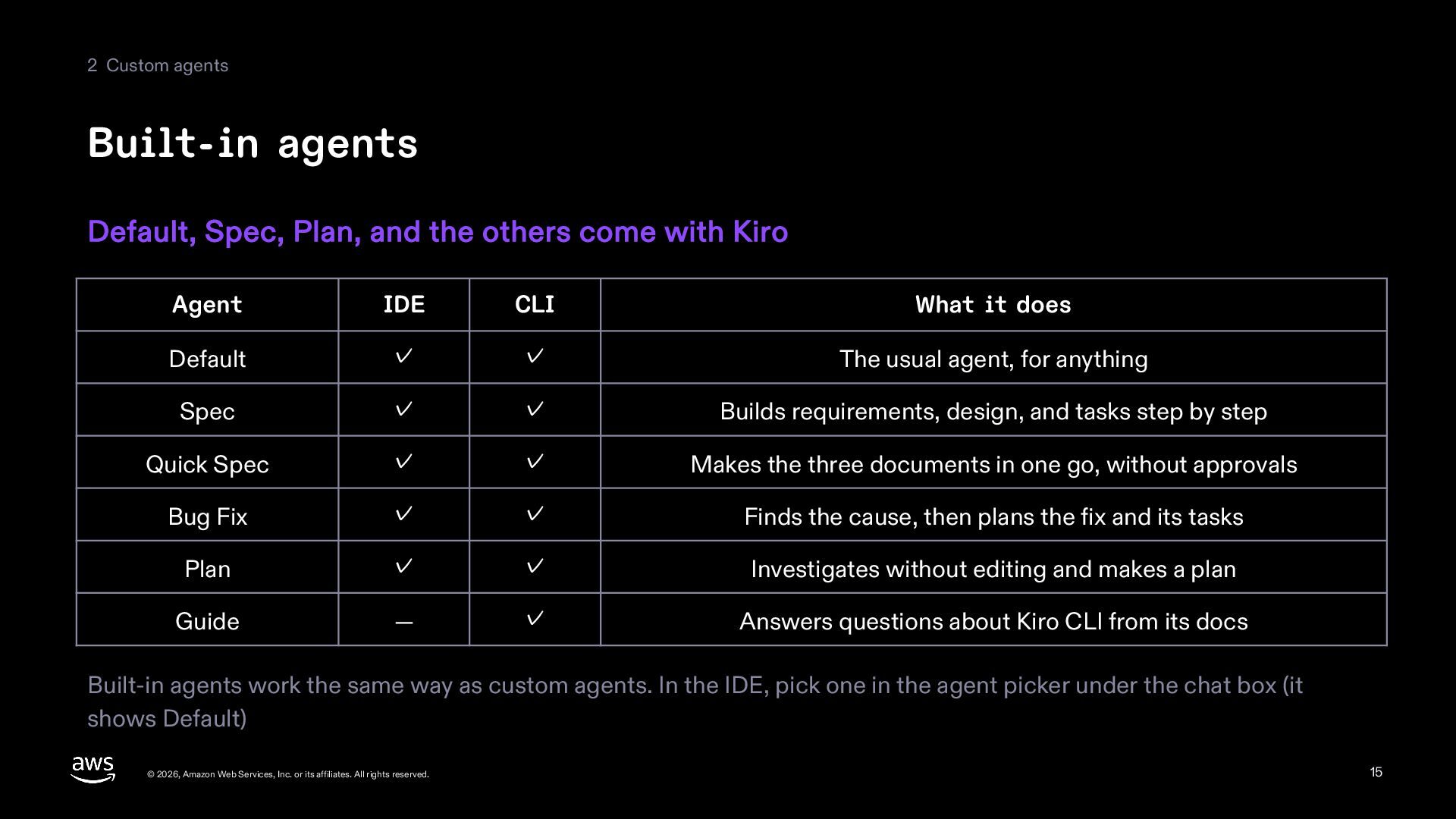
  15. 2 Custom agents Built-in agents Default, Spec, Plan, and the

    others come with Kiro Agent IDE CLI What it does Default ✓ ✓ The usual agent, for anything Spec ✓ ✓ Builds requirements, design, and tasks step by step Quick Spec ✓ ✓ Makes the three documents in one go, without approvals Bug Fix ✓ ✓ Finds the cause, then plans the fix and its tasks Plan ✓ ✓ Investigates without editing and makes a plan Guide — ✓ Answers questions about Kiro CLI from its docs Built-in agents work the same way as custom agents. In the IDE, pick one in the agent picker under the chat box (it shows Default) © 2026, Amazon Web Services, Inc. or its affiliates. All rights reserved. 15
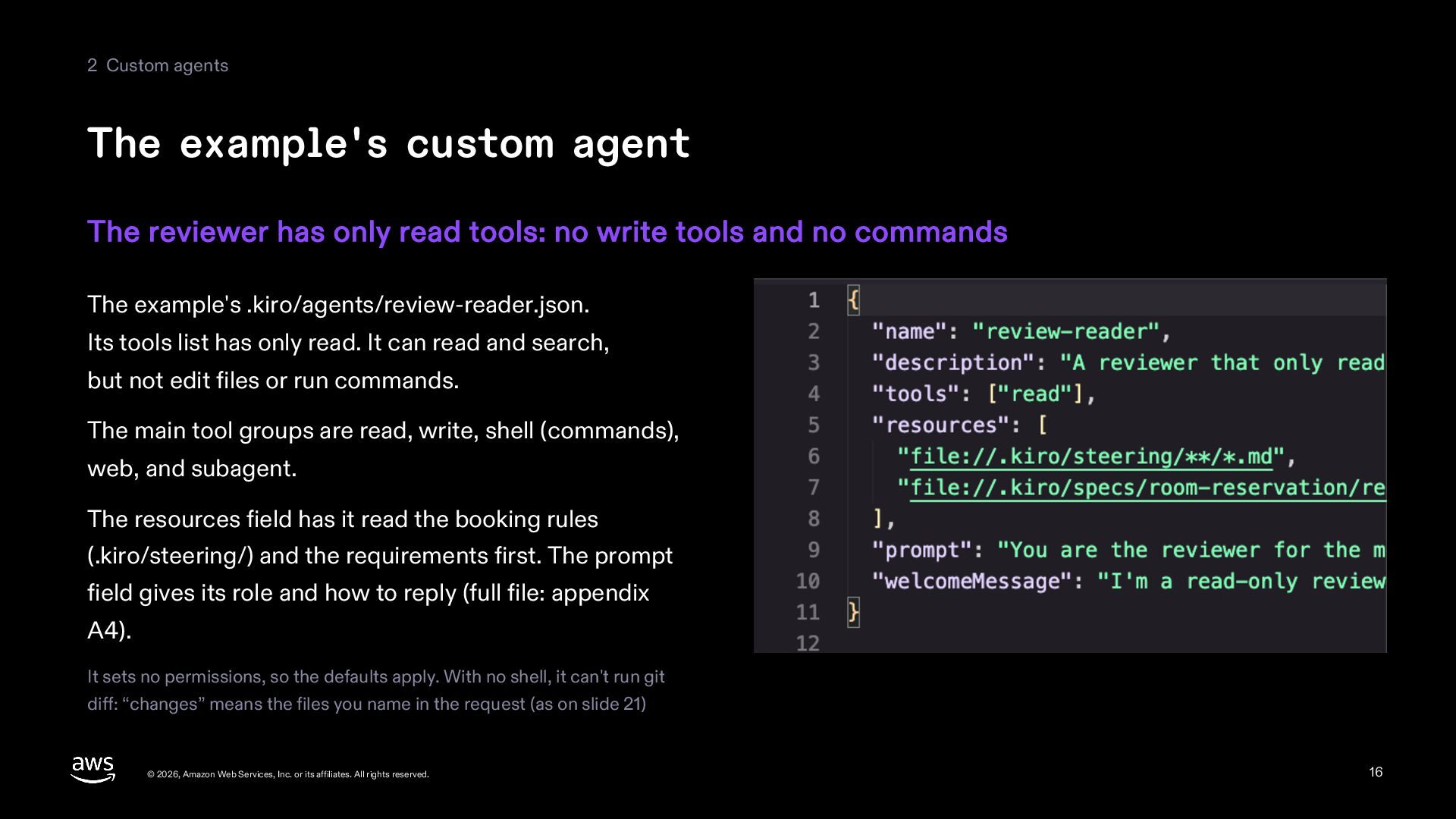
  16. 2 Custom agents The example's custom agent The reviewer has

    only read tools: no write tools and no commands The example's .kiro/agents/review-reader.json. Its tools list has only read. It can read and search, but not edit files or run commands. The main tool groups are read, write, shell (commands), web, and subagent. The resources field has it read the booking rules (.kiro/steering/) and the requirements first. The prompt field gives its role and how to reply (full file: appendix A4). It sets no permissions, so the defaults apply. With no shell, it can't run git diff: “changes” means the files you name in the request (as on slide 21) © 2026, Amazon Web Services, Inc. or its affiliates. All rights reserved. 16
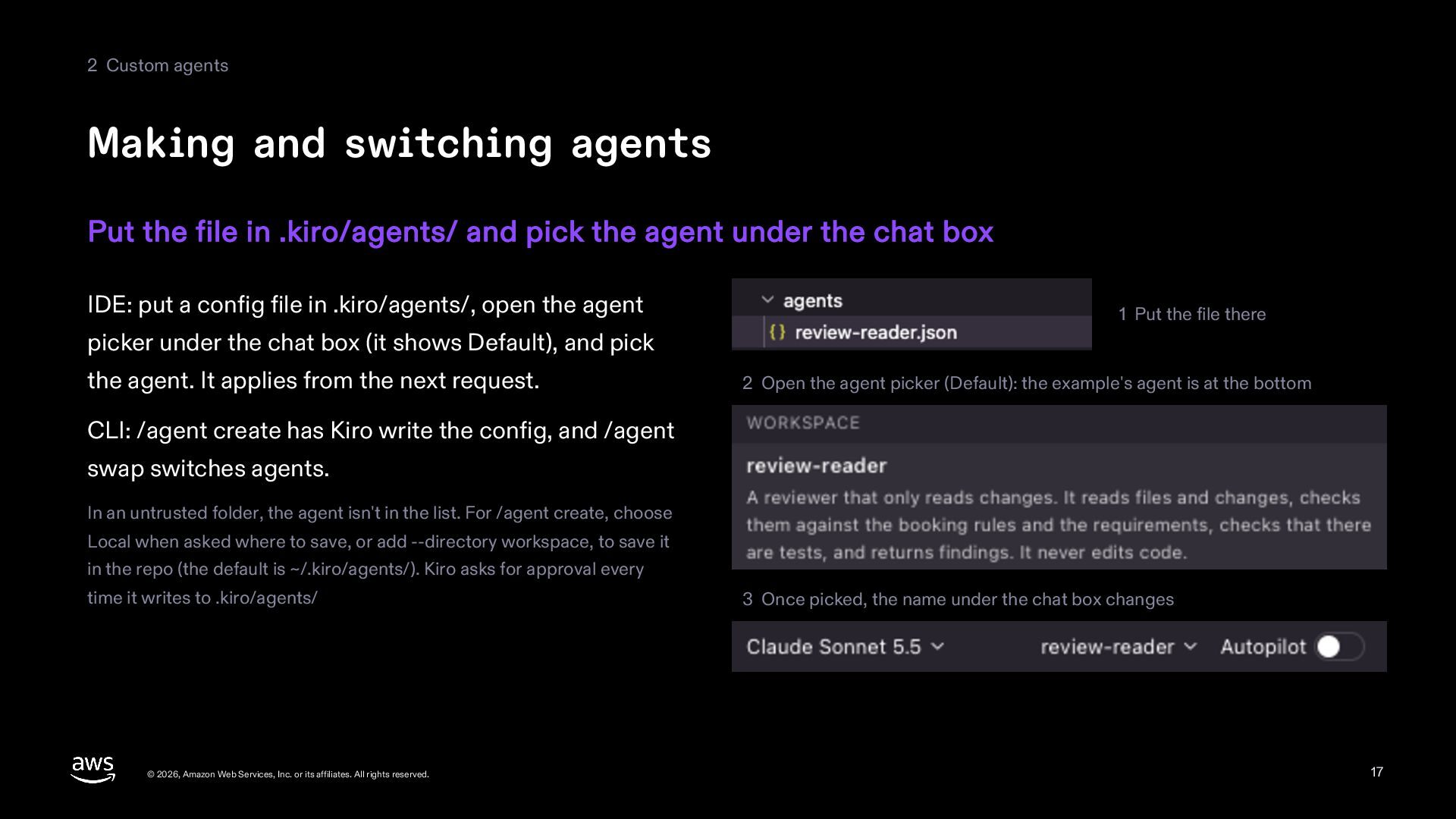
  17. 2 Custom agents Making and switching agents Put the file

    in .kiro/agents/ and pick the agent under the chat box IDE: put a config file in .kiro/agents/, open the agent 1 Put the file there picker under the chat box (it shows Default), and pick the agent. It applies from the next request. 2 Open the agent picker (Default): the example's agent is at the bottom CLI: /agent create has Kiro write the config, and /agent swap switches agents. In an untrusted folder, the agent isn't in the list. For /agent create, choose Local when asked where to save, or add --directory workspace, to save it in the repo (the default is ~/.kiro/agents/). Kiro asks for approval every time it writes to .kiro/agents/ © 2026, Amazon Web Services, Inc. or its affiliates. All rights reserved. 3 Once picked, the name under the chat box changes 17
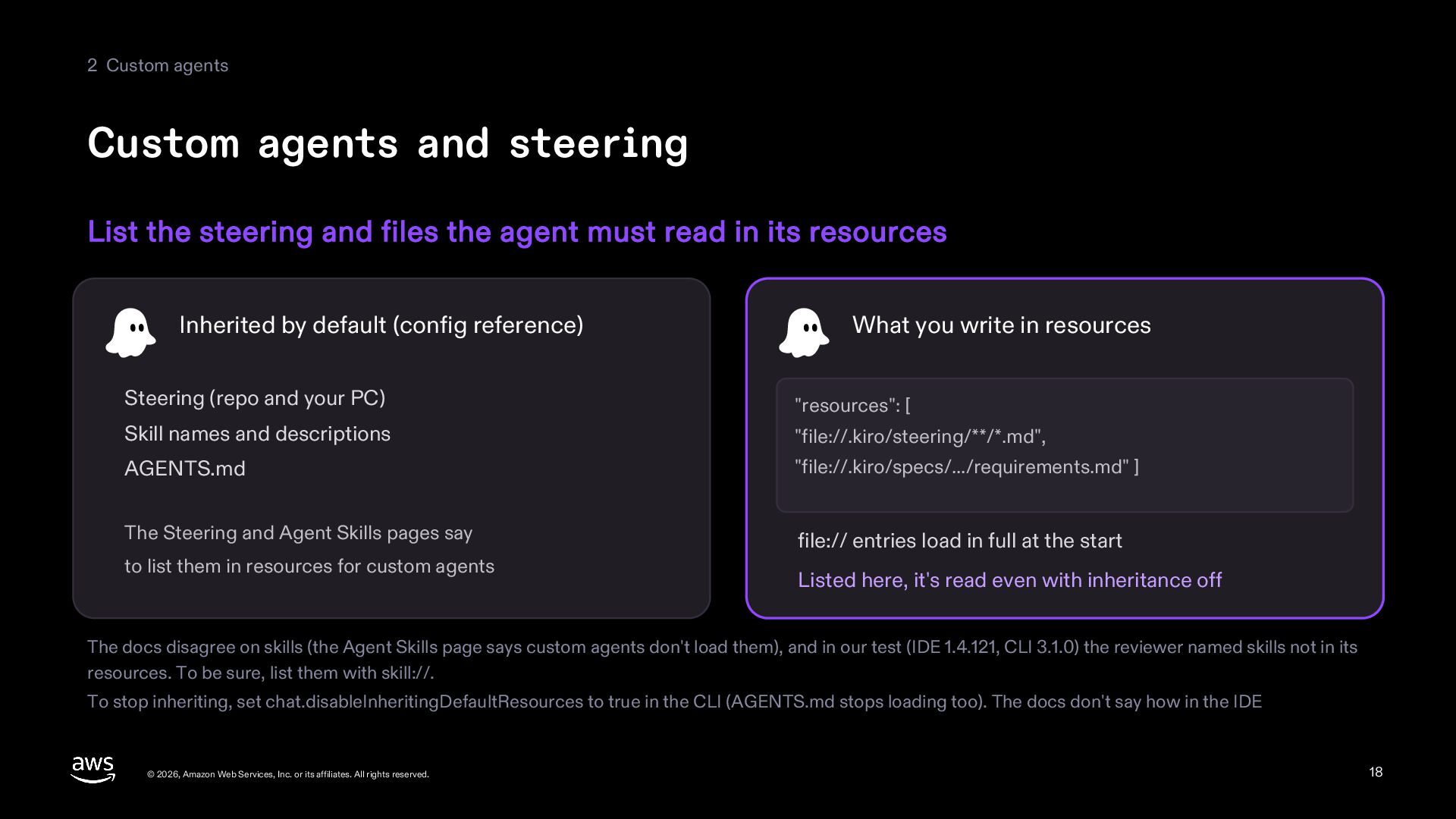
  18. 2 Custom agents Custom agents and steering List the steering

    and files the agent must read in its resources Inherited by default (config reference) What you write in resources Steering (repo and your PC) "resources": [ Skill names and descriptions "file://.kiro/steering/**/*.md", AGENTS.md "file://.kiro/specs/.../requirements.md" ] The Steering and Agent Skills pages say file:// entries load in full at the start to list them in resources for custom agents Listed here, it's read even with inheritance off The docs disagree on skills (the Agent Skills page says custom agents don't load them), and in our test (IDE 1.4.121, CLI 3.1.0) the reviewer named skills not in its resources. To be sure, list them with skill://. To stop inheriting, set chat.disableInheritingDefaultResources to true in the CLI (AGENTS.md stops loading too). The docs don't say how in the IDE © 2026, Amazon Web Services, Inc. or its affiliates. All rights reserved. 18
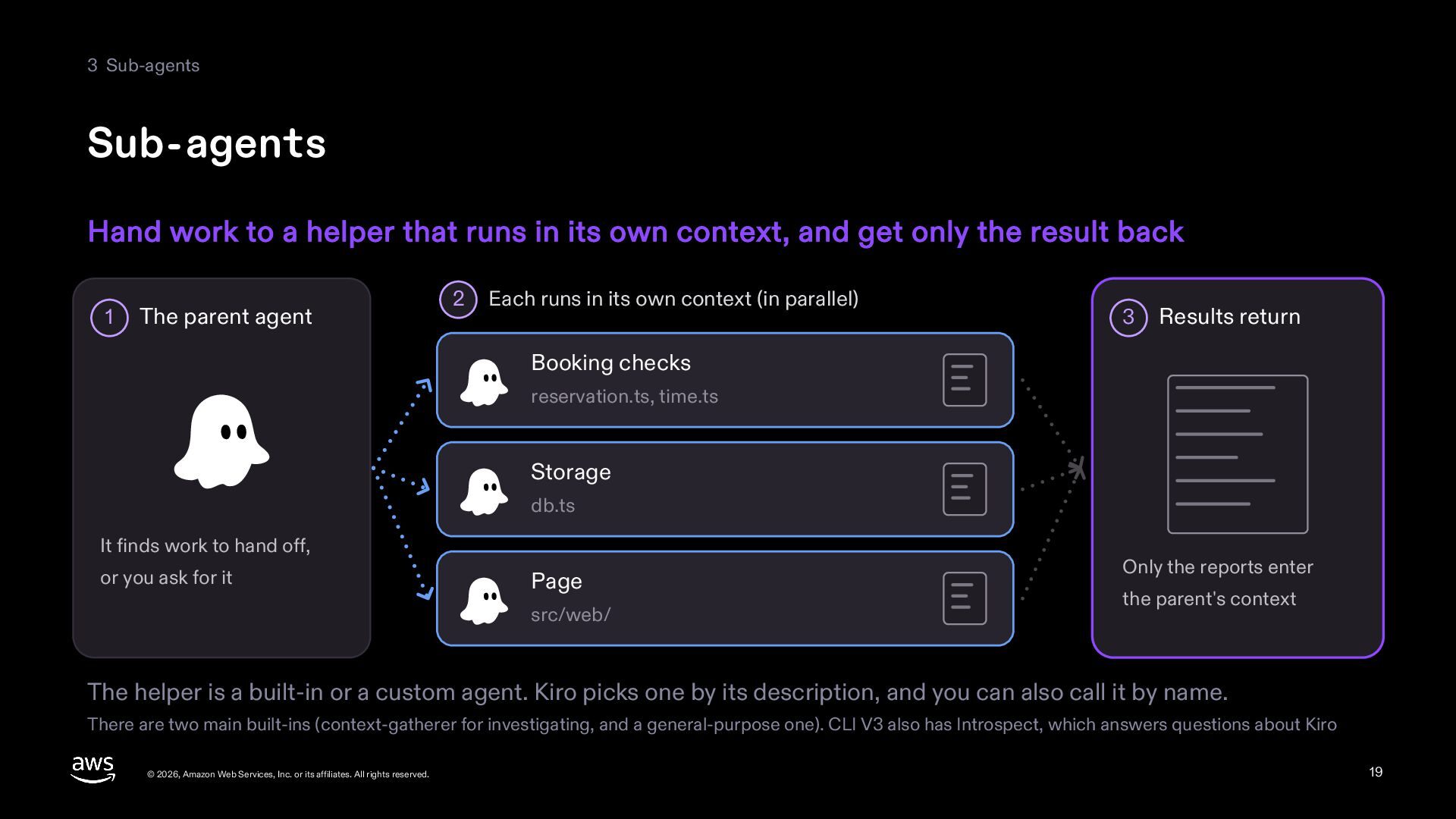
  19. 3 Sub-agents Sub-agents Hand work to a helper that runs

    in its own context, and get only the result back 1 The parent agent 2 Each runs in its own context (in parallel) 3 Results return Booking checks reservation.ts, time.ts Storage db.ts It finds work to hand off, or you ask for it Page src/web/ Only the reports enter the parent's context The helper is a built-in or a custom agent. Kiro picks one by its description, and you can also call it by name. There are two main built-ins (context-gatherer for investigating, and a general-purpose one). CLI V3 also has Introspect, which answers questions about Kiro © 2026, Amazon Web Services, Inc. or its affiliates. All rights reserved. 19
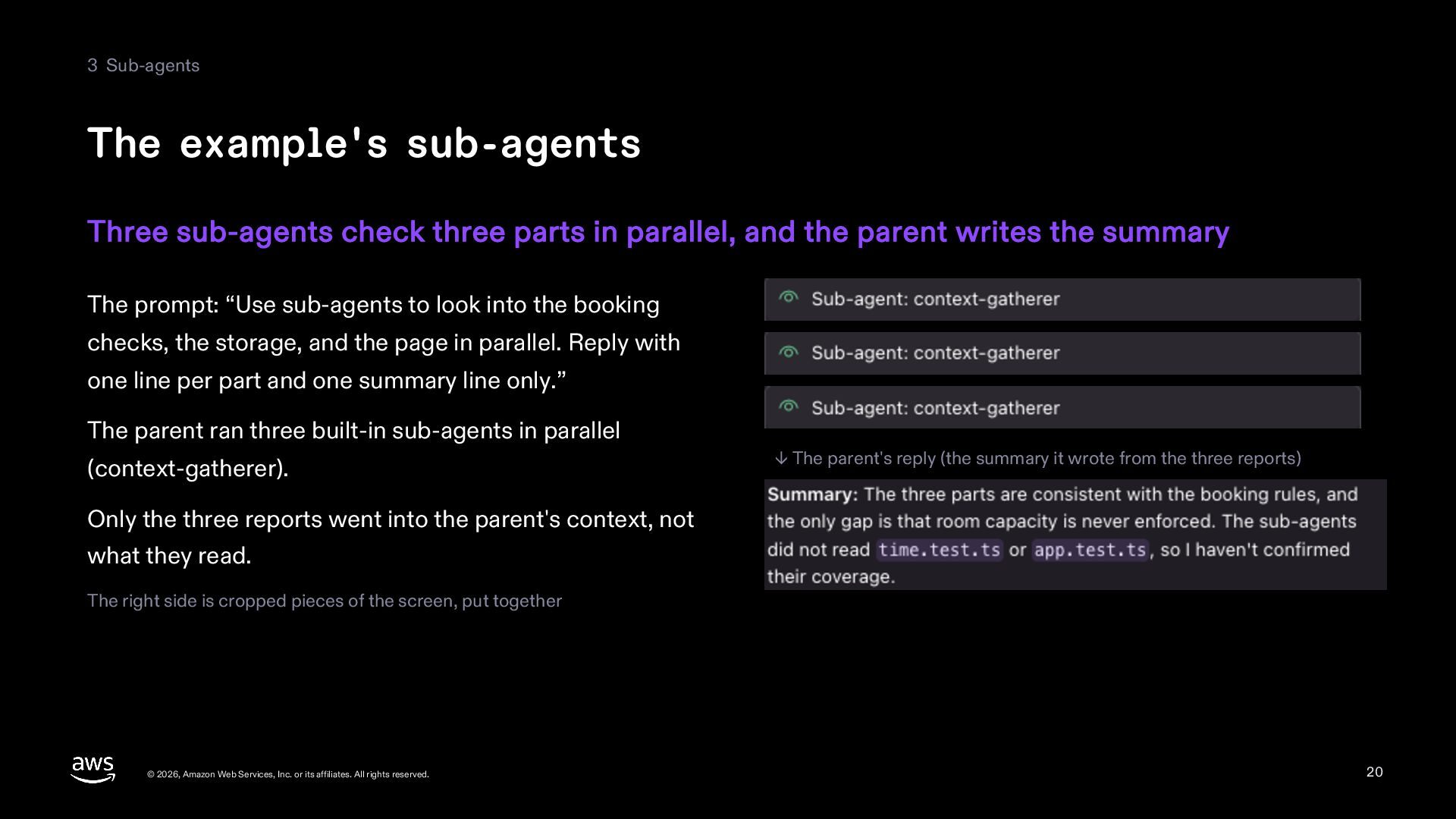
  20. 3 Sub-agents The example's sub-agents Three sub-agents check three parts

    in parallel, and the parent writes the summary The prompt: “Use sub-agents to look into the booking checks, the storage, and the page in parallel. Reply with one line per part and one summary line only.” The parent ran three built-in sub-agents in parallel (context-gatherer). ↓ The parent's reply (the summary it wrote from the three reports) Only the three reports went into the parent's context, not what they read. The right side is cropped pieces of the screen, put together © 2026, Amazon Web Services, Inc. or its affiliates. All rights reserved. 20
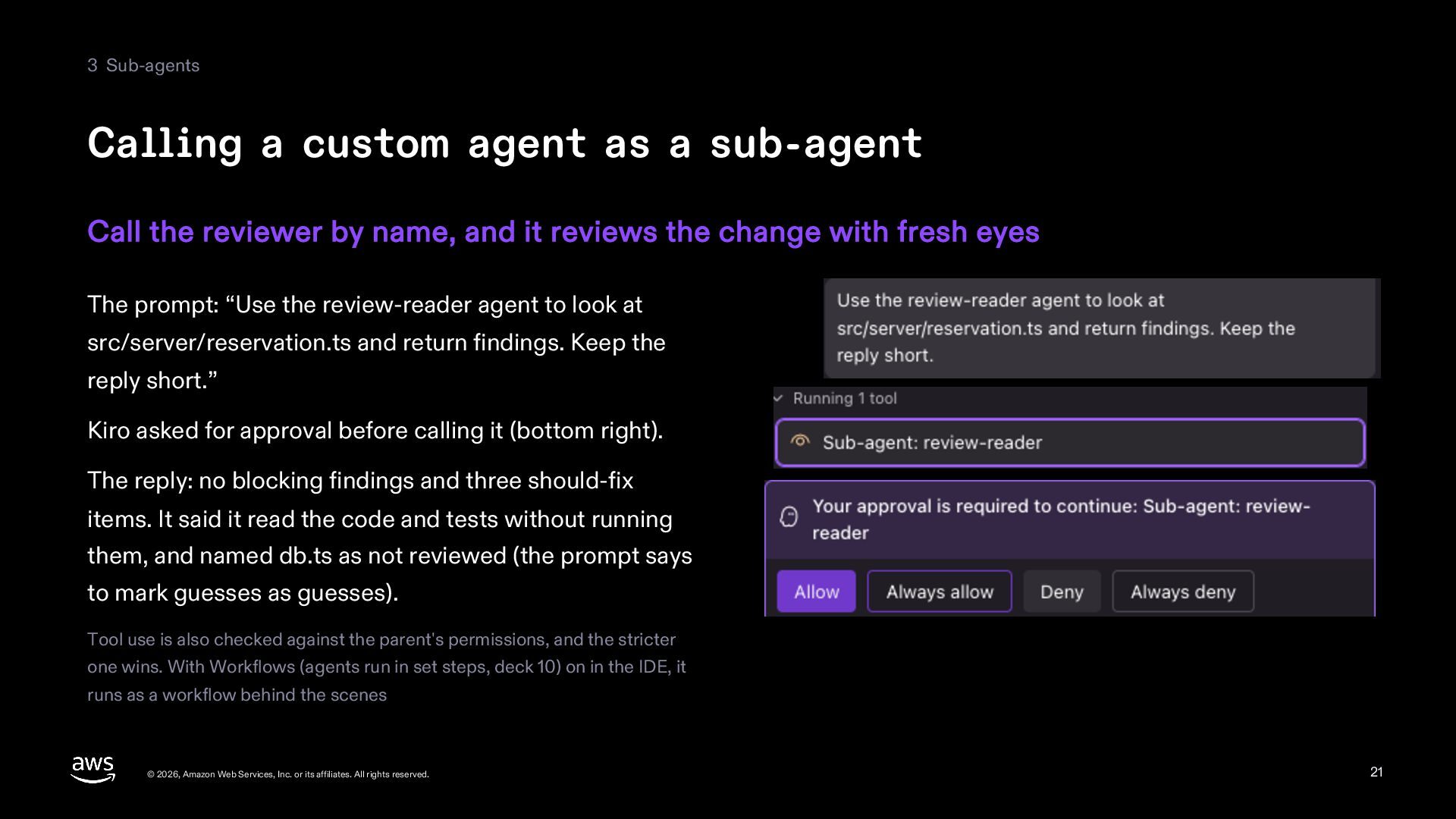
  21. 3 Sub-agents Calling a custom agent as a sub-agent Call

    the reviewer by name, and it reviews the change with fresh eyes The prompt: “Use the review-reader agent to look at src/server/reservation.ts and return findings. Keep the reply short.” Kiro asked for approval before calling it (bottom right). The reply: no blocking findings and three should-fix items. It said it read the code and tests without running them, and named db.ts as not reviewed (the prompt says to mark guesses as guesses). Tool use is also checked against the parent's permissions, and the stricter one wins. With Workflows (agents run in set steps, deck 10) on in the IDE, it runs as a workflow behind the scenes © 2026, Amazon Web Services, Inc. or its affiliates. All rights reserved. 21
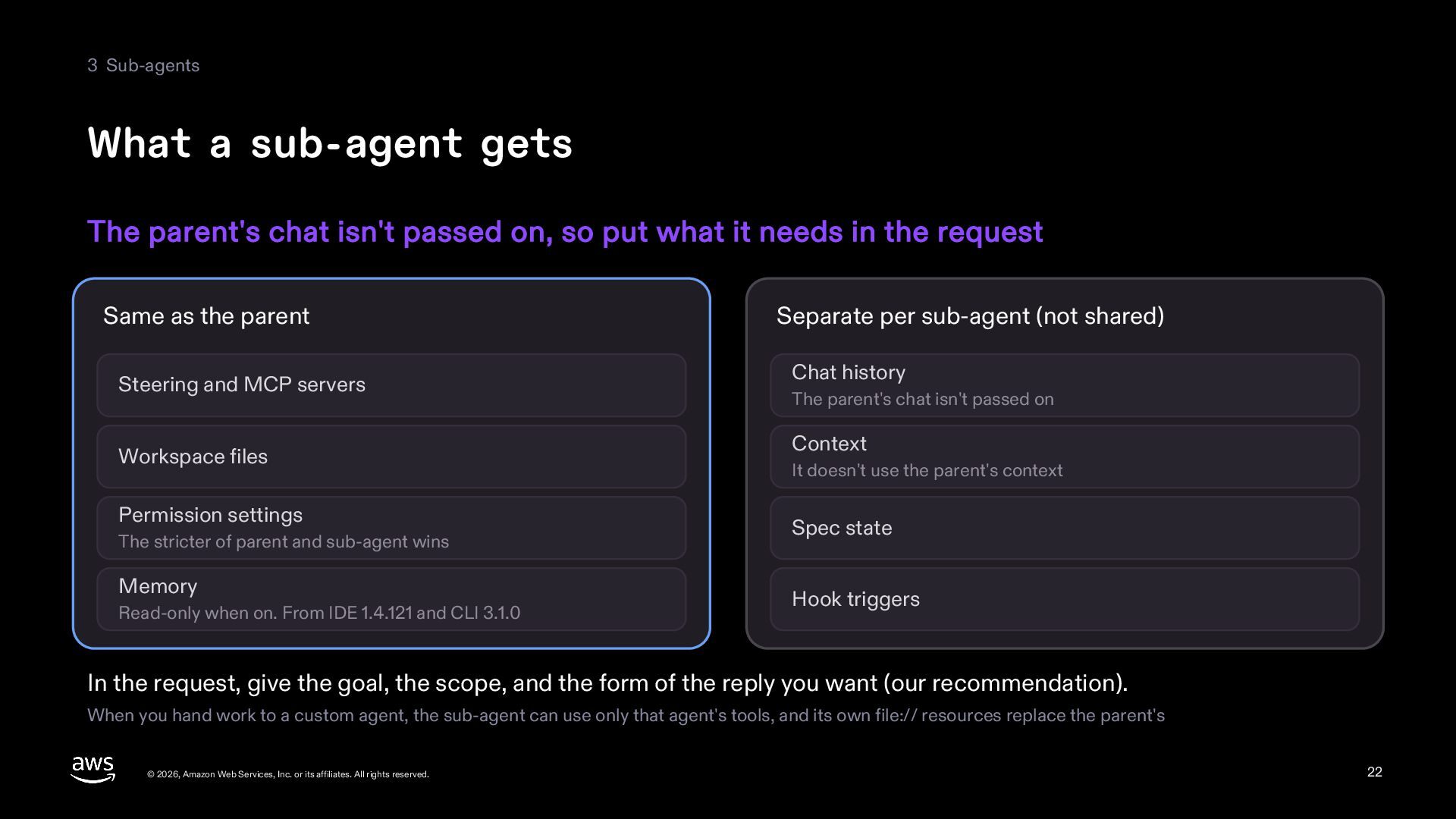
  22. 3 Sub-agents What a sub-agent gets The parent's chat isn't

    passed on, so put what it needs in the request Same as the parent Steering and MCP servers Workspace files Permission settings The stricter of parent and sub-agent wins Memory Read-only when on. From IDE 1.4.121 and CLI 3.1.0 Separate per sub-agent (not shared) Chat history The parent's chat isn't passed on Context It doesn't use the parent's context Spec state Hook triggers In the request, give the goal, the scope, and the form of the reply you want (our recommendation). When you hand work to a custom agent, the sub-agent can use only that agent's tools, and its own file:// resources replace the parent's © 2026, Amazon Web Services, Inc. or its affiliates. All rights reserved. 22
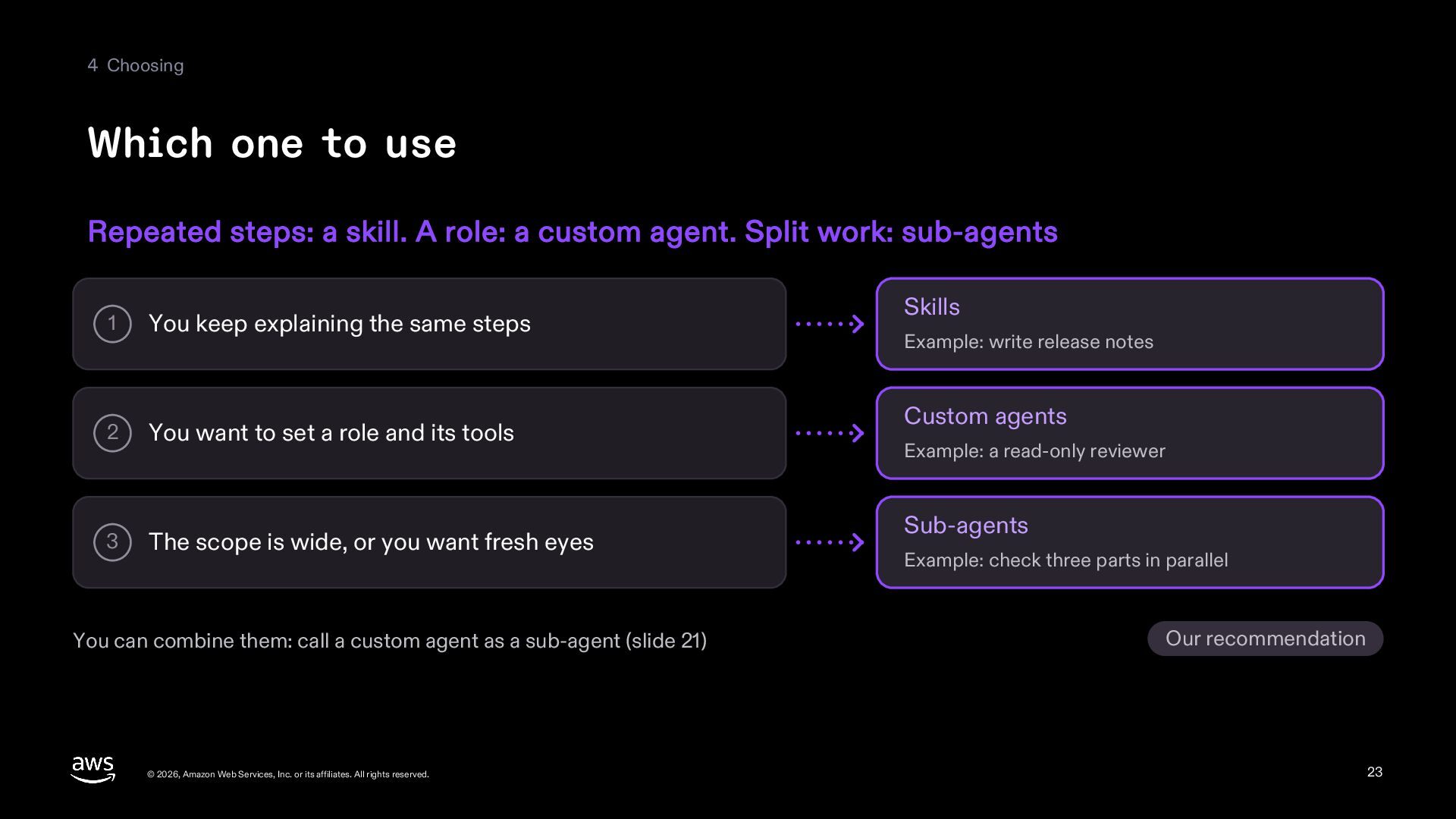
  23. 4 Choosing Which one to use Repeated steps: a skill.

    A role: a custom agent. Split work: sub-agents 1 You keep explaining the same steps 2 You want to set a role and its tools 3 The scope is wide, or you want fresh eyes You can combine them: call a custom agent as a sub-agent (slide 21) © 2026, Amazon Web Services, Inc. or its affiliates. All rights reserved. Skills Example: write release notes Custom agents Example: a read-only reviewer Sub-agents Example: check three parts in parallel Our recommendation 23
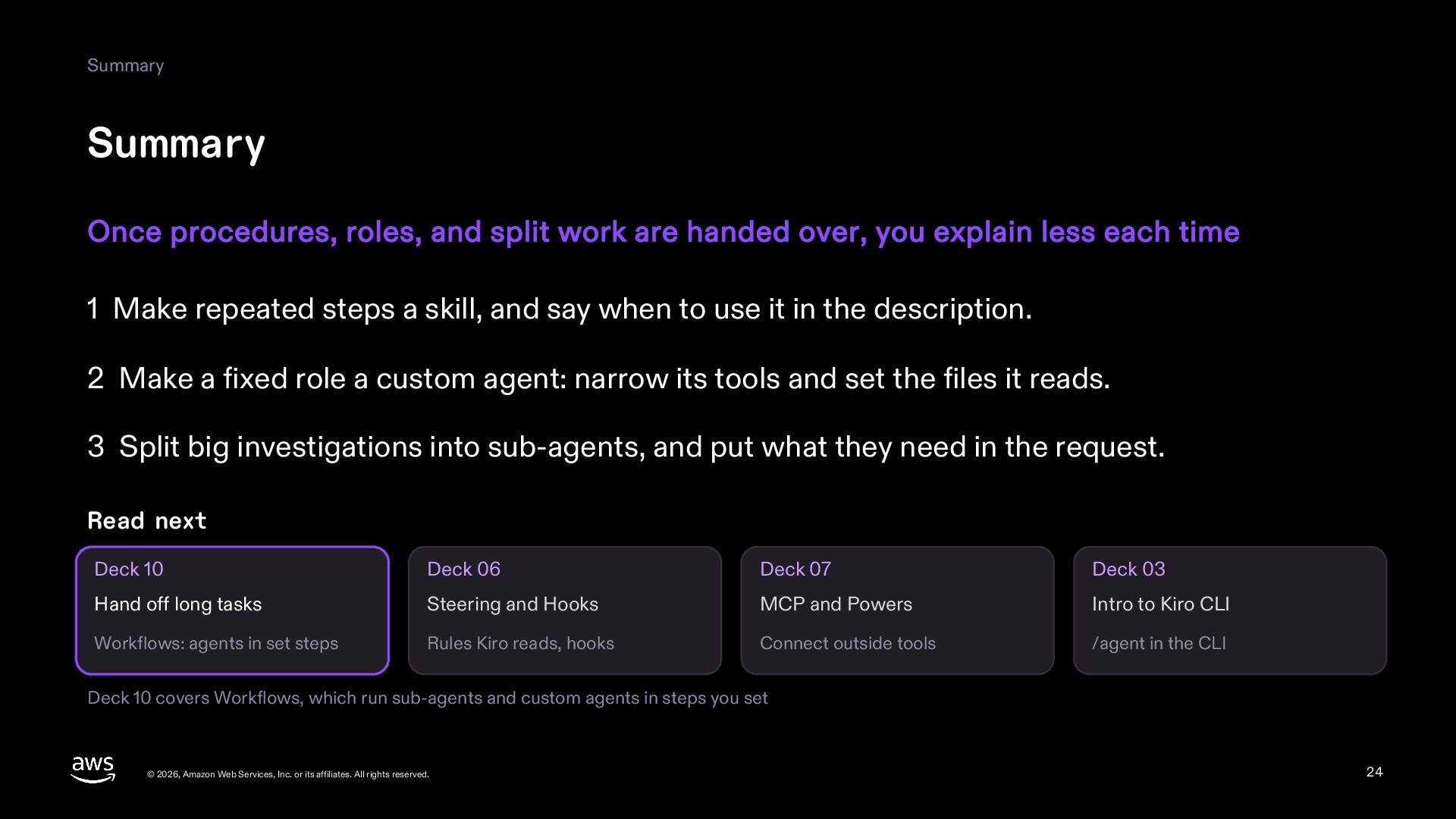
  24. Summary Summary Once procedures, roles, and split work are handed

    over, you explain less each time 1 Make repeated steps a skill, and say when to use it in the description. 2 Make a fixed role a custom agent: narrow its tools and set the files it reads. 3 Split big investigations into sub-agents, and put what they need in the request. Read next Deck 10 Deck 06 Deck 07 Deck 03 Hand off long tasks Steering and Hooks MCP and Powers Intro to Kiro CLI Workflows: agents in set steps Rules Kiro reads, hooks Connect outside tools /agent in the CLI Deck 10 covers Workflows, which run sub-agents and custom agents in steps you set © 2026, Amazon Web Services, Inc. or its affiliates. All rights reserved. 24
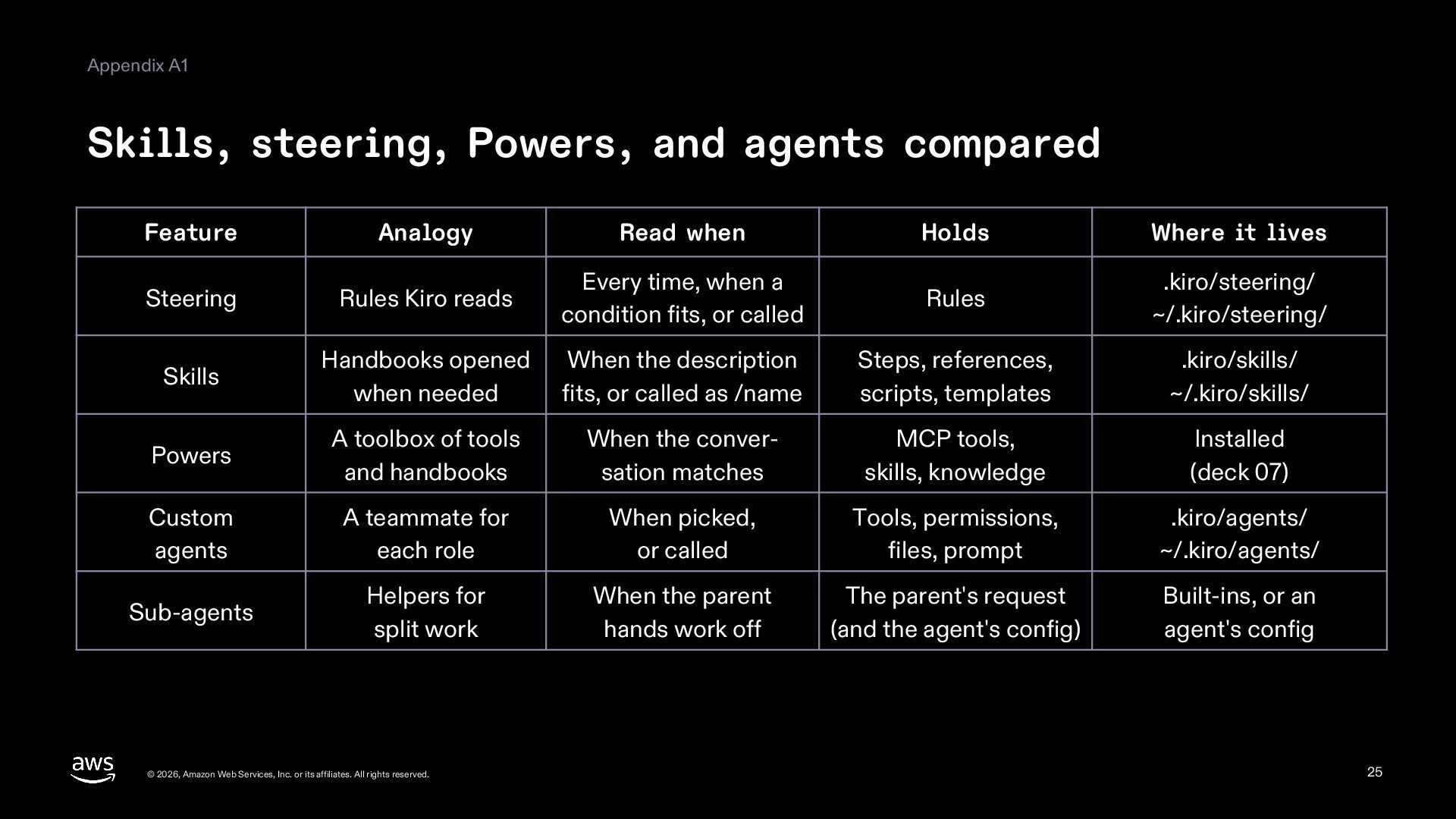
  25. Appendix A1 Skills, steering, Powers, and agents compared Feature Analogy

    Read when Holds Where it lives Steering Rules Kiro reads Every time, when a condition fits, or called Rules .kiro/steering/ ~/.kiro/steering/ Skills Handbooks opened when needed When the description fits, or called as /name Steps, references, scripts, templates .kiro/skills/ ~/.kiro/skills/ Powers A toolbox of tools and handbooks When the conversation matches MCP tools, skills, knowledge Installed (deck 07) Custom agents A teammate for each role When picked, or called Tools, permissions, files, prompt .kiro/agents/ ~/.kiro/agents/ Sub-agents Helpers for split work When the parent hands work off The parent's request (and the agent's config) Built-ins, or an agent's config © 2026, Amazon Web Services, Inc. or its affiliates. All rights reserved. 25
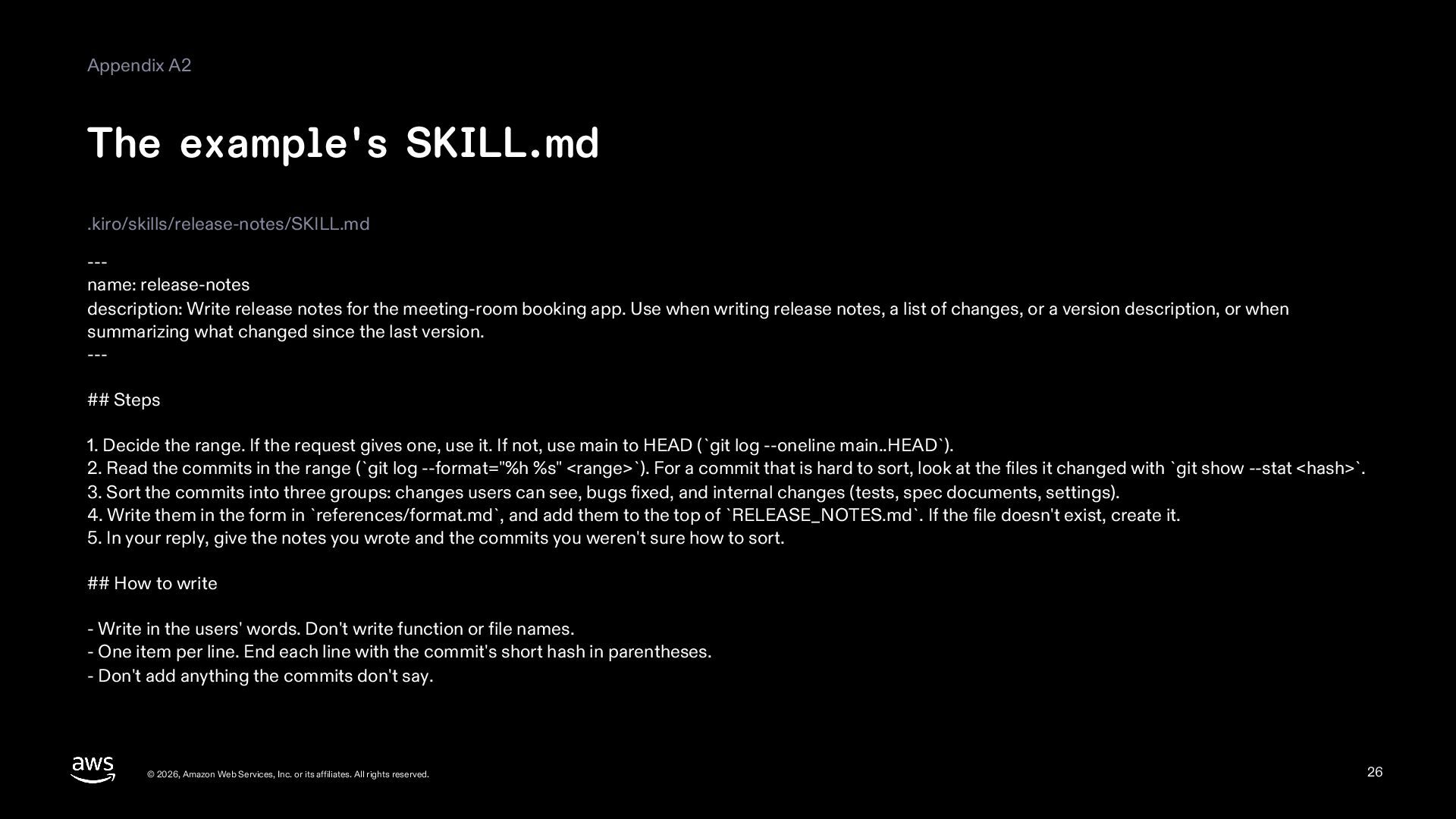
  26. Appendix A2 The example's SKILL.md .kiro/skills/release-notes/SKILL.md --name: release-notes description: Write

    release notes for the meeting-room booking app. Use when writing release notes, a list of changes, or a version description, or when summarizing what changed since the last version. --## Steps 1. Decide the range. If the request gives one, use it. If not, use main to HEAD (`git log --oneline main..HEAD`). 2. Read the commits in the range (`git log --format="%h %s" <range>`). For a commit that is hard to sort, look at the files it changed with `git show --stat <hash>`. 3. Sort the commits into three groups: changes users can see, bugs fixed, and internal changes (tests, spec documents, settings). 4. Write them in the form in `references/format.md`, and add them to the top of `RELEASE_NOTES.md`. If the file doesn't exist, create it. 5. In your reply, give the notes you wrote and the commits you weren't sure how to sort. ## How to write - Write in the users' words. Don't write function or file names. - One item per line. End each line with the commit's short hash in parentheses. - Don't add anything the commits don't say. © 2026, Amazon Web Services, Inc. or its affiliates. All rights reserved. 26
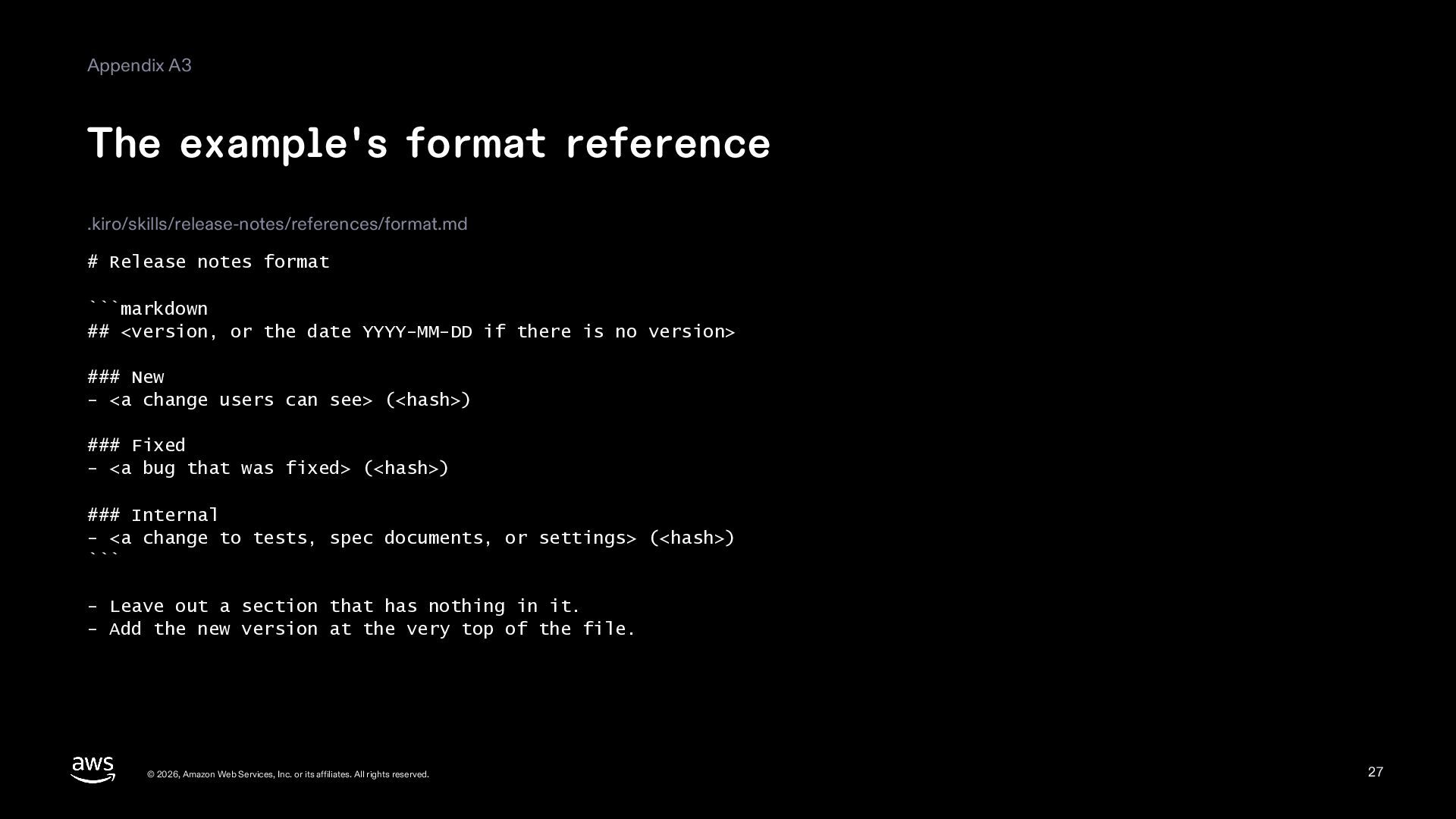
  27. Appendix A3 The example's format reference .kiro/skills/release-notes/references/format.md # Release notes

    format ```markdown ## <version, or the date YYYY-MM-DD if there is no version> ### New - <a change users can see> (<hash>) ### Fixed - <a bug that was fixed> (<hash>) ### Internal - <a change to tests, spec documents, or settings> (<hash>) ``` - Leave out a section that has nothing in it. - Add the new version at the very top of the file. © 2026, Amazon Web Services, Inc. or its affiliates. All rights reserved. 27
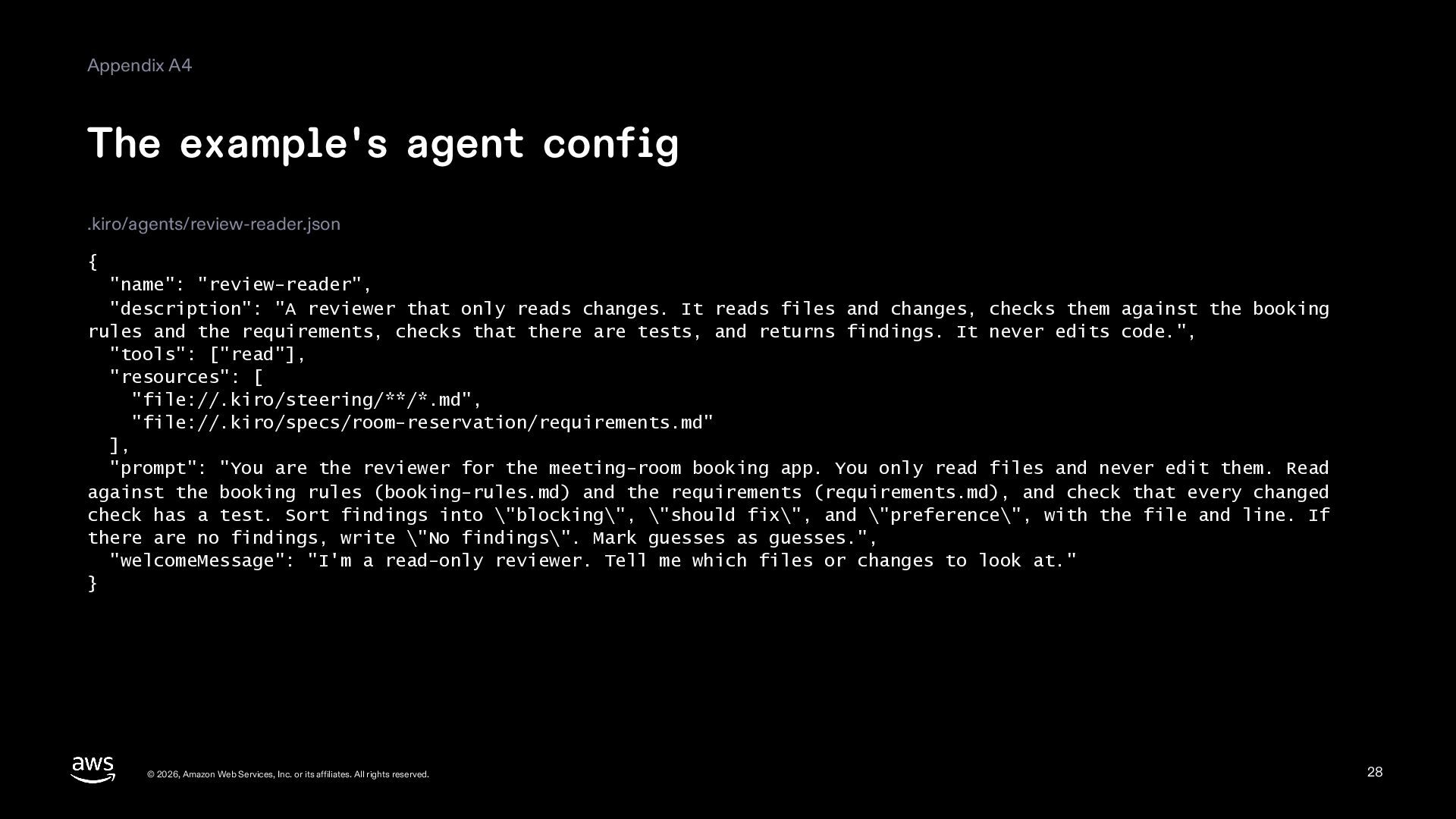
  28. Appendix A4 The example's agent config .kiro/agents/review-reader.json { "name": "review-reader",

    "description": "A reviewer that only reads changes. It reads files and changes, checks them against the booking rules and the requirements, checks that there are tests, and returns findings. It never edits code.", "tools": ["read"], "resources": [ "file://.kiro/steering/**/*.md", "file://.kiro/specs/room-reservation/requirements.md" ], "prompt": "You are the reviewer for the meeting-room booking app. You only read files and never edit them. Read against the booking rules (booking-rules.md) and the requirements (requirements.md), and check that every changed check has a test. Sort findings into \"blocking\", \"should fix\", and \"preference\", with the file and line. If there are no findings, write \"No findings\". Mark guesses as guesses.", "welcomeMessage": "I'm a read-only reviewer. Tell me which files or changes to look at." } © 2026, Amazon Web Services, Inc. or its affiliates. All rights reserved. 28
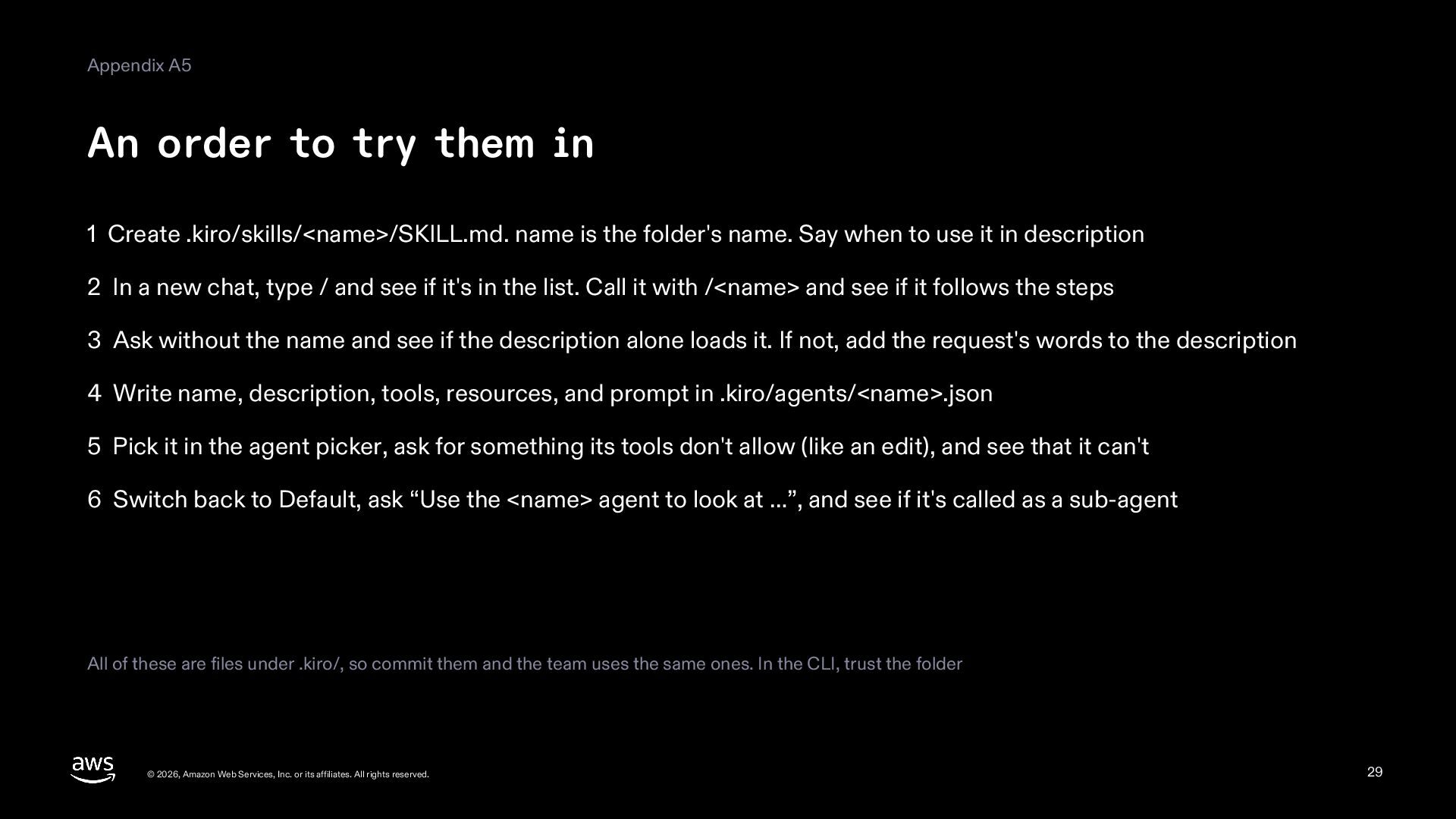
  29. Appendix A5 An order to try them in 1 Create

    .kiro/skills/<name>/SKILL.md. name is the folder's name. Say when to use it in description 2 In a new chat, type / and see if it's in the list. Call it with /<name> and see if it follows the steps 3 Ask without the name and see if the description alone loads it. If not, add the request's words to the description 4 Write name, description, tools, resources, and prompt in .kiro/agents/<name>.json 5 Pick it in the agent picker, ask for something its tools don't allow (like an edit), and see that it can't 6 Switch back to Default, ask “Use the <name> agent to look at …”, and see if it's called as a sub-agent All of these are files under .kiro/, so commit them and the team uses the same ones. In the CLI, trust the folder © 2026, Amazon Web Services, Inc. or its affiliates. All rights reserved. 29
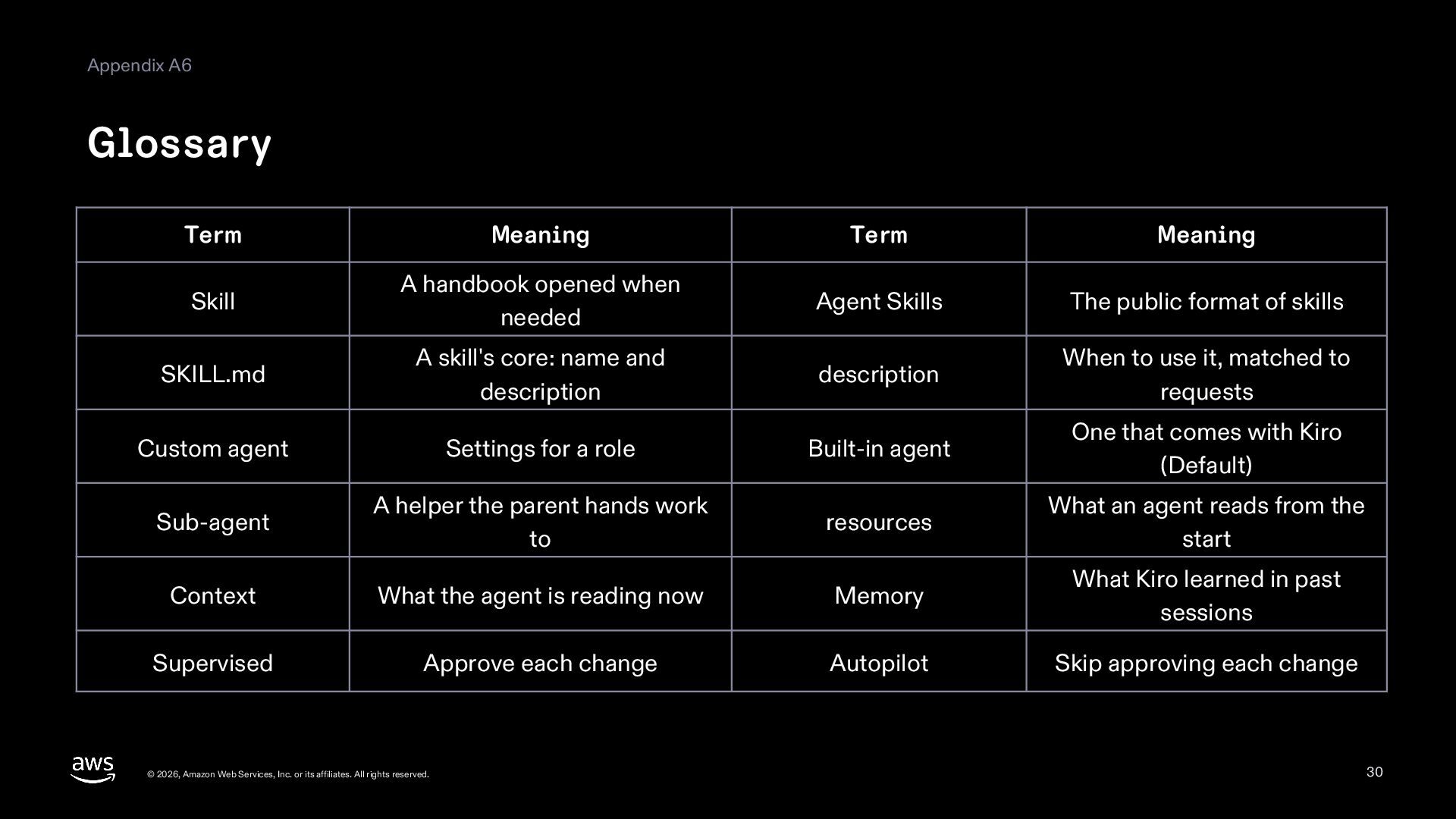
  30. Appendix A6 Glossary Term Meaning Term Meaning Skill A handbook

    opened when needed Agent Skills The public format of skills SKILL.md A skill's core: name and description description When to use it, matched to requests Custom agent Settings for a role Built-in agent One that comes with Kiro (Default) Sub-agent A helper the parent hands work to resources What an agent reads from the start Context What the agent is reading now Memory What Kiro learned in past sessions Supervised Approve each change Autopilot Skip approving each change © 2026, Amazon Web Services, Inc. or its affiliates. All rights reserved. 30
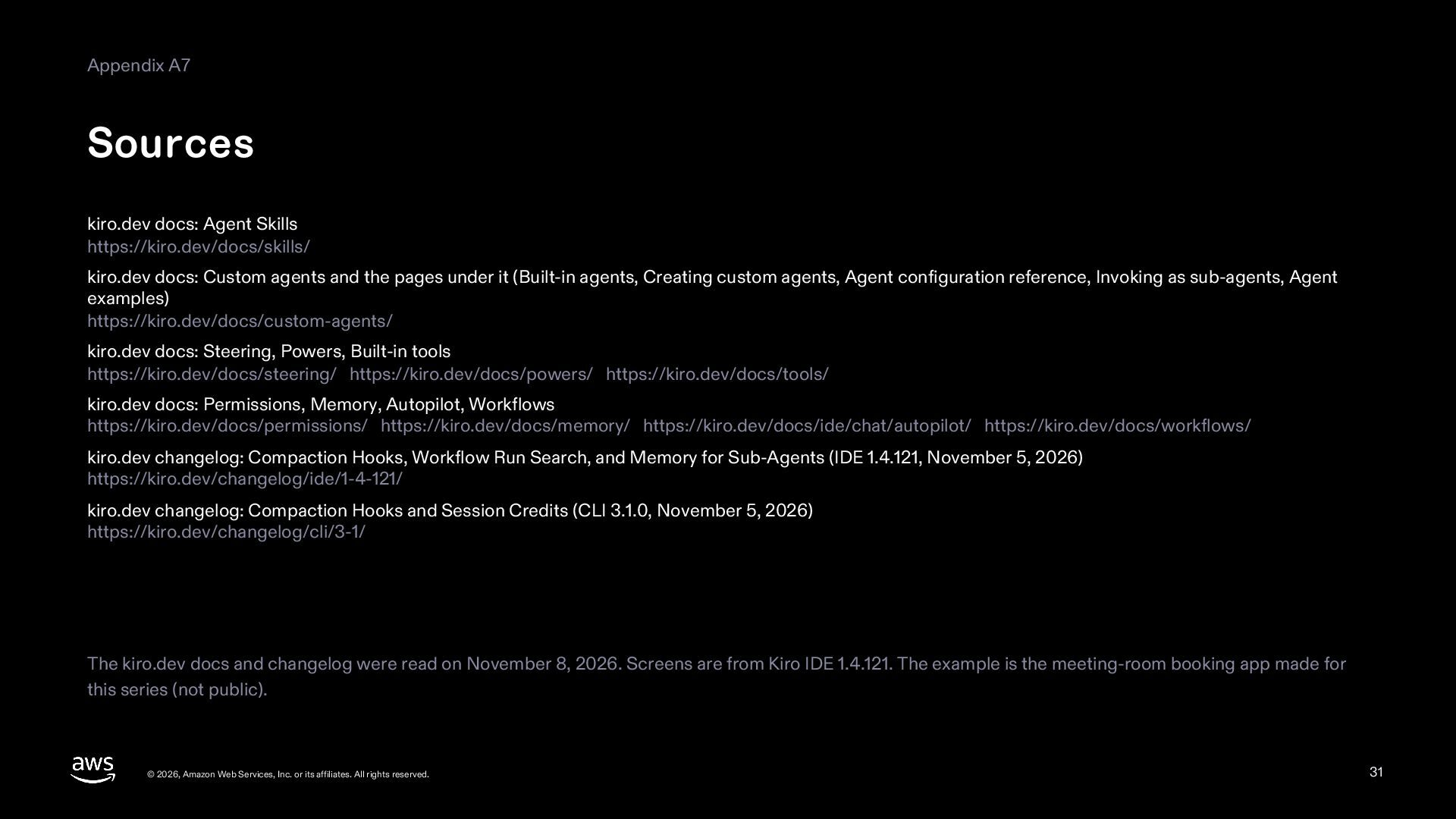
  31. Appendix A7 Sources kiro.dev docs: Agent Skills https://kiro.dev/docs/skills/ kiro.dev docs:

    Custom agents and the pages under it (Built-in agents, Creating custom agents, Agent configuration reference, Invoking as sub-agents, Agent examples) https://kiro.dev/docs/custom-agents/ kiro.dev docs: Steering, Powers, Built-in tools https://kiro.dev/docs/steering/ https://kiro.dev/docs/powers/ https://kiro.dev/docs/tools/ kiro.dev docs: Permissions, Memory, Autopilot, Workflows https://kiro.dev/docs/permissions/ https://kiro.dev/docs/memory/ https://kiro.dev/docs/ide/chat/autopilot/ https://kiro.dev/docs/workflows/ kiro.dev changelog: Compaction Hooks, Workflow Run Search, and Memory for Sub-Agents (IDE 1.4.121, November 5, 2026) https://kiro.dev/changelog/ide/1-4-121/ kiro.dev changelog: Compaction Hooks and Session Credits (CLI 3.1.0, November 5, 2026) https://kiro.dev/changelog/cli/3-1/ The kiro.dev docs and changelog were read on November 8, 2026. Screens are from Kiro IDE 1.4.121. The example is the meeting-room booking app made for this series (not public). © 2026, Amazon Web Services, Inc. or its affiliates. All rights reserved. 31