Upgrade to Pro
— share decks privately, control downloads, hide ads and more …
Speaker Deck
Sign up for free
Menu
Search
Features
All features
Private URLs
Password Protection
Custom URLS
Scheduled publishing
Remove Branding
Restrict embedding
Deck Collections
Notes
Features
All features
Private URLs
Password Protection
Custom URLS
Scheduled publishing
Remove Branding
Restrict embedding
Deck Collections
Notes
Explore
Featured decks
Featured speakers
Programming
Technology
Storyboards
Explore
Featured decks
Featured speakers
Programming
Technology
Storyboards
Pricing
Search
Sign in
Sign up for free
Tasking Maneger
Search
Xiangjiao
July 04, 2017
Education
52
0
Share
Embed
Copy iframe code
Copy JS code
Copy link
Start on current slide
Tasking Maneger
授業でやりました。
Xiangjiao
July 04, 2017
More Decks by Xiangjiao
See All by Xiangjiao
google earth 課題
karintani
0
58
Other Decks in Education
See All in Education
[2026後期火5] 論理学(京都大学文学部 後期 第2回)「量化子の導入」
yatabe
0
180
Sekolah Sabat - Triwulan 3 2026 - Pelajaran 13
hiola
0
11k
General Introduction, Composition, Chemistry & Chemical Classes, Biosources, Therapeutic uses and Commercial Application of Secondary Metabolites.
drpoonamkc
0
170
2026年度秋学期 統計学 第2回 統計資料の収集と読み方 (2026. 10. 6)
akiraasano
PRO
0
270
The Dirty Dozen: 12 gala mistakes you don’t know you’re making
auctria
PRO
0
140
セキュリティ担当がいない中小医療機関を院外のRISSはどう支えるべきか / How External RISS Can Help Small Medical Institutions
eller86
1
230
未踏峰連山 Frontiers: Creating and Conquering Untrodden Peaks
ishii_mit
1
170
子どものためのプログラミング道場『CoderDojo』〜法人提携例〜 / Partnership with CoderDojo Japan
coderdojojapan
PRO
4
19k
Antigravityを使ってGeminiAPI(NanobananaPro)と連携して挿絵メーカーを作った
yoshimura_datam
0
260
Sekolah Sabat - Triwulan 4 2026 - Pelajaran 1
hiola
0
13k
2026年度秋学期 統計学 第1回 イントロダクション ー 統計的なものの見方・考え方について (2026. 9. 29)
akiraasano
PRO
0
260
AIがコードを書く時代に、何を教えるのか / What Should We Teach in the Age of AI-Generated Code?
ichiroc
1
610
Featured
See All Featured
How to train your dragon (web standard)
notwaldorf
96
6.9k
How to audit for AI Accessibility on your Front & Back End
davetheseo
0
600
Practical Orchestrator
shlominoach
192
12k
RailsConf & Balkan Ruby 2019: The Past, Present, and Future of Rails at GitHub
eileencodes
141
35k
BBQ
matthewcrist
90
10k
We Have a Design System, Now What?
morganepeng
55
8.4k
Making Projects Easy
brettharned
120
6.8k
How to build an LLM SEO readiness audit: a practical framework
nmsamuel
2
950
Writing Fast Ruby
sferik
630
63k
Leveraging LLMs for student feedback in introductory data science courses - posit::conf(2025)
minecr
1
440
Stop Working from a Prison Cell
hatefulcrawdad
274
21k
How to Think Like a Performance Engineer
csswizardry
28
2.9k
Transcript
Tasking Mangerを使った マッピング⽅方法
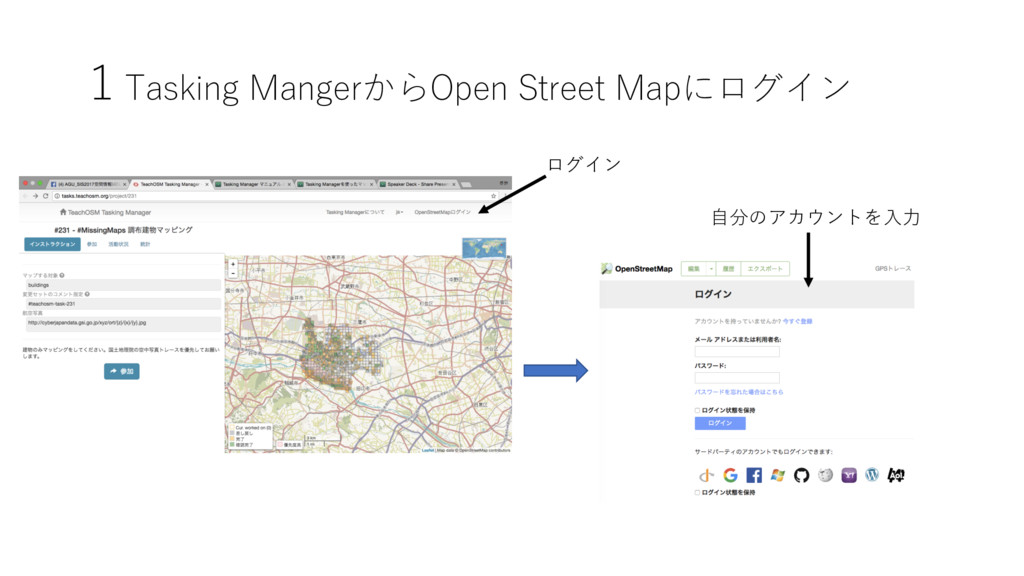
1Tasking MangerからOpen Street Mapにログイン ログイン ⾃自分のアカウントを⼊入⼒力
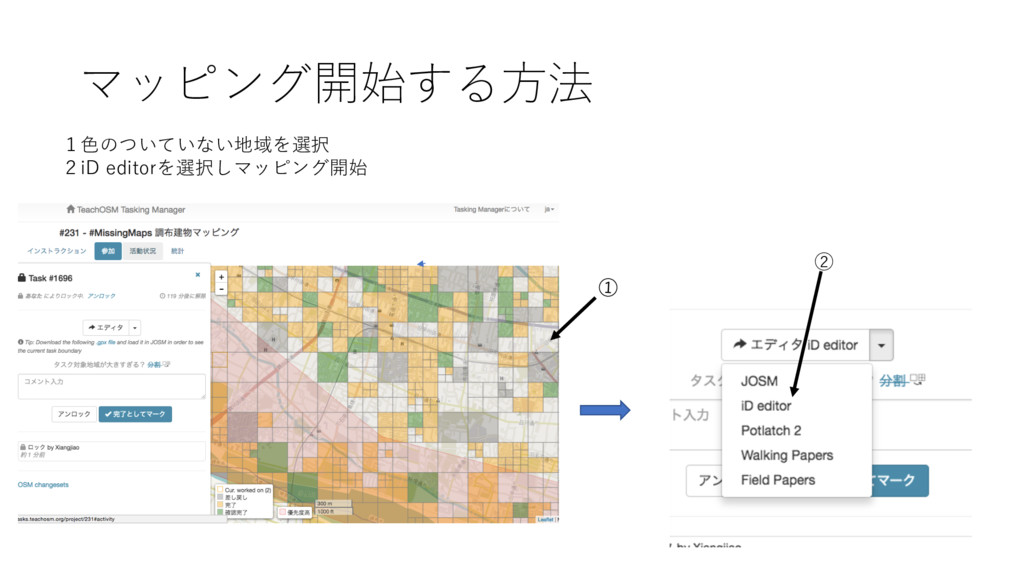
マッピング開始する⽅方法 1⾊色のついていない地域を選択 2iD editorを選択しマッピング開始 ②
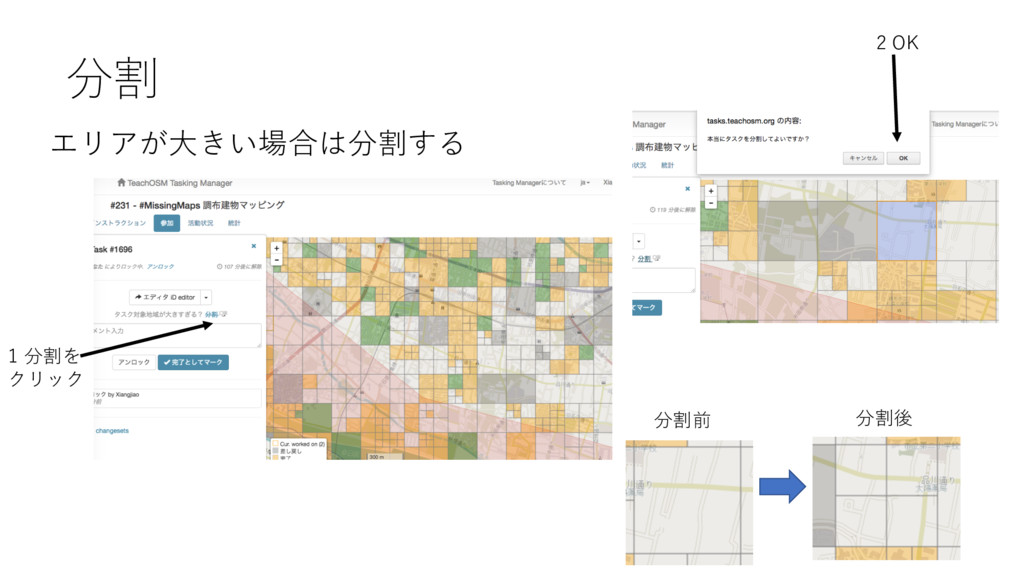
分割 エリアが⼤大きい場合は分割する 1 分割を クリック 2 OK 分割前 分割後
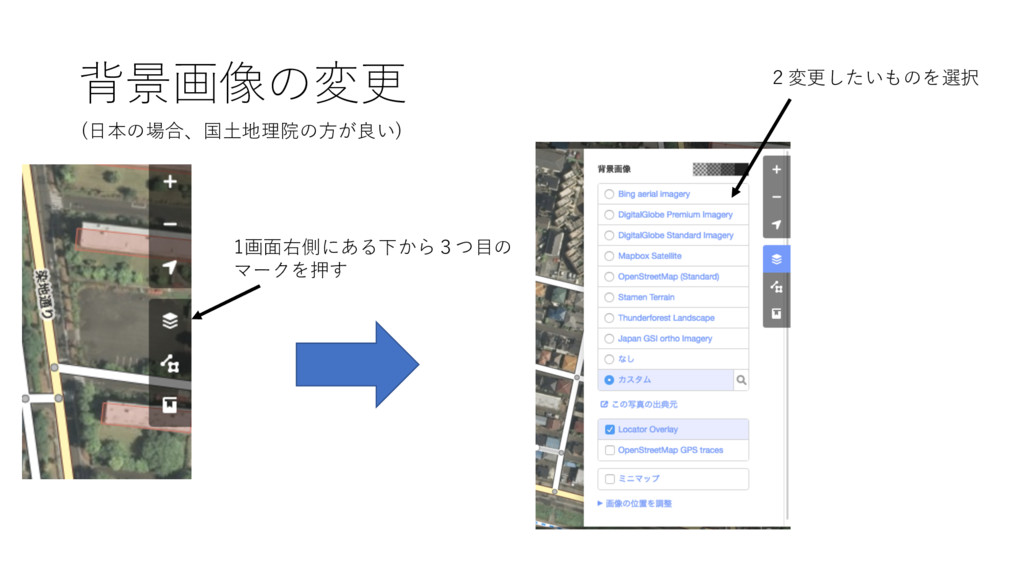
背景画像の変更 1画⾯面右側にある下から3つ⽬目の マークを押す 2変更したいものを選択 (⽇日本の場合、国⼟土地理院の⽅方が良い)
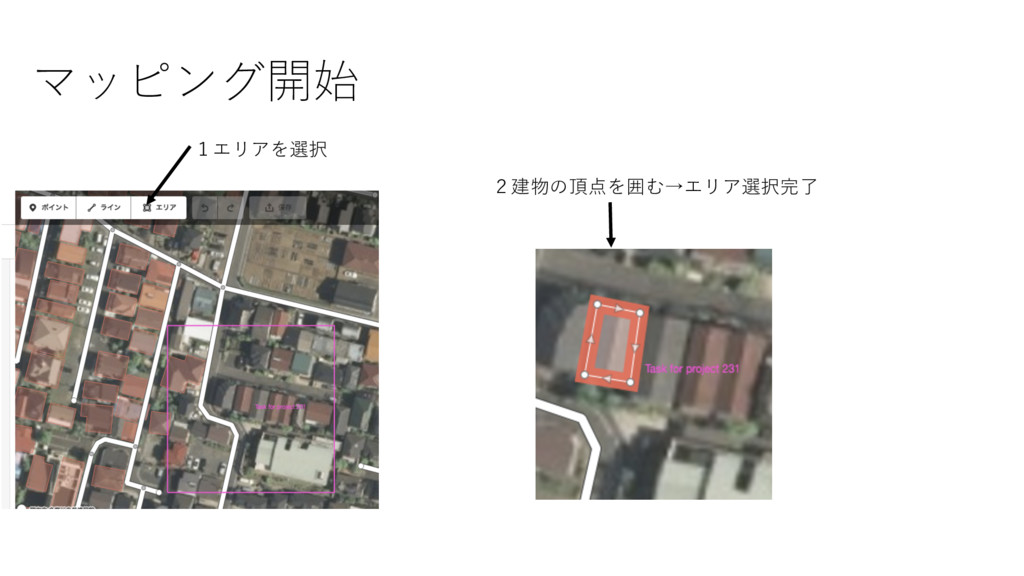
マッピング開始 1エリアを選択 2建物の頂点を囲む→エリア選択完了
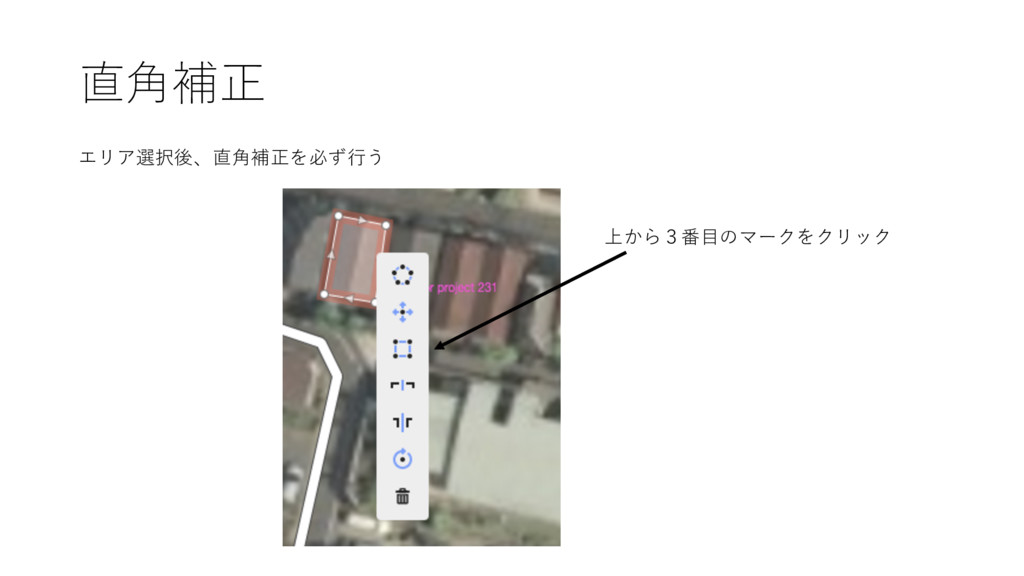
直⾓角補正 エリア選択後、直⾓角補正を必ず⾏行う 上から3番⽬目のマークをクリック
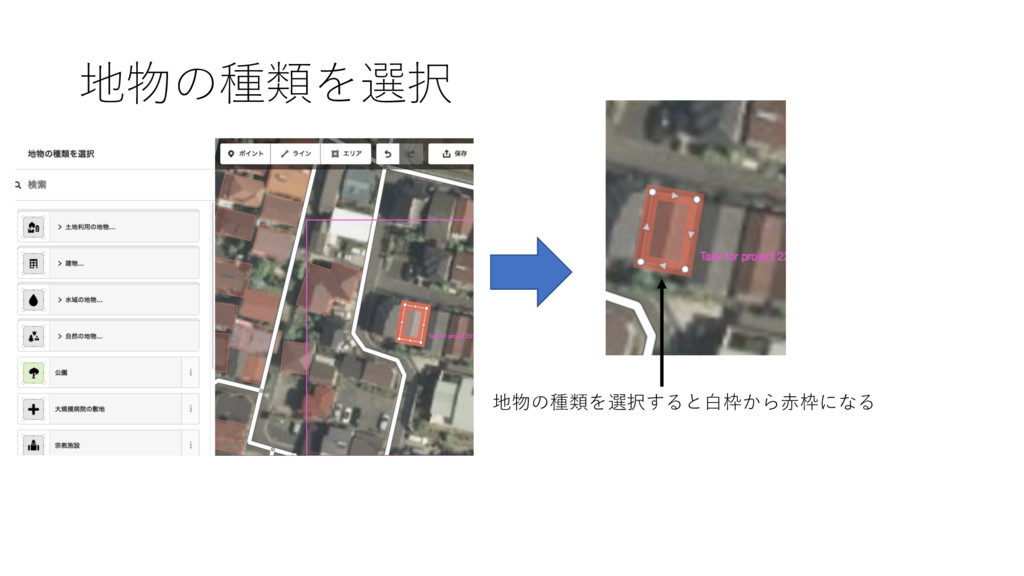
地物の種類を選択 地物の種類を選択すると⽩白枠から⾚赤枠になる
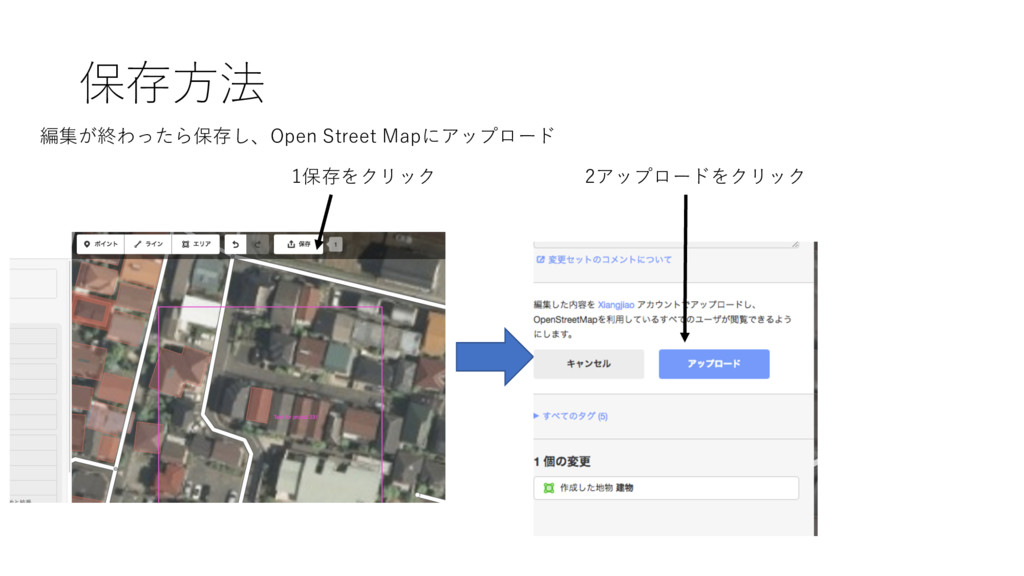
保存⽅方法 編集が終わったら保存し、Open Street Mapにアップロード 2アップロードをクリック 1保存をクリック
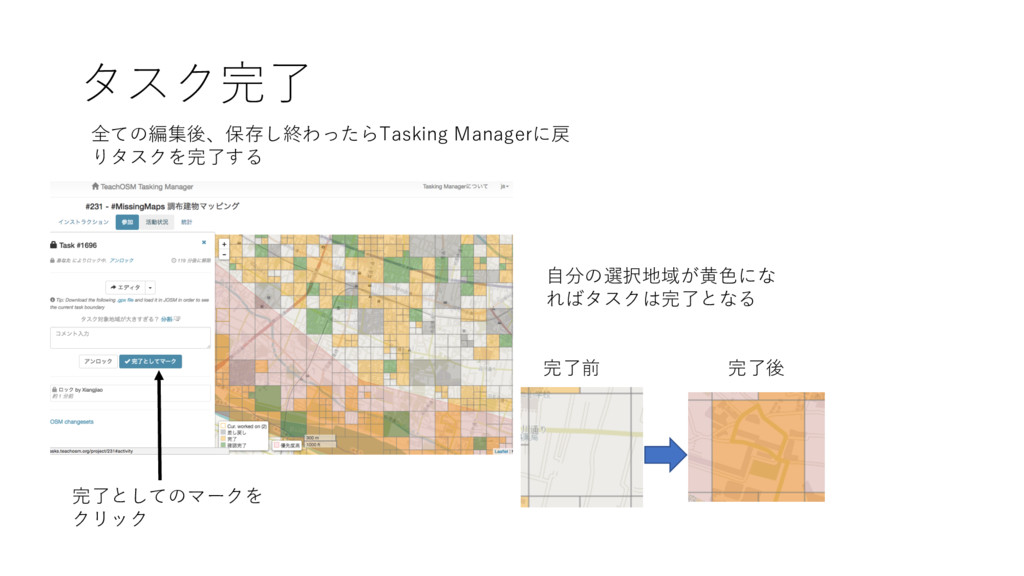
タスク完了 全ての編集後、保存し終わったらTasking Managerに戻 りタスクを完了する 完了としてのマークを クリック ⾃自分の選択地域が⻩黄⾊色にな ればタスクは完了となる 完了前 完了後


 karintani
 yatabe
 hiola
hiola
 drpoonamkc
 akiraasano
 auctria
 eller86
 ishii_mit
 coderdojojapan
 yoshimura_datam
 ichiroc
 notwaldorf
 davetheseo
 shlominoach
 eileencodes
 matthewcrist
 morganepeng
 brettharned
 nmsamuel
 sferik
 minecr
 hatefulcrawdad
 csswizardry